Managing
Devices in a
BYOD world
60%of P–12 parents want students’
mobile devices used in class****
41%of principals would allow students’
mobile devices****
(up from 22% in 2010 – 86% increase)
74%of Higher Ed CIOs say mobility and
BYOD has increased as strategy priority over
previous year****
89%use laptops**
(from 91% in 2013 )
Mobility is the new normal
Devices are everywhere
83%use smartphones**
(from 72% in 2013 – 15% increase)
45%use tablets**
(from 38% in 2013 – 18% increase)
73%use laptops***
(from 71% in 2013 )
62%use smartphones***
(from 50% in 2013 – 24% increase)
53%use tablets***
(from 41% in 2013 – 29% increase)
25%
of all software will
be available via SaaS
by 2020****
Approximately
90%
of today’s
data was generated
in last two years
93%
73%
50+% 33%
13%
Students
Apps and data access fuel mobility
Teachers
Students expect unfettered anywhere, anytime access to everything
IT staff need to empower users, give up control, and ensure compliance and security
CIOs / IT Managers enable, broker between, and inspire all constituents
Mobility complicates education’s
constituent landscape
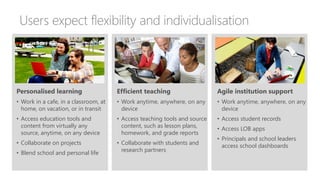
Users expect flexibility and individualisation
Personalised learning
• Work in a cafe, in a classroom, at
home, on vacation, or in transit
• Access education tools and
content from virtually any
source, anytime, on any device
• Collaborate on projects
• Blend school and personal life
Efficient teaching
• Work anytime, anywhere, on any
device
• Access teaching tools and source
content, such as lesson plans,
homework, and grade reports
• Collaborate with students and
research partners
Agile institution support
• Work anytime, anywhere, on any
device
• Access student records
• Access LOB apps
• Principals and school leaders
access school dashboards
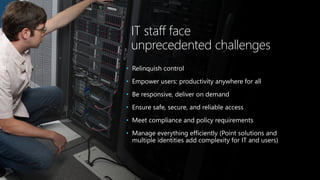
IT staff face
unprecedented challenges
• Relinquish control
• Empower users: productivity anywhere for all
• Be responsive, deliver on demand
• Ensure safe, secure, and reliable access
• Meet compliance and policy requirements
• Manage everything efficiently (Point solutions and
multiple identities add complexity for IT and users)
The future of mobility in education starts with smart
mobile devices that boost productivity and enable
learning and working from anywhere. Easily consume,
create, and share knowledge and experiences—all from
secured, well-managed devices that users love.
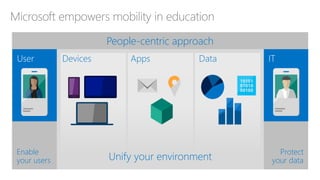
Microsoft empowers mobility in education
Unify your environment
Protect
your data
Enable
your users
People-centric approach
DataDevices Apps
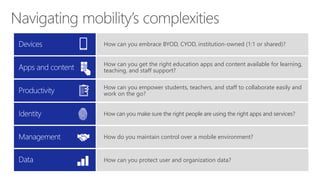
How can you empower students, teachers, and staff to collaborate easily and
work on the go?
How can you embrace BYOD, CYOD, institution-owned (1:1 or shared)?
How can you get the right education apps and content available for learning,
teaching, and staff support?
How can you make sure the right people are using the right apps and services?
How do you maintain control over a mobile environment?
How can you protect user and organization data?
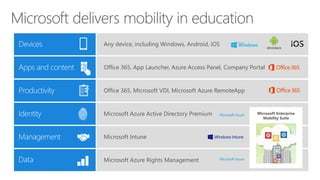
Office 365, Microsoft VDI, Microsoft Azure RemoteApp
Any device, including Windows, Android, iOS
Office 365, App Launcher, Azure Access Panel, Company Portal
Microsoft Azure Active Directory Premium
Microsoft Intune
Microsoft Azure Rights Management
Microsoft Enterprise
Mobility Suite
Devices
Create dynamic learning and work
experiences in and outside of school
by enabling everyone to use any
devices—Windows, Android, iOS
Devices
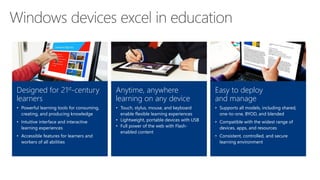
Designed for 21st-century
learners
• Powerful learning tools for consuming,
creating, and producing knowledge
• Intuitive interface and interactive
learning experiences
• Accessible features for learners and
workers of all abilities
Anytime, anywhere
learning on any device
• Touch, stylus, mouse, and keyboard
enable flexible learning experiences
• Lightweight, portable devices with USB
• Full power of the web with Flash-
enabled content
Easy to deploy
and manage
• Supports all models, including shared,
one-to-one, BYOD, and blended
• Compatible with the widest range of
devices, apps, and resources
• Consistent, controlled, and secure
learning environment
Apps and
Content
Empower students, staff, and faculty
with an enterprise-class productivity
suite and communications apps
Tools for Learning
App Launcher
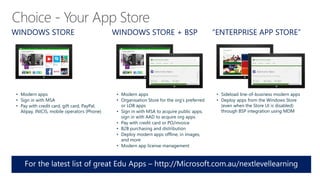
WINDOWS STORE
• Modern apps
• Sign in with MSA
• Pay with credit card, gift card, PayPal,
Alipay, INICIS, mobile operators (Phone)
WINDOWS STORE + BSP “ENTERPRISE APP STORE”
• Modern apps
• Organisation Store for the org’s preferred
or LOB apps
• Sign in with MSA to acquire public apps;
sign in with AAD to acquire org apps
• Pay with credit card or PO/invoice
• B2B purchasing and distribution
• Deploy modern apps offline, in images,
and more
• Modern app license management
• Sideload line-of-business modern apps
• Deploy apps from the Windows Store
(even when the Store UI is disabled)
through BSP integration using MDM
Choice - Your App Store
Productivity
Empower your users to work and
study from anywhere
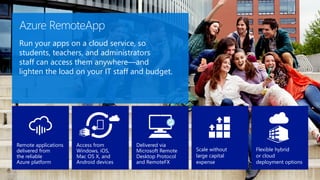
Azure RemoteApp
Run your apps on a cloud service, so
students, teachers, and administrators
staff can access them anywhere—and
lighten the load on your IT staff and budget.
Remote applications
delivered from
the reliable
Azure platform
Access from
Windows, iOS,
Mac OS X, and
Android devices
Delivered via
Microsoft Remote
Desktop Protocol
and RemoteFX
Flexible hybrid
or cloud
deployment options
Scale without
large capital
expense
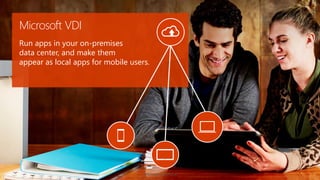
Microsoft VDI
Run apps in your on-premises
data center, and make them
appear as local apps for mobile users.
Identity,
management,
and data
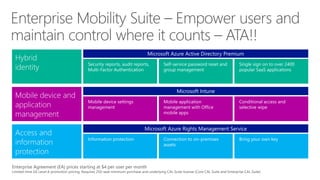
Empower users and maintain
control where it counts
Enterprise Agreement (EA) prices starting at $4 per user per month
Limited-time EA Level A promotion pricing. Requires 250-seat minimum purchase and underlying CAL Suite license (Core CAL Suite and Enterprise CAL Suite)
Microsoft Intune
Mobile device settings
management
Mobile application
management with Office
mobile apps
Conditional access and
selective wipe
Microsoft Azure Active Directory Premium
Security reports, audit reports,
Multi-Factor Authentication
Self-service password reset and
group management
Single sign on to over 2400
popular SaaS applications
Microsoft Azure Rights Management Service
Information protection Connection to on-premises
assets
Bring your own key
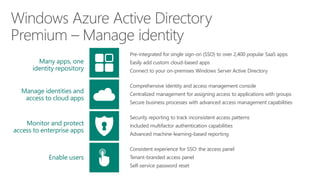
Pre-integrated for single sign-on (SSO) to over 2,400 popular SaaS apps
Easily add custom cloud-based apps
Connect to your on-premises Windows Server Active Directory
Many apps, one
identity repository
Manage identities and
access to cloud apps
Monitor and protect
access to enterprise apps
Enable users
Comprehensive identity and access management console
Centralized management for assigning access to applications with groups
Secure business processes with advanced access management capabilities
Security reporting to track inconsistent access patterns
Included multifactor authentication capabilities
Advanced machine-learning-based reporting
Consistent experience for SSO: the access panel
Tenant-branded access panel
Self-service password reset
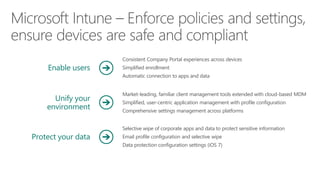
Enable users
Unify your
environment
Protect your data
Market-leading, familiar client management tools extended with cloud-based MDM
Simplified, user-centric application management with profile configuration
Comprehensive settings management across platforms
Consistent Company Portal experiences across devices
Simplified enrollment
Automatic connection to apps and data
Selective wipe of corporate apps and data to protect sensitive information
Email profile configuration and selective wipe
Data protection configuration settings (iOS 7)
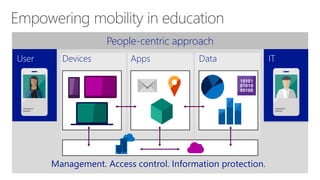
People-centric approach
Devices Apps Data
Management. Access control. Information protection.
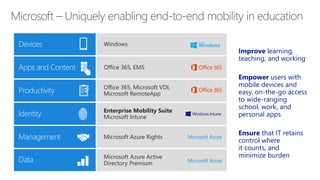
The Microsoft
mobility advantage
Improve learning,
teaching, and working
Empower users with
mobile devices and
easy, on-the-go access
to wide-ranging
school, work, and
personal apps
Ensure that IT retains
control where
it counts, and
minimize burden
Office 365, Microsoft VDI,
Microsoft RemoteApp
Windows
Office 365, EMS
Enterprise Mobility Suite
Microsoft Intune
Microsoft Azure Rights
Microsoft Azure Active
Directory Premium
Next Level Learning IT Track - Managing Devices in a BYOD world

Next Level Learning IT Track - Managing Devices in a BYOD world

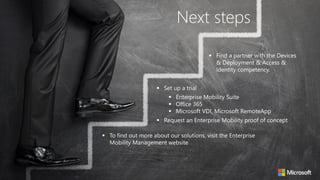
  • 1.
  • 2.
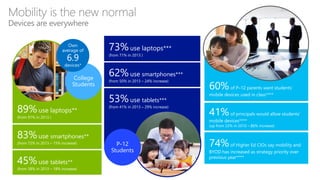
    60%of P–12 parentswant students’ mobile devices used in class**** 41%of principals would allow students’ mobile devices**** (up from 22% in 2010 – 86% increase) 74%of Higher Ed CIOs say mobility and BYOD has increased as strategy priority over previous year**** 89%use laptops** (from 91% in 2013 ) Mobility is the new normal Devices are everywhere 83%use smartphones** (from 72% in 2013 – 15% increase) 45%use tablets** (from 38% in 2013 – 18% increase) 73%use laptops*** (from 71% in 2013 ) 62%use smartphones*** (from 50% in 2013 – 24% increase) 53%use tablets*** (from 41% in 2013 – 29% increase)
  • 3.
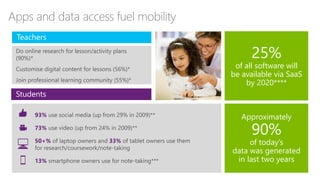
    25% of all softwarewill be available via SaaS by 2020**** Approximately 90% of today’s data was generated in last two years 93% 73% 50+% 33% 13% Students Apps and data access fuel mobility Teachers
  • 4.
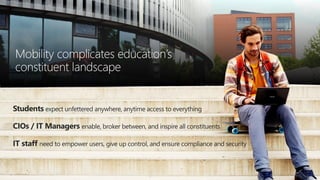
    Students expect unfetteredanywhere, anytime access to everything IT staff need to empower users, give up control, and ensure compliance and security CIOs / IT Managers enable, broker between, and inspire all constituents Mobility complicates education’s constituent landscape
  • 5.
    Users expect flexibilityand individualisation Personalised learning • Work in a cafe, in a classroom, at home, on vacation, or in transit • Access education tools and content from virtually any source, anytime, on any device • Collaborate on projects • Blend school and personal life Efficient teaching • Work anytime, anywhere, on any device • Access teaching tools and source content, such as lesson plans, homework, and grade reports • Collaborate with students and research partners Agile institution support • Work anytime, anywhere, on any device • Access student records • Access LOB apps • Principals and school leaders access school dashboards
  • 6.
    IT staff face unprecedentedchallenges • Relinquish control • Empower users: productivity anywhere for all • Be responsive, deliver on demand • Ensure safe, secure, and reliable access • Meet compliance and policy requirements • Manage everything efficiently (Point solutions and multiple identities add complexity for IT and users)
  • 7.
    The future ofmobility in education starts with smart mobile devices that boost productivity and enable learning and working from anywhere. Easily consume, create, and share knowledge and experiences—all from secured, well-managed devices that users love.
  • 8.
    Microsoft empowers mobilityin education Unify your environment Protect your data Enable your users People-centric approach DataDevices Apps
  • 9.
    How can youempower students, teachers, and staff to collaborate easily and work on the go? How can you embrace BYOD, CYOD, institution-owned (1:1 or shared)? How can you get the right education apps and content available for learning, teaching, and staff support? How can you make sure the right people are using the right apps and services? How do you maintain control over a mobile environment? How can you protect user and organization data?
  • 10.
    Office 365, MicrosoftVDI, Microsoft Azure RemoteApp Any device, including Windows, Android, iOS Office 365, App Launcher, Azure Access Panel, Company Portal Microsoft Azure Active Directory Premium Microsoft Intune Microsoft Azure Rights Management Microsoft Enterprise Mobility Suite
  • 11.
    Devices Create dynamic learningand work experiences in and outside of school by enabling everyone to use any devices—Windows, Android, iOS
  • 12.
    Devices Designed for 21st-century learners •Powerful learning tools for consuming, creating, and producing knowledge • Intuitive interface and interactive learning experiences • Accessible features for learners and workers of all abilities Anytime, anywhere learning on any device • Touch, stylus, mouse, and keyboard enable flexible learning experiences • Lightweight, portable devices with USB • Full power of the web with Flash- enabled content Easy to deploy and manage • Supports all models, including shared, one-to-one, BYOD, and blended • Compatible with the widest range of devices, apps, and resources • Consistent, controlled, and secure learning environment
  • 13.
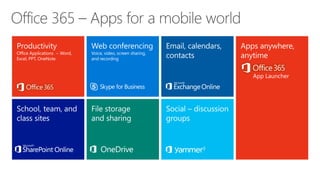
    Apps and Content Empower students,staff, and faculty with an enterprise-class productivity suite and communications apps
  • 14.
  • 15.
    WINDOWS STORE • Modernapps • Sign in with MSA • Pay with credit card, gift card, PayPal, Alipay, INICIS, mobile operators (Phone) WINDOWS STORE + BSP “ENTERPRISE APP STORE” • Modern apps • Organisation Store for the org’s preferred or LOB apps • Sign in with MSA to acquire public apps; sign in with AAD to acquire org apps • Pay with credit card or PO/invoice • B2B purchasing and distribution • Deploy modern apps offline, in images, and more • Modern app license management • Sideload line-of-business modern apps • Deploy apps from the Windows Store (even when the Store UI is disabled) through BSP integration using MDM Choice - Your App Store
  • 16.
    Productivity Empower your usersto work and study from anywhere
  • 17.
    Azure RemoteApp Run yourapps on a cloud service, so students, teachers, and administrators staff can access them anywhere—and lighten the load on your IT staff and budget. Remote applications delivered from the reliable Azure platform Access from Windows, iOS, Mac OS X, and Android devices Delivered via Microsoft Remote Desktop Protocol and RemoteFX Flexible hybrid or cloud deployment options Scale without large capital expense
  • 18.
    Microsoft VDI Run appsin your on-premises data center, and make them appear as local apps for mobile users.
  • 19.
    Identity, management, and data Empower usersand maintain control where it counts
  • 20.
    Enterprise Agreement (EA)prices starting at $4 per user per month Limited-time EA Level A promotion pricing. Requires 250-seat minimum purchase and underlying CAL Suite license (Core CAL Suite and Enterprise CAL Suite) Microsoft Intune Mobile device settings management Mobile application management with Office mobile apps Conditional access and selective wipe Microsoft Azure Active Directory Premium Security reports, audit reports, Multi-Factor Authentication Self-service password reset and group management Single sign on to over 2400 popular SaaS applications Microsoft Azure Rights Management Service Information protection Connection to on-premises assets Bring your own key
  • 21.
    Pre-integrated for singlesign-on (SSO) to over 2,400 popular SaaS apps Easily add custom cloud-based apps Connect to your on-premises Windows Server Active Directory Many apps, one identity repository Manage identities and access to cloud apps Monitor and protect access to enterprise apps Enable users Comprehensive identity and access management console Centralized management for assigning access to applications with groups Secure business processes with advanced access management capabilities Security reporting to track inconsistent access patterns Included multifactor authentication capabilities Advanced machine-learning-based reporting Consistent experience for SSO: the access panel Tenant-branded access panel Self-service password reset
  • 22.
    Enable users Unify your environment Protectyour data Market-leading, familiar client management tools extended with cloud-based MDM Simplified, user-centric application management with profile configuration Comprehensive settings management across platforms Consistent Company Portal experiences across devices Simplified enrollment Automatic connection to apps and data Selective wipe of corporate apps and data to protect sensitive information Email profile configuration and selective wipe Data protection configuration settings (iOS 7)
  • 24.
    People-centric approach Devices AppsData Management. Access control. Information protection.
  • 25.
  • 26.
    Improve learning, teaching, andworking Empower users with mobile devices and easy, on-the-go access to wide-ranging school, work, and personal apps Ensure that IT retains control where it counts, and minimize burden Office 365, Microsoft VDI, Microsoft RemoteApp Windows Office 365, EMS Enterprise Mobility Suite Microsoft Intune Microsoft Azure Rights Microsoft Azure Active Directory Premium