Welcome
Device Password:
Welcome1
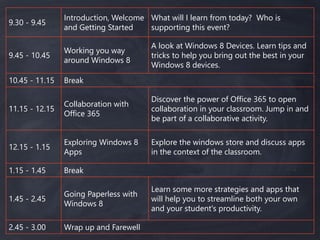
9.30 - 9.45
Introduction, Welcome
and Getting Started
What will I learn from today? Who is
supporting this event?
9.45 - 10.45
Working you way
around Windows 8
A look at Windows 8 Devices. Learn tips and
tricks to help you bring out the best in your
Windows 8 devices.
10.45 - 11.15 Break
11.15 - 12.15
Collaboration with
Office 365
Discover the power of Office 365 to open
collaboration in your classroom. Jump in and
be part of a collaborative activity.
12.15 - 1.15
Exploring Windows 8
Apps
Explore the windows store and discuss apps
in the context of the classroom.
1.15 - 1.45 Break
1.45 - 2.45
Going Paperless with
Windows 8
Learn some more strategies and apps that
will help you to streamline both your own
and your student's productivity.
2.45 - 3.00 Wrap up and Farewell
Today’s
OneNote:
Working your
way around
Windows 8
INTEL
Nathan Armstrong
Account Manager
7
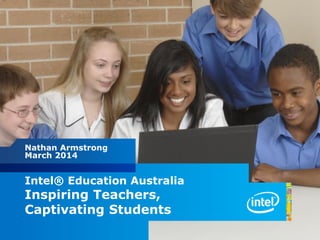
Nathan Armstrong
March 2014
Intel® Education Australia
Inspiring Teachers,
Captivating Students
8
Copyright © 2012 Intel Corporation. All rights reserved. Intel and Intel Education are trademarks or registered trademarks of Intel Corporation or its subsidiaries in the United States and other countries. *Other names and brands may
be claimed as the property of others.
Legal Notices and Disclaimers
Systems using Client Initiated Remote Access require wired LAN connectivity and may not be available
in public hot spots or “click to accept” locations. For more information on CIRA go to:
http://www.intel.com/products/centrino2/vpro.
ENERGY STAR denotes a system level energy specification, defined by the US Environmental Protection
Agency, that relies upon all of the system's components, including processor, chipset, power supply,
HDD, graphics controller and memory to meet the specification. For more information, go to:
http://www.energystar.gov/index.cfm?fuseaction=find_a_product.showProductGroup&pgw_code=CO
Intel® High Definition Audio requires a system with an appropriate Intel chipset and a motherboard
with an appropriate codec and the necessary drivers installed. System sound quality will vary depending
on actual implementation, controller, codec, drivers and speakers. For more information about Intel®
HD audio, refer to http://www.intel.com/.
Check with your PC vendor for availability of computer systems that meet Intel SIPP guidelines. A stable
image computer system is a standardized hardware configuration that IT departments can deploy into
the enterprise for a set period of time, which is usually 12 months. Intel SIPP is a client program only
and does not apply to servers or Intel-based handhelds and/or handsets.
No computer system can provide absolute security under all conditions. Intel® Trusted Execution
Technology (Intel® TXT) requires a computer system with Intel® Virtualization Technology, an Intel
TXT-enabled processor, chipset, BIOS, Authenticated Code Modules and an Intel TXT-compatible
measured launched environment (MLE). The MLE could consist of a virtual machine monitor, an OS or an
application. In addition, Intel TXT requires the system to contain a TPM v1.2, as defined by the Trusted
Computing Group and specific software for some uses. For more information, see here
As compared to other PC I/O connection technologies including eSATA, USB, and IEEE 1394 Firewire**.
Performance will vary depending on the specific hardware and software used. For more information go
to http://www.intel.com/technology/io/thunderbolt/index.htSoftware and workloads used in
performance tests may have been optimized for performance only on Intel microprocessors.
Performance tests, such as SYSmark and MobileMark, are measured using specific computer systems,
components, software, operations and functions. Any change to any of those factors may cause the
results to vary. You should consult other information and performance tests to assist you in fully
evaluating your contemplated purchases, including the performance of that product when combined
with other products. Intel, Intel Inside, the Intel logo, Thunderbolt, and the Thunderbolt logo are
trademarks of Intel Corporation in the United States and other countries.
9
Copyright © 2012 Intel Corporation. All rights reserved. Intel and Intel Education are trademarks or registered trademarks of Intel Corporation or its subsidiaries in the United States and other countries. *Other names and brands may
be claimed as the property of others.
Intel Corporation:
The World’s Largest Semiconductor Manufacturer
 300 Facilities in 50 Countries
 100,000 Employees
 43,000 technical degrees, 12,000 Masters in Science, 4,000
PhD’s, 4,000 MBA’s
 One of the Top Ten Most Valuable Brands in the World for 10
Consecutive Years
 Invests $100 Million Each Year in Education Across More than
50 Countries
 One Million Hours of Volunteer Service in Our Communities in
2010
 Intel Teach Program
10
Copyright © 2013 Intel Corporation. All rights reserved. Intel and Intel Education are trademarks or registered trademarks of Intel Corporation or its subsidiaries in the
United States and other countries. *Other names and brands may be claimed as the property of others.
Intel® Education in Australia
Our mission is to support the rapid adoption
of technology in the classroom.
We enable an ecosystem of hardware,
software and digital content designed to help
students learn and offer educators the tools to
effectively integrate technology into the
classroom.
11
Copyright © 2012 Intel Corporation. All rights reserved. Intel and Intel Education are trademarks or registered trademarks of Intel Corporation or its subsidiaries in the United States and other countries. *Other names and brands may
be claimed as the property of others.
Other names and brands may be claimed as the property of others.11
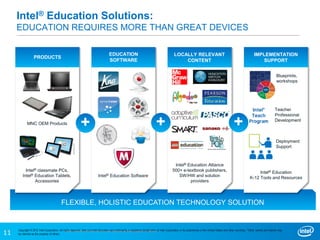
MNC OEM Products
Intel® Education Alliance
500+ e-textbook publishers,
SW/HW and solution
providers
Intel® Education Software
Teacher
Professional
Development
Deployment
Support
Blueprints,
workshops
Intel® Education
K-12 Tools and Resources
Intel® classmate PCs,
Intel® Education Tablets,
Accessories
PRODUCTS
EDUCATION
SOFTWARE
LOCALLY RELEVANT
CONTENT
IMPLEMENTATION
SUPPORT
FLEXIBLE, HOLISTIC EDUCATION TECHNOLOGY SOLUTION
+++
Intel® Education Solutions:
EDUCATION REQUIRES MORE THAN GREAT DEVICES
12
Copyright © 2012 Intel Corporation. All rights reserved. Intel and Intel Education are trademarks or registered trademarks of Intel Corporation or its subsidiaries in the United States and other countries. *Other names and brands may
be claimed as the property of others.
© 2013 Intel Corporation. All rights reserved. Intel and the Intel logo are trademarks or registered trademarks of Intel
Corporation or its subsidiaries in the United States and other countries.
*Other names and brands may be claimed as the property of others.
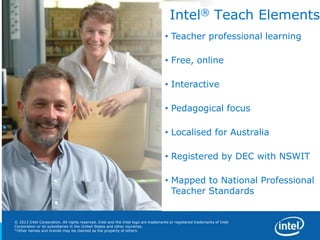
Intel® Teach Elements
• Teacher professional learning
• Free, online
• Interactive
• Pedagogical focus
• Localised for Australia
• Registered by DEC with NSWIT
• Mapped to National Professional
Teacher Standards
13
13
Copyright © 2013 Intel Corporation.
All rights reserved. Intel, the Intel logo, Intel Education Initiative and Intel Teach Program are trademarks of Intel Corporation in the U.S. and other countries.
*Other names and brands may be claimed as the property of others.
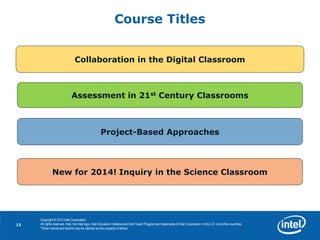
Course Titles
Collaboration in the Digital Classroom
Assessment in 21st Century Classrooms
Project-Based Approaches
New for 2014! Inquiry in the Science Classroom
14
Copyright © 2013 Intel Corporation. All rights reserved. Intel and Intel Education are trademarks or registered trademarks of Intel Corporation or its subsidiaries in the
United States and other countries. *Other names and brands may be claimed as the property of others.
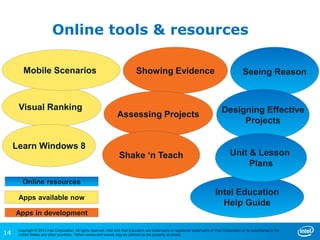
Online tools & resources
Visual Ranking
Showing Evidence Seeing Reason
Assessing Projects
Mobile Scenarios
Shake ‘n Teach
Intel Education
Help Guide
Designing Effective
Projects
Unit & Lesson
Plans
Online resources
Apps available now
Apps in development
Learn Windows 8
15
Copyright © 2012 Intel Corporation. All rights reserved. Intel and Intel Education are trademarks or registered trademarks of Intel Corporation or its subsidiaries in the United States and other countries. *Other names and brands may
be claimed as the property of others.
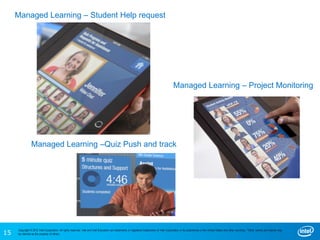
Managed Learning – Project Monitoring
Managed Learning –Quiz Push and track
Managed Learning – Student Help request
16
Copyright © 2012 Intel Corporation. All rights reserved. Intel and Intel Education are trademarks or registered trademarks of Intel Corporation or its subsidiaries in the United States and other countries. *Other names and brands may
be claimed as the property of others.
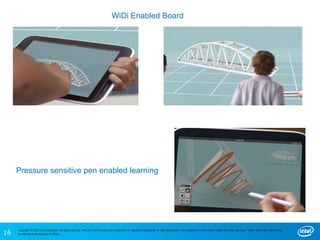
Pressure sensitive pen enabled learning
WiDi Enabled Board
17
Copyright © 2013 Intel Corporation. All rights reserved. Intel and Intel Education are trademarks or registered trademarks of Intel Corporation or its subsidiaries in the
United States and other countries. *Other names and brands may be claimed as the property of others.
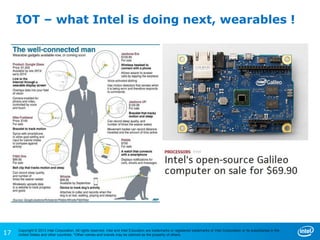
IOT – what Intel is doing next, wearables !
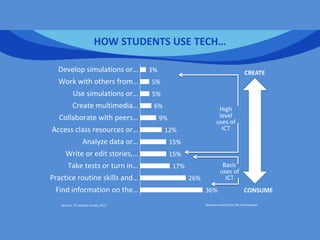
HOW STUDENTS USE TECH…
Source: ITL teacher survey, 2011 Based on analysis by SRI International
Basic
uses of
ICT
High
level
uses of
ICT
36%
26%
17%
15%
15%
12%
9%
6%
5%
5%
3%
Find information on the…
Practice routine skills and…
Take tests or turn in…
Write or edit stories,…
Analyze data or…
Access class resources or…
Collaborate with peers…
Create multimedia…
Use simulations or…
Work with others from…
Develop simulations or…
CONSUME
CREATE
19
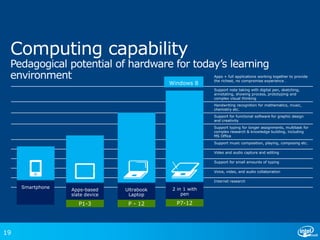
Apps + full applications working together to provide
the richest, no compromise experience .
Support note taking with digital pen, sketching,
annotating, showing process, prototyping and
complex visual thinking
Handwriting recognition for mathematics, music,
chemistry etc.
Support for functional software for graphic design
and creativity
Support typing for longer assignments, multitask for
complex research & knowledge building, including
MS Office
Support music composition, playing, composing etc.
Video and audio capture and editing
Support for small amounts of typing
Voice, video, and audio collaboration
Internet research
P1-3 P - 12 P7-12
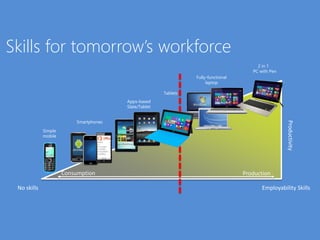
Skills for tomorrow’s workforce
Productivity
Simple
mobile
Smartphones
Fully-functional
laptop
2 in 1
PC with Pen
No skills Employability Skills
Apps-based
Slate/Tablet
Consumption Production
Tablets
21
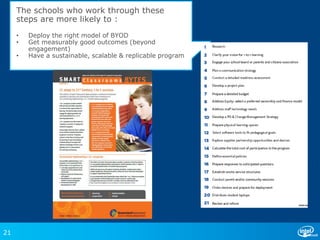
The schools who work through these
steps are more likely to :
• Deploy the right model of BYOD
• Get measurably good outcomes (beyond
engagement)
• Have a sustainable, scalable & replicable program
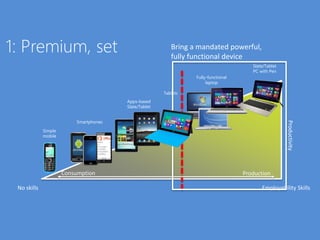
1: Premium, set
Productivity
Simple
mobile
Smartphones
Fully-functional
laptop
Slate/Tablet
PC with Pen
No skills Employability Skills
Consumption Production
Bring a mandated powerful,
fully functional device
Apps-based
Slate/Tablet
Tablets
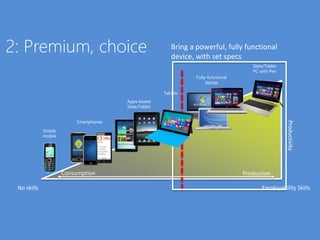
2: Premium, choice
Productivity
Simple
mobile
Smartphones
Fully-functional
laptop
Slate/Tablet
PC with Pen
No skills Employability Skills
Consumption Production
Bring a powerful, fully functional
device, with set specs
Apps-based
Slate/Tablet
Tablets
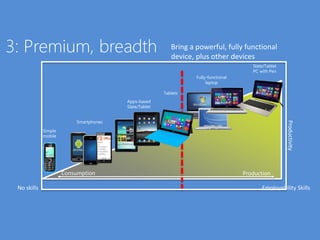
3: Premium, breadth
Productivity
Simple
mobile
Smartphones
Fully-functional
laptop
Slate/Tablet
PC with Pen
No skills Employability Skills
Consumption Production
Bring a powerful, fully functional
device, plus other devices
Apps-based
Slate/Tablet
Tablets
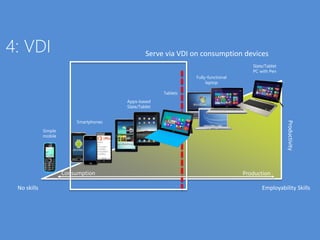
4: VDI
Productivity
Simple
mobile
Smartphones
Fully-functional
laptop
Slate/Tablet
PC with Pen
No skills Employability Skills
Consumption Production
Serve via VDI on consumption devices
Apps-based
Slate/Tablet
Tablets
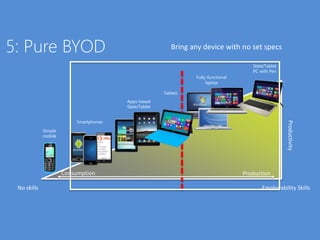
5: Pure BYOD
Productivity
Simple
mobile
Smartphones
Fully-functional
laptop
Slate/Tablet
PC with Pen
No skills Employability Skills
Consumption Production
Bring any device with no set specs
Apps-based
Slate/Tablet
Tablets
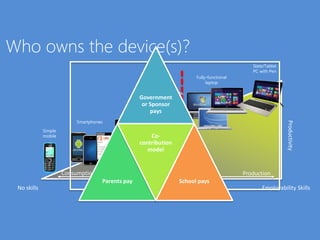
Who owns the device(s)?
Productivity
Simple
mobile
Smartphones
Fully-functional
laptop
Slate/Tablet
PC with Pen
No skills Employability Skills
Consumption Production
Apps-based
Slate/Tablet
RT Tablets
Government
or Sponsor
pays
Parents pay
Co-
contribution
model
School pays
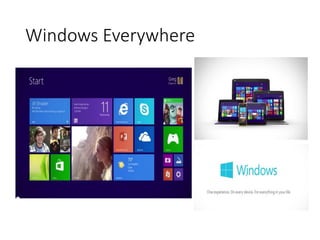
Windows Everywhere
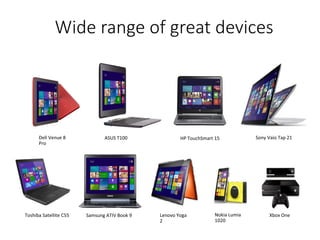
Wide range of great devices
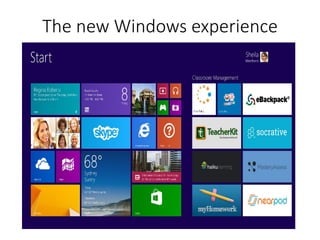
The new Windows experience
Copyright © 2013 Intel Corporation. All rights reserved. Intel and Intel Education are trademarks or registered trademarks of Intel Corporation or its subsidiaries in the United States
and other countries. *Other names and brands may be claimed as the property of others.
32
Intel® Education Australia
www.intel.com/education/au
Nathan Armstrong
Intel Education
Email: Nathan.Armstrong@intel.com
Rebecca Harrington
Manager, Intel Teach Program
Email: rebecca.harrington@crossmark.com.au
Windows 8
Charm Bar Swiping Search
Split
Screen
Apps Personalise
Morning Tea
Collaboration
with
Office 365
MICROSOFT
Travis Smith
National Education Specialist
Exploring
Windows 8
Apps
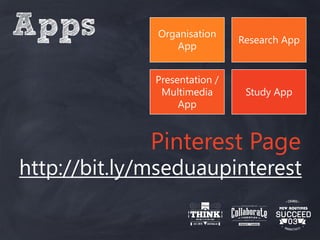
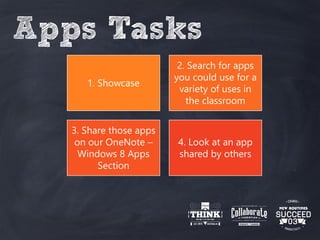
Apps Tasks
1. Showcase
2. Search for apps
you could use for a
variety of uses in
the classroom
3. Share those apps
on our OneNote –
Windows 8 Apps
Section
4. Look at an app
shared by others
Apps Organisation
App
Research App
Presentation /
Multimedia
App
Study App
Pinterest Page
http://bit.ly/mseduaupinterest
Lunch
Going
Paperless with
Windows 8
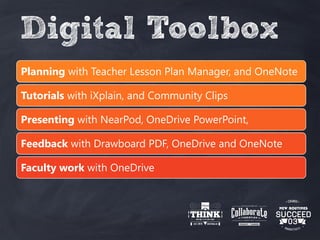
Digital Toolbox
Planning with Teacher Lesson Plan Manager, and OneNote
Tutorials with iXplain, and Community Clips
Presenting with NearPod, OneDrive PowerPoint,
Feedback with Drawboard PDF, OneDrive and OneNote
Faculty work with OneDrive
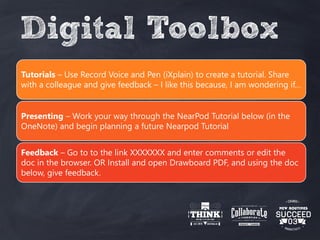
Digital Toolbox
Tutorials – Use Record Voice and Pen (iXplain) to create a tutorial. Share
with a colleague and give feedback – I like this because, I am wondering if…
Presenting – Work your way through the NearPod Tutorial below (in the
OneNote) and begin planning a future Nearpod Tutorial
Feedback – Go to to the link XXXXXXX and enter comments or edit the
doc in the browser. OR Install and open Drawboard PDF, and using the doc
below, give feedback.
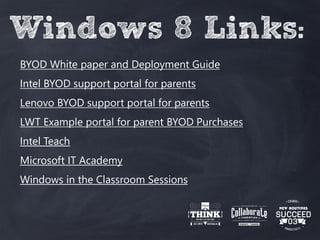
Windows 8 Links:
BYOD White paper and Deployment Guide
Intel BYOD support portal for parents
Lenovo BYOD support portal for parents
LWT Example portal for parent BYOD Purchases
Intel Teach
Microsoft IT Academy
Windows in the Classroom Sessions
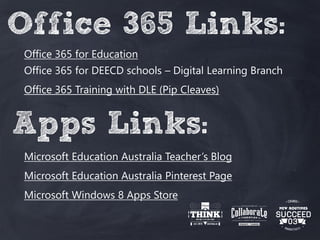
Office 365 Links:
Office 365 for Education
Office 365 for DEECD schools – Digital Learning Branch
Office 365 Training with DLE (Pip Cleaves)
Apps Links:
Microsoft Education Australia Teacher’s Blog
Microsoft Education Australia Pinterest Page
Microsoft Windows 8 Apps Store
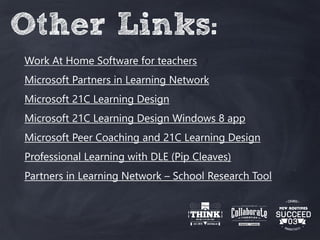
Other Links:
Work At Home Software for teachers
Microsoft Partners in Learning Network
Microsoft 21C Learning Design
Microsoft 21C Learning Design Windows 8 app
Microsoft Peer Coaching and 21C Learning Design
Professional Learning with DLE (Pip Cleaves)
Partners in Learning Network – School Research Tool
End

Think. Collaborate. Succeed. Presentation

  • 2.
  • 3.
    9.30 - 9.45 Introduction,Welcome and Getting Started What will I learn from today? Who is supporting this event? 9.45 - 10.45 Working you way around Windows 8 A look at Windows 8 Devices. Learn tips and tricks to help you bring out the best in your Windows 8 devices. 10.45 - 11.15 Break 11.15 - 12.15 Collaboration with Office 365 Discover the power of Office 365 to open collaboration in your classroom. Jump in and be part of a collaborative activity. 12.15 - 1.15 Exploring Windows 8 Apps Explore the windows store and discuss apps in the context of the classroom. 1.15 - 1.45 Break 1.45 - 2.45 Going Paperless with Windows 8 Learn some more strategies and apps that will help you to streamline both your own and your student's productivity. 2.45 - 3.00 Wrap up and Farewell
  • 4.
  • 5.
  • 6.
  • 7.
    7 Nathan Armstrong March 2014 Intel®Education Australia Inspiring Teachers, Captivating Students
  • 8.
    8 Copyright © 2012Intel Corporation. All rights reserved. Intel and Intel Education are trademarks or registered trademarks of Intel Corporation or its subsidiaries in the United States and other countries. *Other names and brands may be claimed as the property of others. Legal Notices and Disclaimers Systems using Client Initiated Remote Access require wired LAN connectivity and may not be available in public hot spots or “click to accept” locations. For more information on CIRA go to: http://www.intel.com/products/centrino2/vpro. ENERGY STAR denotes a system level energy specification, defined by the US Environmental Protection Agency, that relies upon all of the system's components, including processor, chipset, power supply, HDD, graphics controller and memory to meet the specification. For more information, go to: http://www.energystar.gov/index.cfm?fuseaction=find_a_product.showProductGroup&pgw_code=CO Intel® High Definition Audio requires a system with an appropriate Intel chipset and a motherboard with an appropriate codec and the necessary drivers installed. System sound quality will vary depending on actual implementation, controller, codec, drivers and speakers. For more information about Intel® HD audio, refer to http://www.intel.com/. Check with your PC vendor for availability of computer systems that meet Intel SIPP guidelines. A stable image computer system is a standardized hardware configuration that IT departments can deploy into the enterprise for a set period of time, which is usually 12 months. Intel SIPP is a client program only and does not apply to servers or Intel-based handhelds and/or handsets. No computer system can provide absolute security under all conditions. Intel® Trusted Execution Technology (Intel® TXT) requires a computer system with Intel® Virtualization Technology, an Intel TXT-enabled processor, chipset, BIOS, Authenticated Code Modules and an Intel TXT-compatible measured launched environment (MLE). The MLE could consist of a virtual machine monitor, an OS or an application. In addition, Intel TXT requires the system to contain a TPM v1.2, as defined by the Trusted Computing Group and specific software for some uses. For more information, see here As compared to other PC I/O connection technologies including eSATA, USB, and IEEE 1394 Firewire**. Performance will vary depending on the specific hardware and software used. For more information go to http://www.intel.com/technology/io/thunderbolt/index.htSoftware and workloads used in performance tests may have been optimized for performance only on Intel microprocessors. Performance tests, such as SYSmark and MobileMark, are measured using specific computer systems, components, software, operations and functions. Any change to any of those factors may cause the results to vary. You should consult other information and performance tests to assist you in fully evaluating your contemplated purchases, including the performance of that product when combined with other products. Intel, Intel Inside, the Intel logo, Thunderbolt, and the Thunderbolt logo are trademarks of Intel Corporation in the United States and other countries.
  • 9.
    9 Copyright © 2012Intel Corporation. All rights reserved. Intel and Intel Education are trademarks or registered trademarks of Intel Corporation or its subsidiaries in the United States and other countries. *Other names and brands may be claimed as the property of others. Intel Corporation: The World’s Largest Semiconductor Manufacturer  300 Facilities in 50 Countries  100,000 Employees  43,000 technical degrees, 12,000 Masters in Science, 4,000 PhD’s, 4,000 MBA’s  One of the Top Ten Most Valuable Brands in the World for 10 Consecutive Years  Invests $100 Million Each Year in Education Across More than 50 Countries  One Million Hours of Volunteer Service in Our Communities in 2010  Intel Teach Program
  • 10.
    10 Copyright © 2013Intel Corporation. All rights reserved. Intel and Intel Education are trademarks or registered trademarks of Intel Corporation or its subsidiaries in the United States and other countries. *Other names and brands may be claimed as the property of others. Intel® Education in Australia Our mission is to support the rapid adoption of technology in the classroom. We enable an ecosystem of hardware, software and digital content designed to help students learn and offer educators the tools to effectively integrate technology into the classroom.
  • 11.
    11 Copyright © 2012Intel Corporation. All rights reserved. Intel and Intel Education are trademarks or registered trademarks of Intel Corporation or its subsidiaries in the United States and other countries. *Other names and brands may be claimed as the property of others. Other names and brands may be claimed as the property of others.11 MNC OEM Products Intel® Education Alliance 500+ e-textbook publishers, SW/HW and solution providers Intel® Education Software Teacher Professional Development Deployment Support Blueprints, workshops Intel® Education K-12 Tools and Resources Intel® classmate PCs, Intel® Education Tablets, Accessories PRODUCTS EDUCATION SOFTWARE LOCALLY RELEVANT CONTENT IMPLEMENTATION SUPPORT FLEXIBLE, HOLISTIC EDUCATION TECHNOLOGY SOLUTION +++ Intel® Education Solutions: EDUCATION REQUIRES MORE THAN GREAT DEVICES
  • 12.
    12 Copyright © 2012Intel Corporation. All rights reserved. Intel and Intel Education are trademarks or registered trademarks of Intel Corporation or its subsidiaries in the United States and other countries. *Other names and brands may be claimed as the property of others. © 2013 Intel Corporation. All rights reserved. Intel and the Intel logo are trademarks or registered trademarks of Intel Corporation or its subsidiaries in the United States and other countries. *Other names and brands may be claimed as the property of others. Intel® Teach Elements • Teacher professional learning • Free, online • Interactive • Pedagogical focus • Localised for Australia • Registered by DEC with NSWIT • Mapped to National Professional Teacher Standards
  • 13.
    13 13 Copyright © 2013Intel Corporation. All rights reserved. Intel, the Intel logo, Intel Education Initiative and Intel Teach Program are trademarks of Intel Corporation in the U.S. and other countries. *Other names and brands may be claimed as the property of others. Course Titles Collaboration in the Digital Classroom Assessment in 21st Century Classrooms Project-Based Approaches New for 2014! Inquiry in the Science Classroom
  • 14.
    14 Copyright © 2013Intel Corporation. All rights reserved. Intel and Intel Education are trademarks or registered trademarks of Intel Corporation or its subsidiaries in the United States and other countries. *Other names and brands may be claimed as the property of others. Online tools & resources Visual Ranking Showing Evidence Seeing Reason Assessing Projects Mobile Scenarios Shake ‘n Teach Intel Education Help Guide Designing Effective Projects Unit & Lesson Plans Online resources Apps available now Apps in development Learn Windows 8
  • 15.
    15 Copyright © 2012Intel Corporation. All rights reserved. Intel and Intel Education are trademarks or registered trademarks of Intel Corporation or its subsidiaries in the United States and other countries. *Other names and brands may be claimed as the property of others. Managed Learning – Project Monitoring Managed Learning –Quiz Push and track Managed Learning – Student Help request
  • 16.
    16 Copyright © 2012Intel Corporation. All rights reserved. Intel and Intel Education are trademarks or registered trademarks of Intel Corporation or its subsidiaries in the United States and other countries. *Other names and brands may be claimed as the property of others. Pressure sensitive pen enabled learning WiDi Enabled Board
  • 17.
    17 Copyright © 2013Intel Corporation. All rights reserved. Intel and Intel Education are trademarks or registered trademarks of Intel Corporation or its subsidiaries in the United States and other countries. *Other names and brands may be claimed as the property of others. IOT – what Intel is doing next, wearables !
  • 18.
    HOW STUDENTS USETECH… Source: ITL teacher survey, 2011 Based on analysis by SRI International Basic uses of ICT High level uses of ICT 36% 26% 17% 15% 15% 12% 9% 6% 5% 5% 3% Find information on the… Practice routine skills and… Take tests or turn in… Write or edit stories,… Analyze data or… Access class resources or… Collaborate with peers… Create multimedia… Use simulations or… Work with others from… Develop simulations or… CONSUME CREATE
  • 19.
    19 Apps + fullapplications working together to provide the richest, no compromise experience . Support note taking with digital pen, sketching, annotating, showing process, prototyping and complex visual thinking Handwriting recognition for mathematics, music, chemistry etc. Support for functional software for graphic design and creativity Support typing for longer assignments, multitask for complex research & knowledge building, including MS Office Support music composition, playing, composing etc. Video and audio capture and editing Support for small amounts of typing Voice, video, and audio collaboration Internet research P1-3 P - 12 P7-12
  • 20.
    Skills for tomorrow’sworkforce Productivity Simple mobile Smartphones Fully-functional laptop 2 in 1 PC with Pen No skills Employability Skills Apps-based Slate/Tablet Consumption Production Tablets
  • 21.
    21 The schools whowork through these steps are more likely to : • Deploy the right model of BYOD • Get measurably good outcomes (beyond engagement) • Have a sustainable, scalable & replicable program
  • 23.
    1: Premium, set Productivity Simple mobile Smartphones Fully-functional laptop Slate/Tablet PCwith Pen No skills Employability Skills Consumption Production Bring a mandated powerful, fully functional device Apps-based Slate/Tablet Tablets
  • 24.
    2: Premium, choice Productivity Simple mobile Smartphones Fully-functional laptop Slate/Tablet PCwith Pen No skills Employability Skills Consumption Production Bring a powerful, fully functional device, with set specs Apps-based Slate/Tablet Tablets
  • 25.
    3: Premium, breadth Productivity Simple mobile Smartphones Fully-functional laptop Slate/Tablet PCwith Pen No skills Employability Skills Consumption Production Bring a powerful, fully functional device, plus other devices Apps-based Slate/Tablet Tablets
  • 26.
    4: VDI Productivity Simple mobile Smartphones Fully-functional laptop Slate/Tablet PC withPen No skills Employability Skills Consumption Production Serve via VDI on consumption devices Apps-based Slate/Tablet Tablets
  • 27.
    5: Pure BYOD Productivity Simple mobile Smartphones Fully-functional laptop Slate/Tablet PCwith Pen No skills Employability Skills Consumption Production Bring any device with no set specs Apps-based Slate/Tablet Tablets
  • 28.
    Who owns thedevice(s)? Productivity Simple mobile Smartphones Fully-functional laptop Slate/Tablet PC with Pen No skills Employability Skills Consumption Production Apps-based Slate/Tablet RT Tablets Government or Sponsor pays Parents pay Co- contribution model School pays
  • 29.
  • 30.
    Wide range ofgreat devices
  • 31.
    The new Windowsexperience
  • 32.
    Copyright © 2013Intel Corporation. All rights reserved. Intel and Intel Education are trademarks or registered trademarks of Intel Corporation or its subsidiaries in the United States and other countries. *Other names and brands may be claimed as the property of others. 32 Intel® Education Australia www.intel.com/education/au Nathan Armstrong Intel Education Email: Nathan.Armstrong@intel.com Rebecca Harrington Manager, Intel Teach Program Email: rebecca.harrington@crossmark.com.au
  • 33.
    Windows 8 Charm BarSwiping Search Split Screen Apps Personalise
  • 34.
  • 35.
  • 36.
  • 37.
  • 38.
    Apps Tasks 1. Showcase 2.Search for apps you could use for a variety of uses in the classroom 3. Share those apps on our OneNote – Windows 8 Apps Section 4. Look at an app shared by others
  • 39.
    Apps Organisation App Research App Presentation/ Multimedia App Study App Pinterest Page http://bit.ly/mseduaupinterest
  • 40.
  • 41.
  • 42.
    Digital Toolbox Planning withTeacher Lesson Plan Manager, and OneNote Tutorials with iXplain, and Community Clips Presenting with NearPod, OneDrive PowerPoint, Feedback with Drawboard PDF, OneDrive and OneNote Faculty work with OneDrive
  • 43.
    Digital Toolbox Tutorials –Use Record Voice and Pen (iXplain) to create a tutorial. Share with a colleague and give feedback – I like this because, I am wondering if… Presenting – Work your way through the NearPod Tutorial below (in the OneNote) and begin planning a future Nearpod Tutorial Feedback – Go to to the link XXXXXXX and enter comments or edit the doc in the browser. OR Install and open Drawboard PDF, and using the doc below, give feedback.
  • 44.
    Windows 8 Links: BYODWhite paper and Deployment Guide Intel BYOD support portal for parents Lenovo BYOD support portal for parents LWT Example portal for parent BYOD Purchases Intel Teach Microsoft IT Academy Windows in the Classroom Sessions
  • 45.
    Office 365 Links: Office365 for Education Office 365 for DEECD schools – Digital Learning Branch Office 365 Training with DLE (Pip Cleaves) Apps Links: Microsoft Education Australia Teacher’s Blog Microsoft Education Australia Pinterest Page Microsoft Windows 8 Apps Store
  • 46.
    Other Links: Work AtHome Software for teachers Microsoft Partners in Learning Network Microsoft 21C Learning Design Microsoft 21C Learning Design Windows 8 app Microsoft Peer Coaching and 21C Learning Design Professional Learning with DLE (Pip Cleaves) Partners in Learning Network – School Research Tool
  • 47.