#ATM15 |
ClearPass Design Scenarios
Austin Hawthorne
Feb 26, 2015
CONFIDENTIAL © Copyright 2015. Aruba Networks, Inc. All rights reserved2#ATM15 |
Agenda
1. Better user experience and tighter security, is that
possible?
2. Employees on Guest Network
3. The headless device dilemma
3#ATM15 |
Security and Usability Cohabitation
4 CONFIDENTIAL © Copyright 2015. Aruba Networks, Inc. All rights reserved#ATM15 |
Better user experience and tighter security, is that
possible?
Solutions:
1. Status updates and notifications
2. Provide self-service workflows
3. Dynamically Update other network security systems
4. Implement proactive problem identification and resolution
5 CONFIDENTIAL © Copyright 2015. Aruba Networks, Inc. All rights reserved#ATM15 |
The User Problem….
How do I get my device my on the
network?
What is a MAC Address?
Why is the network not working?
6 CONFIDENTIAL © Copyright 2015. Aruba Networks, Inc. All rights reserved#ATM15 |
Common Security Concerns
 Who does this device belong to?
 Does this device meet minimum corporate
compliance standards?
 Can I really support this technology?
7 CONFIDENTIAL © Copyright 2015. Aruba Networks, Inc. All rights reserved#ATM15 |
1. Communicate with your users
 Don’t just REJECT a connection if something goes wrong!
 Sure that’s secure, but what does the user think?
 Let a user know what went wrong:
 SMS
 Web Notification Page (Walled Garden)
 Push Notification
 Phone Call
 OnGuard Message
 Email
• Most can be done even if you still send a REJECT
8 CONFIDENTIAL © Copyright 2015. Aruba Networks, Inc. All rights reserved#ATM15 |
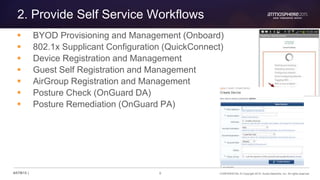
2. Provide Self Service Workflows
 BYOD Provisioning and Management (Onboard)
 802.1x Supplicant Configuration (QuickConnect)
 Device Registration and Management
 Guest Self Registration and Management
 AirGroup Registration and Management
 Posture Check (OnGuard DA)
 Posture Remediation (OnGuard PA)
9 CONFIDENTIAL © Copyright 2015. Aruba Networks, Inc. All rights reserved#ATM15 |
3. Dynamically Prepare the Rest of the Network
 Getting past the front door is one thing….
 How many more “identity” controlled doors do you have?
 DHCP/DNS Controls?
 Firewalls?
 IDS/IPS?
 Proxies?
 Application Logins (SSO)?
10 CONFIDENTIAL © Copyright 2015. Aruba Networks, Inc. All rights reserved#ATM15 |
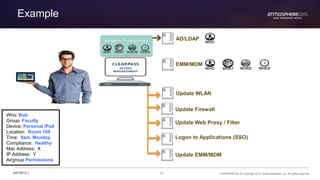
Example
Update WLAN
AD/LDAP
Update Firewall
EMM/MDM
Adaptive Trust Identity
Update Web Proxy / Filter
Logon to Applications (SSO)
Update EMM/MDM
Who: Bob
Group: Faculty
Device: Personal iPad
Location: Room 104
Time: 9am, Monday
Compliance: Healthy
Mac Address: X
IP Address: Y
Airgroup Permissions
11 CONFIDENTIAL © Copyright 2015. Aruba Networks, Inc. All rights reserved#ATM15 |
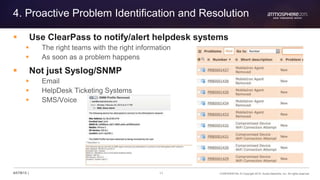
4. Proactive Problem Identification and Resolution
 Use ClearPass to notify/alert helpdesk systems
 The right teams with the right information
 As soon as a problem happens
 Not just Syslog/SNMP
 Email
 HelpDesk Ticketing Systems
 SMS/Voice
12 CONFIDENTIAL © Copyright 2015. Aruba Networks, Inc. All rights reserved#ATM15 |
Example
Radius Action to force
notification page
Send user
SMS
notification
Update Palo Alto
Firewall
Open Help
Desk Ticket
Sound
the alarm!Send Email to
security team
13#ATM15 |
Employees on Guest Network
14 CONFIDENTIAL © Copyright 2015. Aruba Networks, Inc. All rights reserved#ATM15 |
Why is it a bad idea?
1. Users/Devices are exposed to cyber-attacks
2. SSID Confusion
3. User circumvent web policy at work
Protect your users and devices
15 CONFIDENTIAL © Copyright 2015. Aruba Networks, Inc. All rights reserved#ATM15 |
Get visibility and control on your Guest SSID
Wireless Controller
ADSQL Store
ClearPass
MDM
RADIUS
LDAP
SQL
1
2
3
User
4AP
SSID: Guest
MAC Authentication
MAC | 11:22:33:44:55:66
16 CONFIDENTIAL © Copyright 2015. Aruba Networks, Inc. All rights reserved#ATM15 |
How can we identify corporate devices?
ClearPass Policy Manager
DATA CENTER
Network Infrastructure
WIRELESS WIRED VPN
REMOTE
OFFICE
OUTDOOR
ADORACLECMDBEndpoint
Database
MDM JAMF
Authorization Sources
18 CONFIDENTIAL © Copyright 2015. Aruba Networks, Inc. All rights reserved#ATM15 |
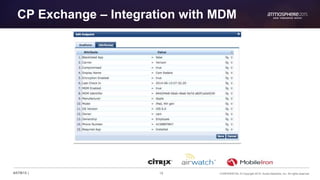
CP Exchange – Integration with MDM
20 CONFIDENTIAL © Copyright 2015. Aruba Networks, Inc. All rights reserved#ATM15 |
CP Exchange – Integration with CMDB
SELECT MAC_ADDR as cmdb_mac where MAC_ADDR =
‘%{Connection:Client-Mac-Address-Hyphen}’
23 CONFIDENTIAL © Copyright 2015. Aruba Networks, Inc. All rights reserved#ATM15 |
Endpoint Attribute Tagging
ClearPass
AD/LDAP
Device
Authentication
SSID: Secure
WPA2-AES
[MACHINE AUTHENTICATED]
Certificate:Issuer-CN
Update Endpoint
Ownership:
Corporate
MAC | 11:22:33:44:55:66
Authorization
24 CONFIDENTIAL © Copyright 2015. Aruba Networks, Inc. All rights reserved#ATM15 |
Update Endpoint Enforcement
25 CONFIDENTIAL © Copyright 2015. Aruba Networks, Inc. All rights reserved#ATM15 |
Let’s build a Role Mapping Policy (Tagging)
26 CONFIDENTIAL © Copyright 2015. Aruba Networks, Inc. All rights reserved#ATM15 |
Policy Enforcement Options
Auto-generate
Helpdesk Ticket
Notify user:
SMS & voice
call to phone
IT administrator:
Email alert
Redirect to Captive
Portal
ENFORCEMENT
WORKFLOWS
Employee connects to
Guest SSID
CLEARPASS IDENTIFIES
Corp-Device Role
ClearPass
SSID: Guest
MAC Authentication
27 CONFIDENTIAL © Copyright 2015. Aruba Networks, Inc. All rights reserved#ATM15 |
Let’s build an Enforcement Policy (Actions)
28 CONFIDENTIAL © Copyright 2015. Aruba Networks, Inc. All rights reserved#ATM15 |
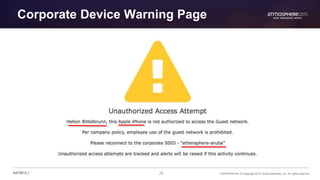
Corporate Device Warning Page
29 CONFIDENTIAL © Copyright 2015. Aruba Networks, Inc. All rights reserved#ATM15 |
Enforcement Profile– SMS with twilio
31 CONFIDENTIAL © Copyright 2015. Aruba Networks, Inc. All rights reserved#ATM15 |
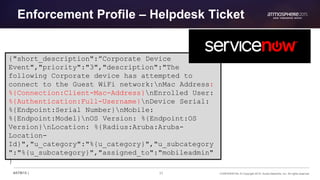
Enforcement Profile – Helpdesk Ticket
{"short_description":”Corporate Device
Event","priority":"3","description":"The
following Corporate device has attempted to
connect to the Guest WiFi network:nMac Address:
%{Connection:Client-Mac-Address}nEnrolled User:
%{Authentication:Full-Username}nDevice Serial:
%{Endpoint:Serial Number}nMobile:
%{Endpoint:Model}nOS Version: %{Endpoint:OS
Version}nLocation: %{Radius:Aruba:Aruba-
Location-
Id}","u_category":"%{u_category}","u_subcategory
":"%{u_subcategory}","assigned_to":"mobileadmin"
}
3232#ATM15 |
Headless Devices on Wired/Wireless
33 CONFIDENTIAL © Copyright 2015. Aruba Networks, Inc. All rights reserved#ATM15 |
Is 802.1X the only option?
1. Many wired/wireless devices do not support 802.1x
authentication
2. How do we make sure only the desired devices get
access?
3. What about MAC Spoofing?
34 CONFIDENTIAL © Copyright 2015. Aruba Networks, Inc. All rights reserved#ATM15 |
Supporting “Headless” Devices
 For devices that do not support 802.1X:
 Wireless: Need a PSK SSID with MAC Authentication
 Wired: Need to use MAB on the port
 Two mechanisms for authentication:
1. Device Profiler
2. Device Registration
35 CONFIDENTIAL © Copyright 2015. Aruba Networks, Inc. All rights reserved#ATM15 |
1. Endpoint Profiler
• Authorize devices like IP Phones, Hand Scanners,
Printers, or Access Points.
Protect your users and devices
36 CONFIDENTIAL © Copyright 2015. Aruba Networks, Inc. All rights reserved#ATM15 |
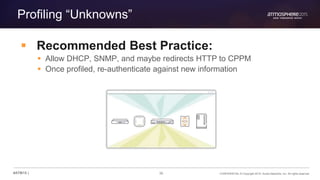
Profiling “Unknowns”
 Recommended Best Practice:
 Allow DHCP, SNMP, and maybe redirects HTTP to CPPM
 Once profiled, re-authenticate against new information
37 CONFIDENTIAL © Copyright 2015. Aruba Networks, Inc. All rights reserved#ATM15 |
Example Profiling Policy
• Create an enforcement profile and policy rule to send the
dACL (in the case of, say, a Cisco LAN switch)
Protect your users and devices
38 CONFIDENTIAL © Copyright 2015. Aruba Networks, Inc. All rights reserved#ATM15 |
Pulling it all together
39 CONFIDENTIAL © Copyright 2015. Aruba Networks, Inc. All rights reserved#ATM15 |
2. Device Registration
• The default device registration page looks like this:
Protect your users and devices
40 CONFIDENTIAL © Copyright 2015. Aruba Networks, Inc. All rights reserved#ATM15 |
MAC Spoofing
What if someone spoofs their device MAC
address?
41 CONFIDENTIAL © Copyright 2015. Aruba Networks, Inc. All rights reserved#ATM15 |
ClearPass can detect device conflicts
THANK YOU
42#ATM15 |
43 CONFIDENTIAL © Copyright 2015. Aruba Networks, Inc. All rights reserved#ATM15 |
Sign up, save $200!
arubanetworks.com/atmosphere2016
Give feedback!
… Before You Go
atmosphere
2016

ClearPass design scenarios that solve the toughest security policy requirements

  • 1.
    #ATM15 | ClearPass DesignScenarios Austin Hawthorne Feb 26, 2015
  • 2.
    CONFIDENTIAL © Copyright2015. Aruba Networks, Inc. All rights reserved2#ATM15 | Agenda 1. Better user experience and tighter security, is that possible? 2. Employees on Guest Network 3. The headless device dilemma
  • 3.
    3#ATM15 | Security andUsability Cohabitation
  • 4.
    4 CONFIDENTIAL ©Copyright 2015. Aruba Networks, Inc. All rights reserved#ATM15 | Better user experience and tighter security, is that possible? Solutions: 1. Status updates and notifications 2. Provide self-service workflows 3. Dynamically Update other network security systems 4. Implement proactive problem identification and resolution
  • 5.
    5 CONFIDENTIAL ©Copyright 2015. Aruba Networks, Inc. All rights reserved#ATM15 | The User Problem…. How do I get my device my on the network? What is a MAC Address? Why is the network not working?
  • 6.
    6 CONFIDENTIAL ©Copyright 2015. Aruba Networks, Inc. All rights reserved#ATM15 | Common Security Concerns  Who does this device belong to?  Does this device meet minimum corporate compliance standards?  Can I really support this technology?
  • 7.
    7 CONFIDENTIAL ©Copyright 2015. Aruba Networks, Inc. All rights reserved#ATM15 | 1. Communicate with your users  Don’t just REJECT a connection if something goes wrong!  Sure that’s secure, but what does the user think?  Let a user know what went wrong:  SMS  Web Notification Page (Walled Garden)  Push Notification  Phone Call  OnGuard Message  Email • Most can be done even if you still send a REJECT
  • 8.
    8 CONFIDENTIAL ©Copyright 2015. Aruba Networks, Inc. All rights reserved#ATM15 | 2. Provide Self Service Workflows  BYOD Provisioning and Management (Onboard)  802.1x Supplicant Configuration (QuickConnect)  Device Registration and Management  Guest Self Registration and Management  AirGroup Registration and Management  Posture Check (OnGuard DA)  Posture Remediation (OnGuard PA)
  • 9.
    9 CONFIDENTIAL ©Copyright 2015. Aruba Networks, Inc. All rights reserved#ATM15 | 3. Dynamically Prepare the Rest of the Network  Getting past the front door is one thing….  How many more “identity” controlled doors do you have?  DHCP/DNS Controls?  Firewalls?  IDS/IPS?  Proxies?  Application Logins (SSO)?
  • 10.
    10 CONFIDENTIAL ©Copyright 2015. Aruba Networks, Inc. All rights reserved#ATM15 | Example Update WLAN AD/LDAP Update Firewall EMM/MDM Adaptive Trust Identity Update Web Proxy / Filter Logon to Applications (SSO) Update EMM/MDM Who: Bob Group: Faculty Device: Personal iPad Location: Room 104 Time: 9am, Monday Compliance: Healthy Mac Address: X IP Address: Y Airgroup Permissions
  • 11.
    11 CONFIDENTIAL ©Copyright 2015. Aruba Networks, Inc. All rights reserved#ATM15 | 4. Proactive Problem Identification and Resolution  Use ClearPass to notify/alert helpdesk systems  The right teams with the right information  As soon as a problem happens  Not just Syslog/SNMP  Email  HelpDesk Ticketing Systems  SMS/Voice
  • 12.
    12 CONFIDENTIAL ©Copyright 2015. Aruba Networks, Inc. All rights reserved#ATM15 | Example Radius Action to force notification page Send user SMS notification Update Palo Alto Firewall Open Help Desk Ticket Sound the alarm!Send Email to security team
  • 13.
  • 14.
    14 CONFIDENTIAL ©Copyright 2015. Aruba Networks, Inc. All rights reserved#ATM15 | Why is it a bad idea? 1. Users/Devices are exposed to cyber-attacks 2. SSID Confusion 3. User circumvent web policy at work Protect your users and devices
  • 15.
    15 CONFIDENTIAL ©Copyright 2015. Aruba Networks, Inc. All rights reserved#ATM15 | Get visibility and control on your Guest SSID Wireless Controller ADSQL Store ClearPass MDM RADIUS LDAP SQL 1 2 3 User 4AP SSID: Guest MAC Authentication MAC | 11:22:33:44:55:66
  • 16.
    16 CONFIDENTIAL ©Copyright 2015. Aruba Networks, Inc. All rights reserved#ATM15 | How can we identify corporate devices? ClearPass Policy Manager DATA CENTER Network Infrastructure WIRELESS WIRED VPN REMOTE OFFICE OUTDOOR ADORACLECMDBEndpoint Database MDM JAMF Authorization Sources
  • 17.
    18 CONFIDENTIAL ©Copyright 2015. Aruba Networks, Inc. All rights reserved#ATM15 | CP Exchange – Integration with MDM
  • 18.
    20 CONFIDENTIAL ©Copyright 2015. Aruba Networks, Inc. All rights reserved#ATM15 | CP Exchange – Integration with CMDB SELECT MAC_ADDR as cmdb_mac where MAC_ADDR = ‘%{Connection:Client-Mac-Address-Hyphen}’
  • 19.
    23 CONFIDENTIAL ©Copyright 2015. Aruba Networks, Inc. All rights reserved#ATM15 | Endpoint Attribute Tagging ClearPass AD/LDAP Device Authentication SSID: Secure WPA2-AES [MACHINE AUTHENTICATED] Certificate:Issuer-CN Update Endpoint Ownership: Corporate MAC | 11:22:33:44:55:66 Authorization
  • 20.
    24 CONFIDENTIAL ©Copyright 2015. Aruba Networks, Inc. All rights reserved#ATM15 | Update Endpoint Enforcement
  • 21.
    25 CONFIDENTIAL ©Copyright 2015. Aruba Networks, Inc. All rights reserved#ATM15 | Let’s build a Role Mapping Policy (Tagging)
  • 22.
    26 CONFIDENTIAL ©Copyright 2015. Aruba Networks, Inc. All rights reserved#ATM15 | Policy Enforcement Options Auto-generate Helpdesk Ticket Notify user: SMS & voice call to phone IT administrator: Email alert Redirect to Captive Portal ENFORCEMENT WORKFLOWS Employee connects to Guest SSID CLEARPASS IDENTIFIES Corp-Device Role ClearPass SSID: Guest MAC Authentication
  • 23.
    27 CONFIDENTIAL ©Copyright 2015. Aruba Networks, Inc. All rights reserved#ATM15 | Let’s build an Enforcement Policy (Actions)
  • 24.
    28 CONFIDENTIAL ©Copyright 2015. Aruba Networks, Inc. All rights reserved#ATM15 | Corporate Device Warning Page
  • 25.
    29 CONFIDENTIAL ©Copyright 2015. Aruba Networks, Inc. All rights reserved#ATM15 | Enforcement Profile– SMS with twilio
  • 26.
    31 CONFIDENTIAL ©Copyright 2015. Aruba Networks, Inc. All rights reserved#ATM15 | Enforcement Profile – Helpdesk Ticket {"short_description":”Corporate Device Event","priority":"3","description":"The following Corporate device has attempted to connect to the Guest WiFi network:nMac Address: %{Connection:Client-Mac-Address}nEnrolled User: %{Authentication:Full-Username}nDevice Serial: %{Endpoint:Serial Number}nMobile: %{Endpoint:Model}nOS Version: %{Endpoint:OS Version}nLocation: %{Radius:Aruba:Aruba- Location- Id}","u_category":"%{u_category}","u_subcategory ":"%{u_subcategory}","assigned_to":"mobileadmin" }
  • 27.
  • 28.
    33 CONFIDENTIAL ©Copyright 2015. Aruba Networks, Inc. All rights reserved#ATM15 | Is 802.1X the only option? 1. Many wired/wireless devices do not support 802.1x authentication 2. How do we make sure only the desired devices get access? 3. What about MAC Spoofing?
  • 29.
    34 CONFIDENTIAL ©Copyright 2015. Aruba Networks, Inc. All rights reserved#ATM15 | Supporting “Headless” Devices  For devices that do not support 802.1X:  Wireless: Need a PSK SSID with MAC Authentication  Wired: Need to use MAB on the port  Two mechanisms for authentication: 1. Device Profiler 2. Device Registration
  • 30.
    35 CONFIDENTIAL ©Copyright 2015. Aruba Networks, Inc. All rights reserved#ATM15 | 1. Endpoint Profiler • Authorize devices like IP Phones, Hand Scanners, Printers, or Access Points. Protect your users and devices
  • 31.
    36 CONFIDENTIAL ©Copyright 2015. Aruba Networks, Inc. All rights reserved#ATM15 | Profiling “Unknowns”  Recommended Best Practice:  Allow DHCP, SNMP, and maybe redirects HTTP to CPPM  Once profiled, re-authenticate against new information
  • 32.
    37 CONFIDENTIAL ©Copyright 2015. Aruba Networks, Inc. All rights reserved#ATM15 | Example Profiling Policy • Create an enforcement profile and policy rule to send the dACL (in the case of, say, a Cisco LAN switch) Protect your users and devices
  • 33.
    38 CONFIDENTIAL ©Copyright 2015. Aruba Networks, Inc. All rights reserved#ATM15 | Pulling it all together
  • 34.
    39 CONFIDENTIAL ©Copyright 2015. Aruba Networks, Inc. All rights reserved#ATM15 | 2. Device Registration • The default device registration page looks like this: Protect your users and devices
  • 35.
    40 CONFIDENTIAL ©Copyright 2015. Aruba Networks, Inc. All rights reserved#ATM15 | MAC Spoofing What if someone spoofs their device MAC address?
  • 36.
    41 CONFIDENTIAL ©Copyright 2015. Aruba Networks, Inc. All rights reserved#ATM15 | ClearPass can detect device conflicts
  • 37.
  • 38.
    43 CONFIDENTIAL ©Copyright 2015. Aruba Networks, Inc. All rights reserved#ATM15 | Sign up, save $200! arubanetworks.com/atmosphere2016 Give feedback! … Before You Go atmosphere 2016

Editor's Notes

  • #4 Make networks mobility-defined instead of fixed
  • #5 Problem Statement: As I implement more security, the number of help desk tickets increase. Users cannot resolve issues themselves, and cannot relay accurate problem description. Users are constantly being prompted to get through yet another security checkpoint
  • #6 How do I get my device on the network? Who do I talk to when I have a problem? Is the network working? What’s a firewall? What is MAC Address?
  • #9 Notification is step #1 Offloading IT/Helpdesk and giving users “simple” path to resolution is the next step.
  • #12 What if the user cannot solve the problem themselves, then what?
  • #14 Make networks mobility-defined instead of fixed
  • #17 MDM Integration Endpoint Attribute Tagging Machine Auth Cache SQL integration
  • #18 MDM Integration Endpoint Attribute Tagging Machine Auth Cache SQL integration
  • #19 MDM Integration Endpoint Attribute Tagging Machine Auth Cache SQL integration
  • #20 MDM Integration Endpoint Attribute Tagging Machine Auth Cache SQL integration
  • #21 MDM Integration Endpoint Attribute Tagging Machine Auth Cache SQL integration
  • #22 MDM Integration Endpoint Attribute Tagging Machine Auth Cache SQL integration
  • #23 MDM Integration Endpoint Attribute Tagging Machine Auth Cache SQL integration
  • #24 MDM Integration Endpoint Attribute Tagging Machine Auth Cache SQL integration
  • #25 MDM Integration Endpoint Attribute Tagging Machine Auth Cache SQL integration
  • #26 MDM Integration Endpoint Attribute Tagging Machine Auth Cache SQL integration
  • #27 MDM Integration Endpoint Attribute Tagging Machine Auth Cache SQL integration
  • #28 MDM Integration Endpoint Attribute Tagging Machine Auth Cache SQL integration
  • #29 MDM Integration Endpoint Attribute Tagging Machine Auth Cache SQL integration
  • #30 MDM Integration Endpoint Attribute Tagging Machine Auth Cache SQL integration
  • #31 MDM Integration Endpoint Attribute Tagging Machine Auth Cache SQL integration
  • #32 MDM Integration Endpoint Attribute Tagging Machine Auth Cache SQL integration
  • #33 Make networks mobility-defined instead of fixed
  • #37 But what about new devices or devices that haven’t been profiled yet?
  • #40 ClearPass comes with a device registration feature that allows a specific device (MAC) to be registered and authorized in the system. This allows a user to pre-register a device before bringing it onto the network. Thus creating an audit trail Useful when a general category or OS family isn’t specific enough or when you need to only allow specific devices. Example: We don’t want to authorize all Apple MacBooks but we will allow some to be registered and authorized
  • #41 What if someone gets the MAC address of a printer or other authorized device and spoofs it on their PC? CPPM will set the Conflict flag on the Endpoint if the same MAC profiles as a different device than it previously had been. You can then act on that in
  • #42 What if someone gets the MAC address of a printer or other authorized device and spoofs it on their PC? CPPM will set the Conflict flag on the Endpoint if the same MAC profiles as a different device than it previously had been. You can then act on that in
  • #43 Make networks mobility-defined instead of fixed
  • #44 Make networks mobility-defined instead of fixed