#ATM15 |
A-to-Z Design Guide for the
All-Wireless Workplace
Partha Narasimhan, Michael Wong
March 2015
@ArubaNetworks
2 CONFIDENTIAL © Copyright 2015. Aruba Networks, Inc. All rights reserved#ATM15 |
#nomorephones
3 CONFIDENTIAL © Copyright 2015. Aruba Networks, Inc. All rights reserved#ATM15 |
Wireless Devices
• Wireless Devices
– 802.11n / 802.11ac
– Wireless NIC driver updates
– Roaming behavior
– 11r, 11k, 11v capabilities
4 CONFIDENTIAL © Copyright 2015. Aruba Networks, Inc. All rights reserved#ATM15 |
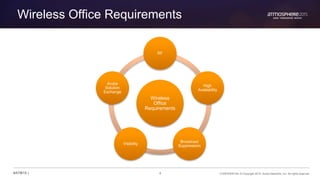
Wireless Office Requirements
Wireless
Office
Requirements
RF
High
Availability
Broadcast
Suppression
Visibility
Aruba
Solution
Exchange
5 CONFIDENTIAL © Copyright 2015. Aruba Networks, Inc. All rights reserved#ATM15 |
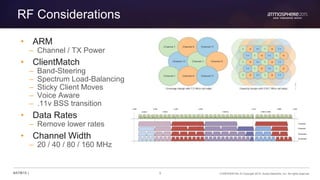
RF Considerations
• ARM
– Channel / TX Power
• ClientMatch
– Band-Steering
– Spectrum Load-Balancing
– Sticky Client Moves
– Voice Aware
– .11v BSS transition
• Data Rates
– Remove lower rates
• Channel Width
– 20 / 40 / 80 / 160 MHz
6 CONFIDENTIAL © Copyright 2015. Aruba Networks, Inc. All rights reserved#ATM15 |
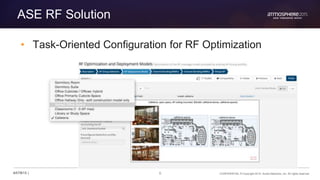
ASE RF Solution
• Task-Oriented Configuration for RF Optimization
7 CONFIDENTIAL © Copyright 2015. Aruba Networks, Inc. All rights reserved#ATM15 |
ASE RF Solution
• Generated Configuration can be pasted to controller
8#ATM15 |
High Availability / Redundancy
@ArubaNetworks
9 CONFIDENTIAL © Copyright 2015. Aruba Networks, Inc. All rights reserved#ATM15 |
Transition Content
Controller High Availability
• Client State Info is shared by a pair of controller
• 2048 APs: under a second
Client State
Sync
• ESSID stays up
• AP builds a primary tunnel and a standby tunnel
• 512 APs: ~9 sec
AP Fast
Failover
• Ensures that AP always have a controller available
• LMS / Backup LMS
• 512 APs: ~1min 20 sec
VRRP
@ArubaNetworks
10 CONFIDENTIAL © Copyright 2015. Aruba Networks, Inc. All rights reserved#ATM15 |
Transition Content
Client State Sync
1. Client successfully authenticates
and generates Key and PMK-SA
(Role, VLAN)
2. Client info are synced between
the controller pair
3. AP standby tunnel becomes
active upon controller failure
4. Client is deauth and when it
reconnects, it performs a 4-way
key exchange
• Does not require full authentication to
radius servers
5. Controller deployed in Active /
Active Model
@ArubaNetworks
Authentication
ServersMaster
Local LocalX
Active GRE
Standby GRE
Active / Active Deployment
11 CONFIDENTIAL © Copyright 2015. Aruba Networks, Inc. All rights reserved#ATM15 |
Generated Configuration from ASE
12#ATM15 |
Broadcast / Multicast
Controls
@ArubaNetworks
13 CONFIDENTIAL © Copyright 2015. Aruba Networks, Inc. All rights reserved#ATM15 |
Wireless Requirements
• Design Criteria
– Mobility
• Mobile device don’t disconnect and do not understand VLANs
• User are not physically constraint to space
– RF coverage
• Boundaries are less obvious
– Decisions, Decisions
• Single VLAN or VLAN Pool?
• How large should the broadcast domain be?
• L2 Mobility
• IP Mobility
– IPv6 Clients
14 CONFIDENTIAL © Copyright 2015. Aruba Networks, Inc. All rights reserved#ATM15 |
Broadcast Domain
• “Controlling broadcast
propagation… is important
to reduce the amount of
overhead”
• Wired Network
– Broadcast Control with VLAN
segmentation
– Physically Constraint (per floor)
– Finite number of ports
15 CONFIDENTIAL © Copyright 2015. Aruba Networks, Inc. All rights reserved#ATM15 |
Problem: WLAN Broadcast Flow
• Unicast frames
– Unique for each client
• Broadcast / Multicast frames
– Clients connecting to same BSS
(AP) use the same key
– Broadcast / multicast traffic is
unnecessary flooded
Unicast Frame
Broadcast /
Multicast Frame
VLAN
16 CONFIDENTIAL © Copyright 2015. Aruba Networks, Inc. All rights reserved#ATM15 |
Problem: Multiple VLANs
• Unicast frames
– Unique for each client
• Broadcast / Multicast frames
– Clients connecting to same BSS
(AP) use the same key
– Clients can see broadcast /
multicast from other VLANs
Unicast Frame
Broadcast /
Multicast Frame
VLAN 20
VLAN 10
17 CONFIDENTIAL © Copyright 2015. Aruba Networks, Inc. All rights reserved#ATM15 |
Transition Content
AOS Broadcast / Multicast Control
Broadcast
/ Multicast
Controls
Enable IGMP snooping /
MLD
• Learn IGMP membership
• Prune multicast flows if there are no
subscribers
“broadcast-filter all”
• Packets allowed if:
•Packets originating from the wired
side with destination range of
225.0.0.0-239.255.255.255
•A station has subscribed to a multicast
group
“broadcast-filter arp”
• ARP will be flooded on the wired side
and sent as 802.11 unicast frame if
there is a match in the user table
• DHCP converted to unicast
• IPv6 NS is treated in a similar fashion
Duplicate Address Detection
• Gratuitous ARP
• IPv6 DAD
If DMO is enabled,
multicast packets will
be sent as 802.11
unicast
@ArubaNetworks
18 CONFIDENTIAL © Copyright 2015. Aruba Networks, Inc. All rights reserved#ATM15 |
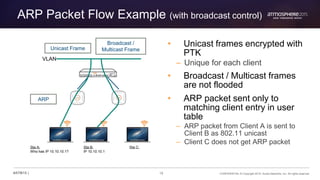
ARP Packet Flow Example (with broadcast control)
• Unicast frames encrypted with
PTK
– Unique for each client
• Broadcast / Multicast frames
are not flooded
• ARP packet sent only to
matching client entry in user
table
– ARP packet from Client A is sent to
Client B as 802.11 unicast
– Client C does not get ARP packet
Unicast Frame
Broadcast /
Multicast Frame
ARP
VLAN
Sta A:
Who has IP 10.10.10.1?
Sta B:
IP 10.10.10.1
Sta C:
19 CONFIDENTIAL © Copyright 2015. Aruba Networks, Inc. All rights reserved#ATM15 |
Bonjour and SSDP in the Enterprise
Enable Airgroup to handle Zero Configuration Networking Multicast (Bonjour
and SSDP) large campus without affecting Wi-Fi performance
• Well-known address for mDNS is 224.0.0.251
• Well-known address for SSDP is 239.255.255.250
20 CONFIDENTIAL © Copyright 2015. Aruba Networks, Inc. All rights reserved#ATM15 |
VLAN Pooling
• When should VLAN pool be used?
– Provide additional address space for non-contiguous
• Higher chance if public IP address is being used
– All VLANs in the pool should be the same size
• Controller will automatically convert IPv6 RAs to unicast
– Conversion of RAs to unicast is necessary to prevent client from
getting address in wrong IPv6 prefix
– Unicast traffic may negatively affect battery life
21 CONFIDENTIAL © Copyright 2015. Aruba Networks, Inc. All rights reserved#ATM15 |
Summary
• Keep it simple, use a single VLAN
– The cost of managing broadcast / multicast domain for multiple
VLANs is expensive
– Use Airgroup to manage Bonjour (AirPlay) and SSDP (Chromecast /
DLNA) behavior
– Avoid potential client misbehavior
• L2 Domain should match a contiguous RF footprint
– With Mobility, devices are not constraint to a physical space
22 CONFIDENTIAL © Copyright 2015. Aruba Networks, Inc. All rights reserved#ATM15 |
Things to Keep in Mind
• Single VLAN can put additional requirements to uplink
router
– Router should be able to handle large ARP table
• DHCP server scalability / redundancy
23#ATM15 |
Visibility
@ArubaNetworks
24 CONFIDENTIAL © Copyright 2015. Aruba Networks, Inc. All rights reserved#ATM15 |
Voice / UCC Visibility
• Real time correlation between
Call Quality and Wi-Fi Quality
• Lync SDN 2.1
– additional session info provided
25 CONFIDENTIAL © Copyright 2015. Aruba Networks, Inc. All rights reserved#ATM15 |
AppRF
26 CONFIDENTIAL © Copyright 2015. Aruba Networks, Inc. All rights reserved#ATM15 |
Aruba Solution Exchange (ASE)
• Aruba Solution Exchange (ASE)
– https://ase.arubanetworks.com
• Benefits
– Generate dynamic configuration
– Reduce time to make use of configuration
– Solution validates user input
27 CONFIDENTIAL © Copyright 2015. Aruba Networks, Inc. All rights reserved#ATM15 |
ASE FAQ
• Who can access ASE?
– Customer, Partners, Airhead Social Users
• Is there a cost?
– ASE is free
• Documentation
– https://ase.arubanetworks.com/docs
• How can I get notification when a solution is updated?
– Follow the solution!
28 CONFIDENTIAL © Copyright 2015. Aruba Networks, Inc. All rights reserved#ATM15 |
Sign up, save $200!
arubanetworks.com/atmosphere2016
Give feedback!
… Before You Go
atmosphere
2016
29#ATM15 | @ArubaNetworks
THANK YOU
30#ATM15 | @ArubaNetworks

A-to-Z design guide for the all-wireless workplace

  • 1.
    #ATM15 | A-to-Z DesignGuide for the All-Wireless Workplace Partha Narasimhan, Michael Wong March 2015 @ArubaNetworks
  • 2.
    2 CONFIDENTIAL ©Copyright 2015. Aruba Networks, Inc. All rights reserved#ATM15 | #nomorephones
  • 3.
    3 CONFIDENTIAL ©Copyright 2015. Aruba Networks, Inc. All rights reserved#ATM15 | Wireless Devices • Wireless Devices – 802.11n / 802.11ac – Wireless NIC driver updates – Roaming behavior – 11r, 11k, 11v capabilities
  • 4.
    4 CONFIDENTIAL ©Copyright 2015. Aruba Networks, Inc. All rights reserved#ATM15 | Wireless Office Requirements Wireless Office Requirements RF High Availability Broadcast Suppression Visibility Aruba Solution Exchange
  • 5.
    5 CONFIDENTIAL ©Copyright 2015. Aruba Networks, Inc. All rights reserved#ATM15 | RF Considerations • ARM – Channel / TX Power • ClientMatch – Band-Steering – Spectrum Load-Balancing – Sticky Client Moves – Voice Aware – .11v BSS transition • Data Rates – Remove lower rates • Channel Width – 20 / 40 / 80 / 160 MHz
  • 6.
    6 CONFIDENTIAL ©Copyright 2015. Aruba Networks, Inc. All rights reserved#ATM15 | ASE RF Solution • Task-Oriented Configuration for RF Optimization
  • 7.
    7 CONFIDENTIAL ©Copyright 2015. Aruba Networks, Inc. All rights reserved#ATM15 | ASE RF Solution • Generated Configuration can be pasted to controller
  • 8.
    8#ATM15 | High Availability/ Redundancy @ArubaNetworks
  • 9.
    9 CONFIDENTIAL ©Copyright 2015. Aruba Networks, Inc. All rights reserved#ATM15 | Transition Content Controller High Availability • Client State Info is shared by a pair of controller • 2048 APs: under a second Client State Sync • ESSID stays up • AP builds a primary tunnel and a standby tunnel • 512 APs: ~9 sec AP Fast Failover • Ensures that AP always have a controller available • LMS / Backup LMS • 512 APs: ~1min 20 sec VRRP @ArubaNetworks
  • 10.
    10 CONFIDENTIAL ©Copyright 2015. Aruba Networks, Inc. All rights reserved#ATM15 | Transition Content Client State Sync 1. Client successfully authenticates and generates Key and PMK-SA (Role, VLAN) 2. Client info are synced between the controller pair 3. AP standby tunnel becomes active upon controller failure 4. Client is deauth and when it reconnects, it performs a 4-way key exchange • Does not require full authentication to radius servers 5. Controller deployed in Active / Active Model @ArubaNetworks Authentication ServersMaster Local LocalX Active GRE Standby GRE Active / Active Deployment
  • 11.
    11 CONFIDENTIAL ©Copyright 2015. Aruba Networks, Inc. All rights reserved#ATM15 | Generated Configuration from ASE
  • 12.
    12#ATM15 | Broadcast /Multicast Controls @ArubaNetworks
  • 13.
    13 CONFIDENTIAL ©Copyright 2015. Aruba Networks, Inc. All rights reserved#ATM15 | Wireless Requirements • Design Criteria – Mobility • Mobile device don’t disconnect and do not understand VLANs • User are not physically constraint to space – RF coverage • Boundaries are less obvious – Decisions, Decisions • Single VLAN or VLAN Pool? • How large should the broadcast domain be? • L2 Mobility • IP Mobility – IPv6 Clients
  • 14.
    14 CONFIDENTIAL ©Copyright 2015. Aruba Networks, Inc. All rights reserved#ATM15 | Broadcast Domain • “Controlling broadcast propagation… is important to reduce the amount of overhead” • Wired Network – Broadcast Control with VLAN segmentation – Physically Constraint (per floor) – Finite number of ports
  • 15.
    15 CONFIDENTIAL ©Copyright 2015. Aruba Networks, Inc. All rights reserved#ATM15 | Problem: WLAN Broadcast Flow • Unicast frames – Unique for each client • Broadcast / Multicast frames – Clients connecting to same BSS (AP) use the same key – Broadcast / multicast traffic is unnecessary flooded Unicast Frame Broadcast / Multicast Frame VLAN
  • 16.
    16 CONFIDENTIAL ©Copyright 2015. Aruba Networks, Inc. All rights reserved#ATM15 | Problem: Multiple VLANs • Unicast frames – Unique for each client • Broadcast / Multicast frames – Clients connecting to same BSS (AP) use the same key – Clients can see broadcast / multicast from other VLANs Unicast Frame Broadcast / Multicast Frame VLAN 20 VLAN 10
  • 17.
    17 CONFIDENTIAL ©Copyright 2015. Aruba Networks, Inc. All rights reserved#ATM15 | Transition Content AOS Broadcast / Multicast Control Broadcast / Multicast Controls Enable IGMP snooping / MLD • Learn IGMP membership • Prune multicast flows if there are no subscribers “broadcast-filter all” • Packets allowed if: •Packets originating from the wired side with destination range of 225.0.0.0-239.255.255.255 •A station has subscribed to a multicast group “broadcast-filter arp” • ARP will be flooded on the wired side and sent as 802.11 unicast frame if there is a match in the user table • DHCP converted to unicast • IPv6 NS is treated in a similar fashion Duplicate Address Detection • Gratuitous ARP • IPv6 DAD If DMO is enabled, multicast packets will be sent as 802.11 unicast @ArubaNetworks
  • 18.
    18 CONFIDENTIAL ©Copyright 2015. Aruba Networks, Inc. All rights reserved#ATM15 | ARP Packet Flow Example (with broadcast control) • Unicast frames encrypted with PTK – Unique for each client • Broadcast / Multicast frames are not flooded • ARP packet sent only to matching client entry in user table – ARP packet from Client A is sent to Client B as 802.11 unicast – Client C does not get ARP packet Unicast Frame Broadcast / Multicast Frame ARP VLAN Sta A: Who has IP 10.10.10.1? Sta B: IP 10.10.10.1 Sta C:
  • 19.
    19 CONFIDENTIAL ©Copyright 2015. Aruba Networks, Inc. All rights reserved#ATM15 | Bonjour and SSDP in the Enterprise Enable Airgroup to handle Zero Configuration Networking Multicast (Bonjour and SSDP) large campus without affecting Wi-Fi performance • Well-known address for mDNS is 224.0.0.251 • Well-known address for SSDP is 239.255.255.250
  • 20.
    20 CONFIDENTIAL ©Copyright 2015. Aruba Networks, Inc. All rights reserved#ATM15 | VLAN Pooling • When should VLAN pool be used? – Provide additional address space for non-contiguous • Higher chance if public IP address is being used – All VLANs in the pool should be the same size • Controller will automatically convert IPv6 RAs to unicast – Conversion of RAs to unicast is necessary to prevent client from getting address in wrong IPv6 prefix – Unicast traffic may negatively affect battery life
  • 21.
    21 CONFIDENTIAL ©Copyright 2015. Aruba Networks, Inc. All rights reserved#ATM15 | Summary • Keep it simple, use a single VLAN – The cost of managing broadcast / multicast domain for multiple VLANs is expensive – Use Airgroup to manage Bonjour (AirPlay) and SSDP (Chromecast / DLNA) behavior – Avoid potential client misbehavior • L2 Domain should match a contiguous RF footprint – With Mobility, devices are not constraint to a physical space
  • 22.
    22 CONFIDENTIAL ©Copyright 2015. Aruba Networks, Inc. All rights reserved#ATM15 | Things to Keep in Mind • Single VLAN can put additional requirements to uplink router – Router should be able to handle large ARP table • DHCP server scalability / redundancy
  • 23.
  • 24.
    24 CONFIDENTIAL ©Copyright 2015. Aruba Networks, Inc. All rights reserved#ATM15 | Voice / UCC Visibility • Real time correlation between Call Quality and Wi-Fi Quality • Lync SDN 2.1 – additional session info provided
  • 25.
    25 CONFIDENTIAL ©Copyright 2015. Aruba Networks, Inc. All rights reserved#ATM15 | AppRF
  • 26.
    26 CONFIDENTIAL ©Copyright 2015. Aruba Networks, Inc. All rights reserved#ATM15 | Aruba Solution Exchange (ASE) • Aruba Solution Exchange (ASE) – https://ase.arubanetworks.com • Benefits – Generate dynamic configuration – Reduce time to make use of configuration – Solution validates user input
  • 27.
    27 CONFIDENTIAL ©Copyright 2015. Aruba Networks, Inc. All rights reserved#ATM15 | ASE FAQ • Who can access ASE? – Customer, Partners, Airhead Social Users • Is there a cost? – ASE is free • Documentation – https://ase.arubanetworks.com/docs • How can I get notification when a solution is updated? – Follow the solution!
  • 28.
    28 CONFIDENTIAL ©Copyright 2015. Aruba Networks, Inc. All rights reserved#ATM15 | Sign up, save $200! arubanetworks.com/atmosphere2016 Give feedback! … Before You Go atmosphere 2016
  • 29.
  • 30.
    THANK YOU 30#ATM15 |@ArubaNetworks

Editor's Notes

  • #9 Make networks mobility-defined instead of fixed
  • #10 Make networks mobility-defined instead of fixed
  • #11 Make networks mobility-defined instead of fixed
  • #13 Make networks mobility-defined instead of fixed
  • #18 Make networks mobility-defined instead of fixed
  • #24 Make networks mobility-defined instead of fixed
  • #29 Make networks mobility-defined instead of fixed
  • #30 Make networks mobility-defined instead of fixed