


Aruba / Palo Alto Networks
Secure Enterprise Mobility
CONFIDENTIAL
© Copyright 2014. Aruba Networks, Inc.
All rights reserved
2 #AirheadsConf
Today’s Agenda
• Mobility / BYOD
• Threat Landscape & Challenges
• Integration Points
• Demonstration
3
CONFIDENTIAL
© Copyright 2014. Aruba Networks, Inc.
All rights reserved
#AirheadsConf
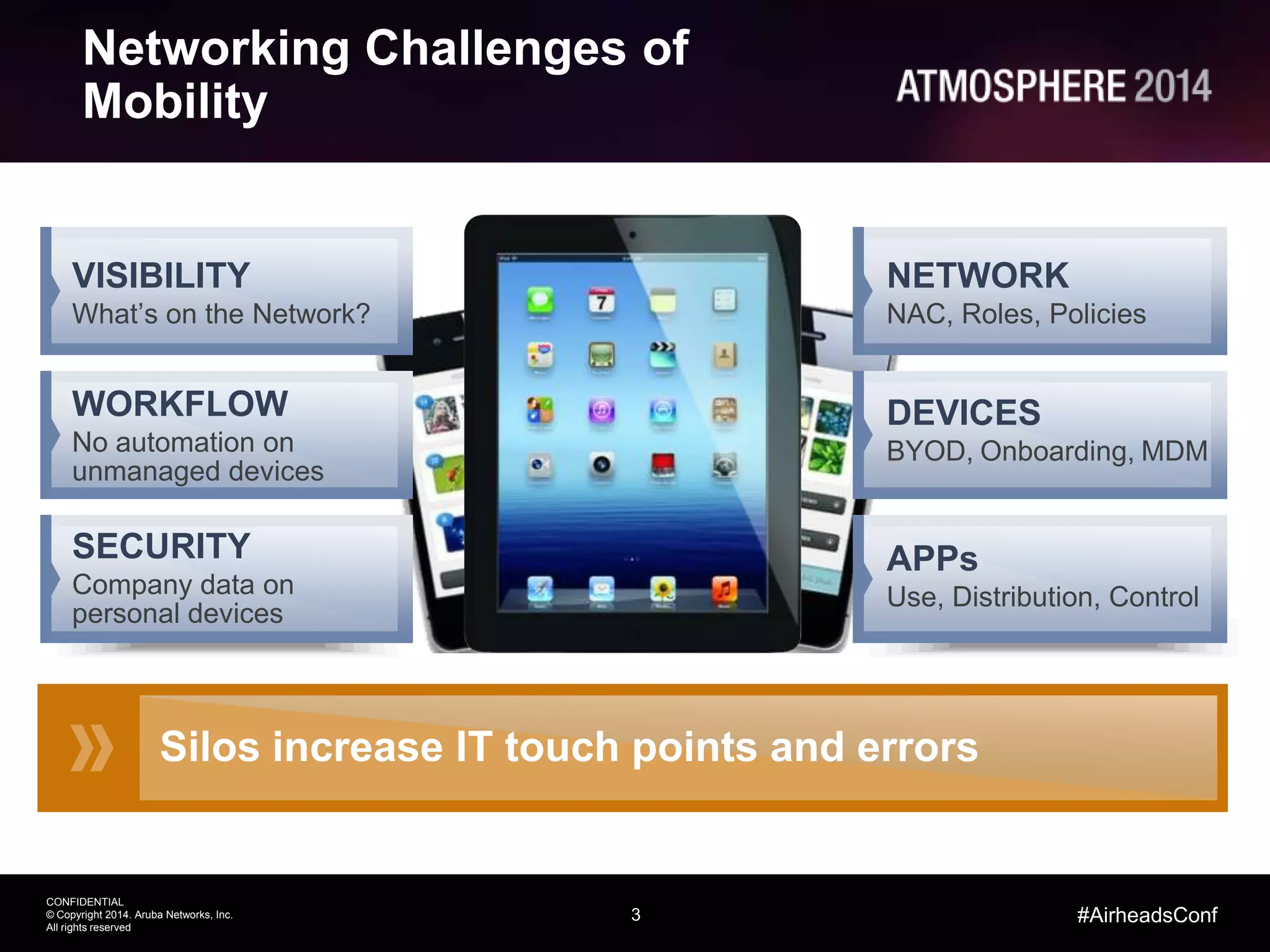
Networking Challenges of
Mobility
Silos increase IT touch points and errors
NETWORK
NAC, Roles, Policies
DEVICES
BYOD, Onboarding, MDM
APPs
Use, Distribution, Control
VISIBILITY
What’s on the Network?
WORKFLOW
No automation on
unmanaged devices
SECURITY
Company data on
personal devices
4
CONFIDENTIAL
© Copyright 2014. Aruba Networks, Inc.
All rights reserved
#AirheadsConf
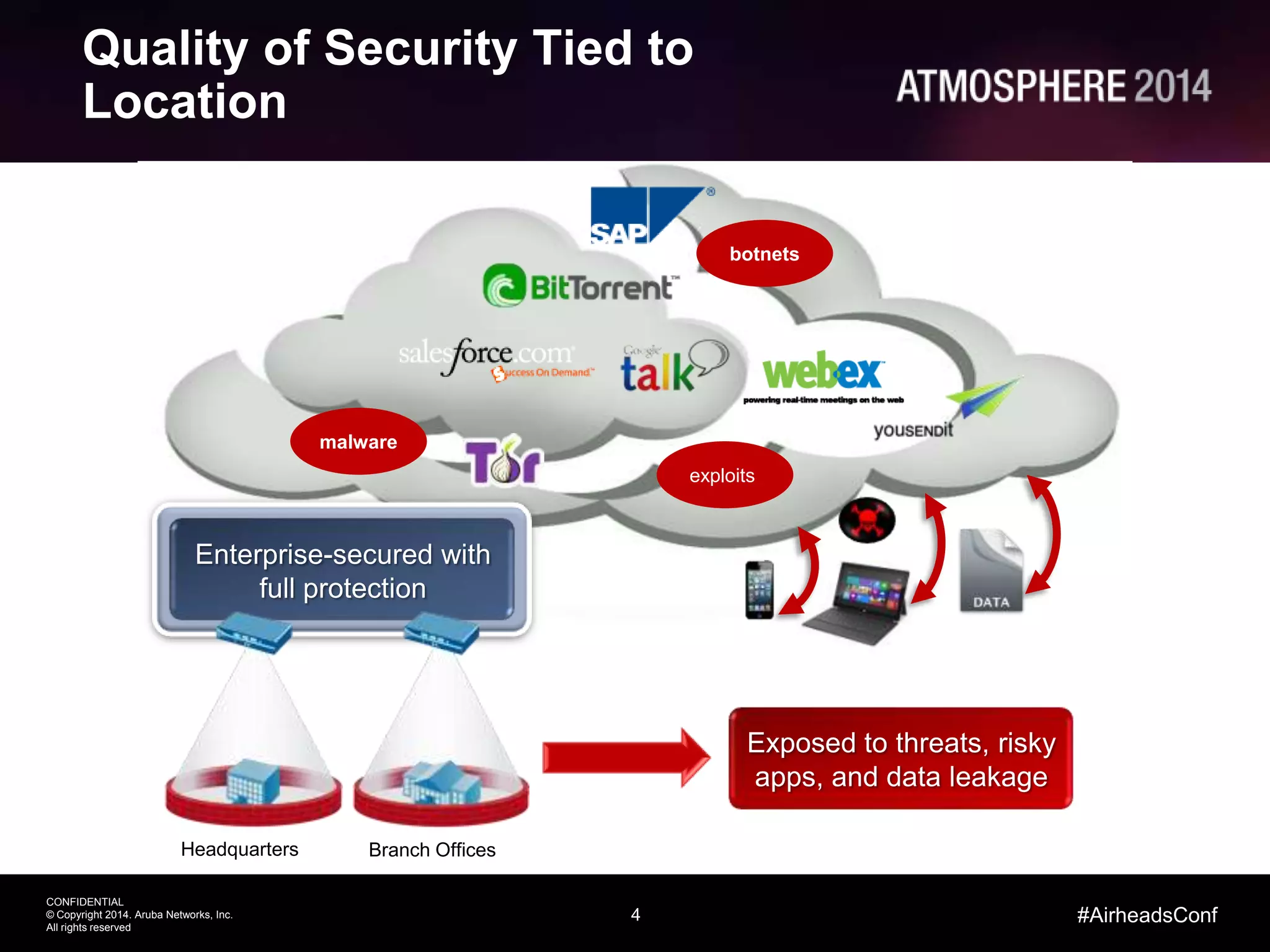
Quality of Security Tied to
Location
malware
botnets
exploits
Exposed to threats, risky
apps, and data leakage
Enterprise-secured with
full protection
Headquarters Branch Offices
Palo Alto Networks
Safe BYOD Application Enablement
6
CONFIDENTIAL
© Copyright 2014. Aruba Networks, Inc.
All rights reserved
#AirheadsConf
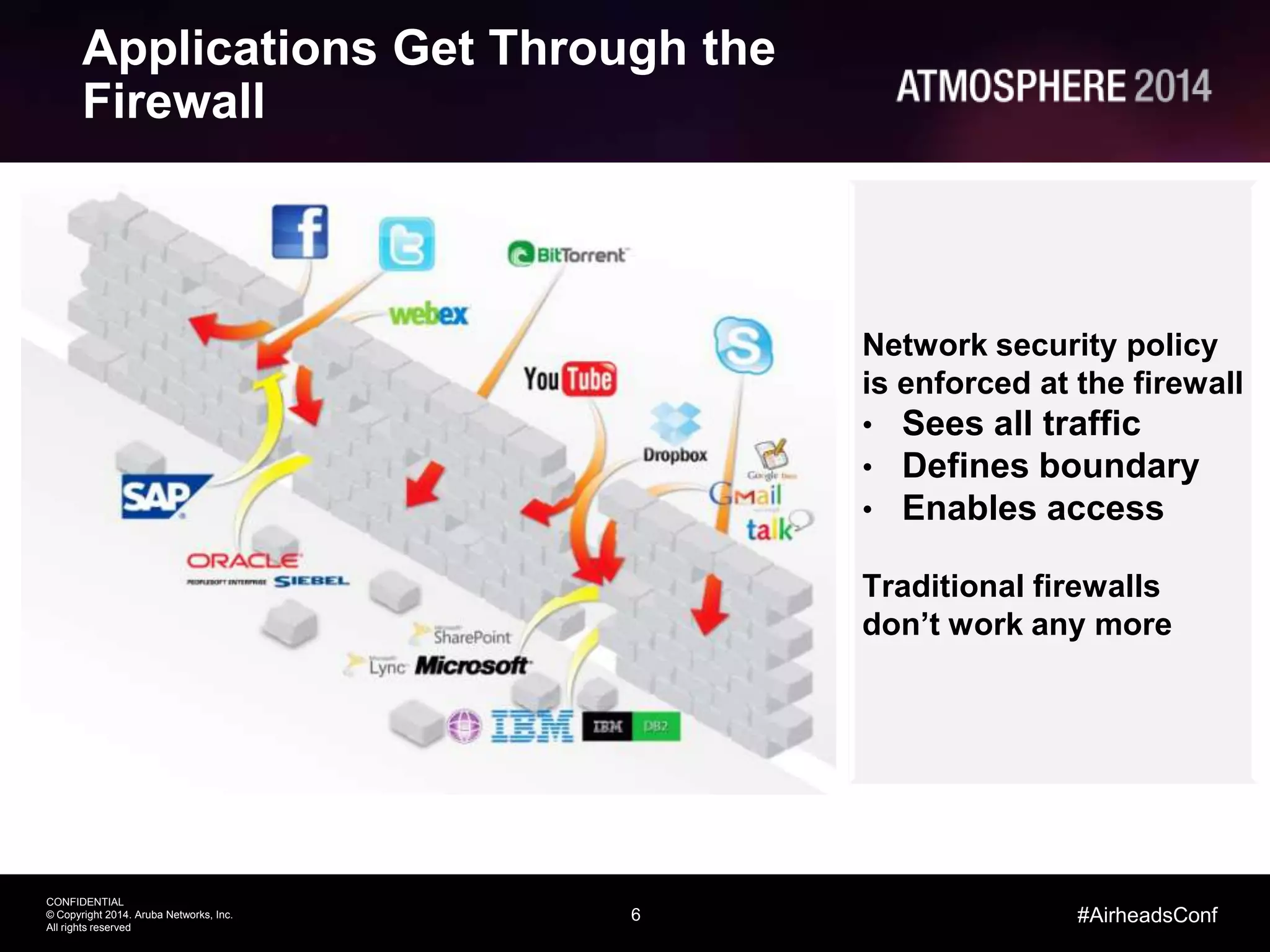
Applications Get Through the
Firewall
Network security policy
is enforced at the firewall
• Sees all traffic
• Defines boundary
• Enables access
Traditional firewalls
don’t work any more
7
CONFIDENTIAL
© Copyright 2014. Aruba Networks, Inc.
All rights reserved
#AirheadsConf
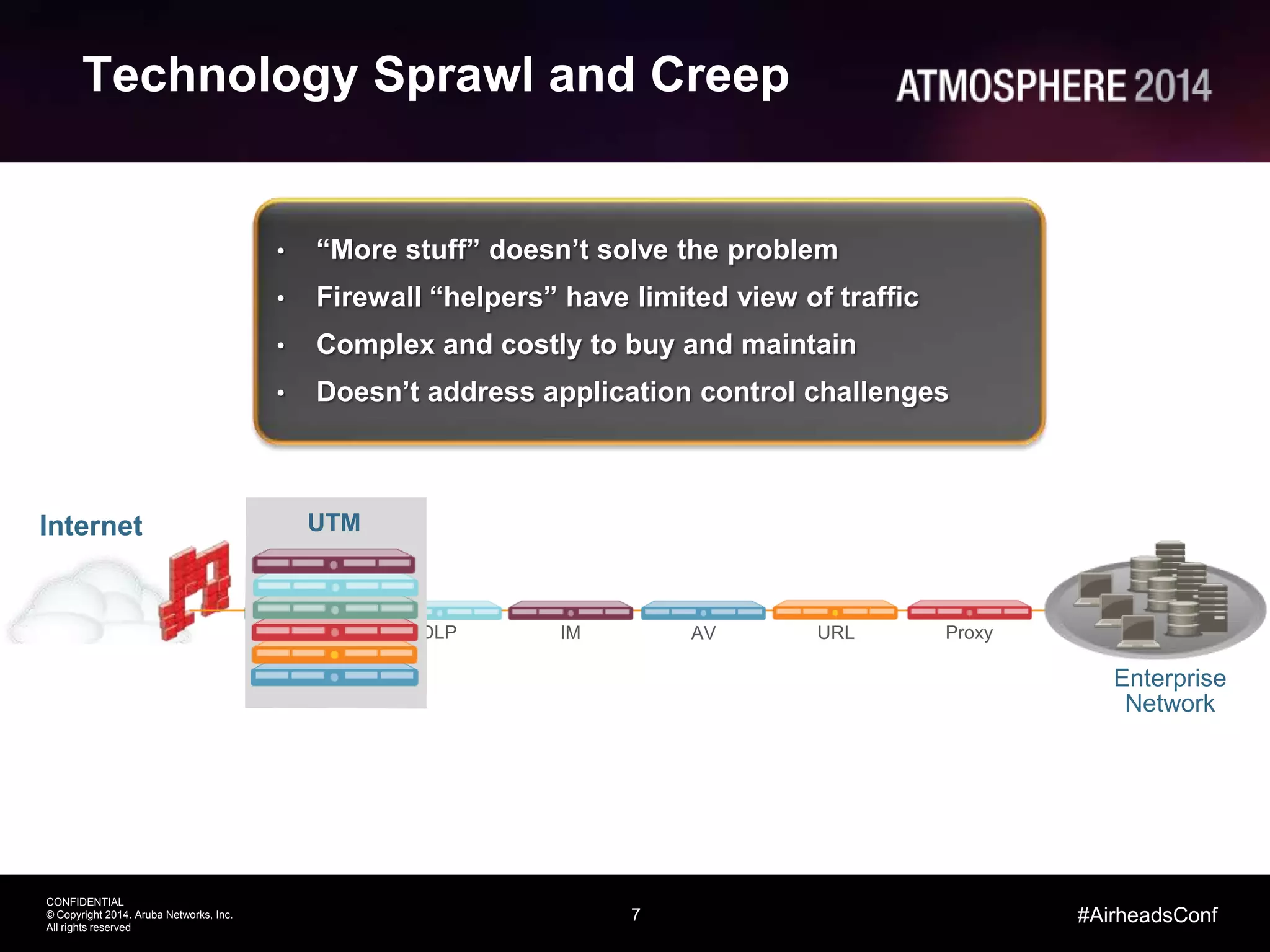
Technology Sprawl and Creep
Enterprise
Network
• “More stuff” doesn’t solve the problem
• Firewall “helpers” have limited view of traffic
• Complex and costly to buy and maintain
• Doesn’t address application control challenges
IMDLPIPS ProxyURLAV
UTMInternet
8
CONFIDENTIAL
© Copyright 2014. Aruba Networks, Inc.
All rights reserved
#AirheadsConf
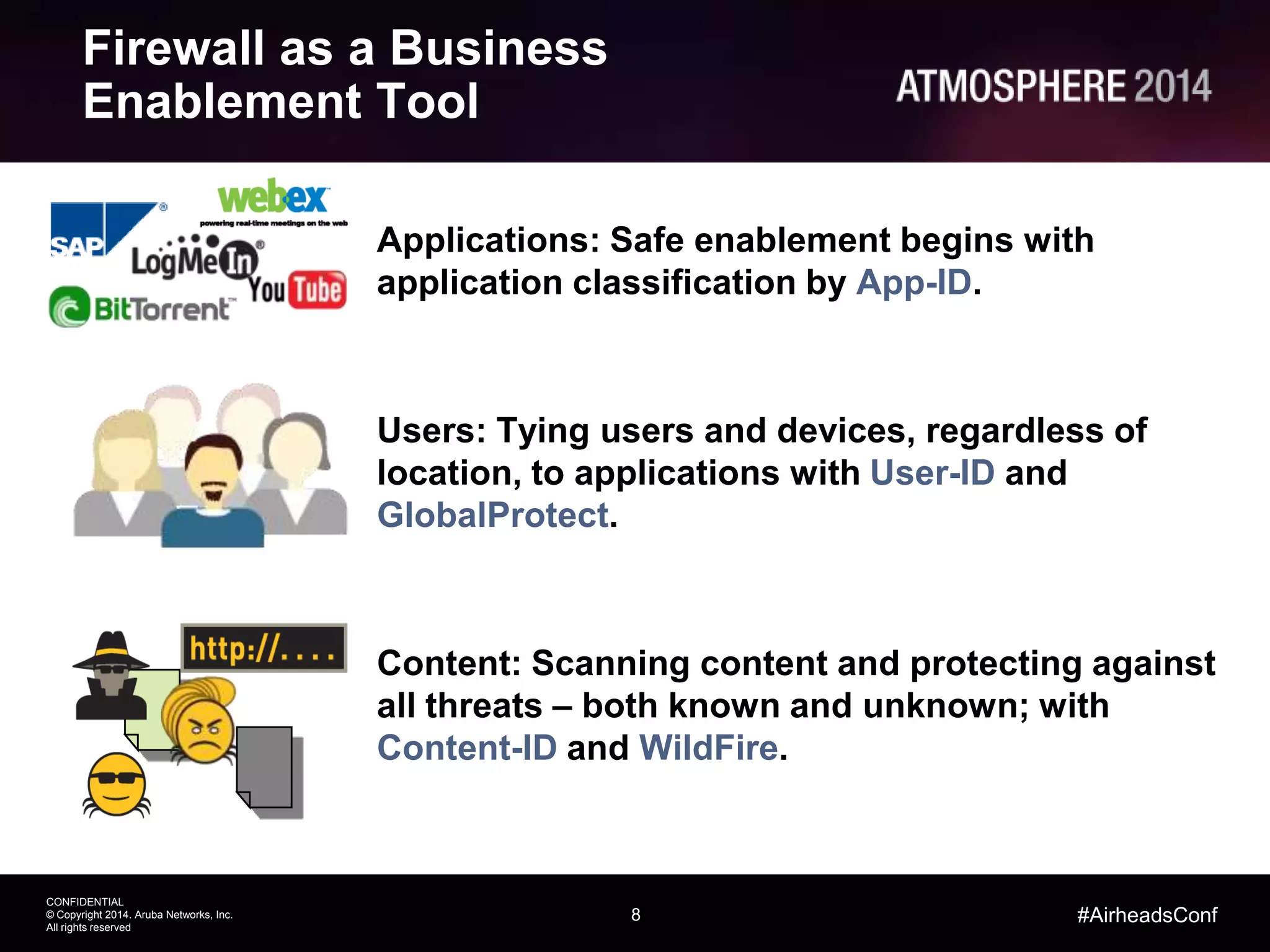
Firewall as a Business
Enablement Tool
Applications: Safe enablement begins with
application classification by App-ID.
Users: Tying users and devices, regardless of
location, to applications with User-ID and
GlobalProtect.
Content: Scanning content and protecting against
all threats – both known and unknown; with
Content-ID and WildFire.
9
CONFIDENTIAL
© Copyright 2014. Aruba Networks, Inc.
All rights reserved
#AirheadsConf
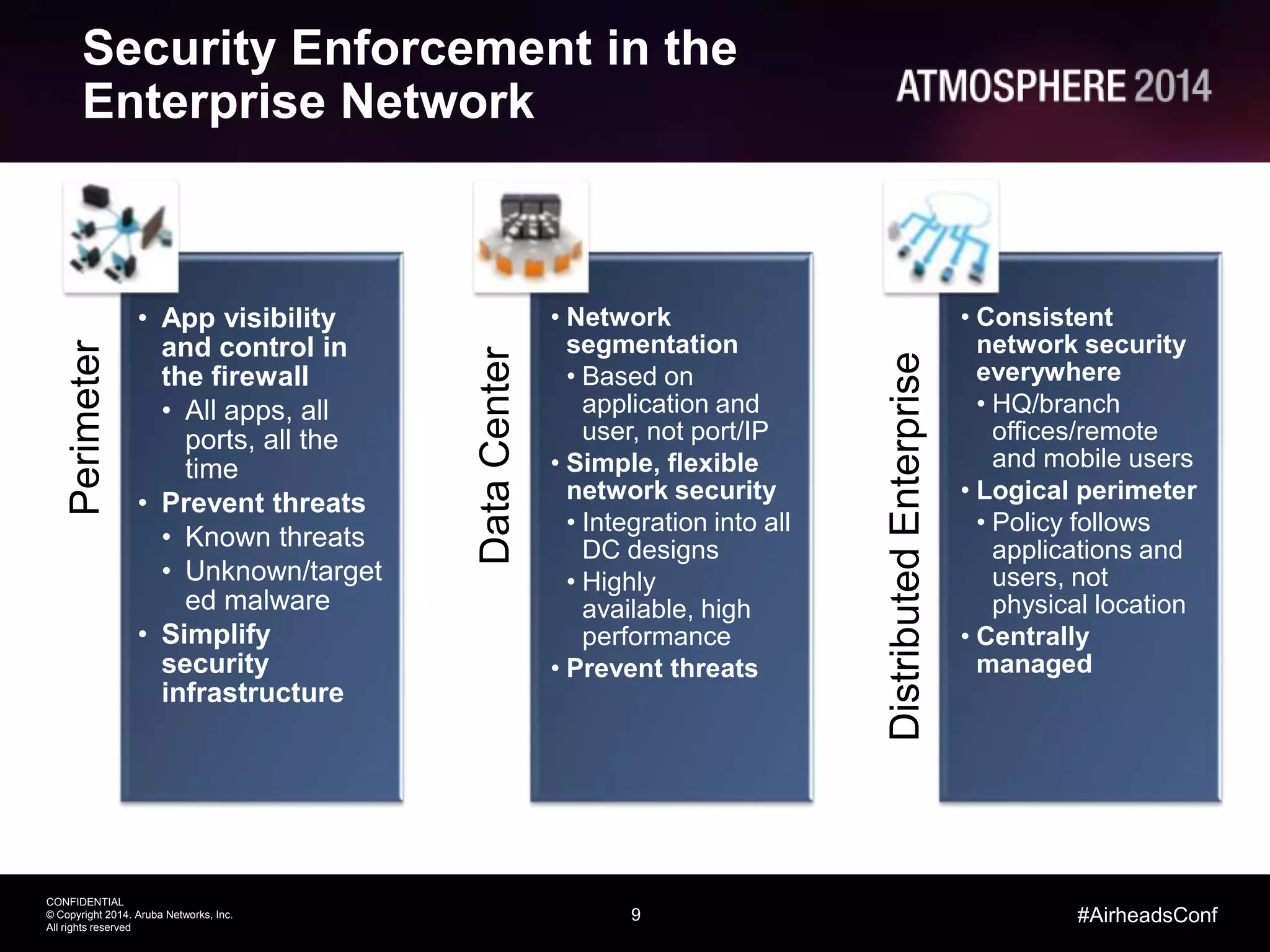
Security Enforcement in the
Enterprise NetworkPerimeter
• App visibility
and control in
the firewall
• All apps, all
ports, all the
time
• Prevent threats
• Known threats
• Unknown/target
ed malware
• Simplify
security
infrastructure
DataCenter
• Network
segmentation
• Based on
application and
user, not port/IP
• Simple, flexible
network security
• Integration into all
DC designs
• Highly
available, high
performance
• Prevent threats
DistributedEnterprise
• Consistent
network security
everywhere
• HQ/branch
offices/remote
and mobile users
• Logical perimeter
• Policy follows
applications and
users, not
physical location
• Centrally
managed
Enabling Enterprise Mobility & BYOD
12
CONFIDENTIAL
© Copyright 2014. Aruba Networks, Inc.
All rights reserved
#AirheadsConf
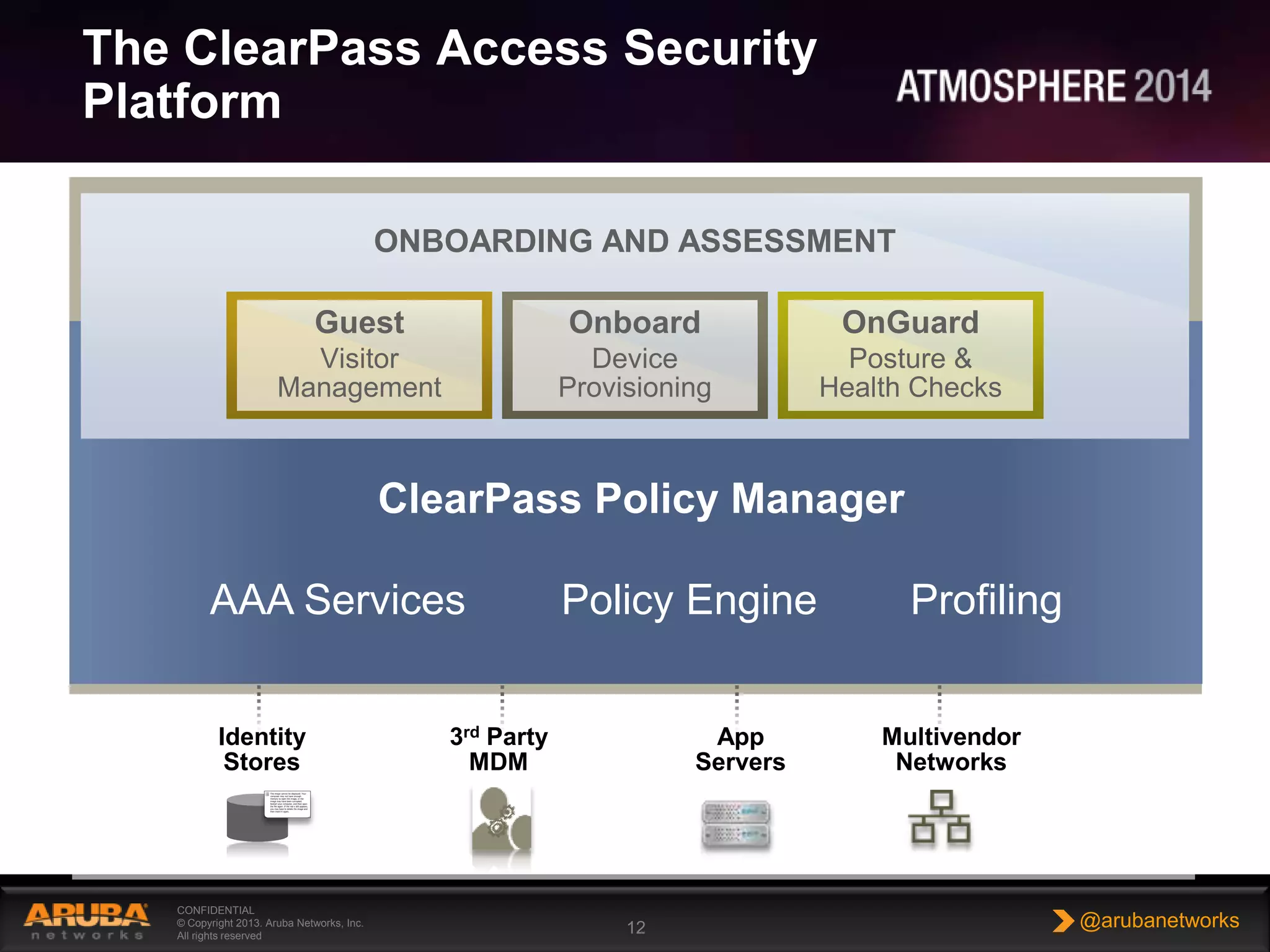
The ClearPass Access Security
Platform
CONFIDENTIAL
© Copyright 2013. Aruba Networks, Inc.
All rights reserved
12 @arubanetworks
Policy Services
Identity
Stores
3rd Party
MDM
App
Servers
DIFFERENTIATED
ACCESS
UNIFIED
POLICIES
DEVICE
VISIBILITY
GUEST EMPLOYEE
POLICY SERVICES
ENTERPRISE-CLASS AAA
RADIUS, TACACS+
VPN
Onboard
Device
Provisioning
OnGuard
Posture &
Health Checks
Guest
Visitor
Management
ONBOARDING AND ASSESSMENT
Multivendor
Networks
ClearPass Policy Manager
AAA Services ProfilingPolicy Engine
13
CONFIDENTIAL
© Copyright 2014. Aruba Networks, Inc.
All rights reserved
#AirheadsConf
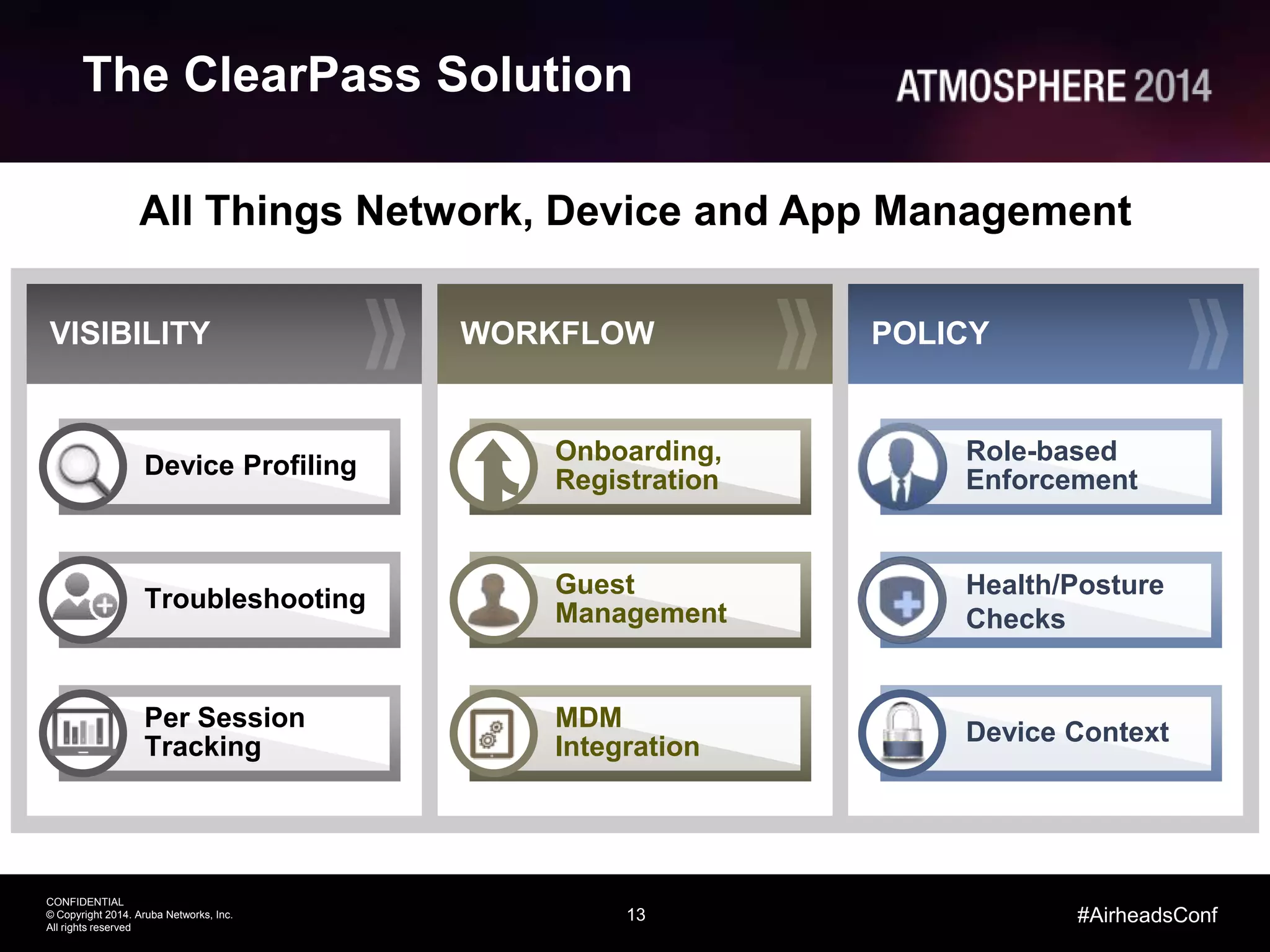
All Things Network, Device and App Management
WORKFLOW POLICYVISIBILITY
Role-based
Enforcement
Health/Posture
Checks
Device Context
Device Profiling
Troubleshooting
Per Session
Tracking
Onboarding,
Registration
Guest
Management
MDM
Integration
The ClearPass Solution
Threat Prevention
15
CONFIDENTIAL
© Copyright 2014. Aruba Networks, Inc.
All rights reserved
#AirheadsConf
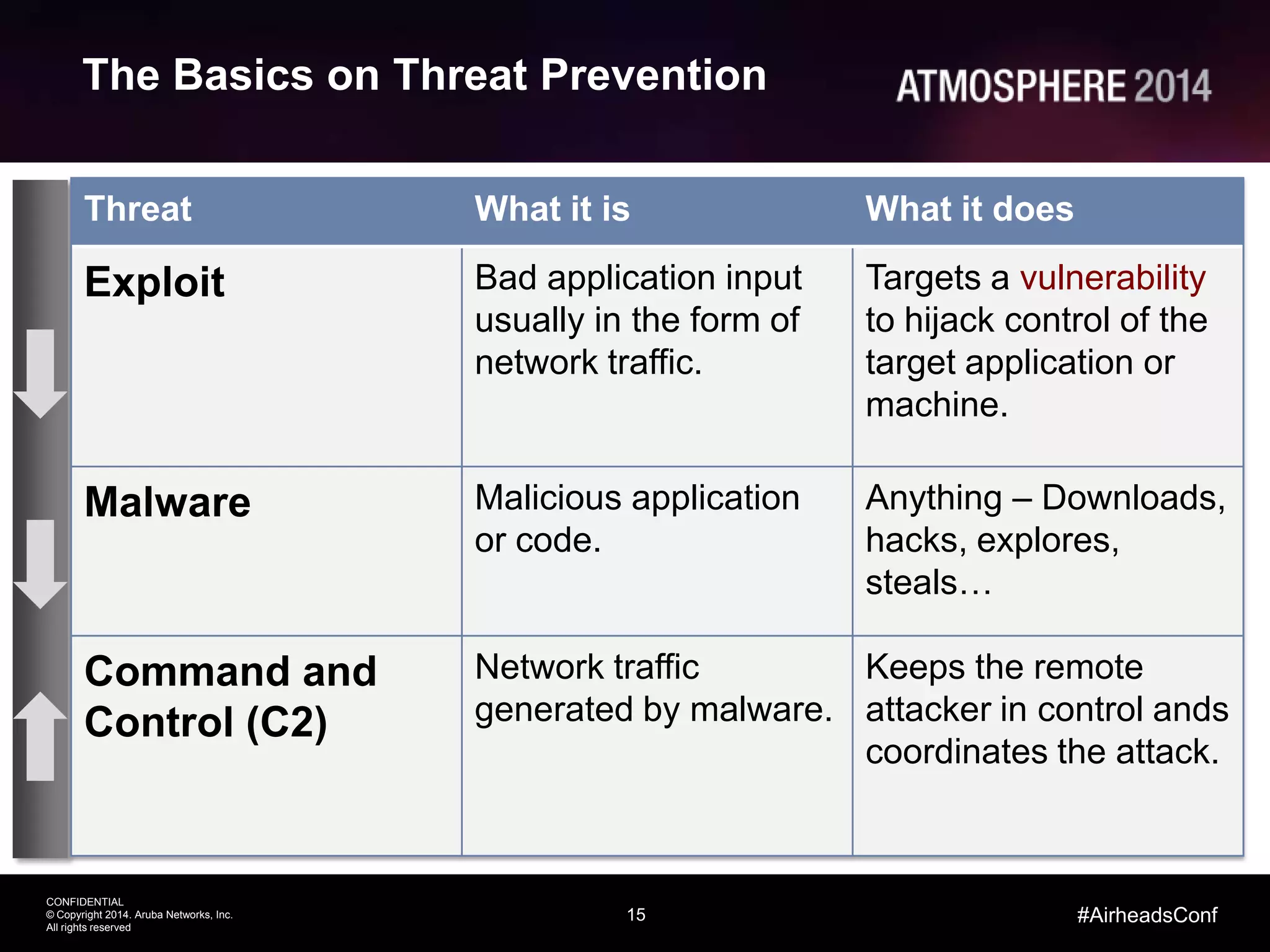
The Basics on Threat Prevention
Threat What it is What it does
Exploit Bad application input
usually in the form of
network traffic.
Targets a vulnerability
to hijack control of the
target application or
machine.
Malware Malicious application
or code.
Anything – Downloads,
hacks, explores,
steals…
Command and
Control (C2)
Network traffic
generated by malware.
Keeps the remote
attacker in control ands
coordinates the attack.
16
CONFIDENTIAL
© Copyright 2014. Aruba Networks, Inc.
All rights reserved
#AirheadsConf
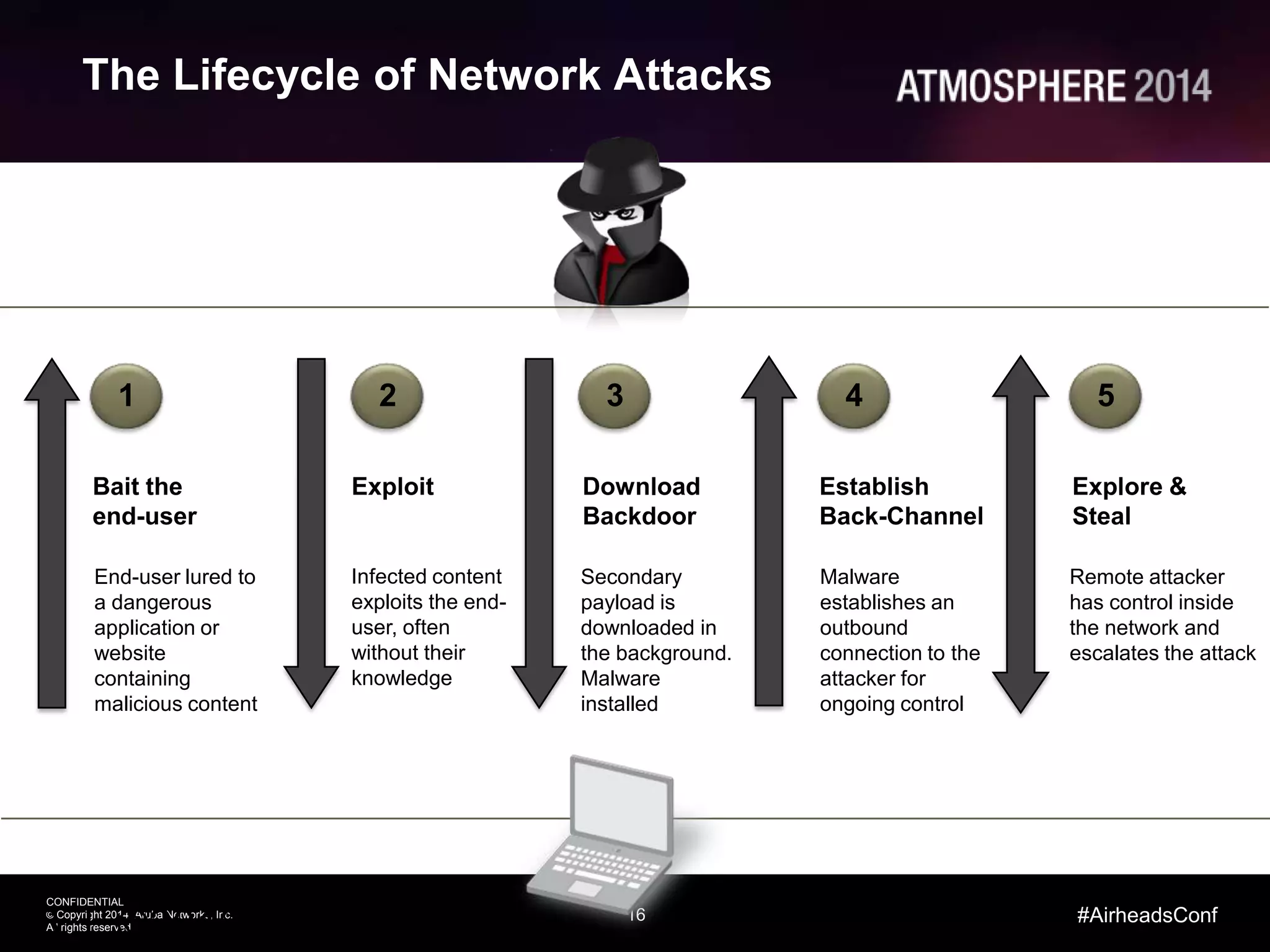
The Lifecycle of Network Attacks
16 | ©2012, Palo
Bait the
end-user
1
End-user lured to
a dangerous
application or
website
containing
malicious content
Exploit
2
Infected content
exploits the end-
user, often
without their
knowledge
Download
Backdoor
3
Secondary
payload is
downloaded in
the background.
Malware
installed
Establish
Back-Channel
4
Malware
establishes an
outbound
connection to the
attacker for
ongoing control
Explore &
Steal
5
Remote attacker
has control inside
the network and
escalates the attack
17 | ©2012, Palo Alto Networks. Confidential and Proprietary.
Secondary
Payload
Spread
Laterally
Custom C2
& Hacking
Data Stolen
Exploit Kit Malware From
New Domain
ZeroAccess
Delivered
C2
Established
Hidden
within SSL
New domain
has no
reputation
Payload
designed to
avoid AV
Non-standard
port use evades
detection
Custom
malware = no
AV signature
Internal traffic is
not monitored
Custom protocol
avoids C2
signatures
RDP & FTP
allowed on the
network
18
CONFIDENTIAL
© Copyright 2014. Aruba Networks, Inc.
All rights reserved
#AirheadsConf
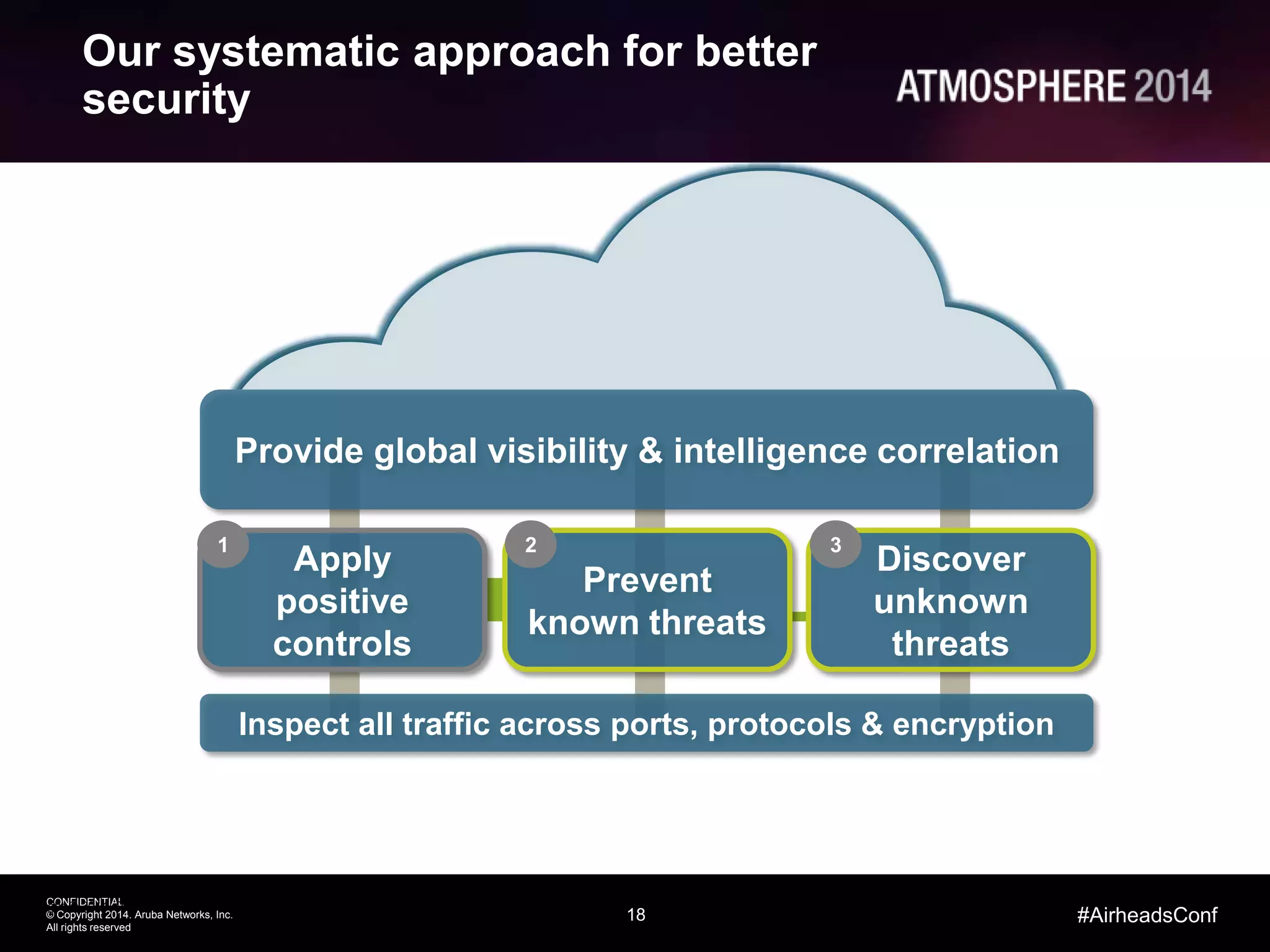
Our systematic approach for better
security
Copyright © 2014, Palo Alto Networks, Inc. All Rights Reserved
Provide global visibility & intelligence correlation
Discover
unknown
threats
Inspect all traffic across ports, protocols & encryption
Prevent
known threats
2 3
Apply
positive
controls
1
Aruba / Palo Alto Networks
Validated Architecture
20
CONFIDENTIAL
© Copyright 2014. Aruba Networks, Inc.
All rights reserved
#AirheadsConf
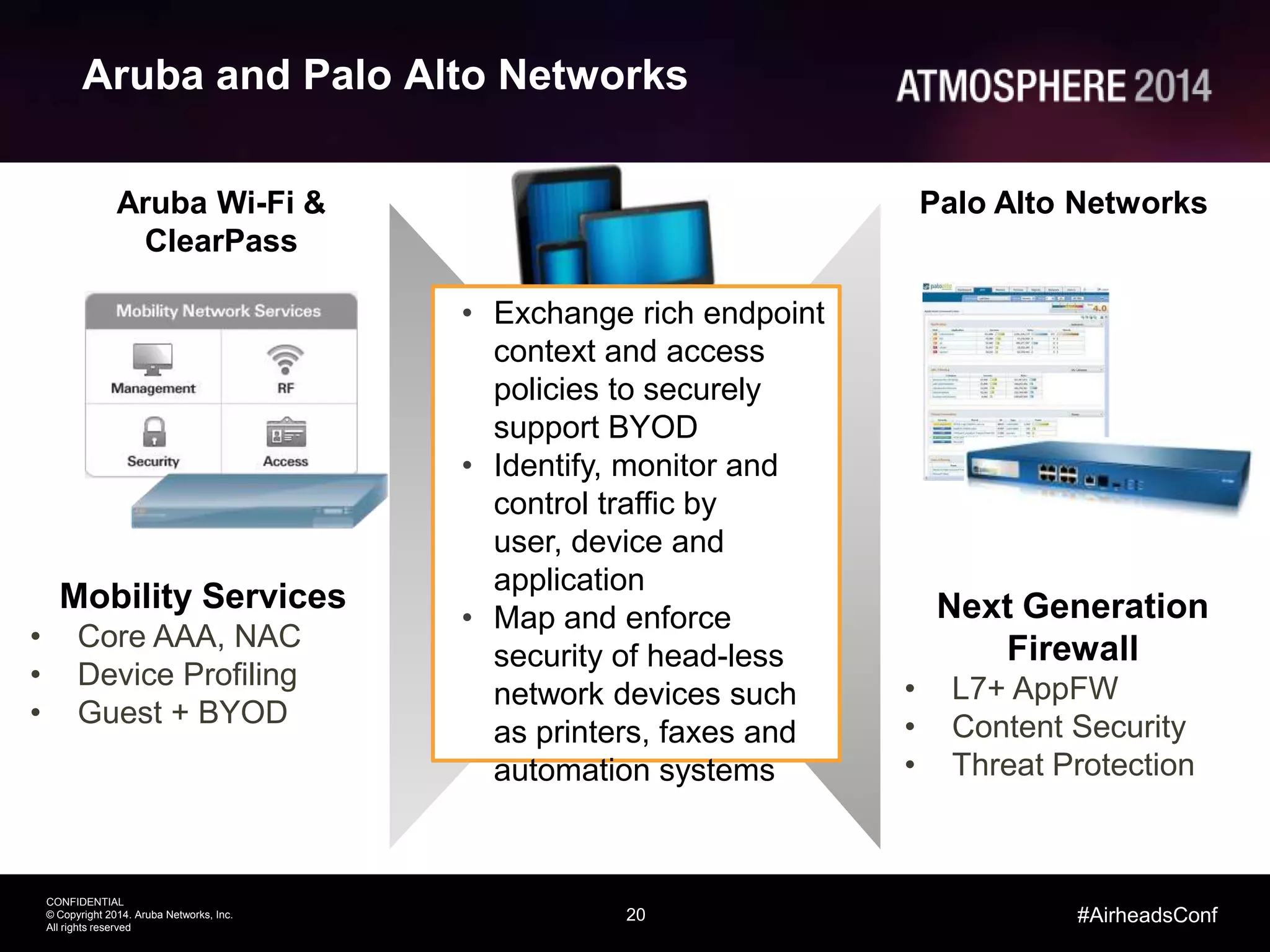
Aruba and Palo Alto Networks
Mobility Services
• Core AAA, NAC
• Device Profiling
• Guest + BYOD
Aruba Wi-Fi &
ClearPass
Palo Alto Networks
Next Generation
Firewall
• L7+ AppFW
• Content Security
• Threat Protection
• Exchange rich endpoint
context and access
policies to securely
support BYOD
• Identify, monitor and
control traffic by
user, device and
application
• Map and enforce
security of head-less
network devices such
as printers, faxes and
automation systems
21
CONFIDENTIAL
© Copyright 2014. Aruba Networks, Inc.
All rights reserved
#AirheadsConf
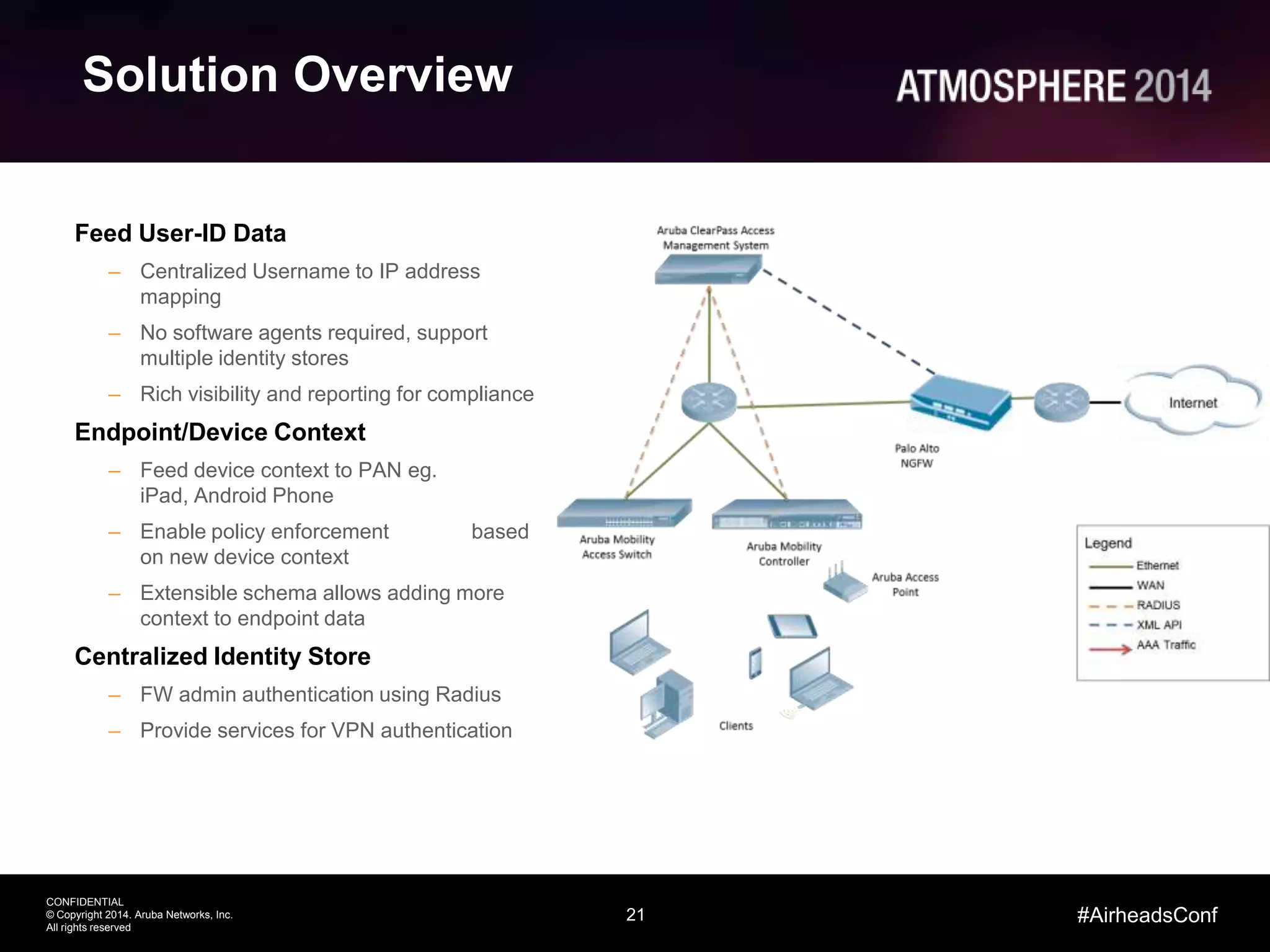
Solution Overview
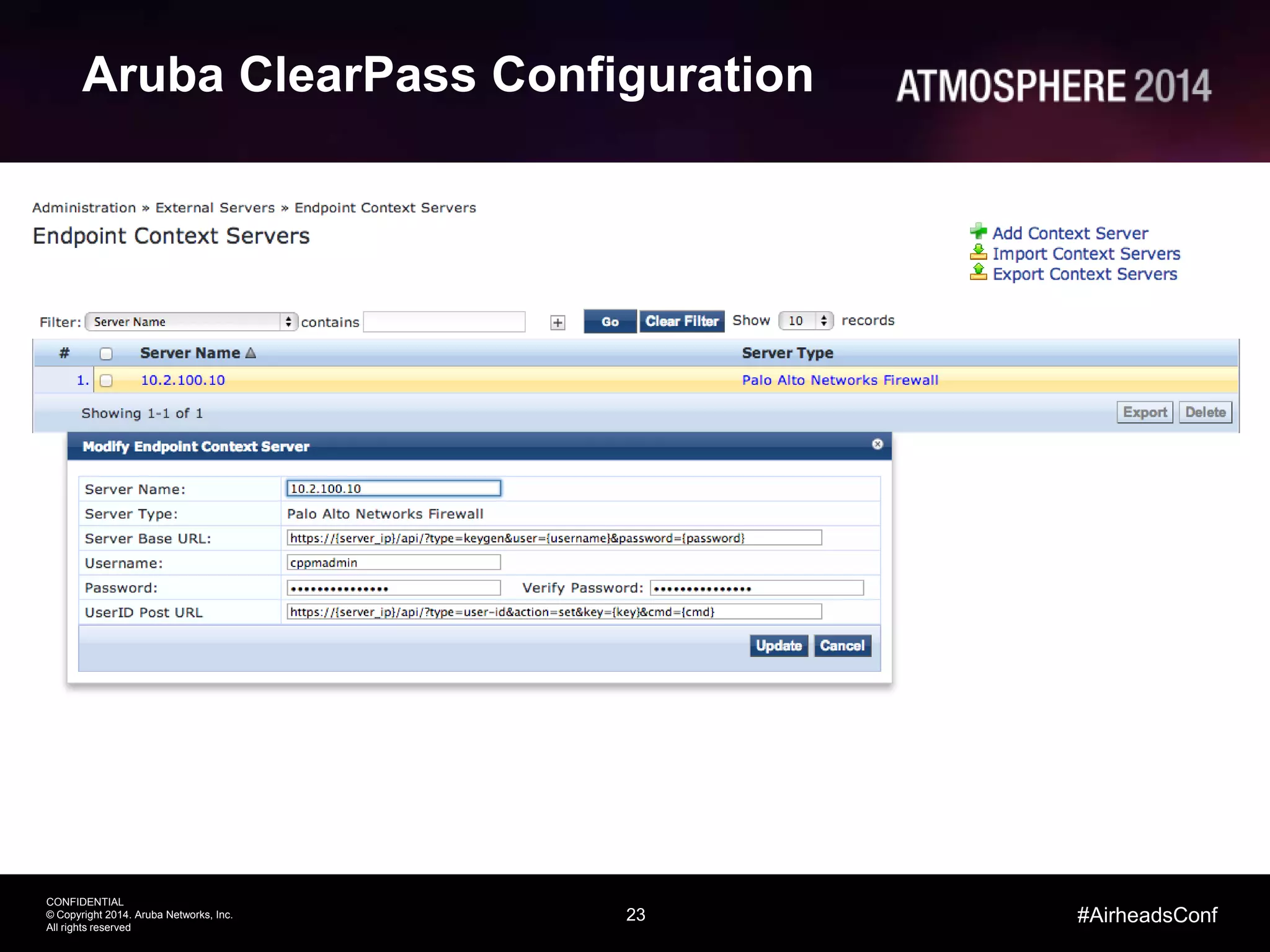
Feed User-ID Data
– Centralized Username to IP address
mapping
– No software agents required, support
multiple identity stores
– Rich visibility and reporting for compliance
Endpoint/Device Context
– Feed device context to PAN eg.
iPad, Android Phone
– Enable policy enforcement based
on new device context
– Extensible schema allows adding more
context to endpoint data
Centralized Identity Store
– FW admin authentication using Radius
– Provide services for VPN authentication
22
CONFIDENTIAL
© Copyright 2014. Aruba Networks, Inc.
All rights reserved
#AirheadsConf
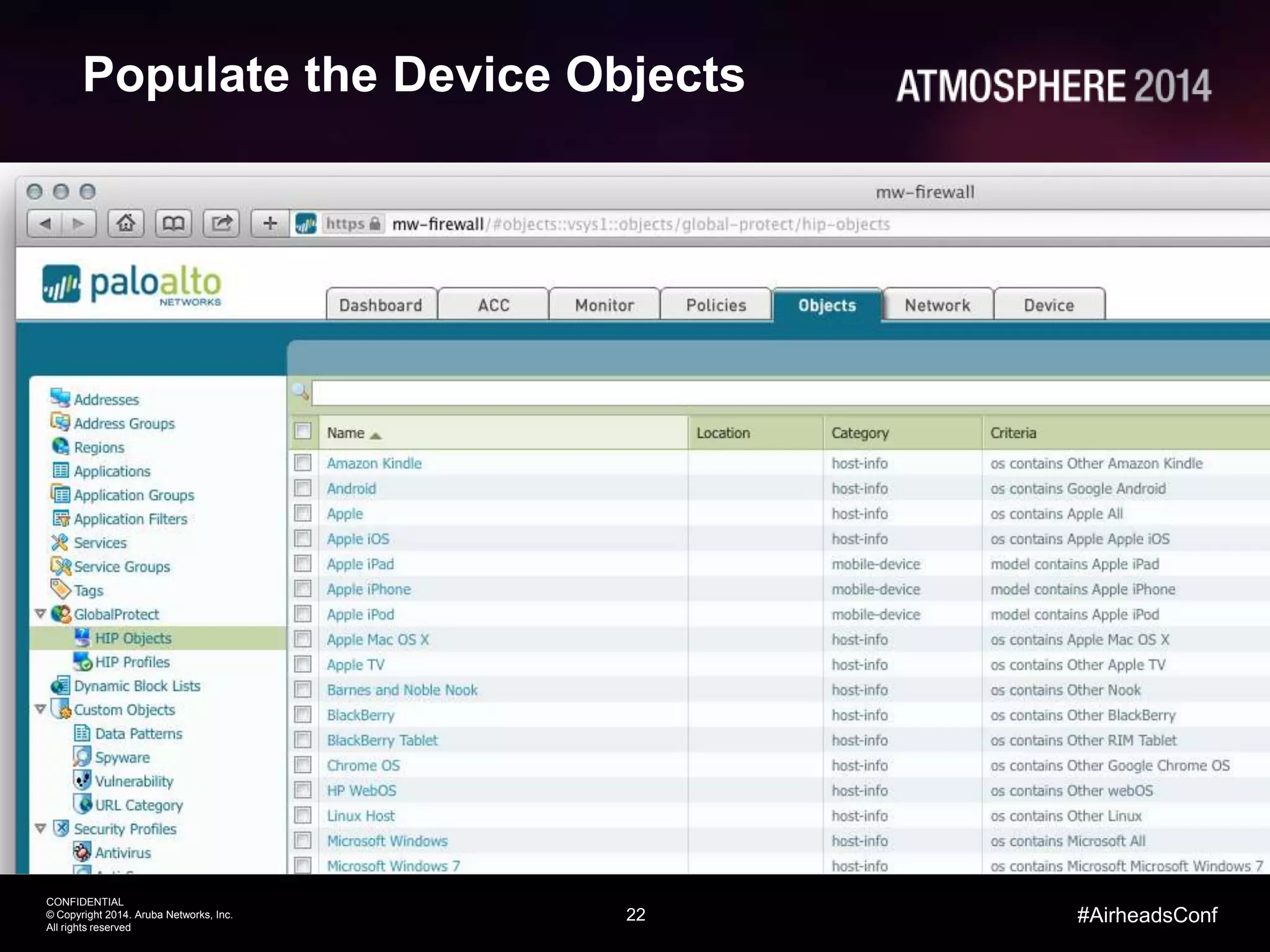
Populate the Device Objects
23
CONFIDENTIAL
© Copyright 2014. Aruba Networks, Inc.
All rights reserved
#AirheadsConf
Aruba ClearPass Configuration
24
CONFIDENTIAL
© Copyright 2014. Aruba Networks, Inc.
All rights reserved
#AirheadsConf
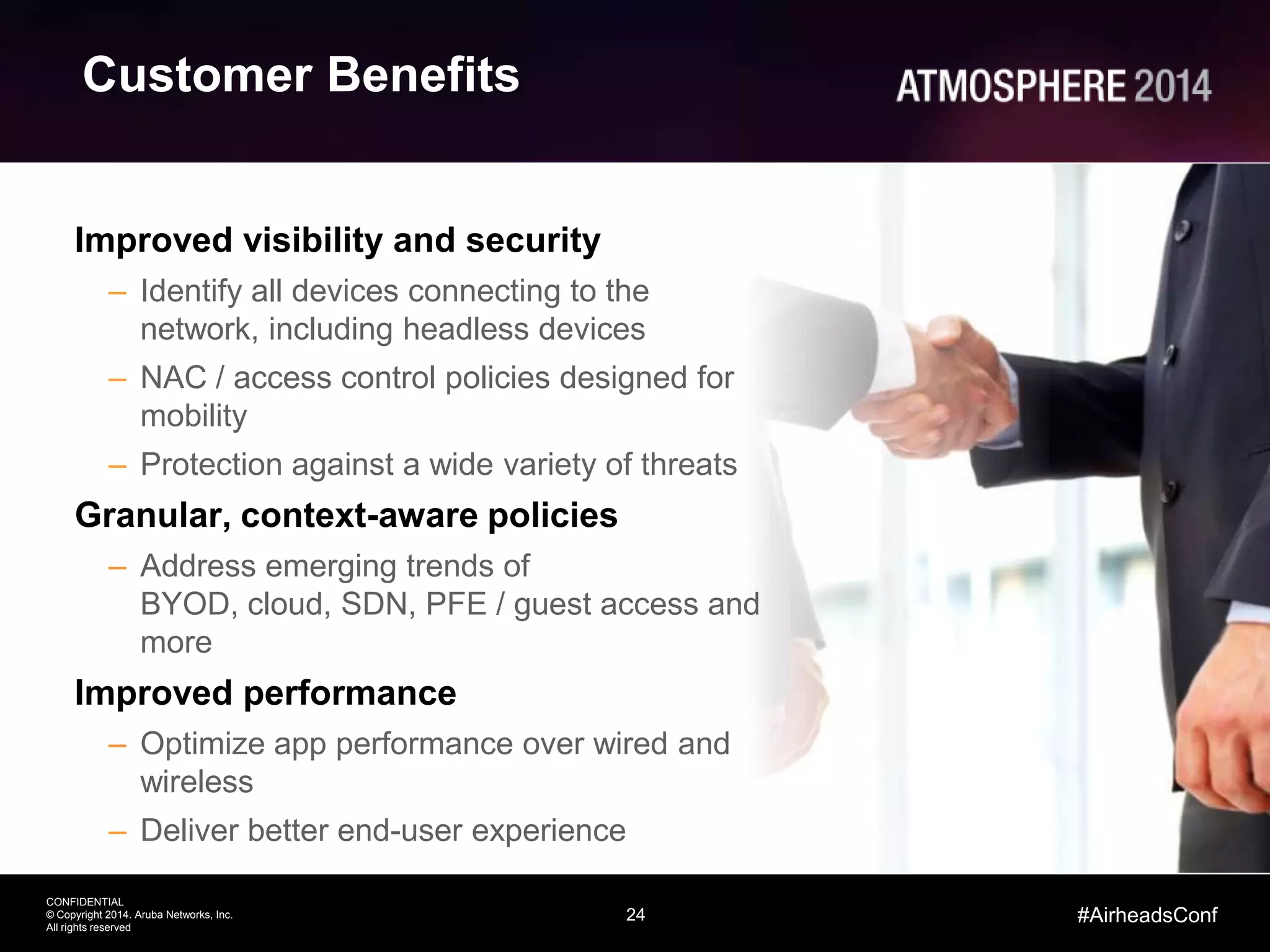
Customer Benefits
Improved visibility and security
– Identify all devices connecting to the
network, including headless devices
– NAC / access control policies designed for
mobility
– Protection against a wide variety of threats
Granular, context-aware policies
– Address emerging trends of
BYOD, cloud, SDN, PFE / guest access and
more
Improved performance
– Optimize app performance over wired and
wireless
– Deliver better end-user experience
25
CONFIDENTIAL
© Copyright 2014. Aruba Networks, Inc.
All rights reserved
Thank You
#AirheadsConf
26

Secure Enterprise Mobility

  • 1.
    Aruba / PaloAlto Networks Secure Enterprise Mobility
  • 2.
    CONFIDENTIAL © Copyright 2014.Aruba Networks, Inc. All rights reserved 2 #AirheadsConf Today’s Agenda • Mobility / BYOD • Threat Landscape & Challenges • Integration Points • Demonstration
  • 3.
    3 CONFIDENTIAL © Copyright 2014.Aruba Networks, Inc. All rights reserved #AirheadsConf Networking Challenges of Mobility Silos increase IT touch points and errors NETWORK NAC, Roles, Policies DEVICES BYOD, Onboarding, MDM APPs Use, Distribution, Control VISIBILITY What’s on the Network? WORKFLOW No automation on unmanaged devices SECURITY Company data on personal devices
  • 4.
    4 CONFIDENTIAL © Copyright 2014.Aruba Networks, Inc. All rights reserved #AirheadsConf Quality of Security Tied to Location malware botnets exploits Exposed to threats, risky apps, and data leakage Enterprise-secured with full protection Headquarters Branch Offices
  • 5.
    Palo Alto Networks SafeBYOD Application Enablement
  • 6.
    6 CONFIDENTIAL © Copyright 2014.Aruba Networks, Inc. All rights reserved #AirheadsConf Applications Get Through the Firewall Network security policy is enforced at the firewall • Sees all traffic • Defines boundary • Enables access Traditional firewalls don’t work any more
  • 7.
    7 CONFIDENTIAL © Copyright 2014.Aruba Networks, Inc. All rights reserved #AirheadsConf Technology Sprawl and Creep Enterprise Network • “More stuff” doesn’t solve the problem • Firewall “helpers” have limited view of traffic • Complex and costly to buy and maintain • Doesn’t address application control challenges IMDLPIPS ProxyURLAV UTMInternet
  • 8.
    8 CONFIDENTIAL © Copyright 2014.Aruba Networks, Inc. All rights reserved #AirheadsConf Firewall as a Business Enablement Tool Applications: Safe enablement begins with application classification by App-ID. Users: Tying users and devices, regardless of location, to applications with User-ID and GlobalProtect. Content: Scanning content and protecting against all threats – both known and unknown; with Content-ID and WildFire.
  • 9.
    9 CONFIDENTIAL © Copyright 2014.Aruba Networks, Inc. All rights reserved #AirheadsConf Security Enforcement in the Enterprise NetworkPerimeter • App visibility and control in the firewall • All apps, all ports, all the time • Prevent threats • Known threats • Unknown/target ed malware • Simplify security infrastructure DataCenter • Network segmentation • Based on application and user, not port/IP • Simple, flexible network security • Integration into all DC designs • Highly available, high performance • Prevent threats DistributedEnterprise • Consistent network security everywhere • HQ/branch offices/remote and mobile users • Logical perimeter • Policy follows applications and users, not physical location • Centrally managed
  • 10.
  • 11.
    12 CONFIDENTIAL © Copyright 2014.Aruba Networks, Inc. All rights reserved #AirheadsConf The ClearPass Access Security Platform CONFIDENTIAL © Copyright 2013. Aruba Networks, Inc. All rights reserved 12 @arubanetworks Policy Services Identity Stores 3rd Party MDM App Servers DIFFERENTIATED ACCESS UNIFIED POLICIES DEVICE VISIBILITY GUEST EMPLOYEE POLICY SERVICES ENTERPRISE-CLASS AAA RADIUS, TACACS+ VPN Onboard Device Provisioning OnGuard Posture & Health Checks Guest Visitor Management ONBOARDING AND ASSESSMENT Multivendor Networks ClearPass Policy Manager AAA Services ProfilingPolicy Engine
  • 12.
    13 CONFIDENTIAL © Copyright 2014.Aruba Networks, Inc. All rights reserved #AirheadsConf All Things Network, Device and App Management WORKFLOW POLICYVISIBILITY Role-based Enforcement Health/Posture Checks Device Context Device Profiling Troubleshooting Per Session Tracking Onboarding, Registration Guest Management MDM Integration The ClearPass Solution
  • 13.
  • 14.
    15 CONFIDENTIAL © Copyright 2014.Aruba Networks, Inc. All rights reserved #AirheadsConf The Basics on Threat Prevention Threat What it is What it does Exploit Bad application input usually in the form of network traffic. Targets a vulnerability to hijack control of the target application or machine. Malware Malicious application or code. Anything – Downloads, hacks, explores, steals… Command and Control (C2) Network traffic generated by malware. Keeps the remote attacker in control ands coordinates the attack.
  • 15.
    16 CONFIDENTIAL © Copyright 2014.Aruba Networks, Inc. All rights reserved #AirheadsConf The Lifecycle of Network Attacks 16 | ©2012, Palo Bait the end-user 1 End-user lured to a dangerous application or website containing malicious content Exploit 2 Infected content exploits the end- user, often without their knowledge Download Backdoor 3 Secondary payload is downloaded in the background. Malware installed Establish Back-Channel 4 Malware establishes an outbound connection to the attacker for ongoing control Explore & Steal 5 Remote attacker has control inside the network and escalates the attack
  • 16.
    17 | ©2012,Palo Alto Networks. Confidential and Proprietary. Secondary Payload Spread Laterally Custom C2 & Hacking Data Stolen Exploit Kit Malware From New Domain ZeroAccess Delivered C2 Established Hidden within SSL New domain has no reputation Payload designed to avoid AV Non-standard port use evades detection Custom malware = no AV signature Internal traffic is not monitored Custom protocol avoids C2 signatures RDP & FTP allowed on the network
  • 17.
    18 CONFIDENTIAL © Copyright 2014.Aruba Networks, Inc. All rights reserved #AirheadsConf Our systematic approach for better security Copyright © 2014, Palo Alto Networks, Inc. All Rights Reserved Provide global visibility & intelligence correlation Discover unknown threats Inspect all traffic across ports, protocols & encryption Prevent known threats 2 3 Apply positive controls 1
  • 18.
    Aruba / PaloAlto Networks Validated Architecture
  • 19.
    20 CONFIDENTIAL © Copyright 2014.Aruba Networks, Inc. All rights reserved #AirheadsConf Aruba and Palo Alto Networks Mobility Services • Core AAA, NAC • Device Profiling • Guest + BYOD Aruba Wi-Fi & ClearPass Palo Alto Networks Next Generation Firewall • L7+ AppFW • Content Security • Threat Protection • Exchange rich endpoint context and access policies to securely support BYOD • Identify, monitor and control traffic by user, device and application • Map and enforce security of head-less network devices such as printers, faxes and automation systems
  • 20.
    21 CONFIDENTIAL © Copyright 2014.Aruba Networks, Inc. All rights reserved #AirheadsConf Solution Overview Feed User-ID Data – Centralized Username to IP address mapping – No software agents required, support multiple identity stores – Rich visibility and reporting for compliance Endpoint/Device Context – Feed device context to PAN eg. iPad, Android Phone – Enable policy enforcement based on new device context – Extensible schema allows adding more context to endpoint data Centralized Identity Store – FW admin authentication using Radius – Provide services for VPN authentication
  • 21.
    22 CONFIDENTIAL © Copyright 2014.Aruba Networks, Inc. All rights reserved #AirheadsConf Populate the Device Objects
  • 22.
    23 CONFIDENTIAL © Copyright 2014.Aruba Networks, Inc. All rights reserved #AirheadsConf Aruba ClearPass Configuration
  • 23.
    24 CONFIDENTIAL © Copyright 2014.Aruba Networks, Inc. All rights reserved #AirheadsConf Customer Benefits Improved visibility and security – Identify all devices connecting to the network, including headless devices – NAC / access control policies designed for mobility – Protection against a wide variety of threats Granular, context-aware policies – Address emerging trends of BYOD, cloud, SDN, PFE / guest access and more Improved performance – Optimize app performance over wired and wireless – Deliver better end-user experience
  • 24.
    25 CONFIDENTIAL © Copyright 2014.Aruba Networks, Inc. All rights reserved Thank You #AirheadsConf
  • 25.

Editor's Notes

  • #9 Mitigating risk in allowed traffic
  • #12 Aruba believes IT should think about building the all-wireless office for GenMobile. The all-wireless office has “4 S’s”:Stable Air – Companies can’t have Wi-Fi that slows down as the network experiences high density, especially as users move around to different areas of a building and introduce bursts of trafficSecure Air – Personal devices that GenMobile guests, employees, contractors bring in should be able to be secured without involving IT. The time it takes for IT to enable simple tasks like getting online, checking email, etc is just not worth the timeSimple Air – Logging in to the cloud apps, screen-projecting, or printing needs to be hassle-free. For GenMobile, having single-sign on, or automated authentication on mobile devices will dramatically simplify the login experience.Smart Air – Mobile apps should be able to learn their indoor location, get priority for work use, and get less priority for personal use.
  • #13 All of the features just described are delivered as hardware or virtual appliances that can authenticate up to 500, 5000 and 25000 unique devices per week. ClearPass is also unique in that the base appliance includes our entire feature set – RADIUS and TACACS services, policy engine, identity broker features, as well as each of the add-on modules in the form of a starter bundle for Guest, Onboard, OnGuard and WorkSpace. The add-on modules are expandable per use case which means that customers with 100 guests per week only need to license for that amount. The same goes for onboarding personal or BYO devices. They’re not required to purchase advanced licenses or features they won’t use.Other customer benefits include the ability to create policies that query multiple identity stores, connect multiple active directory domains, leverage external MDM solutions and work in Wi-Fi, wired and VPN environments. Again without purchasing special licensing.
  • #14 To eliminate silos Aruba ClearPass is designed to deliver user and device visibility, automated workflow services and policy management enforcement all from a single platform. Built-in device profiling provides a comprehensive picture of what’s connecting to the network which makes it simple to differentiate access for BYOD and IT managed devices. Real-time troubleshooting tools help IT create policies that work and also solve connectivity issues. For example, an access dashboard and per session logs allow IT to easily see why a user had a problem without having to peruse lengthy log databases. To help off-load IT, ClearPass includes automated features that allow users to self-provision personal devices and register media sharing devices like an Apple TV or just a printer. ClearPass Guest lets visitors self-register or sponsors can create credentials that automatically expire. Device management services extend MDM capabilities with network control and enforcement. A built-in CA can be used to distribute and manage device specific certificates. User can even re-install or revoke certificates for lost or stolen devices.The policy component brings it all together by allowing organizations to create granular policies for Aruba and multivendor Wi-Fi, wired and VPN networks. A role-based model allows you to assign and differentiate access by user, device and other contextual attributes like location, job function and device ownership. All this from a single pane of glass.
  • #18 Real cyberattacks are considerably more sophisticated than the attacks that one would expect to see even a few years ago. Most of these attacks will leverage multiple steps, in which each step builds on the previous toward a strategic goal. Multiple techniques are coordinated to work together, and the attackers attempt to hide their traffic and infrastructure whenever possible. This example walks through the very common steps of a modern data breach.Step 1 – Many attacks today begin by using a compromised website to deliver an exploit and malware to an end-user. This process is called a drive-by-download and it often begins with something called an exploit kit. For example, Blackhole is a very well-known exploit kit. An attacker can craft a website that uses the exploit kit or simply find a vulnerable website where the attacker can add his exploit kit code. Either way, once the exploit kit code is running on the target website, the exploit kit will automatically identify vulnerable visitors to the site and exploit the end-user machine.Step 2 – Once the exploit has been delivered to the target, now the user is now compromised, and the attacker can deliver malware to the compromised user. The malware is typically not delivered from the same site hosting the exploit kit, as this would very quickly make it obvious that the site was infected. Instead the attacker will redirect traffic to new or unknown domain to deliver the malware. The attacker can constantly cycle through these domains to keep his operation a secret.Step 3 – Once malware is delivered to the target, it is often the job of the first stage malware to establish persistence and communication on the infected host. In many cases this is done via a root-kit and downloader. Zero Access is very common rootkit that meets this requirement, but there are many others.Step 4- Once the rootkit is installed, it now needs to set up a command-and-control channel with the remote attacker. This link is one of the most important in the attack lifecycle because it provides the attacker with remote control over his attack, and a control point inside the target network. This traffic tends to be highly evasive because the attacker is in control of both ends of the connection (both the malware sending the traffic and server that it is communicating with). This gives the attacker a great deal of freedom in terms of ports, protocols, encryption and tunneling.Step 5 – Once the attacker is inside the network, and communicate back out, he can now download a second wave of malware that is more geared to the actual goal of the attack, such as stealing information. These payloads can be customized to a particular attack and often give a more unique view into the attacker and the ultimate goal of an attack. Step 6 – Often it is the goal of the secondary payload to dig deeper into the network to access protected data. To do this the attacker will attempt to spread to other nodes in the network, and to attempt to escalate his privilege in the network. For example, the attacker may have initially compromised a low level employee with limited rights on the network. The attack may try to use that initial compromise in order to steal credentials for a network administrator in the network, which in turn would provide free reign over the network.Step 7 – As part of digging deeper into the network, attackers will often leverage a variety of hacking tools both to enumerate the internal environment, find weaknesses and steal data. Furthermore, the attackers will use a variety of techniques to quietly communicate from inside the network. This can include custom protocols that have been designed by the attackers or traffic and covert communications that are tunneled within allowed traffic. Step 8 – Of course the ultimate goal of most attacks is to steal data. What this data is will of course vary depending on the target, but can include everything from credit card numbers to personally identifiable information, to trade secrets and intellectual property. This often requires using applications that are effective at transferring large volumes of data such as FTP, peer-to-peer applications or other web-based file transfer applications.
  • #19 In the next 10 minutes, I’m going to walk you through our unique approach to secure your network infrastructure and defeat advanced and targeted threats. It’s basically made of 3 steps:The one where you apply positive controls. It’s typically done the next-generation firewalls and Step 2 and 3 are about
  • #27 21:44 – 24:16