Apple Captive Network Assistant
Bypass with Amigopod
Version 1.0
www.arubanetworks.com
1344 Crossman Avenue
Sunnyvale, California 94089
Phone: 408.227.4500
Fax 408.227.4550
Aruba Networks, Inc. 2
Apple Captive Network Assistant Bypass with Amigopod Application Note
Copyright
© 2011 Aruba Networks, Inc. AirWave®, Aruba Networks®, Aruba Mobility Management System®, Bluescanner, For Wireless That
Works®, Mobile Edge Architecture®, People Move. Networks Must Follow®, RFprotect®, The All Wireless Workplace Is Now Open For
Business, Green Island, and The Mobile Edge Company® are trademarks of Aruba Networks, Inc. All rights reserved. Aruba Networks
reserves the right to change, modify, transfer, or otherwise revise this publication and the product specifications without notice. While
Aruba uses commercially reasonable efforts to ensure the accuracy of the specifications contained in this document, Aruba will assume
no responsibility for any errors or omissions.
Open Source Code
Certain Aruba products include Open Source software code developed by third parties, including software code subject to the GNU
General Public License (“GPL”), GNU Lesser General Public License (“LGPL”), or other Open Source Licenses. The Open Source code
used can be found at this site:
http://www.arubanetworks.com/open_source
Legal Notice
ARUBA DISCLAIMS ANY AND ALL OTHER REPRESENTATIONS AND WARRANTIES, WEATHER EXPRESS, IMPLIED, OR
STATUTORY, INCLUDING WARRANTIES OF MERCHANTABILITY, FITNESS FOR A PARTICULAR PURPOSE, TITLE,
NONINFRINGEMENT, ACCURACY AND QUET ENJOYMENT. IN NO EVENT SHALL THE AGGREGATE LIABILITY OF ARUBA
EXCEED THE AMOUNTS ACUTALLY PAID TO ARUBA UNDER ANY APPLICABLE WRITTEN AGREEMENT OR FOR ARUBA
PRODUCTS OR SERVICES PURSHASED DIRECTLY FROM ARUBA, WHICHEVER IS LESS.
Warning and Disclaimer
This guide is designed to provide information about wireless networking, which includes Aruba Network products. Though Aruba uses
commercially reasonable efforts to ensure the accuracy of the specifications contained in this document, this guide and the information in
it is provided on an “as is” basis. Aruba assumes no liability or responsibility for any errors or omissions.
ARUBA DISCLAIMS ANY AND ALL OTHER REPRESENTATIONS AND WARRANTIES, WHETHER EXPRESSED, IMPLIED, OR
STATUTORY, INCLUDING WARRANTIES OF MERCHANTABILITY, FITNESS FOR A PARTICULAR PURPOSE, TITLE,
NONINFRINGEMENT, ACCURACY, AND QUIET ENJOYMENT. IN NO EVENT SHALL THE AGGREGATE LIABILITY OF ARUBA
EXCEED THE AMOUNTS ACTUALLY PAID TO ARUBA UNDER ANY APPLICABLE WRITTEN AGREEMENT OR FOR ARUBA
PRODUCTS OR SERVICES PURCHASED DIRECTLY FROM ARUBA, WHICHEVER IS LESS.
Aruba Networks reserves the right to change, modify, transfer, or otherwise revise this publication and the product specifications without
notice.
Aruba Networks, Inc. Table of Contents | 3
Apple Captive Network Assistant Bypass with Amigopod Application Note
Table of Contents
Chapter 1: Introduction 4
Reference Material 4
Chapter 2: Solution Implementation 5
Configuration of CNA bypass 7
Solution Summary 10
Appendix A: Contacting Aruba Networks 11
Contacting Aruba Networks 11
Aruba Networks, Inc. Introduction | 4
Apple Captive Network Assistant Bypass with Amigopod Application Note
Chapter 1: Introduction
This guide describes the process for leveraging the Amigopod captive portal to bypass the Captive
Network Assistant that is displayed on iOS devices such as iPhones, iPad, and more recently,
Mac OS X machines running Lion (10.7). The Captive Network Assistant is displayed on these
platforms when a device connects to a Wi-Fi network that has been configured with open security,
such as those typically found in guest access networks or public hotspots. While convenient, the
assistant also blocks the user from seeing items such as terms of service or branding and advertising
on the captive portal page.
Table 1 lists the current software versions that were tested for this guide.
Reference Material
 This guide assumes a working knowledge of Aruba products. This guide is based on the network
detailed in the Aruba Campus Wireless Networks VRD and the Base Designs Lab Setup for
Validated Reference Design. These guides are available for free at
http://www.arubanetworks.com/vrd.
 The complete suite of Aruba technical documentation is available for download from the Aruba
support site. These documents present complete, detailed feature and functionality explanations
outside the scope of the VRD series. The Aruba support site is located at:
https://support.arubanetworks.com/. This site requires a user login and is for current Aruba
customers with support contracts.
Table 1 Aruba Software Versions
Product Version
ArubaOS™ (mobility controllers) 6.1*
AmigopodOS 3.5.1
N O T E
Although the testing in this document was performed using ArubaOS 6.1 there
are no new 6.1 features leveraged in this guide. The new capabilities were
added to Amigopod 3.5.1
Aruba Networks, Inc. Solution Implementation | 5
Apple Captive Network Assistant Bypass with Amigopod Application Note
Chapter 2: Solution Implementation
The Apple Captive Network Assistant (CNA) feature is an overlay that appears and prompts users
automatically to login to the detected captive portal network without the need to explicitly open a web
browser. This type of login is useful on mobile devices where many of the common applications are not
browser-based and these applications would otherwise fail to connect without the successful browser-
based authentication. Examples of these nonbrowser-based applications are email, social networking
applications, corporate VPNs, and media streaming.
The Apple operating systems detect the presence of a network that has captive portal enabled by
attempting to request a web page from the Apple public website. This HTTP GET process retrieves a
simple success.html file from the Apple web servers and the operating system uses the successful
receipt of this file to assume that it is connected to an open network without the requirement for captive
portal authentication.
If the success.html file is not received, the operating system conversely assumes that a captive portal
is in place and presents the CNA automatically to prompt the user to perform a web authentication
task. When the web authentication has completed successfully, the CNA window is closed
automatically, which prevents the display of any subsequent welcome pages or redirecting of the user
to their configured home page. If the user chooses to cancel the CNA, the Wi-Fi connection to the
open network is dropped automatically, which prevents any further interaction via the full browser or
other applications.
Please note that the recommended captive portal configuration where SSL secured connections are
implemented on both the Aruba controller and Amigopod Web Login page has also prevented the
display of the Captive Network Assistant on Apple devices. It appears that the redirect process to the
HTTPS hosted Web Login page on Amigopod prevents the display of the CNA, and it is assumed that
the CNA only supports HTTP. This recommended approach of using HTTPS to avoid user credentials
being passed in the clear for guest and public access networks requires the installation of trusted
server certificates on the controller and the Amigopod. For some customers where securing these user
credentials is not essential (for example in anonymous login designs), the solution proposed in this
guide provides the same desired result using HTTP as the transport for the web authentication traffic.
Aruba Networks, Inc. Solution Implementation | 6
Apple Captive Network Assistant Bypass with Amigopod Application Note
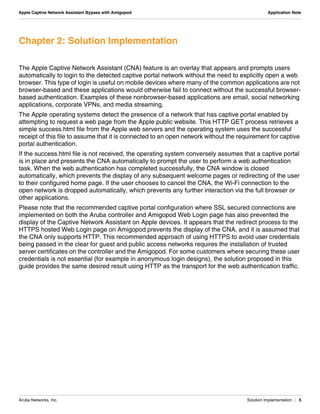
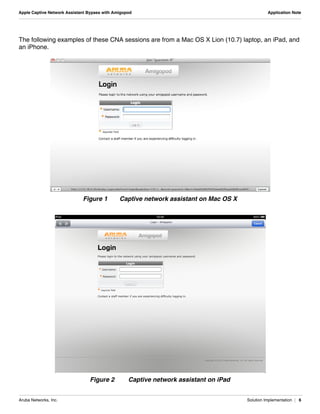
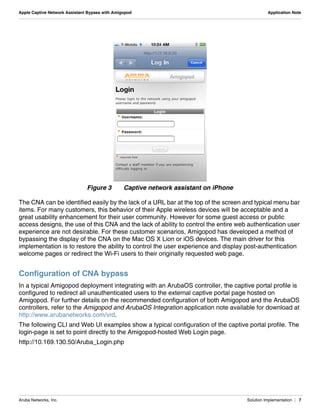
The following examples of these CNA sessions are from a Mac OS X Lion (10.7) laptop, an iPad, and
an iPhone.
Figure 1 Captive network assistant on Mac OS X
Figure 2 Captive network assistant on iPad
Aruba Networks, Inc. Solution Implementation | 7
Apple Captive Network Assistant Bypass with Amigopod Application Note
Figure 3 Captive network assistant on iPhone
The CNA can be identified easily by the lack of a URL bar at the top of the screen and typical menu bar
items. For many customers, this behavior of their Apple wireless devices will be acceptable and a
great usability enhancement for their user community. However for some guest access or public
access designs, the use of this CNA and the lack of ability to control the entire web authentication user
experience are not desirable. For these customer scenarios, Amigopod has developed a method of
bypassing the display of the CNA on the Mac OS X Lion or iOS devices. The main driver for this
implementation is to restore the ability to control the user experience and display post-authentication
welcome pages or redirect the Wi-Fi users to their originally requested web page.
Configuration of CNA bypass
In a typical Amigopod deployment integrating with an ArubaOS controller, the captive portal profile is
configured to redirect all unauthenticated users to the external captive portal page hosted on
Amigopod. For further details on the recommended configuration of both Amigopod and the ArubaOS
controllers, refer to the Amigopod and ArubaOS Integration application note available for download at
http://www.arubanetworks.com/vrd.
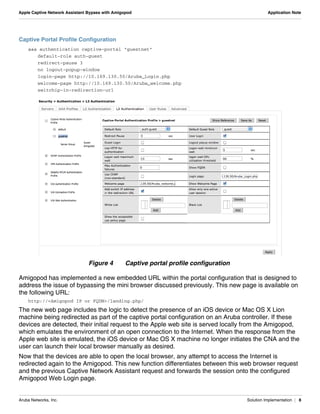
The following CLI and Web UI examples show a typical configuration of the captive portal profile. The
login-page is set to point directly to the Amigopod-hosted Web Login page.
http://10.169.130.50/Aruba_Login.php
Aruba Networks, Inc. Solution Implementation | 8
Apple Captive Network Assistant Bypass with Amigopod Application Note
Captive Portal Profile Configuration
aaa authentication captive-portal "guestnet"
default-role auth-guest
redirect-pause 3
no logout-popup-window
login-page http://10.169.130.50/Aruba_Login.php
welcome-page http://10.169.130.50/Aruba_welcome.php
switchip-in-redirection-url
Figure 4 Captive portal profile configuration
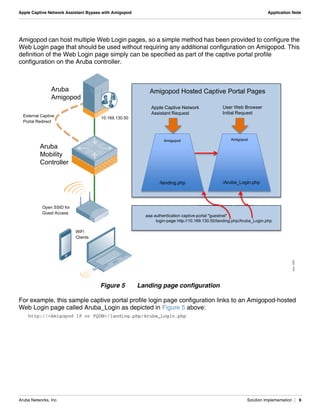
Amigopod has implemented a new embedded URL within the portal configuration that is designed to
address the issue of bypassing the mini browser discussed previously. This new page is available on
the following URL:
http://<Amigopod IP or FQDN>/landing.php/
The new web page includes the logic to detect the presence of an iOS device or Mac OS X Lion
machine being redirected as part of the captive portal configuration on an Aruba controller. If these
devices are detected, their initial request to the Apple web site is served locally from the Amigopod,
which emulates the environment of an open connection to the Internet. When the response from the
Apple web site is emulated, the iOS device or Mac OS X machine no longer initiates the CNA and the
user can launch their local browser manually as desired.
Now that the devices are able to open the local browser, any attempt to access the Internet is
redirected again to the Amigopod. This new function differentiates between this web browser request
and the previous Captive Network Assistant request and forwards the session onto the configured
Amigopod Web Login page.
Aruba Networks, Inc. Solution Implementation | 9
Apple Captive Network Assistant Bypass with Amigopod Application Note
Amigopod can host multiple Web Login pages, so a simple method has been provided to configure the
Web Login page that should be used without requiring any additional configuration on Amigopod. This
definition of the Web Login page simply can be specified as part of the captive portal profile
configuration on the Aruba controller.
Figure 5 Landing page configuration
For example, this sample captive portal profile login page configuration links to an Amigopod-hosted
Web Login page called Aruba_Login as depicted in Figure 5 above:
http://<Amigopod IP or FQDN>/landing.php/Aruba_Login.php
Aruba
Mobility
Controller
Aruba
Amigopod
Open SSID for
Guest Access
WiFi
Clients
/Aruba_Login.php
Amigopod Hosted Captive Portal Pages
External Captive
Portal Redirect
/landing.php
Amigopod Amigopod
Apple Captive Network
Assistant Request
User Web Browser
Initial Request
aaa authentication captive-portal "guestnet"
login-page http://10.169.130.50/landing.php/Aruba_Login.php
10.169.130.50
hp/Aruba L
portal "guestnet"
69 130 50/landing p
arun_1000
Aruba Networks, Inc. Solution Implementation | 10
Apple Captive Network Assistant Bypass with Amigopod Application Note
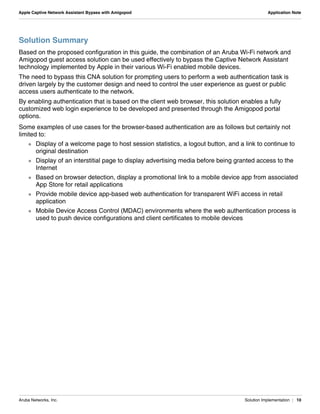
Solution Summary
Based on the proposed configuration in this guide, the combination of an Aruba Wi-Fi network and
Amigopod guest access solution can be used effectively to bypass the Captive Network Assistant
technology implemented by Apple in their various Wi-Fi enabled mobile devices.
The need to bypass this CNA solution for prompting users to perform a web authentication task is
driven largely by the customer design and need to control the user experience as guest or public
access users authenticate to the network.
By enabling authentication that is based on the client web browser, this solution enables a fully
customized web login experience to be developed and presented through the Amigopod portal
options.
Some examples of use cases for the browser-based authentication are as follows but certainly not
limited to:
 Display of a welcome page to host session statistics, a logout button, and a link to continue to
original destination
 Display of an interstitial page to display advertising media before being granted access to the
Internet
 Based on browser detection, display a promotional link to a mobile device app from associated
App Store for retail applications
 Provide mobile device app-based web authentication for transparent WiFi access in retail
application
 Mobile Device Access Control (MDAC) environments where the web authentication process is
used to push device configurations and client certificates to mobile devices
Aruba Networks, Inc. Contacting Aruba Networks | 11
Apple Captive Network Assistant Bypass with Amigopod Application Note
Appendix A: Contacting Aruba Networks
Contacting Aruba Networks
Web Site Support
Main Site http://www.arubanetworks.com
Support Site https://support.arubanetworks.com
Software Licensing Site https://licensing.arubanetworks.com/login.php
Wireless Security Incident
Response Team (WSIRT)
http://www.arubanetworks.com/support/wsirt.php
Support Emails
Americas and APAC support@arubanetworks.com
EMEA emea_support@arubanetworks.com
WSIRT Email
Please email details of any security
problem found in an Aruba product.
wsirt@arubanetworks.com
Validated Reference Design Contact and User Forum
Validated Reference Designs http://www.arubanetworks.com/vrd
VRD Contact Email referencedesign@arubanetworks.com
AirHeads Online User Forum http://airheads.arubanetworks.com
Telephone Support
Aruba Corporate +1 (408) 227-4500
FAX +1 (408) 227-4550
Support
 United States +1-800-WI-FI-LAN (800-943-4526)
 Universal Free Phone Service Numbers (UIFN):
 Australia Reach: 1300 4 ARUBA (27822)
 United States 1 800 9434526
1 650 3856589
 Canada 1 800 9434526
1 650 3856589
 United Kingdom BT: 0 825 494 34526
MCL: 0 825 494 34526
Aruba Networks, Inc. Contacting Aruba Networks | 12
Apple Captive Network Assistant Bypass with Amigopod Application Note
 Universal Free Phone Service Numbers (UIFN):
 Japan IDC: 10 810 494 34526 * Select fixed phones
IDC: 0061 010 812 494 34526 * Any fixed, mobile & payphone
KDD: 10 813 494 34526 * Select fixed phones
JT: 10 815 494 34526 * Select fixed phones
JT: 0041 010 816 494 34526 * Any fixed, mobile & payphone
 Korea DACOM: 2 819 494 34526
KT: 1 820 494 34526
ONSE: 8 821 494 34526
 Singapore Singapore Telecom: 1 822 494 34526
 Taiwan (U) CHT-I: 0 824 494 34526
 Belgium Belgacom: 0 827 494 34526
 Israel Bezeq: 14 807 494 34526
Barack ITC: 13 808 494 34526
 Ireland EIRCOM: 0 806 494 34526
 Hong Kong HKTI: 1 805 494 34526
 Germany Deutsche Telkom: 0 804 494 34526
 France France Telecom: 0 803 494 34526
 China (P) China Telecom South: 0 801 494 34526
China Netcom Group: 0 802 494 34526
 Saudi Arabia 800 8445708
 UAE 800 04416077
 Egypt 2510-0200 8885177267 * within Cairo
02-2510-0200 8885177267 * outside Cairo
 India 91 044 66768150
Telephone Support

Apple Captive Network Assistant Bypass with ClearPass Guest

  • 1.
    Apple Captive NetworkAssistant Bypass with Amigopod Version 1.0
  • 2.
    www.arubanetworks.com 1344 Crossman Avenue Sunnyvale,California 94089 Phone: 408.227.4500 Fax 408.227.4550 Aruba Networks, Inc. 2 Apple Captive Network Assistant Bypass with Amigopod Application Note Copyright © 2011 Aruba Networks, Inc. AirWave®, Aruba Networks®, Aruba Mobility Management System®, Bluescanner, For Wireless That Works®, Mobile Edge Architecture®, People Move. Networks Must Follow®, RFprotect®, The All Wireless Workplace Is Now Open For Business, Green Island, and The Mobile Edge Company® are trademarks of Aruba Networks, Inc. All rights reserved. Aruba Networks reserves the right to change, modify, transfer, or otherwise revise this publication and the product specifications without notice. While Aruba uses commercially reasonable efforts to ensure the accuracy of the specifications contained in this document, Aruba will assume no responsibility for any errors or omissions. Open Source Code Certain Aruba products include Open Source software code developed by third parties, including software code subject to the GNU General Public License (“GPL”), GNU Lesser General Public License (“LGPL”), or other Open Source Licenses. The Open Source code used can be found at this site: http://www.arubanetworks.com/open_source Legal Notice ARUBA DISCLAIMS ANY AND ALL OTHER REPRESENTATIONS AND WARRANTIES, WEATHER EXPRESS, IMPLIED, OR STATUTORY, INCLUDING WARRANTIES OF MERCHANTABILITY, FITNESS FOR A PARTICULAR PURPOSE, TITLE, NONINFRINGEMENT, ACCURACY AND QUET ENJOYMENT. IN NO EVENT SHALL THE AGGREGATE LIABILITY OF ARUBA EXCEED THE AMOUNTS ACUTALLY PAID TO ARUBA UNDER ANY APPLICABLE WRITTEN AGREEMENT OR FOR ARUBA PRODUCTS OR SERVICES PURSHASED DIRECTLY FROM ARUBA, WHICHEVER IS LESS. Warning and Disclaimer This guide is designed to provide information about wireless networking, which includes Aruba Network products. Though Aruba uses commercially reasonable efforts to ensure the accuracy of the specifications contained in this document, this guide and the information in it is provided on an “as is” basis. Aruba assumes no liability or responsibility for any errors or omissions. ARUBA DISCLAIMS ANY AND ALL OTHER REPRESENTATIONS AND WARRANTIES, WHETHER EXPRESSED, IMPLIED, OR STATUTORY, INCLUDING WARRANTIES OF MERCHANTABILITY, FITNESS FOR A PARTICULAR PURPOSE, TITLE, NONINFRINGEMENT, ACCURACY, AND QUIET ENJOYMENT. IN NO EVENT SHALL THE AGGREGATE LIABILITY OF ARUBA EXCEED THE AMOUNTS ACTUALLY PAID TO ARUBA UNDER ANY APPLICABLE WRITTEN AGREEMENT OR FOR ARUBA PRODUCTS OR SERVICES PURCHASED DIRECTLY FROM ARUBA, WHICHEVER IS LESS. Aruba Networks reserves the right to change, modify, transfer, or otherwise revise this publication and the product specifications without notice.
  • 3.
    Aruba Networks, Inc.Table of Contents | 3 Apple Captive Network Assistant Bypass with Amigopod Application Note Table of Contents Chapter 1: Introduction 4 Reference Material 4 Chapter 2: Solution Implementation 5 Configuration of CNA bypass 7 Solution Summary 10 Appendix A: Contacting Aruba Networks 11 Contacting Aruba Networks 11
  • 4.
    Aruba Networks, Inc.Introduction | 4 Apple Captive Network Assistant Bypass with Amigopod Application Note Chapter 1: Introduction This guide describes the process for leveraging the Amigopod captive portal to bypass the Captive Network Assistant that is displayed on iOS devices such as iPhones, iPad, and more recently, Mac OS X machines running Lion (10.7). The Captive Network Assistant is displayed on these platforms when a device connects to a Wi-Fi network that has been configured with open security, such as those typically found in guest access networks or public hotspots. While convenient, the assistant also blocks the user from seeing items such as terms of service or branding and advertising on the captive portal page. Table 1 lists the current software versions that were tested for this guide. Reference Material  This guide assumes a working knowledge of Aruba products. This guide is based on the network detailed in the Aruba Campus Wireless Networks VRD and the Base Designs Lab Setup for Validated Reference Design. These guides are available for free at http://www.arubanetworks.com/vrd.  The complete suite of Aruba technical documentation is available for download from the Aruba support site. These documents present complete, detailed feature and functionality explanations outside the scope of the VRD series. The Aruba support site is located at: https://support.arubanetworks.com/. This site requires a user login and is for current Aruba customers with support contracts. Table 1 Aruba Software Versions Product Version ArubaOS™ (mobility controllers) 6.1* AmigopodOS 3.5.1 N O T E Although the testing in this document was performed using ArubaOS 6.1 there are no new 6.1 features leveraged in this guide. The new capabilities were added to Amigopod 3.5.1
  • 5.
    Aruba Networks, Inc.Solution Implementation | 5 Apple Captive Network Assistant Bypass with Amigopod Application Note Chapter 2: Solution Implementation The Apple Captive Network Assistant (CNA) feature is an overlay that appears and prompts users automatically to login to the detected captive portal network without the need to explicitly open a web browser. This type of login is useful on mobile devices where many of the common applications are not browser-based and these applications would otherwise fail to connect without the successful browser- based authentication. Examples of these nonbrowser-based applications are email, social networking applications, corporate VPNs, and media streaming. The Apple operating systems detect the presence of a network that has captive portal enabled by attempting to request a web page from the Apple public website. This HTTP GET process retrieves a simple success.html file from the Apple web servers and the operating system uses the successful receipt of this file to assume that it is connected to an open network without the requirement for captive portal authentication. If the success.html file is not received, the operating system conversely assumes that a captive portal is in place and presents the CNA automatically to prompt the user to perform a web authentication task. When the web authentication has completed successfully, the CNA window is closed automatically, which prevents the display of any subsequent welcome pages or redirecting of the user to their configured home page. If the user chooses to cancel the CNA, the Wi-Fi connection to the open network is dropped automatically, which prevents any further interaction via the full browser or other applications. Please note that the recommended captive portal configuration where SSL secured connections are implemented on both the Aruba controller and Amigopod Web Login page has also prevented the display of the Captive Network Assistant on Apple devices. It appears that the redirect process to the HTTPS hosted Web Login page on Amigopod prevents the display of the CNA, and it is assumed that the CNA only supports HTTP. This recommended approach of using HTTPS to avoid user credentials being passed in the clear for guest and public access networks requires the installation of trusted server certificates on the controller and the Amigopod. For some customers where securing these user credentials is not essential (for example in anonymous login designs), the solution proposed in this guide provides the same desired result using HTTP as the transport for the web authentication traffic.
  • 6.
    Aruba Networks, Inc.Solution Implementation | 6 Apple Captive Network Assistant Bypass with Amigopod Application Note The following examples of these CNA sessions are from a Mac OS X Lion (10.7) laptop, an iPad, and an iPhone. Figure 1 Captive network assistant on Mac OS X Figure 2 Captive network assistant on iPad
  • 7.
    Aruba Networks, Inc.Solution Implementation | 7 Apple Captive Network Assistant Bypass with Amigopod Application Note Figure 3 Captive network assistant on iPhone The CNA can be identified easily by the lack of a URL bar at the top of the screen and typical menu bar items. For many customers, this behavior of their Apple wireless devices will be acceptable and a great usability enhancement for their user community. However for some guest access or public access designs, the use of this CNA and the lack of ability to control the entire web authentication user experience are not desirable. For these customer scenarios, Amigopod has developed a method of bypassing the display of the CNA on the Mac OS X Lion or iOS devices. The main driver for this implementation is to restore the ability to control the user experience and display post-authentication welcome pages or redirect the Wi-Fi users to their originally requested web page. Configuration of CNA bypass In a typical Amigopod deployment integrating with an ArubaOS controller, the captive portal profile is configured to redirect all unauthenticated users to the external captive portal page hosted on Amigopod. For further details on the recommended configuration of both Amigopod and the ArubaOS controllers, refer to the Amigopod and ArubaOS Integration application note available for download at http://www.arubanetworks.com/vrd. The following CLI and Web UI examples show a typical configuration of the captive portal profile. The login-page is set to point directly to the Amigopod-hosted Web Login page. http://10.169.130.50/Aruba_Login.php
  • 8.
    Aruba Networks, Inc.Solution Implementation | 8 Apple Captive Network Assistant Bypass with Amigopod Application Note Captive Portal Profile Configuration aaa authentication captive-portal "guestnet" default-role auth-guest redirect-pause 3 no logout-popup-window login-page http://10.169.130.50/Aruba_Login.php welcome-page http://10.169.130.50/Aruba_welcome.php switchip-in-redirection-url Figure 4 Captive portal profile configuration Amigopod has implemented a new embedded URL within the portal configuration that is designed to address the issue of bypassing the mini browser discussed previously. This new page is available on the following URL: http://<Amigopod IP or FQDN>/landing.php/ The new web page includes the logic to detect the presence of an iOS device or Mac OS X Lion machine being redirected as part of the captive portal configuration on an Aruba controller. If these devices are detected, their initial request to the Apple web site is served locally from the Amigopod, which emulates the environment of an open connection to the Internet. When the response from the Apple web site is emulated, the iOS device or Mac OS X machine no longer initiates the CNA and the user can launch their local browser manually as desired. Now that the devices are able to open the local browser, any attempt to access the Internet is redirected again to the Amigopod. This new function differentiates between this web browser request and the previous Captive Network Assistant request and forwards the session onto the configured Amigopod Web Login page.
  • 9.
    Aruba Networks, Inc.Solution Implementation | 9 Apple Captive Network Assistant Bypass with Amigopod Application Note Amigopod can host multiple Web Login pages, so a simple method has been provided to configure the Web Login page that should be used without requiring any additional configuration on Amigopod. This definition of the Web Login page simply can be specified as part of the captive portal profile configuration on the Aruba controller. Figure 5 Landing page configuration For example, this sample captive portal profile login page configuration links to an Amigopod-hosted Web Login page called Aruba_Login as depicted in Figure 5 above: http://<Amigopod IP or FQDN>/landing.php/Aruba_Login.php Aruba Mobility Controller Aruba Amigopod Open SSID for Guest Access WiFi Clients /Aruba_Login.php Amigopod Hosted Captive Portal Pages External Captive Portal Redirect /landing.php Amigopod Amigopod Apple Captive Network Assistant Request User Web Browser Initial Request aaa authentication captive-portal "guestnet" login-page http://10.169.130.50/landing.php/Aruba_Login.php 10.169.130.50 hp/Aruba L portal "guestnet" 69 130 50/landing p arun_1000
  • 10.
    Aruba Networks, Inc.Solution Implementation | 10 Apple Captive Network Assistant Bypass with Amigopod Application Note Solution Summary Based on the proposed configuration in this guide, the combination of an Aruba Wi-Fi network and Amigopod guest access solution can be used effectively to bypass the Captive Network Assistant technology implemented by Apple in their various Wi-Fi enabled mobile devices. The need to bypass this CNA solution for prompting users to perform a web authentication task is driven largely by the customer design and need to control the user experience as guest or public access users authenticate to the network. By enabling authentication that is based on the client web browser, this solution enables a fully customized web login experience to be developed and presented through the Amigopod portal options. Some examples of use cases for the browser-based authentication are as follows but certainly not limited to:  Display of a welcome page to host session statistics, a logout button, and a link to continue to original destination  Display of an interstitial page to display advertising media before being granted access to the Internet  Based on browser detection, display a promotional link to a mobile device app from associated App Store for retail applications  Provide mobile device app-based web authentication for transparent WiFi access in retail application  Mobile Device Access Control (MDAC) environments where the web authentication process is used to push device configurations and client certificates to mobile devices
  • 11.
    Aruba Networks, Inc.Contacting Aruba Networks | 11 Apple Captive Network Assistant Bypass with Amigopod Application Note Appendix A: Contacting Aruba Networks Contacting Aruba Networks Web Site Support Main Site http://www.arubanetworks.com Support Site https://support.arubanetworks.com Software Licensing Site https://licensing.arubanetworks.com/login.php Wireless Security Incident Response Team (WSIRT) http://www.arubanetworks.com/support/wsirt.php Support Emails Americas and APAC support@arubanetworks.com EMEA emea_support@arubanetworks.com WSIRT Email Please email details of any security problem found in an Aruba product. wsirt@arubanetworks.com Validated Reference Design Contact and User Forum Validated Reference Designs http://www.arubanetworks.com/vrd VRD Contact Email referencedesign@arubanetworks.com AirHeads Online User Forum http://airheads.arubanetworks.com Telephone Support Aruba Corporate +1 (408) 227-4500 FAX +1 (408) 227-4550 Support  United States +1-800-WI-FI-LAN (800-943-4526)  Universal Free Phone Service Numbers (UIFN):  Australia Reach: 1300 4 ARUBA (27822)  United States 1 800 9434526 1 650 3856589  Canada 1 800 9434526 1 650 3856589  United Kingdom BT: 0 825 494 34526 MCL: 0 825 494 34526
  • 12.
    Aruba Networks, Inc.Contacting Aruba Networks | 12 Apple Captive Network Assistant Bypass with Amigopod Application Note  Universal Free Phone Service Numbers (UIFN):  Japan IDC: 10 810 494 34526 * Select fixed phones IDC: 0061 010 812 494 34526 * Any fixed, mobile & payphone KDD: 10 813 494 34526 * Select fixed phones JT: 10 815 494 34526 * Select fixed phones JT: 0041 010 816 494 34526 * Any fixed, mobile & payphone  Korea DACOM: 2 819 494 34526 KT: 1 820 494 34526 ONSE: 8 821 494 34526  Singapore Singapore Telecom: 1 822 494 34526  Taiwan (U) CHT-I: 0 824 494 34526  Belgium Belgacom: 0 827 494 34526  Israel Bezeq: 14 807 494 34526 Barack ITC: 13 808 494 34526  Ireland EIRCOM: 0 806 494 34526  Hong Kong HKTI: 1 805 494 34526  Germany Deutsche Telkom: 0 804 494 34526  France France Telecom: 0 803 494 34526  China (P) China Telecom South: 0 801 494 34526 China Netcom Group: 0 802 494 34526  Saudi Arabia 800 8445708  UAE 800 04416077  Egypt 2510-0200 8885177267 * within Cairo 02-2510-0200 8885177267 * outside Cairo  India 91 044 66768150 Telephone Support