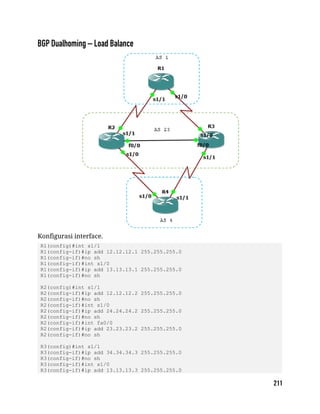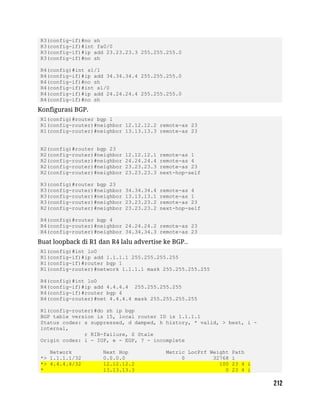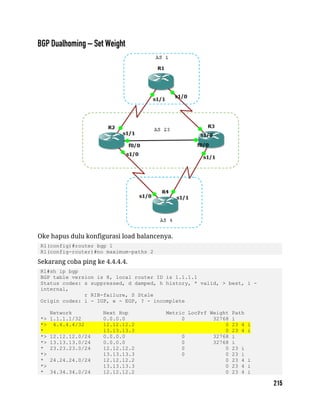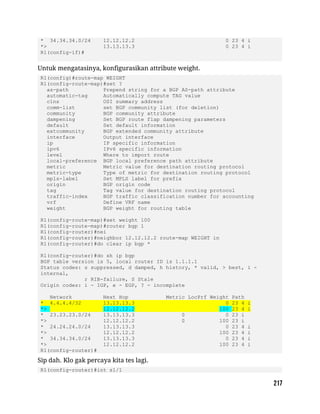



Assalammu’alaykum wr wb
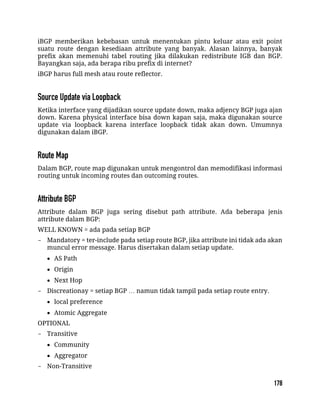
Alhamdulillah buku ini dapat terselesaikan. Buku ini adalah buku penunjang
untuk belajar ilmu jaringan khususnya CISCO. InshaAllah buku ini juga akan
digunakan untuk pertama kalinya dalam training “Pesantren Networkers
Mengajar”.
CISCO merupakan salahsatu vendor perangkat terbesar dalam dunia jaringan.
Selain CISCO, ada juga Mikrotik dan Juniper. Kesemuanya mempunyai
sertifikasinya masing-masing. Misalkan di CISCO ada CCNA (Cirsco Certified
Network Academy), CCNP (Cirsco Certified Network Professional) dan CCIE (Cisco
Certified Internetwork Expert).
Dalam buku ini dituliskan teori dan praktek step by step sehingga mudah diikuti.
Walaupun buku ini lebih focus pada CISCO, namun secara teori, sama dengan yang
lain semisal Mikrotik dan Juniper. Yang berbeda hanyalah pada commandnya.
Dan dalam CISCO, materinya bisa dibilang adalah yang paling lengkap.
Pada akhirnya penulis berharap buku ini bermanfaat dan tidak lupa
mengucapkan rasa terimakasih kepada pihak yang telah banyak membantu
terselesaikannya buku ini: Pak Dedi, Alam, Ikhwan, Mas Aries, Mas Ali, Mas Bram,
Pak Anshori, Mas Rofiq, Mas Okky, teman-teman Pesantren Networkers, SMK IDN
dan keluarga ID-Networkers dan teman-teman Ponpes Madinatul Quran.
Wassalammu alaykum wr wb
Jakarta, 29 April 2015
Muhammad Taufik
Pengertian Jaringan
Jaringan berdasarkan Area
OSI Layer
Perangkat Jaringan dan Simbol
IP Address
Ethernet Cable
Subnetting So Easy
Contoh Soal Subnetting
Subnetting Challenge
Broadcast Domain dan Collision Domain
Perbedaan Hub, Bridge, Switch dan Router
Perintah Dasar Switch & Router Cisco
Konfigurasi Password pada Cisco
Virtual LAN (VLAN)
Trunking VLAN
Inter-VLAN - Router on a Stick
Inter-VLAN – Switch Layer 3
DHCP menggunakan Switch
Port Security
Spanning Tree Protocol (STP)
STP Portfast
Etherchannel
VLAN Trunking Protocol (VTP)
Static Routing
Default Routing
Enhanced Interior Gateway Protocol (EIGRP)
Open Shortest Path First (OSPF)
Standard Access List
Extended Access List
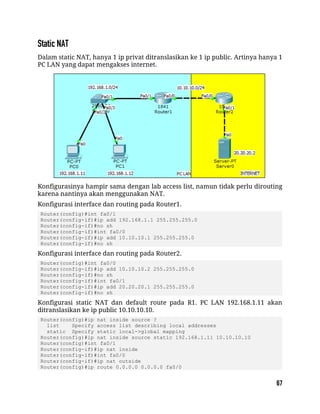
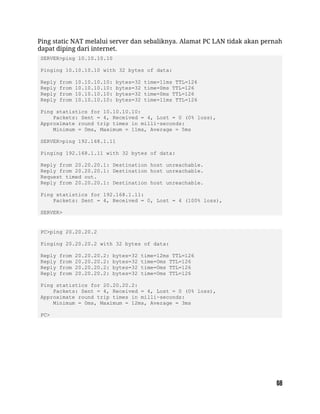
Static NAT
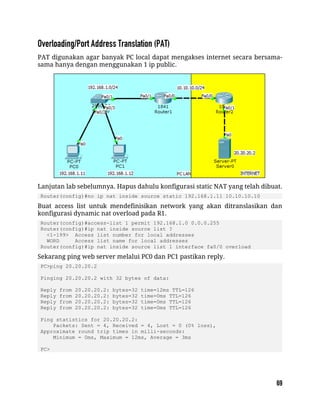
Overloading/Port Address Translation (PAT)
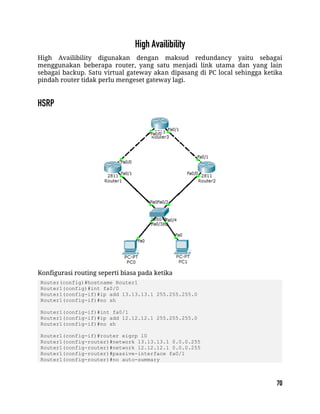
HSRP
IPv6 Basic Link-Local
IPv6 Basic Global Unicast
IPv6 Basic EUI-64
IPv6 Static Routing
IPv6 RIPnG
IPv6 EIGRP
IPv6 OSPFv3
IPv6 IPv6IP Tunneling
IPv6 GRE IP Tunneling
IPv6 Tunnel 6to4
IPv6 Tunnel ISATAP
IPv6 Tunnel Auto-TunnelTER 3 IPV6
EIGRP Basic Configuration
EIGRP Filtering - Distribute List
EIGRP Filtering - Prefix List
EIGRP Filtering - Access List
EIGRP Filtering - Administrative Distance
EIGRP Authentication
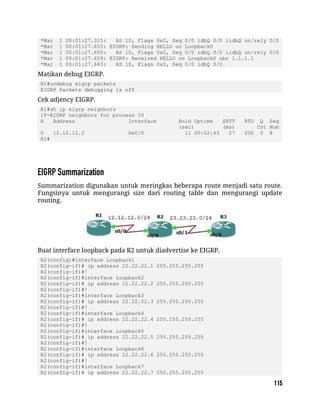
EIGRP Summarization
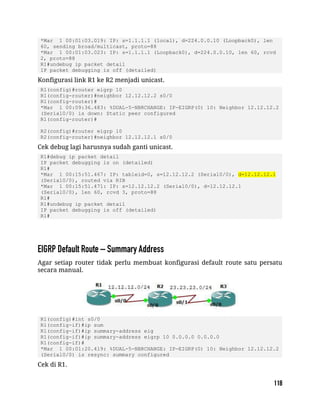
EIGRP Unicast Update
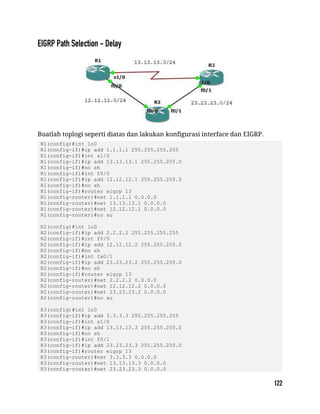
EIGRP Default Route – Summary Address
EIGRP Redistribution - RIP
EIGRP Redistribution - OSPF
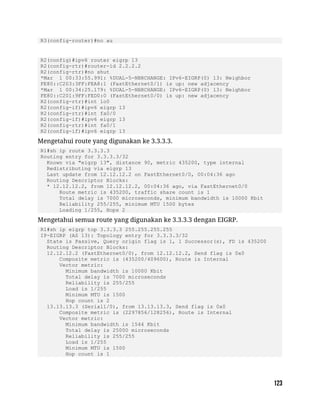
EIGRP Path Selection - Delay
EIGRP Path Selection - Bandwidth
EIGRP Equal Load Balancing
EIGRP Unequal Load Balancing
EIGRP Stub – Connected + Summary
EIGRP Stub – Connected
EIGRP Stub – Summary
EIGRP Stub – Static
EIGRP Stub – Redistributed
EIGRP Stub – Receive Only
OSPF Basic Configuration
OSPF Virtual Link
OSPF GRE Tunnel
OSPF Standar Area
OSPF Stub Area
OSPF Totally Stub Area
OSPF Not So Stubby Area (NSSA)
OSPF External Route Type 1
OSPF Summarization – Area Range
OSPF Summarization – Summary Address
OSPF Path Selection
BGP - iBGP Configuration
BGP - iBGP Update via Loopback
BGP – eBGP Configuration
BGP – eBGP Configuration 2
BGP – eBGP Configuration 3
BGP – Next Hop Self
BGP – Authentication
BGP Route Reflector
BGP Attribute - Origin
BGP Attribute - Community
BGP Attribute - Community Local-AS and Configuring Confederation
BGP Aggregator
BGP Attribute - Weight
BGP Dualhoming – Load Balance
BGP Dualhoming – Set Weight
BGP Dualhoming – Set MED
BGP Dualhoming – Set AS Path
BGP Multihoming – Equal Load Balance
BGP Multihoming – Unequal Load Balance
Pengertian Jaringan
Jaringan berdasarkan Area
OSI Layer
Perangkat Jaringan dan Simbol
IP Address
Ethernet Cable
Subnetting So Easy
Contoh Soal Subnetting
Subnetting Challenge
Broadcast Domain dan Collision Domain
Perbedaan Hub, Bridge, Switch dan Router
Jaringan atau network adalah kumpulan perangkat jaringan (network devices)
dan perangkat endhost (end devices) yang terhubung satu sama lain dan dapat
melakukan sharing informasi serta resources.
Komponen pembentuk jaringan:
 Network devices: hub, bridge, switch dan router.
 End devices: PC, laptop, mobile, dll.
 Interconnection: NIC, konektor, media (cooper, fiber optic, wireless, dll).
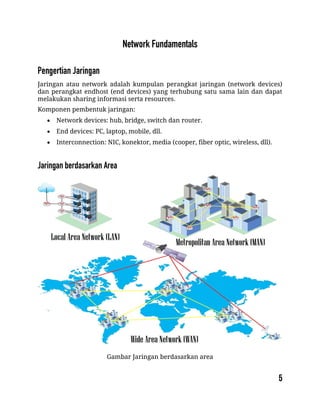
Gambar Jaringan berdasarkan area
 Local Area Network (LAN) merupakan jaringan sederhana dalam satu
gedung, kantor, rumah atau sekolah. Biasanya menggunakan kabel UTP.
 Metropolitan Area Network (MAN) adalah gabungan dari banyak LAN
dalam suatu wilayah.
 Wide Area Network (WAN) adalah jaringan yang menghubungkan banyak
MAN antar pulau, negara atau benua. Medianya dapat berupa fiber optic
dan satelit.
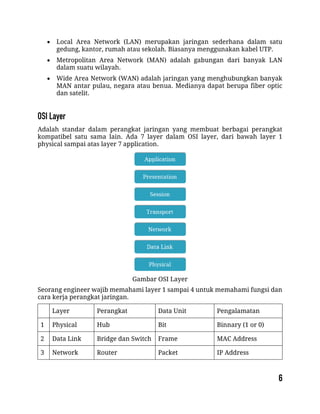
Adalah standar dalam perangkat jaringan yang membuat berbagai perangkat
kompatibel satu sama lain. Ada 7 layer dalam OSI layer, dari bawah layer 1
physical sampai atas layer 7 application.
Gambar OSI Layer
Seorang engineer wajib memahami layer 1 sampai 4 untuk memahami fungsi dan
cara kerja perangkat jaringan.
Layer Perangkat Data Unit Pengalamatan
1 Physical Hub Bit Binnary (1 or 0)
2 Data Link Bridge dan Switch Frame MAC Address
3 Network Router Packet IP Address
Layer Perangkat Konektivitas Memory
1 Physical Hub Broadcast ke semua
port
-
2 Data Link Bridge dan Switch Broadcast
berdasarkan MAC
Address
MAC Address Tabel
3 Network Router Berdasarkan IP
Address tujuan
Routing Tabel
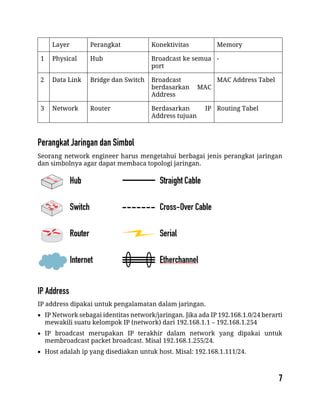
Seorang network engineer harus mengetahui berbagai jenis perangkat jaringan
dan simbolnya agar dapat membaca topologi jaringan.
IP address dipakai untuk pengalamatan dalam jaringan.
 IP Network sebagai identitas network/jaringan. Jika ada IP 192.168.1.0/24 berarti
mewakili suatu kelompok IP (network) dari 192.168.1.1 – 192.168.1.254
 IP broadcast merupakan IP terakhir dalam network yang dipakai untuk
membroadcast packet broadcast. Misal 192.168.1.255/24.
 Host adalah ip yang disediakan untuk host. Misal: 192.168.1.111/24.
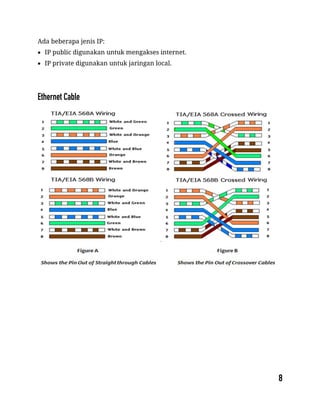
Ada beberapa jenis IP:
 IP public digunakan untuk mengakses internet.
 IP private digunakan untuk jaringan local.
Subneting adalah membagi menjadi suatu netwok menjadi subnetwork yang lebih
kecil. Inilah yang disebut subnet. Salah satu aspek dalam suatu design jaringan
yang baik adalah pengoptimalan alamat ip. Subneting meminimalisir alamat ip
yang tidak terpakai atau terbuang.
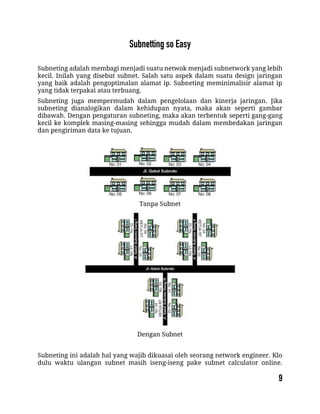
Subneting juga mempermudah dalam pengelolaan dan kinerja jaringan. Jika
subneting dianalogikan dalam kehidupan nyata, maka akan seperti gambar
dibawah. Dengan pengaturan subneting, maka akan terbentuk seperti gang-gang
kecil ke komplek masing-masing sehingga mudah dalam membedakan jaringan
dan pengiriman data ke tujuan.
Tanpa Subnet
Dengan Subnet
Subneting ini adalah hal yang wajib dikuasai oleh seorang network engineer. Klo
dulu waktu ulangan subnet masih iseng-iseng pake subnet calculator online.
Hehehe… Sekarang harus bener-bener paham. Untuk memahami subneting ini,
terlebih dahulu mengerti tentang bilangan decimal dan biner (nol atau satu).
Dalam subneting, ada beberapa hal yang paling sering dicari.
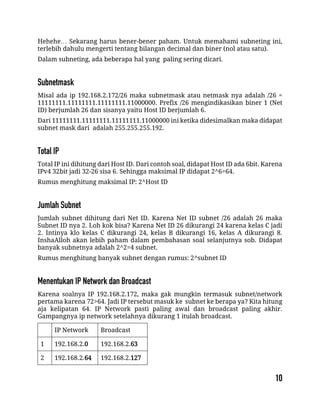
Misal ada ip 192.168.2.172/26 maka subnetmask atau netmask nya adalah /26 =
11111111.11111111.11111111.11000000. Prefix /26 mengindikasikan biner 1 (Net
ID) berjumlah 26 dan sisanya yaitu Host ID berjumlah 6.
Dari 11111111.11111111.11111111.11000000 ini ketika didesimalkan maka didapat
subnet mask dari adalah 255.255.255.192.
Total IP ini dihitung dari Host ID. Dari contoh soal, didapat Host ID ada 6bit. Karena
IPv4 32bit jadi 32-26 sisa 6. Sehingga maksimal IP didapat 2^6=64.
Rumus menghitung maksimal IP: 2^Host ID
Jumlah subnet dihitung dari Net ID. Karena Net ID subnet /26 adalah 26 maka
Subnet ID nya 2. Loh kok bisa? Karena Net ID 26 dikurangi 24 karena kelas C jadi
2. Intinya klo kelas C dikurangi 24, kelas B dikurangi 16, kelas A dikurangi 8.
InshaAlloh akan lebih paham dalam pembahasan soal selanjutnya sob. Didapat
banyak subnetnya adalah 2^2=4 subnet.
Rumus menghitung banyak subnet dengan rumus: 2^subnet ID
Karena soalnya IP 192.168.2.172, maka gak mungkin termasuk subnet/network
pertama karena 72>64. Jadi IP tersebut masuk ke subnet ke berapa ya? Kita hitung
aja kelipatan 64. IP Network pasti paling awal dan broadcast paling akhir.
Gampangnya ip network setelahnya dikurang 1 itulah broadcast.
IP Network Broadcast
1 192.168.2.0 192.168.2.63
2 192.168.2.64 192.168.2.127
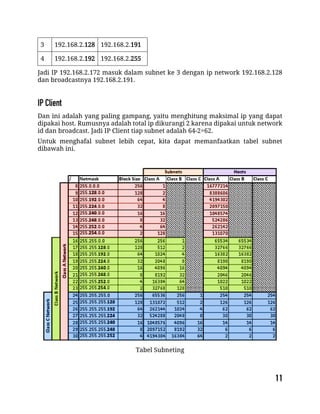
3 192.168.2.128 192.168.2.191
4 192.168.2.192 192.168.2.255
Jadi IP 192.168.2.172 masuk dalam subnet ke 3 dengan ip network 192.168.2.128
dan broadcastnya 192.168.2.191.
Dan ini adalah yang paling gampang, yaitu menghitung maksimal ip yang dapat
dipakai host. Rumusnya adalah total ip dikurangi 2 karena dipakai untuk network
id dan broadcast. Jadi IP Client tiap subnet adalah 64-2=62.
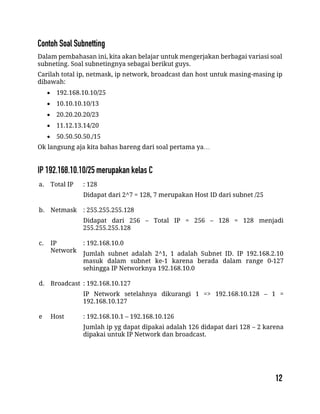
Untuk menghafal subnet lebih cepat, kita dapat memanfaatkan tabel subnet
dibawah ini.
Tabel Subneting
Dalam pembahasan ini, kita akan belajar untuk mengerjakan berbagai variasi soal
subneting. Soal subnetingnya sebagai berikut guys.
Carilah total ip, netmask, ip network, broadcast dan host untuk masing-masing ip
dibawah:
 192.168.10.10/25
 10.10.10.10/13
 20.20.20.20/23
 11.12.13.14/20
 50.50.50.50./15
Ok langsung aja kita bahas bareng dari soal pertama ya…
a. Total IP : 128
Didapat dari 2^7 = 128, 7 merupakan Host ID dari subnet /25
b. Netmask : 255.255.255.128
Didapat dari 256 – Total IP = 256 – 128 = 128 menjadi
255.255.255.128
c. IP
Network
: 192.168.10.0
Jumlah subnet adalah 2^1, 1 adalah Subnet ID. IP 192.168.2.10
masuk dalam subnet ke-1 karena berada dalam range 0-127
sehingga IP Networknya 192.168.10.0
d. Broadcast : 192.168.10.127
IP Network setelahnya dikurangi 1 => 192.168.10.128 – 1 =
192.168.10.127
e Host : 192.168.10.1 – 192.168.10.126
Jumlah ip yg dapat dipakai adalah 126 didapat dari 128 – 2 karena
dipakai untuk IP Network dan broadcast.
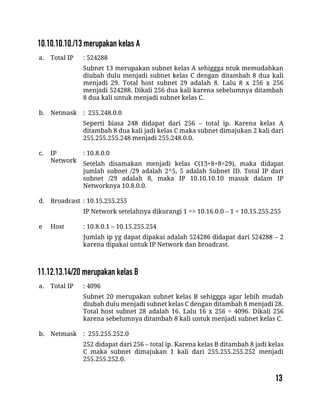
a. Total IP : 524288
Subnet 13 merupakan subnet kelas A sehiggga ntuk memudahkan
diubah dulu menjadi subnet kelas C dengan ditambah 8 dua kali
menjadi 29. Total host subnet 29 adalah 8. Lalu 8 x 256 x 256
menjadi 524288. Dikali 256 dua kali karena sebelumnya ditambah
8 dua kali untuk menjadi subnet kelas C.
b. Netmask : 255.248.0.0
Seperti biasa 248 didapat dari 256 – total ip. Karena kelas A
ditambah 8 dua kali jadi kelas C maka subnet dimajukan 2 kali dari
255.255.255.248 menjadi 255.248.0.0.
c. IP
Network
: 10.8.0.0
Setelah disamakan menjadi kelas C(13+8+8=29), maka didapat
jumlah subnet /29 adalah 2^5, 5 adalah Subnet ID. Total IP dari
subnet /29 adalah 8, maka IP 10.10.10.10 masuk dalam IP
Networknya 10.8.0.0.
d. Broadcast : 10.15.255.255
IP Network setelahnya dikurangi 1 => 10.16.0.0 – 1 = 10.15.255.255
e Host : 10.8.0.1 – 10.15.255.254
Jumlah ip yg dapat dipakai adalah 524286 didapat dari 524288 – 2
karena dipakai untuk IP Network dan broadcast.
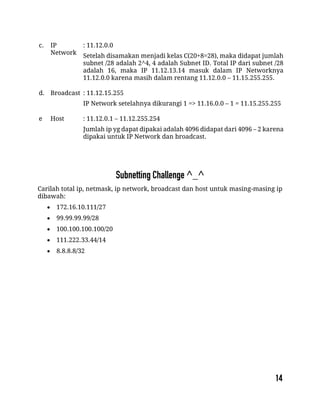
a. Total IP : 4096
Subnet 20 merupakan subnet kelas B sehiggga agar lebih mudah
diubah dulu menjadi subnet kelas C dengan ditambah 8 menjadi 28.
Total host subnet 28 adalah 16. Lalu 16 x 256 = 4096. Dikali 256
karena sebelumnya ditambah 8 kali untuk menjadi subnet kelas C.
b. Netmask : 255.255.252.0
252 didapat dari 256 – total ip. Karena kelas B ditambah 8 jadi kelas
C maka subnet dimajukan 1 kali dari 255.255.255.252 menjadi
255.255.252.0.
c. IP
Network
: 11.12.0.0
Setelah disamakan menjadi kelas C(20+8=28), maka didapat jumlah
subnet /28 adalah 2^4, 4 adalah Subnet ID. Total IP dari subnet /28
adalah 16, maka IP 11.12.13.14 masuk dalam IP Networknya
11.12.0.0 karena masih dalam rentang 11.12.0.0 – 11.15.255.255.
d. Broadcast : 11.12.15.255
IP Network setelahnya dikurangi 1 => 11.16.0.0 – 1 = 11.15.255.255
e Host : 11.12.0.1 – 11.12.255.254
Jumlah ip yg dapat dipakai adalah 4096 didapat dari 4096 – 2 karena
dipakai untuk IP Network dan broadcast.
Carilah total ip, netmask, ip network, broadcast dan host untuk masing-masing ip
dibawah:
 172.16.10.111/27
 99.99.99.99/28
 100.100.100.100/20
 111.222.33.44/14
 8.8.8.8/32
packetlife.net
by Jeremy Stretch v2.0
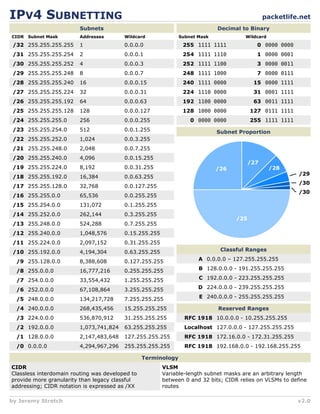
IPV4 SUBNETTING
Terminology
Subnets
CIDR
/32 255.255.255.255 1
Subnet Mask Addresses Wildcard
0.0.0.0
/31 255.255.255.254 2 0.0.0.1
/30 255.255.255.252 4 0.0.0.3
/29 255.255.255.248 8 0.0.0.7
/28 255.255.255.240 16 0.0.0.15
/27 255.255.255.224 32 0.0.0.31
/26 255.255.255.192 64 0.0.0.63
/25 255.255.255.128 128 0.0.0.127
/24 255.255.255.0 256 0.0.0.255
/23 255.255.254.0 512 0.0.1.255
/22 255.255.252.0 1,024 0.0.3.255
/21 255.255.248.0 2,048 0.0.7.255
/20 255.255.240.0 4,096 0.0.15.255
/19 255.255.224.0 8,192 0.0.31.255
/18 255.255.192.0 16,384 0.0.63.255
/17 255.255.128.0 32,768 0.0.127.255
/16 255.255.0.0 65,536 0.0.255.255
/15 255.254.0.0 131,072 0.1.255.255
/14 255.252.0.0 262,144 0.3.255.255
/13 255.248.0.0 524,288 0.7.255.255
/12 255.240.0.0 1,048,576 0.15.255.255
/11 255.224.0.0 2,097,152 0.31.255.255
/10 255.192.0.0 4,194,304 0.63.255.255
/9 255.128.0.0 8,388,608 0.127.255.255
/8 255.0.0.0 16,777,216 0.255.255.255
/7 254.0.0.0 33,554,432 1.255.255.255
/6 252.0.0.0 67,108,864 3.255.255.255
/5 248.0.0.0 134,217,728 7.255.255.255
/4 240.0.0.0 268,435,456 15.255.255.255
/3 224.0.0.0 536,870,912 31.255.255.255
/2 192.0.0.0 1,073,741,824 63.255.255.255
/1 128.0.0.0 2,147,483,648 127.255.255.255
/0 0.0.0.0 4,294,967,296 255.255.255.255
Decimal to Binary
Subnet Mask Wildcard
255 1111 1111 0 0000 0000
254 1111 1110 1 0000 0001
252 1111 1100 3 0000 0011
248 1111 1000 7 0000 0111
240 1111 0000 15 0000 1111
224 1110 0000 31 0001 1111
192 1100 0000 63 0011 1111
128 1000 0000 127 0111 1111
0 0000 0000 255 1111 1111
Subnet Proportion
Classful Ranges
A 0.0.0.0 – 127.255.255.255
B 128.0.0.0 - 191.255.255.255
C 192.0.0.0 - 223.255.255.255
D 224.0.0.0 - 239.255.255.255
E 240.0.0.0 - 255.255.255.255
Reserved Ranges
RFC 1918 10.0.0.0 - 10.255.255.255
Localhost 127.0.0.0 - 127.255.255.255
RFC 1918 172.16.0.0 - 172.31.255.255
RFC 1918 192.168.0.0 - 192.168.255.255
/29
/30
/30
CIDR
Classless interdomain routing was developed to
provide more granularity than legacy classful
addressing; CIDR notation is expressed as /XX
/25
/26
/27
/28
VLSM
Variable-length subnet masks are an arbitrary length
between 0 and 32 bits; CIDR relies on VLSMs to define
routes
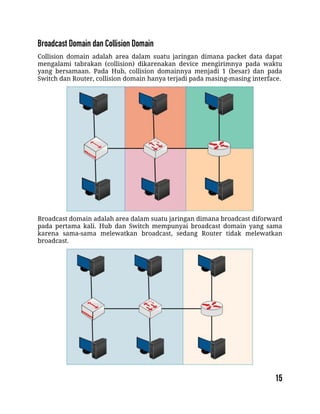
Collision domain adalah area dalam suatu jaringan dimana packet data dapat
mengalami tabrakan (collision) dikarenakan device mengirimnya pada waktu
yang bersamaan. Pada Hub, collision domainnya menjadi 1 (besar) dan pada
Switch dan Router, collision domain hanya terjadi pada masing-masing interface.
Broadcast domain adalah area dalam suatu jaringan dimana broadcast diforward
pada pertama kali. Hub dan Switch mempunyai broadcast domain yang sama
karena sama-sama melewatkan broadcast, sedang Router tidak melewatkan
broadcast.
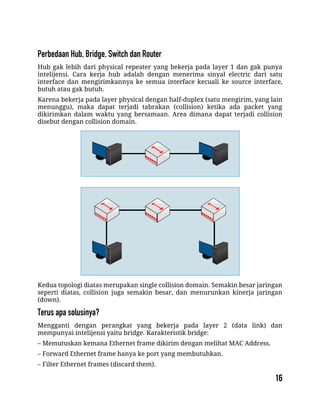
Hub gak lebih dari physical repeater yang bekerja pada layer 1 dan gak punya
intelijensi. Cara kerja hub adalah dengan menerima sinyal electric dari satu
interface dan mengirimkannya ke semua interface kecuali ke source interface,
butuh atau gak butuh.
Karena bekerja pada layer physical dengan half-duplex (satu mengirim, yang lain
menunggu), maka dapat terjadi tabrakan (collision) ketika ada packet yang
dikirimkan dalam waktu yang bersamaan. Area dimana dapat terjadi collision
disebut dengan collision domain.
Kedua topologi diatas merupakan single collision domain. Semakin besar jaringan
seperti diatas, collision juga semakin besar, dan menurunkan kinerja jaringan
(down).
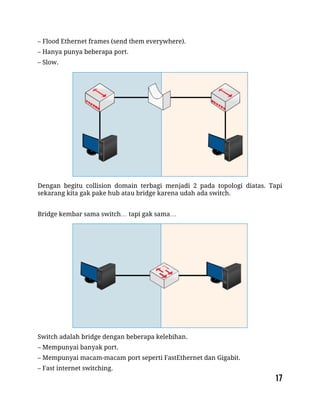
Mengganti dengan perangkat yang bekerja pada layer 2 (data link) dan
mempunyai intelijensi yaitu bridge. Karakteristik bridge:
– Memutuskan kemana Ethernet frame dikirim dengan melihat MAC Address.
– Forward Ethernet frame hanya ke port yang membutuhkan.
– Filter Ethernet frames (discard them).
– Flood Ethernet frames (send them everywhere).
– Hanya punya beberapa port.
– Slow.
Dengan begitu collision domain terbagi menjadi 2 pada topologi diatas. Tapi
sekarang kita gak pake hub atau bridge karena udah ada switch.
Bridge kembar sama switch… tapi gak sama…
Switch adalah bridge dengan beberapa kelebihan.
– Mempunyai banyak port.
– Mempunyai macam-macam port seperti FastEthernet dan Gigabit.
– Fast internet switching.
– Large buffers.
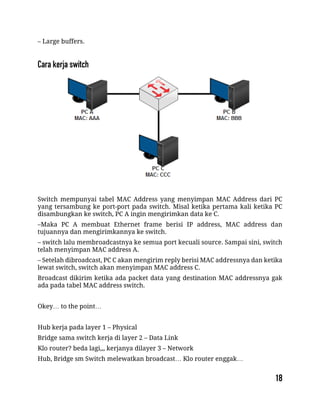
Switch mempunyai tabel MAC Address yang menyimpan MAC Address dari PC
yang tersambung ke port-port pada switch. Misal ketika pertama kali ketika PC
disambungkan ke switch, PC A ingin mengirimkan data ke C.
–Maka PC A membuat Ethernet frame berisi IP address, MAC address dan
tujuannya dan mengirimkannya ke switch.
– switch lalu membroadcastnya ke semua port kecuali source. Sampai sini, switch
telah menyimpan MAC address A.
– Setelah dibroadcast, PC C akan mengirim reply berisi MAC addressnya dan ketika
lewat switch, switch akan menyimpan MAC address C.
Broadcast dikirim ketika ada packet data yang destination MAC addressnya gak
ada pada tabel MAC address switch.
Okey… to the point…
Hub kerja pada layer 1 – Physical
Bridge sama switch kerja di layer 2 – Data Link
Klo router? beda lagi,,, kerjanya dilayer 3 – Network
Hub, Bridge sm Switch melewatkan broadcast… Klo router enggak…
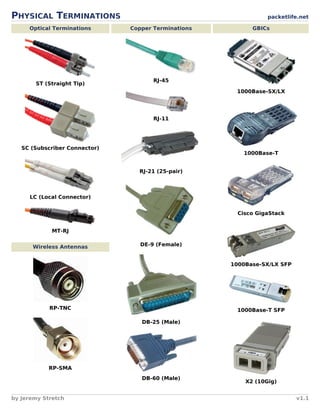
PHYSICAL TERMINATIONS packetlife.net
Optical Terminations
ST (Straight Tip)
SC (Subscriber Connector)
LC (Local Connector)
MT-RJ
Wireless Antennas
RP-TNC
RP-SMA
Copper Terminations
RJ-45
RJ-11
RJ-21 (25-pair)
DE-9 (Female)
DB-25 (Male)
DB-60 (Male)
GBICs
1000Base-SX/LX
1000Base-T
Cisco GigaStack
1000Base-SX/LX SFP
1000Base-T SFP
X2 (10Gig)
by Jeremy Stretch v1.1
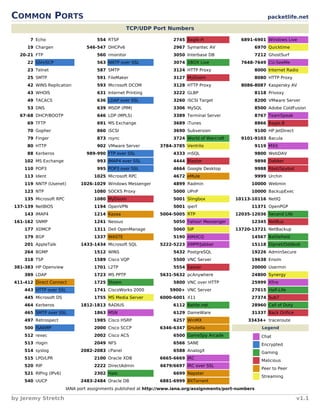
COMMON PORTS packetlife.net
TCP/UDP Port Numbers
7 Echo
19 Chargen
20-21 FTP
22 SSH/SCP
23 Telnet
25 SMTP
42 WINS Replication
43 WHOIS
49 TACACS
53 DNS
67-68 DHCP/BOOTP
69 TFTP
70 Gopher
79 Finger
80 HTTP
88 Kerberos
102 MS Exchange
110 POP3
113 Ident
119 NNTP (Usenet)
123 NTP
135 Microsoft RPC
137-139 NetBIOS
143 IMAP4
161-162 SNMP
177 XDMCP
179 BGP
201 AppleTalk
264 BGMP
318 TSP
381-383 HP Openview
389 LDAP
411-412 Direct Connect
443 HTTP over SSL
445 Microsoft DS
464 Kerberos
465 SMTP over SSL
497 Retrospect
500 ISAKMP
512 rexec
513 rlogin
514 syslog
515 LPD/LPR
520 RIP
521 RIPng (IPv6)
540 UUCP
554 RTSP
546-547 DHCPv6
560 rmonitor
563 NNTP over SSL
587 SMTP
591 FileMaker
593 Microsoft DCOM
631 Internet Printing
636 LDAP over SSL
639 MSDP (PIM)
646 LDP (MPLS)
691 MS Exchange
860 iSCSI
873 rsync
902 VMware Server
989-990 FTP over SSL
993 IMAP4 over SSL
995 POP3 over SSL
1025 Microsoft RPC
1026-1029 Windows Messenger
1080 SOCKS Proxy
1080 MyDoom
1194 OpenVPN
1214 Kazaa
1241 Nessus
1311 Dell OpenManage
1337 WASTE
1433-1434 Microsoft SQL
1512 WINS
1589 Cisco VQP
1701 L2TP
1723 MS PPTP
1725 Steam
1741 CiscoWorks 2000
1755 MS Media Server
1812-1813 RADIUS
1863 MSN
1985 Cisco HSRP
2000 Cisco SCCP
2002 Cisco ACS
2049 NFS
2082-2083 cPanel
2100 Oracle XDB
2222 DirectAdmin
2302 Halo
2483-2484 Oracle DB
2745 Bagle.H
2967 Symantec AV
3050 Interbase DB
3074 XBOX Live
3124 HTTP Proxy
3127 MyDoom
3128 HTTP Proxy
3222 GLBP
3260 iSCSI Target
3306 MySQL
3389 Terminal Server
3689 iTunes
3690 Subversion
3724 World of Warcraft
3784-3785 Ventrilo
4333 mSQL
4444 Blaster
4664 Google Desktop
4672 eMule
4899 Radmin
5000 UPnP
5001 Slingbox
5001 iperf
5004-5005 RTP
5050 Yahoo! Messenger
5060 SIP
5190 AIM/ICQ
5222-5223 XMPP/Jabber
5432 PostgreSQL
5500 VNC Server
5554 Sasser
5631-5632 pcAnywhere
5800 VNC over HTTP
5900+ VNC Server
6000-6001 X11
6112 Battle.net
6129 DameWare
6257 WinMX
6346-6347 Gnutella
6500 GameSpy Arcade
6566 SANE
6588 AnalogX
6665-6669 IRC
6679/6697 IRC over SSL
6699 Napster
6881-6999 BitTorrent
6891-6901 Windows Live
6970 Quicktime
7212 GhostSurf
7648-7649 CU-SeeMe
8000 Internet Radio
8080 HTTP Proxy
8086-8087 Kaspersky AV
8118 Privoxy
8200 VMware Server
8500 Adobe ColdFusion
8767 TeamSpeak
8866 Bagle.B
9100 HP JetDirect
9101-9103 Bacula
9119 MXit
9800 WebDAV
9898 Dabber
9988 Rbot/Spybot
9999 Urchin
10000 Webmin
10000 BackupExec
10113-10116 NetIQ
11371 OpenPGP
12035-12036 Second Life
12345 NetBus
13720-13721 NetBackup
14567 Battlefield
15118 Dipnet/Oddbob
19226 AdminSecure
19638 Ensim
20000 Usermin
24800 Synergy
25999 Xfire
27015 Half-Life
27374 Sub7
28960 Call of Duty
31337 Back Orifice
33434+ traceroute
Legend
Chat
Encrypted
Gaming
Malicious
Peer to Peer
Streaming
IANA port assignments published at http://www.iana.org/assignments/port-numbers
by Jeremy Stretch v1.1
Perintah Dasar Switch & Router Cisco
Konfigurasi Password pada Cisco
Virtual LAN (VLAN)
Trunking VLAN
Inter-VLAN - Router on a Stick
Inter-VLAN – Switch Layer 3
DHCP menggunakan Switch
Port Security
Spanning Tree Protocol (STP)
STP Portfast
Etherchannel
VLAN Trunking Protocol (VTP)
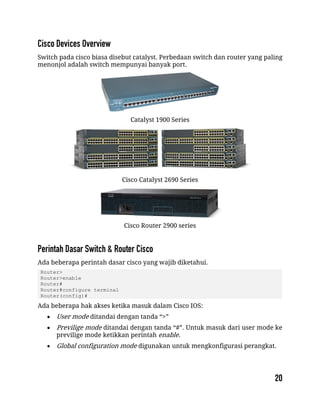
Switch pada cisco biasa disebut catalyst. Perbedaan switch dan router yang paling
menonjol adalah switch mempunyai banyak port.
Catalyst 1900 Series
Cisco Catalyst 2690 Series
Cisco Router 2900 series
Ada beberapa perintah dasar cisco yang wajib diketahui.
Router>
Router>enable
Router#
Router#configure terminal
Router(config)#
Ada beberapa hak akses ketika masuk dalam Cisco IOS:
 User mode ditandai dengan tanda “>”
 Previlige mode ditandai dengan tanda “#”. Untuk masuk dari user mode ke
previlige mode ketikkan perintah enable.
 Global configuration mode digunakan untuk mengkonfigurasi perangkat.
Mengganti Hostname
Router(config)#hostname Semarang
Semarang (config)#
Meyimpan Konfigurasi
Konfigurasi agar ketika device direboot konfigurasi tidak hilang.
Router(config)#write
atau
Router(config)#copy run start
Mereset Perangkat Cisco
Untuk mengembalikan konfigurasi ke default.
Router(config)#write erase
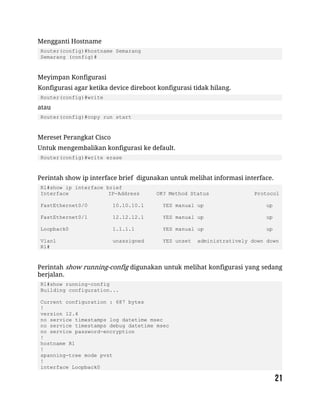
Perintah show ip interface brief digunakan untuk melihat informasi interface.
R1#show ip interface brief
Interface IP-Address OK? Method Status Protocol
FastEthernet0/0 10.10.10.1 YES manual up up
FastEthernet0/1 12.12.12.1 YES manual up up
Loopback0 1.1.1.1 YES manual up up
Vlan1 unassigned YES unset administratively down down
R1#
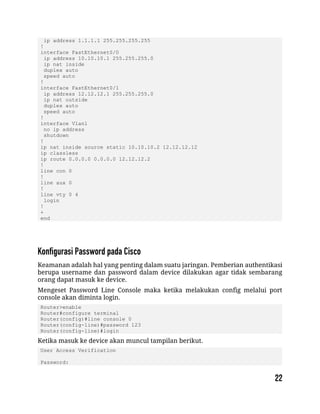
Perintah show running-config digunakan untuk melihat konfigurasi yang sedang
berjalan.
R1#show running-config
Building configuration...
Current configuration : 687 bytes
!
version 12.4
no service timestamps log datetime msec
no service timestamps debug datetime msec
no service password-encryption
!
hostname R1
!
spanning-tree mode pvst
!
interface Loopback0
ip address 1.1.1.1 255.255.255.255
!
interface FastEthernet0/0
ip address 10.10.10.1 255.255.255.0
ip nat inside
duplex auto
speed auto
!
interface FastEthernet0/1
ip address 12.12.12.1 255.255.255.0
ip nat outside
duplex auto
speed auto
!
interface Vlan1
no ip address
shutdown
!
ip nat inside source static 10.10.10.2 12.12.12.12
ip classless
ip route 0.0.0.0 0.0.0.0 12.12.12.2
!
line con 0
!
line aux 0
!
line vty 0 4
login
!
+
end
Keamanan adalah hal yang penting dalam suatu jaringan. Pemberian authentikasi
berupa username dan password dalam device dilakukan agar tidak sembarang
orang dapat masuk ke device.
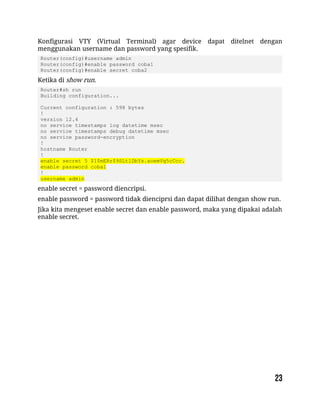
Mengeset Password Line Console maka ketika melakukan config melalui port
console akan diminta login.
Router>enable
Router#configure terminal
Router(config)#line console 0
Router(config-line)#password 123
Router(config-line)#login
Ketika masuk ke device akan muncul tampilan berikut.
User Access Verification
Password:
Konfigurasi VTY (Virtual Terminal) agar device dapat ditelnet dengan
menggunakan username dan password yang spesifik.
Router(config)#username admin
Router(config)#enable password coba1
Router(config)#enable secret coba2
Ketika di show run.
Router#sh run
Building configuration...
Current configuration : 598 bytes
!
version 12.4
no service timestamps log datetime msec
no service timestamps debug datetime msec
no service password-encryption
!
hostname Router
!
enable secret 5 $1$mERr$9SLtlDbYs.aoemVq5cCcc.
enable password coba1
!
username admin
enable secret = password diencripsi.
enable password = password tidak dienciprsi dan dapat dilihat dengan show run.
Jika kita mengeset enable secret dan enable password, maka yang dipakai adalah
enable secret.
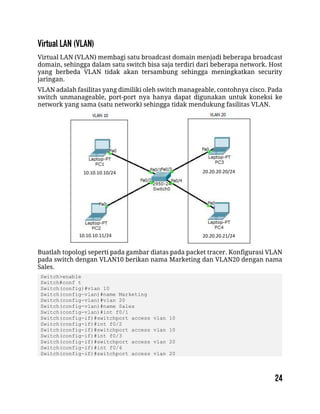
Virtual LAN (VLAN) membagi satu broadcast domain menjadi beberapa broadcast
domain, sehingga dalam satu switch bisa saja terdiri dari beberapa network. Host
yang berbeda VLAN tidak akan tersambung sehingga meningkatkan security
jaringan.
VLAN adalah fasilitas yang dimiliki oleh switch manageable, contohnya cisco. Pada
switch unmanageable, port-port nya hanya dapat digunakan untuk koneksi ke
network yang sama (satu network) sehingga tidak mendukung fasilitas VLAN.
Buatlah topologi seperti pada gambar diatas pada packet tracer. Konfigurasi VLAN
pada switch dengan VLAN10 berikan nama Marketing dan VLAN20 dengan nama
Sales.
Switch>enable
Switch#conf t
Switch(config)#vlan 10
Switch(config-vlan)#name Marketing
Switch(config-vlan)#vlan 20
Switch(config-vlan)#name Sales
Switch(config-vlan)#int f0/1
Switch(config-if)#switchport access vlan 10
Switch(config-if)#int f0/2
Switch(config-if)#switchport access vlan 10
Switch(config-if)#int f0/3
Switch(config-if)#switchport access vlan 20
Switch(config-if)#int f0/4
Switch(config-if)#switchport access vlan 20
10.10.10.10/24
10.10.10.11/24
20.20.20.20/24
20.20.20.21/24
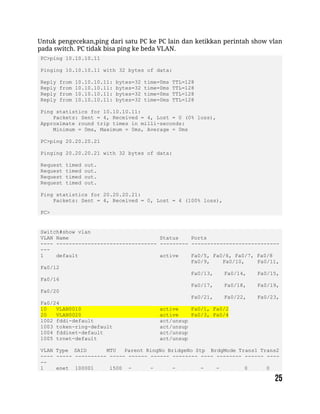
Untuk pengecekan,ping dari satu PC ke PC lain dan ketikkan perintah show vlan
pada switch. PC tidak bisa ping ke beda VLAN.
PC>ping 10.10.10.11
Pinging 10.10.10.11 with 32 bytes of data:
Reply from 10.10.10.11: bytes=32 time=0ms TTL=128
Ping statistics for 10.10.10.11:
Packets: Sent = 4, Received = 4, Lost = 0 (0% loss),
Approximate round trip times in milli-seconds:
Minimum = 0ms, Maximum = 0ms, Average = 0ms
PC>ping 20.20.20.21
Pinging 20.20.20.21 with 32 bytes of data:
Request timed out.
Request timed out.
Request timed out.
Request timed out.
Ping statistics for 20.20.20.21:
Packets: Sent = 4, Received = 0, Lost = 4 (100% loss),
PC>
Switch#show vlan
VLAN Name Status Ports
---- -------------------------------- --------- ----------------------------
---
1 default active Fa0/5, Fa0/6, Fa0/7, Fa0/8
Fa0/9, Fa0/10, Fa0/11,
Fa0/12
Fa0/13, Fa0/14, Fa0/15,
Fa0/16
Fa0/17, Fa0/18, Fa0/19,
Fa0/20
Fa0/21, Fa0/22, Fa0/23,
Fa0/24
10 VLAN0010 active Fa0/1, Fa0/2
20 VLAN0020 active Fa0/3, Fa0/4
1002 fddi-default act/unsup
1003 token-ring-default act/unsup
1004 fddinet-default act/unsup
1005 trnet-default act/unsup
VLAN Type SAID MTU Parent RingNo BridgeNo Stp BrdgMode Trans1 Trans2
---- ----- ---------- ----- ------ ------ -------- ---- -------- ------ ----
--
1 enet 100001 1500 - - - - - 0 0
10 enet 100010 1500 - - - - - 0 0
20 enet 100020 1500 - - - - - 0 0
1002 fddi 101002 1500 - - - - - 0 0
1003 tr 101003 1500 - - - - - 0 0
1004 fdnet 101004 1500 - - - ieee - 0 0
1005 trnet 101005 1500 - - - ibm - 0 0
Remote SPAN VLANs
----------------------------------------------------------------------------
--
Primary Secondary Type Ports
------- --------- ----------------- ----------------------------------------
--
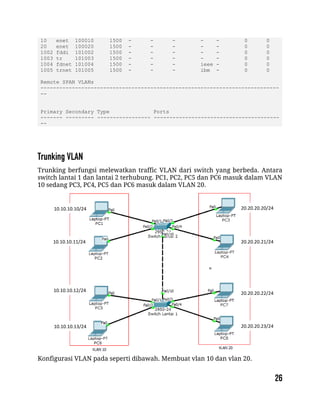
Trunking berfungsi melewatkan traffic VLAN dari switch yang berbeda. Antara
switch lantai 1 dan lantai 2 terhubung. PC1, PC2, PC5 dan PC6 masuk dalam VLAN
10 sedang PC3, PC4, PC5 dan PC6 masuk dalam VLAN 20.
Konfigurasi VLAN pada seperti dibawah. Membuat vlan 10 dan vlan 20.
10.10.10.10/24
10.10.10.11/24
10.10.10.12/24
10.10.10.13/24
20.20.20.20/24
20.20.20.21/24
20.20.20.22/24
20.20.20.23/24
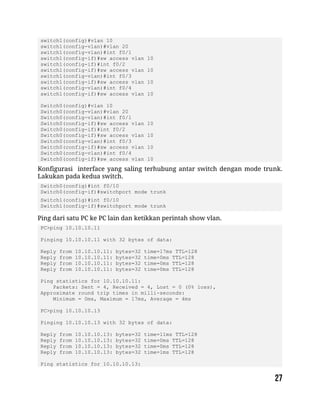
switch1(config)#vlan 10
switch1(config-vlan)#vlan 20
switch1(config-vlan)#int f0/1
switch1(config-if)#sw access vlan 10
switch1(config-if)#int f0/2
switch1(config-if)#sw access vlan 10
switch1(config-vlan)#int f0/3
switch1(config-if)#sw access vlan 10
switch1(config-vlan)#int f0/4
switch1(config-if)#sw access vlan 10
Switch0(config)#vlan 10
Switch0(config-vlan)#vlan 20
Switch0(config-vlan)#int f0/1
Switch0(config-if)#sw access vlan 10
Switch0(config-if)#int f0/2
Switch0(config-if)#sw access vlan 10
Switch0(config-vlan)#int f0/3
Switch0(config-if)#sw access vlan 10
Switch0(config-vlan)#int f0/4
Switch0(config-if)#sw access vlan 10
Konfigurasi interface yang saling terhubung antar switch dengan mode trunk.
Lakukan pada kedua switch.
Switch0(config)#int f0/10
Switch0(config-if)#switchport mode trunk
Switch1(config)#int f0/10
Switch1(config-if)#switchport mode trunk
Ping dari satu PC ke PC lain dan ketikkan perintah show vlan.
PC>ping 10.10.10.11
Pinging 10.10.10.11 with 32 bytes of data:
Reply from 10.10.10.11: bytes=32 time=17ms TTL=128
Reply from 10.10.10.11: bytes=32 time=0ms TTL=128
Ping statistics for 10.10.10.11:
Packets: Sent = 4, Received = 4, Lost = 0 (0% loss),
Approximate round trip times in milli-seconds:
Minimum = 0ms, Maximum = 17ms, Average = 4ms
PC>ping 10.10.10.13
Pinging 10.10.10.13 with 32 bytes of data:
Reply from 10.10.10.13: bytes=32 time=11ms TTL=128
Reply from 10.10.10.13: bytes=32 time=0ms TTL=128
Reply from 10.10.10.13: bytes=32 time=1ms TTL=128
Ping statistics for 10.10.10.13:
Packets: Sent = 4, Received = 4, Lost = 0 (0% loss),
Approximate round trip times in milli-seconds:
Minimum = 0ms, Maximum = 11ms, Average = 3ms
PC>ping 20.20.20.20
Pinging 20.20.20.20 with 32 bytes of data:
Request timed out.
Request timed out.
Request timed out.
Request timed out.
Ping statistics for 20.20.20.20:
Packets: Sent = 4, Received = 0, Lost = 4 (100% loss),
PC>
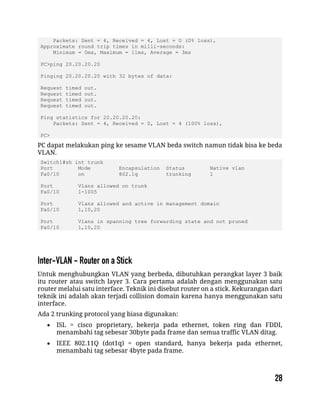
PC dapat melakukan ping ke sesame VLAN beda switch namun tidak bisa ke beda
VLAN.
Switch1#sh int trunk
Port Mode Encapsulation Status Native vlan
Fa0/10 on 802.1q trunking 1
Port Vlans allowed on trunk
Fa0/10 1-1005
Port Vlans allowed and active in management domain
Fa0/10 1,10,20
Port Vlans in spanning tree forwarding state and not pruned
Fa0/10 1,10,20
Untuk menghubungkan VLAN yang berbeda, dibutuhkan perangkat layer 3 baik
itu router atau switch layer 3. Cara pertama adalah dengan menggunakan satu
router melalui satu interface. Teknik ini disebut router on a stick. Kekurangan dari
teknik ini adalah akan terjadi collision domain karena hanya menggunakan satu
interface.
Ada 2 trunking protocol yang biasa digunakan:
 ISL = cisco proprietary, bekerja pada ethernet, token ring dan FDDI,
menambahi tag sebesar 30byte pada frame dan semua traffic VLAN ditag.
 IEEE 802.11Q (dot1q) = open standard, hanya bekerja pada ethernet,
menambahi tag sebesar 4byte pada frame.
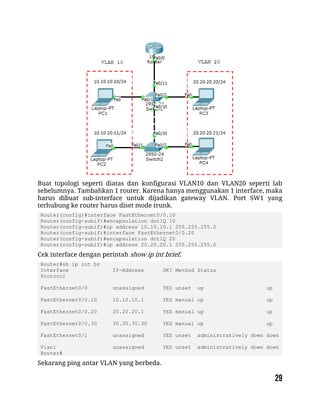
Buat topologi seperti diatas dan konfigurasi VLAN10 dan VLAN20 seperti lab
sebelumnya. Tambahkan 1 router. Karena hanya menggunakan 1 interface, maka
harus dibuat sub-interface untuk dijadikan gateway VLAN. Port SW1 yang
terhubung ke router harus diset mode trunk.
Router(config)#interface FastEthernet0/0.10
Router(config-subif)#encapsulation dot1Q 10
Router(config-subif)#ip address 10.10.10.1 255.255.255.0
Router(config-subif)#interface FastEthernet0/0.20
Router(config-subif)#encapsulation dot1Q 20
Router(config-subif)#ip address 20.20.20.1 255.255.255.0
Cek interface dengan perintah show ip int brief.
Router#sh ip int br
Interface IP-Address OK? Method Status
Protocol
FastEthernet0/0 unassigned YES unset up up
FastEthernet0/0.10 10.10.10.1 YES manual up up
FastEthernet0/0.20 20.20.20.1 YES manual up up
FastEthernet0/0.30 30.30.30.30 YES manual up up
FastEthernet0/1 unassigned YES unset administratively down down
Vlan1 unassigned YES unset administratively down down
Router#
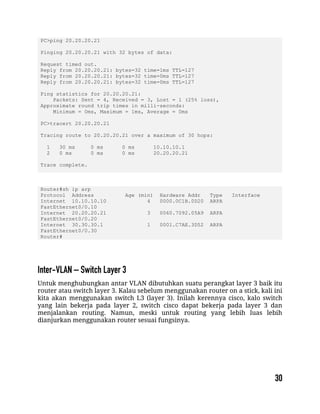
Sekarang ping antar VLAN yang berbeda.
PC>ping 20.20.20.21
Pinging 20.20.20.21 with 32 bytes of data:
Request timed out.
Reply from 20.20.20.21: bytes=32 time=1ms TTL=127
Reply from 20.20.20.21: bytes=32 time=0ms TTL=127
Ping statistics for 20.20.20.21:
Packets: Sent = 4, Received = 3, Lost = 1 (25% loss),
Approximate round trip times in milli-seconds:
Minimum = 0ms, Maximum = 1ms, Average = 0ms
PC>tracert 20.20.20.21
Tracing route to 20.20.20.21 over a maximum of 30 hops:
1 30 ms 0 ms 0 ms 10.10.10.1
2 0 ms 0 ms 0 ms 20.20.20.21
Trace complete.
Router#sh ip arp
Protocol Address Age (min) Hardware Addr Type Interface
Internet 10.10.10.10 4 0000.0C1B.0D20 ARPA
FastEthernet0/0.10
Internet 20.20.20.21 3 0060.7092.05A9 ARPA
FastEthernet0/0.20
Internet 30.30.30.1 1 0001.C7AE.3D52 ARPA
FastEthernet0/0.30
Router#
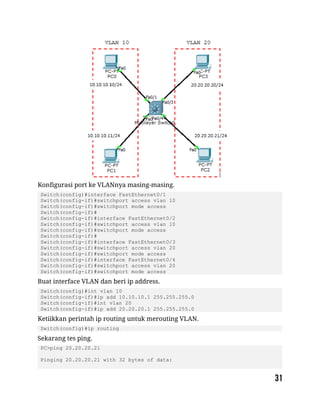
Untuk menghubungkan antar VLAN dibutuhkan suatu perangkat layer 3 baik itu
router atau switch layer 3. Kalau sebelum menggunakan router on a stick, kali ini
kita akan menggunakan switch L3 (layer 3). Inilah kerennya cisco, kalo switch
yang lain bekerja pada layer 2, switch cisco dapat bekerja pada layer 3 dan
menjalankan routing. Namun, meski untuk routing yang lebih luas lebih
dianjurkan menggunakan router sesuai fungsinya.
Konfigurasi port ke VLANnya masing-masing.
Switch(config)#interface FastEthernet0/1
Switch(config-if)#switchport access vlan 10
Switch(config-if)#switchport mode access
Switch(config-if)#
Switch(config-if)#interface FastEthernet0/2
Switch(config-if)#switchport access vlan 10
Switch(config-if)#switchport mode access
Switch(config-if)#
Switch(config-if)#interface FastEthernet0/3
Switch(config-if)#switchport access vlan 20
Switch(config-if)#switchport mode access
Switch(config-if)#interface FastEthernet0/4
Switch(config-if)#switchport access vlan 20
Switch(config-if)#switchport mode access
Buat interface VLAN dan beri ip address.
Switch(config)#int vlan 10
Switch(config-if)#ip add 10.10.10.1 255.255.255.0
Switch(config-if)#int vlan 20
Switch(config-if)#ip add 20.20.20.1 255.255.255.0
Ketiikkan perintah ip routing untuk merouting VLAN.
Switch(config)#ip routing
Sekarang tes ping.
PC>ping 20.20.20.21
Pinging 20.20.20.21 with 32 bytes of data:
Request timed out.
Reply from 20.20.20.21: bytes=32 time=0ms TTL=127
Ping statistics for 20.20.20.21:
Packets: Sent = 4, Received = 3, Lost = 1 (25% loss),
Approximate round trip times in milli-seconds:
Minimum = 0ms, Maximum = 0ms, Average = 0ms
PC>
packetlife.net
by Jeremy Stretch v2.0
VLANS
Trunk Encapsulation
VLAN Creation
Switch(config)# vlan 100
Switch(config-vlan)# name Engineering
0 Reserved
1 default
1002 fddi-default
1003 tr
Terminology
Trunking
Carrying multiple VLANs over the same
physical connection
Access VLAN
The VLAN to which an access port is assigned
Voice VLAN
If configured, enables minimal trunking to
support voice traffic in addition to data traffic
on an access port
Troubleshooting
show vlan
show interface [status | switchport]
show interface trunk
show vtp status
show vtp password
Access Port Configuration
Switch(config-if)# switchport mode access
Switch(config-if)# switchport nonegotiate
Switch(config-if)# switchport access vlan 100
Switch(config-if)# switchport voice vlan 150
Trunk Port Configuration
Switch(config-if)# switchport mode trunk
Switch(config-if)# switchport trunk encapsulation dot1q
Switch(config-if)# switchport trunk allowed vlan 10,20-30
Switch(config-if)# switchport trunk native vlan 10
Trunk Types
Header Size 26 bytes
ISL
4 bytes
802.1Q
Trailer Size 4 bytes
N/A
Standard Cisco
IEEE
Maximum VLANs 1000
4094
VLAN Numbers
1004 fdnet
1005 trnet
1006-4094 Extended
4095 Reserved
Native VLAN
By default, frames in this VLAN are untagged
when sent across a trunk
Dynamic Trunking Protocol (DTP)
Can be used to automatically establish trunks
between capable ports (insecure)
Switched Virtual Interface (SVI)
A virtual interface which provides a routed
gateway into and out of a VLAN
SVI Configuration
Switch(config)# interface vlan100
Switch(config-if)# ip address 192.168.100.1 255.255.255.0
ISL
Header
Dest
MAC
Source
MAC
Type FCS
ISL
Dest
MAC
Source
MAC
Type
802.1Q
802.1Q
26 6 6 2 4
6 6 2
4
Dest
MAC
Source
MAC
Type
Untagged
Switch Port Modes
trunk
Forms an unconditional trunk
dynamic desirable
Attempts to negotiate a trunk with the far end
dynamic auto
Forms a trunk only if requested by the far end
access
Will never form a trunk
VLAN Trunking Protocol (VTP)
Domain
Common to all switches participating in VTP
Server Mode
Generates and propagates VTP advertisements to clients;
default mode on unconfigured switches
Client Mode
Receives and forwards advertisements from servers; VLANs
cannot be manually configured on switches in client mode
Transparent Mode
Forwards advertisements but does not participate in VTP;
VLANs must be configured manually
Pruning
VLANs not having any access ports on an end switch are
removed from the trunk to reduce flooded traffic
VTP Configuration
Switch(config)# vtp mode {server | client | transparent}
Switch(config)# vtp domain <name>
Switch(config)# vtp password <passsword>
Switch(config)# vtp version {1 | 2}
Switch(config)# vtp pruning
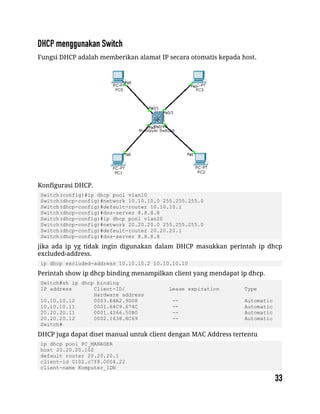
Fungsi DHCP adalah memberikan alamat IP secara otomatis kepada host.
Konfigurasi DHCP.
Switch(config)#ip dhcp pool vlan10
Switch(dhcp-config)#network 10.10.10.0 255.255.255.0
Switch(dhcp-config)#default-router 10.10.10.1
Switch(dhcp-config)#dns-server 8.8.8.8
Switch(dhcp-config)#ip dhcp pool vlan20
Switch(dhcp-config)#network 20.20.20.0 255.255.255.0
Switch(dhcp-config)#default-router 20.20.20.1
Switch(dhcp-config)#dns-server 8.8.8.8
jika ada ip yg tidak ingin digunakan dalam DHCP masukkan perintah ip dhcp
excluded-address.
ip dhcp excluded-address 10.10.10.2 10.10.10.10
Perintah show ip dhcp binding menampilkan client yang mendapat ip dhcp.
Switch#sh ip dhcp binding
IP address Client-ID/ Lease expiration Type
Hardware address
10.10.10.12 0003.E4A2.9D08 -- Automatic
10.10.10.11 0001.64C9.674C -- Automatic
20.20.20.11 0001.4266.50B0 -- Automatic
20.20.20.12 0002.1638.8C69 -- Automatic
Switch#
DHCP juga dapat diset manual untuk client dengan MAC Address tertentu
ip dhcp pool PC_MANAGER
host 20.20.20.100
default router 20.20.20.1
client-id 0102.c7f8.0004.22
client-name Komputer_IDN
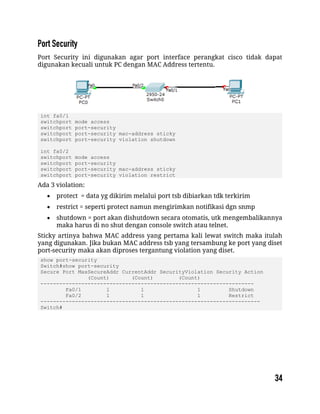
Port Security ini digunakan agar port interface perangkat cisco tidak dapat
digunakan kecuali untuk PC dengan MAC Address tertentu.
int fa0/1
switchport mode access
switchport port-security
switchport port-security mac-address sticky
switchport port-security violation shutdown
int fa0/2
switchport mode access
switchport port-security
switchport port-security mac-address sticky
switchport port-security violation restrict
Ada 3 violation:
 protect = data yg dikirim melalui port tsb dibiarkan tdk terkirim
 restrict = seperti protect namun mengirimkan notifikasi dgn snmp
 shutdown = port akan dishutdown secara otomatis, utk mengembalikannya
maka harus di no shut dengan console switch atau telnet.
Sticky artinya bahwa MAC address yang pertama kali lewat switch maka itulah
yang digunakan. Jika bukan MAC address tsb yang tersambung ke port yang diset
port-security maka akan diproses tergantung violation yang diset.
show port-security
Switch#show port-security
Secure Port MaxSecureAddr CurrentAddr SecurityViolation Security Action
(Count) (Count) (Count)
--------------------------------------------------------------------
Fa0/1 1 1 1 Shutdown
Fa0/2 1 1 1 Restrict
----------------------------------------------------------------------
Switch#
Spanning Tree Protocol (STP) merupakan protocol yang berfungsi mencegah loop
pada switch ketika switch menggunakan lebih dari 1 link dengan maksud
redundancy. STP secara defaultnya diset aktif pada Cisco Catalyst. STP merupakan
open standard (IEEE 802.1D). STP dapat mencegah:
 Broadcast Storm
 Multiple Frame Copies
 Database Instability
Ada beberapa jenis STP:
 Open Standard : STP (802.1D), Rapid STP (802.1W), Multiple Spanning Tree
MST (802.1S)
 Cisco Proprietary : PVST (Per Vlan Spanning Tree), PVST+, Rapid PVST.
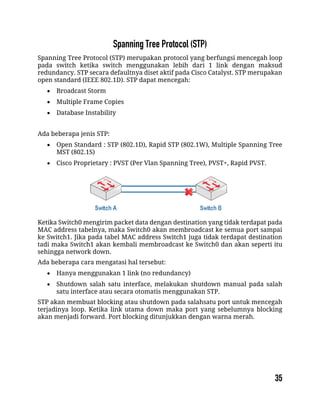
Ketika Switch0 mengirim packet data dengan destination yang tidak terdapat pada
MAC address tabelnya, maka Switch0 akan membroadcast ke semua port sampai
ke Switch1. Jika pada tabel MAC address Switch1 juga tidak terdapat destination
tadi maka Switch1 akan kembali membroadcast ke Switch0 dan akan seperti itu
sehingga network down.
Ada beberapa cara mengatasi hal tersebut:
 Hanya menggunakan 1 link (no redundancy)
 Shutdown salah satu interface, melakukan shutdown manual pada salah
satu interface atau secara otomatis menggunakan STP.
STP akan membuat blocking atau shutdown pada salahsatu port untuk mencegah
terjadinya loop. Ketika link utama down maka port yang sebelumnya blocking
akan menjadi forward. Port blocking ditunjukkan dengan warna merah.
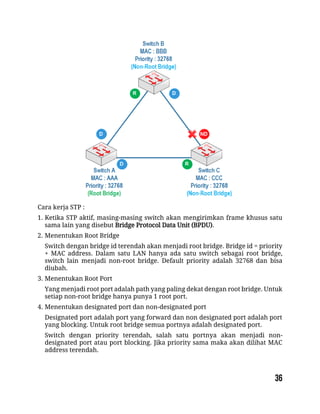
Cara kerja STP :
1. Ketika STP aktif, masing-masing switch akan mengirimkan frame khusus satu
sama lain yang disebut Bridge Protocol Data Unit (BPDU).
2. Menentukan Root Bridge
Switch dengan bridge id terendah akan menjadi root bridge. Bridge id = priority
+ MAC address. Dalam satu LAN hanya ada satu switch sebagai root bridge,
switch lain menjadi non-root bridge. Default priority adalah 32768 dan bisa
diubah.
3. Menentukan Root Port
Yang menjadi root port adalah path yang paling dekat dengan root bridge. Untuk
setiap non-root bridge hanya punya 1 root port.
4. Menentukan designated port dan non-designated port
Designated port adalah port yang forward dan non designated port adalah port
yang blocking. Untuk root bridge semua portnya adalah designated port.
Switch dengan priority terendah, salah satu portnya akan menjadi non-
designated port atau port blocking. Jika priority sama maka akan dilihat MAC
address terendah.
STP akan membuat blocking atau shutdown pada salahsatu port untuk mencegah
terjadinya loop. Ketika link utama down maka port yang sebelumnya blocking
akan menjadi forward. Port blocking ditunjukkan dengan warna merah.
STP menggunakan link cost calculation untuk menentukan root port pada non-root
switch.
 10 Gbps = Cost 2
 1 Gbps = Cost 4
 100 Mbps = Cost 19
 10 Mbps = Cost 100
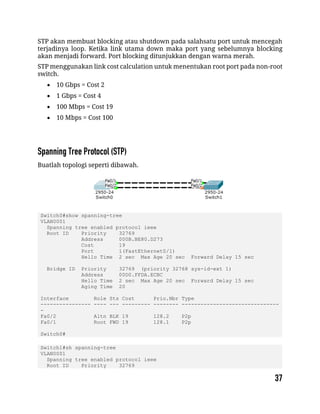
Buatlah topologi seperti dibawah.
Switch0#show spanning-tree
VLAN0001
Spanning tree enabled protocol ieee
Root ID Priority 32769
Address 000B.BE80.D273
Cost 19
Port 1(FastEthernet0/1)
Hello Time 2 sec Max Age 20 sec Forward Delay 15 sec
Bridge ID Priority 32769 (priority 32768 sys-id-ext 1)
Address 00D0.FFDA.ECBC
Hello Time 2 sec Max Age 20 sec Forward Delay 15 sec
Aging Time 20
Interface Role Sts Cost Prio.Nbr Type
---------------- ---- --- --------- -------- -------------------------------
-
Fa0/2 Altn BLK 19 128.2 P2p
Fa0/1 Root FWD 19 128.1 P2p
Switch0#
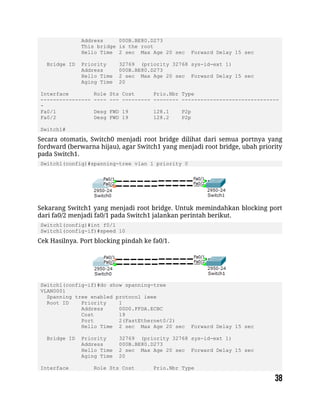
Switch1#sh spanning-tree
VLAN0001
Spanning tree enabled protocol ieee
Root ID Priority 32769
Address 000B.BE80.D273
This bridge is the root
Hello Time 2 sec Max Age 20 sec Forward Delay 15 sec
Bridge ID Priority 32769 (priority 32768 sys-id-ext 1)
Address 000B.BE80.D273
Hello Time 2 sec Max Age 20 sec Forward Delay 15 sec
Aging Time 20
Interface Role Sts Cost Prio.Nbr Type
---------------- ---- --- --------- -------- -------------------------------
-
Fa0/1 Desg FWD 19 128.1 P2p
Fa0/2 Desg FWD 19 128.2 P2p
Switch1#
Secara otomatis, Switch0 menjadi root bridge dilihat dari semua portnya yang
fordward (berwarna hijau), agar Switch1 yang menjadi root bridge, ubah priority
pada Switch1.
Switch1(config)#spanning-tree vlan 1 priority 0
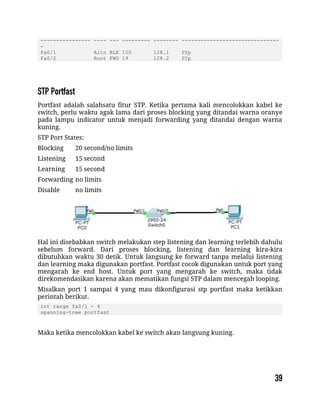
Sekarang Switch1 yang menjadi root bridge. Untuk memindahkan blocking port
dari fa0/2 menjadi fa0/1 pada Switch1 jalankan perintah berikut.
Switch1(config)#int f0/1
Switch1(config-if)#speed 10
Cek Hasilnya. Port blocking pindah ke fa0/1.
Switch1(config-if)#do show spanning-tree
VLAN0001
Spanning tree enabled protocol ieee
Root ID Priority 1
Address 00D0.FFDA.ECBC
Cost 19
Port 2(FastEthernet0/2)
Hello Time 2 sec Max Age 20 sec Forward Delay 15 sec
Bridge ID Priority 32769 (priority 32768 sys-id-ext 1)
Address 000B.BE80.D273
Hello Time 2 sec Max Age 20 sec Forward Delay 15 sec
Aging Time 20
Interface Role Sts Cost Prio.Nbr Type
---------------- ---- --- --------- -------- -------------------------------
-
Fa0/1 Altn BLK 100 128.1 P2p
Fa0/2 Root FWD 19 128.2 P2p
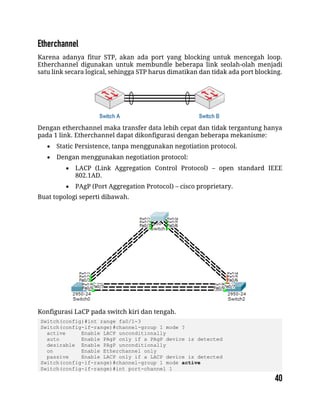
Portfast adalah salahsatu fitur STP. Ketika pertama kali mencolokkan kabel ke
switch, perlu waktu agak lama dari proses blocking yang ditandai warna oranye
pada lampu indicator untuk menjadi forwarding yang ditandai dengan warna
kuning.
STP Port States:
Blocking 20 second/no limits
Listening 15 second
Learning 15 second
Forwarding no limits
Disable no limits
Hal ini disebabkan switch melakukan step listening dan learning terlebih dahulu
sebelum forward. Dari proses blocking, listening dan learning kira-kira
dibutuhkan waktu 30 detik. Untuk langsung ke forward tanpa melalui listening
dan learning maka digunakan portfast. Portfast cocok digunakan untuk port yang
mengarah ke end host. Untuk port yang mengarah ke switch, maka tidak
direkomendasikan karena akan mematikan fungsi STP dalam mencegah looping.
Misalkan port 1 sampai 4 yang mau dikonfigurasi stp portfast maka ketikkan
perintah berikut.
int range fa0/1 - 4
spanning-tree portfast
Maka ketika mencolokkan kabel ke switch akan langsung kuning.
Karena adanya fitur STP, akan ada port yang blocking untuk mencegah loop.
Etherchannel digunakan untuk membundle beberapa link seolah-olah menjadi
satu link secara logical, sehingga STP harus dimatikan dan tidak ada port blocking.
Dengan etherchannel maka transfer data lebih cepat dan tidak tergantung hanya
pada 1 link. Etherchannel dapat dikonfigurasi dengan beberapa mekanisme:
 Static Persistence, tanpa menggunakan negotiation protocol.
 Dengan menggunakan negotiation protocol:
 LACP (Link Aggregation Control Protocol) – open standard IEEE
802.1AD.
 PAgP (Port Aggregation Protocol) – cisco proprietary.
Buat topologi seperti dibawah.
Konfigurasi LaCP pada switch kiri dan tengah.
Switch(config)#int range fa0/1-3
Switch(config-if-range)#channel-group 1 mode ?
active Enable LACP unconditionally
auto Enable PAgP only if a PAgP device is detected
desirable Enable PAgP unconditionally
on Enable Etherchannel only
passive Enable LACP only if a LACP device is detected
Switch(config-if-range)#channel-group 1 mode active
Switch(config-if-range)#int port-channel 1
Switch(config-if)#switchport mode trunk
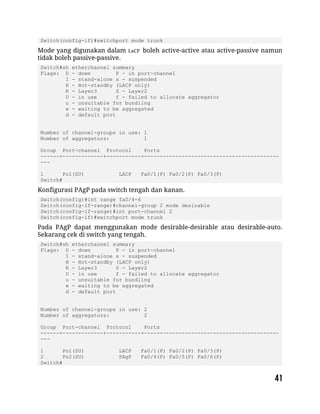
Mode yang digunakan dalam LaCP boleh active-active atau active-passive namun
tidak boleh passive-passive.
Switch#sh etherchannel summary
Flags: D - down P - in port-channel
I - stand-alone s - suspended
H - Hot-standby (LACP only)
R - Layer3 S - Layer2
U - in use f - failed to allocate aggregator
u - unsuitable for bundling
w - waiting to be aggregated
d - default port
Number of channel-groups in use: 1
Number of aggregators: 1
Group Port-channel Protocol Ports
------+-------------+-----------+-------------------------------------------
---
1 Po1(SU) LACP Fa0/1(P) Fa0/2(P) Fa0/3(P)
Switch#
Konfigurasi PAgP pada switch tengah dan kanan.
Switch(config)#int range fa0/4-6
Switch(config-if-range)#channel-group 2 mode desirable
Switch(config-if-range)#int port-channel 2
Switch(config-if)#switchport mode trunk
Pada PAgP dapat menggunakan mode desirable-desirable atau desirable-auto.
Sekarang cek di switch yang tengah.
Switch#sh etherchannel summary
Flags: D - down P - in port-channel
I - stand-alone s - suspended
H - Hot-standby (LACP only)
R - Layer3 S - Layer2
U - in use f - failed to allocate aggregator
u - unsuitable for bundling
w - waiting to be aggregated
d - default port
Number of channel-groups in use: 2
Number of aggregators: 2
Group Port-channel Protocol Ports
------+-------------+-----------+-------------------------------------------
---
1 Po1(SU) LACP Fa0/1(P) Fa0/2(P) Fa0/3(P)
2 Po2(SU) PAgP Fa0/4(P) Fa0/5(P) Fa0/6(P)
Switch#
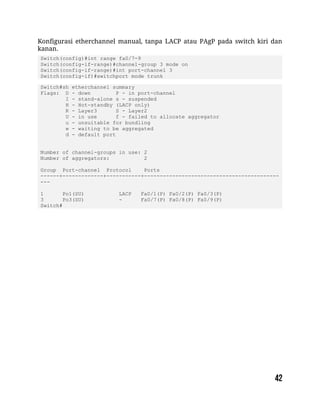
Konfigurasi etherchannel manual, tanpa LACP atau PAgP pada switch kiri dan
kanan.
Switch(config)#int range fa0/7-9
Switch(config-if-range)#channel-group 3 mode on
Switch(config-if-range)#int port-channel 3
Switch(config-if)#switchport mode trunk
Switch#sh etherchannel summary
Flags: D - down P - in port-channel
I - stand-alone s - suspended
H - Hot-standby (LACP only)
R - Layer3 S - Layer2
U - in use f - failed to allocate aggregator
u - unsuitable for bundling
w - waiting to be aggregated
d - default port
Number of channel-groups in use: 2
Number of aggregators: 2
Group Port-channel Protocol Ports
------+-------------+-----------+-------------------------------------------
---
1 Po1(SU) LACP Fa0/1(P) Fa0/2(P) Fa0/3(P)
3 Po3(SU) - Fa0/7(P) Fa0/8(P) Fa0/9(P)
Switch#
packetlife.net
by Jeremy Stretch v3.0
IEEE
Cisco
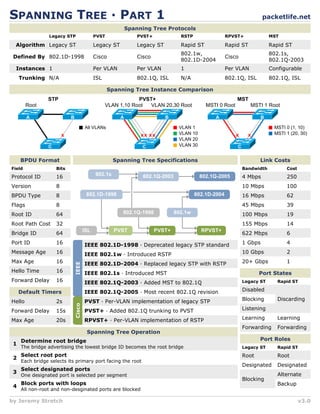
SPANNING TREE · PART 1
BPDU Format
Protocol ID 16
Spanning Tree Protocols
Algorithm
Legacy STP PVST
Defined By
Instances
Trunking
PVST+ RPVST+ MST
Legacy ST
802.1D-1998
1
N/A
Legacy ST
Cisco
Per VLAN
ISL
Legacy ST
Cisco
Per VLAN
802.1Q, ISL
Rapid ST
Cisco
Per VLAN
802.1Q, ISL
Rapid ST
802.1s,
802.1Q-2003
Configurable
802.1Q, ISL
RSTP
Rapid ST
802.1w,
802.1D-2004
1
N/A
Spanning Tree Instance Comparison
STP
C
A B
All VLANs
x
Root
PVST+
C
A B
VLAN 1
VLAN 10
VLAN 20
VLAN 30
xx xx
VLAN 1,10 Root VLAN 20,30 Root
MST
C
A B
MSTI 0 (1, 10)
MSTI 1 (20, 30)
x x
MSTI 0 Root MSTI 1 Root
Field Bits
Version 8
BPDU Type 8
Flags 8
Root ID 64
Root Path Cost 32
Bridge ID 64
Port ID 16
Message Age 16
Max Age 16
Hello Time 16
Forward Delay 16
Spanning Tree Specifications
802.1D-1998
PVST
ISL PVST+ RPVST+
802.1w
802.1s
802.1D-2004
802.1Q-2003
802.1Q-1998
802.1Q-2005
Link Costs
4 Mbps 250
Bandwidth Cost
10 Mbps 100
16 Mbps 62
45 Mbps 39
100 Mbps 19
155 Mbps 14
622 Mbps 6
1 Gbps 4
10 Gbps 2
Default Timers
Hello
Forward Delay
Max Age
2s
15s
20s
Port States
Disabled
Discarding
Legacy ST Rapid ST
Blocking
Listening
Learning Learning
Forwarding Forwarding
IEEE 802.1D-1998 · Deprecated legacy STP standard
IEEE 802.1w · Introduced RSTP
IEEE 802.1D-2004 · Replaced legacy STP with RSTP
IEEE 802.1s · Introduced MST
IEEE 802.1Q-2003 · Added MST to 802.1Q
PVST · Per-VLAN implementation of legacy STP
PVST+ · Added 802.1Q trunking to PVST
RPVST+ · Per-VLAN implementation of RSTP
Port Roles
Root Root
Legacy ST Rapid ST
Designated Designated
Blocking
Alternate
Backup
Spanning Tree Operation
Determine root bridge
The bridge advertising the lowest bridge ID becomes the root bridge
Select root port
Each bridge selects its primary port facing the root
Select designated ports
One designated port is selected per segment
Block ports with loops
All non-root and non-desginated ports are blocked
1
2
3
4
IEEE 802.1Q-2005 · Most recent 802.1Q revision
20+ Gbps 1
packetlife.net
by Jeremy Stretch v3.0
SPANNING TREE · PART 2
PVST+ and RPVST+ Configuration
spanning-tree mode {pvst | rapid-pvst}
! Bridge priority
spanning-tree vlan 1-4094 priority 32768
! Timers, in seconds
spanning-tree vlan 1-4094 hello-time 2
spanning-tree vlan 1-4094 forward-time 15
spanning-tree vlan 1-4094 max-age 20
! PVST+ Enhancements
spanning-tree backbonefast
spanning-tree uplinkfast
! Interface attributes
interface FastEthernet0/1
spanning-tree [vlan 1-4094] port-priority 128
spanning-tree [vlan 1-4094] cost 19
! Manual link type specification
spanning-tree link-type {point-to-point | shared}
! Enables PortFast if running PVST+, or
! designates an edge port under RPVST+
spanning-tree portfast
! Spanning tree protection
spanning-tree guard {loop | root | none}
! Per-interface toggling
spanning-tree bpduguard enable
spanning-tree bpdufilter enable
Troubleshooting
show spanning-tree [summary | detail | root]
show spanning-tree [interface | vlan]
MST Configuration
spanning-tree mode mst
! MST Configuration
spanning-tree mst configuration
name MyTree
revision 1
! Map VLANs to instances
instance 1 vlan 20, 30
instance 2 vlan 40, 50
! Bridge priority (per instance)
spanning-tree mst 1 priority 32768
! Timers, in seconds
spanning-tree mst hello-time 2
spanning-tree mst forward-time 15
spanning-tree mst max-age 20
! Maximum hops for BPDUs
spanning-tree mst max-hops 20
! Interface attributes
interface FastEthernet0/1
spanning-tree mst 1 port-priority 128
spanning-tree mst 1 cost 19
Bridge ID Format
Pri Sys ID Ext MAC Address
4 12 48
System ID Extension
12-bit value taken from VLAN number (IEEE 802.1t)
Priority
4-bit bridge priority (configurable from 0 to 61440 in
increments of 4096)
MAC Address
48-bit unique identifier
Path Selection
1 Bridge with lowest root ID becomes the root
2
3
4
Prefer the neighbor with the lowest cost to root
Prefer the neighbor with the lowest bridge ID
Prefer the lowest sender port ID
Optional PVST+ Ehancements
PortFast
Enables immediate transition into the forwarding state
(designates edge ports under MST)
UplinkFast
Enables switches to maintain backup paths to root
BackboneFast
Enables immediate expiration of the Max Age timer in
the event of an indirect link failure
Spanning Tree Protection
Root Guard
Prevents a port from becoming the root port
BPDU Guard
Error-disables a port if a BPDU is received
Loop Guard
Prevents a blocked port from transitioning to listening
after the Max Age timer has expired
BPDU Filter
Blocks BPDUs on an interface (disables STP)
RSTP Link Types
Point-to-Point
Connects to exactly one other bridge (full duplex)
Shared
Potentially connects to multiple bridges (half duplex)
Edge
Connects to a single host; designated by PortFast
show spanning-tree mst […]
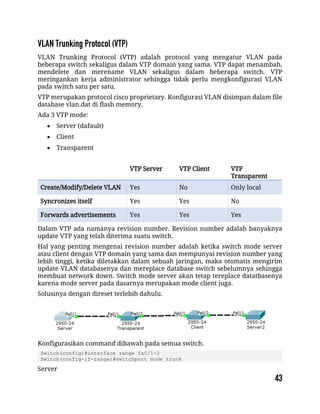
VLAN Trunking Protocol (VTP) adalah protocol yang mengatur VLAN pada
beberapa switch sekaligus dalam VTP domain yang sama. VTP dapat menambah,
mendelete dan merename VLAN sekaligus dalam beberapa switch. VTP
meringankan kerja administrator sehingga tidak perlu mengkonfigurasi VLAN
pada switch satu per satu.
VTP merupakan protocol cisco proprietary. Konfigurasi VLAN disimpan dalam file
database vlan.dat di flash memory.
Ada 3 VTP mode:
 Server (dafault)
 Client
 Transparent
VTP Server VTP Client VTP
Transparent
Create/Modify/Delete VLAN Yes No Only local
Syncronizes itself Yes Yes No
Forwards advertisements Yes Yes Yes
Dalam VTP ada namanya revision number. Revision number adalah banyaknya
update VTP yang telah diterima suatu switch.
Hal yang penting mengenai revision number adalah ketika switch mode server
atau client dengan VTP domain yang sama dan mempunyai revision number yang
lebih tinggi, ketika diletakkan dalam sebuah jaringan, maka otomatis mengirim
update VLAN databasenya dan mereplace database switch sebelumnya sehingga
membuat network down. Switch mode server akan tetap tereplace datatbasenya
karena mode server pada dasarnya merupakan mode client juga.
Solusinya dengan direset terlebih dahulu.
Konfigurasikan command dibawah pada semua switch.
Switch(config)#interface range fa0/1-2
Switch(config-if-range)#switchport mode trunk
Server
Switch(config)#int vlan 1
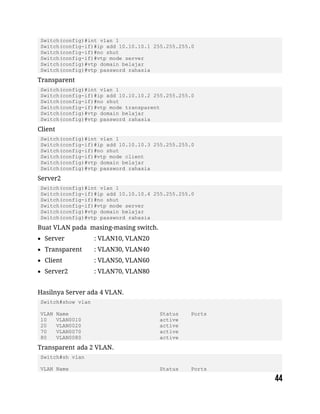
Switch(config-if)#ip add 10.10.10.1 255.255.255.0
Switch(config-if)#no shut
Switch(config-if)#vtp mode server
Switch(config)#vtp domain belajar
Switch(config)#vtp password rahasia
Transparent
Switch(config)#int vlan 1
Switch(config-if)#ip add 10.10.10.2 255.255.255.0
Switch(config-if)#no shut
Switch(config-if)#vtp mode transparent
Switch(config)#vtp domain belajar
Switch(config)#vtp password rahasia
Client
Switch(config)#int vlan 1
Switch(config-if)#ip add 10.10.10.3 255.255.255.0
Switch(config-if)#no shut
Switch(config-if)#vtp mode client
Switch(config)#vtp domain belajar
Switch(config)#vtp password rahasia
Server2
Switch(config)#int vlan 1
Switch(config-if)#ip add 10.10.10.4 255.255.255.0
Switch(config-if)#no shut
Switch(config-if)#vtp mode server
Switch(config)#vtp domain belajar
Switch(config)#vtp password rahasia
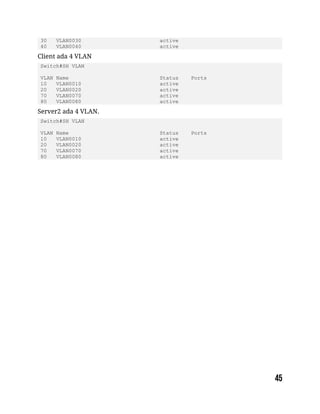
Buat VLAN pada masing-masing switch.
 Server : VLAN10, VLAN20
 Transparent : VLAN30, VLAN40
 Client : VLAN50, VLAN60
 Server2 : VLAN70, VLAN80
Hasilnya Server ada 4 VLAN.
Switch#show vlan
VLAN Name Status Ports
10 VLAN0010 active
20 VLAN0020 active
70 VLAN0070 active
80 VLAN0080 active
Transparent ada 2 VLAN.
Switch#sh vlan
VLAN Name Status Ports
30 VLAN0030 active
40 VLAN0040 active
Client ada 4 VLAN
Switch#SH VLAN
VLAN Name Status Ports
10 VLAN0010 active
20 VLAN0020 active
70 VLAN0070 active
80 VLAN0080 active
Server2 ada 4 VLAN.
Switch#SH VLAN
VLAN Name Status Ports
10 VLAN0010 active
20 VLAN0020 active
70 VLAN0070 active
80 VLAN0080 active
Static Routing
Default Routing
Enhanced Interior Gateway Protocol (EIGRP)
Open Shortest Path First (OSPF)
Standard Access List
Extended Access List
Static NAT
Overloading/Port Address Translation (PAT)
HSRP
Routing adalah mengirimkan packet data dari satu network ke network lain.
Perangkat yang digunakan dalam routing adalah router. Router digunakan untuk
best path selection dan packets forwarding.
Untuk menuju ke destination, router dapat dikonfigurasi dengan 2 cara:
 Manually, memasukkan route ke tabel routing secara manual (static
routing).
 Dynamically, menggunakan protocol routing (dynamic routing).
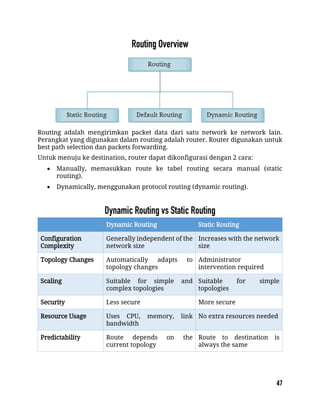
Dynamic Routing Static Routing
Configuration
Complexity
Generally independent of the
network size
Increases with the network
size
Topology Changes Automatically adapts to
topology changes
Administrator
intervention required
Scaling Suitable for simple and
complex topologies
Suitable for simple
topologies
Security Less secure More secure
Resource Usage Uses CPU, memory, link
bandwidth
No extra resources needed
Predictability Route depends on the
current topology
Route to destination is
always the same
Dalam static routing, network administrator memasukkan route ke tabel routing
secara manual untuk menuju ke spesific network. Konfigurasi harus diupdate
secara manual setiap terjadi perubahan topologi.
 Static Routing mempunyai Administrative Distance (AD) 1 sehingga akan
lebih dipilih daripada dynamic routing.
 Better security, static routes tidak diadvertise dalam network.
 Use less bandwidth daripada dynamic routing protocol, karena tidak
melakukan pertukaran route.
 No CPU cycles are used to calculate and communicate routes.
 The path a static route uses to send data is known.
 Konfigurasi dan maintenance yang memakan waktu
 Tidak cocok untuk network skala besar.
 Untuk jaringan kecil yang tidak akan terjadi perubahan topologi secara
significant
 Routing ke/dari stub network. Stub network adalah jaringan yang diakses
hanya mempunyai 1 exit path (karena hanya mempunyai satu neighbor).
 Untuk unknown network menggunakan default route.
ip route (spaci) destination network (spaci) subnetmask (spaci) ip/interface next-
hop
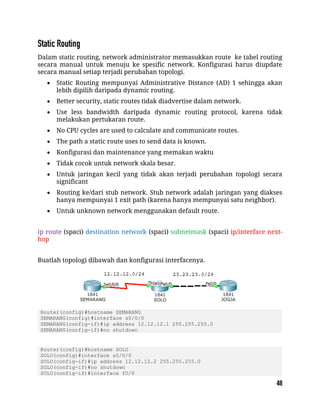
Buatlah topologi dibawah dan konfigurasi interfacenya.
Router(config)#hostname SEMARANG
SEMARANG(config)#interface s0/0/0
SEMARANG(config-if)#ip address 12.12.12.1 255.255.255.0
SEMARANG(config-if)#no shutdown
Router(config)#hostname SOLO
SOLO(config)#interface s0/0/0
SOLO(config-if)#ip address 12.12.12.2 255.255.255.0
SOLO(config-if)#no shutdown
SOLO(config-if)#interface f0/0
SOLO(config-if)#ip address 23.23.23.2 255.255.255.0
SOLO(config-if)#no shutdown
Router(config)#hostname JOGJA
JOGJA(config)#interface f0/0
JOGJA(config-if)#ip address 23.23.23.3 255.255.255.0
JOGJA(config-if)#no shutdown
Konfigurasikan routing static pada router Semarang dan Jogja. Router Solo tidak
perlu dikonfigurasi static routing karena sudah direct connected dengan router
Semarang dan Jogja.
SEMARANG(config-if)#ip route 23.23.23.0 255.255.255.0 12.12.12.2
JOGJA(config-if)#ip route 12.12.12.0 255.255.255.0 23.23.23.2
Sekarang cek ping dan lihat tabel routing.
JOGJA#ping 12.12.12.1
Type escape sequence to abort.
Sending 5, 100-byte ICMP Echos to 12.12.12.1, timeout is 2 seconds:
.!!!!
Success rate is 80 percent (4/5), round-trip min/avg/max = 3/6/17 ms
JOGJA#show ip route
Codes: C - connected, S - static, I - IGRP, R - RIP, M - mobile, B - BGP
D - EIGRP, EX - EIGRP external, O - OSPF, IA - OSPF inter area
N1 - OSPF NSSA external type 1, N2 - OSPF NSSA external type 2
E1 - OSPF external type 1, E2 - OSPF external type 2, E - EGP
i - IS-IS, L1 - IS-IS level-1, L2 - IS-IS level-2, ia - IS-IS inter
area
* - candidate default, U - per-user static route, o - ODR
P - periodic downloaded static route
Gateway of last resort is not set
12.0.0.0/24 is subnetted, 1 subnets
S 12.12.12.0 [1/0] via 23.23.23.2
23.0.0.0/24 is subnetted, 1 subnets
C 23.23.23.0 is directly connected, FastEthernet0/0
JOGJA#
SEMARANG#ping 23.23.23.3
Type escape sequence to abort.
Sending 5, 100-byte ICMP Echos to 23.23.23.3, timeout is 2 seconds:
!!!!!
Success rate is 100 percent (5/5), round-trip min/avg/max = 1/4/14 ms
SEMARANG#sh ip route
Codes: C - connected, S - static, I - IGRP, R - RIP, M - mobile, B - BGP
D - EIGRP, EX - EIGRP external, O - OSPF, IA - OSPF inter area
N1 - OSPF NSSA external type 1, N2 - OSPF NSSA external type 2
E1 - OSPF external type 1, E2 - OSPF external type 2, E - EGP
i - IS-IS, L1 - IS-IS level-1, L2 - IS-IS level-2, ia - IS-IS inter
area
* - candidate default, U - per-user static route, o - ODR
P - periodic downloaded static route
Gateway of last resort is not set
12.0.0.0/24 is subnetted, 1 subnets
C 12.12.12.0 is directly connected, Serial0/0/0
23.0.0.0/24 is subnetted, 1 subnets
S 23.23.23.0 [1/0] via 12.12.12.2
SEMARANG#
Static routing ditandai dengan tanda S. Ketika ditraceroute, maka melewati
12.12.12.1 sebagai next-hop menuju network 23.23.23.0/24.
SEMARANG#traceroute 23.23.23.3
Type escape sequence to abort.
Tracing the route to 23.23.23.3
1 12.12.12.2 0 msec 0 msec 0 msec
2 23.23.23.3 1 msec 1 msec 4 msec
SEMARANG#
Default routing sebenarnya masuk dalam static routing. Biasa digunakan untuk
routing ke internet. Pada tabel routing, default routing selalu berada paling bawah
dan selalu menjadi last preferred (pilihan terakhir).
ip route (spaci) 0.0.0.0 (spaci) 0.0.0.0 (spaci) ip/interface next- hop
Lanjutan lab sebelumnya. Hapus dulu static route yang sebelumnya dibuat.
SEMARANG(config)#no ip route 23.23.23.0 255.255.255.0 12.12.12.2
JOGJA(config)#no ip route 12.12.12.0 255.255.255.0 23.23.23.2
Sekarang masukkan default routingnya.
SEMARANG(config)#ip route 0.0.0.0 0.0.0.0 12.12.12.2
JOGJA(config)#ip route 0.0.0.0 0.0.0.0 23.23.23.2
Sekarang tes ping dan cek tabel routing.
SEMARANG#ping 23.23.23.3
Type escape sequence to abort.
Sending 5, 100-byte ICMP Echos to 23.23.23.3, timeout is 2 seconds:
!!!!!
Success rate is 100 percent (5/5), round-trip min/avg/max = 1/1/1 ms
SEMARANG#sh ip route
Codes: C - connected, S - static, I - IGRP, R - RIP, M - mobile, B - BGP
D - EIGRP, EX - EIGRP external, O - OSPF, IA - OSPF inter area
N1 - OSPF NSSA external type 1, N2 - OSPF NSSA external type 2
E1 - OSPF external type 1, E2 - OSPF external type 2, E - EGP
i - IS-IS, L1 - IS-IS level-1, L2 - IS-IS level-2, ia - IS-IS inter
area
* - candidate default, U - per-user static route, o - ODR
P - periodic downloaded static route
Gateway of last resort is 12.12.12.2 to network 0.0.0.0
12.0.0.0/24 is subnetted, 1 subnets
C 12.12.12.0 is directly connected, Serial0/0/0
S* 0.0.0.0/0 [1/0] via 12.12.12.2
SEMARANG#
Default routing ditandai dengan tanda S* dan destination 0.0.0.0/0 yang artinya ke
semua ip.
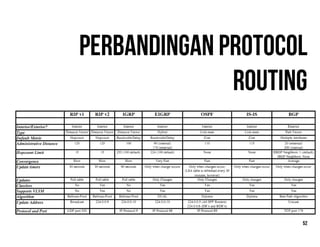
Dynamic routing menggunakan protocol routing dalam pembentukan tabel
routing. Ketika topologi berubah, tabel routing akan ikut berubah secara otomatis.
 Use more bandwidth daripada static routing, karena route exchanging.
 CPU cycles are used to calculate and communicate routes.
 Cocok untuk network skala besar.
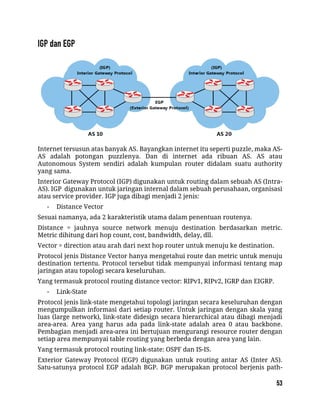
Internet tersusun atas banyak AS. Bayangkan internet itu seperti puzzle, maka AS-
AS adalah potongan puzzlenya. Dan di internet ada ribuan AS. AS atau
Autonomous System sendiri adalah kumpulan router didalam suatu authority
yang sama.
Interior Gateway Protocol (IGP) digunakan untuk routing dalam sebuah AS (Intra-
AS). IGP digunakan untuk jaringan internal dalam sebuah perusahaan, organisasi
atau service provider. IGP juga dibagi menjadi 2 jenis:
- Distance Vector
Sesuai namanya, ada 2 karakteristik utama dalam penentuan routenya.
Distance = jauhnya source network menuju destination berdasarkan metric.
Metric dihitung dari hop count, cost, bandwidth, delay, dll.
Vector = direction atau arah dari next hop router untuk menuju ke destination.
Protocol jenis Distance Vector hanya mengetahui route dan metric untuk menuju
destination tertentu. Protocol tersebut tidak mempunyai informasi tentang map
jaringan atau topologi secara keseluruhan.
Yang termasuk protocol routing distance vector: RIPv1, RIPv2, IGRP dan EIGRP.
- Link-State
Protocol jenis link-state mengetahui topologi jaringan secara keseluruhan dengan
mengumpulkan informasi dari setiap router. Untuk jaringan dengan skala yang
luas (large network), link-state didesign secara hierarchical atau dibagi menjadi
area-area. Area yang harus ada pada link-state adalah area 0 atau backbone.
Pembagian menjadi area-area ini bertujuan mengurangi resource router dengan
setiap area mempunyai table routing yang berbeda dengan area yang lain.
Yang termasuk protocol routing link-state: OSPF dan IS-IS.
Exterior Gateway Protocol (EGP) digunakan untuk routing antar AS (Inter AS).
Satu-satunya protocol EGP adalah BGP. BGP merupakan protocol berjenis path-
vector. Route yang dihasilkan dari BGP memuat attribute as-path. AS Path adalah
urutan AS Number yang dilewati suatu route untuk sampai ke destination.
 Cisco proprietary
 Advanced distance vector/hybrid routing protocol
 Using DUAL Algorithm.
 Multicast or unicast for exchange information use port 88
 Administrative distance 90
 Classless routing protocol support VLSM/CIDR.
 Support IPv6
 Rich metric (bandwidth, delay, load and reliability)
 Very fast convergence
 Equal and Unequal Load balancing
 100% loop-free
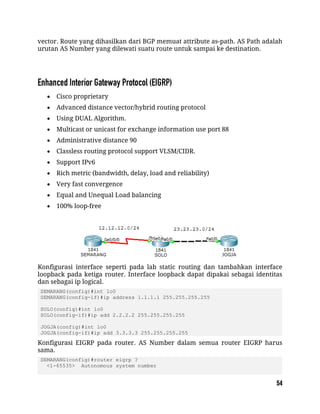
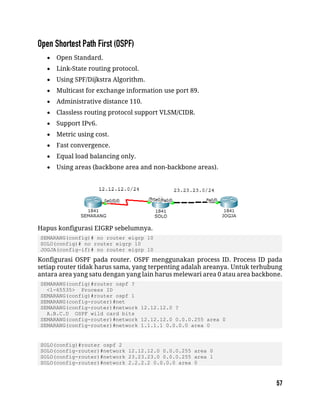
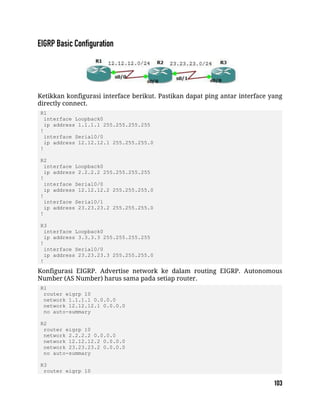
Konfigurasi interface seperti pada lab static routing dan tambahkan interface
loopback pada ketiga router. Interface loopback dapat dipakai sebagai identitas
dan sebagai ip logical.
SEMARANG(config)#int lo0
SEMARANG(config-if)#ip address 1.1.1.1 255.255.255.255
SOLO(config)#int lo0
SOLO(config-if)#ip add 2.2.2.2 255.255.255.255
JOGJA(config)#int lo0
JOGJA(config-if)#ip add 3.3.3.3 255.255.255.255
Konfigurasi EIGRP pada router. AS Number dalam semua router EIGRP harus
sama.
SEMARANG(config)#router eigrp ?
<1-65535> Autonomous system number
SEMARANG(config)#router eigrp 10
SEMARANG(config-router)#network 12.12.12.0 ?
A.B.C.D EIGRP wild card bits
<cr>
SEMARANG(config-router)#network 12.12.12.0 0.0.0.255
SEMARANG(config-router)#network 1.1.1.1 0.0.0.0
SEMARANG(config-router)#no auto-summary
SEMARANG(config-router)#ex
SOLO(config)#router eigrp 10
SOLO(config-router)#network 12.12.12.0 0.0.0.255
SOLO(config-router)#network 23.23.23.0 0.0.0.255
SOLO(config-router)#network 2.2.2.2 0.0.0.0
SOLO(config-router)#no auto-summary
JOGJA(config)#router eigrp 10
JOGJA(config-router)#network 23.23.23.0 0.0.0.255
JOGJA(config-router)#network 3.3.3.3 0.0.0.0
JOGJA(config-router)#no auto-summary
No-auto summary bertujuan untuk menyertakan subnetmask dalam routing
EIGRP. Sekarang lakukan tes ping dan traceroute ke router jogja.
SEMARANG#ping 2.2.2.2
Type escape sequence to abort.
Sending 5, 100-byte ICMP Echos to 2.2.2.2, timeout is 2 seconds:
!!!!!
Success rate is 100 percent (5/5), round-trip min/avg/max = 1/3/12 ms
SEMARANG#ping 3.3.3.3
Type escape sequence to abort.
Sending 5, 100-byte ICMP Echos to 3.3.3.3, timeout is 2 seconds:
!!!!!
Success rate is 100 percent (5/5), round-trip min/avg/max = 1/3/11 ms
SEMARANG#traceroute 3.3.3.3
Type escape sequence to abort.
Tracing the route to 3.3.3.3
1 12.12.12.2 0 msec 2 msec 2 msec
2 23.23.23.3 1 msec 0 msec 1 msec
SEMARANG#
Pengecekan tabel routing.
SEMARANG#sh ip route
Gateway of last resort is not set
1.0.0.0/8 is variably subnetted, 2 subnets, 2 masks
D 1.0.0.0/8 [90/2809856] via 12.12.12.2, 00:07:37, Serial0/0/0
C 1.1.1.1/32 is directly connected, Loopback0
2.0.0.0/32 is subnetted, 1 subnets
D 2.2.2.2 [90/2297856] via 12.12.12.2, 00:07:37, Serial0/0/0
3.0.0.0/32 is subnetted, 1 subnets
D 3.3.3.3 [90/2300416] via 12.12.12.2, 00:02:48, Serial0/0/0
12.0.0.0/24 is subnetted, 1 subnets
C 12.12.12.0 is directly connected, Serial0/0/0
23.0.0.0/24 is subnetted, 1 subnets
D 23.23.23.0 [90/2172416] via 12.12.12.2, 00:02:49, Serial0/0/0
SEMARANG#
SOLO#sh ip route
Gateway of last resort is not set
1.0.0.0/8 is variably subnetted, 2 subnets, 2 masks
D 1.0.0.0/8 is a summary, 00:08:13, Null0
D 1.1.1.1/32 [90/2297856] via 12.12.12.1, 00:08:07, Serial0/0/0
2.0.0.0/32 is subnetted, 1 subnets
C 2.2.2.2 is directly connected, Loopback0
3.0.0.0/32 is subnetted, 1 subnets
D 3.3.3.3 [90/156160] via 23.23.23.3, 00:03:19, FastEthernet0/0
12.0.0.0/24 is subnetted, 1 subnets
C 12.12.12.0 is directly connected, Serial0/0/0
23.0.0.0/24 is subnetted, 1 subnets
C 23.23.23.0 is directly connected, FastEthernet0/0
SOLO#
JOGJA#sh ip route
Gateway of last resort is not set
1.0.0.0/8 is variably subnetted, 2 subnets, 2 masks
D 1.0.0.0/8 [90/2300416] via 23.23.23.2, 00:03:39, FastEthernet0/0
D 1.1.1.1/32 [90/2300416] via 23.23.23.2, 00:03:39, FastEthernet0/0
2.0.0.0/32 is subnetted, 1 subnets
D 2.2.2.2 [90/156160] via 23.23.23.2, 00:03:39, FastEthernet0/0
3.0.0.0/32 is subnetted, 1 subnets
C 3.3.3.3 is directly connected, Loopback0
12.0.0.0/24 is subnetted, 1 subnets
D 12.12.12.0 [90/2172416] via 23.23.23.2, 00:03:39, FastEthernet0/0
23.0.0.0/24 is subnetted, 1 subnets
C 23.23.23.0 is directly connected, FastEthernet0/0
JOGJA#
Tanda D menunjukkan bahwa route dihasilkan melalui protocol EIGRP. AD pada
EIGRP adalah 90 ditandai dengan warna kuning dan metic ditandai dengan warna
biru. Perhitungan metric menggunakan rumus tersendiri.
 Open Standard.
 Link-State routing protocol.
 Using SPF/Dijkstra Algorithm.
 Multicast for exchange information use port 89.
 Administrative distance 110.
 Classless routing protocol support VLSM/CIDR.
 Support IPv6.
 Metric using cost.
 Fast convergence.
 Equal load balancing only.
 Using areas (backbone area and non-backbone areas).
Hapus konfigurasi EIGRP sebelumnya.
SEMARANG(config)# no router eigrp 10
SOLO(config)# no router eigrp 10
JOGJA(config-if)# no router eigrp 10
Konfigurasi OSPF pada router. OSPF menggunakan process ID. Process ID pada
setiap router tidak harus sama, yang terpenting adalah areanya. Untuk terhubung
antara area yang satu dengan yang lain harus melewari area 0 atau area backbone.
SEMARANG(config)#router ospf ?
<1-65535> Process ID
SEMARANG(config)#router ospf 1
SEMARANG(config-router)#net
SEMARANG(config-router)#network 12.12.12.0 ?
A.B.C.D OSPF wild card bits
SEMARANG(config-router)#network 12.12.12.0 0.0.0.255 area 0
SEMARANG(config-router)#network 1.1.1.1 0.0.0.0 area 0
SOLO(config)#router ospf 2
SOLO(config-router)#network 12.12.12.0 0.0.0.255 area 0
SOLO(config-router)#network 23.23.23.0 0.0.0.255 area 1
SOLO(config-router)#network 2.2.2.2 0.0.0.0 area 0
JOGJA(config)#router ospf 3
JOGJA(config-router)#network 23.23.23.0 0.0.0.255 area 1
JOGJA(config-router)#network 3.3.3.3 0.0.0.0 area 1
Sekarang lakukan tes ping.
SEMARANG#ping 2.2.2.2
Type escape sequence to abort.
Sending 5, 100-byte ICMP Echos to 2.2.2.2, timeout is 2 seconds:
!!!!!
Success rate is 100 percent (5/5), round-trip min/avg/max = 1/1/2 ms
SEMARANG#ping 3.3.3.3
Type escape sequence to abort.
Sending 5, 100-byte ICMP Echos to 3.3.3.3, timeout is 2 seconds:
!!!!!
Success rate is 100 percent (5/5), round-trip min/avg/max = 1/2/7 ms
SEMARANG#
Cek tabel routing.
SEMARANG#sh ip route
Gateway of last resort is not set
1.0.0.0/32 is subnetted, 1 subnets
C 1.1.1.1 is directly connected, Loopback0
2.0.0.0/32 is subnetted, 1 subnets
O 2.2.2.2 [110/65] via 12.12.12.2, 00:02:45, Serial0/0/0
3.0.0.0/32 is subnetted, 1 subnets
O IA 3.3.3.3 [110/66] via 12.12.12.2, 00:01:21, Serial0/0/0
12.0.0.0/24 is subnetted, 1 subnets
C 12.12.12.0 is directly connected, Serial0/0/0
23.0.0.0/24 is subnetted, 1 subnets
O IA 23.23.23.0 [110/65] via 12.12.12.2, 00:03:13, Serial0/0/0
SOLO#sh ip ro
Gateway of last resort is not set
1.0.0.0/32 is subnetted, 1 subnets
O 1.1.1.1 [110/65] via 12.12.12.1, 00:05:40, Serial0/0/0
2.0.0.0/32 is subnetted, 1 subnets
C 2.2.2.2 is directly connected, Loopback0
3.0.0.0/32 is subnetted, 1 subnets
O 3.3.3.3 [110/2] via 23.23.23.3, 00:02:35, FastEthernet0/0
12.0.0.0/24 is subnetted, 1 subnets
C 12.12.12.0 is directly connected, Serial0/0/0
23.0.0.0/24 is subnetted, 1 subnets
C 23.23.23.0 is directly connected, FastEthernet0/0
SOLO#
JOGJA#sh ip route
Gateway of last resort is not set
1.0.0.0/32 is subnetted, 1 subnets
O IA 1.1.1.1 [110/66] via 23.23.23.2, 00:02:03, FastEthernet0/0
2.0.0.0/32 is subnetted, 1 subnets
O IA 2.2.2.2 [110/2] via 23.23.23.2, 00:02:03, FastEthernet0/0
3.0.0.0/32 is subnetted, 1 subnets
C 3.3.3.3 is directly connected, Loopback0
12.0.0.0/24 is subnetted, 1 subnets
O IA 12.12.12.0 [110/65] via 23.23.23.2, 00:02:03, FastEthernet0/0
23.0.0.0/24 is subnetted, 1 subnets
C 23.23.23.0 is directly connected, FastEthernet0/0
JOGJA#
Tanda O menunjukkan bahwa route dihasilkan melalui protocol OSPF. Tanda IA
menunjukkan bahwa destination route berada pada area yang berbeda. AD pada
OSPF adalah 110.
Access List (ACL) biasa digunakan untuk filtering. Ada 2 macam access list yaitu
standard dan extented.
Standard ACL Extended ACL
ACL Number range 1-99 ACL Number range 100-199
Can block a network, host and subnet Can allow or deny a network, host,
subnet and service
All service are blocked Select service can be blocked
Implemented closest to the destination Implemented closest to the destination
Filtering based on source IP address
only
Filtering based on source IP address,
destination IP, protocol and port
number
Lakukan konfigurasi supaya PC LAN dapat ping ke server.
Konfigurasi interface dan routing pada Router0.
Router(config)#int fa0/1
Router(config-if)#ip add 192.168.1.1 255.255.255.0
Router(config-if)#no sh
Router(config-if)#int fa0/0
Router(config-if)#ip add 10.10.10.1 255.255.255.0
Router(config-if)#no sh
Router(config-if)#ip route 20.20.20.0 255.255.255.0 10.10.10.2
Konfigurasi interface dan routing pada Router1.
Router(config)#int fa0/0
Router(config-if)#ip add 10.10.10.2 255.255.255.0
Router(config-if)#no sh
Router(config-if)#int fa0/1
Router(config-if)#ip add 20.20.20.1 255.255.255.0
Router(config-if)#no sh
Router(config-if)#ip route 192.168.1.0 255.255.255.0 10.10.10.1
Berikan IP pada server dan coba cek web server melalui browser pada PC LAN.
Cek ping dari PC LAN ke web server.
PC>ping 20.20.20.2
Pinging 20.20.20.2 with 32 bytes of data:
Reply from 20.20.20.2: bytes=32 time=0ms TTL=126
Ping statistics for 20.20.20.2:
Packets: Sent = 4, Received = 4, Lost = 0 (0% loss),
Approximate round trip times in milli-seconds:
Minimum = 0ms, Maximum = 0ms, Average = 0ms
PC>
Sekarang konfigurasikan standard access list agar PC LAN tidak dapat mengakses
web server. Set access list pada router dan interface yang paling dekat dengan
destination.
Router(config)#access-list 10 deny 192.168.10.0 ?
A.B.C.D Wildcard bits
<cr>
Router(config)#access-list 10 deny 192.168.1.0 0.0.0.255
Router(config)#access-list 10 permit any
Router(config)#int fa0/1
Router(config-if)#ip access-group 1 out
Cek ping dan akses browser dari PC LAN ke web server.
PC>ping 20.20.20.2
Pinging 20.20.20.2 with 32 bytes of data:
Reply from 10.10.10.2: Destination host unreachable.
Ping statistics for 20.20.20.2:
Packets: Sent = 4, Received = 0, Lost = 4 (100% loss),
PC>
Cek access list pada Router1.
Router#show access-lists
Standard IP access list 10
deny 192.168.1.0 0.0.0.255 (64 match(es))
permit any (5 match(es))
Router#
Pada standard access list, semua service akan diblok, baik UDP untuk akses
browser atau ICMP untuk ping. Untuk memilih hanya service tertentu saja,
gunakan extended access list.
Extented access list mengizinkan hanya service tertentu saja yang diblok. Gambar
dibawah adalah jenis-jenis service beserta aplikasinya.
Masih memakai topologi dari lab sebelumnya. Hapus dulu standard access list
yang telah dibuat pada Router1.
Router(config)#no access-list 10
Konfigurasi extended access list pada Router1 agar PC LAN dapat mengakses web
server namun tidak bisa melakukan ping.
Router(config)#access-list 100 deny icmp 192.168.1.0 0.0.0.255 host
20.20.20.2 echo
Router(config)#access-list 100 permit ip any any
Router(config)#int fa0/1
Router(config-if)#ip access-group 100 out
Coba cek browser dan tes ping.
PC>ping 20.20.20.2
Pinging 20.20.20.2 with 32 bytes of data:
Reply from 10.10.10.2: Destination host unreachable.
Ping statistics for 20.20.20.2:
Packets: Sent = 4, Received = 0, Lost = 4 (100% loss),
PC>
Cek access list.
Router#show access-lists
Standard IP access list 10
deny 192.168.1.0 0.0.0.255 (64 match(es))
permit any (5 match(es))
Router#
packetlife.net
by Jeremy Stretch v2.0
IOS IPV4 ACCESS LISTS
Standard ACL Syntax
permit
Actions
deny
remark
evaluate
Allow matched packets
Deny matched packets
Record a configuration comment
Evaluate a reflexive ACL
Extended ACL Syntax
! Legacy syntax
access-list <number> {permit | deny} <source> [log]
! Modern syntax
ip access-list standard {<number> | <name>}
[<sequence>] {permit | deny} <source> [log]
ACL Numbers
TCP Options
1-99
1300-1999
IP standard
100-199
2000-2699
IP extended
200-299 Protocol
300-399 DECnet
400-499 XNS
ack Match ACK flag
fin Match FIN flag
psh Match PSH flag
rst Match RST flag
syn Match SYN flag
Troubleshooting
show access-lists [<number> | <name>]
show ip access-lists [<number> | <name>]
show ip access-lists interface <interface>
show ip access-lists dynamic
show ip interface [<interface>]
show time-range [<name>]
! Legacy syntax
access-list <number> {permit | deny} <protocol> <source> [<ports>] <destination> [<ports>] [<options>]
! Modern syntax
ip access-list extended {<number> | <name>}
[<sequence>] {permit | deny} <protocol> <source> [<ports>] <destination> [<ports>] [<options>]
500-599 Extended XNS
600-699 Appletalk
700-799 Ethernet MAC
800-899 IPX standard
900-999 IPX extended
1000-1099 IPX SAP
1100-1199 MAC extended
1200-1299 IPX summary
urg
established
Match URG flag
Source/Destination Definitions
any Any address
host <address> A single address
<network> <mask> Any address matched by the wildcard mask
IP Options
dscp <DSCP> Match the specified IP DSCP
fragments Check non-initial fragments
option <option> Match the specified IP option
precedence {0-7} Match the specified IP precedence
ttl <count> Match the specified IP time to live (TTL)
TCP/UDP Port Definitions
eq <port> Not equal to
lt <port> Greater than
range <port> <port> Matches a range of port numbers
neq <port>
gt <port>
Equal to
Less than
Miscellaneous Options
reflect <name> Create a reflexive ACL entry
time-range <name> Enable rule only during the given time range
Applying ACLs to Restrict Traffic
interface FastEthernet0/0
ip access-group {<number> | <name>} {in | out}
Match packets in an
established session
Logging Options
log Log ACL entry matches
log-input
Log matches including
ingress interface and
source MAC address
Network Aceess Translation (NAT) digunakan untuk mentranslasikan ip privat ke
ip public atau sebaliknya. Misalkan ada server pada suatu perusahaan, selain bisa
diakses secara local, perusahaan ingin server tersebut bisa diakses lewat internet.
Maka server tersebut diberi ip public dan dikonfigurasi static NAT.
Dalam konfigurasi NAT, interface diset menjadi 2 kategori: inside dan outside.
 Inside = traffic yang masuk ke interface router dari local network.
 Outside = traffic yang keluar melalui interface router menuju
destination/internet.
Ada beberapa tipe NAT.
 Static NAT, satu ip privat ditranslasikan ke satu ip public (one to one
mapping)
 Dynamic NAT, Jumlah ip public yang disediakan harus sejumlah ip privat
yang ditranslasikan NAT jenis ini jarang digunakan.
 Overloading/Port Address Translation (PAT), akses internet menggunakan 1
ip public. Ini yang banyak digunakan sekarang.
Dalam static NAT, hanya 1 ip privat ditranslasikan ke 1 ip public. Artinya hanya 1
PC LAN yang dapat mengakses internet.
Konfigurasinya hampir sama dengan lab access list, namun tidak perlu dirouting
karena nantinya akan menggunakan NAT.
Konfigurasi interface dan routing pada Router1.
Router(config)#int fa0/1
Router(config-if)#ip add 192.168.1.1 255.255.255.0
Router(config-if)#no sh
Router(config-if)#int fa0/0
Router(config-if)#ip add 10.10.10.1 255.255.255.0
Router(config-if)#no sh
Konfigurasi interface dan routing pada Router2.
Router(config)#int fa0/0
Router(config-if)#ip add 10.10.10.2 255.255.255.0
Router(config-if)#no sh
Router(config-if)#int fa0/1
Router(config-if)#ip add 20.20.20.1 255.255.255.0
Router(config-if)#no sh
Konfigurasi static NAT dan default route pada R1. PC LAN 192.168.1.11 akan
ditranslasikan ke ip public 10.10.10.10.
Router(config)#ip nat inside source ?
list Specify access list describing local addresses
static Specify static local->global mapping
Router(config)#ip nat inside source static 192.168.1.11 10.10.10.10
Router(config)#int fa0/1
Router(config-if)#ip nat inside
Router(config-if)#int fa0/0
Router(config-if)#ip nat outside
Router(config)#ip route 0.0.0.0 0.0.0.0 fa0/0
Ping static NAT melalui server dan sebaliknya. Alamat PC LAN tidak akan pernah
dapat diping dari internet.
SERVER>ping 10.10.10.10
Pinging 10.10.10.10 with 32 bytes of data:
Reply from 10.10.10.10: bytes=32 time=11ms TTL=126
Reply from 10.10.10.10: bytes=32 time=0ms TTL=126
Reply from 10.10.10.10: bytes=32 time=11ms TTL=126
Ping statistics for 10.10.10.10:
Packets: Sent = 4, Received = 4, Lost = 0 (0% loss),
Approximate round trip times in milli-seconds:
Minimum = 0ms, Maximum = 11ms, Average = 5ms
SERVER>ping 192.168.1.11
Pinging 192.168.1.11 with 32 bytes of data:
Reply from 20.20.20.1: Destination host unreachable.
Request timed out.
Reply from 20.20.20.1: Destination host unreachable.
Ping statistics for 192.168.1.11:
Packets: Sent = 4, Received = 0, Lost = 4 (100% loss),
SERVER>
PC>ping 20.20.20.2
Pinging 20.20.20.2 with 32 bytes of data:
Reply from 20.20.20.2: bytes=32 time=12ms TTL=126
Reply from 20.20.20.2: bytes=32 time=0ms TTL=126
Ping statistics for 20.20.20.2:
Packets: Sent = 4, Received = 4, Lost = 0 (0% loss),
Approximate round trip times in milli-seconds:
Minimum = 0ms, Maximum = 12ms, Average = 3ms
PC>
PAT digunakan agar banyak PC local dapat mengakses internet secara bersama-
sama hanya dengan menggunakan 1 ip public.
Lanjutan lab sebelumnya. Hapus dahulu konfigurasi static NAT yang telah dibuat.
Router(config)#no ip nat inside source static 192.168.1.11 10.10.10.10
Buat access list untuk mendefinisikan network yang akan ditranslasikan dan
konfigurasi dynamic nat overload pada R1.
Router(config)#access-list 1 permit 192.168.1.0 0.0.0.255
Router(config)#ip nat inside source list ?
<1-199> Access list number for local addresses
WORD Access list name for local addresses
Router(config)#ip nat inside source list 1 interface fa0/0 overload
Sekarang ping web server melalui PC0 dan PC1 pastikan reply.
PC>ping 20.20.20.2
Pinging 20.20.20.2 with 32 bytes of data:
Reply from 20.20.20.2: bytes=32 time=12ms TTL=126
Reply from 20.20.20.2: bytes=32 time=0ms TTL=126
Ping statistics for 20.20.20.2:
Packets: Sent = 4, Received = 4, Lost = 0 (0% loss),
Approximate round trip times in milli-seconds:
Minimum = 0ms, Maximum = 12ms, Average = 3ms
PC>
packetlife.net
by Jeremy Stretch v1.0
NETWORK ADDRESS TRANSLATION
interface FastEthernet0
ip address 10.0.0.1 255.255.0.0
ip nat inside
!
interface FastEthernet1
ip address 174.143.212.1 255.255.252.0
ip nat outside
! One line per static translation
ip nat inside source static 10.0.0.19 192.0.2.1
ip nat inside source static 10.0.1.47 192.0.2.2
ip nat outside source static 174.143.212.133 10.0.0.47
ip nat outside source static 174.143.213.240 10.0.2.181
FastEthernet0
10.0.0.1/16
NAT Inside
FastEthernet1
174.143.212.1/22
NAT Outside
NAT Boundary Configuration
Static Source Translation
Dynamic Source Translation
! Create an access list to match inside local addresses
access-list 10 permit 10.0.0.0 0.0.255.255
!
! Create NAT pool of inside global addresses
ip nat pool MyPool 192.0.2.1 192.0.2.254 prefix-length 24
!
! Combine them with a translation rule
ip nat inside source list 10 pool MyPool
!
! Dynamic translations can be combined with static entries
ip nat inside source static 10.0.0.42 192.0.2.42
! Static layer four port translations
ip nat inside source static tcp 10.0.0.3 8080 192.0.2.1 80
ip nat inside source static udp 10.0.0.14 53 192.0.2.2 53
ip nat outside source static tcp 174.143.212.4 23 10.0.0.8 23
!
! Dynamic port translation with a pool
ip nat inside source list 11 pool MyPool overload
!
! Dynamic translation with interface overloading
ip nat inside source list 11 interface FastEthernet1 overload
Port Address Translation (PAT)
! Create a rotary NAT pool
ip nat pool LoadBalServers 10.0.99.200 10.0.99.203 prefix-length 24 type rotary
!
! Enable load balancing across inside hosts for incoming traffic
ip nat inside destination list 12 pool LoadBalServers
Inside Destination Translation
Perspective
Location
Local Global
Inside
Outside
Inside Local Inside Global
Outside Local Outside Global
Address Classification
Inside Local
An actual address assigned to
an inside host
An inside address seen from
the outside
Inside Global
Outside Global
An actual address assigned to
an outside host
An outside address seen from
the inside
Outside Local
Troubleshooting
show ip nat translations [verbose]
show ip nat statistics
clear ip nat translations
Special NAT Pool Types
Rotary Used for load balancing
Preserves the host portion of
the address after translation
Match-
Host
Example Topology
Terminology
NAT Pool
A pool of IP addresses to be used as inside
global or outside local addresses in translations
Extendable Translation
The extendable keyword must be appended
when multiple overlapping static translations are
configured
Port Address Translation (PAT)
An extension to NAT that translates information
at layer four and above, such as TCP and UDP
port numbers; dynamic PAT configurations
include the overload keyword
ip nat translation tcp-timeout <seconds>
ip nat translation udp-timeout <seconds>
ip nat translation max-entries <number>
NAT Translations Tuning
High Availibility digunakan dengan maksud redundancy yaitu sebagai
menggunakan beberapa router, yang satu menjadi link utama dan yang lain
sebagai backup. Satu virtual gateway akan dipasang di PC local sehingga ketika
pindah router tidak perlu mengeset gateway lagi.
Konfigurasi routing seperti biasa pada ketika
Router(config)#hostname Router1
Router1(config)#int fa0/0
Router1(config-if)#ip add 13.13.13.1 255.255.255.0
Router1(config-if)#no sh
Router1(config-if)#int fa0/1
Router1(config-if)#ip add 12.12.12.1 255.255.255.0
Router1(config-if)#no sh
Router1(config-if)#router eigrp 10
Router1(config-router)#network 13.13.13.1 0.0.0.255
Router1(config-router)#network 12.12.12.1 0.0.0.255
Router1(config-router)#passive-interface fa0/1
Router1(config-router)#no auto-summary
Router(config)#hostname Router2
Router2(config)#int fa0/1
Router2(config-if)#ip add 23.23.23.2 255.255.255.0
Router2(config-if)#no sh
Router2(config-if)#int fa0/0
Router2(config-if)#ip add 12.12.12.2 255.255.255.0
Router2(config-if)#no sh
Router2(config-if)#router eigrp 10
Router2(config-router)#network 23.23.23.2 0.0.0.255
Router2(config-router)#network 12.12.12.2 0.0.0.255
Router2(config-router)#passive-interface fa0/0
Router2(config-router)#no auto-summary
Router(config)#hostname Router3
Router3(config)#int lo0
Router3(config-if)#ip add 3.3.3.3 255.255.255.255
Router3(config-if)#int fa0/1
Router3(config-if)#ip add 23.23.23.3 255.255.255.0
Router3(config-if)#no sh
Router3(config-if)#int fa0/0
Router3(config-if)#ip add 13.13.13.3 255.255.255.0
Router3(config-if)#no sh
Router3(config-if)#router eigrp 10
Router3(config-router)#network 23.23.23.3 0.0.0.255
Router3(config-router)#network 13.13.13.3 0.0.0.255
Router3(config-router)#network 3.3.3.3 0.0.0.0
Router3(config-router)#no auto-summary
Pastikan Router1 dan Router2 dapat melakukan ping ke 3.3.3.3 baru lakukan
konfigurasi HSRP.
Router1(config)#int fa0/1
Router1(config-if)#standby ?
<0-4095> group number
ip Enable HSRP and set the virtual IP address
ipv6 Enable HSRP IPv6
preempt Overthrow lower priority Active routers
priority Priority level
track Priority Tracking
Router1(config-if)#standby 1 ip 12.12.12.12
Router1(config-if)#standby 1 preempt
%HSRP-6-STATECHANGE: FastEthernet0/1 Grp 1 state Speak -> Standby
%HSRP-6-STATECHANGE: FastEthernet0/1 Grp 1 state Standby -> Active
Router1(config-if)#standby 1 priority 105
Router1(config-if)#standby 1 track fa0/0
Router2(config)#int fa0/0
Router2(config-if)#standby 1 ip 12.12.12.12
Router2(config-if)#standby preempt
%HSRP-6-STATECHANGE: FastEthernet0/0 Grp 1 state Speak -> Standby
Konfigurasi di PC.
PC0 IP:12.12.12.100/24 GATEWAY:12.12.12.12
PC1 IP:12.12.12.101/24 GATEWAY:12.12.12.12
Ping dan trace dari PC ke 3.3.3.3.
PC>ping 3.3.3.3
Pinging 3.3.3.3 with 32 bytes of data:
Reply from 3.3.3.3: bytes=32 time=1ms TTL=254
Reply from 3.3.3.3: bytes=32 time=0ms TTL=254
Ping statistics for 3.3.3.3:
Packets: Sent = 4, Received = 4, Lost = 0 (0% loss),
Approximate round trip times in milli-seconds:
Minimum = 0ms, Maximum = 1ms, Average = 0ms
PC>tracert 3.3.3.3
Tracing route to 3.3.3.3 over a maximum of 30 hops:
1 1 ms 1 ms 0 ms 12.12.12.1
2 1 ms 1 ms 0 ms 3.3.3.3
Trace complete.
PC>
Cek standby pada Router1 dan Router2.
Router1#show standby br
P indicates configured to preempt.
|
Interface Grp Pri P State Active Standby Virtual IP
Fa0/1 1 105 P Active local 12.12.12.2 12.12.12.12
Router1#
Router2#show standby br
P indicates configured to preempt.
|
Interface Grp Pri P State Active Standby Virtual IP
Fa0/0 1 100 Standby 12.12.12.1 local 12.12.12.12
Router2#
Router2(config)#int fa0/0
Router2(config-if)#standby 1 ip 12.12.12.12
Router2(config-if)#standby preempt
%HSRP-6-STATECHANGE: FastEthernet0/0 Grp 1 state Speak -> Standby
packetlife.net
by Jeremy Stretch v2.0
FIRST HOP REDUNDANCY
Protocols
HSRP Configuration
interface FastEthernet0/0
ip address 10.0.1.2 255.255.255.0
standby version {1 | 2}
standby 1 ip 10.0.1.1
standby 1 timers <hello> <dead>
standby 1 priority <priority>
standby 1 preempt
standby 1 authentication md5 key-string <password>
standby 1 track <interface> <value>
standby 1 track <object> decrement <value>
Troubleshooting
show standby [brief]
show glbp [brief]
Virtual Router Redundancy Protocol (VRRP)
An open-standard alternative to Cisco's HSRP,
providing the same functionality
Hot Standby Router Protocol (HSRP)
Provides default gateway redundancy using one active
and one standby router; standardized but licensed by
Cisco Systems
Gateway Load Balancing Protocol (GLBP)
Supports arbitrary load balancing in addition to
redundancy across gateways; Cisco proprietary
Attributes
HSRP
No
Load Balancing
RFC 2281
Standard
Transport
IPv6 Support
Default Hello
Default Priority
Multicast Group
UDP/1985
Yes
3 sec
100
224.0.0.2
VRRP
No
RFC 3768
IP/112
No
1 sec
100
224.0.0.18
GLBP
Yes
Cisco
UDP/3222
Yes
3 sec
100
224.0.0.102
HSRP VRRP GLBP
Standby Active Listen
100 200 100
Backup Master
100 200 100
Backup
VRRP Configuration
interface FastEthernet0/0
ip address 10.0.1.2 255.255.255.0
vrrp 1 ip 10.0.1.1
vrrp 1 timers {advertise <hello> | learn}
vrrp 1 priority <priority>
vrrp 1 preempt
vrrp 1 authentication md5 key-string <password>
vrrp 1 track <object> decrement <value>
GLBP Configuration
interface FastEthernet0/0
ip address 10.0.1.2 255.255.255.0
glbp 1 ip 10.0.1.1
glbp 1 timers <hello> <dead>
glbp 1 timers redirect <redirect> <time-out>
glbp 1 priority <priority>
glbp 1 preempt
glbp 1 forwarder preempt
glbp 1 authentication md5 key-string <password>
glbp 1 load-balancing <method>
glbp 1 weighting <weight> lower <lower> upper <upper>
glbp 1 weighting track <object> decrement <value>
Speak · Gateway election in progress
HSRP/GLBP Interface States
Active · Active router/VG
Standby · Backup router/VG
Listen · Not the active router/VG
Master · Acting as the virtual router
VRRP Interface States
Backup · All non-master routers
GLBP Roles
Active Virtual Gateway (AVG)
Answers for the virtual router and assigns
virtual MAC addresses to group members
Active Virtual Forwarder (AVF)
All routers which forward traffic for the group
GLBP Load Balancing
Round-Robin (default)
The AVG answers host ARP requests for the
virtual router with the next router in the cycle
Host-Dependent
Round-robin cycling is used while a consistent
AVF is maintained for each host
Weighted
Determines the proportionate share of hosts
handled by each AVF
AVF AVF
AVG
100 200 100
AVF
show vrrp [brief]
show track [brief]
IPv6 Basic Link-Local
IPv6 Basic Global Unicast
IPv6 Basic EUI-64
IPv6 Static Routing
IPv6 RIPnG
IPv6 EIGRP
IPv6 OSPFv3
IPv6 IPv6IP Tunneling
IPv6 GRE IP Tunneling
IPv6 Tunnel 6to4
IPv6 Tunnel ISATAP
IPv6 Tunnel Auto-Tunnel
Pengguna internet berkembang sangat pesat sehingga space IPv4 yang tersedia
juga semakin sedikit. Apalagi dengan banyaknya perangkat seperti telepon dan
tablet yang butuh koneksi internet juga turut mengurangi space IPv4. Solusinya
adalah dengan IPv6 yang mempunyai space ip yang jauh lebih banyak.
Masalahnya adalah IPv4 berbeda dengan IPv6 sehingga banyak protocol yang
tidak compatible satu sama lain. Migrasi dari IPv4 ke IPv6 sudah banyak
dilakukan.
Berikut perbandingan jumlah IPv4 dan IPv6.
IPv4 32bit = 2^3 = 4.294.967.296
IPv6 128bit = 2^128 = 340.282.366.920.938.463.463.374.607.431.768.211.456
 Dengan banyaknya space yang disediakan IPv6 maka tidak perlu lagi
menggunakan Network Address Translation (NAT) dan Port Address Translation
(PAT).
 Dari segi size header, IPv6 mempunyai header yang lebih kecil dibanding IPv4.
 IPv6 terdiri dari 16bit hexadecimal dan case-insensitive yang terbagi menjadi 8
field, tidak seperti IPv4 yang terdiri dari 12bit dan terbagi menjadi 4 oktet.
 Jika dalam IPv4 ada namanya oktet, di IPv6 ada namanya field. Pada IPv6
prefixnya sampai 128. Contohnya: 0000:360B:0000:0000:0020:875B:131B/64.
Aslinya : 2541:0000:360B:0000:0000:0020:875B:131B/64
Jika ada 0000 baik berjejer atau tidak, dapat diwakili tanda colon 2 (::). Syaratnya
semua harus 0, tidak boleh ada angka selain 0.
Diringkas : 2541:0000:360B::0020:875B:131B/64
Klo sudah ada :: maka jika ada 0000 tidak bisa diwakili :: lagi karena hanya ada
satu :: dalam satu IPv6. 0000 bisa diwakili hanya dengan 0 saja.
Selain itu jika ada field yang depannya (sisi kirinya) adalah 0, maka 0 bisa
dihilangkan.
Diringkas lagi : 2541:0:360B::20:875B:131B/64
Dalam IPv6 tidak ada broadcast. Adanya unicast, multicast dan anycast.
Unicast, unicast dalam IPv6 sama dengan IPv4. Kelebihannya, IPv6 dapat
memberikan lebih dari 1 alamat pada 1 interface. Keren kan?
Multicast, pada IPv6, broadcast digantikan oleh multicast karena memang tidak
ada broadcast dalam IPv6.
Anycast, dalam IPv6 beberapa host dan router dapat diberi ip yang sama. Misalkan
kita punya beberapa web server dengan ip anycast yang sama. Dengan cara
tersebut, kita bisa mengarahkan host yang mengakses web server tadi untuk di
route ke web server terdekat.
Unique Local, sama dengan IP private pada IPv4. IP private digunakan untuk
network local dan bukan untuk internet. IP network yang digunakan adalah
FD00::/8.
Link Local, digunakan untuk mengirim dan menerima packet IPv6 dalam sebuah
single subnet. Tiap perangkat yang memakai IPv6 akan mempunyai alamat link
local secara otomatis pada interfacenya dan mempunyai link local scope atau
jangkauan link local, artinya packet tidak akan meninggalkan link local. Packet
yang dikirim ke destination tertentu akan tetap berada dalam link local dan tidak
diforward ke subnet lain oleh router. Link Local menggunakan IP network
FE80::/10.
Link Local digunakan sebagai RS (Router Solicitation) and RA (Router
Advertisement), untuk network discovery (sama seperti ARP) dan digunakan
sebagai next-hop untuk ip route.
Global Unicast, sama seperti ip publik untuk internet. IP network yang digunakan
adalah 2000::/3.
Unspecified, alamat ini digunakan ketika host tidak bisa menggunakan IPv6,
menggunakan ::/128
Loopback yang digunakan untuk software testing seperti 127.0.0.1. Loopback
menggunakan ip ::1/128.
Site Local. Site local dulunya digunakan sebagai ip private, sekarang sudah tidak
digunakan. IP site local adalah FECO::/10.
Secara default IPv6 tidak aktif, untuk mengaktifkan ketikkan perintah unicast-
routing.
R1(config)#ipv6 unicast-routing
Setiap kali mengkonfigurasi IPv6 pada interface, link-local akan otomatis terbuat.
R1(config-if)#do sh ipv6 int fa0/0
FastEthernet0/0 is administratively down, line protocol is down
IPv6 is enabled, link-local address is FE80::C201:9FF:FED0:0 [TEN]
No Virtual link-local address(es):
No global unicast address is configured
Joined group address(es):
FF02::1
FF02::2
MTU is 1500 bytes
ICMP error messages limited to one every 100 milliseconds
ICMP redirects are enabled
ICMP unreachables are sent
ND DAD is enabled, number of DAD attempts: 1
ND reachable time is 30000 milliseconds
ND advertised reachable time is 0 milliseconds
ND advertised retransmit interval is 0 milliseconds
ND router advertisements are sent every 200 seconds
ND router advertisements live for 1800 seconds
ND advertised default router preference is Medium
Hosts use stateless autoconfig for addresses.
R1(config-if)#
Bisa juga dengan perintah berikut.
R2(config)#int fa0/0
R2(config-if)#ipv6 address autoconfig
R2(config)#do show ipv6 int fa0/0
FastEthernet0/0 is administratively down, line protocol is down
IPv6 is enabled, link-local address is FE80::C202:CFF:FED8:0 [TEN]
No Virtual link-local address(es):
No global unicast address is configured
Joined group address(es):
FF02::1
FF02::2
MTU is 1500 bytes
ICMP error messages limited to one every 100 milliseconds
ICMP redirects are enabled
ICMP unreachables are sent
ND DAD is enabled, number of DAD attempts: 1
ND reachable time is 30000 milliseconds
ND advertised reachable time is 0 milliseconds
ND advertised retransmit interval is 0 milliseconds
ND router advertisements are sent every 200 seconds
ND router advertisements live for 1800 seconds
ND advertised default router preference is Medium
Hosts use stateless autoconfig for addresses.
R2(config)#
R1(config)#int fa0/0
R1(config-if)#ipv6 address 12::1/126
RR1(config-if)#no sh
*Mar 1 00:22:30.687: %LINK-3-UPDOWN: Interface FastEthernet0/0, changed
state to up
*Mar 1 00:22:31.687: %LINEPROTO-5-UPDOWN: Line protocol on Interface
FastEthernet0/0, changed state to up
R2(config)#int fa0/0
R2(config-if)#ipv6 add 12::2/126
R2(config-if)#no sh
*Mar 1 00:21:23.063: %LINK-3-UPDOWN: Interface FastEthernet0/0, changed
state to up
*Mar 1 00:21:24.063: %LINEPROTO-5-UPDOWN: Line protocol on Interface
FastEthernet0/0, changed state to up
Cek ping.
R2(config-if)#do ping 12::1
Type escape sequence to abort.
Sending 5, 100-byte ICMP Echos to 12::1, timeout is 2 seconds:
!!!!!
Success rate is 100 percent (5/5), round-trip min/avg/max = 32/54/104 ms
R2(config-if)#
Untuk konfigurasi otomatis.
R2(config-if)#int fa0/1
R2(config-if)#ipv6 address 23::/64 eui-64
R2(config-if)#no sh
*Mar 1 00:25:46.951: %LINK-3-UPDOWN: Interface FastEthernet0/1, changed
state to up
*Mar 1 00:25:47.951: %LINEPROTO-5-UPDOWN: Line protocol on Interface
FastEthernet0/1, changed state to up
R3(config)#int fa0/1
R3(config-if)#ipv6 address 23::/64 eui-64
R3(config-if)#no sh
*Mar 1 00:24:13.739: %LINK-3-UPDOWN: Interface FastEthernet0/1, changed
state to up
*Mar 1 00:24:14.739: %LINEPROTO-5-UPDOWN: Line protocol on Interface
FastEthernet0/1, changed state to up
Cek interface R2 dan R3.
R2(config-if)#do sh ipv6 int br
FastEthernet0/0 [up/up]
FE80::C202:CFF:FED8:0
12::2
FastEthernet0/1 [up/up]
FE80::C202:CFF:FED8:1
23::C202:CFF:FED8:1
Serial1/0 [administratively down/down]
Serial1/1 [administratively down/down]
Serial1/2 [administratively down/down]
Serial1/3 [administratively down/down]
R2(config-if)#
R3(config-if)#do sh ipv6 int br
FastEthernet0/0 [administratively down/down]
FastEthernet0/1 [up/up]
FE80::C203:3FF:FEA8:1
23::C203:3FF:FEA8:1
Serial1/0 [administratively down/down]
Serial1/1 [administratively down/down]
Serial1/2 [administratively down/down]
Serial1/3 [administratively down/down]
R3(config-if)#
Cek ping ke R2.
Type escape sequence to abort.
Sending 5, 100-byte ICMP Echos to 23::C202:CFF:FED8:1, timeout is 2 seconds:
!!!!!
Success rate is 100 percent (5/5), round-trip min/avg/max = 28/56/104 ms
R3(config-if)#
Pakai topologi sebelumnya. Cek interface router untuk menentukan destination
dan next-hop.
R1#sh ipv6 int br
FastEthernet0/0 [up/up]
FE80::C201:9FF:FED0:0
12::1
FastEthernet0/1 [administratively down/down]
Serial1/0 [administratively down/down]
Serial1/1 [administratively down/down]
Serial1/2 [administratively down/down]
Serial1/3 [administratively down/down]
R1#
R2#sh ipv6 int br
FastEthernet0/0 [up/up]
FE80::C202:CFF:FED8:0
12::2
FastEthernet0/1 [up/up]
FE80::C202:CFF:FED8:1
23::C202:CFF:FED8:1
Serial1/0 [administratively down/down]
Serial1/1 [administratively down/down]
Serial1/2 [administratively down/down]
Serial1/3 [administratively down/down]
R2#
R3#sh ipv6 int br
FastEthernet0/0 [administratively down/down]
FastEthernet0/1 [up/up]
FE80::C203:3FF:FEA8:1
23::C203:3FF:FEA8:1
Serial1/0 [administratively down/down]
Serial1/1 [administratively down/down]
Serial1/2 [administratively down/down]
Serial1/3 [administratively down/down]
R3#
Konfigurasi static routing pada IPv6 hampir sama dengan IPv4.
R1(config)# ipv6 route 23::/64 12::2
R3(config)#ipv6 route 12::/126 23::C202:CFF:FED8:1
Cek tabel routing dan tes ping.
R1#sh ipv6 route
IPv6 Routing Table - 4 entries
Codes: C - Connected, L - Local, S - Static, R - RIP, B - BGP
U - Per-user Static route, M - MIPv6
I1 - ISIS L1, I2 - ISIS L2, IA - ISIS interarea, IS - ISIS summary
O - OSPF intra, OI - OSPF inter, OE1 - OSPF ext 1, OE2 - OSPF ext 2
ON1 - OSPF NSSA ext 1, ON2 - OSPF NSSA ext 2
D - EIGRP, EX - EIGRP external
C 12::/126 [0/0]
via ::, FastEthernet0/0
L 12::1/128 [0/0]
via ::, FastEthernet0/0
S 23::/64 [1/0]
via 12::2
L FF00::/8 [0/0]
via ::, Null0
R1#ping 23::C203:3FF:FEA8:1
Type escape sequence to abort.
Sending 5, 100-byte ICMP Echos to 23::C203:3FF:FEA8:1, timeout is 2 seconds:
!!!!!
Succes
R3(config)#do sho ipv6 route
IPv6 Routing Table - 4 entries
Codes: C - Connected, L - Local, S - Static, R - RIP, B - BGP
U - Per-user Static route, M - MIPv6
I1 - ISIS L1, I2 - ISIS L2, IA - ISIS interarea, IS - ISIS summary
O - OSPF intra, OI - OSPF inter, OE1 - OSPF ext 1, OE2 - OSPF ext 2
ON1 - OSPF NSSA ext 1, ON2 - OSPF NSSA ext 2
D - EIGRP, EX - EIGRP external
S 12::/126 [1/0]
via 23::C202:CFF:FED8:1
C 23::/64 [0/0]
via ::, FastEthernet0/1
L 23::C203:3FF:FEA8:1/128 [0/0]
via ::, FastEthernet0/1
L FF00::/8 [0/0]
via ::, Null0
R3(config)#do ping 12::1
Type escape sequence to abort.
Sending 5, 100-byte ICMP Echos to 12::1, timeout is 2 seconds:
!!!!!
Success rate is 100 percent (5/5), round-trip min/avg/max = 64/74/84 ms
R3(config)#
Selain menggunakan ip next-hop, konfigurasi static routing juga dapat
menggunakan interface next-hop. Khusus IPv6, harus disertakan link localnya.
Hapus dulu static routing sebelumnya.
R1(config)#no ipv6 route 23::/64 12::2
R3(config)#no ipv6 route 12::/126 23::C202:CFF:FED8:1
R1(config)#ipv6 route 23::/64 FastEthernet 0/0
R1(config)#do ping 23::C203:3FF:FEA8:1
Type escape sequence to abort.
Sending 5, 100-byte ICMP Echos to 23::C203:3FF:FEA8:1, timeout is 2 seconds:
.....
Success rate is 0 percent (0/5)
R1(config)#
Ping gagal karena belum disertakan link local.
R1(config)#no ipv6 route 23::/64 FastEthernet 0/0
R1(config)#ipv6 route 23::/64 FastEthernet 0/0 FE80::C202:CFF:FED8:0
R1(config)#do ping 23::C203:3FF:FEA8:1
Type escape sequence to abort.
Sending 5, 100-byte ICMP Echos to 23::C203:3FF:FEA8:1, timeout is 2 seconds:
!!!!!
Success rate is 100 percent (5/5), round-trip min/avg/max = 72/85/108 ms
R1(config)#
Sekarang konfigurasi routing static pada R3.
R3(config)#ipv6 route 12::/126 FastEthernet 0/1 FE80::C202:CFF:FED8:1
R3(config)#do ping 12::1
Type escape sequence to abort.
Sending 5, 100-byte ICMP Echos to 12::1, timeout is 2 seconds:
!!!!!
Success rate is 100 percent (5/5), round-trip min/avg/max = 56/68/92 ms
R3(config)#
Masih memakai topologi sebelumnya, hapus dulu ipv6 route. Masukkan
konfigurasi RIPnG.
R1(config)#ipv6 unicast-routing
R1(config)#int fa0/0
R1(config-if)#ipv6 rip ?
WORD User selected string identifying this RIP process
R1(config-if)#ipv6 rip 17 ?
default-information Configure handling of default route
enable Enable/disable RIP routing
metric-offset Adjust default metric increment
summary-address Configure address summarization
R1(config-if)#ipv6 rip 17 enable
R2(config)#ipv6 unicast-routing
R2(config)#int fa0/0
R2(config-if)#ipv6 rip 17 enable
R2(config-if)#int fa0/1
R2(config-if)#ipv6 rip 17 enable
R3(config)#ipv6 unicast-routing
R3(config)#int fa0/1
R3(config-if)#ipv6 rip 17 enable
Cek tabel routing dan tes ping.
R3#sh ipv6 route
IPv6 Routing Table - 4 entries
Codes: C - Connected, L - Local, S - Static, R - RIP, B - BGP
U - Per-user Static route, M - MIPv6
I1 - ISIS L1, I2 - ISIS L2, IA - ISIS interarea, IS - ISIS summary
O - OSPF intra, OI - OSPF inter, OE1 - OSPF ext 1, OE2 - OSPF ext 2
ON1 - OSPF NSSA ext 1, ON2 - OSPF NSSA ext 2
D - EIGRP, EX - EIGRP external
R 12::/126 [120/2]
via FE80::C202:CFF:FED8:1, FastEthernet0/1
C 23::/64 [0/0]
via ::, FastEthernet0/1
L 23::C203:3FF:FEA8:1/128 [0/0]
via ::, FastEthernet0/1
L FF00::/8 [0/0]
via ::, Null0
R3#ping 12::1
Type escape sequence to abort.
Sending 5, 100-byte ICMP Echos to 12::1, timeout is 2 seconds:
!!!!!
Success rate is 100 percent (5/5), round-trip min/avg/max = 52/92/160 ms
R3#
Cek protocol yang sedang bekerja.
R1#sh ipv6 protocols
IPv6 Routing Protocol is "connected"
IPv6 Routing Protocol is "static"
IPv6 Routing Protocol is "rip 17"
Interfaces:
FastEthernet0/0
Redistribution:
None
R1#sh ipv6 rip 17
RIP process "17", port 521, multicast-group FF02::9, pid 238
Administrative distance is 120. Maximum paths is 16
Updates every 30 seconds, expire after 180
Holddown lasts 0 seconds, garbage collect after 120
Split horizon is on; poison reverse is off
Default routes are not generated
Periodic updates 34, trigger updates 0
Interfaces:
FastEthernet0/0
Redistribution:
None
R1#
Hapus dulu RIPnG nya.
R1(config)#no ipv6 router rip 17
R2(config)#no ipv6 router rip 17
R3(config)#no ipv6 router rip 17
Tambahkan interface loopback sebagai identitas dan agar lebih mudah diping.
R1(config-rtr)#int lo0
R1(config-if)#ipv6 address 1::1/128
R2(config-rtr)#int lo0
R2(config-if)#ipv6 address 2::2/128
R3(config-rtr)#int lo0
R3(config-if)#ipv6 address 3::3/128
Konfigurasi EIGRP pada ketiga router.
R1(config)#ipv6 router eigrp 13
R1(config-rtr)#router-id 1.1.1.1
R1(config-rtr)#no shut
*Mar 1 00:34:24.023: %DUAL-5-NBRCHANGE: IPv6-EIGRP(0) 13: Neighbor
FE80::C202:CFF:FED8:0 (FastEthernet0/0) is up: new adjacency
R2(config-rtr)#int lo0
R2(config-if)#ipv6 eigrp 13
R1(config-rtr)#int fa0/0
R1(config-if)#ipv6 eigrp 13
R2(config)#ipv6 router eigrp 13
R2(config-rtr)#router-id 2.2.2.2
R2(config-rtr)#no shut
*Mar 1 00:33:55.991: %DUAL-5-NBRCHANGE: IPv6-EIGRP(0) 13: Neighbor
FE80::C203:3FF:FEA8:1 (FastEthernet0/1) is up: new adjacency
*Mar 1 00:34:25.179: %DUAL-5-NBRCHANGE: IPv6-EIGRP(0) 13: Neighbor
FE80::C201:9FF:FED0:0 (FastEthernet0/0) is up: new adjacency
R2(config-rtr)#int lo0
R2(config-if)#ipv6 eigrp 13
R2(config-rtr)#int fa0/0
R2(config-if)#ipv6 eigrp 13
R2(config-rtr)#int fa0/1
R2(config-if)#ipv6 eigrp 13
R3(config)#ipv6 router eigrp 13
R3(config-rtr)#router-id 3.3.3.3
R3(config-rtr)#no shut
*Mar 1 00:33:56.287: %DUAL-5-NBRCHANGE: IPv6-EIGRP(0) 13: Neighbor
FE80::C202:CFF:FED8:1 (FastEthernet0/1) is up: new adjacency
R2(config-rtr)#int lo0
R2(config-if)#ipv6 eigrp 13
R3(config-rtr)#int fa0/1
R3(config-if)#ipv6 eigrp 13
Cek tabel routing dan tes ping.
R1#sh ipv6 route
IPv6 Routing Table - 7 entries
Codes: C - Connected, L - Local, S - Static, R - RIP, B - BGP
U - Per-user Static route, M - MIPv6
I1 - ISIS L1, I2 - ISIS L2, IA - ISIS interarea, IS - ISIS summary
O - OSPF intra, OI - OSPF inter, OE1 - OSPF ext 1, OE2 - OSPF ext 2
ON1 - OSPF NSSA ext 1, ON2 - OSPF NSSA ext 2
D - EIGRP, EX - EIGRP external
LC 1::1/128 [0/0]
via ::, Loopback0
D 2::2/128 [90/409600]
via FE80::C202:CFF:FED8:0, FastEthernet0/0
D 3::3/128 [90/435200]
via FE80::C202:CFF:FED8:0, FastEthernet0/0
C 12::/126 [0/0]
via ::, FastEthernet0/0
L 12::1/128 [0/0]
via ::, FastEthernet0/0
D 23::/64 [90/307200]
via FE80::C202:CFF:FED8:0, FastEthernet0/0
L FF00::/8 [0/0]
via ::, Null0
R1#ping 2::2
Type escape sequence to abort.
Sending 5, 100-byte ICMP Echos to 2::2, timeout is 2 seconds:
!!!!!
Success rate is 100 percent (5/5), round-trip min/avg/max = 16/44/92 ms
R1#ping 3::3
Type escape sequence to abort.
Sending 5, 100-byte ICMP Echos to 3::3, timeout is 2 seconds:
!!!!!
Success rate is 100 percent (5/5), round-trip min/avg/max = 32/57/92 ms
R1#
Hapus dulu EIGRP sebelumnya.
R1(config)##no ipv6 router eigrp 13
R2(config)##no ipv6 router eigrp 13
R3(config)##no ipv6 router eigrp 13
Sekarang konfigurasi OSPFv3 nya.
R1(config)#ipv6 router ospf 1
*Mar 1 00:21:43.595: %OSPFv3-4-NORTRID: OSPFv3 process 2 could not pick a
router-id,
R1(config-rtr)#router-id 1.1.1.1
R1(config-rtr)#int lo0
R1(config-if)#ipv6 ospf 1 area 0
R1(config-if)#int fa0/0
R1(config-if)#ipv6 ospf 1 area 0
R2(config)#ipv6 router ospf 2
*Mar 1 00:21:43.595: %OSPFv3-4-NORTRID: OSPFv3 process 2 could not pick a
router-id,
please configure manually
R2(config-rtr)#router-id 2.2.2.2
R2(config-rtr)#int lo0
R2(config-if)#ipv6 ospf 2 area 0
R2(config-if)#int fa0/0
R2(config-if)#ipv6 ospf 2 area 0
*Mar 1 00:22:34.395: %OSPFv3-5-ADJCHG: Process 2, Nbr 1.1.1.1 on
FastEthernet0/0 from LOADING to FULL, Loading Done
R2(config-if)#int fa0/1
R2(config-if)#ipv6 ospf 2 area 0
R3(config)#ipv6 router ospf 3
*Mar 1 00:25:00.603: %OSPFv3-4-NORTRID: OSPFv3 process 3 could not pick a
router-id,
please configure manually
R3(config-rtr)#router-id 3.3.3.3
R3(config-rtr)#int fa0/1
R3(config-if)#ipv6 ospf 3 area 0
*Mar 1 00:25:23.427: %OSPFv3-5-ADJCHG: Process 3, Nbr 2.2.2.2 on
FastEthernet0/1 from LOADING to FULL, Loading Done
R3(config-if)#int lo0
R3(config-if)#ipv6 ospf 3 area 0
Cek neighbor.
R2#sh ipv6 ospf neighbor
Neighbor ID Pri State Dead Time Interface ID Interface
3.3.3.3 1 FULL/BDR 00:00:35 5
FastEthernet0/1
1.1.1.1 1 FULL/DR 00:00:27 4
FastEthernet0/0
R2#
Cek tabel routing dan tes ping.
R1#sh ipv6 route
IPv6 Routing Table - 7 entries
Codes: C - Connected, L - Local, S - Static, R - RIP, B - BGP
U - Per-user Static route, M - MIPv6
I1 - ISIS L1, I2 - ISIS L2, IA - ISIS interarea, IS - ISIS summary
O - OSPF intra, OI - OSPF inter, OE1 - OSPF ext 1, OE2 - OSPF ext 2
ON1 - OSPF NSSA ext 1, ON2 - OSPF NSSA ext 2
D - EIGRP, EX - EIGRP external
LC 1::1/128 [0/0]
via ::, Loopback0
O 2::2/128 [110/10]
via FE80::C202:CFF:FED8:0, FastEthernet0/0
O 3::3/128 [110/20]
via FE80::C202:CFF:FED8:0, FastEthernet0/0
C 12::/126 [0/0]
via ::, FastEthernet0/0
L 12::1/128 [0/0]
via ::, FastEthernet0/0
O 23::/64 [110/20]
via FE80::C202:CFF:FED8:0, FastEthernet0/0
L FF00::/8 [0/0]
via ::, Null0
R1#ping 2::2
Type escape sequence to abort.
Sending 5, 100-byte ICMP Echos to 2::2, timeout is 2 seconds:
!!!!!
Success rate is 100 percent (5/5), round-trip min/avg/max = 24/48/80 ms
R1#ping 3::3
Type escape sequence to abort.
Sending 5, 100-byte ICMP Echos to 3::3, timeout is 2 seconds:
!!!!!
Success rate is 100 percent (5/5), round-trip min/avg/max = 36/70/144 ms
R1#
Tunneling adalah mengencapsulasi suatu packet data ke dalam packet data yang
lain. Disini, packet IPv6 di encapsulasi ke dalam packet IPv4.
Static Point-to-Point Tunnel, digunakan untuk tunneling point-to-point dan support
IGP pada IPv6. Static Point-to-Point Tunnel dibagi menjadi 2 yaitu:
 Manual Tunnel
 GRE (Generic Routing Encapsulation) Tunnel
Persamaan:
Sama-sama memforward multicast traffic.
Perbedaan:
 Untuk manual tunnel, seperti namanya, membutuhkan konfigurasi secara
manual. GRE Tunnel sudah aktif secara default sehingga tidak perlu
dikonfigurasi.
 GRE Tunnel mempunyai MTU yang lebih besar dibanding manual tunnel.
 Link-local GRE Tunnel dibuat secara otomatis dengan EUI-64 dan diambil
dari MAC Address Interface yang paling rendah. Sedang link-local manual
tunnel adalah FE80::/96 + 32 bit tunnel source IPv4.
Dynamic Multipoint IPv6 Tunnel, dinamakan dynamic karena tidak perlu
dispesifikasikan end-point IPv4 secara manual, atau bisa dikatakan tidak perlu
mengeset tunnel destination, digunakan untuk tunneling point to multipoint.
Dynamic Multipoint IPv6 Tunnel ini tidak support IGP dan hanya support static
routing atau BGP. Dynamic Multipoint IPv6 Tunnel ini dibagi menjadi 3:
 Automatic 6to4
 ISATAP (Intra-site Automatic Tunneling Addressing Protocol)
Automatic 6to4, menggunakan network 2002::/16. Network 2002::/16 memang
disediakan khusus untuk tunneling dan bukan untuk global unicast.
ISATAP, hampir sama dengan 6to4, namun tidak menggunakan network 2002::/16
untuk tunneling namun menggunakan global unicast. ISATAP secara otomatis
membuat tunnel ID menggunakan EUI-64.
R1(config)#ipv6 unicast-routing
R1(config)#int lo0
R1(config-if)#ipv6 address 1::1/128
R1(config-if)#int fa0/0
R1(config-if)#ip address 12.12.12.1 255.255.255.0
R1(config-if)#no sh
R2(config-if)#int fa0/0
R2(config-if)#ip add 12.12.12.2 255.255.255.0
R2(config-if)#no sh
R2(config-if)#int s1/1
R2(config-if)#ip add 23.23.23.2 255.255.255.0
R2(config-if)#no sh
R3(config)#ipv6 unicast-routing
R3(config)#int lo0
R3(config-if)#ipv6 add 3::3/128
R3(config-if)#int se1/1
R3(config-if)#ip add 23.23.23.3 255.255.255.0
R3(config-if)#no sh
Sekarang konfigurasi routing IPv4 nya, boleh pake static, EIGRP ato OSPF.
R1(config-if)#router ospf 1
R1(config-router)#net 12.12.12.0 0.0.0.255 area 0
R2(config-if)#router ospf 2
R2(config-router)#net 12.12.12.0 0.0.0.255 area 0
R2(config-router)#net 23.23.23.0 0.0.0.255 area 0
R3(config-if)#router ospf 3
R3(config-router)#net 23.23.23.0 0.0.0.255 area 0
Cek ping dulu.
R1#ping 23.23.23.3
Type escape sequence to abort.
Sending 5, 100-byte ICMP Echos to 23.23.23.3, timeout is 2 seconds:
!!!!!
Success rate is 100 percent (5/5), round-trip min/avg/max = 84/99/116 ms
R1#sh ip route
Gateway of last resort is not set
23.0.0.0/24 is subnetted, 1 subnets
O 23.23.23.0 [110/74] via 12.12.12.2, 00:02:39, FastEthernet0/0
12.0.0.0/24 is subnetted, 1 subnets
C 12.12.12.0 is directly connected, FastEthernet0/0
R1#
Konfigurasi tunnel IPv6IP.
R1(config)#int tun13
*Mar 1 00:21:38.631: %LINEPROTO-5-UPDOWN: Line protocol on Interface
Tunnel13, changed state to down
R1(config-if)#ipv6 address 13::1/64
R1(config-if)#tunnel source 12.12.12.1
R1(config-if)#tunnel destination 23.23.23.3
*Mar 1 00:22:26.331: %LINEPROTO-5-UPDOWN: Line protocol on Interface
Tunnel13, changed state to up
R1(config-if)#tunnel mode ?
aurp AURP TunnelTalk AppleTalk encapsulation
cayman Cayman TunnelTalk AppleTalk encapsulation
dvmrp DVMRP multicast tunnel
eon EON compatible CLNS tunnel
gre generic route encapsulation protocol
ipip IP over IP encapsulation
ipsec IPSec tunnel encapsulation
iptalk Apple IPTalk encapsulation
ipv6 Generic packet tunneling in IPv6
ipv6ip IPv6 over IP encapsulation
mpls MPLS encapsulations
nos IP over IP encapsulation (KA9Q/NOS compatible)
rbscp RBSCP in IP tunnel
R1(config-if)#tunnel mode ipv6ip
R3(config)#int tun31
R3(config-if)#ipv6 add 13::3/64
R3(config-if)#tunnel source 23.23.23.3
R3(config-if)#tunnel destination 12.12.12.1
R3(config-if)#tunnel mode ipv6ip
R1#sh ipv6 int br
FastEthernet0/0 [up/up]
FastEthernet0/1 [administratively down/down]
Serial1/0 [administratively down/down]
Serial1/1 [administratively down/down]
Serial1/2 [administratively down/down]
Serial1/3 [administratively down/down]
Loopback0 [up/up]
FE80::C201:11FF:FE04:0
1::1
Tunnel13 [up/up]
FE80::C0C:C01
13::1
R1#sh ipv6 int tun13
Tunnel13 is up, line protocol is up
IPv6 is enabled, link-local address is FE80::C0C:C01
No Virtual link-local address(es):
Global unicast address(es):
13::1, subnet is 13::/64
Joined group address(es):
FF02::1
FF02::2
FF02::1:FF00:1
FF02::1:FF0C:C01
MTU is 1480 bytes
ICMP error messages limited to one every 100 milliseconds
ICMP redirects are enabled
ICMP unreachables are sent
ND DAD is enabled, number of DAD attempts: 1
ND reachable time is 30000 milliseconds
Hosts use stateless autoconfig for addresses.
R1#sh int tun13
Tunnel13 is up, line protocol is up
Hardware is Tunnel
MTU 1514 bytes, BW 9 Kbit, DLY 500000 usec,
reliability 255/255, txload 1/255, rxload 1/255
Encapsulation TUNNEL, loopback not set
Keepalive not set
Tunnel source 12.12.12.1, destination 23.23.23.3
Tunnel protocol/transport IPv6/IP
Tunnel TTL 255
Fast tunneling enabled
Tunnel transmit bandwidth 8000 (kbps)
Tunnel receive bandwidth 8000 (kbps)
Last input 00:02:22, output 00:07:11, output hang never
Last clearing of "show interface" counters never
Input queue: 0/75/0/0 (size/max/drops/flushes); Total output drops: 0
Queueing strategy: fifo
Output queue: 0/0 (size/max)
5 minute input rate 0 bits/sec, 0 packets/sec
5 minute output rate 0 bits/sec, 0 packets/sec
9 packets input, 1008 bytes, 0 no buffer
Received 0 broadcasts, 0 runts, 0 giants, 0 throttles
0 input errors, 0 CRC, 0 frame, 0 overrun, 0 ignored, 0 abort
23 packets output, 2152 bytes, 0 underruns
0 output errors, 0 collisions, 0 interface resets
0 output buffer failures, 0 output buffers swapped out
R1#
Sekarang tes ping.
R1#ping 3::3
Type escape sequence to abort.
Sending 5, 100-byte ICMP Echos to 3::3, timeout is 2 seconds:
!!!!!
Success rate is 100 percent (5/5), round-trip min/avg/max = 92/157/240 ms
R1#sh ipv6 ro
R1#sh ipv6 route
IPv6 Routing Table - 5 entries
Codes: C - Connected, L - Local, S - Static, R - RIP, B - BGP
U - Per-user Static route, M - MIPv6
I1 - ISIS L1, I2 - ISIS L2, IA - ISIS interarea, IS - ISIS summary
O - OSPF intra, OI - OSPF inter, OE1 - OSPF ext 1, OE2 - OSPF ext 2
ON1 - OSPF NSSA ext 1, ON2 - OSPF NSSA ext 2
D - EIGRP, EX - EIGRP external
LC 1::1/128 [0/0]
via ::, Loopback0
S 3::3/128 [1/0]
via 13::3
C 13::/64 [0/0]
via ::, Tunnel13
L 13::1/128 [0/0]
via ::, Tunnel13
L FF00::/8 [0/0]
via ::, Null0
R1#
Dari lab sebelumnya tinggal merubah tunnel mode atau cukup menghapus tunnel
mode sebelumnya karena GRE IP Tunneling secara default aktif.
Lakukan konfigurasi berikut.
R1(config)#int tunnel 13
R1(config-if)#tunnel mode ipv6i
R1(config-if)#no tunnel mode ipv6ip
R3(config)#int tunnel 31
R3(config-if)#tunnel mode gre ip
Cek interfacenya.
R3#show int tunnel31
Tunnel31 is up, line protocol is up
Hardware is Tunnel
MTU 1514 bytes, BW 9 Kbit, DLY 500000 usec,
reliability 255/255, txload 1/255, rxload 1/255
Encapsulation TUNNEL, loopback not set
Keepalive not set
Tunnel source 23.23.23.3, destination 12.12.12.1
Tunnel protocol/transport GRE/IP
Key disabled, sequencing disabled
Checksumming of packets disabled
Tunnel TTL 255
Fast tunneling enabled
Tunnel transmit bandwidth 8000 (kbps)
Tunnel receive bandwidth 8000 (kbps)
Last input 00:03:54, output 00:03:54, output hang never
Last clearing of "show interface" counters never
Input queue: 0/75/0/0 (size/max/drops/flushes); Total output drops: 0
Queueing strategy: fifo
Output queue: 0/0 (size/max)
5 minute input rate 0 bits/sec, 0 packets/sec
5 minute output rate 0 bits/sec, 0 packets/sec
29 packets input, 3296 bytes, 0 no buffer
Received 0 broadcasts, 0 runts, 0 giants, 0 throttles
0 input errors, 0 CRC, 0 frame, 0 overrun, 0 ignored, 0 abort
38 packets output, 3988 bytes, 0 underruns
0 output errors, 0 collisions, 0 interface resets
0 output buffer failures, 0 output buffers swapped out
R3#
Tes ping.
R3#ping 1::1
Type escape sequence to abort.
Sending 5, 100-byte ICMP Echos to 1::1, timeout is 2 seconds:
!!!!!
Success rate is 100 percent (5/5), round-trip min/avg/max = 76/116/152 ms
R3#
Masih menggunakan topologi sebelumnya. Hapus dulu interface tunnel dan ipv6
routenya.
R1(config)#no int tun13
R1(config)#do sh run | s i ipv6 route
ipv6 route 3::3/128 13::3
R1(config)#no ipv6 route 3::3/128 13::3
R3(config)#no int tun31
R3(config)#do sh run | s i ipv6 route
ipv6 route 1::1/128 13::1
R3(config)#no ipv6 route 1::1/128 13::1
Konfigurasi 6to4 tunnel.
R1(config)#int tunnel 103
R1(config-if)#ipv6 address 2002:0C0C:0C01::1/64
R1(config-if)#tunnel source 12.12.12.1
R1(config-if)#tunnel mode ipv6ip ?
6to4 IPv6 automatic tunnelling using 6to4
auto-tunnel IPv6 automatic tunnelling using IPv4 compatible addresses
isatap IPv6 automatic tunnelling using ISATAP
<cr>
R1(config-if)#tunnel mode ipv6ip 6to4
R3(config)#int tunnel 301
Tunnel301, changed state to down
R3(config-if)#tunnel source 23.23.23.3
R3(config-if)#ipv6 address 2002:1717:1703::3/64
R3(config-if)#tunnel mode ipv6ip 6to4
Pengecekan.
R3(config-if)#do ping 2002:0C0C:0C01::1
Type escape sequence to abort.
Sending 5, 100-byte ICMP Echos to 2002:C0C:C01::1, timeout is 2 seconds:
!!!!!
Success rate is 100 percent (5/5), round-trip min/avg/max = 120/147/196 ms
R3(config-if)#
R1(config-if)#do ping 2002:1717:1703::3
Type escape sequence to abort.
Sending 5, 100-byte ICMP Echos to 2002:1717:1703::3, timeout is 2 seconds:
!!!!!
Success rate is 100 percent (5/5), round-trip min/avg/max = 124/139/168 ms
R1(config-if)#
R1#sh int tun 103
Tunnel103 is up, line protocol is up
Hardware is Tunnel
MTU 1514 bytes, BW 9 Kbit, DLY 500000 usec,
reliability 255/255, txload 1/255, rxload 1/255
Encapsulation TUNNEL, loopback not set
Keepalive not set
Tunnel source 12.12.12.1, destination UNKNOWN
Tunnel protocol/transport IPv6 6to4
Tunnel TTL 255
Fast tunneling enabled
Tunnel transmit bandwidth 8000 (kbps)
Tunnel receive bandwidth 8000 (kbps)
Last input never, output 00:01:41, output hang never
Last clearing of "show interface" counters never
Input queue: 0/75/0/0 (size/max/drops/flushes); Total output drops: 0
Queueing strategy: fifo
Output queue: 0/0 (size/max)
5 minute input rate 0 bits/sec, 0 packets/sec
5 minute output rate 0 bits/sec, 0 packets/sec
0 packets input, 0 bytes, 0 no buffer
Received 0 broadcasts, 0 runts, 0 giants, 0 throttles
0 input errors, 0 CRC, 0 frame, 0 overrun, 0 ignored, 0 abort
6 packets output, 576 bytes, 0 underruns
0 output errors, 0 collisions, 0 interface resets
0 output buffer failures, 0 output buffers swapped out
Hitungan IP tunnelnya sebagai berikut:
12.12.12.1 -> 01100.01100.01100.0001 -> 0C0C:0C01 -> 2002:0C0C:0C01::1
23.23.23.3 -> 10111.10111.10111.0011 -> 1717:1703 -> 2002:1717:1703::3
IP tunnel 6to4 menggunakan network 2002:/64. Untuk lebih mudahnya,
perhitungan diatas dapat menggunakan calculator pada os windows dengan mode
programmer.
Masih memakai topologi sebelumnya. Hapus dulu interface tunnel dan ipv6
routenya.
R1(config)#no int tun103
R3(config)#no int tun301
Konfigurasi tunnel ISATAP.
R1(config)#int tun 1003
R1(config-if)#ipv6 address 13::/64 eui-64
*Mar 1 00:52:50.127: %LINEPROTO-5-UPDOWN: Line protocol on Interface
Tunnel1003, changed state to down
R1(config-if)#tunnel source 12.12.12.1
R1(config-if)#tunnel mode ipv6ip isatap
R3(config)#int tun 3001
*Mar 1 00:54:17.359: %LINEPROTO-5-UPDOWN: Line protocol on Interface
Tunnel3001, changed state to down
R3(config-if)#tunnel source 23.23.23.3
R3(config-if)#ipv6 add 13::/64 eui-64
R3(config-if)#tunnel mode ipv6ip isatap
Tes ping.
R1(config-if)#do sh ipv6 int br
FastEthernet0/0 [up/up]
FastEthernet0/1 [administratively down/down]
Serial1/0 [administratively down/down]
Serial1/1 [administratively down/down]
Serial1/2 [administratively down/down]
Serial1/3 [administratively down/down]
Loopback0 [up/up]
FE80::C201:11FF:FE04:0
1::1
Tunnel1003 [up/up]
FE80::5EFE:C0C:C01
13::5EFE:C0C:C01
R1(config-if)#
R3(config-if)#do ping
Type escape sequence to abort.
Sending 5, 100-byte ICMP Echos to 13::5EFE:C0C:C01, timeout is 2 seconds:
!!!!!
Success rate is 100 percent (5/5), round-trip min/avg/max = 92/124/152 ms
R3(config-if)#
Masukkan routing static.
R1(config)#ipv6 route 3::3/128 13::5EFE:1717:1703
R3(config)#ipv6 route 1::1/128 13::5EFE:C0C:C01
Pengecekan.
R1(config)#do ping 3::3
Type escape sequence to abort.
Sending 5, 100-byte ICMP Echos to 3::3, timeout is 2 seconds:
!!!!!
Success rate is 100 percent (5/5), round-trip min/avg/max = 96/117/136 ms
R1(config)#
R3(config)#do ping 1::1
Type escape sequence to abort.
Sending 5, 100-byte ICMP Echos to 1::1, timeout is 2 seconds:
!!!!!
Success rate is 100 percent (5/5), round-trip min/avg/max = 92/132/168 ms
R3(config)#
R1(config)#do sh int tun1003
Tunnel1003 is up, line protocol is up
Hardware is Tunnel
MTU 1514 bytes, BW 9 Kbit, DLY 500000 usec,
reliability 255/255, txload 1/255, rxload 1/255
Encapsulation TUNNEL, loopback not set
Keepalive not set
Tunnel source 12.12.12.1, destination UNKNOWN
Tunnel protocol/transport IPv6 ISATAP
Tunnel TTL 255
Fast tunneling enabled
Tunnel transmit bandwidth 8000 (kbps)
Tunnel receive bandwidth 8000 (kbps)
Last input 00:00:53, output 00:00:53, output hang never
Last clearing of "show interface" counters never
Input queue: 0/75/0/0 (size/max/drops/flushes); Total output drops: 0
Queueing strategy: fifo
Output queue: 0/0 (size/max)
5 minute input rate 0 bits/sec, 0 packets/sec
5 minute output rate 0 bits/sec, 0 packets/sec
15 packets input, 2100 bytes, 0 no buffer
Received 0 broadcasts, 0 runts, 0 giants, 0 throttles
0 input errors, 0 CRC, 0 frame, 0 overrun, 0 ignored, 0 abort
19 packets output, 2184 bytes, 0 underruns
0 output errors, 0 collisions, 0 interface resets
0 output buffer failures, 0 output buffers swapped out
Masih memakai topologi sebelumnya. Hapus dulu interface tunnel dan ipv6
routenya.
R1(config)#no int tun1003
R3(config)#no int tun3001
Konfigurasi tunnel autotunnel.
R1(config)#int tun10003
*Mar 1 00:03:09.163: %LINEPROTO-5-UPDOWN: Line protocol on Interface
Tunnel10003, changed state to down
R1(config-if)#tunnel source 12.12.12.1
R1(config-if)#tunnel mode ipv6ip auto-tunnel
R3(config)#int tun30001
*Mar 1 00:04:15.243: %LINEPROTO-5-UPDOWN: Line protocol on Interface
Tunnel30001, changed state to down
R3(config-if)#tunnel source 23.23.23.3
R3(config-if)#tunnel mode ipv6ip au
R3(config-if)#tunnel mode ipv6ip auto-tunnel
Ping tunnelnya.
R3(config-if)#do ping ::12.12.12.1
Type escape sequence to abort.
Sending 5, 100-byte ICMP Echos to ::12.12.12.1, timeout is 2 seconds:
!!!!!
Success rate is 100 percent (5/5), round-trip min/avg/max = 104/136/184 ms
R3(config-if)#do sh int tun30001
Tunnel30001 is up, line protocol is up
Hardware is Tunnel
MTU 1514 bytes, BW 9 Kbit, DLY 500000 usec,
reliability 255/255, txload 1/255, rxload 1/255
Encapsulation TUNNEL, loopback not set
Keepalive not set
Tunnel source 23.23.23.3, destination UNKNOWN
Tunnel protocol/transport IPv6 auto-tunnel
Tunnel TTL 255
Fast tunneling enabled
Tunnel transmit bandwidth 8000 (kbps)
Tunnel receive bandwidth 8000 (kbps)
Last input 00:00:47, output 00:00:47, output hang never
Last clearing of "show interface" counters never
Input queue: 0/75/0/0 (size/max/drops/flushes); Total output drops: 0
Queueing strategy: fifo
Output queue: 0/0 (size/max)
5 minute input rate 0 bits/sec, 0 packets/sec
5 minute output rate 0 bits/sec, 0 packets/sec
5 packets input, 700 bytes, 0 no buffer
Received 0 broadcasts, 0 runts, 0 giants, 0 throttles
0 input errors, 0 CRC, 0 frame, 0 overrun, 0 ignored, 0 abort
9 packets output, 984 bytes, 0 underruns
0 output errors, 0 collisions, 0 interface resets
0 output buffer failures, 0 output buffers swapped out
R3(config-if)#
Konfigurasi static routing.
R1(config)#ipv6 route 3::3/128 ::23.23.23.3
R3(config)#ipv6 route 1::1/128 ::12.12.12.1
Pengecekan.
R1(config)#do ping 3::3
Type escape sequence to abort.
Sending 5, 100-byte ICMP Echos to 3::3, timeout is 2 seconds:
!!!!!
Success rate is 100 percent (5/5), round-trip min/avg/max = 120/136/168 ms
R1(config)#
R3(config)#do ping 1::1
Type escape sequence to abort.
Sending 5, 100-byte ICMP Echos to 1::1, timeout is 2 seconds:
!!!!!
Success rate is 100 percent (5/5), round-trip min/avg/max = 84/131/156 ms
R3(config)#
packetlife.net
by Jeremy Stretch v2.0
IPV6
Protocol Header
8 16 24 32
Extension Headers
Ver Traffic Class Flow Label
Payload Length Next Header Hop Limit
Source Address
Destination Address
Version (4 bits) · Always set to 6
Traffic Class (8 bits) · A DSCP value for QoS
Flow Label (20 bits) · Identifies unique flows (optional)
Payload Length (16 bits) · Length of the payload in bytes
Next Header (8 bits) · Header or protocol which follows
Hop Limit (8 bits) · Similar to IPv4's time to live field
Source Address (128 bits) · Source IP address
Destination Address (128 bits) · Destination IP address
Address Types
Unicast · One-to-one communication
Multicast · One-to-many communication
Anycast · An address configured in multiple locations
Address Notation
Address Formats
EUI-64 Formation
· Insert 0xfffe between the two halves of the MAC
· Flip the seventh bit (universal/local flag) to 1
Special-Use Ranges
::/0
::/128
Default route
Unspecified
::1/128
::/96
Loopback
IPv4-compatible*
::FFFF:0:0/96
2001::/32
IPv4-mapped
Teredo
2001:DB8::/32
2002::/16
Documentation
6to4
FC00::/7
FE80::/10
Unique local
Link-local unicast
FEC0::/10
FF00::/8
Site-local unicast*
Multicast
Hop-by-hop Options (0)
Carries additional information which must be examined by every
router in the path
Routing (43)
Provides source routing functionality
Fragment (44)
Included when a packet has been fragmented by its source
Encapsulating Security Payload (50)
Provides payload encryption (IPsec)
Authentication Header (51)
Provides packet authentication (IPsec)
Destination Options (60)
Carries additional information which pertains only to the recipient
Transition Mechanisms
Dual Stack
Transporting IPv4 and IPv6 across an infrastructure simultaneously
Tunneling
IPv6 traffic is encapsulated into IPv4 using IPv6-in-IP, UDP (Teredo),
or Intra-Site Automatic Tunnel Addressing Protocol (ISATAP)
Translation
Stateless IP/ICMP Translation (SIIT) translates IP header fields, NAT
Protocol Translation (NAT-PT) maps between IPv6 and IPv4 addresses
Multicast Scopes
1 Interface-local 5 Site-local
2 Link-local 8 Org-local
4 Admin-local E Global
* Deprecated
EUI-64
MAC
Global unicast
Global Prefix Subnet Interface ID
48 16 64
Link-local unicast
Interface ID
64 64
Multicast
Group ID
Flags
Scope
112
8 4 4
· Eliminate leading zeros from all two-byte sets
· Replace up to one string of consecutive zeros
with a double-colon (::)
EIGRP Basic Configuration
EIGRP Filtering - Distribute List
EIGRP Filtering - Prefix List
EIGRP Filtering - Access List
EIGRP Filtering - Administrative Distance
EIGRP Authentication
EIGRP Summarization
EIGRP Unicast Update
EIGRP Default Route – Summary Address
EIGRP Redistribution - RIP
EIGRP Redistribution - OSPF
EIGRP Path Selection - Delay
EIGRP Path Selection - Bandwidth
EIGRP Equal Load Balancing
EIGRP Unequal Load Balancing
EIGRP Stub – Connected + Summary
EIGRP Stub – Connected
EIGRP Stub – Summary
EIGRP Stub – Static
EIGRP Stub – Redistributed
EIGRP Stub – Receive Only
EIGRP merupakan distance vector protocol dan cisco proprietary. Menggunakan
algoritma DUAL (Diffusing Update Algorithm).
 Advanced distance vector/hybrid routing protocol
 Multicast or unicast for exchange information use port 88
 Administrative distance 90
 Classless routing protocol support VLSM/CIDR.
 Support IPv6
 Rich metric (bandwidth, delay, load and reliability)
 Very fast convergence
 Equal and Unequal Load balancing
 100% loop-free
Dinamakan advanced distance vector atau hybrid routing protocol karena EIGRP
tidak seperti RIP yang:
 No neighbor discovery
 Periodic updates
 Vulnerable to loops
 Simple metric (hop count)
Cisco menambahkan fitur-fitur dari link state pada EIGRP sehingga dapat
mengatasi masalah-masalah RIP. Pada router yang menjalankan EIGRP akan
mempunyai 3 database(tabel):
EIGRP neighbor table
 List semua directly connected neighbor
 Next-hop router
 Interface
EIGRP topology table
 List semua route yang dipelajari dari semua EIGRP neighbor
 Destination
 Metric
Routing table
 Best route dari EIGRP topology table
Successor and Feasible Successor
 Successor = best path to destination
 Feasible Successor = backup link to destination
EIGRP Packets
Hello Packet
 Untuk discover dan recovery neighbor serta membentuk adjency.
 Jika penerima membalas dengan hello packet maka terjadi adjency. Jika
penerima tidak mengirim hello packet dalam X waktu (hold time), maka
adjency akan didrop.
 Setelah adjency terbentuk, akan melakukan exchange routing information
yang akan disimpan di topology table. Best path dari topology table akan
disave di routing table.
 Reliable
Update Packet
 Berisi informasi routing
 Dapat dikirim secara unicast atau multicast
 Reliable
Query Packet
 Dikirim jika suatu router EIGRP kehilangan informasi tentang suatu
network, maka query akan dikirim ke neighbor untuk mendapat informasi
tentang neighbor yang hilang tadi.
Reply Packet
 Response dari query packet
ACK Packet
 Dikirim sebagai pemberitahuan bahwa telah menerima update packet.
 Dikirim secara unicast.
No Auto-Summary
Digunakan untuk menyertakan subnetmask dalam advertise network.
Ketikkan konfigurasi interface berikut. Pastikan dapat ping antar interface yang
directly connect.
R1
interface Loopback0
ip address 1.1.1.1 255.255.255.255
!
interface Serial0/0
ip address 12.12.12.1 255.255.255.0
!
R2
interface Loopback0
ip address 2.2.2.2 255.255.255.255
!
interface Serial0/0
ip address 12.12.12.2 255.255.255.0
!
interface Serial0/1
ip address 23.23.23.2 255.255.255.0
!
R3
interface Loopback0
ip address 3.3.3.3 255.255.255.255
!
interface Serial0/0
ip address 23.23.23.3 255.255.255.0
!
Konfigurasi EIGRP. Advertise network ke dalam routing EIGRP. Autonomous
Number (AS Number) harus sama pada setiap router.
R1
router eigrp 10
network 1.1.1.1 0.0.0.0
network 12.12.12.1 0.0.0.0
no auto-summary
R2
router eigrp 10
network 2.2.2.2 0.0.0.0
network 12.12.12.2 0.0.0.0
network 23.23.23.2 0.0.0.0
no auto-summary
R3
router eigrp 10
network 3.3.3.3 0.0.0.0
network 23.23.23.3 0.0.0.0
no auto-summary
Cek routing tabel dan tes ping.
R1#show ip route
Gateway of last resort is not set
1.0.0.0/32 is subnetted, 1 subnets
C 1.1.1.1 is directly connected, Loopback0
2.0.0.0/32 is subnetted, 1 subnets
D 2.2.2.2 [90/2297856] via 12.12.12.2, 00:06:56, Serial0/0
3.0.0.0/32 is subnetted, 1 subnets
D 3.3.3.3 [90/2809856] via 12.12.12.2, 00:06:56, Serial0/0
23.0.0.0/24 is subnetted, 1 subnets
D 23.23.23.0 [90/2681856] via 12.12.12.2, 00:06:56, Serial0/0
12.0.0.0/24 is subnetted, 1 subnets
C 12.12.12.0 is directly connected, Serial0/0
R1#ping 2.2.2.2
Type escape sequence to abort.
Sending 5, 100-byte ICMP Echos to 2.2.2.2, timeout is 2 seconds:
!!!!!
Success rate is 100 percent (5/5), round-trip min/avg/max = 60/75/128 ms
R1#ping 3.3.3.3
Type escape sequence to abort.
Sending 5, 100-byte ICMP Echos to 3.3.3.3, timeout is 2 seconds:
!!!!!
Success rate is 100 percent (5/5), round-trip min/avg/max = 60/88/116 ms
Diguanakn untuk memfilter network berdasarkan route network yang masuk dan
keluar interface. Pada topologi dibawah, tujuannya agar ip loopback 2.2.2.2 tidak
ada dalam routing tabel R1.
Cara pertama: filter network menggunakan access list pada R1 dengan distribute
IN.
Masih menggunakan lab sebelumnya.
access-list 10 deny 2.2.2.2
access-list 10 permit any
router eigrp 10
distribute-list 10 in Serial0/0
Cek ip route.
R1#sh ip route
Gateway of last resort is not set
1.0.0.0/32 is subnetted, 1 subnets
C 1.1.1.1 is directly connected, Loopback0
3.0.0.0/32 is subnetted, 1 subnets
D 3.3.3.3 [90/2809856] via 12.12.12.2, 00:00:39, Serial0/0
23.0.0.0/24 is subnetted, 1 subnets
D 23.23.23.0 [90/2681856] via 12.12.12.2, 00:00:39, Serial0/0
12.0.0.0/24 is subnetted, 1 subnets
C 12.12.12.0 is directly connected, Serial0/0
R1#
Cara kedua: filter network menggunakan access list pada R2 dengan distribute
OUT. Pastikan ip loopback 2.2.2.2 ada lagi dalam tabel routing R1 lalu pada R2 ketik
perintah dibawah.
router eigrp 10
access-list 10 deny 2.2.2.2
access-list 10 permit any
distribute-list 10 out Serial0/0
Cek routing tabel pastikan ip loopback 2.2.2.2 tidak ada.
Memfilter network berdasarkan prefix. Ketika dimasukkan prefix list IN pada R2,
maka network R3 yang dideny oleh R2 tidak akan diadvertise ke R1.
Masih menggunakan lab sebelumnya. Tujuannya agar network pada R3 dengan
prefix 24 sampai 28 diblok, selain itu ditampilkan.
R1
interface Loopback0
ip address 1.1.1.1 255.255.255.255
!
interface Serial0/0
ip address 12.12.12.1 255.255.255.0
!
router eigrp 10
network 0.0.0.0
no auto-summary
!
R2
interface Loopback0
ip address 2.2.2.2 255.255.255.255
!
interface Serial0/0
ip address 12.12.12.2 255.255.255.0
!
interface Serial0/1
ip address 23.23.23.2 255.255.255.0
!
router eigrp 10
network 0.0.0.0
no auto-summary
!
R3
interface Loopback0
ip address 3.3.3.3 255.255.255.255
!
interface Serial0/0
ip address 23.23.23.3 255.255.255.0
!
router eigrp 10
network 0.0.0.0
no auto-summary
!
Pada R1, buat ip loopback yang bervariatif untuk difilter.
interface Loopback1
ip address 3.3.3.17 255.255.255.240
!
interface Loopback2
ip address 3.3.3.33 255.255.255.248
!
interface Loopback3
ip address 3.3.3.150 255.255.255.252
!
interface Loopback4
ip address 3.3.3.200 255.255.255.240
!
interface Loopback5
ip address 3.3.3.100 255.255.255.224
!
Cek tabel routing R1.
R1#sh ip route
Gateway of last resort is not set
1.0.0.0/32 is subnetted, 1 subnets
C 1.1.1.1 is directly connected, Loopback0
2.0.0.0/32 is subnetted, 1 subnets
D 2.2.2.2 [90/2297856] via 12.12.12.2, 00:04:45, Serial0/0
3.0.0.0/8 is variably subnetted, 6 subnets, 5 masks
D 3.3.3.3/32 [90/2809856] via 12.12.12.2, 00:04:44, Serial0/0
D 3.3.3.16/28 [90/2809856] via 12.12.12.2, 00:00:02, Serial0/0
D 3.3.3.32/29 [90/2809856] via 12.12.12.2, 00:04:44, Serial0/0
D 3.3.3.96/27 [90/2809856] via 12.12.12.2, 00:00:05, Serial0/0
D 3.3.3.148/30 [90/2809856] via 12.12.12.2, 00:04:46, Serial0/0
D 3.3.3.192/28 [90/2809856] via 12.12.12.2, 00:00:05, Serial0/0
23.0.0.0/24 is subnetted, 1 subnets
D 23.23.23.0 [90/2681856] via 12.12.12.2, 00:04:47, Serial0/0
12.0.0.0/24 is subnetted, 1 subnets
C 12.12.12.0 is directly connected, Serial0/0
R1#
Konfigurasi prefix list filtering pada R2 dan cek tabel routing. Route dengan prefix
antara 24 sampai 28 sudah tidak ada.
R2(config-router)#ip prefix-list EIGRP_IN seq 5 deny 3.3.3.0/24 le 28
R2(config)#ip prefix-list EIGRP_IN seq 10 permit 0.0.0.0/0 le 32
R2(config)#router eigrp 10
R2(config-router)#distribute-list prefix EIGRP_IN in
R2(config-router)#
*Mar 1 00:07:32.647: %DUAL-5-NBRCHANGE: IP-EIGRP(0) 10: Neighbor 12.12.12.1
(Serial0/0) is resync: route configuration changed
*Mar 1 00:07:32.647: %DUAL-5-NBRCHANGE: IP-EIGRP(0) 10: Neighbor 23.23.23.3
(Serial0/1) is resync: route configuration changed
R2#sh ip route
Gateway of last resort is not set
1.0.0.0/32 is subnetted, 1 subnets
D 1.1.1.1 [90/2297856] via 12.12.12.1, 00:10:55, Serial0/0
2.0.0.0/32 is subnetted, 1 subnets
C 2.2.2.2 is directly connected, Loopback0
3.0.0.0/8 is variably subnetted, 3 subnets, 3 masks
D 3.3.3.3/32 [90/2297856] via 23.23.23.3, 00:02:51, Serial0/1
D 3.3.3.32/29 [90/2297856] via 23.23.23.3, 00:02:51, Serial0/1
D 3.3.3.148/30 [90/2297856] via 23.23.23.3, 00:02:51, Serial0/1
23.0.0.0/24 is subnetted, 1 subnets
C 23.23.23.0 is directly connected, Serial0/1
12.0.0.0/24 is subnetted, 1 subnets
C 12.12.12.0 is directly connected, Serial0/0
R2#
Begitu juga pada R1.
R1#sh ip route
Gateway of last resort is not set
1.0.0.0/32 is subnetted, 1 subnets
C 1.1.1.1 is directly connected, Loopback0
2.0.0.0/32 is subnetted, 1 subnets
D 2.2.2.2 [90/2297856] via 12.12.12.2, 00:11:45, Serial0/0
3.0.0.0/8 is variably subnetted, 3 subnets, 3 masks
D 3.3.3.3/32 [90/2809856] via 12.12.12.2, 00:03:22, Serial0/0
D 3.3.3.32/29 [90/2809856] via 12.12.12.2, 00:03:22, Serial0/0
D 3.3.3.148/30 [90/2809856] via 12.12.12.2, 00:03:22, Serial0/0
23.0.0.0/24 is subnetted, 1 subnets
D 23.23.23.0 [90/2681856] via 12.12.12.2, 00:11:47, Serial0/0
12.0.0.0/24 is subnetted, 1 subnets
C 12.12.12.0 is directly connected, Serial0/0
R1#
Masih menggunakan lab sebelumnya. Tujuannya agar network pada R3 dengan
prefix 24 sampai 28 diblok, selain itu ditampilkan.
Jika sebelumnya memakai prefix IN, sekarang menggunakan OUT. Tujuannya agar
network pada R3 dengan prefix 28 sampai 30 diblok, selain itu ditampilkan. Hapus
konfigurasi prefix list IN sebelumnya.
R2(config)#router eigrp 10
R2(config-router)#no distribute-list prefix EIGRP_IN in
Pastikan semua network muncul pada tabel routing.
R1#sh ip route
Gateway of last resort is not set
1.0.0.0/32 is subnetted, 1 subnets
C 1.1.1.1 is directly connected, Loopback0
2.0.0.0/32 is subnetted, 1 subnets
D 2.2.2.2 [90/2297856] via 12.12.12.2, 00:04:45, Serial0/0
3.0.0.0/8 is variably subnetted, 6 subnets, 5 masks
D 3.3.3.3/32 [90/2809856] via 12.12.12.2, 00:04:44, Serial0/0
D 3.3.3.16/28 [90/2809856] via 12.12.12.2, 00:00:02, Serial0/0
D 3.3.3.32/29 [90/2809856] via 12.12.12.2, 00:04:44, Serial0/0
D 3.3.3.96/27 [90/2809856] via 12.12.12.2, 00:00:05, Serial0/0
D 3.3.3.148/30 [90/2809856] via 12.12.12.2, 00:04:46, Serial0/0
D 3.3.3.192/28 [90/2809856] via 12.12.12.2, 00:00:05, Serial0/0
23.0.0.0/24 is subnetted, 1 subnets
D 23.23.23.0 [90/2681856] via 12.12.12.2, 00:04:47, Serial0/0
12.0.0.0/24 is subnetted, 1 subnets
C 12.12.12.0 is directly connected, Serial0/0
R1#
Konfigurasi prefix list filtering OUT pada R2.
R2(config-router)# ip prefix-list EIGRP_OUT seq 5 deny 3.3.3.0/24 ge 28 le
30
R2(config)# ip prefix-list EIGRP_OUT seq 10 permit 0.0.0.0/0 ge 24
R2(config)#router eigrp 10
R2(config-router)#distribute-list prefix EIGRP_OUT out
Cek tabel routing pada R1 dan R2.
R2#sh ip route
Gateway of last resort is not set
1.0.0.0/32 is subnetted, 1 subnets
D 1.1.1.1 [90/2297856] via 12.12.12.1, 00:10:55, Serial0/0
2.0.0.0/32 is subnetted, 1 subnets
C 2.2.2.2 is directly connected, Loopback0
3.0.0.0/8 is variably subnetted, 3 subnets, 3 masks
D 3.3.3.3/32 [90/2297856] via 23.23.23.3, 00:02:51, Serial0/1
D 3.3.3.32/29 [90/2297856] via 23.23.23.3, 00:02:51, Serial0/1
D 3.3.3.148/30 [90/2297856] via 23.23.23.3, 00:02:51, Serial0/1
23.0.0.0/24 is subnetted, 1 subnets
C 23.23.23.0 is directly connected, Serial0/1
12.0.0.0/24 is subnetted, 1 subnets
C 12.12.12.0 is directly connected, Serial0/0
R2#
R1#sh ip route
Gateway of last resort is not set
1.0.0.0/32 is subnetted, 1 subnets
C 1.1.1.1 is directly connected, Loopback0
2.0.0.0/32 is subnetted, 1 subnets
D 2.2.2.2 [90/2297856] via 12.12.12.2, 00:03:29, Serial0/0
3.0.0.0/8 is variably subnetted, 2 subnets, 2 masks
D 3.3.3.3/32 [90/2809856] via 12.12.12.2, 00:03:28, Serial0/0
D 3.3.3.96/27 [90/2809856] via 12.12.12.2, 00:03:28, Serial0/0
23.0.0.0/24 is subnetted, 1 subnets
D 23.23.23.0 [90/2681856] via 12.12.12.2, 00:03:29, Serial0/0
12.0.0.0/24 is subnetted, 1 subnets
C 12.12.12.0 is directly connected, Serial0/0
R1#
R2#sh ip route
Gateway of last resort is not set
1.0.0.0/32 is subnetted, 1 subnets
D 1.1.1.1 [90/2297856] via 12.12.12.1, 00:03:15, Serial0/0
2.0.0.0/32 is subnetted, 1 subnets
C 2.2.2.2 is directly connected, Loopback0
3.0.0.0/8 is variably subnetted, 2 subnets, 2 masks
D 3.3.3.3/32 [90/2297856] via 23.23.23.3, 00:03:15, Serial0/1
D 3.3.3.96/27 [90/2297856] via 23.23.23.3, 00:03:15, Serial0/1
23.0.0.0/24 is subnetted, 1 subnets
C 23.23.23.0 is directly connected, Serial0/1
12.0.0.0/24 is subnetted, 1 subnets
C 12.12.12.0 is directly connected, Serial0/0
R2#
Access list juga dapat digunakan untuk filtering. Tujuan lab kali ini adalah
memfilter route yang genap dan ganjil pada tabel routing.
Buat ip loopback ganjil dan genap lalu advertise ke EIGRP.
R1(config)#interface Loopback1
R1(config-if)# ip address 11.11.11.1 255.255.255.255
R1(config-if)#!
R1(config-if)#interface Loopback2
R1(config-if)# ip address 11.11.11.2 255.255.255.255
R1(config-if)#!
R1(config-if)#interface Loopback3
R1(config-if)# ip address 11.11.11.3 255.255.255.255
R1(config-if)#!
R1(config-if)#interface Loopback4
R1(config-if)# ip address 11.11.11.4 255.255.255.255
R1(config-if)#!
R1(config-if)#interface Loopback5
R1(config-if)# ip address 11.11.11.5 255.255.255.255
R1(config-if)#!
R1(config-if)#interface Loopback6
R1(config-if)# ip address 11.11.11.6 255.255.255.255
R1(config-if)#!
R1(config-if)#interface Loopback7
R1(config-if)# ip address 11.11.11.7 255.255.255.255
R1(config-if)#!
R1(config-if)#interface Loopback8
R1(config-if)# ip address 11.11.11.8 255.255.255.255
R1(config-if)#!
***Advertise ke EIGRP***
R1(config)#router eigrp 10
R1(config-router)# network 11.11.11.1 0.0.0.0
R1(config-router)# network 11.11.11.2 0.0.0.0
R1(config-router)# network 11.11.11.3 0.0.0.0
R1(config-router)# network 11.11.11.4 0.0.0.0
R1(config-router)# network 11.11.11.5 0.0.0.0
R1(config-router)# network 11.11.11.6 0.0.0.0
R1(config-router)# network 11.11.11.7 0.0.0.0
R1(config-router)# network 11.11.11.8 0.0.0.0
***Cek tabel routing***
R3(config)#do sh ip route
Gateway of last resort is not set
1.0.0.0/32 is subnetted, 1 subnets
D 1.1.1.1 [90/2809856] via 23.23.23.2, 00:05:40, Serial0/0
2.0.0.0/32 is subnetted, 1 subnets
D 2.2.2.2 [90/2297856] via 23.23.23.2, 00:00:03, Serial0/0
3.0.0.0/32 is subnetted, 1 subnets
C 3.3.3.3 is directly connected, Loopback0
23.0.0.0/24 is subnetted, 1 subnets
C 23.23.23.0 is directly connected, Serial0/0
11.0.0.0/32 is subnetted, 8 subnets
D 11.11.11.8 [90/2809856] via 23.23.23.2, 00:00:03, Serial0/0
D 11.11.11.3 [90/2809856] via 23.23.23.2, 00:03:29, Serial0/0
D 11.11.11.2 [90/2809856] via 23.23.23.2, 00:00:04, Serial0/0
D 11.11.11.1 [90/2809856] via 23.23.23.2, 00:03:29, Serial0/0
D 11.11.11.7 [90/2809856] via 23.23.23.2, 00:03:29, Serial0/0
D 11.11.11.6 [90/2809856] via 23.23.23.2, 00:00:06, Serial0/0
D 11.11.11.5 [90/2809856] via 23.23.23.2, 00:03:30, Serial0/0
D 11.11.11.4 [90/2809856] via 23.23.23.2, 00:00:06, Serial0/0
12.0.0.0/24 is subnetted, 1 subnets
D 12.12.12.0 [90/2681856] via 23.23.23.2, 00:00:06, Serial0/0
R3(config)#
Filter route yang ganjil aja.
R3(config)#access-list 10 permit 0.0.0.1 255.255.255.254
R3(config)#router eigrp 10
R3(config-router)#distribute-list 10 in s0/0
Gateway of last resort is not set
1.0.0.0/32 is subnetted, 1 subnets
D 1.1.1.1 [90/2809856] via 23.23.23.2, 00:07:25, Serial0/0
3.0.0.0/32 is subnetted, 1 subnets
C 3.3.3.3 is directly connected, Loopback0
23.0.0.0/24 is subnetted, 1 subnets
C 23.23.23.0 is directly connected, Serial0/0
11.0.0.0/32 is subnetted, 4 subnets
D 11.11.11.3 [90/2809856] via 23.23.23.2, 00:05:12, Serial0/0
D 11.11.11.1 [90/2809856] via 23.23.23.2, 00:05:13, Serial0/0
D 11.11.11.7 [90/2809856] via 23.23.23.2, 00:05:14, Serial0/0
D 11.11.11.5 [90/2809856] via 23.23.23.2, 00:05:14, Serial0/0
R3(config)#
Filter route yang genap aja.
R3(config)#access-list 10 permit 0.0.0.0 255.255.255.254
R3(config)#router eigrp 10
R3(config-router)#distribute-list 10 in s0/0
R3(config)#
*Mar 1 00:14:41.751: %DUAL-5-NBRCHANGE: IP-EIGRP(0) 10: Neighbor 23.23.23.2
(Serial0/0) is resync: route configuration changed
R3(config)#do sh ip route
Gateway of last resort is not set
2.0.0.0/32 is subnetted, 1 subnets
D 2.2.2.2 [90/2297856] via 23.23.23.2, 00:02:26, Serial0/0
3.0.0.0/32 is subnetted, 1 subnets
C 3.3.3.3 is directly connected, Loopback0
23.0.0.0/24 is subnetted, 1 subnets
C 23.23.23.0 is directly connected, Serial0/0
11.0.0.0/32 is subnetted, 4 subnets
D 11.11.11.8 [90/2809856] via 23.23.23.2, 00:02:26, Serial0/0
D 11.11.11.2 [90/2809856] via 23.23.23.2, 00:02:26, Serial0/0
D 11.11.11.6 [90/2809856] via 23.23.23.2, 00:02:28, Serial0/0
D 11.11.11.4 [90/2809856] via 23.23.23.2, 00:02:28, Serial0/0
12.0.0.0/24 is subnetted, 1 subnets
D 12.12.12.0 [90/2681856] via 23.23.23.2, 00:02:28, Serial0/0
R3(config)#
Untuk memfilter route dengan mengeset Administrative Distance (AD) menjadi
255. Maka route tidak akan masuk tabel routing.
Buat interface loopback dan advertise ke nertwork.
R3(config)#int lo1
R3(config-if)#ip add 33.33.33.33 255.255.255.255
R3(config-if)#router eigrp 10
R3(config-router)#network 33.33.33.33 0.0.0.0
Pastikan sudah ter-advertise.
R2#sh ip route
Codes: C - connected, S - static, R - RIP, M - mobile, B - BGP
D - EIGRP, EX - EIGRP external, O - OSPF, IA - OSPF inter area
N1 - OSPF NSSA external type 1, N2 - OSPF NSSA external type 2
E1 - OSPF external type 1, E2 - OSPF external type 2
i - IS-IS, su - IS-IS summary, L1 - IS-IS level-1, L2 - IS-IS level-2
ia - IS-IS inter area, * - candidate default, U - per-user static
route
o - ODR, P - periodic downloaded static route
Gateway of last resort is not set
1.0.0.0/32 is subnetted, 1 subnets
D 1.1.1.1 [90/2297856] via 12.12.12.1, 00:04:36, Serial0/0
2.0.0.0/32 is subnetted, 1 subnets
C 2.2.2.2 is directly connected, Loopback0
33.0.0.0/32 is subnetted, 1 subnets
D 33.33.33.33 [90/2297856] via 23.23.23.3, 00:00:12, Serial0/1
3.0.0.0/32 is subnetted, 1 subnets
D 3.3.3.3 [90/2297856] via 23.23.23.3, 00:00:12, Serial0/1
23.0.0.0/24 is subnetted, 1 subnets
C 23.23.23.0 is directly connected, Serial0/1
11.0.0.0/32 is subnetted, 8 subnets
D 11.11.11.8 [90/2297856] via 12.12.12.1, 00:02:56, Serial0/0
D 11.11.11.3 [90/2297856] via 12.12.12.1, 00:02:56, Serial0/0
D 11.11.11.2 [90/2297856] via 12.12.12.1, 00:02:58, Serial0/0
D 11.11.11.1 [90/2297856] via 12.12.12.1, 00:02:58, Serial0/0
D 11.11.11.7 [90/2297856] via 12.12.12.1, 00:02:57, Serial0/0
D 11.11.11.6 [90/2297856] via 12.12.12.1, 00:02:58, Serial0/0
D 11.11.11.5 [90/2297856] via 12.12.12.1, 00:02:58, Serial0/0
D 11.11.11.4 [90/2297856] via 12.12.12.1, 00:02:58, Serial0/0
12.0.0.0/24 is subnetted, 1 subnets
C 12.12.12.0 is directly connected, Serial0/0
R2#ping 3.3.3.3
Type escape sequence to abort.
Sending 5, 100-byte ICMP Echos to 3.3.3.3, timeout is 2 seconds:
!!!!!
Success rate is 100 percent (5/5), round-trip min/avg/max = 64/82/96 ms
R2#
Dengan mengeset distance 255 pada network 33.33.33.33 di R2, maka network
33.33.33.33 tidak akan muncul pada tabel routing R2. Ketika dicek, network
33.33.33.33 sudah tidak ada.
R2(config)#access-list 33 permit 33.33.33.33
R2(config)#router eigrp 10
R2(config-router)#distance 255 0.0.0.0 255.255.255.255 33
R2(config-router)#do sh ip route
Gateway of last resort is not set
1.0.0.0/32 is subnetted, 1 subnets
D 1.1.1.1 [90/2297856] via 12.12.12.1, 00:00:13, Serial0/0
2.0.0.0/32 is subnetted, 1 subnets
C 2.2.2.2 is directly connected, Loopback0
3.0.0.0/32 is subnetted, 1 subnets
D 3.3.3.3 [90/2297856] via 23.23.23.3, 00:00:13, Serial0/1
23.0.0.0/24 is subnetted, 1 subnets
C 23.23.23.0 is directly connected, Serial0/1
11.0.0.0/32 is subnetted, 8 subnets
D 11.11.11.8 [90/2297856] via 12.12.12.1, 00:00:13, Serial0/0
D 11.11.11.3 [90/2297856] via 12.12.12.1, 00:00:15, Serial0/0
D 11.11.11.2 [90/2297856] via 12.12.12.1, 00:00:15, Serial0/0
D 11.11.11.1 [90/2297856] via 12.12.12.1, 00:00:15, Serial0/0
D 11.11.11.7 [90/2297856] via 12.12.12.1, 00:00:18, Serial0/0
D 11.11.11.6 [90/2297856] via 12.12.12.1, 00:00:18, Serial0/0
D 11.11.11.5 [90/2297856] via 12.12.12.1, 00:00:18, Serial0/0
D 11.11.11.4 [90/2297856] via 12.12.12.1, 00:00:18, Serial0/0
12.0.0.0/24 is subnetted, 1 subnets
C 12.12.12.0 is directly connected, Serial0/0
R2(config-router)#do ping 33.33.33.33
Type escape sequence to abort.
Sending 5, 100-byte ICMP Echos to 33.33.33.33, timeout is 2 seconds:
.....
Success rate is 0 percent (0/5)
R2(config-router)#
Untuk memberikan authentikasi pada EIGRP dengan mengeset password,
Authentication akan mencegah router untuk menerima update packet dari
sembarang router EIGRP.
Set authentication pada R1 dan R2.
R1(config)#key chain EIGRP
R1(config-keychain)#key 1
R1(config-keychain-key)#key-string CISCO
R1(config-keychain-key)#int s0/0
R1(config-if)#ip authentication mode eigrp 10 md5
R1(config-if)#ip authentication key-chain eigrp 10 EIGRP
*Mar 1 00:00:31.507: %DUAL-5-NBRCHANGE: IP-EIGRP(0) 10: Neighbor 12.12.12.2
(Serial0/0) is down: authentication mode changed
R2(config)#key chain EIGRP
R2(config-keychain)#key 1
R2(config-keychain-key)#key-string CISCO
R2(config-keychain-key)#int s0/0
R2(config-if)#ip authentication mode eigrp 10 md5
R2(config-if)#ip authentication key-chain eigrp 10 EIGRP
R2(config-if)#
*Mar 1 00:00:31.911: %DUAL-5-NBRCHANGE: IP-EIGRP(0) 10: Neighbor 12.12.12.1
(Serial0/0) is down: authentication mode changed
Lakukan debug untuk pengecekan.
R1#debug eigrp packets
EIGRP Packets debugging is on
(UPDATE, REQUEST, QUERY, REPLY, HELLO, IPXSAP, PROBE, ACK, STUB,
SIAQUERY, SIAREPLY)
R1#
*Mar 1 00:01:15.211: EIGRP: received packet with MD5 authentication, key id
= 1
*Mar 1 00:01:15.215: EIGRP: Received HELLO on Serial0/0 nbr 12.12.12.2
*Mar 1 00:01:15.215: AS 10, Flags 0x0, Seq 0/0 idbQ 0/0 iidbQ un/rely 0/0
peerQ un/rely 0/0
R1#
*Mar 1 00:01:18.395: EIGRP: Sending HELLO on Serial0/0
*Mar 1 00:01:18.395: AS 10, Flags 0x0, Seq 0/0 idbQ 0/0 iidbQ un/rely 0/0
*Mar 1 00:01:18.419: EIGRP: Sending HELLO on Loopback0
*Mar 1 00:01:18.419: AS 10, Flags 0x0, Seq 0/0 idbQ 0/0 iidbQ un/rely 0/0
*Mar 1 00:01:18.423: EIGRP: Received HELLO on Loopback0 nbr 1.1.1.1
*Mar 1 00:01:18.423: AS 10, Flags 0x0, Seq 0/0 idbQ 0/0
*Mar 1 00:01:18.427: EIGRP: Packet from ourselves ignored
R1#
*Mar 1 00:01:27.315: EIGRP: Sending HELLO on Serial0/0
*Mar 1 00:01:27.315: AS 10, Flags 0x0, Seq 0/0 idbQ 0/0 iidbQ un/rely 0/0
*Mar 1 00:01:27.655: EIGRP: Sending HELLO on Loopback0
*Mar 1 00:01:27.655: AS 10, Flags 0x0, Seq 0/0 idbQ 0/0 iidbQ un/rely 0/0
*Mar 1 00:01:27.659: EIGRP: Received HELLO on Loopback0 nbr 1.1.1.1
*Mar 1 00:01:27.663: AS 10, Flags 0x0, Seq 0/0 idbQ 0/0
Matikan debug EIGRP.
R1#undebug eigrp packets
EIGRP Packets debugging is off
Cek adjency EIGRP.
R1#sh ip eigrp neighbors
IP-EIGRP neighbors for process 10
H Address Interface Hold Uptime SRTT RTO Q Seq
(sec) (ms) Cnt Num
0 12.12.12.2 Se0/0 11 00:02:43 27 200 0 8
R1#
Summarization digunakan untuk meringkas beberapa route menjadi satu route.
Fungsinya untuk mengurangi size dari routing table dan mengurangi update
routing.
Buat interface loopback pada R2 untuk diadvertise ke EIGRP.
R2(config)#interface Loopback1
R2(config-if)# ip address 22.22.22.1 255.255.255.255
R2(config-if)#!
R2(config-if)#interface Loopback2
R2(config-if)# ip address 22.22.22.2 255.255.255.255
R2(config-if)#!
R2(config-if)#interface Loopback3
R2(config-if)# ip address 22.22.22.3 255.255.255.255
R2(config-if)#!
R2(config-if)#interface Loopback4
R2(config-if)# ip address 22.22.22.4 255.255.255.255
R2(config-if)#!
R2(config-if)#interface Loopback5
R2(config-if)# ip address 22.22.22.5 255.255.255.255
R2(config-if)#!
R2(config-if)#interface Loopback6
R2(config-if)# ip address 22.22.22.6 255.255.255.255
R2(config-if)#!
R2(config-if)#interface Loopback7
R2(config-if)# ip address 22.22.22.7 255.255.255.255
R2(config-if)#!
R2(config-if)#interface Loopback8
R2(config-if)# ip address 22.22.22.8 255.255.255.255
R2(config-if)#!
R2(config-if)#router eigrp 10
R2(config-router)# network 22.22.22.1 0.0.0.0
R2(config-router)# network 22.22.22.2 0.0.0.0
R2(config-router)# network 22.22.22.3 0.0.0.0
R2(config-router)# network 22.22.22.4 0.0.0.0
R2(config-router)# network 22.22.22.5 0.0.0.0
R2(config-router)# network 22.22.22.6 0.0.0.0
R2(config-router)# network 22.22.22.7 0.0.0.0
R2(config-router)# network 22.22.22.8 0.0.0.0
Cek di R1 dan R3.
R3#show ip route
Gateway of last resort is not set
1.0.0.0/32 is subnetted, 1 subnets
D 1.1.1.1 [90/2809856] via 23.23.23.2, 00:07:53, Serial0/0
2.0.0.0/32 is subnetted, 1 subnets
D 2.2.2.2 [90/2297856] via 23.23.23.2, 00:07:53, Serial0/0
3.0.0.0/32 is subnetted, 1 subnets
C 3.3.3.3 is directly connected, Loopback0
23.0.0.0/24 is subnetted, 1 subnets
C 23.23.23.0 is directly connected, Serial0/0
22.0.0.0/32 is subnetted, 8 subnets
D 22.22.22.6 [90/2297856] via 23.23.23.2, 00:00:28, Serial0/0
D 22.22.22.7 [90/2297856] via 23.23.23.2, 00:00:31, Serial0/0
D 22.22.22.4 [90/2297856] via 23.23.23.2, 00:00:31, Serial0/0
D 22.22.22.5 [90/2297856] via 23.23.23.2, 00:00:31, Serial0/0
D 22.22.22.2 [90/2297856] via 23.23.23.2, 00:00:32, Serial0/0
D 22.22.22.3 [90/2297856] via 23.23.23.2, 00:00:32, Serial0/0
D 22.22.22.1 [90/2297856] via 23.23.23.2, 00:00:32, Serial0/0
D 22.22.22.8 [90/2297856] via 23.23.23.2, 00:00:31, Serial0/0
12.0.0.0/24 is subnetted, 1 subnets
D 12.12.12.0 [90/2681856] via 23.23.23.2, 00:07:57, Serial0/0
R3#
Konfigurasi summarization di interface s0/1 pada R2.
R2(config-router)# int s0/1
R2(config-if)#ip summary-address eigrp 10 22.22.22.0 255.255.255.248
R2(config-if)#
*Mar 1 00:13:09.727: %DUAL-5-NBRCHANGE: IP-EIGRP(0) 10: Neighbor 23.23.23.3
(Serial0/1) is resync: summary configured
Cek di R3.
R3#sh ip route
Gateway of last resort is not set
1.0.0.0/32 is subnetted, 1 subnets
D 1.1.1.1 [90/2809856] via 23.23.23.2, 00:13:36, Serial0/0
2.0.0.0/32 is subnetted, 1 subnets
D 2.2.2.2 [90/2297856] via 23.23.23.2, 00:13:36, Serial0/0
3.0.0.0/32 is subnetted, 1 subnets
C 3.3.3.3 is directly connected, Loopback0
23.0.0.0/24 is subnetted, 1 subnets
C 23.23.23.0 is directly connected, Serial0/0
22.0.0.0/8 is variably subnetted, 2 subnets, 2 masks
D 22.22.22.0/29 [90/2297856] via 23.23.23.2, 00:00:38, Serial0/0
D 22.22.22.8/32 [90/2297856] via 23.23.23.2, 00:06:13, Serial0/0
12.0.0.0/24 is subnetted, 1 subnets
D 12.12.12.0 [90/2681856] via 23.23.23.2, 00:13:39, Serial0/0
R3#ping 22.22.22.1
Type escape sequence to abort.
Sending 5, 100-byte ICMP Echos to 22.22.22.1, timeout is 2 seconds:
!!!!!
Success rate is 100 percent (5/5), round-trip min/avg/max = 60/96/152 ms
R3#ping 22.22.22.8
Type escape sequence to abort.
Sending 5, 100-byte ICMP Echos to 22.22.22.8, timeout is 2 seconds:
!!!!!
Success rate is 100 percent (5/5), round-trip min/avg/max = 32/52/92 ms
R3#
Secara default EIGRP melakukan update melalui ip multicast 224.0.0.10, unicast
update mengganti update dari multicast ke unicast neighbornya.
Cek bahwa EIGRP mengirim update secara multicast. IP multicast adalah
244.0.0.10
R1#debug ip packet detail
IP packet debugging is on (detailed)
R1#
*Mar 1 00:00:57.331: IP: s=12.12.12.2 (Serial0/0), d=224.0.0.10, len 60,
rcvd 2, proto=88
*Mar 1 00:00:58.079: IP: s=1.1.1.1 (local), d=224.0.0.10 (Loopback0), len
60, sending broad/multicast, proto=88
*Mar 1 00:00:58.083: IP: s=1.1.1.1 (Loopback0), d=224.0.0.10, len 60, rcvd
2, proto=88
R1#
*Mar 1 00:01:00.271: IP: s=12.12.12.1 (local), d=224.0.0.10 (Serial0/0),
len 60, sending broad/multicast, proto=88
R1#
*Mar 1 00:01:03.019: IP: s=1.1.1.1 (local), d=224.0.0.10 (Loopback0), len
60, sending broad/multicast, proto=88
*Mar 1 00:01:03.023: IP: s=1.1.1.1 (Loopback0), d=224.0.0.10, len 60, rcvd
2, proto=88
R1#undebug ip packet detail
IP packet debugging is off (detailed)
Konfigurasi link R1 ke R2 menjadi unicast.
R1(config)#router eigrp 10
R1(config-router)#neighbor 12.12.12.2 s0/0
R1(config-router)#
*Mar 1 00:09:36.483: %DUAL-5-NBRCHANGE: IP-EIGRP(0) 10: Neighbor 12.12.12.2
(Serial0/0) is down: Static peer configured
R1(config-router)#
R2(config)#router eigrp 10
R2(config-router)#neighbor 12.12.12.1 s0/0
Cek debug lagi harusnya sudah ganti unicast.
R1#debug ip packet detail
IP packet debugging is on (detailed)
R1#
*Mar 1 00:15:51.467: IP: tableid=0, s=12.12.12.2 (Serial0/0), d=12.12.12.1
(Serial0/0), routed via RIB
*Mar 1 00:15:51.471: IP: s=12.12.12.2 (Serial0/0), d=12.12.12.1
(Serial0/0), len 60, rcvd 3, proto=88
R1#
R1#undebug ip packet detail
IP packet debugging is off (detailed)
R1#
Agar setiap router tidak perlu membuat konfigurasi default route satu persatu
secara manual.
R1(config)#int s0/0
R1(config-if)#ip sum
R1(config-if)#ip summary-address eig
R1(config-if)#ip summary-address eigrp 10 0.0.0.0 0.0.0.0
R1(config-if)#
*Mar 1 00:01:20.419: %DUAL-5-NBRCHANGE: IP-EIGRP(0) 10: Neighbor 12.12.12.2
(Serial0/0) is resync: summary configured
Cek di R1.
R1(config-if)#do sh ip route
Gateway of last resort is 0.0.0.0 to network 0.0.0.0
1.0.0.0/32 is subnetted, 1 subnets
C 1.1.1.1 is directly connected, Loopback0
2.0.0.0/32 is subnetted, 1 subnets
D 2.2.2.2 [90/2297856] via 12.12.12.2, 00:01:15, Serial0/0
3.0.0.0/32 is subnetted, 1 subnets
D 3.3.3.3 [90/2809856] via 12.12.12.2, 00:01:14, Serial0/0
23.0.0.0/24 is subnetted, 1 subnets
D 23.23.23.0 [90/2681856] via 12.12.12.2, 00:01:15, Serial0/0
22.0.0.0/32 is subnetted, 8 subnets
D 22.22.22.6 [90/2297856] via 12.12.12.2, 00:01:17, Serial0/0
D 22.22.22.7 [90/2297856] via 12.12.12.2, 00:01:17, Serial0/0
D 22.22.22.4 [90/2297856] via 12.12.12.2, 00:01:17, Serial0/0
D 22.22.22.5 [90/2297856] via 12.12.12.2, 00:01:17, Serial0/0
D 22.22.22.2 [90/2297856] via 12.12.12.2, 00:01:18, Serial0/0
D 22.22.22.3 [90/2297856] via 12.12.12.2, 00:01:18, Serial0/0
D 22.22.22.1 [90/2297856] via 12.12.12.2, 00:01:18, Serial0/0
D 22.22.22.8 [90/2297856] via 12.12.12.2, 00:01:18, Serial0/0
12.0.0.0/24 is subnetted, 1 subnets
C 12.12.12.0 is directly connected, Serial0/0
D* 0.0.0.0/0 is a summary, 00:00:17, Null0
Pada default route aka nada Null0. Null0 berfungsi mendrop packet yang tidak
ditemukan tujuannya karena default route.
Untuk meredistribute RIP ke dalam EIGRP.
Buat interface loopback di R1 dan advertise ke dalam RIP.
R1(config-if)#int lo1
R1(config-if)#ip add 111.111.111.111 255.255.255.255
R1(config-if)#router rip
R1(config-router)#version 2
R1(config-router)#network 111.111.111.0
R1(config-router)#no auto-summary
Redistribute RIP ke EIGRP.
R2(config)#ipv6 unicast-routing
R2(config)#int fa0/0
R2(config-if)#ipv6 rip 17 enable
R2(config-if)#int fa0/1
R2(config-if)#ipv6 rip 17 enable
Redistribute RIP ke EIGRP.
R1(config)#router eigrp 10
R1(config-router)#redistribute rip metric 1 1 1 1 1
Cek tabel routing dan tes ping.
R1#sh ip route
Gateway of last resort is not set
1.0.0.0/32 is subnetted, 1 subnets
C 1.1.1.1 is directly connected, Loopback0
2.0.0.0/32 is subnetted, 1 subnets
D 2.2.2.2 [90/2297856] via 12.12.12.2, 00:25:20, Serial0/0
3.0.0.0/32 is subnetted, 1 subnets
D 3.3.3.3 [90/2809856] via 12.12.12.2, 00:25:20, Serial0/0
23.0.0.0/24 is subnetted, 1 subnets
D 23.23.23.0 [90/2681856] via 12.12.12.2, 00:25:20, Serial0/0
111.0.0.0/32 is subnetted, 1 subnets
C 111.111.111.111 is directly connected, Loopback1
12.0.0.0/24 is subnetted, 1 subnets
C 12.12.12.0 is directly connected, Serial0/0
R1#
R3#sh ip route
Gateway of last resort is not set
1.0.0.0/32 is subnetted, 1 subnets
D 1.1.1.1 [90/2809856] via 23.23.23.2, 00:13:37, Serial0/0
2.0.0.0/32 is subnetted, 1 subnets
D 2.2.2.2 [90/2297856] via 23.23.23.2, 00:13:38, Serial0/0
3.0.0.0/32 is subnetted, 1 subnets
C 3.3.3.3 is directly connected, Loopback0
23.0.0.0/24 is subnetted, 1 subnets
C 23.23.23.0 is directly connected, Serial0/0
111.0.0.0/32 is subnetted, 1 subnets
D EX 111.111.111.111 [170/2561024256] via 23.23.23.2, 00:00:06, Serial0/0
12.0.0.0/24 is subnetted, 1 subnets
D 12.12.12.0 [90/2681856] via 23.23.23.2, 00:13:40, Serial0/0
R3#ping 111.111.111.111
Type escape sequence to abort.
Sending 5, 100-byte ICMP Echos to 111.111.111.111, timeout is 2 seconds:
!!!!!
Success rate is 100 percent (5/5), round-trip min/avg/max = 52/98/248 ms
R3#
Tanda EX menunjukkan bahwa route dihasilkan dengan proses redistribute.
Untuk meredistribute OSPF ke dalam EIGRP.
Buat interface loopback di R2 dan advertise ke dalam OSPF.
R2(config)#int lo1
R2(config-if)#ip add 22
R2(config-if)#ip add 222.222.222.222 255.255.255.255
R2(config-if)#router ospf 11
R2(config-router)#net 222.222.222.222 0.0.0.0 area 0
Redistribute OSPF ke EIGRP.
R2(config)#router eigrp 10
R2(config-router)#redistribute ospf 11 metric 1 1 1 1 1
Cek tabel routing dan tes ping.
R1#sh ip route
Gateway of last resort is not set
222.222.222.0/32 is subnetted, 1 subnets
D EX 222.222.222.222 [170/2560512256] via 12.12.12.2, 00:00:52, Serial0/0
1.0.0.0/32 is subnetted, 1 subnets
C 1.1.1.1 is directly connected, Loopback0
2.0.0.0/32 is subnetted, 1 subnets
D 2.2.2.2 [90/2297856] via 12.12.12.2, 00:05:14, Serial0/0
3.0.0.0/32 is subnetted, 1 subnets
D 3.3.3.3 [90/2809856] via 12.12.12.2, 00:05:14, Serial0/0
23.0.0.0/24 is subnetted, 1 subnets
D 23.23.23.0 [90/2681856] via 12.12.12.2, 00:05:17, Serial0/0
111.0.0.0/32 is subnetted, 1 subnets
C 111.111.111.111 is directly connected, Loopback1
12.0.0.0/24 is subnetted, 1 subnets
C 12.12.12.0 is directly connected, Serial0/0
R1#ping 222.222.222.222
Type escape sequence to abort.
Sending 5, 100-byte ICMP Echos to 222.222.222.222, timeout is 2 seconds:
!!!!!
Success rate is 100 percent (5/5), round-trip min/avg/max = 40/64/92 ms
R1#
Buatlah toplogi seperti diatas dan lakukan konfigurasi interface dan EIGRP.
R1(config)#int lo0
R1(config-if)#ip add 1.1.1.1 255.255.255.255
R1(config-if)#int s1/0
R1(config-if)#ip add 13.13.13.1 255.255.255.0
R1(config-if)#no sh
R1(config-if)#int f0/0
R1(config-if)#ip add 12.12.12.1 255.255.255.0
R1(config-if)#no sh
R1(config-if)#router eigrp 13
R1(config-router)#net 1.1.1.1 0.0.0.0
R1(config-router)#net 13.13.13.1 0.0.0.0
R1(config-router)#net 12.12.12.1 0.0.0.0
R1(config-router)#no au
R2(config)#int lo0
R2(config-if)#ip add 2.2.2.2 255.255.255.255
R2(config-if)#int f0/0
R2(config-if)#ip add 12.12.12.2 255.255.255.0
R2(config-if)#no sh
R2(config-if)#int fa0/1
R2(config-if)#ip add 23.23.23.2 255.255.255.0
R2(config-if)#no sh
R2(config-if)#router eigrp 13
R2(config-router)#net 2.2.2.2 0.0.0.0
R2(config-router)#net 12.12.12.2 0.0.0.0
R2(config-router)#net 23.23.23.2 0.0.0.0
R2(config-router)#no au
R3(config)#int lo0
R3(config-if)#ip add 3.3.3.3 255.255.255.255
R3(config-if)#int s1/0
R3(config-if)#ip add 13.13.13.3 255.255.255.0
R3(config-if)#no sh
R3(config-if)#int f0/1
R3(config-if)#ip add 23.23.23.3 255.255.255.0
R3(config-if)#router eigrp 13
R3(config-router)#net 3.3.3.3 0.0.0.0
R3(config-router)#net 13.13.13.3 0.0.0.0
R3(config-router)#net 23.23.23.3 0.0.0.0
R3(config-router)#no au
R2(config)#ipv6 router eigrp 13
R2(config-rtr)#router-id 2.2.2.2
R2(config-rtr)#no shut
*Mar 1 00:33:55.991: %DUAL-5-NBRCHANGE: IPv6-EIGRP(0) 13: Neighbor
FE80::C203:3FF:FEA8:1 (FastEthernet0/1) is up: new adjacency
*Mar 1 00:34:25.179: %DUAL-5-NBRCHANGE: IPv6-EIGRP(0) 13: Neighbor
FE80::C201:9FF:FED0:0 (FastEthernet0/0) is up: new adjacency
R2(config-rtr)#int lo0
R2(config-if)#ipv6 eigrp 13
R2(config-rtr)#int fa0/0
R2(config-if)#ipv6 eigrp 13
R2(config-rtr)#int fa0/1
R2(config-if)#ipv6 eigrp 13
Mengetahui route yang digunakan ke 3.3.3.3.
R1#sh ip route 3.3.3.3
Routing entry for 3.3.3.3/32
Known via "eigrp 13", distance 90, metric 435200, type internal
Redistributing via eigrp 13
Last update from 12.12.12.2 on FastEthernet0/0, 00:04:36 ago
Routing Descriptor Blocks:
* 12.12.12.2, from 12.12.12.2, 00:04:36 ago, via FastEthernet0/0
Route metric is 435200, traffic share count is 1
Total delay is 7000 microseconds, minimum bandwidth is 10000 Kbit
Reliability 255/255, minimum MTU 1500 bytes
Loading 1/255, Hops 2
Mengetahui semua route yang digunakan ke 3.3.3.3 dengan EIGRP.
R1#sh ip eigrp top 3.3.3.3 255.255.255.255
IP-EIGRP (AS 13): Topology entry for 3.3.3.3/32
State is Passive, Query origin flag is 1, 1 Successor(s), FD is 435200
Routing Descriptor Blocks:
12.12.12.2 (FastEthernet0/0), from 12.12.12.2, Send flag is 0x0
Composite metric is (435200/409600), Route is Internal
Vector metric:
Minimum bandwidth is 10000 Kbit
Total delay is 7000 microseconds
Reliability is 255/255
Load is 1/255
Minimum MTU is 1500
Hop count is 2
13.13.13.3 (Serial1/0), from 13.13.13.3, Send flag is 0x0
Composite metric is (2297856/128256), Route is Internal
Vector metric:
Minimum bandwidth is 1544 Kbit
Total delay is 25000 microseconds
Reliability is 255/255
Load is 1/255
Minimum MTU is 1500
Hop count is 1
Ternyata EIGRP lebih memilih FastEthernet daripada Serial. Hal ini dikarenakan
bandwidth FastEthernet lebih besar. Untuk menjadikan Serial menjadi link utama
dapat dilakukan dengan mengubah delay.
R1(config)#int fa0/0
R1(config-if)#delay 100000
R1(config-if)#do clear ip eigrp neighbor
*Mar 1 00:22:45.311: %DUAL-5-NBRCHANGE: IP-EIGRP(0) 13: Neighbor 13.13.13.3
(Serial1/0) is down: manually cleared
*Mar 1 00:22:45.327: %DUAL-5-NBRCHANGE: IP-EIGRP(0) 13: Neighbor 12.12.12.2
(FastEthernet0/0) is down: manually cleared
*Mar 1 00:22:45.863: %DUAL-5-NBRCHANGE: IP-EIGRP(0) 13: Neighbor 12.12.12.2
(FastEthernet0/0) is up: new adjacency
*Mar 1 00:22:46.551: %DUAL-5-NBRCHANGE: IP-EIGRP(0) 13: Neighbor 13.13.13.3
(Serial1/0) is up: new adjacency
*Mar 1 00:23:01.507: %SYS-5-CONFIG_I: Configured from console by console
Sekarang cek lagi dan jalur sudah berpindah melalui Serial1/0.
R1#sh ip eigrp top 3.3.3.3 255.255.255.255
IP-EIGRP (AS 13): Topology entry for 3.3.3.3/32
State is Passive, Query origin flag is 1, 1 Successor(s), FD is 2297856
Routing Descriptor Blocks:
13.13.13.3 (Serial1/0), from 13.13.13.3, Send flag is 0x0
Composite metric is (2297856/128256), Route is Internal
Vector metric:
Minimum bandwidth is 1544 Kbit
Total delay is 25000 microseconds
Reliability is 255/255
Load is 1/255
Minimum MTU is 1500
Hop count is 1
12.12.12.2 (FastEthernet0/0), from 12.12.12.2, Send flag is 0x0
Composite metric is (26009600/409600), Route is Internal
Vector metric:
Minimum bandwidth is 10000 Kbit
Total delay is 1006000 microseconds
Reliability is 255/255
Load is 1/255
Minimum MTU is 1500
Hop count is 2
R1#sh ip route 3.3.3.3
Routing entry for 3.3.3.3/32
Known via "eigrp 13", distance 90, metric 2297856, type internal
Redistributing via eigrp 13
Last update from 13.13.13.3 on Serial1/0, 00:00:43 ago
Routing Descriptor Blocks:
* 13.13.13.3, from 13.13.13.3, 00:00:43 ago, via Serial1/0
Route metric is 2297856, traffic share count is 1
Total delay is 25000 microseconds, minimum bandwidth is 1544 Kbit
Reliability 255/255, minimum MTU 1500 bytes
Loading 1/255, Hops 1
R1#traceroute 3.3.3.3
Type escape sequence to abort.
Tracing the route to 3.3.3.3
1 13.13.13.3 140 msec 4 msec 68 msec
R1#traceroute 2.2.2.2
Type escape sequence to abort.
Tracing the route to 2.2.2.2
1 13.13.13.3 172 msec 72 msec 72 msec
2 23.23.23.2 140 msec 144 msec 72 msec
R1#
Selain menggunakan delay, dapat juga menggunakan bandwidth.
Hapus dulu konfigurasi delay sebelumnya sehingga route berubah seperti semula.
R1(config)#int f0/0
R1(config-if)#no delay 100000
R1(config-if)#do sh ip eigrp top 3.3.3.3 255.255.255.255
IP-EIGRP (AS 13): Topology entry for 3.3.3.3/32
State is Passive, Query origin flag is 1, 1 Successor(s), FD is 435200
Routing Descriptor Blocks:
12.12.12.2 (FastEthernet0/0), from 12.12.12.2, Send flag is 0x0
Composite metric is (435200/409600), Route is Internal
Vector metric:
Minimum bandwidth is 10000 Kbit
Total delay is 7000 microseconds
Reliability is 255/255
Load is 1/255
Minimum MTU is 1500
Hop count is 2
13.13.13.3 (Serial1/0), from 13.13.13.3, Send flag is 0x0
Composite metric is (2297856/128256), Route is Internal
Vector metric:
Minimum bandwidth is 1544 Kbit
Total delay is 25000 microseconds
Reliability is 255/255
Load is 1/255
Minimum MTU is 1500
Hop count is 1
Ubah bandwidth.
R1(config-if)#bandwidth 1000
R1(config-if)#do clear ip eigrp neighbor
Sekarang cek lagi.
R1(config-if)#do sh ip eigrp top 3.3.3.3 255.255.255.255
IP-EIGRP (AS 13): Topology entry for 3.3.3.3/32
State is Passive, Query origin flag is 1, 1 Successor(s), FD is 2297856
Routing Descriptor Blocks:
13.13.13.3 (Serial1/0), from 13.13.13.3, Send flag is 0x0
Composite metric is (2297856/128256), Route is Internal
Vector metric:
Minimum bandwidth is 1544 Kbit
Total delay is 25000 microseconds
Reliability is 255/255
Load is 1/255
Minimum MTU is 1500
Hop count is 1
12.12.12.2 (FastEthernet0/0), from 12.12.12.2, Send flag is 0x0
Composite metric is (2739200/409600), Route is Internal
Vector metric:
Minimum bandwidth is 1000 Kbit
Total delay is 7000 microseconds
Reliability is 255/255
Load is 1/255
Minimum MTU is 1500
Hop count is 2
R1(config-if)#
R1#sh ip route
Gateway of last resort is not set
1.0.0.0/32 is subnetted, 1 subnets
C 1.1.1.1 is directly connected, Loopback0
2.0.0.0/32 is subnetted, 1 subnets
D 2.2.2.2 [90/2323456] via 13.13.13.3, 00:00:27, Serial1/0
3.0.0.0/32 is subnetted, 1 subnets
D 3.3.3.3 [90/2297856] via 13.13.13.3, 00:00:27, Serial1/0
23.0.0.0/24 is subnetted, 1 subnets
D 23.23.23.0 [90/2195456] via 13.13.13.3, 00:00:27, Serial1/0
12.0.0.0/24 is subnetted, 1 subnets
C 12.12.12.0 is directly connected, FastEthernet0/0
13.0.0.0/24 is subnetted, 1 subnets
C 13.13.13.0 is directly connected, Serial1/0
R1#traceroute 3.3.3.3
Type escape sequence to abort.
Tracing the route to 3.3.3.3
1 13.13.13.3 152 msec 140 msec 72 msec
R1#traceroute 2.2.2.2
Type escape sequence to abort.
Tracing the route to 2.2.2.2
1 13.13.13.3 184 msec 44 msec 16 msec
2 23.23.23.2 140 msec 96 msec 36 msec
Secara default EIGRP akan menerapkan load balancing pada link yang equal. Pada
topologi dibawah dari R1 menuju R3 dapat menggunakan 2 jalur dan semuanya
FastEthernet.
Buat topologi diatas dan lakukan konfigurasi berikut.
R1(config)#int lo0
R1(config-if)#ip add 1.1.1.1 255.255.255.255
R1(config-if)#int f0/0
R1(config-if)#ip add 12.12.12.1 255.255.255.0
R1(config-if)#no sh
R1(config-if)#int fa0/1
R1(config-if)#ip add 14.14.14.1 255.255.255.0
R1(config-if)#no sh
R1(config-if)#router eigrp 16
R1(config-router)#net 0.0.0.0
R1(config-router)#no au
R2(config)#int lo0
R2(config-if)#ip add 2.2.2.2 255.255.255.255
R2(config-if)#int fa0/0
R2(config-if)#ip add 12.12.12.2 255.255.255.0
R2(config-if)#no sh
R2(config-if)#int f0/1
R2(config-if)#ip add 23.23.23.2 255.255.255.0
R2(config-if)#no sh
R2(config-if)#router eigrp 16
R2(config-router)#net 0.0.0.0
R2(config-router)#no au
R3(config)#int lo0
R3(config-if)#ip add 3.3.3.3 255.255.255.255
R3(config-if)#int f0/1
R3(config-if)#ip add 23.23.23.3 255.255.255.0
R3(config-if)#no sh
R3(config-if)#int fa0/0
R3(config-if)#ip add 34.34.34.3 255.255.255.0
R3(config-if)#no sh
R3(config-if)#router eigrp 16
R3(config-router)#net 0.0.0.0
R3(config-router)#no au
R4(config)#int lo0
R4(config-if)#ip add 4.4.4.4 255.255.255.255
R4(config-if)#int f0/1
R4(config-if)#ip add 14.14.14.4 255.255.255.0
R4(config-if)#no sh
R4(config-if)#int fa0/0
R4(config-if)#ip add 34.34.34.4 255.255.255.0
R4(config-if)#no sh
R4(config-if)#router eigrp 16
R4(config-router)#net 0.0.0.0
R4(config-router)#no au
Cek routing tabel dan route menuju 3.3.3.3 dari R1.
R1#sh ip route
Gateway of last resort is not set
34.0.0.0/24 is subnetted, 1 subnets
D 34.34.34.0 [90/307200] via 14.14.14.4, 00:01:13, FastEthernet0/1
1.0.0.0/32 is subnetted, 1 subnets
C 1.1.1.1 is directly connected, Loopback0
2.0.0.0/32 is subnetted, 1 subnets
D 2.2.2.2 [90/409600] via 12.12.12.2, 00:01:17, FastEthernet0/0
3.0.0.0/32 is subnetted, 1 subnets
D 3.3.3.3 [90/435200] via 14.14.14.4, 00:01:16, FastEthernet0/1
[90/435200] via 12.12.12.2, 00:01:16, FastEthernet0/0
4.0.0.0/32 is subnetted, 1 subnets
D 4.4.4.4 [90/409600] via 14.14.14.4, 00:01:15, FastEthernet0/1
23.0.0.0/24 is subnetted, 1 subnets
D 23.23.23.0 [90/307200] via 12.12.12.2, 00:01:18, FastEthernet0/0
12.0.0.0/24 is subnetted, 1 subnets
C 12.12.12.0 is directly connected, FastEthernet0/0
14.0.0.0/24 is subnetted, 1 subnets
C 14.14.14.0 is directly connected, FastEthernet0/1
R1#sh ip route 3.3.3.3
Routing entry for 3.3.3.3/32
Known via "eigrp 16", distance 90, metric 435200, type internal
Redistributing via eigrp 16
Last update from 12.12.12.2 on FastEthernet0/0, 00:01:42 ago
Routing Descriptor Blocks:
* 14.14.14.4, from 14.14.14.4, 00:01:42 ago, via FastEthernet0/1
Route metric is 435200, traffic share count is 1
Total delay is 7000 microseconds, minimum bandwidth is 10000 Kbit
Reliability 255/255, minimum MTU 1500 bytes
Loading 1/255, Hops 2
12.12.12.2, from 12.12.12.2, 00:01:42 ago, via FastEthernet0/0
Route metric is 435200, traffic share count is 1
Total delay is 7000 microseconds, minimum bandwidth is 10000 Kbit
Reliability 255/255, minimum MTU 1500 bytes
Loading 1/255, Hops 2
Didapat bahwa 2 jalur digunakan secara bersamaan (load balancing) menuju ke
3.3.3.3. Sekarang lakukan traceroute ke 3.3.3.3.
R1#traceroute 3.3.3.3
Type escape sequence to abort.
Tracing the route to 3.3.3.3
1 14.14.14.4 160 msec
12.12.12.2 172 msec
14.14.14.4 188 msec
2 23.23.23.3 312 msec
34.34.34.3 216 msec
23.23.23.3 188 msec
R1#
Pada link yang unequal, maka load balancing tidak aktif dan hanya akan
menggunakan satu link.
Masih memakai topologi sebelumnya. Sebelumnya ubah bandwidth interface
fa0/0 menjadi 1000Kbit agar tidak equal dengan fa0/1.
R1(config)#int fa0/0
R1(config-if)#bandwidth 1000
Sekarang cek route ke 3.3.3.3 dan hanya melalui satu link.
R1(config-if) R1(config-if)#do clear ip route *
R1(config-if)#do sh ip route 3.3.3.3
Routing entry for 3.3.3.3/32
Known via "eigrp 16", distance 90, metric 435200, type internal
Redistributing via eigrp 16
Last update from 14.14.14.4 on FastEthernet0/1, 00:00:22 ago
Routing Descriptor Blocks:
* 14.14.14.4, from 14.14.14.4, 00:00:22 ago, via FastEthernet0/1
Route metric is 435200, traffic share count is 1
Total delay is 7000 microseconds, minimum bandwidth is 10000 Kbit
Reliability 255/255, minimum MTU 1500 bytes
Loading 1/255, Hops 2
R1(config-if)#do sh ip eigrp top 3.3.3.3/32
IP-EIGRP (AS 16): Topology entry for 3.3.3.3/32
State is Passive, Query origin flag is 1, 1 Successor(s), FD is 435200
Routing Descriptor Blocks:
14.14.14.4 (FastEthernet0/1), from 14.14.14.4, Send flag is 0x0
Composite metric is (435200/409600), Route is Internal
Vector metric:
Minimum bandwidth is 10000 Kbit
Total delay is 7000 microseconds
Reliability is 255/255
Load is 1/255
Minimum MTU is 1500
Hop count is 2
12.12.12.2 (FastEthernet0/0), from 12.12.12.2, Send flag is 0x0
Composite metric is (2739200/409600), Route is Internal
Vector metric:
Minimum bandwidth is 1000 Kbit
Total delay is 7000 microseconds
Reliability is 255/255
Load is 1/255
Minimum MTU is 1500
Hop count is 2
R1(config-if)# #do clear ip route
Untuk mengaktifkan load balancing, harus dicari nilai variencenya. Varience
adalah 2739200 : 435200 = 6.29412, berapapun komanya bulatkan kebawah
sehingga menjadi 7.
Dengan nilai varience 7, artinya setiap 7 packet dikirimkan melalui link pertama
dan 1 packet melalui link kedua.
Sekarang set nilai variencenya.
R1(config-if)#router eigrp 16
R1(config-router)#variance 7
Cek apakah sudah load balancing.
R1(config-router)#do sh ip route
Gateway of last resort is not set
34.0.0.0/24 is subnetted, 1 subnets
D 34.34.34.0 [90/307200] via 14.14.14.4, 00:00:17, FastEthernet0/1
1.0.0.0/32 is subnetted, 1 subnets
C 1.1.1.1 is directly connected, Loopback0
2.0.0.0/32 is subnetted, 1 subnets
D 2.2.2.2 [90/460800] via 14.14.14.4, 00:00:17, FastEthernet0/1
[90/2713600] via 12.12.12.2, 00:00:17, FastEthernet0/0
3.0.0.0/32 is subnetted, 1 subnets
D 3.3.3.3 [90/435200] via 14.14.14.4, 00:00:17, FastEthernet0/1
[90/2739200] via 12.12.12.2, 00:00:19, FastEthernet0/0
4.0.0.0/32 is subnetted, 1 subnets
D 4.4.4.4 [90/409600] via 14.14.14.4, 00:00:19, FastEthernet0/1
23.0.0.0/24 is subnetted, 1 subnets
D 23.23.23.0 [90/332800] via 14.14.14.4, 00:00:20, FastEthernet0/1
12.0.0.0/24 is subnetted, 1 subnets
C 12.12.12.0 is directly connected, FastEthernet0/0
14.0.0.0/24 is subnetted, 1 subnets
C 14.14.14.0 is directly connected, FastEthernet0/1
R1(config-router)#do sh ip route 3.3.3.3
Routing entry for 3.3.3.3/32
Known via "eigrp 16", distance 90, metric 435200, type internal
Redistributing via eigrp 16
Last update from 12.12.12.2 on FastEthernet0/0, 00:00:42 ago
Routing Descriptor Blocks:
* 14.14.14.4, from 14.14.14.4, 00:00:42 ago, via FastEthernet0/1
Route metric is 435200, traffic share count is 120
Total delay is 7000 microseconds, minimum bandwidth is 10000 Kbit
Reliability 255/255, minimum MTU 1500 bytes
Loading 1/255, Hops 2
12.12.12.2, from 12.12.12.2, 00:00:42 ago, via FastEthernet0/0
Route metric is 2739200, traffic share count is 19
Total delay is 7000 microseconds, minimum bandwidth is 1000 Kbit
Reliability 255/255, minimum MTU 1500 bytes
Loading 1/255, Hops 2
R1(config-router)#
Router stub akan mengadvertise directly connected dan summary route.
Lakukan konfigurasi berikut.
R1
interface Loopback0
ip address 1.1.1.1 255.255.255.255
!
interface FastEthernet0/0
ip address 12.12.12.1 255.255.255.0
!
router eigrp 10
redistribute static
network 12.12.12.1 0.0.0.0
no auto-summary
!
R2
interface Loopback0
ip address 2.2.2.2 255.255.255.255
!
interface Loopback1
ip address 22.22.21.1 255.255.255.0
!
interface Loopback2
ip address 22.22.22.1 255.255.255.0
!
interface Loopback3
ip address 22.22.23.1 255.255.255.0
!
interface Loopback4
ip address 22.22.24.1 255.255.255.0
!
interface Loopback5
ip address 22.22.25.1 255.255.255.0
!
interface FastEthernet0/0
ip address 12.12.12.2 255.255.255.0
!
interface FastEthernet0/1
ip address 23.23.23.2 255.255.255.0
ip summary-address eigrp 10 22.22.0.0 255.255.0.0 5
!
router eigrp 10
redistribute static
redistribute rip metric 1 1 1 1 1
network 2.2.2.2 0.0.0.0
network 12.12.12.2 0.0.0.0
network 22.22.0.0 0.0.0.0
network 23.23.23.2 0.0.0.0
no auto-summary
!
router rip
network 22.0.0.0
!
ip route 1.1.1.1 255.255.255.255 FastEthernet0/0
R3
interface Loopback0
ip address 3.3.3.3 255.255.255.255
!
interface FastEthernet0/1
ip address 23.23.23.3 255.255.255.0
!
router eigrp 10
network 3.3.3.3 0.0.0.0
network 23.23.23.3 0.0.0.0
no auto-summary
!
Cek tabel routing di R3.
R3#sh ip route
Gateway of last resort is not set
1.0.0.0/32 is subnetted, 1 subnets
D EX 1.1.1.1 [170/307200] via 23.23.23.2, 00:00:01, FastEthernet0/1
2.0.0.0/32 is subnetted, 1 subnets
D 2.2.2.2 [90/409600] via 23.23.23.2, 00:00:01, FastEthernet0/1
3.0.0.0/32 is subnetted, 1 subnets
C 3.3.3.3 is directly connected, Loopback0
23.0.0.0/24 is subnetted, 1 subnets
C 23.23.23.0 is directly connected, FastEthernet0/1
22.0.0.0/16 is subnetted, 1 subnets
D 22.22.0.0 [90/2560025856] via 23.23.23.2, 00:00:04, FastEthernet0/1
12.0.0.0/24 is subnetted, 1 subnets
D 12.12.12.0 [90/307200] via 23.23.23.2, 00:00:04, FastEthernet0/1
R3#
Sekarang tes masukkan perintah eigrp stub.
R2(config-router)#eigrp stub
Cek ip route dan bandingkan dengan sebelumnya. Hanya ada route connected dan
summary sedang redistribute sudah terhapus.
R3#sh ip route
Gateway of last resort is not set
2.0.0.0/32 is subnetted, 1 subnets
D 2.2.2.2 [90/409600] via 23.23.23.2, 00:00:06, FastEthernet0/1
3.0.0.0/32 is subnetted, 1 subnets
C 3.3.3.3 is directly connected, Loopback0
23.0.0.0/24 is subnetted, 1 subnets
C 23.23.23.0 is directly connected, FastEthernet0/1
22.0.0.0/16 is subnetted, 1 subnets
D 22.22.0.0 [90/2560025856] via 23.23.23.2, 00:00:06, FastEthernet0/1
12.0.0.0/24 is subnetted, 1 subnets
D 12.12.12.0 [90/307200] via 23.23.23.2, 00:00:09, FastEthernet0/1
R3#
Router stub hanya akan mengadvertise directly connected route.
Lanjutan lab sebelumnya. Hapus dulu perintah eigrp stub sebelumnya.
R2(config)#router eigrp 10
R2(config-router)#no eigrp stub
Cek ip route dan tabel routing sudah kembali seperti semua. Masukkan eigrp stub
connected.
R3#sh ip route
Gateway of last resort is not set
1.0.0.0/32 is subnetted, 1 subnets
D EX 1.1.1.1 [170/307200] via 23.23.23.2, 00:00:46, FastEthernet0/1
2.0.0.0/32 is subnetted, 1 subnets
D 2.2.2.2 [90/409600] via 23.23.23.2, 00:00:46, FastEthernet0/1
3.0.0.0/32 is subnetted, 1 subnets
C 3.3.3.3 is directly connected, Loopback0
23.0.0.0/24 is subnetted, 1 subnets
C 23.23.23.0 is directly connected, FastEthernet0/1
22.0.0.0/16 is subnetted, 1 subnets
D 22.22.0.0 [90/2560025856] via 23.23.23.2, 00:00:46, FastEthernet0/1
12.0.0.0/24 is subnetted, 1 subnets
D 12.12.12.0 [90/307200] via 23.23.23.2, 00:00:48, FastEthernet0/1
R3#
R2(config-router)# eigrp stub connected
*Mar 1 00:06:02.587: %DUAL-5-NBRCHANGE: IP-EIGRP(0) 10: Neighbor 12.12.12.1
(FastEthernet0/0) is down: peer info changed
*Mar 1 00:06:02.599: %DUAL-5-NBRCHANGE: IP-EIGRP(0) 10: Neighbor 23.23.23.3
(FastEthernet0/1) is down: peer info changed
Cek lagi ip route.
R3#sh ip route
Gateway of last resort is not set
2.0.0.0/32 is subnetted, 1 subnets
D 2.2.2.2 [90/409600] via 23.23.23.2, 00:00:12, FastEthernet0/1
3.0.0.0/32 is subnetted, 1 subnets
C 3.3.3.3 is directly connected, Loopback0
23.0.0.0/24 is subnetted, 1 subnets
C 23.23.23.0 is directly connected, FastEthernet0/1
12.0.0.0/24 is subnetted, 1 subnets
D 12.12.12.0 [90/307200] via 23.23.23.2, 00:00:12, FastEthernet0/1
R3#
Router stub hanya akan mengadvertise summary route.
R2(config)#router eigrp 10
R2(config-router)#no eigrp stub
R2(config-router)# eigrp stub summary
R3#sh ip route
Gateway of last resort is not set
3.0.0.0/32 is subnetted, 1 subnets
C 3.3.3.3 is directly connected, Loopback0
23.0.0.0/24 is subnetted, 1 subnets
C 23.23.23.0 is directly connected, FastEthernet0/1
22.0.0.0/16 is subnetted, 1 subnets
D 22.22.0.0 [90/2560025856] via 23.23.23.2, 00:00:27, FastEthernet0/1
R3#
Router stub akan mengadvertise static route.
R2(config)#router eigrp 10
R2(config-router)#no eigrp stub
R2(config-router)#eigrp stub static
R3#sh ip route
Gateway of last resort is not set
1.0.0.0/32 is subnetted, 1 subnets
D EX 1.1.1.1 [170/307200] via 23.23.23.2, 00:00:28, FastEthernet0/1
3.0.0.0/32 is subnetted, 1 subnets
C 3.3.3.3 is directly connected, Loopback0
23.0.0.0/24 is subnetted, 1 subnets
C 23.23.23.0 is directly connected, FastEthernet0/1
R3#
Router stub akan mengadvertise redistributed route.
R2(config)#router eigrp 10
R2(config-router)#no eigrp stub
R2(config-router)#eigrp stub redistributed
R3#sh ip route
Gateway of last resort is not set
1.0.0.0/32 is subnetted, 1 subnets
D EX 1.1.1.1 [170/307200] via 23.23.23.2, 00:00:02, FastEthernet0/1
2.0.0.0/32 is subnetted, 1 subnets
D 2.2.2.2 [90/409600] via 23.23.23.2, 00:00:02, FastEthernet0/1
3.0.0.0/32 is subnetted, 1 subnets
C 3.3.3.3 is directly connected, Loopback0
23.0.0.0/24 is subnetted, 1 subnets
C 23.23.23.0 is directly connected, FastEthernet0/1
22.0.0.0/16 is subnetted, 1 subnets
D 22.22.0.0 [90/2560025856] via 23.23.23.2, 00:00:02, FastEthernet0/1
12.0.0.0/24 is subnetted, 1 subnets
D 12.12.12.0 [90/307200] via 23.23.23.2, 00:00:05, FastEthernet0/1
R3#
Lanjutan lab sebelumnya. Hapus dulu perintah eigrp stub sebelumnya.
R2(config)#router eigrp 10
R2(config-router)#no eigrp stub
R2(config-router)#eigrp stub receive-only
Gateway of last resort is not set
3.0.0.0/32 is subnetted, 1 subnets
C 3.3.3.3 is directly connected, Loopback0
23.0.0.0/24 is subnetted, 1 subnets
C 23.23.23.0 is directly connected, FastEthernet0/1
R3#
R1#sh ip route
Gateway of last resort is not set
1.0.0.0/32 is subnetted, 1 subnets
C 1.1.1.1 is directly connected, Loopback0
12.0.0.0/24 is subnetted, 1 subnets
C 12.12.12.0 is directly connected, FastEthernet0/0
packetlife.net
by Jeremy Stretch v2.1
EIGRP
Protocol Header
Type
Attributes
Algorithm
Internal AD
External AD
Distance Vector
DUAL
90
170
Summary AD
Standard
Protocols
Transport
5
Cisco proprietary
IP, IPX, Appletalk
IP/88
Version Opcode Checksum
8 16 24 32
Flags
Sequence Number
Acknowledgment Number
Autonomous System Number
Type Length
Value
Authentication
Multicast IP
Hello Timers
Hold Timers
MD5
224.0.0.10
5/60
15/180
Metric Formula
256 * (K1 * bw + + K3 * delay) *
K2 * bw
256 - load
K5
rel + K4
· bw = 107
/ minimum path bandwidth in kbps
· delay = interface delay in µsecs / 10
EIGRP Configuration
! Enable EIGRP
router eigrp <ASN>
! Add networks to advertise
network <IP address> <wildcard mask>
! Configure K values to manipulate metric formula
metric weights 0 <k1> <k2> <k3> <k4> <k5>
! Disable automatic route summarization
no auto-summary
! Designate passive interfaces
passive-interface (<interface> | default)
! Enable stub routing
eigrp stub [receive-only | connected | static | summary]
! Statically identify neighoring routers
neighbor <IP address> <interface>
Protocol Configuration
! Set maximum bandwidth EIGRP can consume
ip bandwidth-percent eigrp <AS> <percentage>
! Configure manual summarization of outbound routes
ip summary-address eigrp <AS> <IP address> <mask> [<AD>]
! Enable MD5 authentication
ip authentication mode eigrp <AS> md5
ip authentication key-chain eigrp <AS> <key-chain>
! Configure hello and hold timers
ip hello-interval eigrp <AS> <seconds>
ip hold-time eigrp <AS> <seconds>
! Disable split horizon for EIGRP
no ip split-horizon eigrp <AS>
Interface Configuration
K Defaults Packet Types
K1 1
K2 0
K3 1
K4 0
K5 0
1 Update
3 Query
4 Reply
5 Hello
8 Acknowledge
Terminology
Feasible Distance
The distance advertised by a neighbor plus the cost
to get to that neighbor
Reported Distance
The metric for a route advertised by a neighbor
Stuck In Active (SIA)
The condition when a route becomes unreachable
and not all queries for it are answered; adjacencies
with unresponsive neighbors are reset
Passive Interface
An interface which does not participate in EIGRP but
whose network is advertised
Stub Router
A router which advertises only a subset of routes,
and is omitted from the route query process
Troubleshooting
show ip eigrp interfaces
show ip eigrp neighbors
show ip eigrp topology
show ip eigrp traffic
clear ip eigrp neighbors
debug ip eigrp [packet | neighbors]
OSPF Basic Configuration
OSPF Virtual Link
OSPF GRE Tunnel
OSPF Standar Area
OSPF Stub Area
OSPF Totally Stub Area
OSPF Not So Stubby Area (NSSA)
OSPF External Route Type 1
OSPF Summarization – Area Range
OSPF Summarization – Summary Address
OSPF Path Selection
 Open Standard.
 Link-State routing protocol.
 Using SPF/Dijkstra Algorithm.
 Multicast for exchange information use port 89.
 Administrative distance 110.
 Classless routing protocol support VLSM/CIDR.
 Support IPv6.
 Metric using cost.
 Fast convergence.
 Equal load balancing only.
 Using areas (backbone area and non-backbone areas).
Link-state mengetahui peta keseluruhan (topology) dalam jaringan untuk
menentukan shortest path.
Link = interface dari router.
State = ke router neighbor mana interface tadi terhubung.
Link state router bekerja dengan mengirim link-state advertisement (LSA) ke
router link-state lain dan disimpan di link-state database (LSDB). LSA seperti
puzzle yang membentuk LSDB. LSDB adalah gambaran keseluruhan jaringan yang
kita sebut topology. Ketika LSDB sudah lengkap, maka OSPF akan menghitung
shortest path.
OSPF bekerja dengan konsep area. Area yang harus ada pada OSPF adalah area 0
atau backbone area. Area-area lain (non-backbone area) yang ingin terhubung,
harus melalui backbone area.
Pembagian area ini bertujuan untuk memanajemen traffic dan mengurangi
resources yang dipakai oleh router. Ada beberapa jenis router dalam OSPF.
Backbone router = router dalam backbone area.
Area Border Router (ABR) = router dalam 2 area.
Autonomous System Border Router (ASBR) = router yang terhubung ke network
lain yang menjalankan routing yang berbeda.
OSPF menggunakan metric yang disebut cost. Cost dihitung berdasarkan
bandwidth suatu interface.
Cost = reference bandwidth / interface bandwidth
Default reference bandwidth adalah 100Mbit, tapi ini bisa diubah karena saat ini
sudah ada interface yang sampai giga.
Setiap LSA mempunyai aging timer yaitu batas waktu berlaku. Defaultnya LSA
valid selama 30 menit. Setelah itu akan expire dan dikirim lagi LSA baru dengan
sequence number yang lebih tinggi.
Ketikkan konfigurasi interface berikut.
R1
interface Loopback0
ip address 1.1.1.1 255.255.255.255
!
interface FastEthernet0/0
ip address 12.12.12.1 255.255.255.0
!
router ospf 13
router-id 1.1.1.1
network 1.1.1.1 0.0.0.0 area 0
network 12.12.12.0 0.0.0.255 area 0
!
R2
interface Loopback0
ip address 2.2.2.2 255.255.255.255
!
interface FastEthernet0/0
ip address 12.12.12.2 255.255.255.0
!
interface Serial1/0
ip address 23.23.23.2 255.255.255.0
!
router ospf 13
router-id 2.2.2.2
network 2.2.2.2 0.0.0.0 area 10
network 12.12.12.0 0.0.0.255 area 0
network 23.23.23.0 0.0.0.255 area 10
!
R3
interface Loopback0
ip address 3.3.3.3 255.255.255.255
!
interface Serial1/0
ip address 23.23.23.3 255.255.255.0
!
router ospf 14
router-id 3.3.3.3
network 3.3.3.3 0.0.0.0 area 10
network 23.23.23.0 0.0.0.255 area 10
!
Cek tabel routing.
R1#sh ip route
Gateway of last resort is not set
1.0.0.0/32 is subnetted, 1 subnets
C 1.1.1.1 is directly connected, Loopback0
2.0.0.0/32 is subnetted, 1 subnets
O IA 2.2.2.2 [110/11] via 12.12.12.2, 00:07:41, FastEthernet0/0
3.0.0.0/32 is subnetted, 1 subnets
O IA 3.3.3.3 [110/75] via 12.12.12.2, 00:07:41, FastEthernet0/0
23.0.0.0/24 is subnetted, 1 subnets
O IA 23.23.23.0 [110/74] via 12.12.12.2, 00:07:41, FastEthernet0/0
12.0.0.0/24 is subnetted, 1 subnets
C 12.12.12.0 is directly connected, FastEthernet0/0
R1#
R2#sh ip route
Gateway of last resort is not set
1.0.0.0/32 is subnetted, 1 subnets
O 1.1.1.1 [110/11] via 12.12.12.1, 00:08:04, FastEthernet0/0
2.0.0.0/32 is subnetted, 1 subnets
C 2.2.2.2 is directly connected, Loopback0
3.0.0.0/32 is subnetted, 1 subnets
O 3.3.3.3 [110/65] via 23.23.23.3, 00:08:39, Serial1/0
23.0.0.0/24 is subnetted, 1 subnets
C 23.23.23.0 is directly connected, Serial1/0
12.0.0.0/24 is subnetted, 1 subnets
C 12.12.12.0 is directly connected, FastEthernet0/0
R2#
R3#sh ip route
Gateway of last resort is not set
1.0.0.0/32 is subnetted, 1 subnets
O IA 1.1.1.1 [110/75] via 23.23.23.2, 00:08:17, Serial1/0
2.0.0.0/32 is subnetted, 1 subnets
O 2.2.2.2 [110/65] via 23.23.23.2, 00:08:52, Serial1/0
3.0.0.0/32 is subnetted, 1 subnets
C 3.3.3.3 is directly connected, Loopback0
23.0.0.0/24 is subnetted, 1 subnets
C 23.23.23.0 is directly connected, Serial1/0
12.0.0.0/24 is subnetted, 1 subnets
O IA 12.12.12.0 [110/74] via 23.23.23.2, 00:08:52, Serial1/0
R3#
Tes ping.
R1#ping 2.2.2.2
Type escape sequence to abort.
Sending 5, 100-byte ICMP Echos to 2.2.2.2, timeout is 2 seconds:
!!!!!
Success rate is 100 percent (5/5), round-trip min/avg/max = 8/75/144 ms
R1#ping 3.3.3.3
Type escape sequence to abort.
Sending 5, 100-byte ICMP Echos to 3.3.3.3, timeout is 2 seconds:
!!!!!
Success rate is 100 percent (5/5), round-trip min/avg/max = 12/128/288 ms
R1#
R2#sh ip ospf database
OSPF Router with ID (2.2.2.2) (Process ID 13)
Router Link States (Area 0)
Link ID ADV Router Age Seq# Checksum Link count
1.1.1.1 1.1.1.1 616 0x80000002 0x0015AB 2
2.2.2.2 2.2.2.2 615 0x80000002 0x00F9D1 1
Net Link States (Area 0)
Link ID ADV Router Age Seq# Checksum
12.12.12.2 2.2.2.2 615 0x80000001 0x0014EB
Summary Net Link States (Area 0)
Link ID ADV Router Age Seq# Checksum
2.2.2.2 2.2.2.2 656 0x80000001 0x00FA31
3.3.3.3 2.2.2.2 646 0x80000001 0x004F98
23.23.23.0 2.2.2.2 656 0x80000001 0x00901F
Router Link States (Area 10)
Link ID ADV Router Age Seq# Checksum Link count
2.2.2.2 2.2.2.2 655 0x80000002 0x009C44 3
3.3.3.3 3.3.3.3 658 0x80000002 0x00BB1D 3
Summary Net Link States (Area 10)
Link ID ADV Router Age Seq# Checksum
1.1.1.1 2.2.2.2 613 0x80000001 0x008D98
12.12.12.0 2.2.2.2 658 0x80000001 0x00FF07
R2#
R1
interface Loopback0
ip address 1.1.1.1 255.255.255.255
!
interface FastEthernet0/0
ip address 12.12.12.1 255.255.255.0
!
router ospf 13
router-id 1.1.1.1
network 1.1.1.1 0.0.0.0 area 0
network 12.12.12.0 0.0.0.255 area 1
!
R2
interface Loopback0
ip address 2.2.2.2 255.255.255.255
!
interface FastEthernet0/0
ip address 12.12.12.2 255.255.255.0
!
interface Serial1/0
ip address 23.23.23.2 255.255.255.0
!
router ospf 13
router-id 2.2.2.2
network 2.2.2.2 0.0.0.0 area 1
network 12.12.12.0 0.0.0.255 area 1
network 23.23.23.0 0.0.0.255 area 2
!
R3
interface Loopback0
ip address 3.3.3.3 255.255.255.255
!
interface Serial1/0
ip address 23.23.23.3 255.255.255.0
!
router ospf 14
router-id 3.3.3.3
network 3.3.3.3 0.0.0.0 area 2
network 23.23.23.0 0.0.0.255 area 2
!
Cek tabel routing.
R1(config-router)#do sh ip route
Gateway of last resort is not set
1.0.0.0/32 is subnetted, 1 subnets
C 1.1.1.1 is directly connected, Loopback0
2.0.0.0/32 is subnetted, 1 subnets
O 2.2.2.2 [110/11] via 12.12.12.2, 00:00:21, FastEthernet0/0
12.0.0.0/24 is subnetted, 1 subnets
C 12.12.12.0 is directly connected, FastEthernet0/0
R1(config-router)#
R2(config-router)#do sh ip route
Gateway of last resort is not set
1.0.0.0/32 is subnetted, 1 subnets
O IA 1.1.1.1 [110/11] via 12.12.12.1, 00:01:33, FastEthernet0/0
2.0.0.0/32 is subnetted, 1 subnets
C 2.2.2.2 is directly connected, Loopback0
3.0.0.0/32 is subnetted, 1 subnets
O 3.3.3.3 [110/65] via 23.23.23.3, 00:01:43, Serial1/0
23.0.0.0/24 is subnetted, 1 subnets
C 23.23.23.0 is directly connected, Serial1/0
12.0.0.0/24 is subnetted, 1 subnets
C 12.12.12.0 is directly connected, FastEthernet0/0
R2(config-router)#
R3(config-router)#do sh ip route
Gateway of last resort is not set
3.0.0.0/32 is subnetted, 1 subnets
C 3.3.3.3 is directly connected, Loopback0
23.0.0.0/24 is subnetted, 1 subnets
C 23.23.23.0 is directly connected, Serial1/0
R3(config-router)#
Cek database OSPF.
R1#sh ip ospf database
OSPF Router with ID (1.1.1.1) (Process ID 13)
Router Link States (Area 0)
Link ID ADV Router Age Seq# Checksum Link count
1.1.1.1 1.1.1.1 261 0x80000001 0x00D351 1
Summary Net Link States (Area 0)
Link ID ADV Router Age Seq# Checksum
2.2.2.2 1.1.1.1 189 0x80000001 0x007DA8
12.12.12.0 1.1.1.1 257 0x80000001 0x001EEC
Router Link States (Area 1)
Link ID ADV Router Age Seq# Checksum Link count
1.1.1.1 1.1.1.1 193 0x80000002 0x00389C 1
2.2.2.2 2.2.2.2 195 0x80000002 0x00298A 2
Net Link States (Area 1)
Link ID ADV Router Age Seq# Checksum
12.12.12.2 2.2.2.2 195 0x80000001 0x0014EB
Summary Net Link States (Area 1)
Link ID ADV Router Age Seq# Checksum
1.1.1.1 1.1.1.1 297 0x80000001 0x0047EC
R1#
R3#sh ip ospf database
OSPF Router with ID (3.3.3.3) (Process ID 14)
Router Link States (Area 2)
Link ID ADV Router Age Seq# Checksum Link count
2.2.2.2 2.2.2.2 293 0x80000002 0x00D624 2
3.3.3.3 3.3.3.3 287 0x80000002 0x00BB1D 3
R3#
Konfigurasi virtual link: area area-id virtual-link router-id
R1(config)#router ospf 13
R1(config-router)#area 1 virtual-link ?
A.B.C.D ID (IP addr) associated with virtual link neighbor
R1(config-router)#area 1 virtual-link 2.2.2.2
R2(config-router)#area 1 virtual-link 1.1.1.1
*Mar 1 00:09:45.563: %OSPF-5-ADJCHG: Process 13, Nbr 1.1.1.1 on OSPF_VL0
from LOADING to FULL, Loading Done
R1#sh ip route
Gateway of last resort is not set
1.0.0.0/32 is subnetted, 1 subnets
C 1.1.1.1 is directly connected, Loopback0
2.0.0.0/32 is subnetted, 1 subnets
O 2.2.2.2 [110/11] via 12.12.12.2, 00:08:38, FastEthernet0/0
3.0.0.0/32 is subnetted, 1 subnets
O IA 3.3.3.3 [110/75] via 12.12.12.2, 00:00:48, FastEthernet0/0
23.0.0.0/24 is subnetted, 1 subnets
O IA 23.23.23.0 [110/74] via 12.12.12.2, 00:00:48, FastEthernet0/0
12.0.0.0/24 is subnetted, 1 subnets
C 12.12.12.0 is directly connected, FastEthernet0/0
R1#
Network 3.3.3.3 belum ada pada tabel routing.
R2(config-router)#area 2 virtual-link 3.3.3.3
R3(config-router)#area 2 virtual-link 2.2.2.2
*Mar 1 00:12:26.355: %OSPF-5-ADJCHG: Process 14, Nbr 2.2.2.2 on OSPF_VL0
from LOADING to FULL, Loading Done
Cek lagi
R1#sh ip route
Gateway of last resort is not set
1.0.0.0/32 is subnetted, 1 subnets
C 1.1.1.1 is directly connected, Loopback0
2.0.0.0/32 is subnetted, 1 subnets
O 2.2.2.2 [110/11] via 12.12.12.2, 00:12:02, FastEthernet0/0
3.0.0.0/32 is subnetted, 1 subnets
O IA 3.3.3.3 [110/75] via 12.12.12.2, 00:01:34, FastEthernet0/0
23.0.0.0/24 is subnetted, 1 subnets
O IA 23.23.23.0 [110/74] via 12.12.12.2, 00:04:11, FastEthernet0/0
12.0.0.0/24 is subnetted, 1 subnets
C 12.12.12.0 is directly connected, FastEthernet0/0
R1#ping 2.2.2.2
Type escape sequence to abort.
Sending 5, 100-byte ICMP Echos to 2.2.2.2, timeout is 2 seconds:
!!!!!
Success rate is 100 percent (5/5), round-trip min/avg/max = 56/100/204 ms
R1#ping 3.3.3.3
Type escape sequence to abort.
Sending 5, 100-byte ICMP Echos to 3.3.3.3, timeout is 2 seconds:
!!!!!
Success rate is 100 percent (5/5), round-trip min/avg/max = 24/148/204 ms
R1#
Cek virtual link.
R1#sh ip ospf virtual-links
Virtual Link OSPF_VL0 to router 2.2.2.2 is up
Run as demand circuit
DoNotAge LSA allowed.
Transit area 1, via interface FastEthernet0/0, Cost of using 10
Transmit Delay is 1 sec, State POINT_TO_POINT,
Timer intervals configured, Hello 10, Dead 40, Wait 40, Retransmit 5
Hello due in 00:00:09
Adjacency State FULL (Hello suppressed)
Index 1/2, retransmission queue length 0, number of retransmission 0
First 0x0(0)/0x0(0) Next 0x0(0)/0x0(0)
Last retransmission scan length is 0, maximum is 0
Last retransmission scan time is 0 msec, maximum is 0 msec
R1#
2#sh ip ospf virtual-links
Virtual Link OSPF_VL1 to router 3.3.3.3 is up
Run as demand circuit
DoNotAge LSA allowed.
Transit area 2, via interface Serial1/0, Cost of using 64
Transmit Delay is 1 sec, State POINT_TO_POINT,
Timer intervals configured, Hello 10, Dead 40, Wait 40, Retransmit 5
Hello due in 00:00:07
Adjacency State FULL (Hello suppressed)
Index 2/4, retransmission queue length 0, number of retransmission 0
First 0x0(0)/0x0(0) Next 0x0(0)/0x0(0)
Last retransmission scan length is 0, maximum is 0
Last retransmission scan time is 0 msec, maximum is 0 msec
Virtual Link OSPF_VL0 to router 1.1.1.1 is up
Run as demand circuit
DoNotAge LSA allowed.
Transit area 1, via interface FastEthernet0/0, Cost of using 10
Transmit Delay is 1 sec, State POINT_TO_POINT,
Timer intervals configured, Hello 10, Dead 40, Wait 40, Retransmit 5
Hello due in 00:00:02
Adjacency State FULL (Hello suppressed)
Index 1/3, retransmission queue length 0, number of retransmission 1
First 0x0(0)/0x0(0) Next 0x0(0)/0x0(0)
Last retransmission scan length is 1, maximum is 1
Last retransmission scan time is 0 msec, maximum is 0 msec
R2#
R3#sh ip ospf virtual-links
Virtual Link OSPF_VL0 to router 2.2.2.2 is up
Run as demand circuit
DoNotAge LSA allowed.
Transit area 2, via interface Serial1/0, Cost of using 64
Transmit Delay is 1 sec, State POINT_TO_POINT,
Timer intervals configured, Hello 10, Dead 40, Wait 40, Retransmit 5
Hello due in 00:00:01
Adjacency State FULL (Hello suppressed)
Index 1/2, retransmission queue length 0, number of retransmission 0
First 0x0(0)/0x0(0) Next 0x0(0)/0x0(0)
Last retransmission scan length is 0, maximum is 0
Last retransmission scan time is 0 msec, maximum is 0 msec
R3#
Hapus virtual link terlebih dahulu.
R1(config)#router ospf 13
R1(config-router)#no area 1 virtual-link 2.2.2.2
R2(config)#router ospf 13
R2(config-router)#no area 1 virtual-link 1.1.1.1
R2(config-router)#no area 2 virtual-link 3.3.3.3
R3(config)#router ospf 14
R3(config-router)#no area 2 virtual-link 2.2.2.2
Konfigurasi GRE tunnel.
R1(config)#int tun1
R1(config-if)#ip add 102.102.102.1 255.255.255.0
R1(config-if)#tunnel source 12.12.12.1
R1(config-if)#tunnel destination 12.12.12.2
R1(config-if)#router ospf 13
R1(config-router)#net 102.102.102.1 0.0.0.0 area 0
R2(config)#int tun1
R2(config-if)#ip add 102.102.102.2 255.255.255.0
R2(config-if)#tunnel destination 12.12.12.1
R2(config-if)#tunnel source 12.12.12.2
R2(config-if)#router ospf 13
R2(config-router)#net 102.102.102.2 0.0.0.0 area 0
R1#sh ip route
Gateway of last resort is not set
102.0.0.0/24 is subnetted, 1 subnets
C 102.102.102.0 is directly connected, Tunnel1
1.0.0.0/32 is subnetted, 1 subnets
C 1.1.1.1 is directly connected, Loopback0
2.0.0.0/32 is subnetted, 1 subnets
O 2.2.2.2 [110/11] via 12.12.12.2, 00:11:26, FastEthernet0/0
3.0.0.0/32 is subnetted, 1 subnets
O IA 3.3.3.3 [110/11176] via 102.102.102.2, 00:03:52, Tunnel1
23.0.0.0/24 is subnetted, 1 subnets
O IA 23.23.23.0 [110/11175] via 102.102.102.2, 00:03:52, Tunnel1
12.0.0.0/24 is subnetted, 1 subnets
C 12.12.12.0 is directly connected, FastEthernet0/0
R1#ping 2.2.2.2
Type escape sequence to abort.
Sending 5, 100-byte ICMP Echos to 2.2.2.2, timeout is 2 seconds:
!!!!!
Success rate is 100 percent (5/5), round-trip min/avg/max = 32/96/284 ms
R1#ping 3.3.3.3
Type escape sequence to abort.
Sending 5, 100-byte ICMP Echos to 3.3.3.3, timeout is 2 seconds:
!!!!!
Success rate is 100 percent (5/5), round-trip min/avg/max = 92/200/312 ms
R1#
R1#sh ip int br
Interface IP-Address OK? Method Status
Protocol
FastEthernet0/0 12.12.12.1 YES NVRAM up
up
FastEthernet0/1 unassigned YES NVRAM administratively down
down
Serial1/0 unassigned YES NVRAM administratively down
down
Serial1/1 unassigned YES NVRAM administratively down
down
Serial1/2 unassigned YES NVRAM administratively down
down
Serial1/3 unassigned YES NVRAM administratively down
down
Loopback0 1.1.1.1 YES NVRAM up
up
Tunnel1 102.102.102.1 YES manual up
up
R1#
R1
interface Loopback0
ip address 1.1.1.1 255.255.255.255
!
interface FastEthernet0/0
ip address 12.12.12.1 255.255.255.0
!
router ospf 13
router-id 1.1.1.1
network 1.1.1.1 0.0.0.0 area 10
network 12.12.12.0 0.0.0.255 area 10
!
R2
interface Loopback0
ip address 2.2.2.2 255.255.255.255
!
interface FastEthernet0/0
ip address 12.12.12.2 255.255.255.0
!
interface Serial1/0
ip address 23.23.23.2 255.255.255.0
!
router ospf 13
router-id 2.2.2.2
network 2.2.2.2 0.0.0.0 area 0
network 12.12.12.0 0.0.0.255 area 10
network 23.23.23.0 0.0.0.255 area 0
!
R3
interface Loopback0
ip address 3.3.3.3 255.255.255.255
!
interface Serial1/0
ip address 23.23.23.3 255.255.255.0
!
router ospf 14
router-id 3.3.3.3
network 3.3.3.3 0.0.0.0 area 0
network 23.23.23.0 0.0.0.255 area 0
!
Buat interface loopback di R3 dan masukkan beberapa interfacenya ke EIGRP.
interface Loopback1
ip address 33.33.33.1 255.255.255.255
!
interface Loopback2
ip address 33.33.33.2 255.255.255.255
!
interface Loopback3
ip address 33.33.33.3 255.255.255.255
!
interface Loopback4
ip address 33.33.33.4 255.255.255.255
!
interface Loopback5
ip address 33.33.33.5 255.255.255.255
!
interface Loopback6
ip address 33.33.33.6 255.255.255.255
!
interface Loopback7
ip address 33.33.33.7 255.255.255.255
!
interface Loopback8
ip address 33.33.33.8 255.255.255.255
!
router eigrp 2
net 33.33.33.1 0.0.0.0
net 33.33.33.2 0.0.0.0
net 33.33.33.3 0.0.0.0
net 33.33.33.4 0.0.0.0
no auto-summary
Masukkan interface yang lain ke OSPF dengan area 100 dan redistribute EIGRP ke
OSPF lalu cek tabel routing R1.
router ospf 14
net 33.33.33.5 0.0.0.0 area 100
net 33.33.33.6 0.0.0.0 area 100
net 33.33.33.7 0.0.0.0 area 100
net 33.33.33.8 0.0.0.0 area 100
redistribute eigrp 2 subnets
Cek R1.
R1(config-router)#do sh ip route
Gateway of last resort is not set
1.0.0.0/32 is subnetted, 1 subnets
C 1.1.1.1 is directly connected, Loopback0
2.0.0.0/32 is subnetted, 1 subnets
O IA 2.2.2.2 [110/11] via 12.12.12.2, 00:00:28, FastEthernet0/0
33.0.0.0/32 is subnetted, 8 subnets
O E2 33.33.33.1 [110/20] via 12.12.12.2, 00:00:03, FastEthernet0/0
O E2 33.33.33.3 [110/20] via 12.12.12.2, 00:00:03, FastEthernet0/0
O E2 33.33.33.2 [110/20] via 12.12.12.2, 00:00:03, FastEthernet0/0
O IA 33.33.33.5 [110/75] via 12.12.12.2, 00:00:08, FastEthernet0/0
O E2 33.33.33.4 [110/20] via 12.12.12.2, 00:00:04, FastEthernet0/0
O IA 33.33.33.7 [110/75] via 12.12.12.2, 00:00:09, FastEthernet0/0
O IA 33.33.33.6 [110/75] via 12.12.12.2, 00:00:09, FastEthernet0/0
O IA 33.33.33.8 [110/75] via 12.12.12.2, 00:00:09, FastEthernet0/0
3.0.0.0/32 is subnetted, 1 subnets
O IA 3.3.3.3 [110/75] via 12.12.12.2, 00:00:11, FastEthernet0/0
23.0.0.0/24 is subnetted, 1 subnets
O IA 23.23.23.0 [110/74] via 12.12.12.2, 00:00:31, FastEthernet0/0
12.0.0.0/24 is subnetted, 1 subnets
C 12.12.12.0 is directly connected, FastEthernet0/0
R1(config-router)#
R1(config-router)#do sh ip ospf database
OSPF Router with ID (1.1.1.1) (Process ID 13)
Router Link States (Area 10)
Link ID ADV Router Age Seq# Checksum Link count
1.1.1.1 1.1.1.1 127 0x80000002 0x0015AB 2
2.2.2.2 2.2.2.2 127 0x80000002 0x00F9D1 1
Net Link States (Area 10)
Link ID ADV Router Age Seq# Checksum
12.12.12.2 2.2.2.2 127 0x80000001 0x0014EB
Summary Net Link States (Area 10)
Link ID ADV Router Age Seq# Checksum
2.2.2.2 2.2.2.2 193 0x80000001 0x00FA31
3.3.3.3 2.2.2.2 103 0x80000001 0x004F98
23.23.23.0 2.2.2.2 193 0x80000001 0x00901F
33.33.33.5 2.2.2.2 103 0x80000001 0x00FE8C
33.33.33.6 2.2.2.2 103 0x80000001 0x00F495
33.33.33.7 2.2.2.2 103 0x80000001 0x00EA9E
33.33.33.8 2.2.2.2 103 0x80000001 0x00E0A7
Summary ASB Link States (Area 10)
Link ID ADV Router Age Seq# Checksum
3.3.3.3 2.2.2.2 105 0x80000001 0x0037B0
Type-5 AS External Link States
Link ID ADV Router Age Seq# Checksum Tag
33.33.33.1 3.3.3.3 433 0x80000001 0x00DA55 0
33.33.33.2 3.3.3.3 433 0x80000001 0x00D05E 0
33.33.33.3 3.3.3.3 433 0x80000001 0x00C667 0
33.33.33.4 3.3.3.3 433 0x80000001 0x00BC70 0
R1(config-router)#
Cek tabel routing R1.
R1#sh ip route
Gateway of last resort is not set
1.0.0.0/32 is subnetted, 1 subnets
C 1.1.1.1 is directly connected, Loopback0
2.0.0.0/32 is subnetted, 1 subnets
O IA 2.2.2.2 [110/11] via 12.12.12.2, 00:00:04, FastEthernet0/0
33.0.0.0/32 is subnetted, 8 subnets
O E2 33.33.33.1 [110/20] via 12.12.12.2, 00:00:04, FastEthernet0/0
O E2 33.33.33.3 [110/20] via 12.12.12.2, 00:00:04, FastEthernet0/0
O E2 33.33.33.2 [110/20] via 12.12.12.2, 00:00:04, FastEthernet0/0
O IA 33.33.33.5 [110/75] via 12.12.12.2, 00:00:04, FastEthernet0/0
O E2 33.33.33.4 [110/20] via 12.12.12.2, 00:00:05, FastEthernet0/0
O IA 33.33.33.7 [110/75] via 12.12.12.2, 00:00:05, FastEthernet0/0
O IA 33.33.33.6 [110/75] via 12.12.12.2, 00:00:05, FastEthernet0/0
O IA 33.33.33.8 [110/75] via 12.12.12.2, 00:00:05, FastEthernet0/0
3.0.0.0/32 is subnetted, 1 subnets
O IA 3.3.3.3 [110/75] via 12.12.12.2, 00:00:07, FastEthernet0/0
23.0.0.0/24 is subnetted, 1 subnets
O IA 23.23.23.0 [110/74] via 12.12.12.2, 00:00:07, FastEthernet0/0
12.0.0.0/24 is subnetted, 1 subnets
C 12.12.12.0 is directly connected, FastEthernet0/0
Konfigurasi stub.
R1(config-router)#area 10 stub
R2(config-router)#area 10 stub
Sekarang cek tabel routing lagi.
R1(config-router)#do sh ip route
Gateway of last resort is 12.12.12.2 to network 0.0.0.0
1.0.0.0/32 is subnetted, 1 subnets
C 1.1.1.1 is directly connected, Loopback0
2.0.0.0/32 is subnetted, 1 subnets
O IA 2.2.2.2 [110/11] via 12.12.12.2, 00:02:06, FastEthernet0/0
33.0.0.0/32 is subnetted, 4 subnets
O IA 33.33.33.5 [110/75] via 12.12.12.2, 00:02:06, FastEthernet0/0
O IA 33.33.33.7 [110/75] via 12.12.12.2, 00:02:06, FastEthernet0/0
O IA 33.33.33.6 [110/75] via 12.12.12.2, 00:02:06, FastEthernet0/0
O IA 33.33.33.8 [110/75] via 12.12.12.2, 00:02:07, FastEthernet0/0
3.0.0.0/32 is subnetted, 1 subnets
O IA 3.3.3.3 [110/75] via 12.12.12.2, 00:02:07, FastEthernet0/0
23.0.0.0/24 is subnetted, 1 subnets
O IA 23.23.23.0 [110/74] via 12.12.12.2, 00:02:08, FastEthernet0/0
12.0.0.0/24 is subnetted, 1 subnets
C 12.12.12.0 is directly connected, FastEthernet0/0
O*IA 0.0.0.0/0 [110/11] via 12.12.12.2, 00:02:09, FastEthernet0/0
E2 hilang diganti dengan 0*. Cek database OSPF.
R1#sh ip ospf database
OSPF Router with ID (1.1.1.1) (Process ID 13)
Router Link States (Area 10)
Link ID ADV Router Age Seq# Checksum Link count
1.1.1.1 1.1.1.1 339 0x80000005 0x00687D 2
2.2.2.2 2.2.2.2 499 0x80000005 0x0012B8 1
Net Link States (Area 10)
Link ID ADV Router Age Seq# Checksum
12.12.12.2 2.2.2.2 495 0x80000003 0x002ED1
Summary Net Link States (Area 10)
Link ID ADV Router Age Seq# Checksum
0.0.0.0 2.2.2.2 501 0x80000001 0x0075C0
2.2.2.2 2.2.2.2 501 0x80000002 0x001716
3.3.3.3 2.2.2.2 501 0x80000002 0x006B7D
23.23.23.0 2.2.2.2 501 0x80000002 0x00AC04
33.33.33.5 2.2.2.2 501 0x80000002 0x001B71
33.33.33.6 2.2.2.2 501 0x80000002 0x00117A
33.33.33.7 2.2.2.2 501 0x80000002 0x000783
33.33.33.8 2.2.2.2 503 0x80000002 0x00FC8C
Konfigurasi totally stub.
R2(config-router)#no area 10 stub
R2(config-router)#area 10 stub no-summary
Cek tabel routing dan OSPF database.
R1#sh ip route
Gateway of last resort is 12.12.12.2 to network 0.0.0.0
1.0.0.0/32 is subnetted, 1 subnets
C 1.1.1.1 is directly connected, Loopback0
12.0.0.0/24 is subnetted, 1 subnets
C 12.12.12.0 is directly connected, FastEthernet0/0
O*IA 0.0.0.0/0 [110/11] via 12.12.12.2, 00:00:47, FastEthernet0/0
R1#sh ip ospf database
OSPF Router with ID (1.1.1.1) (Process ID 13)
Router Link States (Area 10)
Link ID ADV Router Age Seq# Checksum Link count
1.1.1.1 1.1.1.1 251 0x80000004 0x002F91 2
2.2.2.2 2.2.2.2 257 0x80000004 0x0014B7 1
Net Link States (Area 10)
Link ID ADV Router Age Seq# Checksum
12.12.12.2 2.2.2.2 252 0x80000003 0x002ED1
Summary Net Link States (Area 10)
Link ID ADV Router Age Seq# Checksum
0.0.0.0 2.2.2.2 625 0x80000001 0x0075C0
R1#
Tambahkan interface loopback di R1 dengan konfigurasi RIP.
R1(config-if)#interface Loopback1
R1(config-if)# ip address 11.11.11.1 255.255.255.255
R1(config-if)#interface Loopback2
R1(config-if)# ip address 11.11.11.2 255.255.255.255
R1(config-if)#interface Loopback3
R1(config-if)# ip address 11.11.11.3 255.255.255.255
R1(config-if)#router rip
R1(config-router)#ver 2
R1(config-router)#no auto-summary
R1(config-router)#net 11.0.0.0
R1(config)#router ospf 13
R1(config-router)#redistribute rip subnets
Hapus OSPF stub sebelumnya dan ganti dengan nssa.
R2(config-router)#no area 10 stub
R2(config-router)#area 10 nssa
*Mar 1 00:10:39.295: %OSPF-5-ADJCHG: Process 13, Nbr 2.2.2.2 on
FastEthernet0/0 from DOWN to DOWN, Neighbor Down: Adjacency forced to reset
Cek tabel routing R1. Internal area dari ospf area 100 muncul di stub router R1.
R1(config-router)#do sh ip route
Gateway of last resort is not set
1.0.0.0/32 is subnetted, 1 subnets
C 1.1.1.1 is directly connected, Loopback0
2.0.0.0/32 is subnetted, 1 subnets
O IA 2.2.2.2 [110/11] via 12.12.12.2, 00:01:48, FastEthernet0/0
33.0.0.0/32 is subnetted, 4 subnets
O IA 33.33.33.5 [110/75] via 12.12.12.2, 00:01:48, FastEthernet0/0
O IA 33.33.33.7 [110/75] via 12.12.12.2, 00:01:48, FastEthernet0/0
O IA 33.33.33.6 [110/75] via 12.12.12.2, 00:01:48, FastEthernet0/0
O IA 33.33.33.8 [110/75] via 12.12.12.2, 00:01:48, FastEthernet0/0
3.0.0.0/32 is subnetted, 1 subnets
O IA 3.3.3.3 [110/75] via 12.12.12.2, 00:01:49, FastEthernet0/0
23.0.0.0/24 is subnetted, 1 subnets
O IA 23.23.23.0 [110/74] via 12.12.12.2, 00:01:49, FastEthernet0/0
11.0.0.0/32 is subnetted, 3 subnets
C 11.11.11.3 is directly connected, Loopback3
C 11.11.11.2 is directly connected, Loopback2
C 11.11.11.1 is directly connected, Loopback1
12.0.0.0/24 is subnetted, 1 subnets
C 12.12.12.0 is directly connected, FastEthernet0/0
R1(config-router)#
Cek tabel routing R3. External route dari RIP dan EIGRP sudah muncul di R1.
R3#sh ip route
Gateway of last resort is not set
1.0.0.0/32 is subnetted, 1 subnets
O IA 1.1.1.1 [110/75] via 23.23.23.2, 00:19:55, Serial1/0
2.0.0.0/32 is subnetted, 1 subnets
O 2.2.2.2 [110/65] via 23.23.23.2, 00:27:47, Serial1/0
33.0.0.0/32 is subnetted, 8 subnets
C 33.33.33.1 is directly connected, Loopback1
C 33.33.33.3 is directly connected, Loopback3
C 33.33.33.2 is directly connected, Loopback2
C 33.33.33.5 is directly connected, Loopback5
C 33.33.33.4 is directly connected, Loopback4
C 33.33.33.7 is directly connected, Loopback7
C 33.33.33.6 is directly connected, Loopback6
C 33.33.33.8 is directly connected, Loopback8
3.0.0.0/32 is subnetted, 1 subnets
C 3.3.3.3 is directly connected, Loopback0
23.0.0.0/24 is subnetted, 1 subnets
C 23.23.23.0 is directly connected, Serial1/0
11.0.0.0/32 is subnetted, 3 subnets
O E2 11.11.11.3 [110/20] via 23.23.23.2, 00:19:11, Serial1/0
O E2 11.11.11.2 [110/20] via 23.23.23.2, 00:19:11, Serial1/0
O E2 11.11.11.1 [110/20] via 23.23.23.2, 00:19:11, Serial1/0
12.0.0.0/24 is subnetted, 1 subnets
O IA 12.12.12.0 [110/74] via 23.23.23.2, 00:27:49, Serial1/0
R3#
Pada R1 belum ada default route sehingga belum bisa ping ke 33.33.33.1 -
33.33.33.4 pada network EIGRP pada R3 yang diredistribute ke OSPF.
R1#ping 33.33.33.1
Type escape sequence to abort.
Sending 5, 100-byte ICMP Echos to 33.33.33.1, timeout is 2 seconds:
.....
Success rate is 0 percent (0/5)
R1#
Caranya adalah dengan menambahkan konfigurasi pada ABR routernya yaitu R2.
R2(config-router)#area 10 nssa default-information-originate
R1#sh ip route
Gateway of last resort is 12.12.12.2 to network 0.0.0.0
1.0.0.0/32 is subnetted, 1 subnets
C 1.1.1.1 is directly connected, Loopback0
2.0.0.0/32 is subnetted, 1 subnets
O IA 2.2.2.2 [110/11] via 12.12.12.2, 00:27:01, FastEthernet0/0
33.0.0.0/32 is subnetted, 4 subnets
O IA 33.33.33.5 [110/75] via 12.12.12.2, 00:27:01, FastEthernet0/0
O IA 33.33.33.7 [110/75] via 12.12.12.2, 00:27:01, FastEthernet0/0
O IA 33.33.33.6 [110/75] via 12.12.12.2, 00:27:01, FastEthernet0/0
O IA 33.33.33.8 [110/75] via 12.12.12.2, 00:27:02, FastEthernet0/0
3.0.0.0/32 is subnetted, 1 subnets
O IA 3.3.3.3 [110/75] via 12.12.12.2, 00:27:02, FastEthernet0/0
23.0.0.0/24 is subnetted, 1 subnets
O IA 23.23.23.0 [110/74] via 12.12.12.2, 00:27:03, FastEthernet0/0
11.0.0.0/32 is subnetted, 3 subnets
C 11.11.11.3 is directly connected, Loopback3
C 11.11.11.2 is directly connected, Loopback2
C 11.11.11.1 is directly connected, Loopback1
12.0.0.0/24 is subnetted, 1 subnets
C 12.12.12.0 is directly connected, FastEthernet0/0
O*N2 0.0.0.0/0 [110/1] via 12.12.12.2, 00:00:18, FastEthernet0/0
R1#ping 33.33.33.1
Type escape sequence to abort.
Sending 5, 100-byte ICMP Echos to 33.33.33.1, timeout is 2 seconds:
!!!!!
Success rate is 100 percent (5/5), round-trip min/avg/max = 20/64/124 ms
R1#
Jika diinginkan internal route OSPF area lain tidak ditampilkan dalam database
namun masih bisa mengirimkan External Route RIP nya, maka tambahkan no-
summary pada ABR R2.
R2(config-router)#area 10 nssa no-summary
Cek tabel route R1.
R1#sh ip route
Gateway of last resort is 12.12.12.2 to network 0.0.0.0
1.0.0.0/32 is subnetted, 1 subnets
C 1.1.1.1 is directly connected, Loopback0
11.0.0.0/32 is subnetted, 3 subnets
C 11.11.11.3 is directly connected, Loopback3
C 11.11.11.2 is directly connected, Loopback2
C 11.11.11.1 is directly connected, Loopback1
12.0.0.0/24 is subnetted, 1 subnets
C 12.12.12.0 is directly connected, FastEthernet0/0
O*IA 0.0.0.0/0 [110/11] via 12.12.12.2, 00:00:17, FastEthernet0/0
R1#ping 33.33.33.1
Type escape sequence to abort.
Sending 5, 100-byte ICMP Echos to 33.33.33.1, timeout is 2 seconds:
!!!!!
Success rate is 100 percent (5/5), round-trip min/avg/max = 24/80/144 ms
Pastikan external route RIP dari R1 masih bisa diterima R3.
R3#sh ip route
Gateway of last resort is not set
1.0.0.0/32 is subnetted, 1 subnets
O IA 1.1.1.1 [110/75] via 23.23.23.2, 00:32:10, Serial1/0
2.0.0.0/32 is subnetted, 1 subnets
O 2.2.2.2 [110/65] via 23.23.23.2, 00:40:02, Serial1/0
33.0.0.0/32 is subnetted, 8 subnets
C 33.33.33.1 is directly connected, Loopback1
C 33.33.33.3 is directly connected, Loopback3
C 33.33.33.2 is directly connected, Loopback2
C 33.33.33.5 is directly connected, Loopback5
C 33.33.33.4 is directly connected, Loopback4
C 33.33.33.7 is directly connected, Loopback7
C 33.33.33.6 is directly connected, Loopback6
C 33.33.33.8 is directly connected, Loopback8
3.0.0.0/32 is subnetted, 1 subnets
C 3.3.3.3 is directly connected, Loopback0
23.0.0.0/24 is subnetted, 1 subnets
C 23.23.23.0 is directly connected, Serial1/0
11.0.0.0/32 is subnetted, 3 subnets
O E2 11.11.11.3 [110/20] via 23.23.23.2, 00:31:28, Serial1/0
O E2 11.11.11.2 [110/20] via 23.23.23.2, 00:31:28, Serial1/0
O E2 11.11.11.1 [110/20] via 23.23.23.2, 00:31:28, Serial1/0
12.0.0.0/24 is subnetted, 1 subnets
O IA 12.12.12.0 [110/74] via 23.23.23.2, 00:40:06, Serial1/0
R3#ping 11.11.11.1
Type escape sequence to abort.
Sending 5, 100-byte ICMP Echos to 11.11.11.1, timeout is 2 seconds:
!!!!!
Success rate is 100 percent (5/5), round-trip min/avg/max = 20/65/104 ms
R3#
R2#sh ip route
Gateway of last resort is not set
1.0.0.0/32 is subnetted, 1 subnets
O 1.1.1.1 [110/11] via 12.12.12.1, 00:02:05, FastEthernet0/0
2.0.0.0/32 is subnetted, 1 subnets
C 2.2.2.2 is directly connected, Loopback0
33.0.0.0/32 is subnetted, 8 subnets
O E2 33.33.33.1 [110/20] via 23.23.23.3, 00:02:41, Serial1/0
O E2 33.33.33.3 [110/20] via 23.23.23.3, 00:02:41, Serial1/0
O E2 33.33.33.2 [110/20] via 23.23.23.3, 00:02:41, Serial1/0
O IA 33.33.33.5 [110/65] via 23.23.23.3, 00:02:41, Serial1/0
O E2 33.33.33.4 [110/20] via 23.23.23.3, 00:02:42, Serial1/0
O IA 33.33.33.7 [110/65] via 23.23.23.3, 00:02:42, Serial1/0
O IA 33.33.33.6 [110/65] via 23.23.23.3, 00:02:42, Serial1/0
O IA 33.33.33.8 [110/65] via 23.23.23.3, 00:02:42, Serial1/0
3.0.0.0/32 is subnetted, 1 subnets
O 3.3.3.3 [110/65] via 23.23.23.3, 00:02:43, Serial1/0
23.0.0.0/24 is subnetted, 1 subnets
C 23.23.23.0 is directly connected, Serial1/0
11.0.0.0/32 is subnetted, 3 subnets
O N2 11.11.11.3 [110/20] via 12.12.12.1, 00:02:08, FastEthernet0/0
O N2 11.11.11.2 [110/20] via 12.12.12.1, 00:02:08, FastEthernet0/0
O N2 11.11.11.1 [110/20] via 12.12.12.1, 00:02:08, FastEthernet0/0
12.0.0.0/24 is subnetted, 1 subnets
C 12.12.12.0 is directly connected, FastEthernet0/0
R2#
R3#sh ip route
Gateway of last resort is not set
1.0.0.0/32 is subnetted, 1 subnets
O IA 1.1.1.1 [110/75] via 23.23.23.2, 00:01:14, Serial1/0
2.0.0.0/32 is subnetted, 1 subnets
O 2.2.2.2 [110/65] via 23.23.23.2, 00:01:47, Serial1/0
33.0.0.0/32 is subnetted, 8 subnets
C 33.33.33.1 is directly connected, Loopback1
C 33.33.33.3 is directly connected, Loopback3
C 33.33.33.2 is directly connected, Loopback2
C 33.33.33.5 is directly connected, Loopback5
C 33.33.33.4 is directly connected, Loopback4
C 33.33.33.7 is directly connected, Loopback7
C 33.33.33.6 is directly connected, Loopback6
C 33.33.33.8 is directly connected, Loopback8
3.0.0.0/32 is subnetted, 1 subnets
C 3.3.3.3 is directly connected, Loopback0
23.0.0.0/24 is subnetted, 1 subnets
C 23.23.23.0 is directly connected, Serial1/0
11.0.0.0/32 is subnetted, 3 subnets
O E2 11.11.11.3 [110/20] via 23.23.23.2, 00:01:11, Serial1/0
O E2 11.11.11.2 [110/20] via 23.23.23.2, 00:01:11, Serial1/0
O E2 11.11.11.1 [110/20] via 23.23.23.2, 00:01:11, Serial1/0
12.0.0.0/24 is subnetted, 1 subnets
O IA 12.12.12.0 [110/74] via 23.23.23.2, 00:01:49, Serial1/0
R3#sh ip route 11.11.11.1
Routing entry for 11.11.11.1/32
Known via "ospf 14", distance 110, metric 20, type extern 2, forward
metric 75
Last update from 23.23.23.2 on Serial1/0, 00:02:39 ago
Routing Descriptor Blocks:
* 23.23.23.2, from 2.2.2.2, 00:02:39 ago, via Serial1/0
Route metric is 20, traffic share count is 1
Konfigurasi external route 1.
R1(config)#route-map TIPE_SATU
R1(config-route-map)#set metric-type type-1
R1(config-route-map)#router ospf 13
R1(config-router)#redistribute rip subnets route-map TIPE_SATU
Cek di R3.
R3#sh ip route
Gateway of last resort is not set
1.0.0.0/32 is subnetted, 1 subnets
O IA 1.1.1.1 [110/75] via 23.23.23.2, 00:01:01, Serial1/0
2.0.0.0/32 is subnetted, 1 subnets
O 2.2.2.2 [110/65] via 23.23.23.2, 00:01:01, Serial1/0
33.0.0.0/32 is subnetted, 8 subnets
C 33.33.33.1 is directly connected, Loopback1
C 33.33.33.3 is directly connected, Loopback3
C 33.33.33.2 is directly connected, Loopback2
C 33.33.33.5 is directly connected, Loopback5
C 33.33.33.4 is directly connected, Loopback4
C 33.33.33.7 is directly connected, Loopback7
C 33.33.33.6 is directly connected, Loopback6
C 33.33.33.8 is directly connected, Loopback8
3.0.0.0/32 is subnetted, 1 subnets
C 3.3.3.3 is directly connected, Loopback0
23.0.0.0/24 is subnetted, 1 subnets
C 23.23.23.0 is directly connected, Serial1/0
11.0.0.0/32 is subnetted, 3 subnets
O E1 11.11.11.3 [110/95] via 23.23.23.2, 00:00:53, Serial1/0
O E1 11.11.11.2 [110/95] via 23.23.23.2, 00:00:53, Serial1/0
O E1 11.11.11.1 [110/95] via 23.23.23.2, 00:00:53, Serial1/0
12.0.0.0/24 is subnetted, 1 subnets
O IA 12.12.12.0 [110/74] via 23.23.23.2, 00:01:03, Serial1/0
R3#
R2#sh ip route
Gateway of last resort is not set
1.0.0.0/32 is subnetted, 1 subnets
O 1.1.1.1 [110/11] via 12.12.12.1, 00:02:42, FastEthernet0/0
2.0.0.0/32 is subnetted, 1 subnets
C 2.2.2.2 is directly connected, Loopback0
33.0.0.0/32 is subnetted, 8 subnets
O E2 33.33.33.1 [110/20] via 23.23.23.3, 00:02:42, Serial1/0
O E2 33.33.33.3 [110/20] via 23.23.23.3, 00:02:42, Serial1/0
O E2 33.33.33.2 [110/20] via 23.23.23.3, 00:02:42, Serial1/0
O IA 33.33.33.5 [110/65] via 23.23.23.3, 00:02:42, Serial1/0
O E2 33.33.33.4 [110/20] via 23.23.23.3, 00:02:44, Serial1/0
O IA 33.33.33.7 [110/65] via 23.23.23.3, 00:02:44, Serial1/0
O IA 33.33.33.6 [110/65] via 23.23.23.3, 00:02:44, Serial1/0
O IA 33.33.33.8 [110/65] via 23.23.23.3, 00:02:44, Serial1/0
3.0.0.0/32 is subnetted, 1 subnets
O 3.3.3.3 [110/65] via 23.23.23.3, 00:02:46, Serial1/0
23.0.0.0/24 is subnetted, 1 subnets
C 23.23.23.0 is directly connected, Serial1/0
11.0.0.0/32 is subnetted, 3 subnets
O N1 11.11.11.3 [110/31] via 12.12.12.1, 00:02:46, FastEthernet0/0
O N1 11.11.11.2 [110/31] via 12.12.12.1, 00:02:46, FastEthernet0/0
O N1 11.11.11.1 [110/31] via 12.12.12.1, 00:02:46, FastEthernet0/0
12.0.0.0/24 is subnetted, 1 subnets
C 12.12.12.0 is directly connected, FastEthernet0/0
R2#
Jika sebelumnya metric sama-sama 20 pada tabel routing R2 dan R3, sekarang
sudah berbeda.
R1
interface Loopback0
ip address 1.1.1.1 255.255.255.255
!
interface FastEthernet0/0
ip address 12.12.12.1 255.255.255.0
!
router ospf 1
router-id 1.1.1.1
network 0.0.0.0 255.255.255.255 area 0
!
R2
interface Loopback0
ip address 2.2.2.2 255.255.255.255
!
interface FastEthernet0/0
ip address 12.12.12.2 255.255.255.0
!
interface Serial1/0
ip address 23.23.23.2 255.255.255.0
!
router ospf 2
router-id 2.2.2.2
network 0.0.0.0 255.255.255.255 area 0
!
R3
interface Loopback0
ip address 3.3.3.3 255.255.255.255
!
interface Serial1/0
ip address 23.23.23.3 255.255.255.0
!
router ospf 3
router-id 3.3.3.3
network 0.0.0.0 255.255.255.255 area 0
!
Buat ip loopback yang bervariatif.
R1(config)#int lo1
R1(config-if)#ip add 11.11.11.1 255.255.255.255
R1(config-if)#int lo2
R1(config-if)#ip add 11.11.11.2 255.255.255.255
R1(config-if)#int lo3
R1(config-if)#ip add 11.11.11.3 255.255.255.255
R1(config-if)#int lo4
R1(config-if)#ip add 11.11.11.4 255.255.255.255
R1(config-if)#int lo5
R1(config-if)#ip add 11.11.11.5 255.255.255.255
R1(config-if)#int lo6
R1(config-if)#ip add 11.11.11.6 255.255.255.255
Cek routing table.
R2#sh ip route
Gateway of last resort is not set
1.0.0.0/32 is subnetted, 1 subnets
O 1.1.1.1 [110/11] via 12.12.12.1, 00:05:05, FastEthernet0/0
2.0.0.0/32 is subnetted, 1 subnets
C 2.2.2.2 is directly connected, Loopback0
3.0.0.0/32 is subnetted, 1 subnets
O 3.3.3.3 [110/65] via 23.23.23.3, 00:04:12, Serial1/0
23.0.0.0/24 is subnetted, 1 subnets
C 23.23.23.0 is directly connected, Serial1/0
11.0.0.0/32 is subnetted, 6 subnets
O 11.11.11.3 [110/11] via 12.12.12.1, 00:00:47, FastEthernet0/0
O 11.11.11.2 [110/11] via 12.12.12.1, 00:00:49, FastEthernet0/0
O 11.11.11.1 [110/11] via 12.12.12.1, 00:00:49, FastEthernet0/0
O 11.11.11.6 [110/11] via 12.12.12.1, 00:00:49, FastEthernet0/0
O 11.11.11.5 [110/11] via 12.12.12.1, 00:00:49, FastEthernet0/0
O 11.11.11.4 [110/11] via 12.12.12.1, 00:00:49, FastEthernet0/0
12.0.0.0/24 is subnetted, 1 subnets
C 12.12.12.0 is directly connected, FastEthernet0/0
R2#
Filter yang ganjil saja menggunakan access-list dan konfigurasi distribute-list.
R2(config)#access-list 10 permit 0.0.0.1 255.255.255.254
R2(config)#router ospf 2
R2(config-router)#distribute-list 10 in
Cek tabel routing dan lihat hasilnya.
R2(config-router)#do sh ip route
Codes: C - connected, S - static, R - RIP, M - mobile, B - BGP
D - EIGRP, EX - EIGRP external, O - OSPF, IA - OSPF inter area
N1 - OSPF NSSA external type 1, N2 - OSPF NSSA external type 2
E1 - OSPF external type 1, E2 - OSPF external type 2
i - IS-IS, su - IS-IS summary, L1 - IS-IS level-1, L2 - IS-IS level-2
ia - IS-IS inter area, * - candidate default, U - per-user static
route
o - ODR, P - periodic downloaded static route
Gateway of last resort is not set
1.0.0.0/32 is subnetted, 1 subnets
O 1.1.1.1 [110/11] via 12.12.12.1, 00:00:15, FastEthernet0/0
2.0.0.0/32 is subnetted, 1 subnets
C 2.2.2.2 is directly connected, Loopback0
3.0.0.0/32 is subnetted, 1 subnets
O 3.3.3.3 [110/65] via 23.23.23.3, 00:00:15, Serial1/0
23.0.0.0/24 is subnetted, 1 subnets
C 23.23.23.0 is directly connected, Serial1/0
11.0.0.0/32 is subnetted, 3 subnets
O 11.11.11.3 [110/11] via 12.12.12.1, 00:00:15, FastEthernet0/0
O 11.11.11.1 [110/11] via 12.12.12.1, 00:00:16, FastEthernet0/0
O 11.11.11.5 [110/11] via 12.12.12.1, 00:00:16, FastEthernet0/0
12.0.0.0/24 is subnetted, 1 subnets
C 12.12.12.0 is directly connected, FastEthernet0/0
R2(config-router)#
Walau didalalam ip route tidak muncul, namun di ospf database masih muncul
karena router dalam area yang sama memiliki database yang sama.
R2#sh ip ospf database
OSPF Router with ID (2.2.2.2) (Process ID 2)
Router Link States (Area 0)
Link ID ADV Router Age Seq# Checksum Link count
1.1.1.1 1.1.1.1 401 0x80000007 0x003446 8
2.2.2.2 2.2.2.2 617 0x80000002 0x000875 4
3.3.3.3 3.3.3.3 613 0x80000002 0x007365 3
Net Link States (Area 0)
Link ID ADV Router Age Seq# Checksum
12.12.12.1 1.1.1.1 662 0x80000001 0x004CB8
R2#
R1#sh ip ospf database
OSPF Router with ID (1.1.1.1) (Process ID 1)
Router Link States (Area 0)
Link ID ADV Router Age Seq# Checksum Link count
1.1.1.1 1.1.1.1 430 0x80000007 0x003446 8
2.2.2.2 2.2.2.2 648 0x80000002 0x000875 4
3.3.3.3 3.3.3.3 643 0x80000002 0x007365 3
Net Link States (Area 0)
Link ID ADV Router Age Seq# Checksum
12.12.12.1 1.1.1.1 690 0x80000001 0x004CB8
R1#
R1
interface Loopback0
ip address 1.1.1.1 255.255.255.255
!
interface FastEthernet0/0
ip address 12.12.12.1 255.255.255.0
!
router ospf 1
router-id 1.1.1.1
network 0.0.0.0 255.255.255.255 area 0
!
R2
interface Loopback0
ip address 2.2.2.2 255.255.255.255
!
interface FastEthernet0/0
ip address 12.12.12.2 255.255.255.0
!
interface Serial1/0
ip address 23.23.23.2 255.255.255.0
!
router ospf 2
router-id 2.2.2.2
network 0.0.0.0 255.255.255.255 area 0
!
R3
interface Loopback0
ip address 3.3.3.3 255.255.255.255
!
interface Serial1/0
ip address 23.23.23.3 255.255.255.0
!
router ospf 3
router-id 3.3.3.3
network 0.0.0.0 255.255.255.255 area 0
!
Buat ip loopback untuk nantinya disummary.
R3(config)#int lo1
R3(config-if)#ip add 33.33.33.1 255.255.255.255
R3(config-if)#int lo2
R3(config-if)#ip add 33.33.33.2 255.255.255.255
R3(config-if)#int lo3
R3(config-if)#ip add 33.33.33.3 255.255.255.255
R3(config-if)#int lo4
R3(config-if)#ip add 33.33.33.4 255.255.255.255
R3(config-if)#int lo5
R3(config-if)#ip add 33.33.33.5 255.255.255.255
R3(config-if)#int lo6
R3(config-if)#ip add 33.33.33.6 255.255.255.255
R3(config)#router ospf 3
R3(config-router)#net 33.33.33.1 0.0.0.0 area 10
R3(config-router)#net 33.33.33.2 0.0.0.0 area 10
R3(config-router)#net 33.33.33.3 0.0.0.0 area 10
R3(config-router)#net 33.33.33.4 0.0.0.0 area 10
R3(config-router)#net 33.33.33.5 0.0.0.0 area 10
R3(config-router)#net 33.33.33.6 0.0.0.0 area 10
R1(config-router)#do sh ip route
Codes: C - connected, S - static, R - RIP, M - mobile, B - BGP
D - EIGRP, EX - EIGRP external, O - OSPF, IA - OSPF inter area
N1 - OSPF NSSA external type 1, N2 - OSPF NSSA external type 2
E1 - OSPF external type 1, E2 - OSPF external type 2
i - IS-IS, su - IS-IS summary, L1 - IS-IS level-1, L2 - IS-IS level-2
ia - IS-IS inter area, * - candidate default, U - per-user static
route
o - ODR, P - periodic downloaded static route
Gateway of last resort is not set
1.0.0.0/32 is subnetted, 1 subnets
C 1.1.1.1 is directly connected, Loopback0
2.0.0.0/32 is subnetted, 1 subnets
O 2.2.2.2 [110/11] via 12.12.12.2, 00:04:12, FastEthernet0/0
33.0.0.0/32 is subnetted, 6 subnets
O IA 33.33.33.1 [110/75] via 12.12.12.2, 00:00:20, FastEthernet0/0
O IA 33.33.33.3 [110/75] via 12.12.12.2, 00:00:20, FastEthernet0/0
O IA 33.33.33.2 [110/75] via 12.12.12.2, 00:00:20, FastEthernet0/0
O IA 33.33.33.5 [110/75] via 12.12.12.2, 00:00:20, FastEthernet0/0
O IA 33.33.33.4 [110/75] via 12.12.12.2, 00:00:21, FastEthernet0/0
O IA 33.33.33.6 [110/75] via 12.12.12.2, 00:00:12, FastEthernet0/0
3.0.0.0/32 is subnetted, 1 subnets
O 3.3.3.3 [110/75] via 12.12.12.2, 00:02:51, FastEthernet0/0
23.0.0.0/24 is subnetted, 1 subnets
O 23.23.23.0 [110/74] via 12.12.12.2, 00:04:15, FastEthernet0/0
12.0.0.0/24 is subnetted, 1 subnets
C 12.12.12.0 is directly connected, FastEthernet0/0
R1(config-router)#
Konfigurasi summary di R3.
R3(config-router)#area 10 range 33.33.33.0 255.255.255.248
Cek tabel routing dan sudah tersummary.
R1(config-router)#do sh ip route
Gateway of last resort is not set
1.0.0.0/32 is subnetted, 1 subnets
C 1.1.1.1 is directly connected, Loopback0
2.0.0.0/32 is subnetted, 1 subnets
O 2.2.2.2 [110/11] via 12.12.12.2, 00:05:34, FastEthernet0/0
33.0.0.0/29 is subnetted, 1 subnets
O IA 33.33.33.0 [110/75] via 12.12.12.2, 00:00:06, FastEthernet0/0
3.0.0.0/32 is subnetted, 1 subnets
O 3.3.3.3 [110/75] via 12.12.12.2, 00:04:12, FastEthernet0/0
23.0.0.0/24 is subnetted, 1 subnets
O 23.23.23.0 [110/74] via 12.12.12.2, 00:05:36, FastEthernet0/0
12.0.0.0/24 is subnetted, 1 subnets
C 12.12.12.0 is directly connected, FastEthernet0/0
R1(config-router)#
Gateway of last resort is not set
1.0.0.0/32 is subnetted, 1 subnets
O 1.1.1.1 [110/75] via 23.23.23.2, 00:02:04, Serial1/0
2.0.0.0/32 is subnetted, 1 subnets
O 2.2.2.2 [110/65] via 23.23.23.2, 00:02:04, Serial1/0
33.0.0.0/8 is variably subnetted, 7 subnets, 2 masks
C 33.33.33.1/32 is directly connected, Loopback1
O 33.33.33.0/29 is a summary, 00:02:04, Null0
C 33.33.33.3/32 is directly connected, Loopback3
C 33.33.33.2/32 is directly connected, Loopback2
C 33.33.33.5/32 is directly connected, Loopback5
C 33.33.33.4/32 is directly connected, Loopback4
C 33.33.33.6/32 is directly connected, Loopback6
3.0.0.0/32 is subnetted, 1 subnets
C 3.3.3.3 is directly connected, Loopback0
23.0.0.0/24 is subnetted, 1 subnets
C 23.23.23.0 is directly connected, Serial1/0
12.0.0.0/24 is subnetted, 1 subnets
O 12.12.12.0 [110/74] via 23.23.23.2, 00:02:06, Serial1/0
R3#
Jika ingin menghapus Null0 gunakan perintah dibawah.
R3(config-router)#no discard-route internal
R3(config-router)#do sh ip route
Gateway of last resort is not set
1.0.0.0/32 is subnetted, 1 subnets
O 1.1.1.1 [110/75] via 23.23.23.2, 00:00:09, Serial1/0
2.0.0.0/32 is subnetted, 1 subnets
O 2.2.2.2 [110/65] via 23.23.23.2, 00:00:09, Serial1/0
33.0.0.0/32 is subnetted, 6 subnets
C 33.33.33.1 is directly connected, Loopback1
C 33.33.33.3 is directly connected, Loopback3
C 33.33.33.2 is directly connected, Loopback2
C 33.33.33.5 is directly connected, Loopback5
C 33.33.33.4 is directly connected, Loopback4
C 33.33.33.6 is directly connected, Loopback6
3.0.0.0/32 is subnetted, 1 subnets
C 3.3.3.3 is directly connected, Loopback0
23.0.0.0/24 is subnetted, 1 subnets
C 23.23.23.0 is directly connected, Serial1/0
12.0.0.0/24 is subnetted, 1 subnets
O 12.12.12.0 [110/74] via 23.23.23.2, 00:00:11, Serial1/0
R3(config-router)#
Dan Null0 sudah tiada.
Masih menggunakan lab sebelumnya.
R3(config)#router eigrp 3
R3(config-router)#net 33.33.33.1 0.0.0.0
R3(config-router)#net 33.33.33.2 0.0.0.0
R3(config-router)#net 33.33.33.3 0.0.0.0
R3(config-router)#net 33.33.33.4 0.0.0.0
R3(config-router)#net 33.33.33.5 0.0.0.0
R3(config-router)#net 33.33.33.6 0.0.0.0
R3(config-router)#no auto-summary
R3(config)#no router ospf 3
*Mar 1 00:01:06.811: %OSPF-5-ADJCHG: Process 3, Nbr 2.2.2.2 on Serial1/0
from FULL to DOWN, Neighbor Down: Interface down or detached
R3(config)#router ospf 3
R3(config-router)#router-id 3.3.3.3
R3(config-router)#network 3.3.3.3 0.0.0.0 area 0
R3(config-router)#network 23.23.23.3 0.0.0.0 area 0 e
R3(config-router)#redistribute eigrp 3 subnets
R1#sh ip route
Gateway of last resort is not set
1.0.0.0/32 is subnetted, 1 subnets
C 1.1.1.1 is directly connected, Loopback0
2.0.0.0/32 is subnetted, 1 subnets
O 2.2.2.2 [110/11] via 12.12.12.2, 00:04:26, FastEthernet0/0
33.0.0.0/32 is subnetted, 6 subnets
O E2 33.33.33.1 [110/20] via 12.12.12.2, 00:01:08, FastEthernet0/0
O E2 33.33.33.3 [110/20] via 12.12.12.2, 00:01:08, FastEthernet0/0
O E2 33.33.33.2 [110/20] via 12.12.12.2, 00:01:08, FastEthernet0/0
O E2 33.33.33.5 [110/20] via 12.12.12.2, 00:01:08, FastEthernet0/0
O E2 33.33.33.4 [110/20] via 12.12.12.2, 00:01:09, FastEthernet0/0
O E2 33.33.33.6 [110/20] via 12.12.12.2, 00:01:09, FastEthernet0/0
3.0.0.0/32 is subnetted, 1 subnets
O 3.3.3.3 [110/75] via 12.12.12.2, 00:03:15, FastEthernet0/0
23.0.0.0/24 is subnetted, 1 subnets
O 23.23.23.0 [110/74] via 12.12.12.2, 00:04:36, FastEthernet0/0
12.0.0.0/24 is subnetted, 1 subnets
C 12.12.12.0 is directly connected, FastEthernet0/0
R1#
Konfigurasi external route summary di R3.
R3(config-router)#summary-address 33.33.33.0 255.255.255.248
Cek lagi tabel routing R1.
R1#sh ip route
Gateway of last resort is not set
1.0.0.0/32 is subnetted, 1 subnets
C 1.1.1.1 is directly connected, Loopback0
2.0.0.0/32 is subnetted, 1 subnets
O 2.2.2.2 [110/11] via 12.12.12.2, 00:06:38, FastEthernet0/0
33.0.0.0/29 is subnetted, 1 subnets
O E2 33.33.33.0 [110/20] via 12.12.12.2, 00:00:30, FastEthernet0/0
3.0.0.0/32 is subnetted, 1 subnets
O 3.3.3.3 [110/75] via 12.12.12.2, 00:05:25, FastEthernet0/0
23.0.0.0/24 is subnetted, 1 subnets
O 23.23.23.0 [110/74] via 12.12.12.2, 00:06:39, FastEthernet0/0
12.0.0.0/24 is subnetted, 1 subnets
C 12.12.12.0 is directly connected, FastEthernet0/0
R1#
Masih menggunakan lab sebelumnya. Buat 1 ip loopback di R3 dan tidak usah
diadvertise.
R3(config)#int lo11
R3(config-if)#ip add 113.113.113.113 255.255.255.255
Untuk mengakses loopback 113.113.113.113 yang tidak diadvertise, maka gunakan
default route.
R3(config)#router ospf 3
R3(config-router)#default-information originate always
Cek tabel routing R1.
R1#sh ip route
Codes: C - connected, S - static, R - RIP, M - mobile, B - BGP
D - EIGRP, EX - EIGRP external, O - OSPF, IA - OSPF inter area
N1 - OSPF NSSA external type 1, N2 - OSPF NSSA external type 2
E1 - OSPF external type 1, E2 - OSPF external type 2
i - IS-IS, su - IS-IS summary, L1 - IS-IS level-1, L2 - IS-IS level-2
ia - IS-IS inter area, * - candidate default, U - per-user static
route
o - ODR, P - periodic downloaded static route
Gateway of last resort is 12.12.12.2 to network 0.0.0.0
1.0.0.0/32 is subnetted, 1 subnets
C 1.1.1.1 is directly connected, Loopback0
2.0.0.0/32 is subnetted, 1 subnets
O 2.2.2.2 [110/11] via 12.12.12.2, 00:02:49, FastEthernet0/0
33.0.0.0/29 is subnetted, 1 subnets
O E2 33.33.33.0 [110/20] via 12.12.12.2, 00:02:49, FastEthernet0/0
3.0.0.0/32 is subnetted, 1 subnets
O 3.3.3.3 [110/75] via 12.12.12.2, 00:02:49, FastEthernet0/0
23.0.0.0/24 is subnetted, 1 subnets
O 23.23.23.0 [110/74] via 12.12.12.2, 00:02:51, FastEthernet0/0
12.0.0.0/24 is subnetted, 1 subnets
C 12.12.12.0 is directly connected, FastEthernet0/0
O*E2 0.0.0.0/0 [110/1] via 12.12.12.2, 00:00:09, FastEthernet0/0
R1#ping 113.113.113.113
R1#sh ip route
Codes: C - connected, S - static, R - RIP, M - mobile, B - BGP
D - EIGRP, EX - EIGRP external, O - OSPF, IA - OSPF inter area
N1 - OSPF NSSA external type 1, N2 - OSPF NSSA external type 2
E1 - OSPF external type 1, E2 - OSPF external type 2
i - IS-IS, su - IS-IS summary, L1 - IS-IS level-1, L2 - IS-IS level-2
ia - IS-IS inter area, * - candidate default, U - per-user static
route
o - ODR, P - periodic downloaded static route
Gateway of last resort is 12.12.12.2 to network 0.0.0.0
1.0.0.0/32 is subnetted, 1 subnets
C 1.1.1.1 is directly connected, Loopback0
2.0.0.0/32 is subnetted, 1 subnets
O 2.2.2.2 [110/11] via 12.12.12.2, 00:02:49, FastEthernet0/0
33.0.0.0/29 is subnetted, 1 subnets
O E2 33.33.33.0 [110/20] via 12.12.12.2, 00:02:49, FastEthernet0/0
3.0.0.0/32 is subnetted, 1 subnets
O 3.3.3.3 [110/75] via 12.12.12.2, 00:02:49, FastEthernet0/0
23.0.0.0/24 is subnetted, 1 subnets
O 23.23.23.0 [110/74] via 12.12.12.2, 00:02:51, FastEthernet0/0
12.0.0.0/24 is subnetted, 1 subnets
C 12.12.12.0 is directly connected, FastEthernet0/0
O*E2 0.0.0.0/0 [110/1] via 12.12.12.2, 00:00:09, FastEthernet0/0
R1#ping 113.113.113.113
Type escape sequence to abort.
Sending 5, 100-byte ICMP Echos to 113.113.113.113, timeout is 2 seconds:
!!!!!
Success rate is 100 percent (5/5), round-trip min/avg/max = 16/164/280 ms
R1#
Type escape sequence to abort.
Sending 5, 100-byte ICMP Echos to 113.113.113.113, timeout is 2 seconds:
!!!!!
Success rate is 100 percent (5/5), round-trip min/avg/max = 16/164/280 ms
R1#
Default route sudah muncul.
Ada 2 authentication dalam ospf.
1. Clear Text Authentication
2. MD5 Authentication
Konfigurasi Clear Text Authentication antara R1 dan R2.
R1(config)#int f0/0
R1(config-if)#ip ospf authentication
R1(config-if)#ip ospf authentication-key CISCO123
R2(config)#int f0/0
R2(config-if)#ip ospf authentication
R2(config-if)#ip ospf authentication-key CISCO123
R1(config-if)#do sh ip ospf int f0/0
FastEthernet0/0 is up, line protocol is up
Internet Address 12.12.12.1/24, Area 0
Process ID 1, Router ID 1.1.1.1, Network Type BROADCAST, Cost: 10
Transmit Delay is 1 sec, State BDR, Priority 1
Designated Router (ID) 2.2.2.2, Interface address 12.12.12.2
Backup Designated router (ID) 1.1.1.1, Interface address 12.12.12.1
Timer intervals configured, Hello 10, Dead 40, Wait 40, Retransmit 5
oob-resync timeout 40
Hello due in 00:00:00
Supports Link-local Signaling (LLS)
Cisco NSF helper support enabled
IETF NSF helper support enabled
Index 1/1, flood queue length 0
Next 0x0(0)/0x0(0)
Last flood scan length is 1, maximum is 1
Last flood scan time is 0 msec, maximum is 0 msec
Neighbor Count is 1, Adjacent neighbor count is 1
Adjacent with neighbor 2.2.2.2 (Designated Router)
Suppress hello for 0 neighbor(s)
Simple password authentication enabled
R1(config-if)#
Konfigurasi MD5 Authentication antara R2 dan R3.
R2(config-if)#int s1/0
R2(config-if)#ip ospf authentication message-digest
R2(config-if)#ip ospf message-digest-key 13 md5 CISCO123
R3(config)#int s1/0
R3(config-if)#ip ospf authentication message-digest
R3(config-if)#ip ospf message-digest-key 13 md5 CISCO123
R3(config-if)#do sh ip ospf int s1/0
Serial1/0 is up, line protocol is up
Internet Address 23.23.23.3/24, Area 0
Process ID 3, Router ID 3.3.3.3, Network Type POINT_TO_POINT, Cost: 64
Transmit Delay is 1 sec, State POINT_TO_POINT
Timer intervals configured, Hello 10, Dead 40, Wait 40, Retransmit 5
oob-resync timeout 40
Hello due in 00:00:06
Supports Link-local Signaling (LLS)
Cisco NSF helper support enabled
IETF NSF helper support enabled
Index 2/2, flood queue length 0
Next 0x0(0)/0x0(0)
Last flood scan length is 1, maximum is 1
Last flood scan time is 0 msec, maximum is 0 msec
Neighbor Count is 1, Adjacent neighbor count is 1
Adjacent with neighbor 2.2.2.2
Suppress hello for 0 neighbor(s)
Message digest authentication enabled
Youngest key id is 13
R3(config-if)#
R1(config)#interface Loopback0
R1(config-if)#ip address 1.1.1.1 255.255.255.255
R1(config-if)#interface FastEthernet0/0
R1(config-if)#ip address 12.12.12.1 255.255.255.0
R1(config-if)#no sh
R1(config-if)#interface Serial1/0
R1(config-if)#ip address 13.13.13.1 255.255.255.0
R1(config-if)#no sh
R1(config-if)#router ospf 1
R1(config-router)#router-id 1.1.1.1
R1(config-router)#network 0.0.0.0 255.255.255.255 area 0
R2(config)#interface Loopback0
R2(config-if)#ip address 2.2.2.2 255.255.255.255
R2(config-if)#interface FastEthernet0/0
R2(config-if)#ip address 12.12.12.2 255.255.255.0
R2(config-if)#no sh
R2(config-if)#interface FastEthernet0/1
R2(config-if)#ip address 23.23.23.2 255.255.255.0
R2(config-if)#no sh
R2(config-if)#router ospf 2
R2(config-router)#router-id 2.2.2.2
R2(config-router)#network 0.0.0.0 255.255.255.255 area 0
R3(config)#interface Loopback0
R3(config-if)#ip address 3.3.3.3 255.255.255.255
R3(config-if)#interface FastEthernet0/1
R3(config-if)#ip address 23.23.23.3 255.255.255.0
R3(config-if)#no sh
R3(config-if)#interface Serial1/0
R3(config-if)#ip address 13.13.13.3 255.255.255.0
R3(config-if)#no sh
R3(config-if)#router ospf 3
R3(config-router)#router-id 3.3.3.3
R3(config-router)#network 0.0.0.0 255.255.255.255 area 0
Cek jalurnya ternyata melalui R2.
R1#traceroute 3.3.3.3
Type escape sequence to abort.
Tracing the route to 3.3.3.3
1 12.12.12.2 208 msec 4 msec 8 msec
2 23.23.23.3 276 msec 80 msec 216 msec
R1#sh ip route 3.3.3.3
Routing entry for 3.3.3.3/32
Known via "ospf 1", distance 110, metric 21, type intra area
Last update from 12.12.12.2 on FastEthernet0/0, 00:02:07 ago
Routing Descriptor Blocks:
* 12.12.12.2, from 3.3.3.3, 00:02:07 ago, via FastEthernet0/0
Route metric is 21, traffic share count is 1
R1#
Karena ospf menggunakan bandwidth maka jalur yang lebih dipilih adalah yang
melalui FastEthernet. FastEthernet mempunyai metric 10 didapat dari
100.000.000:10.000.000(bandwidth terendah 10Mbps).
Tertulis metric nya 21 didapat dari metric FastEthernet R1-R2 dan R2-R3 masing-
masing 10 dan loopback R3 1 sehingga totalnya 21.
Coba shutdown FastEthernet pada R2.
R2(config)#interface FastEthernet0/0
R2(config-if)#shutdown
R1#sh ip route 3.3.3.3
Routing entry for 3.3.3.3/32
Known via "ospf 1", distance 110, metric 65, type intra area
Last update from 13.13.13.3 on Serial1/0, 00:00:18 ago
Routing Descriptor Blocks:
* 13.13.13.3, from 3.3.3.3, 00:00:18 ago, via Serial1/0
Route metric is 65, traffic share count is 1
R1#
Maka jalurnya berpindah ke serial. Serial mempunyai metric 64 didapat dari
100.000.000:1.544.000(pembulatan bandwidth serial).
Metric 65 didapat dari link serial R1-R3 yaitu 64 dan loopback R3 1 totalnya 65.
Hidupkan lagi FastEthernet dan pastikan jalur kembali seperti semula.
R2(config)#interface FastEthernet0/0
R2(config-if)#no shutdown
R1#sh ip route 3.3.3.3
Routing entry for 3.3.3.3/32
Known via "ospf 1", distance 110, metric 21, type intra area
Last update from 12.12.12.2 on FastEthernet0/0, 00:00:55 ago
Routing Descriptor Blocks:
* 12.12.12.2, from 3.3.3.3, 00:00:55 ago, via FastEthernet0/0
Route metric is 21, traffic share count is 1
R1#
Untuk memindahkan jalur ke Serial, ubah parameter bandwidth FastEthernet.
R1(config)#int fastEthernet0/0
R1(config-if)#bandwidth 100
R1#sh ip route 3.3.3.3
Routing entry for 3.3.3.3/32
Known via "ospf 1", distance 110, metric 65, type intra area
Last update from 13.13.13.3 on Serial1/0, 00:00:12 ago
Routing Descriptor Blocks:
* 13.13.13.3, from 3.3.3.3, 00:00:12 ago, via Serial1/0
Route metric is 65, traffic share count is 1
R1#
Maka jalur berpindah ke Serial.
packetlife.net
by Jeremy Stretch v2.1
OSPF · PART 1
Protocol Header
Type
Attributes
Algorithm
Metric
Link-State
Dijkstra
Cost (Bandwidth)
AD
Standard
Protocols
Transport
110
RFC 2328, 2740
IP
IP/89
Router Types
Internal Router
All interfaces reside within the
same area
Backbone Router
A router with an interface in
area 0 (the backbone)
Area Border Router (ABR)
Connects two or more areas
AS Boundary Router (ASBR)
Connects to additional routing
domains; typically located in
the backbone
Troubleshooting
show ip [route | protocols]
show ip ospf interface
show ip ospf neighbor
* modifiable with
ospf auto-cost reference-bandwidth
Metric Formula
Version Type Length
8 16 24 32
Router ID
Area ID
Checksum Instance ID Reserved
Data
Link State Advertisements
Router Link (Type 1)
Lists neighboring routers and the cost to each; flooded within an area
Network Link (Type 2)
Generated by a DR; lists all routers on an adjacent segment; flooded
within an area
Network Summary (Type 3)
Generated by an ABR and advertised among areas
ASBR Summary (Type 4)
Injected by an ABR into the backbone to advertise the presence of an
ASBR within an area
External Link (Type 5)
Generated by an ASBR and flooded throughout the AS to advertise a
route external to OSPF
NSSA External Link (Type 7)
Generated by an ASBR in a not-so-stubby area; converted into a
type 5 LSA by the ABR when leaving the area
DR/BDR Election
· The BDR also maintains adjacencies
with all routers in case the DR fails
· Election does not occur on point-to-
point or multipoint links
· Default priority (0-255) is 1; highest
priority wins; 0 cannot be elected
· DR preemption will not occur unless
the current DR is reset
Virtual Links
· Tunnel formed to join two areas
across an intermediate
· Both end routers must share a
common area
· At least one end must reside in area 0
· Cannot traverse stub areas
Area Types
Standard Area
Default OSPF area type
Stub Area
External link (type 5) LSAs are
replaced with a default route
Totally Stubby Area
Type 3, 4, and 5 LSAs are
replaced with a default route
Not So Stubby Area (NSSA)
A stub area containing an ASBR;
type 5 LSAs are converted to type
7 within the area
External Route Types
E1 · Cost to the advertising ASBR plus the external cost of the route
E2 (Default) · Cost of the route as seen by the ASBR
Authentication
AllSPF Address
AllDR Address
Plaintext, MD5
224.0.0.5
224.0.0.6
Adjacency States
1
2
Down
Attempt
5
6
Exstart
Exchange
3
4
Init
2-Way
7
8
Loading
Full
show ip ospf border-routers
show ip ospf virtual-links
debug ip ospf […]
cost =
100,000 Kbps*
link speed
· The DR serves as a common point for
all adjacencies on a multiaccess
segment
packetlife.net
by Jeremy Stretch v2.1
OSPF · PART 2
Configuration Example
interface Serial0/0
description WAN Link
ip address 172.16.34.2 255.255.255.252
!
interface FastEthernet0/0
description Area 0
ip address 192.168.0.1 255.255.255.0
!
interface Loopback0
! Used as router ID
ip address 10.0.34.1 255.255.255.0
!
router ospf 100
! Advertising the WAN cloud to OSPF
redistribute static subnets
network 192.168.0.0 0.0.0.255 area 0
!
! Static route to the WAN cloud
ip route 172.16.0.0 255.255.192.0 172.16.34.1
interface Ethernet0/0
description Area 9
ip address 192.168.9.1 255.255.255.0
ip ospf 100 area 9
!
interface Ethernet0/1
description Area 2
ip address 192.168.2.2 255.255.255.0
ip ospf 100 area 2
! Optional MD5 authentication configured
ip ospf authentication message-digest
ip ospf message-digest-key 1 md5 FooBar
! Give C second priority (BDR) in election
ip ospf priority 50
!
!
!
!
!
!
interface Loopback0
ip address 10.0.34.3 255.255.255.0
!
router ospf 100
! Define area 9 as a totally stubby area
area 9 stub no-summary
! Virtual link from area 9 to area 0
area 2 virtual-link 10.0.34.2
interface Ethernet0/0
description Area 0
ip address 192.168.0.2 255.255.255.0
ip ospf 100 area 0
!
interface Ethernet0/1
description Area 2
ip address 192.168.2.1 255.255.255.0
ip ospf 100 area 2
! Optional MD5 authentication configured
ip ospf authentication message-digest
ip ospf message-digest-key 1 md5 FooBar
! Give B priority in DR election
ip ospf priority 100
!
interface Ethernet0/2
description Area 1
ip address 192.168.1.1 255.255.255.0
ip ospf 100 area 1
!
interface Loopback0
ip address 10.0.34.2 255.255.255.0
!
router ospf 100
! Define area 1 as a stub area
area 1 stub
! Virtual link from area 0 to area 9
area 2 virtual-link 10.0.34.3
Router A
Router C
Router B
Network Types
DR/BDR Elected
Nonbroadcast
(NBMA)
Multipoint
Broadcast
Neighbor Discovery
Hello/Dead Timers
Defined By
Supported Topology
Multipoint
Nonbroadcast Broadcast Point-to-Point
Yes
No
30/120
RFC 2328
Full Mesh
No
Yes
30/120
RFC 2328
Any
No
No
30/120
Cisco
Any
Yes
Yes
10/40
Cisco
Full Mesh
No
Yes
10/40
Cisco
Point-to-Point
Area 0
A
Backbone
Area 9
Totally Stubby Area
Area 1
Stub Area
Area 2
Standard Area
WAN
172.16.0.0/18
B
C
BGP - iBGP Configuration
BGP - iBGP Update via Loopback
BGP – eBGP Configuration
BGP – eBGP Configuration 2
BGP – eBGP Configuration 3
BGP – Next Hop Self
BGP – Authentication
BGP Route Reflector
BGP Attribute - Origin
BGP Attribute - Community
BGP Attribute - Community Local-AS and Configuring Confederation
BGP Aggregator
BGP Attribute - Weight
BGP Dualhoming – Load Balance
BGP Dualhoming – Set Weight
BGP Dualhoming – Set MED
BGP Dualhoming – Set AS Path
BGP Multihoming – Equal Load Balance
BGP Multihoming – Unequal Load Balance
Border Router Gateway (BGP) adalah protocol yang membentuk jaringan internet.
BGP termasuk Exterior Gateway Protocol (EGP) atau bisa dikatakan satu-satunya
protocol EGP. EGP menghubungkan Autonomous System (AS) yang satu dengan
yang lain. Autonomous System sendiri adalah kumpulan router yang berada
dibawah satu administrative domain.
BGP menggunakan TCP port 179 untuk transport protocol. Agar 2 router BGP saling
peer atau saling menjadi neighbor, harus dibangun TCP connection terlebih
dahulu, setelah itu baru dapat dilakukan pertukaran informasi routing BGP antara
2 router.
BGP menentukan route berdasarkan kebijakan AS yang dilewati (Policy Based).
Berbeda dengan protocol IGP yang menentukan route berdasarkan shortest path.
Setiap router BGP mempunyai Router ID, IP loopback tertinggi akan menjadi
router ID, jika tidak ada loopback maka akan dipilih IP interface tertinggi.
Ketika BGP berjalan didalam router-router dalam 1 AS, disebut iBGP. BGP yang
berjalan antar AS disebut eBGP. eBGP harus direct connected antara 2 router,
namun iBGP tidak harus direct connected selama ada IGP baik itu EIGRP, OSPF,
atau static routing yang berjalan dan menjadikan 2 router BGP tadi reachable satu
sama lain.
iBGP juga digunakan ketika suatu AS menjadi transit AS menuju AS lain.
Pertanyaannya, Kenapa tidak menggunakan IGP saja? RIP, EIGRP atau OSPF lalu
diredistribute? Hal ini karena iBGP lebih efisien dan fleksibel untuk pertukaran
routing information dalam suatu AS.
iBGP memberikan kebebasan untuk menentukan pintu keluar atau exit point
suatu route dengan kesediaan attribute yang banyak. Alasan lainnya, banyak
prefix akan memenuhi tabel routing jika dilakukan redistribute IGB dan BGP.
Bayangkan saja, ada berapa ribu prefix di internet?
iBGP harus full mesh atau route reflector.
Ketika interface yang dijadikan source update down, maka adjency BGP juga ajan
down. Karena physical interface bisa down kapan saja, maka digunakan source
update via loopback karena interface loopback tidak akan down. Umumnya
digunakan dalam iBGP.
Dalam BGP, route map digunakan untuk mengontrol dan memodifikasi informasi
routing untuk incoming routes dan outcoming routes.
Attribute dalam BGP juga sering disebut path attribute. Ada beberapa jenis
attribute dalam BGP:
WELL KNOWN = ada pada setiap BGP
- Mandatory = ter-include pada setiap route BGP, jika attribute ini tidak ada akan
muncul error message. Harus disertakan dalam setiap update.
 AS Path
 Origin
 Next Hop
- Discreationay = setiap BGP … namun tidak tampil pada setiap route entry.
 local preference
 Atomic Aggregate
OPTIONAL
- Transitive
 Community
 Aggregator
- Non-Transitive
 Multi Exit Discriminator (MED)
Ketika packet update route dikirim melewati suatu AS, maka AS Number tersebut
akan ditambahkan ke dalam packet update. Jadi AS Path adalah urutan AS Number
yang dilewati suatu route untuk sampai ke destination. Karena hal ini juga, BGP
disebut juga path-vector protocol.
AS Path digunakan untuk loop detection.
Origin mendefinisikan asal dari suatu path information. Ada 3 value dari origin
attribute.
 IGP (i) = berasal dari BGP baik iBGP atau eBGP dengan perintah network x.x.x.x
mask x.x.x.x
 EGP (e) = berasal dari protocol EGP, saat ini sudah tidak ada.
 INCOMPLETE (?) = berasal dari protocol lain(RIP, EIGRP, OSPF, Static) yang
diredistribute ke BGP.
• Step 1: Prefer highest weight (local to router)
• Step 2: Prefer highest local preference (global within AS)
• Step 3: Prefer route originated by the local router
• Step 4: Prefer shortest AS path
• Step 5: Prefer lowest origin code (IGP < EGP < incomplete)
• Step 6: Prefer lowest MED (from other AS)
• Step 7: Prefer EBGP path over IBGP path
• Step 8: Prefer the path through the closest IGP neighbor
• Step 9: Prefer oldest route for EBGP paths
• Step 10: Prefer the path with the lowest neighbor BGP router ID
Ketikkan konfigurasi interface berikut.
R1(config)#int fa0/0
R1(config-if)#ip add 12.12.12.1 255.255.255.0
R1(config-if)#no sh
R1(config-if)#router ospf 1
R1(config-router)#net 0.0.0.0 255.255.255.255 area 0
R2(config)#int fa0/0
R2(config-if)#ip add 12.12.12.2 255.255.255.0
R2(config-if)#no sh
R2(config-if)#int f0/1
R2(config-if)#ip add 23.23.23.2 255.255.255.0
R2(config-if)#no sh
R2(config-if)#router ospf 1
R2(config-router)#net 0.0.0.0 255.255.255.255 area 0
R3(config)#int fa0/1
R3(config-if)#ip add 23.23.23.3 255.255.255.0
R3(config-if)#no sh
R3(config-if)#int fa0/0
R3(config-if)#ip add 34.34.34.3 255.255.255.0
R3(config-if)#no sh
R3(config-if)#router ospf 1
R3(config-router)#net 0.0.0.0 255.255.255.255 area 0
R3(config-router)#passive-interface fa0/0
R4(config)#int fa0/0
R4(config-if)#ip add 34.34.34.4 255.255.255.0
R4(config-if)#no sh
Oke pastikan R1 dapat mengeping R3.
R1(config-router)#do ping 23.23.23.3
Type escape sequence to abort.
Sending 5, 100-byte ICMP Echos to 23.23.23.3, timeout is 2 seconds:
!!!!!
Success rate is 100 percent (5/5), round-trip min/avg/max = 20/63/120 ms
R1(config-router)#
Konfigurasi iBGP antara R1 dengan R3 terlebih dahulu.
R1(config)#router bgp 10
R1(config-router)#neighbor 23.23.23.3 remote-as 10
R3(config)#router bgp 10
R3(config-router)#neighbor 12.12.12.1 remote-as 10
Cek show ip bgp summary pastikan sudah neighbornya sudah ada.
R1(config-router)#do sh ip bgp sum
BGP router identifier 12.12.12.1, local AS number 10
BGP table version is 1, main routing table version 1
Neighbor V AS MsgRcvd MsgSent TblVer InQ OutQ Up/Down
State/PfxRcd
23.23.23.3 4 10 6 6 1 0 0 00:03:24 0
R1(config-router)#
R3(config-router)#do sh ip bgp sum
BGP router identifier 34.34.34.3, local AS number 10
BGP table version is 1, main routing table version 1
Neighbor V AS MsgRcvd MsgSent TblVer InQ OutQ Up/Down
State/PfxRcd
12.12.12.1 4 10 6 6 1 0 0 00:03:43 0
R3(config-router)#
Oke sekarang buat interface loopback yang akan di advertise ke iBGP.
R1(config-router)#int lo11
R1(config-if)#ip add 11.11.11.11 255.255.255.255
R1(config-if)#router bgp 10
R1(config-router)#network 11.11.11.11 mask 255.255.255.255
Sekarang cek di R3, pastikan State/PfxRcd sudah tidak 0 lagi.
R3(config-router)#do sh ip bgp sum
BGP router identifier 34.34.34.3, local AS number 10
BGP table version is 3, main routing table version 3
1 network entries using 120 bytes of memory
1 path entries using 52 bytes of memory
2/1 BGP path/bestpath attribute entries using 248 bytes of memory
0 BGP route-map cache entries using 0 bytes of memory
0 BGP filter-list cache entries using 0 bytes of memory
BGP using 420 total bytes of memory
BGP activity 1/0 prefixes, 1/0 paths, scan interval 60 secs
Neighbor V AS MsgRcvd MsgSent TblVer InQ OutQ Up/Down State/PfxRcd
12.12.12.1 4 10 10 9 3 0 0 00:06:07 1
Cek network yang diadvertise.
R3(config-router)#do sh ip bgp
BGP table version is 3, local router ID is 34.34.34.3
Status codes: s suppressed, d damped, h history, * valid, > best, i -
internal,
r RIB-failure, S Stale
Origin codes: i - IGP, e - EGP, ? - incomplete
Network Next Hop Metric LocPrf Weight Path
r>i11.11.11.11/32 12.12.12.1 0 100 0 i
Cek ping dan sukses.
R3(config-router)#do ping 11.11.11.11
Type escape sequence to abort.
Sending 5, 100-byte ICMP Echos to 11.11.11.11, timeout is 2 seconds:
!!!!!
Success rate is 100 percent (5/5), round-trip min/avg/max = 56/72/96 ms
R3(config-router)#
Interface fisik bisa down sewaktu-waktu sehingga adjency BGP juga bisa drop.
Karena itu adjency BGP dilakukan melalui loopback.
Buat dulu interface loopback nya.
R1(config)#int lo0
R1(config-if)#ip add 1.1.1.1 255.255.255.255
R3(config)#int lo0
R3(config-if)#ip add 3.3.3.3 255.255.255.255
Sekarang konfigurasikan loopback sebagai neighbor.
R1(config-if)#router bgp 10
R1(config-router)#neighbor 3.3.3.3 remote-as 10
R3(config-if)#router bgp 10
R3(config-router)#neighbor 1.1.1.1 remote-as 10
Oke sekarang cek neighbor BGP nya.
R3(config-router)#do sh ip bgp sum
BGP router identifier 34.34.34.3, local AS number 10
BGP table version is 3, main routing table version 3
1 network entries using 120 bytes of memory
1 path entries using 52 bytes of memory
2/1 BGP path/bestpath attribute entries using 248 bytes of memory
0 BGP route-map cache entries using 0 bytes of memory
0 BGP filter-list cache entries using 0 bytes of memory
BGP using 420 total bytes of memory
BGP activity 1/0 prefixes, 1/0 paths, scan interval 60 secs
Neighbor V AS MsgRcvd MsgSent TblVer InQ OutQ Up/Down State/PfxRcd
1.1.1.1 4 10 0 0 0 0 0 never Active
12.12.12.1 4 10 8 7 3 0 0 00:04:20 1
Ups... ternyata adjency melalui loopback belum berhasil, walau state sudah active
tapi PfxRcd masih belum ada. Tambahkan perintah berikut.
R3(config-router)#neighbor 1.1.1.1 update-source loopback0
*Mar 1 00:06:33.639: %BGP-5-ADJCHANGE: neighbor 1.1.1.1 Up
R1(config-router)#neighbor 3.3.3.3 update-source loopback0
*Mar 1 00:06:20.067: %BGP-5-ADJCHANGE: neighbor 3.3.3.3 Up
Oke cek lagi.
R3(config-router)#do sh ip bgp sum
BGP router identifier 34.34.34.3, local AS number 10
BGP table version is 3, main routing table version 3
1 network entries using 120 bytes of memory
2 path entries using 104 bytes of memory
2/1 BGP path/bestpath attribute entries using 248 bytes of memory
0 BGP route-map cache entries using 0 bytes of memory
0 BGP filter-list cache entries using 0 bytes of memory
BGP using 472 total bytes of memory
BGP activity 1/0 prefixes, 2/0 paths, scan interval 60 secs
Neighbor V AS MsgRcvd MsgSent TblVer InQ OutQ Up/Down
State/PfxRcd
1.1.1.1 4 10 11 10 3 0 0 00:06:02 1
12.12.12.1 4 10 15 14 3 0 0 00:11:08 1
R3(config-router)#
Sip... sudah berubah. Hapus dulu adjency 12.12.12.1 dan 23.23.23.3.
R3(config-router)#no neighbor 12.12.12.1
*Mar 1 00:14:47.347: %BGP-5-ADJCHANGE: neighbor 12.12.12.1 Down Neighbor
deleted
R1(config-router)#
*Mar 1 00:14:33.951: %BGP-5-ADJCHANGE: neighbor 23.23.23.3 Down Peer closed
the session
R1(config-router)#no neighbor 23.23.23.3
Oke cek lagi dan neighbor nya hanya ada 1.
R3(config-router)#do sh ip bgp sum
BGP router identifier 34.34.34.3, local AS number 10
BGP table version is 4, main routing table version 4
1 network entries using 120 bytes of memory
1 path entries using 52 bytes of memory
2/1 BGP path/bestpath attribute entries using 248 bytes of memory
0 BGP route-map cache entries using 0 bytes of memory
0 BGP filter-list cache entries using 0 bytes of memory
BGP using 420 total bytes of memory
BGP activity 1/0 prefixes, 2/1 paths, scan interval 60 secs
Neighbor V AS MsgRcvd MsgSent TblVer InQ OutQ Up/Down
State/PfxRcd
1.1.1.1 4 10 14 13 4 0 0 00:09:13 1
R3(config-router)#
Dan yang terakhir, tes ping.
R3(config-router)#do ping 11.11.11.11
Type escape sequence to abort.
Sending 5, 100-byte ICMP Echos to 11.11.11.11, timeout is 2 seconds:
!!!!!
Success rate is 100 percent (5/5), round-trip min/avg/max = 44/87/140 ms
R3(config-router)#
Siipp... berhasil.
Konfigurasi eBGP pada R3 dan R4.
R3(config)#router bgp 10
R3(config-router)#neighbor 34.34.34.4 remote-as 20
*Mar 1 00:03:03.087: %BGP-5-ADJCHANGE: neighbor 34.34.34.4 Up
R4(config)#router bgp 20
R4(config-router)#neighbor 34.34.34.3 remote-as 10
*Mar 1 00:02:03.487: %BGP-5-ADJCHANGE: neighbor 34.34.34.3 Up
Cek neighbor.
R4(config-router)#do sh ip bgp sum
Neighbor V AS MsgRcvd MsgSent TblVer InQ OutQ Up/Down
State/PfxRcd
34.34.34.3 4 10 5 4 2 0 0 00:00:02 1
R4(config-router)#
R3(config-router)#do sh ip bgp sum
Neighbor V AS MsgRcvd MsgSent TblVer InQ OutQ Up/Down
State/PfxRcd
1.1.1.1 4 10 7 6 3 0 0 00:03:49 1
34.34.34.4 4 20 6 7 3 0 0 00:02:06 0
Oke sekarang cek tabek bgp dan tes ping.
R4#sh ip bgp
BGP table version is 2, local router ID is 34.34.34.4
Status codes: s suppressed, d damped, h history, * valid, > best, i -
internal,
r RIB-failure, S Stale
Origin codes: i - IGP, e - EGP, ? - incomplete
Network Next Hop Metric LocPrf Weight Path
*> 11.11.11.11/32 34.34.34.3 0 10 i
R4(config-router)#do ping 11.11.11.11
Type escape sequence to abort.
Sending 5, 100-byte ICMP Echos to 11.11.11.11, timeout is 2 seconds:
!!!!!
Success rate is 100 percent (5/5), round-trip min/avg/max = 68/94/148 ms
R4(config-router)#
Berhasil. Path menunjukkan bahwa network 11.11.11.11 diadvertise ke dalam
iBGP (ditandai dengan i) dari AS 10.
Oke fix.
Oke lanjutan lab sebelumnya. Buatlah interface loopback di R4 dan advertise ke
BGP 20.
R4(config)#int lo44
*Mar 1 00:18:42.419: %LINEPROTO-5-UPDOWN: Line protocol on Interface
Loopback44, changed state to up
R4(config-if)#ip add 44.44.44.44 255.255.255.255
R4(config-if)#router bgp 20
R4(config-router)#network 44.44.44.44 mask 255.255.255.255
R4(config-router)#do sh ip bgp
BGP table version is 3, local router ID is 34.34.34.4
Status codes: s suppressed, d damped, h history, * valid, > best, i -
internal,
r RIB-failure, S Stale
Origin codes: i - IGP, e - EGP, ? - incomplete
Network Next Hop Metric LocPrf Weight Path
*> 11.11.11.11/32 34.34.34.3 0 10 i
*> 44.44.44.44/32 0.0.0.0 0 32768 i
R4(config-router)#
Sekarang coba ping dari R3.
R3#ping 44.44.44.44
Type escape sequence to abort.
Sending 5, 100-byte ICMP Echos to 44.44.44.44, timeout is 2 seconds:
!!!!!
Succes
Klo dari R1?
Type escape sequence to abort.
Sending 5, 100-byte ICMP Echos to 44.44.44.44, timeout is 2 seconds:
UUUUU
Success rate is 0 percent (0/5)
R1#sh ip route
Gateway of last resort is not set
34.0.0.0/24 is subnetted, 1 subnets
O 34.34.34.0 [110/30] via 12.12.12.2, 00:23:17, FastEthernet0/0
1.0.0.0/32 is subnetted, 1 subnets
C 1.1.1.1 is directly connected, Loopback0
3.0.0.0/32 is subnetted, 1 subnets
O 3.3.3.3 [110/21] via 12.12.12.2, 00:23:17, FastEthernet0/0
23.0.0.0/24 is subnetted, 1 subnets
O 23.23.23.0 [110/20] via 12.12.12.2, 00:23:17, FastEthernet0/0
11.0.0.0/32 is subnetted, 1 subnets
C 11.11.11.11 is directly connected, Loopback11
12.0.0.0/24 is subnetted, 1 subnets
C 12.12.12.0 is directly connected, FastEthernet0/0
44.0.0.0/32 is subnetted, 1 subnets
B 44.44.44.44 [200/0] via 34.34.34.4, 00:04:24
R1#
Upsss... unreachable. Padahal network 44.44.44.44 sudah ada di tabel routing.
Coba di traceroute dulu ah.
R1#traceroute 44.44.44.44
Type escape sequence to abort.
Tracing the route to 44.44.44.44
1 12.12.12.2 76 msec 80 msec 44 msec
2 12.12.12.2 !H !H !H
R1#
Ternyata berhenti di R2. Lalu bagaimana solusinya? Cek tabel routing pada R4.
R4#sh ip ro
Codes: C - connected, S - static, R - RIP, M - mobile, B - BGP
D - EIGRP, EX - EIGRP external, O - OSPF, IA - OSPF inter area
N1 - OSPF NSSA external type 1, N2 - OSPF NSSA external type 2
E1 - OSPF external type 1, E2 - OSPF external type 2
i - IS-IS, su - IS-IS summary, L1 - IS-IS level-1, L2 - IS-IS level-2
ia - IS-IS inter area, * - candidate default, U - per-user static
route
o - ODR, P - periodic downloaded static route
Gateway of last resort is not set
34.0.0.0/24 is subnetted, 1 subnets
C 34.34.34.0 is directly connected, FastEthernet0/0
23.0.0.0/24 is subnetted, 1 subnets
B 23.23.23.0 [20/0] via 34.34.34.3, 00:01:22
11.0.0.0/32 is subnetted, 1 subnets
B 11.11.11.11 [20/0] via 34.34.34.3, 00:02:38
44.0.0.0/32 is subnetted, 1 subnets
C 44.44.44.44 is directly connected, Loopback44
R4#
Ternyata hanya ada IP 11.11.11.11 yang dikenali. Gunakan IP tersebut sebagai
source.
R1#ping
Protocol [ip]:
Target IP address: 44.44.44.44
Repeat count [5]:
Datagram size [100]:
Timeout in seconds [2]:
Extended commands [n]: y
Source address or interface: 11.11.11.11
Type of service [0]:
Set DF bit in IP header? [no]:
Validate reply data? [no]:
Data pattern [0xABCD]:
Loose, Strict, Record, Timestamp, Verbose[none]:
Sweep range of sizes [n]:
Type escape sequence to abort.
Sending 5, 100-byte ICMP Echos to 44.44.44.44, timeout is 2 seconds:
Packet sent with a source address of 11.11.11.11
UUUUU
Success rate is 0 percent (0/5)
R1#
Upss... ternyata masih belum bisa. Disitu kadang saya merasa sedih...
Caranya... angkat R2 menjadi iBGP juga. Syarat iBGP adalah full mesh atau bisa
juga route reflector. Klo full mesh berarti setiap router harus punya satu link ke
setiap router lain.
R2(config)#int lo0
R2(config-if)#ip add 2.2.2.2 255.255.255.255
R2(config-if)#router bgp 10
R2(config-router)#neighbor 1.1.1.1 remote-as 10
R2(config-router)#neighbor 1.1.1.1 up lo0
R2(config-router)#neighbor 3.3.3.3 remote-as 10
R2(config-router)#neighbor 3.3.3.3 up lo0
R1(config)#router bgp 10
R1(config-router)#neighbor 2.2.2.2 remote-as 10
R1(config-router)#neighbor 2.2.2.2 up lo0
R3(config)#router bgp 10
R3(config-router)#neighbor 2.2.2.2 remot 10
R3(config-router)#neighbor 2.2.2.2 up lo0
Oke cek lagi.
R1#ping
Protocol [ip]:
Target IP address: 44.44.44.44
Repeat count [5]:
Datagram size [100]:
Timeout in seconds [2]:
Extended commands [n]: y
Source address or interface: 11.11.11.11
Type of service [0]:
Set DF bit in IP header? [no]:
Validate reply data? [no]:
Data pattern [0xABCD]:
Loose, Strict, Record, Timestamp, Verbose[none]:
Sweep range of sizes [n]:
Type escape sequence to abort.
Sending 5, 100-byte ICMP Echos to 44.44.44.44, timeout is 2 seconds:
Packet sent with a source address of 11.11.11.11
!!!!!
Success rate is 100 percent (5/5), round-trip min/avg/max = 144/196/264 ms
R1#
Hal ini dikarenakan secara default source yang dipakai untuk ping adalah
interface phisicalnya. Jadi tinggal advertise network interfacenya ke dalam BGP.
R1(config)#router bgp 10
R1(config-router)#network 12.12.12.0 mask 255.255.255.0
R1(config-router)#do ping 44.44.44.44
Type escape sequence to abort.
Sending 5, 100-byte ICMP Echos to 44.44.44.44, timeout is 2 seconds:
!!!!!
Success rate is 100 percent (5/5), round-trip min/avg/max = 64/150/204 ms
R1(config-router)#
Oke sekarang coba ping 44.44.44.44 dari R2.
R2#ping 44.44.44.44
Type escape sequence to abort.
Sending 5, 100-byte ICMP Echos to 44.44.44.44, timeout is 2 seconds:
.....
Success rate is 0 percent (0/5)
R2#tra
R2#traceroute 44.44.44.44
Type escape sequence to abort.
Tracing the route to 44.44.44.44
1 23.23.23.3 72 msec 72 msec 68 msec
2 * * *
3
R2#
Gagal ya? Trace nya berakhir di R3. Klo begitu advertise network 23.23.23.0 pada
R3 ke BGP.
R3(config)#router bgp 10
R3(config-router)#net 23.23.23.0 mask 255.255.255.0
R2#ping 44.44.44.44
Type escape sequence to abort.
Sending 5, 100-byte ICMP Echos to 44.44.44.44, timeout is 2 seconds:
!!!!!
Success rate is 100 percent (5/5), round-trip min/avg/max = 68/102/144 ms
R2#
Good Job...
Masih pake topologi sebelumnya cuma tambahin R5 disebelah kiri.
R1(config)#int fa0/1
R1(config-if)#ip add 15.15.15.1 255.255.255.0
R1(config-if)#no sh
R1(config-if)#router bgp 10
R1(config-router)#nei 15.15.15.5 remot 5
R5(config)#int fa0/1
R5(config-if)#ip add 15.15.15.5 255.255.255.0
R5(config-if)#no sh
R5(config-if)#router bgp 5
R5(config-router)#neighbor 15.15.15.1 remot 10
R5(config-router)#do sh ip bgp
BGP table version is 4, local router ID is 15.15.15.5
Status codes: s suppressed, d damped, h history, * valid, > best, i -
internal,
r RIB-failure, S Stale
Origin codes: i - IGP, e - EGP, ? - incomplete
Network Next Hop Metric LocPrf Weight Path
*> 11.11.11.11/32 15.15.15.1 0 0 10 i
*> 12.12.12.0/24 15.15.15.1 0 0 10 i
*> 44.44.44.44/32 15.15.15.1 0 10 20 i
R5(config-router)#
Sekarang ping dan trace ke R4 pada AS 20.
R5#ping 44.44.44.44
Type escape sequence to abort.
Sending 5, 100-byte ICMP Echos to 44.44.44.44, timeout is 2 seconds:
.....
Success rate is 0 percent (0/5)
R5#trac 44.44.44.44
Type escape sequence to abort.
Tracing the route to 44.44.44.44
1 15.15.15.1 92 msec 76 msec 92 msec
2 12.12.12.2 [AS 10] 96 msec 60 msec 60 msec
3 23.23.23.3 152 msec 156 msec 88 msec
4
R5#
Ups gagal... solusinya R5 harus mengadvertise source network nya.
R5(config)#router bgp 5
R5(config-router)#network 15.15.15.0 mask 255.255.255.0
R5#ping 44.44.44.44
Type escape sequence to abort.
Sending 5, 100-byte ICMP Echos to 44.44.44.44, timeout is 2 seconds:
!!!!!
Success rate is 100 percent (5/5), round-trip min/avg/max = 188/251/304 ms
R5#
Sekarang kita lakukan sedikit percobaan. Hapus bgp 10 pada R2. Sebelumnya copy
dulu konfigurasi BGP nya ke notepad.
R2#sh run | s r b
router bgp 10
no synchronization
bgp log-neighbor-changes
neighbor 1.1.1.1 remote-as 10
neighbor 1.1.1.1 update-source Loopback0
neighbor 3.3.3.3 remote-as 10
neighbor 3.3.3.3 update-source Loopback0
no auto-summary
R2(config)#no router bgp 10
*Mar 1 00:10:49.335: %BGP-5-ADJCHANGE: neighbor 1.1.1.1 Down BGP protocol
initialization
*Mar 1 00:10:49.335: %BGP-5-ADJCHANGE: neighbor 3.3.3.3 Down BGP protocol
initialization
Cek ping R5 ke R4.
R5#ping 44.44.44.44
Type escape sequence to abort.
Sending 5, 100-byte ICMP Echos to 44.44.44.44, timeout is 2 seconds:
UUUUU
Success rate is 0 percent (0/5)
R5#
Sekarang balikin lagi konfigurasi BGP 10 ke R2 dan cek lagi.
R5#ping 44.44.44.44
Type escape sequence to abort.
Sending 5, 100-byte ICMP Echos to 44.44.44.44, timeout is 2 seconds:
!!!!!
Success rate is 100 percent (5/5), round-trip min/avg/max = 156/218/276 ms
R5#
Oke sip. Kesimpulannya? ... Tulis sendiri ya.
Lanjutin lab 4 yang lebih simpel dan enteng.
R2#sh ip route
Gateway of last resort is not set
34.0.0.0/24 is subnetted, 1 subnets
O 34.34.34.0 [110/20] via 23.23.23.3, 00:01:53, FastEthernet0/1
1.0.0.0/32 is subnetted, 1 subnets
O 1.1.1.1 [110/11] via 12.12.12.1, 00:01:53, FastEthernet0/0
2.0.0.0/32 is subnetted, 1 subnets
C 2.2.2.2 is directly connected, Loopback0
3.0.0.0/32 is subnetted, 1 subnets
O 3.3.3.3 [110/11] via 23.23.23.3, 00:01:53, FastEthernet0/1
23.0.0.0/24 is subnetted, 1 subnets
C 23.23.23.0 is directly connected, FastEthernet0/1
11.0.0.0/32 is subnetted, 1 subnets
O 11.11.11.11 [110/11] via 12.12.12.1, 00:01:54, FastEthernet0/0
12.0.0.0/24 is subnetted, 1 subnets
C 12.12.12.0 is directly connected, FastEthernet0/0
44.0.0.0/32 is subnetted, 1 subnets
B 44.44.44.44 [200/0] via 34.34.34.4, 00:01:06
R2#sh ip bgp
BGP table version is 8, local router ID is 2.2.2.2
Status codes: s suppressed, d damped, h history, * valid, > best, i -
internal,
r RIB-failure, S Stale
Origin codes: i - IGP, e - EGP, ? - incomplete
Network Next Hop Metric LocPrf Weight Path
r>i11.11.11.11/32 1.1.1.1 0 100 0 i
r>i12.12.12.0/24 1.1.1.1 0 100 0 i
r>i23.23.23.0/24 3.3.3.3 0 100 0 i
*>i44.44.44.44/32 34.34.34.4 0 100 0 20 i
R2#
Ketika default network ospf R3 dihapus, maka route nya hilang.
R3(config)#router ospf 1
R3(config-router)#no network 0.0.0.0 255.255.255.255 area 0
Gateway of last resort is not set
1.0.0.0/32 is subnetted, 1 subnets
O 1.1.1.1 [110/11] via 12.12.12.1, 00:05:18, FastEthernet0/0
2.0.0.0/32 is subnetted, 1 subnets
C 2.2.2.2 is directly connected, Loopback0
23.0.0.0/24 is subnetted, 1 subnets
C 23.23.23.0 is directly connected, FastEthernet0/1
11.0.0.0/32 is subnetted, 1 subnets
O 11.11.11.11 [110/11] via 12.12.12.1, 00:05:18, FastEthernet0/0
12.0.0.0/24 is subnetted, 1 subnets
C 12.12.12.0 is directly connected, FastEthernet0/0
R2#sh ip bgp
BGP table version is 10, local router ID is 2.2.2.2
Status codes: s suppressed, d damped, h history, * valid, > best, i -
internal,
r RIB-failure, S Stale
Origin codes: i - IGP, e - EGP, ? - incomplete
Network Next Hop Metric LocPrf Weight Path
r>i11.11.11.11/32 1.1.1.1 0 100 0 i
r>i12.12.12.0/24 1.1.1.1 0 100 0 i
* i23.23.23.0/24 3.3.3.3 0 100 0 i
* i44.44.44.44/32 34.34.34.4 0 100 0 20 i
R2#
iBGP tidak memilih next-hop nya sendiri, dalam hal ini dia numpang sama OSPF.
Karena OSPF dihapus, maka route BGP tidak muncul dalam tabel routing. Namun,
kita bisa mengkonfigurasi next-hop secara manual pada iBGP.
R2(config-router)#router bgp 10
R2(config-router)#neighbor 23.23.23.3 remot 10
R3(config-router)#router bgp 10
R3(config-router)#neighbor 23.23.23.2 remot 10
R3(config-router)#neighbor 23.23.23.2 next-hop-self
Sekarang cek lagi.
R2#sh ip bgp sum
BGP router identifier 2.2.2.2, local AS number 10
BGP table version is 13, main routing table version 13
4 network entries using 480 bytes of memory
4 path entries using 208 bytes of memory
3/2 BGP path/bestpath attribute entries using 372 bytes of memory
1 BGP AS-PATH entries using 24 bytes of memory
0 BGP route-map cache entries using 0 bytes of memory
0 BGP filter-list cache entries using 0 bytes of memory
BGP using 1084 total bytes of memory
BGP activity 6/2 prefixes, 6/2 paths, scan interval 60 secs
Neighbor V AS MsgRcvd MsgSent TblVer InQ OutQ Up/Down
State/PfxRcd
1.1.1.1 4 10 18 16 13 0 0 00:13:04 2
3.3.3.3 4 10 10 12 0 0 0 00:06:10 Active
23.23.23.3 4 10 8 6 13 0 0 00:02:33 2
R2#sh ip bgp
BGP table version is 13, local router ID is 2.2.2.2
Status codes: s suppressed, d damped, h history, * valid, > best, i -
internal,
r RIB-failure, S Stale
Origin codes: i - IGP, e - EGP, ? - incomplete
Network Next Hop Metric LocPrf Weight Path
r>i11.11.11.11/32 1.1.1.1 0 100 0 i
r>i12.12.12.0/24 1.1.1.1 0 100 0 i
r>i23.23.23.0/24 23.23.23.3 0 100 0 i
*>i44.44.44.44/32 23.23.23.3 0 100 0 20 i
R2#sh ip route
Codes: C - connected, S - static, R - RIP, M - mobile, B - BGP
D - EIGRP, EX - EIGRP external, O - OSPF, IA - OSPF inter area
N1 - OSPF NSSA external type 1, N2 - OSPF NSSA external type 2
E1 - OSPF external type 1, E2 - OSPF external type 2
i - IS-IS, su - IS-IS summary, L1 - IS-IS level-1, L2 - IS-IS level-2
ia - IS-IS inter area, * - candidate default, U - per-user static
route
o - ODR, P - periodic downloaded static route
Gateway of last resort is not set
1.0.0.0/32 is subnetted, 1 subnets
O 1.1.1.1 [110/11] via 12.12.12.1, 00:13:39, FastEthernet0/0
2.0.0.0/32 is subnetted, 1 subnets
C 2.2.2.2 is directly connected, Loopback0
23.0.0.0/24 is subnetted, 1 subnets
C 23.23.23.0 is directly connected, FastEthernet0/1
11.0.0.0/32 is subnetted, 1 subnets
O 11.11.11.11 [110/11] via 12.12.12.1, 00:13:39, FastEthernet0/0
12.0.0.0/24 is subnetted, 1 subnets
C 12.12.12.0 is directly connected, FastEthernet0/0
44.0.0.0/32 is subnetted, 1 subnets
B 44.44.44.44 [200/0] via 23.23.23.3, 00:02:49
R2#ping 44.44.44.44
Type escape sequence to abort.
Sending 5, 100-byte ICMP Echos to 44.44.44.44, timeout is 2 seconds:
!!!!!
Success rate is 100 percent (5/5), round-trip min/avg/max = 48/78/112 ms
R2#
Sip dah.
R2(config)#router bgp 10
R2(config-router)#neighbor 1.1.1.1 password ?
<0-7> Encryption type (0 to disable encryption, 7 for proprietary)
R2(config-router)#neighbor 1.1.1.1 password 0 HAHAHA
R1(config)#router bgp 10
R1(config-router)#neighbor 2.2.2.2 password 0 HAHAHA
*Mar 1 00:05:09.383: %BGP-3-NOTIFICATION: received from neighbor 2.2.2.2
4/0 (hold time expired) 0 bytes
R1(config)#
*Mar 1 00:05:09.383: %BGP-5-ADJCHANGE: neighbor 2.2.2.2 Down BGP
Notification received
*Mar 1 00:05:36.667: %BGP-5-ADJCHANGE: neighbor 2.2.2.2 Up
Oke selesai. Gampangkan.
Balik lagi ke topologi lab 5. Pada iBGP, peers nya harus full mesh. Masalah terjadi
ketika ada router baru yang tersambung. Artinya harus dikonfigurasi peer yang
baru satu per satu.
Solusinya adalah menjadikan salah saru router menjadi Route Reflector(RR)
sehingga hanya RR yang full mesh ke semua router sedang router lain hanya perlu
peer ke RR.
Yang mau kita konfigurasi adalah iBGP AS 10. R1 akan kita jadikan RR.
R1#sh run | s r b
router bgp 10
no synchronization
bgp log-neighbor-changes
network 11.11.11.11 mask 255.255.255.255
network 12.12.12.0 mask 255.255.255.0
neighbor 2.2.2.2 remote-as 10
neighbor 2.2.2.2 update-source Loopback0
neighbor 3.3.3.3 remote-as 10
neighbor 3.3.3.3 update-source Loopback0
neighbor 15.15.15.5 remote-as 5
no auto-summary
R1#
Karena sudah dikonfigurasi sebelumnya, tinggal mengeset route-reflector-client
aja.
R1(config)#router bgp 10
R1(config-router)#neighbor 2.2.2.2 route-reflector-client
R1(config-router)#neighbor 3.3.3.3 route-reflector-client
*Mar 1 00:11:20.291: %BGP-5-ADJCHANGE: neighbor 2.2.2.2 Down RR client
config change
R1(config-router)#neighbor 2.2.2.2 route-reflector-client
*Mar 1 00:11:22.543: %BGP-5-ADJCHANGE: neighbor 2.2.2.2 Up
*Mar 1 00:11:30.891: %BGP-5-ADJCHANGE: neighbor 3.3.3.3 Down RR client
config change
*Mar 1 00:11:33.275: %BGP-5-ADJCHANGE: neighbor 3.3.3.3 Up
Sekarang hapus peer pada R2 dan R3 yang tidak mengarah ke R1.
R2(config-router)#no neighbor 3.3.3.3 remot 10
R3(config-router)#no neighbor 2.2.2.2 remot 10
Untuk pengecekan, buat interface loopback dan advertise ke iBGP.
R2(config)#int lo22
R2(config-if)#ip add 22.22.22.22 255.255.255.255
R2(config-if)#router bgp 10
R2(config-router)#net 22.22.22.22 mask 255.255.255.255
Pastikan R1 dan R3 bisa ping.
R1#ping 22.22.22.22
Type escape sequence to abort.
Sending 5, 100-byte ICMP Echos to 22.22.22.22, timeout is 2 seconds:
!!!!!
Success rate is 100 percent (5/5), round-trip min/avg/max = 16/52/80 ms
R1#
R3#ping 22.22.22.22
Type escape sequence to abort.
Sending 5, 100-byte ICMP Echos to 22.22.22.22, timeout is 2 seconds:
!!!!!
Success rate is 100 percent (5/5), round-trip min/avg/max = 20/53/88 ms
R3#
Dan ketika dicek, peer atau networknya hanya ada satu.
R2#sh ip bgp sum
BGP router identifier 2.2.2.2, local AS number 10
BGP table version is 19, main routing table version 19
5 network entries using 600 bytes of memory
5 path entries using 260 bytes of memory
5/4 BGP path/bestpath attribute entries using 620 bytes of memory
1 BGP rrinfo entries using 24 bytes of memory
2 BGP AS-PATH entries using 48 bytes of memory
0 BGP route-map cache entries using 0 bytes of memory
0 BGP filter-list cache entries using 0 bytes of memory
Bitfield cache entries: current 1 (at peak 1) using 32 bytes of memory
BGP using 1584 total bytes of memory
BGP activity 5/0 prefixes, 10/5 paths, scan interval 60 secs
Neighbor V AS MsgRcvd MsgSent TblVer InQ OutQ Up/Down
State/PfxRcd
1.1.1.1 4 10 35 28 19 0 0 00:10:28 4
R2#
Oke fix.
Buat interface loopback untuk diredistribute ke BGP.
R2(config)#int lo222
R2(config-if)#ip add 222.222.222.222 255.255.255.255
R2(config-if)#router rip
R2(config-router)#net 222.222.222.0
R2(config-router)#router bgp 10
R2(config-router)#redistribute rip
R5#sh ip bgp
BGP table version is 8, local router ID is 15.15.15.5
Status codes: s suppressed, d damped, h history, * valid, > best, i -
internal,
r RIB-failure, S Stale
Origin codes: i - IGP, e - EGP, ? - incomplete
Network Next Hop Metric LocPrf Weight Path
*> 11.11.11.11/32 15.15.15.1 0 0 10 i
*> 12.12.12.0/24 15.15.15.1 0 0 10 i
*> 15.15.15.0/24 0.0.0.0 0 32768 i
*> 22.22.22.22/32 15.15.15.1 0 10 i
*> 23.23.23.0/24 15.15.15.1 0 10 i
*> 44.44.44.44/32 15.15.15.1 0 10 20 i
*> 222.222.222.222/32 15.15.15.1 0 10 ?
R5#ping 222.222.222.222
Type escape sequence to abort.
Sending 5, 100-byte ICMP Echos to 222.222.222.222, timeout is 2 seconds:
!!!!!
Success rate is 100 percent (5/5), round-trip min/avg/max = 32/80/108 ms
R5#
Pada path ada beberapa keterangan origin code:
i = berasal dari BGP baik iBGP atau eBGP dengan perintah network x.x.x.x mask
x.x.x.x
e = berasal dari protocol EGP, saat ini sudah tidak ada.
? = berasal dari protocol lain(RIP, EIGRP, OSPF, Static) yang diredistribute ke BGP.
R5 menuju 222.222.222.222/32 melalui 15.15.15.1 dengan path 10 ?. Artinya Next
AS Path nya adalah 200 dengan origin code adalah ? artinya terjadi melalui
redistribute protocol lain ke BGP.
R1(config)#int lo0
R1(config-if)#ip add 1.1.1.1 255.255.255.255
R1(config-if)#int lo11
R1(config-if)#ip add 11.11.11.11 255.255.255.255
R1(config-if)#int fa0/0
R1(config-if)#ip add 12.12.12.1 255.255.255.0
R1(config-if)#router ospf 1
R1(config-router)#net 1.1.1.1 0.0.0.0 area 0
R1(config-router)#net 12.12.12.0 0.0.0.255 area 0
R2(config)#int lo0
R2(config-if)#ip add 2.2.2.2 255.255.255.255
R2(config-if)#int lo22
R2(config-if)#ip add 22.22.22.22 255.255.255.255
R2(config-if)#int fa0/0
R2(config-if)#no sh
R2(config-if)#ip add 12.12.12.2 255.255.255.0
R2(config-if)#int fa0/1
R2(config-if)#ip add 23.23.23.2 255.255.255.0
R2(config-if)#no sh
R2(config-if)#int s1/1
R2(config-if)#ip add 24.24.24.2 255.255.255.0
R2(config-if)#no sh
R2(config)#router ospf 1
R2(config-router)#net 2.2.2.2 0.0.0.0 area 0
R2(config-router)#net 12.12.12.0 0.0.0.255 area 0
R2(config-router)#net 24.24.24.0 0.0.0.255 area 0
R2(config-router)#net 23.23.23.0 0.0.0.255 area 0
R3(config)#int lo0
R3(config-if)#ip add 3.3.3.3 255.255.255.255
R3(config-if)#int lo33
R3(config-if)#ip add 33.33.33.33 255.255.255.255
R3(config-if)#int fa0/1
R3(config-if)#no sh
R3(config-if)#ip add 23.23.23.
R3(config-if)#ip add 23.23.23.3 255.255.255.0
R3(config-if)#router ospf 1
R3(config-router)#net 3.3.3.3 0.0.0.0 area 0
R3(config-router)#net 23.23.23.0 0.0.0.255 area 0
R4(config-if)#int lo0
R4(config-if)#ip add 4.4.4.4 255.255.255.255
R4(config-if)#int s1/1
R4(config-if)#ip add 24.24.24.24 255.255.255.0
R4(config-if)#no sh
Konfigurasi BGP. R1 sebagai RR.
R1(config-router)#router bgp 123
R1(config-router)#neighbor 2.2.2.2 remote-as 123
R1(config-router)#neighbor 2.2.2.2 update-source loopback0
R1(config-router)#network 11.11.11.11 mask 255.255.255.255
R2(config-router)#router bgp 123
R2(config-router)#neighbor 1.1.1.1 remote-as 123
R2(config-router)#neighbor 3.3.3.3 remote-as 123
R2(config-router)#neighbor 24.24.24.4 remote-as 4
R2(config-router)#neighbor 1.1.1.1 update-source loopback 0
R2(config-router)#neighbor 3.3.3.3 update-source loopback 0
R2(config-router)#neighbor 1.1.1.1 route-reflector-client
R2(config-router)#neighbor 3.3.3.3 route-reflector-client
R2(config-router)#network 22.22.22.22 mask 255.255.255.255
R3(config)#router bgp 123
R3(config-router)#neighbor 2.2.2.2 remote-as 123
R3(config-router)#neighbor 2.2.2.2 up lo0
R3(config-router)#network 33.33.33.33 mask 255.255.255.255
R4(config-if)#router bgp 4
R4(config-router)#neighbor 24.24.24.2 remot 123
R4(config-router)#network 4.4.4.4 mask 255.255.255.255
Sekarang cek bgp route di R1 dan R4.
R1#sh ip bgp
BGP table version is 4, local router ID is 11.11.11.11
Status codes: s suppressed, d damped, h history, * valid, > best, i -
internal,
r RIB-failure, S Stale
Origin codes: i - IGP, e - EGP, ? - incomplete
Network Next Hop Metric LocPrf Weight Path
* i4.4.4.4/32 24.24.24.4 0 100 0 4 i
*> 11.11.11.11/32 0.0.0.0 0 32768 i
*>i22.22.22.22/32 2.2.2.2 0 100 0 i
*>i33.33.33.33/32 3.3.3.3 0 100 0 i
R1#
R4#sh ip bgp
BGP table version is 5, local router ID is 4.4.4.4
Status codes: s suppressed, d damped, h history, * valid, > best, i -
internal,
r RIB-failure, S Stale
Origin codes: i - IGP, e - EGP, ? - incomplete
Network Next Hop Metric LocPrf Weight Path
*> 4.4.4.4/32 0.0.0.0 0 32768 i
*> 11.11.11.11/32 24.24.24.2 0 123 i
*> 22.22.22.22/32 24.24.24.2 0 0 123 i
*> 33.33.33.33/32 24.24.24.2 0 123 i
R4#
Ada beberapa set-community dalam BGP:
no-export = network tidak diadvertise ke eBGP.
no-advertise = network tidak diadvertise ke iBGP/eBGP.
local-as = network hanya diadvertise ke iBGP Confederation(ada AS didalam AS).
Set comunity no-export di R1.
R1(config)#access-list 10 permit host 11.11.11.11
R1(config)#route-map NO-EXPORT
R1(config-route-map)#match ip address ?
<1-199> IP access-list number
<1300-2699> IP access-list number (expanded range)
WORD IP access-list name
prefix-list Match entries of prefix-lists
<cr>
R1(config-route-map)#match ip address 10
R1(config-route-map)#set community ?
<1-4294967295> community number
aa:nn community number in aa:nn format
additive Add to the existing community
internet Internet (well-known community)
local-AS Do not send outside local AS (well-known community)
no-advertise Do not advertise to any peer (well-known community)
no-export Do not export to next AS (well-known community)
none No community attribute
<cr>
R1(config-route-map)#set community no-export
R1(config-route-map)#router bgp 123
R1(config-router)#neighbor 2.2.2.2 route-map NO-EXPORT out
R1(config-router)#neighbor 2.2.2.2 send-community
Cek bgp di R4 pastikan network 11.11.11.11 tidak ada.
R4#sh ip bgp
BGP table version is 6, local router ID is 4.4.4.4
Status codes: s suppressed, d damped, h history, * valid, > best, i -
internal,
r RIB-failure, S Stale
Origin codes: i - IGP, e - EGP, ? - incomplete
Network Next Hop Metric LocPrf Weight Path
*> 4.4.4.4/32 0.0.0.0 0 32768 i
*> 22.22.22.22/32 24.24.24.2 0 0 123 i
*> 33.33.33.33/32 24.24.24.2 0 123 i
R4#
R2#sh ip bgp 11.11.11.11
BGP routing table entry for 11.11.11.11/32, version 3
Paths: (1 available, best #1, table Default-IP-Routing-Table, not advertised
to EBGP peer)
Flag: 0x820
Advertised to update-groups:
2
Local, (Received from a RR-client)
1.1.1.1 (metric 11) from 1.1.1.1 (11.11.11.11)
Origin IGP, metric 0, localpref 100, valid, internal, best
Community: no-export
R2#
Set community no-advertise di R3.
R3(config)#access-list 10 permit host 33.33.33.33
R3(config)#route-map NO-ADVERTISE
R3(config-route-map)#match ip address 10
R3(config-route-map)#set community no-advertise
R3(config-route-map)#router bgp 123
R3(config-router)#neighbor 2.2.2.2 route-map NO-ADVERTISE out
R3(config-router)#neighbor 2.2.2.2 send-community
Cek di R1 dan R4 pastikan network 33.33.33.33 sudah tidak ada.
R1#sh ip bgp
BGP table version is 5, local router ID is 11.11.11.11
Status codes: s suppressed, d damped, h history, * valid, > best, i -
internal,
r RIB-failure, S Stale
Origin codes: i - IGP, e - EGP, ? - incomplete
Network Next Hop Metric LocPrf Weight Path
* i4.4.4.4/32 24.24.24.4 0 100 0 4 i
*> 11.11.11.11/32 0.0.0.0 0 32768 i
*>i22.22.22.22/32 2.2.2.2 0 100 0 i
R1#
R4#sh ip bgp
BGP table version is 7, local router ID is 4.4.4.4
Status codes: s suppressed, d damped, h history, * valid, > best, i -
internal,
r RIB-failure, S Stale
Origin codes: i - IGP, e - EGP, ? - incomplete
Network Next Hop Metric LocPrf Weight Path
*> 4.4.4.4/32 0.0.0.0 0 32768 i
*> 22.22.22.22/32 24.24.24.2 0 0 123 i
R4#
R2#sh ip bgp 33.33.33.33
BGP routing table entry for 33.33.33.33/32, version 5
Paths: (1 available, best #1, table Default-IP-Routing-Table, not advertised
to any peer)
Flag: 0x820
Not advertised to any peer
Local, (Received from a RR-client)
3.3.3.3 (metric 11) from 3.3.3.3 (33.33.33.33)
Origin IGP, metric 0, localpref 100, valid, internal, best
Community: no-advertise
R2#
Oke sip.
Oke konfigurasi BGP Confederation, sebelumnya hapus dulu BGP 123.
R1(config)#no router bgp 123
R1(config)#router bgp 1
R1(config-router)# bgp confederation identifier 123
R1(config-router)# bgp confederation peers 23
R1(config-router)# network 11.11.11.11 mask 255.255.255.255
R1(config-router)# neighbor 12.12.12.2 remote-as 23
R2(config)#no router bgp 123
R2(config)#router bgp 23
R2(config-router)# bgp confederation identifier 123
R2(config-router)# bgp confederation peers 1
R2(config-router)# network 22.22.22.22 mask 255.255.255.255
R2(config-router)# neighbor 12.12.12.1 remote-as 1
R2(config-router)# neighbor 12.12.12.1 next-hop-self
R2(config-router)# neighbor 23.23.23.3 remote-as 23
R2(config-router)# neighbor 23.23.23.3 next-hop-self
R2(config-router)# neighbor 24.24.24.4 remote-as 4
R3(config)#no router bgp 123
R3(config)#router bgp 23
R3(config-router)# bgp confederation identifier 123
R3(config-router)# network 33.33.33.33 mask 255.255.255.255
R3(config-router)# neighbor 23.23.23.2 remote-as 23
Oke cek dulu.
R2(config-router)#do sh ip bgp sum
BGP router identifier 22.22.22.22, local AS number 23
BGP table version is 5, main routing table version 5
4 network entries using 480 bytes of memory
4 path entries using 208 bytes of memory
5/4 BGP path/bestpath attribute entries using 620 bytes of memory
2 BGP AS-PATH entries using 48 bytes of memory
0 BGP route-map cache entries using 0 bytes of memory
0 BGP filter-list cache entries using 0 bytes of memory
Bitfield cache entries: current 4 (at peak 4) using 128 bytes of memory
BGP using 1484 total bytes of memory
BGP activity 4/0 prefixes, 4/0 paths, scan interval 60 secs
Neighbor V AS MsgRcvd MsgSent TblVer InQ OutQ Up/Down
State/PfxRcd
12.12.12.1 4 1 6 8 5 0 0 00:02:13 1
23.23.23.3 4 23 6 8 5 0 0 00:02:03 1
24.24.24.4 4 4 7 9 5 0 0 00:02:08 1
R2(config-router)#do sh ip bgp
BGP table version is 5, local router ID is 22.22.22.22
Status codes: s suppressed, d damped, h history, * valid, > best, i -
internal,
r RIB-failure, S Stale
Origin codes: i - IGP, e - EGP, ? - incomplete
Network Next Hop Metric LocPrf Weight Path
*> 4.4.4.4/32 24.24.24.4 0 0 4 i
*> 11.11.11.11/32 12.12.12.1 0 100 0 (1) i
*> 22.22.22.22/32 0.0.0.0 0 32768 i
*>i33.33.33.33/32 23.23.23.3 0 100 0 i
R2(config-router)#
R1(config-router)#do sh ip bgp
BGP table version is 5, local router ID is 11.11.11.11
Status codes: s suppressed, d damped, h history, * valid, > best, i -
internal,
r RIB-failure, S Stale
Origin codes: i - IGP, e - EGP, ? - incomplete
Network Next Hop Metric LocPrf Weight Path
*> 4.4.4.4/32 12.12.12.2 0 100 0 (23) 4 i
*> 11.11.11.11/32 0.0.0.0 0 32768 i
*> 22.22.22.22/32 12.12.12.2 0 100 0 (23) i
*> 33.33.33.33/32 12.12.12.2 0 100 0 (23) i
R1(config-router)#
Sekarang set community local-as pada R3.
R3(config)#access-list 20 permit host 33.33.33.33
R3(config)#route-map LOCAL-AS
R3(config-route-map)#match ip address 20
R3(config-route-map)#set community local-AS
R3(config-route-map)#router bgp 23
R3(config-router)#neighbor 23.23.23.2 route-map LOCAL-AS out
R3(config-router)#neighbor 23.23.23.2 send-community
Cek di R1 dan R2. Harusnya network 33.33.33.33 hanya diadvertise ke
Confederation iBGP(R2) saja.
R1#sh ip bgp
BGP table version is 4, local router ID is 11.11.11.11
Status codes: s suppressed, d damped, h history, * valid, > best, i -
internal,
r RIB-failure, S Stale
Origin codes: i - IGP, e - EGP, ? - incomplete
Network Next Hop Metric LocPrf Weight Path
*> 4.4.4.4/32 12.12.12.2 0 100 0 (23) 4 i
*> 11.11.11.11/32 0.0.0.0 0 32768 i
*> 22.22.22.22/32 12.12.12.2 0 100 0 (23) i
R1#
R2#sh ip bgp
BGP table version is 5, local router ID is 22.22.22.22
Status codes: s suppressed, d damped, h history, * valid, > best, i -
internal,
r RIB-failure, S Stale
Origin codes: i - IGP, e - EGP, ? - incomplete
Network Next Hop Metric LocPrf Weight Path
*> 4.4.4.4/32 24.24.24.4 0 0 4 i
*> 11.11.11.11/32 12.12.12.1 0 100 0 (1) i
*> 22.22.22.22/32 0.0.0.0 0 32768 i
*>i33.33.33.33/32 23.23.23.3 0 100 0 i
R2#sh ip bgp 33.33.33.33
BGP routing table entry for 33.33.33.33/32, version 4
Paths: (1 available, best #1, table Default-IP-Routing-Table, not advertised
outside local AS)
Not advertised to any peer
Local
23.23.23.3 from 23.23.23.3 (33.33.33.33)
Origin IGP, metric 0, localpref 100, valid, confed-internal, best
Community: local-AS
R2#
Aggregator ini sama dengan summary.
R4(config)#int lo1
R4(config-if)#ip add 44.1.1.1 255.255.255.255
R4(config-if)#int lo2
R4(config-if)#ip add 44.2.1.1 255.255.255.255
R4(config-if)#int lo3
R4(config-if)#ip add 44.3.1.1 255.255.255.255
R4(config-if)#int lo4
R4(config-if)#ip add 44.4.1.1 255.255.255.255
R4(config-if)#int lo5
R4(config-if)#ip add 44.5.1.1 255.255.255.255
R4(config-if)#int lo6
R4(config-if)#ip add 44.6.1.1 255.255.255.255
Advertise ke BGP.
R4(config-if)#router bgp 4
R4(config-router)#network 44.1.1.1 mask 255.255.255.255
R4(config-router)#network 44.2.1.1 mask 255.255.255.255
R4(config-router)#network 44.3.1.1 mask 255.255.255.255
R4(config-router)#network 44.4.1.1 mask 255.255.255.255
R4(config-router)#network 44.5.1.1 mask 255.255.255.255
R4(config-router)#network 44.6.1.1 mask 255.255.255.255
Cek di R1.
R1#sh ip bgp
BGP table version is 10, local router ID is 11.11.11.11
Status codes: s suppressed, d damped, h history, * valid, > best, i -
internal,
r RIB-failure, S Stale
Origin codes: i - IGP, e - EGP, ? - incomplete
Network Next Hop Metric LocPrf Weight Path
*> 4.4.4.4/32 12.12.12.2 0 100 0 (23) 4 i
*> 11.11.11.11/32 0.0.0.0 0 32768 i
*> 22.22.22.22/32 12.12.12.2 0 100 0 (23) i
*> 44.1.1.1/32 12.12.12.2 0 100 0 (23) 4 i
*> 44.2.1.1/32 12.12.12.2 0 100 0 (23) 4 i
*> 44.3.1.1/32 12.12.12.2 0 100 0 (23) 4 i
*> 44.4.1.1/32 12.12.12.2 0 100 0 (23) 4 i
*> 44.5.1.1/32 12.12.12.2 0 100 0 (23) 4 i
*> 44.6.1.1/32 12.12.12.2 0 100 0 (23) 4 i
R1#
Lakukan aggregate di R4 lalu cek kembali di R1.
R4(config-router)#aggregate-address 44.0.0.0 255.248.0.0
R1#sh ip bgp
BGP table version is 11, local router ID is 11.11.11.11
Status codes: s suppressed, d damped, h history, * valid, > best, i -
internal,
r RIB-failure, S Stale
Origin codes: i - IGP, e - EGP, ? - incomplete
Network Next Hop Metric LocPrf Weight Path
*> 4.4.4.4/32 12.12.12.2 0 100 0 (23) 4 i
*> 11.11.11.11/32 0.0.0.0 0 32768 i
*> 22.22.22.22/32 12.12.12.2 0 100 0 (23) i
*> 44.0.0.0/13 12.12.12.2 0 100 0 (23) 4 i
*> 44.1.1.1/32 12.12.12.2 0 100 0 (23) 4 i
*> 44.2.1.1/32 12.12.12.2 0 100 0 (23) 4 i
*> 44.3.1.1/32 12.12.12.2 0 100 0 (23) 4 i
*> 44.4.1.1/32 12.12.12.2 0 100 0 (23) 4 i
*> 44.5.1.1/32 12.12.12.2 0 100 0 (23) 4 i
*> 44.6.1.1/32 12.12.12.2 0 100 0 (23) 4 i
R1#sh ip bgp 44.0.0.0
BGP routing table entry for 44.0.0.0/13, version 11
Paths: (1 available, best #1, table Default-IP-Routing-Table)
Flag: 0x820
Not advertised to any peer
(23) 4, (aggregated by 4 4.4.4.4)
12.12.12.2 from 12.12.12.2 (22.22.22.22)
Origin IGP, metric 0, localpref 100, valid, confed-external, atomic-
aggregate, best
R1#
Aggregate single route.
R4(config-router)#aggregate-address 44.0.0.0 255.248.0.0 summary-only
R1#sh ip bgp
BGP table version is 17, local router ID is 11.11.11.11
Status codes: s suppressed, d damped, h history, * valid, > best, i -
internal,
r RIB-failure, S Stale
Origin codes: i - IGP, e - EGP, ? - incomplete
Network Next Hop Metric LocPrf Weight Path
*> 4.4.4.4/32 12.12.12.2 0 100 0 (23) 4 i
*> 11.11.11.11/32 0.0.0.0 0 32768 i
*> 22.22.22.22/32 12.12.12.2 0 100 0 (23) i
*> 44.0.0.0/13 12.12.12.2 0 100 0 (23) 4 i
R1#
Aggregate suppress map.
R4(config)#access-list 1 permit host 44.1.1.1
R4(config)#access-list 1 permit host 44.2.1.1
R4(config)#access-list 1 permit host 44.3.1.1
R4(config)#access-list 1 deny any
R4(config)#route-map BLOK
R4(config-route-map)#match ip address 1
R4(config-route-map)#router bgp 4
R4(config-router)#aggregate-address 44.0.0.0 255.248.0.0 suppress-map BLOK
R4(config-router)#do sh bgp
BGP table version is 26, local router ID is 4.4.4.4
Status codes: s suppressed, d damped, h history, * valid, > best, i -
internal,
r RIB-failure, S Stale
Origin codes: i - IGP, e - EGP, ? - incomplete
Network Next Hop Metric LocPrf Weight Path
*> 4.4.4.4/32 0.0.0.0 0 32768 i
*> 11.11.11.11/32 24.24.24.2 0 123 i
*> 22.22.22.22/32 24.24.24.2 0 0 123 i
*> 44.0.0.0/13 0.0.0.0 32768 i
s> 44.1.1.1/32 0.0.0.0 0 32768 i
s> 44.2.1.1/32 0.0.0.0 0 32768 i
s> 44.3.1.1/32 0.0.0.0 0 32768 i
*> 44.4.1.1/32 0.0.0.0 0 32768 i
*> 44.5.1.1/32 0.0.0.0 0 32768 i
*> 44.6.1.1/32 0.0.0.0 0 32768 i
R4(config-router)#
Cek di R1.
R1#sh ip bgp
BGP table version is 26, local router ID is 11.11.11.11
Status codes: s suppressed, d damped, h history, * valid, > best, i -
internal,
r RIB-failure, S Stale
Origin codes: i - IGP, e - EGP, ? - incomplete
Network Next Hop Metric LocPrf Weight Path
*> 4.4.4.4/32 12.12.12.2 0 100 0 (23) 4 i
*> 11.11.11.11/32 0.0.0.0 0 32768 i
*> 22.22.22.22/32 12.12.12.2 0 100 0 (23) i
*> 44.0.0.0/13 12.12.12.2 0 100 0 (23) 4 i
*> 44.4.1.1/32 12.12.12.2 0 100 0 (23) 4 i
*> 44.5.1.1/32 12.12.12.2 0 100 0 (23) 4 i
*> 44.6.1.1/32 12.12.12.2 0 100 0 (23) 4 i
R1#
Oke sip.
R1(config)#int fa0/0
R1(config-if)#ip add 12.12.12.1 255.255.255.0
R1(config-if)#no sh
R1(config-if)#int fa0/1
R1(config-if)#ip add 15.15.15.1 255.255.255.0
R1(config-if)#no sh
R1(config-if)#int s1/1
R1(config-if)#ip add 13.13.13.1 255.255.255.0
R1(config-if)#no sh
R2(config)#int fa0/0
R2(config-if)#ip add 12.12.12.2 255.255.255.0
R2(config-if)#no sh
R2(config-if)#int s1/1
R2(config-if)#ip add 24.24.24.2 255.255.255.0
R2(config-if)#no sh
R2(config-if)#int fa0/1
R2(config-if)#ip add 26.26.26.2 255.255.255.0
R2(config-if)#no sh
R3(config)#int fa0/0
R3(config-if)#ip add 34.34.34.3 255.255.255.0
R3(config-if)#no sh
R3(config-if)#int s1/1
R3(config-if)#ip add 13.13.13.3 255.255.255.0
R3(config-if)#no sh
R4(config)#int fa0/0
R4(config-if)#ip add 34.34.34.4 255.255.255.0
R4(config-if)#no sh
R4(config-if)#int s1/1
R4(config-if)#ip add 24.24.24.4 255.255.255.0
R4(config-if)#no sh
R5(config)#int fa0/1
R5(config-if)#ip add 15.15.15.5 255.255.255.0
R5(config-if)#no sh
R6(config)#int fa0/1
R6(config-if)#ip add 26.26.26.6 255.255.255.0
R6(config-if)#no sh
Konfigurasi BGP.
R1(config)#router bgp 13
R1(config-router)# neighbor 12.12.12.2 remote-as 24
R1(config-router)# neighbor 12.12.12.2 next-hop-self
R1(config-router)# neighbor 13.13.13.3 remote-as 13
R1(config-router)# neighbor 13.13.13.3 next-hop-self
R3(config-router)#router bgp 13
R3(config-router)# neighbor 13.13.13.1 remote-as 13
R3(config-router)# neighbor 13.13.13.1 next-hop-self
R3(config-router)# neighbor 34.34.34.4 remote-as 24
R3(config-router)# neighbor 34.34.34.4 next-hop-self
R2(config)#router bgp 24
R2(config-router)# neighbor 12.12.12.1 remote-as 13
R2(config-router)# neighbor 12.12.12.1 next-hop-self
R2(config-router)# neighbor 24.24.24.4 remote-as 24
R2(config-router)# neighbor 24.24.24.4 next-hop-self
R4(config-if)#router bgp 24
R4(config-router)# network 45.45.45.0 mask 255.255.255.0
R4(config-router)# neighbor 24.24.24.2 remote-as 24
R4(config-router)# neighbor 34.34.34.3 remote-as 13
R4(config-router)# neighbor 24.24.24.2 next-hop-self
R4(config-router)# neighbor 34.34.34.3 next-hop-self
Default route pada R5 dan R6. Advertise dulu network R2 ke BGP.
R1(config-router)#network 15.15.15.0 mask 255.255.255.0
R2(config-router)# network 26.26.26.0 mask 255.255.255.0
R1(config-router)#do sh ip bgp
BGP table version is 8, local router ID is 15.15.15.1
Status codes: s suppressed, d damped, h history, * valid, > best, i -
internal,
r RIB-failure, S Stale
Origin codes: i - IGP, e - EGP, ? - incomplete
Network Next Hop Metric LocPrf Weight Path
*> 15.15.15.0/24 0.0.0.0 0 32768 i
* i26.26.26.0/24 13.13.13.3 0 100 0 24 i
*> 12.12.12.2 0 100 24 i
R1(config-router)#do sh ip bgp 26.26.26.0
BGP routing table entry for 26.26.26.0/24, version 2
Paths: (2 available, best #2, table Default-IP-Routing-Table)
Advertised to update-groups:
2
24
12.12.12.2 from 12.12.12.2 (26.26.26.2)
Origin IGP, metric 0, localpref 100, valid, external
24
13.13.13.3 from 13.13.13.3 (34.34.34.3)
Origin IGP, metric 0, localpref 100, valid, internal, best
R1(config-router)#
Ternyata ada 2 jalur menuju network 26.26.26.0, namun yang digunakan sekarang
adalah melalui 12.12.12.2. Sekarang masukkan default routing ke R5 dan R6.
R5(config-if)#ip route 0.0.0.0 0.0.0.0 15.15.15.1
R6(config-if)#ip route 0.0.0.0 0.0.0.0 26.26.26.2
Trace dari R5 ke R6.
R5#trace 26.26.26.6
Type escape sequence to abort.
Tracing the route to 26.26.26.6
1 15.15.15.1 68 msec 96 msec 68 msec
2 12.12.12.2 88 msec 76 msec 80 msec
3 26.26.26.6 200 msec 148 msec 56 msec
R5#
Sekarang kita belokkan jalurnya agar melalui 13.13.13.3 dengan konfigurasi
weight attribute.
R1(config)#route-map WEIGHT permit 10
R1(config-route-map)#set weight 100
R1(config-route-map)#router bgp 13
R1(config-router)#neighbor 13.13.13.3 route-map WEIGHT in
R1(config-router)#do clear ip bgp *
Sekarang kita cek lagi.
R1(config-router)#do sh ip bgp 26.26.26.0
BGP routing table entry for 26.26.26.0/24, version 2
Paths: (2 available, best #2, table Default-IP-Routing-Table)
Advertised to update-groups:
2
24
12.12.12.2 from 12.12.12.2 (26.26.26.2)
Origin IGP, metric 0, localpref 100, valid, external
24
13.13.13.3 from 13.13.13.3 (34.34.34.3)
Origin IGP, metric 0, localpref 100, weight 100, valid, internal, best
R1(config-router)#
R5#trace 26.26.26.6
Type escape sequence to abort.
Tracing the route to 26.26.26.6
1 15.15.15.1 112 msec 72 msec 60 msec
2 13.13.13.3 140 msec 112 msec 88 msec
3 34.34.34.4 232 msec 172 msec 88 msec
4 24.24.24.2 112 msec 140 msec 156 msec
5 26.26.26.6 220 msec 240 msec 152 msec
R5#
Konfigurasi interface.
R1(config)#int s1/1
R1(config-if)#ip add 12.12.12.1 255.255.255.0
R1(config-if)#no sh
R1(config-if)#int s1/0
R1(config-if)#ip add 13.13.13.1 255.255.255.0
R1(config-if)#no sh
R2(config)#int s1/1
R2(config-if)#ip add 12.12.12.2 255.255.255.0
R2(config-if)#no sh
R2(config-if)#int s1/0
R2(config-if)#ip add 24.24.24.2 255.255.255.0
R2(config-if)#no sh
R2(config-if)#int fa0/0
R2(config-if)#ip add 23.23.23.2 255.255.255.0
R2(config-if)#no sh
R3(config)#int s1/1
R3(config-if)#ip add 34.34.34.3 255.255.255.0
R3(config-if)#no sh
R3(config-if)#int s1/0
R3(config-if)#ip add 13.13.13.3 255.255.255.0
R3(config-if)#no sh
R3(config-if)#int fa0/0
R3(config-if)#ip add 23.23.23.3 255.255.255.0
R3(config-if)#no sh
R4(config)#int s1/1
R4(config-if)#ip add 34.34.34.4 255.255.255.0
R4(config-if)#no sh
R4(config-if)#int s1/0
R4(config-if)#ip add 24.24.24.4 255.255.255.0
R4(config-if)#no sh
Konfigurasi BGP.
R1(config)#router bgp 1
R1(config-router)#neighbor 12.12.12.2 remote-as 23
R1(config-router)#neighbor 13.13.13.3 remote-as 23
R2(config)#router bgp 23
R2(config-router)#neighbor 12.12.12.1 remote-as 1
R2(config-router)#neighbor 24.24.24.4 remote-as 4
R2(config-router)#neighbor 23.23.23.3 remote-as 23
R2(config-router)#neighbor 23.23.23.3 next-hop-self
R3(config)#router bgp 23
R3(config-router)#neighbor 34.34.34.4 remote-as 4
R3(config-router)#neighbor 13.13.13.1 remote-as 1
R3(config-router)#neighbor 23.23.23.2 remote-as 23
R2(config-router)#neighbor 23.23.23.2 next-hop-self
R4(config)#router bgp 4
R4(config-router)#neighbor 24.24.24.2 remote-as 23
R4(config-router)#neighbor 34.34.34.3 remote-as 23
Buat loopback di R1 dan R4 lalu advertise ke BGP..
R1(config)#int lo0
R1(config-if)#ip add 1.1.1.1 255.255.255.255
R1(config-if)#router bgp 1
R1(config-router)#network 1.1.1.1 mask 255.255.255.255
R4(config)#int lo0
R4(config-if)#ip add 4.4.4.4 255.255.255.255
R4(config-if)#router bgp 4
R4(config-router)#net 4.4.4.4 mask 255.255.255.255
R1(config-router)#do sh ip bgp
BGP table version is 15, local router ID is 1.1.1.1
Status codes: s suppressed, d damped, h history, * valid, > best, i -
internal,
r RIB-failure, S Stale
Origin codes: i - IGP, e - EGP, ? - incomplete
Network Next Hop Metric LocPrf Weight Path
*> 1.1.1.1/32 0.0.0.0 0 32768 i
*> 4.4.4.4/32 12.12.12.2 100 23 4 i
* 13.13.13.3 0 23 4 i
Walau ada 2 link, yang dipakai hanya 1, dilihat dari tanda “>” nya hanya satu.
Informasi diatas menunjukkan yang dipakai sebagai next hop ke 4.4.4.4 adalah
12.12.12.2.
Coba ping dari R1 ke R4.
R1(config-router)#do ping 4.4.4.4
Type escape sequence to abort.
Sending 5, 100-byte ICMP Echos to 4.4.4.4, timeout is 2 seconds:
.....
Success rate is 0 percent (0/5)
R1(config-router)#do trace 4.4.4.4
Type escape sequence to abort.
Tracing the route to 4.4.4.4
1 12.12.12.2 84 msec 60 msec 64 msec
2 * * *
3 *
R1(config)#
Ternyata gagal. Hal ini dikarenakan network belum diadvertise ke BGP.
R1(config-router)#network 12.12.12.0 mask 255.255.255.0
R1(config-router)#network 13.13.13.0 mask 255.255.255.0
R4(config-router)#network 24.24.24.0 mask 255.255.255.0
R4(config-router)#network 34.34.34.0 mask 255.255.255.0
Oke cek lagi.
R1(config-router)#do ping 4.4.4.4
Type escape sequence to abort.
Sending 5, 100-byte ICMP Echos to 4.4.4.4, timeout is 2 seconds:
!!!!!
Success rate is 100 percent (5/5), round-trip min/avg/max = 44/88/152 ms
R1(config-router)#do trace 4.4.4.4
Type escape sequence to abort.
Tracing the route to 4.4.4.4
1 12.12.12.2 52 msec 44 msec 32 msec
2 24.24.24.4 [AS 4] 96 msec 108 msec 64 msec
R1(config-router)#
Sekarang konfigurasikan agar load-balance.
R1(config-router)#maximum-paths 2
R1(config-router)#do sh ip bgp
BGP table version is 21, local router ID is 1.1.1.1
Status codes: s suppressed, d damped, h history, * valid, > best, i -
internal,
r RIB-failure, S Stale
Origin codes: i - IGP, e - EGP, ? - incomplete
Network Next Hop Metric LocPrf Weight Path
*> 1.1.1.1/32 0.0.0.0 0 32768 i
*> 4.4.4.4/32 12.12.12.2 100 23 4 i
* 13.13.13.3 0 23 4 i
*> 12.12.12.0/24 0.0.0.0 0 32768 i
*> 13.13.13.0/24 0.0.0.0 0 32768 i
*> 24.24.24.0/24 12.12.12.2 100 23 4 i
* 13.13.13.3 0 23 4 i
*> 34.34.34.0/24 12.12.12.2 100 23 4 i
* 13.13.13.3 0 23 4 i
R1(config-router)#do trace 4.4.4.4
Type escape sequence to abort.
Tracing the route to 4.4.4.4
1 13.13.13.3 80 msec
12.12.12.2 64 msec
13.13.13.3 60 msec
2 24.24.24.4 [AS 4] 188 msec
34.34.34.4 [AS 4] 152 msec
24.24.24.4 [AS 4] 168 msec
R1(config-router)#
Walau pada show ip bgp tanda “>” hanya 1, tapi ketika dicek sudah load balance.
Oke sip.
Oke hapus dulu konfigurasi load balancenya.
R1(config)#router bgp 1
R1(config-router)#no maximum-paths 2
Sekarang coba ping ke 4.4.4.4.
R1#sh ip bgp
BGP table version is 8, local router ID is 1.1.1.1
Status codes: s suppressed, d damped, h history, * valid, > best, i -
internal,
r RIB-failure, S Stale
Origin codes: i - IGP, e - EGP, ? - incomplete
Network Next Hop Metric LocPrf Weight Path
*> 1.1.1.1/32 0.0.0.0 0 32768 i
*> 4.4.4.4/32 12.12.12.2 0 23 4 i
* 13.13.13.3 0 23 4 i
*> 12.12.12.0/24 0.0.0.0 0 32768 i
*> 13.13.13.0/24 0.0.0.0 0 32768 i
* 23.23.23.0/24 12.12.12.2 0 0 23 i
*> 13.13.13.3 0 0 23 i
* 24.24.24.0/24 12.12.12.2 0 23 4 i
*> 13.13.13.3 0 23 4 i
* 34.34.34.0/24 12.12.12.2 0 23 4 i
*> 13.13.13.3 0 23 4 i
R1#trace 4.4.4.4
Type escape sequence to abort.
Tracing the route to 4.4.4.4
1 12.12.12.2 40 msec 108 msec 60 msec
2 24.24.24.4 [AS 4] 88 msec 100 msec 96 msec
R1#
Untuk menuju 4.4.4.4, melewati 12.12.12.2. Sekarang coba matikan interface
12.12.12.1.
R1(config-if)#int s1/1
R1(config-if)#shutdown
*Mar 1 00:07:37.387: %BGP-5-ADJCHANGE: neighbor 12.12.12.2 Down Interface
flap
R1(config-if)#do sh ip bgp
BGP table version is 23, local router ID is 1.1.1.1
Status codes: s suppressed, d damped, h history, * valid, > best, i -
internal,
r RIB-failure, S Stale
Origin codes: i - IGP, e - EGP, ? - incomplete
Network Next Hop Metric LocPrf Weight Path
*> 1.1.1.1/32 0.0.0.0 0 32768 i
*> 4.4.4.4/32 13.13.13.3 0 23 4 i
*> 13.13.13.0/24 0.0.0.0 0 32768 i
*> 23.23.23.0/24 13.13.13.3 0 0 23 i
*> 24.24.24.0/24 13.13.13.3 0 23 4 i
*> 34.34.34.0/24 13.13.13.3 0 23 4 i
R1(config-if)#
Maka sekarang akan untuk menuju 4.4.4.4 akan melewati 13.13.13.3. Coba
hidupkan interface nya lagi. Ternyata walau sudah dihidupkan, main link nya
tidak kembali ke 12.12.12.2 tapi tetap menggunakan 13.13.13.3.
R1(config-if)#int s1/1
R1(config-if)#no sh
R1(config-if)#do sh ip bgp
BGP table version is 24, local router ID is 1.1.1.1
Status codes: s suppressed, d damped, h history, * valid, > best, i -
internal,
r RIB-failure, S Stale
Origin codes: i - IGP, e - EGP, ? - incomplete
Network Next Hop Metric LocPrf Weight Path
*> 1.1.1.1/32 0.0.0.0 0 32768 i
* 4.4.4.4/32 12.12.12.2 0 23 4 i
*> 13.13.13.3 0 23 4 i
*> 12.12.12.0/24 0.0.0.0 0 32768 i
*> 13.13.13.0/24 0.0.0.0 0 32768 i
* 23.23.23.0/24 12.12.12.2 0 0 23 i
*> 13.13.13.3 0 0 23 i
* 24.24.24.0/24 12.12.12.2 0 23 4 i
*> 13.13.13.3 0 23 4 i
* 34.34.34.0/24 12.12.12.2 0 23 4 i
*> 13.13.13.3 0 23 4 i
R1(config-if)#
Untuk mengatasinya, konfigurasikan attribute weight.
R1(config)#route-map WEIGHT
R1(config-route-map)#set ?
as-path Prepend string for a BGP AS-path attribute
automatic-tag Automatically compute TAG value
clns OSI summary address
comm-list set BGP community list (for deletion)
community BGP community attribute
dampening Set BGP route flap dampening parameters
default Set default information
extcommunity BGP extended community attribute
interface Output interface
ip IP specific information
ipv6 IPv6 specific information
level Where to import route
local-preference BGP local preference path attribute
metric Metric value for destination routing protocol
metric-type Type of metric for destination routing protocol
mpls-label Set MPLS label for prefix
origin BGP origin code
tag Tag value for destination routing protocol
traffic-index BGP traffic classification number for accounting
vrf Define VRF name
weight BGP weight for routing table
R1(config-route-map)#set weight 100
R1(config-route-map)#router bgp 1
R1(config-router)#nei
R1(config-router)#neighbor 12.12.12.2 route-map WEIGHT in
R1(config-router)#do clear ip bgp *
R1(config-router)#do sh ip bgp
BGP table version is 5, local router ID is 1.1.1.1
Status codes: s suppressed, d damped, h history, * valid, > best, i -
internal,
r RIB-failure, S Stale
Origin codes: i - IGP, e - EGP, ? - incomplete
Network Next Hop Metric LocPrf Weight Path
* 4.4.4.4/32 13.13.13.3 0 23 4 i
*> 12.12.12.2 100 23 4 i
* 23.23.23.0/24 13.13.13.3 0 0 23 i
*> 12.12.12.2 0 100 23 i
* 24.24.24.0/24 13.13.13.3 0 23 4 i
*> 12.12.12.2 100 23 4 i
* 34.34.34.0/24 13.13.13.3 0 23 4 i
*> 12.12.12.2 100 23 4 i
R1(config-router)#
Sip dah. Klo gak percaya kita tes lagi.
R1(config-router)#int s1/1
R1(config-if)#sh
*Mar 1 00:15:25.867: %BGP-5-ADJCHANGE: neighbor 12.12.12.2 Down Interface
flap
R1(config-if)#
*Mar 1 00:15:27.827: %LINK-5-CHANGED: Interface Serial1/1, changed state to
administratively down
*Mar 1 00:15:28.827: %LINEPROTO-5-UPDOWN: Line protocol on Interface
Serial1/1, changed state to down
R1(config-if)#do sh ip bgp
BGP table version is 13, local router ID is 1.1.1.1
Status codes: s suppressed, d damped, h history, * valid, > best, i -
internal,
r RIB-failure, S Stale
Origin codes: i - IGP, e - EGP, ? - incomplete
Network Next Hop Metric LocPrf Weight Path
*> 1.1.1.1/32 0.0.0.0 0 32768 i
*> 4.4.4.4/32 13.13.13.3 0 23 4 i
*> 13.13.13.0/24 0.0.0.0 0 32768 i
*> 23.23.23.0/24 13.13.13.3 0 0 23 i
*> 24.24.24.0/24 13.13.13.3 0 23 4 i
*> 34.34.34.0/24 13.13.13.3 0 23 4 i
R1(config-if)#
Sekarang hidupin lagi. Tunggu agak lama baru cek show ip bgp.
R1(config-if)#no sh
R1(config-if)#
*Mar 1 00:15:52.047: %LINK-3-UPDOWN: Interface Serial1/1, changed state to
up
R1(config-if)#
*Mar 1 00:15:53.051: %LINEPROTO-5-UPDOWN: Line protocol on Interface
Serial1/1, changed state to up
*Mar 1 00:16:19.355: %BGP-5-ADJCHANGE: neighbor 12.12.12.2 Up
R1(config-if)#do sh ip bgp
BGP table version is 18, local router ID is 1.1.1.1
Status codes: s suppressed, d damped, h history, * valid, > best, i -
internal,
r RIB-failure, S Stale
Origin codes: i - IGP, e - EGP, ? - incomplete
Network Next Hop Metric LocPrf Weight Path
*> 1.1.1.1/32 0.0.0.0 0 32768 i
*> 4.4.4.4/32 12.12.12.2 100 23 4 i
* 13.13.13.3 0 23 4 i
*> 12.12.12.0/24 0.0.0.0 0 32768 i
*> 13.13.13.0/24 0.0.0.0 0 32768 i
*> 23.23.23.0/24 12.12.12.2 0 100 23 i
* 13.13.13.3 0 0 23 i
*> 24.24.24.0/24 12.12.12.2 100 23 4 i
* 13.13.13.3 0 23 4 i
*> 34.34.34.0/24 12.12.12.2 100 23 4 i
* 13.13.13.3 0 23 4 i
R1(config-if)#
Oke sip.
Selain mengatur traffic yang keluar dari R1, juga bisa mengatur traffic yang
menuju R1 salah satunya dengan MED atau metric.
R1(config)#ip access-list standard LAN
R1(config-std-nacl)#permit 1.1.1.1
R1(config-std-nacl)#route-map R2MED permit 10
R1(config-route-map)#match ip address LAN
R1(config-route-map)#set metric 110
R1(config-route-map)#route-map R3MED permit 10
R1(config-route-map)#match ip address LAN
R1(config-route-map)#set metric 100
R1(config-route-map)#
R1(config-route-map)#router bgp 1
R1(config-router)#neighbor 12.12.12.2 route-map R2MED out
R1(config-router)#neighbor 13.13.13.3 route-map R3MED out
R1(config-router)#do clear ip bgp *
Cek di R2. Sekarang untuk menuju ke 1.1.1.1, akan dilewatkan 23.23.23.3 lalu ke
13.13.13.1 terlebih dahulu.
R2(config-router)#do sh ip bgp
BGP table version is 23, local router ID is 24.24.24.2
Status codes: s suppressed, d damped, h history, * valid, > best, i -
internal,
r RIB-failure, S Stale
Origin codes: i - IGP, e - EGP, ? - incomplete
Network Next Hop Metric LocPrf Weight Path
*>i1.1.1.1/32 23.23.23.3 100 100 0 1 i
* 12.12.12.1 110 0 1 i
* i4.4.4.4/32 23.23.23.3 0 100 0 4 i
*> 24.24.24.4 0 0 4 i
*> 23.23.23.0/24 0.0.0.0 0 32768 i
* i 23.23.23.3 0 100 0 i
r i24.24.24.0/24 23.23.23.3 0 100 0 4 i
r> 24.24.24.4 0 0 4 i
* i34.34.34.0/24 23.23.23.3 0 100 0 4 i
*> 24.24.24.4 0 0 4 i
R2(config-router)#do trace 1.1.1.1
Type escape sequence to abort.
Tracing the route to 1.1.1.1
1 23.23.23.3 56 msec 100 msec 64 msec
2 13.13.13.1 112 msec 84 msec 72 msec
R2(config-router)#
Mengatur traffic yang menuju R1 selain menggunakan metric juga bisa
menggunakan AS Path. Hapus dulu MED nya.
R1(config-router)#no neighbor 12.12.12.2 route-map R2MED out
R1(config-router)#no neighbor 13.13.13.3 route-map R3MED out
Sekarang set as-path pada route-map.
R1(config)#route-map AS-PREPEND
R1(config-route-map)#set as-path prepend 1 1 1
R1(config-route-map)#router bgp 1
R1(config-router)#neighbor 12.12.12.2 route-map AS-PREPEND out
R1(config-router)#do clear ip bgp *
Cek.
R2#traceroute 1.1.1.1
Type escape sequence to abort.
Tracing the route to 1.1.1.1
1 23.23.23.3 60 msec 96 msec 44 msec
2 13.13.13.1 [AS 1] 80 msec 92 msec 80 msec
R2#
Tujuannya agar dapat load balance melalui 2 AS atau 2 ISP.
Hapus AS 23 dan ubah menjadi masing-masing AS 2 dan AS 3. Hapus juga route-
map sebelumnya.
R1(config)#router bgp 1
R1(config-router)#no neighbor 12.12.12.2 remote-as 23
R1(config-router)#neighbor 12.12.12.2 remote-as 2
R1(config-router)#no neighbor 12.12.12.2 route-map AS-PREPEND out
R1(config-router)#no neighbor 13.13.13.3 remote-as 23
R1(config-router)#neighbor 13.13.13.3 remote-as 3
R2(config)#no router bgp 23
R2(config)#router bgp 2
R2(config-router)#neighbor 12.12.12.1 remote-as 1
R2(config-router)#neighbor 24.24.24.4 remote-as 4
R2(config-router)#neighbor 23.23.23.3 remote-as 3
R3(config)#no router bgp 23
R3(config)#router bgp 3
R3(config-router)#neighbor 34.34.34.4 remote-as 4
R3(config-router)#neighbor 13.13.13.1 remote-as 1
R3(config-router)#neighbor 23.23.23.2 remote-as 2
R4(config)#router bgp 4
R4(config-router)#no neighbor 24.24.24.2 remote-as 23
R4(config-router)#neighbor 24.24.24.2 remote-as 2
R4(config-router)#no neighbor 34.34.34.3 remote-as 23
R4(config-router)#neighbor 34.34.34.3 remote-as 3
Konfigurasikan load balance pada R1.
R1(config)#router bgp 1
R1(config-router)#maximum-paths 2
R1#trace 4.4.4.4
Type escape sequence to abort.
Tracing the route to 4.4.4.4
1 12.12.12.2 104 msec 72 msec 48 msec
2 24.24.24.4 [AS 4] 140 msec 92 msec 64 msec
R1#
Ternyata walau sudah dikonfigurasi maximum-path, tetap saja belum load-
balance. Tambahkan konfigurasi dibawah.
R1(config)#router bgp 1
R1(config-router)#bgp bestpath as-path multipath-relax
R1(config-router)#do clear ip bgp *
Oke tunggu bentar dan sekarang cek lagi.
R1(config-router)#do trace 4.4.4.4
Type escape sequence to abort.
Tracing the route to 4.4.4.4
1 13.13.13.3 116 msec
12.12.12.2 108 msec
13.13.13.3 88 msec
2 24.24.24.4 [AS 4] 204 msec
34.34.34.4 [AS 4] 44 msec
24.24.24.4 [AS 4] 92 msec
R1(config-router)#
Sip sudah load-balance.
R1(config)#router bgp 1
R1(config-router)#maximum-paths 2
R1#trace 4.4.4.4
Type escape sequence to abort.
Tracing the route to 4.4.4.4
1 12.12.12.2 104 msec 72 msec 48 msec
2 24.24.24.4 [AS 4] 140 msec 92 msec 64 msec
R1#
Permasalahan terjadi ketika link ke AS 4 melalui AS 2 dan AS 3 berbeda bandwidth.
R1(config)#int s1/0
R1(config-if)#bandwidth 100
R1(config-if)#int s1/1
R1(config-if)#bandwidth 200
R1(config-if)#do clear ip bgp *
R1(config-if)#do sh ip bgp
BGP table version is 7, local router ID is 1.1.1.1
Status codes: s suppressed, d damped, h history, * valid, > best, i -
internal,
r RIB-failure, S Stale
Origin codes: i - IGP, e - EGP, ? - incomplete
Network Next Hop Metric LocPrf Weight Path
*> 1.1.1.1/32 0.0.0.0 0 32768 i
* 4.4.4.4/32 13.13.13.3 0 3 4 i
*> 12.12.12.2 0 2 4 i
*> 12.12.12.0/24 0.0.0.0 0 32768 i
*> 13.13.13.0/24 0.0.0.0 0 32768 i
* 24.24.24.0/24 13.13.13.3 0 3 4 i
*> 12.12.12.2 0 2 4 i
* 34.34.34.0/24 13.13.13.3 0 3 4 i
*> 12.12.12.2 0 2 4 i
R1(config-if)#do sh ip route 4.4.4.4
Routing entry for 4.4.4.4/32
Known via "bgp 1", distance 20, metric 0
Tag 2, type external
Last update from 12.12.12.2 00:00:16 ago
Routing Descriptor Blocks:
* 13.13.13.3, from 13.13.13.3, 00:00:16 ago
Route metric is 0, traffic share count is 1
AS Hops 2
Route tag 2
12.12.12.2, from 12.12.12.2, 00:00:16 ago
Route metric is 0, traffic share count is 1
AS Hops 2
Route tag 2
R1(config-if)#
Maka akan didapati perbandingan bandwidthnya masih 1:1. Bagaimana jika
perbedaan bandwidthnya jauh?
R1(config-if)#router bgp 1
R1(config-router)#bgp dmzlink-bw
R1(config-router)#neighbor 12.12.12.2 dmzlink-bw
R1(config-router)#neighbor 13.13.13.3 dmzlink-bw
R1(config-router)#do clear ip bgp *
Oke cek lagi.
R1(config-router)#do sh ip route 4.4.4.4
Routing entry for 4.4.4.4/32
Known via "bgp 1", distance 20, metric 0
Tag 2, type external
Last update from 13.13.13.3 00:00:15 ago
Routing Descriptor Blocks:
13.13.13.3, from 13.13.13.3, 00:00:15 ago
Route metric is 0, traffic share count is 23
AS Hops 2
Route tag 2
* 12.12.12.2, from 12.12.12.2, 00:00:15 ago
Route metric is 0, traffic share count is 48
AS Hops 2
Route tag 2
R1(config-router)#
Oke sudah berhasil.
packetlife.net
by Jeremy Stretch v2.1-r1
BGP · PART 1
Type
About BGP
eBGP AD
iBGP AD
Path Vector
20
200
Standard
Protocols
Transport
Authentication
RFC 4271
IP
TCP/179
MD5
Path Selection
Attribute
Weight Administrative preference
Description
1
Preference
Highest
Local Preference
Communicated between peers
within an AS
2 Highest
Self-originated Prefer paths originated locally
3 True
AS Path Minimize AS hops
4 Shortest
Origin
Prefer IGP-learned routes over
EGP, and EGP over unknown
5 IGP
MED Used externally to enter an AS
6 Lowest
External Prefer eBGP routes over iBGP
7 eBGP
IGP Cost Consider IGP metric
8 Lowest
eBGP Peering Favor more stable routes
9 Oldest
Router ID Tie breaker
10 Lowest
Influencing Path Selection
Weight neighbor 172.16.0.1 weight 200
MED default-metric 400
Local Preference bgp default local-preference 100
Route Map neighbor 172.16.0.1 route-map Foo
Terminology
Autonomous System (AS)
A logical domain under the control of a
single entity
External BGP (eBGP)
BGP adjacencies which span autonomous
system boundaries
Internal BGP (iBGP)
BGP adjacencies formed within a single AS
Synchronization Requirement
A route must be known by an IGP before
it may be advertised to BGP peers
Packet Types
Open Update
Keepalive Notification
Neighbor States
Idle · Neighbor is not responding
Connect · TCP session established
Open Sent · Open message sent
Open Confirm · Response received
Established · Adjacency established
Troubleshooting
show ip bgp [summary]
show ip bgp neighbors
show ip route [bgp]
clear ip bgp * [soft]
debug ip bgp […]
Active · Attempting to connect
Well-known Mandatory · Must be supported and propagated
Well-known Discretionary · Must be supported; propagation optional
Optional Transitive · Marked as partial if unsupported by neighbor
Optional Nontransitive · Deleted if unsupported by neighbor
Attributes
Aggregator
7 ID and AS of summarizing router
List of autonomous systems which the
advertisement has traversed
AS Path
2
Atomic Aggregate
6
Includes ASes which have been dropped
due to route aggregation
Originating cluster
13 Cluster ID
Route tag
8 Community
Metric for internal neighbors to reach
external destinations (default 100)
Local Preference
5
Multiple Exit
Discriminator (MED)
4
Metric for external neighbors to reach the
local AS (default 0)
External peer in neighboring AS
3 Next Hop
Origin type (IGP, EGP, or unknown)
1 Origin
The originator of a reflected route
9 Originator ID
Weight
--
Cisco proprietary, not communicated to
peers (default 0)
Name Description
List of cluster IDs
10 Cluster List
Ignore
AS Path
bgp bestpath as-path ignore
Ignore Cost
Communities
bgp bestpath cost-community ignore
packetlife.net
by Jeremy Stretch v2.1-r1
BGP · PART 2
Configuration Example
interface Serial1/0
description Backbone to B
ip address 172.16.0.1 255.255.255.252
!
interface Serial1/1
description Backbone to C
ip address 172.16.0.5 255.255.255.252
!
interface FastEthernet2/0
description LAN
ip address 192.168.1.1 255.255.255.0
!
router bgp 65100
no synchronization
network 172.16.0.0 mask 255.255.255.252
network 172.16.0.4 mask 255.255.255.252
network 192.168.1.0
neighbor South peer-group
neighbor South remote-as 65200
neighbor 172.16.0.2 peer-group South
neighbor 172.16.0.6 peer-group South
no auto-summary
10.0.0.0/30
172.16.0.0/30
172.16.0.4/30
AS 65100
AS 65200
F0/0 F0/0
A
B C
OSPF
F2/0 F2/0
S1/0
S1/0
S1/0 S1/1
F2/0
interface FastEthernet0/0
description Backbone to B
ip address 10.0.0.2 255.255.255.252
!
interface Serial1/0
description Backbone to A
ip address 172.16.0.6 255.255.255.252
!
interface FastEthernet2/0
description LAN
ip address 192.168.3.1 255.255.255.0
!
router ospf 100
network 10.0.0.2 0.0.0.0 area 0
network 192.168.3.1 0.0.0.0 area 2
!
router bgp 65200
no synchronization
redistribute ospf 100 route-map LAN_Subnets
neighbor 10.0.0.1 remote-as 65200
neighbor 172.16.0.5 remote-as 65100
no auto-summary
!
access-list 10 permit 192.168.0.0 0.0.255.255
!
route-map LAN_Subnets permit 10
match ip address 10
set metric 100
interface FastEthernet0/0
description Backbone to C
ip address 10.0.0.1 255.255.255.252
!
interface Serial1/0
description Backbone to A
ip address 172.16.0.2 255.255.255.252
!
interface FastEthernet2/0
description LAN
ip address 192.168.2.1 255.255.255.0
!
router ospf 100
network 10.0.0.1 0.0.0.0 area 0
network 192.168.2.1 0.0.0.0 area 1
!
router bgp 65200
no synchronization
redistribute ospf 100 route-map LAN_Subnets
neighbor 10.0.0.2 remote-as 65200
neighbor 172.16.0.1 remote-as 65100
no auto-summary
!
access-list 10 permit 192.168.0.0 0.0.255.255
!
route-map LAN_Subnets permit 10
match ip address 10
set metric 100
Router A Routing Table Router B Routing Table
172.16.0.0/30 is subnetted, 2 subnets
C 172.16.0.4 is directly connected, S1/1
C 172.16.0.0 is directly connected, S1/0
C 192.168.1.0/24 is directly connected, F2/0
B 192.168.2.0/24 [20/100] via 172.16.0.2
B 192.168.3.0/24 [20/100] via 172.16.0.2
172.16.0.0/30 is subnetted, 2 subnets
B 172.16.0.4 [20/0] via 172.16.0.1
C 172.16.0.0 is directly connected, S1/0
10.0.0.0/30 is subnetted, 1 subnets
C 10.0.0.0 is directly connected, F0/0
B 192.168.1.0/24 [20/0] via 172.16.0.1
C 192.168.2.0/24 is directly connected, F2/0
O IA 192.168.3.0/24 [110/2] via 10.0.0.2, F0/0
Router A
Router C
Router B
Name : Muhammad Taufik
Website : http://muhammadtaufik7.wordpress.com
Email : muhammadtaufik951@gmail.com
Facebook : facebook.com/MuhammadTaufiq72
Ebook Belajar Perangkat Cisco

Ebook Belajar Perangkat Cisco

  • 2.
    Assalammu’alaykum wr wb Alhamdulillahbuku ini dapat terselesaikan. Buku ini adalah buku penunjang untuk belajar ilmu jaringan khususnya CISCO. InshaAllah buku ini juga akan digunakan untuk pertama kalinya dalam training “Pesantren Networkers Mengajar”. CISCO merupakan salahsatu vendor perangkat terbesar dalam dunia jaringan. Selain CISCO, ada juga Mikrotik dan Juniper. Kesemuanya mempunyai sertifikasinya masing-masing. Misalkan di CISCO ada CCNA (Cirsco Certified Network Academy), CCNP (Cirsco Certified Network Professional) dan CCIE (Cisco Certified Internetwork Expert). Dalam buku ini dituliskan teori dan praktek step by step sehingga mudah diikuti. Walaupun buku ini lebih focus pada CISCO, namun secara teori, sama dengan yang lain semisal Mikrotik dan Juniper. Yang berbeda hanyalah pada commandnya. Dan dalam CISCO, materinya bisa dibilang adalah yang paling lengkap. Pada akhirnya penulis berharap buku ini bermanfaat dan tidak lupa mengucapkan rasa terimakasih kepada pihak yang telah banyak membantu terselesaikannya buku ini: Pak Dedi, Alam, Ikhwan, Mas Aries, Mas Ali, Mas Bram, Pak Anshori, Mas Rofiq, Mas Okky, teman-teman Pesantren Networkers, SMK IDN dan keluarga ID-Networkers dan teman-teman Ponpes Madinatul Quran. Wassalammu alaykum wr wb Jakarta, 29 April 2015 Muhammad Taufik
  • 3.
    Pengertian Jaringan Jaringan berdasarkanArea OSI Layer Perangkat Jaringan dan Simbol IP Address Ethernet Cable Subnetting So Easy Contoh Soal Subnetting Subnetting Challenge Broadcast Domain dan Collision Domain Perbedaan Hub, Bridge, Switch dan Router Perintah Dasar Switch & Router Cisco Konfigurasi Password pada Cisco Virtual LAN (VLAN) Trunking VLAN Inter-VLAN - Router on a Stick Inter-VLAN – Switch Layer 3 DHCP menggunakan Switch Port Security Spanning Tree Protocol (STP) STP Portfast Etherchannel
  • 4.
    VLAN Trunking Protocol(VTP) Static Routing Default Routing Enhanced Interior Gateway Protocol (EIGRP) Open Shortest Path First (OSPF) Standard Access List Extended Access List Static NAT Overloading/Port Address Translation (PAT) HSRP IPv6 Basic Link-Local IPv6 Basic Global Unicast IPv6 Basic EUI-64 IPv6 Static Routing IPv6 RIPnG IPv6 EIGRP IPv6 OSPFv3 IPv6 IPv6IP Tunneling IPv6 GRE IP Tunneling IPv6 Tunnel 6to4 IPv6 Tunnel ISATAP IPv6 Tunnel Auto-TunnelTER 3 IPV6 EIGRP Basic Configuration EIGRP Filtering - Distribute List
  • 5.
    EIGRP Filtering -Prefix List EIGRP Filtering - Access List EIGRP Filtering - Administrative Distance EIGRP Authentication EIGRP Summarization EIGRP Unicast Update EIGRP Default Route – Summary Address EIGRP Redistribution - RIP EIGRP Redistribution - OSPF EIGRP Path Selection - Delay EIGRP Path Selection - Bandwidth EIGRP Equal Load Balancing EIGRP Unequal Load Balancing EIGRP Stub – Connected + Summary EIGRP Stub – Connected EIGRP Stub – Summary EIGRP Stub – Static EIGRP Stub – Redistributed EIGRP Stub – Receive Only OSPF Basic Configuration OSPF Virtual Link OSPF GRE Tunnel OSPF Standar Area OSPF Stub Area OSPF Totally Stub Area OSPF Not So Stubby Area (NSSA) OSPF External Route Type 1 OSPF Summarization – Area Range OSPF Summarization – Summary Address
  • 6.
    OSPF Path Selection BGP- iBGP Configuration BGP - iBGP Update via Loopback BGP – eBGP Configuration BGP – eBGP Configuration 2 BGP – eBGP Configuration 3 BGP – Next Hop Self BGP – Authentication BGP Route Reflector BGP Attribute - Origin BGP Attribute - Community BGP Attribute - Community Local-AS and Configuring Confederation BGP Aggregator BGP Attribute - Weight BGP Dualhoming – Load Balance BGP Dualhoming – Set Weight BGP Dualhoming – Set MED BGP Dualhoming – Set AS Path BGP Multihoming – Equal Load Balance BGP Multihoming – Unequal Load Balance
  • 7.
    Pengertian Jaringan Jaringan berdasarkanArea OSI Layer Perangkat Jaringan dan Simbol IP Address Ethernet Cable Subnetting So Easy Contoh Soal Subnetting Subnetting Challenge Broadcast Domain dan Collision Domain Perbedaan Hub, Bridge, Switch dan Router
  • 8.
    Jaringan atau networkadalah kumpulan perangkat jaringan (network devices) dan perangkat endhost (end devices) yang terhubung satu sama lain dan dapat melakukan sharing informasi serta resources. Komponen pembentuk jaringan:  Network devices: hub, bridge, switch dan router.  End devices: PC, laptop, mobile, dll.  Interconnection: NIC, konektor, media (cooper, fiber optic, wireless, dll). Gambar Jaringan berdasarkan area
  • 9.
     Local AreaNetwork (LAN) merupakan jaringan sederhana dalam satu gedung, kantor, rumah atau sekolah. Biasanya menggunakan kabel UTP.  Metropolitan Area Network (MAN) adalah gabungan dari banyak LAN dalam suatu wilayah.  Wide Area Network (WAN) adalah jaringan yang menghubungkan banyak MAN antar pulau, negara atau benua. Medianya dapat berupa fiber optic dan satelit. Adalah standar dalam perangkat jaringan yang membuat berbagai perangkat kompatibel satu sama lain. Ada 7 layer dalam OSI layer, dari bawah layer 1 physical sampai atas layer 7 application. Gambar OSI Layer Seorang engineer wajib memahami layer 1 sampai 4 untuk memahami fungsi dan cara kerja perangkat jaringan. Layer Perangkat Data Unit Pengalamatan 1 Physical Hub Bit Binnary (1 or 0) 2 Data Link Bridge dan Switch Frame MAC Address 3 Network Router Packet IP Address
  • 10.
    Layer Perangkat KonektivitasMemory 1 Physical Hub Broadcast ke semua port - 2 Data Link Bridge dan Switch Broadcast berdasarkan MAC Address MAC Address Tabel 3 Network Router Berdasarkan IP Address tujuan Routing Tabel Seorang network engineer harus mengetahui berbagai jenis perangkat jaringan dan simbolnya agar dapat membaca topologi jaringan. IP address dipakai untuk pengalamatan dalam jaringan.  IP Network sebagai identitas network/jaringan. Jika ada IP 192.168.1.0/24 berarti mewakili suatu kelompok IP (network) dari 192.168.1.1 – 192.168.1.254  IP broadcast merupakan IP terakhir dalam network yang dipakai untuk membroadcast packet broadcast. Misal 192.168.1.255/24.  Host adalah ip yang disediakan untuk host. Misal: 192.168.1.111/24.
  • 11.
    Ada beberapa jenisIP:  IP public digunakan untuk mengakses internet.  IP private digunakan untuk jaringan local.
  • 12.
    Subneting adalah membagimenjadi suatu netwok menjadi subnetwork yang lebih kecil. Inilah yang disebut subnet. Salah satu aspek dalam suatu design jaringan yang baik adalah pengoptimalan alamat ip. Subneting meminimalisir alamat ip yang tidak terpakai atau terbuang. Subneting juga mempermudah dalam pengelolaan dan kinerja jaringan. Jika subneting dianalogikan dalam kehidupan nyata, maka akan seperti gambar dibawah. Dengan pengaturan subneting, maka akan terbentuk seperti gang-gang kecil ke komplek masing-masing sehingga mudah dalam membedakan jaringan dan pengiriman data ke tujuan. Tanpa Subnet Dengan Subnet Subneting ini adalah hal yang wajib dikuasai oleh seorang network engineer. Klo dulu waktu ulangan subnet masih iseng-iseng pake subnet calculator online.
  • 13.
    Hehehe… Sekarang harusbener-bener paham. Untuk memahami subneting ini, terlebih dahulu mengerti tentang bilangan decimal dan biner (nol atau satu). Dalam subneting, ada beberapa hal yang paling sering dicari. Misal ada ip 192.168.2.172/26 maka subnetmask atau netmask nya adalah /26 = 11111111.11111111.11111111.11000000. Prefix /26 mengindikasikan biner 1 (Net ID) berjumlah 26 dan sisanya yaitu Host ID berjumlah 6. Dari 11111111.11111111.11111111.11000000 ini ketika didesimalkan maka didapat subnet mask dari adalah 255.255.255.192. Total IP ini dihitung dari Host ID. Dari contoh soal, didapat Host ID ada 6bit. Karena IPv4 32bit jadi 32-26 sisa 6. Sehingga maksimal IP didapat 2^6=64. Rumus menghitung maksimal IP: 2^Host ID Jumlah subnet dihitung dari Net ID. Karena Net ID subnet /26 adalah 26 maka Subnet ID nya 2. Loh kok bisa? Karena Net ID 26 dikurangi 24 karena kelas C jadi 2. Intinya klo kelas C dikurangi 24, kelas B dikurangi 16, kelas A dikurangi 8. InshaAlloh akan lebih paham dalam pembahasan soal selanjutnya sob. Didapat banyak subnetnya adalah 2^2=4 subnet. Rumus menghitung banyak subnet dengan rumus: 2^subnet ID Karena soalnya IP 192.168.2.172, maka gak mungkin termasuk subnet/network pertama karena 72>64. Jadi IP tersebut masuk ke subnet ke berapa ya? Kita hitung aja kelipatan 64. IP Network pasti paling awal dan broadcast paling akhir. Gampangnya ip network setelahnya dikurang 1 itulah broadcast. IP Network Broadcast 1 192.168.2.0 192.168.2.63 2 192.168.2.64 192.168.2.127
  • 14.
    3 192.168.2.128 192.168.2.191 4192.168.2.192 192.168.2.255 Jadi IP 192.168.2.172 masuk dalam subnet ke 3 dengan ip network 192.168.2.128 dan broadcastnya 192.168.2.191. Dan ini adalah yang paling gampang, yaitu menghitung maksimal ip yang dapat dipakai host. Rumusnya adalah total ip dikurangi 2 karena dipakai untuk network id dan broadcast. Jadi IP Client tiap subnet adalah 64-2=62. Untuk menghafal subnet lebih cepat, kita dapat memanfaatkan tabel subnet dibawah ini. Tabel Subneting
  • 15.
    Dalam pembahasan ini,kita akan belajar untuk mengerjakan berbagai variasi soal subneting. Soal subnetingnya sebagai berikut guys. Carilah total ip, netmask, ip network, broadcast dan host untuk masing-masing ip dibawah:  192.168.10.10/25  10.10.10.10/13  20.20.20.20/23  11.12.13.14/20  50.50.50.50./15 Ok langsung aja kita bahas bareng dari soal pertama ya… a. Total IP : 128 Didapat dari 2^7 = 128, 7 merupakan Host ID dari subnet /25 b. Netmask : 255.255.255.128 Didapat dari 256 – Total IP = 256 – 128 = 128 menjadi 255.255.255.128 c. IP Network : 192.168.10.0 Jumlah subnet adalah 2^1, 1 adalah Subnet ID. IP 192.168.2.10 masuk dalam subnet ke-1 karena berada dalam range 0-127 sehingga IP Networknya 192.168.10.0 d. Broadcast : 192.168.10.127 IP Network setelahnya dikurangi 1 => 192.168.10.128 – 1 = 192.168.10.127 e Host : 192.168.10.1 – 192.168.10.126 Jumlah ip yg dapat dipakai adalah 126 didapat dari 128 – 2 karena dipakai untuk IP Network dan broadcast.
  • 16.
    a. Total IP: 524288 Subnet 13 merupakan subnet kelas A sehiggga ntuk memudahkan diubah dulu menjadi subnet kelas C dengan ditambah 8 dua kali menjadi 29. Total host subnet 29 adalah 8. Lalu 8 x 256 x 256 menjadi 524288. Dikali 256 dua kali karena sebelumnya ditambah 8 dua kali untuk menjadi subnet kelas C. b. Netmask : 255.248.0.0 Seperti biasa 248 didapat dari 256 – total ip. Karena kelas A ditambah 8 dua kali jadi kelas C maka subnet dimajukan 2 kali dari 255.255.255.248 menjadi 255.248.0.0. c. IP Network : 10.8.0.0 Setelah disamakan menjadi kelas C(13+8+8=29), maka didapat jumlah subnet /29 adalah 2^5, 5 adalah Subnet ID. Total IP dari subnet /29 adalah 8, maka IP 10.10.10.10 masuk dalam IP Networknya 10.8.0.0. d. Broadcast : 10.15.255.255 IP Network setelahnya dikurangi 1 => 10.16.0.0 – 1 = 10.15.255.255 e Host : 10.8.0.1 – 10.15.255.254 Jumlah ip yg dapat dipakai adalah 524286 didapat dari 524288 – 2 karena dipakai untuk IP Network dan broadcast. a. Total IP : 4096 Subnet 20 merupakan subnet kelas B sehiggga agar lebih mudah diubah dulu menjadi subnet kelas C dengan ditambah 8 menjadi 28. Total host subnet 28 adalah 16. Lalu 16 x 256 = 4096. Dikali 256 karena sebelumnya ditambah 8 kali untuk menjadi subnet kelas C. b. Netmask : 255.255.252.0 252 didapat dari 256 – total ip. Karena kelas B ditambah 8 jadi kelas C maka subnet dimajukan 1 kali dari 255.255.255.252 menjadi 255.255.252.0.
  • 17.
    c. IP Network : 11.12.0.0 Setelahdisamakan menjadi kelas C(20+8=28), maka didapat jumlah subnet /28 adalah 2^4, 4 adalah Subnet ID. Total IP dari subnet /28 adalah 16, maka IP 11.12.13.14 masuk dalam IP Networknya 11.12.0.0 karena masih dalam rentang 11.12.0.0 – 11.15.255.255. d. Broadcast : 11.12.15.255 IP Network setelahnya dikurangi 1 => 11.16.0.0 – 1 = 11.15.255.255 e Host : 11.12.0.1 – 11.12.255.254 Jumlah ip yg dapat dipakai adalah 4096 didapat dari 4096 – 2 karena dipakai untuk IP Network dan broadcast. Carilah total ip, netmask, ip network, broadcast dan host untuk masing-masing ip dibawah:  172.16.10.111/27  99.99.99.99/28  100.100.100.100/20  111.222.33.44/14  8.8.8.8/32
  • 18.
    packetlife.net by Jeremy Stretchv2.0 IPV4 SUBNETTING Terminology Subnets CIDR /32 255.255.255.255 1 Subnet Mask Addresses Wildcard 0.0.0.0 /31 255.255.255.254 2 0.0.0.1 /30 255.255.255.252 4 0.0.0.3 /29 255.255.255.248 8 0.0.0.7 /28 255.255.255.240 16 0.0.0.15 /27 255.255.255.224 32 0.0.0.31 /26 255.255.255.192 64 0.0.0.63 /25 255.255.255.128 128 0.0.0.127 /24 255.255.255.0 256 0.0.0.255 /23 255.255.254.0 512 0.0.1.255 /22 255.255.252.0 1,024 0.0.3.255 /21 255.255.248.0 2,048 0.0.7.255 /20 255.255.240.0 4,096 0.0.15.255 /19 255.255.224.0 8,192 0.0.31.255 /18 255.255.192.0 16,384 0.0.63.255 /17 255.255.128.0 32,768 0.0.127.255 /16 255.255.0.0 65,536 0.0.255.255 /15 255.254.0.0 131,072 0.1.255.255 /14 255.252.0.0 262,144 0.3.255.255 /13 255.248.0.0 524,288 0.7.255.255 /12 255.240.0.0 1,048,576 0.15.255.255 /11 255.224.0.0 2,097,152 0.31.255.255 /10 255.192.0.0 4,194,304 0.63.255.255 /9 255.128.0.0 8,388,608 0.127.255.255 /8 255.0.0.0 16,777,216 0.255.255.255 /7 254.0.0.0 33,554,432 1.255.255.255 /6 252.0.0.0 67,108,864 3.255.255.255 /5 248.0.0.0 134,217,728 7.255.255.255 /4 240.0.0.0 268,435,456 15.255.255.255 /3 224.0.0.0 536,870,912 31.255.255.255 /2 192.0.0.0 1,073,741,824 63.255.255.255 /1 128.0.0.0 2,147,483,648 127.255.255.255 /0 0.0.0.0 4,294,967,296 255.255.255.255 Decimal to Binary Subnet Mask Wildcard 255 1111 1111 0 0000 0000 254 1111 1110 1 0000 0001 252 1111 1100 3 0000 0011 248 1111 1000 7 0000 0111 240 1111 0000 15 0000 1111 224 1110 0000 31 0001 1111 192 1100 0000 63 0011 1111 128 1000 0000 127 0111 1111 0 0000 0000 255 1111 1111 Subnet Proportion Classful Ranges A 0.0.0.0 – 127.255.255.255 B 128.0.0.0 - 191.255.255.255 C 192.0.0.0 - 223.255.255.255 D 224.0.0.0 - 239.255.255.255 E 240.0.0.0 - 255.255.255.255 Reserved Ranges RFC 1918 10.0.0.0 - 10.255.255.255 Localhost 127.0.0.0 - 127.255.255.255 RFC 1918 172.16.0.0 - 172.31.255.255 RFC 1918 192.168.0.0 - 192.168.255.255 /29 /30 /30 CIDR Classless interdomain routing was developed to provide more granularity than legacy classful addressing; CIDR notation is expressed as /XX /25 /26 /27 /28 VLSM Variable-length subnet masks are an arbitrary length between 0 and 32 bits; CIDR relies on VLSMs to define routes
  • 19.
    Collision domain adalaharea dalam suatu jaringan dimana packet data dapat mengalami tabrakan (collision) dikarenakan device mengirimnya pada waktu yang bersamaan. Pada Hub, collision domainnya menjadi 1 (besar) dan pada Switch dan Router, collision domain hanya terjadi pada masing-masing interface. Broadcast domain adalah area dalam suatu jaringan dimana broadcast diforward pada pertama kali. Hub dan Switch mempunyai broadcast domain yang sama karena sama-sama melewatkan broadcast, sedang Router tidak melewatkan broadcast.
  • 20.
    Hub gak lebihdari physical repeater yang bekerja pada layer 1 dan gak punya intelijensi. Cara kerja hub adalah dengan menerima sinyal electric dari satu interface dan mengirimkannya ke semua interface kecuali ke source interface, butuh atau gak butuh. Karena bekerja pada layer physical dengan half-duplex (satu mengirim, yang lain menunggu), maka dapat terjadi tabrakan (collision) ketika ada packet yang dikirimkan dalam waktu yang bersamaan. Area dimana dapat terjadi collision disebut dengan collision domain. Kedua topologi diatas merupakan single collision domain. Semakin besar jaringan seperti diatas, collision juga semakin besar, dan menurunkan kinerja jaringan (down). Mengganti dengan perangkat yang bekerja pada layer 2 (data link) dan mempunyai intelijensi yaitu bridge. Karakteristik bridge: – Memutuskan kemana Ethernet frame dikirim dengan melihat MAC Address. – Forward Ethernet frame hanya ke port yang membutuhkan. – Filter Ethernet frames (discard them).
  • 21.
    – Flood Ethernetframes (send them everywhere). – Hanya punya beberapa port. – Slow. Dengan begitu collision domain terbagi menjadi 2 pada topologi diatas. Tapi sekarang kita gak pake hub atau bridge karena udah ada switch. Bridge kembar sama switch… tapi gak sama… Switch adalah bridge dengan beberapa kelebihan. – Mempunyai banyak port. – Mempunyai macam-macam port seperti FastEthernet dan Gigabit. – Fast internet switching.
  • 22.
    – Large buffers. Switchmempunyai tabel MAC Address yang menyimpan MAC Address dari PC yang tersambung ke port-port pada switch. Misal ketika pertama kali ketika PC disambungkan ke switch, PC A ingin mengirimkan data ke C. –Maka PC A membuat Ethernet frame berisi IP address, MAC address dan tujuannya dan mengirimkannya ke switch. – switch lalu membroadcastnya ke semua port kecuali source. Sampai sini, switch telah menyimpan MAC address A. – Setelah dibroadcast, PC C akan mengirim reply berisi MAC addressnya dan ketika lewat switch, switch akan menyimpan MAC address C. Broadcast dikirim ketika ada packet data yang destination MAC addressnya gak ada pada tabel MAC address switch. Okey… to the point… Hub kerja pada layer 1 – Physical Bridge sama switch kerja di layer 2 – Data Link Klo router? beda lagi,,, kerjanya dilayer 3 – Network Hub, Bridge sm Switch melewatkan broadcast… Klo router enggak…
  • 23.
    PHYSICAL TERMINATIONS packetlife.net OpticalTerminations ST (Straight Tip) SC (Subscriber Connector) LC (Local Connector) MT-RJ Wireless Antennas RP-TNC RP-SMA Copper Terminations RJ-45 RJ-11 RJ-21 (25-pair) DE-9 (Female) DB-25 (Male) DB-60 (Male) GBICs 1000Base-SX/LX 1000Base-T Cisco GigaStack 1000Base-SX/LX SFP 1000Base-T SFP X2 (10Gig) by Jeremy Stretch v1.1
  • 24.
    COMMON PORTS packetlife.net TCP/UDPPort Numbers 7 Echo 19 Chargen 20-21 FTP 22 SSH/SCP 23 Telnet 25 SMTP 42 WINS Replication 43 WHOIS 49 TACACS 53 DNS 67-68 DHCP/BOOTP 69 TFTP 70 Gopher 79 Finger 80 HTTP 88 Kerberos 102 MS Exchange 110 POP3 113 Ident 119 NNTP (Usenet) 123 NTP 135 Microsoft RPC 137-139 NetBIOS 143 IMAP4 161-162 SNMP 177 XDMCP 179 BGP 201 AppleTalk 264 BGMP 318 TSP 381-383 HP Openview 389 LDAP 411-412 Direct Connect 443 HTTP over SSL 445 Microsoft DS 464 Kerberos 465 SMTP over SSL 497 Retrospect 500 ISAKMP 512 rexec 513 rlogin 514 syslog 515 LPD/LPR 520 RIP 521 RIPng (IPv6) 540 UUCP 554 RTSP 546-547 DHCPv6 560 rmonitor 563 NNTP over SSL 587 SMTP 591 FileMaker 593 Microsoft DCOM 631 Internet Printing 636 LDAP over SSL 639 MSDP (PIM) 646 LDP (MPLS) 691 MS Exchange 860 iSCSI 873 rsync 902 VMware Server 989-990 FTP over SSL 993 IMAP4 over SSL 995 POP3 over SSL 1025 Microsoft RPC 1026-1029 Windows Messenger 1080 SOCKS Proxy 1080 MyDoom 1194 OpenVPN 1214 Kazaa 1241 Nessus 1311 Dell OpenManage 1337 WASTE 1433-1434 Microsoft SQL 1512 WINS 1589 Cisco VQP 1701 L2TP 1723 MS PPTP 1725 Steam 1741 CiscoWorks 2000 1755 MS Media Server 1812-1813 RADIUS 1863 MSN 1985 Cisco HSRP 2000 Cisco SCCP 2002 Cisco ACS 2049 NFS 2082-2083 cPanel 2100 Oracle XDB 2222 DirectAdmin 2302 Halo 2483-2484 Oracle DB 2745 Bagle.H 2967 Symantec AV 3050 Interbase DB 3074 XBOX Live 3124 HTTP Proxy 3127 MyDoom 3128 HTTP Proxy 3222 GLBP 3260 iSCSI Target 3306 MySQL 3389 Terminal Server 3689 iTunes 3690 Subversion 3724 World of Warcraft 3784-3785 Ventrilo 4333 mSQL 4444 Blaster 4664 Google Desktop 4672 eMule 4899 Radmin 5000 UPnP 5001 Slingbox 5001 iperf 5004-5005 RTP 5050 Yahoo! Messenger 5060 SIP 5190 AIM/ICQ 5222-5223 XMPP/Jabber 5432 PostgreSQL 5500 VNC Server 5554 Sasser 5631-5632 pcAnywhere 5800 VNC over HTTP 5900+ VNC Server 6000-6001 X11 6112 Battle.net 6129 DameWare 6257 WinMX 6346-6347 Gnutella 6500 GameSpy Arcade 6566 SANE 6588 AnalogX 6665-6669 IRC 6679/6697 IRC over SSL 6699 Napster 6881-6999 BitTorrent 6891-6901 Windows Live 6970 Quicktime 7212 GhostSurf 7648-7649 CU-SeeMe 8000 Internet Radio 8080 HTTP Proxy 8086-8087 Kaspersky AV 8118 Privoxy 8200 VMware Server 8500 Adobe ColdFusion 8767 TeamSpeak 8866 Bagle.B 9100 HP JetDirect 9101-9103 Bacula 9119 MXit 9800 WebDAV 9898 Dabber 9988 Rbot/Spybot 9999 Urchin 10000 Webmin 10000 BackupExec 10113-10116 NetIQ 11371 OpenPGP 12035-12036 Second Life 12345 NetBus 13720-13721 NetBackup 14567 Battlefield 15118 Dipnet/Oddbob 19226 AdminSecure 19638 Ensim 20000 Usermin 24800 Synergy 25999 Xfire 27015 Half-Life 27374 Sub7 28960 Call of Duty 31337 Back Orifice 33434+ traceroute Legend Chat Encrypted Gaming Malicious Peer to Peer Streaming IANA port assignments published at http://www.iana.org/assignments/port-numbers by Jeremy Stretch v1.1
  • 25.
    Perintah Dasar Switch& Router Cisco Konfigurasi Password pada Cisco Virtual LAN (VLAN) Trunking VLAN Inter-VLAN - Router on a Stick Inter-VLAN – Switch Layer 3 DHCP menggunakan Switch Port Security Spanning Tree Protocol (STP) STP Portfast Etherchannel VLAN Trunking Protocol (VTP)
  • 26.
    Switch pada ciscobiasa disebut catalyst. Perbedaan switch dan router yang paling menonjol adalah switch mempunyai banyak port. Catalyst 1900 Series Cisco Catalyst 2690 Series Cisco Router 2900 series Ada beberapa perintah dasar cisco yang wajib diketahui. Router> Router>enable Router# Router#configure terminal Router(config)# Ada beberapa hak akses ketika masuk dalam Cisco IOS:  User mode ditandai dengan tanda “>”  Previlige mode ditandai dengan tanda “#”. Untuk masuk dari user mode ke previlige mode ketikkan perintah enable.  Global configuration mode digunakan untuk mengkonfigurasi perangkat.
  • 27.
    Mengganti Hostname Router(config)#hostname Semarang Semarang(config)# Meyimpan Konfigurasi Konfigurasi agar ketika device direboot konfigurasi tidak hilang. Router(config)#write atau Router(config)#copy run start Mereset Perangkat Cisco Untuk mengembalikan konfigurasi ke default. Router(config)#write erase Perintah show ip interface brief digunakan untuk melihat informasi interface. R1#show ip interface brief Interface IP-Address OK? Method Status Protocol FastEthernet0/0 10.10.10.1 YES manual up up FastEthernet0/1 12.12.12.1 YES manual up up Loopback0 1.1.1.1 YES manual up up Vlan1 unassigned YES unset administratively down down R1# Perintah show running-config digunakan untuk melihat konfigurasi yang sedang berjalan. R1#show running-config Building configuration... Current configuration : 687 bytes ! version 12.4 no service timestamps log datetime msec no service timestamps debug datetime msec no service password-encryption ! hostname R1 ! spanning-tree mode pvst ! interface Loopback0
  • 28.
    ip address 1.1.1.1255.255.255.255 ! interface FastEthernet0/0 ip address 10.10.10.1 255.255.255.0 ip nat inside duplex auto speed auto ! interface FastEthernet0/1 ip address 12.12.12.1 255.255.255.0 ip nat outside duplex auto speed auto ! interface Vlan1 no ip address shutdown ! ip nat inside source static 10.10.10.2 12.12.12.12 ip classless ip route 0.0.0.0 0.0.0.0 12.12.12.2 ! line con 0 ! line aux 0 ! line vty 0 4 login ! + end Keamanan adalah hal yang penting dalam suatu jaringan. Pemberian authentikasi berupa username dan password dalam device dilakukan agar tidak sembarang orang dapat masuk ke device. Mengeset Password Line Console maka ketika melakukan config melalui port console akan diminta login. Router>enable Router#configure terminal Router(config)#line console 0 Router(config-line)#password 123 Router(config-line)#login Ketika masuk ke device akan muncul tampilan berikut. User Access Verification Password:
  • 29.
    Konfigurasi VTY (VirtualTerminal) agar device dapat ditelnet dengan menggunakan username dan password yang spesifik. Router(config)#username admin Router(config)#enable password coba1 Router(config)#enable secret coba2 Ketika di show run. Router#sh run Building configuration... Current configuration : 598 bytes ! version 12.4 no service timestamps log datetime msec no service timestamps debug datetime msec no service password-encryption ! hostname Router ! enable secret 5 $1$mERr$9SLtlDbYs.aoemVq5cCcc. enable password coba1 ! username admin enable secret = password diencripsi. enable password = password tidak dienciprsi dan dapat dilihat dengan show run. Jika kita mengeset enable secret dan enable password, maka yang dipakai adalah enable secret.
  • 30.
    Virtual LAN (VLAN)membagi satu broadcast domain menjadi beberapa broadcast domain, sehingga dalam satu switch bisa saja terdiri dari beberapa network. Host yang berbeda VLAN tidak akan tersambung sehingga meningkatkan security jaringan. VLAN adalah fasilitas yang dimiliki oleh switch manageable, contohnya cisco. Pada switch unmanageable, port-port nya hanya dapat digunakan untuk koneksi ke network yang sama (satu network) sehingga tidak mendukung fasilitas VLAN. Buatlah topologi seperti pada gambar diatas pada packet tracer. Konfigurasi VLAN pada switch dengan VLAN10 berikan nama Marketing dan VLAN20 dengan nama Sales. Switch>enable Switch#conf t Switch(config)#vlan 10 Switch(config-vlan)#name Marketing Switch(config-vlan)#vlan 20 Switch(config-vlan)#name Sales Switch(config-vlan)#int f0/1 Switch(config-if)#switchport access vlan 10 Switch(config-if)#int f0/2 Switch(config-if)#switchport access vlan 10 Switch(config-if)#int f0/3 Switch(config-if)#switchport access vlan 20 Switch(config-if)#int f0/4 Switch(config-if)#switchport access vlan 20 10.10.10.10/24 10.10.10.11/24 20.20.20.20/24 20.20.20.21/24
  • 31.
    Untuk pengecekan,ping darisatu PC ke PC lain dan ketikkan perintah show vlan pada switch. PC tidak bisa ping ke beda VLAN. PC>ping 10.10.10.11 Pinging 10.10.10.11 with 32 bytes of data: Reply from 10.10.10.11: bytes=32 time=0ms TTL=128 Reply from 10.10.10.11: bytes=32 time=0ms TTL=128 Reply from 10.10.10.11: bytes=32 time=0ms TTL=128 Reply from 10.10.10.11: bytes=32 time=0ms TTL=128 Ping statistics for 10.10.10.11: Packets: Sent = 4, Received = 4, Lost = 0 (0% loss), Approximate round trip times in milli-seconds: Minimum = 0ms, Maximum = 0ms, Average = 0ms PC>ping 20.20.20.21 Pinging 20.20.20.21 with 32 bytes of data: Request timed out. Request timed out. Request timed out. Request timed out. Ping statistics for 20.20.20.21: Packets: Sent = 4, Received = 0, Lost = 4 (100% loss), PC> Switch#show vlan VLAN Name Status Ports ---- -------------------------------- --------- ---------------------------- --- 1 default active Fa0/5, Fa0/6, Fa0/7, Fa0/8 Fa0/9, Fa0/10, Fa0/11, Fa0/12 Fa0/13, Fa0/14, Fa0/15, Fa0/16 Fa0/17, Fa0/18, Fa0/19, Fa0/20 Fa0/21, Fa0/22, Fa0/23, Fa0/24 10 VLAN0010 active Fa0/1, Fa0/2 20 VLAN0020 active Fa0/3, Fa0/4 1002 fddi-default act/unsup 1003 token-ring-default act/unsup 1004 fddinet-default act/unsup 1005 trnet-default act/unsup VLAN Type SAID MTU Parent RingNo BridgeNo Stp BrdgMode Trans1 Trans2 ---- ----- ---------- ----- ------ ------ -------- ---- -------- ------ ---- -- 1 enet 100001 1500 - - - - - 0 0
  • 32.
    10 enet 1000101500 - - - - - 0 0 20 enet 100020 1500 - - - - - 0 0 1002 fddi 101002 1500 - - - - - 0 0 1003 tr 101003 1500 - - - - - 0 0 1004 fdnet 101004 1500 - - - ieee - 0 0 1005 trnet 101005 1500 - - - ibm - 0 0 Remote SPAN VLANs ---------------------------------------------------------------------------- -- Primary Secondary Type Ports ------- --------- ----------------- ---------------------------------------- -- Trunking berfungsi melewatkan traffic VLAN dari switch yang berbeda. Antara switch lantai 1 dan lantai 2 terhubung. PC1, PC2, PC5 dan PC6 masuk dalam VLAN 10 sedang PC3, PC4, PC5 dan PC6 masuk dalam VLAN 20. Konfigurasi VLAN pada seperti dibawah. Membuat vlan 10 dan vlan 20. 10.10.10.10/24 10.10.10.11/24 10.10.10.12/24 10.10.10.13/24 20.20.20.20/24 20.20.20.21/24 20.20.20.22/24 20.20.20.23/24
  • 33.
    switch1(config)#vlan 10 switch1(config-vlan)#vlan 20 switch1(config-vlan)#intf0/1 switch1(config-if)#sw access vlan 10 switch1(config-if)#int f0/2 switch1(config-if)#sw access vlan 10 switch1(config-vlan)#int f0/3 switch1(config-if)#sw access vlan 10 switch1(config-vlan)#int f0/4 switch1(config-if)#sw access vlan 10 Switch0(config)#vlan 10 Switch0(config-vlan)#vlan 20 Switch0(config-vlan)#int f0/1 Switch0(config-if)#sw access vlan 10 Switch0(config-if)#int f0/2 Switch0(config-if)#sw access vlan 10 Switch0(config-vlan)#int f0/3 Switch0(config-if)#sw access vlan 10 Switch0(config-vlan)#int f0/4 Switch0(config-if)#sw access vlan 10 Konfigurasi interface yang saling terhubung antar switch dengan mode trunk. Lakukan pada kedua switch. Switch0(config)#int f0/10 Switch0(config-if)#switchport mode trunk Switch1(config)#int f0/10 Switch1(config-if)#switchport mode trunk Ping dari satu PC ke PC lain dan ketikkan perintah show vlan. PC>ping 10.10.10.11 Pinging 10.10.10.11 with 32 bytes of data: Reply from 10.10.10.11: bytes=32 time=17ms TTL=128 Reply from 10.10.10.11: bytes=32 time=0ms TTL=128 Reply from 10.10.10.11: bytes=32 time=0ms TTL=128 Reply from 10.10.10.11: bytes=32 time=0ms TTL=128 Ping statistics for 10.10.10.11: Packets: Sent = 4, Received = 4, Lost = 0 (0% loss), Approximate round trip times in milli-seconds: Minimum = 0ms, Maximum = 17ms, Average = 4ms PC>ping 10.10.10.13 Pinging 10.10.10.13 with 32 bytes of data: Reply from 10.10.10.13: bytes=32 time=11ms TTL=128 Reply from 10.10.10.13: bytes=32 time=0ms TTL=128 Reply from 10.10.10.13: bytes=32 time=0ms TTL=128 Reply from 10.10.10.13: bytes=32 time=1ms TTL=128 Ping statistics for 10.10.10.13:
  • 34.
    Packets: Sent =4, Received = 4, Lost = 0 (0% loss), Approximate round trip times in milli-seconds: Minimum = 0ms, Maximum = 11ms, Average = 3ms PC>ping 20.20.20.20 Pinging 20.20.20.20 with 32 bytes of data: Request timed out. Request timed out. Request timed out. Request timed out. Ping statistics for 20.20.20.20: Packets: Sent = 4, Received = 0, Lost = 4 (100% loss), PC> PC dapat melakukan ping ke sesame VLAN beda switch namun tidak bisa ke beda VLAN. Switch1#sh int trunk Port Mode Encapsulation Status Native vlan Fa0/10 on 802.1q trunking 1 Port Vlans allowed on trunk Fa0/10 1-1005 Port Vlans allowed and active in management domain Fa0/10 1,10,20 Port Vlans in spanning tree forwarding state and not pruned Fa0/10 1,10,20 Untuk menghubungkan VLAN yang berbeda, dibutuhkan perangkat layer 3 baik itu router atau switch layer 3. Cara pertama adalah dengan menggunakan satu router melalui satu interface. Teknik ini disebut router on a stick. Kekurangan dari teknik ini adalah akan terjadi collision domain karena hanya menggunakan satu interface. Ada 2 trunking protocol yang biasa digunakan:  ISL = cisco proprietary, bekerja pada ethernet, token ring dan FDDI, menambahi tag sebesar 30byte pada frame dan semua traffic VLAN ditag.  IEEE 802.11Q (dot1q) = open standard, hanya bekerja pada ethernet, menambahi tag sebesar 4byte pada frame.
  • 35.
    Buat topologi sepertidiatas dan konfigurasi VLAN10 dan VLAN20 seperti lab sebelumnya. Tambahkan 1 router. Karena hanya menggunakan 1 interface, maka harus dibuat sub-interface untuk dijadikan gateway VLAN. Port SW1 yang terhubung ke router harus diset mode trunk. Router(config)#interface FastEthernet0/0.10 Router(config-subif)#encapsulation dot1Q 10 Router(config-subif)#ip address 10.10.10.1 255.255.255.0 Router(config-subif)#interface FastEthernet0/0.20 Router(config-subif)#encapsulation dot1Q 20 Router(config-subif)#ip address 20.20.20.1 255.255.255.0 Cek interface dengan perintah show ip int brief. Router#sh ip int br Interface IP-Address OK? Method Status Protocol FastEthernet0/0 unassigned YES unset up up FastEthernet0/0.10 10.10.10.1 YES manual up up FastEthernet0/0.20 20.20.20.1 YES manual up up FastEthernet0/0.30 30.30.30.30 YES manual up up FastEthernet0/1 unassigned YES unset administratively down down Vlan1 unassigned YES unset administratively down down Router# Sekarang ping antar VLAN yang berbeda.
  • 36.
    PC>ping 20.20.20.21 Pinging 20.20.20.21with 32 bytes of data: Request timed out. Reply from 20.20.20.21: bytes=32 time=1ms TTL=127 Reply from 20.20.20.21: bytes=32 time=0ms TTL=127 Reply from 20.20.20.21: bytes=32 time=0ms TTL=127 Ping statistics for 20.20.20.21: Packets: Sent = 4, Received = 3, Lost = 1 (25% loss), Approximate round trip times in milli-seconds: Minimum = 0ms, Maximum = 1ms, Average = 0ms PC>tracert 20.20.20.21 Tracing route to 20.20.20.21 over a maximum of 30 hops: 1 30 ms 0 ms 0 ms 10.10.10.1 2 0 ms 0 ms 0 ms 20.20.20.21 Trace complete. Router#sh ip arp Protocol Address Age (min) Hardware Addr Type Interface Internet 10.10.10.10 4 0000.0C1B.0D20 ARPA FastEthernet0/0.10 Internet 20.20.20.21 3 0060.7092.05A9 ARPA FastEthernet0/0.20 Internet 30.30.30.1 1 0001.C7AE.3D52 ARPA FastEthernet0/0.30 Router# Untuk menghubungkan antar VLAN dibutuhkan suatu perangkat layer 3 baik itu router atau switch layer 3. Kalau sebelum menggunakan router on a stick, kali ini kita akan menggunakan switch L3 (layer 3). Inilah kerennya cisco, kalo switch yang lain bekerja pada layer 2, switch cisco dapat bekerja pada layer 3 dan menjalankan routing. Namun, meski untuk routing yang lebih luas lebih dianjurkan menggunakan router sesuai fungsinya.
  • 37.
    Konfigurasi port keVLANnya masing-masing. Switch(config)#interface FastEthernet0/1 Switch(config-if)#switchport access vlan 10 Switch(config-if)#switchport mode access Switch(config-if)# Switch(config-if)#interface FastEthernet0/2 Switch(config-if)#switchport access vlan 10 Switch(config-if)#switchport mode access Switch(config-if)# Switch(config-if)#interface FastEthernet0/3 Switch(config-if)#switchport access vlan 20 Switch(config-if)#switchport mode access Switch(config-if)#interface FastEthernet0/4 Switch(config-if)#switchport access vlan 20 Switch(config-if)#switchport mode access Buat interface VLAN dan beri ip address. Switch(config)#int vlan 10 Switch(config-if)#ip add 10.10.10.1 255.255.255.0 Switch(config-if)#int vlan 20 Switch(config-if)#ip add 20.20.20.1 255.255.255.0 Ketiikkan perintah ip routing untuk merouting VLAN. Switch(config)#ip routing Sekarang tes ping. PC>ping 20.20.20.21 Pinging 20.20.20.21 with 32 bytes of data:
  • 38.
    Request timed out. Replyfrom 20.20.20.21: bytes=32 time=0ms TTL=127 Reply from 20.20.20.21: bytes=32 time=0ms TTL=127 Reply from 20.20.20.21: bytes=32 time=0ms TTL=127 Ping statistics for 20.20.20.21: Packets: Sent = 4, Received = 3, Lost = 1 (25% loss), Approximate round trip times in milli-seconds: Minimum = 0ms, Maximum = 0ms, Average = 0ms PC>
  • 39.
    packetlife.net by Jeremy Stretchv2.0 VLANS Trunk Encapsulation VLAN Creation Switch(config)# vlan 100 Switch(config-vlan)# name Engineering 0 Reserved 1 default 1002 fddi-default 1003 tr Terminology Trunking Carrying multiple VLANs over the same physical connection Access VLAN The VLAN to which an access port is assigned Voice VLAN If configured, enables minimal trunking to support voice traffic in addition to data traffic on an access port Troubleshooting show vlan show interface [status | switchport] show interface trunk show vtp status show vtp password Access Port Configuration Switch(config-if)# switchport mode access Switch(config-if)# switchport nonegotiate Switch(config-if)# switchport access vlan 100 Switch(config-if)# switchport voice vlan 150 Trunk Port Configuration Switch(config-if)# switchport mode trunk Switch(config-if)# switchport trunk encapsulation dot1q Switch(config-if)# switchport trunk allowed vlan 10,20-30 Switch(config-if)# switchport trunk native vlan 10 Trunk Types Header Size 26 bytes ISL 4 bytes 802.1Q Trailer Size 4 bytes N/A Standard Cisco IEEE Maximum VLANs 1000 4094 VLAN Numbers 1004 fdnet 1005 trnet 1006-4094 Extended 4095 Reserved Native VLAN By default, frames in this VLAN are untagged when sent across a trunk Dynamic Trunking Protocol (DTP) Can be used to automatically establish trunks between capable ports (insecure) Switched Virtual Interface (SVI) A virtual interface which provides a routed gateway into and out of a VLAN SVI Configuration Switch(config)# interface vlan100 Switch(config-if)# ip address 192.168.100.1 255.255.255.0 ISL Header Dest MAC Source MAC Type FCS ISL Dest MAC Source MAC Type 802.1Q 802.1Q 26 6 6 2 4 6 6 2 4 Dest MAC Source MAC Type Untagged Switch Port Modes trunk Forms an unconditional trunk dynamic desirable Attempts to negotiate a trunk with the far end dynamic auto Forms a trunk only if requested by the far end access Will never form a trunk VLAN Trunking Protocol (VTP) Domain Common to all switches participating in VTP Server Mode Generates and propagates VTP advertisements to clients; default mode on unconfigured switches Client Mode Receives and forwards advertisements from servers; VLANs cannot be manually configured on switches in client mode Transparent Mode Forwards advertisements but does not participate in VTP; VLANs must be configured manually Pruning VLANs not having any access ports on an end switch are removed from the trunk to reduce flooded traffic VTP Configuration Switch(config)# vtp mode {server | client | transparent} Switch(config)# vtp domain <name> Switch(config)# vtp password <passsword> Switch(config)# vtp version {1 | 2} Switch(config)# vtp pruning
  • 40.
    Fungsi DHCP adalahmemberikan alamat IP secara otomatis kepada host. Konfigurasi DHCP. Switch(config)#ip dhcp pool vlan10 Switch(dhcp-config)#network 10.10.10.0 255.255.255.0 Switch(dhcp-config)#default-router 10.10.10.1 Switch(dhcp-config)#dns-server 8.8.8.8 Switch(dhcp-config)#ip dhcp pool vlan20 Switch(dhcp-config)#network 20.20.20.0 255.255.255.0 Switch(dhcp-config)#default-router 20.20.20.1 Switch(dhcp-config)#dns-server 8.8.8.8 jika ada ip yg tidak ingin digunakan dalam DHCP masukkan perintah ip dhcp excluded-address. ip dhcp excluded-address 10.10.10.2 10.10.10.10 Perintah show ip dhcp binding menampilkan client yang mendapat ip dhcp. Switch#sh ip dhcp binding IP address Client-ID/ Lease expiration Type Hardware address 10.10.10.12 0003.E4A2.9D08 -- Automatic 10.10.10.11 0001.64C9.674C -- Automatic 20.20.20.11 0001.4266.50B0 -- Automatic 20.20.20.12 0002.1638.8C69 -- Automatic Switch# DHCP juga dapat diset manual untuk client dengan MAC Address tertentu ip dhcp pool PC_MANAGER host 20.20.20.100 default router 20.20.20.1 client-id 0102.c7f8.0004.22 client-name Komputer_IDN
  • 41.
    Port Security inidigunakan agar port interface perangkat cisco tidak dapat digunakan kecuali untuk PC dengan MAC Address tertentu. int fa0/1 switchport mode access switchport port-security switchport port-security mac-address sticky switchport port-security violation shutdown int fa0/2 switchport mode access switchport port-security switchport port-security mac-address sticky switchport port-security violation restrict Ada 3 violation:  protect = data yg dikirim melalui port tsb dibiarkan tdk terkirim  restrict = seperti protect namun mengirimkan notifikasi dgn snmp  shutdown = port akan dishutdown secara otomatis, utk mengembalikannya maka harus di no shut dengan console switch atau telnet. Sticky artinya bahwa MAC address yang pertama kali lewat switch maka itulah yang digunakan. Jika bukan MAC address tsb yang tersambung ke port yang diset port-security maka akan diproses tergantung violation yang diset. show port-security Switch#show port-security Secure Port MaxSecureAddr CurrentAddr SecurityViolation Security Action (Count) (Count) (Count) -------------------------------------------------------------------- Fa0/1 1 1 1 Shutdown Fa0/2 1 1 1 Restrict ---------------------------------------------------------------------- Switch#
  • 42.
    Spanning Tree Protocol(STP) merupakan protocol yang berfungsi mencegah loop pada switch ketika switch menggunakan lebih dari 1 link dengan maksud redundancy. STP secara defaultnya diset aktif pada Cisco Catalyst. STP merupakan open standard (IEEE 802.1D). STP dapat mencegah:  Broadcast Storm  Multiple Frame Copies  Database Instability Ada beberapa jenis STP:  Open Standard : STP (802.1D), Rapid STP (802.1W), Multiple Spanning Tree MST (802.1S)  Cisco Proprietary : PVST (Per Vlan Spanning Tree), PVST+, Rapid PVST. Ketika Switch0 mengirim packet data dengan destination yang tidak terdapat pada MAC address tabelnya, maka Switch0 akan membroadcast ke semua port sampai ke Switch1. Jika pada tabel MAC address Switch1 juga tidak terdapat destination tadi maka Switch1 akan kembali membroadcast ke Switch0 dan akan seperti itu sehingga network down. Ada beberapa cara mengatasi hal tersebut:  Hanya menggunakan 1 link (no redundancy)  Shutdown salah satu interface, melakukan shutdown manual pada salah satu interface atau secara otomatis menggunakan STP. STP akan membuat blocking atau shutdown pada salahsatu port untuk mencegah terjadinya loop. Ketika link utama down maka port yang sebelumnya blocking akan menjadi forward. Port blocking ditunjukkan dengan warna merah.
  • 43.
    Cara kerja STP: 1. Ketika STP aktif, masing-masing switch akan mengirimkan frame khusus satu sama lain yang disebut Bridge Protocol Data Unit (BPDU). 2. Menentukan Root Bridge Switch dengan bridge id terendah akan menjadi root bridge. Bridge id = priority + MAC address. Dalam satu LAN hanya ada satu switch sebagai root bridge, switch lain menjadi non-root bridge. Default priority adalah 32768 dan bisa diubah. 3. Menentukan Root Port Yang menjadi root port adalah path yang paling dekat dengan root bridge. Untuk setiap non-root bridge hanya punya 1 root port. 4. Menentukan designated port dan non-designated port Designated port adalah port yang forward dan non designated port adalah port yang blocking. Untuk root bridge semua portnya adalah designated port. Switch dengan priority terendah, salah satu portnya akan menjadi non- designated port atau port blocking. Jika priority sama maka akan dilihat MAC address terendah.
  • 44.
    STP akan membuatblocking atau shutdown pada salahsatu port untuk mencegah terjadinya loop. Ketika link utama down maka port yang sebelumnya blocking akan menjadi forward. Port blocking ditunjukkan dengan warna merah. STP menggunakan link cost calculation untuk menentukan root port pada non-root switch.  10 Gbps = Cost 2  1 Gbps = Cost 4  100 Mbps = Cost 19  10 Mbps = Cost 100 Buatlah topologi seperti dibawah. Switch0#show spanning-tree VLAN0001 Spanning tree enabled protocol ieee Root ID Priority 32769 Address 000B.BE80.D273 Cost 19 Port 1(FastEthernet0/1) Hello Time 2 sec Max Age 20 sec Forward Delay 15 sec Bridge ID Priority 32769 (priority 32768 sys-id-ext 1) Address 00D0.FFDA.ECBC Hello Time 2 sec Max Age 20 sec Forward Delay 15 sec Aging Time 20 Interface Role Sts Cost Prio.Nbr Type ---------------- ---- --- --------- -------- ------------------------------- - Fa0/2 Altn BLK 19 128.2 P2p Fa0/1 Root FWD 19 128.1 P2p Switch0# Switch1#sh spanning-tree VLAN0001 Spanning tree enabled protocol ieee Root ID Priority 32769
  • 45.
    Address 000B.BE80.D273 This bridgeis the root Hello Time 2 sec Max Age 20 sec Forward Delay 15 sec Bridge ID Priority 32769 (priority 32768 sys-id-ext 1) Address 000B.BE80.D273 Hello Time 2 sec Max Age 20 sec Forward Delay 15 sec Aging Time 20 Interface Role Sts Cost Prio.Nbr Type ---------------- ---- --- --------- -------- ------------------------------- - Fa0/1 Desg FWD 19 128.1 P2p Fa0/2 Desg FWD 19 128.2 P2p Switch1# Secara otomatis, Switch0 menjadi root bridge dilihat dari semua portnya yang fordward (berwarna hijau), agar Switch1 yang menjadi root bridge, ubah priority pada Switch1. Switch1(config)#spanning-tree vlan 1 priority 0 Sekarang Switch1 yang menjadi root bridge. Untuk memindahkan blocking port dari fa0/2 menjadi fa0/1 pada Switch1 jalankan perintah berikut. Switch1(config)#int f0/1 Switch1(config-if)#speed 10 Cek Hasilnya. Port blocking pindah ke fa0/1. Switch1(config-if)#do show spanning-tree VLAN0001 Spanning tree enabled protocol ieee Root ID Priority 1 Address 00D0.FFDA.ECBC Cost 19 Port 2(FastEthernet0/2) Hello Time 2 sec Max Age 20 sec Forward Delay 15 sec Bridge ID Priority 32769 (priority 32768 sys-id-ext 1) Address 000B.BE80.D273 Hello Time 2 sec Max Age 20 sec Forward Delay 15 sec Aging Time 20 Interface Role Sts Cost Prio.Nbr Type
  • 46.
    ---------------- ---- ------------ -------- ------------------------------- - Fa0/1 Altn BLK 100 128.1 P2p Fa0/2 Root FWD 19 128.2 P2p Portfast adalah salahsatu fitur STP. Ketika pertama kali mencolokkan kabel ke switch, perlu waktu agak lama dari proses blocking yang ditandai warna oranye pada lampu indicator untuk menjadi forwarding yang ditandai dengan warna kuning. STP Port States: Blocking 20 second/no limits Listening 15 second Learning 15 second Forwarding no limits Disable no limits Hal ini disebabkan switch melakukan step listening dan learning terlebih dahulu sebelum forward. Dari proses blocking, listening dan learning kira-kira dibutuhkan waktu 30 detik. Untuk langsung ke forward tanpa melalui listening dan learning maka digunakan portfast. Portfast cocok digunakan untuk port yang mengarah ke end host. Untuk port yang mengarah ke switch, maka tidak direkomendasikan karena akan mematikan fungsi STP dalam mencegah looping. Misalkan port 1 sampai 4 yang mau dikonfigurasi stp portfast maka ketikkan perintah berikut. int range fa0/1 - 4 spanning-tree portfast Maka ketika mencolokkan kabel ke switch akan langsung kuning.
  • 47.
    Karena adanya fiturSTP, akan ada port yang blocking untuk mencegah loop. Etherchannel digunakan untuk membundle beberapa link seolah-olah menjadi satu link secara logical, sehingga STP harus dimatikan dan tidak ada port blocking. Dengan etherchannel maka transfer data lebih cepat dan tidak tergantung hanya pada 1 link. Etherchannel dapat dikonfigurasi dengan beberapa mekanisme:  Static Persistence, tanpa menggunakan negotiation protocol.  Dengan menggunakan negotiation protocol:  LACP (Link Aggregation Control Protocol) – open standard IEEE 802.1AD.  PAgP (Port Aggregation Protocol) – cisco proprietary. Buat topologi seperti dibawah. Konfigurasi LaCP pada switch kiri dan tengah. Switch(config)#int range fa0/1-3 Switch(config-if-range)#channel-group 1 mode ? active Enable LACP unconditionally auto Enable PAgP only if a PAgP device is detected desirable Enable PAgP unconditionally on Enable Etherchannel only passive Enable LACP only if a LACP device is detected Switch(config-if-range)#channel-group 1 mode active Switch(config-if-range)#int port-channel 1
  • 48.
    Switch(config-if)#switchport mode trunk Modeyang digunakan dalam LaCP boleh active-active atau active-passive namun tidak boleh passive-passive. Switch#sh etherchannel summary Flags: D - down P - in port-channel I - stand-alone s - suspended H - Hot-standby (LACP only) R - Layer3 S - Layer2 U - in use f - failed to allocate aggregator u - unsuitable for bundling w - waiting to be aggregated d - default port Number of channel-groups in use: 1 Number of aggregators: 1 Group Port-channel Protocol Ports ------+-------------+-----------+------------------------------------------- --- 1 Po1(SU) LACP Fa0/1(P) Fa0/2(P) Fa0/3(P) Switch# Konfigurasi PAgP pada switch tengah dan kanan. Switch(config)#int range fa0/4-6 Switch(config-if-range)#channel-group 2 mode desirable Switch(config-if-range)#int port-channel 2 Switch(config-if)#switchport mode trunk Pada PAgP dapat menggunakan mode desirable-desirable atau desirable-auto. Sekarang cek di switch yang tengah. Switch#sh etherchannel summary Flags: D - down P - in port-channel I - stand-alone s - suspended H - Hot-standby (LACP only) R - Layer3 S - Layer2 U - in use f - failed to allocate aggregator u - unsuitable for bundling w - waiting to be aggregated d - default port Number of channel-groups in use: 2 Number of aggregators: 2 Group Port-channel Protocol Ports ------+-------------+-----------+------------------------------------------- --- 1 Po1(SU) LACP Fa0/1(P) Fa0/2(P) Fa0/3(P) 2 Po2(SU) PAgP Fa0/4(P) Fa0/5(P) Fa0/6(P) Switch#
  • 49.
    Konfigurasi etherchannel manual,tanpa LACP atau PAgP pada switch kiri dan kanan. Switch(config)#int range fa0/7-9 Switch(config-if-range)#channel-group 3 mode on Switch(config-if-range)#int port-channel 3 Switch(config-if)#switchport mode trunk Switch#sh etherchannel summary Flags: D - down P - in port-channel I - stand-alone s - suspended H - Hot-standby (LACP only) R - Layer3 S - Layer2 U - in use f - failed to allocate aggregator u - unsuitable for bundling w - waiting to be aggregated d - default port Number of channel-groups in use: 2 Number of aggregators: 2 Group Port-channel Protocol Ports ------+-------------+-----------+------------------------------------------- --- 1 Po1(SU) LACP Fa0/1(P) Fa0/2(P) Fa0/3(P) 3 Po3(SU) - Fa0/7(P) Fa0/8(P) Fa0/9(P) Switch#
  • 50.
    packetlife.net by Jeremy Stretchv3.0 IEEE Cisco SPANNING TREE · PART 1 BPDU Format Protocol ID 16 Spanning Tree Protocols Algorithm Legacy STP PVST Defined By Instances Trunking PVST+ RPVST+ MST Legacy ST 802.1D-1998 1 N/A Legacy ST Cisco Per VLAN ISL Legacy ST Cisco Per VLAN 802.1Q, ISL Rapid ST Cisco Per VLAN 802.1Q, ISL Rapid ST 802.1s, 802.1Q-2003 Configurable 802.1Q, ISL RSTP Rapid ST 802.1w, 802.1D-2004 1 N/A Spanning Tree Instance Comparison STP C A B All VLANs x Root PVST+ C A B VLAN 1 VLAN 10 VLAN 20 VLAN 30 xx xx VLAN 1,10 Root VLAN 20,30 Root MST C A B MSTI 0 (1, 10) MSTI 1 (20, 30) x x MSTI 0 Root MSTI 1 Root Field Bits Version 8 BPDU Type 8 Flags 8 Root ID 64 Root Path Cost 32 Bridge ID 64 Port ID 16 Message Age 16 Max Age 16 Hello Time 16 Forward Delay 16 Spanning Tree Specifications 802.1D-1998 PVST ISL PVST+ RPVST+ 802.1w 802.1s 802.1D-2004 802.1Q-2003 802.1Q-1998 802.1Q-2005 Link Costs 4 Mbps 250 Bandwidth Cost 10 Mbps 100 16 Mbps 62 45 Mbps 39 100 Mbps 19 155 Mbps 14 622 Mbps 6 1 Gbps 4 10 Gbps 2 Default Timers Hello Forward Delay Max Age 2s 15s 20s Port States Disabled Discarding Legacy ST Rapid ST Blocking Listening Learning Learning Forwarding Forwarding IEEE 802.1D-1998 · Deprecated legacy STP standard IEEE 802.1w · Introduced RSTP IEEE 802.1D-2004 · Replaced legacy STP with RSTP IEEE 802.1s · Introduced MST IEEE 802.1Q-2003 · Added MST to 802.1Q PVST · Per-VLAN implementation of legacy STP PVST+ · Added 802.1Q trunking to PVST RPVST+ · Per-VLAN implementation of RSTP Port Roles Root Root Legacy ST Rapid ST Designated Designated Blocking Alternate Backup Spanning Tree Operation Determine root bridge The bridge advertising the lowest bridge ID becomes the root bridge Select root port Each bridge selects its primary port facing the root Select designated ports One designated port is selected per segment Block ports with loops All non-root and non-desginated ports are blocked 1 2 3 4 IEEE 802.1Q-2005 · Most recent 802.1Q revision 20+ Gbps 1
  • 51.
    packetlife.net by Jeremy Stretchv3.0 SPANNING TREE · PART 2 PVST+ and RPVST+ Configuration spanning-tree mode {pvst | rapid-pvst} ! Bridge priority spanning-tree vlan 1-4094 priority 32768 ! Timers, in seconds spanning-tree vlan 1-4094 hello-time 2 spanning-tree vlan 1-4094 forward-time 15 spanning-tree vlan 1-4094 max-age 20 ! PVST+ Enhancements spanning-tree backbonefast spanning-tree uplinkfast ! Interface attributes interface FastEthernet0/1 spanning-tree [vlan 1-4094] port-priority 128 spanning-tree [vlan 1-4094] cost 19 ! Manual link type specification spanning-tree link-type {point-to-point | shared} ! Enables PortFast if running PVST+, or ! designates an edge port under RPVST+ spanning-tree portfast ! Spanning tree protection spanning-tree guard {loop | root | none} ! Per-interface toggling spanning-tree bpduguard enable spanning-tree bpdufilter enable Troubleshooting show spanning-tree [summary | detail | root] show spanning-tree [interface | vlan] MST Configuration spanning-tree mode mst ! MST Configuration spanning-tree mst configuration name MyTree revision 1 ! Map VLANs to instances instance 1 vlan 20, 30 instance 2 vlan 40, 50 ! Bridge priority (per instance) spanning-tree mst 1 priority 32768 ! Timers, in seconds spanning-tree mst hello-time 2 spanning-tree mst forward-time 15 spanning-tree mst max-age 20 ! Maximum hops for BPDUs spanning-tree mst max-hops 20 ! Interface attributes interface FastEthernet0/1 spanning-tree mst 1 port-priority 128 spanning-tree mst 1 cost 19 Bridge ID Format Pri Sys ID Ext MAC Address 4 12 48 System ID Extension 12-bit value taken from VLAN number (IEEE 802.1t) Priority 4-bit bridge priority (configurable from 0 to 61440 in increments of 4096) MAC Address 48-bit unique identifier Path Selection 1 Bridge with lowest root ID becomes the root 2 3 4 Prefer the neighbor with the lowest cost to root Prefer the neighbor with the lowest bridge ID Prefer the lowest sender port ID Optional PVST+ Ehancements PortFast Enables immediate transition into the forwarding state (designates edge ports under MST) UplinkFast Enables switches to maintain backup paths to root BackboneFast Enables immediate expiration of the Max Age timer in the event of an indirect link failure Spanning Tree Protection Root Guard Prevents a port from becoming the root port BPDU Guard Error-disables a port if a BPDU is received Loop Guard Prevents a blocked port from transitioning to listening after the Max Age timer has expired BPDU Filter Blocks BPDUs on an interface (disables STP) RSTP Link Types Point-to-Point Connects to exactly one other bridge (full duplex) Shared Potentially connects to multiple bridges (half duplex) Edge Connects to a single host; designated by PortFast show spanning-tree mst […]
  • 52.
    VLAN Trunking Protocol(VTP) adalah protocol yang mengatur VLAN pada beberapa switch sekaligus dalam VTP domain yang sama. VTP dapat menambah, mendelete dan merename VLAN sekaligus dalam beberapa switch. VTP meringankan kerja administrator sehingga tidak perlu mengkonfigurasi VLAN pada switch satu per satu. VTP merupakan protocol cisco proprietary. Konfigurasi VLAN disimpan dalam file database vlan.dat di flash memory. Ada 3 VTP mode:  Server (dafault)  Client  Transparent VTP Server VTP Client VTP Transparent Create/Modify/Delete VLAN Yes No Only local Syncronizes itself Yes Yes No Forwards advertisements Yes Yes Yes Dalam VTP ada namanya revision number. Revision number adalah banyaknya update VTP yang telah diterima suatu switch. Hal yang penting mengenai revision number adalah ketika switch mode server atau client dengan VTP domain yang sama dan mempunyai revision number yang lebih tinggi, ketika diletakkan dalam sebuah jaringan, maka otomatis mengirim update VLAN databasenya dan mereplace database switch sebelumnya sehingga membuat network down. Switch mode server akan tetap tereplace datatbasenya karena mode server pada dasarnya merupakan mode client juga. Solusinya dengan direset terlebih dahulu. Konfigurasikan command dibawah pada semua switch. Switch(config)#interface range fa0/1-2 Switch(config-if-range)#switchport mode trunk Server
  • 53.
    Switch(config)#int vlan 1 Switch(config-if)#ipadd 10.10.10.1 255.255.255.0 Switch(config-if)#no shut Switch(config-if)#vtp mode server Switch(config)#vtp domain belajar Switch(config)#vtp password rahasia Transparent Switch(config)#int vlan 1 Switch(config-if)#ip add 10.10.10.2 255.255.255.0 Switch(config-if)#no shut Switch(config-if)#vtp mode transparent Switch(config)#vtp domain belajar Switch(config)#vtp password rahasia Client Switch(config)#int vlan 1 Switch(config-if)#ip add 10.10.10.3 255.255.255.0 Switch(config-if)#no shut Switch(config-if)#vtp mode client Switch(config)#vtp domain belajar Switch(config)#vtp password rahasia Server2 Switch(config)#int vlan 1 Switch(config-if)#ip add 10.10.10.4 255.255.255.0 Switch(config-if)#no shut Switch(config-if)#vtp mode server Switch(config)#vtp domain belajar Switch(config)#vtp password rahasia Buat VLAN pada masing-masing switch.  Server : VLAN10, VLAN20  Transparent : VLAN30, VLAN40  Client : VLAN50, VLAN60  Server2 : VLAN70, VLAN80 Hasilnya Server ada 4 VLAN. Switch#show vlan VLAN Name Status Ports 10 VLAN0010 active 20 VLAN0020 active 70 VLAN0070 active 80 VLAN0080 active Transparent ada 2 VLAN. Switch#sh vlan VLAN Name Status Ports
  • 54.
    30 VLAN0030 active 40VLAN0040 active Client ada 4 VLAN Switch#SH VLAN VLAN Name Status Ports 10 VLAN0010 active 20 VLAN0020 active 70 VLAN0070 active 80 VLAN0080 active Server2 ada 4 VLAN. Switch#SH VLAN VLAN Name Status Ports 10 VLAN0010 active 20 VLAN0020 active 70 VLAN0070 active 80 VLAN0080 active
  • 55.
    Static Routing Default Routing EnhancedInterior Gateway Protocol (EIGRP) Open Shortest Path First (OSPF) Standard Access List Extended Access List Static NAT Overloading/Port Address Translation (PAT) HSRP
  • 56.
    Routing adalah mengirimkanpacket data dari satu network ke network lain. Perangkat yang digunakan dalam routing adalah router. Router digunakan untuk best path selection dan packets forwarding. Untuk menuju ke destination, router dapat dikonfigurasi dengan 2 cara:  Manually, memasukkan route ke tabel routing secara manual (static routing).  Dynamically, menggunakan protocol routing (dynamic routing). Dynamic Routing Static Routing Configuration Complexity Generally independent of the network size Increases with the network size Topology Changes Automatically adapts to topology changes Administrator intervention required Scaling Suitable for simple and complex topologies Suitable for simple topologies Security Less secure More secure Resource Usage Uses CPU, memory, link bandwidth No extra resources needed Predictability Route depends on the current topology Route to destination is always the same
  • 57.
    Dalam static routing,network administrator memasukkan route ke tabel routing secara manual untuk menuju ke spesific network. Konfigurasi harus diupdate secara manual setiap terjadi perubahan topologi.  Static Routing mempunyai Administrative Distance (AD) 1 sehingga akan lebih dipilih daripada dynamic routing.  Better security, static routes tidak diadvertise dalam network.  Use less bandwidth daripada dynamic routing protocol, karena tidak melakukan pertukaran route.  No CPU cycles are used to calculate and communicate routes.  The path a static route uses to send data is known.  Konfigurasi dan maintenance yang memakan waktu  Tidak cocok untuk network skala besar.  Untuk jaringan kecil yang tidak akan terjadi perubahan topologi secara significant  Routing ke/dari stub network. Stub network adalah jaringan yang diakses hanya mempunyai 1 exit path (karena hanya mempunyai satu neighbor).  Untuk unknown network menggunakan default route. ip route (spaci) destination network (spaci) subnetmask (spaci) ip/interface next- hop Buatlah topologi dibawah dan konfigurasi interfacenya. Router(config)#hostname SEMARANG SEMARANG(config)#interface s0/0/0 SEMARANG(config-if)#ip address 12.12.12.1 255.255.255.0 SEMARANG(config-if)#no shutdown Router(config)#hostname SOLO SOLO(config)#interface s0/0/0 SOLO(config-if)#ip address 12.12.12.2 255.255.255.0 SOLO(config-if)#no shutdown SOLO(config-if)#interface f0/0
  • 58.
    SOLO(config-if)#ip address 23.23.23.2255.255.255.0 SOLO(config-if)#no shutdown Router(config)#hostname JOGJA JOGJA(config)#interface f0/0 JOGJA(config-if)#ip address 23.23.23.3 255.255.255.0 JOGJA(config-if)#no shutdown Konfigurasikan routing static pada router Semarang dan Jogja. Router Solo tidak perlu dikonfigurasi static routing karena sudah direct connected dengan router Semarang dan Jogja. SEMARANG(config-if)#ip route 23.23.23.0 255.255.255.0 12.12.12.2 JOGJA(config-if)#ip route 12.12.12.0 255.255.255.0 23.23.23.2 Sekarang cek ping dan lihat tabel routing. JOGJA#ping 12.12.12.1 Type escape sequence to abort. Sending 5, 100-byte ICMP Echos to 12.12.12.1, timeout is 2 seconds: .!!!! Success rate is 80 percent (4/5), round-trip min/avg/max = 3/6/17 ms JOGJA#show ip route Codes: C - connected, S - static, I - IGRP, R - RIP, M - mobile, B - BGP D - EIGRP, EX - EIGRP external, O - OSPF, IA - OSPF inter area N1 - OSPF NSSA external type 1, N2 - OSPF NSSA external type 2 E1 - OSPF external type 1, E2 - OSPF external type 2, E - EGP i - IS-IS, L1 - IS-IS level-1, L2 - IS-IS level-2, ia - IS-IS inter area * - candidate default, U - per-user static route, o - ODR P - periodic downloaded static route Gateway of last resort is not set 12.0.0.0/24 is subnetted, 1 subnets S 12.12.12.0 [1/0] via 23.23.23.2 23.0.0.0/24 is subnetted, 1 subnets C 23.23.23.0 is directly connected, FastEthernet0/0 JOGJA# SEMARANG#ping 23.23.23.3 Type escape sequence to abort. Sending 5, 100-byte ICMP Echos to 23.23.23.3, timeout is 2 seconds: !!!!! Success rate is 100 percent (5/5), round-trip min/avg/max = 1/4/14 ms SEMARANG#sh ip route Codes: C - connected, S - static, I - IGRP, R - RIP, M - mobile, B - BGP D - EIGRP, EX - EIGRP external, O - OSPF, IA - OSPF inter area N1 - OSPF NSSA external type 1, N2 - OSPF NSSA external type 2 E1 - OSPF external type 1, E2 - OSPF external type 2, E - EGP
  • 59.
    i - IS-IS,L1 - IS-IS level-1, L2 - IS-IS level-2, ia - IS-IS inter area * - candidate default, U - per-user static route, o - ODR P - periodic downloaded static route Gateway of last resort is not set 12.0.0.0/24 is subnetted, 1 subnets C 12.12.12.0 is directly connected, Serial0/0/0 23.0.0.0/24 is subnetted, 1 subnets S 23.23.23.0 [1/0] via 12.12.12.2 SEMARANG# Static routing ditandai dengan tanda S. Ketika ditraceroute, maka melewati 12.12.12.1 sebagai next-hop menuju network 23.23.23.0/24. SEMARANG#traceroute 23.23.23.3 Type escape sequence to abort. Tracing the route to 23.23.23.3 1 12.12.12.2 0 msec 0 msec 0 msec 2 23.23.23.3 1 msec 1 msec 4 msec SEMARANG# Default routing sebenarnya masuk dalam static routing. Biasa digunakan untuk routing ke internet. Pada tabel routing, default routing selalu berada paling bawah dan selalu menjadi last preferred (pilihan terakhir). ip route (spaci) 0.0.0.0 (spaci) 0.0.0.0 (spaci) ip/interface next- hop Lanjutan lab sebelumnya. Hapus dulu static route yang sebelumnya dibuat. SEMARANG(config)#no ip route 23.23.23.0 255.255.255.0 12.12.12.2 JOGJA(config)#no ip route 12.12.12.0 255.255.255.0 23.23.23.2 Sekarang masukkan default routingnya. SEMARANG(config)#ip route 0.0.0.0 0.0.0.0 12.12.12.2 JOGJA(config)#ip route 0.0.0.0 0.0.0.0 23.23.23.2 Sekarang tes ping dan cek tabel routing. SEMARANG#ping 23.23.23.3 Type escape sequence to abort. Sending 5, 100-byte ICMP Echos to 23.23.23.3, timeout is 2 seconds: !!!!! Success rate is 100 percent (5/5), round-trip min/avg/max = 1/1/1 ms
  • 60.
    SEMARANG#sh ip route Codes:C - connected, S - static, I - IGRP, R - RIP, M - mobile, B - BGP D - EIGRP, EX - EIGRP external, O - OSPF, IA - OSPF inter area N1 - OSPF NSSA external type 1, N2 - OSPF NSSA external type 2 E1 - OSPF external type 1, E2 - OSPF external type 2, E - EGP i - IS-IS, L1 - IS-IS level-1, L2 - IS-IS level-2, ia - IS-IS inter area * - candidate default, U - per-user static route, o - ODR P - periodic downloaded static route Gateway of last resort is 12.12.12.2 to network 0.0.0.0 12.0.0.0/24 is subnetted, 1 subnets C 12.12.12.0 is directly connected, Serial0/0/0 S* 0.0.0.0/0 [1/0] via 12.12.12.2 SEMARANG# Default routing ditandai dengan tanda S* dan destination 0.0.0.0/0 yang artinya ke semua ip. Dynamic routing menggunakan protocol routing dalam pembentukan tabel routing. Ketika topologi berubah, tabel routing akan ikut berubah secara otomatis.  Use more bandwidth daripada static routing, karena route exchanging.  CPU cycles are used to calculate and communicate routes.  Cocok untuk network skala besar.
  • 62.
    Internet tersusun atasbanyak AS. Bayangkan internet itu seperti puzzle, maka AS- AS adalah potongan puzzlenya. Dan di internet ada ribuan AS. AS atau Autonomous System sendiri adalah kumpulan router didalam suatu authority yang sama. Interior Gateway Protocol (IGP) digunakan untuk routing dalam sebuah AS (Intra- AS). IGP digunakan untuk jaringan internal dalam sebuah perusahaan, organisasi atau service provider. IGP juga dibagi menjadi 2 jenis: - Distance Vector Sesuai namanya, ada 2 karakteristik utama dalam penentuan routenya. Distance = jauhnya source network menuju destination berdasarkan metric. Metric dihitung dari hop count, cost, bandwidth, delay, dll. Vector = direction atau arah dari next hop router untuk menuju ke destination. Protocol jenis Distance Vector hanya mengetahui route dan metric untuk menuju destination tertentu. Protocol tersebut tidak mempunyai informasi tentang map jaringan atau topologi secara keseluruhan. Yang termasuk protocol routing distance vector: RIPv1, RIPv2, IGRP dan EIGRP. - Link-State Protocol jenis link-state mengetahui topologi jaringan secara keseluruhan dengan mengumpulkan informasi dari setiap router. Untuk jaringan dengan skala yang luas (large network), link-state didesign secara hierarchical atau dibagi menjadi area-area. Area yang harus ada pada link-state adalah area 0 atau backbone. Pembagian menjadi area-area ini bertujuan mengurangi resource router dengan setiap area mempunyai table routing yang berbeda dengan area yang lain. Yang termasuk protocol routing link-state: OSPF dan IS-IS. Exterior Gateway Protocol (EGP) digunakan untuk routing antar AS (Inter AS). Satu-satunya protocol EGP adalah BGP. BGP merupakan protocol berjenis path-
  • 63.
    vector. Route yangdihasilkan dari BGP memuat attribute as-path. AS Path adalah urutan AS Number yang dilewati suatu route untuk sampai ke destination.  Cisco proprietary  Advanced distance vector/hybrid routing protocol  Using DUAL Algorithm.  Multicast or unicast for exchange information use port 88  Administrative distance 90  Classless routing protocol support VLSM/CIDR.  Support IPv6  Rich metric (bandwidth, delay, load and reliability)  Very fast convergence  Equal and Unequal Load balancing  100% loop-free Konfigurasi interface seperti pada lab static routing dan tambahkan interface loopback pada ketiga router. Interface loopback dapat dipakai sebagai identitas dan sebagai ip logical. SEMARANG(config)#int lo0 SEMARANG(config-if)#ip address 1.1.1.1 255.255.255.255 SOLO(config)#int lo0 SOLO(config-if)#ip add 2.2.2.2 255.255.255.255 JOGJA(config)#int lo0 JOGJA(config-if)#ip add 3.3.3.3 255.255.255.255 Konfigurasi EIGRP pada router. AS Number dalam semua router EIGRP harus sama. SEMARANG(config)#router eigrp ? <1-65535> Autonomous system number
  • 64.
    SEMARANG(config)#router eigrp 10 SEMARANG(config-router)#network12.12.12.0 ? A.B.C.D EIGRP wild card bits <cr> SEMARANG(config-router)#network 12.12.12.0 0.0.0.255 SEMARANG(config-router)#network 1.1.1.1 0.0.0.0 SEMARANG(config-router)#no auto-summary SEMARANG(config-router)#ex SOLO(config)#router eigrp 10 SOLO(config-router)#network 12.12.12.0 0.0.0.255 SOLO(config-router)#network 23.23.23.0 0.0.0.255 SOLO(config-router)#network 2.2.2.2 0.0.0.0 SOLO(config-router)#no auto-summary JOGJA(config)#router eigrp 10 JOGJA(config-router)#network 23.23.23.0 0.0.0.255 JOGJA(config-router)#network 3.3.3.3 0.0.0.0 JOGJA(config-router)#no auto-summary No-auto summary bertujuan untuk menyertakan subnetmask dalam routing EIGRP. Sekarang lakukan tes ping dan traceroute ke router jogja. SEMARANG#ping 2.2.2.2 Type escape sequence to abort. Sending 5, 100-byte ICMP Echos to 2.2.2.2, timeout is 2 seconds: !!!!! Success rate is 100 percent (5/5), round-trip min/avg/max = 1/3/12 ms SEMARANG#ping 3.3.3.3 Type escape sequence to abort. Sending 5, 100-byte ICMP Echos to 3.3.3.3, timeout is 2 seconds: !!!!! Success rate is 100 percent (5/5), round-trip min/avg/max = 1/3/11 ms SEMARANG#traceroute 3.3.3.3 Type escape sequence to abort. Tracing the route to 3.3.3.3 1 12.12.12.2 0 msec 2 msec 2 msec 2 23.23.23.3 1 msec 0 msec 1 msec SEMARANG# Pengecekan tabel routing. SEMARANG#sh ip route Gateway of last resort is not set 1.0.0.0/8 is variably subnetted, 2 subnets, 2 masks D 1.0.0.0/8 [90/2809856] via 12.12.12.2, 00:07:37, Serial0/0/0 C 1.1.1.1/32 is directly connected, Loopback0 2.0.0.0/32 is subnetted, 1 subnets
  • 65.
    D 2.2.2.2 [90/2297856]via 12.12.12.2, 00:07:37, Serial0/0/0 3.0.0.0/32 is subnetted, 1 subnets D 3.3.3.3 [90/2300416] via 12.12.12.2, 00:02:48, Serial0/0/0 12.0.0.0/24 is subnetted, 1 subnets C 12.12.12.0 is directly connected, Serial0/0/0 23.0.0.0/24 is subnetted, 1 subnets D 23.23.23.0 [90/2172416] via 12.12.12.2, 00:02:49, Serial0/0/0 SEMARANG# SOLO#sh ip route Gateway of last resort is not set 1.0.0.0/8 is variably subnetted, 2 subnets, 2 masks D 1.0.0.0/8 is a summary, 00:08:13, Null0 D 1.1.1.1/32 [90/2297856] via 12.12.12.1, 00:08:07, Serial0/0/0 2.0.0.0/32 is subnetted, 1 subnets C 2.2.2.2 is directly connected, Loopback0 3.0.0.0/32 is subnetted, 1 subnets D 3.3.3.3 [90/156160] via 23.23.23.3, 00:03:19, FastEthernet0/0 12.0.0.0/24 is subnetted, 1 subnets C 12.12.12.0 is directly connected, Serial0/0/0 23.0.0.0/24 is subnetted, 1 subnets C 23.23.23.0 is directly connected, FastEthernet0/0 SOLO# JOGJA#sh ip route Gateway of last resort is not set 1.0.0.0/8 is variably subnetted, 2 subnets, 2 masks D 1.0.0.0/8 [90/2300416] via 23.23.23.2, 00:03:39, FastEthernet0/0 D 1.1.1.1/32 [90/2300416] via 23.23.23.2, 00:03:39, FastEthernet0/0 2.0.0.0/32 is subnetted, 1 subnets D 2.2.2.2 [90/156160] via 23.23.23.2, 00:03:39, FastEthernet0/0 3.0.0.0/32 is subnetted, 1 subnets C 3.3.3.3 is directly connected, Loopback0 12.0.0.0/24 is subnetted, 1 subnets D 12.12.12.0 [90/2172416] via 23.23.23.2, 00:03:39, FastEthernet0/0 23.0.0.0/24 is subnetted, 1 subnets C 23.23.23.0 is directly connected, FastEthernet0/0 JOGJA# Tanda D menunjukkan bahwa route dihasilkan melalui protocol EIGRP. AD pada EIGRP adalah 90 ditandai dengan warna kuning dan metic ditandai dengan warna biru. Perhitungan metric menggunakan rumus tersendiri.
  • 66.
     Open Standard. Link-State routing protocol.  Using SPF/Dijkstra Algorithm.  Multicast for exchange information use port 89.  Administrative distance 110.  Classless routing protocol support VLSM/CIDR.  Support IPv6.  Metric using cost.  Fast convergence.  Equal load balancing only.  Using areas (backbone area and non-backbone areas). Hapus konfigurasi EIGRP sebelumnya. SEMARANG(config)# no router eigrp 10 SOLO(config)# no router eigrp 10 JOGJA(config-if)# no router eigrp 10 Konfigurasi OSPF pada router. OSPF menggunakan process ID. Process ID pada setiap router tidak harus sama, yang terpenting adalah areanya. Untuk terhubung antara area yang satu dengan yang lain harus melewari area 0 atau area backbone. SEMARANG(config)#router ospf ? <1-65535> Process ID SEMARANG(config)#router ospf 1 SEMARANG(config-router)#net SEMARANG(config-router)#network 12.12.12.0 ? A.B.C.D OSPF wild card bits SEMARANG(config-router)#network 12.12.12.0 0.0.0.255 area 0 SEMARANG(config-router)#network 1.1.1.1 0.0.0.0 area 0 SOLO(config)#router ospf 2 SOLO(config-router)#network 12.12.12.0 0.0.0.255 area 0 SOLO(config-router)#network 23.23.23.0 0.0.0.255 area 1 SOLO(config-router)#network 2.2.2.2 0.0.0.0 area 0
  • 67.
    JOGJA(config)#router ospf 3 JOGJA(config-router)#network23.23.23.0 0.0.0.255 area 1 JOGJA(config-router)#network 3.3.3.3 0.0.0.0 area 1 Sekarang lakukan tes ping. SEMARANG#ping 2.2.2.2 Type escape sequence to abort. Sending 5, 100-byte ICMP Echos to 2.2.2.2, timeout is 2 seconds: !!!!! Success rate is 100 percent (5/5), round-trip min/avg/max = 1/1/2 ms SEMARANG#ping 3.3.3.3 Type escape sequence to abort. Sending 5, 100-byte ICMP Echos to 3.3.3.3, timeout is 2 seconds: !!!!! Success rate is 100 percent (5/5), round-trip min/avg/max = 1/2/7 ms SEMARANG# Cek tabel routing. SEMARANG#sh ip route Gateway of last resort is not set 1.0.0.0/32 is subnetted, 1 subnets C 1.1.1.1 is directly connected, Loopback0 2.0.0.0/32 is subnetted, 1 subnets O 2.2.2.2 [110/65] via 12.12.12.2, 00:02:45, Serial0/0/0 3.0.0.0/32 is subnetted, 1 subnets O IA 3.3.3.3 [110/66] via 12.12.12.2, 00:01:21, Serial0/0/0 12.0.0.0/24 is subnetted, 1 subnets C 12.12.12.0 is directly connected, Serial0/0/0 23.0.0.0/24 is subnetted, 1 subnets O IA 23.23.23.0 [110/65] via 12.12.12.2, 00:03:13, Serial0/0/0 SOLO#sh ip ro Gateway of last resort is not set 1.0.0.0/32 is subnetted, 1 subnets O 1.1.1.1 [110/65] via 12.12.12.1, 00:05:40, Serial0/0/0 2.0.0.0/32 is subnetted, 1 subnets C 2.2.2.2 is directly connected, Loopback0 3.0.0.0/32 is subnetted, 1 subnets O 3.3.3.3 [110/2] via 23.23.23.3, 00:02:35, FastEthernet0/0 12.0.0.0/24 is subnetted, 1 subnets C 12.12.12.0 is directly connected, Serial0/0/0 23.0.0.0/24 is subnetted, 1 subnets C 23.23.23.0 is directly connected, FastEthernet0/0 SOLO# JOGJA#sh ip route
  • 68.
    Gateway of lastresort is not set 1.0.0.0/32 is subnetted, 1 subnets O IA 1.1.1.1 [110/66] via 23.23.23.2, 00:02:03, FastEthernet0/0 2.0.0.0/32 is subnetted, 1 subnets O IA 2.2.2.2 [110/2] via 23.23.23.2, 00:02:03, FastEthernet0/0 3.0.0.0/32 is subnetted, 1 subnets C 3.3.3.3 is directly connected, Loopback0 12.0.0.0/24 is subnetted, 1 subnets O IA 12.12.12.0 [110/65] via 23.23.23.2, 00:02:03, FastEthernet0/0 23.0.0.0/24 is subnetted, 1 subnets C 23.23.23.0 is directly connected, FastEthernet0/0 JOGJA# Tanda O menunjukkan bahwa route dihasilkan melalui protocol OSPF. Tanda IA menunjukkan bahwa destination route berada pada area yang berbeda. AD pada OSPF adalah 110.
  • 69.
    Access List (ACL)biasa digunakan untuk filtering. Ada 2 macam access list yaitu standard dan extented. Standard ACL Extended ACL ACL Number range 1-99 ACL Number range 100-199 Can block a network, host and subnet Can allow or deny a network, host, subnet and service All service are blocked Select service can be blocked Implemented closest to the destination Implemented closest to the destination Filtering based on source IP address only Filtering based on source IP address, destination IP, protocol and port number Lakukan konfigurasi supaya PC LAN dapat ping ke server. Konfigurasi interface dan routing pada Router0. Router(config)#int fa0/1 Router(config-if)#ip add 192.168.1.1 255.255.255.0
  • 70.
    Router(config-if)#no sh Router(config-if)#int fa0/0 Router(config-if)#ipadd 10.10.10.1 255.255.255.0 Router(config-if)#no sh Router(config-if)#ip route 20.20.20.0 255.255.255.0 10.10.10.2 Konfigurasi interface dan routing pada Router1. Router(config)#int fa0/0 Router(config-if)#ip add 10.10.10.2 255.255.255.0 Router(config-if)#no sh Router(config-if)#int fa0/1 Router(config-if)#ip add 20.20.20.1 255.255.255.0 Router(config-if)#no sh Router(config-if)#ip route 192.168.1.0 255.255.255.0 10.10.10.1 Berikan IP pada server dan coba cek web server melalui browser pada PC LAN.
  • 71.
    Cek ping dariPC LAN ke web server. PC>ping 20.20.20.2 Pinging 20.20.20.2 with 32 bytes of data: Reply from 20.20.20.2: bytes=32 time=0ms TTL=126 Reply from 20.20.20.2: bytes=32 time=0ms TTL=126 Reply from 20.20.20.2: bytes=32 time=0ms TTL=126 Reply from 20.20.20.2: bytes=32 time=0ms TTL=126 Ping statistics for 20.20.20.2: Packets: Sent = 4, Received = 4, Lost = 0 (0% loss), Approximate round trip times in milli-seconds: Minimum = 0ms, Maximum = 0ms, Average = 0ms PC> Sekarang konfigurasikan standard access list agar PC LAN tidak dapat mengakses web server. Set access list pada router dan interface yang paling dekat dengan destination. Router(config)#access-list 10 deny 192.168.10.0 ? A.B.C.D Wildcard bits <cr> Router(config)#access-list 10 deny 192.168.1.0 0.0.0.255 Router(config)#access-list 10 permit any Router(config)#int fa0/1 Router(config-if)#ip access-group 1 out Cek ping dan akses browser dari PC LAN ke web server. PC>ping 20.20.20.2 Pinging 20.20.20.2 with 32 bytes of data: Reply from 10.10.10.2: Destination host unreachable. Reply from 10.10.10.2: Destination host unreachable. Reply from 10.10.10.2: Destination host unreachable. Reply from 10.10.10.2: Destination host unreachable. Ping statistics for 20.20.20.2: Packets: Sent = 4, Received = 0, Lost = 4 (100% loss), PC>
  • 72.
    Cek access listpada Router1. Router#show access-lists Standard IP access list 10 deny 192.168.1.0 0.0.0.255 (64 match(es)) permit any (5 match(es)) Router# Pada standard access list, semua service akan diblok, baik UDP untuk akses browser atau ICMP untuk ping. Untuk memilih hanya service tertentu saja, gunakan extended access list. Extented access list mengizinkan hanya service tertentu saja yang diblok. Gambar dibawah adalah jenis-jenis service beserta aplikasinya.
  • 73.
    Masih memakai topologidari lab sebelumnya. Hapus dulu standard access list yang telah dibuat pada Router1. Router(config)#no access-list 10 Konfigurasi extended access list pada Router1 agar PC LAN dapat mengakses web server namun tidak bisa melakukan ping. Router(config)#access-list 100 deny icmp 192.168.1.0 0.0.0.255 host 20.20.20.2 echo Router(config)#access-list 100 permit ip any any Router(config)#int fa0/1 Router(config-if)#ip access-group 100 out Coba cek browser dan tes ping. PC>ping 20.20.20.2 Pinging 20.20.20.2 with 32 bytes of data: Reply from 10.10.10.2: Destination host unreachable. Reply from 10.10.10.2: Destination host unreachable.
  • 74.
    Reply from 10.10.10.2:Destination host unreachable. Reply from 10.10.10.2: Destination host unreachable. Ping statistics for 20.20.20.2: Packets: Sent = 4, Received = 0, Lost = 4 (100% loss), PC> Cek access list. Router#show access-lists Standard IP access list 10 deny 192.168.1.0 0.0.0.255 (64 match(es)) permit any (5 match(es)) Router#
  • 75.
    packetlife.net by Jeremy Stretchv2.0 IOS IPV4 ACCESS LISTS Standard ACL Syntax permit Actions deny remark evaluate Allow matched packets Deny matched packets Record a configuration comment Evaluate a reflexive ACL Extended ACL Syntax ! Legacy syntax access-list <number> {permit | deny} <source> [log] ! Modern syntax ip access-list standard {<number> | <name>} [<sequence>] {permit | deny} <source> [log] ACL Numbers TCP Options 1-99 1300-1999 IP standard 100-199 2000-2699 IP extended 200-299 Protocol 300-399 DECnet 400-499 XNS ack Match ACK flag fin Match FIN flag psh Match PSH flag rst Match RST flag syn Match SYN flag Troubleshooting show access-lists [<number> | <name>] show ip access-lists [<number> | <name>] show ip access-lists interface <interface> show ip access-lists dynamic show ip interface [<interface>] show time-range [<name>] ! Legacy syntax access-list <number> {permit | deny} <protocol> <source> [<ports>] <destination> [<ports>] [<options>] ! Modern syntax ip access-list extended {<number> | <name>} [<sequence>] {permit | deny} <protocol> <source> [<ports>] <destination> [<ports>] [<options>] 500-599 Extended XNS 600-699 Appletalk 700-799 Ethernet MAC 800-899 IPX standard 900-999 IPX extended 1000-1099 IPX SAP 1100-1199 MAC extended 1200-1299 IPX summary urg established Match URG flag Source/Destination Definitions any Any address host <address> A single address <network> <mask> Any address matched by the wildcard mask IP Options dscp <DSCP> Match the specified IP DSCP fragments Check non-initial fragments option <option> Match the specified IP option precedence {0-7} Match the specified IP precedence ttl <count> Match the specified IP time to live (TTL) TCP/UDP Port Definitions eq <port> Not equal to lt <port> Greater than range <port> <port> Matches a range of port numbers neq <port> gt <port> Equal to Less than Miscellaneous Options reflect <name> Create a reflexive ACL entry time-range <name> Enable rule only during the given time range Applying ACLs to Restrict Traffic interface FastEthernet0/0 ip access-group {<number> | <name>} {in | out} Match packets in an established session Logging Options log Log ACL entry matches log-input Log matches including ingress interface and source MAC address
  • 76.
    Network Aceess Translation(NAT) digunakan untuk mentranslasikan ip privat ke ip public atau sebaliknya. Misalkan ada server pada suatu perusahaan, selain bisa diakses secara local, perusahaan ingin server tersebut bisa diakses lewat internet. Maka server tersebut diberi ip public dan dikonfigurasi static NAT. Dalam konfigurasi NAT, interface diset menjadi 2 kategori: inside dan outside.  Inside = traffic yang masuk ke interface router dari local network.  Outside = traffic yang keluar melalui interface router menuju destination/internet. Ada beberapa tipe NAT.  Static NAT, satu ip privat ditranslasikan ke satu ip public (one to one mapping)  Dynamic NAT, Jumlah ip public yang disediakan harus sejumlah ip privat yang ditranslasikan NAT jenis ini jarang digunakan.  Overloading/Port Address Translation (PAT), akses internet menggunakan 1 ip public. Ini yang banyak digunakan sekarang.
  • 77.
    Dalam static NAT,hanya 1 ip privat ditranslasikan ke 1 ip public. Artinya hanya 1 PC LAN yang dapat mengakses internet. Konfigurasinya hampir sama dengan lab access list, namun tidak perlu dirouting karena nantinya akan menggunakan NAT. Konfigurasi interface dan routing pada Router1. Router(config)#int fa0/1 Router(config-if)#ip add 192.168.1.1 255.255.255.0 Router(config-if)#no sh Router(config-if)#int fa0/0 Router(config-if)#ip add 10.10.10.1 255.255.255.0 Router(config-if)#no sh Konfigurasi interface dan routing pada Router2. Router(config)#int fa0/0 Router(config-if)#ip add 10.10.10.2 255.255.255.0 Router(config-if)#no sh Router(config-if)#int fa0/1 Router(config-if)#ip add 20.20.20.1 255.255.255.0 Router(config-if)#no sh Konfigurasi static NAT dan default route pada R1. PC LAN 192.168.1.11 akan ditranslasikan ke ip public 10.10.10.10. Router(config)#ip nat inside source ? list Specify access list describing local addresses static Specify static local->global mapping Router(config)#ip nat inside source static 192.168.1.11 10.10.10.10 Router(config)#int fa0/1 Router(config-if)#ip nat inside Router(config-if)#int fa0/0 Router(config-if)#ip nat outside Router(config)#ip route 0.0.0.0 0.0.0.0 fa0/0
  • 78.
    Ping static NATmelalui server dan sebaliknya. Alamat PC LAN tidak akan pernah dapat diping dari internet. SERVER>ping 10.10.10.10 Pinging 10.10.10.10 with 32 bytes of data: Reply from 10.10.10.10: bytes=32 time=11ms TTL=126 Reply from 10.10.10.10: bytes=32 time=0ms TTL=126 Reply from 10.10.10.10: bytes=32 time=0ms TTL=126 Reply from 10.10.10.10: bytes=32 time=11ms TTL=126 Ping statistics for 10.10.10.10: Packets: Sent = 4, Received = 4, Lost = 0 (0% loss), Approximate round trip times in milli-seconds: Minimum = 0ms, Maximum = 11ms, Average = 5ms SERVER>ping 192.168.1.11 Pinging 192.168.1.11 with 32 bytes of data: Reply from 20.20.20.1: Destination host unreachable. Reply from 20.20.20.1: Destination host unreachable. Request timed out. Reply from 20.20.20.1: Destination host unreachable. Ping statistics for 192.168.1.11: Packets: Sent = 4, Received = 0, Lost = 4 (100% loss), SERVER> PC>ping 20.20.20.2 Pinging 20.20.20.2 with 32 bytes of data: Reply from 20.20.20.2: bytes=32 time=12ms TTL=126 Reply from 20.20.20.2: bytes=32 time=0ms TTL=126 Reply from 20.20.20.2: bytes=32 time=0ms TTL=126 Reply from 20.20.20.2: bytes=32 time=0ms TTL=126 Ping statistics for 20.20.20.2: Packets: Sent = 4, Received = 4, Lost = 0 (0% loss), Approximate round trip times in milli-seconds: Minimum = 0ms, Maximum = 12ms, Average = 3ms PC>
  • 79.
    PAT digunakan agarbanyak PC local dapat mengakses internet secara bersama- sama hanya dengan menggunakan 1 ip public. Lanjutan lab sebelumnya. Hapus dahulu konfigurasi static NAT yang telah dibuat. Router(config)#no ip nat inside source static 192.168.1.11 10.10.10.10 Buat access list untuk mendefinisikan network yang akan ditranslasikan dan konfigurasi dynamic nat overload pada R1. Router(config)#access-list 1 permit 192.168.1.0 0.0.0.255 Router(config)#ip nat inside source list ? <1-199> Access list number for local addresses WORD Access list name for local addresses Router(config)#ip nat inside source list 1 interface fa0/0 overload Sekarang ping web server melalui PC0 dan PC1 pastikan reply. PC>ping 20.20.20.2 Pinging 20.20.20.2 with 32 bytes of data: Reply from 20.20.20.2: bytes=32 time=12ms TTL=126 Reply from 20.20.20.2: bytes=32 time=0ms TTL=126 Reply from 20.20.20.2: bytes=32 time=0ms TTL=126 Reply from 20.20.20.2: bytes=32 time=0ms TTL=126 Ping statistics for 20.20.20.2: Packets: Sent = 4, Received = 4, Lost = 0 (0% loss), Approximate round trip times in milli-seconds: Minimum = 0ms, Maximum = 12ms, Average = 3ms PC>
  • 80.
    packetlife.net by Jeremy Stretchv1.0 NETWORK ADDRESS TRANSLATION interface FastEthernet0 ip address 10.0.0.1 255.255.0.0 ip nat inside ! interface FastEthernet1 ip address 174.143.212.1 255.255.252.0 ip nat outside ! One line per static translation ip nat inside source static 10.0.0.19 192.0.2.1 ip nat inside source static 10.0.1.47 192.0.2.2 ip nat outside source static 174.143.212.133 10.0.0.47 ip nat outside source static 174.143.213.240 10.0.2.181 FastEthernet0 10.0.0.1/16 NAT Inside FastEthernet1 174.143.212.1/22 NAT Outside NAT Boundary Configuration Static Source Translation Dynamic Source Translation ! Create an access list to match inside local addresses access-list 10 permit 10.0.0.0 0.0.255.255 ! ! Create NAT pool of inside global addresses ip nat pool MyPool 192.0.2.1 192.0.2.254 prefix-length 24 ! ! Combine them with a translation rule ip nat inside source list 10 pool MyPool ! ! Dynamic translations can be combined with static entries ip nat inside source static 10.0.0.42 192.0.2.42 ! Static layer four port translations ip nat inside source static tcp 10.0.0.3 8080 192.0.2.1 80 ip nat inside source static udp 10.0.0.14 53 192.0.2.2 53 ip nat outside source static tcp 174.143.212.4 23 10.0.0.8 23 ! ! Dynamic port translation with a pool ip nat inside source list 11 pool MyPool overload ! ! Dynamic translation with interface overloading ip nat inside source list 11 interface FastEthernet1 overload Port Address Translation (PAT) ! Create a rotary NAT pool ip nat pool LoadBalServers 10.0.99.200 10.0.99.203 prefix-length 24 type rotary ! ! Enable load balancing across inside hosts for incoming traffic ip nat inside destination list 12 pool LoadBalServers Inside Destination Translation Perspective Location Local Global Inside Outside Inside Local Inside Global Outside Local Outside Global Address Classification Inside Local An actual address assigned to an inside host An inside address seen from the outside Inside Global Outside Global An actual address assigned to an outside host An outside address seen from the inside Outside Local Troubleshooting show ip nat translations [verbose] show ip nat statistics clear ip nat translations Special NAT Pool Types Rotary Used for load balancing Preserves the host portion of the address after translation Match- Host Example Topology Terminology NAT Pool A pool of IP addresses to be used as inside global or outside local addresses in translations Extendable Translation The extendable keyword must be appended when multiple overlapping static translations are configured Port Address Translation (PAT) An extension to NAT that translates information at layer four and above, such as TCP and UDP port numbers; dynamic PAT configurations include the overload keyword ip nat translation tcp-timeout <seconds> ip nat translation udp-timeout <seconds> ip nat translation max-entries <number> NAT Translations Tuning
  • 81.
    High Availibility digunakandengan maksud redundancy yaitu sebagai menggunakan beberapa router, yang satu menjadi link utama dan yang lain sebagai backup. Satu virtual gateway akan dipasang di PC local sehingga ketika pindah router tidak perlu mengeset gateway lagi. Konfigurasi routing seperti biasa pada ketika Router(config)#hostname Router1 Router1(config)#int fa0/0 Router1(config-if)#ip add 13.13.13.1 255.255.255.0 Router1(config-if)#no sh Router1(config-if)#int fa0/1 Router1(config-if)#ip add 12.12.12.1 255.255.255.0 Router1(config-if)#no sh Router1(config-if)#router eigrp 10 Router1(config-router)#network 13.13.13.1 0.0.0.255 Router1(config-router)#network 12.12.12.1 0.0.0.255 Router1(config-router)#passive-interface fa0/1 Router1(config-router)#no auto-summary
  • 82.
    Router(config)#hostname Router2 Router2(config)#int fa0/1 Router2(config-if)#ipadd 23.23.23.2 255.255.255.0 Router2(config-if)#no sh Router2(config-if)#int fa0/0 Router2(config-if)#ip add 12.12.12.2 255.255.255.0 Router2(config-if)#no sh Router2(config-if)#router eigrp 10 Router2(config-router)#network 23.23.23.2 0.0.0.255 Router2(config-router)#network 12.12.12.2 0.0.0.255 Router2(config-router)#passive-interface fa0/0 Router2(config-router)#no auto-summary Router(config)#hostname Router3 Router3(config)#int lo0 Router3(config-if)#ip add 3.3.3.3 255.255.255.255 Router3(config-if)#int fa0/1 Router3(config-if)#ip add 23.23.23.3 255.255.255.0 Router3(config-if)#no sh Router3(config-if)#int fa0/0 Router3(config-if)#ip add 13.13.13.3 255.255.255.0 Router3(config-if)#no sh Router3(config-if)#router eigrp 10 Router3(config-router)#network 23.23.23.3 0.0.0.255 Router3(config-router)#network 13.13.13.3 0.0.0.255 Router3(config-router)#network 3.3.3.3 0.0.0.0 Router3(config-router)#no auto-summary Pastikan Router1 dan Router2 dapat melakukan ping ke 3.3.3.3 baru lakukan konfigurasi HSRP. Router1(config)#int fa0/1 Router1(config-if)#standby ? <0-4095> group number ip Enable HSRP and set the virtual IP address ipv6 Enable HSRP IPv6 preempt Overthrow lower priority Active routers priority Priority level track Priority Tracking Router1(config-if)#standby 1 ip 12.12.12.12 Router1(config-if)#standby 1 preempt %HSRP-6-STATECHANGE: FastEthernet0/1 Grp 1 state Speak -> Standby %HSRP-6-STATECHANGE: FastEthernet0/1 Grp 1 state Standby -> Active Router1(config-if)#standby 1 priority 105 Router1(config-if)#standby 1 track fa0/0 Router2(config)#int fa0/0 Router2(config-if)#standby 1 ip 12.12.12.12 Router2(config-if)#standby preempt
  • 83.
    %HSRP-6-STATECHANGE: FastEthernet0/0 Grp1 state Speak -> Standby Konfigurasi di PC. PC0 IP:12.12.12.100/24 GATEWAY:12.12.12.12 PC1 IP:12.12.12.101/24 GATEWAY:12.12.12.12 Ping dan trace dari PC ke 3.3.3.3. PC>ping 3.3.3.3 Pinging 3.3.3.3 with 32 bytes of data: Reply from 3.3.3.3: bytes=32 time=1ms TTL=254 Reply from 3.3.3.3: bytes=32 time=1ms TTL=254 Reply from 3.3.3.3: bytes=32 time=1ms TTL=254 Reply from 3.3.3.3: bytes=32 time=0ms TTL=254 Ping statistics for 3.3.3.3: Packets: Sent = 4, Received = 4, Lost = 0 (0% loss), Approximate round trip times in milli-seconds: Minimum = 0ms, Maximum = 1ms, Average = 0ms PC>tracert 3.3.3.3 Tracing route to 3.3.3.3 over a maximum of 30 hops: 1 1 ms 1 ms 0 ms 12.12.12.1 2 1 ms 1 ms 0 ms 3.3.3.3 Trace complete. PC> Cek standby pada Router1 dan Router2. Router1#show standby br P indicates configured to preempt. | Interface Grp Pri P State Active Standby Virtual IP Fa0/1 1 105 P Active local 12.12.12.2 12.12.12.12 Router1# Router2#show standby br P indicates configured to preempt. | Interface Grp Pri P State Active Standby Virtual IP Fa0/0 1 100 Standby 12.12.12.1 local 12.12.12.12 Router2# Router2(config)#int fa0/0 Router2(config-if)#standby 1 ip 12.12.12.12 Router2(config-if)#standby preempt %HSRP-6-STATECHANGE: FastEthernet0/0 Grp 1 state Speak -> Standby
  • 84.
    packetlife.net by Jeremy Stretchv2.0 FIRST HOP REDUNDANCY Protocols HSRP Configuration interface FastEthernet0/0 ip address 10.0.1.2 255.255.255.0 standby version {1 | 2} standby 1 ip 10.0.1.1 standby 1 timers <hello> <dead> standby 1 priority <priority> standby 1 preempt standby 1 authentication md5 key-string <password> standby 1 track <interface> <value> standby 1 track <object> decrement <value> Troubleshooting show standby [brief] show glbp [brief] Virtual Router Redundancy Protocol (VRRP) An open-standard alternative to Cisco's HSRP, providing the same functionality Hot Standby Router Protocol (HSRP) Provides default gateway redundancy using one active and one standby router; standardized but licensed by Cisco Systems Gateway Load Balancing Protocol (GLBP) Supports arbitrary load balancing in addition to redundancy across gateways; Cisco proprietary Attributes HSRP No Load Balancing RFC 2281 Standard Transport IPv6 Support Default Hello Default Priority Multicast Group UDP/1985 Yes 3 sec 100 224.0.0.2 VRRP No RFC 3768 IP/112 No 1 sec 100 224.0.0.18 GLBP Yes Cisco UDP/3222 Yes 3 sec 100 224.0.0.102 HSRP VRRP GLBP Standby Active Listen 100 200 100 Backup Master 100 200 100 Backup VRRP Configuration interface FastEthernet0/0 ip address 10.0.1.2 255.255.255.0 vrrp 1 ip 10.0.1.1 vrrp 1 timers {advertise <hello> | learn} vrrp 1 priority <priority> vrrp 1 preempt vrrp 1 authentication md5 key-string <password> vrrp 1 track <object> decrement <value> GLBP Configuration interface FastEthernet0/0 ip address 10.0.1.2 255.255.255.0 glbp 1 ip 10.0.1.1 glbp 1 timers <hello> <dead> glbp 1 timers redirect <redirect> <time-out> glbp 1 priority <priority> glbp 1 preempt glbp 1 forwarder preempt glbp 1 authentication md5 key-string <password> glbp 1 load-balancing <method> glbp 1 weighting <weight> lower <lower> upper <upper> glbp 1 weighting track <object> decrement <value> Speak · Gateway election in progress HSRP/GLBP Interface States Active · Active router/VG Standby · Backup router/VG Listen · Not the active router/VG Master · Acting as the virtual router VRRP Interface States Backup · All non-master routers GLBP Roles Active Virtual Gateway (AVG) Answers for the virtual router and assigns virtual MAC addresses to group members Active Virtual Forwarder (AVF) All routers which forward traffic for the group GLBP Load Balancing Round-Robin (default) The AVG answers host ARP requests for the virtual router with the next router in the cycle Host-Dependent Round-robin cycling is used while a consistent AVF is maintained for each host Weighted Determines the proportionate share of hosts handled by each AVF AVF AVF AVG 100 200 100 AVF show vrrp [brief] show track [brief]
  • 85.
    IPv6 Basic Link-Local IPv6Basic Global Unicast IPv6 Basic EUI-64 IPv6 Static Routing IPv6 RIPnG IPv6 EIGRP IPv6 OSPFv3 IPv6 IPv6IP Tunneling IPv6 GRE IP Tunneling IPv6 Tunnel 6to4 IPv6 Tunnel ISATAP IPv6 Tunnel Auto-Tunnel
  • 86.
    Pengguna internet berkembangsangat pesat sehingga space IPv4 yang tersedia juga semakin sedikit. Apalagi dengan banyaknya perangkat seperti telepon dan tablet yang butuh koneksi internet juga turut mengurangi space IPv4. Solusinya adalah dengan IPv6 yang mempunyai space ip yang jauh lebih banyak. Masalahnya adalah IPv4 berbeda dengan IPv6 sehingga banyak protocol yang tidak compatible satu sama lain. Migrasi dari IPv4 ke IPv6 sudah banyak dilakukan. Berikut perbandingan jumlah IPv4 dan IPv6. IPv4 32bit = 2^3 = 4.294.967.296 IPv6 128bit = 2^128 = 340.282.366.920.938.463.463.374.607.431.768.211.456  Dengan banyaknya space yang disediakan IPv6 maka tidak perlu lagi menggunakan Network Address Translation (NAT) dan Port Address Translation (PAT).  Dari segi size header, IPv6 mempunyai header yang lebih kecil dibanding IPv4.  IPv6 terdiri dari 16bit hexadecimal dan case-insensitive yang terbagi menjadi 8 field, tidak seperti IPv4 yang terdiri dari 12bit dan terbagi menjadi 4 oktet.  Jika dalam IPv4 ada namanya oktet, di IPv6 ada namanya field. Pada IPv6 prefixnya sampai 128. Contohnya: 0000:360B:0000:0000:0020:875B:131B/64. Aslinya : 2541:0000:360B:0000:0000:0020:875B:131B/64 Jika ada 0000 baik berjejer atau tidak, dapat diwakili tanda colon 2 (::). Syaratnya semua harus 0, tidak boleh ada angka selain 0. Diringkas : 2541:0000:360B::0020:875B:131B/64 Klo sudah ada :: maka jika ada 0000 tidak bisa diwakili :: lagi karena hanya ada satu :: dalam satu IPv6. 0000 bisa diwakili hanya dengan 0 saja. Selain itu jika ada field yang depannya (sisi kirinya) adalah 0, maka 0 bisa dihilangkan. Diringkas lagi : 2541:0:360B::20:875B:131B/64 Dalam IPv6 tidak ada broadcast. Adanya unicast, multicast dan anycast. Unicast, unicast dalam IPv6 sama dengan IPv4. Kelebihannya, IPv6 dapat memberikan lebih dari 1 alamat pada 1 interface. Keren kan?
  • 87.
    Multicast, pada IPv6,broadcast digantikan oleh multicast karena memang tidak ada broadcast dalam IPv6. Anycast, dalam IPv6 beberapa host dan router dapat diberi ip yang sama. Misalkan kita punya beberapa web server dengan ip anycast yang sama. Dengan cara tersebut, kita bisa mengarahkan host yang mengakses web server tadi untuk di route ke web server terdekat. Unique Local, sama dengan IP private pada IPv4. IP private digunakan untuk network local dan bukan untuk internet. IP network yang digunakan adalah FD00::/8. Link Local, digunakan untuk mengirim dan menerima packet IPv6 dalam sebuah single subnet. Tiap perangkat yang memakai IPv6 akan mempunyai alamat link local secara otomatis pada interfacenya dan mempunyai link local scope atau jangkauan link local, artinya packet tidak akan meninggalkan link local. Packet yang dikirim ke destination tertentu akan tetap berada dalam link local dan tidak diforward ke subnet lain oleh router. Link Local menggunakan IP network FE80::/10. Link Local digunakan sebagai RS (Router Solicitation) and RA (Router Advertisement), untuk network discovery (sama seperti ARP) dan digunakan sebagai next-hop untuk ip route. Global Unicast, sama seperti ip publik untuk internet. IP network yang digunakan adalah 2000::/3. Unspecified, alamat ini digunakan ketika host tidak bisa menggunakan IPv6, menggunakan ::/128 Loopback yang digunakan untuk software testing seperti 127.0.0.1. Loopback menggunakan ip ::1/128. Site Local. Site local dulunya digunakan sebagai ip private, sekarang sudah tidak digunakan. IP site local adalah FECO::/10.
  • 88.
    Secara default IPv6tidak aktif, untuk mengaktifkan ketikkan perintah unicast- routing. R1(config)#ipv6 unicast-routing Setiap kali mengkonfigurasi IPv6 pada interface, link-local akan otomatis terbuat. R1(config-if)#do sh ipv6 int fa0/0 FastEthernet0/0 is administratively down, line protocol is down IPv6 is enabled, link-local address is FE80::C201:9FF:FED0:0 [TEN] No Virtual link-local address(es): No global unicast address is configured Joined group address(es): FF02::1 FF02::2 MTU is 1500 bytes ICMP error messages limited to one every 100 milliseconds ICMP redirects are enabled ICMP unreachables are sent ND DAD is enabled, number of DAD attempts: 1 ND reachable time is 30000 milliseconds ND advertised reachable time is 0 milliseconds ND advertised retransmit interval is 0 milliseconds ND router advertisements are sent every 200 seconds ND router advertisements live for 1800 seconds ND advertised default router preference is Medium Hosts use stateless autoconfig for addresses. R1(config-if)# Bisa juga dengan perintah berikut. R2(config)#int fa0/0 R2(config-if)#ipv6 address autoconfig R2(config)#do show ipv6 int fa0/0 FastEthernet0/0 is administratively down, line protocol is down IPv6 is enabled, link-local address is FE80::C202:CFF:FED8:0 [TEN] No Virtual link-local address(es): No global unicast address is configured Joined group address(es): FF02::1 FF02::2 MTU is 1500 bytes ICMP error messages limited to one every 100 milliseconds ICMP redirects are enabled ICMP unreachables are sent ND DAD is enabled, number of DAD attempts: 1 ND reachable time is 30000 milliseconds
  • 89.
    ND advertised reachabletime is 0 milliseconds ND advertised retransmit interval is 0 milliseconds ND router advertisements are sent every 200 seconds ND router advertisements live for 1800 seconds ND advertised default router preference is Medium Hosts use stateless autoconfig for addresses. R2(config)# R1(config)#int fa0/0 R1(config-if)#ipv6 address 12::1/126 RR1(config-if)#no sh *Mar 1 00:22:30.687: %LINK-3-UPDOWN: Interface FastEthernet0/0, changed state to up *Mar 1 00:22:31.687: %LINEPROTO-5-UPDOWN: Line protocol on Interface FastEthernet0/0, changed state to up R2(config)#int fa0/0 R2(config-if)#ipv6 add 12::2/126 R2(config-if)#no sh *Mar 1 00:21:23.063: %LINK-3-UPDOWN: Interface FastEthernet0/0, changed state to up *Mar 1 00:21:24.063: %LINEPROTO-5-UPDOWN: Line protocol on Interface FastEthernet0/0, changed state to up Cek ping. R2(config-if)#do ping 12::1 Type escape sequence to abort. Sending 5, 100-byte ICMP Echos to 12::1, timeout is 2 seconds: !!!!! Success rate is 100 percent (5/5), round-trip min/avg/max = 32/54/104 ms R2(config-if)#
  • 90.
    Untuk konfigurasi otomatis. R2(config-if)#intfa0/1 R2(config-if)#ipv6 address 23::/64 eui-64 R2(config-if)#no sh *Mar 1 00:25:46.951: %LINK-3-UPDOWN: Interface FastEthernet0/1, changed state to up *Mar 1 00:25:47.951: %LINEPROTO-5-UPDOWN: Line protocol on Interface FastEthernet0/1, changed state to up R3(config)#int fa0/1 R3(config-if)#ipv6 address 23::/64 eui-64 R3(config-if)#no sh *Mar 1 00:24:13.739: %LINK-3-UPDOWN: Interface FastEthernet0/1, changed state to up *Mar 1 00:24:14.739: %LINEPROTO-5-UPDOWN: Line protocol on Interface FastEthernet0/1, changed state to up Cek interface R2 dan R3. R2(config-if)#do sh ipv6 int br FastEthernet0/0 [up/up] FE80::C202:CFF:FED8:0 12::2 FastEthernet0/1 [up/up] FE80::C202:CFF:FED8:1 23::C202:CFF:FED8:1 Serial1/0 [administratively down/down] Serial1/1 [administratively down/down] Serial1/2 [administratively down/down] Serial1/3 [administratively down/down] R2(config-if)# R3(config-if)#do sh ipv6 int br FastEthernet0/0 [administratively down/down] FastEthernet0/1 [up/up] FE80::C203:3FF:FEA8:1 23::C203:3FF:FEA8:1 Serial1/0 [administratively down/down] Serial1/1 [administratively down/down] Serial1/2 [administratively down/down] Serial1/3 [administratively down/down] R3(config-if)#
  • 91.
    Cek ping keR2. Type escape sequence to abort. Sending 5, 100-byte ICMP Echos to 23::C202:CFF:FED8:1, timeout is 2 seconds: !!!!! Success rate is 100 percent (5/5), round-trip min/avg/max = 28/56/104 ms R3(config-if)#
  • 92.
    Pakai topologi sebelumnya.Cek interface router untuk menentukan destination dan next-hop. R1#sh ipv6 int br FastEthernet0/0 [up/up] FE80::C201:9FF:FED0:0 12::1 FastEthernet0/1 [administratively down/down] Serial1/0 [administratively down/down] Serial1/1 [administratively down/down] Serial1/2 [administratively down/down] Serial1/3 [administratively down/down] R1# R2#sh ipv6 int br FastEthernet0/0 [up/up] FE80::C202:CFF:FED8:0 12::2 FastEthernet0/1 [up/up] FE80::C202:CFF:FED8:1 23::C202:CFF:FED8:1 Serial1/0 [administratively down/down] Serial1/1 [administratively down/down] Serial1/2 [administratively down/down] Serial1/3 [administratively down/down] R2# R3#sh ipv6 int br FastEthernet0/0 [administratively down/down] FastEthernet0/1 [up/up] FE80::C203:3FF:FEA8:1 23::C203:3FF:FEA8:1 Serial1/0 [administratively down/down] Serial1/1 [administratively down/down] Serial1/2 [administratively down/down] Serial1/3 [administratively down/down] R3# Konfigurasi static routing pada IPv6 hampir sama dengan IPv4. R1(config)# ipv6 route 23::/64 12::2 R3(config)#ipv6 route 12::/126 23::C202:CFF:FED8:1
  • 93.
    Cek tabel routingdan tes ping. R1#sh ipv6 route IPv6 Routing Table - 4 entries Codes: C - Connected, L - Local, S - Static, R - RIP, B - BGP U - Per-user Static route, M - MIPv6 I1 - ISIS L1, I2 - ISIS L2, IA - ISIS interarea, IS - ISIS summary O - OSPF intra, OI - OSPF inter, OE1 - OSPF ext 1, OE2 - OSPF ext 2 ON1 - OSPF NSSA ext 1, ON2 - OSPF NSSA ext 2 D - EIGRP, EX - EIGRP external C 12::/126 [0/0] via ::, FastEthernet0/0 L 12::1/128 [0/0] via ::, FastEthernet0/0 S 23::/64 [1/0] via 12::2 L FF00::/8 [0/0] via ::, Null0 R1#ping 23::C203:3FF:FEA8:1 Type escape sequence to abort. Sending 5, 100-byte ICMP Echos to 23::C203:3FF:FEA8:1, timeout is 2 seconds: !!!!! Succes R3(config)#do sho ipv6 route IPv6 Routing Table - 4 entries Codes: C - Connected, L - Local, S - Static, R - RIP, B - BGP U - Per-user Static route, M - MIPv6 I1 - ISIS L1, I2 - ISIS L2, IA - ISIS interarea, IS - ISIS summary O - OSPF intra, OI - OSPF inter, OE1 - OSPF ext 1, OE2 - OSPF ext 2 ON1 - OSPF NSSA ext 1, ON2 - OSPF NSSA ext 2 D - EIGRP, EX - EIGRP external S 12::/126 [1/0] via 23::C202:CFF:FED8:1 C 23::/64 [0/0] via ::, FastEthernet0/1 L 23::C203:3FF:FEA8:1/128 [0/0] via ::, FastEthernet0/1 L FF00::/8 [0/0] via ::, Null0 R3(config)#do ping 12::1 Type escape sequence to abort. Sending 5, 100-byte ICMP Echos to 12::1, timeout is 2 seconds: !!!!! Success rate is 100 percent (5/5), round-trip min/avg/max = 64/74/84 ms R3(config)# Selain menggunakan ip next-hop, konfigurasi static routing juga dapat menggunakan interface next-hop. Khusus IPv6, harus disertakan link localnya. Hapus dulu static routing sebelumnya. R1(config)#no ipv6 route 23::/64 12::2 R3(config)#no ipv6 route 12::/126 23::C202:CFF:FED8:1
  • 94.
    R1(config)#ipv6 route 23::/64FastEthernet 0/0 R1(config)#do ping 23::C203:3FF:FEA8:1 Type escape sequence to abort. Sending 5, 100-byte ICMP Echos to 23::C203:3FF:FEA8:1, timeout is 2 seconds: ..... Success rate is 0 percent (0/5) R1(config)# Ping gagal karena belum disertakan link local. R1(config)#no ipv6 route 23::/64 FastEthernet 0/0 R1(config)#ipv6 route 23::/64 FastEthernet 0/0 FE80::C202:CFF:FED8:0 R1(config)#do ping 23::C203:3FF:FEA8:1 Type escape sequence to abort. Sending 5, 100-byte ICMP Echos to 23::C203:3FF:FEA8:1, timeout is 2 seconds: !!!!! Success rate is 100 percent (5/5), round-trip min/avg/max = 72/85/108 ms R1(config)# Sekarang konfigurasi routing static pada R3. R3(config)#ipv6 route 12::/126 FastEthernet 0/1 FE80::C202:CFF:FED8:1 R3(config)#do ping 12::1 Type escape sequence to abort. Sending 5, 100-byte ICMP Echos to 12::1, timeout is 2 seconds: !!!!! Success rate is 100 percent (5/5), round-trip min/avg/max = 56/68/92 ms R3(config)# Masih memakai topologi sebelumnya, hapus dulu ipv6 route. Masukkan konfigurasi RIPnG. R1(config)#ipv6 unicast-routing R1(config)#int fa0/0 R1(config-if)#ipv6 rip ? WORD User selected string identifying this RIP process R1(config-if)#ipv6 rip 17 ? default-information Configure handling of default route enable Enable/disable RIP routing
  • 95.
    metric-offset Adjust defaultmetric increment summary-address Configure address summarization R1(config-if)#ipv6 rip 17 enable R2(config)#ipv6 unicast-routing R2(config)#int fa0/0 R2(config-if)#ipv6 rip 17 enable R2(config-if)#int fa0/1 R2(config-if)#ipv6 rip 17 enable R3(config)#ipv6 unicast-routing R3(config)#int fa0/1 R3(config-if)#ipv6 rip 17 enable Cek tabel routing dan tes ping. R3#sh ipv6 route IPv6 Routing Table - 4 entries Codes: C - Connected, L - Local, S - Static, R - RIP, B - BGP U - Per-user Static route, M - MIPv6 I1 - ISIS L1, I2 - ISIS L2, IA - ISIS interarea, IS - ISIS summary O - OSPF intra, OI - OSPF inter, OE1 - OSPF ext 1, OE2 - OSPF ext 2 ON1 - OSPF NSSA ext 1, ON2 - OSPF NSSA ext 2 D - EIGRP, EX - EIGRP external R 12::/126 [120/2] via FE80::C202:CFF:FED8:1, FastEthernet0/1 C 23::/64 [0/0] via ::, FastEthernet0/1 L 23::C203:3FF:FEA8:1/128 [0/0] via ::, FastEthernet0/1 L FF00::/8 [0/0] via ::, Null0 R3#ping 12::1 Type escape sequence to abort. Sending 5, 100-byte ICMP Echos to 12::1, timeout is 2 seconds: !!!!! Success rate is 100 percent (5/5), round-trip min/avg/max = 52/92/160 ms R3# Cek protocol yang sedang bekerja. R1#sh ipv6 protocols IPv6 Routing Protocol is "connected" IPv6 Routing Protocol is "static" IPv6 Routing Protocol is "rip 17" Interfaces: FastEthernet0/0 Redistribution: None R1#sh ipv6 rip 17 RIP process "17", port 521, multicast-group FF02::9, pid 238 Administrative distance is 120. Maximum paths is 16 Updates every 30 seconds, expire after 180 Holddown lasts 0 seconds, garbage collect after 120
  • 96.
    Split horizon ison; poison reverse is off Default routes are not generated Periodic updates 34, trigger updates 0 Interfaces: FastEthernet0/0 Redistribution: None R1# Hapus dulu RIPnG nya. R1(config)#no ipv6 router rip 17 R2(config)#no ipv6 router rip 17 R3(config)#no ipv6 router rip 17 Tambahkan interface loopback sebagai identitas dan agar lebih mudah diping. R1(config-rtr)#int lo0 R1(config-if)#ipv6 address 1::1/128 R2(config-rtr)#int lo0 R2(config-if)#ipv6 address 2::2/128 R3(config-rtr)#int lo0 R3(config-if)#ipv6 address 3::3/128 Konfigurasi EIGRP pada ketiga router. R1(config)#ipv6 router eigrp 13 R1(config-rtr)#router-id 1.1.1.1 R1(config-rtr)#no shut *Mar 1 00:34:24.023: %DUAL-5-NBRCHANGE: IPv6-EIGRP(0) 13: Neighbor FE80::C202:CFF:FED8:0 (FastEthernet0/0) is up: new adjacency R2(config-rtr)#int lo0 R2(config-if)#ipv6 eigrp 13 R1(config-rtr)#int fa0/0 R1(config-if)#ipv6 eigrp 13 R2(config)#ipv6 router eigrp 13 R2(config-rtr)#router-id 2.2.2.2 R2(config-rtr)#no shut *Mar 1 00:33:55.991: %DUAL-5-NBRCHANGE: IPv6-EIGRP(0) 13: Neighbor FE80::C203:3FF:FEA8:1 (FastEthernet0/1) is up: new adjacency *Mar 1 00:34:25.179: %DUAL-5-NBRCHANGE: IPv6-EIGRP(0) 13: Neighbor FE80::C201:9FF:FED0:0 (FastEthernet0/0) is up: new adjacency R2(config-rtr)#int lo0
  • 97.
    R2(config-if)#ipv6 eigrp 13 R2(config-rtr)#intfa0/0 R2(config-if)#ipv6 eigrp 13 R2(config-rtr)#int fa0/1 R2(config-if)#ipv6 eigrp 13 R3(config)#ipv6 router eigrp 13 R3(config-rtr)#router-id 3.3.3.3 R3(config-rtr)#no shut *Mar 1 00:33:56.287: %DUAL-5-NBRCHANGE: IPv6-EIGRP(0) 13: Neighbor FE80::C202:CFF:FED8:1 (FastEthernet0/1) is up: new adjacency R2(config-rtr)#int lo0 R2(config-if)#ipv6 eigrp 13 R3(config-rtr)#int fa0/1 R3(config-if)#ipv6 eigrp 13 Cek tabel routing dan tes ping. R1#sh ipv6 route IPv6 Routing Table - 7 entries Codes: C - Connected, L - Local, S - Static, R - RIP, B - BGP U - Per-user Static route, M - MIPv6 I1 - ISIS L1, I2 - ISIS L2, IA - ISIS interarea, IS - ISIS summary O - OSPF intra, OI - OSPF inter, OE1 - OSPF ext 1, OE2 - OSPF ext 2 ON1 - OSPF NSSA ext 1, ON2 - OSPF NSSA ext 2 D - EIGRP, EX - EIGRP external LC 1::1/128 [0/0] via ::, Loopback0 D 2::2/128 [90/409600] via FE80::C202:CFF:FED8:0, FastEthernet0/0 D 3::3/128 [90/435200] via FE80::C202:CFF:FED8:0, FastEthernet0/0 C 12::/126 [0/0] via ::, FastEthernet0/0 L 12::1/128 [0/0] via ::, FastEthernet0/0 D 23::/64 [90/307200] via FE80::C202:CFF:FED8:0, FastEthernet0/0 L FF00::/8 [0/0] via ::, Null0 R1#ping 2::2 Type escape sequence to abort. Sending 5, 100-byte ICMP Echos to 2::2, timeout is 2 seconds: !!!!! Success rate is 100 percent (5/5), round-trip min/avg/max = 16/44/92 ms R1#ping 3::3 Type escape sequence to abort. Sending 5, 100-byte ICMP Echos to 3::3, timeout is 2 seconds: !!!!! Success rate is 100 percent (5/5), round-trip min/avg/max = 32/57/92 ms R1#
  • 98.
    Hapus dulu EIGRPsebelumnya. R1(config)##no ipv6 router eigrp 13 R2(config)##no ipv6 router eigrp 13 R3(config)##no ipv6 router eigrp 13 Sekarang konfigurasi OSPFv3 nya. R1(config)#ipv6 router ospf 1 *Mar 1 00:21:43.595: %OSPFv3-4-NORTRID: OSPFv3 process 2 could not pick a router-id, R1(config-rtr)#router-id 1.1.1.1 R1(config-rtr)#int lo0 R1(config-if)#ipv6 ospf 1 area 0 R1(config-if)#int fa0/0 R1(config-if)#ipv6 ospf 1 area 0 R2(config)#ipv6 router ospf 2 *Mar 1 00:21:43.595: %OSPFv3-4-NORTRID: OSPFv3 process 2 could not pick a router-id, please configure manually R2(config-rtr)#router-id 2.2.2.2 R2(config-rtr)#int lo0 R2(config-if)#ipv6 ospf 2 area 0 R2(config-if)#int fa0/0 R2(config-if)#ipv6 ospf 2 area 0 *Mar 1 00:22:34.395: %OSPFv3-5-ADJCHG: Process 2, Nbr 1.1.1.1 on FastEthernet0/0 from LOADING to FULL, Loading Done R2(config-if)#int fa0/1 R2(config-if)#ipv6 ospf 2 area 0 R3(config)#ipv6 router ospf 3 *Mar 1 00:25:00.603: %OSPFv3-4-NORTRID: OSPFv3 process 3 could not pick a router-id, please configure manually R3(config-rtr)#router-id 3.3.3.3 R3(config-rtr)#int fa0/1 R3(config-if)#ipv6 ospf 3 area 0 *Mar 1 00:25:23.427: %OSPFv3-5-ADJCHG: Process 3, Nbr 2.2.2.2 on FastEthernet0/1 from LOADING to FULL, Loading Done R3(config-if)#int lo0 R3(config-if)#ipv6 ospf 3 area 0 Cek neighbor. R2#sh ipv6 ospf neighbor Neighbor ID Pri State Dead Time Interface ID Interface 3.3.3.3 1 FULL/BDR 00:00:35 5 FastEthernet0/1 1.1.1.1 1 FULL/DR 00:00:27 4 FastEthernet0/0 R2#
  • 99.
    Cek tabel routingdan tes ping. R1#sh ipv6 route IPv6 Routing Table - 7 entries Codes: C - Connected, L - Local, S - Static, R - RIP, B - BGP U - Per-user Static route, M - MIPv6 I1 - ISIS L1, I2 - ISIS L2, IA - ISIS interarea, IS - ISIS summary O - OSPF intra, OI - OSPF inter, OE1 - OSPF ext 1, OE2 - OSPF ext 2 ON1 - OSPF NSSA ext 1, ON2 - OSPF NSSA ext 2 D - EIGRP, EX - EIGRP external LC 1::1/128 [0/0] via ::, Loopback0 O 2::2/128 [110/10] via FE80::C202:CFF:FED8:0, FastEthernet0/0 O 3::3/128 [110/20] via FE80::C202:CFF:FED8:0, FastEthernet0/0 C 12::/126 [0/0] via ::, FastEthernet0/0 L 12::1/128 [0/0] via ::, FastEthernet0/0 O 23::/64 [110/20] via FE80::C202:CFF:FED8:0, FastEthernet0/0 L FF00::/8 [0/0] via ::, Null0 R1#ping 2::2 Type escape sequence to abort. Sending 5, 100-byte ICMP Echos to 2::2, timeout is 2 seconds: !!!!! Success rate is 100 percent (5/5), round-trip min/avg/max = 24/48/80 ms R1#ping 3::3 Type escape sequence to abort. Sending 5, 100-byte ICMP Echos to 3::3, timeout is 2 seconds: !!!!! Success rate is 100 percent (5/5), round-trip min/avg/max = 36/70/144 ms R1#
  • 100.
    Tunneling adalah mengencapsulasisuatu packet data ke dalam packet data yang lain. Disini, packet IPv6 di encapsulasi ke dalam packet IPv4. Static Point-to-Point Tunnel, digunakan untuk tunneling point-to-point dan support IGP pada IPv6. Static Point-to-Point Tunnel dibagi menjadi 2 yaitu:  Manual Tunnel  GRE (Generic Routing Encapsulation) Tunnel Persamaan: Sama-sama memforward multicast traffic. Perbedaan:  Untuk manual tunnel, seperti namanya, membutuhkan konfigurasi secara manual. GRE Tunnel sudah aktif secara default sehingga tidak perlu dikonfigurasi.  GRE Tunnel mempunyai MTU yang lebih besar dibanding manual tunnel.  Link-local GRE Tunnel dibuat secara otomatis dengan EUI-64 dan diambil dari MAC Address Interface yang paling rendah. Sedang link-local manual tunnel adalah FE80::/96 + 32 bit tunnel source IPv4. Dynamic Multipoint IPv6 Tunnel, dinamakan dynamic karena tidak perlu dispesifikasikan end-point IPv4 secara manual, atau bisa dikatakan tidak perlu mengeset tunnel destination, digunakan untuk tunneling point to multipoint. Dynamic Multipoint IPv6 Tunnel ini tidak support IGP dan hanya support static routing atau BGP. Dynamic Multipoint IPv6 Tunnel ini dibagi menjadi 3:  Automatic 6to4  ISATAP (Intra-site Automatic Tunneling Addressing Protocol) Automatic 6to4, menggunakan network 2002::/16. Network 2002::/16 memang disediakan khusus untuk tunneling dan bukan untuk global unicast. ISATAP, hampir sama dengan 6to4, namun tidak menggunakan network 2002::/16 untuk tunneling namun menggunakan global unicast. ISATAP secara otomatis membuat tunnel ID menggunakan EUI-64.
  • 101.
    R1(config)#ipv6 unicast-routing R1(config)#int lo0 R1(config-if)#ipv6address 1::1/128 R1(config-if)#int fa0/0 R1(config-if)#ip address 12.12.12.1 255.255.255.0 R1(config-if)#no sh R2(config-if)#int fa0/0 R2(config-if)#ip add 12.12.12.2 255.255.255.0 R2(config-if)#no sh R2(config-if)#int s1/1 R2(config-if)#ip add 23.23.23.2 255.255.255.0 R2(config-if)#no sh R3(config)#ipv6 unicast-routing R3(config)#int lo0 R3(config-if)#ipv6 add 3::3/128 R3(config-if)#int se1/1 R3(config-if)#ip add 23.23.23.3 255.255.255.0 R3(config-if)#no sh Sekarang konfigurasi routing IPv4 nya, boleh pake static, EIGRP ato OSPF. R1(config-if)#router ospf 1 R1(config-router)#net 12.12.12.0 0.0.0.255 area 0 R2(config-if)#router ospf 2 R2(config-router)#net 12.12.12.0 0.0.0.255 area 0 R2(config-router)#net 23.23.23.0 0.0.0.255 area 0 R3(config-if)#router ospf 3 R3(config-router)#net 23.23.23.0 0.0.0.255 area 0 Cek ping dulu. R1#ping 23.23.23.3 Type escape sequence to abort. Sending 5, 100-byte ICMP Echos to 23.23.23.3, timeout is 2 seconds: !!!!! Success rate is 100 percent (5/5), round-trip min/avg/max = 84/99/116 ms R1#sh ip route
  • 102.
    Gateway of lastresort is not set 23.0.0.0/24 is subnetted, 1 subnets O 23.23.23.0 [110/74] via 12.12.12.2, 00:02:39, FastEthernet0/0 12.0.0.0/24 is subnetted, 1 subnets C 12.12.12.0 is directly connected, FastEthernet0/0 R1# Konfigurasi tunnel IPv6IP. R1(config)#int tun13 *Mar 1 00:21:38.631: %LINEPROTO-5-UPDOWN: Line protocol on Interface Tunnel13, changed state to down R1(config-if)#ipv6 address 13::1/64 R1(config-if)#tunnel source 12.12.12.1 R1(config-if)#tunnel destination 23.23.23.3 *Mar 1 00:22:26.331: %LINEPROTO-5-UPDOWN: Line protocol on Interface Tunnel13, changed state to up R1(config-if)#tunnel mode ? aurp AURP TunnelTalk AppleTalk encapsulation cayman Cayman TunnelTalk AppleTalk encapsulation dvmrp DVMRP multicast tunnel eon EON compatible CLNS tunnel gre generic route encapsulation protocol ipip IP over IP encapsulation ipsec IPSec tunnel encapsulation iptalk Apple IPTalk encapsulation ipv6 Generic packet tunneling in IPv6 ipv6ip IPv6 over IP encapsulation mpls MPLS encapsulations nos IP over IP encapsulation (KA9Q/NOS compatible) rbscp RBSCP in IP tunnel R1(config-if)#tunnel mode ipv6ip R3(config)#int tun31 R3(config-if)#ipv6 add 13::3/64 R3(config-if)#tunnel source 23.23.23.3 R3(config-if)#tunnel destination 12.12.12.1 R3(config-if)#tunnel mode ipv6ip R1#sh ipv6 int br FastEthernet0/0 [up/up] FastEthernet0/1 [administratively down/down] Serial1/0 [administratively down/down] Serial1/1 [administratively down/down] Serial1/2 [administratively down/down] Serial1/3 [administratively down/down] Loopback0 [up/up] FE80::C201:11FF:FE04:0 1::1 Tunnel13 [up/up] FE80::C0C:C01
  • 103.
    13::1 R1#sh ipv6 inttun13 Tunnel13 is up, line protocol is up IPv6 is enabled, link-local address is FE80::C0C:C01 No Virtual link-local address(es): Global unicast address(es): 13::1, subnet is 13::/64 Joined group address(es): FF02::1 FF02::2 FF02::1:FF00:1 FF02::1:FF0C:C01 MTU is 1480 bytes ICMP error messages limited to one every 100 milliseconds ICMP redirects are enabled ICMP unreachables are sent ND DAD is enabled, number of DAD attempts: 1 ND reachable time is 30000 milliseconds Hosts use stateless autoconfig for addresses. R1#sh int tun13 Tunnel13 is up, line protocol is up Hardware is Tunnel MTU 1514 bytes, BW 9 Kbit, DLY 500000 usec, reliability 255/255, txload 1/255, rxload 1/255 Encapsulation TUNNEL, loopback not set Keepalive not set Tunnel source 12.12.12.1, destination 23.23.23.3 Tunnel protocol/transport IPv6/IP Tunnel TTL 255 Fast tunneling enabled Tunnel transmit bandwidth 8000 (kbps) Tunnel receive bandwidth 8000 (kbps) Last input 00:02:22, output 00:07:11, output hang never Last clearing of "show interface" counters never Input queue: 0/75/0/0 (size/max/drops/flushes); Total output drops: 0 Queueing strategy: fifo Output queue: 0/0 (size/max) 5 minute input rate 0 bits/sec, 0 packets/sec 5 minute output rate 0 bits/sec, 0 packets/sec 9 packets input, 1008 bytes, 0 no buffer Received 0 broadcasts, 0 runts, 0 giants, 0 throttles 0 input errors, 0 CRC, 0 frame, 0 overrun, 0 ignored, 0 abort 23 packets output, 2152 bytes, 0 underruns 0 output errors, 0 collisions, 0 interface resets 0 output buffer failures, 0 output buffers swapped out R1# Sekarang tes ping. R1#ping 3::3
  • 104.
    Type escape sequenceto abort. Sending 5, 100-byte ICMP Echos to 3::3, timeout is 2 seconds: !!!!! Success rate is 100 percent (5/5), round-trip min/avg/max = 92/157/240 ms R1#sh ipv6 ro R1#sh ipv6 route IPv6 Routing Table - 5 entries Codes: C - Connected, L - Local, S - Static, R - RIP, B - BGP U - Per-user Static route, M - MIPv6 I1 - ISIS L1, I2 - ISIS L2, IA - ISIS interarea, IS - ISIS summary O - OSPF intra, OI - OSPF inter, OE1 - OSPF ext 1, OE2 - OSPF ext 2 ON1 - OSPF NSSA ext 1, ON2 - OSPF NSSA ext 2 D - EIGRP, EX - EIGRP external LC 1::1/128 [0/0] via ::, Loopback0 S 3::3/128 [1/0] via 13::3 C 13::/64 [0/0] via ::, Tunnel13 L 13::1/128 [0/0] via ::, Tunnel13 L FF00::/8 [0/0] via ::, Null0 R1# Dari lab sebelumnya tinggal merubah tunnel mode atau cukup menghapus tunnel mode sebelumnya karena GRE IP Tunneling secara default aktif. Lakukan konfigurasi berikut. R1(config)#int tunnel 13 R1(config-if)#tunnel mode ipv6i R1(config-if)#no tunnel mode ipv6ip R3(config)#int tunnel 31 R3(config-if)#tunnel mode gre ip Cek interfacenya. R3#show int tunnel31 Tunnel31 is up, line protocol is up
  • 105.
    Hardware is Tunnel MTU1514 bytes, BW 9 Kbit, DLY 500000 usec, reliability 255/255, txload 1/255, rxload 1/255 Encapsulation TUNNEL, loopback not set Keepalive not set Tunnel source 23.23.23.3, destination 12.12.12.1 Tunnel protocol/transport GRE/IP Key disabled, sequencing disabled Checksumming of packets disabled Tunnel TTL 255 Fast tunneling enabled Tunnel transmit bandwidth 8000 (kbps) Tunnel receive bandwidth 8000 (kbps) Last input 00:03:54, output 00:03:54, output hang never Last clearing of "show interface" counters never Input queue: 0/75/0/0 (size/max/drops/flushes); Total output drops: 0 Queueing strategy: fifo Output queue: 0/0 (size/max) 5 minute input rate 0 bits/sec, 0 packets/sec 5 minute output rate 0 bits/sec, 0 packets/sec 29 packets input, 3296 bytes, 0 no buffer Received 0 broadcasts, 0 runts, 0 giants, 0 throttles 0 input errors, 0 CRC, 0 frame, 0 overrun, 0 ignored, 0 abort 38 packets output, 3988 bytes, 0 underruns 0 output errors, 0 collisions, 0 interface resets 0 output buffer failures, 0 output buffers swapped out R3# Tes ping. R3#ping 1::1 Type escape sequence to abort. Sending 5, 100-byte ICMP Echos to 1::1, timeout is 2 seconds: !!!!! Success rate is 100 percent (5/5), round-trip min/avg/max = 76/116/152 ms R3# Masih menggunakan topologi sebelumnya. Hapus dulu interface tunnel dan ipv6 routenya.
  • 106.
    R1(config)#no int tun13 R1(config)#dosh run | s i ipv6 route ipv6 route 3::3/128 13::3 R1(config)#no ipv6 route 3::3/128 13::3 R3(config)#no int tun31 R3(config)#do sh run | s i ipv6 route ipv6 route 1::1/128 13::1 R3(config)#no ipv6 route 1::1/128 13::1 Konfigurasi 6to4 tunnel. R1(config)#int tunnel 103 R1(config-if)#ipv6 address 2002:0C0C:0C01::1/64 R1(config-if)#tunnel source 12.12.12.1 R1(config-if)#tunnel mode ipv6ip ? 6to4 IPv6 automatic tunnelling using 6to4 auto-tunnel IPv6 automatic tunnelling using IPv4 compatible addresses isatap IPv6 automatic tunnelling using ISATAP <cr> R1(config-if)#tunnel mode ipv6ip 6to4 R3(config)#int tunnel 301 Tunnel301, changed state to down R3(config-if)#tunnel source 23.23.23.3 R3(config-if)#ipv6 address 2002:1717:1703::3/64 R3(config-if)#tunnel mode ipv6ip 6to4 Pengecekan. R3(config-if)#do ping 2002:0C0C:0C01::1 Type escape sequence to abort. Sending 5, 100-byte ICMP Echos to 2002:C0C:C01::1, timeout is 2 seconds: !!!!! Success rate is 100 percent (5/5), round-trip min/avg/max = 120/147/196 ms R3(config-if)# R1(config-if)#do ping 2002:1717:1703::3 Type escape sequence to abort. Sending 5, 100-byte ICMP Echos to 2002:1717:1703::3, timeout is 2 seconds: !!!!! Success rate is 100 percent (5/5), round-trip min/avg/max = 124/139/168 ms R1(config-if)# R1#sh int tun 103 Tunnel103 is up, line protocol is up Hardware is Tunnel MTU 1514 bytes, BW 9 Kbit, DLY 500000 usec, reliability 255/255, txload 1/255, rxload 1/255 Encapsulation TUNNEL, loopback not set Keepalive not set Tunnel source 12.12.12.1, destination UNKNOWN Tunnel protocol/transport IPv6 6to4 Tunnel TTL 255 Fast tunneling enabled
  • 107.
    Tunnel transmit bandwidth8000 (kbps) Tunnel receive bandwidth 8000 (kbps) Last input never, output 00:01:41, output hang never Last clearing of "show interface" counters never Input queue: 0/75/0/0 (size/max/drops/flushes); Total output drops: 0 Queueing strategy: fifo Output queue: 0/0 (size/max) 5 minute input rate 0 bits/sec, 0 packets/sec 5 minute output rate 0 bits/sec, 0 packets/sec 0 packets input, 0 bytes, 0 no buffer Received 0 broadcasts, 0 runts, 0 giants, 0 throttles 0 input errors, 0 CRC, 0 frame, 0 overrun, 0 ignored, 0 abort 6 packets output, 576 bytes, 0 underruns 0 output errors, 0 collisions, 0 interface resets 0 output buffer failures, 0 output buffers swapped out Hitungan IP tunnelnya sebagai berikut: 12.12.12.1 -> 01100.01100.01100.0001 -> 0C0C:0C01 -> 2002:0C0C:0C01::1 23.23.23.3 -> 10111.10111.10111.0011 -> 1717:1703 -> 2002:1717:1703::3 IP tunnel 6to4 menggunakan network 2002:/64. Untuk lebih mudahnya, perhitungan diatas dapat menggunakan calculator pada os windows dengan mode programmer. Masih memakai topologi sebelumnya. Hapus dulu interface tunnel dan ipv6 routenya. R1(config)#no int tun103 R3(config)#no int tun301 Konfigurasi tunnel ISATAP. R1(config)#int tun 1003 R1(config-if)#ipv6 address 13::/64 eui-64 *Mar 1 00:52:50.127: %LINEPROTO-5-UPDOWN: Line protocol on Interface Tunnel1003, changed state to down R1(config-if)#tunnel source 12.12.12.1 R1(config-if)#tunnel mode ipv6ip isatap
  • 108.
    R3(config)#int tun 3001 *Mar1 00:54:17.359: %LINEPROTO-5-UPDOWN: Line protocol on Interface Tunnel3001, changed state to down R3(config-if)#tunnel source 23.23.23.3 R3(config-if)#ipv6 add 13::/64 eui-64 R3(config-if)#tunnel mode ipv6ip isatap Tes ping. R1(config-if)#do sh ipv6 int br FastEthernet0/0 [up/up] FastEthernet0/1 [administratively down/down] Serial1/0 [administratively down/down] Serial1/1 [administratively down/down] Serial1/2 [administratively down/down] Serial1/3 [administratively down/down] Loopback0 [up/up] FE80::C201:11FF:FE04:0 1::1 Tunnel1003 [up/up] FE80::5EFE:C0C:C01 13::5EFE:C0C:C01 R1(config-if)# R3(config-if)#do ping Type escape sequence to abort. Sending 5, 100-byte ICMP Echos to 13::5EFE:C0C:C01, timeout is 2 seconds: !!!!! Success rate is 100 percent (5/5), round-trip min/avg/max = 92/124/152 ms R3(config-if)# Masukkan routing static. R1(config)#ipv6 route 3::3/128 13::5EFE:1717:1703 R3(config)#ipv6 route 1::1/128 13::5EFE:C0C:C01 Pengecekan. R1(config)#do ping 3::3 Type escape sequence to abort. Sending 5, 100-byte ICMP Echos to 3::3, timeout is 2 seconds: !!!!! Success rate is 100 percent (5/5), round-trip min/avg/max = 96/117/136 ms R1(config)# R3(config)#do ping 1::1 Type escape sequence to abort. Sending 5, 100-byte ICMP Echos to 1::1, timeout is 2 seconds: !!!!! Success rate is 100 percent (5/5), round-trip min/avg/max = 92/132/168 ms R3(config)# R1(config)#do sh int tun1003 Tunnel1003 is up, line protocol is up Hardware is Tunnel MTU 1514 bytes, BW 9 Kbit, DLY 500000 usec,
  • 109.
    reliability 255/255, txload1/255, rxload 1/255 Encapsulation TUNNEL, loopback not set Keepalive not set Tunnel source 12.12.12.1, destination UNKNOWN Tunnel protocol/transport IPv6 ISATAP Tunnel TTL 255 Fast tunneling enabled Tunnel transmit bandwidth 8000 (kbps) Tunnel receive bandwidth 8000 (kbps) Last input 00:00:53, output 00:00:53, output hang never Last clearing of "show interface" counters never Input queue: 0/75/0/0 (size/max/drops/flushes); Total output drops: 0 Queueing strategy: fifo Output queue: 0/0 (size/max) 5 minute input rate 0 bits/sec, 0 packets/sec 5 minute output rate 0 bits/sec, 0 packets/sec 15 packets input, 2100 bytes, 0 no buffer Received 0 broadcasts, 0 runts, 0 giants, 0 throttles 0 input errors, 0 CRC, 0 frame, 0 overrun, 0 ignored, 0 abort 19 packets output, 2184 bytes, 0 underruns 0 output errors, 0 collisions, 0 interface resets 0 output buffer failures, 0 output buffers swapped out Masih memakai topologi sebelumnya. Hapus dulu interface tunnel dan ipv6 routenya. R1(config)#no int tun1003 R3(config)#no int tun3001 Konfigurasi tunnel autotunnel. R1(config)#int tun10003 *Mar 1 00:03:09.163: %LINEPROTO-5-UPDOWN: Line protocol on Interface Tunnel10003, changed state to down R1(config-if)#tunnel source 12.12.12.1 R1(config-if)#tunnel mode ipv6ip auto-tunnel R3(config)#int tun30001
  • 110.
    *Mar 1 00:04:15.243:%LINEPROTO-5-UPDOWN: Line protocol on Interface Tunnel30001, changed state to down R3(config-if)#tunnel source 23.23.23.3 R3(config-if)#tunnel mode ipv6ip au R3(config-if)#tunnel mode ipv6ip auto-tunnel Ping tunnelnya. R3(config-if)#do ping ::12.12.12.1 Type escape sequence to abort. Sending 5, 100-byte ICMP Echos to ::12.12.12.1, timeout is 2 seconds: !!!!! Success rate is 100 percent (5/5), round-trip min/avg/max = 104/136/184 ms R3(config-if)#do sh int tun30001 Tunnel30001 is up, line protocol is up Hardware is Tunnel MTU 1514 bytes, BW 9 Kbit, DLY 500000 usec, reliability 255/255, txload 1/255, rxload 1/255 Encapsulation TUNNEL, loopback not set Keepalive not set Tunnel source 23.23.23.3, destination UNKNOWN Tunnel protocol/transport IPv6 auto-tunnel Tunnel TTL 255 Fast tunneling enabled Tunnel transmit bandwidth 8000 (kbps) Tunnel receive bandwidth 8000 (kbps) Last input 00:00:47, output 00:00:47, output hang never Last clearing of "show interface" counters never Input queue: 0/75/0/0 (size/max/drops/flushes); Total output drops: 0 Queueing strategy: fifo Output queue: 0/0 (size/max) 5 minute input rate 0 bits/sec, 0 packets/sec 5 minute output rate 0 bits/sec, 0 packets/sec 5 packets input, 700 bytes, 0 no buffer Received 0 broadcasts, 0 runts, 0 giants, 0 throttles 0 input errors, 0 CRC, 0 frame, 0 overrun, 0 ignored, 0 abort 9 packets output, 984 bytes, 0 underruns 0 output errors, 0 collisions, 0 interface resets 0 output buffer failures, 0 output buffers swapped out R3(config-if)# Konfigurasi static routing. R1(config)#ipv6 route 3::3/128 ::23.23.23.3 R3(config)#ipv6 route 1::1/128 ::12.12.12.1 Pengecekan. R1(config)#do ping 3::3 Type escape sequence to abort. Sending 5, 100-byte ICMP Echos to 3::3, timeout is 2 seconds: !!!!! Success rate is 100 percent (5/5), round-trip min/avg/max = 120/136/168 ms R1(config)# R3(config)#do ping 1::1
  • 111.
    Type escape sequenceto abort. Sending 5, 100-byte ICMP Echos to 1::1, timeout is 2 seconds: !!!!! Success rate is 100 percent (5/5), round-trip min/avg/max = 84/131/156 ms R3(config)#
  • 112.
    packetlife.net by Jeremy Stretchv2.0 IPV6 Protocol Header 8 16 24 32 Extension Headers Ver Traffic Class Flow Label Payload Length Next Header Hop Limit Source Address Destination Address Version (4 bits) · Always set to 6 Traffic Class (8 bits) · A DSCP value for QoS Flow Label (20 bits) · Identifies unique flows (optional) Payload Length (16 bits) · Length of the payload in bytes Next Header (8 bits) · Header or protocol which follows Hop Limit (8 bits) · Similar to IPv4's time to live field Source Address (128 bits) · Source IP address Destination Address (128 bits) · Destination IP address Address Types Unicast · One-to-one communication Multicast · One-to-many communication Anycast · An address configured in multiple locations Address Notation Address Formats EUI-64 Formation · Insert 0xfffe between the two halves of the MAC · Flip the seventh bit (universal/local flag) to 1 Special-Use Ranges ::/0 ::/128 Default route Unspecified ::1/128 ::/96 Loopback IPv4-compatible* ::FFFF:0:0/96 2001::/32 IPv4-mapped Teredo 2001:DB8::/32 2002::/16 Documentation 6to4 FC00::/7 FE80::/10 Unique local Link-local unicast FEC0::/10 FF00::/8 Site-local unicast* Multicast Hop-by-hop Options (0) Carries additional information which must be examined by every router in the path Routing (43) Provides source routing functionality Fragment (44) Included when a packet has been fragmented by its source Encapsulating Security Payload (50) Provides payload encryption (IPsec) Authentication Header (51) Provides packet authentication (IPsec) Destination Options (60) Carries additional information which pertains only to the recipient Transition Mechanisms Dual Stack Transporting IPv4 and IPv6 across an infrastructure simultaneously Tunneling IPv6 traffic is encapsulated into IPv4 using IPv6-in-IP, UDP (Teredo), or Intra-Site Automatic Tunnel Addressing Protocol (ISATAP) Translation Stateless IP/ICMP Translation (SIIT) translates IP header fields, NAT Protocol Translation (NAT-PT) maps between IPv6 and IPv4 addresses Multicast Scopes 1 Interface-local 5 Site-local 2 Link-local 8 Org-local 4 Admin-local E Global * Deprecated EUI-64 MAC Global unicast Global Prefix Subnet Interface ID 48 16 64 Link-local unicast Interface ID 64 64 Multicast Group ID Flags Scope 112 8 4 4 · Eliminate leading zeros from all two-byte sets · Replace up to one string of consecutive zeros with a double-colon (::)
  • 113.
    EIGRP Basic Configuration EIGRPFiltering - Distribute List EIGRP Filtering - Prefix List EIGRP Filtering - Access List EIGRP Filtering - Administrative Distance EIGRP Authentication EIGRP Summarization EIGRP Unicast Update EIGRP Default Route – Summary Address EIGRP Redistribution - RIP EIGRP Redistribution - OSPF EIGRP Path Selection - Delay EIGRP Path Selection - Bandwidth EIGRP Equal Load Balancing EIGRP Unequal Load Balancing EIGRP Stub – Connected + Summary EIGRP Stub – Connected EIGRP Stub – Summary EIGRP Stub – Static EIGRP Stub – Redistributed EIGRP Stub – Receive Only
  • 114.
    EIGRP merupakan distancevector protocol dan cisco proprietary. Menggunakan algoritma DUAL (Diffusing Update Algorithm).  Advanced distance vector/hybrid routing protocol  Multicast or unicast for exchange information use port 88  Administrative distance 90  Classless routing protocol support VLSM/CIDR.  Support IPv6  Rich metric (bandwidth, delay, load and reliability)  Very fast convergence  Equal and Unequal Load balancing  100% loop-free Dinamakan advanced distance vector atau hybrid routing protocol karena EIGRP tidak seperti RIP yang:  No neighbor discovery  Periodic updates  Vulnerable to loops  Simple metric (hop count) Cisco menambahkan fitur-fitur dari link state pada EIGRP sehingga dapat mengatasi masalah-masalah RIP. Pada router yang menjalankan EIGRP akan mempunyai 3 database(tabel): EIGRP neighbor table  List semua directly connected neighbor  Next-hop router  Interface EIGRP topology table  List semua route yang dipelajari dari semua EIGRP neighbor  Destination  Metric
  • 115.
    Routing table  Bestroute dari EIGRP topology table Successor and Feasible Successor  Successor = best path to destination  Feasible Successor = backup link to destination EIGRP Packets Hello Packet  Untuk discover dan recovery neighbor serta membentuk adjency.  Jika penerima membalas dengan hello packet maka terjadi adjency. Jika penerima tidak mengirim hello packet dalam X waktu (hold time), maka adjency akan didrop.  Setelah adjency terbentuk, akan melakukan exchange routing information yang akan disimpan di topology table. Best path dari topology table akan disave di routing table.  Reliable Update Packet  Berisi informasi routing  Dapat dikirim secara unicast atau multicast  Reliable Query Packet  Dikirim jika suatu router EIGRP kehilangan informasi tentang suatu network, maka query akan dikirim ke neighbor untuk mendapat informasi tentang neighbor yang hilang tadi. Reply Packet  Response dari query packet ACK Packet  Dikirim sebagai pemberitahuan bahwa telah menerima update packet.  Dikirim secara unicast. No Auto-Summary Digunakan untuk menyertakan subnetmask dalam advertise network.
  • 116.
    Ketikkan konfigurasi interfaceberikut. Pastikan dapat ping antar interface yang directly connect. R1 interface Loopback0 ip address 1.1.1.1 255.255.255.255 ! interface Serial0/0 ip address 12.12.12.1 255.255.255.0 ! R2 interface Loopback0 ip address 2.2.2.2 255.255.255.255 ! interface Serial0/0 ip address 12.12.12.2 255.255.255.0 ! interface Serial0/1 ip address 23.23.23.2 255.255.255.0 ! R3 interface Loopback0 ip address 3.3.3.3 255.255.255.255 ! interface Serial0/0 ip address 23.23.23.3 255.255.255.0 ! Konfigurasi EIGRP. Advertise network ke dalam routing EIGRP. Autonomous Number (AS Number) harus sama pada setiap router. R1 router eigrp 10 network 1.1.1.1 0.0.0.0 network 12.12.12.1 0.0.0.0 no auto-summary R2 router eigrp 10 network 2.2.2.2 0.0.0.0 network 12.12.12.2 0.0.0.0 network 23.23.23.2 0.0.0.0 no auto-summary R3 router eigrp 10
  • 117.
    network 3.3.3.3 0.0.0.0 network23.23.23.3 0.0.0.0 no auto-summary Cek routing tabel dan tes ping. R1#show ip route Gateway of last resort is not set 1.0.0.0/32 is subnetted, 1 subnets C 1.1.1.1 is directly connected, Loopback0 2.0.0.0/32 is subnetted, 1 subnets D 2.2.2.2 [90/2297856] via 12.12.12.2, 00:06:56, Serial0/0 3.0.0.0/32 is subnetted, 1 subnets D 3.3.3.3 [90/2809856] via 12.12.12.2, 00:06:56, Serial0/0 23.0.0.0/24 is subnetted, 1 subnets D 23.23.23.0 [90/2681856] via 12.12.12.2, 00:06:56, Serial0/0 12.0.0.0/24 is subnetted, 1 subnets C 12.12.12.0 is directly connected, Serial0/0 R1#ping 2.2.2.2 Type escape sequence to abort. Sending 5, 100-byte ICMP Echos to 2.2.2.2, timeout is 2 seconds: !!!!! Success rate is 100 percent (5/5), round-trip min/avg/max = 60/75/128 ms R1#ping 3.3.3.3 Type escape sequence to abort. Sending 5, 100-byte ICMP Echos to 3.3.3.3, timeout is 2 seconds: !!!!! Success rate is 100 percent (5/5), round-trip min/avg/max = 60/88/116 ms Diguanakn untuk memfilter network berdasarkan route network yang masuk dan keluar interface. Pada topologi dibawah, tujuannya agar ip loopback 2.2.2.2 tidak ada dalam routing tabel R1. Cara pertama: filter network menggunakan access list pada R1 dengan distribute IN. Masih menggunakan lab sebelumnya. access-list 10 deny 2.2.2.2 access-list 10 permit any router eigrp 10
  • 118.
    distribute-list 10 inSerial0/0 Cek ip route. R1#sh ip route Gateway of last resort is not set 1.0.0.0/32 is subnetted, 1 subnets C 1.1.1.1 is directly connected, Loopback0 3.0.0.0/32 is subnetted, 1 subnets D 3.3.3.3 [90/2809856] via 12.12.12.2, 00:00:39, Serial0/0 23.0.0.0/24 is subnetted, 1 subnets D 23.23.23.0 [90/2681856] via 12.12.12.2, 00:00:39, Serial0/0 12.0.0.0/24 is subnetted, 1 subnets C 12.12.12.0 is directly connected, Serial0/0 R1# Cara kedua: filter network menggunakan access list pada R2 dengan distribute OUT. Pastikan ip loopback 2.2.2.2 ada lagi dalam tabel routing R1 lalu pada R2 ketik perintah dibawah. router eigrp 10 access-list 10 deny 2.2.2.2 access-list 10 permit any distribute-list 10 out Serial0/0 Cek routing tabel pastikan ip loopback 2.2.2.2 tidak ada. Memfilter network berdasarkan prefix. Ketika dimasukkan prefix list IN pada R2, maka network R3 yang dideny oleh R2 tidak akan diadvertise ke R1. Masih menggunakan lab sebelumnya. Tujuannya agar network pada R3 dengan prefix 24 sampai 28 diblok, selain itu ditampilkan. R1 interface Loopback0 ip address 1.1.1.1 255.255.255.255 ! interface Serial0/0 ip address 12.12.12.1 255.255.255.0 ! router eigrp 10 network 0.0.0.0 no auto-summary
  • 119.
    ! R2 interface Loopback0 ip address2.2.2.2 255.255.255.255 ! interface Serial0/0 ip address 12.12.12.2 255.255.255.0 ! interface Serial0/1 ip address 23.23.23.2 255.255.255.0 ! router eigrp 10 network 0.0.0.0 no auto-summary ! R3 interface Loopback0 ip address 3.3.3.3 255.255.255.255 ! interface Serial0/0 ip address 23.23.23.3 255.255.255.0 ! router eigrp 10 network 0.0.0.0 no auto-summary ! Pada R1, buat ip loopback yang bervariatif untuk difilter. interface Loopback1 ip address 3.3.3.17 255.255.255.240 ! interface Loopback2 ip address 3.3.3.33 255.255.255.248 ! interface Loopback3 ip address 3.3.3.150 255.255.255.252 ! interface Loopback4 ip address 3.3.3.200 255.255.255.240 ! interface Loopback5 ip address 3.3.3.100 255.255.255.224 ! Cek tabel routing R1. R1#sh ip route Gateway of last resort is not set 1.0.0.0/32 is subnetted, 1 subnets C 1.1.1.1 is directly connected, Loopback0 2.0.0.0/32 is subnetted, 1 subnets D 2.2.2.2 [90/2297856] via 12.12.12.2, 00:04:45, Serial0/0 3.0.0.0/8 is variably subnetted, 6 subnets, 5 masks
  • 120.
    D 3.3.3.3/32 [90/2809856]via 12.12.12.2, 00:04:44, Serial0/0 D 3.3.3.16/28 [90/2809856] via 12.12.12.2, 00:00:02, Serial0/0 D 3.3.3.32/29 [90/2809856] via 12.12.12.2, 00:04:44, Serial0/0 D 3.3.3.96/27 [90/2809856] via 12.12.12.2, 00:00:05, Serial0/0 D 3.3.3.148/30 [90/2809856] via 12.12.12.2, 00:04:46, Serial0/0 D 3.3.3.192/28 [90/2809856] via 12.12.12.2, 00:00:05, Serial0/0 23.0.0.0/24 is subnetted, 1 subnets D 23.23.23.0 [90/2681856] via 12.12.12.2, 00:04:47, Serial0/0 12.0.0.0/24 is subnetted, 1 subnets C 12.12.12.0 is directly connected, Serial0/0 R1# Konfigurasi prefix list filtering pada R2 dan cek tabel routing. Route dengan prefix antara 24 sampai 28 sudah tidak ada. R2(config-router)#ip prefix-list EIGRP_IN seq 5 deny 3.3.3.0/24 le 28 R2(config)#ip prefix-list EIGRP_IN seq 10 permit 0.0.0.0/0 le 32 R2(config)#router eigrp 10 R2(config-router)#distribute-list prefix EIGRP_IN in R2(config-router)# *Mar 1 00:07:32.647: %DUAL-5-NBRCHANGE: IP-EIGRP(0) 10: Neighbor 12.12.12.1 (Serial0/0) is resync: route configuration changed *Mar 1 00:07:32.647: %DUAL-5-NBRCHANGE: IP-EIGRP(0) 10: Neighbor 23.23.23.3 (Serial0/1) is resync: route configuration changed R2#sh ip route Gateway of last resort is not set 1.0.0.0/32 is subnetted, 1 subnets D 1.1.1.1 [90/2297856] via 12.12.12.1, 00:10:55, Serial0/0 2.0.0.0/32 is subnetted, 1 subnets C 2.2.2.2 is directly connected, Loopback0 3.0.0.0/8 is variably subnetted, 3 subnets, 3 masks D 3.3.3.3/32 [90/2297856] via 23.23.23.3, 00:02:51, Serial0/1 D 3.3.3.32/29 [90/2297856] via 23.23.23.3, 00:02:51, Serial0/1 D 3.3.3.148/30 [90/2297856] via 23.23.23.3, 00:02:51, Serial0/1 23.0.0.0/24 is subnetted, 1 subnets C 23.23.23.0 is directly connected, Serial0/1 12.0.0.0/24 is subnetted, 1 subnets C 12.12.12.0 is directly connected, Serial0/0 R2# Begitu juga pada R1. R1#sh ip route Gateway of last resort is not set 1.0.0.0/32 is subnetted, 1 subnets C 1.1.1.1 is directly connected, Loopback0 2.0.0.0/32 is subnetted, 1 subnets D 2.2.2.2 [90/2297856] via 12.12.12.2, 00:11:45, Serial0/0 3.0.0.0/8 is variably subnetted, 3 subnets, 3 masks D 3.3.3.3/32 [90/2809856] via 12.12.12.2, 00:03:22, Serial0/0 D 3.3.3.32/29 [90/2809856] via 12.12.12.2, 00:03:22, Serial0/0 D 3.3.3.148/30 [90/2809856] via 12.12.12.2, 00:03:22, Serial0/0 23.0.0.0/24 is subnetted, 1 subnets
  • 121.
    D 23.23.23.0 [90/2681856]via 12.12.12.2, 00:11:47, Serial0/0 12.0.0.0/24 is subnetted, 1 subnets C 12.12.12.0 is directly connected, Serial0/0 R1# Masih menggunakan lab sebelumnya. Tujuannya agar network pada R3 dengan prefix 24 sampai 28 diblok, selain itu ditampilkan. Jika sebelumnya memakai prefix IN, sekarang menggunakan OUT. Tujuannya agar network pada R3 dengan prefix 28 sampai 30 diblok, selain itu ditampilkan. Hapus konfigurasi prefix list IN sebelumnya. R2(config)#router eigrp 10 R2(config-router)#no distribute-list prefix EIGRP_IN in Pastikan semua network muncul pada tabel routing. R1#sh ip route Gateway of last resort is not set 1.0.0.0/32 is subnetted, 1 subnets C 1.1.1.1 is directly connected, Loopback0 2.0.0.0/32 is subnetted, 1 subnets D 2.2.2.2 [90/2297856] via 12.12.12.2, 00:04:45, Serial0/0 3.0.0.0/8 is variably subnetted, 6 subnets, 5 masks D 3.3.3.3/32 [90/2809856] via 12.12.12.2, 00:04:44, Serial0/0 D 3.3.3.16/28 [90/2809856] via 12.12.12.2, 00:00:02, Serial0/0 D 3.3.3.32/29 [90/2809856] via 12.12.12.2, 00:04:44, Serial0/0 D 3.3.3.96/27 [90/2809856] via 12.12.12.2, 00:00:05, Serial0/0 D 3.3.3.148/30 [90/2809856] via 12.12.12.2, 00:04:46, Serial0/0 D 3.3.3.192/28 [90/2809856] via 12.12.12.2, 00:00:05, Serial0/0 23.0.0.0/24 is subnetted, 1 subnets D 23.23.23.0 [90/2681856] via 12.12.12.2, 00:04:47, Serial0/0 12.0.0.0/24 is subnetted, 1 subnets C 12.12.12.0 is directly connected, Serial0/0 R1# Konfigurasi prefix list filtering OUT pada R2. R2(config-router)# ip prefix-list EIGRP_OUT seq 5 deny 3.3.3.0/24 ge 28 le 30 R2(config)# ip prefix-list EIGRP_OUT seq 10 permit 0.0.0.0/0 ge 24 R2(config)#router eigrp 10 R2(config-router)#distribute-list prefix EIGRP_OUT out Cek tabel routing pada R1 dan R2. R2#sh ip route Gateway of last resort is not set 1.0.0.0/32 is subnetted, 1 subnets D 1.1.1.1 [90/2297856] via 12.12.12.1, 00:10:55, Serial0/0 2.0.0.0/32 is subnetted, 1 subnets C 2.2.2.2 is directly connected, Loopback0
  • 122.
    3.0.0.0/8 is variablysubnetted, 3 subnets, 3 masks D 3.3.3.3/32 [90/2297856] via 23.23.23.3, 00:02:51, Serial0/1 D 3.3.3.32/29 [90/2297856] via 23.23.23.3, 00:02:51, Serial0/1 D 3.3.3.148/30 [90/2297856] via 23.23.23.3, 00:02:51, Serial0/1 23.0.0.0/24 is subnetted, 1 subnets C 23.23.23.0 is directly connected, Serial0/1 12.0.0.0/24 is subnetted, 1 subnets C 12.12.12.0 is directly connected, Serial0/0 R2# R1#sh ip route Gateway of last resort is not set 1.0.0.0/32 is subnetted, 1 subnets C 1.1.1.1 is directly connected, Loopback0 2.0.0.0/32 is subnetted, 1 subnets D 2.2.2.2 [90/2297856] via 12.12.12.2, 00:03:29, Serial0/0 3.0.0.0/8 is variably subnetted, 2 subnets, 2 masks D 3.3.3.3/32 [90/2809856] via 12.12.12.2, 00:03:28, Serial0/0 D 3.3.3.96/27 [90/2809856] via 12.12.12.2, 00:03:28, Serial0/0 23.0.0.0/24 is subnetted, 1 subnets D 23.23.23.0 [90/2681856] via 12.12.12.2, 00:03:29, Serial0/0 12.0.0.0/24 is subnetted, 1 subnets C 12.12.12.0 is directly connected, Serial0/0 R1# R2#sh ip route Gateway of last resort is not set 1.0.0.0/32 is subnetted, 1 subnets D 1.1.1.1 [90/2297856] via 12.12.12.1, 00:03:15, Serial0/0 2.0.0.0/32 is subnetted, 1 subnets C 2.2.2.2 is directly connected, Loopback0 3.0.0.0/8 is variably subnetted, 2 subnets, 2 masks D 3.3.3.3/32 [90/2297856] via 23.23.23.3, 00:03:15, Serial0/1 D 3.3.3.96/27 [90/2297856] via 23.23.23.3, 00:03:15, Serial0/1 23.0.0.0/24 is subnetted, 1 subnets C 23.23.23.0 is directly connected, Serial0/1 12.0.0.0/24 is subnetted, 1 subnets C 12.12.12.0 is directly connected, Serial0/0 R2#
  • 123.
    Access list jugadapat digunakan untuk filtering. Tujuan lab kali ini adalah memfilter route yang genap dan ganjil pada tabel routing. Buat ip loopback ganjil dan genap lalu advertise ke EIGRP. R1(config)#interface Loopback1 R1(config-if)# ip address 11.11.11.1 255.255.255.255 R1(config-if)#! R1(config-if)#interface Loopback2 R1(config-if)# ip address 11.11.11.2 255.255.255.255 R1(config-if)#! R1(config-if)#interface Loopback3 R1(config-if)# ip address 11.11.11.3 255.255.255.255 R1(config-if)#! R1(config-if)#interface Loopback4 R1(config-if)# ip address 11.11.11.4 255.255.255.255 R1(config-if)#! R1(config-if)#interface Loopback5 R1(config-if)# ip address 11.11.11.5 255.255.255.255 R1(config-if)#! R1(config-if)#interface Loopback6 R1(config-if)# ip address 11.11.11.6 255.255.255.255 R1(config-if)#! R1(config-if)#interface Loopback7 R1(config-if)# ip address 11.11.11.7 255.255.255.255 R1(config-if)#! R1(config-if)#interface Loopback8 R1(config-if)# ip address 11.11.11.8 255.255.255.255 R1(config-if)#! ***Advertise ke EIGRP*** R1(config)#router eigrp 10 R1(config-router)# network 11.11.11.1 0.0.0.0 R1(config-router)# network 11.11.11.2 0.0.0.0 R1(config-router)# network 11.11.11.3 0.0.0.0 R1(config-router)# network 11.11.11.4 0.0.0.0 R1(config-router)# network 11.11.11.5 0.0.0.0 R1(config-router)# network 11.11.11.6 0.0.0.0 R1(config-router)# network 11.11.11.7 0.0.0.0 R1(config-router)# network 11.11.11.8 0.0.0.0 ***Cek tabel routing*** R3(config)#do sh ip route Gateway of last resort is not set 1.0.0.0/32 is subnetted, 1 subnets D 1.1.1.1 [90/2809856] via 23.23.23.2, 00:05:40, Serial0/0
  • 124.
    2.0.0.0/32 is subnetted,1 subnets D 2.2.2.2 [90/2297856] via 23.23.23.2, 00:00:03, Serial0/0 3.0.0.0/32 is subnetted, 1 subnets C 3.3.3.3 is directly connected, Loopback0 23.0.0.0/24 is subnetted, 1 subnets C 23.23.23.0 is directly connected, Serial0/0 11.0.0.0/32 is subnetted, 8 subnets D 11.11.11.8 [90/2809856] via 23.23.23.2, 00:00:03, Serial0/0 D 11.11.11.3 [90/2809856] via 23.23.23.2, 00:03:29, Serial0/0 D 11.11.11.2 [90/2809856] via 23.23.23.2, 00:00:04, Serial0/0 D 11.11.11.1 [90/2809856] via 23.23.23.2, 00:03:29, Serial0/0 D 11.11.11.7 [90/2809856] via 23.23.23.2, 00:03:29, Serial0/0 D 11.11.11.6 [90/2809856] via 23.23.23.2, 00:00:06, Serial0/0 D 11.11.11.5 [90/2809856] via 23.23.23.2, 00:03:30, Serial0/0 D 11.11.11.4 [90/2809856] via 23.23.23.2, 00:00:06, Serial0/0 12.0.0.0/24 is subnetted, 1 subnets D 12.12.12.0 [90/2681856] via 23.23.23.2, 00:00:06, Serial0/0 R3(config)# Filter route yang ganjil aja. R3(config)#access-list 10 permit 0.0.0.1 255.255.255.254 R3(config)#router eigrp 10 R3(config-router)#distribute-list 10 in s0/0 Gateway of last resort is not set 1.0.0.0/32 is subnetted, 1 subnets D 1.1.1.1 [90/2809856] via 23.23.23.2, 00:07:25, Serial0/0 3.0.0.0/32 is subnetted, 1 subnets C 3.3.3.3 is directly connected, Loopback0 23.0.0.0/24 is subnetted, 1 subnets C 23.23.23.0 is directly connected, Serial0/0 11.0.0.0/32 is subnetted, 4 subnets D 11.11.11.3 [90/2809856] via 23.23.23.2, 00:05:12, Serial0/0 D 11.11.11.1 [90/2809856] via 23.23.23.2, 00:05:13, Serial0/0 D 11.11.11.7 [90/2809856] via 23.23.23.2, 00:05:14, Serial0/0 D 11.11.11.5 [90/2809856] via 23.23.23.2, 00:05:14, Serial0/0 R3(config)# Filter route yang genap aja. R3(config)#access-list 10 permit 0.0.0.0 255.255.255.254 R3(config)#router eigrp 10 R3(config-router)#distribute-list 10 in s0/0 R3(config)# *Mar 1 00:14:41.751: %DUAL-5-NBRCHANGE: IP-EIGRP(0) 10: Neighbor 23.23.23.2 (Serial0/0) is resync: route configuration changed R3(config)#do sh ip route Gateway of last resort is not set 2.0.0.0/32 is subnetted, 1 subnets D 2.2.2.2 [90/2297856] via 23.23.23.2, 00:02:26, Serial0/0 3.0.0.0/32 is subnetted, 1 subnets C 3.3.3.3 is directly connected, Loopback0 23.0.0.0/24 is subnetted, 1 subnets
  • 125.
    C 23.23.23.0 isdirectly connected, Serial0/0 11.0.0.0/32 is subnetted, 4 subnets D 11.11.11.8 [90/2809856] via 23.23.23.2, 00:02:26, Serial0/0 D 11.11.11.2 [90/2809856] via 23.23.23.2, 00:02:26, Serial0/0 D 11.11.11.6 [90/2809856] via 23.23.23.2, 00:02:28, Serial0/0 D 11.11.11.4 [90/2809856] via 23.23.23.2, 00:02:28, Serial0/0 12.0.0.0/24 is subnetted, 1 subnets D 12.12.12.0 [90/2681856] via 23.23.23.2, 00:02:28, Serial0/0 R3(config)# Untuk memfilter route dengan mengeset Administrative Distance (AD) menjadi 255. Maka route tidak akan masuk tabel routing. Buat interface loopback dan advertise ke nertwork. R3(config)#int lo1 R3(config-if)#ip add 33.33.33.33 255.255.255.255 R3(config-if)#router eigrp 10 R3(config-router)#network 33.33.33.33 0.0.0.0 Pastikan sudah ter-advertise. R2#sh ip route Codes: C - connected, S - static, R - RIP, M - mobile, B - BGP D - EIGRP, EX - EIGRP external, O - OSPF, IA - OSPF inter area N1 - OSPF NSSA external type 1, N2 - OSPF NSSA external type 2 E1 - OSPF external type 1, E2 - OSPF external type 2 i - IS-IS, su - IS-IS summary, L1 - IS-IS level-1, L2 - IS-IS level-2 ia - IS-IS inter area, * - candidate default, U - per-user static route o - ODR, P - periodic downloaded static route Gateway of last resort is not set 1.0.0.0/32 is subnetted, 1 subnets D 1.1.1.1 [90/2297856] via 12.12.12.1, 00:04:36, Serial0/0 2.0.0.0/32 is subnetted, 1 subnets C 2.2.2.2 is directly connected, Loopback0 33.0.0.0/32 is subnetted, 1 subnets D 33.33.33.33 [90/2297856] via 23.23.23.3, 00:00:12, Serial0/1 3.0.0.0/32 is subnetted, 1 subnets D 3.3.3.3 [90/2297856] via 23.23.23.3, 00:00:12, Serial0/1 23.0.0.0/24 is subnetted, 1 subnets C 23.23.23.0 is directly connected, Serial0/1
  • 126.
    11.0.0.0/32 is subnetted,8 subnets D 11.11.11.8 [90/2297856] via 12.12.12.1, 00:02:56, Serial0/0 D 11.11.11.3 [90/2297856] via 12.12.12.1, 00:02:56, Serial0/0 D 11.11.11.2 [90/2297856] via 12.12.12.1, 00:02:58, Serial0/0 D 11.11.11.1 [90/2297856] via 12.12.12.1, 00:02:58, Serial0/0 D 11.11.11.7 [90/2297856] via 12.12.12.1, 00:02:57, Serial0/0 D 11.11.11.6 [90/2297856] via 12.12.12.1, 00:02:58, Serial0/0 D 11.11.11.5 [90/2297856] via 12.12.12.1, 00:02:58, Serial0/0 D 11.11.11.4 [90/2297856] via 12.12.12.1, 00:02:58, Serial0/0 12.0.0.0/24 is subnetted, 1 subnets C 12.12.12.0 is directly connected, Serial0/0 R2#ping 3.3.3.3 Type escape sequence to abort. Sending 5, 100-byte ICMP Echos to 3.3.3.3, timeout is 2 seconds: !!!!! Success rate is 100 percent (5/5), round-trip min/avg/max = 64/82/96 ms R2# Dengan mengeset distance 255 pada network 33.33.33.33 di R2, maka network 33.33.33.33 tidak akan muncul pada tabel routing R2. Ketika dicek, network 33.33.33.33 sudah tidak ada. R2(config)#access-list 33 permit 33.33.33.33 R2(config)#router eigrp 10 R2(config-router)#distance 255 0.0.0.0 255.255.255.255 33 R2(config-router)#do sh ip route Gateway of last resort is not set 1.0.0.0/32 is subnetted, 1 subnets D 1.1.1.1 [90/2297856] via 12.12.12.1, 00:00:13, Serial0/0 2.0.0.0/32 is subnetted, 1 subnets C 2.2.2.2 is directly connected, Loopback0 3.0.0.0/32 is subnetted, 1 subnets D 3.3.3.3 [90/2297856] via 23.23.23.3, 00:00:13, Serial0/1 23.0.0.0/24 is subnetted, 1 subnets C 23.23.23.0 is directly connected, Serial0/1 11.0.0.0/32 is subnetted, 8 subnets D 11.11.11.8 [90/2297856] via 12.12.12.1, 00:00:13, Serial0/0 D 11.11.11.3 [90/2297856] via 12.12.12.1, 00:00:15, Serial0/0 D 11.11.11.2 [90/2297856] via 12.12.12.1, 00:00:15, Serial0/0 D 11.11.11.1 [90/2297856] via 12.12.12.1, 00:00:15, Serial0/0 D 11.11.11.7 [90/2297856] via 12.12.12.1, 00:00:18, Serial0/0 D 11.11.11.6 [90/2297856] via 12.12.12.1, 00:00:18, Serial0/0 D 11.11.11.5 [90/2297856] via 12.12.12.1, 00:00:18, Serial0/0 D 11.11.11.4 [90/2297856] via 12.12.12.1, 00:00:18, Serial0/0 12.0.0.0/24 is subnetted, 1 subnets C 12.12.12.0 is directly connected, Serial0/0 R2(config-router)#do ping 33.33.33.33 Type escape sequence to abort. Sending 5, 100-byte ICMP Echos to 33.33.33.33, timeout is 2 seconds: ..... Success rate is 0 percent (0/5) R2(config-router)#
  • 127.
    Untuk memberikan authentikasipada EIGRP dengan mengeset password, Authentication akan mencegah router untuk menerima update packet dari sembarang router EIGRP. Set authentication pada R1 dan R2. R1(config)#key chain EIGRP R1(config-keychain)#key 1 R1(config-keychain-key)#key-string CISCO R1(config-keychain-key)#int s0/0 R1(config-if)#ip authentication mode eigrp 10 md5 R1(config-if)#ip authentication key-chain eigrp 10 EIGRP *Mar 1 00:00:31.507: %DUAL-5-NBRCHANGE: IP-EIGRP(0) 10: Neighbor 12.12.12.2 (Serial0/0) is down: authentication mode changed R2(config)#key chain EIGRP R2(config-keychain)#key 1 R2(config-keychain-key)#key-string CISCO R2(config-keychain-key)#int s0/0 R2(config-if)#ip authentication mode eigrp 10 md5 R2(config-if)#ip authentication key-chain eigrp 10 EIGRP R2(config-if)# *Mar 1 00:00:31.911: %DUAL-5-NBRCHANGE: IP-EIGRP(0) 10: Neighbor 12.12.12.1 (Serial0/0) is down: authentication mode changed Lakukan debug untuk pengecekan. R1#debug eigrp packets EIGRP Packets debugging is on (UPDATE, REQUEST, QUERY, REPLY, HELLO, IPXSAP, PROBE, ACK, STUB, SIAQUERY, SIAREPLY) R1# *Mar 1 00:01:15.211: EIGRP: received packet with MD5 authentication, key id = 1 *Mar 1 00:01:15.215: EIGRP: Received HELLO on Serial0/0 nbr 12.12.12.2 *Mar 1 00:01:15.215: AS 10, Flags 0x0, Seq 0/0 idbQ 0/0 iidbQ un/rely 0/0 peerQ un/rely 0/0 R1# *Mar 1 00:01:18.395: EIGRP: Sending HELLO on Serial0/0 *Mar 1 00:01:18.395: AS 10, Flags 0x0, Seq 0/0 idbQ 0/0 iidbQ un/rely 0/0 *Mar 1 00:01:18.419: EIGRP: Sending HELLO on Loopback0 *Mar 1 00:01:18.419: AS 10, Flags 0x0, Seq 0/0 idbQ 0/0 iidbQ un/rely 0/0 *Mar 1 00:01:18.423: EIGRP: Received HELLO on Loopback0 nbr 1.1.1.1 *Mar 1 00:01:18.423: AS 10, Flags 0x0, Seq 0/0 idbQ 0/0 *Mar 1 00:01:18.427: EIGRP: Packet from ourselves ignored R1# *Mar 1 00:01:27.315: EIGRP: Sending HELLO on Serial0/0
  • 128.
    *Mar 1 00:01:27.315:AS 10, Flags 0x0, Seq 0/0 idbQ 0/0 iidbQ un/rely 0/0 *Mar 1 00:01:27.655: EIGRP: Sending HELLO on Loopback0 *Mar 1 00:01:27.655: AS 10, Flags 0x0, Seq 0/0 idbQ 0/0 iidbQ un/rely 0/0 *Mar 1 00:01:27.659: EIGRP: Received HELLO on Loopback0 nbr 1.1.1.1 *Mar 1 00:01:27.663: AS 10, Flags 0x0, Seq 0/0 idbQ 0/0 Matikan debug EIGRP. R1#undebug eigrp packets EIGRP Packets debugging is off Cek adjency EIGRP. R1#sh ip eigrp neighbors IP-EIGRP neighbors for process 10 H Address Interface Hold Uptime SRTT RTO Q Seq (sec) (ms) Cnt Num 0 12.12.12.2 Se0/0 11 00:02:43 27 200 0 8 R1# Summarization digunakan untuk meringkas beberapa route menjadi satu route. Fungsinya untuk mengurangi size dari routing table dan mengurangi update routing. Buat interface loopback pada R2 untuk diadvertise ke EIGRP. R2(config)#interface Loopback1 R2(config-if)# ip address 22.22.22.1 255.255.255.255 R2(config-if)#! R2(config-if)#interface Loopback2 R2(config-if)# ip address 22.22.22.2 255.255.255.255 R2(config-if)#! R2(config-if)#interface Loopback3 R2(config-if)# ip address 22.22.22.3 255.255.255.255 R2(config-if)#! R2(config-if)#interface Loopback4 R2(config-if)# ip address 22.22.22.4 255.255.255.255 R2(config-if)#! R2(config-if)#interface Loopback5 R2(config-if)# ip address 22.22.22.5 255.255.255.255 R2(config-if)#! R2(config-if)#interface Loopback6 R2(config-if)# ip address 22.22.22.6 255.255.255.255 R2(config-if)#! R2(config-if)#interface Loopback7 R2(config-if)# ip address 22.22.22.7 255.255.255.255
  • 129.
    R2(config-if)#! R2(config-if)#interface Loopback8 R2(config-if)# ipaddress 22.22.22.8 255.255.255.255 R2(config-if)#! R2(config-if)#router eigrp 10 R2(config-router)# network 22.22.22.1 0.0.0.0 R2(config-router)# network 22.22.22.2 0.0.0.0 R2(config-router)# network 22.22.22.3 0.0.0.0 R2(config-router)# network 22.22.22.4 0.0.0.0 R2(config-router)# network 22.22.22.5 0.0.0.0 R2(config-router)# network 22.22.22.6 0.0.0.0 R2(config-router)# network 22.22.22.7 0.0.0.0 R2(config-router)# network 22.22.22.8 0.0.0.0 Cek di R1 dan R3. R3#show ip route Gateway of last resort is not set 1.0.0.0/32 is subnetted, 1 subnets D 1.1.1.1 [90/2809856] via 23.23.23.2, 00:07:53, Serial0/0 2.0.0.0/32 is subnetted, 1 subnets D 2.2.2.2 [90/2297856] via 23.23.23.2, 00:07:53, Serial0/0 3.0.0.0/32 is subnetted, 1 subnets C 3.3.3.3 is directly connected, Loopback0 23.0.0.0/24 is subnetted, 1 subnets C 23.23.23.0 is directly connected, Serial0/0 22.0.0.0/32 is subnetted, 8 subnets D 22.22.22.6 [90/2297856] via 23.23.23.2, 00:00:28, Serial0/0 D 22.22.22.7 [90/2297856] via 23.23.23.2, 00:00:31, Serial0/0 D 22.22.22.4 [90/2297856] via 23.23.23.2, 00:00:31, Serial0/0 D 22.22.22.5 [90/2297856] via 23.23.23.2, 00:00:31, Serial0/0 D 22.22.22.2 [90/2297856] via 23.23.23.2, 00:00:32, Serial0/0 D 22.22.22.3 [90/2297856] via 23.23.23.2, 00:00:32, Serial0/0 D 22.22.22.1 [90/2297856] via 23.23.23.2, 00:00:32, Serial0/0 D 22.22.22.8 [90/2297856] via 23.23.23.2, 00:00:31, Serial0/0 12.0.0.0/24 is subnetted, 1 subnets D 12.12.12.0 [90/2681856] via 23.23.23.2, 00:07:57, Serial0/0 R3# Konfigurasi summarization di interface s0/1 pada R2. R2(config-router)# int s0/1 R2(config-if)#ip summary-address eigrp 10 22.22.22.0 255.255.255.248 R2(config-if)# *Mar 1 00:13:09.727: %DUAL-5-NBRCHANGE: IP-EIGRP(0) 10: Neighbor 23.23.23.3 (Serial0/1) is resync: summary configured Cek di R3. R3#sh ip route Gateway of last resort is not set 1.0.0.0/32 is subnetted, 1 subnets D 1.1.1.1 [90/2809856] via 23.23.23.2, 00:13:36, Serial0/0 2.0.0.0/32 is subnetted, 1 subnets
  • 130.
    D 2.2.2.2 [90/2297856]via 23.23.23.2, 00:13:36, Serial0/0 3.0.0.0/32 is subnetted, 1 subnets C 3.3.3.3 is directly connected, Loopback0 23.0.0.0/24 is subnetted, 1 subnets C 23.23.23.0 is directly connected, Serial0/0 22.0.0.0/8 is variably subnetted, 2 subnets, 2 masks D 22.22.22.0/29 [90/2297856] via 23.23.23.2, 00:00:38, Serial0/0 D 22.22.22.8/32 [90/2297856] via 23.23.23.2, 00:06:13, Serial0/0 12.0.0.0/24 is subnetted, 1 subnets D 12.12.12.0 [90/2681856] via 23.23.23.2, 00:13:39, Serial0/0 R3#ping 22.22.22.1 Type escape sequence to abort. Sending 5, 100-byte ICMP Echos to 22.22.22.1, timeout is 2 seconds: !!!!! Success rate is 100 percent (5/5), round-trip min/avg/max = 60/96/152 ms R3#ping 22.22.22.8 Type escape sequence to abort. Sending 5, 100-byte ICMP Echos to 22.22.22.8, timeout is 2 seconds: !!!!! Success rate is 100 percent (5/5), round-trip min/avg/max = 32/52/92 ms R3# Secara default EIGRP melakukan update melalui ip multicast 224.0.0.10, unicast update mengganti update dari multicast ke unicast neighbornya. Cek bahwa EIGRP mengirim update secara multicast. IP multicast adalah 244.0.0.10 R1#debug ip packet detail IP packet debugging is on (detailed) R1# *Mar 1 00:00:57.331: IP: s=12.12.12.2 (Serial0/0), d=224.0.0.10, len 60, rcvd 2, proto=88 *Mar 1 00:00:58.079: IP: s=1.1.1.1 (local), d=224.0.0.10 (Loopback0), len 60, sending broad/multicast, proto=88 *Mar 1 00:00:58.083: IP: s=1.1.1.1 (Loopback0), d=224.0.0.10, len 60, rcvd 2, proto=88 R1# *Mar 1 00:01:00.271: IP: s=12.12.12.1 (local), d=224.0.0.10 (Serial0/0), len 60, sending broad/multicast, proto=88 R1#
  • 131.
    *Mar 1 00:01:03.019:IP: s=1.1.1.1 (local), d=224.0.0.10 (Loopback0), len 60, sending broad/multicast, proto=88 *Mar 1 00:01:03.023: IP: s=1.1.1.1 (Loopback0), d=224.0.0.10, len 60, rcvd 2, proto=88 R1#undebug ip packet detail IP packet debugging is off (detailed) Konfigurasi link R1 ke R2 menjadi unicast. R1(config)#router eigrp 10 R1(config-router)#neighbor 12.12.12.2 s0/0 R1(config-router)# *Mar 1 00:09:36.483: %DUAL-5-NBRCHANGE: IP-EIGRP(0) 10: Neighbor 12.12.12.2 (Serial0/0) is down: Static peer configured R1(config-router)# R2(config)#router eigrp 10 R2(config-router)#neighbor 12.12.12.1 s0/0 Cek debug lagi harusnya sudah ganti unicast. R1#debug ip packet detail IP packet debugging is on (detailed) R1# *Mar 1 00:15:51.467: IP: tableid=0, s=12.12.12.2 (Serial0/0), d=12.12.12.1 (Serial0/0), routed via RIB *Mar 1 00:15:51.471: IP: s=12.12.12.2 (Serial0/0), d=12.12.12.1 (Serial0/0), len 60, rcvd 3, proto=88 R1# R1#undebug ip packet detail IP packet debugging is off (detailed) R1# Agar setiap router tidak perlu membuat konfigurasi default route satu persatu secara manual. R1(config)#int s0/0 R1(config-if)#ip sum R1(config-if)#ip summary-address eig R1(config-if)#ip summary-address eigrp 10 0.0.0.0 0.0.0.0 R1(config-if)# *Mar 1 00:01:20.419: %DUAL-5-NBRCHANGE: IP-EIGRP(0) 10: Neighbor 12.12.12.2 (Serial0/0) is resync: summary configured Cek di R1.
  • 132.
    R1(config-if)#do sh iproute Gateway of last resort is 0.0.0.0 to network 0.0.0.0 1.0.0.0/32 is subnetted, 1 subnets C 1.1.1.1 is directly connected, Loopback0 2.0.0.0/32 is subnetted, 1 subnets D 2.2.2.2 [90/2297856] via 12.12.12.2, 00:01:15, Serial0/0 3.0.0.0/32 is subnetted, 1 subnets D 3.3.3.3 [90/2809856] via 12.12.12.2, 00:01:14, Serial0/0 23.0.0.0/24 is subnetted, 1 subnets D 23.23.23.0 [90/2681856] via 12.12.12.2, 00:01:15, Serial0/0 22.0.0.0/32 is subnetted, 8 subnets D 22.22.22.6 [90/2297856] via 12.12.12.2, 00:01:17, Serial0/0 D 22.22.22.7 [90/2297856] via 12.12.12.2, 00:01:17, Serial0/0 D 22.22.22.4 [90/2297856] via 12.12.12.2, 00:01:17, Serial0/0 D 22.22.22.5 [90/2297856] via 12.12.12.2, 00:01:17, Serial0/0 D 22.22.22.2 [90/2297856] via 12.12.12.2, 00:01:18, Serial0/0 D 22.22.22.3 [90/2297856] via 12.12.12.2, 00:01:18, Serial0/0 D 22.22.22.1 [90/2297856] via 12.12.12.2, 00:01:18, Serial0/0 D 22.22.22.8 [90/2297856] via 12.12.12.2, 00:01:18, Serial0/0 12.0.0.0/24 is subnetted, 1 subnets C 12.12.12.0 is directly connected, Serial0/0 D* 0.0.0.0/0 is a summary, 00:00:17, Null0 Pada default route aka nada Null0. Null0 berfungsi mendrop packet yang tidak ditemukan tujuannya karena default route. Untuk meredistribute RIP ke dalam EIGRP. Buat interface loopback di R1 dan advertise ke dalam RIP. R1(config-if)#int lo1 R1(config-if)#ip add 111.111.111.111 255.255.255.255 R1(config-if)#router rip R1(config-router)#version 2 R1(config-router)#network 111.111.111.0 R1(config-router)#no auto-summary Redistribute RIP ke EIGRP. R2(config)#ipv6 unicast-routing R2(config)#int fa0/0 R2(config-if)#ipv6 rip 17 enable
  • 133.
    R2(config-if)#int fa0/1 R2(config-if)#ipv6 rip17 enable Redistribute RIP ke EIGRP. R1(config)#router eigrp 10 R1(config-router)#redistribute rip metric 1 1 1 1 1 Cek tabel routing dan tes ping. R1#sh ip route Gateway of last resort is not set 1.0.0.0/32 is subnetted, 1 subnets C 1.1.1.1 is directly connected, Loopback0 2.0.0.0/32 is subnetted, 1 subnets D 2.2.2.2 [90/2297856] via 12.12.12.2, 00:25:20, Serial0/0 3.0.0.0/32 is subnetted, 1 subnets D 3.3.3.3 [90/2809856] via 12.12.12.2, 00:25:20, Serial0/0 23.0.0.0/24 is subnetted, 1 subnets D 23.23.23.0 [90/2681856] via 12.12.12.2, 00:25:20, Serial0/0 111.0.0.0/32 is subnetted, 1 subnets C 111.111.111.111 is directly connected, Loopback1 12.0.0.0/24 is subnetted, 1 subnets C 12.12.12.0 is directly connected, Serial0/0 R1# R3#sh ip route Gateway of last resort is not set 1.0.0.0/32 is subnetted, 1 subnets D 1.1.1.1 [90/2809856] via 23.23.23.2, 00:13:37, Serial0/0 2.0.0.0/32 is subnetted, 1 subnets D 2.2.2.2 [90/2297856] via 23.23.23.2, 00:13:38, Serial0/0 3.0.0.0/32 is subnetted, 1 subnets C 3.3.3.3 is directly connected, Loopback0 23.0.0.0/24 is subnetted, 1 subnets C 23.23.23.0 is directly connected, Serial0/0 111.0.0.0/32 is subnetted, 1 subnets D EX 111.111.111.111 [170/2561024256] via 23.23.23.2, 00:00:06, Serial0/0 12.0.0.0/24 is subnetted, 1 subnets D 12.12.12.0 [90/2681856] via 23.23.23.2, 00:13:40, Serial0/0 R3#ping 111.111.111.111 Type escape sequence to abort. Sending 5, 100-byte ICMP Echos to 111.111.111.111, timeout is 2 seconds: !!!!! Success rate is 100 percent (5/5), round-trip min/avg/max = 52/98/248 ms R3# Tanda EX menunjukkan bahwa route dihasilkan dengan proses redistribute.
  • 134.
    Untuk meredistribute OSPFke dalam EIGRP. Buat interface loopback di R2 dan advertise ke dalam OSPF. R2(config)#int lo1 R2(config-if)#ip add 22 R2(config-if)#ip add 222.222.222.222 255.255.255.255 R2(config-if)#router ospf 11 R2(config-router)#net 222.222.222.222 0.0.0.0 area 0 Redistribute OSPF ke EIGRP. R2(config)#router eigrp 10 R2(config-router)#redistribute ospf 11 metric 1 1 1 1 1 Cek tabel routing dan tes ping. R1#sh ip route Gateway of last resort is not set 222.222.222.0/32 is subnetted, 1 subnets D EX 222.222.222.222 [170/2560512256] via 12.12.12.2, 00:00:52, Serial0/0 1.0.0.0/32 is subnetted, 1 subnets C 1.1.1.1 is directly connected, Loopback0 2.0.0.0/32 is subnetted, 1 subnets D 2.2.2.2 [90/2297856] via 12.12.12.2, 00:05:14, Serial0/0 3.0.0.0/32 is subnetted, 1 subnets D 3.3.3.3 [90/2809856] via 12.12.12.2, 00:05:14, Serial0/0 23.0.0.0/24 is subnetted, 1 subnets D 23.23.23.0 [90/2681856] via 12.12.12.2, 00:05:17, Serial0/0 111.0.0.0/32 is subnetted, 1 subnets C 111.111.111.111 is directly connected, Loopback1 12.0.0.0/24 is subnetted, 1 subnets C 12.12.12.0 is directly connected, Serial0/0 R1#ping 222.222.222.222 Type escape sequence to abort. Sending 5, 100-byte ICMP Echos to 222.222.222.222, timeout is 2 seconds: !!!!! Success rate is 100 percent (5/5), round-trip min/avg/max = 40/64/92 ms R1#
  • 135.
    Buatlah toplogi sepertidiatas dan lakukan konfigurasi interface dan EIGRP. R1(config)#int lo0 R1(config-if)#ip add 1.1.1.1 255.255.255.255 R1(config-if)#int s1/0 R1(config-if)#ip add 13.13.13.1 255.255.255.0 R1(config-if)#no sh R1(config-if)#int f0/0 R1(config-if)#ip add 12.12.12.1 255.255.255.0 R1(config-if)#no sh R1(config-if)#router eigrp 13 R1(config-router)#net 1.1.1.1 0.0.0.0 R1(config-router)#net 13.13.13.1 0.0.0.0 R1(config-router)#net 12.12.12.1 0.0.0.0 R1(config-router)#no au R2(config)#int lo0 R2(config-if)#ip add 2.2.2.2 255.255.255.255 R2(config-if)#int f0/0 R2(config-if)#ip add 12.12.12.2 255.255.255.0 R2(config-if)#no sh R2(config-if)#int fa0/1 R2(config-if)#ip add 23.23.23.2 255.255.255.0 R2(config-if)#no sh R2(config-if)#router eigrp 13 R2(config-router)#net 2.2.2.2 0.0.0.0 R2(config-router)#net 12.12.12.2 0.0.0.0 R2(config-router)#net 23.23.23.2 0.0.0.0 R2(config-router)#no au R3(config)#int lo0 R3(config-if)#ip add 3.3.3.3 255.255.255.255 R3(config-if)#int s1/0 R3(config-if)#ip add 13.13.13.3 255.255.255.0 R3(config-if)#no sh R3(config-if)#int f0/1 R3(config-if)#ip add 23.23.23.3 255.255.255.0 R3(config-if)#router eigrp 13 R3(config-router)#net 3.3.3.3 0.0.0.0 R3(config-router)#net 13.13.13.3 0.0.0.0 R3(config-router)#net 23.23.23.3 0.0.0.0
  • 136.
    R3(config-router)#no au R2(config)#ipv6 routereigrp 13 R2(config-rtr)#router-id 2.2.2.2 R2(config-rtr)#no shut *Mar 1 00:33:55.991: %DUAL-5-NBRCHANGE: IPv6-EIGRP(0) 13: Neighbor FE80::C203:3FF:FEA8:1 (FastEthernet0/1) is up: new adjacency *Mar 1 00:34:25.179: %DUAL-5-NBRCHANGE: IPv6-EIGRP(0) 13: Neighbor FE80::C201:9FF:FED0:0 (FastEthernet0/0) is up: new adjacency R2(config-rtr)#int lo0 R2(config-if)#ipv6 eigrp 13 R2(config-rtr)#int fa0/0 R2(config-if)#ipv6 eigrp 13 R2(config-rtr)#int fa0/1 R2(config-if)#ipv6 eigrp 13 Mengetahui route yang digunakan ke 3.3.3.3. R1#sh ip route 3.3.3.3 Routing entry for 3.3.3.3/32 Known via "eigrp 13", distance 90, metric 435200, type internal Redistributing via eigrp 13 Last update from 12.12.12.2 on FastEthernet0/0, 00:04:36 ago Routing Descriptor Blocks: * 12.12.12.2, from 12.12.12.2, 00:04:36 ago, via FastEthernet0/0 Route metric is 435200, traffic share count is 1 Total delay is 7000 microseconds, minimum bandwidth is 10000 Kbit Reliability 255/255, minimum MTU 1500 bytes Loading 1/255, Hops 2 Mengetahui semua route yang digunakan ke 3.3.3.3 dengan EIGRP. R1#sh ip eigrp top 3.3.3.3 255.255.255.255 IP-EIGRP (AS 13): Topology entry for 3.3.3.3/32 State is Passive, Query origin flag is 1, 1 Successor(s), FD is 435200 Routing Descriptor Blocks: 12.12.12.2 (FastEthernet0/0), from 12.12.12.2, Send flag is 0x0 Composite metric is (435200/409600), Route is Internal Vector metric: Minimum bandwidth is 10000 Kbit Total delay is 7000 microseconds Reliability is 255/255 Load is 1/255 Minimum MTU is 1500 Hop count is 2 13.13.13.3 (Serial1/0), from 13.13.13.3, Send flag is 0x0 Composite metric is (2297856/128256), Route is Internal Vector metric: Minimum bandwidth is 1544 Kbit Total delay is 25000 microseconds Reliability is 255/255 Load is 1/255 Minimum MTU is 1500 Hop count is 1
  • 137.
    Ternyata EIGRP lebihmemilih FastEthernet daripada Serial. Hal ini dikarenakan bandwidth FastEthernet lebih besar. Untuk menjadikan Serial menjadi link utama dapat dilakukan dengan mengubah delay. R1(config)#int fa0/0 R1(config-if)#delay 100000 R1(config-if)#do clear ip eigrp neighbor *Mar 1 00:22:45.311: %DUAL-5-NBRCHANGE: IP-EIGRP(0) 13: Neighbor 13.13.13.3 (Serial1/0) is down: manually cleared *Mar 1 00:22:45.327: %DUAL-5-NBRCHANGE: IP-EIGRP(0) 13: Neighbor 12.12.12.2 (FastEthernet0/0) is down: manually cleared *Mar 1 00:22:45.863: %DUAL-5-NBRCHANGE: IP-EIGRP(0) 13: Neighbor 12.12.12.2 (FastEthernet0/0) is up: new adjacency *Mar 1 00:22:46.551: %DUAL-5-NBRCHANGE: IP-EIGRP(0) 13: Neighbor 13.13.13.3 (Serial1/0) is up: new adjacency *Mar 1 00:23:01.507: %SYS-5-CONFIG_I: Configured from console by console Sekarang cek lagi dan jalur sudah berpindah melalui Serial1/0. R1#sh ip eigrp top 3.3.3.3 255.255.255.255 IP-EIGRP (AS 13): Topology entry for 3.3.3.3/32 State is Passive, Query origin flag is 1, 1 Successor(s), FD is 2297856 Routing Descriptor Blocks: 13.13.13.3 (Serial1/0), from 13.13.13.3, Send flag is 0x0 Composite metric is (2297856/128256), Route is Internal Vector metric: Minimum bandwidth is 1544 Kbit Total delay is 25000 microseconds Reliability is 255/255 Load is 1/255 Minimum MTU is 1500 Hop count is 1 12.12.12.2 (FastEthernet0/0), from 12.12.12.2, Send flag is 0x0 Composite metric is (26009600/409600), Route is Internal Vector metric: Minimum bandwidth is 10000 Kbit Total delay is 1006000 microseconds Reliability is 255/255 Load is 1/255 Minimum MTU is 1500 Hop count is 2 R1#sh ip route 3.3.3.3 Routing entry for 3.3.3.3/32 Known via "eigrp 13", distance 90, metric 2297856, type internal Redistributing via eigrp 13 Last update from 13.13.13.3 on Serial1/0, 00:00:43 ago Routing Descriptor Blocks: * 13.13.13.3, from 13.13.13.3, 00:00:43 ago, via Serial1/0 Route metric is 2297856, traffic share count is 1 Total delay is 25000 microseconds, minimum bandwidth is 1544 Kbit Reliability 255/255, minimum MTU 1500 bytes Loading 1/255, Hops 1 R1#traceroute 3.3.3.3 Type escape sequence to abort.
  • 138.
    Tracing the routeto 3.3.3.3 1 13.13.13.3 140 msec 4 msec 68 msec R1#traceroute 2.2.2.2 Type escape sequence to abort. Tracing the route to 2.2.2.2 1 13.13.13.3 172 msec 72 msec 72 msec 2 23.23.23.2 140 msec 144 msec 72 msec R1# Selain menggunakan delay, dapat juga menggunakan bandwidth. Hapus dulu konfigurasi delay sebelumnya sehingga route berubah seperti semula. R1(config)#int f0/0 R1(config-if)#no delay 100000 R1(config-if)#do sh ip eigrp top 3.3.3.3 255.255.255.255 IP-EIGRP (AS 13): Topology entry for 3.3.3.3/32 State is Passive, Query origin flag is 1, 1 Successor(s), FD is 435200 Routing Descriptor Blocks: 12.12.12.2 (FastEthernet0/0), from 12.12.12.2, Send flag is 0x0 Composite metric is (435200/409600), Route is Internal Vector metric: Minimum bandwidth is 10000 Kbit Total delay is 7000 microseconds Reliability is 255/255 Load is 1/255 Minimum MTU is 1500 Hop count is 2 13.13.13.3 (Serial1/0), from 13.13.13.3, Send flag is 0x0 Composite metric is (2297856/128256), Route is Internal Vector metric: Minimum bandwidth is 1544 Kbit Total delay is 25000 microseconds Reliability is 255/255 Load is 1/255
  • 139.
    Minimum MTU is1500 Hop count is 1 Ubah bandwidth. R1(config-if)#bandwidth 1000 R1(config-if)#do clear ip eigrp neighbor Sekarang cek lagi. R1(config-if)#do sh ip eigrp top 3.3.3.3 255.255.255.255 IP-EIGRP (AS 13): Topology entry for 3.3.3.3/32 State is Passive, Query origin flag is 1, 1 Successor(s), FD is 2297856 Routing Descriptor Blocks: 13.13.13.3 (Serial1/0), from 13.13.13.3, Send flag is 0x0 Composite metric is (2297856/128256), Route is Internal Vector metric: Minimum bandwidth is 1544 Kbit Total delay is 25000 microseconds Reliability is 255/255 Load is 1/255 Minimum MTU is 1500 Hop count is 1 12.12.12.2 (FastEthernet0/0), from 12.12.12.2, Send flag is 0x0 Composite metric is (2739200/409600), Route is Internal Vector metric: Minimum bandwidth is 1000 Kbit Total delay is 7000 microseconds Reliability is 255/255 Load is 1/255 Minimum MTU is 1500 Hop count is 2 R1(config-if)# R1#sh ip route Gateway of last resort is not set 1.0.0.0/32 is subnetted, 1 subnets C 1.1.1.1 is directly connected, Loopback0 2.0.0.0/32 is subnetted, 1 subnets D 2.2.2.2 [90/2323456] via 13.13.13.3, 00:00:27, Serial1/0 3.0.0.0/32 is subnetted, 1 subnets D 3.3.3.3 [90/2297856] via 13.13.13.3, 00:00:27, Serial1/0 23.0.0.0/24 is subnetted, 1 subnets D 23.23.23.0 [90/2195456] via 13.13.13.3, 00:00:27, Serial1/0 12.0.0.0/24 is subnetted, 1 subnets C 12.12.12.0 is directly connected, FastEthernet0/0 13.0.0.0/24 is subnetted, 1 subnets C 13.13.13.0 is directly connected, Serial1/0 R1#traceroute 3.3.3.3 Type escape sequence to abort. Tracing the route to 3.3.3.3 1 13.13.13.3 152 msec 140 msec 72 msec R1#traceroute 2.2.2.2
  • 140.
    Type escape sequenceto abort. Tracing the route to 2.2.2.2 1 13.13.13.3 184 msec 44 msec 16 msec 2 23.23.23.2 140 msec 96 msec 36 msec Secara default EIGRP akan menerapkan load balancing pada link yang equal. Pada topologi dibawah dari R1 menuju R3 dapat menggunakan 2 jalur dan semuanya FastEthernet. Buat topologi diatas dan lakukan konfigurasi berikut. R1(config)#int lo0 R1(config-if)#ip add 1.1.1.1 255.255.255.255 R1(config-if)#int f0/0 R1(config-if)#ip add 12.12.12.1 255.255.255.0 R1(config-if)#no sh R1(config-if)#int fa0/1 R1(config-if)#ip add 14.14.14.1 255.255.255.0 R1(config-if)#no sh R1(config-if)#router eigrp 16 R1(config-router)#net 0.0.0.0 R1(config-router)#no au R2(config)#int lo0 R2(config-if)#ip add 2.2.2.2 255.255.255.255 R2(config-if)#int fa0/0 R2(config-if)#ip add 12.12.12.2 255.255.255.0 R2(config-if)#no sh R2(config-if)#int f0/1 R2(config-if)#ip add 23.23.23.2 255.255.255.0 R2(config-if)#no sh R2(config-if)#router eigrp 16 R2(config-router)#net 0.0.0.0 R2(config-router)#no au
  • 141.
    R3(config)#int lo0 R3(config-if)#ip add3.3.3.3 255.255.255.255 R3(config-if)#int f0/1 R3(config-if)#ip add 23.23.23.3 255.255.255.0 R3(config-if)#no sh R3(config-if)#int fa0/0 R3(config-if)#ip add 34.34.34.3 255.255.255.0 R3(config-if)#no sh R3(config-if)#router eigrp 16 R3(config-router)#net 0.0.0.0 R3(config-router)#no au R4(config)#int lo0 R4(config-if)#ip add 4.4.4.4 255.255.255.255 R4(config-if)#int f0/1 R4(config-if)#ip add 14.14.14.4 255.255.255.0 R4(config-if)#no sh R4(config-if)#int fa0/0 R4(config-if)#ip add 34.34.34.4 255.255.255.0 R4(config-if)#no sh R4(config-if)#router eigrp 16 R4(config-router)#net 0.0.0.0 R4(config-router)#no au Cek routing tabel dan route menuju 3.3.3.3 dari R1. R1#sh ip route Gateway of last resort is not set 34.0.0.0/24 is subnetted, 1 subnets D 34.34.34.0 [90/307200] via 14.14.14.4, 00:01:13, FastEthernet0/1 1.0.0.0/32 is subnetted, 1 subnets C 1.1.1.1 is directly connected, Loopback0 2.0.0.0/32 is subnetted, 1 subnets D 2.2.2.2 [90/409600] via 12.12.12.2, 00:01:17, FastEthernet0/0 3.0.0.0/32 is subnetted, 1 subnets D 3.3.3.3 [90/435200] via 14.14.14.4, 00:01:16, FastEthernet0/1 [90/435200] via 12.12.12.2, 00:01:16, FastEthernet0/0 4.0.0.0/32 is subnetted, 1 subnets D 4.4.4.4 [90/409600] via 14.14.14.4, 00:01:15, FastEthernet0/1 23.0.0.0/24 is subnetted, 1 subnets D 23.23.23.0 [90/307200] via 12.12.12.2, 00:01:18, FastEthernet0/0 12.0.0.0/24 is subnetted, 1 subnets C 12.12.12.0 is directly connected, FastEthernet0/0 14.0.0.0/24 is subnetted, 1 subnets C 14.14.14.0 is directly connected, FastEthernet0/1 R1#sh ip route 3.3.3.3 Routing entry for 3.3.3.3/32 Known via "eigrp 16", distance 90, metric 435200, type internal Redistributing via eigrp 16 Last update from 12.12.12.2 on FastEthernet0/0, 00:01:42 ago Routing Descriptor Blocks: * 14.14.14.4, from 14.14.14.4, 00:01:42 ago, via FastEthernet0/1 Route metric is 435200, traffic share count is 1 Total delay is 7000 microseconds, minimum bandwidth is 10000 Kbit
  • 142.
    Reliability 255/255, minimumMTU 1500 bytes Loading 1/255, Hops 2 12.12.12.2, from 12.12.12.2, 00:01:42 ago, via FastEthernet0/0 Route metric is 435200, traffic share count is 1 Total delay is 7000 microseconds, minimum bandwidth is 10000 Kbit Reliability 255/255, minimum MTU 1500 bytes Loading 1/255, Hops 2 Didapat bahwa 2 jalur digunakan secara bersamaan (load balancing) menuju ke 3.3.3.3. Sekarang lakukan traceroute ke 3.3.3.3. R1#traceroute 3.3.3.3 Type escape sequence to abort. Tracing the route to 3.3.3.3 1 14.14.14.4 160 msec 12.12.12.2 172 msec 14.14.14.4 188 msec 2 23.23.23.3 312 msec 34.34.34.3 216 msec 23.23.23.3 188 msec R1# Pada link yang unequal, maka load balancing tidak aktif dan hanya akan menggunakan satu link. Masih memakai topologi sebelumnya. Sebelumnya ubah bandwidth interface fa0/0 menjadi 1000Kbit agar tidak equal dengan fa0/1. R1(config)#int fa0/0 R1(config-if)#bandwidth 1000 Sekarang cek route ke 3.3.3.3 dan hanya melalui satu link. R1(config-if) R1(config-if)#do clear ip route * R1(config-if)#do sh ip route 3.3.3.3
  • 143.
    Routing entry for3.3.3.3/32 Known via "eigrp 16", distance 90, metric 435200, type internal Redistributing via eigrp 16 Last update from 14.14.14.4 on FastEthernet0/1, 00:00:22 ago Routing Descriptor Blocks: * 14.14.14.4, from 14.14.14.4, 00:00:22 ago, via FastEthernet0/1 Route metric is 435200, traffic share count is 1 Total delay is 7000 microseconds, minimum bandwidth is 10000 Kbit Reliability 255/255, minimum MTU 1500 bytes Loading 1/255, Hops 2 R1(config-if)#do sh ip eigrp top 3.3.3.3/32 IP-EIGRP (AS 16): Topology entry for 3.3.3.3/32 State is Passive, Query origin flag is 1, 1 Successor(s), FD is 435200 Routing Descriptor Blocks: 14.14.14.4 (FastEthernet0/1), from 14.14.14.4, Send flag is 0x0 Composite metric is (435200/409600), Route is Internal Vector metric: Minimum bandwidth is 10000 Kbit Total delay is 7000 microseconds Reliability is 255/255 Load is 1/255 Minimum MTU is 1500 Hop count is 2 12.12.12.2 (FastEthernet0/0), from 12.12.12.2, Send flag is 0x0 Composite metric is (2739200/409600), Route is Internal Vector metric: Minimum bandwidth is 1000 Kbit Total delay is 7000 microseconds Reliability is 255/255 Load is 1/255 Minimum MTU is 1500 Hop count is 2 R1(config-if)# #do clear ip route Untuk mengaktifkan load balancing, harus dicari nilai variencenya. Varience adalah 2739200 : 435200 = 6.29412, berapapun komanya bulatkan kebawah sehingga menjadi 7. Dengan nilai varience 7, artinya setiap 7 packet dikirimkan melalui link pertama dan 1 packet melalui link kedua. Sekarang set nilai variencenya. R1(config-if)#router eigrp 16 R1(config-router)#variance 7 Cek apakah sudah load balancing. R1(config-router)#do sh ip route Gateway of last resort is not set 34.0.0.0/24 is subnetted, 1 subnets D 34.34.34.0 [90/307200] via 14.14.14.4, 00:00:17, FastEthernet0/1 1.0.0.0/32 is subnetted, 1 subnets C 1.1.1.1 is directly connected, Loopback0
  • 144.
    2.0.0.0/32 is subnetted,1 subnets D 2.2.2.2 [90/460800] via 14.14.14.4, 00:00:17, FastEthernet0/1 [90/2713600] via 12.12.12.2, 00:00:17, FastEthernet0/0 3.0.0.0/32 is subnetted, 1 subnets D 3.3.3.3 [90/435200] via 14.14.14.4, 00:00:17, FastEthernet0/1 [90/2739200] via 12.12.12.2, 00:00:19, FastEthernet0/0 4.0.0.0/32 is subnetted, 1 subnets D 4.4.4.4 [90/409600] via 14.14.14.4, 00:00:19, FastEthernet0/1 23.0.0.0/24 is subnetted, 1 subnets D 23.23.23.0 [90/332800] via 14.14.14.4, 00:00:20, FastEthernet0/1 12.0.0.0/24 is subnetted, 1 subnets C 12.12.12.0 is directly connected, FastEthernet0/0 14.0.0.0/24 is subnetted, 1 subnets C 14.14.14.0 is directly connected, FastEthernet0/1 R1(config-router)#do sh ip route 3.3.3.3 Routing entry for 3.3.3.3/32 Known via "eigrp 16", distance 90, metric 435200, type internal Redistributing via eigrp 16 Last update from 12.12.12.2 on FastEthernet0/0, 00:00:42 ago Routing Descriptor Blocks: * 14.14.14.4, from 14.14.14.4, 00:00:42 ago, via FastEthernet0/1 Route metric is 435200, traffic share count is 120 Total delay is 7000 microseconds, minimum bandwidth is 10000 Kbit Reliability 255/255, minimum MTU 1500 bytes Loading 1/255, Hops 2 12.12.12.2, from 12.12.12.2, 00:00:42 ago, via FastEthernet0/0 Route metric is 2739200, traffic share count is 19 Total delay is 7000 microseconds, minimum bandwidth is 1000 Kbit Reliability 255/255, minimum MTU 1500 bytes Loading 1/255, Hops 2 R1(config-router)# Router stub akan mengadvertise directly connected dan summary route. Lakukan konfigurasi berikut. R1 interface Loopback0 ip address 1.1.1.1 255.255.255.255
  • 145.
    ! interface FastEthernet0/0 ip address12.12.12.1 255.255.255.0 ! router eigrp 10 redistribute static network 12.12.12.1 0.0.0.0 no auto-summary ! R2 interface Loopback0 ip address 2.2.2.2 255.255.255.255 ! interface Loopback1 ip address 22.22.21.1 255.255.255.0 ! interface Loopback2 ip address 22.22.22.1 255.255.255.0 ! interface Loopback3 ip address 22.22.23.1 255.255.255.0 ! interface Loopback4 ip address 22.22.24.1 255.255.255.0 ! interface Loopback5 ip address 22.22.25.1 255.255.255.0 ! interface FastEthernet0/0 ip address 12.12.12.2 255.255.255.0 ! interface FastEthernet0/1 ip address 23.23.23.2 255.255.255.0 ip summary-address eigrp 10 22.22.0.0 255.255.0.0 5 ! router eigrp 10 redistribute static redistribute rip metric 1 1 1 1 1 network 2.2.2.2 0.0.0.0 network 12.12.12.2 0.0.0.0 network 22.22.0.0 0.0.0.0 network 23.23.23.2 0.0.0.0 no auto-summary ! router rip network 22.0.0.0 ! ip route 1.1.1.1 255.255.255.255 FastEthernet0/0 R3 interface Loopback0 ip address 3.3.3.3 255.255.255.255 ! interface FastEthernet0/1 ip address 23.23.23.3 255.255.255.0 !
  • 146.
    router eigrp 10 network3.3.3.3 0.0.0.0 network 23.23.23.3 0.0.0.0 no auto-summary ! Cek tabel routing di R3. R3#sh ip route Gateway of last resort is not set 1.0.0.0/32 is subnetted, 1 subnets D EX 1.1.1.1 [170/307200] via 23.23.23.2, 00:00:01, FastEthernet0/1 2.0.0.0/32 is subnetted, 1 subnets D 2.2.2.2 [90/409600] via 23.23.23.2, 00:00:01, FastEthernet0/1 3.0.0.0/32 is subnetted, 1 subnets C 3.3.3.3 is directly connected, Loopback0 23.0.0.0/24 is subnetted, 1 subnets C 23.23.23.0 is directly connected, FastEthernet0/1 22.0.0.0/16 is subnetted, 1 subnets D 22.22.0.0 [90/2560025856] via 23.23.23.2, 00:00:04, FastEthernet0/1 12.0.0.0/24 is subnetted, 1 subnets D 12.12.12.0 [90/307200] via 23.23.23.2, 00:00:04, FastEthernet0/1 R3# Sekarang tes masukkan perintah eigrp stub. R2(config-router)#eigrp stub Cek ip route dan bandingkan dengan sebelumnya. Hanya ada route connected dan summary sedang redistribute sudah terhapus. R3#sh ip route Gateway of last resort is not set 2.0.0.0/32 is subnetted, 1 subnets D 2.2.2.2 [90/409600] via 23.23.23.2, 00:00:06, FastEthernet0/1 3.0.0.0/32 is subnetted, 1 subnets C 3.3.3.3 is directly connected, Loopback0 23.0.0.0/24 is subnetted, 1 subnets C 23.23.23.0 is directly connected, FastEthernet0/1 22.0.0.0/16 is subnetted, 1 subnets D 22.22.0.0 [90/2560025856] via 23.23.23.2, 00:00:06, FastEthernet0/1 12.0.0.0/24 is subnetted, 1 subnets D 12.12.12.0 [90/307200] via 23.23.23.2, 00:00:09, FastEthernet0/1 R3#
  • 147.
    Router stub hanyaakan mengadvertise directly connected route. Lanjutan lab sebelumnya. Hapus dulu perintah eigrp stub sebelumnya. R2(config)#router eigrp 10 R2(config-router)#no eigrp stub Cek ip route dan tabel routing sudah kembali seperti semua. Masukkan eigrp stub connected. R3#sh ip route Gateway of last resort is not set 1.0.0.0/32 is subnetted, 1 subnets D EX 1.1.1.1 [170/307200] via 23.23.23.2, 00:00:46, FastEthernet0/1 2.0.0.0/32 is subnetted, 1 subnets D 2.2.2.2 [90/409600] via 23.23.23.2, 00:00:46, FastEthernet0/1 3.0.0.0/32 is subnetted, 1 subnets C 3.3.3.3 is directly connected, Loopback0 23.0.0.0/24 is subnetted, 1 subnets C 23.23.23.0 is directly connected, FastEthernet0/1 22.0.0.0/16 is subnetted, 1 subnets D 22.22.0.0 [90/2560025856] via 23.23.23.2, 00:00:46, FastEthernet0/1 12.0.0.0/24 is subnetted, 1 subnets D 12.12.12.0 [90/307200] via 23.23.23.2, 00:00:48, FastEthernet0/1 R3# R2(config-router)# eigrp stub connected *Mar 1 00:06:02.587: %DUAL-5-NBRCHANGE: IP-EIGRP(0) 10: Neighbor 12.12.12.1 (FastEthernet0/0) is down: peer info changed *Mar 1 00:06:02.599: %DUAL-5-NBRCHANGE: IP-EIGRP(0) 10: Neighbor 23.23.23.3 (FastEthernet0/1) is down: peer info changed Cek lagi ip route. R3#sh ip route Gateway of last resort is not set 2.0.0.0/32 is subnetted, 1 subnets D 2.2.2.2 [90/409600] via 23.23.23.2, 00:00:12, FastEthernet0/1 3.0.0.0/32 is subnetted, 1 subnets C 3.3.3.3 is directly connected, Loopback0 23.0.0.0/24 is subnetted, 1 subnets
  • 148.
    C 23.23.23.0 isdirectly connected, FastEthernet0/1 12.0.0.0/24 is subnetted, 1 subnets D 12.12.12.0 [90/307200] via 23.23.23.2, 00:00:12, FastEthernet0/1 R3# Router stub hanya akan mengadvertise summary route. R2(config)#router eigrp 10 R2(config-router)#no eigrp stub R2(config-router)# eigrp stub summary R3#sh ip route Gateway of last resort is not set 3.0.0.0/32 is subnetted, 1 subnets C 3.3.3.3 is directly connected, Loopback0 23.0.0.0/24 is subnetted, 1 subnets C 23.23.23.0 is directly connected, FastEthernet0/1 22.0.0.0/16 is subnetted, 1 subnets D 22.22.0.0 [90/2560025856] via 23.23.23.2, 00:00:27, FastEthernet0/1 R3#
  • 149.
    Router stub akanmengadvertise static route. R2(config)#router eigrp 10 R2(config-router)#no eigrp stub R2(config-router)#eigrp stub static R3#sh ip route Gateway of last resort is not set 1.0.0.0/32 is subnetted, 1 subnets D EX 1.1.1.1 [170/307200] via 23.23.23.2, 00:00:28, FastEthernet0/1 3.0.0.0/32 is subnetted, 1 subnets C 3.3.3.3 is directly connected, Loopback0 23.0.0.0/24 is subnetted, 1 subnets C 23.23.23.0 is directly connected, FastEthernet0/1 R3# Router stub akan mengadvertise redistributed route. R2(config)#router eigrp 10 R2(config-router)#no eigrp stub R2(config-router)#eigrp stub redistributed
  • 150.
    R3#sh ip route Gatewayof last resort is not set 1.0.0.0/32 is subnetted, 1 subnets D EX 1.1.1.1 [170/307200] via 23.23.23.2, 00:00:02, FastEthernet0/1 2.0.0.0/32 is subnetted, 1 subnets D 2.2.2.2 [90/409600] via 23.23.23.2, 00:00:02, FastEthernet0/1 3.0.0.0/32 is subnetted, 1 subnets C 3.3.3.3 is directly connected, Loopback0 23.0.0.0/24 is subnetted, 1 subnets C 23.23.23.0 is directly connected, FastEthernet0/1 22.0.0.0/16 is subnetted, 1 subnets D 22.22.0.0 [90/2560025856] via 23.23.23.2, 00:00:02, FastEthernet0/1 12.0.0.0/24 is subnetted, 1 subnets D 12.12.12.0 [90/307200] via 23.23.23.2, 00:00:05, FastEthernet0/1 R3# Lanjutan lab sebelumnya. Hapus dulu perintah eigrp stub sebelumnya. R2(config)#router eigrp 10 R2(config-router)#no eigrp stub R2(config-router)#eigrp stub receive-only Gateway of last resort is not set 3.0.0.0/32 is subnetted, 1 subnets C 3.3.3.3 is directly connected, Loopback0 23.0.0.0/24 is subnetted, 1 subnets C 23.23.23.0 is directly connected, FastEthernet0/1 R3# R1#sh ip route Gateway of last resort is not set 1.0.0.0/32 is subnetted, 1 subnets C 1.1.1.1 is directly connected, Loopback0 12.0.0.0/24 is subnetted, 1 subnets C 12.12.12.0 is directly connected, FastEthernet0/0
  • 151.
    packetlife.net by Jeremy Stretchv2.1 EIGRP Protocol Header Type Attributes Algorithm Internal AD External AD Distance Vector DUAL 90 170 Summary AD Standard Protocols Transport 5 Cisco proprietary IP, IPX, Appletalk IP/88 Version Opcode Checksum 8 16 24 32 Flags Sequence Number Acknowledgment Number Autonomous System Number Type Length Value Authentication Multicast IP Hello Timers Hold Timers MD5 224.0.0.10 5/60 15/180 Metric Formula 256 * (K1 * bw + + K3 * delay) * K2 * bw 256 - load K5 rel + K4 · bw = 107 / minimum path bandwidth in kbps · delay = interface delay in µsecs / 10 EIGRP Configuration ! Enable EIGRP router eigrp <ASN> ! Add networks to advertise network <IP address> <wildcard mask> ! Configure K values to manipulate metric formula metric weights 0 <k1> <k2> <k3> <k4> <k5> ! Disable automatic route summarization no auto-summary ! Designate passive interfaces passive-interface (<interface> | default) ! Enable stub routing eigrp stub [receive-only | connected | static | summary] ! Statically identify neighoring routers neighbor <IP address> <interface> Protocol Configuration ! Set maximum bandwidth EIGRP can consume ip bandwidth-percent eigrp <AS> <percentage> ! Configure manual summarization of outbound routes ip summary-address eigrp <AS> <IP address> <mask> [<AD>] ! Enable MD5 authentication ip authentication mode eigrp <AS> md5 ip authentication key-chain eigrp <AS> <key-chain> ! Configure hello and hold timers ip hello-interval eigrp <AS> <seconds> ip hold-time eigrp <AS> <seconds> ! Disable split horizon for EIGRP no ip split-horizon eigrp <AS> Interface Configuration K Defaults Packet Types K1 1 K2 0 K3 1 K4 0 K5 0 1 Update 3 Query 4 Reply 5 Hello 8 Acknowledge Terminology Feasible Distance The distance advertised by a neighbor plus the cost to get to that neighbor Reported Distance The metric for a route advertised by a neighbor Stuck In Active (SIA) The condition when a route becomes unreachable and not all queries for it are answered; adjacencies with unresponsive neighbors are reset Passive Interface An interface which does not participate in EIGRP but whose network is advertised Stub Router A router which advertises only a subset of routes, and is omitted from the route query process Troubleshooting show ip eigrp interfaces show ip eigrp neighbors show ip eigrp topology show ip eigrp traffic clear ip eigrp neighbors debug ip eigrp [packet | neighbors]
  • 152.
    OSPF Basic Configuration OSPFVirtual Link OSPF GRE Tunnel OSPF Standar Area OSPF Stub Area OSPF Totally Stub Area OSPF Not So Stubby Area (NSSA) OSPF External Route Type 1 OSPF Summarization – Area Range OSPF Summarization – Summary Address OSPF Path Selection
  • 153.
     Open Standard. Link-State routing protocol.  Using SPF/Dijkstra Algorithm.  Multicast for exchange information use port 89.  Administrative distance 110.  Classless routing protocol support VLSM/CIDR.  Support IPv6.  Metric using cost.  Fast convergence.  Equal load balancing only.  Using areas (backbone area and non-backbone areas). Link-state mengetahui peta keseluruhan (topology) dalam jaringan untuk menentukan shortest path. Link = interface dari router. State = ke router neighbor mana interface tadi terhubung. Link state router bekerja dengan mengirim link-state advertisement (LSA) ke router link-state lain dan disimpan di link-state database (LSDB). LSA seperti puzzle yang membentuk LSDB. LSDB adalah gambaran keseluruhan jaringan yang
  • 154.
    kita sebut topology.Ketika LSDB sudah lengkap, maka OSPF akan menghitung shortest path. OSPF bekerja dengan konsep area. Area yang harus ada pada OSPF adalah area 0 atau backbone area. Area-area lain (non-backbone area) yang ingin terhubung, harus melalui backbone area. Pembagian area ini bertujuan untuk memanajemen traffic dan mengurangi resources yang dipakai oleh router. Ada beberapa jenis router dalam OSPF. Backbone router = router dalam backbone area. Area Border Router (ABR) = router dalam 2 area. Autonomous System Border Router (ASBR) = router yang terhubung ke network lain yang menjalankan routing yang berbeda. OSPF menggunakan metric yang disebut cost. Cost dihitung berdasarkan bandwidth suatu interface. Cost = reference bandwidth / interface bandwidth Default reference bandwidth adalah 100Mbit, tapi ini bisa diubah karena saat ini sudah ada interface yang sampai giga.
  • 155.
    Setiap LSA mempunyaiaging timer yaitu batas waktu berlaku. Defaultnya LSA valid selama 30 menit. Setelah itu akan expire dan dikirim lagi LSA baru dengan sequence number yang lebih tinggi.
  • 156.
    Ketikkan konfigurasi interfaceberikut. R1 interface Loopback0 ip address 1.1.1.1 255.255.255.255 ! interface FastEthernet0/0 ip address 12.12.12.1 255.255.255.0 ! router ospf 13 router-id 1.1.1.1 network 1.1.1.1 0.0.0.0 area 0 network 12.12.12.0 0.0.0.255 area 0 ! R2 interface Loopback0 ip address 2.2.2.2 255.255.255.255 ! interface FastEthernet0/0 ip address 12.12.12.2 255.255.255.0 ! interface Serial1/0 ip address 23.23.23.2 255.255.255.0 ! router ospf 13 router-id 2.2.2.2 network 2.2.2.2 0.0.0.0 area 10 network 12.12.12.0 0.0.0.255 area 0 network 23.23.23.0 0.0.0.255 area 10 ! R3 interface Loopback0 ip address 3.3.3.3 255.255.255.255 ! interface Serial1/0 ip address 23.23.23.3 255.255.255.0 ! router ospf 14 router-id 3.3.3.3 network 3.3.3.3 0.0.0.0 area 10 network 23.23.23.0 0.0.0.255 area 10 !
  • 157.
    Cek tabel routing. R1#ship route Gateway of last resort is not set 1.0.0.0/32 is subnetted, 1 subnets C 1.1.1.1 is directly connected, Loopback0 2.0.0.0/32 is subnetted, 1 subnets O IA 2.2.2.2 [110/11] via 12.12.12.2, 00:07:41, FastEthernet0/0 3.0.0.0/32 is subnetted, 1 subnets O IA 3.3.3.3 [110/75] via 12.12.12.2, 00:07:41, FastEthernet0/0 23.0.0.0/24 is subnetted, 1 subnets O IA 23.23.23.0 [110/74] via 12.12.12.2, 00:07:41, FastEthernet0/0 12.0.0.0/24 is subnetted, 1 subnets C 12.12.12.0 is directly connected, FastEthernet0/0 R1# R2#sh ip route Gateway of last resort is not set 1.0.0.0/32 is subnetted, 1 subnets O 1.1.1.1 [110/11] via 12.12.12.1, 00:08:04, FastEthernet0/0 2.0.0.0/32 is subnetted, 1 subnets C 2.2.2.2 is directly connected, Loopback0 3.0.0.0/32 is subnetted, 1 subnets O 3.3.3.3 [110/65] via 23.23.23.3, 00:08:39, Serial1/0 23.0.0.0/24 is subnetted, 1 subnets C 23.23.23.0 is directly connected, Serial1/0 12.0.0.0/24 is subnetted, 1 subnets C 12.12.12.0 is directly connected, FastEthernet0/0 R2# R3#sh ip route Gateway of last resort is not set 1.0.0.0/32 is subnetted, 1 subnets O IA 1.1.1.1 [110/75] via 23.23.23.2, 00:08:17, Serial1/0 2.0.0.0/32 is subnetted, 1 subnets O 2.2.2.2 [110/65] via 23.23.23.2, 00:08:52, Serial1/0 3.0.0.0/32 is subnetted, 1 subnets C 3.3.3.3 is directly connected, Loopback0 23.0.0.0/24 is subnetted, 1 subnets C 23.23.23.0 is directly connected, Serial1/0 12.0.0.0/24 is subnetted, 1 subnets O IA 12.12.12.0 [110/74] via 23.23.23.2, 00:08:52, Serial1/0 R3# Tes ping. R1#ping 2.2.2.2 Type escape sequence to abort. Sending 5, 100-byte ICMP Echos to 2.2.2.2, timeout is 2 seconds: !!!!! Success rate is 100 percent (5/5), round-trip min/avg/max = 8/75/144 ms
  • 158.
    R1#ping 3.3.3.3 Type escapesequence to abort. Sending 5, 100-byte ICMP Echos to 3.3.3.3, timeout is 2 seconds: !!!!! Success rate is 100 percent (5/5), round-trip min/avg/max = 12/128/288 ms R1# R2#sh ip ospf database OSPF Router with ID (2.2.2.2) (Process ID 13) Router Link States (Area 0) Link ID ADV Router Age Seq# Checksum Link count 1.1.1.1 1.1.1.1 616 0x80000002 0x0015AB 2 2.2.2.2 2.2.2.2 615 0x80000002 0x00F9D1 1 Net Link States (Area 0) Link ID ADV Router Age Seq# Checksum 12.12.12.2 2.2.2.2 615 0x80000001 0x0014EB Summary Net Link States (Area 0) Link ID ADV Router Age Seq# Checksum 2.2.2.2 2.2.2.2 656 0x80000001 0x00FA31 3.3.3.3 2.2.2.2 646 0x80000001 0x004F98 23.23.23.0 2.2.2.2 656 0x80000001 0x00901F Router Link States (Area 10) Link ID ADV Router Age Seq# Checksum Link count 2.2.2.2 2.2.2.2 655 0x80000002 0x009C44 3 3.3.3.3 3.3.3.3 658 0x80000002 0x00BB1D 3 Summary Net Link States (Area 10) Link ID ADV Router Age Seq# Checksum 1.1.1.1 2.2.2.2 613 0x80000001 0x008D98 12.12.12.0 2.2.2.2 658 0x80000001 0x00FF07 R2#
  • 159.
    R1 interface Loopback0 ip address1.1.1.1 255.255.255.255 ! interface FastEthernet0/0 ip address 12.12.12.1 255.255.255.0 ! router ospf 13 router-id 1.1.1.1 network 1.1.1.1 0.0.0.0 area 0 network 12.12.12.0 0.0.0.255 area 1 ! R2 interface Loopback0 ip address 2.2.2.2 255.255.255.255 ! interface FastEthernet0/0 ip address 12.12.12.2 255.255.255.0 ! interface Serial1/0 ip address 23.23.23.2 255.255.255.0 ! router ospf 13 router-id 2.2.2.2 network 2.2.2.2 0.0.0.0 area 1 network 12.12.12.0 0.0.0.255 area 1 network 23.23.23.0 0.0.0.255 area 2 ! R3 interface Loopback0 ip address 3.3.3.3 255.255.255.255 ! interface Serial1/0 ip address 23.23.23.3 255.255.255.0 ! router ospf 14 router-id 3.3.3.3 network 3.3.3.3 0.0.0.0 area 2 network 23.23.23.0 0.0.0.255 area 2 !
  • 160.
    Cek tabel routing. R1(config-router)#dosh ip route Gateway of last resort is not set 1.0.0.0/32 is subnetted, 1 subnets C 1.1.1.1 is directly connected, Loopback0 2.0.0.0/32 is subnetted, 1 subnets O 2.2.2.2 [110/11] via 12.12.12.2, 00:00:21, FastEthernet0/0 12.0.0.0/24 is subnetted, 1 subnets C 12.12.12.0 is directly connected, FastEthernet0/0 R1(config-router)# R2(config-router)#do sh ip route Gateway of last resort is not set 1.0.0.0/32 is subnetted, 1 subnets O IA 1.1.1.1 [110/11] via 12.12.12.1, 00:01:33, FastEthernet0/0 2.0.0.0/32 is subnetted, 1 subnets C 2.2.2.2 is directly connected, Loopback0 3.0.0.0/32 is subnetted, 1 subnets O 3.3.3.3 [110/65] via 23.23.23.3, 00:01:43, Serial1/0 23.0.0.0/24 is subnetted, 1 subnets C 23.23.23.0 is directly connected, Serial1/0 12.0.0.0/24 is subnetted, 1 subnets C 12.12.12.0 is directly connected, FastEthernet0/0 R2(config-router)# R3(config-router)#do sh ip route Gateway of last resort is not set 3.0.0.0/32 is subnetted, 1 subnets C 3.3.3.3 is directly connected, Loopback0 23.0.0.0/24 is subnetted, 1 subnets C 23.23.23.0 is directly connected, Serial1/0 R3(config-router)# Cek database OSPF. R1#sh ip ospf database OSPF Router with ID (1.1.1.1) (Process ID 13) Router Link States (Area 0) Link ID ADV Router Age Seq# Checksum Link count 1.1.1.1 1.1.1.1 261 0x80000001 0x00D351 1 Summary Net Link States (Area 0) Link ID ADV Router Age Seq# Checksum 2.2.2.2 1.1.1.1 189 0x80000001 0x007DA8 12.12.12.0 1.1.1.1 257 0x80000001 0x001EEC Router Link States (Area 1) Link ID ADV Router Age Seq# Checksum Link count 1.1.1.1 1.1.1.1 193 0x80000002 0x00389C 1
  • 161.
    2.2.2.2 2.2.2.2 1950x80000002 0x00298A 2 Net Link States (Area 1) Link ID ADV Router Age Seq# Checksum 12.12.12.2 2.2.2.2 195 0x80000001 0x0014EB Summary Net Link States (Area 1) Link ID ADV Router Age Seq# Checksum 1.1.1.1 1.1.1.1 297 0x80000001 0x0047EC R1# R3#sh ip ospf database OSPF Router with ID (3.3.3.3) (Process ID 14) Router Link States (Area 2) Link ID ADV Router Age Seq# Checksum Link count 2.2.2.2 2.2.2.2 293 0x80000002 0x00D624 2 3.3.3.3 3.3.3.3 287 0x80000002 0x00BB1D 3 R3# Konfigurasi virtual link: area area-id virtual-link router-id R1(config)#router ospf 13 R1(config-router)#area 1 virtual-link ? A.B.C.D ID (IP addr) associated with virtual link neighbor R1(config-router)#area 1 virtual-link 2.2.2.2 R2(config-router)#area 1 virtual-link 1.1.1.1 *Mar 1 00:09:45.563: %OSPF-5-ADJCHG: Process 13, Nbr 1.1.1.1 on OSPF_VL0 from LOADING to FULL, Loading Done R1#sh ip route Gateway of last resort is not set 1.0.0.0/32 is subnetted, 1 subnets C 1.1.1.1 is directly connected, Loopback0 2.0.0.0/32 is subnetted, 1 subnets O 2.2.2.2 [110/11] via 12.12.12.2, 00:08:38, FastEthernet0/0 3.0.0.0/32 is subnetted, 1 subnets O IA 3.3.3.3 [110/75] via 12.12.12.2, 00:00:48, FastEthernet0/0 23.0.0.0/24 is subnetted, 1 subnets O IA 23.23.23.0 [110/74] via 12.12.12.2, 00:00:48, FastEthernet0/0 12.0.0.0/24 is subnetted, 1 subnets C 12.12.12.0 is directly connected, FastEthernet0/0 R1# Network 3.3.3.3 belum ada pada tabel routing. R2(config-router)#area 2 virtual-link 3.3.3.3 R3(config-router)#area 2 virtual-link 2.2.2.2 *Mar 1 00:12:26.355: %OSPF-5-ADJCHG: Process 14, Nbr 2.2.2.2 on OSPF_VL0 from LOADING to FULL, Loading Done
  • 162.
    Cek lagi R1#sh iproute Gateway of last resort is not set 1.0.0.0/32 is subnetted, 1 subnets C 1.1.1.1 is directly connected, Loopback0 2.0.0.0/32 is subnetted, 1 subnets O 2.2.2.2 [110/11] via 12.12.12.2, 00:12:02, FastEthernet0/0 3.0.0.0/32 is subnetted, 1 subnets O IA 3.3.3.3 [110/75] via 12.12.12.2, 00:01:34, FastEthernet0/0 23.0.0.0/24 is subnetted, 1 subnets O IA 23.23.23.0 [110/74] via 12.12.12.2, 00:04:11, FastEthernet0/0 12.0.0.0/24 is subnetted, 1 subnets C 12.12.12.0 is directly connected, FastEthernet0/0 R1#ping 2.2.2.2 Type escape sequence to abort. Sending 5, 100-byte ICMP Echos to 2.2.2.2, timeout is 2 seconds: !!!!! Success rate is 100 percent (5/5), round-trip min/avg/max = 56/100/204 ms R1#ping 3.3.3.3 Type escape sequence to abort. Sending 5, 100-byte ICMP Echos to 3.3.3.3, timeout is 2 seconds: !!!!! Success rate is 100 percent (5/5), round-trip min/avg/max = 24/148/204 ms R1# Cek virtual link. R1#sh ip ospf virtual-links Virtual Link OSPF_VL0 to router 2.2.2.2 is up Run as demand circuit DoNotAge LSA allowed. Transit area 1, via interface FastEthernet0/0, Cost of using 10 Transmit Delay is 1 sec, State POINT_TO_POINT, Timer intervals configured, Hello 10, Dead 40, Wait 40, Retransmit 5 Hello due in 00:00:09 Adjacency State FULL (Hello suppressed) Index 1/2, retransmission queue length 0, number of retransmission 0 First 0x0(0)/0x0(0) Next 0x0(0)/0x0(0) Last retransmission scan length is 0, maximum is 0 Last retransmission scan time is 0 msec, maximum is 0 msec R1# 2#sh ip ospf virtual-links Virtual Link OSPF_VL1 to router 3.3.3.3 is up Run as demand circuit DoNotAge LSA allowed. Transit area 2, via interface Serial1/0, Cost of using 64 Transmit Delay is 1 sec, State POINT_TO_POINT, Timer intervals configured, Hello 10, Dead 40, Wait 40, Retransmit 5 Hello due in 00:00:07 Adjacency State FULL (Hello suppressed) Index 2/4, retransmission queue length 0, number of retransmission 0
  • 163.
    First 0x0(0)/0x0(0) Next0x0(0)/0x0(0) Last retransmission scan length is 0, maximum is 0 Last retransmission scan time is 0 msec, maximum is 0 msec Virtual Link OSPF_VL0 to router 1.1.1.1 is up Run as demand circuit DoNotAge LSA allowed. Transit area 1, via interface FastEthernet0/0, Cost of using 10 Transmit Delay is 1 sec, State POINT_TO_POINT, Timer intervals configured, Hello 10, Dead 40, Wait 40, Retransmit 5 Hello due in 00:00:02 Adjacency State FULL (Hello suppressed) Index 1/3, retransmission queue length 0, number of retransmission 1 First 0x0(0)/0x0(0) Next 0x0(0)/0x0(0) Last retransmission scan length is 1, maximum is 1 Last retransmission scan time is 0 msec, maximum is 0 msec R2# R3#sh ip ospf virtual-links Virtual Link OSPF_VL0 to router 2.2.2.2 is up Run as demand circuit DoNotAge LSA allowed. Transit area 2, via interface Serial1/0, Cost of using 64 Transmit Delay is 1 sec, State POINT_TO_POINT, Timer intervals configured, Hello 10, Dead 40, Wait 40, Retransmit 5 Hello due in 00:00:01 Adjacency State FULL (Hello suppressed) Index 1/2, retransmission queue length 0, number of retransmission 0 First 0x0(0)/0x0(0) Next 0x0(0)/0x0(0) Last retransmission scan length is 0, maximum is 0 Last retransmission scan time is 0 msec, maximum is 0 msec R3# Hapus virtual link terlebih dahulu. R1(config)#router ospf 13 R1(config-router)#no area 1 virtual-link 2.2.2.2 R2(config)#router ospf 13 R2(config-router)#no area 1 virtual-link 1.1.1.1 R2(config-router)#no area 2 virtual-link 3.3.3.3
  • 164.
    R3(config)#router ospf 14 R3(config-router)#noarea 2 virtual-link 2.2.2.2 Konfigurasi GRE tunnel. R1(config)#int tun1 R1(config-if)#ip add 102.102.102.1 255.255.255.0 R1(config-if)#tunnel source 12.12.12.1 R1(config-if)#tunnel destination 12.12.12.2 R1(config-if)#router ospf 13 R1(config-router)#net 102.102.102.1 0.0.0.0 area 0 R2(config)#int tun1 R2(config-if)#ip add 102.102.102.2 255.255.255.0 R2(config-if)#tunnel destination 12.12.12.1 R2(config-if)#tunnel source 12.12.12.2 R2(config-if)#router ospf 13 R2(config-router)#net 102.102.102.2 0.0.0.0 area 0 R1#sh ip route Gateway of last resort is not set 102.0.0.0/24 is subnetted, 1 subnets C 102.102.102.0 is directly connected, Tunnel1 1.0.0.0/32 is subnetted, 1 subnets C 1.1.1.1 is directly connected, Loopback0 2.0.0.0/32 is subnetted, 1 subnets O 2.2.2.2 [110/11] via 12.12.12.2, 00:11:26, FastEthernet0/0 3.0.0.0/32 is subnetted, 1 subnets O IA 3.3.3.3 [110/11176] via 102.102.102.2, 00:03:52, Tunnel1 23.0.0.0/24 is subnetted, 1 subnets O IA 23.23.23.0 [110/11175] via 102.102.102.2, 00:03:52, Tunnel1 12.0.0.0/24 is subnetted, 1 subnets C 12.12.12.0 is directly connected, FastEthernet0/0 R1#ping 2.2.2.2 Type escape sequence to abort. Sending 5, 100-byte ICMP Echos to 2.2.2.2, timeout is 2 seconds: !!!!! Success rate is 100 percent (5/5), round-trip min/avg/max = 32/96/284 ms R1#ping 3.3.3.3 Type escape sequence to abort. Sending 5, 100-byte ICMP Echos to 3.3.3.3, timeout is 2 seconds: !!!!! Success rate is 100 percent (5/5), round-trip min/avg/max = 92/200/312 ms R1# R1#sh ip int br Interface IP-Address OK? Method Status Protocol FastEthernet0/0 12.12.12.1 YES NVRAM up up FastEthernet0/1 unassigned YES NVRAM administratively down down
  • 165.
    Serial1/0 unassigned YESNVRAM administratively down down Serial1/1 unassigned YES NVRAM administratively down down Serial1/2 unassigned YES NVRAM administratively down down Serial1/3 unassigned YES NVRAM administratively down down Loopback0 1.1.1.1 YES NVRAM up up Tunnel1 102.102.102.1 YES manual up up R1# R1 interface Loopback0 ip address 1.1.1.1 255.255.255.255 ! interface FastEthernet0/0 ip address 12.12.12.1 255.255.255.0 ! router ospf 13 router-id 1.1.1.1 network 1.1.1.1 0.0.0.0 area 10 network 12.12.12.0 0.0.0.255 area 10 ! R2 interface Loopback0 ip address 2.2.2.2 255.255.255.255 ! interface FastEthernet0/0 ip address 12.12.12.2 255.255.255.0 ! interface Serial1/0 ip address 23.23.23.2 255.255.255.0 !
  • 166.
    router ospf 13 router-id2.2.2.2 network 2.2.2.2 0.0.0.0 area 0 network 12.12.12.0 0.0.0.255 area 10 network 23.23.23.0 0.0.0.255 area 0 ! R3 interface Loopback0 ip address 3.3.3.3 255.255.255.255 ! interface Serial1/0 ip address 23.23.23.3 255.255.255.0 ! router ospf 14 router-id 3.3.3.3 network 3.3.3.3 0.0.0.0 area 0 network 23.23.23.0 0.0.0.255 area 0 ! Buat interface loopback di R3 dan masukkan beberapa interfacenya ke EIGRP. interface Loopback1 ip address 33.33.33.1 255.255.255.255 ! interface Loopback2 ip address 33.33.33.2 255.255.255.255 ! interface Loopback3 ip address 33.33.33.3 255.255.255.255 ! interface Loopback4 ip address 33.33.33.4 255.255.255.255 ! interface Loopback5 ip address 33.33.33.5 255.255.255.255 ! interface Loopback6 ip address 33.33.33.6 255.255.255.255 ! interface Loopback7 ip address 33.33.33.7 255.255.255.255 ! interface Loopback8 ip address 33.33.33.8 255.255.255.255 ! router eigrp 2 net 33.33.33.1 0.0.0.0 net 33.33.33.2 0.0.0.0 net 33.33.33.3 0.0.0.0 net 33.33.33.4 0.0.0.0 no auto-summary Masukkan interface yang lain ke OSPF dengan area 100 dan redistribute EIGRP ke OSPF lalu cek tabel routing R1. router ospf 14
  • 167.
    net 33.33.33.5 0.0.0.0area 100 net 33.33.33.6 0.0.0.0 area 100 net 33.33.33.7 0.0.0.0 area 100 net 33.33.33.8 0.0.0.0 area 100 redistribute eigrp 2 subnets Cek R1. R1(config-router)#do sh ip route Gateway of last resort is not set 1.0.0.0/32 is subnetted, 1 subnets C 1.1.1.1 is directly connected, Loopback0 2.0.0.0/32 is subnetted, 1 subnets O IA 2.2.2.2 [110/11] via 12.12.12.2, 00:00:28, FastEthernet0/0 33.0.0.0/32 is subnetted, 8 subnets O E2 33.33.33.1 [110/20] via 12.12.12.2, 00:00:03, FastEthernet0/0 O E2 33.33.33.3 [110/20] via 12.12.12.2, 00:00:03, FastEthernet0/0 O E2 33.33.33.2 [110/20] via 12.12.12.2, 00:00:03, FastEthernet0/0 O IA 33.33.33.5 [110/75] via 12.12.12.2, 00:00:08, FastEthernet0/0 O E2 33.33.33.4 [110/20] via 12.12.12.2, 00:00:04, FastEthernet0/0 O IA 33.33.33.7 [110/75] via 12.12.12.2, 00:00:09, FastEthernet0/0 O IA 33.33.33.6 [110/75] via 12.12.12.2, 00:00:09, FastEthernet0/0 O IA 33.33.33.8 [110/75] via 12.12.12.2, 00:00:09, FastEthernet0/0 3.0.0.0/32 is subnetted, 1 subnets O IA 3.3.3.3 [110/75] via 12.12.12.2, 00:00:11, FastEthernet0/0 23.0.0.0/24 is subnetted, 1 subnets O IA 23.23.23.0 [110/74] via 12.12.12.2, 00:00:31, FastEthernet0/0 12.0.0.0/24 is subnetted, 1 subnets C 12.12.12.0 is directly connected, FastEthernet0/0 R1(config-router)# R1(config-router)#do sh ip ospf database OSPF Router with ID (1.1.1.1) (Process ID 13) Router Link States (Area 10) Link ID ADV Router Age Seq# Checksum Link count 1.1.1.1 1.1.1.1 127 0x80000002 0x0015AB 2 2.2.2.2 2.2.2.2 127 0x80000002 0x00F9D1 1 Net Link States (Area 10) Link ID ADV Router Age Seq# Checksum 12.12.12.2 2.2.2.2 127 0x80000001 0x0014EB Summary Net Link States (Area 10) Link ID ADV Router Age Seq# Checksum 2.2.2.2 2.2.2.2 193 0x80000001 0x00FA31 3.3.3.3 2.2.2.2 103 0x80000001 0x004F98 23.23.23.0 2.2.2.2 193 0x80000001 0x00901F 33.33.33.5 2.2.2.2 103 0x80000001 0x00FE8C 33.33.33.6 2.2.2.2 103 0x80000001 0x00F495 33.33.33.7 2.2.2.2 103 0x80000001 0x00EA9E
  • 168.
    33.33.33.8 2.2.2.2 1030x80000001 0x00E0A7 Summary ASB Link States (Area 10) Link ID ADV Router Age Seq# Checksum 3.3.3.3 2.2.2.2 105 0x80000001 0x0037B0 Type-5 AS External Link States Link ID ADV Router Age Seq# Checksum Tag 33.33.33.1 3.3.3.3 433 0x80000001 0x00DA55 0 33.33.33.2 3.3.3.3 433 0x80000001 0x00D05E 0 33.33.33.3 3.3.3.3 433 0x80000001 0x00C667 0 33.33.33.4 3.3.3.3 433 0x80000001 0x00BC70 0 R1(config-router)# Cek tabel routing R1. R1#sh ip route Gateway of last resort is not set 1.0.0.0/32 is subnetted, 1 subnets C 1.1.1.1 is directly connected, Loopback0 2.0.0.0/32 is subnetted, 1 subnets O IA 2.2.2.2 [110/11] via 12.12.12.2, 00:00:04, FastEthernet0/0 33.0.0.0/32 is subnetted, 8 subnets O E2 33.33.33.1 [110/20] via 12.12.12.2, 00:00:04, FastEthernet0/0 O E2 33.33.33.3 [110/20] via 12.12.12.2, 00:00:04, FastEthernet0/0 O E2 33.33.33.2 [110/20] via 12.12.12.2, 00:00:04, FastEthernet0/0 O IA 33.33.33.5 [110/75] via 12.12.12.2, 00:00:04, FastEthernet0/0 O E2 33.33.33.4 [110/20] via 12.12.12.2, 00:00:05, FastEthernet0/0 O IA 33.33.33.7 [110/75] via 12.12.12.2, 00:00:05, FastEthernet0/0 O IA 33.33.33.6 [110/75] via 12.12.12.2, 00:00:05, FastEthernet0/0 O IA 33.33.33.8 [110/75] via 12.12.12.2, 00:00:05, FastEthernet0/0 3.0.0.0/32 is subnetted, 1 subnets O IA 3.3.3.3 [110/75] via 12.12.12.2, 00:00:07, FastEthernet0/0 23.0.0.0/24 is subnetted, 1 subnets
  • 169.
    O IA 23.23.23.0[110/74] via 12.12.12.2, 00:00:07, FastEthernet0/0 12.0.0.0/24 is subnetted, 1 subnets C 12.12.12.0 is directly connected, FastEthernet0/0 Konfigurasi stub. R1(config-router)#area 10 stub R2(config-router)#area 10 stub Sekarang cek tabel routing lagi. R1(config-router)#do sh ip route Gateway of last resort is 12.12.12.2 to network 0.0.0.0 1.0.0.0/32 is subnetted, 1 subnets C 1.1.1.1 is directly connected, Loopback0 2.0.0.0/32 is subnetted, 1 subnets O IA 2.2.2.2 [110/11] via 12.12.12.2, 00:02:06, FastEthernet0/0 33.0.0.0/32 is subnetted, 4 subnets O IA 33.33.33.5 [110/75] via 12.12.12.2, 00:02:06, FastEthernet0/0 O IA 33.33.33.7 [110/75] via 12.12.12.2, 00:02:06, FastEthernet0/0 O IA 33.33.33.6 [110/75] via 12.12.12.2, 00:02:06, FastEthernet0/0 O IA 33.33.33.8 [110/75] via 12.12.12.2, 00:02:07, FastEthernet0/0 3.0.0.0/32 is subnetted, 1 subnets O IA 3.3.3.3 [110/75] via 12.12.12.2, 00:02:07, FastEthernet0/0 23.0.0.0/24 is subnetted, 1 subnets O IA 23.23.23.0 [110/74] via 12.12.12.2, 00:02:08, FastEthernet0/0 12.0.0.0/24 is subnetted, 1 subnets C 12.12.12.0 is directly connected, FastEthernet0/0 O*IA 0.0.0.0/0 [110/11] via 12.12.12.2, 00:02:09, FastEthernet0/0 E2 hilang diganti dengan 0*. Cek database OSPF. R1#sh ip ospf database OSPF Router with ID (1.1.1.1) (Process ID 13) Router Link States (Area 10) Link ID ADV Router Age Seq# Checksum Link count 1.1.1.1 1.1.1.1 339 0x80000005 0x00687D 2 2.2.2.2 2.2.2.2 499 0x80000005 0x0012B8 1 Net Link States (Area 10) Link ID ADV Router Age Seq# Checksum 12.12.12.2 2.2.2.2 495 0x80000003 0x002ED1 Summary Net Link States (Area 10) Link ID ADV Router Age Seq# Checksum 0.0.0.0 2.2.2.2 501 0x80000001 0x0075C0 2.2.2.2 2.2.2.2 501 0x80000002 0x001716 3.3.3.3 2.2.2.2 501 0x80000002 0x006B7D 23.23.23.0 2.2.2.2 501 0x80000002 0x00AC04 33.33.33.5 2.2.2.2 501 0x80000002 0x001B71 33.33.33.6 2.2.2.2 501 0x80000002 0x00117A 33.33.33.7 2.2.2.2 501 0x80000002 0x000783 33.33.33.8 2.2.2.2 503 0x80000002 0x00FC8C
  • 170.
    Konfigurasi totally stub. R2(config-router)#noarea 10 stub R2(config-router)#area 10 stub no-summary Cek tabel routing dan OSPF database. R1#sh ip route Gateway of last resort is 12.12.12.2 to network 0.0.0.0 1.0.0.0/32 is subnetted, 1 subnets C 1.1.1.1 is directly connected, Loopback0 12.0.0.0/24 is subnetted, 1 subnets C 12.12.12.0 is directly connected, FastEthernet0/0 O*IA 0.0.0.0/0 [110/11] via 12.12.12.2, 00:00:47, FastEthernet0/0 R1#sh ip ospf database OSPF Router with ID (1.1.1.1) (Process ID 13) Router Link States (Area 10) Link ID ADV Router Age Seq# Checksum Link count 1.1.1.1 1.1.1.1 251 0x80000004 0x002F91 2 2.2.2.2 2.2.2.2 257 0x80000004 0x0014B7 1 Net Link States (Area 10) Link ID ADV Router Age Seq# Checksum 12.12.12.2 2.2.2.2 252 0x80000003 0x002ED1 Summary Net Link States (Area 10) Link ID ADV Router Age Seq# Checksum 0.0.0.0 2.2.2.2 625 0x80000001 0x0075C0 R1#
  • 171.
    Tambahkan interface loopbackdi R1 dengan konfigurasi RIP. R1(config-if)#interface Loopback1 R1(config-if)# ip address 11.11.11.1 255.255.255.255 R1(config-if)#interface Loopback2 R1(config-if)# ip address 11.11.11.2 255.255.255.255 R1(config-if)#interface Loopback3 R1(config-if)# ip address 11.11.11.3 255.255.255.255 R1(config-if)#router rip R1(config-router)#ver 2 R1(config-router)#no auto-summary R1(config-router)#net 11.0.0.0 R1(config)#router ospf 13 R1(config-router)#redistribute rip subnets Hapus OSPF stub sebelumnya dan ganti dengan nssa. R2(config-router)#no area 10 stub R2(config-router)#area 10 nssa *Mar 1 00:10:39.295: %OSPF-5-ADJCHG: Process 13, Nbr 2.2.2.2 on FastEthernet0/0 from DOWN to DOWN, Neighbor Down: Adjacency forced to reset Cek tabel routing R1. Internal area dari ospf area 100 muncul di stub router R1. R1(config-router)#do sh ip route Gateway of last resort is not set 1.0.0.0/32 is subnetted, 1 subnets C 1.1.1.1 is directly connected, Loopback0 2.0.0.0/32 is subnetted, 1 subnets O IA 2.2.2.2 [110/11] via 12.12.12.2, 00:01:48, FastEthernet0/0 33.0.0.0/32 is subnetted, 4 subnets O IA 33.33.33.5 [110/75] via 12.12.12.2, 00:01:48, FastEthernet0/0 O IA 33.33.33.7 [110/75] via 12.12.12.2, 00:01:48, FastEthernet0/0 O IA 33.33.33.6 [110/75] via 12.12.12.2, 00:01:48, FastEthernet0/0 O IA 33.33.33.8 [110/75] via 12.12.12.2, 00:01:48, FastEthernet0/0 3.0.0.0/32 is subnetted, 1 subnets O IA 3.3.3.3 [110/75] via 12.12.12.2, 00:01:49, FastEthernet0/0 23.0.0.0/24 is subnetted, 1 subnets O IA 23.23.23.0 [110/74] via 12.12.12.2, 00:01:49, FastEthernet0/0
  • 172.
    11.0.0.0/32 is subnetted,3 subnets C 11.11.11.3 is directly connected, Loopback3 C 11.11.11.2 is directly connected, Loopback2 C 11.11.11.1 is directly connected, Loopback1 12.0.0.0/24 is subnetted, 1 subnets C 12.12.12.0 is directly connected, FastEthernet0/0 R1(config-router)# Cek tabel routing R3. External route dari RIP dan EIGRP sudah muncul di R1. R3#sh ip route Gateway of last resort is not set 1.0.0.0/32 is subnetted, 1 subnets O IA 1.1.1.1 [110/75] via 23.23.23.2, 00:19:55, Serial1/0 2.0.0.0/32 is subnetted, 1 subnets O 2.2.2.2 [110/65] via 23.23.23.2, 00:27:47, Serial1/0 33.0.0.0/32 is subnetted, 8 subnets C 33.33.33.1 is directly connected, Loopback1 C 33.33.33.3 is directly connected, Loopback3 C 33.33.33.2 is directly connected, Loopback2 C 33.33.33.5 is directly connected, Loopback5 C 33.33.33.4 is directly connected, Loopback4 C 33.33.33.7 is directly connected, Loopback7 C 33.33.33.6 is directly connected, Loopback6 C 33.33.33.8 is directly connected, Loopback8 3.0.0.0/32 is subnetted, 1 subnets C 3.3.3.3 is directly connected, Loopback0 23.0.0.0/24 is subnetted, 1 subnets C 23.23.23.0 is directly connected, Serial1/0 11.0.0.0/32 is subnetted, 3 subnets O E2 11.11.11.3 [110/20] via 23.23.23.2, 00:19:11, Serial1/0 O E2 11.11.11.2 [110/20] via 23.23.23.2, 00:19:11, Serial1/0 O E2 11.11.11.1 [110/20] via 23.23.23.2, 00:19:11, Serial1/0 12.0.0.0/24 is subnetted, 1 subnets O IA 12.12.12.0 [110/74] via 23.23.23.2, 00:27:49, Serial1/0 R3# Pada R1 belum ada default route sehingga belum bisa ping ke 33.33.33.1 - 33.33.33.4 pada network EIGRP pada R3 yang diredistribute ke OSPF. R1#ping 33.33.33.1 Type escape sequence to abort. Sending 5, 100-byte ICMP Echos to 33.33.33.1, timeout is 2 seconds: ..... Success rate is 0 percent (0/5) R1# Caranya adalah dengan menambahkan konfigurasi pada ABR routernya yaitu R2. R2(config-router)#area 10 nssa default-information-originate R1#sh ip route Gateway of last resort is 12.12.12.2 to network 0.0.0.0 1.0.0.0/32 is subnetted, 1 subnets C 1.1.1.1 is directly connected, Loopback0
  • 173.
    2.0.0.0/32 is subnetted,1 subnets O IA 2.2.2.2 [110/11] via 12.12.12.2, 00:27:01, FastEthernet0/0 33.0.0.0/32 is subnetted, 4 subnets O IA 33.33.33.5 [110/75] via 12.12.12.2, 00:27:01, FastEthernet0/0 O IA 33.33.33.7 [110/75] via 12.12.12.2, 00:27:01, FastEthernet0/0 O IA 33.33.33.6 [110/75] via 12.12.12.2, 00:27:01, FastEthernet0/0 O IA 33.33.33.8 [110/75] via 12.12.12.2, 00:27:02, FastEthernet0/0 3.0.0.0/32 is subnetted, 1 subnets O IA 3.3.3.3 [110/75] via 12.12.12.2, 00:27:02, FastEthernet0/0 23.0.0.0/24 is subnetted, 1 subnets O IA 23.23.23.0 [110/74] via 12.12.12.2, 00:27:03, FastEthernet0/0 11.0.0.0/32 is subnetted, 3 subnets C 11.11.11.3 is directly connected, Loopback3 C 11.11.11.2 is directly connected, Loopback2 C 11.11.11.1 is directly connected, Loopback1 12.0.0.0/24 is subnetted, 1 subnets C 12.12.12.0 is directly connected, FastEthernet0/0 O*N2 0.0.0.0/0 [110/1] via 12.12.12.2, 00:00:18, FastEthernet0/0 R1#ping 33.33.33.1 Type escape sequence to abort. Sending 5, 100-byte ICMP Echos to 33.33.33.1, timeout is 2 seconds: !!!!! Success rate is 100 percent (5/5), round-trip min/avg/max = 20/64/124 ms R1# Jika diinginkan internal route OSPF area lain tidak ditampilkan dalam database namun masih bisa mengirimkan External Route RIP nya, maka tambahkan no- summary pada ABR R2. R2(config-router)#area 10 nssa no-summary Cek tabel route R1. R1#sh ip route Gateway of last resort is 12.12.12.2 to network 0.0.0.0 1.0.0.0/32 is subnetted, 1 subnets C 1.1.1.1 is directly connected, Loopback0 11.0.0.0/32 is subnetted, 3 subnets C 11.11.11.3 is directly connected, Loopback3 C 11.11.11.2 is directly connected, Loopback2 C 11.11.11.1 is directly connected, Loopback1 12.0.0.0/24 is subnetted, 1 subnets C 12.12.12.0 is directly connected, FastEthernet0/0 O*IA 0.0.0.0/0 [110/11] via 12.12.12.2, 00:00:17, FastEthernet0/0 R1#ping 33.33.33.1 Type escape sequence to abort. Sending 5, 100-byte ICMP Echos to 33.33.33.1, timeout is 2 seconds: !!!!! Success rate is 100 percent (5/5), round-trip min/avg/max = 24/80/144 ms Pastikan external route RIP dari R1 masih bisa diterima R3. R3#sh ip route Gateway of last resort is not set 1.0.0.0/32 is subnetted, 1 subnets
  • 174.
    O IA 1.1.1.1[110/75] via 23.23.23.2, 00:32:10, Serial1/0 2.0.0.0/32 is subnetted, 1 subnets O 2.2.2.2 [110/65] via 23.23.23.2, 00:40:02, Serial1/0 33.0.0.0/32 is subnetted, 8 subnets C 33.33.33.1 is directly connected, Loopback1 C 33.33.33.3 is directly connected, Loopback3 C 33.33.33.2 is directly connected, Loopback2 C 33.33.33.5 is directly connected, Loopback5 C 33.33.33.4 is directly connected, Loopback4 C 33.33.33.7 is directly connected, Loopback7 C 33.33.33.6 is directly connected, Loopback6 C 33.33.33.8 is directly connected, Loopback8 3.0.0.0/32 is subnetted, 1 subnets C 3.3.3.3 is directly connected, Loopback0 23.0.0.0/24 is subnetted, 1 subnets C 23.23.23.0 is directly connected, Serial1/0 11.0.0.0/32 is subnetted, 3 subnets O E2 11.11.11.3 [110/20] via 23.23.23.2, 00:31:28, Serial1/0 O E2 11.11.11.2 [110/20] via 23.23.23.2, 00:31:28, Serial1/0 O E2 11.11.11.1 [110/20] via 23.23.23.2, 00:31:28, Serial1/0 12.0.0.0/24 is subnetted, 1 subnets O IA 12.12.12.0 [110/74] via 23.23.23.2, 00:40:06, Serial1/0 R3#ping 11.11.11.1 Type escape sequence to abort. Sending 5, 100-byte ICMP Echos to 11.11.11.1, timeout is 2 seconds: !!!!! Success rate is 100 percent (5/5), round-trip min/avg/max = 20/65/104 ms R3# R2#sh ip route Gateway of last resort is not set 1.0.0.0/32 is subnetted, 1 subnets O 1.1.1.1 [110/11] via 12.12.12.1, 00:02:05, FastEthernet0/0 2.0.0.0/32 is subnetted, 1 subnets C 2.2.2.2 is directly connected, Loopback0
  • 175.
    33.0.0.0/32 is subnetted,8 subnets O E2 33.33.33.1 [110/20] via 23.23.23.3, 00:02:41, Serial1/0 O E2 33.33.33.3 [110/20] via 23.23.23.3, 00:02:41, Serial1/0 O E2 33.33.33.2 [110/20] via 23.23.23.3, 00:02:41, Serial1/0 O IA 33.33.33.5 [110/65] via 23.23.23.3, 00:02:41, Serial1/0 O E2 33.33.33.4 [110/20] via 23.23.23.3, 00:02:42, Serial1/0 O IA 33.33.33.7 [110/65] via 23.23.23.3, 00:02:42, Serial1/0 O IA 33.33.33.6 [110/65] via 23.23.23.3, 00:02:42, Serial1/0 O IA 33.33.33.8 [110/65] via 23.23.23.3, 00:02:42, Serial1/0 3.0.0.0/32 is subnetted, 1 subnets O 3.3.3.3 [110/65] via 23.23.23.3, 00:02:43, Serial1/0 23.0.0.0/24 is subnetted, 1 subnets C 23.23.23.0 is directly connected, Serial1/0 11.0.0.0/32 is subnetted, 3 subnets O N2 11.11.11.3 [110/20] via 12.12.12.1, 00:02:08, FastEthernet0/0 O N2 11.11.11.2 [110/20] via 12.12.12.1, 00:02:08, FastEthernet0/0 O N2 11.11.11.1 [110/20] via 12.12.12.1, 00:02:08, FastEthernet0/0 12.0.0.0/24 is subnetted, 1 subnets C 12.12.12.0 is directly connected, FastEthernet0/0 R2# R3#sh ip route Gateway of last resort is not set 1.0.0.0/32 is subnetted, 1 subnets O IA 1.1.1.1 [110/75] via 23.23.23.2, 00:01:14, Serial1/0 2.0.0.0/32 is subnetted, 1 subnets O 2.2.2.2 [110/65] via 23.23.23.2, 00:01:47, Serial1/0 33.0.0.0/32 is subnetted, 8 subnets C 33.33.33.1 is directly connected, Loopback1 C 33.33.33.3 is directly connected, Loopback3 C 33.33.33.2 is directly connected, Loopback2 C 33.33.33.5 is directly connected, Loopback5 C 33.33.33.4 is directly connected, Loopback4 C 33.33.33.7 is directly connected, Loopback7 C 33.33.33.6 is directly connected, Loopback6 C 33.33.33.8 is directly connected, Loopback8 3.0.0.0/32 is subnetted, 1 subnets C 3.3.3.3 is directly connected, Loopback0 23.0.0.0/24 is subnetted, 1 subnets C 23.23.23.0 is directly connected, Serial1/0 11.0.0.0/32 is subnetted, 3 subnets O E2 11.11.11.3 [110/20] via 23.23.23.2, 00:01:11, Serial1/0 O E2 11.11.11.2 [110/20] via 23.23.23.2, 00:01:11, Serial1/0 O E2 11.11.11.1 [110/20] via 23.23.23.2, 00:01:11, Serial1/0 12.0.0.0/24 is subnetted, 1 subnets O IA 12.12.12.0 [110/74] via 23.23.23.2, 00:01:49, Serial1/0 R3#sh ip route 11.11.11.1 Routing entry for 11.11.11.1/32 Known via "ospf 14", distance 110, metric 20, type extern 2, forward metric 75 Last update from 23.23.23.2 on Serial1/0, 00:02:39 ago Routing Descriptor Blocks: * 23.23.23.2, from 2.2.2.2, 00:02:39 ago, via Serial1/0 Route metric is 20, traffic share count is 1
  • 176.
    Konfigurasi external route1. R1(config)#route-map TIPE_SATU R1(config-route-map)#set metric-type type-1 R1(config-route-map)#router ospf 13 R1(config-router)#redistribute rip subnets route-map TIPE_SATU Cek di R3. R3#sh ip route Gateway of last resort is not set 1.0.0.0/32 is subnetted, 1 subnets O IA 1.1.1.1 [110/75] via 23.23.23.2, 00:01:01, Serial1/0 2.0.0.0/32 is subnetted, 1 subnets O 2.2.2.2 [110/65] via 23.23.23.2, 00:01:01, Serial1/0 33.0.0.0/32 is subnetted, 8 subnets C 33.33.33.1 is directly connected, Loopback1 C 33.33.33.3 is directly connected, Loopback3 C 33.33.33.2 is directly connected, Loopback2 C 33.33.33.5 is directly connected, Loopback5 C 33.33.33.4 is directly connected, Loopback4 C 33.33.33.7 is directly connected, Loopback7 C 33.33.33.6 is directly connected, Loopback6 C 33.33.33.8 is directly connected, Loopback8 3.0.0.0/32 is subnetted, 1 subnets C 3.3.3.3 is directly connected, Loopback0 23.0.0.0/24 is subnetted, 1 subnets C 23.23.23.0 is directly connected, Serial1/0 11.0.0.0/32 is subnetted, 3 subnets O E1 11.11.11.3 [110/95] via 23.23.23.2, 00:00:53, Serial1/0 O E1 11.11.11.2 [110/95] via 23.23.23.2, 00:00:53, Serial1/0 O E1 11.11.11.1 [110/95] via 23.23.23.2, 00:00:53, Serial1/0 12.0.0.0/24 is subnetted, 1 subnets O IA 12.12.12.0 [110/74] via 23.23.23.2, 00:01:03, Serial1/0 R3# R2#sh ip route Gateway of last resort is not set 1.0.0.0/32 is subnetted, 1 subnets O 1.1.1.1 [110/11] via 12.12.12.1, 00:02:42, FastEthernet0/0 2.0.0.0/32 is subnetted, 1 subnets C 2.2.2.2 is directly connected, Loopback0 33.0.0.0/32 is subnetted, 8 subnets O E2 33.33.33.1 [110/20] via 23.23.23.3, 00:02:42, Serial1/0 O E2 33.33.33.3 [110/20] via 23.23.23.3, 00:02:42, Serial1/0 O E2 33.33.33.2 [110/20] via 23.23.23.3, 00:02:42, Serial1/0 O IA 33.33.33.5 [110/65] via 23.23.23.3, 00:02:42, Serial1/0 O E2 33.33.33.4 [110/20] via 23.23.23.3, 00:02:44, Serial1/0 O IA 33.33.33.7 [110/65] via 23.23.23.3, 00:02:44, Serial1/0 O IA 33.33.33.6 [110/65] via 23.23.23.3, 00:02:44, Serial1/0 O IA 33.33.33.8 [110/65] via 23.23.23.3, 00:02:44, Serial1/0 3.0.0.0/32 is subnetted, 1 subnets O 3.3.3.3 [110/65] via 23.23.23.3, 00:02:46, Serial1/0 23.0.0.0/24 is subnetted, 1 subnets C 23.23.23.0 is directly connected, Serial1/0 11.0.0.0/32 is subnetted, 3 subnets
  • 177.
    O N1 11.11.11.3[110/31] via 12.12.12.1, 00:02:46, FastEthernet0/0 O N1 11.11.11.2 [110/31] via 12.12.12.1, 00:02:46, FastEthernet0/0 O N1 11.11.11.1 [110/31] via 12.12.12.1, 00:02:46, FastEthernet0/0 12.0.0.0/24 is subnetted, 1 subnets C 12.12.12.0 is directly connected, FastEthernet0/0 R2# Jika sebelumnya metric sama-sama 20 pada tabel routing R2 dan R3, sekarang sudah berbeda. R1 interface Loopback0 ip address 1.1.1.1 255.255.255.255 ! interface FastEthernet0/0 ip address 12.12.12.1 255.255.255.0 ! router ospf 1 router-id 1.1.1.1 network 0.0.0.0 255.255.255.255 area 0 ! R2 interface Loopback0 ip address 2.2.2.2 255.255.255.255 ! interface FastEthernet0/0 ip address 12.12.12.2 255.255.255.0 ! interface Serial1/0 ip address 23.23.23.2 255.255.255.0 ! router ospf 2 router-id 2.2.2.2 network 0.0.0.0 255.255.255.255 area 0 ! R3 interface Loopback0 ip address 3.3.3.3 255.255.255.255 ! interface Serial1/0 ip address 23.23.23.3 255.255.255.0 !
  • 178.
    router ospf 3 router-id3.3.3.3 network 0.0.0.0 255.255.255.255 area 0 ! Buat ip loopback yang bervariatif. R1(config)#int lo1 R1(config-if)#ip add 11.11.11.1 255.255.255.255 R1(config-if)#int lo2 R1(config-if)#ip add 11.11.11.2 255.255.255.255 R1(config-if)#int lo3 R1(config-if)#ip add 11.11.11.3 255.255.255.255 R1(config-if)#int lo4 R1(config-if)#ip add 11.11.11.4 255.255.255.255 R1(config-if)#int lo5 R1(config-if)#ip add 11.11.11.5 255.255.255.255 R1(config-if)#int lo6 R1(config-if)#ip add 11.11.11.6 255.255.255.255 Cek routing table. R2#sh ip route Gateway of last resort is not set 1.0.0.0/32 is subnetted, 1 subnets O 1.1.1.1 [110/11] via 12.12.12.1, 00:05:05, FastEthernet0/0 2.0.0.0/32 is subnetted, 1 subnets C 2.2.2.2 is directly connected, Loopback0 3.0.0.0/32 is subnetted, 1 subnets O 3.3.3.3 [110/65] via 23.23.23.3, 00:04:12, Serial1/0 23.0.0.0/24 is subnetted, 1 subnets C 23.23.23.0 is directly connected, Serial1/0 11.0.0.0/32 is subnetted, 6 subnets O 11.11.11.3 [110/11] via 12.12.12.1, 00:00:47, FastEthernet0/0 O 11.11.11.2 [110/11] via 12.12.12.1, 00:00:49, FastEthernet0/0 O 11.11.11.1 [110/11] via 12.12.12.1, 00:00:49, FastEthernet0/0 O 11.11.11.6 [110/11] via 12.12.12.1, 00:00:49, FastEthernet0/0 O 11.11.11.5 [110/11] via 12.12.12.1, 00:00:49, FastEthernet0/0 O 11.11.11.4 [110/11] via 12.12.12.1, 00:00:49, FastEthernet0/0 12.0.0.0/24 is subnetted, 1 subnets C 12.12.12.0 is directly connected, FastEthernet0/0 R2# Filter yang ganjil saja menggunakan access-list dan konfigurasi distribute-list. R2(config)#access-list 10 permit 0.0.0.1 255.255.255.254 R2(config)#router ospf 2 R2(config-router)#distribute-list 10 in Cek tabel routing dan lihat hasilnya. R2(config-router)#do sh ip route Codes: C - connected, S - static, R - RIP, M - mobile, B - BGP D - EIGRP, EX - EIGRP external, O - OSPF, IA - OSPF inter area N1 - OSPF NSSA external type 1, N2 - OSPF NSSA external type 2 E1 - OSPF external type 1, E2 - OSPF external type 2 i - IS-IS, su - IS-IS summary, L1 - IS-IS level-1, L2 - IS-IS level-2 ia - IS-IS inter area, * - candidate default, U - per-user static route
  • 179.
    o - ODR,P - periodic downloaded static route Gateway of last resort is not set 1.0.0.0/32 is subnetted, 1 subnets O 1.1.1.1 [110/11] via 12.12.12.1, 00:00:15, FastEthernet0/0 2.0.0.0/32 is subnetted, 1 subnets C 2.2.2.2 is directly connected, Loopback0 3.0.0.0/32 is subnetted, 1 subnets O 3.3.3.3 [110/65] via 23.23.23.3, 00:00:15, Serial1/0 23.0.0.0/24 is subnetted, 1 subnets C 23.23.23.0 is directly connected, Serial1/0 11.0.0.0/32 is subnetted, 3 subnets O 11.11.11.3 [110/11] via 12.12.12.1, 00:00:15, FastEthernet0/0 O 11.11.11.1 [110/11] via 12.12.12.1, 00:00:16, FastEthernet0/0 O 11.11.11.5 [110/11] via 12.12.12.1, 00:00:16, FastEthernet0/0 12.0.0.0/24 is subnetted, 1 subnets C 12.12.12.0 is directly connected, FastEthernet0/0 R2(config-router)# Walau didalalam ip route tidak muncul, namun di ospf database masih muncul karena router dalam area yang sama memiliki database yang sama. R2#sh ip ospf database OSPF Router with ID (2.2.2.2) (Process ID 2) Router Link States (Area 0) Link ID ADV Router Age Seq# Checksum Link count 1.1.1.1 1.1.1.1 401 0x80000007 0x003446 8 2.2.2.2 2.2.2.2 617 0x80000002 0x000875 4 3.3.3.3 3.3.3.3 613 0x80000002 0x007365 3 Net Link States (Area 0) Link ID ADV Router Age Seq# Checksum 12.12.12.1 1.1.1.1 662 0x80000001 0x004CB8 R2# R1#sh ip ospf database OSPF Router with ID (1.1.1.1) (Process ID 1) Router Link States (Area 0) Link ID ADV Router Age Seq# Checksum Link count 1.1.1.1 1.1.1.1 430 0x80000007 0x003446 8 2.2.2.2 2.2.2.2 648 0x80000002 0x000875 4 3.3.3.3 3.3.3.3 643 0x80000002 0x007365 3 Net Link States (Area 0) Link ID ADV Router Age Seq# Checksum 12.12.12.1 1.1.1.1 690 0x80000001 0x004CB8 R1#
  • 180.
    R1 interface Loopback0 ip address1.1.1.1 255.255.255.255 ! interface FastEthernet0/0 ip address 12.12.12.1 255.255.255.0 ! router ospf 1 router-id 1.1.1.1 network 0.0.0.0 255.255.255.255 area 0 ! R2 interface Loopback0 ip address 2.2.2.2 255.255.255.255 ! interface FastEthernet0/0 ip address 12.12.12.2 255.255.255.0 ! interface Serial1/0 ip address 23.23.23.2 255.255.255.0 ! router ospf 2 router-id 2.2.2.2 network 0.0.0.0 255.255.255.255 area 0 ! R3 interface Loopback0 ip address 3.3.3.3 255.255.255.255 ! interface Serial1/0 ip address 23.23.23.3 255.255.255.0 ! router ospf 3 router-id 3.3.3.3 network 0.0.0.0 255.255.255.255 area 0 ! Buat ip loopback untuk nantinya disummary. R3(config)#int lo1 R3(config-if)#ip add 33.33.33.1 255.255.255.255 R3(config-if)#int lo2 R3(config-if)#ip add 33.33.33.2 255.255.255.255 R3(config-if)#int lo3 R3(config-if)#ip add 33.33.33.3 255.255.255.255 R3(config-if)#int lo4
  • 181.
    R3(config-if)#ip add 33.33.33.4255.255.255.255 R3(config-if)#int lo5 R3(config-if)#ip add 33.33.33.5 255.255.255.255 R3(config-if)#int lo6 R3(config-if)#ip add 33.33.33.6 255.255.255.255 R3(config)#router ospf 3 R3(config-router)#net 33.33.33.1 0.0.0.0 area 10 R3(config-router)#net 33.33.33.2 0.0.0.0 area 10 R3(config-router)#net 33.33.33.3 0.0.0.0 area 10 R3(config-router)#net 33.33.33.4 0.0.0.0 area 10 R3(config-router)#net 33.33.33.5 0.0.0.0 area 10 R3(config-router)#net 33.33.33.6 0.0.0.0 area 10 R1(config-router)#do sh ip route Codes: C - connected, S - static, R - RIP, M - mobile, B - BGP D - EIGRP, EX - EIGRP external, O - OSPF, IA - OSPF inter area N1 - OSPF NSSA external type 1, N2 - OSPF NSSA external type 2 E1 - OSPF external type 1, E2 - OSPF external type 2 i - IS-IS, su - IS-IS summary, L1 - IS-IS level-1, L2 - IS-IS level-2 ia - IS-IS inter area, * - candidate default, U - per-user static route o - ODR, P - periodic downloaded static route Gateway of last resort is not set 1.0.0.0/32 is subnetted, 1 subnets C 1.1.1.1 is directly connected, Loopback0 2.0.0.0/32 is subnetted, 1 subnets O 2.2.2.2 [110/11] via 12.12.12.2, 00:04:12, FastEthernet0/0 33.0.0.0/32 is subnetted, 6 subnets O IA 33.33.33.1 [110/75] via 12.12.12.2, 00:00:20, FastEthernet0/0 O IA 33.33.33.3 [110/75] via 12.12.12.2, 00:00:20, FastEthernet0/0 O IA 33.33.33.2 [110/75] via 12.12.12.2, 00:00:20, FastEthernet0/0 O IA 33.33.33.5 [110/75] via 12.12.12.2, 00:00:20, FastEthernet0/0 O IA 33.33.33.4 [110/75] via 12.12.12.2, 00:00:21, FastEthernet0/0 O IA 33.33.33.6 [110/75] via 12.12.12.2, 00:00:12, FastEthernet0/0 3.0.0.0/32 is subnetted, 1 subnets O 3.3.3.3 [110/75] via 12.12.12.2, 00:02:51, FastEthernet0/0 23.0.0.0/24 is subnetted, 1 subnets O 23.23.23.0 [110/74] via 12.12.12.2, 00:04:15, FastEthernet0/0 12.0.0.0/24 is subnetted, 1 subnets C 12.12.12.0 is directly connected, FastEthernet0/0 R1(config-router)# Konfigurasi summary di R3. R3(config-router)#area 10 range 33.33.33.0 255.255.255.248 Cek tabel routing dan sudah tersummary. R1(config-router)#do sh ip route Gateway of last resort is not set 1.0.0.0/32 is subnetted, 1 subnets C 1.1.1.1 is directly connected, Loopback0 2.0.0.0/32 is subnetted, 1 subnets O 2.2.2.2 [110/11] via 12.12.12.2, 00:05:34, FastEthernet0/0 33.0.0.0/29 is subnetted, 1 subnets
  • 182.
    O IA 33.33.33.0[110/75] via 12.12.12.2, 00:00:06, FastEthernet0/0 3.0.0.0/32 is subnetted, 1 subnets O 3.3.3.3 [110/75] via 12.12.12.2, 00:04:12, FastEthernet0/0 23.0.0.0/24 is subnetted, 1 subnets O 23.23.23.0 [110/74] via 12.12.12.2, 00:05:36, FastEthernet0/0 12.0.0.0/24 is subnetted, 1 subnets C 12.12.12.0 is directly connected, FastEthernet0/0 R1(config-router)# Gateway of last resort is not set 1.0.0.0/32 is subnetted, 1 subnets O 1.1.1.1 [110/75] via 23.23.23.2, 00:02:04, Serial1/0 2.0.0.0/32 is subnetted, 1 subnets O 2.2.2.2 [110/65] via 23.23.23.2, 00:02:04, Serial1/0 33.0.0.0/8 is variably subnetted, 7 subnets, 2 masks C 33.33.33.1/32 is directly connected, Loopback1 O 33.33.33.0/29 is a summary, 00:02:04, Null0 C 33.33.33.3/32 is directly connected, Loopback3 C 33.33.33.2/32 is directly connected, Loopback2 C 33.33.33.5/32 is directly connected, Loopback5 C 33.33.33.4/32 is directly connected, Loopback4 C 33.33.33.6/32 is directly connected, Loopback6 3.0.0.0/32 is subnetted, 1 subnets C 3.3.3.3 is directly connected, Loopback0 23.0.0.0/24 is subnetted, 1 subnets C 23.23.23.0 is directly connected, Serial1/0 12.0.0.0/24 is subnetted, 1 subnets O 12.12.12.0 [110/74] via 23.23.23.2, 00:02:06, Serial1/0 R3# Jika ingin menghapus Null0 gunakan perintah dibawah. R3(config-router)#no discard-route internal R3(config-router)#do sh ip route Gateway of last resort is not set 1.0.0.0/32 is subnetted, 1 subnets O 1.1.1.1 [110/75] via 23.23.23.2, 00:00:09, Serial1/0 2.0.0.0/32 is subnetted, 1 subnets O 2.2.2.2 [110/65] via 23.23.23.2, 00:00:09, Serial1/0 33.0.0.0/32 is subnetted, 6 subnets C 33.33.33.1 is directly connected, Loopback1 C 33.33.33.3 is directly connected, Loopback3 C 33.33.33.2 is directly connected, Loopback2 C 33.33.33.5 is directly connected, Loopback5 C 33.33.33.4 is directly connected, Loopback4 C 33.33.33.6 is directly connected, Loopback6 3.0.0.0/32 is subnetted, 1 subnets C 3.3.3.3 is directly connected, Loopback0 23.0.0.0/24 is subnetted, 1 subnets C 23.23.23.0 is directly connected, Serial1/0 12.0.0.0/24 is subnetted, 1 subnets O 12.12.12.0 [110/74] via 23.23.23.2, 00:00:11, Serial1/0 R3(config-router)# Dan Null0 sudah tiada.
  • 183.
    Masih menggunakan labsebelumnya. R3(config)#router eigrp 3 R3(config-router)#net 33.33.33.1 0.0.0.0 R3(config-router)#net 33.33.33.2 0.0.0.0 R3(config-router)#net 33.33.33.3 0.0.0.0 R3(config-router)#net 33.33.33.4 0.0.0.0 R3(config-router)#net 33.33.33.5 0.0.0.0 R3(config-router)#net 33.33.33.6 0.0.0.0 R3(config-router)#no auto-summary R3(config)#no router ospf 3 *Mar 1 00:01:06.811: %OSPF-5-ADJCHG: Process 3, Nbr 2.2.2.2 on Serial1/0 from FULL to DOWN, Neighbor Down: Interface down or detached R3(config)#router ospf 3 R3(config-router)#router-id 3.3.3.3 R3(config-router)#network 3.3.3.3 0.0.0.0 area 0 R3(config-router)#network 23.23.23.3 0.0.0.0 area 0 e R3(config-router)#redistribute eigrp 3 subnets R1#sh ip route Gateway of last resort is not set 1.0.0.0/32 is subnetted, 1 subnets C 1.1.1.1 is directly connected, Loopback0 2.0.0.0/32 is subnetted, 1 subnets O 2.2.2.2 [110/11] via 12.12.12.2, 00:04:26, FastEthernet0/0 33.0.0.0/32 is subnetted, 6 subnets O E2 33.33.33.1 [110/20] via 12.12.12.2, 00:01:08, FastEthernet0/0 O E2 33.33.33.3 [110/20] via 12.12.12.2, 00:01:08, FastEthernet0/0 O E2 33.33.33.2 [110/20] via 12.12.12.2, 00:01:08, FastEthernet0/0 O E2 33.33.33.5 [110/20] via 12.12.12.2, 00:01:08, FastEthernet0/0 O E2 33.33.33.4 [110/20] via 12.12.12.2, 00:01:09, FastEthernet0/0 O E2 33.33.33.6 [110/20] via 12.12.12.2, 00:01:09, FastEthernet0/0 3.0.0.0/32 is subnetted, 1 subnets O 3.3.3.3 [110/75] via 12.12.12.2, 00:03:15, FastEthernet0/0 23.0.0.0/24 is subnetted, 1 subnets O 23.23.23.0 [110/74] via 12.12.12.2, 00:04:36, FastEthernet0/0 12.0.0.0/24 is subnetted, 1 subnets C 12.12.12.0 is directly connected, FastEthernet0/0 R1# Konfigurasi external route summary di R3. R3(config-router)#summary-address 33.33.33.0 255.255.255.248 Cek lagi tabel routing R1. R1#sh ip route
  • 184.
    Gateway of lastresort is not set 1.0.0.0/32 is subnetted, 1 subnets C 1.1.1.1 is directly connected, Loopback0 2.0.0.0/32 is subnetted, 1 subnets O 2.2.2.2 [110/11] via 12.12.12.2, 00:06:38, FastEthernet0/0 33.0.0.0/29 is subnetted, 1 subnets O E2 33.33.33.0 [110/20] via 12.12.12.2, 00:00:30, FastEthernet0/0 3.0.0.0/32 is subnetted, 1 subnets O 3.3.3.3 [110/75] via 12.12.12.2, 00:05:25, FastEthernet0/0 23.0.0.0/24 is subnetted, 1 subnets O 23.23.23.0 [110/74] via 12.12.12.2, 00:06:39, FastEthernet0/0 12.0.0.0/24 is subnetted, 1 subnets C 12.12.12.0 is directly connected, FastEthernet0/0 R1# Masih menggunakan lab sebelumnya. Buat 1 ip loopback di R3 dan tidak usah diadvertise. R3(config)#int lo11 R3(config-if)#ip add 113.113.113.113 255.255.255.255 Untuk mengakses loopback 113.113.113.113 yang tidak diadvertise, maka gunakan default route. R3(config)#router ospf 3 R3(config-router)#default-information originate always Cek tabel routing R1. R1#sh ip route Codes: C - connected, S - static, R - RIP, M - mobile, B - BGP D - EIGRP, EX - EIGRP external, O - OSPF, IA - OSPF inter area N1 - OSPF NSSA external type 1, N2 - OSPF NSSA external type 2 E1 - OSPF external type 1, E2 - OSPF external type 2 i - IS-IS, su - IS-IS summary, L1 - IS-IS level-1, L2 - IS-IS level-2 ia - IS-IS inter area, * - candidate default, U - per-user static route o - ODR, P - periodic downloaded static route Gateway of last resort is 12.12.12.2 to network 0.0.0.0
  • 185.
    1.0.0.0/32 is subnetted,1 subnets C 1.1.1.1 is directly connected, Loopback0 2.0.0.0/32 is subnetted, 1 subnets O 2.2.2.2 [110/11] via 12.12.12.2, 00:02:49, FastEthernet0/0 33.0.0.0/29 is subnetted, 1 subnets O E2 33.33.33.0 [110/20] via 12.12.12.2, 00:02:49, FastEthernet0/0 3.0.0.0/32 is subnetted, 1 subnets O 3.3.3.3 [110/75] via 12.12.12.2, 00:02:49, FastEthernet0/0 23.0.0.0/24 is subnetted, 1 subnets O 23.23.23.0 [110/74] via 12.12.12.2, 00:02:51, FastEthernet0/0 12.0.0.0/24 is subnetted, 1 subnets C 12.12.12.0 is directly connected, FastEthernet0/0 O*E2 0.0.0.0/0 [110/1] via 12.12.12.2, 00:00:09, FastEthernet0/0 R1#ping 113.113.113.113 R1#sh ip route Codes: C - connected, S - static, R - RIP, M - mobile, B - BGP D - EIGRP, EX - EIGRP external, O - OSPF, IA - OSPF inter area N1 - OSPF NSSA external type 1, N2 - OSPF NSSA external type 2 E1 - OSPF external type 1, E2 - OSPF external type 2 i - IS-IS, su - IS-IS summary, L1 - IS-IS level-1, L2 - IS-IS level-2 ia - IS-IS inter area, * - candidate default, U - per-user static route o - ODR, P - periodic downloaded static route Gateway of last resort is 12.12.12.2 to network 0.0.0.0 1.0.0.0/32 is subnetted, 1 subnets C 1.1.1.1 is directly connected, Loopback0 2.0.0.0/32 is subnetted, 1 subnets O 2.2.2.2 [110/11] via 12.12.12.2, 00:02:49, FastEthernet0/0 33.0.0.0/29 is subnetted, 1 subnets O E2 33.33.33.0 [110/20] via 12.12.12.2, 00:02:49, FastEthernet0/0 3.0.0.0/32 is subnetted, 1 subnets O 3.3.3.3 [110/75] via 12.12.12.2, 00:02:49, FastEthernet0/0 23.0.0.0/24 is subnetted, 1 subnets O 23.23.23.0 [110/74] via 12.12.12.2, 00:02:51, FastEthernet0/0 12.0.0.0/24 is subnetted, 1 subnets C 12.12.12.0 is directly connected, FastEthernet0/0 O*E2 0.0.0.0/0 [110/1] via 12.12.12.2, 00:00:09, FastEthernet0/0 R1#ping 113.113.113.113 Type escape sequence to abort. Sending 5, 100-byte ICMP Echos to 113.113.113.113, timeout is 2 seconds: !!!!! Success rate is 100 percent (5/5), round-trip min/avg/max = 16/164/280 ms R1# Type escape sequence to abort. Sending 5, 100-byte ICMP Echos to 113.113.113.113, timeout is 2 seconds: !!!!! Success rate is 100 percent (5/5), round-trip min/avg/max = 16/164/280 ms R1# Default route sudah muncul.
  • 186.
    Ada 2 authenticationdalam ospf. 1. Clear Text Authentication 2. MD5 Authentication Konfigurasi Clear Text Authentication antara R1 dan R2. R1(config)#int f0/0 R1(config-if)#ip ospf authentication R1(config-if)#ip ospf authentication-key CISCO123 R2(config)#int f0/0 R2(config-if)#ip ospf authentication R2(config-if)#ip ospf authentication-key CISCO123 R1(config-if)#do sh ip ospf int f0/0 FastEthernet0/0 is up, line protocol is up Internet Address 12.12.12.1/24, Area 0 Process ID 1, Router ID 1.1.1.1, Network Type BROADCAST, Cost: 10 Transmit Delay is 1 sec, State BDR, Priority 1 Designated Router (ID) 2.2.2.2, Interface address 12.12.12.2 Backup Designated router (ID) 1.1.1.1, Interface address 12.12.12.1 Timer intervals configured, Hello 10, Dead 40, Wait 40, Retransmit 5 oob-resync timeout 40 Hello due in 00:00:00 Supports Link-local Signaling (LLS) Cisco NSF helper support enabled IETF NSF helper support enabled Index 1/1, flood queue length 0 Next 0x0(0)/0x0(0) Last flood scan length is 1, maximum is 1 Last flood scan time is 0 msec, maximum is 0 msec Neighbor Count is 1, Adjacent neighbor count is 1 Adjacent with neighbor 2.2.2.2 (Designated Router) Suppress hello for 0 neighbor(s) Simple password authentication enabled R1(config-if)# Konfigurasi MD5 Authentication antara R2 dan R3. R2(config-if)#int s1/0 R2(config-if)#ip ospf authentication message-digest R2(config-if)#ip ospf message-digest-key 13 md5 CISCO123 R3(config)#int s1/0 R3(config-if)#ip ospf authentication message-digest R3(config-if)#ip ospf message-digest-key 13 md5 CISCO123
  • 187.
    R3(config-if)#do sh ipospf int s1/0 Serial1/0 is up, line protocol is up Internet Address 23.23.23.3/24, Area 0 Process ID 3, Router ID 3.3.3.3, Network Type POINT_TO_POINT, Cost: 64 Transmit Delay is 1 sec, State POINT_TO_POINT Timer intervals configured, Hello 10, Dead 40, Wait 40, Retransmit 5 oob-resync timeout 40 Hello due in 00:00:06 Supports Link-local Signaling (LLS) Cisco NSF helper support enabled IETF NSF helper support enabled Index 2/2, flood queue length 0 Next 0x0(0)/0x0(0) Last flood scan length is 1, maximum is 1 Last flood scan time is 0 msec, maximum is 0 msec Neighbor Count is 1, Adjacent neighbor count is 1 Adjacent with neighbor 2.2.2.2 Suppress hello for 0 neighbor(s) Message digest authentication enabled Youngest key id is 13 R3(config-if)# R1(config)#interface Loopback0 R1(config-if)#ip address 1.1.1.1 255.255.255.255 R1(config-if)#interface FastEthernet0/0 R1(config-if)#ip address 12.12.12.1 255.255.255.0 R1(config-if)#no sh R1(config-if)#interface Serial1/0 R1(config-if)#ip address 13.13.13.1 255.255.255.0 R1(config-if)#no sh R1(config-if)#router ospf 1 R1(config-router)#router-id 1.1.1.1 R1(config-router)#network 0.0.0.0 255.255.255.255 area 0 R2(config)#interface Loopback0 R2(config-if)#ip address 2.2.2.2 255.255.255.255 R2(config-if)#interface FastEthernet0/0
  • 188.
    R2(config-if)#ip address 12.12.12.2255.255.255.0 R2(config-if)#no sh R2(config-if)#interface FastEthernet0/1 R2(config-if)#ip address 23.23.23.2 255.255.255.0 R2(config-if)#no sh R2(config-if)#router ospf 2 R2(config-router)#router-id 2.2.2.2 R2(config-router)#network 0.0.0.0 255.255.255.255 area 0 R3(config)#interface Loopback0 R3(config-if)#ip address 3.3.3.3 255.255.255.255 R3(config-if)#interface FastEthernet0/1 R3(config-if)#ip address 23.23.23.3 255.255.255.0 R3(config-if)#no sh R3(config-if)#interface Serial1/0 R3(config-if)#ip address 13.13.13.3 255.255.255.0 R3(config-if)#no sh R3(config-if)#router ospf 3 R3(config-router)#router-id 3.3.3.3 R3(config-router)#network 0.0.0.0 255.255.255.255 area 0 Cek jalurnya ternyata melalui R2. R1#traceroute 3.3.3.3 Type escape sequence to abort. Tracing the route to 3.3.3.3 1 12.12.12.2 208 msec 4 msec 8 msec 2 23.23.23.3 276 msec 80 msec 216 msec R1#sh ip route 3.3.3.3 Routing entry for 3.3.3.3/32 Known via "ospf 1", distance 110, metric 21, type intra area Last update from 12.12.12.2 on FastEthernet0/0, 00:02:07 ago Routing Descriptor Blocks: * 12.12.12.2, from 3.3.3.3, 00:02:07 ago, via FastEthernet0/0 Route metric is 21, traffic share count is 1 R1# Karena ospf menggunakan bandwidth maka jalur yang lebih dipilih adalah yang melalui FastEthernet. FastEthernet mempunyai metric 10 didapat dari 100.000.000:10.000.000(bandwidth terendah 10Mbps). Tertulis metric nya 21 didapat dari metric FastEthernet R1-R2 dan R2-R3 masing- masing 10 dan loopback R3 1 sehingga totalnya 21. Coba shutdown FastEthernet pada R2. R2(config)#interface FastEthernet0/0 R2(config-if)#shutdown R1#sh ip route 3.3.3.3 Routing entry for 3.3.3.3/32 Known via "ospf 1", distance 110, metric 65, type intra area Last update from 13.13.13.3 on Serial1/0, 00:00:18 ago Routing Descriptor Blocks: * 13.13.13.3, from 3.3.3.3, 00:00:18 ago, via Serial1/0
  • 189.
    Route metric is65, traffic share count is 1 R1# Maka jalurnya berpindah ke serial. Serial mempunyai metric 64 didapat dari 100.000.000:1.544.000(pembulatan bandwidth serial). Metric 65 didapat dari link serial R1-R3 yaitu 64 dan loopback R3 1 totalnya 65. Hidupkan lagi FastEthernet dan pastikan jalur kembali seperti semula. R2(config)#interface FastEthernet0/0 R2(config-if)#no shutdown R1#sh ip route 3.3.3.3 Routing entry for 3.3.3.3/32 Known via "ospf 1", distance 110, metric 21, type intra area Last update from 12.12.12.2 on FastEthernet0/0, 00:00:55 ago Routing Descriptor Blocks: * 12.12.12.2, from 3.3.3.3, 00:00:55 ago, via FastEthernet0/0 Route metric is 21, traffic share count is 1 R1# Untuk memindahkan jalur ke Serial, ubah parameter bandwidth FastEthernet. R1(config)#int fastEthernet0/0 R1(config-if)#bandwidth 100 R1#sh ip route 3.3.3.3 Routing entry for 3.3.3.3/32 Known via "ospf 1", distance 110, metric 65, type intra area Last update from 13.13.13.3 on Serial1/0, 00:00:12 ago Routing Descriptor Blocks: * 13.13.13.3, from 3.3.3.3, 00:00:12 ago, via Serial1/0 Route metric is 65, traffic share count is 1 R1# Maka jalur berpindah ke Serial.
  • 190.
    packetlife.net by Jeremy Stretchv2.1 OSPF · PART 1 Protocol Header Type Attributes Algorithm Metric Link-State Dijkstra Cost (Bandwidth) AD Standard Protocols Transport 110 RFC 2328, 2740 IP IP/89 Router Types Internal Router All interfaces reside within the same area Backbone Router A router with an interface in area 0 (the backbone) Area Border Router (ABR) Connects two or more areas AS Boundary Router (ASBR) Connects to additional routing domains; typically located in the backbone Troubleshooting show ip [route | protocols] show ip ospf interface show ip ospf neighbor * modifiable with ospf auto-cost reference-bandwidth Metric Formula Version Type Length 8 16 24 32 Router ID Area ID Checksum Instance ID Reserved Data Link State Advertisements Router Link (Type 1) Lists neighboring routers and the cost to each; flooded within an area Network Link (Type 2) Generated by a DR; lists all routers on an adjacent segment; flooded within an area Network Summary (Type 3) Generated by an ABR and advertised among areas ASBR Summary (Type 4) Injected by an ABR into the backbone to advertise the presence of an ASBR within an area External Link (Type 5) Generated by an ASBR and flooded throughout the AS to advertise a route external to OSPF NSSA External Link (Type 7) Generated by an ASBR in a not-so-stubby area; converted into a type 5 LSA by the ABR when leaving the area DR/BDR Election · The BDR also maintains adjacencies with all routers in case the DR fails · Election does not occur on point-to- point or multipoint links · Default priority (0-255) is 1; highest priority wins; 0 cannot be elected · DR preemption will not occur unless the current DR is reset Virtual Links · Tunnel formed to join two areas across an intermediate · Both end routers must share a common area · At least one end must reside in area 0 · Cannot traverse stub areas Area Types Standard Area Default OSPF area type Stub Area External link (type 5) LSAs are replaced with a default route Totally Stubby Area Type 3, 4, and 5 LSAs are replaced with a default route Not So Stubby Area (NSSA) A stub area containing an ASBR; type 5 LSAs are converted to type 7 within the area External Route Types E1 · Cost to the advertising ASBR plus the external cost of the route E2 (Default) · Cost of the route as seen by the ASBR Authentication AllSPF Address AllDR Address Plaintext, MD5 224.0.0.5 224.0.0.6 Adjacency States 1 2 Down Attempt 5 6 Exstart Exchange 3 4 Init 2-Way 7 8 Loading Full show ip ospf border-routers show ip ospf virtual-links debug ip ospf […] cost = 100,000 Kbps* link speed · The DR serves as a common point for all adjacencies on a multiaccess segment
  • 191.
    packetlife.net by Jeremy Stretchv2.1 OSPF · PART 2 Configuration Example interface Serial0/0 description WAN Link ip address 172.16.34.2 255.255.255.252 ! interface FastEthernet0/0 description Area 0 ip address 192.168.0.1 255.255.255.0 ! interface Loopback0 ! Used as router ID ip address 10.0.34.1 255.255.255.0 ! router ospf 100 ! Advertising the WAN cloud to OSPF redistribute static subnets network 192.168.0.0 0.0.0.255 area 0 ! ! Static route to the WAN cloud ip route 172.16.0.0 255.255.192.0 172.16.34.1 interface Ethernet0/0 description Area 9 ip address 192.168.9.1 255.255.255.0 ip ospf 100 area 9 ! interface Ethernet0/1 description Area 2 ip address 192.168.2.2 255.255.255.0 ip ospf 100 area 2 ! Optional MD5 authentication configured ip ospf authentication message-digest ip ospf message-digest-key 1 md5 FooBar ! Give C second priority (BDR) in election ip ospf priority 50 ! ! ! ! ! ! interface Loopback0 ip address 10.0.34.3 255.255.255.0 ! router ospf 100 ! Define area 9 as a totally stubby area area 9 stub no-summary ! Virtual link from area 9 to area 0 area 2 virtual-link 10.0.34.2 interface Ethernet0/0 description Area 0 ip address 192.168.0.2 255.255.255.0 ip ospf 100 area 0 ! interface Ethernet0/1 description Area 2 ip address 192.168.2.1 255.255.255.0 ip ospf 100 area 2 ! Optional MD5 authentication configured ip ospf authentication message-digest ip ospf message-digest-key 1 md5 FooBar ! Give B priority in DR election ip ospf priority 100 ! interface Ethernet0/2 description Area 1 ip address 192.168.1.1 255.255.255.0 ip ospf 100 area 1 ! interface Loopback0 ip address 10.0.34.2 255.255.255.0 ! router ospf 100 ! Define area 1 as a stub area area 1 stub ! Virtual link from area 0 to area 9 area 2 virtual-link 10.0.34.3 Router A Router C Router B Network Types DR/BDR Elected Nonbroadcast (NBMA) Multipoint Broadcast Neighbor Discovery Hello/Dead Timers Defined By Supported Topology Multipoint Nonbroadcast Broadcast Point-to-Point Yes No 30/120 RFC 2328 Full Mesh No Yes 30/120 RFC 2328 Any No No 30/120 Cisco Any Yes Yes 10/40 Cisco Full Mesh No Yes 10/40 Cisco Point-to-Point Area 0 A Backbone Area 9 Totally Stubby Area Area 1 Stub Area Area 2 Standard Area WAN 172.16.0.0/18 B C
  • 192.
    BGP - iBGPConfiguration BGP - iBGP Update via Loopback BGP – eBGP Configuration BGP – eBGP Configuration 2 BGP – eBGP Configuration 3 BGP – Next Hop Self BGP – Authentication BGP Route Reflector BGP Attribute - Origin BGP Attribute - Community BGP Attribute - Community Local-AS and Configuring Confederation BGP Aggregator BGP Attribute - Weight BGP Dualhoming – Load Balance BGP Dualhoming – Set Weight BGP Dualhoming – Set MED BGP Dualhoming – Set AS Path BGP Multihoming – Equal Load Balance BGP Multihoming – Unequal Load Balance
  • 193.
    Border Router Gateway(BGP) adalah protocol yang membentuk jaringan internet. BGP termasuk Exterior Gateway Protocol (EGP) atau bisa dikatakan satu-satunya protocol EGP. EGP menghubungkan Autonomous System (AS) yang satu dengan yang lain. Autonomous System sendiri adalah kumpulan router yang berada dibawah satu administrative domain. BGP menggunakan TCP port 179 untuk transport protocol. Agar 2 router BGP saling peer atau saling menjadi neighbor, harus dibangun TCP connection terlebih dahulu, setelah itu baru dapat dilakukan pertukaran informasi routing BGP antara 2 router. BGP menentukan route berdasarkan kebijakan AS yang dilewati (Policy Based). Berbeda dengan protocol IGP yang menentukan route berdasarkan shortest path. Setiap router BGP mempunyai Router ID, IP loopback tertinggi akan menjadi router ID, jika tidak ada loopback maka akan dipilih IP interface tertinggi. Ketika BGP berjalan didalam router-router dalam 1 AS, disebut iBGP. BGP yang berjalan antar AS disebut eBGP. eBGP harus direct connected antara 2 router, namun iBGP tidak harus direct connected selama ada IGP baik itu EIGRP, OSPF, atau static routing yang berjalan dan menjadikan 2 router BGP tadi reachable satu sama lain. iBGP juga digunakan ketika suatu AS menjadi transit AS menuju AS lain. Pertanyaannya, Kenapa tidak menggunakan IGP saja? RIP, EIGRP atau OSPF lalu diredistribute? Hal ini karena iBGP lebih efisien dan fleksibel untuk pertukaran routing information dalam suatu AS.
  • 194.
    iBGP memberikan kebebasanuntuk menentukan pintu keluar atau exit point suatu route dengan kesediaan attribute yang banyak. Alasan lainnya, banyak prefix akan memenuhi tabel routing jika dilakukan redistribute IGB dan BGP. Bayangkan saja, ada berapa ribu prefix di internet? iBGP harus full mesh atau route reflector. Ketika interface yang dijadikan source update down, maka adjency BGP juga ajan down. Karena physical interface bisa down kapan saja, maka digunakan source update via loopback karena interface loopback tidak akan down. Umumnya digunakan dalam iBGP. Dalam BGP, route map digunakan untuk mengontrol dan memodifikasi informasi routing untuk incoming routes dan outcoming routes. Attribute dalam BGP juga sering disebut path attribute. Ada beberapa jenis attribute dalam BGP: WELL KNOWN = ada pada setiap BGP - Mandatory = ter-include pada setiap route BGP, jika attribute ini tidak ada akan muncul error message. Harus disertakan dalam setiap update.  AS Path  Origin  Next Hop - Discreationay = setiap BGP … namun tidak tampil pada setiap route entry.  local preference  Atomic Aggregate OPTIONAL - Transitive  Community  Aggregator - Non-Transitive
  • 195.
     Multi ExitDiscriminator (MED) Ketika packet update route dikirim melewati suatu AS, maka AS Number tersebut akan ditambahkan ke dalam packet update. Jadi AS Path adalah urutan AS Number yang dilewati suatu route untuk sampai ke destination. Karena hal ini juga, BGP disebut juga path-vector protocol. AS Path digunakan untuk loop detection. Origin mendefinisikan asal dari suatu path information. Ada 3 value dari origin attribute.  IGP (i) = berasal dari BGP baik iBGP atau eBGP dengan perintah network x.x.x.x mask x.x.x.x  EGP (e) = berasal dari protocol EGP, saat ini sudah tidak ada.  INCOMPLETE (?) = berasal dari protocol lain(RIP, EIGRP, OSPF, Static) yang diredistribute ke BGP. • Step 1: Prefer highest weight (local to router) • Step 2: Prefer highest local preference (global within AS) • Step 3: Prefer route originated by the local router • Step 4: Prefer shortest AS path • Step 5: Prefer lowest origin code (IGP < EGP < incomplete) • Step 6: Prefer lowest MED (from other AS) • Step 7: Prefer EBGP path over IBGP path • Step 8: Prefer the path through the closest IGP neighbor • Step 9: Prefer oldest route for EBGP paths • Step 10: Prefer the path with the lowest neighbor BGP router ID
  • 196.
    Ketikkan konfigurasi interfaceberikut. R1(config)#int fa0/0 R1(config-if)#ip add 12.12.12.1 255.255.255.0 R1(config-if)#no sh R1(config-if)#router ospf 1 R1(config-router)#net 0.0.0.0 255.255.255.255 area 0 R2(config)#int fa0/0 R2(config-if)#ip add 12.12.12.2 255.255.255.0 R2(config-if)#no sh R2(config-if)#int f0/1 R2(config-if)#ip add 23.23.23.2 255.255.255.0 R2(config-if)#no sh R2(config-if)#router ospf 1 R2(config-router)#net 0.0.0.0 255.255.255.255 area 0 R3(config)#int fa0/1 R3(config-if)#ip add 23.23.23.3 255.255.255.0 R3(config-if)#no sh R3(config-if)#int fa0/0 R3(config-if)#ip add 34.34.34.3 255.255.255.0 R3(config-if)#no sh R3(config-if)#router ospf 1 R3(config-router)#net 0.0.0.0 255.255.255.255 area 0 R3(config-router)#passive-interface fa0/0 R4(config)#int fa0/0 R4(config-if)#ip add 34.34.34.4 255.255.255.0 R4(config-if)#no sh Oke pastikan R1 dapat mengeping R3. R1(config-router)#do ping 23.23.23.3 Type escape sequence to abort. Sending 5, 100-byte ICMP Echos to 23.23.23.3, timeout is 2 seconds: !!!!! Success rate is 100 percent (5/5), round-trip min/avg/max = 20/63/120 ms R1(config-router)# Konfigurasi iBGP antara R1 dengan R3 terlebih dahulu. R1(config)#router bgp 10
  • 197.
    R1(config-router)#neighbor 23.23.23.3 remote-as10 R3(config)#router bgp 10 R3(config-router)#neighbor 12.12.12.1 remote-as 10 Cek show ip bgp summary pastikan sudah neighbornya sudah ada. R1(config-router)#do sh ip bgp sum BGP router identifier 12.12.12.1, local AS number 10 BGP table version is 1, main routing table version 1 Neighbor V AS MsgRcvd MsgSent TblVer InQ OutQ Up/Down State/PfxRcd 23.23.23.3 4 10 6 6 1 0 0 00:03:24 0 R1(config-router)# R3(config-router)#do sh ip bgp sum BGP router identifier 34.34.34.3, local AS number 10 BGP table version is 1, main routing table version 1 Neighbor V AS MsgRcvd MsgSent TblVer InQ OutQ Up/Down State/PfxRcd 12.12.12.1 4 10 6 6 1 0 0 00:03:43 0 R3(config-router)# Oke sekarang buat interface loopback yang akan di advertise ke iBGP. R1(config-router)#int lo11 R1(config-if)#ip add 11.11.11.11 255.255.255.255 R1(config-if)#router bgp 10 R1(config-router)#network 11.11.11.11 mask 255.255.255.255 Sekarang cek di R3, pastikan State/PfxRcd sudah tidak 0 lagi. R3(config-router)#do sh ip bgp sum BGP router identifier 34.34.34.3, local AS number 10 BGP table version is 3, main routing table version 3 1 network entries using 120 bytes of memory 1 path entries using 52 bytes of memory 2/1 BGP path/bestpath attribute entries using 248 bytes of memory 0 BGP route-map cache entries using 0 bytes of memory 0 BGP filter-list cache entries using 0 bytes of memory BGP using 420 total bytes of memory BGP activity 1/0 prefixes, 1/0 paths, scan interval 60 secs Neighbor V AS MsgRcvd MsgSent TblVer InQ OutQ Up/Down State/PfxRcd 12.12.12.1 4 10 10 9 3 0 0 00:06:07 1 Cek network yang diadvertise. R3(config-router)#do sh ip bgp BGP table version is 3, local router ID is 34.34.34.3 Status codes: s suppressed, d damped, h history, * valid, > best, i - internal, r RIB-failure, S Stale Origin codes: i - IGP, e - EGP, ? - incomplete
  • 198.
    Network Next HopMetric LocPrf Weight Path r>i11.11.11.11/32 12.12.12.1 0 100 0 i Cek ping dan sukses. R3(config-router)#do ping 11.11.11.11 Type escape sequence to abort. Sending 5, 100-byte ICMP Echos to 11.11.11.11, timeout is 2 seconds: !!!!! Success rate is 100 percent (5/5), round-trip min/avg/max = 56/72/96 ms R3(config-router)# Interface fisik bisa down sewaktu-waktu sehingga adjency BGP juga bisa drop. Karena itu adjency BGP dilakukan melalui loopback. Buat dulu interface loopback nya. R1(config)#int lo0 R1(config-if)#ip add 1.1.1.1 255.255.255.255 R3(config)#int lo0 R3(config-if)#ip add 3.3.3.3 255.255.255.255 Sekarang konfigurasikan loopback sebagai neighbor. R1(config-if)#router bgp 10 R1(config-router)#neighbor 3.3.3.3 remote-as 10 R3(config-if)#router bgp 10 R3(config-router)#neighbor 1.1.1.1 remote-as 10 Oke sekarang cek neighbor BGP nya. R3(config-router)#do sh ip bgp sum BGP router identifier 34.34.34.3, local AS number 10 BGP table version is 3, main routing table version 3 1 network entries using 120 bytes of memory 1 path entries using 52 bytes of memory 2/1 BGP path/bestpath attribute entries using 248 bytes of memory 0 BGP route-map cache entries using 0 bytes of memory
  • 199.
    0 BGP filter-listcache entries using 0 bytes of memory BGP using 420 total bytes of memory BGP activity 1/0 prefixes, 1/0 paths, scan interval 60 secs Neighbor V AS MsgRcvd MsgSent TblVer InQ OutQ Up/Down State/PfxRcd 1.1.1.1 4 10 0 0 0 0 0 never Active 12.12.12.1 4 10 8 7 3 0 0 00:04:20 1 Ups... ternyata adjency melalui loopback belum berhasil, walau state sudah active tapi PfxRcd masih belum ada. Tambahkan perintah berikut. R3(config-router)#neighbor 1.1.1.1 update-source loopback0 *Mar 1 00:06:33.639: %BGP-5-ADJCHANGE: neighbor 1.1.1.1 Up R1(config-router)#neighbor 3.3.3.3 update-source loopback0 *Mar 1 00:06:20.067: %BGP-5-ADJCHANGE: neighbor 3.3.3.3 Up Oke cek lagi. R3(config-router)#do sh ip bgp sum BGP router identifier 34.34.34.3, local AS number 10 BGP table version is 3, main routing table version 3 1 network entries using 120 bytes of memory 2 path entries using 104 bytes of memory 2/1 BGP path/bestpath attribute entries using 248 bytes of memory 0 BGP route-map cache entries using 0 bytes of memory 0 BGP filter-list cache entries using 0 bytes of memory BGP using 472 total bytes of memory BGP activity 1/0 prefixes, 2/0 paths, scan interval 60 secs Neighbor V AS MsgRcvd MsgSent TblVer InQ OutQ Up/Down State/PfxRcd 1.1.1.1 4 10 11 10 3 0 0 00:06:02 1 12.12.12.1 4 10 15 14 3 0 0 00:11:08 1 R3(config-router)# Sip... sudah berubah. Hapus dulu adjency 12.12.12.1 dan 23.23.23.3. R3(config-router)#no neighbor 12.12.12.1 *Mar 1 00:14:47.347: %BGP-5-ADJCHANGE: neighbor 12.12.12.1 Down Neighbor deleted R1(config-router)# *Mar 1 00:14:33.951: %BGP-5-ADJCHANGE: neighbor 23.23.23.3 Down Peer closed the session R1(config-router)#no neighbor 23.23.23.3 Oke cek lagi dan neighbor nya hanya ada 1. R3(config-router)#do sh ip bgp sum BGP router identifier 34.34.34.3, local AS number 10 BGP table version is 4, main routing table version 4 1 network entries using 120 bytes of memory 1 path entries using 52 bytes of memory 2/1 BGP path/bestpath attribute entries using 248 bytes of memory 0 BGP route-map cache entries using 0 bytes of memory 0 BGP filter-list cache entries using 0 bytes of memory BGP using 420 total bytes of memory BGP activity 1/0 prefixes, 2/1 paths, scan interval 60 secs
  • 200.
    Neighbor V ASMsgRcvd MsgSent TblVer InQ OutQ Up/Down State/PfxRcd 1.1.1.1 4 10 14 13 4 0 0 00:09:13 1 R3(config-router)# Dan yang terakhir, tes ping. R3(config-router)#do ping 11.11.11.11 Type escape sequence to abort. Sending 5, 100-byte ICMP Echos to 11.11.11.11, timeout is 2 seconds: !!!!! Success rate is 100 percent (5/5), round-trip min/avg/max = 44/87/140 ms R3(config-router)# Siipp... berhasil. Konfigurasi eBGP pada R3 dan R4. R3(config)#router bgp 10 R3(config-router)#neighbor 34.34.34.4 remote-as 20 *Mar 1 00:03:03.087: %BGP-5-ADJCHANGE: neighbor 34.34.34.4 Up R4(config)#router bgp 20 R4(config-router)#neighbor 34.34.34.3 remote-as 10 *Mar 1 00:02:03.487: %BGP-5-ADJCHANGE: neighbor 34.34.34.3 Up Cek neighbor. R4(config-router)#do sh ip bgp sum Neighbor V AS MsgRcvd MsgSent TblVer InQ OutQ Up/Down State/PfxRcd 34.34.34.3 4 10 5 4 2 0 0 00:00:02 1 R4(config-router)# R3(config-router)#do sh ip bgp sum Neighbor V AS MsgRcvd MsgSent TblVer InQ OutQ Up/Down State/PfxRcd 1.1.1.1 4 10 7 6 3 0 0 00:03:49 1 34.34.34.4 4 20 6 7 3 0 0 00:02:06 0
  • 201.
    Oke sekarang cektabek bgp dan tes ping. R4#sh ip bgp BGP table version is 2, local router ID is 34.34.34.4 Status codes: s suppressed, d damped, h history, * valid, > best, i - internal, r RIB-failure, S Stale Origin codes: i - IGP, e - EGP, ? - incomplete Network Next Hop Metric LocPrf Weight Path *> 11.11.11.11/32 34.34.34.3 0 10 i R4(config-router)#do ping 11.11.11.11 Type escape sequence to abort. Sending 5, 100-byte ICMP Echos to 11.11.11.11, timeout is 2 seconds: !!!!! Success rate is 100 percent (5/5), round-trip min/avg/max = 68/94/148 ms R4(config-router)# Berhasil. Path menunjukkan bahwa network 11.11.11.11 diadvertise ke dalam iBGP (ditandai dengan i) dari AS 10. Oke fix. Oke lanjutan lab sebelumnya. Buatlah interface loopback di R4 dan advertise ke BGP 20. R4(config)#int lo44 *Mar 1 00:18:42.419: %LINEPROTO-5-UPDOWN: Line protocol on Interface Loopback44, changed state to up R4(config-if)#ip add 44.44.44.44 255.255.255.255 R4(config-if)#router bgp 20 R4(config-router)#network 44.44.44.44 mask 255.255.255.255 R4(config-router)#do sh ip bgp BGP table version is 3, local router ID is 34.34.34.4 Status codes: s suppressed, d damped, h history, * valid, > best, i - internal, r RIB-failure, S Stale Origin codes: i - IGP, e - EGP, ? - incomplete
  • 202.
    Network Next HopMetric LocPrf Weight Path *> 11.11.11.11/32 34.34.34.3 0 10 i *> 44.44.44.44/32 0.0.0.0 0 32768 i R4(config-router)# Sekarang coba ping dari R3. R3#ping 44.44.44.44 Type escape sequence to abort. Sending 5, 100-byte ICMP Echos to 44.44.44.44, timeout is 2 seconds: !!!!! Succes Klo dari R1? Type escape sequence to abort. Sending 5, 100-byte ICMP Echos to 44.44.44.44, timeout is 2 seconds: UUUUU Success rate is 0 percent (0/5) R1#sh ip route Gateway of last resort is not set 34.0.0.0/24 is subnetted, 1 subnets O 34.34.34.0 [110/30] via 12.12.12.2, 00:23:17, FastEthernet0/0 1.0.0.0/32 is subnetted, 1 subnets C 1.1.1.1 is directly connected, Loopback0 3.0.0.0/32 is subnetted, 1 subnets O 3.3.3.3 [110/21] via 12.12.12.2, 00:23:17, FastEthernet0/0 23.0.0.0/24 is subnetted, 1 subnets O 23.23.23.0 [110/20] via 12.12.12.2, 00:23:17, FastEthernet0/0 11.0.0.0/32 is subnetted, 1 subnets C 11.11.11.11 is directly connected, Loopback11 12.0.0.0/24 is subnetted, 1 subnets C 12.12.12.0 is directly connected, FastEthernet0/0 44.0.0.0/32 is subnetted, 1 subnets B 44.44.44.44 [200/0] via 34.34.34.4, 00:04:24 R1# Upsss... unreachable. Padahal network 44.44.44.44 sudah ada di tabel routing. Coba di traceroute dulu ah. R1#traceroute 44.44.44.44 Type escape sequence to abort. Tracing the route to 44.44.44.44 1 12.12.12.2 76 msec 80 msec 44 msec 2 12.12.12.2 !H !H !H R1# Ternyata berhenti di R2. Lalu bagaimana solusinya? Cek tabel routing pada R4. R4#sh ip ro Codes: C - connected, S - static, R - RIP, M - mobile, B - BGP D - EIGRP, EX - EIGRP external, O - OSPF, IA - OSPF inter area
  • 203.
    N1 - OSPFNSSA external type 1, N2 - OSPF NSSA external type 2 E1 - OSPF external type 1, E2 - OSPF external type 2 i - IS-IS, su - IS-IS summary, L1 - IS-IS level-1, L2 - IS-IS level-2 ia - IS-IS inter area, * - candidate default, U - per-user static route o - ODR, P - periodic downloaded static route Gateway of last resort is not set 34.0.0.0/24 is subnetted, 1 subnets C 34.34.34.0 is directly connected, FastEthernet0/0 23.0.0.0/24 is subnetted, 1 subnets B 23.23.23.0 [20/0] via 34.34.34.3, 00:01:22 11.0.0.0/32 is subnetted, 1 subnets B 11.11.11.11 [20/0] via 34.34.34.3, 00:02:38 44.0.0.0/32 is subnetted, 1 subnets C 44.44.44.44 is directly connected, Loopback44 R4# Ternyata hanya ada IP 11.11.11.11 yang dikenali. Gunakan IP tersebut sebagai source. R1#ping Protocol [ip]: Target IP address: 44.44.44.44 Repeat count [5]: Datagram size [100]: Timeout in seconds [2]: Extended commands [n]: y Source address or interface: 11.11.11.11 Type of service [0]: Set DF bit in IP header? [no]: Validate reply data? [no]: Data pattern [0xABCD]: Loose, Strict, Record, Timestamp, Verbose[none]: Sweep range of sizes [n]: Type escape sequence to abort. Sending 5, 100-byte ICMP Echos to 44.44.44.44, timeout is 2 seconds: Packet sent with a source address of 11.11.11.11 UUUUU Success rate is 0 percent (0/5) R1# Upss... ternyata masih belum bisa. Disitu kadang saya merasa sedih... Caranya... angkat R2 menjadi iBGP juga. Syarat iBGP adalah full mesh atau bisa juga route reflector. Klo full mesh berarti setiap router harus punya satu link ke setiap router lain. R2(config)#int lo0 R2(config-if)#ip add 2.2.2.2 255.255.255.255 R2(config-if)#router bgp 10 R2(config-router)#neighbor 1.1.1.1 remote-as 10 R2(config-router)#neighbor 1.1.1.1 up lo0 R2(config-router)#neighbor 3.3.3.3 remote-as 10 R2(config-router)#neighbor 3.3.3.3 up lo0 R1(config)#router bgp 10
  • 204.
    R1(config-router)#neighbor 2.2.2.2 remote-as10 R1(config-router)#neighbor 2.2.2.2 up lo0 R3(config)#router bgp 10 R3(config-router)#neighbor 2.2.2.2 remot 10 R3(config-router)#neighbor 2.2.2.2 up lo0 Oke cek lagi. R1#ping Protocol [ip]: Target IP address: 44.44.44.44 Repeat count [5]: Datagram size [100]: Timeout in seconds [2]: Extended commands [n]: y Source address or interface: 11.11.11.11 Type of service [0]: Set DF bit in IP header? [no]: Validate reply data? [no]: Data pattern [0xABCD]: Loose, Strict, Record, Timestamp, Verbose[none]: Sweep range of sizes [n]: Type escape sequence to abort. Sending 5, 100-byte ICMP Echos to 44.44.44.44, timeout is 2 seconds: Packet sent with a source address of 11.11.11.11 !!!!! Success rate is 100 percent (5/5), round-trip min/avg/max = 144/196/264 ms R1# Hal ini dikarenakan secara default source yang dipakai untuk ping adalah interface phisicalnya. Jadi tinggal advertise network interfacenya ke dalam BGP. R1(config)#router bgp 10 R1(config-router)#network 12.12.12.0 mask 255.255.255.0 R1(config-router)#do ping 44.44.44.44 Type escape sequence to abort. Sending 5, 100-byte ICMP Echos to 44.44.44.44, timeout is 2 seconds: !!!!! Success rate is 100 percent (5/5), round-trip min/avg/max = 64/150/204 ms R1(config-router)# Oke sekarang coba ping 44.44.44.44 dari R2. R2#ping 44.44.44.44 Type escape sequence to abort. Sending 5, 100-byte ICMP Echos to 44.44.44.44, timeout is 2 seconds: ..... Success rate is 0 percent (0/5) R2#tra R2#traceroute 44.44.44.44 Type escape sequence to abort. Tracing the route to 44.44.44.44 1 23.23.23.3 72 msec 72 msec 68 msec
  • 205.
    2 * ** 3 R2# Gagal ya? Trace nya berakhir di R3. Klo begitu advertise network 23.23.23.0 pada R3 ke BGP. R3(config)#router bgp 10 R3(config-router)#net 23.23.23.0 mask 255.255.255.0 R2#ping 44.44.44.44 Type escape sequence to abort. Sending 5, 100-byte ICMP Echos to 44.44.44.44, timeout is 2 seconds: !!!!! Success rate is 100 percent (5/5), round-trip min/avg/max = 68/102/144 ms R2# Good Job... Masih pake topologi sebelumnya cuma tambahin R5 disebelah kiri. R1(config)#int fa0/1 R1(config-if)#ip add 15.15.15.1 255.255.255.0 R1(config-if)#no sh R1(config-if)#router bgp 10 R1(config-router)#nei 15.15.15.5 remot 5 R5(config)#int fa0/1 R5(config-if)#ip add 15.15.15.5 255.255.255.0 R5(config-if)#no sh R5(config-if)#router bgp 5 R5(config-router)#neighbor 15.15.15.1 remot 10 R5(config-router)#do sh ip bgp BGP table version is 4, local router ID is 15.15.15.5 Status codes: s suppressed, d damped, h history, * valid, > best, i - internal, r RIB-failure, S Stale Origin codes: i - IGP, e - EGP, ? - incomplete
  • 206.
    Network Next HopMetric LocPrf Weight Path *> 11.11.11.11/32 15.15.15.1 0 0 10 i *> 12.12.12.0/24 15.15.15.1 0 0 10 i *> 44.44.44.44/32 15.15.15.1 0 10 20 i R5(config-router)# Sekarang ping dan trace ke R4 pada AS 20. R5#ping 44.44.44.44 Type escape sequence to abort. Sending 5, 100-byte ICMP Echos to 44.44.44.44, timeout is 2 seconds: ..... Success rate is 0 percent (0/5) R5#trac 44.44.44.44 Type escape sequence to abort. Tracing the route to 44.44.44.44 1 15.15.15.1 92 msec 76 msec 92 msec 2 12.12.12.2 [AS 10] 96 msec 60 msec 60 msec 3 23.23.23.3 152 msec 156 msec 88 msec 4 R5# Ups gagal... solusinya R5 harus mengadvertise source network nya. R5(config)#router bgp 5 R5(config-router)#network 15.15.15.0 mask 255.255.255.0 R5#ping 44.44.44.44 Type escape sequence to abort. Sending 5, 100-byte ICMP Echos to 44.44.44.44, timeout is 2 seconds: !!!!! Success rate is 100 percent (5/5), round-trip min/avg/max = 188/251/304 ms R5# Sekarang kita lakukan sedikit percobaan. Hapus bgp 10 pada R2. Sebelumnya copy dulu konfigurasi BGP nya ke notepad. R2#sh run | s r b router bgp 10 no synchronization bgp log-neighbor-changes neighbor 1.1.1.1 remote-as 10 neighbor 1.1.1.1 update-source Loopback0 neighbor 3.3.3.3 remote-as 10 neighbor 3.3.3.3 update-source Loopback0 no auto-summary R2(config)#no router bgp 10 *Mar 1 00:10:49.335: %BGP-5-ADJCHANGE: neighbor 1.1.1.1 Down BGP protocol initialization *Mar 1 00:10:49.335: %BGP-5-ADJCHANGE: neighbor 3.3.3.3 Down BGP protocol initialization Cek ping R5 ke R4.
  • 207.
    R5#ping 44.44.44.44 Type escapesequence to abort. Sending 5, 100-byte ICMP Echos to 44.44.44.44, timeout is 2 seconds: UUUUU Success rate is 0 percent (0/5) R5# Sekarang balikin lagi konfigurasi BGP 10 ke R2 dan cek lagi. R5#ping 44.44.44.44 Type escape sequence to abort. Sending 5, 100-byte ICMP Echos to 44.44.44.44, timeout is 2 seconds: !!!!! Success rate is 100 percent (5/5), round-trip min/avg/max = 156/218/276 ms R5# Oke sip. Kesimpulannya? ... Tulis sendiri ya. Lanjutin lab 4 yang lebih simpel dan enteng. R2#sh ip route Gateway of last resort is not set 34.0.0.0/24 is subnetted, 1 subnets O 34.34.34.0 [110/20] via 23.23.23.3, 00:01:53, FastEthernet0/1 1.0.0.0/32 is subnetted, 1 subnets O 1.1.1.1 [110/11] via 12.12.12.1, 00:01:53, FastEthernet0/0 2.0.0.0/32 is subnetted, 1 subnets C 2.2.2.2 is directly connected, Loopback0 3.0.0.0/32 is subnetted, 1 subnets O 3.3.3.3 [110/11] via 23.23.23.3, 00:01:53, FastEthernet0/1 23.0.0.0/24 is subnetted, 1 subnets C 23.23.23.0 is directly connected, FastEthernet0/1 11.0.0.0/32 is subnetted, 1 subnets O 11.11.11.11 [110/11] via 12.12.12.1, 00:01:54, FastEthernet0/0 12.0.0.0/24 is subnetted, 1 subnets C 12.12.12.0 is directly connected, FastEthernet0/0 44.0.0.0/32 is subnetted, 1 subnets
  • 208.
    B 44.44.44.44 [200/0]via 34.34.34.4, 00:01:06 R2#sh ip bgp BGP table version is 8, local router ID is 2.2.2.2 Status codes: s suppressed, d damped, h history, * valid, > best, i - internal, r RIB-failure, S Stale Origin codes: i - IGP, e - EGP, ? - incomplete Network Next Hop Metric LocPrf Weight Path r>i11.11.11.11/32 1.1.1.1 0 100 0 i r>i12.12.12.0/24 1.1.1.1 0 100 0 i r>i23.23.23.0/24 3.3.3.3 0 100 0 i *>i44.44.44.44/32 34.34.34.4 0 100 0 20 i R2# Ketika default network ospf R3 dihapus, maka route nya hilang. R3(config)#router ospf 1 R3(config-router)#no network 0.0.0.0 255.255.255.255 area 0 Gateway of last resort is not set 1.0.0.0/32 is subnetted, 1 subnets O 1.1.1.1 [110/11] via 12.12.12.1, 00:05:18, FastEthernet0/0 2.0.0.0/32 is subnetted, 1 subnets C 2.2.2.2 is directly connected, Loopback0 23.0.0.0/24 is subnetted, 1 subnets C 23.23.23.0 is directly connected, FastEthernet0/1 11.0.0.0/32 is subnetted, 1 subnets O 11.11.11.11 [110/11] via 12.12.12.1, 00:05:18, FastEthernet0/0 12.0.0.0/24 is subnetted, 1 subnets C 12.12.12.0 is directly connected, FastEthernet0/0 R2#sh ip bgp BGP table version is 10, local router ID is 2.2.2.2 Status codes: s suppressed, d damped, h history, * valid, > best, i - internal, r RIB-failure, S Stale Origin codes: i - IGP, e - EGP, ? - incomplete Network Next Hop Metric LocPrf Weight Path r>i11.11.11.11/32 1.1.1.1 0 100 0 i r>i12.12.12.0/24 1.1.1.1 0 100 0 i * i23.23.23.0/24 3.3.3.3 0 100 0 i * i44.44.44.44/32 34.34.34.4 0 100 0 20 i R2# iBGP tidak memilih next-hop nya sendiri, dalam hal ini dia numpang sama OSPF. Karena OSPF dihapus, maka route BGP tidak muncul dalam tabel routing. Namun, kita bisa mengkonfigurasi next-hop secara manual pada iBGP. R2(config-router)#router bgp 10 R2(config-router)#neighbor 23.23.23.3 remot 10 R3(config-router)#router bgp 10 R3(config-router)#neighbor 23.23.23.2 remot 10 R3(config-router)#neighbor 23.23.23.2 next-hop-self Sekarang cek lagi.
  • 209.
    R2#sh ip bgpsum BGP router identifier 2.2.2.2, local AS number 10 BGP table version is 13, main routing table version 13 4 network entries using 480 bytes of memory 4 path entries using 208 bytes of memory 3/2 BGP path/bestpath attribute entries using 372 bytes of memory 1 BGP AS-PATH entries using 24 bytes of memory 0 BGP route-map cache entries using 0 bytes of memory 0 BGP filter-list cache entries using 0 bytes of memory BGP using 1084 total bytes of memory BGP activity 6/2 prefixes, 6/2 paths, scan interval 60 secs Neighbor V AS MsgRcvd MsgSent TblVer InQ OutQ Up/Down State/PfxRcd 1.1.1.1 4 10 18 16 13 0 0 00:13:04 2 3.3.3.3 4 10 10 12 0 0 0 00:06:10 Active 23.23.23.3 4 10 8 6 13 0 0 00:02:33 2 R2#sh ip bgp BGP table version is 13, local router ID is 2.2.2.2 Status codes: s suppressed, d damped, h history, * valid, > best, i - internal, r RIB-failure, S Stale Origin codes: i - IGP, e - EGP, ? - incomplete Network Next Hop Metric LocPrf Weight Path r>i11.11.11.11/32 1.1.1.1 0 100 0 i r>i12.12.12.0/24 1.1.1.1 0 100 0 i r>i23.23.23.0/24 23.23.23.3 0 100 0 i *>i44.44.44.44/32 23.23.23.3 0 100 0 20 i R2#sh ip route Codes: C - connected, S - static, R - RIP, M - mobile, B - BGP D - EIGRP, EX - EIGRP external, O - OSPF, IA - OSPF inter area N1 - OSPF NSSA external type 1, N2 - OSPF NSSA external type 2 E1 - OSPF external type 1, E2 - OSPF external type 2 i - IS-IS, su - IS-IS summary, L1 - IS-IS level-1, L2 - IS-IS level-2 ia - IS-IS inter area, * - candidate default, U - per-user static route o - ODR, P - periodic downloaded static route Gateway of last resort is not set 1.0.0.0/32 is subnetted, 1 subnets O 1.1.1.1 [110/11] via 12.12.12.1, 00:13:39, FastEthernet0/0 2.0.0.0/32 is subnetted, 1 subnets C 2.2.2.2 is directly connected, Loopback0 23.0.0.0/24 is subnetted, 1 subnets C 23.23.23.0 is directly connected, FastEthernet0/1 11.0.0.0/32 is subnetted, 1 subnets O 11.11.11.11 [110/11] via 12.12.12.1, 00:13:39, FastEthernet0/0 12.0.0.0/24 is subnetted, 1 subnets C 12.12.12.0 is directly connected, FastEthernet0/0 44.0.0.0/32 is subnetted, 1 subnets B 44.44.44.44 [200/0] via 23.23.23.3, 00:02:49 R2#ping 44.44.44.44 Type escape sequence to abort. Sending 5, 100-byte ICMP Echos to 44.44.44.44, timeout is 2 seconds:
  • 210.
    !!!!! Success rate is100 percent (5/5), round-trip min/avg/max = 48/78/112 ms R2# Sip dah. R2(config)#router bgp 10 R2(config-router)#neighbor 1.1.1.1 password ? <0-7> Encryption type (0 to disable encryption, 7 for proprietary) R2(config-router)#neighbor 1.1.1.1 password 0 HAHAHA R1(config)#router bgp 10 R1(config-router)#neighbor 2.2.2.2 password 0 HAHAHA *Mar 1 00:05:09.383: %BGP-3-NOTIFICATION: received from neighbor 2.2.2.2 4/0 (hold time expired) 0 bytes R1(config)# *Mar 1 00:05:09.383: %BGP-5-ADJCHANGE: neighbor 2.2.2.2 Down BGP Notification received *Mar 1 00:05:36.667: %BGP-5-ADJCHANGE: neighbor 2.2.2.2 Up Oke selesai. Gampangkan.
  • 211.
    Balik lagi ketopologi lab 5. Pada iBGP, peers nya harus full mesh. Masalah terjadi ketika ada router baru yang tersambung. Artinya harus dikonfigurasi peer yang baru satu per satu. Solusinya adalah menjadikan salah saru router menjadi Route Reflector(RR) sehingga hanya RR yang full mesh ke semua router sedang router lain hanya perlu peer ke RR. Yang mau kita konfigurasi adalah iBGP AS 10. R1 akan kita jadikan RR. R1#sh run | s r b router bgp 10 no synchronization bgp log-neighbor-changes network 11.11.11.11 mask 255.255.255.255 network 12.12.12.0 mask 255.255.255.0 neighbor 2.2.2.2 remote-as 10 neighbor 2.2.2.2 update-source Loopback0 neighbor 3.3.3.3 remote-as 10 neighbor 3.3.3.3 update-source Loopback0 neighbor 15.15.15.5 remote-as 5 no auto-summary R1# Karena sudah dikonfigurasi sebelumnya, tinggal mengeset route-reflector-client aja. R1(config)#router bgp 10 R1(config-router)#neighbor 2.2.2.2 route-reflector-client R1(config-router)#neighbor 3.3.3.3 route-reflector-client *Mar 1 00:11:20.291: %BGP-5-ADJCHANGE: neighbor 2.2.2.2 Down RR client config change R1(config-router)#neighbor 2.2.2.2 route-reflector-client *Mar 1 00:11:22.543: %BGP-5-ADJCHANGE: neighbor 2.2.2.2 Up *Mar 1 00:11:30.891: %BGP-5-ADJCHANGE: neighbor 3.3.3.3 Down RR client config change *Mar 1 00:11:33.275: %BGP-5-ADJCHANGE: neighbor 3.3.3.3 Up Sekarang hapus peer pada R2 dan R3 yang tidak mengarah ke R1. R2(config-router)#no neighbor 3.3.3.3 remot 10 R3(config-router)#no neighbor 2.2.2.2 remot 10
  • 212.
    Untuk pengecekan, buatinterface loopback dan advertise ke iBGP. R2(config)#int lo22 R2(config-if)#ip add 22.22.22.22 255.255.255.255 R2(config-if)#router bgp 10 R2(config-router)#net 22.22.22.22 mask 255.255.255.255 Pastikan R1 dan R3 bisa ping. R1#ping 22.22.22.22 Type escape sequence to abort. Sending 5, 100-byte ICMP Echos to 22.22.22.22, timeout is 2 seconds: !!!!! Success rate is 100 percent (5/5), round-trip min/avg/max = 16/52/80 ms R1# R3#ping 22.22.22.22 Type escape sequence to abort. Sending 5, 100-byte ICMP Echos to 22.22.22.22, timeout is 2 seconds: !!!!! Success rate is 100 percent (5/5), round-trip min/avg/max = 20/53/88 ms R3# Dan ketika dicek, peer atau networknya hanya ada satu. R2#sh ip bgp sum BGP router identifier 2.2.2.2, local AS number 10 BGP table version is 19, main routing table version 19 5 network entries using 600 bytes of memory 5 path entries using 260 bytes of memory 5/4 BGP path/bestpath attribute entries using 620 bytes of memory 1 BGP rrinfo entries using 24 bytes of memory 2 BGP AS-PATH entries using 48 bytes of memory 0 BGP route-map cache entries using 0 bytes of memory 0 BGP filter-list cache entries using 0 bytes of memory Bitfield cache entries: current 1 (at peak 1) using 32 bytes of memory BGP using 1584 total bytes of memory BGP activity 5/0 prefixes, 10/5 paths, scan interval 60 secs Neighbor V AS MsgRcvd MsgSent TblVer InQ OutQ Up/Down State/PfxRcd 1.1.1.1 4 10 35 28 19 0 0 00:10:28 4 R2# Oke fix.
  • 213.
    Buat interface loopbackuntuk diredistribute ke BGP. R2(config)#int lo222 R2(config-if)#ip add 222.222.222.222 255.255.255.255 R2(config-if)#router rip R2(config-router)#net 222.222.222.0 R2(config-router)#router bgp 10 R2(config-router)#redistribute rip R5#sh ip bgp BGP table version is 8, local router ID is 15.15.15.5 Status codes: s suppressed, d damped, h history, * valid, > best, i - internal, r RIB-failure, S Stale Origin codes: i - IGP, e - EGP, ? - incomplete Network Next Hop Metric LocPrf Weight Path *> 11.11.11.11/32 15.15.15.1 0 0 10 i *> 12.12.12.0/24 15.15.15.1 0 0 10 i *> 15.15.15.0/24 0.0.0.0 0 32768 i *> 22.22.22.22/32 15.15.15.1 0 10 i *> 23.23.23.0/24 15.15.15.1 0 10 i *> 44.44.44.44/32 15.15.15.1 0 10 20 i *> 222.222.222.222/32 15.15.15.1 0 10 ? R5#ping 222.222.222.222 Type escape sequence to abort. Sending 5, 100-byte ICMP Echos to 222.222.222.222, timeout is 2 seconds: !!!!! Success rate is 100 percent (5/5), round-trip min/avg/max = 32/80/108 ms R5# Pada path ada beberapa keterangan origin code: i = berasal dari BGP baik iBGP atau eBGP dengan perintah network x.x.x.x mask x.x.x.x e = berasal dari protocol EGP, saat ini sudah tidak ada. ? = berasal dari protocol lain(RIP, EIGRP, OSPF, Static) yang diredistribute ke BGP.
  • 214.
    R5 menuju 222.222.222.222/32melalui 15.15.15.1 dengan path 10 ?. Artinya Next AS Path nya adalah 200 dengan origin code adalah ? artinya terjadi melalui redistribute protocol lain ke BGP. R1(config)#int lo0 R1(config-if)#ip add 1.1.1.1 255.255.255.255 R1(config-if)#int lo11 R1(config-if)#ip add 11.11.11.11 255.255.255.255 R1(config-if)#int fa0/0 R1(config-if)#ip add 12.12.12.1 255.255.255.0 R1(config-if)#router ospf 1 R1(config-router)#net 1.1.1.1 0.0.0.0 area 0 R1(config-router)#net 12.12.12.0 0.0.0.255 area 0 R2(config)#int lo0 R2(config-if)#ip add 2.2.2.2 255.255.255.255 R2(config-if)#int lo22 R2(config-if)#ip add 22.22.22.22 255.255.255.255 R2(config-if)#int fa0/0 R2(config-if)#no sh R2(config-if)#ip add 12.12.12.2 255.255.255.0 R2(config-if)#int fa0/1 R2(config-if)#ip add 23.23.23.2 255.255.255.0 R2(config-if)#no sh R2(config-if)#int s1/1 R2(config-if)#ip add 24.24.24.2 255.255.255.0 R2(config-if)#no sh R2(config)#router ospf 1 R2(config-router)#net 2.2.2.2 0.0.0.0 area 0 R2(config-router)#net 12.12.12.0 0.0.0.255 area 0 R2(config-router)#net 24.24.24.0 0.0.0.255 area 0
  • 215.
    R2(config-router)#net 23.23.23.0 0.0.0.255area 0 R3(config)#int lo0 R3(config-if)#ip add 3.3.3.3 255.255.255.255 R3(config-if)#int lo33 R3(config-if)#ip add 33.33.33.33 255.255.255.255 R3(config-if)#int fa0/1 R3(config-if)#no sh R3(config-if)#ip add 23.23.23. R3(config-if)#ip add 23.23.23.3 255.255.255.0 R3(config-if)#router ospf 1 R3(config-router)#net 3.3.3.3 0.0.0.0 area 0 R3(config-router)#net 23.23.23.0 0.0.0.255 area 0 R4(config-if)#int lo0 R4(config-if)#ip add 4.4.4.4 255.255.255.255 R4(config-if)#int s1/1 R4(config-if)#ip add 24.24.24.24 255.255.255.0 R4(config-if)#no sh Konfigurasi BGP. R1 sebagai RR. R1(config-router)#router bgp 123 R1(config-router)#neighbor 2.2.2.2 remote-as 123 R1(config-router)#neighbor 2.2.2.2 update-source loopback0 R1(config-router)#network 11.11.11.11 mask 255.255.255.255 R2(config-router)#router bgp 123 R2(config-router)#neighbor 1.1.1.1 remote-as 123 R2(config-router)#neighbor 3.3.3.3 remote-as 123 R2(config-router)#neighbor 24.24.24.4 remote-as 4 R2(config-router)#neighbor 1.1.1.1 update-source loopback 0 R2(config-router)#neighbor 3.3.3.3 update-source loopback 0 R2(config-router)#neighbor 1.1.1.1 route-reflector-client R2(config-router)#neighbor 3.3.3.3 route-reflector-client R2(config-router)#network 22.22.22.22 mask 255.255.255.255 R3(config)#router bgp 123 R3(config-router)#neighbor 2.2.2.2 remote-as 123 R3(config-router)#neighbor 2.2.2.2 up lo0 R3(config-router)#network 33.33.33.33 mask 255.255.255.255 R4(config-if)#router bgp 4 R4(config-router)#neighbor 24.24.24.2 remot 123 R4(config-router)#network 4.4.4.4 mask 255.255.255.255 Sekarang cek bgp route di R1 dan R4. R1#sh ip bgp BGP table version is 4, local router ID is 11.11.11.11 Status codes: s suppressed, d damped, h history, * valid, > best, i - internal, r RIB-failure, S Stale Origin codes: i - IGP, e - EGP, ? - incomplete Network Next Hop Metric LocPrf Weight Path * i4.4.4.4/32 24.24.24.4 0 100 0 4 i *> 11.11.11.11/32 0.0.0.0 0 32768 i
  • 216.
    *>i22.22.22.22/32 2.2.2.2 0100 0 i *>i33.33.33.33/32 3.3.3.3 0 100 0 i R1# R4#sh ip bgp BGP table version is 5, local router ID is 4.4.4.4 Status codes: s suppressed, d damped, h history, * valid, > best, i - internal, r RIB-failure, S Stale Origin codes: i - IGP, e - EGP, ? - incomplete Network Next Hop Metric LocPrf Weight Path *> 4.4.4.4/32 0.0.0.0 0 32768 i *> 11.11.11.11/32 24.24.24.2 0 123 i *> 22.22.22.22/32 24.24.24.2 0 0 123 i *> 33.33.33.33/32 24.24.24.2 0 123 i R4# Ada beberapa set-community dalam BGP: no-export = network tidak diadvertise ke eBGP. no-advertise = network tidak diadvertise ke iBGP/eBGP. local-as = network hanya diadvertise ke iBGP Confederation(ada AS didalam AS). Set comunity no-export di R1. R1(config)#access-list 10 permit host 11.11.11.11 R1(config)#route-map NO-EXPORT R1(config-route-map)#match ip address ? <1-199> IP access-list number <1300-2699> IP access-list number (expanded range) WORD IP access-list name prefix-list Match entries of prefix-lists <cr> R1(config-route-map)#match ip address 10 R1(config-route-map)#set community ? <1-4294967295> community number aa:nn community number in aa:nn format additive Add to the existing community internet Internet (well-known community) local-AS Do not send outside local AS (well-known community) no-advertise Do not advertise to any peer (well-known community) no-export Do not export to next AS (well-known community) none No community attribute <cr> R1(config-route-map)#set community no-export R1(config-route-map)#router bgp 123 R1(config-router)#neighbor 2.2.2.2 route-map NO-EXPORT out R1(config-router)#neighbor 2.2.2.2 send-community Cek bgp di R4 pastikan network 11.11.11.11 tidak ada. R4#sh ip bgp
  • 217.
    BGP table versionis 6, local router ID is 4.4.4.4 Status codes: s suppressed, d damped, h history, * valid, > best, i - internal, r RIB-failure, S Stale Origin codes: i - IGP, e - EGP, ? - incomplete Network Next Hop Metric LocPrf Weight Path *> 4.4.4.4/32 0.0.0.0 0 32768 i *> 22.22.22.22/32 24.24.24.2 0 0 123 i *> 33.33.33.33/32 24.24.24.2 0 123 i R4# R2#sh ip bgp 11.11.11.11 BGP routing table entry for 11.11.11.11/32, version 3 Paths: (1 available, best #1, table Default-IP-Routing-Table, not advertised to EBGP peer) Flag: 0x820 Advertised to update-groups: 2 Local, (Received from a RR-client) 1.1.1.1 (metric 11) from 1.1.1.1 (11.11.11.11) Origin IGP, metric 0, localpref 100, valid, internal, best Community: no-export R2# Set community no-advertise di R3. R3(config)#access-list 10 permit host 33.33.33.33 R3(config)#route-map NO-ADVERTISE R3(config-route-map)#match ip address 10 R3(config-route-map)#set community no-advertise R3(config-route-map)#router bgp 123 R3(config-router)#neighbor 2.2.2.2 route-map NO-ADVERTISE out R3(config-router)#neighbor 2.2.2.2 send-community Cek di R1 dan R4 pastikan network 33.33.33.33 sudah tidak ada. R1#sh ip bgp BGP table version is 5, local router ID is 11.11.11.11 Status codes: s suppressed, d damped, h history, * valid, > best, i - internal, r RIB-failure, S Stale Origin codes: i - IGP, e - EGP, ? - incomplete Network Next Hop Metric LocPrf Weight Path * i4.4.4.4/32 24.24.24.4 0 100 0 4 i *> 11.11.11.11/32 0.0.0.0 0 32768 i *>i22.22.22.22/32 2.2.2.2 0 100 0 i R1# R4#sh ip bgp BGP table version is 7, local router ID is 4.4.4.4 Status codes: s suppressed, d damped, h history, * valid, > best, i - internal, r RIB-failure, S Stale Origin codes: i - IGP, e - EGP, ? - incomplete Network Next Hop Metric LocPrf Weight Path
  • 218.
    *> 4.4.4.4/32 0.0.0.00 32768 i *> 22.22.22.22/32 24.24.24.2 0 0 123 i R4# R2#sh ip bgp 33.33.33.33 BGP routing table entry for 33.33.33.33/32, version 5 Paths: (1 available, best #1, table Default-IP-Routing-Table, not advertised to any peer) Flag: 0x820 Not advertised to any peer Local, (Received from a RR-client) 3.3.3.3 (metric 11) from 3.3.3.3 (33.33.33.33) Origin IGP, metric 0, localpref 100, valid, internal, best Community: no-advertise R2# Oke sip. Oke konfigurasi BGP Confederation, sebelumnya hapus dulu BGP 123. R1(config)#no router bgp 123 R1(config)#router bgp 1 R1(config-router)# bgp confederation identifier 123 R1(config-router)# bgp confederation peers 23 R1(config-router)# network 11.11.11.11 mask 255.255.255.255 R1(config-router)# neighbor 12.12.12.2 remote-as 23 R2(config)#no router bgp 123 R2(config)#router bgp 23 R2(config-router)# bgp confederation identifier 123 R2(config-router)# bgp confederation peers 1
  • 219.
    R2(config-router)# network 22.22.22.22mask 255.255.255.255 R2(config-router)# neighbor 12.12.12.1 remote-as 1 R2(config-router)# neighbor 12.12.12.1 next-hop-self R2(config-router)# neighbor 23.23.23.3 remote-as 23 R2(config-router)# neighbor 23.23.23.3 next-hop-self R2(config-router)# neighbor 24.24.24.4 remote-as 4 R3(config)#no router bgp 123 R3(config)#router bgp 23 R3(config-router)# bgp confederation identifier 123 R3(config-router)# network 33.33.33.33 mask 255.255.255.255 R3(config-router)# neighbor 23.23.23.2 remote-as 23 Oke cek dulu. R2(config-router)#do sh ip bgp sum BGP router identifier 22.22.22.22, local AS number 23 BGP table version is 5, main routing table version 5 4 network entries using 480 bytes of memory 4 path entries using 208 bytes of memory 5/4 BGP path/bestpath attribute entries using 620 bytes of memory 2 BGP AS-PATH entries using 48 bytes of memory 0 BGP route-map cache entries using 0 bytes of memory 0 BGP filter-list cache entries using 0 bytes of memory Bitfield cache entries: current 4 (at peak 4) using 128 bytes of memory BGP using 1484 total bytes of memory BGP activity 4/0 prefixes, 4/0 paths, scan interval 60 secs Neighbor V AS MsgRcvd MsgSent TblVer InQ OutQ Up/Down State/PfxRcd 12.12.12.1 4 1 6 8 5 0 0 00:02:13 1 23.23.23.3 4 23 6 8 5 0 0 00:02:03 1 24.24.24.4 4 4 7 9 5 0 0 00:02:08 1 R2(config-router)#do sh ip bgp BGP table version is 5, local router ID is 22.22.22.22 Status codes: s suppressed, d damped, h history, * valid, > best, i - internal, r RIB-failure, S Stale Origin codes: i - IGP, e - EGP, ? - incomplete Network Next Hop Metric LocPrf Weight Path *> 4.4.4.4/32 24.24.24.4 0 0 4 i *> 11.11.11.11/32 12.12.12.1 0 100 0 (1) i *> 22.22.22.22/32 0.0.0.0 0 32768 i *>i33.33.33.33/32 23.23.23.3 0 100 0 i R2(config-router)# R1(config-router)#do sh ip bgp BGP table version is 5, local router ID is 11.11.11.11 Status codes: s suppressed, d damped, h history, * valid, > best, i - internal, r RIB-failure, S Stale Origin codes: i - IGP, e - EGP, ? - incomplete Network Next Hop Metric LocPrf Weight Path *> 4.4.4.4/32 12.12.12.2 0 100 0 (23) 4 i *> 11.11.11.11/32 0.0.0.0 0 32768 i
  • 220.
    *> 22.22.22.22/32 12.12.12.20 100 0 (23) i *> 33.33.33.33/32 12.12.12.2 0 100 0 (23) i R1(config-router)# Sekarang set community local-as pada R3. R3(config)#access-list 20 permit host 33.33.33.33 R3(config)#route-map LOCAL-AS R3(config-route-map)#match ip address 20 R3(config-route-map)#set community local-AS R3(config-route-map)#router bgp 23 R3(config-router)#neighbor 23.23.23.2 route-map LOCAL-AS out R3(config-router)#neighbor 23.23.23.2 send-community Cek di R1 dan R2. Harusnya network 33.33.33.33 hanya diadvertise ke Confederation iBGP(R2) saja. R1#sh ip bgp BGP table version is 4, local router ID is 11.11.11.11 Status codes: s suppressed, d damped, h history, * valid, > best, i - internal, r RIB-failure, S Stale Origin codes: i - IGP, e - EGP, ? - incomplete Network Next Hop Metric LocPrf Weight Path *> 4.4.4.4/32 12.12.12.2 0 100 0 (23) 4 i *> 11.11.11.11/32 0.0.0.0 0 32768 i *> 22.22.22.22/32 12.12.12.2 0 100 0 (23) i R1# R2#sh ip bgp BGP table version is 5, local router ID is 22.22.22.22 Status codes: s suppressed, d damped, h history, * valid, > best, i - internal, r RIB-failure, S Stale Origin codes: i - IGP, e - EGP, ? - incomplete Network Next Hop Metric LocPrf Weight Path *> 4.4.4.4/32 24.24.24.4 0 0 4 i *> 11.11.11.11/32 12.12.12.1 0 100 0 (1) i *> 22.22.22.22/32 0.0.0.0 0 32768 i *>i33.33.33.33/32 23.23.23.3 0 100 0 i R2#sh ip bgp 33.33.33.33 BGP routing table entry for 33.33.33.33/32, version 4 Paths: (1 available, best #1, table Default-IP-Routing-Table, not advertised outside local AS) Not advertised to any peer Local 23.23.23.3 from 23.23.23.3 (33.33.33.33) Origin IGP, metric 0, localpref 100, valid, confed-internal, best Community: local-AS R2#
  • 221.
    Aggregator ini samadengan summary. R4(config)#int lo1 R4(config-if)#ip add 44.1.1.1 255.255.255.255 R4(config-if)#int lo2 R4(config-if)#ip add 44.2.1.1 255.255.255.255 R4(config-if)#int lo3 R4(config-if)#ip add 44.3.1.1 255.255.255.255 R4(config-if)#int lo4 R4(config-if)#ip add 44.4.1.1 255.255.255.255 R4(config-if)#int lo5 R4(config-if)#ip add 44.5.1.1 255.255.255.255 R4(config-if)#int lo6 R4(config-if)#ip add 44.6.1.1 255.255.255.255 Advertise ke BGP. R4(config-if)#router bgp 4 R4(config-router)#network 44.1.1.1 mask 255.255.255.255 R4(config-router)#network 44.2.1.1 mask 255.255.255.255 R4(config-router)#network 44.3.1.1 mask 255.255.255.255 R4(config-router)#network 44.4.1.1 mask 255.255.255.255 R4(config-router)#network 44.5.1.1 mask 255.255.255.255 R4(config-router)#network 44.6.1.1 mask 255.255.255.255 Cek di R1. R1#sh ip bgp BGP table version is 10, local router ID is 11.11.11.11 Status codes: s suppressed, d damped, h history, * valid, > best, i - internal, r RIB-failure, S Stale Origin codes: i - IGP, e - EGP, ? - incomplete Network Next Hop Metric LocPrf Weight Path *> 4.4.4.4/32 12.12.12.2 0 100 0 (23) 4 i
  • 222.
    *> 11.11.11.11/32 0.0.0.00 32768 i *> 22.22.22.22/32 12.12.12.2 0 100 0 (23) i *> 44.1.1.1/32 12.12.12.2 0 100 0 (23) 4 i *> 44.2.1.1/32 12.12.12.2 0 100 0 (23) 4 i *> 44.3.1.1/32 12.12.12.2 0 100 0 (23) 4 i *> 44.4.1.1/32 12.12.12.2 0 100 0 (23) 4 i *> 44.5.1.1/32 12.12.12.2 0 100 0 (23) 4 i *> 44.6.1.1/32 12.12.12.2 0 100 0 (23) 4 i R1# Lakukan aggregate di R4 lalu cek kembali di R1. R4(config-router)#aggregate-address 44.0.0.0 255.248.0.0 R1#sh ip bgp BGP table version is 11, local router ID is 11.11.11.11 Status codes: s suppressed, d damped, h history, * valid, > best, i - internal, r RIB-failure, S Stale Origin codes: i - IGP, e - EGP, ? - incomplete Network Next Hop Metric LocPrf Weight Path *> 4.4.4.4/32 12.12.12.2 0 100 0 (23) 4 i *> 11.11.11.11/32 0.0.0.0 0 32768 i *> 22.22.22.22/32 12.12.12.2 0 100 0 (23) i *> 44.0.0.0/13 12.12.12.2 0 100 0 (23) 4 i *> 44.1.1.1/32 12.12.12.2 0 100 0 (23) 4 i *> 44.2.1.1/32 12.12.12.2 0 100 0 (23) 4 i *> 44.3.1.1/32 12.12.12.2 0 100 0 (23) 4 i *> 44.4.1.1/32 12.12.12.2 0 100 0 (23) 4 i *> 44.5.1.1/32 12.12.12.2 0 100 0 (23) 4 i *> 44.6.1.1/32 12.12.12.2 0 100 0 (23) 4 i R1#sh ip bgp 44.0.0.0 BGP routing table entry for 44.0.0.0/13, version 11 Paths: (1 available, best #1, table Default-IP-Routing-Table) Flag: 0x820 Not advertised to any peer (23) 4, (aggregated by 4 4.4.4.4) 12.12.12.2 from 12.12.12.2 (22.22.22.22) Origin IGP, metric 0, localpref 100, valid, confed-external, atomic- aggregate, best R1# Aggregate single route. R4(config-router)#aggregate-address 44.0.0.0 255.248.0.0 summary-only R1#sh ip bgp BGP table version is 17, local router ID is 11.11.11.11 Status codes: s suppressed, d damped, h history, * valid, > best, i - internal, r RIB-failure, S Stale Origin codes: i - IGP, e - EGP, ? - incomplete Network Next Hop Metric LocPrf Weight Path *> 4.4.4.4/32 12.12.12.2 0 100 0 (23) 4 i *> 11.11.11.11/32 0.0.0.0 0 32768 i
  • 223.
    *> 22.22.22.22/32 12.12.12.20 100 0 (23) i *> 44.0.0.0/13 12.12.12.2 0 100 0 (23) 4 i R1# Aggregate suppress map. R4(config)#access-list 1 permit host 44.1.1.1 R4(config)#access-list 1 permit host 44.2.1.1 R4(config)#access-list 1 permit host 44.3.1.1 R4(config)#access-list 1 deny any R4(config)#route-map BLOK R4(config-route-map)#match ip address 1 R4(config-route-map)#router bgp 4 R4(config-router)#aggregate-address 44.0.0.0 255.248.0.0 suppress-map BLOK R4(config-router)#do sh bgp BGP table version is 26, local router ID is 4.4.4.4 Status codes: s suppressed, d damped, h history, * valid, > best, i - internal, r RIB-failure, S Stale Origin codes: i - IGP, e - EGP, ? - incomplete Network Next Hop Metric LocPrf Weight Path *> 4.4.4.4/32 0.0.0.0 0 32768 i *> 11.11.11.11/32 24.24.24.2 0 123 i *> 22.22.22.22/32 24.24.24.2 0 0 123 i *> 44.0.0.0/13 0.0.0.0 32768 i s> 44.1.1.1/32 0.0.0.0 0 32768 i s> 44.2.1.1/32 0.0.0.0 0 32768 i s> 44.3.1.1/32 0.0.0.0 0 32768 i *> 44.4.1.1/32 0.0.0.0 0 32768 i *> 44.5.1.1/32 0.0.0.0 0 32768 i *> 44.6.1.1/32 0.0.0.0 0 32768 i R4(config-router)# Cek di R1. R1#sh ip bgp BGP table version is 26, local router ID is 11.11.11.11 Status codes: s suppressed, d damped, h history, * valid, > best, i - internal, r RIB-failure, S Stale Origin codes: i - IGP, e - EGP, ? - incomplete Network Next Hop Metric LocPrf Weight Path *> 4.4.4.4/32 12.12.12.2 0 100 0 (23) 4 i *> 11.11.11.11/32 0.0.0.0 0 32768 i *> 22.22.22.22/32 12.12.12.2 0 100 0 (23) i *> 44.0.0.0/13 12.12.12.2 0 100 0 (23) 4 i *> 44.4.1.1/32 12.12.12.2 0 100 0 (23) 4 i *> 44.5.1.1/32 12.12.12.2 0 100 0 (23) 4 i *> 44.6.1.1/32 12.12.12.2 0 100 0 (23) 4 i R1# Oke sip.
  • 224.
    R1(config)#int fa0/0 R1(config-if)#ip add12.12.12.1 255.255.255.0 R1(config-if)#no sh R1(config-if)#int fa0/1 R1(config-if)#ip add 15.15.15.1 255.255.255.0 R1(config-if)#no sh R1(config-if)#int s1/1 R1(config-if)#ip add 13.13.13.1 255.255.255.0 R1(config-if)#no sh R2(config)#int fa0/0 R2(config-if)#ip add 12.12.12.2 255.255.255.0 R2(config-if)#no sh R2(config-if)#int s1/1 R2(config-if)#ip add 24.24.24.2 255.255.255.0 R2(config-if)#no sh R2(config-if)#int fa0/1 R2(config-if)#ip add 26.26.26.2 255.255.255.0 R2(config-if)#no sh R3(config)#int fa0/0 R3(config-if)#ip add 34.34.34.3 255.255.255.0 R3(config-if)#no sh R3(config-if)#int s1/1 R3(config-if)#ip add 13.13.13.3 255.255.255.0 R3(config-if)#no sh R4(config)#int fa0/0 R4(config-if)#ip add 34.34.34.4 255.255.255.0 R4(config-if)#no sh R4(config-if)#int s1/1 R4(config-if)#ip add 24.24.24.4 255.255.255.0 R4(config-if)#no sh R5(config)#int fa0/1
  • 225.
    R5(config-if)#ip add 15.15.15.5255.255.255.0 R5(config-if)#no sh R6(config)#int fa0/1 R6(config-if)#ip add 26.26.26.6 255.255.255.0 R6(config-if)#no sh Konfigurasi BGP. R1(config)#router bgp 13 R1(config-router)# neighbor 12.12.12.2 remote-as 24 R1(config-router)# neighbor 12.12.12.2 next-hop-self R1(config-router)# neighbor 13.13.13.3 remote-as 13 R1(config-router)# neighbor 13.13.13.3 next-hop-self R3(config-router)#router bgp 13 R3(config-router)# neighbor 13.13.13.1 remote-as 13 R3(config-router)# neighbor 13.13.13.1 next-hop-self R3(config-router)# neighbor 34.34.34.4 remote-as 24 R3(config-router)# neighbor 34.34.34.4 next-hop-self R2(config)#router bgp 24 R2(config-router)# neighbor 12.12.12.1 remote-as 13 R2(config-router)# neighbor 12.12.12.1 next-hop-self R2(config-router)# neighbor 24.24.24.4 remote-as 24 R2(config-router)# neighbor 24.24.24.4 next-hop-self R4(config-if)#router bgp 24 R4(config-router)# network 45.45.45.0 mask 255.255.255.0 R4(config-router)# neighbor 24.24.24.2 remote-as 24 R4(config-router)# neighbor 34.34.34.3 remote-as 13 R4(config-router)# neighbor 24.24.24.2 next-hop-self R4(config-router)# neighbor 34.34.34.3 next-hop-self Default route pada R5 dan R6. Advertise dulu network R2 ke BGP. R1(config-router)#network 15.15.15.0 mask 255.255.255.0 R2(config-router)# network 26.26.26.0 mask 255.255.255.0 R1(config-router)#do sh ip bgp BGP table version is 8, local router ID is 15.15.15.1 Status codes: s suppressed, d damped, h history, * valid, > best, i - internal, r RIB-failure, S Stale Origin codes: i - IGP, e - EGP, ? - incomplete Network Next Hop Metric LocPrf Weight Path *> 15.15.15.0/24 0.0.0.0 0 32768 i * i26.26.26.0/24 13.13.13.3 0 100 0 24 i *> 12.12.12.2 0 100 24 i R1(config-router)#do sh ip bgp 26.26.26.0 BGP routing table entry for 26.26.26.0/24, version 2 Paths: (2 available, best #2, table Default-IP-Routing-Table) Advertised to update-groups: 2 24 12.12.12.2 from 12.12.12.2 (26.26.26.2) Origin IGP, metric 0, localpref 100, valid, external
  • 226.
    24 13.13.13.3 from 13.13.13.3(34.34.34.3) Origin IGP, metric 0, localpref 100, valid, internal, best R1(config-router)# Ternyata ada 2 jalur menuju network 26.26.26.0, namun yang digunakan sekarang adalah melalui 12.12.12.2. Sekarang masukkan default routing ke R5 dan R6. R5(config-if)#ip route 0.0.0.0 0.0.0.0 15.15.15.1 R6(config-if)#ip route 0.0.0.0 0.0.0.0 26.26.26.2 Trace dari R5 ke R6. R5#trace 26.26.26.6 Type escape sequence to abort. Tracing the route to 26.26.26.6 1 15.15.15.1 68 msec 96 msec 68 msec 2 12.12.12.2 88 msec 76 msec 80 msec 3 26.26.26.6 200 msec 148 msec 56 msec R5# Sekarang kita belokkan jalurnya agar melalui 13.13.13.3 dengan konfigurasi weight attribute. R1(config)#route-map WEIGHT permit 10 R1(config-route-map)#set weight 100 R1(config-route-map)#router bgp 13 R1(config-router)#neighbor 13.13.13.3 route-map WEIGHT in R1(config-router)#do clear ip bgp * Sekarang kita cek lagi. R1(config-router)#do sh ip bgp 26.26.26.0 BGP routing table entry for 26.26.26.0/24, version 2 Paths: (2 available, best #2, table Default-IP-Routing-Table) Advertised to update-groups: 2 24 12.12.12.2 from 12.12.12.2 (26.26.26.2) Origin IGP, metric 0, localpref 100, valid, external 24 13.13.13.3 from 13.13.13.3 (34.34.34.3) Origin IGP, metric 0, localpref 100, weight 100, valid, internal, best R1(config-router)# R5#trace 26.26.26.6 Type escape sequence to abort. Tracing the route to 26.26.26.6 1 15.15.15.1 112 msec 72 msec 60 msec 2 13.13.13.3 140 msec 112 msec 88 msec 3 34.34.34.4 232 msec 172 msec 88 msec 4 24.24.24.2 112 msec 140 msec 156 msec 5 26.26.26.6 220 msec 240 msec 152 msec R5#
  • 227.
    Konfigurasi interface. R1(config)#int s1/1 R1(config-if)#ipadd 12.12.12.1 255.255.255.0 R1(config-if)#no sh R1(config-if)#int s1/0 R1(config-if)#ip add 13.13.13.1 255.255.255.0 R1(config-if)#no sh R2(config)#int s1/1 R2(config-if)#ip add 12.12.12.2 255.255.255.0 R2(config-if)#no sh R2(config-if)#int s1/0 R2(config-if)#ip add 24.24.24.2 255.255.255.0 R2(config-if)#no sh R2(config-if)#int fa0/0 R2(config-if)#ip add 23.23.23.2 255.255.255.0 R2(config-if)#no sh R3(config)#int s1/1 R3(config-if)#ip add 34.34.34.3 255.255.255.0 R3(config-if)#no sh R3(config-if)#int s1/0 R3(config-if)#ip add 13.13.13.3 255.255.255.0
  • 228.
    R3(config-if)#no sh R3(config-if)#int fa0/0 R3(config-if)#ipadd 23.23.23.3 255.255.255.0 R3(config-if)#no sh R4(config)#int s1/1 R4(config-if)#ip add 34.34.34.4 255.255.255.0 R4(config-if)#no sh R4(config-if)#int s1/0 R4(config-if)#ip add 24.24.24.4 255.255.255.0 R4(config-if)#no sh Konfigurasi BGP. R1(config)#router bgp 1 R1(config-router)#neighbor 12.12.12.2 remote-as 23 R1(config-router)#neighbor 13.13.13.3 remote-as 23 R2(config)#router bgp 23 R2(config-router)#neighbor 12.12.12.1 remote-as 1 R2(config-router)#neighbor 24.24.24.4 remote-as 4 R2(config-router)#neighbor 23.23.23.3 remote-as 23 R2(config-router)#neighbor 23.23.23.3 next-hop-self R3(config)#router bgp 23 R3(config-router)#neighbor 34.34.34.4 remote-as 4 R3(config-router)#neighbor 13.13.13.1 remote-as 1 R3(config-router)#neighbor 23.23.23.2 remote-as 23 R2(config-router)#neighbor 23.23.23.2 next-hop-self R4(config)#router bgp 4 R4(config-router)#neighbor 24.24.24.2 remote-as 23 R4(config-router)#neighbor 34.34.34.3 remote-as 23 Buat loopback di R1 dan R4 lalu advertise ke BGP.. R1(config)#int lo0 R1(config-if)#ip add 1.1.1.1 255.255.255.255 R1(config-if)#router bgp 1 R1(config-router)#network 1.1.1.1 mask 255.255.255.255 R4(config)#int lo0 R4(config-if)#ip add 4.4.4.4 255.255.255.255 R4(config-if)#router bgp 4 R4(config-router)#net 4.4.4.4 mask 255.255.255.255 R1(config-router)#do sh ip bgp BGP table version is 15, local router ID is 1.1.1.1 Status codes: s suppressed, d damped, h history, * valid, > best, i - internal, r RIB-failure, S Stale Origin codes: i - IGP, e - EGP, ? - incomplete Network Next Hop Metric LocPrf Weight Path *> 1.1.1.1/32 0.0.0.0 0 32768 i *> 4.4.4.4/32 12.12.12.2 100 23 4 i * 13.13.13.3 0 23 4 i
  • 229.
    Walau ada 2link, yang dipakai hanya 1, dilihat dari tanda “>” nya hanya satu. Informasi diatas menunjukkan yang dipakai sebagai next hop ke 4.4.4.4 adalah 12.12.12.2. Coba ping dari R1 ke R4. R1(config-router)#do ping 4.4.4.4 Type escape sequence to abort. Sending 5, 100-byte ICMP Echos to 4.4.4.4, timeout is 2 seconds: ..... Success rate is 0 percent (0/5) R1(config-router)#do trace 4.4.4.4 Type escape sequence to abort. Tracing the route to 4.4.4.4 1 12.12.12.2 84 msec 60 msec 64 msec 2 * * * 3 * R1(config)# Ternyata gagal. Hal ini dikarenakan network belum diadvertise ke BGP. R1(config-router)#network 12.12.12.0 mask 255.255.255.0 R1(config-router)#network 13.13.13.0 mask 255.255.255.0 R4(config-router)#network 24.24.24.0 mask 255.255.255.0 R4(config-router)#network 34.34.34.0 mask 255.255.255.0 Oke cek lagi. R1(config-router)#do ping 4.4.4.4 Type escape sequence to abort. Sending 5, 100-byte ICMP Echos to 4.4.4.4, timeout is 2 seconds: !!!!! Success rate is 100 percent (5/5), round-trip min/avg/max = 44/88/152 ms R1(config-router)#do trace 4.4.4.4 Type escape sequence to abort. Tracing the route to 4.4.4.4 1 12.12.12.2 52 msec 44 msec 32 msec 2 24.24.24.4 [AS 4] 96 msec 108 msec 64 msec R1(config-router)# Sekarang konfigurasikan agar load-balance. R1(config-router)#maximum-paths 2 R1(config-router)#do sh ip bgp BGP table version is 21, local router ID is 1.1.1.1 Status codes: s suppressed, d damped, h history, * valid, > best, i - internal, r RIB-failure, S Stale Origin codes: i - IGP, e - EGP, ? - incomplete Network Next Hop Metric LocPrf Weight Path
  • 230.
    *> 1.1.1.1/32 0.0.0.00 32768 i *> 4.4.4.4/32 12.12.12.2 100 23 4 i * 13.13.13.3 0 23 4 i *> 12.12.12.0/24 0.0.0.0 0 32768 i *> 13.13.13.0/24 0.0.0.0 0 32768 i *> 24.24.24.0/24 12.12.12.2 100 23 4 i * 13.13.13.3 0 23 4 i *> 34.34.34.0/24 12.12.12.2 100 23 4 i * 13.13.13.3 0 23 4 i R1(config-router)#do trace 4.4.4.4 Type escape sequence to abort. Tracing the route to 4.4.4.4 1 13.13.13.3 80 msec 12.12.12.2 64 msec 13.13.13.3 60 msec 2 24.24.24.4 [AS 4] 188 msec 34.34.34.4 [AS 4] 152 msec 24.24.24.4 [AS 4] 168 msec R1(config-router)# Walau pada show ip bgp tanda “>” hanya 1, tapi ketika dicek sudah load balance. Oke sip.
  • 231.
    Oke hapus dulukonfigurasi load balancenya. R1(config)#router bgp 1 R1(config-router)#no maximum-paths 2 Sekarang coba ping ke 4.4.4.4. R1#sh ip bgp BGP table version is 8, local router ID is 1.1.1.1 Status codes: s suppressed, d damped, h history, * valid, > best, i - internal, r RIB-failure, S Stale Origin codes: i - IGP, e - EGP, ? - incomplete Network Next Hop Metric LocPrf Weight Path *> 1.1.1.1/32 0.0.0.0 0 32768 i *> 4.4.4.4/32 12.12.12.2 0 23 4 i * 13.13.13.3 0 23 4 i *> 12.12.12.0/24 0.0.0.0 0 32768 i *> 13.13.13.0/24 0.0.0.0 0 32768 i * 23.23.23.0/24 12.12.12.2 0 0 23 i *> 13.13.13.3 0 0 23 i * 24.24.24.0/24 12.12.12.2 0 23 4 i *> 13.13.13.3 0 23 4 i * 34.34.34.0/24 12.12.12.2 0 23 4 i
  • 232.
    *> 13.13.13.3 023 4 i R1#trace 4.4.4.4 Type escape sequence to abort. Tracing the route to 4.4.4.4 1 12.12.12.2 40 msec 108 msec 60 msec 2 24.24.24.4 [AS 4] 88 msec 100 msec 96 msec R1# Untuk menuju 4.4.4.4, melewati 12.12.12.2. Sekarang coba matikan interface 12.12.12.1. R1(config-if)#int s1/1 R1(config-if)#shutdown *Mar 1 00:07:37.387: %BGP-5-ADJCHANGE: neighbor 12.12.12.2 Down Interface flap R1(config-if)#do sh ip bgp BGP table version is 23, local router ID is 1.1.1.1 Status codes: s suppressed, d damped, h history, * valid, > best, i - internal, r RIB-failure, S Stale Origin codes: i - IGP, e - EGP, ? - incomplete Network Next Hop Metric LocPrf Weight Path *> 1.1.1.1/32 0.0.0.0 0 32768 i *> 4.4.4.4/32 13.13.13.3 0 23 4 i *> 13.13.13.0/24 0.0.0.0 0 32768 i *> 23.23.23.0/24 13.13.13.3 0 0 23 i *> 24.24.24.0/24 13.13.13.3 0 23 4 i *> 34.34.34.0/24 13.13.13.3 0 23 4 i R1(config-if)# Maka sekarang akan untuk menuju 4.4.4.4 akan melewati 13.13.13.3. Coba hidupkan interface nya lagi. Ternyata walau sudah dihidupkan, main link nya tidak kembali ke 12.12.12.2 tapi tetap menggunakan 13.13.13.3. R1(config-if)#int s1/1 R1(config-if)#no sh R1(config-if)#do sh ip bgp BGP table version is 24, local router ID is 1.1.1.1 Status codes: s suppressed, d damped, h history, * valid, > best, i - internal, r RIB-failure, S Stale Origin codes: i - IGP, e - EGP, ? - incomplete Network Next Hop Metric LocPrf Weight Path *> 1.1.1.1/32 0.0.0.0 0 32768 i * 4.4.4.4/32 12.12.12.2 0 23 4 i *> 13.13.13.3 0 23 4 i *> 12.12.12.0/24 0.0.0.0 0 32768 i *> 13.13.13.0/24 0.0.0.0 0 32768 i * 23.23.23.0/24 12.12.12.2 0 0 23 i *> 13.13.13.3 0 0 23 i * 24.24.24.0/24 12.12.12.2 0 23 4 i *> 13.13.13.3 0 23 4 i
  • 233.
    * 34.34.34.0/24 12.12.12.20 23 4 i *> 13.13.13.3 0 23 4 i R1(config-if)# Untuk mengatasinya, konfigurasikan attribute weight. R1(config)#route-map WEIGHT R1(config-route-map)#set ? as-path Prepend string for a BGP AS-path attribute automatic-tag Automatically compute TAG value clns OSI summary address comm-list set BGP community list (for deletion) community BGP community attribute dampening Set BGP route flap dampening parameters default Set default information extcommunity BGP extended community attribute interface Output interface ip IP specific information ipv6 IPv6 specific information level Where to import route local-preference BGP local preference path attribute metric Metric value for destination routing protocol metric-type Type of metric for destination routing protocol mpls-label Set MPLS label for prefix origin BGP origin code tag Tag value for destination routing protocol traffic-index BGP traffic classification number for accounting vrf Define VRF name weight BGP weight for routing table R1(config-route-map)#set weight 100 R1(config-route-map)#router bgp 1 R1(config-router)#nei R1(config-router)#neighbor 12.12.12.2 route-map WEIGHT in R1(config-router)#do clear ip bgp * R1(config-router)#do sh ip bgp BGP table version is 5, local router ID is 1.1.1.1 Status codes: s suppressed, d damped, h history, * valid, > best, i - internal, r RIB-failure, S Stale Origin codes: i - IGP, e - EGP, ? - incomplete Network Next Hop Metric LocPrf Weight Path * 4.4.4.4/32 13.13.13.3 0 23 4 i *> 12.12.12.2 100 23 4 i * 23.23.23.0/24 13.13.13.3 0 0 23 i *> 12.12.12.2 0 100 23 i * 24.24.24.0/24 13.13.13.3 0 23 4 i *> 12.12.12.2 100 23 4 i * 34.34.34.0/24 13.13.13.3 0 23 4 i *> 12.12.12.2 100 23 4 i R1(config-router)# Sip dah. Klo gak percaya kita tes lagi. R1(config-router)#int s1/1
  • 234.
    R1(config-if)#sh *Mar 1 00:15:25.867:%BGP-5-ADJCHANGE: neighbor 12.12.12.2 Down Interface flap R1(config-if)# *Mar 1 00:15:27.827: %LINK-5-CHANGED: Interface Serial1/1, changed state to administratively down *Mar 1 00:15:28.827: %LINEPROTO-5-UPDOWN: Line protocol on Interface Serial1/1, changed state to down R1(config-if)#do sh ip bgp BGP table version is 13, local router ID is 1.1.1.1 Status codes: s suppressed, d damped, h history, * valid, > best, i - internal, r RIB-failure, S Stale Origin codes: i - IGP, e - EGP, ? - incomplete Network Next Hop Metric LocPrf Weight Path *> 1.1.1.1/32 0.0.0.0 0 32768 i *> 4.4.4.4/32 13.13.13.3 0 23 4 i *> 13.13.13.0/24 0.0.0.0 0 32768 i *> 23.23.23.0/24 13.13.13.3 0 0 23 i *> 24.24.24.0/24 13.13.13.3 0 23 4 i *> 34.34.34.0/24 13.13.13.3 0 23 4 i R1(config-if)# Sekarang hidupin lagi. Tunggu agak lama baru cek show ip bgp. R1(config-if)#no sh R1(config-if)# *Mar 1 00:15:52.047: %LINK-3-UPDOWN: Interface Serial1/1, changed state to up R1(config-if)# *Mar 1 00:15:53.051: %LINEPROTO-5-UPDOWN: Line protocol on Interface Serial1/1, changed state to up *Mar 1 00:16:19.355: %BGP-5-ADJCHANGE: neighbor 12.12.12.2 Up R1(config-if)#do sh ip bgp BGP table version is 18, local router ID is 1.1.1.1 Status codes: s suppressed, d damped, h history, * valid, > best, i - internal, r RIB-failure, S Stale Origin codes: i - IGP, e - EGP, ? - incomplete Network Next Hop Metric LocPrf Weight Path *> 1.1.1.1/32 0.0.0.0 0 32768 i *> 4.4.4.4/32 12.12.12.2 100 23 4 i * 13.13.13.3 0 23 4 i *> 12.12.12.0/24 0.0.0.0 0 32768 i *> 13.13.13.0/24 0.0.0.0 0 32768 i *> 23.23.23.0/24 12.12.12.2 0 100 23 i * 13.13.13.3 0 0 23 i *> 24.24.24.0/24 12.12.12.2 100 23 4 i * 13.13.13.3 0 23 4 i *> 34.34.34.0/24 12.12.12.2 100 23 4 i * 13.13.13.3 0 23 4 i R1(config-if)# Oke sip.
  • 235.
    Selain mengatur trafficyang keluar dari R1, juga bisa mengatur traffic yang menuju R1 salah satunya dengan MED atau metric. R1(config)#ip access-list standard LAN R1(config-std-nacl)#permit 1.1.1.1 R1(config-std-nacl)#route-map R2MED permit 10 R1(config-route-map)#match ip address LAN R1(config-route-map)#set metric 110 R1(config-route-map)#route-map R3MED permit 10 R1(config-route-map)#match ip address LAN R1(config-route-map)#set metric 100 R1(config-route-map)# R1(config-route-map)#router bgp 1 R1(config-router)#neighbor 12.12.12.2 route-map R2MED out R1(config-router)#neighbor 13.13.13.3 route-map R3MED out R1(config-router)#do clear ip bgp * Cek di R2. Sekarang untuk menuju ke 1.1.1.1, akan dilewatkan 23.23.23.3 lalu ke 13.13.13.1 terlebih dahulu. R2(config-router)#do sh ip bgp BGP table version is 23, local router ID is 24.24.24.2 Status codes: s suppressed, d damped, h history, * valid, > best, i - internal,
  • 236.
    r RIB-failure, SStale Origin codes: i - IGP, e - EGP, ? - incomplete Network Next Hop Metric LocPrf Weight Path *>i1.1.1.1/32 23.23.23.3 100 100 0 1 i * 12.12.12.1 110 0 1 i * i4.4.4.4/32 23.23.23.3 0 100 0 4 i *> 24.24.24.4 0 0 4 i *> 23.23.23.0/24 0.0.0.0 0 32768 i * i 23.23.23.3 0 100 0 i r i24.24.24.0/24 23.23.23.3 0 100 0 4 i r> 24.24.24.4 0 0 4 i * i34.34.34.0/24 23.23.23.3 0 100 0 4 i *> 24.24.24.4 0 0 4 i R2(config-router)#do trace 1.1.1.1 Type escape sequence to abort. Tracing the route to 1.1.1.1 1 23.23.23.3 56 msec 100 msec 64 msec 2 13.13.13.1 112 msec 84 msec 72 msec R2(config-router)#
  • 237.
    Mengatur traffic yangmenuju R1 selain menggunakan metric juga bisa menggunakan AS Path. Hapus dulu MED nya. R1(config-router)#no neighbor 12.12.12.2 route-map R2MED out R1(config-router)#no neighbor 13.13.13.3 route-map R3MED out Sekarang set as-path pada route-map. R1(config)#route-map AS-PREPEND R1(config-route-map)#set as-path prepend 1 1 1 R1(config-route-map)#router bgp 1 R1(config-router)#neighbor 12.12.12.2 route-map AS-PREPEND out R1(config-router)#do clear ip bgp * Cek. R2#traceroute 1.1.1.1 Type escape sequence to abort. Tracing the route to 1.1.1.1 1 23.23.23.3 60 msec 96 msec 44 msec 2 13.13.13.1 [AS 1] 80 msec 92 msec 80 msec R2#
  • 238.
    Tujuannya agar dapatload balance melalui 2 AS atau 2 ISP. Hapus AS 23 dan ubah menjadi masing-masing AS 2 dan AS 3. Hapus juga route- map sebelumnya. R1(config)#router bgp 1 R1(config-router)#no neighbor 12.12.12.2 remote-as 23 R1(config-router)#neighbor 12.12.12.2 remote-as 2 R1(config-router)#no neighbor 12.12.12.2 route-map AS-PREPEND out R1(config-router)#no neighbor 13.13.13.3 remote-as 23 R1(config-router)#neighbor 13.13.13.3 remote-as 3 R2(config)#no router bgp 23 R2(config)#router bgp 2 R2(config-router)#neighbor 12.12.12.1 remote-as 1 R2(config-router)#neighbor 24.24.24.4 remote-as 4 R2(config-router)#neighbor 23.23.23.3 remote-as 3 R3(config)#no router bgp 23 R3(config)#router bgp 3 R3(config-router)#neighbor 34.34.34.4 remote-as 4 R3(config-router)#neighbor 13.13.13.1 remote-as 1 R3(config-router)#neighbor 23.23.23.2 remote-as 2 R4(config)#router bgp 4
  • 239.
    R4(config-router)#no neighbor 24.24.24.2remote-as 23 R4(config-router)#neighbor 24.24.24.2 remote-as 2 R4(config-router)#no neighbor 34.34.34.3 remote-as 23 R4(config-router)#neighbor 34.34.34.3 remote-as 3 Konfigurasikan load balance pada R1. R1(config)#router bgp 1 R1(config-router)#maximum-paths 2 R1#trace 4.4.4.4 Type escape sequence to abort. Tracing the route to 4.4.4.4 1 12.12.12.2 104 msec 72 msec 48 msec 2 24.24.24.4 [AS 4] 140 msec 92 msec 64 msec R1# Ternyata walau sudah dikonfigurasi maximum-path, tetap saja belum load- balance. Tambahkan konfigurasi dibawah. R1(config)#router bgp 1 R1(config-router)#bgp bestpath as-path multipath-relax R1(config-router)#do clear ip bgp * Oke tunggu bentar dan sekarang cek lagi. R1(config-router)#do trace 4.4.4.4 Type escape sequence to abort. Tracing the route to 4.4.4.4 1 13.13.13.3 116 msec 12.12.12.2 108 msec 13.13.13.3 88 msec 2 24.24.24.4 [AS 4] 204 msec 34.34.34.4 [AS 4] 44 msec 24.24.24.4 [AS 4] 92 msec R1(config-router)# Sip sudah load-balance. R1(config)#router bgp 1 R1(config-router)#maximum-paths 2 R1#trace 4.4.4.4 Type escape sequence to abort. Tracing the route to 4.4.4.4 1 12.12.12.2 104 msec 72 msec 48 msec 2 24.24.24.4 [AS 4] 140 msec 92 msec 64 msec R1#
  • 240.
    Permasalahan terjadi ketikalink ke AS 4 melalui AS 2 dan AS 3 berbeda bandwidth. R1(config)#int s1/0 R1(config-if)#bandwidth 100 R1(config-if)#int s1/1 R1(config-if)#bandwidth 200 R1(config-if)#do clear ip bgp * R1(config-if)#do sh ip bgp BGP table version is 7, local router ID is 1.1.1.1 Status codes: s suppressed, d damped, h history, * valid, > best, i - internal, r RIB-failure, S Stale Origin codes: i - IGP, e - EGP, ? - incomplete Network Next Hop Metric LocPrf Weight Path *> 1.1.1.1/32 0.0.0.0 0 32768 i * 4.4.4.4/32 13.13.13.3 0 3 4 i *> 12.12.12.2 0 2 4 i *> 12.12.12.0/24 0.0.0.0 0 32768 i
  • 241.
    *> 13.13.13.0/24 0.0.0.00 32768 i * 24.24.24.0/24 13.13.13.3 0 3 4 i *> 12.12.12.2 0 2 4 i * 34.34.34.0/24 13.13.13.3 0 3 4 i *> 12.12.12.2 0 2 4 i R1(config-if)#do sh ip route 4.4.4.4 Routing entry for 4.4.4.4/32 Known via "bgp 1", distance 20, metric 0 Tag 2, type external Last update from 12.12.12.2 00:00:16 ago Routing Descriptor Blocks: * 13.13.13.3, from 13.13.13.3, 00:00:16 ago Route metric is 0, traffic share count is 1 AS Hops 2 Route tag 2 12.12.12.2, from 12.12.12.2, 00:00:16 ago Route metric is 0, traffic share count is 1 AS Hops 2 Route tag 2 R1(config-if)# Maka akan didapati perbandingan bandwidthnya masih 1:1. Bagaimana jika perbedaan bandwidthnya jauh? R1(config-if)#router bgp 1 R1(config-router)#bgp dmzlink-bw R1(config-router)#neighbor 12.12.12.2 dmzlink-bw R1(config-router)#neighbor 13.13.13.3 dmzlink-bw R1(config-router)#do clear ip bgp * Oke cek lagi. R1(config-router)#do sh ip route 4.4.4.4 Routing entry for 4.4.4.4/32 Known via "bgp 1", distance 20, metric 0 Tag 2, type external Last update from 13.13.13.3 00:00:15 ago Routing Descriptor Blocks: 13.13.13.3, from 13.13.13.3, 00:00:15 ago Route metric is 0, traffic share count is 23 AS Hops 2 Route tag 2 * 12.12.12.2, from 12.12.12.2, 00:00:15 ago Route metric is 0, traffic share count is 48 AS Hops 2 Route tag 2 R1(config-router)# Oke sudah berhasil.
  • 242.
    packetlife.net by Jeremy Stretchv2.1-r1 BGP · PART 1 Type About BGP eBGP AD iBGP AD Path Vector 20 200 Standard Protocols Transport Authentication RFC 4271 IP TCP/179 MD5 Path Selection Attribute Weight Administrative preference Description 1 Preference Highest Local Preference Communicated between peers within an AS 2 Highest Self-originated Prefer paths originated locally 3 True AS Path Minimize AS hops 4 Shortest Origin Prefer IGP-learned routes over EGP, and EGP over unknown 5 IGP MED Used externally to enter an AS 6 Lowest External Prefer eBGP routes over iBGP 7 eBGP IGP Cost Consider IGP metric 8 Lowest eBGP Peering Favor more stable routes 9 Oldest Router ID Tie breaker 10 Lowest Influencing Path Selection Weight neighbor 172.16.0.1 weight 200 MED default-metric 400 Local Preference bgp default local-preference 100 Route Map neighbor 172.16.0.1 route-map Foo Terminology Autonomous System (AS) A logical domain under the control of a single entity External BGP (eBGP) BGP adjacencies which span autonomous system boundaries Internal BGP (iBGP) BGP adjacencies formed within a single AS Synchronization Requirement A route must be known by an IGP before it may be advertised to BGP peers Packet Types Open Update Keepalive Notification Neighbor States Idle · Neighbor is not responding Connect · TCP session established Open Sent · Open message sent Open Confirm · Response received Established · Adjacency established Troubleshooting show ip bgp [summary] show ip bgp neighbors show ip route [bgp] clear ip bgp * [soft] debug ip bgp […] Active · Attempting to connect Well-known Mandatory · Must be supported and propagated Well-known Discretionary · Must be supported; propagation optional Optional Transitive · Marked as partial if unsupported by neighbor Optional Nontransitive · Deleted if unsupported by neighbor Attributes Aggregator 7 ID and AS of summarizing router List of autonomous systems which the advertisement has traversed AS Path 2 Atomic Aggregate 6 Includes ASes which have been dropped due to route aggregation Originating cluster 13 Cluster ID Route tag 8 Community Metric for internal neighbors to reach external destinations (default 100) Local Preference 5 Multiple Exit Discriminator (MED) 4 Metric for external neighbors to reach the local AS (default 0) External peer in neighboring AS 3 Next Hop Origin type (IGP, EGP, or unknown) 1 Origin The originator of a reflected route 9 Originator ID Weight -- Cisco proprietary, not communicated to peers (default 0) Name Description List of cluster IDs 10 Cluster List Ignore AS Path bgp bestpath as-path ignore Ignore Cost Communities bgp bestpath cost-community ignore
  • 243.
    packetlife.net by Jeremy Stretchv2.1-r1 BGP · PART 2 Configuration Example interface Serial1/0 description Backbone to B ip address 172.16.0.1 255.255.255.252 ! interface Serial1/1 description Backbone to C ip address 172.16.0.5 255.255.255.252 ! interface FastEthernet2/0 description LAN ip address 192.168.1.1 255.255.255.0 ! router bgp 65100 no synchronization network 172.16.0.0 mask 255.255.255.252 network 172.16.0.4 mask 255.255.255.252 network 192.168.1.0 neighbor South peer-group neighbor South remote-as 65200 neighbor 172.16.0.2 peer-group South neighbor 172.16.0.6 peer-group South no auto-summary 10.0.0.0/30 172.16.0.0/30 172.16.0.4/30 AS 65100 AS 65200 F0/0 F0/0 A B C OSPF F2/0 F2/0 S1/0 S1/0 S1/0 S1/1 F2/0 interface FastEthernet0/0 description Backbone to B ip address 10.0.0.2 255.255.255.252 ! interface Serial1/0 description Backbone to A ip address 172.16.0.6 255.255.255.252 ! interface FastEthernet2/0 description LAN ip address 192.168.3.1 255.255.255.0 ! router ospf 100 network 10.0.0.2 0.0.0.0 area 0 network 192.168.3.1 0.0.0.0 area 2 ! router bgp 65200 no synchronization redistribute ospf 100 route-map LAN_Subnets neighbor 10.0.0.1 remote-as 65200 neighbor 172.16.0.5 remote-as 65100 no auto-summary ! access-list 10 permit 192.168.0.0 0.0.255.255 ! route-map LAN_Subnets permit 10 match ip address 10 set metric 100 interface FastEthernet0/0 description Backbone to C ip address 10.0.0.1 255.255.255.252 ! interface Serial1/0 description Backbone to A ip address 172.16.0.2 255.255.255.252 ! interface FastEthernet2/0 description LAN ip address 192.168.2.1 255.255.255.0 ! router ospf 100 network 10.0.0.1 0.0.0.0 area 0 network 192.168.2.1 0.0.0.0 area 1 ! router bgp 65200 no synchronization redistribute ospf 100 route-map LAN_Subnets neighbor 10.0.0.2 remote-as 65200 neighbor 172.16.0.1 remote-as 65100 no auto-summary ! access-list 10 permit 192.168.0.0 0.0.255.255 ! route-map LAN_Subnets permit 10 match ip address 10 set metric 100 Router A Routing Table Router B Routing Table 172.16.0.0/30 is subnetted, 2 subnets C 172.16.0.4 is directly connected, S1/1 C 172.16.0.0 is directly connected, S1/0 C 192.168.1.0/24 is directly connected, F2/0 B 192.168.2.0/24 [20/100] via 172.16.0.2 B 192.168.3.0/24 [20/100] via 172.16.0.2 172.16.0.0/30 is subnetted, 2 subnets B 172.16.0.4 [20/0] via 172.16.0.1 C 172.16.0.0 is directly connected, S1/0 10.0.0.0/30 is subnetted, 1 subnets C 10.0.0.0 is directly connected, F0/0 B 192.168.1.0/24 [20/0] via 172.16.0.1 C 192.168.2.0/24 is directly connected, F2/0 O IA 192.168.3.0/24 [110/2] via 10.0.0.2, F0/0 Router A Router C Router B
  • 244.
    Name : MuhammadTaufik Website : http://muhammadtaufik7.wordpress.com Email : muhammadtaufik951@gmail.com Facebook : facebook.com/MuhammadTaufiq72