Guide to Networking Essentials,
6th
Edition
Chapter 4: Network Media
Copyright © 2012 Cengage Learning. All rights reserved. 2
Objectives
2
• Define the primary cables used in wired networking
• Describe the characteristics of the major types of
fiber-optic media
• Explain the technologies used for wireless
networking
Copyright © 2012 Cengage Learning. All rights reserved. 3
Wired Networking
• Wired networking uses tangible physical media
called cables
• Two broad categories of cables: copper wire and
fiber optic
• The main differences between the two types:
– Composition of signals (electricity or light)
– Speed at which signals can be sent
– Distance the signals can effectively travel
Copyright © 2012 Cengage Learning. All rights reserved. 4
Criteria for Choosing Network Media
• Bandwidth Rating – number of bits per second that
can be transmitted across a medium
– A factor determining bandwidth is how bit signals are
represented on the medium (called encoding)
– When possible, choose a cabling category that’s compatible
with the standard you want to implement now but will support
the next level of speed your network is likely to need in the
future
• Maximum Segment Length – maximum length of
cable between two network devices
– Each cable type can transport data only so far before its
signals begin to weaken beyond what can be read by a
receiving device (called attenuation)
Copyright © 2012 Cengage Learning. All rights reserved. 5
Criteria for Choosing Network Media
• Interference and Eavesdropping Susceptibility
– Interference to electrical signals on copper media comes in the form of
electromagnetic interference (EMI) and radio frequency
interference (RFI)
– Motors, transformers, fluorescent lights, and other sources of intense
electrical activity can emit both EMI and RFI
– RFI can also affect wireless networks if the frequencies are in the
same range
– Another interference found in copper wires is called crosstalk, which
is interference one wire generates on another wire when both wires
are in a bundle
– Copper wire is susceptible to electronic eavesdropping
– Fiber-optic media carries light signals and is not susceptible to
interference or eavesdropping
Copyright © 2012 Cengage Learning. All rights reserved. 6
Criteria for Choosing Network Media
• Cable Grade
– Building and fire codes include specific cabling requirements
– Cables run between a false ceiling and the true ceiling
(plenum) must be plenum-rated
– UTP Cabling is marked as communication cable riser (CMR) or
communication cable plenum (CMP)
– CMR can only be used for building risers or in cable trays
– CMP is suitable for use in plenum spaces
• Connection Hardware
– Every type of cable has connectors that influence the kinds of
hardware the cable can connect to
– You must make sure the media you select can be supported by
the network device
Copyright © 2012 Cengage Learning. All rights reserved. 7
Criteria for Choosing Network Media
• Ease of installation – the difficulty of installing the media
– Factors to consider:
• media’s minimum bend radius, which limits the angle at which a cable can
be bent to run around corners
• Cost and time needed to terminate the medium
• Physical environment – types of walls and ceilings, EMI or RFI
• Testability – A network that “works” might be crippled by
excessive errors
– It is important to certify whether the cable meets requirements for its
category
• Total cost – includes cabling, connectors, termination
panels, wall jacks, termination tools, testing equipment
and time
Copyright © 2012 Cengage Learning. All rights reserved. 8
Coaxial Cable
• Often called “coax” for short
• Once was the predominant form of network cabling
• Inexpensive and easy to install
• Started to phase out in the early 1990s
• Still used primarily in connecting a cable modem to the
wall outlet your cable TV/Internet provider installs
Copyright © 2012 Cengage Learning. All rights reserved. 9
Twisted-Pair Cable
• Comes in two types: unshielded and shielded
• Consists of one or more pairs of insulated strands
of copper wires twisted around one another and
housed in an outer jacket
• Twists are necessary to improve resistance to
crosstalk between the individual wires and EMI
from outside sources
– The more twists per unit length, the better resistance to EMI
and crosstalk
– More expensive TP is twisted more than less expensive and
provides a better pathway for higher bandwidth networks
Copyright © 2012 Cengage Learning. All rights reserved. 10
Unshielded Twisted-Pair Cable
 Most networks use Unshielded Twisted-Pair (UTP)
 Consists of four pairs of insulated wires
 Rated according to categories devised by the
Telecommunications Industry Association (TIA) and
Electronic Industries Alliance (EIA) and American
National Standards Institutes (ANSI)
 Categories 1 – 6e are accepted in U.S.
 Two additional categories aren’t yet TIA/EIA standards
and might never be in U.S.
 Europe has accepted Category 7 and 7a, which specify that each wire
pair is shielded
Copyright © 2012 Cengage Learning. All rights reserved. 11
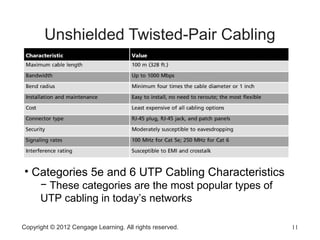
Unshielded Twisted-Pair Cabling
• Categories 5e and 6 UTP Cabling Characteristics
− These categories are the most popular types of
UTP cabling in today’s networks
Copyright © 2012 Cengage Learning. All rights reserved. 12
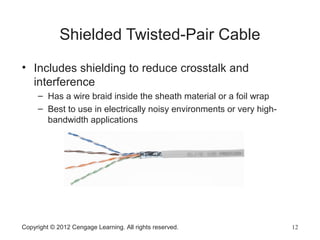
Shielded Twisted-Pair Cable
• Includes shielding to reduce crosstalk and
interference
– Has a wire braid inside the sheath material or a foil wrap
– Best to use in electrically noisy environments or very high-
bandwidth applications
Copyright © 2012 Cengage Learning. All rights reserved. 13
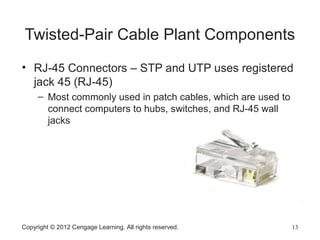
Twisted-Pair Cable Plant Components
• RJ-45 Connectors – STP and UTP uses registered
jack 45 (RJ-45)
– Most commonly used in patch cables, which are used to
connect computers to hubs, switches, and RJ-45 wall
jacks
Copyright © 2012 Cengage Learning. All rights reserved. 14
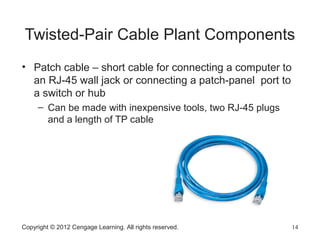
Twisted-Pair Cable Plant Components
• Patch cable – short cable for connecting a computer to
an RJ-45 wall jack or connecting a patch-panel port to
a switch or hub
– Can be made with inexpensive tools, two RJ-45 plugs
and a length of TP cable
Copyright © 2012 Cengage Learning. All rights reserved. 15
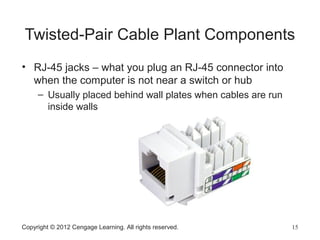
Twisted-Pair Cable Plant Components
• RJ-45 jacks – what you plug an RJ-45 connector into
when the computer is not near a switch or hub
– Usually placed behind wall plates when cables are run
inside walls
Copyright © 2012 Cengage Learning. All rights reserved. 16
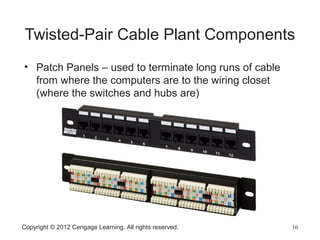
Twisted-Pair Cable Plant Components
• Patch Panels – used to terminate long runs of cable
from where the computers are to the wiring closet
(where the switches and hubs are)
Copyright © 2012 Cengage Learning. All rights reserved. 17
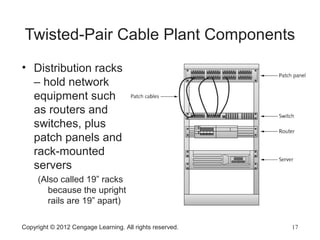
Twisted-Pair Cable Plant Components
• Distribution racks
– hold network
equipment such
as routers and
switches, plus
patch panels and
rack-mounted
servers
(Also called 19” racks
because the upright
rails are 19” apart)
Copyright © 2012 Cengage Learning. All rights reserved. 18
Structured Cabling: Managing and
Installing a UTP Cable Plant
• Structured cabling specifies how cabling should
be organized, regardless of the media type or
network architecture
• Large networks typically use most or all of these
components:
– Work area
– Horizontal wiring
– Telecommunication closets
– Equipment rooms
– Backbone or vertical wiring
– Entrance facilities
Copyright © 2012 Cengage Learning. All rights reserved. 19
Structured Cabling: Managing and
Installing a UTP Cable Plant
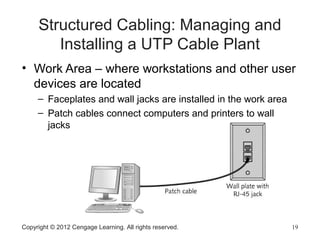
• Work Area – where workstations and other user
devices are located
– Faceplates and wall jacks are installed in the work area
– Patch cables connect computers and printers to wall
jacks
Copyright © 2012 Cengage Learning. All rights reserved. 20
Structured Cabling: Managing and
Installing a UTP Cable Plant
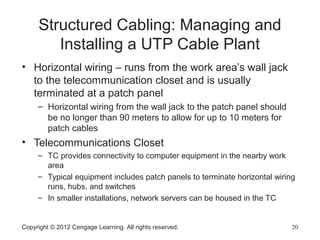
• Horizontal wiring – runs from the work area’s wall jack
to the telecommunication closet and is usually
terminated at a patch panel
– Horizontal wiring from the wall jack to the patch panel should
be no longer than 90 meters to allow for up to 10 meters for
patch cables
• Telecommunications Closet
– TC provides connectivity to computer equipment in the nearby work
area
– Typical equipment includes patch panels to terminate horizontal wiring
runs, hubs, and switches
– In smaller installations, network servers can be housed in the TC
Copyright © 2012 Cengage Learning. All rights reserved. 21
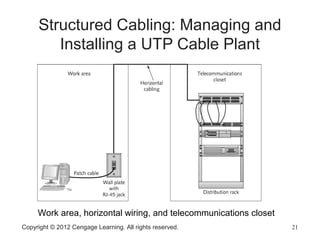
Structured Cabling: Managing and
Installing a UTP Cable Plant
Work area, horizontal wiring, and telecommunications closet
Copyright © 2012 Cengage Learning. All rights reserved. 22
Structured Cabling: Managing and
Installing a UTP Cable Plant
• Equipment Room – house servers, routers,
switches, and other major network equipment and
serve as a connection point for backbone cabling
– Can be the main cross-connect for the entire network or it
might serve as the connecting point for backbone cabling
between buildings
• Backbone Cabling – interconnects TCs and
equipment rooms
– Runs between floors or wings of a building and between
buildings
– Frequently fiber-optic cable, but can also be UTP if the
distance between TCs is less than 90 meters
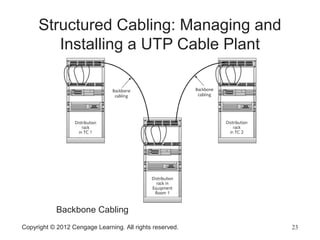
Structured Cabling: Managing and
Installing a UTP Cable Plant
Backbone Cabling
Copyright © 2012 Cengage Learning. All rights reserved. 23
Copyright © 2012 Cengage Learning. All rights reserved. 24
Structured Cabling: Managing and
Installing a UTP Cable Plant
• Entrance Facility – the location of the cabling and
equipment that connects a corporate network to a
third-party telecommunications provider
– Can also serve as an equipment room and the main
cross-connect for all backbone cabling
– Where a connection to a WAN is made
– Demarcation point: point where corporate LAN equipment ends
and a third-party provider’s equipment and cabling begins
Copyright © 2012 Cengage Learning. All rights reserved. 25
Installing UTP Cabling
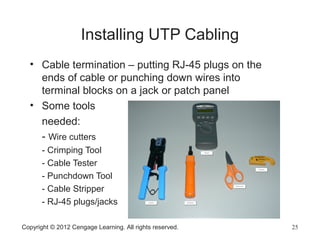
• Cable termination – putting RJ-45 plugs on the
ends of cable or punching down wires into
terminal blocks on a jack or patch panel
• Some tools
needed:
- Wire cutters
- Crimping Tool
- Cable Tester
- Punchdown Tool
- Cable Stripper
- RJ-45 plugs/jacks
Copyright © 2012 Cengage Learning. All rights reserved. 26
Straight-Through Versus Crossover
Cable
• When making or terminating a cable you must
get the colored wires arranged in the correct
order
– Two standards of arrangement of wires: 568A and 568B
• Standard patch cables are called straight-through
cables (same wiring standard on both ends)
• Crossover cables – use 568A standard on one side
of the cable and 568B standard on the other side
– This type of cable is often needed when you connect two
devices of the same type to one another
• Example: hub to hub, switch to switch, or PC to PC
Copyright © 2012 Cengage Learning. All rights reserved. 27
Medium Dependent Interface
• Network devices that connect by using RJ-45 plugs over
twisted-pair cabling are classified as medium dependent
interface (MDI) devices or MDI crossed (MDI-X) devices
• MDI devices transmit on pins 1 and 2 and receive on pins 3
and 6
– PC NICs and routers are examples
• MDI-X devices receive on pins 1 and 2 and transmit on pins
3 and 6
– Hubs and switches are examples
• When two switches (or any other like devices) need to be
connected, you use a crossover cable so that transmit and
receive wires get crossed
Copyright © 2012 Cengage Learning. All rights reserved. 28
Why Two Transmit and Two Receive
Wires?
• One wire pair is used for transmit (labeled
transmit+/transmit-) and one pair for receive (labeled
receive+/receive-)
• The plus and minus symbols indicate that the wires
carry a positive and negative signal
– This differential signal mitigates the effect of crosstalk and
noise on the cable
Copyright © 2012 Cengage Learning. All rights reserved. 29
Fiber-Optic Cable
• Bits are transmitted as pulses of light instead of
electricity
• Immune to electrical interference
• Highly secure – electronic eavesdropping is
eliminated
• Composition
– A slender cylinder of glass fiber called the core is surrounded
by a concentric layer of glass called the cladding
– Fiber is then jacketed in a thin transparent plastic material
called the buffer
Copyright © 2012 Cengage Learning. All rights reserved. 30
Fiber-Optic Cable
• Each fiber-optic strand carries data in only one direction
– Network connections consist of two or more strands
• Like UTP patch cables, fiber-optic patch cables usually
connect from a fiber-optic patch panel to a switch or
router
• Fiber-optic cable used as backbone cabling often
comes in bundles of 12 or more fiber strands
– Even only using 2 in the backbone, running more is a good idea so
that you are ready for any future expansion
• Some testing has shown that glass fibers can carry
several terabits per second
– It is speculated that fiber-optic cable will probably one day replace
copper for all types of network connections
Copyright © 2012 Cengage Learning. All rights reserved. 31
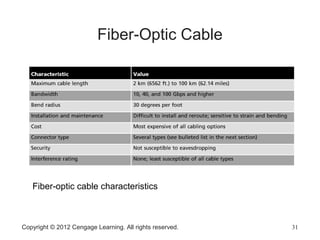
Fiber-Optic Cable
Fiber-optic cable characteristics
Copyright © 2012 Cengage Learning. All rights reserved. 32
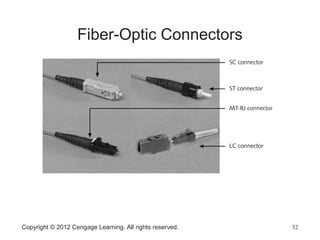
Fiber-Optic Connectors
Fiber-Optic Installation
• Somewhat more difficult and time consuming than
copper media installation
• Connectors and test equipment required for
termination are still more expensive than copper
• There are many methods for terminating fiber-optic
cables because of the many connectors and cable
types available
– Installation details are beyond the scope of this book
Copyright © 2012 Cengage Learning. All rights reserved. 33
Fiber-Optic Cable Types
• Single-mode fiber (SMF)
– Includes a single, small-diameter fiber at the core (8 microns)
– Costs more and generally works with laser-based emitters
– Spans the longest distances
– Used in higher-bandwidth applications
• Multimode fiber (MMF)
– Uses a considerably larger diameter fiber at the core (50 and
62.5 microns)
– Costs less than SMF
– Works with lower-power light emitting diodes (LEDs)
– Spans shorter distances
Copyright © 2012 Cengage Learning. All rights reserved. 34
Wireless Networking
• As wireless networking has become more affordable,
demand has increased
• Many home users have turned to wireless networks
• Wireless networks are often used with wired networks
to interconnect geographically dispersed LANs or
groups of mobile users with wired servers and
resources on a wired LAN (sometimes referred to as
“hybrid networks”)
• Even in small networks with workstations connecting to
a wireless AP or router, the AP or router usually
connects to the Internet via a wired connection to a
cable modem
Copyright © 2012 Cengage Learning. All rights reserved. 35
Wireless Benefits
• Creates temporary connections to existing wired
networks.
• Establishes backup or contingency connectivity for
existing wired networks
• Extends a network’s span beyond the reach of wire-based
or fiber-optic cabling, especially in older buildings where
rewiring might be too expensive
• Allows businesses to provide customers with wireless
networking easily, offering a service that gets customers
in and keeps them there
• Enables users to roam around a corporate or college
campus with their machines
Copyright © 2012 Cengage Learning. All rights reserved. 36
Types of Wireless Networks
 Local area networks (LANs) – usually provide
connectivity for mobile users or across areas that
couldn’t otherwise be networked
 Extended LANs – usually used to increase a LAN’s
span beyond normal distance limitations
 Internet service – used to bring Internet access to
homes and businesses
 Mobile computing – users communicate by using a
wireless networking medium that enable them to
move while remaining connected to a network
Copyright © 2012 Cengage Learning. All rights reserved. 37
Wireless LAN Components
• Network interface attaches to an antenna and an
emitter rather than to a cable
• Transceiver/access point – a transmitter/receiver
device that must be installed to translate between
wired and wireless networks
– Includes an antenna and a transmitter to send and receive
wireless traffic but also connects to the wired side of the
network
– Shuttles traffic back and forth between a network’s wired and
wireless sides
Copyright © 2012 Cengage Learning. All rights reserved. 38
Wireless LAN Transmission
• Signals take the form of waves in the electromagnetic
(EM) spectrum
• The frequency of the wave forms used for
communication is measured in cycles per second,
usually expressed as hertz (Hz)
• The principles governing wireless transmissions dictate
that lower-frequency transmissions can carry less data
more slowly over longer distances, and higher-
frequency transmissions can carry more data faster
over shorter distances
Copyright © 2012 Cengage Learning. All rights reserved. 39
Wireless LAN Transmission
• The following are the most commonly used
frequencies for wireless data communication:
– Radio – 10 KHz to 1 GHz
– Microwave – 1 GHz to 500 GHz
– Infrared – 500 GHz to 1 THz (terahertz)
• Wireless LANs make use of four primary
technologies for transmitting and receiving data
– Infrared
– Laser
– Narrowband (single-frequency) radio
– Spread-spectrum radio
Copyright © 2012 Cengage Learning. All rights reserved. 40
Infrared LAN Technologies
• Infrared (IR) wireless networks use infrared light
beams to send signals between pairs of devices
– Work well for LAN applications because of their high bandwidth
– Four main kinds of infrared LANs
• Line-of-sight networks – require an unobstructed view between
transmitter and receiver
• Reflective wireless networks – broadcast signals from optical
transceivers near devices to a central hub
• Scatter infrared networks – bounce transmissions off walls and
ceilings to deliver signals
• Broadband optical telepoint networks – provide broadband
services
Copyright © 2012 Cengage Learning. All rights reserved. 41
Laser-Based LAN Technologies
• Also require a clear line of sight between sender
and receiver
• Aren’t as susceptible to interference from visible
light sources as infrared
Copyright © 2012 Cengage Learning. All rights reserved. 42
Narrowband Radio LAN Technologies
• Use low-powered, two-way radio communication
• Receiver and transmitter must be tuned to the same
frequency to handle incoming and outgoing data
• Requires no line of sight between sender and receiver
as long as both parties stay within the broadcast range
of these devices (typically 70 meters or 230 feet)
• Depending on the frequency, walls or other solid
barriers can block signals
• Interference from other radio sources is also possible
Copyright © 2012 Cengage Learning. All rights reserved. 43
Spread-Spectrum LAN Technologies
• Uses multiple frequencies simultaneously,
improving reliability and reducing susceptibility to
interference
– Also makes eavesdropping more difficult
• Two main kinds of spread-spectrum
communications
– Frequency hopping: switches data between multiple
frequencies at regular intervals
– Direct-sequence modulation: breaks data into fixed-size
segments called chips and transmits the data on several
different frequencies at the same time
Copyright © 2012 Cengage Learning. All rights reserved. 44
Wireless Extended LAN Technologies
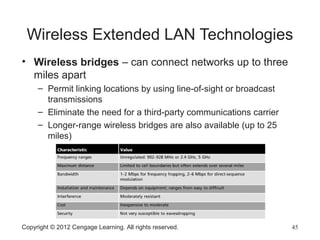
• Wireless bridges – can connect networks up to three
miles apart
– Permit linking locations by using line-of-sight or broadcast
transmissions
– Eliminate the need for a third-party communications carrier
– Longer-range wireless bridges are also available (up to 25
miles)
Copyright © 2012 Cengage Learning. All rights reserved. 45
Microwave Networking Technologies
• Microwave systems deliver higher transmission rates than
radio-based systems
– Transmitters and receivers must share a common clear line of sight
• Terrestrial microwave systems use tight-beam, high
frequency signals to link sender and receiver
– By using relay towers, microwave systems can extend a signal across
continental-scale distances
– Many communications carriers use microwave towers to send traffic
across sparsely populated areas
• Satellite microwave systems send and receive data from
geosynchronous satellites that maintain fixed positions in the
sky
– Most organizations must lease frequencies from global
communications carriers
Copyright © 2012 Cengage Learning. All rights reserved. 46
LAN Media Selection Criteria
• Three main media choices: UTP, fiber-optic, and
wireless
• When having difficulty choosing between media
types consider:
– Bandwidth – Higher bandwidth means more expensive cable
and higher installation costs
• If you need 40 Gbps or more, then fiber-optic is really your only
choice
– Budget – A typical UTP cable installation cost $100 - $200 per
cable run and fiber-optic might cost twice that much
• Wireless have no physical installation costs but you need to install
access points and verify connectivity
Copyright © 2012 Cengage Learning. All rights reserved. 47
LAN Media Selection Criteria
• Environmental considerations – How electrically noisy is
the environment? How important is data security?
– The more weight either factor has, the more likely fiber-optic or
secured wireless is the right choice
• Span – What kind of distance must the network span?
– Longer spans might require fiber-optic or wireless be used between
buildings
– Strategic placement of small switches or hubs gives UTP surprising
reach
• Existing cable plant – For an upgrade, the existing
cable plant must be considered
– If some existing cable is to remain, is it compatible with the speeds
and new equipment that are planned?
Copyright © 2012 Cengage Learning. All rights reserved. 48
Copyright © 2012 Cengage Learning. All rights reserved. 49
Chapter Summary
• Wired networking media come in two primary
categories: copper and fiber-optic
• Twisted-pair cabling comes in shielded or unshielded
varieties
• Twisted-pair cabling components consist of connectors,
patch cable, jacks, patch panels, and distribution racks
• A structured cabling plant consists of work areas,
horizontal wiring, telecommunications closets,
equipment rooms, backbone cabling, and entrance
facilities
Copyright © 2012 Cengage Learning. All rights reserved. 50
Chapter Summary
• Fiber-optic uses pulses of light to represent bits and is
immune to EMI, RFI, and electronic eavesdropping
• Wireless networks can be subdivided into LANs,
extended LANs, and mobile computing
• Components of a wireless LAN are a NIC, an antenna,
and a transceiver or access point
• Different technologies are used to transmit and receive
data including: infrared, laser, narrowband radio, and
spread-spectrum radio
• Networks combining fiber-optic, UTP, and wireless have
become the norm

Net essentials6e ch4

  • 1.
    Guide to NetworkingEssentials, 6th Edition Chapter 4: Network Media
  • 2.
    Copyright © 2012Cengage Learning. All rights reserved. 2 Objectives 2 • Define the primary cables used in wired networking • Describe the characteristics of the major types of fiber-optic media • Explain the technologies used for wireless networking
  • 3.
    Copyright © 2012Cengage Learning. All rights reserved. 3 Wired Networking • Wired networking uses tangible physical media called cables • Two broad categories of cables: copper wire and fiber optic • The main differences between the two types: – Composition of signals (electricity or light) – Speed at which signals can be sent – Distance the signals can effectively travel
  • 4.
    Copyright © 2012Cengage Learning. All rights reserved. 4 Criteria for Choosing Network Media • Bandwidth Rating – number of bits per second that can be transmitted across a medium – A factor determining bandwidth is how bit signals are represented on the medium (called encoding) – When possible, choose a cabling category that’s compatible with the standard you want to implement now but will support the next level of speed your network is likely to need in the future • Maximum Segment Length – maximum length of cable between two network devices – Each cable type can transport data only so far before its signals begin to weaken beyond what can be read by a receiving device (called attenuation)
  • 5.
    Copyright © 2012Cengage Learning. All rights reserved. 5 Criteria for Choosing Network Media • Interference and Eavesdropping Susceptibility – Interference to electrical signals on copper media comes in the form of electromagnetic interference (EMI) and radio frequency interference (RFI) – Motors, transformers, fluorescent lights, and other sources of intense electrical activity can emit both EMI and RFI – RFI can also affect wireless networks if the frequencies are in the same range – Another interference found in copper wires is called crosstalk, which is interference one wire generates on another wire when both wires are in a bundle – Copper wire is susceptible to electronic eavesdropping – Fiber-optic media carries light signals and is not susceptible to interference or eavesdropping
  • 6.
    Copyright © 2012Cengage Learning. All rights reserved. 6 Criteria for Choosing Network Media • Cable Grade – Building and fire codes include specific cabling requirements – Cables run between a false ceiling and the true ceiling (plenum) must be plenum-rated – UTP Cabling is marked as communication cable riser (CMR) or communication cable plenum (CMP) – CMR can only be used for building risers or in cable trays – CMP is suitable for use in plenum spaces • Connection Hardware – Every type of cable has connectors that influence the kinds of hardware the cable can connect to – You must make sure the media you select can be supported by the network device
  • 7.
    Copyright © 2012Cengage Learning. All rights reserved. 7 Criteria for Choosing Network Media • Ease of installation – the difficulty of installing the media – Factors to consider: • media’s minimum bend radius, which limits the angle at which a cable can be bent to run around corners • Cost and time needed to terminate the medium • Physical environment – types of walls and ceilings, EMI or RFI • Testability – A network that “works” might be crippled by excessive errors – It is important to certify whether the cable meets requirements for its category • Total cost – includes cabling, connectors, termination panels, wall jacks, termination tools, testing equipment and time
  • 8.
    Copyright © 2012Cengage Learning. All rights reserved. 8 Coaxial Cable • Often called “coax” for short • Once was the predominant form of network cabling • Inexpensive and easy to install • Started to phase out in the early 1990s • Still used primarily in connecting a cable modem to the wall outlet your cable TV/Internet provider installs
  • 9.
    Copyright © 2012Cengage Learning. All rights reserved. 9 Twisted-Pair Cable • Comes in two types: unshielded and shielded • Consists of one or more pairs of insulated strands of copper wires twisted around one another and housed in an outer jacket • Twists are necessary to improve resistance to crosstalk between the individual wires and EMI from outside sources – The more twists per unit length, the better resistance to EMI and crosstalk – More expensive TP is twisted more than less expensive and provides a better pathway for higher bandwidth networks
  • 10.
    Copyright © 2012Cengage Learning. All rights reserved. 10 Unshielded Twisted-Pair Cable  Most networks use Unshielded Twisted-Pair (UTP)  Consists of four pairs of insulated wires  Rated according to categories devised by the Telecommunications Industry Association (TIA) and Electronic Industries Alliance (EIA) and American National Standards Institutes (ANSI)  Categories 1 – 6e are accepted in U.S.  Two additional categories aren’t yet TIA/EIA standards and might never be in U.S.  Europe has accepted Category 7 and 7a, which specify that each wire pair is shielded
  • 11.
    Copyright © 2012Cengage Learning. All rights reserved. 11 Unshielded Twisted-Pair Cabling • Categories 5e and 6 UTP Cabling Characteristics − These categories are the most popular types of UTP cabling in today’s networks
  • 12.
    Copyright © 2012Cengage Learning. All rights reserved. 12 Shielded Twisted-Pair Cable • Includes shielding to reduce crosstalk and interference – Has a wire braid inside the sheath material or a foil wrap – Best to use in electrically noisy environments or very high- bandwidth applications
  • 13.
    Copyright © 2012Cengage Learning. All rights reserved. 13 Twisted-Pair Cable Plant Components • RJ-45 Connectors – STP and UTP uses registered jack 45 (RJ-45) – Most commonly used in patch cables, which are used to connect computers to hubs, switches, and RJ-45 wall jacks
  • 14.
    Copyright © 2012Cengage Learning. All rights reserved. 14 Twisted-Pair Cable Plant Components • Patch cable – short cable for connecting a computer to an RJ-45 wall jack or connecting a patch-panel port to a switch or hub – Can be made with inexpensive tools, two RJ-45 plugs and a length of TP cable
  • 15.
    Copyright © 2012Cengage Learning. All rights reserved. 15 Twisted-Pair Cable Plant Components • RJ-45 jacks – what you plug an RJ-45 connector into when the computer is not near a switch or hub – Usually placed behind wall plates when cables are run inside walls
  • 16.
    Copyright © 2012Cengage Learning. All rights reserved. 16 Twisted-Pair Cable Plant Components • Patch Panels – used to terminate long runs of cable from where the computers are to the wiring closet (where the switches and hubs are)
  • 17.
    Copyright © 2012Cengage Learning. All rights reserved. 17 Twisted-Pair Cable Plant Components • Distribution racks – hold network equipment such as routers and switches, plus patch panels and rack-mounted servers (Also called 19” racks because the upright rails are 19” apart)
  • 18.
    Copyright © 2012Cengage Learning. All rights reserved. 18 Structured Cabling: Managing and Installing a UTP Cable Plant • Structured cabling specifies how cabling should be organized, regardless of the media type or network architecture • Large networks typically use most or all of these components: – Work area – Horizontal wiring – Telecommunication closets – Equipment rooms – Backbone or vertical wiring – Entrance facilities
  • 19.
    Copyright © 2012Cengage Learning. All rights reserved. 19 Structured Cabling: Managing and Installing a UTP Cable Plant • Work Area – where workstations and other user devices are located – Faceplates and wall jacks are installed in the work area – Patch cables connect computers and printers to wall jacks
  • 20.
    Copyright © 2012Cengage Learning. All rights reserved. 20 Structured Cabling: Managing and Installing a UTP Cable Plant • Horizontal wiring – runs from the work area’s wall jack to the telecommunication closet and is usually terminated at a patch panel – Horizontal wiring from the wall jack to the patch panel should be no longer than 90 meters to allow for up to 10 meters for patch cables • Telecommunications Closet – TC provides connectivity to computer equipment in the nearby work area – Typical equipment includes patch panels to terminate horizontal wiring runs, hubs, and switches – In smaller installations, network servers can be housed in the TC
  • 21.
    Copyright © 2012Cengage Learning. All rights reserved. 21 Structured Cabling: Managing and Installing a UTP Cable Plant Work area, horizontal wiring, and telecommunications closet
  • 22.
    Copyright © 2012Cengage Learning. All rights reserved. 22 Structured Cabling: Managing and Installing a UTP Cable Plant • Equipment Room – house servers, routers, switches, and other major network equipment and serve as a connection point for backbone cabling – Can be the main cross-connect for the entire network or it might serve as the connecting point for backbone cabling between buildings • Backbone Cabling – interconnects TCs and equipment rooms – Runs between floors or wings of a building and between buildings – Frequently fiber-optic cable, but can also be UTP if the distance between TCs is less than 90 meters
  • 23.
    Structured Cabling: Managingand Installing a UTP Cable Plant Backbone Cabling Copyright © 2012 Cengage Learning. All rights reserved. 23
  • 24.
    Copyright © 2012Cengage Learning. All rights reserved. 24 Structured Cabling: Managing and Installing a UTP Cable Plant • Entrance Facility – the location of the cabling and equipment that connects a corporate network to a third-party telecommunications provider – Can also serve as an equipment room and the main cross-connect for all backbone cabling – Where a connection to a WAN is made – Demarcation point: point where corporate LAN equipment ends and a third-party provider’s equipment and cabling begins
  • 25.
    Copyright © 2012Cengage Learning. All rights reserved. 25 Installing UTP Cabling • Cable termination – putting RJ-45 plugs on the ends of cable or punching down wires into terminal blocks on a jack or patch panel • Some tools needed: - Wire cutters - Crimping Tool - Cable Tester - Punchdown Tool - Cable Stripper - RJ-45 plugs/jacks
  • 26.
    Copyright © 2012Cengage Learning. All rights reserved. 26 Straight-Through Versus Crossover Cable • When making or terminating a cable you must get the colored wires arranged in the correct order – Two standards of arrangement of wires: 568A and 568B • Standard patch cables are called straight-through cables (same wiring standard on both ends) • Crossover cables – use 568A standard on one side of the cable and 568B standard on the other side – This type of cable is often needed when you connect two devices of the same type to one another • Example: hub to hub, switch to switch, or PC to PC
  • 27.
    Copyright © 2012Cengage Learning. All rights reserved. 27 Medium Dependent Interface • Network devices that connect by using RJ-45 plugs over twisted-pair cabling are classified as medium dependent interface (MDI) devices or MDI crossed (MDI-X) devices • MDI devices transmit on pins 1 and 2 and receive on pins 3 and 6 – PC NICs and routers are examples • MDI-X devices receive on pins 1 and 2 and transmit on pins 3 and 6 – Hubs and switches are examples • When two switches (or any other like devices) need to be connected, you use a crossover cable so that transmit and receive wires get crossed
  • 28.
    Copyright © 2012Cengage Learning. All rights reserved. 28 Why Two Transmit and Two Receive Wires? • One wire pair is used for transmit (labeled transmit+/transmit-) and one pair for receive (labeled receive+/receive-) • The plus and minus symbols indicate that the wires carry a positive and negative signal – This differential signal mitigates the effect of crosstalk and noise on the cable
  • 29.
    Copyright © 2012Cengage Learning. All rights reserved. 29 Fiber-Optic Cable • Bits are transmitted as pulses of light instead of electricity • Immune to electrical interference • Highly secure – electronic eavesdropping is eliminated • Composition – A slender cylinder of glass fiber called the core is surrounded by a concentric layer of glass called the cladding – Fiber is then jacketed in a thin transparent plastic material called the buffer
  • 30.
    Copyright © 2012Cengage Learning. All rights reserved. 30 Fiber-Optic Cable • Each fiber-optic strand carries data in only one direction – Network connections consist of two or more strands • Like UTP patch cables, fiber-optic patch cables usually connect from a fiber-optic patch panel to a switch or router • Fiber-optic cable used as backbone cabling often comes in bundles of 12 or more fiber strands – Even only using 2 in the backbone, running more is a good idea so that you are ready for any future expansion • Some testing has shown that glass fibers can carry several terabits per second – It is speculated that fiber-optic cable will probably one day replace copper for all types of network connections
  • 31.
    Copyright © 2012Cengage Learning. All rights reserved. 31 Fiber-Optic Cable Fiber-optic cable characteristics
  • 32.
    Copyright © 2012Cengage Learning. All rights reserved. 32 Fiber-Optic Connectors
  • 33.
    Fiber-Optic Installation • Somewhatmore difficult and time consuming than copper media installation • Connectors and test equipment required for termination are still more expensive than copper • There are many methods for terminating fiber-optic cables because of the many connectors and cable types available – Installation details are beyond the scope of this book Copyright © 2012 Cengage Learning. All rights reserved. 33
  • 34.
    Fiber-Optic Cable Types •Single-mode fiber (SMF) – Includes a single, small-diameter fiber at the core (8 microns) – Costs more and generally works with laser-based emitters – Spans the longest distances – Used in higher-bandwidth applications • Multimode fiber (MMF) – Uses a considerably larger diameter fiber at the core (50 and 62.5 microns) – Costs less than SMF – Works with lower-power light emitting diodes (LEDs) – Spans shorter distances Copyright © 2012 Cengage Learning. All rights reserved. 34
  • 35.
    Wireless Networking • Aswireless networking has become more affordable, demand has increased • Many home users have turned to wireless networks • Wireless networks are often used with wired networks to interconnect geographically dispersed LANs or groups of mobile users with wired servers and resources on a wired LAN (sometimes referred to as “hybrid networks”) • Even in small networks with workstations connecting to a wireless AP or router, the AP or router usually connects to the Internet via a wired connection to a cable modem Copyright © 2012 Cengage Learning. All rights reserved. 35
  • 36.
    Wireless Benefits • Createstemporary connections to existing wired networks. • Establishes backup or contingency connectivity for existing wired networks • Extends a network’s span beyond the reach of wire-based or fiber-optic cabling, especially in older buildings where rewiring might be too expensive • Allows businesses to provide customers with wireless networking easily, offering a service that gets customers in and keeps them there • Enables users to roam around a corporate or college campus with their machines Copyright © 2012 Cengage Learning. All rights reserved. 36
  • 37.
    Types of WirelessNetworks  Local area networks (LANs) – usually provide connectivity for mobile users or across areas that couldn’t otherwise be networked  Extended LANs – usually used to increase a LAN’s span beyond normal distance limitations  Internet service – used to bring Internet access to homes and businesses  Mobile computing – users communicate by using a wireless networking medium that enable them to move while remaining connected to a network Copyright © 2012 Cengage Learning. All rights reserved. 37
  • 38.
    Wireless LAN Components •Network interface attaches to an antenna and an emitter rather than to a cable • Transceiver/access point – a transmitter/receiver device that must be installed to translate between wired and wireless networks – Includes an antenna and a transmitter to send and receive wireless traffic but also connects to the wired side of the network – Shuttles traffic back and forth between a network’s wired and wireless sides Copyright © 2012 Cengage Learning. All rights reserved. 38
  • 39.
    Wireless LAN Transmission •Signals take the form of waves in the electromagnetic (EM) spectrum • The frequency of the wave forms used for communication is measured in cycles per second, usually expressed as hertz (Hz) • The principles governing wireless transmissions dictate that lower-frequency transmissions can carry less data more slowly over longer distances, and higher- frequency transmissions can carry more data faster over shorter distances Copyright © 2012 Cengage Learning. All rights reserved. 39
  • 40.
    Wireless LAN Transmission •The following are the most commonly used frequencies for wireless data communication: – Radio – 10 KHz to 1 GHz – Microwave – 1 GHz to 500 GHz – Infrared – 500 GHz to 1 THz (terahertz) • Wireless LANs make use of four primary technologies for transmitting and receiving data – Infrared – Laser – Narrowband (single-frequency) radio – Spread-spectrum radio Copyright © 2012 Cengage Learning. All rights reserved. 40
  • 41.
    Infrared LAN Technologies •Infrared (IR) wireless networks use infrared light beams to send signals between pairs of devices – Work well for LAN applications because of their high bandwidth – Four main kinds of infrared LANs • Line-of-sight networks – require an unobstructed view between transmitter and receiver • Reflective wireless networks – broadcast signals from optical transceivers near devices to a central hub • Scatter infrared networks – bounce transmissions off walls and ceilings to deliver signals • Broadband optical telepoint networks – provide broadband services Copyright © 2012 Cengage Learning. All rights reserved. 41
  • 42.
    Laser-Based LAN Technologies •Also require a clear line of sight between sender and receiver • Aren’t as susceptible to interference from visible light sources as infrared Copyright © 2012 Cengage Learning. All rights reserved. 42
  • 43.
    Narrowband Radio LANTechnologies • Use low-powered, two-way radio communication • Receiver and transmitter must be tuned to the same frequency to handle incoming and outgoing data • Requires no line of sight between sender and receiver as long as both parties stay within the broadcast range of these devices (typically 70 meters or 230 feet) • Depending on the frequency, walls or other solid barriers can block signals • Interference from other radio sources is also possible Copyright © 2012 Cengage Learning. All rights reserved. 43
  • 44.
    Spread-Spectrum LAN Technologies •Uses multiple frequencies simultaneously, improving reliability and reducing susceptibility to interference – Also makes eavesdropping more difficult • Two main kinds of spread-spectrum communications – Frequency hopping: switches data between multiple frequencies at regular intervals – Direct-sequence modulation: breaks data into fixed-size segments called chips and transmits the data on several different frequencies at the same time Copyright © 2012 Cengage Learning. All rights reserved. 44
  • 45.
    Wireless Extended LANTechnologies • Wireless bridges – can connect networks up to three miles apart – Permit linking locations by using line-of-sight or broadcast transmissions – Eliminate the need for a third-party communications carrier – Longer-range wireless bridges are also available (up to 25 miles) Copyright © 2012 Cengage Learning. All rights reserved. 45
  • 46.
    Microwave Networking Technologies •Microwave systems deliver higher transmission rates than radio-based systems – Transmitters and receivers must share a common clear line of sight • Terrestrial microwave systems use tight-beam, high frequency signals to link sender and receiver – By using relay towers, microwave systems can extend a signal across continental-scale distances – Many communications carriers use microwave towers to send traffic across sparsely populated areas • Satellite microwave systems send and receive data from geosynchronous satellites that maintain fixed positions in the sky – Most organizations must lease frequencies from global communications carriers Copyright © 2012 Cengage Learning. All rights reserved. 46
  • 47.
    LAN Media SelectionCriteria • Three main media choices: UTP, fiber-optic, and wireless • When having difficulty choosing between media types consider: – Bandwidth – Higher bandwidth means more expensive cable and higher installation costs • If you need 40 Gbps or more, then fiber-optic is really your only choice – Budget – A typical UTP cable installation cost $100 - $200 per cable run and fiber-optic might cost twice that much • Wireless have no physical installation costs but you need to install access points and verify connectivity Copyright © 2012 Cengage Learning. All rights reserved. 47
  • 48.
    LAN Media SelectionCriteria • Environmental considerations – How electrically noisy is the environment? How important is data security? – The more weight either factor has, the more likely fiber-optic or secured wireless is the right choice • Span – What kind of distance must the network span? – Longer spans might require fiber-optic or wireless be used between buildings – Strategic placement of small switches or hubs gives UTP surprising reach • Existing cable plant – For an upgrade, the existing cable plant must be considered – If some existing cable is to remain, is it compatible with the speeds and new equipment that are planned? Copyright © 2012 Cengage Learning. All rights reserved. 48
  • 49.
    Copyright © 2012Cengage Learning. All rights reserved. 49 Chapter Summary • Wired networking media come in two primary categories: copper and fiber-optic • Twisted-pair cabling comes in shielded or unshielded varieties • Twisted-pair cabling components consist of connectors, patch cable, jacks, patch panels, and distribution racks • A structured cabling plant consists of work areas, horizontal wiring, telecommunications closets, equipment rooms, backbone cabling, and entrance facilities
  • 50.
    Copyright © 2012Cengage Learning. All rights reserved. 50 Chapter Summary • Fiber-optic uses pulses of light to represent bits and is immune to EMI, RFI, and electronic eavesdropping • Wireless networks can be subdivided into LANs, extended LANs, and mobile computing • Components of a wireless LAN are a NIC, an antenna, and a transceiver or access point • Different technologies are used to transmit and receive data including: infrared, laser, narrowband radio, and spread-spectrum radio • Networks combining fiber-optic, UTP, and wireless have become the norm