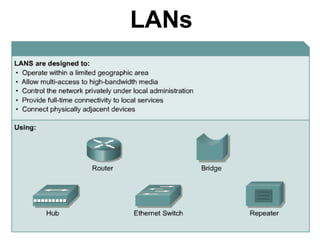
LANs
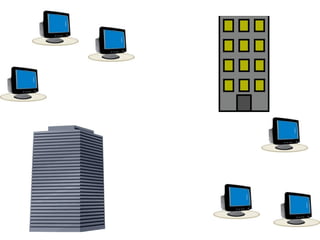
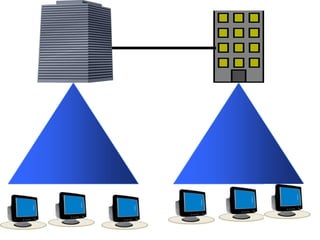
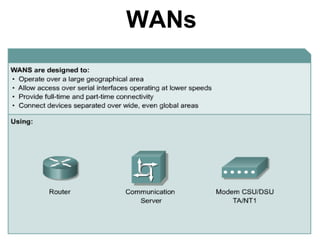
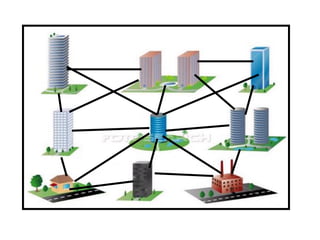
WANs
Transmission Media
Information must be transferred using some form of media that is called as
transmission media. Transmission Media is of two types
• Cable or wired
• Cable less or wireless
The main types of cable media are
• Coaxial Cable
• Twisted Pair Cable
• Fibre Optic Cable
Wireless uses a technologies such as
a. Infrared
b. Microwave
c. Radio frequency
Coaxial Cable
• Why the name is coaxial?
• Why coaxial cable?
• Where coaxial is used?
• What are the advantages of coaxial cable?
• What are the disadvantages of coaxial
cable?
• Different types of coaxial cable?
• Measurement of coaxial cable?
Coaxial Cable
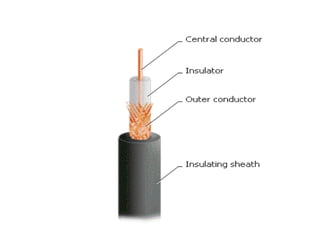
• Coaxial cable gets its name because it contains two conductors that are
parallel to each other or on the same axis i.e., co-axis.
• The center conductor in the cable is usually copper. The copper can be
either solid wire or a stranded material.
• The important of stranded wire is the ability to bend the cable where as
solid, bend it and forth for few times it breaks.
• Outside this central conductor is a nonconductive material. It is usually a
white, plastic-like material, used to separate the inner conductor from the
outer conductor. The outer conductor is a fine mesh made from copper. It is
used to help the cable from electromagnetic interference (EMI). Outside the
cable mesh is the final protective cover.
• The actual network data travels through the center conductor in the cable.
EMI interference is caught by the outer copper mesh
Coaxial Cable
• coaxial cables are commonly used to connect home video equipment, in
ham radio setups, and in measurement electronics. They used to be
common for implementing computer networks, in particular Ethernet, but
twisted pair cables have replaced them in most applications except in
the growing consumer cable modem market for broadband Internet
access.
• coaxial cable is used to connect radio networks and television networks,
though this has largely been superseded by other more high-tech
methods (fibre optics, T1/E1, satellite). It still carries cable television
signals to the majority of television receivers, and this purpose
consumes the majority of coaxial cable production.
• coaxial cables are used in a range of consumer devices, military
equipment, and also in ultra-sound scanning equipment.
Coaxial Cable
• Advantages of Coaxial Cable
1. Inexpensive
2. Easy to install
3. Easy to expand
4. Medium level of EMI immunity
5. It supports up to 10Mbps capacity
• Disadvantages of Coaxial Cable
1. Single cable failure can take down an entire network
Coaxial Cable
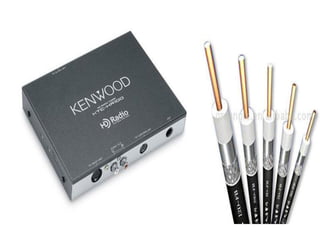
• The different types of coaxial cable vary by Gauge and Impedance
• Gauge is the measure of the cables thickness, It is measured by Radio-
Grade measurement or RG number.
• The higher the number the thinner the center conductor core, the lower
the number the thicker the core.
• The measure of resistance in the cable is called Impedance.
1. 50-ohms RG-7 or RG-11: For thick Ethernet
2. 50-ohms RG-58: For thin Ethernet
3. 75-ohms RG-59: For cable television
4. 93-ohms RG-62: For ARCNET
Different types of coaxial cables are
1. Thick net
2. Thin net
Twisted Pair
• Why twisted pair cable?
• Types of twisted pair cables?
• Advantages of twisted pair?
• Disadvantages of twisted pair?
Twisted Pair
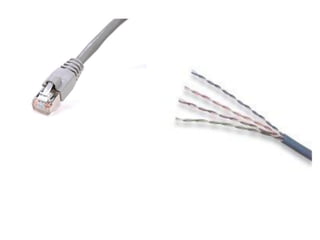
• The most popular network cable right today is twisted pair. It is lightweight,
easy to install, inexpensive and supports many different types of networks.
• When two copper wires conduct electric signals in close proximity, a certain
amount of EMI occurs. This type of interference is called crosstalk.
• Twisting the copper wires reduces crosstalk and signal emissions.
• When one or more twisted pairs are combined within a common jacket, they
form a twisted pair cable.
• The two types of twisted pair cables are:
1. Unshielded
2. Shielded
1. Unshielded Twisted Pair: UTP cable is composed of a set of twisted pairs
with a simple plastic encasement.
2. It is commonly used in telephone systems.
3. The Electrical Industries Association (EIA) popularized a category labeling
scheme for five different qualities of twisted pair cable
• Category 1,2,3,4,5
Twisted Pair
• UTP Advantages:
• Easy Installation
• Capable of high speeds for LANs
• Low cost
• UTP Disadvantages
• Short distances due to attenuation
• Shielded Twisted Pair: Shielded Twisted Pair (STP) is mainly used in
Token Ring.
• It is similar to UTP but are mesh shielding that protects it from EMI which
allows for higher transmission rates and longer distances without errors.
• IBM has defined different levels for STP cables similar to the categories of
UTP cables:
• Type 1,2,6,7,9
Twisted Pair
• Advantages of STP
• It is shielded
• Data transfer rate is higher than UTP and coaxial
• Medium immunity from EMI
• Disadvantages of STP
• More Expensive than UTP and coaxial
• More difficult installation
• High attenuation rate
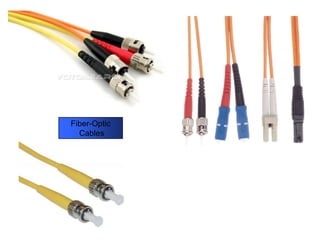
Fiber-Optic
Cables
Fiber-Optic Cable
• Fiber-Optic cable is not like the others. Instead of using electrical signals to
transmit data, here light is used.
• In Fiber-Optic light only move in one direction. For a two-way communication to
take place, a second connection must be made between the two devices.
• Fiber optic comes in two flavours:
• Single Mode or Mono Mode
• Multimode
• Single Mode: It only allows for one light path through the cable. It is used only
for longer distance, such as tens of miles.
• Multi Mode: It has many paths, If we are just connecting nearby building we can
stick to multimode
Advantages of Fiber-Optic:
• It has a bandwidth of more than 3.2Gbps
• Low attenuation
• No EMI interference problems.
• It runs tens of miles
Disadvantages of Fiber-Optic:
• Hard to install
• Expensive
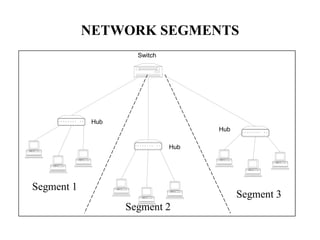
NETWORK SEGMENTS
Switch
Hub
Hub
Hub
Segment 1
Segment 2
Segment 3
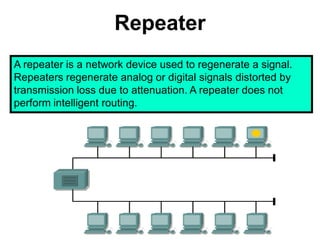
Repeater
A repeater is a network device used to regenerate a signal.
Repeaters regenerate analog or digital signals distorted by
transmission loss due to attenuation. A repeater does not
perform intelligent routing.
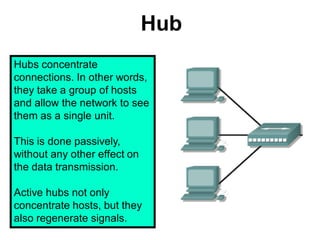
Hub
Hubs concentrate
connections. In other words,
they take a group of hosts
and allow the network to see
them as a single unit.
This is done passively,
without any other effect on
the data transmission.
Active hubs not only
concentrate hosts, but they
also regenerate signals.
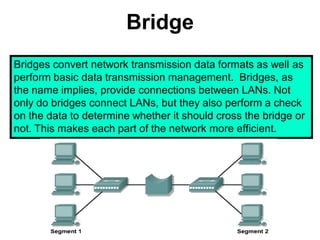
Bridge
Bridges convert network transmission data formats as well as
perform basic data transmission management. Bridges, as
the name implies, provide connections between LANs. Not
only do bridges connect LANs, but they also perform a check
on the data to determine whether it should cross the bridge or
not. This makes each part of the network more efficient.
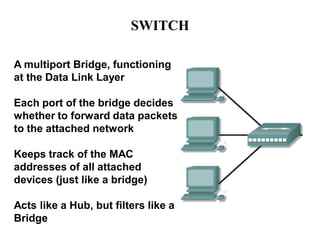
SWITCH
A multiport Bridge, functioning
at the Data Link Layer
Each port of the bridge decides
whether to forward data packets
to the attached network
Keeps track of the MAC
addresses of all attached
devices (just like a bridge)
Acts like a Hub, but filters like a
Bridge
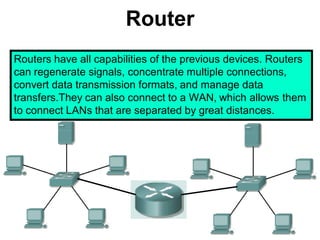
Router
Routers have all capabilities of the previous devices. Routers
can regenerate signals, concentrate multiple connections,
convert data transmission formats, and manage data
transfers.They can also connect to a WAN, which allows them
to connect LANs that are separated by great distances.
Network Topologies
Network topology defines the structure of the network.
One part of the topology definition is the physical topology,
which is the actual layout of the wire or media.
The other part is the logical topology,which defines how the
media is accessed by the hosts for sending data.
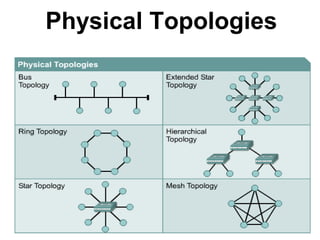
Physical Topologies
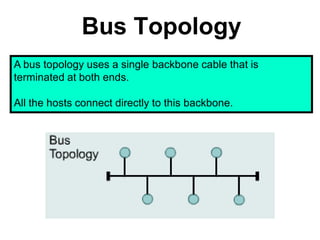
Bus Topology
A bus topology uses a single backbone cable that is
terminated at both ends.
All the hosts connect directly to this backbone.
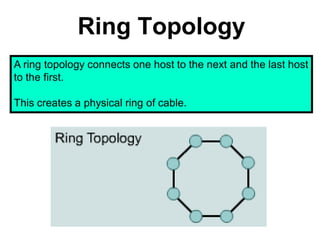
Ring Topology
A ring topology connects one host to the next and the last host
to the first.
This creates a physical ring of cable.
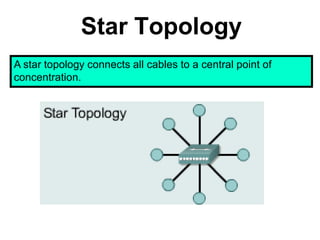
Star Topology
A star topology connects all cables to a central point of
concentration.
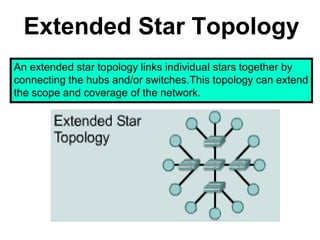
Extended Star Topology
An extended star topology links individual stars together by
connecting the hubs and/or switches.This topology can extend
the scope and coverage of the network.
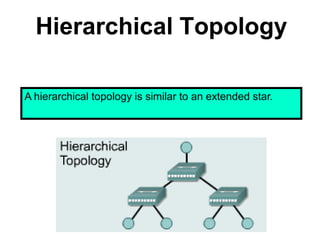
Hierarchical Topology
A hierarchical topology is similar to an extended star.
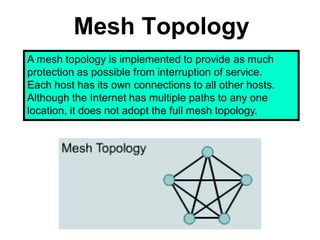
Mesh Topology
A mesh topology is implemented to provide as much
protection as possible from interruption of service.
Each host has its own connections to all other hosts.
Although the Internet has multiple paths to any one
location, it does not adopt the full mesh topology.
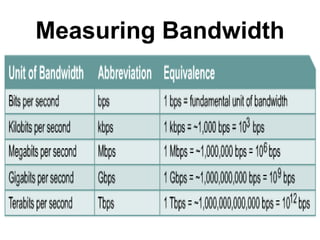
Measuring Bandwidth

Introduction to network

  • 4.
  • 5.
  • 7.
    Transmission Media Information mustbe transferred using some form of media that is called as transmission media. Transmission Media is of two types • Cable or wired • Cable less or wireless The main types of cable media are • Coaxial Cable • Twisted Pair Cable • Fibre Optic Cable Wireless uses a technologies such as a. Infrared b. Microwave c. Radio frequency
  • 8.
    Coaxial Cable • Whythe name is coaxial? • Why coaxial cable? • Where coaxial is used? • What are the advantages of coaxial cable? • What are the disadvantages of coaxial cable? • Different types of coaxial cable? • Measurement of coaxial cable?
  • 10.
    Coaxial Cable • Coaxialcable gets its name because it contains two conductors that are parallel to each other or on the same axis i.e., co-axis. • The center conductor in the cable is usually copper. The copper can be either solid wire or a stranded material. • The important of stranded wire is the ability to bend the cable where as solid, bend it and forth for few times it breaks. • Outside this central conductor is a nonconductive material. It is usually a white, plastic-like material, used to separate the inner conductor from the outer conductor. The outer conductor is a fine mesh made from copper. It is used to help the cable from electromagnetic interference (EMI). Outside the cable mesh is the final protective cover. • The actual network data travels through the center conductor in the cable. EMI interference is caught by the outer copper mesh
  • 11.
    Coaxial Cable • coaxialcables are commonly used to connect home video equipment, in ham radio setups, and in measurement electronics. They used to be common for implementing computer networks, in particular Ethernet, but twisted pair cables have replaced them in most applications except in the growing consumer cable modem market for broadband Internet access. • coaxial cable is used to connect radio networks and television networks, though this has largely been superseded by other more high-tech methods (fibre optics, T1/E1, satellite). It still carries cable television signals to the majority of television receivers, and this purpose consumes the majority of coaxial cable production. • coaxial cables are used in a range of consumer devices, military equipment, and also in ultra-sound scanning equipment.
  • 13.
    Coaxial Cable • Advantagesof Coaxial Cable 1. Inexpensive 2. Easy to install 3. Easy to expand 4. Medium level of EMI immunity 5. It supports up to 10Mbps capacity • Disadvantages of Coaxial Cable 1. Single cable failure can take down an entire network
  • 14.
    Coaxial Cable • Thedifferent types of coaxial cable vary by Gauge and Impedance • Gauge is the measure of the cables thickness, It is measured by Radio- Grade measurement or RG number. • The higher the number the thinner the center conductor core, the lower the number the thicker the core. • The measure of resistance in the cable is called Impedance. 1. 50-ohms RG-7 or RG-11: For thick Ethernet 2. 50-ohms RG-58: For thin Ethernet 3. 75-ohms RG-59: For cable television 4. 93-ohms RG-62: For ARCNET Different types of coaxial cables are 1. Thick net 2. Thin net
  • 15.
    Twisted Pair • Whytwisted pair cable? • Types of twisted pair cables? • Advantages of twisted pair? • Disadvantages of twisted pair?
  • 17.
    Twisted Pair • Themost popular network cable right today is twisted pair. It is lightweight, easy to install, inexpensive and supports many different types of networks. • When two copper wires conduct electric signals in close proximity, a certain amount of EMI occurs. This type of interference is called crosstalk. • Twisting the copper wires reduces crosstalk and signal emissions. • When one or more twisted pairs are combined within a common jacket, they form a twisted pair cable. • The two types of twisted pair cables are: 1. Unshielded 2. Shielded 1. Unshielded Twisted Pair: UTP cable is composed of a set of twisted pairs with a simple plastic encasement. 2. It is commonly used in telephone systems. 3. The Electrical Industries Association (EIA) popularized a category labeling scheme for five different qualities of twisted pair cable • Category 1,2,3,4,5
  • 18.
    Twisted Pair • UTPAdvantages: • Easy Installation • Capable of high speeds for LANs • Low cost • UTP Disadvantages • Short distances due to attenuation • Shielded Twisted Pair: Shielded Twisted Pair (STP) is mainly used in Token Ring. • It is similar to UTP but are mesh shielding that protects it from EMI which allows for higher transmission rates and longer distances without errors. • IBM has defined different levels for STP cables similar to the categories of UTP cables: • Type 1,2,6,7,9
  • 19.
    Twisted Pair • Advantagesof STP • It is shielded • Data transfer rate is higher than UTP and coaxial • Medium immunity from EMI • Disadvantages of STP • More Expensive than UTP and coaxial • More difficult installation • High attenuation rate
  • 20.
  • 21.
    Fiber-Optic Cable • Fiber-Opticcable is not like the others. Instead of using electrical signals to transmit data, here light is used. • In Fiber-Optic light only move in one direction. For a two-way communication to take place, a second connection must be made between the two devices. • Fiber optic comes in two flavours: • Single Mode or Mono Mode • Multimode • Single Mode: It only allows for one light path through the cable. It is used only for longer distance, such as tens of miles. • Multi Mode: It has many paths, If we are just connecting nearby building we can stick to multimode Advantages of Fiber-Optic: • It has a bandwidth of more than 3.2Gbps • Low attenuation • No EMI interference problems. • It runs tens of miles Disadvantages of Fiber-Optic: • Hard to install • Expensive
  • 22.
  • 23.
    Repeater A repeater isa network device used to regenerate a signal. Repeaters regenerate analog or digital signals distorted by transmission loss due to attenuation. A repeater does not perform intelligent routing.
  • 24.
    Hub Hubs concentrate connections. Inother words, they take a group of hosts and allow the network to see them as a single unit. This is done passively, without any other effect on the data transmission. Active hubs not only concentrate hosts, but they also regenerate signals.
  • 25.
    Bridge Bridges convert networktransmission data formats as well as perform basic data transmission management. Bridges, as the name implies, provide connections between LANs. Not only do bridges connect LANs, but they also perform a check on the data to determine whether it should cross the bridge or not. This makes each part of the network more efficient.
  • 26.
    SWITCH A multiport Bridge,functioning at the Data Link Layer Each port of the bridge decides whether to forward data packets to the attached network Keeps track of the MAC addresses of all attached devices (just like a bridge) Acts like a Hub, but filters like a Bridge
  • 27.
    Router Routers have allcapabilities of the previous devices. Routers can regenerate signals, concentrate multiple connections, convert data transmission formats, and manage data transfers.They can also connect to a WAN, which allows them to connect LANs that are separated by great distances.
  • 28.
    Network Topologies Network topologydefines the structure of the network. One part of the topology definition is the physical topology, which is the actual layout of the wire or media. The other part is the logical topology,which defines how the media is accessed by the hosts for sending data.
  • 29.
  • 30.
    Bus Topology A bustopology uses a single backbone cable that is terminated at both ends. All the hosts connect directly to this backbone.
  • 31.
    Ring Topology A ringtopology connects one host to the next and the last host to the first. This creates a physical ring of cable.
  • 32.
    Star Topology A startopology connects all cables to a central point of concentration.
  • 33.
    Extended Star Topology Anextended star topology links individual stars together by connecting the hubs and/or switches.This topology can extend the scope and coverage of the network.
  • 34.
    Hierarchical Topology A hierarchicaltopology is similar to an extended star.
  • 35.
    Mesh Topology A meshtopology is implemented to provide as much protection as possible from interruption of service. Each host has its own connections to all other hosts. Although the Internet has multiple paths to any one location, it does not adopt the full mesh topology.
  • 36.