Lesson 7
Structured Cabling
1
2
Transmission Media
Transmission medium: the physical path between transmitter and
receiver.
 Repeaters or amplifiers may be used to extend the length of
the medium.
 Communication of electromagnetic waves is guided or
unguided.
Guided media :: waves are guided along a physical path (e.g,
twisted pair, coaxial cable and optical fiber).
Unguided media:: means for transmitting but not guiding
electromagnetic waves (e.g., the atmosphere and outer
space).
3
Transmission Media Choices
 Twisted pair
 Coaxial cable
 Optical fiber
 Wireless communications
Transmission Media - Aseel Alhadlaq 4
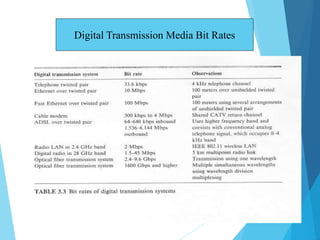
Digital Transmission Media Bit Rates
Twisted Pair
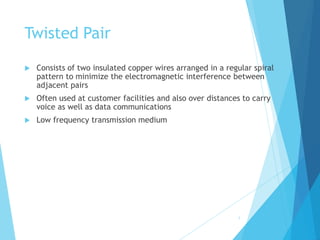
 Consists of two insulated copper wires arranged in a regular spiral
pattern to minimize the electromagnetic interference between
adjacent pairs
 Often used at customer facilities and also over distances to carry
voice as well as data communications
 Low frequency transmission medium
5
6
Twisted Pair
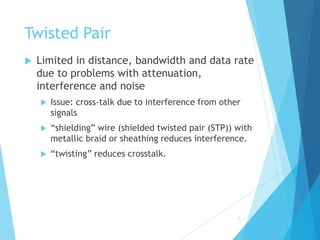
 Limited in distance, bandwidth and data rate
due to problems with attenuation,
interference and noise
 Issue: cross-talk due to interference from other
signals
 “shielding” wire (shielded twisted pair (STP)) with
metallic braid or sheathing reduces interference.
 “twisting” reduces crosstalk.
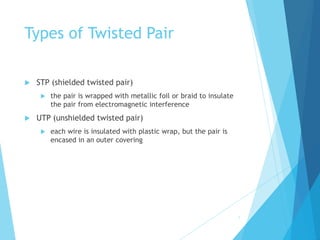
Types of Twisted Pair
 STP (shielded twisted pair)
 the pair is wrapped with metallic foil or braid to insulate
the pair from electromagnetic interference
 UTP (unshielded twisted pair)
 each wire is insulated with plastic wrap, but the pair is
encased in an outer covering
7
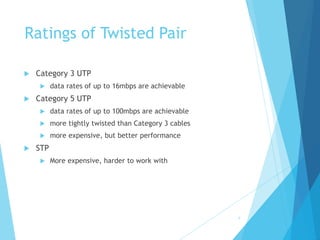
Ratings of Twisted Pair
 Category 3 UTP
 data rates of up to 16mbps are achievable
 Category 5 UTP
 data rates of up to 100mbps are achievable
 more tightly twisted than Category 3 cables
 more expensive, but better performance
 STP
 More expensive, harder to work with
8
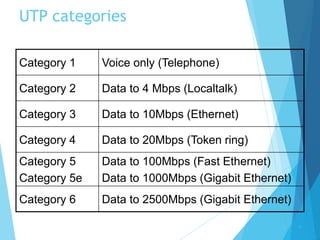
UTP categories
Category 1 Voice only (Telephone)
Category 2 Data to 4 Mbps (Localtalk)
Category 3 Data to 10Mbps (Ethernet)
Category 4 Data to 20Mbps (Token ring)
Category 5
Category 5e
Data to 100Mbps (Fast Ethernet)
Data to 1000Mbps (Gigabit Ethernet)
Category 6 Data to 2500Mbps (Gigabit Ethernet)
9
Twisted Pair Advantages
 Inexpensive and readily available
 Flexible and light weight
 Easy to work with and install
10
Twisted Pair Disadvantages
 Susceptibility to interference and noise
 Attenuation problem
 For analog, repeaters needed every 5-6km
 For digital, repeaters needed every 2-3km
 Relatively low bandwidth (3000Hz)
11
Coaxial Cable (or Coax)
 Used for cable television, LANs, telephony
 Has an inner conductor surrounded by a braided mesh
 Both conductors share a common center axial, hence
the term “co-axial”
 Traditionally used for LANs, but growth of twisted pair
for local nets and optical fiber for larger nets has
reduced coax use
12
13
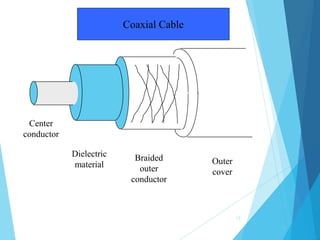
Center
conductor
Dielectric
material
Braided
outer
conductor
Outer
cover
Coaxial Cable
14
Coaxial Cable
 Divided into two basic categories for coax used in
LANs:
 50-ohm cable [baseband]
 75-ohm cable [broadband or single channel baseband]
 In general, coax has better noise immunity for
higher frequencies than twisted pair.
 Coaxial cable provides much higher bandwidth than
twisted pair.
 However, cable is ‘bulky’.
15
Baseband Coax
 50-ohm cable is used exclusively for digital transmissions
 Uses Manchester encoding, geographical limit is a few
kilometers.
10Base5 Thick Ethernet :: thick (10 mm) coax
10 Mbps, 500 m. max segment length, 100 devices/segment,
awkward to handle and install.
10Base2 Thin Ethernet :: thin (5 mm) coax
10 Mbps, 185 m. max segment length, 30 devices/segment,
easier to handle, uses T-shaped connectors.
16
Broadband Coax
 75-ohm cable (CATV system standard)
 Used for both analog and digital signaling.
 Analog signaling – frequencies up to 500 MHZ are
possible.
 For long-distance transmission of analog signals,
amplifiers are needed every few kilometers.
Fiber Optic Cable
 Thin (2 to 125 µm), flexible medium capable
of conducting an optical ray
 Advantages
 Greater capacity
 Smaller size/lighter weight
 Lower attenuation
 Electromagnetic isolation
 Attenuation in the fiber can be kept low by
controlling the impurities in the glass.
17
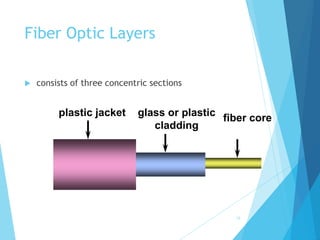
plastic jacket glass or plastic
cladding
fiber core
Fiber Optic Layers
 consists of three concentric sections
18
19
Optical Fiber
 Three standard wavelengths : 850 nanometers
(nm.), 1300 nm, 1500 nm.
 First-generation optical fiber :: 850 nm, 10’s
Mbps using LED (light-emitting diode) sources.
 Second and third generation optical fiber :: 1300
and 1500 nm using ILD (injection laser diode)
sources, gigabits/sec.
20
Optical Fiber
 Attenuation loss is lower at higher wavelengths.
 There are two types of detectors used at the
receiving end to convert light into electrical energy
(photo diodes):
 PIN detectors – less expensive, less sensitive
 APD detectors
 ASK is commonly used to transmit digital data over
optical fiber {referred to as intensity modulation}.
21
Optical Fiber
 Three techniques:
 Multimode step-index
 Multimode graded-index
 Single-mode step-index
 Presence of multiple paths  differences in delay
 optical rays interfere with each other.
 A narrow core can create a single direct path which
yields higher speeds.
 WDM (Wavelength Division Multiplexing) yields more
available capacity.
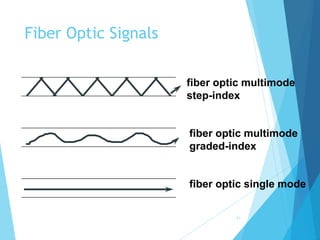
Fiber Optic Types
 multimode step-index fiber
 the reflective walls of the fiber move the
light pulses to the receiver
 multimode graded-index fiber
 acts to refract the light toward the center
of the fiber by variations in the density
 single mode fiber
 the light is guided down the center of an
extremely narrow core
22
fiber optic multimode
step-index
fiber optic multimode
graded-index
fiber optic single mode
Fiber Optic Signals
23
Structured Cabling System
24
Structured Cabling System
 Standards for cabling within a building (EIA/TIA-568 and
ISO 11801)
 Includes cabling for all applications, including LANs, voice,
video, etc
 Vendor and equipment independent
 Designed to encompass entire building, so that equipment
can be easily relocated
 Provides guidance for pre-installation in new buildings and
renovations
25
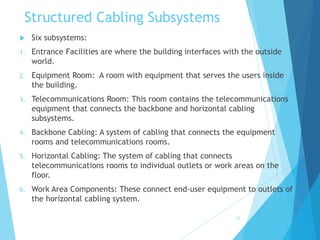
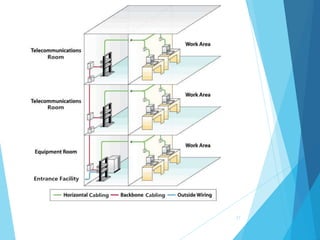
Structured Cabling Subsystems
 Six subsystems:
1. Entrance Facilities are where the building interfaces with the outside
world.
2. Equipment Room: A room with equipment that serves the users inside
the building.
3. Telecommunications Room: This room contains the telecommunications
equipment that connects the backbone and horizontal cabling
subsystems.
4. Backbone Cabling: A system of cabling that connects the equipment
rooms and telecommunications rooms.
5. Horizontal Cabling: The system of cabling that connects
telecommunications rooms to individual outlets or work areas on the
floor.
6. Work Area Components: These connect end-user equipment to outlets of
the horizontal cabling system.
26
27
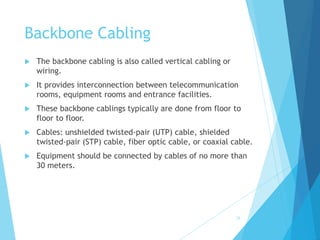
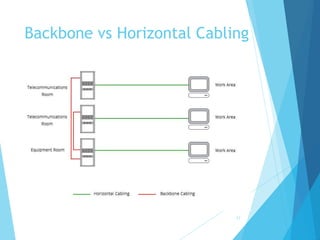
Backbone Cabling
 The backbone cabling is also called vertical cabling or
wiring.
 It provides interconnection between telecommunication
rooms, equipment rooms and entrance facilities.
 These backbone cablings typically are done from floor to
floor to floor.
 Cables: unshielded twisted-pair (UTP) cable, shielded
twisted-pair (STP) cable, fiber optic cable, or coaxial cable.
 Equipment should be connected by cables of no more than
30 meters.
28
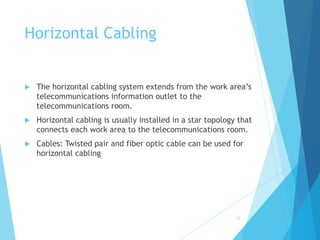
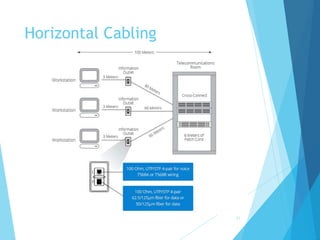
Horizontal Cabling
 The horizontal cabling system extends from the work area’s
telecommunications information outlet to the
telecommunications room.
 Horizontal cabling is usually installed in a star topology that
connects each work area to the telecommunications room.
 Cables: Twisted pair and fiber optic cable can be used for
horizontal cabling
29
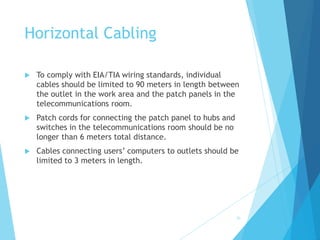
Horizontal Cabling
 To comply with EIA/TIA wiring standards, individual
cables should be limited to 90 meters in length between
the outlet in the work area and the patch panels in the
telecommunications room.
 Patch cords for connecting the patch panel to hubs and
switches in the telecommunications room should be no
longer than 6 meters total distance.
 Cables connecting users’ computers to outlets should be
limited to 3 meters in length.
30
Horizontal Cabling
31
Backbone vs Horizontal Cabling
32
Backbone vs Horizontal Cabling
33
1. The main difference between backbone cabling and horizontal cabling
is that they cover different telecommunication service areas.
 Backebone cabling is to connect the entrance facilities, equipment rooms
and telecommunication rooms.
 Horizontal cabling connects telecommunication rooms to individual
outlets on the floors.
 Backbone runs between floors. While horizontal is on one floor.
2. The cables used for backbone cabling have very different requirement
from the horizontal cabling:
 Backbone cables must meet particular fire-rating specifications.
 Backbone cable must have sufficient strength to support its own weight.
 Horizontal cabling system cable will be simpler.
Ethernet Cable
34
Ethernet Cable
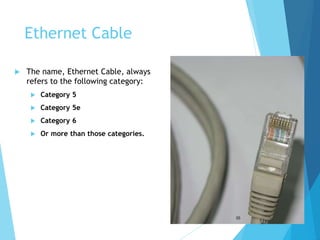
 The name, Ethernet Cable, always
refers to the following category:
 Category 5
 Category 5e
 Category 6
 Or more than those categories.
35
Ethernet Cable
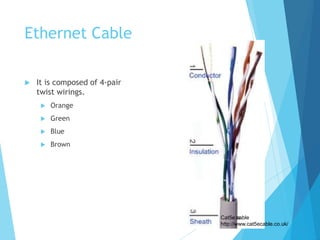
 It is composed of 4-pair
twist wirings.
 Orange
 Green
 Blue
 Brown
Cat5e cable
http://www.cat5ecable.co.uk/
36
Ethernet Cable
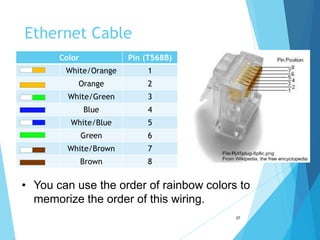
Color Pin (T568B)
White/Orange 1
Orange 2
White/Green 3
Blue 4
White/Blue 5
Green 6
White/Brown 7
Brown 8
• You can use the order of rainbow colors to
memorize the order of this wiring.
37
Ethernet Cable
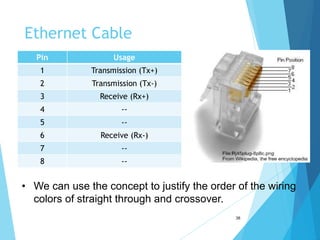
Pin Usage
1 Transmission (Tx+)
2 Transmission (Tx-)
3 Receive (Rx+)
4 --
5 --
6 Receive (Rx-)
7 --
8 --
• We can use the concept to justify the order of the wiring
colors of straight through and crossover.
38
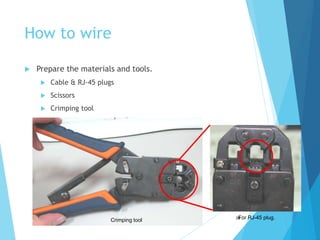
How to wire
 Prepare the materials and tools.
 Cable & RJ-45 plugs
 Scissors
 Crimping tool
39
For RJ-45 plug.
Crimping tool
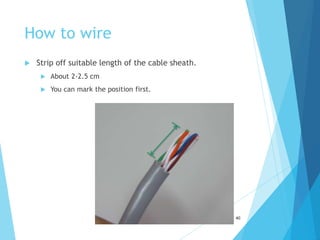
How to wire
 Strip off suitable length of the cable sheath.
 About 2-2.5 cm
 You can mark the position first.
40
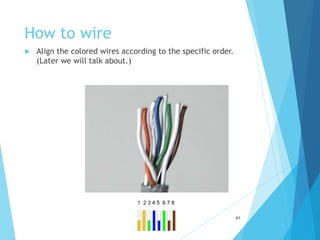
How to wire
 Align the colored wires according to the specific order.
(Later we will talk about.)
41
1 2 3 4 5 6 7 8
42
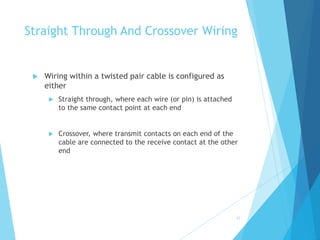
Straight Through And Crossover Wiring
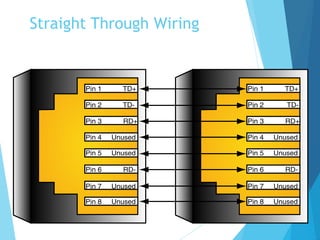
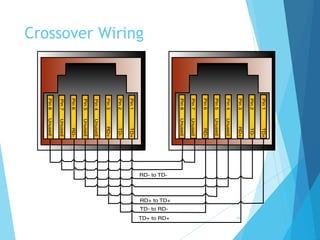
 Wiring within a twisted pair cable is configured as
either
 Straight through, where each wire (or pin) is attached
to the same contact point at each end
 Crossover, where transmit contacts on each end of the
cable are connected to the receive contact at the other
end
43
Straight Through Wiring
44
Crossover Wiring
1→8
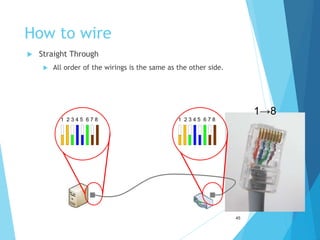
How to wire
 Straight Through
 All order of the wirings is the same as the other side.
1 2 3 4 5 6 7 8 1 2 3 4 5 6 7 8
45
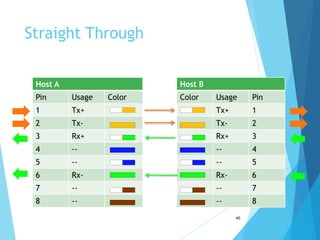
Straight Through
Host A Host B
Pin Usage Color Color Usage Pin
1 Tx+ Tx+ 1
2 Tx- Tx- 2
3 Rx+ Rx+ 3
4 -- -- 4
5 -- -- 5
6 Rx- Rx- 6
7 -- -- 7
8 -- -- 8
46
1→8
How to wire
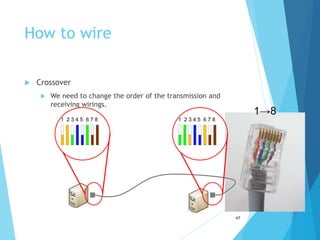
 Crossover
 We need to change the order of the transmission and
receiving wirings.
1 2 3 4 5 6 7 8 1 2 3 4 5 6 7 8
47
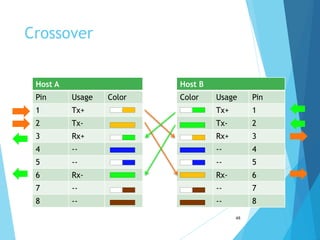
Crossover
Host A Host B
Pin Usage Color Color Usage Pin
1 Tx+ Tx+ 1
2 Tx- Tx- 2
3 Rx+ Rx+ 3
4 -- -- 4
5 -- -- 5
6 Rx- Rx- 6
7 -- -- 7
8 -- -- 8
48
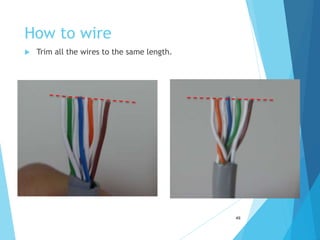
How to wire
 Trim all the wires to the same length.
49
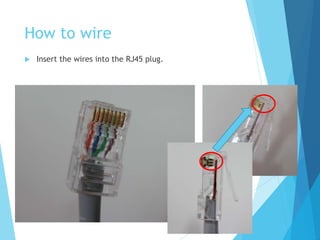
How to wire
 Insert the wires into the RJ45 plug.
50
Transmission Media - Aseel Alhadlaq
How to wire
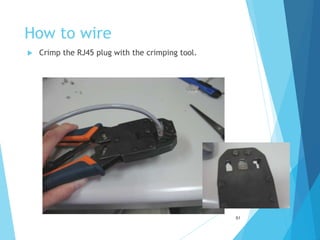
 Crimp the RJ45 plug with the crimping tool.
51
How to wire
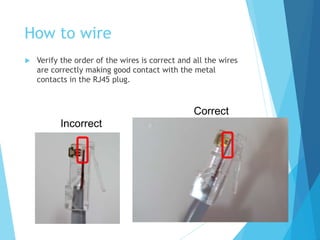
 Verify the order of the wires is correct and all the wires
are correctly making good contact with the metal
contacts in the RJ45 plug.
52
Incorrect
Correct
How to wire
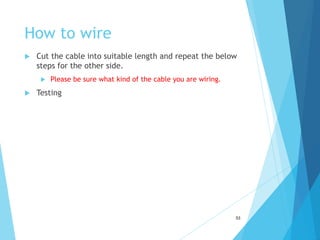
 Cut the cable into suitable length and repeat the below
steps for the other side.
 Please be sure what kind of the cable you are wiring.
 Testing
53

Lesson 7 - Structured cabling.ppt

  • 1.
  • 2.
    2 Transmission Media Transmission medium:the physical path between transmitter and receiver.  Repeaters or amplifiers may be used to extend the length of the medium.  Communication of electromagnetic waves is guided or unguided. Guided media :: waves are guided along a physical path (e.g, twisted pair, coaxial cable and optical fiber). Unguided media:: means for transmitting but not guiding electromagnetic waves (e.g., the atmosphere and outer space).
  • 3.
    3 Transmission Media Choices Twisted pair  Coaxial cable  Optical fiber  Wireless communications
  • 4.
    Transmission Media -Aseel Alhadlaq 4 Digital Transmission Media Bit Rates
  • 5.
    Twisted Pair  Consistsof two insulated copper wires arranged in a regular spiral pattern to minimize the electromagnetic interference between adjacent pairs  Often used at customer facilities and also over distances to carry voice as well as data communications  Low frequency transmission medium 5
  • 6.
    6 Twisted Pair  Limitedin distance, bandwidth and data rate due to problems with attenuation, interference and noise  Issue: cross-talk due to interference from other signals  “shielding” wire (shielded twisted pair (STP)) with metallic braid or sheathing reduces interference.  “twisting” reduces crosstalk.
  • 7.
    Types of TwistedPair  STP (shielded twisted pair)  the pair is wrapped with metallic foil or braid to insulate the pair from electromagnetic interference  UTP (unshielded twisted pair)  each wire is insulated with plastic wrap, but the pair is encased in an outer covering 7
  • 8.
    Ratings of TwistedPair  Category 3 UTP  data rates of up to 16mbps are achievable  Category 5 UTP  data rates of up to 100mbps are achievable  more tightly twisted than Category 3 cables  more expensive, but better performance  STP  More expensive, harder to work with 8
  • 9.
    UTP categories Category 1Voice only (Telephone) Category 2 Data to 4 Mbps (Localtalk) Category 3 Data to 10Mbps (Ethernet) Category 4 Data to 20Mbps (Token ring) Category 5 Category 5e Data to 100Mbps (Fast Ethernet) Data to 1000Mbps (Gigabit Ethernet) Category 6 Data to 2500Mbps (Gigabit Ethernet) 9
  • 10.
    Twisted Pair Advantages Inexpensive and readily available  Flexible and light weight  Easy to work with and install 10
  • 11.
    Twisted Pair Disadvantages Susceptibility to interference and noise  Attenuation problem  For analog, repeaters needed every 5-6km  For digital, repeaters needed every 2-3km  Relatively low bandwidth (3000Hz) 11
  • 12.
    Coaxial Cable (orCoax)  Used for cable television, LANs, telephony  Has an inner conductor surrounded by a braided mesh  Both conductors share a common center axial, hence the term “co-axial”  Traditionally used for LANs, but growth of twisted pair for local nets and optical fiber for larger nets has reduced coax use 12
  • 13.
  • 14.
    14 Coaxial Cable  Dividedinto two basic categories for coax used in LANs:  50-ohm cable [baseband]  75-ohm cable [broadband or single channel baseband]  In general, coax has better noise immunity for higher frequencies than twisted pair.  Coaxial cable provides much higher bandwidth than twisted pair.  However, cable is ‘bulky’.
  • 15.
    15 Baseband Coax  50-ohmcable is used exclusively for digital transmissions  Uses Manchester encoding, geographical limit is a few kilometers. 10Base5 Thick Ethernet :: thick (10 mm) coax 10 Mbps, 500 m. max segment length, 100 devices/segment, awkward to handle and install. 10Base2 Thin Ethernet :: thin (5 mm) coax 10 Mbps, 185 m. max segment length, 30 devices/segment, easier to handle, uses T-shaped connectors.
  • 16.
    16 Broadband Coax  75-ohmcable (CATV system standard)  Used for both analog and digital signaling.  Analog signaling – frequencies up to 500 MHZ are possible.  For long-distance transmission of analog signals, amplifiers are needed every few kilometers.
  • 17.
    Fiber Optic Cable Thin (2 to 125 µm), flexible medium capable of conducting an optical ray  Advantages  Greater capacity  Smaller size/lighter weight  Lower attenuation  Electromagnetic isolation  Attenuation in the fiber can be kept low by controlling the impurities in the glass. 17
  • 18.
    plastic jacket glassor plastic cladding fiber core Fiber Optic Layers  consists of three concentric sections 18
  • 19.
    19 Optical Fiber  Threestandard wavelengths : 850 nanometers (nm.), 1300 nm, 1500 nm.  First-generation optical fiber :: 850 nm, 10’s Mbps using LED (light-emitting diode) sources.  Second and third generation optical fiber :: 1300 and 1500 nm using ILD (injection laser diode) sources, gigabits/sec.
  • 20.
    20 Optical Fiber  Attenuationloss is lower at higher wavelengths.  There are two types of detectors used at the receiving end to convert light into electrical energy (photo diodes):  PIN detectors – less expensive, less sensitive  APD detectors  ASK is commonly used to transmit digital data over optical fiber {referred to as intensity modulation}.
  • 21.
    21 Optical Fiber  Threetechniques:  Multimode step-index  Multimode graded-index  Single-mode step-index  Presence of multiple paths  differences in delay  optical rays interfere with each other.  A narrow core can create a single direct path which yields higher speeds.  WDM (Wavelength Division Multiplexing) yields more available capacity.
  • 22.
    Fiber Optic Types multimode step-index fiber  the reflective walls of the fiber move the light pulses to the receiver  multimode graded-index fiber  acts to refract the light toward the center of the fiber by variations in the density  single mode fiber  the light is guided down the center of an extremely narrow core 22
  • 23.
    fiber optic multimode step-index fiberoptic multimode graded-index fiber optic single mode Fiber Optic Signals 23
  • 24.
  • 25.
    Structured Cabling System Standards for cabling within a building (EIA/TIA-568 and ISO 11801)  Includes cabling for all applications, including LANs, voice, video, etc  Vendor and equipment independent  Designed to encompass entire building, so that equipment can be easily relocated  Provides guidance for pre-installation in new buildings and renovations 25
  • 26.
    Structured Cabling Subsystems Six subsystems: 1. Entrance Facilities are where the building interfaces with the outside world. 2. Equipment Room: A room with equipment that serves the users inside the building. 3. Telecommunications Room: This room contains the telecommunications equipment that connects the backbone and horizontal cabling subsystems. 4. Backbone Cabling: A system of cabling that connects the equipment rooms and telecommunications rooms. 5. Horizontal Cabling: The system of cabling that connects telecommunications rooms to individual outlets or work areas on the floor. 6. Work Area Components: These connect end-user equipment to outlets of the horizontal cabling system. 26
  • 27.
  • 28.
    Backbone Cabling  Thebackbone cabling is also called vertical cabling or wiring.  It provides interconnection between telecommunication rooms, equipment rooms and entrance facilities.  These backbone cablings typically are done from floor to floor to floor.  Cables: unshielded twisted-pair (UTP) cable, shielded twisted-pair (STP) cable, fiber optic cable, or coaxial cable.  Equipment should be connected by cables of no more than 30 meters. 28
  • 29.
    Horizontal Cabling  Thehorizontal cabling system extends from the work area’s telecommunications information outlet to the telecommunications room.  Horizontal cabling is usually installed in a star topology that connects each work area to the telecommunications room.  Cables: Twisted pair and fiber optic cable can be used for horizontal cabling 29
  • 30.
    Horizontal Cabling  Tocomply with EIA/TIA wiring standards, individual cables should be limited to 90 meters in length between the outlet in the work area and the patch panels in the telecommunications room.  Patch cords for connecting the patch panel to hubs and switches in the telecommunications room should be no longer than 6 meters total distance.  Cables connecting users’ computers to outlets should be limited to 3 meters in length. 30
  • 31.
  • 32.
  • 33.
    Backbone vs HorizontalCabling 33 1. The main difference between backbone cabling and horizontal cabling is that they cover different telecommunication service areas.  Backebone cabling is to connect the entrance facilities, equipment rooms and telecommunication rooms.  Horizontal cabling connects telecommunication rooms to individual outlets on the floors.  Backbone runs between floors. While horizontal is on one floor. 2. The cables used for backbone cabling have very different requirement from the horizontal cabling:  Backbone cables must meet particular fire-rating specifications.  Backbone cable must have sufficient strength to support its own weight.  Horizontal cabling system cable will be simpler.
  • 34.
  • 35.
    Ethernet Cable  Thename, Ethernet Cable, always refers to the following category:  Category 5  Category 5e  Category 6  Or more than those categories. 35
  • 36.
    Ethernet Cable  Itis composed of 4-pair twist wirings.  Orange  Green  Blue  Brown Cat5e cable http://www.cat5ecable.co.uk/ 36
  • 37.
    Ethernet Cable Color Pin(T568B) White/Orange 1 Orange 2 White/Green 3 Blue 4 White/Blue 5 Green 6 White/Brown 7 Brown 8 • You can use the order of rainbow colors to memorize the order of this wiring. 37
  • 38.
    Ethernet Cable Pin Usage 1Transmission (Tx+) 2 Transmission (Tx-) 3 Receive (Rx+) 4 -- 5 -- 6 Receive (Rx-) 7 -- 8 -- • We can use the concept to justify the order of the wiring colors of straight through and crossover. 38
  • 39.
    How to wire Prepare the materials and tools.  Cable & RJ-45 plugs  Scissors  Crimping tool 39 For RJ-45 plug. Crimping tool
  • 40.
    How to wire Strip off suitable length of the cable sheath.  About 2-2.5 cm  You can mark the position first. 40
  • 41.
    How to wire Align the colored wires according to the specific order. (Later we will talk about.) 41 1 2 3 4 5 6 7 8
  • 42.
    42 Straight Through AndCrossover Wiring  Wiring within a twisted pair cable is configured as either  Straight through, where each wire (or pin) is attached to the same contact point at each end  Crossover, where transmit contacts on each end of the cable are connected to the receive contact at the other end
  • 43.
  • 44.
  • 45.
    1→8 How to wire Straight Through  All order of the wirings is the same as the other side. 1 2 3 4 5 6 7 8 1 2 3 4 5 6 7 8 45
  • 46.
    Straight Through Host AHost B Pin Usage Color Color Usage Pin 1 Tx+ Tx+ 1 2 Tx- Tx- 2 3 Rx+ Rx+ 3 4 -- -- 4 5 -- -- 5 6 Rx- Rx- 6 7 -- -- 7 8 -- -- 8 46
  • 47.
    1→8 How to wire Crossover  We need to change the order of the transmission and receiving wirings. 1 2 3 4 5 6 7 8 1 2 3 4 5 6 7 8 47
  • 48.
    Crossover Host A HostB Pin Usage Color Color Usage Pin 1 Tx+ Tx+ 1 2 Tx- Tx- 2 3 Rx+ Rx+ 3 4 -- -- 4 5 -- -- 5 6 Rx- Rx- 6 7 -- -- 7 8 -- -- 8 48
  • 49.
    How to wire Trim all the wires to the same length. 49
  • 50.
    How to wire Insert the wires into the RJ45 plug. 50 Transmission Media - Aseel Alhadlaq
  • 51.
    How to wire Crimp the RJ45 plug with the crimping tool. 51
  • 52.
    How to wire Verify the order of the wires is correct and all the wires are correctly making good contact with the metal contacts in the RJ45 plug. 52 Incorrect Correct
  • 53.
    How to wire Cut the cable into suitable length and repeat the below steps for the other side.  Please be sure what kind of the cable you are wiring.  Testing 53