FortiGate Multi-Threat Security Systems
Administration, Content Inspection and Basic VPN
Prerequisites
• Introductory-level network security experience
• Basic understanding of core network security and firewall
concepts
Agenda
• Introduction
• Overview and System Setup
• FortiGuard Subscription Services
• Logging and Alerts
• Firewall Policies
• Basic VPN
• Authentication
• Antivirus
• Spam Filtering
• Web Filtering
Agenda
• Introduction
• Overview and System Setup
• FortiGuard Subscription Services
• Logging and Alerts
• Firewall Policies
• Basic VPN
• Authentication
• Antivirus
• Spam Filtering
• Web Filtering
Lesson 1
Overview and System Setup
Unified Threat Management
• One device
 Firewall, intrusion protection, antivirus and more
• Centralized management
Page: 7
Fortinet Solution
• FortiGate platform
• FortiGuard Subscription Services
• Management, reporting, analysis products
Page: 8
FortiGate
• Application-level services
 Antivirus, intrusion protection, antispam, web content filtering
• Network-level services
 Firewall, IPSec and SSL VPN, traffic shaping
• Management, reporting, analysis products
 Authentication, logging, reporting, secure administration, SNMP
Page: 8
FortiGate Portfolio
• SOHO
 FortiGate 30B, 50B, 51B, 60B, 100A, 110C, 111C
 Protect smaller deployments
• Medium-Sized Enterprises
 FortiGate 200A, 224B, 300A, 400A, 500A, 800
 Meet demands of mission critical enterprise applications
• Large-Sized Enterprises and Carriers
 FortiGate 1000A, 3016B, 3600A, 3810A, 5020, 5050, 5140
 High performance and reliability
Page: 9-10
FortiGuard
• Dynamic updates
 Antivirus, intrusion protection, web filtering, antispam
• Updated 24x7x365
• Data centers around the world
 Secure, high availability locations
Page: 10
FortiManager
• Manage all Fortinet products from a centralized console
• Minimize administration effort
 Deploying, configuring and maintaining devices
Page: 10
FortiAnalyzer
• Centralized analysis and reporting
 Aggregate and analyze log data from multiple devices
• Comprehensive view of network usage
 Identify and address vulnerabilities
 Monitor compliance
• Quarantine and content archiving
Page: 10
FortiMail
• Multi-layered email security
 Advanced spam filtering, antivirus
• Facilitate regulatory compliance
Page: 11
FortiClient
• Security for desktops, laptops, mobile devices
 Personal firewall, IPSec VPN, antivirus, antispam, web content
filtering
• FortiGuard keeps FortiClient up-to-date
Page: 11
Firewall Basics
• Controls flow of traffic between networks of different trust
level
• Allow good information through but block intrusions,
unauthorized users or malicious traffic
• Rules to allow or deny traffic
Page: 12
Firewall Basics
Page: 12
Common Firewall Features
• Block unwanted incoming traffic
• Block prohibited outgoing traffic
• Block traffic based on content
• Allow connections to an internal network
• Reporting
• Authentication
Page: 13
Types of Firewalls
• Packet filter firewall
 Inspects incoming and outgoing packets
 If matches rules, perform action
• Stateful firewall
 Examines headers and content of packet
 Holds attributes of connection in memory
 Packet forwarded if connection already established and tracked
• Improved performance
• Application layer (proxy-based) firewall
 Stands between protected and unprotected network
 Repackages messages into new packets allowed into network
Page: 14
Network Address Translation
• Map private reserved IP addresses into public IP addresses
 Local network uses different set of addresses
• NAT device routes response to proper destination
• Single agent between public and private network
• Conserve IP addresses
 One public address used to represent group of computers
• Organization uses own internal IP addressing schemes
Page: 16
Dynamic NAT
• Private IP address mapped from a pool of public IP
addresses
• Masks internal network configuration
• Private network can use private IP addresses invalid on
Internet but useful internally
Page: 16
Static NAT
• Private IP address mapped to a public IP addresses
 Public address always the same
• Allow internal host to have a private IP address but still be
reachable over the Internet
 Web server
Page: 16
FortiGate Capabilities
• Firewall
 Policies to allow or deny traffic
• UTM Features:
 Antivirus
• Multiple techniques
 Antispam
• Detect, tag, block, and quarantine spam
 Web Filtering
• Control access to inappropriate web content
 Intrusion Protection
• Identify and record suspicious traffic
Page: 17
FortiGate Capabilities
• UTM Features (continued):
 Application Control
• Manage bandwidth use
 Data Leak Prevention
• Prevents transmission of sensitive information
Page: 17-18
FortiGate Capabilities
• Virtual Domains
 Single FortiGate functions as multiple units
• Traffic Shaping
 Control available bandwidth and priority of traffic
• Secure VPN
 Ensure confidentiality and integrity of transmitted data
• WAN Optimization
 Improve performance and security
• High Availability
 Two or more FortiGates operate as a cluster
Page: 18-19
FortiGate Capabilities
• Endpoint Compliance
 Use FortiClient End Point Security in network
• Logging
 Historical and current analysis of network usage
• User Authentication
 Control access to resources
Page: 18-19
FortiGate Unit Description
• CPU
 Intel processor
• FortiASIC processor
 Offload intensive processing
• DRAM
• Flash memory
 Store firmware images
• Hard drive
 Logs, quarantine, archives
• Interfaces
 WAN, DMZ, Internal
Page: 20
FortiGate Unit Description
• Serial console port
 Management access
• USB port
 USB drives or modem
• Wireless
 FortiWifi devices can use wireless communications
• Modem
• Module slot bays
 Blade card installed in a chassis
• PC card slot
 PCMCIA card slot for expansion
Page: 20-21
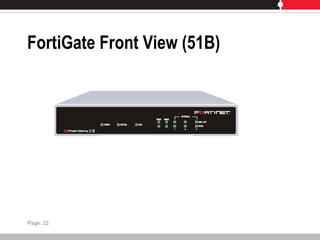
FortiGate Front View (51B)
Page: 22
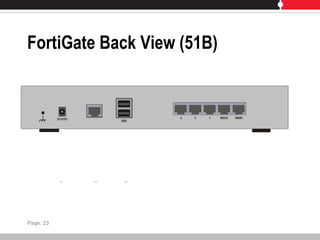
FortiGate Back View (51B)
Page: 23
Operating Modes
• NAT/Route Mode
 Default configuration
 Each FortiGate unit is visible to network it is connected to
 Interfaces are on different subnets
 Unit functions as a firewall
Page: 24
Operating Modes – NAT/Route
Page: 24
Operating Modes
• Transparent Mode
 FortiGate unit is invisible to the network
 All interfaces are on the same subnet
 Use FortiGate without altering IP infrastructure
Page: 25
Operating Modes – Transparent
Page: 25
Device Administration
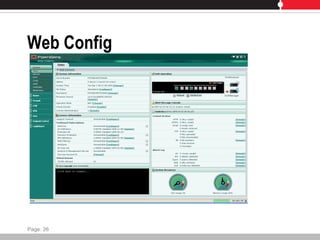
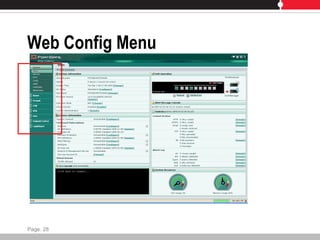
• Web Config
 Configure and monitor device through web browser
• CLI
 Command line interface
Page: 26
Web Config
Page: 26
Web Config Menu
Page: 28
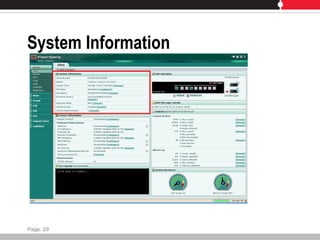
System Information
Page: 29
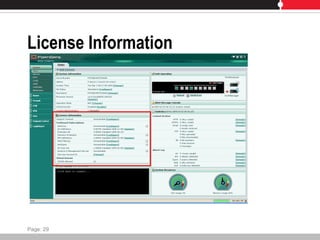
License Information
Page: 29
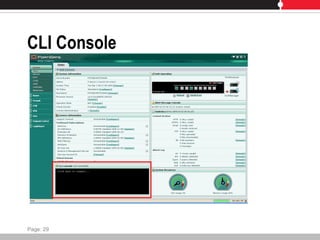
CLI Console
Page: 29
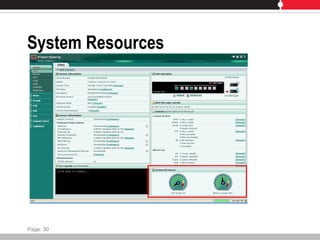
System Resources
Page: 30
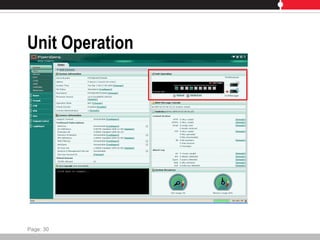
Unit Operation
Page: 30
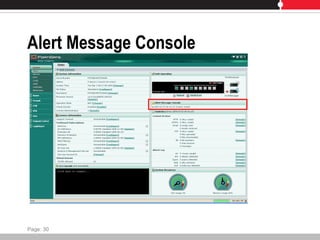
Alert Message Console
Page: 30
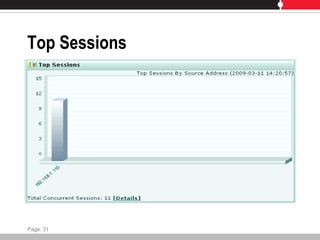
Top Sessions
Page: 31
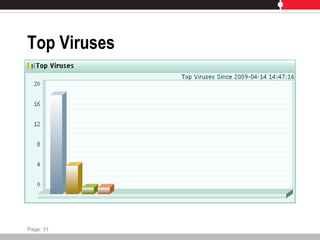
Top Viruses
Page: 31
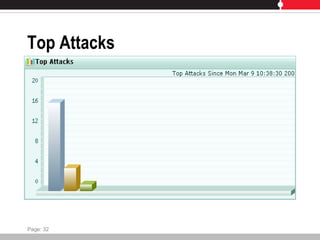
Top Attacks
Page: 32
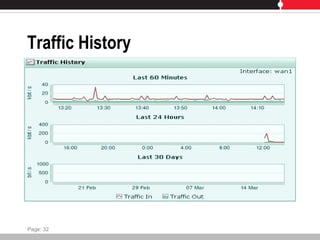
Traffic History
Page: 32
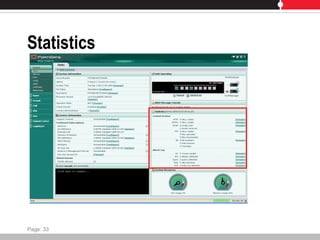
Statistics
Page: 33
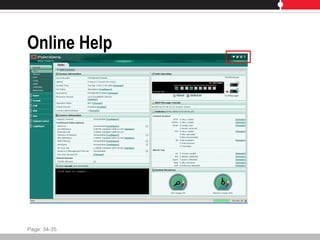
Online Help
Page: 34-35
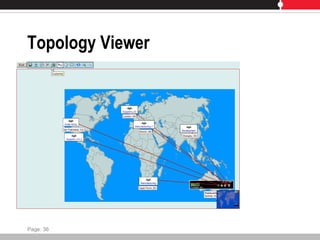
Topology Viewer
Page: 36
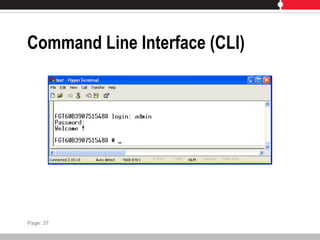
Command Line Interface (CLI)
Page: 37
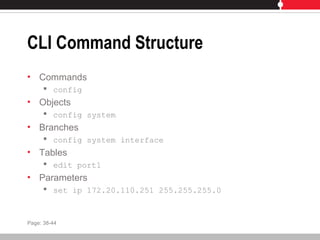
CLI Command Structure
• Commands
 config
• Objects
 config system
• Branches
 config system interface
• Tables
 edit port1
• Parameters
 set ip 172.20.110.251 255.255.255.0
Page: 38-44
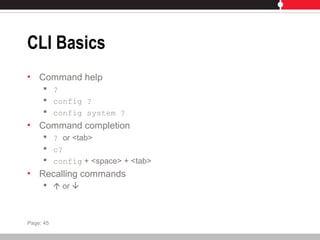
CLI Basics
• Command help
 ?
 config ?
 config system ?
• Command completion
 ? or <tab>
 c?
 config + <space> + <tab>
• Recalling commands
  or 
Page: 45
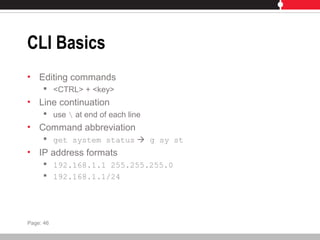
CLI Basics
• Editing commands
 <CTRL> + <key>
• Line continuation
 use  at end of each line
• Command abbreviation
 get system status  g sy st
• IP address formats
 192.168.1.1 255.255.255.0
 192.168.1.1/24
Page: 46
Administrative Users
• Responsible for configuration and operation
• Default: admin
 Full read/write control
 Can not be renamed
 Default password blank
• System administrator
 Assigned super_admin profile
• Regular administrator
 Access profile other than super_admin
 Access configurable
Page: 47
Interface Addressing
• Number of physical interfaces varies per model
• Interface addresses configurable
 Static
 DHCP
 PPPoE
Page: 48-51
DNS
• Some functions use DNS
 Alert email, URL blocking, etc
• Lower end models can retrieve automatically
 One interface must use DHCP
 Can provide DNS forwarding
Page: 52
Configuration Backup and Restore
• Different locations
 Local PC
 FortiManager
 FortiGuard Management Service
 USB disk
• Can be encrypted
 Required to backup VPN certificates
Page: 53
Firmware Upgrades
• File must be obtained from Fortinet
• Apply upgrade
 Web Config
 CLI
 FortiGuard Management Service
Page: 54
Lab
• Connecting to Command Line Interface
• Connecting to Web Config
• Configuring Network Connectivity
• Exploring the CLI
• Configuring Global System Settings
• Configuring Administrative Users
Page: 55
Agenda
• Introduction
• Overview and System Setup
• FortiGuard Subscription Services
• Logging and Alerts
• Firewall Policies
• Basic VPN
• Authentication
• Antivirus
• Spam Filtering
• Web Filtering
Lesson 2
FortiGuard Subscription Services
• Continuously updated security
 Antivirus
 Intrusion Protection
 Web Filtering
 Antispam
• Delivered through FortiGuard Distribution Network
Page: 75
FortiGuard Distribution Network
• Secure, high availability data centers
• Updated methods
 Manual
 Push
 Pull
 Customized frequency
• Devices continuously updated
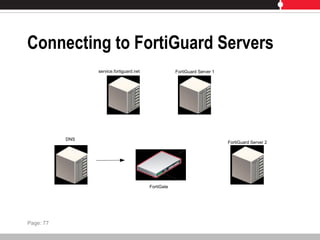
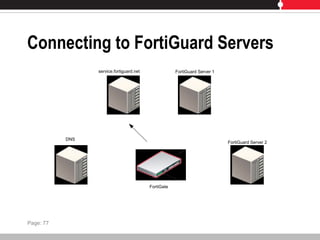
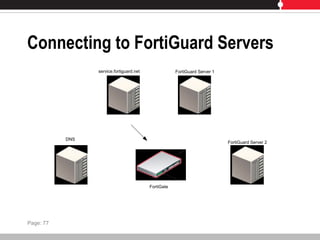
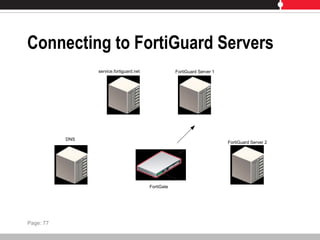
• Device connects to FortiGuard Service Point
Page: 75-76
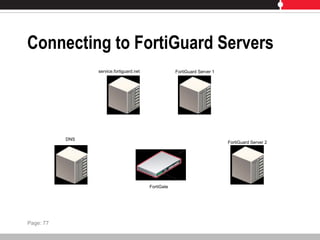
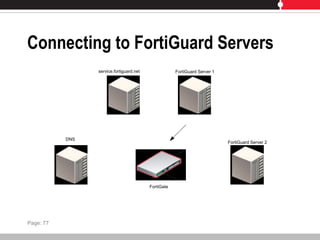
Connecting to FortiGuard Servers
service.fortiguard.net
DNS
FortiGuard Server 1
FortiGuard Server 2
FortiGate
Page: 77
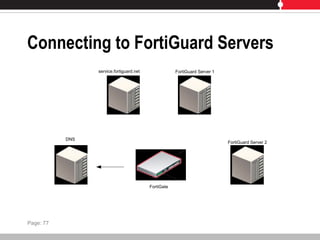
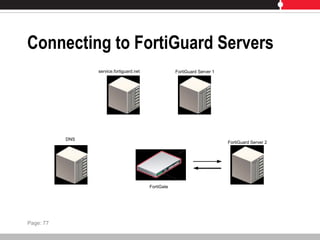
Connecting to FortiGuard Servers
service.fortiguard.net
DNS
FortiGuard Server 1
FortiGuard Server 2
FortiGate
Page: 77
Connecting to FortiGuard Servers
service.fortiguard.net
DNS
FortiGuard Server 1
FortiGuard Server 2
FortiGate
Page: 77
Connecting to FortiGuard Servers
service.fortiguard.net
DNS
FortiGuard Server 1
FortiGuard Server 2
FortiGate
Page: 77
Connecting to FortiGuard Servers
service.fortiguard.net
DNS
FortiGuard Server 1
FortiGuard Server 2
FortiGate
Page: 77
Connecting to FortiGuard Servers
service.fortiguard.net
DNS
FortiGuard Server 1
FortiGuard Server 2
FortiGate
Page: 77
Connecting to FortiGuard Servers
service.fortiguard.net
DNS
FortiGuard Server 1
FortiGuard Server 2
FortiGate
Page: 77
Connecting to FortiGuard Servers
DNS
FortiGuard Server 1
FortiGuard Server 2
FortiGate
service.fortiguard.net
Page: 77
FortiGuard Antivirus Service
• Latest virus defenses
 New and evolving viruses
 Spyware
 Malware
• Automated updates
Page: 78
FortiGuard Intrusion Protection System Service
• Latest defenses against network-level threats
• Library of signatures
• Engines
 Anomaly inspection
 Deep packet inspection
 Full content inspection
 Activity inspection
• Supports behavior-based heuristics
Page: 79
FortiGuard Web Filtering Service
• Hosted web URL filtering service
• FortiGuard Rating Server
 Billions of web page addresses
 Regulate and block harmful, inappropriate and dangerous content
• FortiGuard Web Filtering Service
 Regulate web activities to meet policy and compliance
 CIPA Compliance
Page: 80
FortiGuard Antispam Service
• Reduce spam at network perimeter
• Global filters
 Sender reputation database (FortiIP)
 Spam signature database (FortiSig)
 Constantly updated
• Local filters
 Banned words
 Local white and black lists
 Heuristic rules
 Bayesian training (in FortiMail)
Page: 81-82
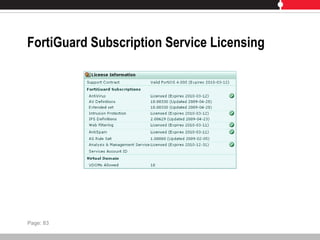
FortiGuard Subscription Service Licensing
Page: 83
Scheduled Updates
• Check for updates at defined times
 Once every 1 to 23 hours
 Once a day
 Once a week
• Must be able to connect to FortiGuard Distribution Network
using HTTPS on port 443
 Use override server address option may be used
Page: 84
Push Updates
• FortiGuard Distribution Network notifies FortiGate units with
push enabled
 FortiGate will request update
• Use push in addition to scheduled updates
 Receive updates sooner
• If configuring push through a NAT device, configure port
forwarding
Page: 85-87
Manual Updates
• Update antivirus and IPS definitions
• Download definition file
• Copy to computer used to connect to Web Config
Page: 88
Caching
• Available for web filtering and antispam
• Improves performance
• Uses small % of system memory
• Least recently used IP or URL deleted when cache full
• Time to Live (TTL) controls time in cache
Page: 89
FortiGuard Web Filtering Categories
• Wide range of categories to filter upon
 Specify action for each category
 Allow, Block, Log, Allow Override
• Enabled through protection profile
Page: 90-91
FortiGuard Antispam Controls
• Filter email based on type
 IMAP, POP3, SMTP
• Filtering options enabled through protection profile
Page: 92
Configuring FortiGuard Using the CLI
• CLI can be used to configure communications with
FortiGuard Distribution Network
 Override default connection settings
• config system fortiguard
Page: 93
FortiGuard Center
• Online knowledge base and resource
 Spyware, virus, IPS, web filtering, antispam attack library
 Vulnerabilities
 Submit spam and dangerous URLs
• Timely threat and vulnerability information
 Updated around the clock
Page: 94-95
Lab
• Enabling FortiGuard Services and Updates
Page: 96
Agenda
• Introduction
• Overview and System Setup
• FortiGuard Subscription Services
• Logging and Alerts
• Firewall Policies
• Basic VPN
• Authentication
• Antivirus
• Spam Filtering
• Web Filtering
Lesson 3
Logging and Alerts
Logging and Alerts
• Track down and pinpoint problems
• Monitor network and Internet traffic
• Monitor normal traffic
 Establish baselines
 Identify changes for optimal performance
Page: 101
Log Storage Locations
• Local hard disk
 FortiGate must have hard disk
• FortiAnalyzer
 Device for log collection, analysis and storage
• System Memory
 Overwrites older logs when capacity reached
 Logs lost when FortiGate reset or loses power
• Syslog
 Forward logs to remote computer
• FortiGuard Analysis Service
 Subscription-based web service
Page: 101-105
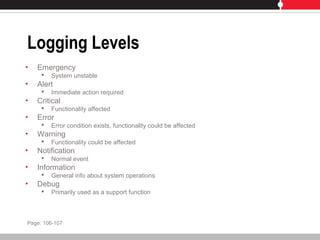
Logging Levels
• Emergency
 System unstable
• Alert
 Immediate action required
• Critical
 Functionality affected
• Error
 Error condition exists, functionality could be affected
• Warning
 Functionality could be affected
• Notification
 Normal event
• Information
 General info about system operations
• Debug
 Primarily used as a support function
Page: 106-107
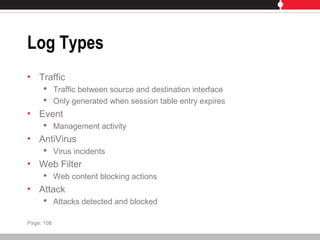
Log Types
• Traffic
 Traffic between source and destination interface
 Only generated when session table entry expires
• Event
 Management activity
• AntiVirus
 Virus incidents
• Web Filter
 Web content blocking actions
• Attack
 Attacks detected and blocked
Page: 108
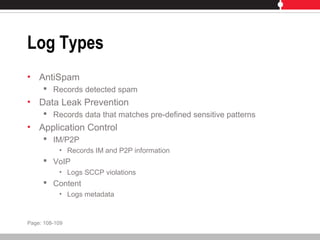
Log Types
• AntiSpam
 Records detected spam
• Data Leak Prevention
 Records data that matches pre-defined sensitive patterns
• Application Control
 IM/P2P
• Records IM and P2P information
 VoIP
• Logs SCCP violations
 Content
• Logs metadata
Page: 108-109
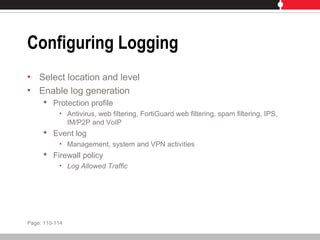
Configuring Logging
• Select location and level
• Enable log generation
 Protection profile
• Antivirus, web filtering, FortiGuard web filtering, spam filtering, IPS,
IM/P2P and VoIP
 Event log
• Management, system and VPN activities
 Firewall policy
• Log Allowed Traffic
Page: 110-114
Viewing Log Files
• Log&Report > Log Access
• Remote or Memory tabs
 Local Disk if available
• Formatted or Raw view
• Select columns to display
• Filter messages
Page: 115-118
Content Archiving
• Store session transaction data
 HTTP
 FTP
 NNTP
 IM (AIM, ICQ, MSN, Yahoo!)
 Email (POP3, IMAP, SMTP)
• Only available with FortiAnalyzer unit
• Summary
 Archives content metadata
• Full
 Copies of files or email messages
Page: 119-121
Alert Email
• Send notification upon detection of a defined event
• Requires one DNS server configured
• Up to 3 recipients
Page: 122
SNMP
• Report system information and forward to SNMP manager
• Access SNMP traps from any FortiGate configured for SNMP
• Read-only implementation
• Fortinet-proprietary MIB available
 Or use Fortinet-supported standard MIB
• Add SNMP Communities
 8 SNMP managers per community
Page: 123-126
Lab
• Exploring Web Config Monitoring
• Configuring System Event Logging
• Exploring the FortiAnalyzer Interface
• Configuring Email Alerts
• SNMP Setup (Optional)
Page: 127
Agenda
• Introduction
• Overview and System Setup
• FortiGuard Subscription Services
• Logging and Alerts
• Firewall Policies
• Basic VPN
• Authentication
• Antivirus
• Spam Filtering
• Web Filtering
Lesson 4
Firewall Policies
Firewall Policies
• Control traffic passing through FortiGate
 What to do with connection request?
• Packet analyzed, content compared to policy
 ACCEPT
 DENY
• Source, destination and service must match policy
 Policy directs action
• Protection profile used with policy
 Apply protection settings
• Logging enabled to view connections using policy
Page: 137
Policy Matching
• Searches policy list for matching policy
 Based on source and destination
• Starts at top of the list and searches down for match
 First match is applied
 Arrange policies from more specific to more general
• Policies configured separately for each virtual domain
• Move policies in list to influence order evaluated
Page: 138-141
User Authentication to Firewall Policies
• User challenged to identify themselves before using policy
 Before matching policies not requiring authentication
• Available for policies with:
 Action set to ACCEPT
 SSL VPN
• Authentication methods
 Username + Password
 Digital certificates
 LDAP
 RADIUS
 TACACS+
 Active Directory
• FSAE required
Page: 142
Authentication Protocols
• Protocol used to issue authentication challenge specified
• Firewall policy must include protocol
 HTTP
 HTTPS
 Telnet
 FTP
Page: 142
Creating Policies
• Source and destination address
• Schedule
• Service
• Action
• NAT
• Options
 Protection profile
 Logging
 Authentication
 Traffic shaping
 Disclaimers
Page: 143
Firewall Addresses
• Added to source and destination address
 Match source and destination IP address of packets received
• Default of ALL
 Represents any IP address on the network
• Address configured with name, IP address and mask
 Also use FQDN
 Must be unique name
• Groups can be used to simplify policy creation and
management
Page: 144-148
Firewall Schedules
• Control when policies are active or inactive
• One-time schedule
 Activate or deactivate for a specified period of time
• Recurring schedule
 Activate or deactivate at specified times of the day or week
Page: 149-150
Firewall Services
• Determine types of communications accepted or denied
• Predefined services applied to policy
 Custom service if not on predefined list
• Group services to simplify policy creation and management
Page: 151-153
Network Address Translation (NAT)
• Translate source address and port of packets accepted by
policy
Page: 154
Network Address Translation (NAT)
Page: 154
Network Address Translation (NAT)
Page: 154
Network Address Translation (NAT)
Page: 154
Network Address Translation (NAT)
Page: 154
Network Address Translation (NAT)
Page: 154
Original New
Dynamic IP Pool
• Translate source address to an IP address randomly
selected from addresses in IP pool
Page: 155
Dynamic IP Pool
Page: 155
Dynamic IP Pool
Page: 155
Dynamic IP Pool
Page: 155
Dynamic IP Pool
Page: 155
Dynamic IP Pool
Page: 155
Original New
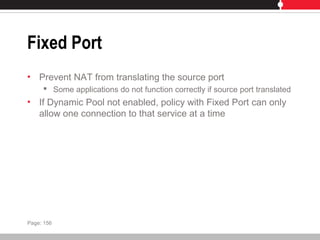
Fixed Port
• Prevent NAT from translating the source port
 Some applications do not function correctly if source port translated
• If Dynamic Pool not enabled, policy with Fixed Port can only
allow one connection to that service at a time
Page: 156
Fixed Port
Page: 156
Fixed Port
Page: 156
Fixed Port
Page: 156
Fixed Port
Page: 156
Fixed Port
Page: 156
Original New
Virtual IPs
• Allow connections using NAT firewall policies
• Addresses in packets are remapped and forwarded
 Client address does not appear in packet server receives
• Upon reply, session table used to determine what destination
address should be mapped to
Page: 157-158
DNAT
• NAT not selected in firewall policy
 Policy performs destination network address translation (DNAT)
• Accepts packet from external network intended for specific
address, translates destination address to IP on another
network
Page: 159
DNAT
Page: 159
DNAT
Page: 159
DNAT
Page: 159
DNAT
Page: 159
DNAT
Page: 159
Original New
DNAT
Page: 159
DNAT
Page: 159
DNAT
Page: 159
DNAT
Page: 159
DNAT
Page: 159
OriginalNew
Server Load Balancing
• Dynamic one-to-many NAT mapping
• External IP address translated to a mapped IP address
 Determine by load balancing algorithm
• External IP address not always translated to same mapped
IP address
Page: 160
Server Load Balancing
Page: 160
Server Load Balancing
Page: 160
Server Load Balancing
Page: 160
Server Load Balancing
Page: 160
Server Load Balancing
Page: 160
Server Load Balancing
Page: 160
Original New
Protection Profiles
• Control all content filtering
• Group of protection settings applied to traffic
 Types and levels of protection customized for each policy
• Enables settings for:
 Protocol Recognition
 Anti-Virus
 IPS
 Web Filtering
 Spam Filtering
 Data Leak Prevention Sensor
 Application Control
 Logging
Page: 161
Default Protection Profiles
• Strict
 Maximum protection
• Scan
 Applies virus scanning to HTTP, FTP, IMAP, POP3, SMTP
• Web
 Applies virus scanning and web content blocking to HTTP
• Unfiltered
 No scanning, blocking or IPS
Page: 162-172
Traffic Shaping
• Control bandwidth available to traffic processed by firewall
policy
 Which policies have higher priority?
• Improve quality of bandwidth-intensive traffic
 Does NOT increase total bandwidth available
Page: 173
Token Bucket Filter
• Dampening function
 Delays traffic by buffering bursts
 Does not schedule traffic
• Configured rate is never exceeded
Page: 174
Token Bucket Filter Mechanism
• Bucket has specified capacity
 Tokens added to bucket at mean rate
• If bucket fills, new tokens discarded
• Bucket requests number of tokens equal to packet size
• If not enough tokens in bucket, packet buffered
• Flow will never send packets more quickly than capacity of
the bucket
• Overall transmission rate does not exceed rate tokens placed
in bucket
Page: 175
Token Bucket Filter Mechanism
Page: 175
Token Bucket Filter Mechanism
Page: 175
Token Bucket Filter Mechanism
Page: 175
Token Bucket Filter Mechanism
Page: 175
Token Bucket Filter Mechanism
Page: 175
Token Bucket Filter Mechanism
Page: 175
Traffic Shaping Considerations
• Attempt to normalize traffic peaks
 Prioritize certain flows over others
• Physical limitation to how much data can be buffered
 Packets may be dropped, sessions affected
• Performance on one traffic flow may be sacrificed to
guarantee performance on another
• Not effective in high-traffic situations
 Where traffic exceeds FortiGate unit’s capacity
 Packets must be received for being subject to shaping
• If shaping not applied to policy, default is high priority
Page: 176-177
Disclaimers
• Accept disclaimer before connecting
• Use with authentication or protection profile
• Can redirect to a URL after authentication
Page: 178
Lab
• Creating Firewall Policy Objects
• Configuring Firewall Policies
• Testing Firewall Policies
• Configuring Virtual IP Access
• Debug Flow
Page: 179
Agenda
• Introduction
• Overview and System Setup
• FortiGuard Subscription Services
• Logging and Alerts
• Firewall Policies
• Basic VPN
• Authentication
• Antivirus
• Spam Filtering
• Web Filtering
Lesson 5
Basic VPN
Virtual Private Networks (VPN)
• Use public network to provide access to private network
• Confidentiality and integrity of data
• Authentication, encryption and restricted access
Page: 195
FortiGate VPN
• Secure Socket Layer (SSL) VPN
 Access through web browser
• Point-to-Point Tunneling Protocol (PPTP)
 Windows standard
• Internet Protocol Security (IPSec) VPN
 Dedicated VPN software required
 Well suited for legacy applications (not web-based)
Page: 195-196
SSL VPN Operating Modes
• Web-only mode
 Web browser only
 Secure connection between browser and FortiGate unit
 FortiGate acts as gateway
• Authenticates users
• Tunnel mode
 VPN software downloaded as ActiveX control
 FortiGate unit assigns client IP address from range of reserved
addresses
Page: 197-199
User Accounts
• Must have user account assigned to SSL VPN user group
• Users must authenticate
 Username + Password
 RADIUS
 TACACS+
 LDAP
 Digital certificates
• User group provides access to firewall policy
• Split tunneling available
 Only traffic destined for tunnel routed over VPN
Page: 200-202
Web-Only Configuration
• Enable SSL VPN
• Create user accounts
 Assign to user group
• Create firewall policy
• Setup logging (optional)
Page: 204
Tunnel Mode Configuration
• Enable SSL VPN
• Specify tunnel IP range
• Create user group
• Create firewall policy
Page: 205
SSL VPN Settings
• Tunnel IP Range
 Reserve range of IPs for SSL VPN clients
• Server Certificate, Require Client Certificate
 Certificates must be installed
• Encryption Key Algorithm
• Idle Time-out
• Client Authentication Time-Out
 CLI only
• Portal Message
• Advanced
 DNS and WINS Servers
Page: 206-208
Firewall Policies
• At least one SSL VPN firewall policy required
• Specify originating IP address
• Specify IP address of intended recipient or network
• Configuration steps:
 Specify source and destination IP address
 Specify level of encryption
 Specify authentication method
 Bind user group to policy
Page: 209
Firewall Addresses
• Web-only mode
 Predefined source address of ALL
 Destination IP address where remote client needs to access
• Entire private network, range of private IPs, private IP of host
• Tunnel model
 Source is range of IP addresses that can be connected to FortiGate
• Restrict who can access FortiGate
 Destination IP address where remote client needs to access
• Entire private network, range of private IPs, private IP of host
Page: 209
Configuring Web-Only Firewall Policies
• Specify destination IP address
 Name
 Type
 Subnet/IP range
 Interface
• Define policy
 Action: SSL-VPN
 Add user group
Page: 210-212
Configuring Tunnel-Mode Firewall Policies
• Specify source IP addresses
 Addresses that can connect to FortiGate
• Specify destination IP address
 Addresses clients need to access
• Specify level of encryption
• Specify authentication type
• Bind user group to policy
• ssl.root
Page: 213-218
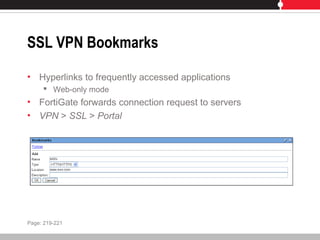
SSL VPN Bookmarks
• Hyperlinks to frequently accessed applications
 Web-only mode
• FortiGate forwards connection request to servers
• VPN > SSL > Portal
Page: 219-221
Connecting to the SSL VPN
• https://<FortiGate_IP_address>:10443
 Port customizable
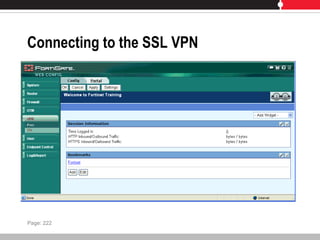
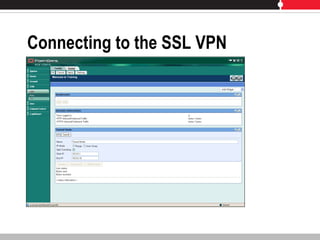
• SSL-VPN Web Portal page displayed
 Bookmarks
• What appears is pre-determined by administrator’s settings
in User > User Group and VPN > SSL > Portal > Settings
Page: 222
Connecting to the SSL VPN
Page: 222
Connecting to the SSL VPN
PPTP VPN
• Point-to-Point (PPP) authentication protocol
 PPP software operates on tunneled links
• Encapsulates PPP packets within IP packets
 Not cryptographically protected
• PPTP packets not authenticated or integrity protected
• FortiGate unit assigns client IP address from reserved range
 Assigned IP used for duration of connection
• FortiGate unit disassembles PPTP packet and forwards to
correct computer on internal network
Page: 223
PPTP VPN
• FortiGate unit can act as PPTP server
• FortiGate unit can forward PPTP packets to PPTP server
Page: 224
FortiGate Unit as PPTP Server
Page: 224
FortiGate Unit Forwards Traffic to PPTP Server
Page: 225
PPTP Server Configuration
• Configure user authentication for PPTP clients
• Enable PPTP on FortiGate unit
• Configure PPTP server
• Configure client
Page: 226
PPTP Pass-Through Configuration
• Configuration required to forward PPTP packets to PPTP
server
• Define virtual IP that points to PPTP server
• Configure firewall policy
• Configure client
Page: 227
IPSec VPN
• Industry standard set of protocols
• Layer 3
 Applications do not need to be designed to use IPSec
• IP packets encapsulated with IPSec packets
 Header of new packet refers to end point of tunnel
• Phase 1
 Establish connection
 Authenticate VPN peer
• Phase 2
 Establish tunnel
Page: 228
IPSec Protocols
• Authentication Header (AH)
 Authenticate identity of sender
 Integrity of data
 Entire packet signed
• Encapsulating Security Payload (ESP)
 Encrypts data
 Signs data only
Page: 229
Authentication Header (AH)
Page: 229
Encapsulating Security Payload (ESP)
Page: 229
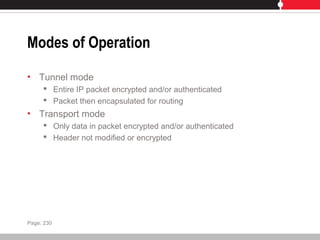
Modes of Operation
• Tunnel mode
 Entire IP packet encrypted and/or authenticated
 Packet then encapsulated for routing
• Transport mode
 Only data in packet encrypted and/or authenticated
 Header not modified or encrypted
Page: 230
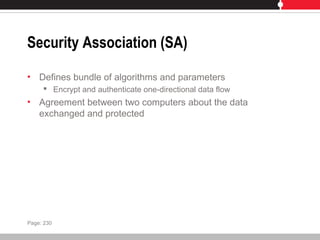
Security Association (SA)
• Defines bundle of algorithms and parameters
 Encrypt and authenticate one-directional data flow
• Agreement between two computers about the data
exchanged and protected
Page: 230
Internet Key Exchange (IKE)
• Allows two parties to setup SAs
 Secret keys
• Uses Internet Security Association Key Management
Protocol (ISAKMP)
 Framework for establishing SAs
• Two distinct phases
 Phase 1
 Phase 2
Page: 231
Phase 1
• Authenticate computer involved in transaction
• Negotiate SA policy between computers
• Perform Diffie-Hellman key exchange
• Set up secure tunnel
• Main mode (three exchanges)
 Algorithms used agreed upon
 Generate secret keys and nonces
 Other side’s identity verified
• Aggressive mode (one exchange)
 Everything needed to complete exchange
Page: 231
Phase 2
• Negotiate SA parameters to set up secure tunnel
• Renegotiate SAs regularly
Page: 232
Gateway-to-Gateway Configuration
• Tunnel between two separate private networks
• All traffic encrypted by firewall policies
• FortiGate units at both ends must be in NAT/Route mode
Page: 234
Gateway-to-Gateway Configuration
Page: 234
Gateway-to-Gateway Configuration
• FortiGate receives connection request from remote peer
 Uses IPSec phase 1 parameters
• Establish secure connection
• Authenticate peer
• If policy permits, tunnel established
 Uses IPSec phase 2 parameters
 Applies policy
• Configuration steps
 Define phase 1 parameters
 Define phase 2 parameters
 Create firewall policies
Page: 234
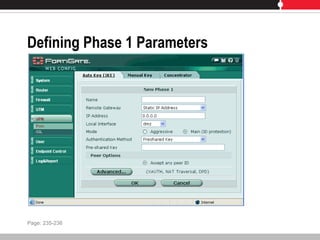
Defining Phase 1 Parameters
Page: 235-236
Authenticating the FortiGate Unit
• Authenticate itself to remote peers
• Pre-shared key
 All peers must use same key
• Digital certificates
 Must be installed on peer and FortiGate
Page: 237-238
Authenticating Remote Clients
• Permit access using trusted certificates
 FortiGate configured for certificate authentication
• Permit access using peer identifier
• Permit access using pre-shared key
 Each peer or client must have user account
• Permit access using peer identifier and pre-shared key
 Each peer or client must have user account
Page: 239
XAuth Authentication
• Separate exchange at end of phase 1
 Increased security
• Draws on existing FortiGate user group definitions
• FortiGate can be XAuth server or XAuth client
Page: 239
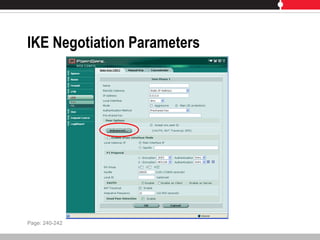
IKE Negotiation Parameters
Page: 240-242
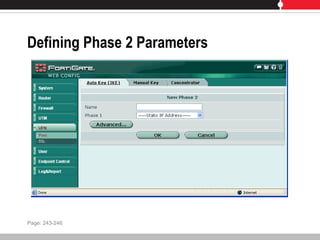
Defining Phase 2 Parameters
Page: 243-246
Firewall Policies
• Policies needed to control services and direction of traffic
• Firewall addresses needed for each private network
• Policy-Based VPN
 Specify interface to private network, remote peer and VPN tunnel
 Single policy for inbound, outbound or both direction
• Route-Based VPN
 Requires ACCEPT policy for each direction
 Creates Virtual IPSec interface on interface connecting to remote
peer
Page: 247-250
Lab
• Configuring SSL VPN for Full Access (Web Portal and
Tunnel Mode)
• Configuring a Basic Gateway-to-Gateway VPN
Page: 251
Agenda
• Introduction
• Overview and System Setup
• FortiGuard Subscription Services
• Logging and Alerts
• Firewall Policies
• Basic VPN
• Authentication
• Antivirus
• Spam Filtering
• Web Filtering
Lesson 6
Authentication
Authentication
• User or administrator prompted to identify themselves
 Only allowed individuals perform actions
• Can be configured for:
 Any firewall policy with action of ACCEPT
 PPTP and L2TP VPNs
 Dial-up IPSEC VPN set up as XAuth server
 Dial-up VPN accepting user group as peer ID
Page: 263
Authentication Methods
• Local user
 User names and passwords used to authenticate stored on
FortiGate
• Remote
 Use existing systems to authenticate
• RADIUS
• LDAP
• PKI
• Windows Active Directory
• TACACS+
Page: 264-265
Users and User Groups
• Authentication based on user groups
 User created
 User added to groups
• User
 Account created on FortiGate or external authentication server
• User group
 Users or servers as members
 Specify allowed groups for each resource requiring authentication
 Group associated with protection profile
Page: 266-267
User Group Types
• Firewall
 Access to firewall policy that requires authentication
 FortiGate request user name and password (or certificate)
• Directory Service
 Allow access to users in DS groups already authenticated
• Single sign on
 Requires FSAE
• SSL VPN
 Access to firewall policy that requires SSL VPN authentication
Page: 268-270
Authentication overrides
• Require access to blocked site
 Override block for period of time
• Link to authenticate presented
Page: 271
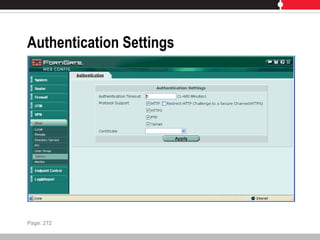
Authentication Settings
Page: 272
PKI Authentication
• Valid certificate required
• SSL used for secure connection
• Trusted certificates installed on FortiGate and client
Page: 273
RADIUS Authentication
• User credentials sent to RADIUS server for authentication
• Shared key used to encrypt data exchanged
• Primary and secondary servers identified on FortiGate unit
Page: 274
LDAP Authentication
• User credentials sent to LDAP server for authentication
• LDAP servers details identified on FortiGate
Page: 275
TACACS+ Authentication
• User credentials sent to TACACS+ server for authentication
• Choice of authentication types:
 Auto
 ASCII
 PAP
 CHAP
 MSCHAP
Page: 276
Microsoft Active Directory Authentication
• Transparently authenticate users
 Fortinet Server Authentication Extensions (FSAE) passes
authentication information to FortiGate
 Sign in once to Windows, no authentication prompts from FortiGate
Page: 277
FSAE Components
• Domain Controller Agent
 Installed on every domain controller
 Monitors user logons, sends to Collector Agent
• Collector Agent
 Installed on at least one domain controller
 Sends information collected to FortiGate
Page: 278
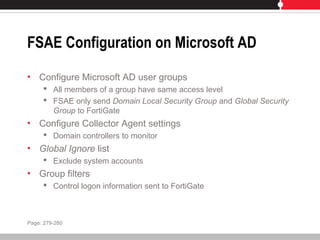
FSAE Configuration on Microsoft AD
• Configure Microsoft AD user groups
 All members of a group have same access level
 FSAE only send Domain Local Security Group and Global Security
Group to FortiGate
• Configure Collector Agent settings
 Domain controllers to monitor
• Global Ignore list
 Exclude system accounts
• Group filters
 Control logon information sent to FortiGate
Page: 279-280
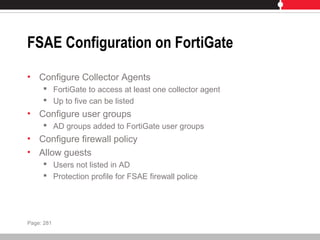
FSAE Configuration on FortiGate
• Configure Collector Agents
 FortiGate to access at least one collector agent
 Up to five can be listed
• Configure user groups
 AD groups added to FortiGate user groups
• Configure firewall policy
• Allow guests
 Users not listed in AD
 Protection profile for FSAE firewall police
Page: 281
Labs
• Firewall Policy Authentication
• Adding User Disclaimers and Redirecting URLs
Page: 282
Agenda
• Introduction
• Overview and System Setup
• FortiGuard Subscription Services
• Logging and Alerts
• Firewall Policies
• Basic VPN
• Authentication
• Antivirus
• Spam Filtering
• Web Filtering
Lesson 7
Antivirus
Antivirus
• Detect and eliminate viruses, worms and spyware
• Scan HTTP and FTP traffic
• Scan SMTP, POP3, IMAP
Page: 289
Antivirus Elements
• File filter
 File pattern and file type recognition
• Virus scan
 Virus definitions kept up-to-date through FortiGuard Subscription
Services
• Grayware
• Heuristics
 Detect virus-like behavior
Page: 289-290
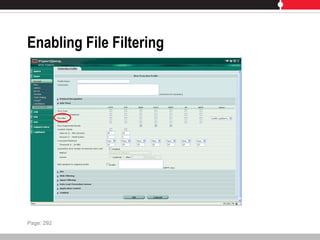
File Filter
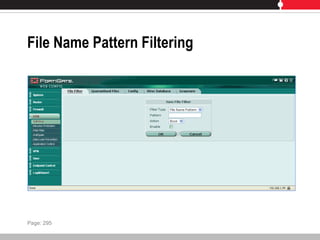
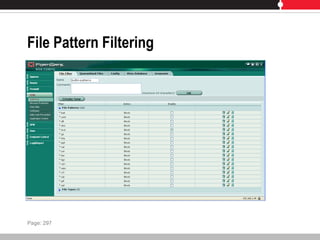
• File pattern
 Name, extension or pattern
 Built-in patterns or custom
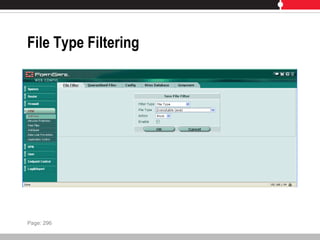
• File type
 Analyze file to determine type
 Types pre-configured
• Actions
 Allow
 Block
• Replacement message sent
Page: 291
Enabling File Filtering
Page: 292
File Name Pattern Filtering
Page: 295
File Type Filtering
Page: 296
File Pattern Filtering
Page: 297
Virus Scan
• Virus definitions used to detect and eliminate threats
 Updated regularly
 FortiGuard Subscription Services license required
Page: 298
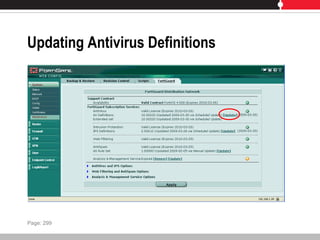
Updating Antivirus Definitions
Page: 299
Grayware
• Unsolicited commercial software
 Often installed without consent
• Scans for grayware in enabled categories
 Categories and content updated regularly
Page: 300
Grayware Categories
• Adware
 Pop-up advertising content
• Browser Helper Objects
 Add capabilities to browser
• Dialers
 Unwanted calls through modem or Internet connection
• Downloaders
 Retrieve files
• Games
• Hacker Tools
 Subvert network and host security
Page: 301-303
Grayware Categories
• Hijackers
 Manipulate settings
• Jokes
• Key loggers
 Log input for later retrieval
• Misc
 Uncategorized (multiple functionalities)
• NMT (Network Management Tool)
 Cause network disruption
• P2P
 File exchanges containing viruses
Page: 301-303
Grayware Categories
• Plugins
 Add additional features to an existing application
• Remote Administration Tools (RAT)
 Remotely change or monitor a computer on a network
• Toolbars
 Augment capabilities of browser
Page: 301-303
Spyware
• Component of adware
 Track user activities online
 Report activities to central server
 Target advertising based on online habits
Page: 304-305
Quarantine
• Quarantine blocked or infected files
 FortiGate unit with hard drive
 FortiAnalyzer
• Files uploaded to Fortinet for analysis
Page: 306-307
Proxies
• Intercepts all connection requests and responses
• Buffers and scans response before flushing to client
• Splicing
 Prevent client from timing out
 Server sends part of response to client while buffering
 Final part sent if response is clean
 FTP uploads, email protocols (SMTP, POP3, IMAP)
• Client comforting
 Prevent timeout while files buffered and scanned by FortiGate
 Can provide visual status to user that progress being made
 HTTP and FTP downloads
Page: 308
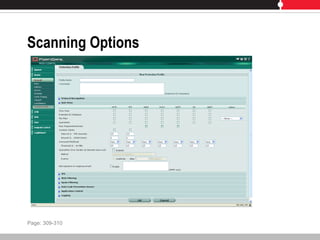
Scanning Options
Page: 309-310
Lab
• Configuring Global Antivirus Settings
• Configuring a Protection Profile
• Testing Protection Profile Settings for HTTP/FTP Antivirus
Scanning
Page: 311
Agenda
• Introduction
• Overview and System Setup
• FortiGuard Subscription Services
• Logging and Alerts
• Firewall Policies
• Basic VPN
• Authentication
• Antivirus
• Spam Filtering
• Web Filtering
Lesson 8
Spam Filtering
Spam Filtering
• Manage unsolicited bulk email
 Detect spam messages
 Identify transmissions from known/suspected spam servers
Page: 321
Spam Filtering Methods
• IP address check
 Verify source IP address again list of known spammers
• URL check
 Extract URLs and verify against list of spam sources
• Email checksum check
 Calculate checksum of message and verify against list of known
spam messages
• Spam submission
 Inform FortiGuard
• Black/White list
 Check incoming IP and email addresses against known list
 SMTP only
Page: 322-323
Spam Filtering Methods
• HELO DNS lookup
 Check source domain name against registered IP address in DNS
• Return email DNS check
 Check incoming return address domain against registered IP in
DNS
• Banned word
 Check email against banned word list
• MIME headers check
 Check MIME headers against list
• DNSBL and ORDBL
 Check email against configured servers
Page: 322-323
FortiGuard Antispam Global Filters
• FortiIP sender IP reputation database
 Reputation of IP based on properties related to address
• Email volume from a sender
 Compare sender’s recent volume with historical pattern
• FortiSig
 Spam signature database
 FortiSig1
• Spamvertised URLs
 FortiSig2
• Spamvertised email addresses
 FortiSig3
• Spam checksums
• FortiRule
 Heuristic rules
 FortiMail only
Page: 324-325
Customized Filters
• Compliment FortiGuard
• Banned word lists
• Local black/white list
• Heuristic rules
• Bayesian
 FortiMail only
Page: 325
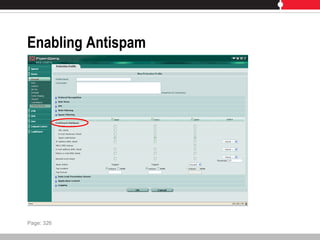
Enabling Antispam
Page: 326
Spam Actions
• Tag or discard spam email
 Add custom text to subject or instead MIME header and value
• Only discard if SMTP and virus check enabled
• Spam actions logged
Page: 327
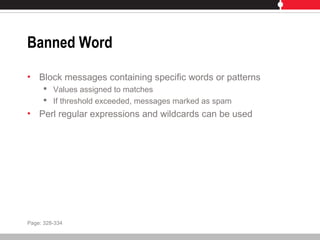
Banned Word
• Block messages containing specific words or patterns
 Values assigned to matches
 If threshold exceeded, messages marked as spam
• Perl regular expressions and wildcards can be used
Page: 328-334
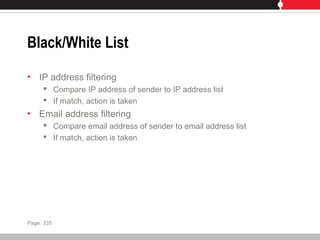
Black/White List
• IP address filtering
 Compare IP address of sender to IP address list
 If match, action is taken
• Email address filtering
 Compare email address of sender to email address list
 If match, action is taken
Page: 335
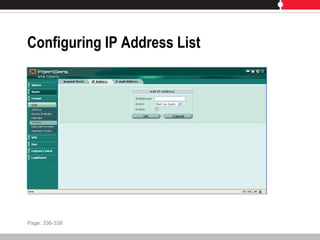
Configuring IP Address List
Page: 336-338
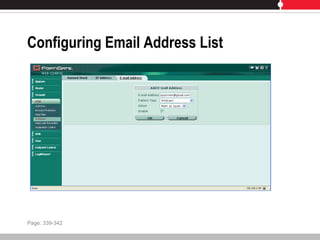
Configuring Email Address List
Page: 339-342
MIME Headers Check
• MIME headers added to email
 Describe content type and encoding
• Malformed headers can fool spam or virus filters
• Compare MIME header key-value of incoming email to list
 If match, action is taken
Page: 343
DNSBL and ORDBL
• Published lists of suspected spammers
• Add subscribed servers
 Define action
Page: 344
FortiMail Antispam
• Enhanced set of features for detecting and blocking spam
 Some techniques not available in FortiGate
• Stand-alone antispam system
 Can be second layer in addition to FortiGate
• Legacy virus protection
• Email quarantine
Page: 345
Agenda
• Introduction
• Overview and System Setup
• FortiGuard Subscription Services
• Logging and Alerts
• Firewall Policies
• Basic VPN
• Authentication
• Antivirus
• Spam Filtering
• Web Filtering
Lesson 9
Web Filtering
Web Filtering
• Process web content to block inappropriate or malicious
content
• Categorized content
 76 categories
 40 million domains
 Billions of web pages
 Automated updates
• Check web addresses against list
• Customizable
Page: 349
Order of Filtering
• URL Filtering
 Exempt, Block, Allow
• FortiGuard Web Filtering
• Content Exempt
 Customizable
• Content Block
 Customizable
• Script Filter
Page: 349
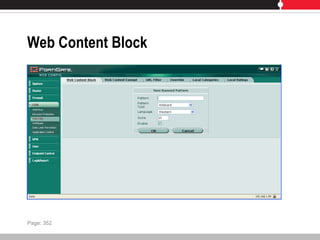
Web Content Block
• Block specific words or patterns
 Score assigned to pattern
 Page blocked if greater than threshold
 Perl regular expressions or wildcards can be used
Page: 350-353
Web Content Block
Page: 352
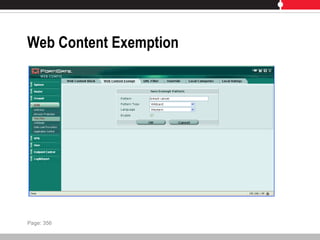
Web Content Exemption
• Override web content block
 Even if banned words appear
Page: 354-357
Web Content Exemption
Page: 356
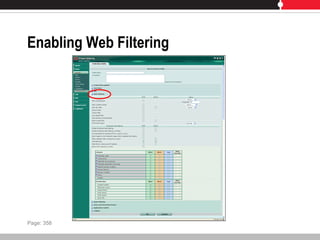
Enabling Web Filtering
Page: 358
URL Filter
• Block specific pages
 Displays replacement message
• Text, regular expressions and wildcards can be used
Page: 359-362
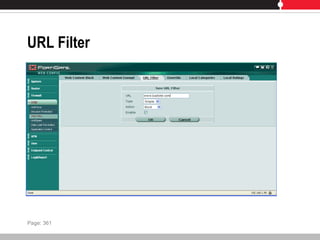
URL Filter
Page: 361
FortiGuard Web Filter
• Managed web filtering solution
 Web pages rated and categorized
• Determines category of site
 Follows firewall policy
• Allow, block, log, or override
• Ratings based on:
 Text analysis
 Exploitation of web structure
 Human raters
Page: 363
Web Filtering Categories
• Categories based on suitability for enterprises, schools, and
home
 Potentially liable
 Controversial
 Potentially non-productive
 Potentially bandwidth consuming
 Potential security risks
 General interest
 Business oriented
 Others
Page: 364
Web Filtering Classes
• Classify web page based on media type or source
 Further refine web access
 Prevent finding material
• Classes
 Cached contents
 Image search
 Audio search
 Video search
 Multimedia search
 Spam URL
 Unclassified
Page: 365
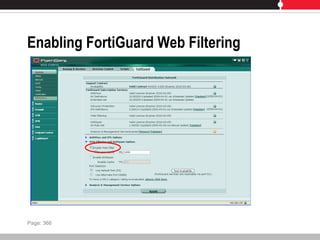
Enabling FortiGuard Web Filtering
Page: 366
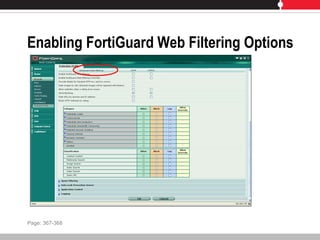
Enabling FortiGuard Web Filtering Options
Page: 367-368
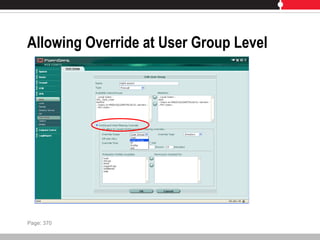
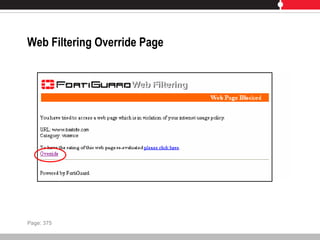
Web Filtering Overrides
• Give user ability to override firewall filter block
 Administrative overrides
 User overrides
• Override permissions configured at user group level or with
override rules
• User group level overrides
 Group of users have same level of overrides
 Assumes authentication enabled on policy
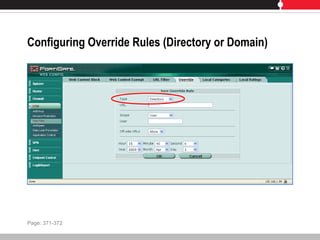
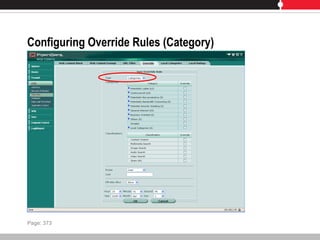
• Override rules
 Fine granularity
 Access domain, directory or category
Page: 369
Allowing Override at User Group Level
Page: 370
Configuring Override Rules (Directory or Domain)
Page: 371-372
Configuring Override Rules (Category)
Page: 373
Web Filtering Override Page
Page: 375
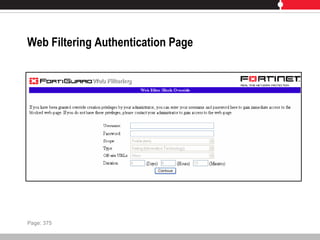
Web Filtering Authentication Page
Page: 375
Local Ratings
• Administrator controlled block of web sites
• Per protection profile basis
Page: 376
Local Categories
• Administrator controlled block on group of web sites
• Per protection profile basis
Page: 377
Thank you for attending
.

Fortigate Training

  • 1.
    FortiGate Multi-Threat SecuritySystems Administration, Content Inspection and Basic VPN
  • 2.
    Prerequisites • Introductory-level networksecurity experience • Basic understanding of core network security and firewall concepts
  • 3.
    Agenda • Introduction • Overviewand System Setup • FortiGuard Subscription Services • Logging and Alerts • Firewall Policies • Basic VPN • Authentication • Antivirus • Spam Filtering • Web Filtering
  • 4.
    Agenda • Introduction • Overviewand System Setup • FortiGuard Subscription Services • Logging and Alerts • Firewall Policies • Basic VPN • Authentication • Antivirus • Spam Filtering • Web Filtering
  • 5.
  • 6.
    Unified Threat Management •One device  Firewall, intrusion protection, antivirus and more • Centralized management Page: 7
  • 7.
    Fortinet Solution • FortiGateplatform • FortiGuard Subscription Services • Management, reporting, analysis products Page: 8
  • 8.
    FortiGate • Application-level services Antivirus, intrusion protection, antispam, web content filtering • Network-level services  Firewall, IPSec and SSL VPN, traffic shaping • Management, reporting, analysis products  Authentication, logging, reporting, secure administration, SNMP Page: 8
  • 9.
    FortiGate Portfolio • SOHO FortiGate 30B, 50B, 51B, 60B, 100A, 110C, 111C  Protect smaller deployments • Medium-Sized Enterprises  FortiGate 200A, 224B, 300A, 400A, 500A, 800  Meet demands of mission critical enterprise applications • Large-Sized Enterprises and Carriers  FortiGate 1000A, 3016B, 3600A, 3810A, 5020, 5050, 5140  High performance and reliability Page: 9-10
  • 10.
    FortiGuard • Dynamic updates Antivirus, intrusion protection, web filtering, antispam • Updated 24x7x365 • Data centers around the world  Secure, high availability locations Page: 10
  • 11.
    FortiManager • Manage allFortinet products from a centralized console • Minimize administration effort  Deploying, configuring and maintaining devices Page: 10
  • 12.
    FortiAnalyzer • Centralized analysisand reporting  Aggregate and analyze log data from multiple devices • Comprehensive view of network usage  Identify and address vulnerabilities  Monitor compliance • Quarantine and content archiving Page: 10
  • 13.
    FortiMail • Multi-layered emailsecurity  Advanced spam filtering, antivirus • Facilitate regulatory compliance Page: 11
  • 14.
    FortiClient • Security fordesktops, laptops, mobile devices  Personal firewall, IPSec VPN, antivirus, antispam, web content filtering • FortiGuard keeps FortiClient up-to-date Page: 11
  • 15.
    Firewall Basics • Controlsflow of traffic between networks of different trust level • Allow good information through but block intrusions, unauthorized users or malicious traffic • Rules to allow or deny traffic Page: 12
  • 16.
  • 17.
    Common Firewall Features •Block unwanted incoming traffic • Block prohibited outgoing traffic • Block traffic based on content • Allow connections to an internal network • Reporting • Authentication Page: 13
  • 18.
    Types of Firewalls •Packet filter firewall  Inspects incoming and outgoing packets  If matches rules, perform action • Stateful firewall  Examines headers and content of packet  Holds attributes of connection in memory  Packet forwarded if connection already established and tracked • Improved performance • Application layer (proxy-based) firewall  Stands between protected and unprotected network  Repackages messages into new packets allowed into network Page: 14
  • 19.
    Network Address Translation •Map private reserved IP addresses into public IP addresses  Local network uses different set of addresses • NAT device routes response to proper destination • Single agent between public and private network • Conserve IP addresses  One public address used to represent group of computers • Organization uses own internal IP addressing schemes Page: 16
  • 20.
    Dynamic NAT • PrivateIP address mapped from a pool of public IP addresses • Masks internal network configuration • Private network can use private IP addresses invalid on Internet but useful internally Page: 16
  • 21.
    Static NAT • PrivateIP address mapped to a public IP addresses  Public address always the same • Allow internal host to have a private IP address but still be reachable over the Internet  Web server Page: 16
  • 22.
    FortiGate Capabilities • Firewall Policies to allow or deny traffic • UTM Features:  Antivirus • Multiple techniques  Antispam • Detect, tag, block, and quarantine spam  Web Filtering • Control access to inappropriate web content  Intrusion Protection • Identify and record suspicious traffic Page: 17
  • 23.
    FortiGate Capabilities • UTMFeatures (continued):  Application Control • Manage bandwidth use  Data Leak Prevention • Prevents transmission of sensitive information Page: 17-18
  • 24.
    FortiGate Capabilities • VirtualDomains  Single FortiGate functions as multiple units • Traffic Shaping  Control available bandwidth and priority of traffic • Secure VPN  Ensure confidentiality and integrity of transmitted data • WAN Optimization  Improve performance and security • High Availability  Two or more FortiGates operate as a cluster Page: 18-19
  • 25.
    FortiGate Capabilities • EndpointCompliance  Use FortiClient End Point Security in network • Logging  Historical and current analysis of network usage • User Authentication  Control access to resources Page: 18-19
  • 26.
    FortiGate Unit Description •CPU  Intel processor • FortiASIC processor  Offload intensive processing • DRAM • Flash memory  Store firmware images • Hard drive  Logs, quarantine, archives • Interfaces  WAN, DMZ, Internal Page: 20
  • 27.
    FortiGate Unit Description •Serial console port  Management access • USB port  USB drives or modem • Wireless  FortiWifi devices can use wireless communications • Modem • Module slot bays  Blade card installed in a chassis • PC card slot  PCMCIA card slot for expansion Page: 20-21
  • 28.
    FortiGate Front View(51B) Page: 22
  • 29.
    FortiGate Back View(51B) Page: 23
  • 30.
    Operating Modes • NAT/RouteMode  Default configuration  Each FortiGate unit is visible to network it is connected to  Interfaces are on different subnets  Unit functions as a firewall Page: 24
  • 31.
    Operating Modes –NAT/Route Page: 24
  • 32.
    Operating Modes • TransparentMode  FortiGate unit is invisible to the network  All interfaces are on the same subnet  Use FortiGate without altering IP infrastructure Page: 25
  • 33.
    Operating Modes –Transparent Page: 25
  • 34.
    Device Administration • WebConfig  Configure and monitor device through web browser • CLI  Command line interface Page: 26
  • 35.
  • 36.
  • 37.
  • 38.
  • 39.
  • 40.
  • 41.
  • 42.
  • 43.
  • 44.
  • 45.
  • 46.
  • 47.
  • 48.
  • 49.
  • 50.
    Command Line Interface(CLI) Page: 37
  • 51.
    CLI Command Structure •Commands  config • Objects  config system • Branches  config system interface • Tables  edit port1 • Parameters  set ip 172.20.110.251 255.255.255.0 Page: 38-44
  • 52.
    CLI Basics • Commandhelp  ?  config ?  config system ? • Command completion  ? or <tab>  c?  config + <space> + <tab> • Recalling commands   or  Page: 45
  • 53.
    CLI Basics • Editingcommands  <CTRL> + <key> • Line continuation  use at end of each line • Command abbreviation  get system status  g sy st • IP address formats  192.168.1.1 255.255.255.0  192.168.1.1/24 Page: 46
  • 54.
    Administrative Users • Responsiblefor configuration and operation • Default: admin  Full read/write control  Can not be renamed  Default password blank • System administrator  Assigned super_admin profile • Regular administrator  Access profile other than super_admin  Access configurable Page: 47
  • 55.
    Interface Addressing • Numberof physical interfaces varies per model • Interface addresses configurable  Static  DHCP  PPPoE Page: 48-51
  • 56.
    DNS • Some functionsuse DNS  Alert email, URL blocking, etc • Lower end models can retrieve automatically  One interface must use DHCP  Can provide DNS forwarding Page: 52
  • 57.
    Configuration Backup andRestore • Different locations  Local PC  FortiManager  FortiGuard Management Service  USB disk • Can be encrypted  Required to backup VPN certificates Page: 53
  • 58.
    Firmware Upgrades • Filemust be obtained from Fortinet • Apply upgrade  Web Config  CLI  FortiGuard Management Service Page: 54
  • 59.
    Lab • Connecting toCommand Line Interface • Connecting to Web Config • Configuring Network Connectivity • Exploring the CLI • Configuring Global System Settings • Configuring Administrative Users Page: 55
  • 60.
    Agenda • Introduction • Overviewand System Setup • FortiGuard Subscription Services • Logging and Alerts • Firewall Policies • Basic VPN • Authentication • Antivirus • Spam Filtering • Web Filtering
  • 61.
  • 62.
    FortiGuard Subscription Services •Continuously updated security  Antivirus  Intrusion Protection  Web Filtering  Antispam • Delivered through FortiGuard Distribution Network Page: 75
  • 63.
    FortiGuard Distribution Network •Secure, high availability data centers • Updated methods  Manual  Push  Pull  Customized frequency • Devices continuously updated • Device connects to FortiGuard Service Point Page: 75-76
  • 64.
    Connecting to FortiGuardServers service.fortiguard.net DNS FortiGuard Server 1 FortiGuard Server 2 FortiGate Page: 77
  • 65.
    Connecting to FortiGuardServers service.fortiguard.net DNS FortiGuard Server 1 FortiGuard Server 2 FortiGate Page: 77
  • 66.
    Connecting to FortiGuardServers service.fortiguard.net DNS FortiGuard Server 1 FortiGuard Server 2 FortiGate Page: 77
  • 67.
    Connecting to FortiGuardServers service.fortiguard.net DNS FortiGuard Server 1 FortiGuard Server 2 FortiGate Page: 77
  • 68.
    Connecting to FortiGuardServers service.fortiguard.net DNS FortiGuard Server 1 FortiGuard Server 2 FortiGate Page: 77
  • 69.
    Connecting to FortiGuardServers service.fortiguard.net DNS FortiGuard Server 1 FortiGuard Server 2 FortiGate Page: 77
  • 70.
    Connecting to FortiGuardServers service.fortiguard.net DNS FortiGuard Server 1 FortiGuard Server 2 FortiGate Page: 77
  • 71.
    Connecting to FortiGuardServers DNS FortiGuard Server 1 FortiGuard Server 2 FortiGate service.fortiguard.net Page: 77
  • 72.
    FortiGuard Antivirus Service •Latest virus defenses  New and evolving viruses  Spyware  Malware • Automated updates Page: 78
  • 73.
    FortiGuard Intrusion ProtectionSystem Service • Latest defenses against network-level threats • Library of signatures • Engines  Anomaly inspection  Deep packet inspection  Full content inspection  Activity inspection • Supports behavior-based heuristics Page: 79
  • 74.
    FortiGuard Web FilteringService • Hosted web URL filtering service • FortiGuard Rating Server  Billions of web page addresses  Regulate and block harmful, inappropriate and dangerous content • FortiGuard Web Filtering Service  Regulate web activities to meet policy and compliance  CIPA Compliance Page: 80
  • 75.
    FortiGuard Antispam Service •Reduce spam at network perimeter • Global filters  Sender reputation database (FortiIP)  Spam signature database (FortiSig)  Constantly updated • Local filters  Banned words  Local white and black lists  Heuristic rules  Bayesian training (in FortiMail) Page: 81-82
  • 76.
  • 77.
    Scheduled Updates • Checkfor updates at defined times  Once every 1 to 23 hours  Once a day  Once a week • Must be able to connect to FortiGuard Distribution Network using HTTPS on port 443  Use override server address option may be used Page: 84
  • 78.
    Push Updates • FortiGuardDistribution Network notifies FortiGate units with push enabled  FortiGate will request update • Use push in addition to scheduled updates  Receive updates sooner • If configuring push through a NAT device, configure port forwarding Page: 85-87
  • 79.
    Manual Updates • Updateantivirus and IPS definitions • Download definition file • Copy to computer used to connect to Web Config Page: 88
  • 80.
    Caching • Available forweb filtering and antispam • Improves performance • Uses small % of system memory • Least recently used IP or URL deleted when cache full • Time to Live (TTL) controls time in cache Page: 89
  • 81.
    FortiGuard Web FilteringCategories • Wide range of categories to filter upon  Specify action for each category  Allow, Block, Log, Allow Override • Enabled through protection profile Page: 90-91
  • 82.
    FortiGuard Antispam Controls •Filter email based on type  IMAP, POP3, SMTP • Filtering options enabled through protection profile Page: 92
  • 83.
    Configuring FortiGuard Usingthe CLI • CLI can be used to configure communications with FortiGuard Distribution Network  Override default connection settings • config system fortiguard Page: 93
  • 84.
    FortiGuard Center • Onlineknowledge base and resource  Spyware, virus, IPS, web filtering, antispam attack library  Vulnerabilities  Submit spam and dangerous URLs • Timely threat and vulnerability information  Updated around the clock Page: 94-95
  • 85.
    Lab • Enabling FortiGuardServices and Updates Page: 96
  • 86.
    Agenda • Introduction • Overviewand System Setup • FortiGuard Subscription Services • Logging and Alerts • Firewall Policies • Basic VPN • Authentication • Antivirus • Spam Filtering • Web Filtering
  • 87.
  • 88.
    Logging and Alerts •Track down and pinpoint problems • Monitor network and Internet traffic • Monitor normal traffic  Establish baselines  Identify changes for optimal performance Page: 101
  • 89.
    Log Storage Locations •Local hard disk  FortiGate must have hard disk • FortiAnalyzer  Device for log collection, analysis and storage • System Memory  Overwrites older logs when capacity reached  Logs lost when FortiGate reset or loses power • Syslog  Forward logs to remote computer • FortiGuard Analysis Service  Subscription-based web service Page: 101-105
  • 90.
    Logging Levels • Emergency System unstable • Alert  Immediate action required • Critical  Functionality affected • Error  Error condition exists, functionality could be affected • Warning  Functionality could be affected • Notification  Normal event • Information  General info about system operations • Debug  Primarily used as a support function Page: 106-107
  • 91.
    Log Types • Traffic Traffic between source and destination interface  Only generated when session table entry expires • Event  Management activity • AntiVirus  Virus incidents • Web Filter  Web content blocking actions • Attack  Attacks detected and blocked Page: 108
  • 92.
    Log Types • AntiSpam Records detected spam • Data Leak Prevention  Records data that matches pre-defined sensitive patterns • Application Control  IM/P2P • Records IM and P2P information  VoIP • Logs SCCP violations  Content • Logs metadata Page: 108-109
  • 93.
    Configuring Logging • Selectlocation and level • Enable log generation  Protection profile • Antivirus, web filtering, FortiGuard web filtering, spam filtering, IPS, IM/P2P and VoIP  Event log • Management, system and VPN activities  Firewall policy • Log Allowed Traffic Page: 110-114
  • 94.
    Viewing Log Files •Log&Report > Log Access • Remote or Memory tabs  Local Disk if available • Formatted or Raw view • Select columns to display • Filter messages Page: 115-118
  • 95.
    Content Archiving • Storesession transaction data  HTTP  FTP  NNTP  IM (AIM, ICQ, MSN, Yahoo!)  Email (POP3, IMAP, SMTP) • Only available with FortiAnalyzer unit • Summary  Archives content metadata • Full  Copies of files or email messages Page: 119-121
  • 96.
    Alert Email • Sendnotification upon detection of a defined event • Requires one DNS server configured • Up to 3 recipients Page: 122
  • 97.
    SNMP • Report systeminformation and forward to SNMP manager • Access SNMP traps from any FortiGate configured for SNMP • Read-only implementation • Fortinet-proprietary MIB available  Or use Fortinet-supported standard MIB • Add SNMP Communities  8 SNMP managers per community Page: 123-126
  • 98.
    Lab • Exploring WebConfig Monitoring • Configuring System Event Logging • Exploring the FortiAnalyzer Interface • Configuring Email Alerts • SNMP Setup (Optional) Page: 127
  • 99.
    Agenda • Introduction • Overviewand System Setup • FortiGuard Subscription Services • Logging and Alerts • Firewall Policies • Basic VPN • Authentication • Antivirus • Spam Filtering • Web Filtering
  • 100.
  • 101.
    Firewall Policies • Controltraffic passing through FortiGate  What to do with connection request? • Packet analyzed, content compared to policy  ACCEPT  DENY • Source, destination and service must match policy  Policy directs action • Protection profile used with policy  Apply protection settings • Logging enabled to view connections using policy Page: 137
  • 102.
    Policy Matching • Searchespolicy list for matching policy  Based on source and destination • Starts at top of the list and searches down for match  First match is applied  Arrange policies from more specific to more general • Policies configured separately for each virtual domain • Move policies in list to influence order evaluated Page: 138-141
  • 103.
    User Authentication toFirewall Policies • User challenged to identify themselves before using policy  Before matching policies not requiring authentication • Available for policies with:  Action set to ACCEPT  SSL VPN • Authentication methods  Username + Password  Digital certificates  LDAP  RADIUS  TACACS+  Active Directory • FSAE required Page: 142
  • 104.
    Authentication Protocols • Protocolused to issue authentication challenge specified • Firewall policy must include protocol  HTTP  HTTPS  Telnet  FTP Page: 142
  • 105.
    Creating Policies • Sourceand destination address • Schedule • Service • Action • NAT • Options  Protection profile  Logging  Authentication  Traffic shaping  Disclaimers Page: 143
  • 106.
    Firewall Addresses • Addedto source and destination address  Match source and destination IP address of packets received • Default of ALL  Represents any IP address on the network • Address configured with name, IP address and mask  Also use FQDN  Must be unique name • Groups can be used to simplify policy creation and management Page: 144-148
  • 107.
    Firewall Schedules • Controlwhen policies are active or inactive • One-time schedule  Activate or deactivate for a specified period of time • Recurring schedule  Activate or deactivate at specified times of the day or week Page: 149-150
  • 108.
    Firewall Services • Determinetypes of communications accepted or denied • Predefined services applied to policy  Custom service if not on predefined list • Group services to simplify policy creation and management Page: 151-153
  • 109.
    Network Address Translation(NAT) • Translate source address and port of packets accepted by policy Page: 154
  • 110.
  • 111.
  • 112.
  • 113.
  • 114.
    Network Address Translation(NAT) Page: 154 Original New
  • 115.
    Dynamic IP Pool •Translate source address to an IP address randomly selected from addresses in IP pool Page: 155
  • 116.
  • 117.
  • 118.
  • 119.
  • 120.
    Dynamic IP Pool Page:155 Original New
  • 121.
    Fixed Port • PreventNAT from translating the source port  Some applications do not function correctly if source port translated • If Dynamic Pool not enabled, policy with Fixed Port can only allow one connection to that service at a time Page: 156
  • 122.
  • 123.
  • 124.
  • 125.
  • 126.
  • 127.
    Virtual IPs • Allowconnections using NAT firewall policies • Addresses in packets are remapped and forwarded  Client address does not appear in packet server receives • Upon reply, session table used to determine what destination address should be mapped to Page: 157-158
  • 128.
    DNAT • NAT notselected in firewall policy  Policy performs destination network address translation (DNAT) • Accepts packet from external network intended for specific address, translates destination address to IP on another network Page: 159
  • 129.
  • 130.
  • 131.
  • 132.
  • 133.
  • 134.
  • 135.
  • 136.
  • 137.
  • 138.
  • 139.
    Server Load Balancing •Dynamic one-to-many NAT mapping • External IP address translated to a mapped IP address  Determine by load balancing algorithm • External IP address not always translated to same mapped IP address Page: 160
  • 140.
  • 141.
  • 142.
  • 143.
  • 144.
  • 145.
  • 146.
    Protection Profiles • Controlall content filtering • Group of protection settings applied to traffic  Types and levels of protection customized for each policy • Enables settings for:  Protocol Recognition  Anti-Virus  IPS  Web Filtering  Spam Filtering  Data Leak Prevention Sensor  Application Control  Logging Page: 161
  • 147.
    Default Protection Profiles •Strict  Maximum protection • Scan  Applies virus scanning to HTTP, FTP, IMAP, POP3, SMTP • Web  Applies virus scanning and web content blocking to HTTP • Unfiltered  No scanning, blocking or IPS Page: 162-172
  • 148.
    Traffic Shaping • Controlbandwidth available to traffic processed by firewall policy  Which policies have higher priority? • Improve quality of bandwidth-intensive traffic  Does NOT increase total bandwidth available Page: 173
  • 149.
    Token Bucket Filter •Dampening function  Delays traffic by buffering bursts  Does not schedule traffic • Configured rate is never exceeded Page: 174
  • 150.
    Token Bucket FilterMechanism • Bucket has specified capacity  Tokens added to bucket at mean rate • If bucket fills, new tokens discarded • Bucket requests number of tokens equal to packet size • If not enough tokens in bucket, packet buffered • Flow will never send packets more quickly than capacity of the bucket • Overall transmission rate does not exceed rate tokens placed in bucket Page: 175
  • 151.
    Token Bucket FilterMechanism Page: 175
  • 152.
    Token Bucket FilterMechanism Page: 175
  • 153.
    Token Bucket FilterMechanism Page: 175
  • 154.
    Token Bucket FilterMechanism Page: 175
  • 155.
    Token Bucket FilterMechanism Page: 175
  • 156.
    Token Bucket FilterMechanism Page: 175
  • 157.
    Traffic Shaping Considerations •Attempt to normalize traffic peaks  Prioritize certain flows over others • Physical limitation to how much data can be buffered  Packets may be dropped, sessions affected • Performance on one traffic flow may be sacrificed to guarantee performance on another • Not effective in high-traffic situations  Where traffic exceeds FortiGate unit’s capacity  Packets must be received for being subject to shaping • If shaping not applied to policy, default is high priority Page: 176-177
  • 158.
    Disclaimers • Accept disclaimerbefore connecting • Use with authentication or protection profile • Can redirect to a URL after authentication Page: 178
  • 159.
    Lab • Creating FirewallPolicy Objects • Configuring Firewall Policies • Testing Firewall Policies • Configuring Virtual IP Access • Debug Flow Page: 179
  • 160.
    Agenda • Introduction • Overviewand System Setup • FortiGuard Subscription Services • Logging and Alerts • Firewall Policies • Basic VPN • Authentication • Antivirus • Spam Filtering • Web Filtering
  • 161.
  • 162.
    Virtual Private Networks(VPN) • Use public network to provide access to private network • Confidentiality and integrity of data • Authentication, encryption and restricted access Page: 195
  • 163.
    FortiGate VPN • SecureSocket Layer (SSL) VPN  Access through web browser • Point-to-Point Tunneling Protocol (PPTP)  Windows standard • Internet Protocol Security (IPSec) VPN  Dedicated VPN software required  Well suited for legacy applications (not web-based) Page: 195-196
  • 164.
    SSL VPN OperatingModes • Web-only mode  Web browser only  Secure connection between browser and FortiGate unit  FortiGate acts as gateway • Authenticates users • Tunnel mode  VPN software downloaded as ActiveX control  FortiGate unit assigns client IP address from range of reserved addresses Page: 197-199
  • 165.
    User Accounts • Musthave user account assigned to SSL VPN user group • Users must authenticate  Username + Password  RADIUS  TACACS+  LDAP  Digital certificates • User group provides access to firewall policy • Split tunneling available  Only traffic destined for tunnel routed over VPN Page: 200-202
  • 166.
    Web-Only Configuration • EnableSSL VPN • Create user accounts  Assign to user group • Create firewall policy • Setup logging (optional) Page: 204
  • 167.
    Tunnel Mode Configuration •Enable SSL VPN • Specify tunnel IP range • Create user group • Create firewall policy Page: 205
  • 168.
    SSL VPN Settings •Tunnel IP Range  Reserve range of IPs for SSL VPN clients • Server Certificate, Require Client Certificate  Certificates must be installed • Encryption Key Algorithm • Idle Time-out • Client Authentication Time-Out  CLI only • Portal Message • Advanced  DNS and WINS Servers Page: 206-208
  • 169.
    Firewall Policies • Atleast one SSL VPN firewall policy required • Specify originating IP address • Specify IP address of intended recipient or network • Configuration steps:  Specify source and destination IP address  Specify level of encryption  Specify authentication method  Bind user group to policy Page: 209
  • 170.
    Firewall Addresses • Web-onlymode  Predefined source address of ALL  Destination IP address where remote client needs to access • Entire private network, range of private IPs, private IP of host • Tunnel model  Source is range of IP addresses that can be connected to FortiGate • Restrict who can access FortiGate  Destination IP address where remote client needs to access • Entire private network, range of private IPs, private IP of host Page: 209
  • 171.
    Configuring Web-Only FirewallPolicies • Specify destination IP address  Name  Type  Subnet/IP range  Interface • Define policy  Action: SSL-VPN  Add user group Page: 210-212
  • 172.
    Configuring Tunnel-Mode FirewallPolicies • Specify source IP addresses  Addresses that can connect to FortiGate • Specify destination IP address  Addresses clients need to access • Specify level of encryption • Specify authentication type • Bind user group to policy • ssl.root Page: 213-218
  • 173.
    SSL VPN Bookmarks •Hyperlinks to frequently accessed applications  Web-only mode • FortiGate forwards connection request to servers • VPN > SSL > Portal Page: 219-221
  • 174.
    Connecting to theSSL VPN • https://<FortiGate_IP_address>:10443  Port customizable • SSL-VPN Web Portal page displayed  Bookmarks • What appears is pre-determined by administrator’s settings in User > User Group and VPN > SSL > Portal > Settings Page: 222
  • 175.
    Connecting to theSSL VPN Page: 222
  • 176.
  • 177.
    PPTP VPN • Point-to-Point(PPP) authentication protocol  PPP software operates on tunneled links • Encapsulates PPP packets within IP packets  Not cryptographically protected • PPTP packets not authenticated or integrity protected • FortiGate unit assigns client IP address from reserved range  Assigned IP used for duration of connection • FortiGate unit disassembles PPTP packet and forwards to correct computer on internal network Page: 223
  • 178.
    PPTP VPN • FortiGateunit can act as PPTP server • FortiGate unit can forward PPTP packets to PPTP server Page: 224
  • 179.
    FortiGate Unit asPPTP Server Page: 224
  • 180.
    FortiGate Unit ForwardsTraffic to PPTP Server Page: 225
  • 181.
    PPTP Server Configuration •Configure user authentication for PPTP clients • Enable PPTP on FortiGate unit • Configure PPTP server • Configure client Page: 226
  • 182.
    PPTP Pass-Through Configuration •Configuration required to forward PPTP packets to PPTP server • Define virtual IP that points to PPTP server • Configure firewall policy • Configure client Page: 227
  • 183.
    IPSec VPN • Industrystandard set of protocols • Layer 3  Applications do not need to be designed to use IPSec • IP packets encapsulated with IPSec packets  Header of new packet refers to end point of tunnel • Phase 1  Establish connection  Authenticate VPN peer • Phase 2  Establish tunnel Page: 228
  • 184.
    IPSec Protocols • AuthenticationHeader (AH)  Authenticate identity of sender  Integrity of data  Entire packet signed • Encapsulating Security Payload (ESP)  Encrypts data  Signs data only Page: 229
  • 185.
  • 186.
  • 187.
    Modes of Operation •Tunnel mode  Entire IP packet encrypted and/or authenticated  Packet then encapsulated for routing • Transport mode  Only data in packet encrypted and/or authenticated  Header not modified or encrypted Page: 230
  • 188.
    Security Association (SA) •Defines bundle of algorithms and parameters  Encrypt and authenticate one-directional data flow • Agreement between two computers about the data exchanged and protected Page: 230
  • 189.
    Internet Key Exchange(IKE) • Allows two parties to setup SAs  Secret keys • Uses Internet Security Association Key Management Protocol (ISAKMP)  Framework for establishing SAs • Two distinct phases  Phase 1  Phase 2 Page: 231
  • 190.
    Phase 1 • Authenticatecomputer involved in transaction • Negotiate SA policy between computers • Perform Diffie-Hellman key exchange • Set up secure tunnel • Main mode (three exchanges)  Algorithms used agreed upon  Generate secret keys and nonces  Other side’s identity verified • Aggressive mode (one exchange)  Everything needed to complete exchange Page: 231
  • 191.
    Phase 2 • NegotiateSA parameters to set up secure tunnel • Renegotiate SAs regularly Page: 232
  • 192.
    Gateway-to-Gateway Configuration • Tunnelbetween two separate private networks • All traffic encrypted by firewall policies • FortiGate units at both ends must be in NAT/Route mode Page: 234
  • 193.
  • 194.
    Gateway-to-Gateway Configuration • FortiGatereceives connection request from remote peer  Uses IPSec phase 1 parameters • Establish secure connection • Authenticate peer • If policy permits, tunnel established  Uses IPSec phase 2 parameters  Applies policy • Configuration steps  Define phase 1 parameters  Define phase 2 parameters  Create firewall policies Page: 234
  • 195.
    Defining Phase 1Parameters Page: 235-236
  • 196.
    Authenticating the FortiGateUnit • Authenticate itself to remote peers • Pre-shared key  All peers must use same key • Digital certificates  Must be installed on peer and FortiGate Page: 237-238
  • 197.
    Authenticating Remote Clients •Permit access using trusted certificates  FortiGate configured for certificate authentication • Permit access using peer identifier • Permit access using pre-shared key  Each peer or client must have user account • Permit access using peer identifier and pre-shared key  Each peer or client must have user account Page: 239
  • 198.
    XAuth Authentication • Separateexchange at end of phase 1  Increased security • Draws on existing FortiGate user group definitions • FortiGate can be XAuth server or XAuth client Page: 239
  • 199.
  • 200.
    Defining Phase 2Parameters Page: 243-246
  • 201.
    Firewall Policies • Policiesneeded to control services and direction of traffic • Firewall addresses needed for each private network • Policy-Based VPN  Specify interface to private network, remote peer and VPN tunnel  Single policy for inbound, outbound or both direction • Route-Based VPN  Requires ACCEPT policy for each direction  Creates Virtual IPSec interface on interface connecting to remote peer Page: 247-250
  • 202.
    Lab • Configuring SSLVPN for Full Access (Web Portal and Tunnel Mode) • Configuring a Basic Gateway-to-Gateway VPN Page: 251
  • 203.
    Agenda • Introduction • Overviewand System Setup • FortiGuard Subscription Services • Logging and Alerts • Firewall Policies • Basic VPN • Authentication • Antivirus • Spam Filtering • Web Filtering
  • 204.
  • 205.
    Authentication • User oradministrator prompted to identify themselves  Only allowed individuals perform actions • Can be configured for:  Any firewall policy with action of ACCEPT  PPTP and L2TP VPNs  Dial-up IPSEC VPN set up as XAuth server  Dial-up VPN accepting user group as peer ID Page: 263
  • 206.
    Authentication Methods • Localuser  User names and passwords used to authenticate stored on FortiGate • Remote  Use existing systems to authenticate • RADIUS • LDAP • PKI • Windows Active Directory • TACACS+ Page: 264-265
  • 207.
    Users and UserGroups • Authentication based on user groups  User created  User added to groups • User  Account created on FortiGate or external authentication server • User group  Users or servers as members  Specify allowed groups for each resource requiring authentication  Group associated with protection profile Page: 266-267
  • 208.
    User Group Types •Firewall  Access to firewall policy that requires authentication  FortiGate request user name and password (or certificate) • Directory Service  Allow access to users in DS groups already authenticated • Single sign on  Requires FSAE • SSL VPN  Access to firewall policy that requires SSL VPN authentication Page: 268-270
  • 209.
    Authentication overrides • Requireaccess to blocked site  Override block for period of time • Link to authenticate presented Page: 271
  • 210.
  • 211.
    PKI Authentication • Validcertificate required • SSL used for secure connection • Trusted certificates installed on FortiGate and client Page: 273
  • 212.
    RADIUS Authentication • Usercredentials sent to RADIUS server for authentication • Shared key used to encrypt data exchanged • Primary and secondary servers identified on FortiGate unit Page: 274
  • 213.
    LDAP Authentication • Usercredentials sent to LDAP server for authentication • LDAP servers details identified on FortiGate Page: 275
  • 214.
    TACACS+ Authentication • Usercredentials sent to TACACS+ server for authentication • Choice of authentication types:  Auto  ASCII  PAP  CHAP  MSCHAP Page: 276
  • 215.
    Microsoft Active DirectoryAuthentication • Transparently authenticate users  Fortinet Server Authentication Extensions (FSAE) passes authentication information to FortiGate  Sign in once to Windows, no authentication prompts from FortiGate Page: 277
  • 216.
    FSAE Components • DomainController Agent  Installed on every domain controller  Monitors user logons, sends to Collector Agent • Collector Agent  Installed on at least one domain controller  Sends information collected to FortiGate Page: 278
  • 217.
    FSAE Configuration onMicrosoft AD • Configure Microsoft AD user groups  All members of a group have same access level  FSAE only send Domain Local Security Group and Global Security Group to FortiGate • Configure Collector Agent settings  Domain controllers to monitor • Global Ignore list  Exclude system accounts • Group filters  Control logon information sent to FortiGate Page: 279-280
  • 218.
    FSAE Configuration onFortiGate • Configure Collector Agents  FortiGate to access at least one collector agent  Up to five can be listed • Configure user groups  AD groups added to FortiGate user groups • Configure firewall policy • Allow guests  Users not listed in AD  Protection profile for FSAE firewall police Page: 281
  • 219.
    Labs • Firewall PolicyAuthentication • Adding User Disclaimers and Redirecting URLs Page: 282
  • 220.
    Agenda • Introduction • Overviewand System Setup • FortiGuard Subscription Services • Logging and Alerts • Firewall Policies • Basic VPN • Authentication • Antivirus • Spam Filtering • Web Filtering
  • 221.
  • 222.
    Antivirus • Detect andeliminate viruses, worms and spyware • Scan HTTP and FTP traffic • Scan SMTP, POP3, IMAP Page: 289
  • 223.
    Antivirus Elements • Filefilter  File pattern and file type recognition • Virus scan  Virus definitions kept up-to-date through FortiGuard Subscription Services • Grayware • Heuristics  Detect virus-like behavior Page: 289-290
  • 224.
    File Filter • Filepattern  Name, extension or pattern  Built-in patterns or custom • File type  Analyze file to determine type  Types pre-configured • Actions  Allow  Block • Replacement message sent Page: 291
  • 225.
  • 226.
    File Name PatternFiltering Page: 295
  • 227.
  • 228.
  • 229.
    Virus Scan • Virusdefinitions used to detect and eliminate threats  Updated regularly  FortiGuard Subscription Services license required Page: 298
  • 230.
  • 231.
    Grayware • Unsolicited commercialsoftware  Often installed without consent • Scans for grayware in enabled categories  Categories and content updated regularly Page: 300
  • 232.
    Grayware Categories • Adware Pop-up advertising content • Browser Helper Objects  Add capabilities to browser • Dialers  Unwanted calls through modem or Internet connection • Downloaders  Retrieve files • Games • Hacker Tools  Subvert network and host security Page: 301-303
  • 233.
    Grayware Categories • Hijackers Manipulate settings • Jokes • Key loggers  Log input for later retrieval • Misc  Uncategorized (multiple functionalities) • NMT (Network Management Tool)  Cause network disruption • P2P  File exchanges containing viruses Page: 301-303
  • 234.
    Grayware Categories • Plugins Add additional features to an existing application • Remote Administration Tools (RAT)  Remotely change or monitor a computer on a network • Toolbars  Augment capabilities of browser Page: 301-303
  • 235.
    Spyware • Component ofadware  Track user activities online  Report activities to central server  Target advertising based on online habits Page: 304-305
  • 236.
    Quarantine • Quarantine blockedor infected files  FortiGate unit with hard drive  FortiAnalyzer • Files uploaded to Fortinet for analysis Page: 306-307
  • 237.
    Proxies • Intercepts allconnection requests and responses • Buffers and scans response before flushing to client • Splicing  Prevent client from timing out  Server sends part of response to client while buffering  Final part sent if response is clean  FTP uploads, email protocols (SMTP, POP3, IMAP) • Client comforting  Prevent timeout while files buffered and scanned by FortiGate  Can provide visual status to user that progress being made  HTTP and FTP downloads Page: 308
  • 238.
  • 239.
    Lab • Configuring GlobalAntivirus Settings • Configuring a Protection Profile • Testing Protection Profile Settings for HTTP/FTP Antivirus Scanning Page: 311
  • 240.
    Agenda • Introduction • Overviewand System Setup • FortiGuard Subscription Services • Logging and Alerts • Firewall Policies • Basic VPN • Authentication • Antivirus • Spam Filtering • Web Filtering
  • 241.
  • 242.
    Spam Filtering • Manageunsolicited bulk email  Detect spam messages  Identify transmissions from known/suspected spam servers Page: 321
  • 243.
    Spam Filtering Methods •IP address check  Verify source IP address again list of known spammers • URL check  Extract URLs and verify against list of spam sources • Email checksum check  Calculate checksum of message and verify against list of known spam messages • Spam submission  Inform FortiGuard • Black/White list  Check incoming IP and email addresses against known list  SMTP only Page: 322-323
  • 244.
    Spam Filtering Methods •HELO DNS lookup  Check source domain name against registered IP address in DNS • Return email DNS check  Check incoming return address domain against registered IP in DNS • Banned word  Check email against banned word list • MIME headers check  Check MIME headers against list • DNSBL and ORDBL  Check email against configured servers Page: 322-323
  • 245.
    FortiGuard Antispam GlobalFilters • FortiIP sender IP reputation database  Reputation of IP based on properties related to address • Email volume from a sender  Compare sender’s recent volume with historical pattern • FortiSig  Spam signature database  FortiSig1 • Spamvertised URLs  FortiSig2 • Spamvertised email addresses  FortiSig3 • Spam checksums • FortiRule  Heuristic rules  FortiMail only Page: 324-325
  • 246.
    Customized Filters • ComplimentFortiGuard • Banned word lists • Local black/white list • Heuristic rules • Bayesian  FortiMail only Page: 325
  • 247.
  • 248.
    Spam Actions • Tagor discard spam email  Add custom text to subject or instead MIME header and value • Only discard if SMTP and virus check enabled • Spam actions logged Page: 327
  • 249.
    Banned Word • Blockmessages containing specific words or patterns  Values assigned to matches  If threshold exceeded, messages marked as spam • Perl regular expressions and wildcards can be used Page: 328-334
  • 250.
    Black/White List • IPaddress filtering  Compare IP address of sender to IP address list  If match, action is taken • Email address filtering  Compare email address of sender to email address list  If match, action is taken Page: 335
  • 251.
    Configuring IP AddressList Page: 336-338
  • 252.
    Configuring Email AddressList Page: 339-342
  • 253.
    MIME Headers Check •MIME headers added to email  Describe content type and encoding • Malformed headers can fool spam or virus filters • Compare MIME header key-value of incoming email to list  If match, action is taken Page: 343
  • 254.
    DNSBL and ORDBL •Published lists of suspected spammers • Add subscribed servers  Define action Page: 344
  • 255.
    FortiMail Antispam • Enhancedset of features for detecting and blocking spam  Some techniques not available in FortiGate • Stand-alone antispam system  Can be second layer in addition to FortiGate • Legacy virus protection • Email quarantine Page: 345
  • 256.
    Agenda • Introduction • Overviewand System Setup • FortiGuard Subscription Services • Logging and Alerts • Firewall Policies • Basic VPN • Authentication • Antivirus • Spam Filtering • Web Filtering
  • 257.
  • 258.
    Web Filtering • Processweb content to block inappropriate or malicious content • Categorized content  76 categories  40 million domains  Billions of web pages  Automated updates • Check web addresses against list • Customizable Page: 349
  • 259.
    Order of Filtering •URL Filtering  Exempt, Block, Allow • FortiGuard Web Filtering • Content Exempt  Customizable • Content Block  Customizable • Script Filter Page: 349
  • 260.
    Web Content Block •Block specific words or patterns  Score assigned to pattern  Page blocked if greater than threshold  Perl regular expressions or wildcards can be used Page: 350-353
  • 261.
  • 262.
    Web Content Exemption •Override web content block  Even if banned words appear Page: 354-357
  • 263.
  • 264.
  • 265.
    URL Filter • Blockspecific pages  Displays replacement message • Text, regular expressions and wildcards can be used Page: 359-362
  • 266.
  • 267.
    FortiGuard Web Filter •Managed web filtering solution  Web pages rated and categorized • Determines category of site  Follows firewall policy • Allow, block, log, or override • Ratings based on:  Text analysis  Exploitation of web structure  Human raters Page: 363
  • 268.
    Web Filtering Categories •Categories based on suitability for enterprises, schools, and home  Potentially liable  Controversial  Potentially non-productive  Potentially bandwidth consuming  Potential security risks  General interest  Business oriented  Others Page: 364
  • 269.
    Web Filtering Classes •Classify web page based on media type or source  Further refine web access  Prevent finding material • Classes  Cached contents  Image search  Audio search  Video search  Multimedia search  Spam URL  Unclassified Page: 365
  • 270.
    Enabling FortiGuard WebFiltering Page: 366
  • 271.
    Enabling FortiGuard WebFiltering Options Page: 367-368
  • 272.
    Web Filtering Overrides •Give user ability to override firewall filter block  Administrative overrides  User overrides • Override permissions configured at user group level or with override rules • User group level overrides  Group of users have same level of overrides  Assumes authentication enabled on policy • Override rules  Fine granularity  Access domain, directory or category Page: 369
  • 273.
    Allowing Override atUser Group Level Page: 370
  • 274.
    Configuring Override Rules(Directory or Domain) Page: 371-372
  • 275.
    Configuring Override Rules(Category) Page: 373
  • 276.
    Web Filtering OverridePage Page: 375
  • 277.
  • 278.
    Local Ratings • Administratorcontrolled block of web sites • Per protection profile basis Page: 376
  • 279.
    Local Categories • Administratorcontrolled block on group of web sites • Per protection profile basis Page: 377
  • 280.
    Thank you forattending .