DO YOU LOSE SLEEP AT NIGHT?
Introductions
Nathan Van Gheem

Director of Solutions Engineering at Wildcard Corp

@vangheezy

vangheem@gmail.com

nathanvangheem.com
Wildcard Corp
wildcardcorp.com

secure web solutions
More about what I do
• Plone(CMS)
• Python
• JavaScript
• NoSQL
• Linux
Purpose
• Learn more about common security issues
• Change attitude and culture toward security
• You, the site owner, can sleep at night
• We, the site developers/system administrators, can sleep
at night
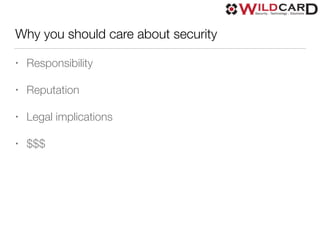
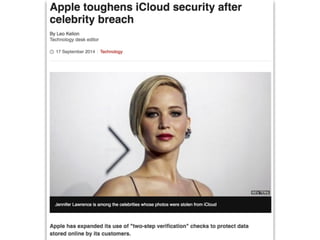
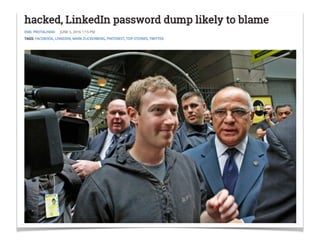
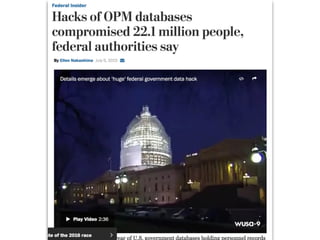
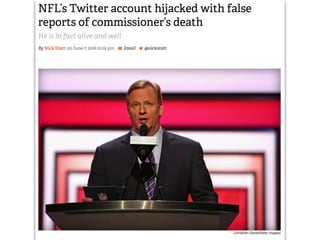
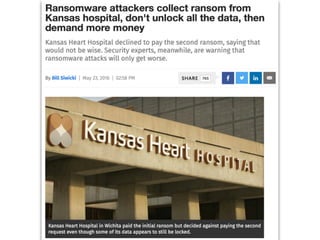
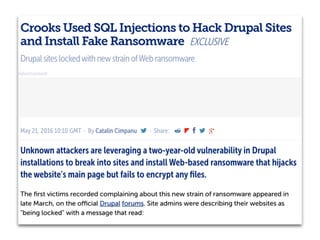
Why you should care about security
• Responsibility
• Reputation
• Legal implications
• $$$
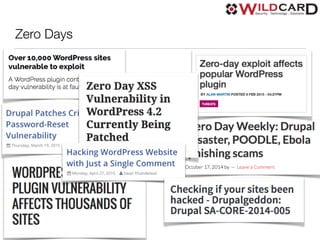
Zero Days
CMS focus
• Exposure
• Complexity
• Users
• Features
• Add-ons
Covering the basics
• firewall
• open ports
• vulnerability patches
• mailing lists
• server configuration
• unprivileged user running server process
What won’t be covered
• DNS, DNSSEC
• Physical security
• Social engineering
• Not in depth on OS Security
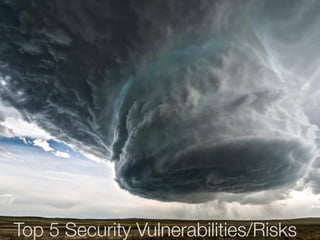
Top 5 Security Vulnerabilities/Risks
Top 5
• No particular order
• Call em as I see em
• We can quibble on what makes the top 5 and the order
• From my experience
• https://www.owasp.org/index.php/
Category:OWASP_Top_Ten_Project
1) SQLi - SQL Injection
“A SQL injection attack consists of
insertion or "injection" of a SQL
query via the input data from the
client to the application.” - OWASP
SQLi Risk Level: HIGH
• Full data compromise
• Access compromise
• Availability compromise
• Possible to issue commands to operating system
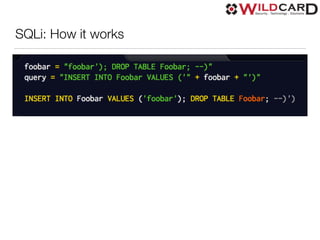
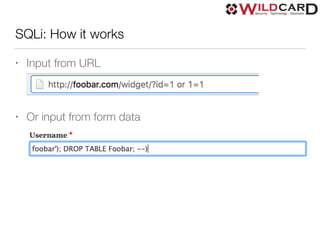
SQLi: How it works
SQLi: How it works
• Input from URL
• Or input from form data
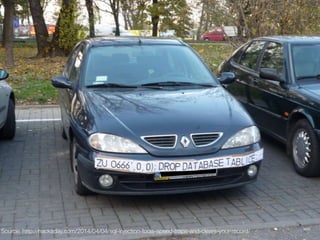
Source: http://hackaday.com/2014/04/04/sql-injection-fools-speed-traps-and-clears-your-record/
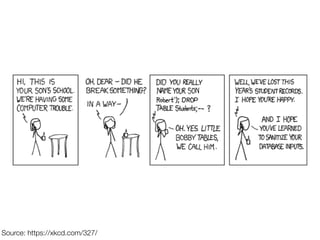
Source: https://xkcd.com/327/
1) SQLi Prevention/Solutions
• If you can, do not write SQL yourself, EVER(ORD)
• Use parameterized statements
• Stored procedures
• Escape all input
• WAF(Web Application Firewall)
• Do not use a SQL database
2) (D)DOS - Denial of Service
“The Denial of Service (DoS) attack is
focused on making a resource (site,
application, server) unavailable for the
purpose it was designed.” - OWASP
(D)DOS Risk Level: MEDIUM
• Availability compromise
• No sensitive data compromised
• Easiest attack to perform
(D)DOS: How it works
• Known slow resources
• Overload server
• Bypass caching
• Example: Script that when run, will make many
simultaneous requests to a server in an attempt to
overwhelm it
DDOS: Distributed Denial of Service
• Distributed to many machines
• Zombie machines for hire
• Botnets
DDOS: LOIC: Low Orbit Ion Cannon
• Hosted service DDOS
• Powered by JavaScript
• Socially driven attack
• Generate random urls to bypass cache and overload
target
2) (D)DOS Solutions
• WAF(Web Application Firewall)
• CDN(Content Delivery Network)
• Caching, Load balancing
• Keep cache warm
• Serve stale content
• Backup static copy of site
2) (D)DOS Solutions continued…
• Profile code
• Monitor traffic, use regular expressions to block request
types
• Rate limiting
• LOIC: watch and block from known bad referrer header
3) XSS - Cross site scripting
“Cross-Site Scripting (XSS) attacks are a type of
injection, in which malicious scripts are injected
into otherwise benign and trusted web sites. XSS
attacks occur when an attacker uses a web
application to send malicious code, generally in the
form of a browser side script, to a different end
user.” - OWASP
XSS Risk Level: HIGH
• Full data compromise
• Access compromise
XSS: Continued
• Injects JavaScript into target web application
• Input/output not validated(server side)
• Targets already logged in users to cause malicious
actions
• Persistent: attack stored in application and rendered
directly from application
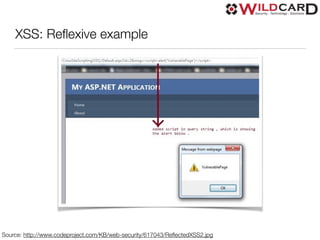
• Reflexive: attack is part of URL
XSS: Reflexive example
Source: http://www.codeproject.com/KB/web-security/617043/ReflectedXSS2.jpg
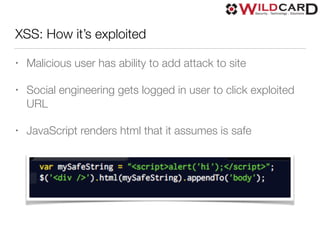
XSS: How it’s exploited
• Malicious user has ability to add attack to site
• Social engineering gets logged in user to click exploited
URL
• JavaScript renders html that it assumes is safe
3) XSS Solutions
• WAF(Web Application Firewall)
• Validated user input
• Escaped output
• Use JavaScript libraries that are safe by default(ReactJS)
4) CSRF - Cross-Site Request Forgery
“Cross-Site Request Forgery (CSRF) is an attack
that forces an end user to execute unwanted
actions on a web application in which they're
currently authenticated.” - OWASP
CSRF Risk Level: MEDIUM
• Data compromise
• Availability compromise
CSRF: How it works
• Target website needs privileged user logged in
• Draw targeted user to view page with exploited URLs
• Or click exploited URLs
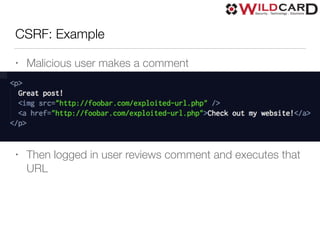
CSRF: Example
• Malicious user makes a comment
• Then logged in user reviews comment and executes that
URL
4) CSRF Solutions
• Force every operation to require unique authentication
token to the logged in user
• Authentication token protection implemented at the
database layer
• Well thought out frameworks require use of CSRF tokens
for database changes are allowed
5) Access control
• Broken, misconfigured access control
• Information disclosure
• misconfigured workflows
• file uploads containing metadata
• pre-package REST APIs giving out too much data
5) Access control solutions
• Assume users will be lazy
• Private by default
• Scrub files
• exiftool(linux)
• Block any potential problem areas with web server rules
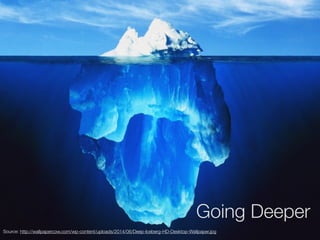
Going Deeper
Source: http://wallpapercow.com/wp-content/uploads/2014/06/Deep-Iceberg-HD-Desktop-Wallpaper.jpg
Caching
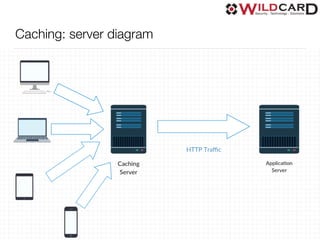
• Sits in front of web application
• Caches content for a configured duration so the user does
not hit the backend
• Varnish**
• Nginx(proxy_cache), Apache(mod_cache) do simple caching
okay
• Apache Traffic Server
• Know your content, how to tune your cache
Caching: server diagram
CDN - Content Delivery Network
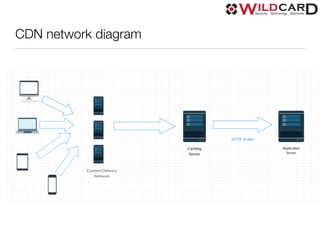
• Geographically dispersed caching servers
• WAF(Web Application Firewall)
• Serve stale content
• Keep cache warm
• Cloudflare
• Prepared for a stampede
CDN network diagram
WAF - Web Application Firewall
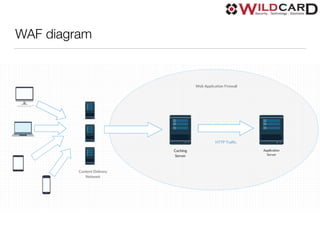
• CDN(Content Delivery Network)s often provide WAF
• Cloudflare
• Modsecurity(Apache)
• Naxsi(nginx)
WAF diagram
Load balancing
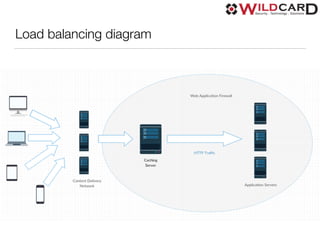
• Provide multiple application servers to handle requests from users
• Better, more resilient performance
• HAProxy**
• Nginx
• Apache
• Varnish
• CDN
Load balancing diagram
Database Selection
• NOSQL
• CouchDB/Couchbase
• ZODB(Python/Plone)
• RDMS: Support for replication
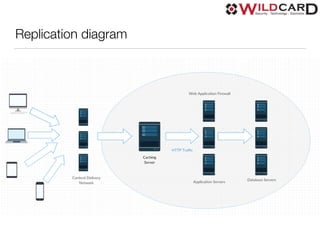
Replication
• All database engines provide some sort of solution for
replication
• Multiple servers can then server web application: better
performance
• Different networks if possible
• Geographically dispersed
Replication diagram
Read-only / Read-write
• Can your web application be readonly?
• What parts of your solution require writes? Can they be done differently?
• For example: Disqus for commenting
• Different backend/frontend URLs
• Are there tools for your platform to do pseudo read-only mode?
• wildcard.readonly(Plone)
• https://github.com/collective/wildcard.readonly
• wildcard.lockdown(Plone)
• https://github.com/collective/wildcard.lockdown
Performance and security
• Caching, CDN provide better performance
• Warm caches provide improved performance
• Keeps backends healthy to serve requests fast
• Replicated database provides added performance
• Geographically dispersed servers can provide lower
latency
Web server techniques
• Understand your application/deployment
• Minimize exposure
• Robust, fail resistant configurations
• Failover to back up replicated server, to static copy, etc
• Can you block certain types of requests?
• Rate limiting
• Careful not to on IP
Two Factor Authentication
• Additional security for users
• Does your 2-factor solution work as a wrapper around
your web application or is it just another token passed
into the login form?
• https://github.com/wildcardcorp/factored
• Proxy
• Or Python WSGI filter
Monitoring
• Know what is going on your systems
• Know traffic patterns
• CDN/Proxy reporting
• Log stash(https://www.elastic.co/products/logstash)
• Pingdom(https://www.pingdom.com/)
• Zabbix/Nagios/Munin/etc
• New relic, Sentry
• Cloud monitoring tools
• ossec(http://ossec.github.io/)
Vulnerability Scanning Tools
• Will test web application against known exploit types
• Acunetix, Netsparker, etc
• https://www.owasp.org/index.php/
Category:Vulnerability_Scanning_Tools
• Or google “vulnerability scanners”
• Some open source
• Some cloud solutions
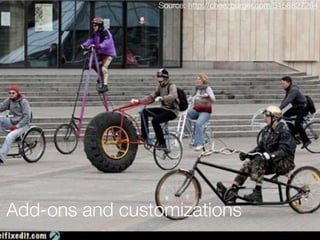
Add-ons and customizations
Source: http://cheezburger.com/5158827264
Add-ons
• Assume ownership of every add-on you integrate
• You are responsible for security
• Audit code
• Do NOT just install any add-on you find
• Consider if you really need add-ons you install
Add-ons and customizations
• How do you install?
• How do you update?
• What kind of access do they have?
• Are they allowed to execute arbitrary SQL queries?
• Do they run in a sandboxed mode?
• Reproducible builds?
PHP
The most popular open source CMS systems are written in PHP; which has a
suspect security track record.
PHP: Problems
• Register globals: off
• Remote file inclusion: off
• Safe mode
• Works by executing scripts on filesystem
• Common to install/update add-ons through the web
• Common to patch it’s own code
What Plone does well
• Permissions checked *before* view code is executed
• CSRF protection at the database layer
• Input and output filtering on everything
• Add-ons must be installed by system administrators,
process restart
• Through the web customizations run in sandboxed mode
• Monkey patching
Final thoughts
• A small investment in security, resiliency = big payoff
• Understand web vulnerabilities
• Understand risks
• Be comfortable with your risks, exposure and technology
• Secure sites can be beautiful. The security of a site has
nothing to do with it’s design
Questions/Comments
Nathan Van Gheem

@vangheezy

vangheem@gmail.com

nathanvangheem.com

wildcardcorp.com

Do you lose sleep at night?

  • 1.
    DO YOU LOSESLEEP AT NIGHT?
  • 2.
    Introductions Nathan Van Gheem Directorof Solutions Engineering at Wildcard Corp @vangheezy vangheem@gmail.com nathanvangheem.com
  • 3.
  • 4.
    More about whatI do • Plone(CMS) • Python • JavaScript • NoSQL • Linux
  • 5.
    Purpose • Learn moreabout common security issues • Change attitude and culture toward security • You, the site owner, can sleep at night • We, the site developers/system administrators, can sleep at night
  • 6.
    Why you shouldcare about security • Responsibility • Reputation • Legal implications • $$$
  • 13.
  • 14.
    CMS focus • Exposure •Complexity • Users • Features • Add-ons
  • 15.
    Covering the basics •firewall • open ports • vulnerability patches • mailing lists • server configuration • unprivileged user running server process
  • 16.
    What won’t becovered • DNS, DNSSEC • Physical security • Social engineering • Not in depth on OS Security
  • 17.
    Top 5 SecurityVulnerabilities/Risks
  • 18.
    Top 5 • Noparticular order • Call em as I see em • We can quibble on what makes the top 5 and the order • From my experience • https://www.owasp.org/index.php/ Category:OWASP_Top_Ten_Project
  • 19.
    1) SQLi -SQL Injection “A SQL injection attack consists of insertion or "injection" of a SQL query via the input data from the client to the application.” - OWASP
  • 20.
    SQLi Risk Level:HIGH • Full data compromise • Access compromise • Availability compromise • Possible to issue commands to operating system
  • 21.
  • 22.
    SQLi: How itworks • Input from URL • Or input from form data
  • 23.
  • 24.
  • 25.
    1) SQLi Prevention/Solutions •If you can, do not write SQL yourself, EVER(ORD) • Use parameterized statements • Stored procedures • Escape all input • WAF(Web Application Firewall) • Do not use a SQL database
  • 26.
    2) (D)DOS -Denial of Service “The Denial of Service (DoS) attack is focused on making a resource (site, application, server) unavailable for the purpose it was designed.” - OWASP
  • 27.
    (D)DOS Risk Level:MEDIUM • Availability compromise • No sensitive data compromised • Easiest attack to perform
  • 28.
    (D)DOS: How itworks • Known slow resources • Overload server • Bypass caching • Example: Script that when run, will make many simultaneous requests to a server in an attempt to overwhelm it
  • 29.
    DDOS: Distributed Denialof Service • Distributed to many machines • Zombie machines for hire • Botnets
  • 30.
    DDOS: LOIC: LowOrbit Ion Cannon • Hosted service DDOS • Powered by JavaScript • Socially driven attack • Generate random urls to bypass cache and overload target
  • 31.
    2) (D)DOS Solutions •WAF(Web Application Firewall) • CDN(Content Delivery Network) • Caching, Load balancing • Keep cache warm • Serve stale content • Backup static copy of site
  • 32.
    2) (D)DOS Solutionscontinued… • Profile code • Monitor traffic, use regular expressions to block request types • Rate limiting • LOIC: watch and block from known bad referrer header
  • 33.
    3) XSS -Cross site scripting “Cross-Site Scripting (XSS) attacks are a type of injection, in which malicious scripts are injected into otherwise benign and trusted web sites. XSS attacks occur when an attacker uses a web application to send malicious code, generally in the form of a browser side script, to a different end user.” - OWASP
  • 34.
    XSS Risk Level:HIGH • Full data compromise • Access compromise
  • 35.
    XSS: Continued • InjectsJavaScript into target web application • Input/output not validated(server side) • Targets already logged in users to cause malicious actions • Persistent: attack stored in application and rendered directly from application • Reflexive: attack is part of URL
  • 36.
    XSS: Reflexive example Source:http://www.codeproject.com/KB/web-security/617043/ReflectedXSS2.jpg
  • 37.
    XSS: How it’sexploited • Malicious user has ability to add attack to site • Social engineering gets logged in user to click exploited URL • JavaScript renders html that it assumes is safe
  • 38.
    3) XSS Solutions •WAF(Web Application Firewall) • Validated user input • Escaped output • Use JavaScript libraries that are safe by default(ReactJS)
  • 39.
    4) CSRF -Cross-Site Request Forgery “Cross-Site Request Forgery (CSRF) is an attack that forces an end user to execute unwanted actions on a web application in which they're currently authenticated.” - OWASP
  • 40.
    CSRF Risk Level:MEDIUM • Data compromise • Availability compromise
  • 41.
    CSRF: How itworks • Target website needs privileged user logged in • Draw targeted user to view page with exploited URLs • Or click exploited URLs
  • 42.
    CSRF: Example • Malicioususer makes a comment • Then logged in user reviews comment and executes that URL
  • 43.
    4) CSRF Solutions •Force every operation to require unique authentication token to the logged in user • Authentication token protection implemented at the database layer • Well thought out frameworks require use of CSRF tokens for database changes are allowed
  • 44.
    5) Access control •Broken, misconfigured access control • Information disclosure • misconfigured workflows • file uploads containing metadata • pre-package REST APIs giving out too much data
  • 45.
    5) Access controlsolutions • Assume users will be lazy • Private by default • Scrub files • exiftool(linux) • Block any potential problem areas with web server rules
  • 46.
  • 47.
    Caching • Sits infront of web application • Caches content for a configured duration so the user does not hit the backend • Varnish** • Nginx(proxy_cache), Apache(mod_cache) do simple caching okay • Apache Traffic Server • Know your content, how to tune your cache
  • 48.
  • 49.
    CDN - ContentDelivery Network • Geographically dispersed caching servers • WAF(Web Application Firewall) • Serve stale content • Keep cache warm • Cloudflare • Prepared for a stampede
  • 50.
  • 51.
    WAF - WebApplication Firewall • CDN(Content Delivery Network)s often provide WAF • Cloudflare • Modsecurity(Apache) • Naxsi(nginx)
  • 52.
  • 53.
    Load balancing • Providemultiple application servers to handle requests from users • Better, more resilient performance • HAProxy** • Nginx • Apache • Varnish • CDN
  • 54.
  • 55.
    Database Selection • NOSQL •CouchDB/Couchbase • ZODB(Python/Plone) • RDMS: Support for replication
  • 56.
    Replication • All databaseengines provide some sort of solution for replication • Multiple servers can then server web application: better performance • Different networks if possible • Geographically dispersed
  • 57.
  • 58.
    Read-only / Read-write •Can your web application be readonly? • What parts of your solution require writes? Can they be done differently? • For example: Disqus for commenting • Different backend/frontend URLs • Are there tools for your platform to do pseudo read-only mode? • wildcard.readonly(Plone) • https://github.com/collective/wildcard.readonly • wildcard.lockdown(Plone) • https://github.com/collective/wildcard.lockdown
  • 59.
    Performance and security •Caching, CDN provide better performance • Warm caches provide improved performance • Keeps backends healthy to serve requests fast • Replicated database provides added performance • Geographically dispersed servers can provide lower latency
  • 60.
    Web server techniques •Understand your application/deployment • Minimize exposure • Robust, fail resistant configurations • Failover to back up replicated server, to static copy, etc • Can you block certain types of requests? • Rate limiting • Careful not to on IP
  • 61.
    Two Factor Authentication •Additional security for users • Does your 2-factor solution work as a wrapper around your web application or is it just another token passed into the login form? • https://github.com/wildcardcorp/factored • Proxy • Or Python WSGI filter
  • 62.
    Monitoring • Know whatis going on your systems • Know traffic patterns • CDN/Proxy reporting • Log stash(https://www.elastic.co/products/logstash) • Pingdom(https://www.pingdom.com/) • Zabbix/Nagios/Munin/etc • New relic, Sentry • Cloud monitoring tools • ossec(http://ossec.github.io/)
  • 63.
    Vulnerability Scanning Tools •Will test web application against known exploit types • Acunetix, Netsparker, etc • https://www.owasp.org/index.php/ Category:Vulnerability_Scanning_Tools • Or google “vulnerability scanners” • Some open source • Some cloud solutions
  • 64.
    Add-ons and customizations Source:http://cheezburger.com/5158827264
  • 65.
    Add-ons • Assume ownershipof every add-on you integrate • You are responsible for security • Audit code • Do NOT just install any add-on you find • Consider if you really need add-ons you install
  • 66.
    Add-ons and customizations •How do you install? • How do you update? • What kind of access do they have? • Are they allowed to execute arbitrary SQL queries? • Do they run in a sandboxed mode? • Reproducible builds?
  • 67.
    PHP The most popularopen source CMS systems are written in PHP; which has a suspect security track record.
  • 68.
    PHP: Problems • Registerglobals: off • Remote file inclusion: off • Safe mode • Works by executing scripts on filesystem • Common to install/update add-ons through the web • Common to patch it’s own code
  • 70.
    What Plone doeswell • Permissions checked *before* view code is executed • CSRF protection at the database layer • Input and output filtering on everything • Add-ons must be installed by system administrators, process restart • Through the web customizations run in sandboxed mode • Monkey patching
  • 71.
    Final thoughts • Asmall investment in security, resiliency = big payoff • Understand web vulnerabilities • Understand risks • Be comfortable with your risks, exposure and technology • Secure sites can be beautiful. The security of a site has nothing to do with it’s design
  • 72.