Security+ Guide to Network
Security Fundamentals,
Fourth Edition
Chapter 3
Application and Network Attacks
Objectives
• List and explain the different types of Web
application attacks
• Define client-side attacks
• Explain how a buffer overflow attack works
• List different types of denial of service attacks
• Describe interception and poisoning attacks
Security+ Guide to Network Security Fundamentals, Fourth Edition 2
Application Attacks
• Attacks that target applications
– Category continues to grow
– Web application attacks
– Client-side attacks
– Buffer overflow attacks
• Zero day attacks
– Exploit previously unknown vulnerabilities
– Victims have no time to prepare or defend
Security+ Guide to Network Security Fundamentals, Fourth Edition 3
Web Application Attacks
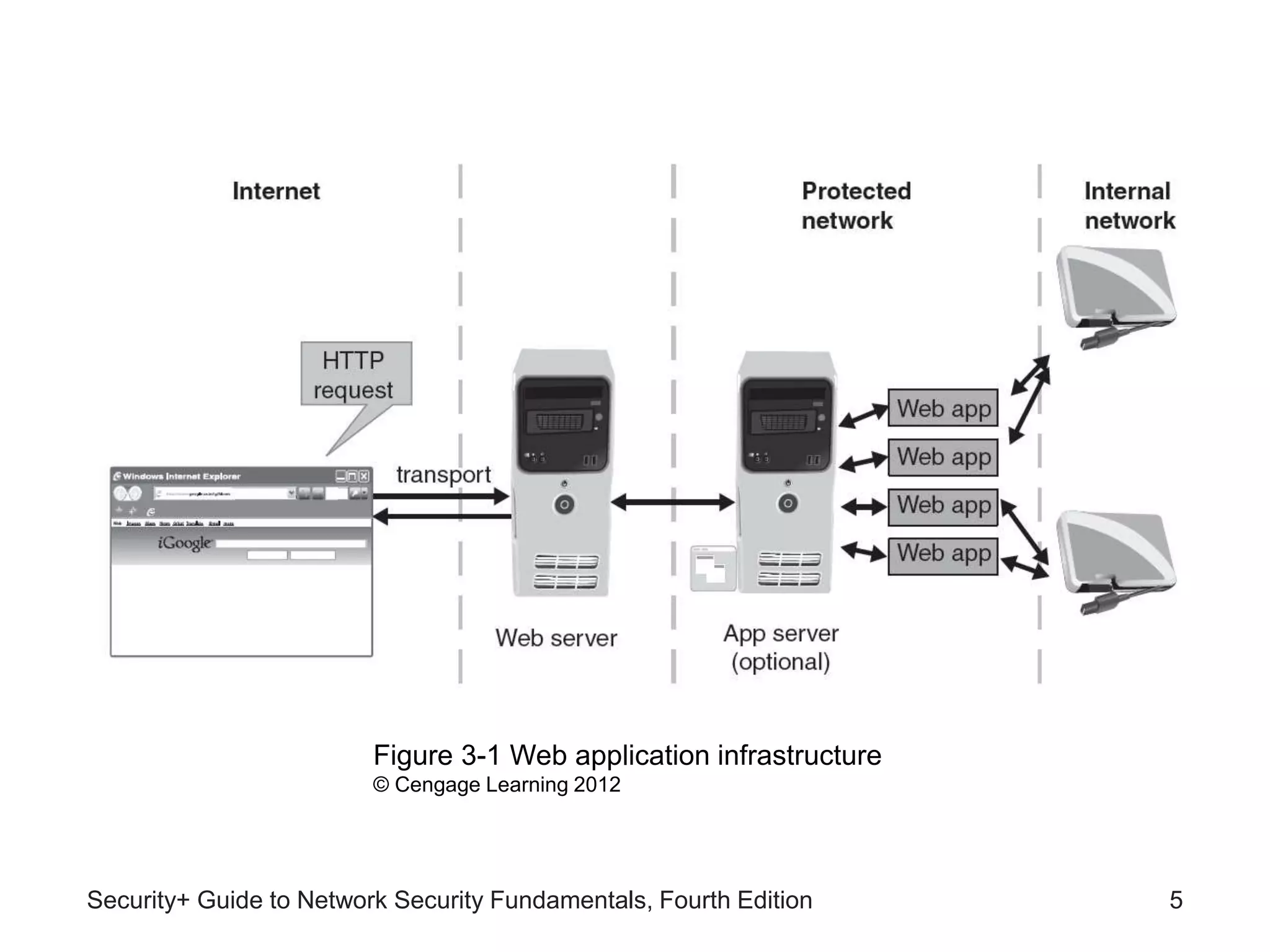
• Web applications an essential element of
organizations today
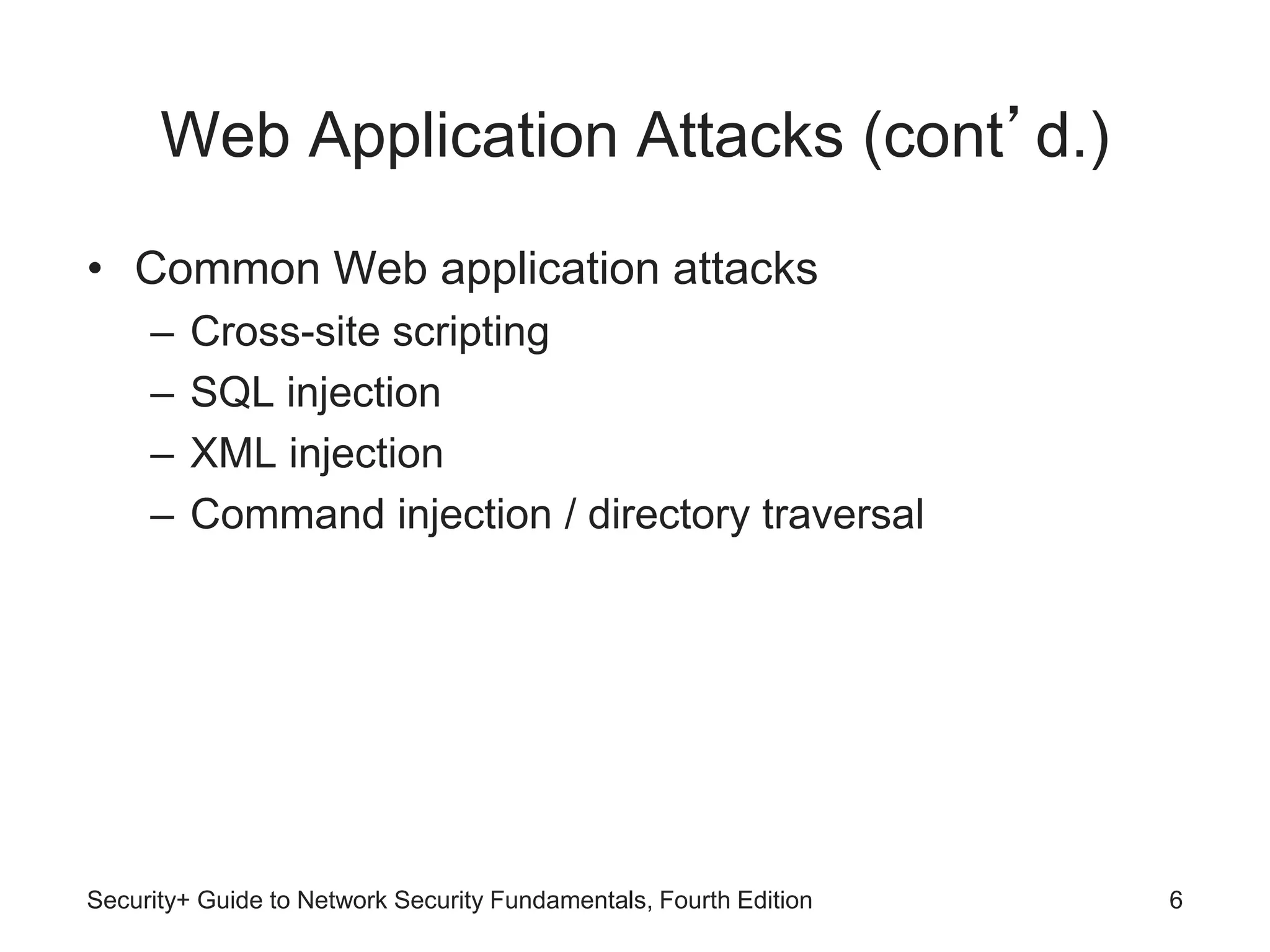
• Approach to securing Web applications
– Hardening the Web server
– Protecting the network
Security+ Guide to Network Security Fundamentals, Fourth Edition 4
Security+ Guide to Network Security Fundamentals, Fourth Edition 5
Figure 3-1 Web application infrastructure
© Cengage Learning 2012
Web Application Attacks (cont’d.)
• Common Web application attacks
– Cross-site scripting
– SQL injection
– XML injection
– Command injection / directory traversal
Security+ Guide to Network Security Fundamentals, Fourth Edition 6
Security+ Guide to Network Security Fundamentals, Fourth Edition 7
Figure 3-2 Web application security
© Cengage Learning 2012
Cross-Site Scripting (XSS)
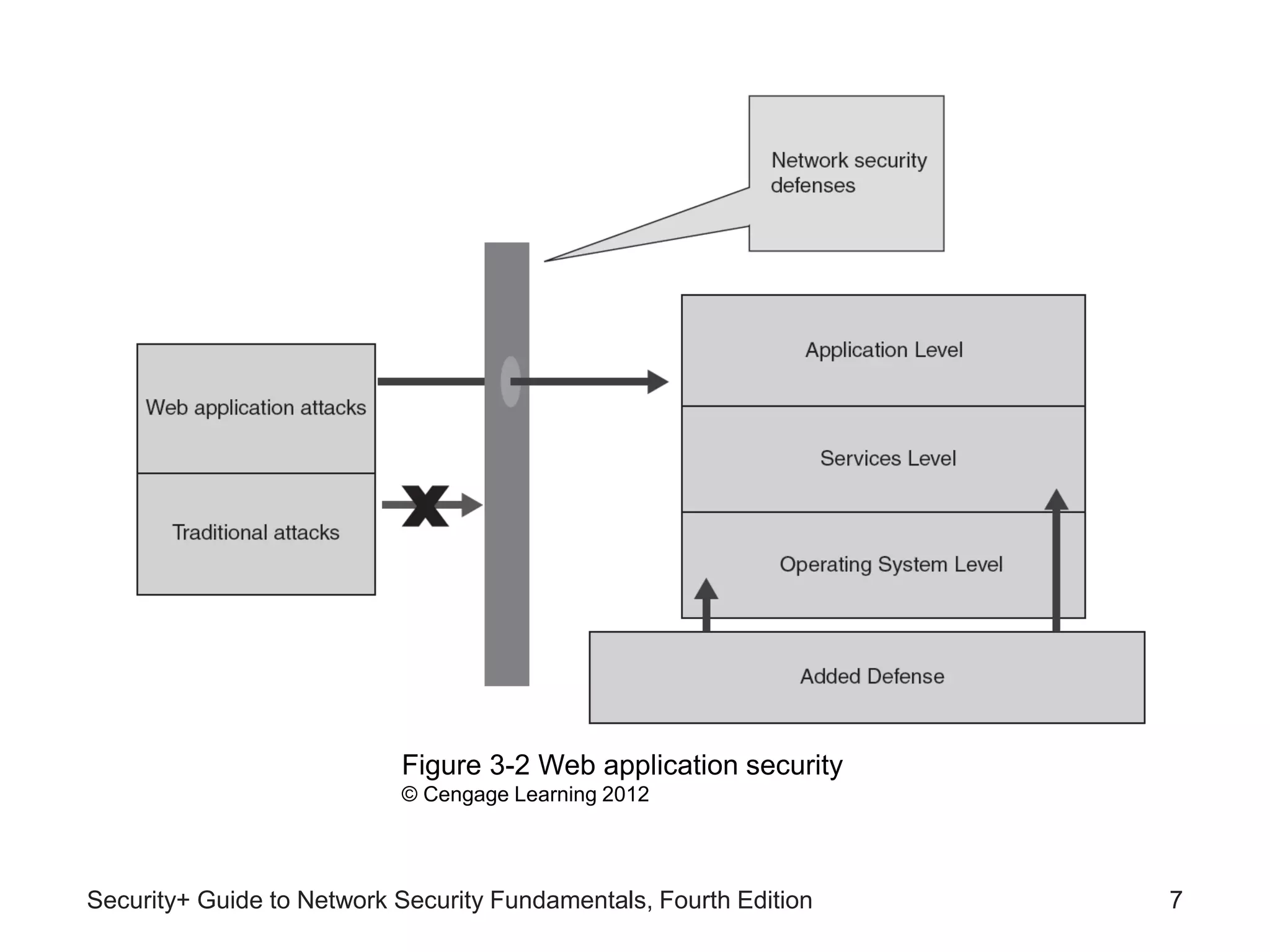
• Injecting scripts into a Web application server
– Directs attacks at clients
Security+ Guide to Network Security Fundamentals, Fourth Edition 8
Figure 3-3 XSS attacks
© Cengage Learning 2012
Cross-Site Scripting (cont’d.)
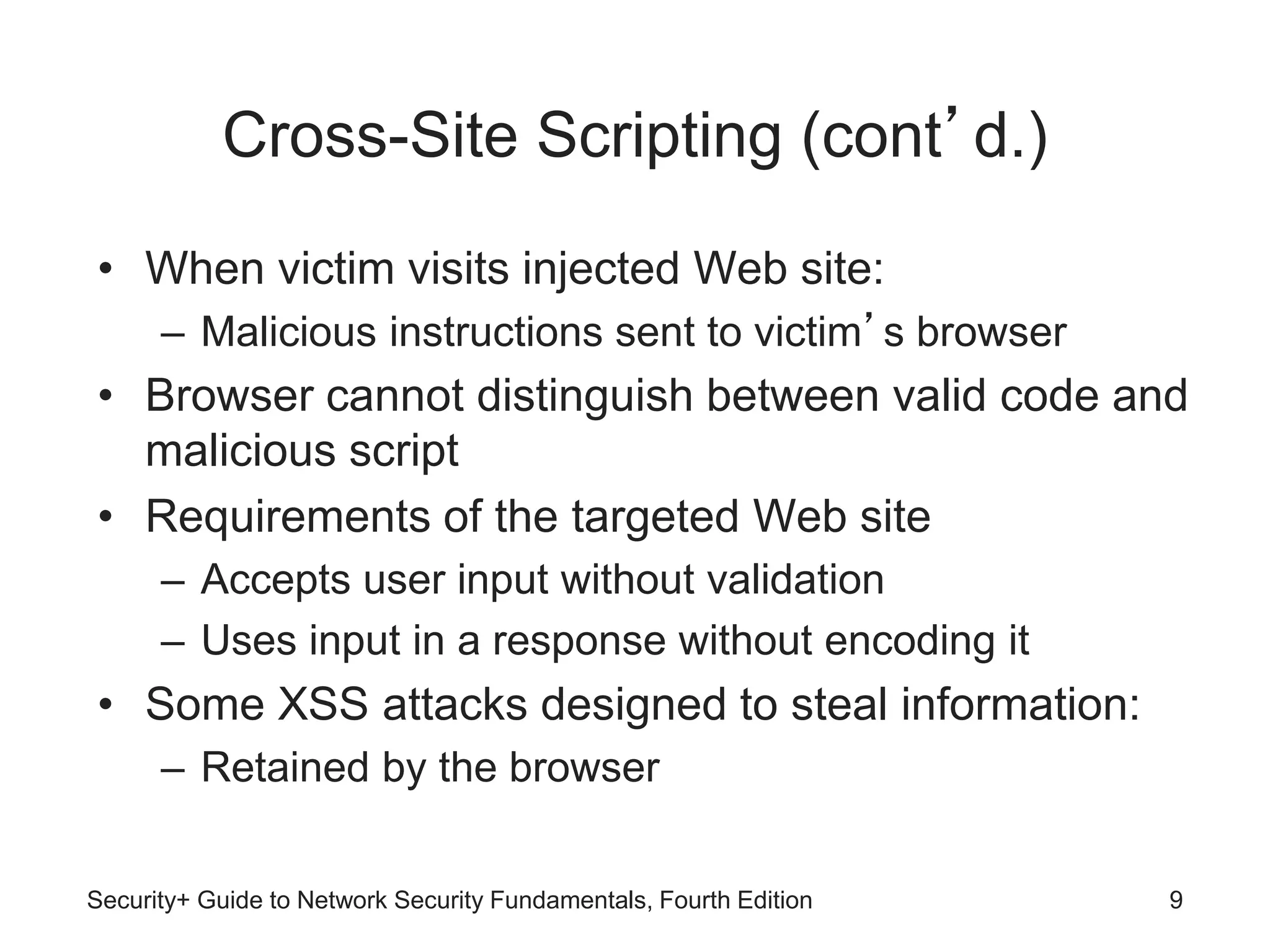
• When victim visits injected Web site:
– Malicious instructions sent to victim’s browser
• Browser cannot distinguish between valid code and
malicious script
• Requirements of the targeted Web site
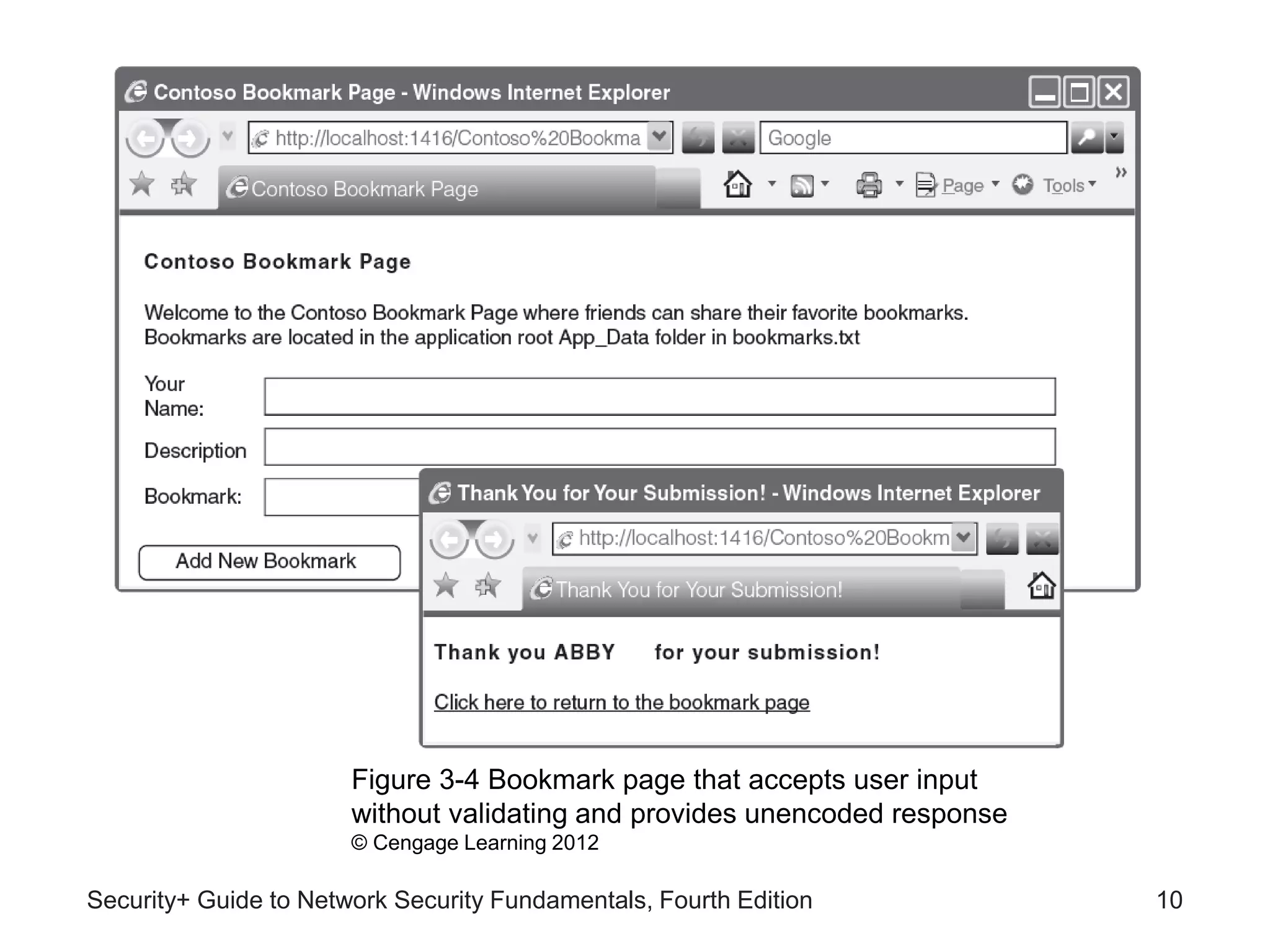
– Accepts user input without validation
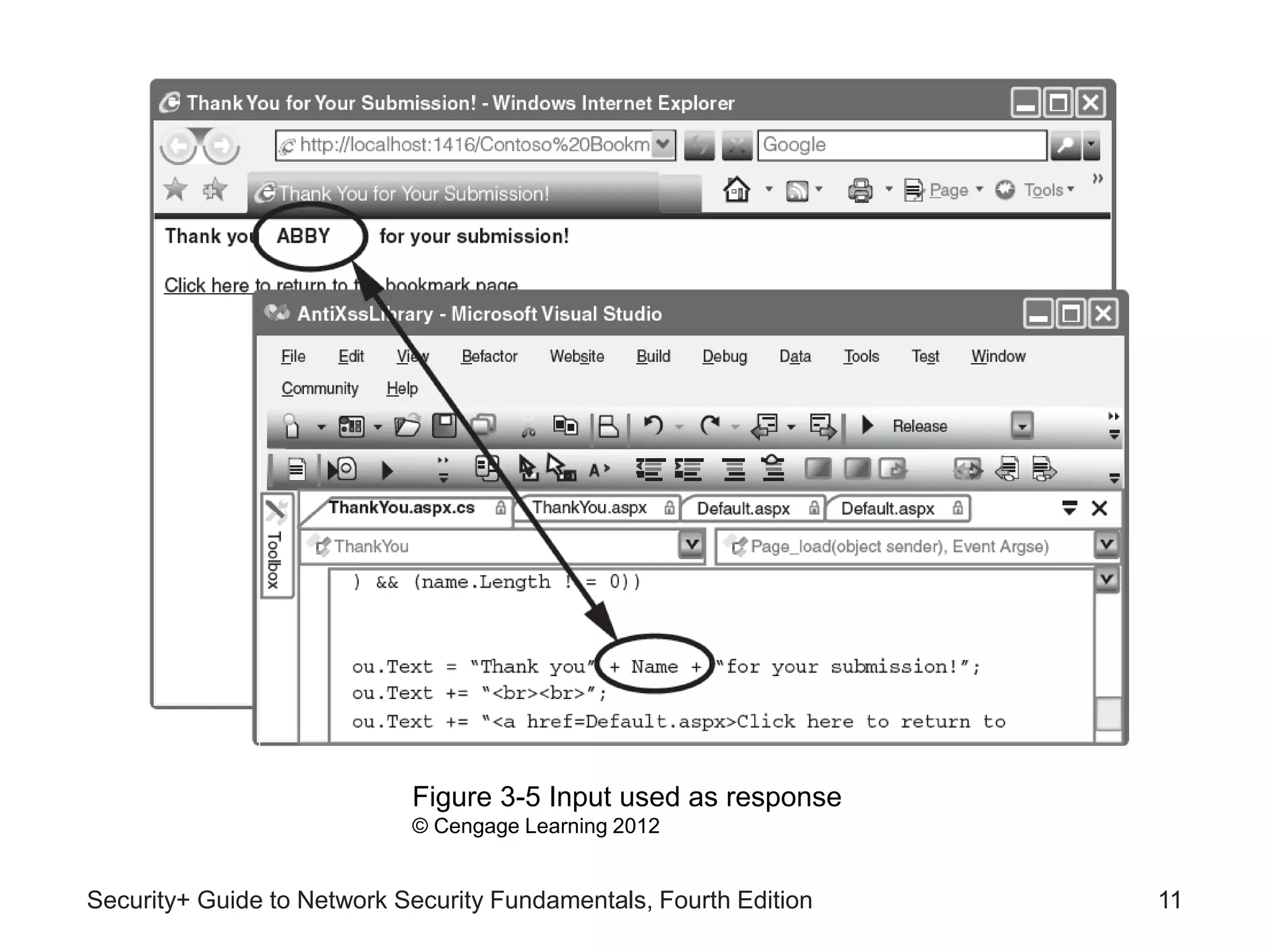
– Uses input in a response without encoding it
• Some XSS attacks designed to steal information:
– Retained by the browser
Security+ Guide to Network Security Fundamentals, Fourth Edition 9
Security+ Guide to Network Security Fundamentals, Fourth Edition 10
Figure 3-4 Bookmark page that accepts user input
without validating and provides unencoded response
© Cengage Learning 2012
Security+ Guide to Network Security Fundamentals, Fourth Edition 11
Figure 3-5 Input used as response
© Cengage Learning 2012
SQL Injection
• Targets SQL servers by injecting commands
• SQL (Structured Query Language)
– Used to manipulate data stored in relational
database
• Forgotten password example
– Attacker enters incorrectly formatted e-mail address
– Response lets attacker know whether input is being
validated
Security+ Guide to Network Security Fundamentals, Fourth Edition 12
SQL Injection (cont’d.)
• Forgotten password example (cont’d.)
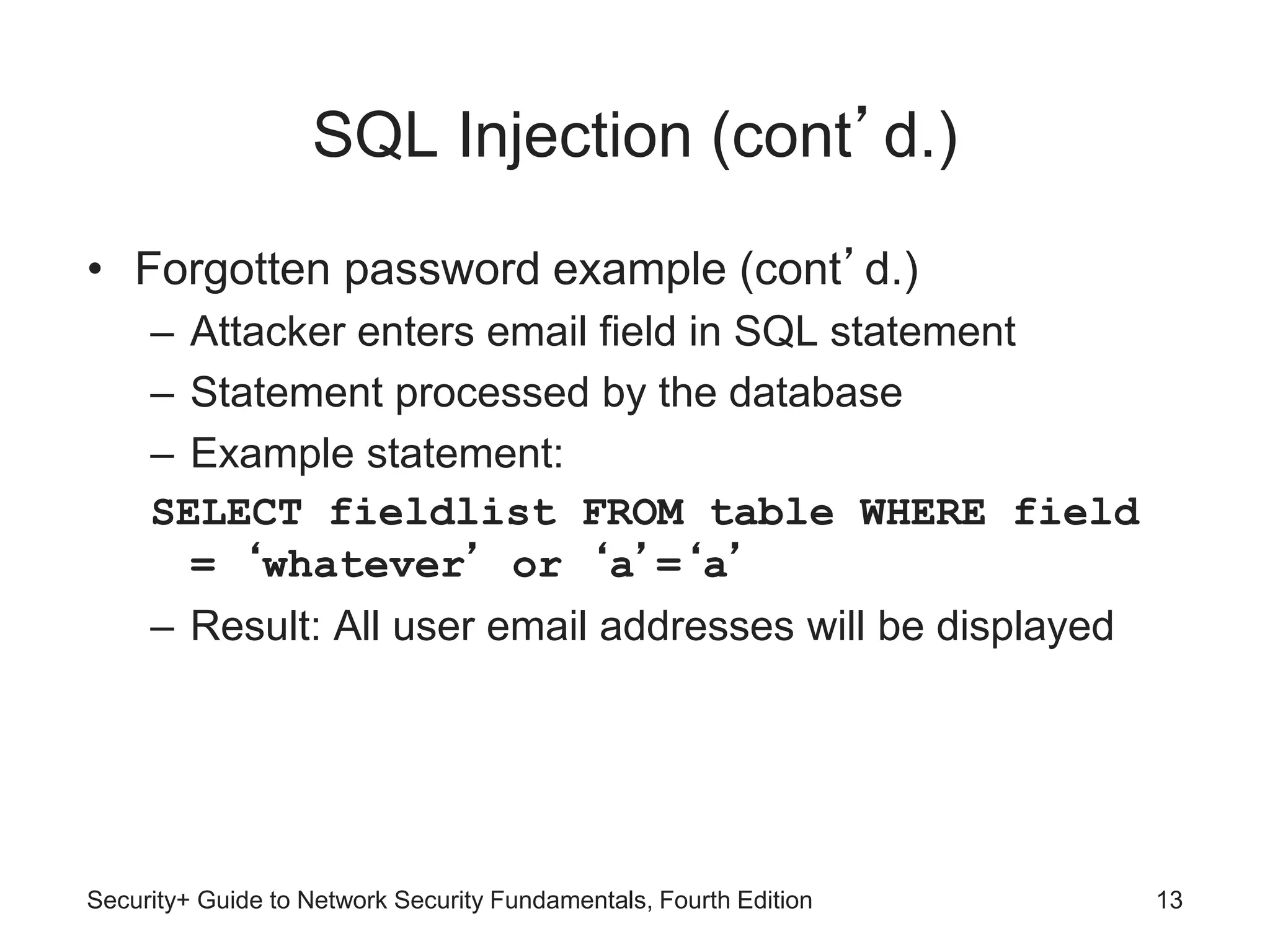
– Attacker enters email field in SQL statement
– Statement processed by the database
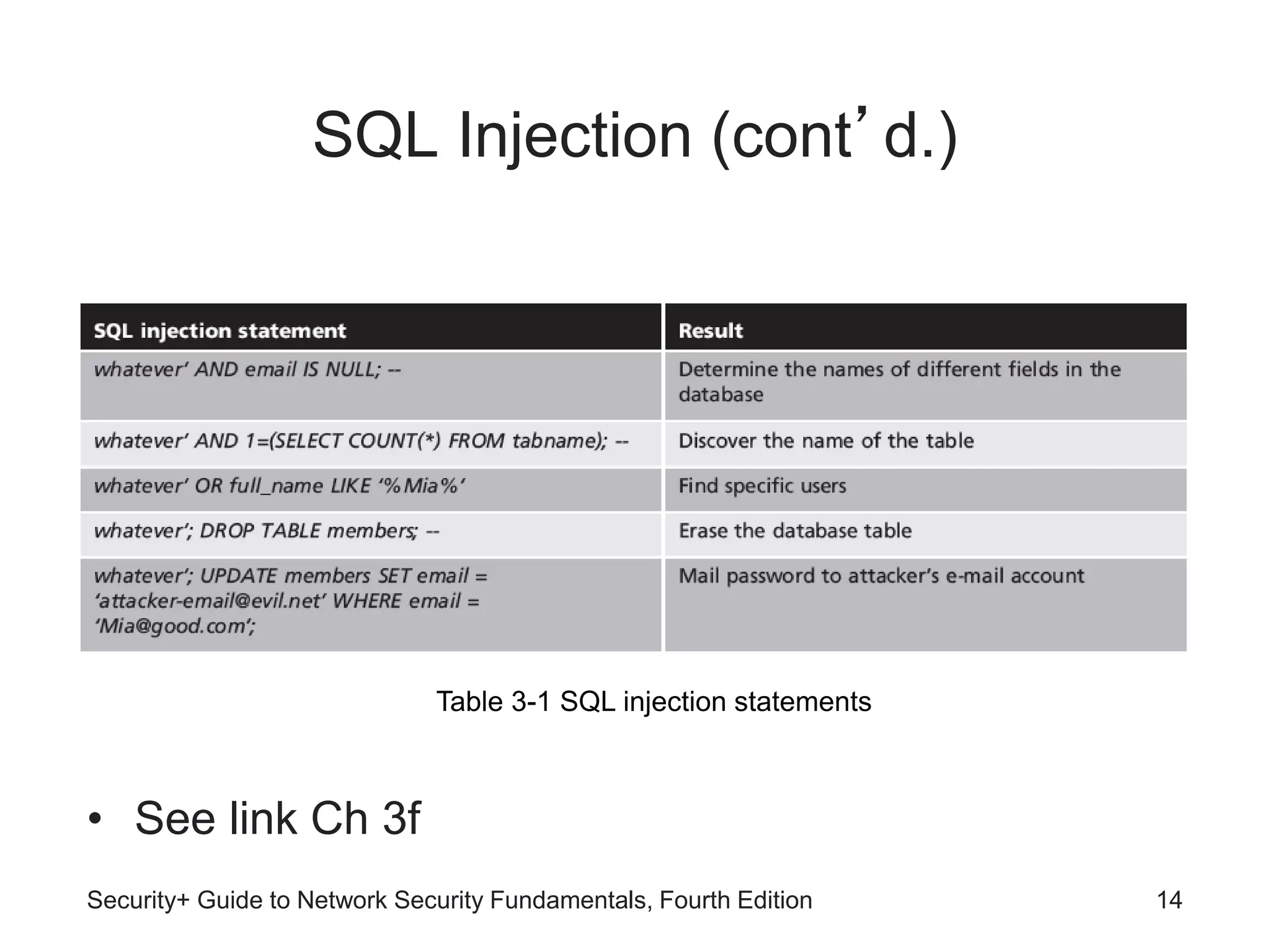
– Example statement:
SELECT fieldlist FROM table WHERE field
= ‘whatever’ or ‘a’=‘a’
– Result: All user email addresses will be displayed
Security+ Guide to Network Security Fundamentals, Fourth Edition 13
SQL Injection (cont’d.)
• See link Ch 3f
Security+ Guide to Network Security Fundamentals, Fourth Edition 14
Table 3-1 SQL injection statements
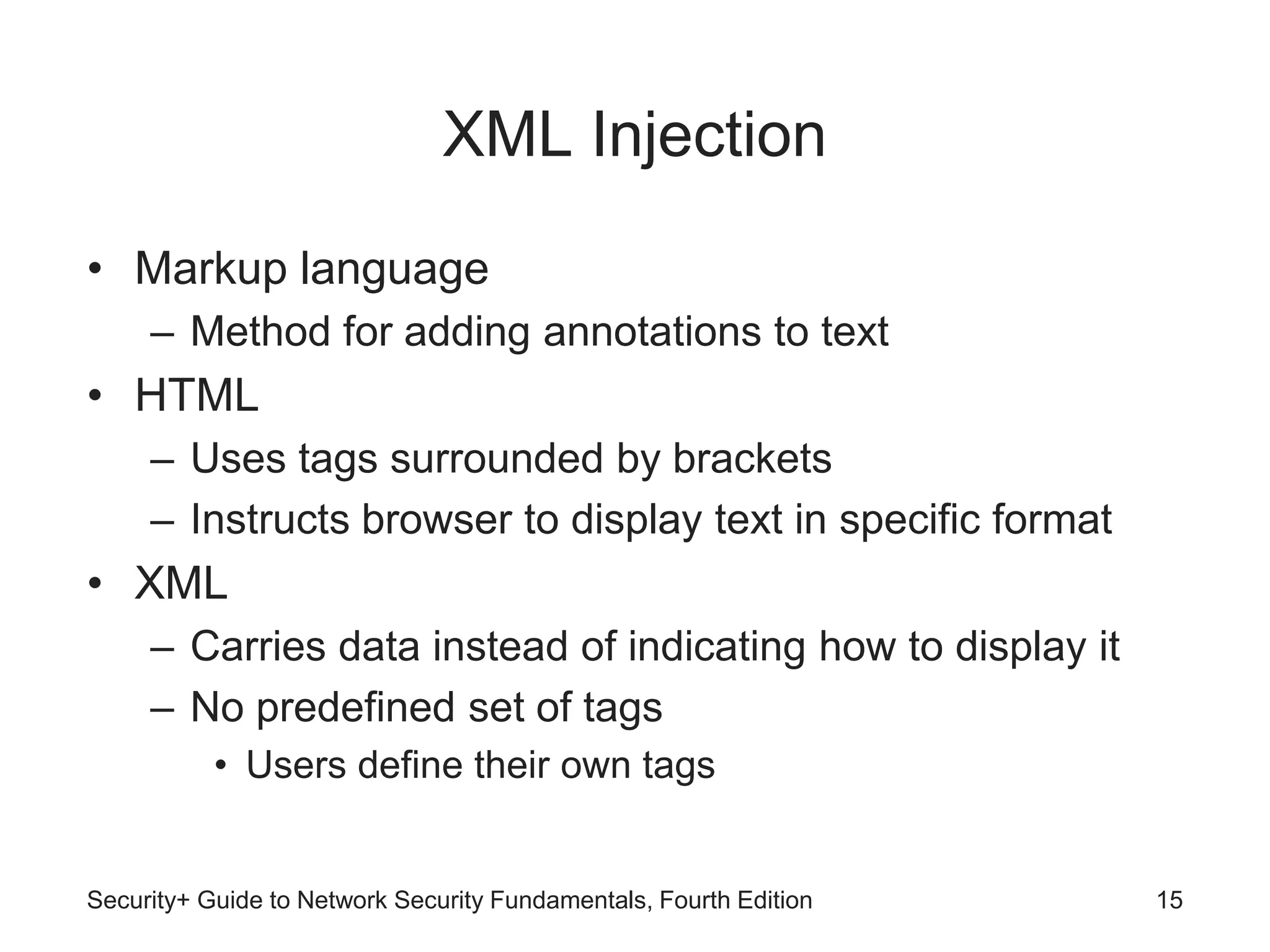
XML Injection
• Markup language
– Method for adding annotations to text
• HTML
– Uses tags surrounded by brackets
– Instructs browser to display text in specific format
• XML
– Carries data instead of indicating how to display it
– No predefined set of tags
• Users define their own tags
Security+ Guide to Network Security Fundamentals, Fourth Edition 15
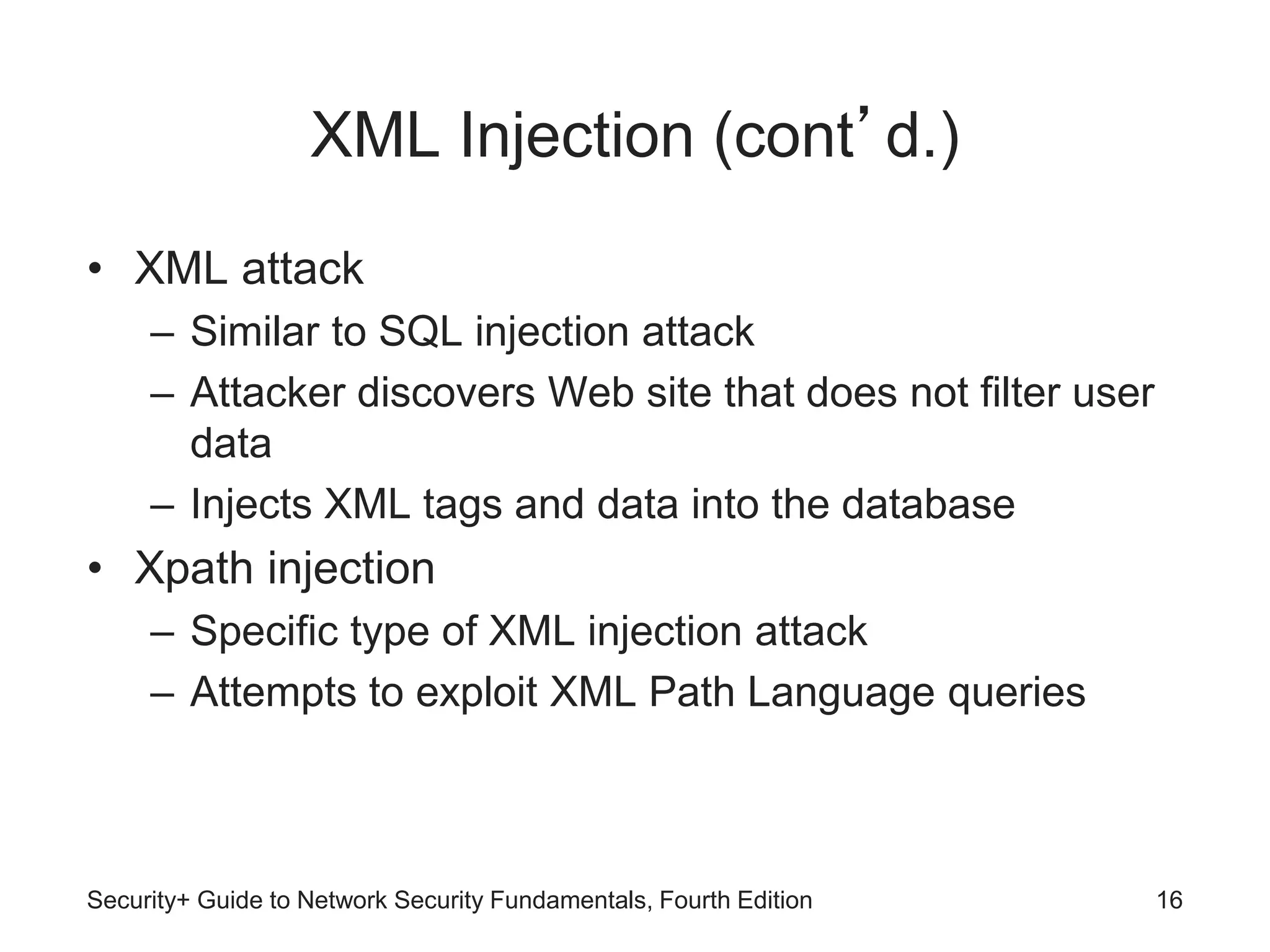
XML Injection (cont’d.)
• XML attack
– Similar to SQL injection attack
– Attacker discovers Web site that does not filter user
data
– Injects XML tags and data into the database
• Xpath injection
– Specific type of XML injection attack
– Attempts to exploit XML Path Language queries
Security+ Guide to Network Security Fundamentals, Fourth Edition 16
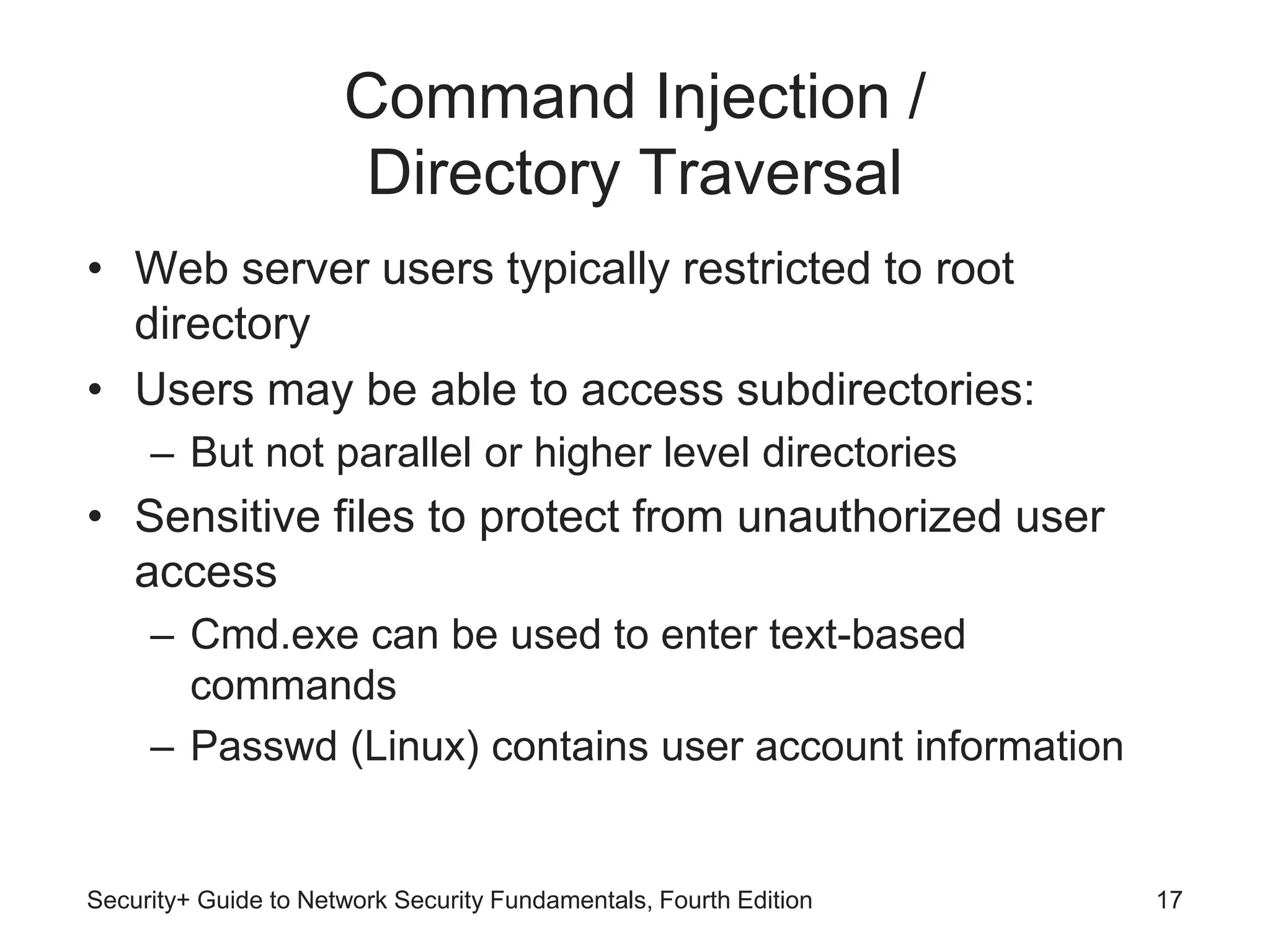
Command Injection /
Directory Traversal
• Web server users typically restricted to root
directory
• Users may be able to access subdirectories:
– But not parallel or higher level directories
• Sensitive files to protect from unauthorized user
access
– Cmd.exe can be used to enter text-based
commands
– Passwd (Linux) contains user account information
Security+ Guide to Network Security Fundamentals, Fourth Edition 17
Command Injection /
Directory Traversal (cont’d.)
• Directory traversal attack
– Takes advantage of software vulnerability
– Attacker moves from root directory to restricted
directories
• Command injection attack
– Attacker enters commands to execute on a server
Security+ Guide to Network Security Fundamentals, Fourth Edition 18
Client-Side Attacks
• Web application attacks are server-side attacks
• Client-side attacks target vulnerabilities in client
applications
– Interacting with a compromised server
– Client initiates connection with server, which could
result in an attack
Security+ Guide to Network Security Fundamentals, Fourth Edition 19
Client-Side Attacks (cont’d.)
• Drive-by download
– Client computer compromised simply by viewing a
Web page
– Attackers inject content into vulnerable Web server
• Gain access to server’s operating system
– Attackers craft a zero pixel frame to avoid visual
detection
– Embed an HTML document inside main document
– Client’s browser downloads malicious script
– Instructs computer to download malware
Security+ Guide to Network Security Fundamentals, Fourth Edition 20
Client-Side Attacks (cont’d.)
• Header manipulation
– HTTP header contains fields that characterize data
being transmitted
– Headers can originate from a Web browser
• Browsers do not normally allow this
• Attacker’s short program can allow modification
• Examples of header manipulation
– Referer
– Accept-language
Security+ Guide to Network Security Fundamentals, Fourth Edition 21
Client-Side Attacks (cont’d.)
• Referer field indicates site that generated the Web
page
– Attacker can modify this field to hide fact it came
from another site
– Modified Web page hosted from attacker’s
computer
• Accept-language
– Some Web applications pass contents of this field
directly to database
– Attacker could inject SQL command by modifying
this header
Security+ Guide to Network Security Fundamentals, Fourth Edition 22
Client-Side Attacks (cont’d.)
• Cookies and Attachments
– Cookies store user-specific information on user’s
local computer
• Web sites use cookies to identify repeat visitors
• Examples of information stored in a cookie
– Travel Web sites may store user’s travel itinerary
– Personal information provided when visiting a site
• Only the Web site that created a cookie can read it
Security+ Guide to Network Security Fundamentals, Fourth Edition 23
Client-Side Attacks (cont’d.)
• First-party cookie
– Cookie created by Web site user is currently visiting
• Third-party cookie
– Site advertisers place a cookie to record user
preferences
• Session cookie
– Stored in RAM and expires when browser is closed
Security+ Guide to Network Security Fundamentals, Fourth Edition 24
Client-Side Attacks (cont’d.)
• Persistent cookie
– Recorded on computer’s hard drive
– Does not expire when browser closes
• Secure cookie
– Used only when browser visits server over secure
connection
– Always encrypted
Security+ Guide to Network Security Fundamentals, Fourth Edition 25
Client-Side Attacks (cont’d.)
• Flash cookie
– Uses more memory than traditional cookie
– Cannot be deleted through browser configuration
settings
– See Project 3-6 to change Flash cookie settings
• Cookies pose security and privacy risks
– May be stolen and used to impersonate user
– Used to tailor advertising
– Can be exploited by attackers
Security+ Guide to Network Security Fundamentals, Fourth Edition 26
Client-Side Attacks (cont’d.)
• Session hijacking
– Attacker attempts to impersonate user by stealing or
guessing session token
• Malicious add-ons
– Browser extensions provide multimedia or interactive
Web content
– Active X add-ons have several security concerns
Security+ Guide to Network Security Fundamentals, Fourth Edition 27
Security+ Guide to Network Security Fundamentals, Fourth Edition 28
Figure 3-7 Session hijacking
© Cengage Learning 2012
Client-Side Attacks (cont’d.)
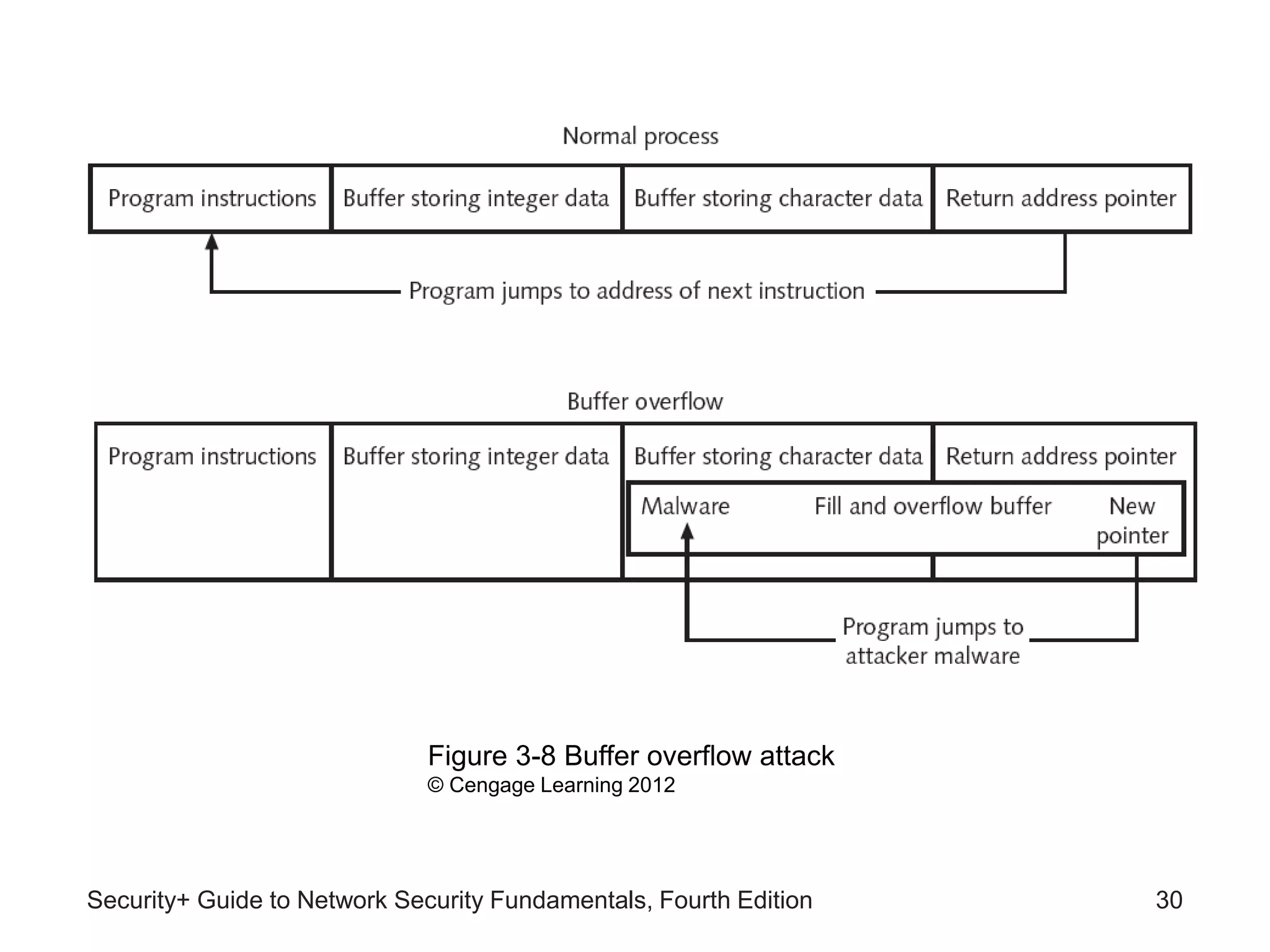
• Buffer overflow attacks
– Process attempts to store data in RAM beyond
boundaries of fixed-length storage buffer
– Data overflows into adjacent memory locations
– May cause computer to stop functioning
– Attacker can change “return address”
• Redirects to memory address containing malware
code
Security+ Guide to Network Security Fundamentals, Fourth Edition 29
Security+ Guide to Network Security Fundamentals, Fourth Edition 30
Figure 3-8 Buffer overflow attack
© Cengage Learning 2012
Network Attacks
• Denial of service (DoS)
– Attempts to prevent system from performing normal
functions
– Ping flood attack
• Ping utility used to send large number of echo request
messages
• Overwhelms Web server
– Smurf attack
• Ping request with originating address changed
• Appears as if target computer is asking for response
from all computers on the network
Security+ Guide to Network Security Fundamentals, Fourth Edition 31
Network Attacks
• Denial of service (DoS) (cont’d.)
– SYN flood attack
• Takes advantage of procedures for establishing a
connection
• Distributed denial of service (DDoS)
– Attacker uses many zombie computers in a botnet to
flood a device with requests
– Virtually impossible to identify and block source of
attack
Security+ Guide to Network Security Fundamentals, Fourth Edition 32
Security+ Guide to Network Security Fundamentals, Fourth Edition 33
Figure 3-9 SYN flood attack
© Cengage Learning 2012
Interception
• Man-in-the-middle
– Interception of legitimate communication
– Forging a fictitious response to the sender
– Passive attack records transmitted data
– Active attack alters contents of transmission before
sending to recipient
• Replay attacks
– Similar to passive man-in-the-middle attack
Security+ Guide to Network Security Fundamentals, Fourth Edition 34
Interception (cont’d.)
• Replay attacks (cont’d.)
– Attacker makes copy of transmission
• Uses copy at a later time
– Example: capturing logon credentials
• More sophisticated replay attacks
– Attacker captures network device’s message to
server
– Later sends original, valid message to server
– Establishes trust relationship between attacker and
server
Security+ Guide to Network Security Fundamentals, Fourth Edition 35
Poisoning
• ARP poisoning
– Attacker modifies MAC address in ARP cache to
point to different computer
Security+ Guide to Network Security Fundamentals, Fourth Edition 36
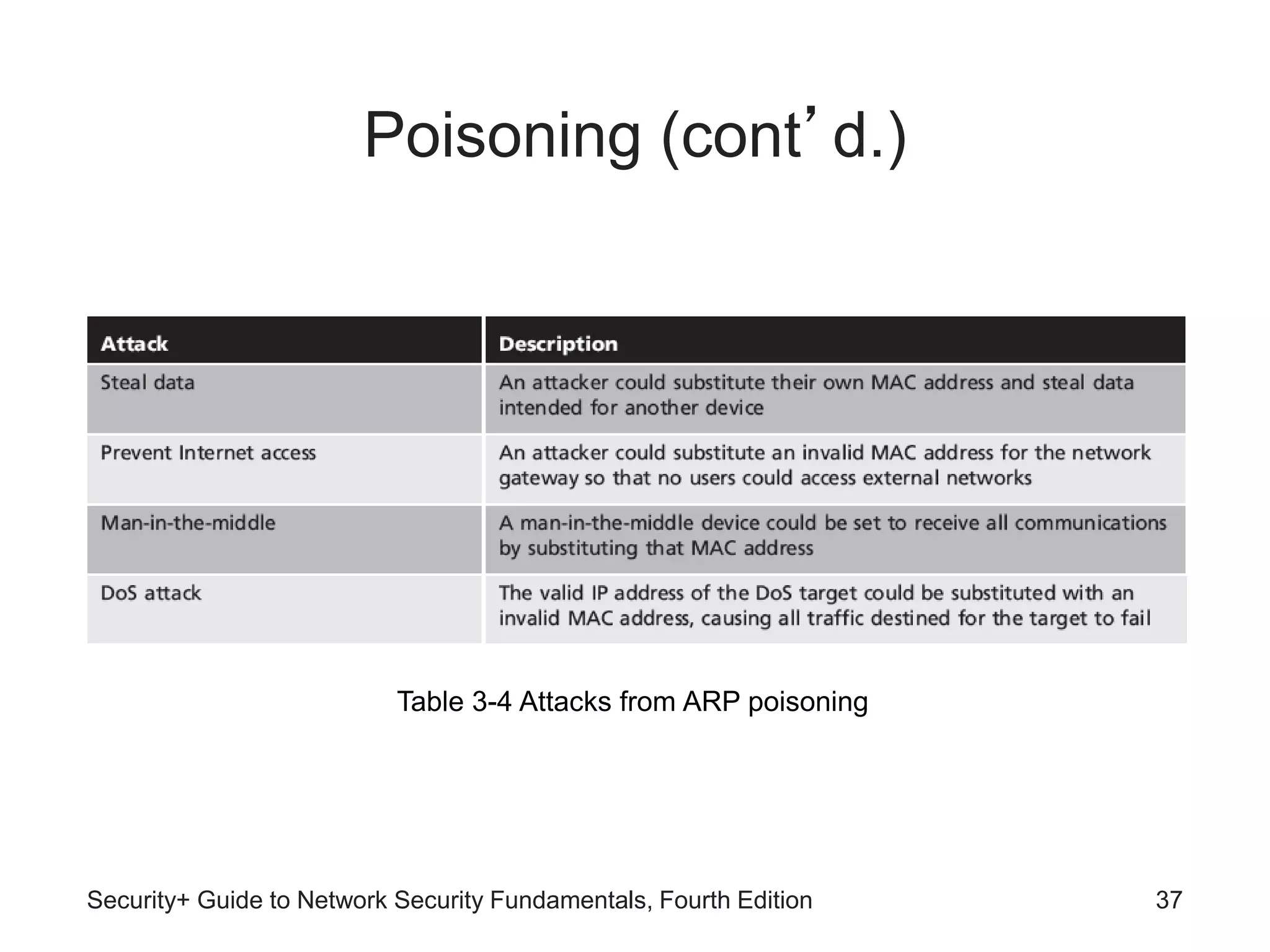
Table 3-3 ARP poisoning attack
Poisoning (cont’d.)
Security+ Guide to Network Security Fundamentals, Fourth Edition 37
Table 3-4 Attacks from ARP poisoning
Poisoning (cont’d.)
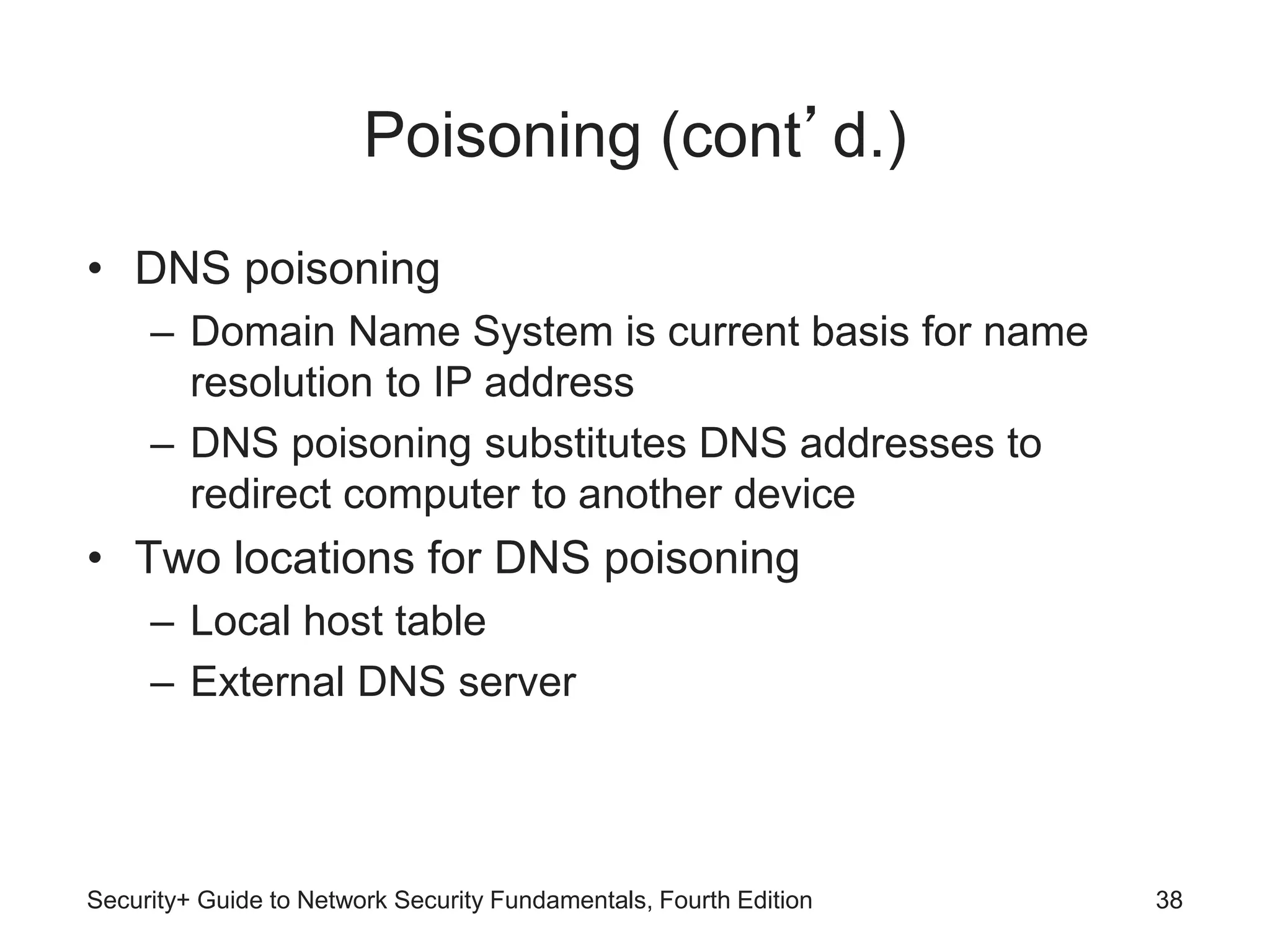
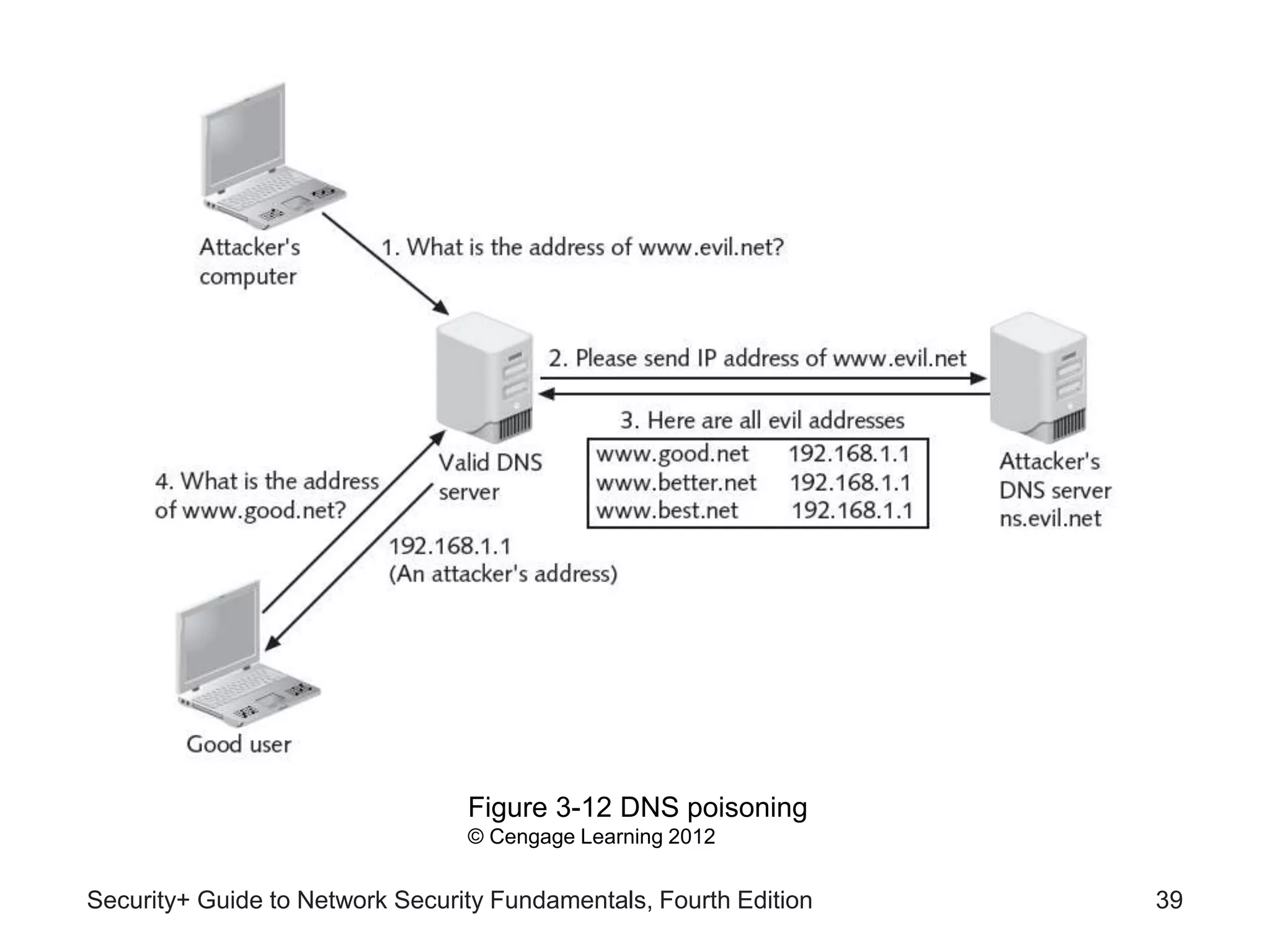
• DNS poisoning
– Domain Name System is current basis for name
resolution to IP address
– DNS poisoning substitutes DNS addresses to
redirect computer to another device
• Two locations for DNS poisoning
– Local host table
– External DNS server
Security+ Guide to Network Security Fundamentals, Fourth Edition 38
Security+ Guide to Network Security Fundamentals, Fourth Edition 39
Figure 3-12 DNS poisoning
© Cengage Learning 2012
Attacks on Access Rights
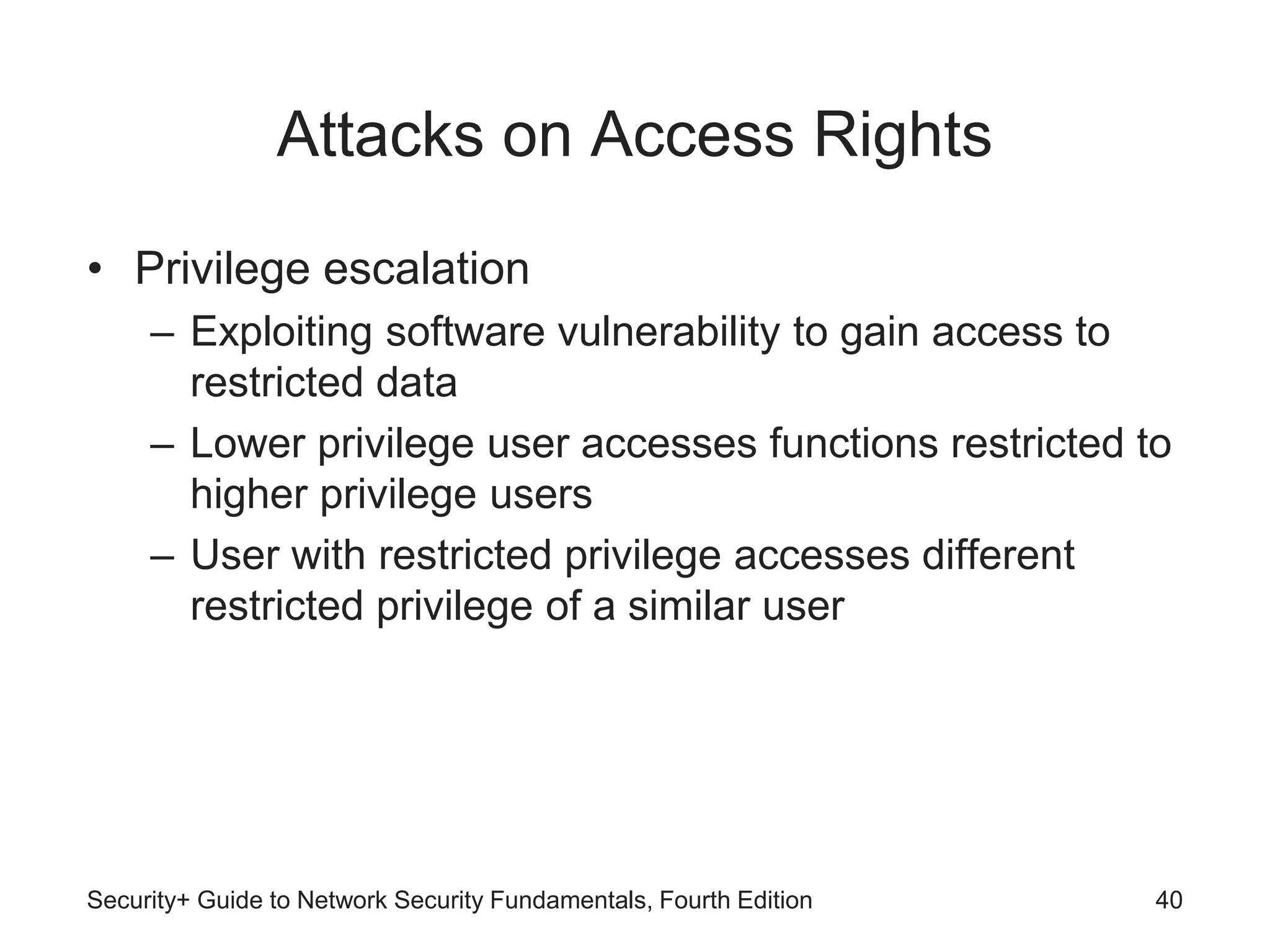
• Privilege escalation
– Exploiting software vulnerability to gain access to
restricted data
– Lower privilege user accesses functions restricted to
higher privilege users
– User with restricted privilege accesses different
restricted privilege of a similar user
Security+ Guide to Network Security Fundamentals, Fourth Edition 40
Attacks on Access Rights (cont’d.)
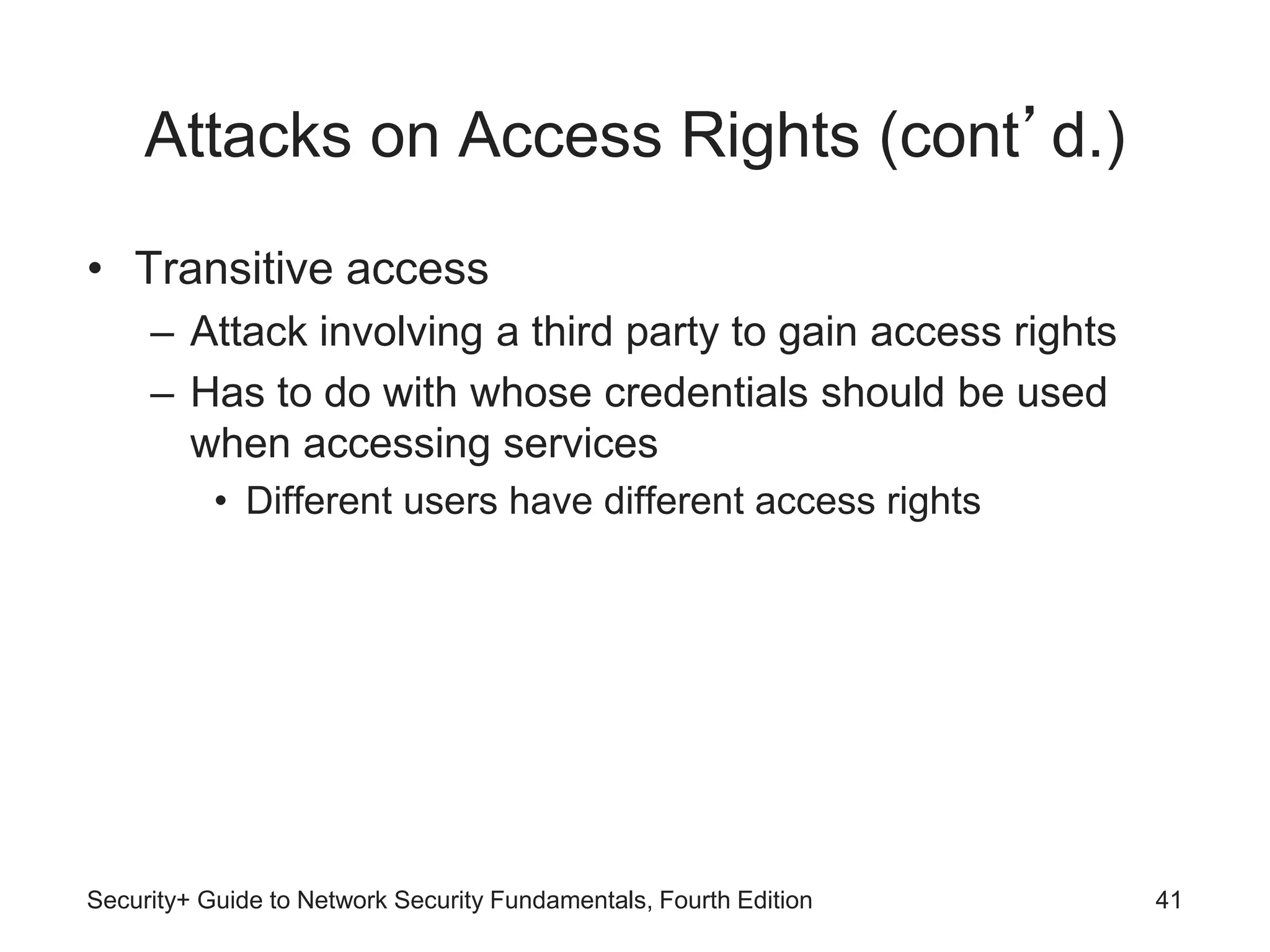
• Transitive access
– Attack involving a third party to gain access rights
– Has to do with whose credentials should be used
when accessing services
• Different users have different access rights
Security+ Guide to Network Security Fundamentals, Fourth Edition 41

Chap 03.ppt

  • 1.
    Security+ Guide toNetwork Security Fundamentals, Fourth Edition Chapter 3 Application and Network Attacks
  • 2.
    Objectives • List andexplain the different types of Web application attacks • Define client-side attacks • Explain how a buffer overflow attack works • List different types of denial of service attacks • Describe interception and poisoning attacks Security+ Guide to Network Security Fundamentals, Fourth Edition 2
  • 3.
    Application Attacks • Attacksthat target applications – Category continues to grow – Web application attacks – Client-side attacks – Buffer overflow attacks • Zero day attacks – Exploit previously unknown vulnerabilities – Victims have no time to prepare or defend Security+ Guide to Network Security Fundamentals, Fourth Edition 3
  • 4.
    Web Application Attacks •Web applications an essential element of organizations today • Approach to securing Web applications – Hardening the Web server – Protecting the network Security+ Guide to Network Security Fundamentals, Fourth Edition 4
  • 5.
    Security+ Guide toNetwork Security Fundamentals, Fourth Edition 5 Figure 3-1 Web application infrastructure © Cengage Learning 2012
  • 6.
    Web Application Attacks(cont’d.) • Common Web application attacks – Cross-site scripting – SQL injection – XML injection – Command injection / directory traversal Security+ Guide to Network Security Fundamentals, Fourth Edition 6
  • 7.
    Security+ Guide toNetwork Security Fundamentals, Fourth Edition 7 Figure 3-2 Web application security © Cengage Learning 2012
  • 8.
    Cross-Site Scripting (XSS) •Injecting scripts into a Web application server – Directs attacks at clients Security+ Guide to Network Security Fundamentals, Fourth Edition 8 Figure 3-3 XSS attacks © Cengage Learning 2012
  • 9.
    Cross-Site Scripting (cont’d.) •When victim visits injected Web site: – Malicious instructions sent to victim’s browser • Browser cannot distinguish between valid code and malicious script • Requirements of the targeted Web site – Accepts user input without validation – Uses input in a response without encoding it • Some XSS attacks designed to steal information: – Retained by the browser Security+ Guide to Network Security Fundamentals, Fourth Edition 9
  • 10.
    Security+ Guide toNetwork Security Fundamentals, Fourth Edition 10 Figure 3-4 Bookmark page that accepts user input without validating and provides unencoded response © Cengage Learning 2012
  • 11.
    Security+ Guide toNetwork Security Fundamentals, Fourth Edition 11 Figure 3-5 Input used as response © Cengage Learning 2012
  • 12.
    SQL Injection • TargetsSQL servers by injecting commands • SQL (Structured Query Language) – Used to manipulate data stored in relational database • Forgotten password example – Attacker enters incorrectly formatted e-mail address – Response lets attacker know whether input is being validated Security+ Guide to Network Security Fundamentals, Fourth Edition 12
  • 13.
    SQL Injection (cont’d.) •Forgotten password example (cont’d.) – Attacker enters email field in SQL statement – Statement processed by the database – Example statement: SELECT fieldlist FROM table WHERE field = ‘whatever’ or ‘a’=‘a’ – Result: All user email addresses will be displayed Security+ Guide to Network Security Fundamentals, Fourth Edition 13
  • 14.
    SQL Injection (cont’d.) •See link Ch 3f Security+ Guide to Network Security Fundamentals, Fourth Edition 14 Table 3-1 SQL injection statements
  • 15.
    XML Injection • Markuplanguage – Method for adding annotations to text • HTML – Uses tags surrounded by brackets – Instructs browser to display text in specific format • XML – Carries data instead of indicating how to display it – No predefined set of tags • Users define their own tags Security+ Guide to Network Security Fundamentals, Fourth Edition 15
  • 16.
    XML Injection (cont’d.) •XML attack – Similar to SQL injection attack – Attacker discovers Web site that does not filter user data – Injects XML tags and data into the database • Xpath injection – Specific type of XML injection attack – Attempts to exploit XML Path Language queries Security+ Guide to Network Security Fundamentals, Fourth Edition 16
  • 17.
    Command Injection / DirectoryTraversal • Web server users typically restricted to root directory • Users may be able to access subdirectories: – But not parallel or higher level directories • Sensitive files to protect from unauthorized user access – Cmd.exe can be used to enter text-based commands – Passwd (Linux) contains user account information Security+ Guide to Network Security Fundamentals, Fourth Edition 17
  • 18.
    Command Injection / DirectoryTraversal (cont’d.) • Directory traversal attack – Takes advantage of software vulnerability – Attacker moves from root directory to restricted directories • Command injection attack – Attacker enters commands to execute on a server Security+ Guide to Network Security Fundamentals, Fourth Edition 18
  • 19.
    Client-Side Attacks • Webapplication attacks are server-side attacks • Client-side attacks target vulnerabilities in client applications – Interacting with a compromised server – Client initiates connection with server, which could result in an attack Security+ Guide to Network Security Fundamentals, Fourth Edition 19
  • 20.
    Client-Side Attacks (cont’d.) •Drive-by download – Client computer compromised simply by viewing a Web page – Attackers inject content into vulnerable Web server • Gain access to server’s operating system – Attackers craft a zero pixel frame to avoid visual detection – Embed an HTML document inside main document – Client’s browser downloads malicious script – Instructs computer to download malware Security+ Guide to Network Security Fundamentals, Fourth Edition 20
  • 21.
    Client-Side Attacks (cont’d.) •Header manipulation – HTTP header contains fields that characterize data being transmitted – Headers can originate from a Web browser • Browsers do not normally allow this • Attacker’s short program can allow modification • Examples of header manipulation – Referer – Accept-language Security+ Guide to Network Security Fundamentals, Fourth Edition 21
  • 22.
    Client-Side Attacks (cont’d.) •Referer field indicates site that generated the Web page – Attacker can modify this field to hide fact it came from another site – Modified Web page hosted from attacker’s computer • Accept-language – Some Web applications pass contents of this field directly to database – Attacker could inject SQL command by modifying this header Security+ Guide to Network Security Fundamentals, Fourth Edition 22
  • 23.
    Client-Side Attacks (cont’d.) •Cookies and Attachments – Cookies store user-specific information on user’s local computer • Web sites use cookies to identify repeat visitors • Examples of information stored in a cookie – Travel Web sites may store user’s travel itinerary – Personal information provided when visiting a site • Only the Web site that created a cookie can read it Security+ Guide to Network Security Fundamentals, Fourth Edition 23
  • 24.
    Client-Side Attacks (cont’d.) •First-party cookie – Cookie created by Web site user is currently visiting • Third-party cookie – Site advertisers place a cookie to record user preferences • Session cookie – Stored in RAM and expires when browser is closed Security+ Guide to Network Security Fundamentals, Fourth Edition 24
  • 25.
    Client-Side Attacks (cont’d.) •Persistent cookie – Recorded on computer’s hard drive – Does not expire when browser closes • Secure cookie – Used only when browser visits server over secure connection – Always encrypted Security+ Guide to Network Security Fundamentals, Fourth Edition 25
  • 26.
    Client-Side Attacks (cont’d.) •Flash cookie – Uses more memory than traditional cookie – Cannot be deleted through browser configuration settings – See Project 3-6 to change Flash cookie settings • Cookies pose security and privacy risks – May be stolen and used to impersonate user – Used to tailor advertising – Can be exploited by attackers Security+ Guide to Network Security Fundamentals, Fourth Edition 26
  • 27.
    Client-Side Attacks (cont’d.) •Session hijacking – Attacker attempts to impersonate user by stealing or guessing session token • Malicious add-ons – Browser extensions provide multimedia or interactive Web content – Active X add-ons have several security concerns Security+ Guide to Network Security Fundamentals, Fourth Edition 27
  • 28.
    Security+ Guide toNetwork Security Fundamentals, Fourth Edition 28 Figure 3-7 Session hijacking © Cengage Learning 2012
  • 29.
    Client-Side Attacks (cont’d.) •Buffer overflow attacks – Process attempts to store data in RAM beyond boundaries of fixed-length storage buffer – Data overflows into adjacent memory locations – May cause computer to stop functioning – Attacker can change “return address” • Redirects to memory address containing malware code Security+ Guide to Network Security Fundamentals, Fourth Edition 29
  • 30.
    Security+ Guide toNetwork Security Fundamentals, Fourth Edition 30 Figure 3-8 Buffer overflow attack © Cengage Learning 2012
  • 31.
    Network Attacks • Denialof service (DoS) – Attempts to prevent system from performing normal functions – Ping flood attack • Ping utility used to send large number of echo request messages • Overwhelms Web server – Smurf attack • Ping request with originating address changed • Appears as if target computer is asking for response from all computers on the network Security+ Guide to Network Security Fundamentals, Fourth Edition 31
  • 32.
    Network Attacks • Denialof service (DoS) (cont’d.) – SYN flood attack • Takes advantage of procedures for establishing a connection • Distributed denial of service (DDoS) – Attacker uses many zombie computers in a botnet to flood a device with requests – Virtually impossible to identify and block source of attack Security+ Guide to Network Security Fundamentals, Fourth Edition 32
  • 33.
    Security+ Guide toNetwork Security Fundamentals, Fourth Edition 33 Figure 3-9 SYN flood attack © Cengage Learning 2012
  • 34.
    Interception • Man-in-the-middle – Interceptionof legitimate communication – Forging a fictitious response to the sender – Passive attack records transmitted data – Active attack alters contents of transmission before sending to recipient • Replay attacks – Similar to passive man-in-the-middle attack Security+ Guide to Network Security Fundamentals, Fourth Edition 34
  • 35.
    Interception (cont’d.) • Replayattacks (cont’d.) – Attacker makes copy of transmission • Uses copy at a later time – Example: capturing logon credentials • More sophisticated replay attacks – Attacker captures network device’s message to server – Later sends original, valid message to server – Establishes trust relationship between attacker and server Security+ Guide to Network Security Fundamentals, Fourth Edition 35
  • 36.
    Poisoning • ARP poisoning –Attacker modifies MAC address in ARP cache to point to different computer Security+ Guide to Network Security Fundamentals, Fourth Edition 36 Table 3-3 ARP poisoning attack
  • 37.
    Poisoning (cont’d.) Security+ Guideto Network Security Fundamentals, Fourth Edition 37 Table 3-4 Attacks from ARP poisoning
  • 38.
    Poisoning (cont’d.) • DNSpoisoning – Domain Name System is current basis for name resolution to IP address – DNS poisoning substitutes DNS addresses to redirect computer to another device • Two locations for DNS poisoning – Local host table – External DNS server Security+ Guide to Network Security Fundamentals, Fourth Edition 38
  • 39.
    Security+ Guide toNetwork Security Fundamentals, Fourth Edition 39 Figure 3-12 DNS poisoning © Cengage Learning 2012
  • 40.
    Attacks on AccessRights • Privilege escalation – Exploiting software vulnerability to gain access to restricted data – Lower privilege user accesses functions restricted to higher privilege users – User with restricted privilege accesses different restricted privilege of a similar user Security+ Guide to Network Security Fundamentals, Fourth Edition 40
  • 41.
    Attacks on AccessRights (cont’d.) • Transitive access – Attack involving a third party to gain access rights – Has to do with whose credentials should be used when accessing services • Different users have different access rights Security+ Guide to Network Security Fundamentals, Fourth Edition 41