Google Android
Based on android-sdk_2.2

Mobile Computing

Bruce Scharlau, University of Aberdeen, 2010
Android is part of the ‘build a
better phone’ process
Open Handset Alliance produces
Android
Comprises handset manufacturers,
software firms, mobile operators, and
other manufactures and funding
companies
http://www.openhandsetalliance.com/

Bruce Scharlau, University of Aberdeen, 2010
Android is growing
Uneven distribution of OS by regions

Does not include iTouch or iPad, as not smartphones

http://metrics.admob.com/wp-content/uploads/2010/06/May-2010-AdMob-Mobile-Metrics-Highlights.pdf
Bruce Scharlau, University of Aberdeen, 2010
Android makes mobile Java easier

Well, sort of…

Bruce Scharlau, University of Aberdeen, 2010
http://code.google.com/android/goodies/index.html
Android applications are written
in Java
package com.google.android.helloactivity;
import android.app.Activity;
import android.os.Bundle;
public class HelloActivity extends Activity {
public HelloActivity() {
}
@Override
public void onCreate(Bundle icicle) {
super.onCreate(icicle);
setContentView(R.layout.hello_activity);
}
Bruce Scharlau, University of Aberdeen, 2010
}
Android applications are
compiled to Dalvik bytecode
Write app in Java
Write app in Java
Compiled in Java
Compiled in Java

Transformed to Dalvik bytecode

Loaded into Dalvik VM

Linux OS

Bruce Scharlau, University of Aberdeen, 2010
The Dalvik runtime is optimised
for mobile applications

Run multiple VMs efficiently
Each app has its own VM
Minimal memory footprint
Bruce Scharlau, University of Aberdeen, 2010
Android has many components

Bruce Scharlau, University of Aberdeen, 2010
Can assume that most have
android 2.1 or 2.2

Bruce Scharlau, University of Aberdeen, 2010
http://developer.android.com/resources/dashboard/platform-versions.html
Android has a working emulator

Bruce Scharlau, University of Aberdeen, 2010
All applications are written in
Java and available to each other
Android designed to enable reuse of
components in other applications

Each application can publish its
capabilities which other apps can use

Bruce Scharlau, University of Aberdeen, 2010
Android applications have
common structure
Views such as
Views such as
lists, grids, text
lists, grids, text
boxes, buttons,
boxes, buttons,
and even an
and even an
embeddable web
embeddable web
browser
browser

An Activity Manager that
manages the life cycle of
applications and provides
a common navigation
a common navigation
backstack
backstack

Content
Content
Providers that
Providers that
enable
enable
applications to
applications to
access data from
access data from
other applications
other applications
(such as
(such as
Contacts), or to
Contacts), or to
share their own
share their own
data
data

A Notification Manager
that enables all apps to
display custom alerts in the
status bar
status bar
A Resource Manager,
A Resource Manager,
providing access to nonproviding access to noncode resources such as
code resources such as
localized strings,
localized strings,
graphics, and layout files
Bruce Scharlau, University of Aberdeen, 2010
Android applications have
common structure

Broadcast
Broadcast
receivers can
receivers can
trigger intents that
start an application
Data storage
Data storage
provide data for
provide data for
your apps, and
your apps, and
can be shared
can be shared
between apps –
between apps –
database, file,
database, file,
and shared
and shared
preferences
preferences
(hash map) used
(hash map) used
by group of
by group of
applications
applications

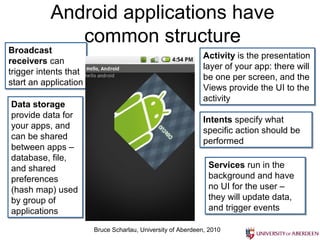
Activity is the presentation
layer of your app: there will
be one per screen, and the
Views provide the UI to the
activity
activity
Intents specify what
specific action should be
performed
performed
Services run in the
Services run in the
background and have
background and have
no UI for the user –
they will update data,
and trigger events
and trigger events
Bruce Scharlau, University of Aberdeen, 2010
There is a common file structure
for applications
code
Autogenerated
resource list

files
images

UI layouts
constants

Bruce Scharlau, University of Aberdeen, 2010
Standard components form
building blocks for Android apps
Notifications
Activity

screen

Views
Intents

Has life-cycle

App to handle content

Service

Background app
Like music player

manifest
ContentProviders
Bruce Scharlau, University of Aberdeen, 2010

Other applications
The AndroidManifest lists
application details
<?xml version="1.0" encoding="utf-8"?>
<manifest
xmlns:android="http://schemas.android.com/apk/res/android"
package="com.my_domain.app.helloactivity">
<application android:label="@string/app_name">
<activity android:name=".HelloActivity">
<intent-filter>
<action android:name="android.intent.action.MAIN"/>
<category
android:name="android.intent.category.LAUNCHER"/>
</intent-filter>
</activity>
</application>
Bruce Scharlau, University of Aberdeen, 2010
Activity is one thing you can do

Bruce Scharlau, University of Aberdeen, 2010

From fundamentals page in sdk
Intent provides late running
binding to other apps
It can be thought of as the glue between
activities. It is basically a passive data
structure holding an abstract description of
an action to be performed.
Written as action/data pairs such as:
VIEW_ACTION/ACTION content://contacts/1

Bruce Scharlau, University of Aberdeen, 2010
Services declared in the manifest
and provide support
Services run in the background:
Music player providing the music playing in
an audio application

Intensive background apps, might need to
spawn their own thread so as to not block
the application
Bruce Scharlau, University of Aberdeen, 2010
Notifications let you know of
background events
This way you know that an SMS arrived,
or that your phone is ringing, and the
MP3 player should pause

Bruce Scharlau, University of Aberdeen, 2010
ContentProviders share data
You need one if your application shares data
with other applications
This way you can share the contact list with the
IM application
If you don’t need to share data, then you can
use SQLlite database
Bruce Scharlau, University of Aberdeen, 2010
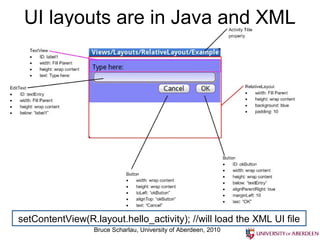
UI layouts are in Java and XML

setContentView(R.layout.hello_activity); //will load the XML UI file
Bruce Scharlau, University of Aberdeen, 2010
Security in Android follows
standard Linux guidelines
Each application runs in its own process
Process permissions are enforced at user
and group IDs assigned to processes
Finer grained permissions are then
granted (revoked) per operations
<manifest xmlns:android="http://schemas.android.com/apk/res/android"
package="com.google.android.app.myapp" >
<uses-permission id="android.permission.RECEIVE_SMS" />
</manifest>
</manifest>
Bruce Scharlau, University of Aberdeen, 2010

android

  • 1.
    Google Android Based onandroid-sdk_2.2 Mobile Computing Bruce Scharlau, University of Aberdeen, 2010
  • 2.
    Android is partof the ‘build a better phone’ process Open Handset Alliance produces Android Comprises handset manufacturers, software firms, mobile operators, and other manufactures and funding companies http://www.openhandsetalliance.com/ Bruce Scharlau, University of Aberdeen, 2010
  • 3.
    Android is growing Unevendistribution of OS by regions Does not include iTouch or iPad, as not smartphones http://metrics.admob.com/wp-content/uploads/2010/06/May-2010-AdMob-Mobile-Metrics-Highlights.pdf Bruce Scharlau, University of Aberdeen, 2010
  • 4.
    Android makes mobileJava easier Well, sort of… Bruce Scharlau, University of Aberdeen, 2010 http://code.google.com/android/goodies/index.html
  • 5.
    Android applications arewritten in Java package com.google.android.helloactivity; import android.app.Activity; import android.os.Bundle; public class HelloActivity extends Activity { public HelloActivity() { } @Override public void onCreate(Bundle icicle) { super.onCreate(icicle); setContentView(R.layout.hello_activity); } Bruce Scharlau, University of Aberdeen, 2010 }
  • 6.
    Android applications are compiledto Dalvik bytecode Write app in Java Write app in Java Compiled in Java Compiled in Java Transformed to Dalvik bytecode Transformed to Dalvik bytecode Loaded into Dalvik VM Loaded into Dalvik VM Linux OS Bruce Scharlau, University of Aberdeen, 2010
  • 7.
    The Dalvik runtimeis optimised for mobile applications Run multiple VMs efficiently Each app has its own VM Minimal memory footprint Bruce Scharlau, University of Aberdeen, 2010
  • 8.
    Android has manycomponents Bruce Scharlau, University of Aberdeen, 2010
  • 9.
    Can assume thatmost have android 2.1 or 2.2 Bruce Scharlau, University of Aberdeen, 2010 http://developer.android.com/resources/dashboard/platform-versions.html
  • 10.
    Android has aworking emulator Bruce Scharlau, University of Aberdeen, 2010
  • 11.
    All applications arewritten in Java and available to each other Android designed to enable reuse of components in other applications Each application can publish its capabilities which other apps can use Bruce Scharlau, University of Aberdeen, 2010
  • 12.
    Android applications have commonstructure Views such as Views such as lists, grids, text lists, grids, text boxes, buttons, boxes, buttons, and even an and even an embeddable web embeddable web browser browser An Activity Manager that An Activity Manager that manages the life cycle of manages the life cycle of applications and provides applications and provides a common navigation a common navigation backstack backstack Content Content Providers that Providers that enable enable applications to applications to access data from access data from other applications other applications (such as (such as Contacts), or to Contacts), or to share their own share their own data data A Notification Manager A Notification Manager that enables all apps to that enables all apps to display custom alerts in the display custom alerts in the status bar status bar A Resource Manager, A Resource Manager, providing access to nonproviding access to noncode resources such as code resources such as localized strings, localized strings, graphics, and layout files graphics, and layout files Bruce Scharlau, University of Aberdeen, 2010
  • 13.
    Android applications have commonstructure Broadcast Broadcast receivers can receivers can trigger intents that trigger intents that start an application start an application Data storage Data storage provide data for provide data for your apps, and your apps, and can be shared can be shared between apps – between apps – database, file, database, file, and shared and shared preferences preferences (hash map) used (hash map) used by group of by group of applications applications Activity is the presentation Activity is the presentation layer of your app: there will layer of your app: there will be one per screen, and the be one per screen, and the Views provide the UI to the Views provide the UI to the activity activity Intents specify what Intents specify what specific action should be specific action should be performed performed Services run in the Services run in the background and have background and have no UI for the user – no UI for the user – they will update data, they will update data, and trigger events and trigger events Bruce Scharlau, University of Aberdeen, 2010
  • 14.
    There is acommon file structure for applications code Autogenerated resource list files images UI layouts constants Bruce Scharlau, University of Aberdeen, 2010
  • 15.
    Standard components form buildingblocks for Android apps Notifications Activity screen Views Intents Has life-cycle App to handle content Service Background app Like music player manifest ContentProviders Bruce Scharlau, University of Aberdeen, 2010 Other applications
  • 16.
    The AndroidManifest lists applicationdetails <?xml version="1.0" encoding="utf-8"?> <manifest xmlns:android="http://schemas.android.com/apk/res/android" package="com.my_domain.app.helloactivity"> <application android:label="@string/app_name"> <activity android:name=".HelloActivity"> <intent-filter> <action android:name="android.intent.action.MAIN"/> <category android:name="android.intent.category.LAUNCHER"/> </intent-filter> </activity> </application> Bruce Scharlau, University of Aberdeen, 2010
  • 17.
    Activity is onething you can do Bruce Scharlau, University of Aberdeen, 2010 From fundamentals page in sdk
  • 18.
    Intent provides laterunning binding to other apps It can be thought of as the glue between activities. It is basically a passive data structure holding an abstract description of an action to be performed. Written as action/data pairs such as: VIEW_ACTION/ACTION content://contacts/1 Bruce Scharlau, University of Aberdeen, 2010
  • 19.
    Services declared inthe manifest and provide support Services run in the background: Music player providing the music playing in an audio application Intensive background apps, might need to spawn their own thread so as to not block the application Bruce Scharlau, University of Aberdeen, 2010
  • 20.
    Notifications let youknow of background events This way you know that an SMS arrived, or that your phone is ringing, and the MP3 player should pause Bruce Scharlau, University of Aberdeen, 2010
  • 21.
    ContentProviders share data Youneed one if your application shares data with other applications This way you can share the contact list with the IM application If you don’t need to share data, then you can use SQLlite database Bruce Scharlau, University of Aberdeen, 2010
  • 22.
    UI layouts arein Java and XML setContentView(R.layout.hello_activity); //will load the XML UI file Bruce Scharlau, University of Aberdeen, 2010
  • 23.
    Security in Androidfollows standard Linux guidelines Each application runs in its own process Process permissions are enforced at user and group IDs assigned to processes Finer grained permissions are then granted (revoked) per operations <manifest xmlns:android="http://schemas.android.com/apk/res/android" <manifest xmlns:android="http://schemas.android.com/apk/res/android" package="com.google.android.app.myapp" > package="com.google.android.app.myapp" > <uses-permission id="android.permission.RECEIVE_SMS" /> <uses-permission id="android.permission.RECEIVE_SMS" /> </manifest> </manifest> Bruce Scharlau, University of Aberdeen, 2010