ADVANCED FORMAT
 Hard Disk Drives

         Sponsored by IDEMA
Advanced Format
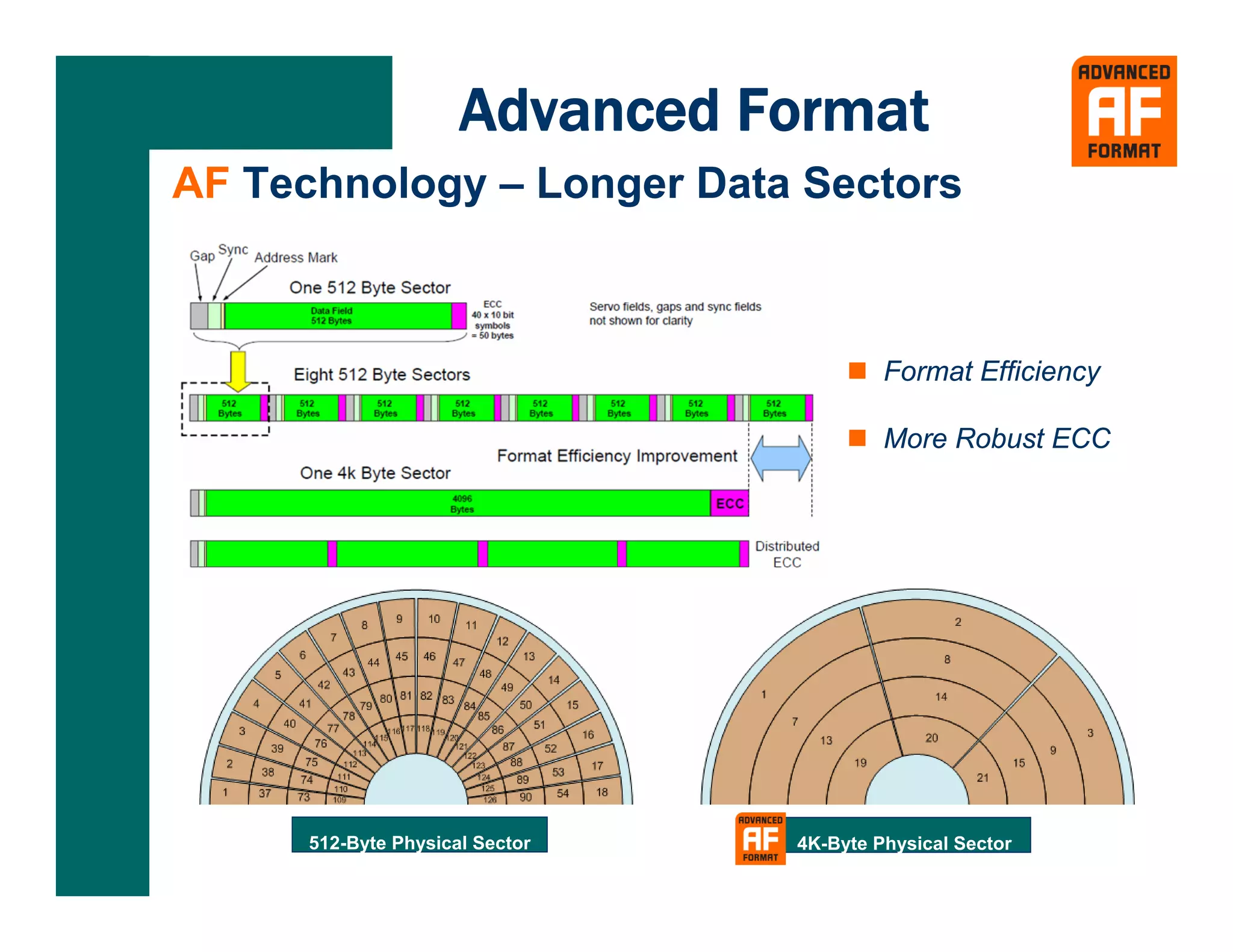
AF Technology – Longer Data Sectors


                                          Format Efficiency

                                          More Robust ECC


      512-Byte Physical Sector   4K-Byte Physical Sector
Advanced Format
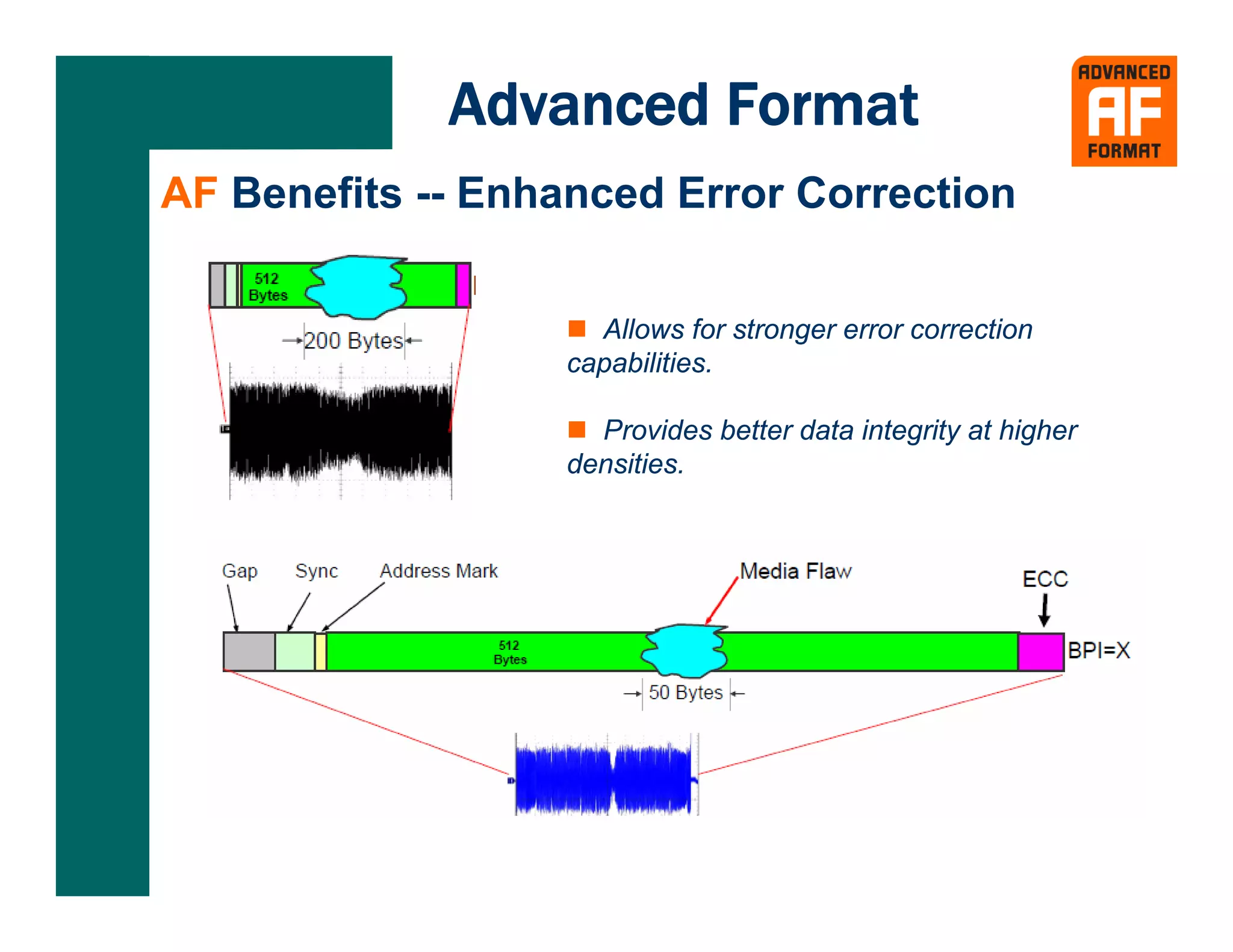
AF Benefits -- Enhanced Error Correction


                    Allows for stronger error correction
                  capabilities.

                    Provides better data integrity at higher
                  densities.
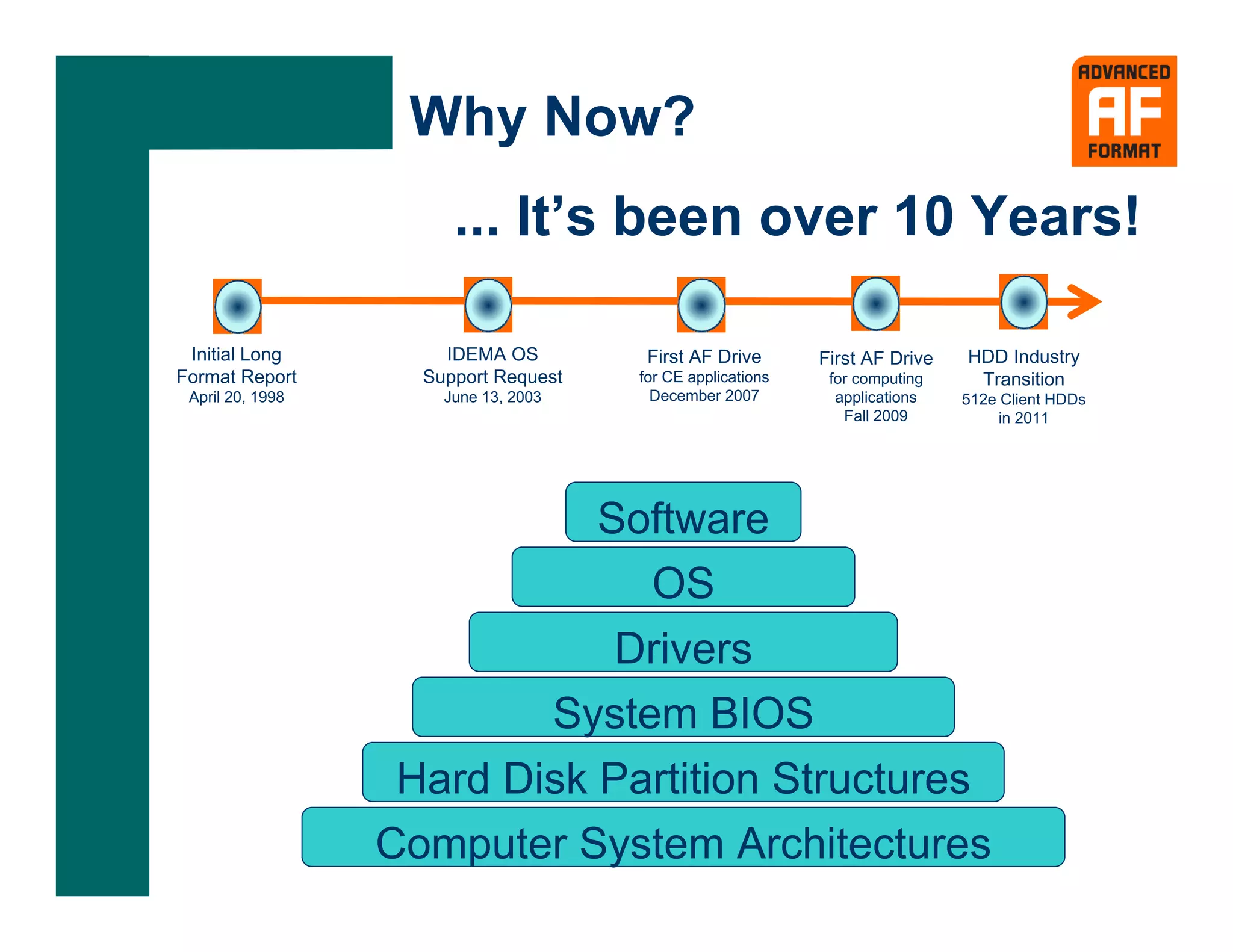
Why Now?
                       ... It’s been over 10 Years!

 Initial Long         IDEMA OS         First AF Drive       First AF Drive   HDD Industry
Format Report       Support Request   for CE applications    for computing    Transition
 April 20, 1998       June 13, 2003     December 2007         applications   512e Client HDDs
                                                               Fall 2009          in 2011


                             Software
                               OS
                              Drivers
                          System BIOS
                   Hard Disk Partition Structures
                  Computer System Architectures
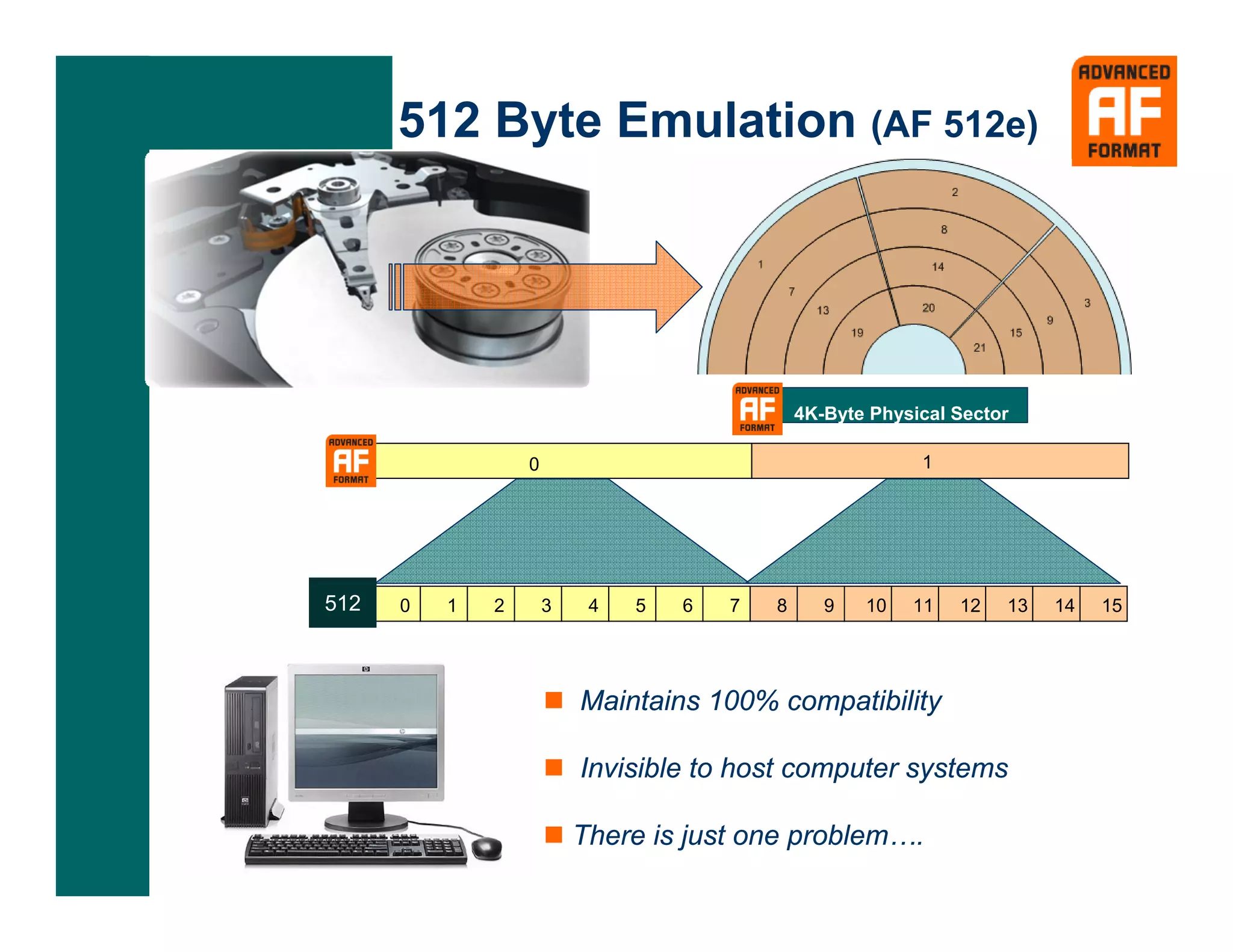
512 Byte Emulation (AF 512e)


                                               4K-Byte Physical Sector

                  0                                         1


512   0   1   2       3    4   5   6   7   8      9   10   11   12   13   14   15


                          Maintains 100% compatibility

                          Invisible to host computer systems

                          There is just one problem….
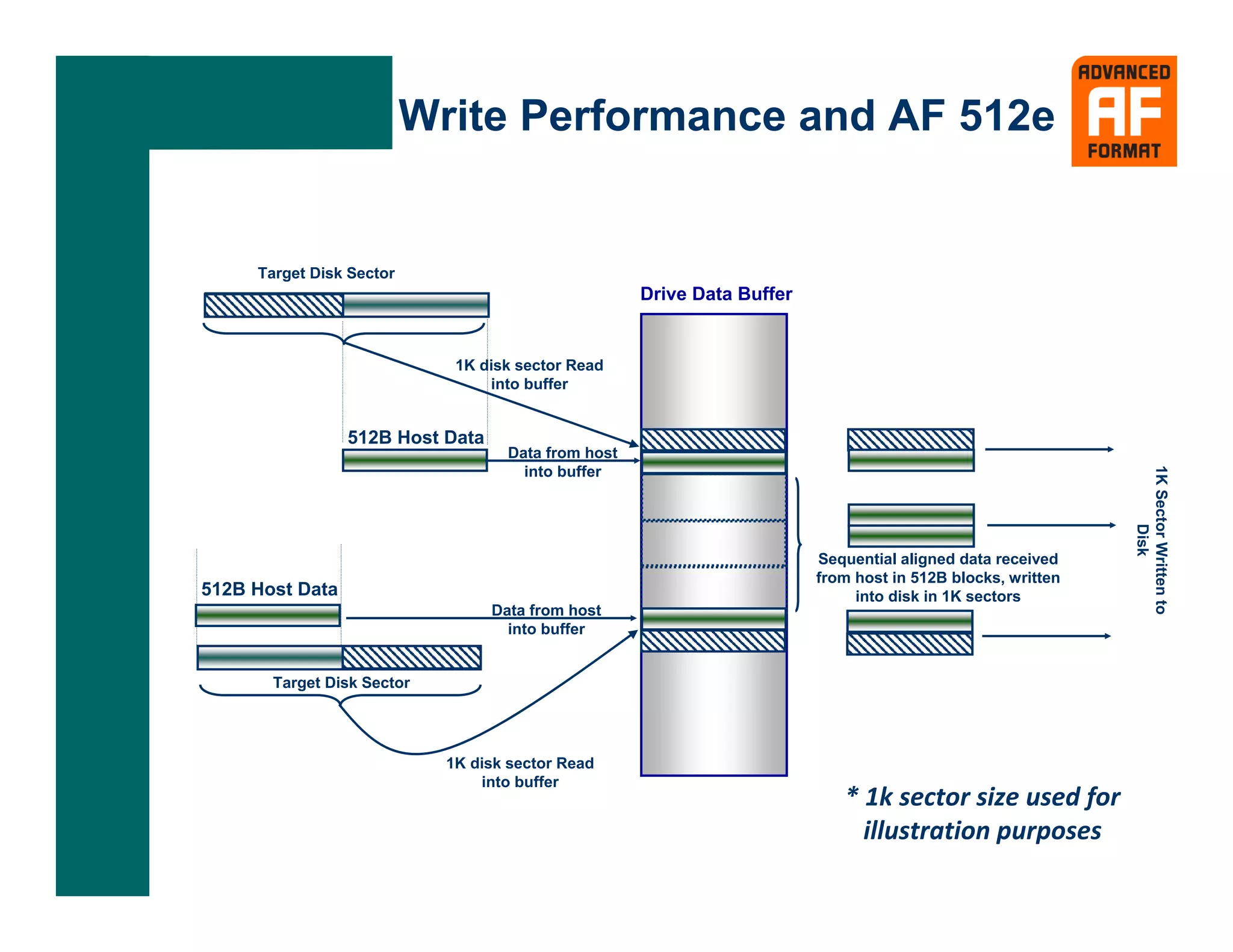
Write Performance and AF 512e


     Target Disk Sector
                                                     Drive Data Buffer


                             1K disk sector Read
                                 into buffer


                 512B Host Data
                                    Data from host


                                                                                                             1K Sector Written to
                                      into buffer


                                                                                                                    Disk
                                                                         Sequential aligned data received
                                                                         from host in 512B blocks, written
512B Host Data                                                                into disk in 1K sectors
                                  Data from host
                                    into buffer


       Target Disk Sector


                            1K disk sector Read
                                into buffer
                                                                            * 1k sector size used for 
                                                                              illustration purposes
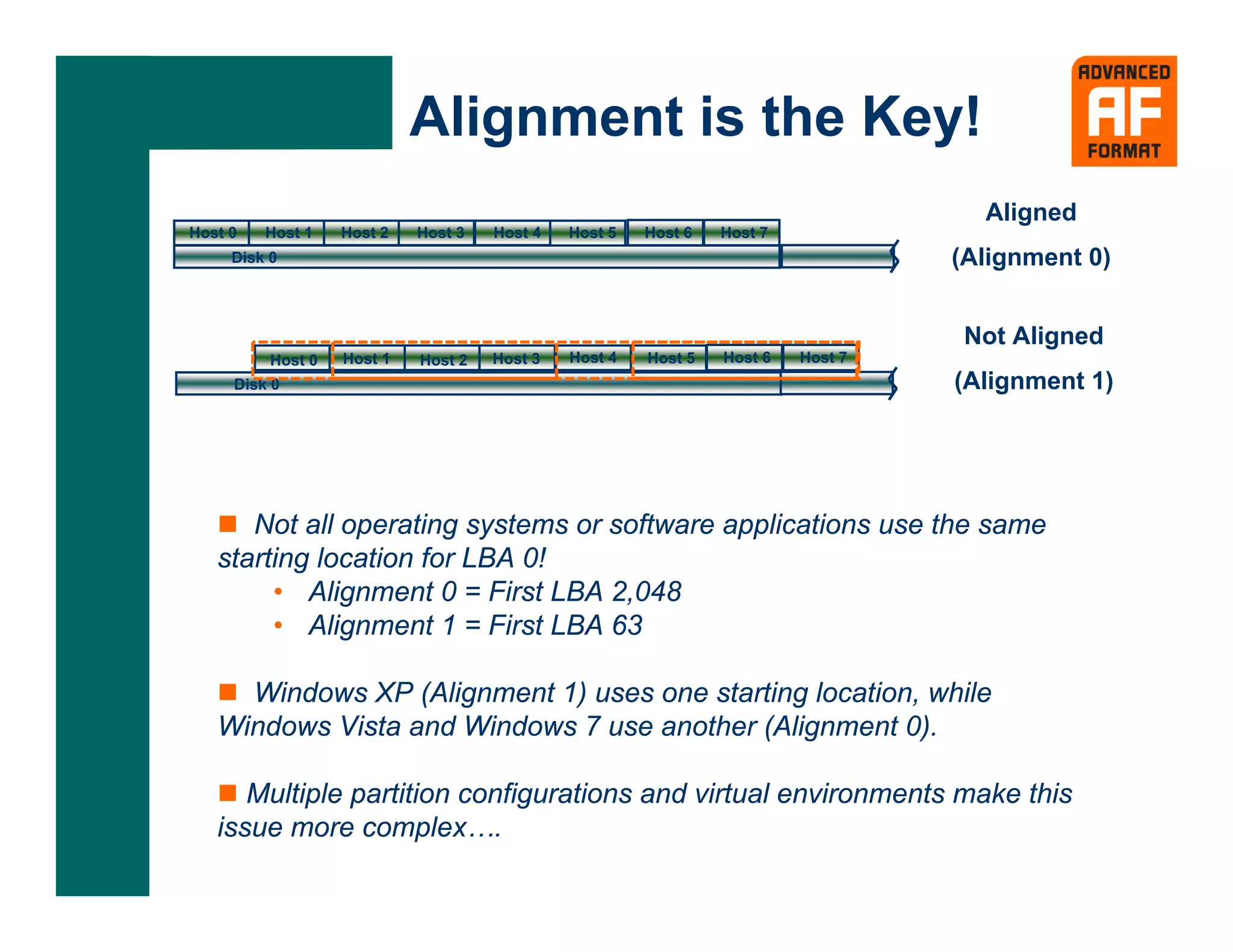
Alignment is the Key!
                                                                                    Aligned
Host 0   Host 1    Host 2   Host 3   Host 4   Host 5   Host 6   Host 7
     Disk 0                                                                       (Alignment 0)


                                                                                   Not Aligned
          Host 0   Host 1   Host 2   Host 3   Host 4   Host 5   Host 6   Host 7
     Disk 0                                                                       (Alignment 1)


      Not all operating systems or software applications use the same
   starting location for LBA 0!
        • Alignment 0 = First LBA 2,048
        • Alignment 1 = First LBA 63

     Windows XP (Alignment 1) uses one starting location, while
   Windows Vista and Windows 7 use another (Alignment 0).

      Multiple partition configurations and virtual environments make this
   issue more complex….
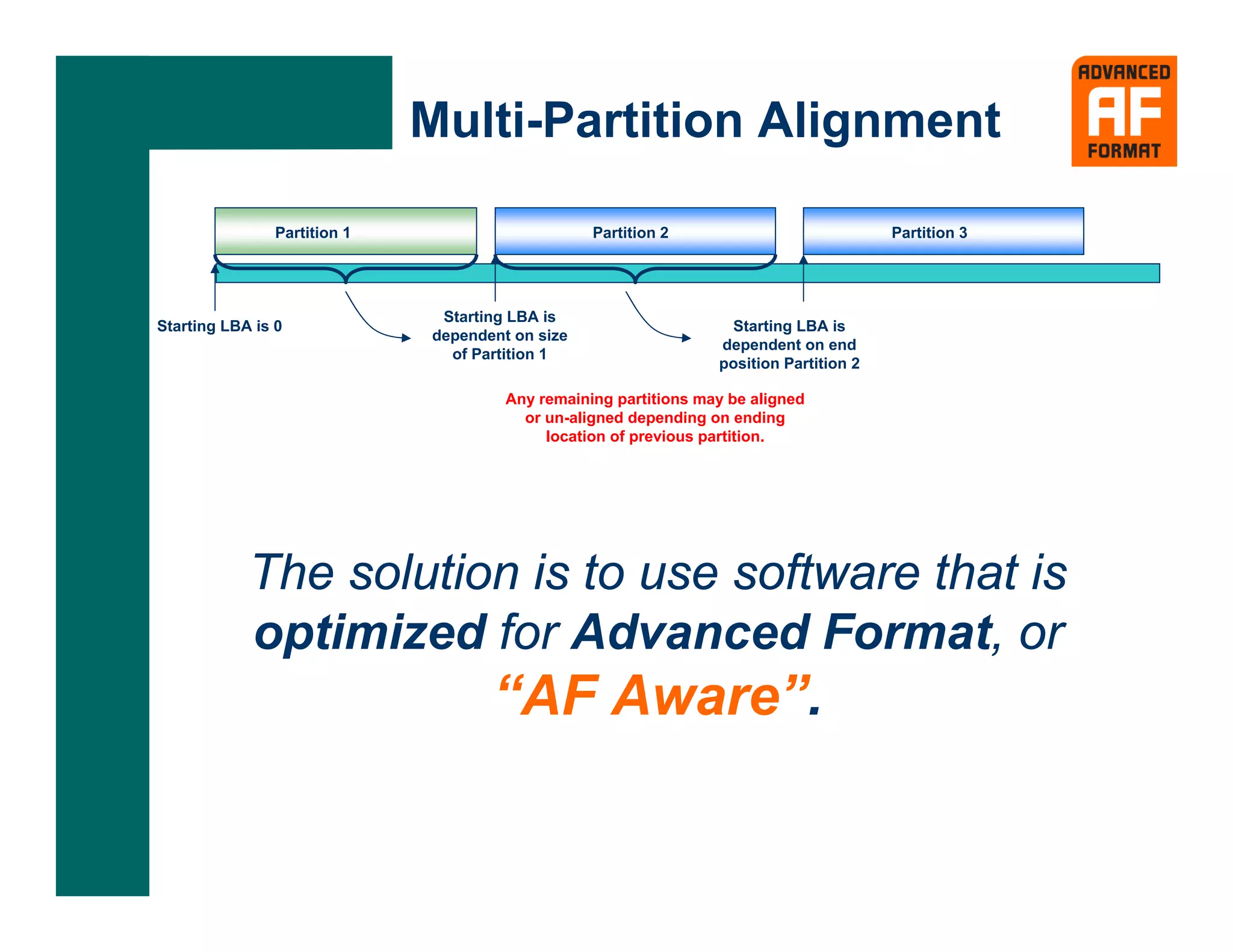
Multi-Partition Alignment

                Partition 1                       Partition 2                            Partition 3


                               Starting LBA is
Starting LBA is 0                                                  Starting LBA is
                              dependent on size
                                                                  dependent on end
                                of Partition 1
                                                                  position Partition 2

                                       Any remaining partitions may be aligned
                                         or un-aligned depending on ending
                                            location of previous partition.


            The solution is to use software that is
            optimized for Advanced Format, or
                                     “AF Aware”.
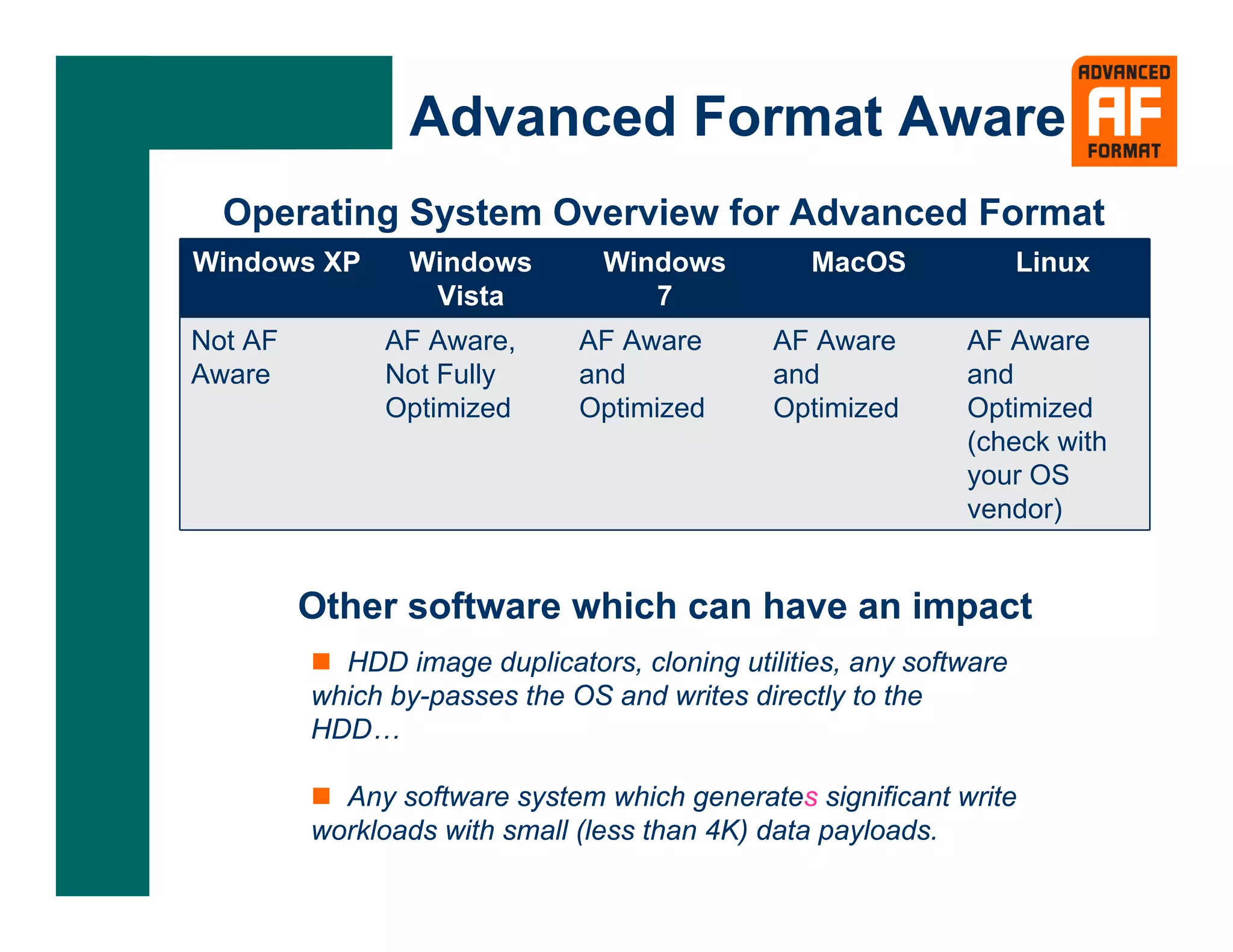
Advanced Format Aware
  Operating System Overview for Advanced Format
Windows XP      Windows         Windows          MacOS              Linux
                 Vista             7
Not AF        AF Aware,       AF Aware        AF Aware       AF Aware
Aware         Not Fully       and             and            and
              Optimized       Optimized       Optimized      Optimized
                                                             (check with
                                                             your OS
                                                             vendor)


         Other software which can have an impact
           HDD image duplicators, cloning utilities, any software
         which by-passes the OS and writes directly to the
         HDD…

           Any software system which generates significant write
         workloads with small (less than 4K) data payloads.
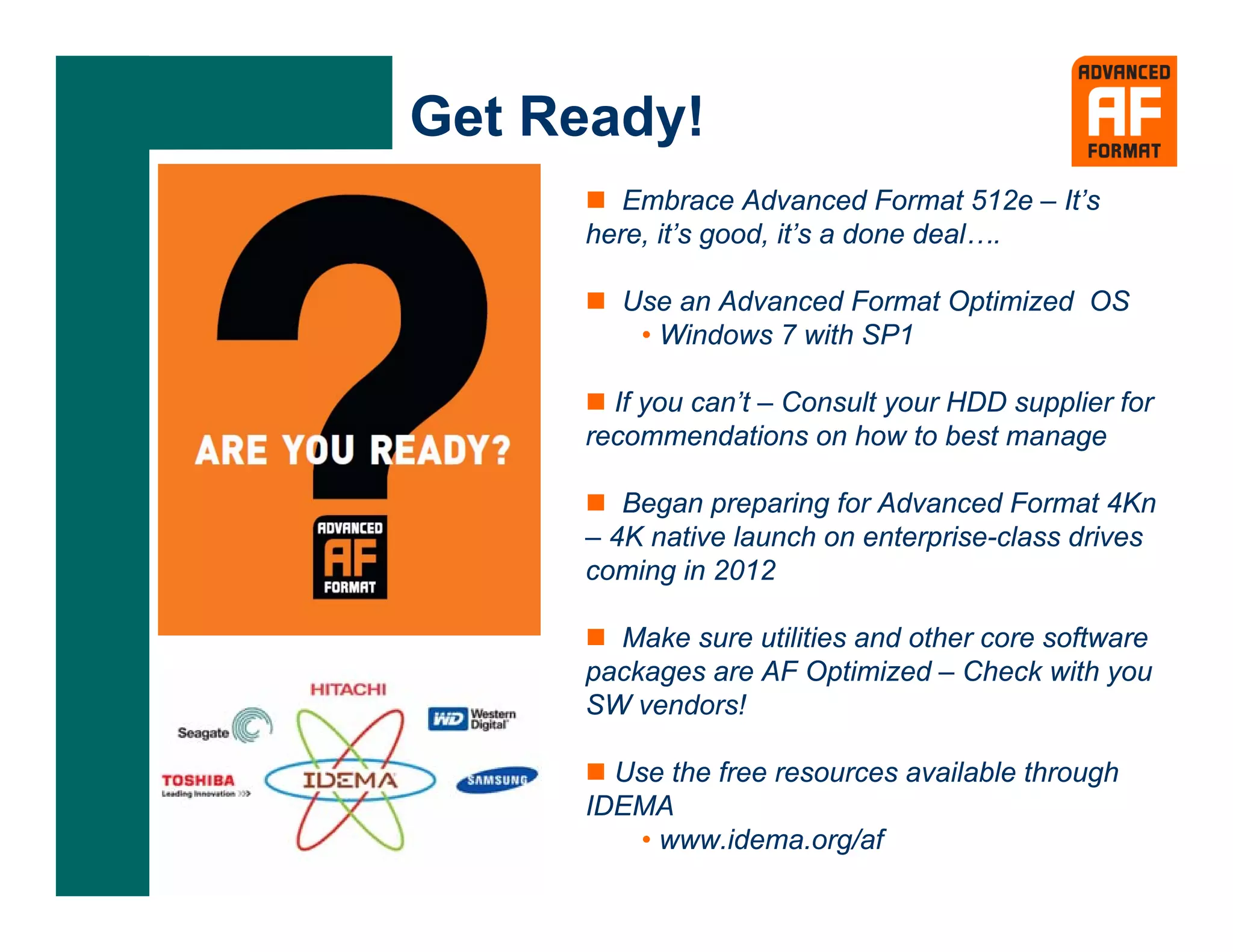
Get Ready!
        Embrace Advanced Format 512e – It’s
     here, it’s good, it’s a done deal….

       Use an Advanced Format Optimized OS
        • Windows 7 with SP1

       If you can’t – Consult your HDD supplier for
     recommendations on how to best manage

        Began preparing for Advanced Format 4Kn
     – 4K native launch on enterprise-class drives
     coming in 2012

       Make sure utilities and other core software
     packages are AF Optimized – Check with you
     SW vendors!

       Use the free resources available through
     IDEMA
         • www.idema.org/af
Advanced Format

Advanced format for hard disk drives

  • 1.
    ADVANCED FORMAT HardDisk Drives Sponsored by IDEMA
  • 2.
    Advanced Format AF Technology– Longer Data Sectors Format Efficiency More Robust ECC 512-Byte Physical Sector 4K-Byte Physical Sector
  • 3.
    Advanced Format AF Benefits-- Enhanced Error Correction Allows for stronger error correction capabilities. Provides better data integrity at higher densities.
  • 4.
    Why Now? ... It’s been over 10 Years! Initial Long IDEMA OS First AF Drive First AF Drive HDD Industry Format Report Support Request for CE applications for computing Transition April 20, 1998 June 13, 2003 December 2007 applications 512e Client HDDs Fall 2009 in 2011 Software OS Drivers System BIOS Hard Disk Partition Structures Computer System Architectures
  • 5.
    512 Byte Emulation(AF 512e) 4K-Byte Physical Sector 0 1 512 0 1 2 3 4 5 6 7 8 9 10 11 12 13 14 15 Maintains 100% compatibility Invisible to host computer systems There is just one problem….
  • 6.
    Write Performance andAF 512e Target Disk Sector Drive Data Buffer 1K disk sector Read into buffer 512B Host Data Data from host 1K Sector Written to into buffer Disk Sequential aligned data received from host in 512B blocks, written 512B Host Data into disk in 1K sectors Data from host into buffer Target Disk Sector 1K disk sector Read into buffer * 1k sector size used for  illustration purposes
  • 7.
    Alignment is theKey! Aligned Host 0 Host 1 Host 2 Host 3 Host 4 Host 5 Host 6 Host 7 Disk 0 (Alignment 0) Not Aligned Host 0 Host 1 Host 2 Host 3 Host 4 Host 5 Host 6 Host 7 Disk 0 (Alignment 1) Not all operating systems or software applications use the same starting location for LBA 0! • Alignment 0 = First LBA 2,048 • Alignment 1 = First LBA 63 Windows XP (Alignment 1) uses one starting location, while Windows Vista and Windows 7 use another (Alignment 0). Multiple partition configurations and virtual environments make this issue more complex….
  • 8.
    Multi-Partition Alignment Partition 1 Partition 2 Partition 3 Starting LBA is Starting LBA is 0 Starting LBA is dependent on size dependent on end of Partition 1 position Partition 2 Any remaining partitions may be aligned or un-aligned depending on ending location of previous partition. The solution is to use software that is optimized for Advanced Format, or “AF Aware”.
  • 9.
    Advanced Format Aware Operating System Overview for Advanced Format Windows XP Windows Windows MacOS Linux Vista 7 Not AF AF Aware, AF Aware AF Aware AF Aware Aware Not Fully and and and Optimized Optimized Optimized Optimized (check with your OS vendor) Other software which can have an impact HDD image duplicators, cloning utilities, any software which by-passes the OS and writes directly to the HDD… Any software system which generates significant write workloads with small (less than 4K) data payloads.
  • 10.
    Get Ready! Embrace Advanced Format 512e – It’s here, it’s good, it’s a done deal…. Use an Advanced Format Optimized OS • Windows 7 with SP1 If you can’t – Consult your HDD supplier for recommendations on how to best manage Began preparing for Advanced Format 4Kn – 4K native launch on enterprise-class drives coming in 2012 Make sure utilities and other core software packages are AF Optimized – Check with you SW vendors! Use the free resources available through IDEMA • www.idema.org/af
  • 11.