Statistics for Managers Using Microsoft Excel, 4e © 2004 Prentice-Hall, Inc. Chap 14-1
Chapter 14
Multiple Regression Model Building
Statistics for Managers
Using Microsoft®
Excel
4th
Edition
Statistics for Managers Using
Microsoft Excel, 4e © 2004
Prentice-Hall, Inc. Chap 14-2
Chapter Goals
After completing this chapter, you should be
able to:
 use quadratic terms in a regression model
 use transformed variables in a regression model
 measure the correlation among the independent
variables
 build a regression model using either the stepwise or
best-subsets approach
 explain the pitfalls involved in developing a multiple
regression model
Statistics for Managers Using
Microsoft Excel, 4e © 2004
Prentice-Hall, Inc. Chap 14-3
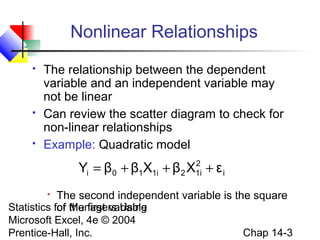
 The relationship between the dependent
variable and an independent variable may
not be linear
 Can review the scatter diagram to check for
non-linear relationships
 Example: Quadratic model
 The second independent variable is the square
of the first variable
Nonlinear Relationships
i
2
1i21i10i εXβXββY +++=
Statistics for Managers Using
Microsoft Excel, 4e © 2004
Prentice-Hall, Inc. Chap 14-4
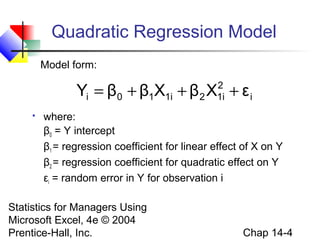
Quadratic Regression Model
 where:
β0 = Y intercept
β1 = regression coefficient for linear effect of X on Y
β2 = regression coefficient for quadratic effect on Y
εi = random error in Y for observation i
i
2
1i21i10i εXβXββY +++=
Model form:
Statistics for Managers Using
Microsoft Excel, 4e © 2004
Prentice-Hall, Inc. Chap 14-5
Linear fit does not give
random residuals
Linear vs. Nonlinear Fit
Nonlinear fit gives
random residuals

X
residuals
X
Y
X
residuals
Y
X
Statistics for Managers Using
Microsoft Excel, 4e © 2004
Prentice-Hall, Inc. Chap 14-6
Quadratic Regression Model
Quadratic models may be considered when the scatter
diagram takes on one of the following shapes:
X1
Y
X1X1
YYY
β1 < 0 β1 > 0 β1 < 0 β1 > 0
β1 = the coefficient of the linear term
β2 = the coefficient of the squared term
X1
i
2
1i21i10i εXβXββY +++=
β2 > 0 β2 > 0 β2 < 0 β2 < 0
Statistics for Managers Using
Microsoft Excel, 4e © 2004
Prentice-Hall, Inc. Chap 14-7
Testing the Overall
Quadratic Model
 Test for Overall Relationship
H0: β1 = β2 = 0 (no overall relationship between X and Y)
H1: β1 and/or β2 ≠ 0 (there is a relationship between X and Y)
 F test statistic =
2
1i21i10i XbXbbYˆ ++=
MSE
MSR
 Estimate the quadratic model to obtain the
regression equation:
Statistics for Managers Using
Microsoft Excel, 4e © 2004
Prentice-Hall, Inc. Chap 14-8
Testing for Significance:
Quadratic Effect
 Testing the Quadratic Effect
 Compare quadratic regression equation
with the linear regression equation
2
1i21i10i XbXbbY ++=
1i10i XbbY +=
Statistics for Managers Using
Microsoft Excel, 4e © 2004
Prentice-Hall, Inc. Chap 14-9
Testing for Significance:
Quadratic Effect
 Testing the Quadratic Effect
 Consider the quadratic regression equaiton
Hypotheses

(The quadratic term does not improve the model)

(The quadratic term improves the model)
2
1i21i10i XbXbbY ++=
H0: β2 = 0
H1: β2 ≠ 0
(continued)
Statistics for Managers Using
Microsoft Excel, 4e © 2004
Prentice-Hall, Inc. Chap 14-10
Testing for Significance:
Quadratic Effect
 Testing the Quadratic Effect
Hypotheses

(The quadratic term does not improve the model)

(The quadratic term improves the model)
 The test statistic is
H0: β2 = 0
H1: β2 ≠ 0
(continued)
2b
22
S
βb
t
−
=
3nd.f. −=
where:
b2 = squared term slope
coefficient
β2 = hypothesized slope (zero)
Sb = standard error of the slope2
Statistics for Managers Using
Microsoft Excel, 4e © 2004
Prentice-Hall, Inc. Chap 14-11
Testing for Significance:
Quadratic Effect
 Testing the Quadratic Effect
Compare r2
from simple regression to
adjusted r2
from the quadratic model
 If adj. r2
from the quadratic model is larger
than the r2
from the simple model, then the
quadratic model is a better model
(continued)
Statistics for Managers Using
Microsoft Excel, 4e © 2004
Prentice-Hall, Inc. Chap 14-12
Example: Quadratic Model
 Purity increases as filter time
increases:
Purity
Filter
Time
3 1
7 2
8 3
15 5
22 7
33 8
40 10
54 12
67 13
70 14
78 15
85 15
87 16
99 17
Purity vs. Time
0
20
40
60
80
100
0 5 10 15 20
Time
Purity
Statistics for Managers Using
Microsoft Excel, 4e © 2004
Prentice-Hall, Inc. Chap 14-13
Example: Quadratic Model
(continued)
Regression Statistics
R Square 0.96888
Adjusted R Square 0.96628
Standard Error 6.15997
 Simple regression results:
Y = -11.283 + 5.985 Time
  Coefficients
Standard
Error t Stat P-value
Intercept -11.28267 3.46805 -3.25332 0.00691
Time 5.98520 0.30966 19.32819 2.078E-10
F Significance F
373.57904 2.0778E-10
^
Time Residual Plot
-10
-5
0
5
10
0 5 10 15 20
Time
Residuals
t statistic, F statistic, and r2
are all high, but the
residuals are not random:
Statistics for Managers Using
Microsoft Excel, 4e © 2004
Prentice-Hall, Inc. Chap 14-14
  Coefficients
Standard
Error t Stat P-value
Intercept 1.53870 2.24465 0.68550 0.50722
Time 1.56496 0.60179 2.60052 0.02467
Time-squared 0.24516 0.03258 7.52406 1.165E-05
Regression Statistics
R Square 0.99494
Adjusted R Square 0.99402
Standard Error 2.59513
F Significance F
1080.7330 2.368E-13
 Quadratic regression results:
Y = 1.539 + 1.565 Time + 0.245 (Time)2
^
Example: Quadratic Model
(continued)
Time Residual Plot
-5
0
5
10
0 5 10 15 20
Time
Residuals
Time-squared Residual Plot
-5
0
5
10
0 100 200 300 400
Time-squared
Residuals
The quadratic term is significant and
improves the model: adj. r2
is higher and
SYX is lower, residuals are now random
Statistics for Managers Using
Microsoft Excel, 4e © 2004
Prentice-Hall, Inc. Chap 14-15
Using Transformations in
Regression Analysis
Idea:
 non-linear models can often be transformed
to a linear form
 Can be estimated by least squares if transformed
 transform X or Y or both to get a better fit or
to deal with violations of regression
assumptions
 Can be based on theory, logic or scatter
diagrams
Statistics for Managers Using
Microsoft Excel, 4e © 2004
Prentice-Hall, Inc. Chap 14-16
The Square Root Transformation
 The square-root transformation
 Used to
 overcome violations of the homoscedasticity
assumption
 fit a non-linear relationship
i1i10i εXββY ++=
Statistics for Managers Using
Microsoft Excel, 4e © 2004
Prentice-Hall, Inc. Chap 14-17
 Shape of original relationship
X
The Square Root Transformation
(continued)
b1 > 0
b1 < 0
X
Y
Y
Y
Y
X
X
 Relationship when transformed
i1i10i εXββY ++=i1i10i εXββY ++=
Statistics for Managers Using
Microsoft Excel, 4e © 2004
Prentice-Hall, Inc. Chap 14-18
 Original multiplicative model
The Log Transformation
 Transformed multiplicative model
i
β
1i0i εXβY 1
= i1i10i εlogXlogββlogYlog ++=
The Multiplicative Model:
 Original multiplicative model  Transformed exponential model
i2i21i10i εlnXβXββYln +++=
The Exponential Model:
i
XβXββ
i εeY 2i21i10 ++
=
Statistics for Managers Using
Microsoft Excel, 4e © 2004
Prentice-Hall, Inc. Chap 14-19
Interpretation of coefficients
For the multiplicative model:
 When both dependent and independent
variables are logged:
 The coefficient of the independent variable Xk can
be interpreted as : a 1 percent change in Xk leads to
an estimated bk percentage change in the average
value of Y. Therefore bk is the elasticity of Y with
respect to a change in Xk .
i1i10i εlogXlogββlogYlog ++=
Statistics for Managers Using
Microsoft Excel, 4e © 2004
Prentice-Hall, Inc. Chap 14-20
Collinearity
 Collinearity: High correlation exists among two
or more independent variables
 This means the correlated variables contribute
redundant information to the multiple regression
model
Statistics for Managers Using
Microsoft Excel, 4e © 2004
Prentice-Hall, Inc. Chap 14-21
Collinearity
 Including two highly correlated explanatory
variables can adversely affect the regression
results
 No new information provided
 Can lead to unstable coefficients (large
standard error and low t-values)
 Coefficient signs may not match prior
expectations
(continued)
Statistics for Managers Using
Microsoft Excel, 4e © 2004
Prentice-Hall, Inc. Chap 14-22
Some Indications of
Strong Collinearity
 Incorrect signs on the coefficients
 Large change in the value of a previous
coefficient when a new variable is added to the
model
 A previously significant variable becomes
insignificant when a new independent variable
is added
 The estimate of the standard deviation of the
model increases when a variable is added to
the model
Statistics for Managers Using
Microsoft Excel, 4e © 2004
Prentice-Hall, Inc. Chap 14-23
Detecting Collinearity
(Variance Inflationary Factor)
VIFj is used to measure collinearity:
If VIFj > 5, Xj is highly correlated with
the other explanatory variables
where R2
j is the coefficient of determination
of variable Xj with all other X variables
2
j
j
R1
1
VIF
−
=
Statistics for Managers Using
Microsoft Excel, 4e © 2004
Prentice-Hall, Inc. Chap 14-24
Example: Pie Sales
Sales = b0 + b1 (Price)
+ b2 (Advertising)
Week
Pie
Sales
Price
($)
Advertising
($100s)
1 350 5.50 3.3
2 460 7.50 3.3
3 350 8.00 3.0
4 430 8.00 4.5
5 350 6.80 3.0
6 380 7.50 4.0
7 430 4.50 3.0
8 470 6.40 3.7
9 450 7.00 3.5
10 490 5.00 4.0
11 340 7.20 3.5
12 300 7.90 3.2
13 440 5.90 4.0
14 450 5.00 3.5
15 300 7.00 2.7
Recall the multiple regression
equation of chapter 13:
Statistics for Managers Using
Microsoft Excel, 4e © 2004
Prentice-Hall, Inc. Chap 14-25
Detect Collinearity in PHStat
Output for the pie sales example:
 Since there are only two
explanatory variables, only one
VIF is reported

VIF is < 5

There is no evidence of
collinearity between Price and
Advertising
Regression Analysis
Price and all other X
Regression Statistics
Multiple R 0.030438
R Square 0.000926
Adjusted R
Square -0.075925
Standard Error 1.21527
Observations 15
VIF 1.000927
PHStat / regression / multiple regression …
Check the “variance inflationary factor (VIF)” box
Statistics for Managers Using
Microsoft Excel, 4e © 2004
Prentice-Hall, Inc. Chap 14-26
Model Building
 Goal is to develop a model with the best set of
independent variables
 Easier to interpret if unimportant variables are
removed
 Lower probability of collinearity
 Stepwise regression procedure
 Provide evaluation of alternative models as variables
are added
 Best-subset approach
 Try all combinations and select the best using the
highest adjusted r2
and lowest standard error
Statistics for Managers Using
Microsoft Excel, 4e © 2004
Prentice-Hall, Inc. Chap 14-27
 Idea: develop the least squares regression
equation in steps, adding one explanatory
variable at a time and evaluating whether
existing variables should remain or be removed
 The coefficient of partial determination is the
measure of the marginal contribution of each
independent variable, given that other
independent variables are in the model
Stepwise Regression
Statistics for Managers Using
Microsoft Excel, 4e © 2004
Prentice-Hall, Inc. Chap 14-28
Best Subsets Regression
 Idea: estimate all possible regression equations
using all possible combinations of independent
variables
 Choose the best fit by looking for the highest
adjusted r2
and lowest standard error
Stepwise regression and best subsets
regression can be performed using PHStat
Statistics for Managers Using
Microsoft Excel, 4e © 2004
Prentice-Hall, Inc. Chap 14-29
Alternative Best Subsets
Criterion
 Calculate the value Cp for each potential
regression model
 Consider models with Cp values close to or
below k + 1
 k is the number of independent variables in the
model under consideration
Statistics for Managers Using
Microsoft Excel, 4e © 2004
Prentice-Hall, Inc. Chap 14-30
Alternative Best Subsets
Criterion
 The Cp Statistic
))1k(2n(
R1
)Tn)(R1(
C 2
T
2
k
p +−−
−
−−
=
Where k = number of independent variables included in a
particular regression model
T = total number of parameters to be estimated in the
full regression model
= coefficient of multiple determination for model with k
independent variables
= coefficient of multiple determination for full model with
all T estimated parameters
2
kR
2
TR
(continued)
Statistics for Managers Using
Microsoft Excel, 4e © 2004
Prentice-Hall, Inc. Chap 14-31
10 Steps in Model Building
1. Choose explanatory variables to include in the
model
2. Estimate full model and check VIFs
3. Check if any VIFs > 5
4.
 If no VIF > 5, go to step 5
 If one VIF > 5, remove this variable
 If more than one, eliminate the variable with the
highest VIF and go back to step 2
5. Perform best subsets regression with
remaining variables …
Statistics for Managers Using
Microsoft Excel, 4e © 2004
Prentice-Hall, Inc. Chap 14-32
10 Steps in Model Building
6. List all models with Cp close to or less than (k
+ 1)
7. Choose the best model
 Consider parsimony
 Do extra variable make a significant contribution?
8. Perform complete analysis with chosen model,
including residual analysis
9. Transform the model if necessary to deal with
violations of linearity or other model
assumptions
10. Use the model for prediction
(continued)
Statistics for Managers Using
Microsoft Excel, 4e © 2004
Prentice-Hall, Inc. Chap 14-33
Model Building Flowchart
Choose X1,X2,…Xk
Run regression
to find VIFs
Remove
variable with
highest
VIF
Any
VIF>5?
Run subsets
regression to obtain
“best” models in
terms of Cp
Do complete analysis
Add quadratic term and/or
transform variables as indicated
Perform
predictions
No
More
than one?
Remove
this X
Yes
No
Yes
Statistics for Managers Using
Microsoft Excel, 4e © 2004
Prentice-Hall, Inc. Chap 14-34
Pitfalls and Ethical
Considerations
 Understand that interpretation of the
estimated regression coefficients are
performed holding all other independent
variables constant
 Evaluate residual plots for each independent
variable
 Evaluate interaction terms
To avoid pitfalls and address ethical considerations:
Statistics for Managers Using
Microsoft Excel, 4e © 2004
Prentice-Hall, Inc. Chap 14-35
Additional Pitfalls
and Ethical Considerations
 Obtain VIFs for each independent variable
before determining which variables should be
included in the model
 Examine several alternative models using best-
subsets regression
 Use other methods when the assumptions
necessary for least-squares regression have
been seriously violated
To avoid pitfalls and address ethical considerations:
(continued)
Statistics for Managers Using
Microsoft Excel, 4e © 2004
Prentice-Hall, Inc. Chap 14-36
Chapter Summary
 Developed the quadratic regression model
 Discussed using transformations in
regression models
 The multiplicative model
 The exponential model
 Described collinearity
 Discussed model building
 Stepwise regression
 Best subsets
 Addressed pitfalls in multiple regression and
ethical considerations

multiple regression model building

  • 1.
    Statistics for ManagersUsing Microsoft Excel, 4e © 2004 Prentice-Hall, Inc. Chap 14-1 Chapter 14 Multiple Regression Model Building Statistics for Managers Using Microsoft® Excel 4th Edition
  • 2.
    Statistics for ManagersUsing Microsoft Excel, 4e © 2004 Prentice-Hall, Inc. Chap 14-2 Chapter Goals After completing this chapter, you should be able to:  use quadratic terms in a regression model  use transformed variables in a regression model  measure the correlation among the independent variables  build a regression model using either the stepwise or best-subsets approach  explain the pitfalls involved in developing a multiple regression model
  • 3.
    Statistics for ManagersUsing Microsoft Excel, 4e © 2004 Prentice-Hall, Inc. Chap 14-3  The relationship between the dependent variable and an independent variable may not be linear  Can review the scatter diagram to check for non-linear relationships  Example: Quadratic model  The second independent variable is the square of the first variable Nonlinear Relationships i 2 1i21i10i εXβXββY +++=
  • 4.
    Statistics for ManagersUsing Microsoft Excel, 4e © 2004 Prentice-Hall, Inc. Chap 14-4 Quadratic Regression Model  where: β0 = Y intercept β1 = regression coefficient for linear effect of X on Y β2 = regression coefficient for quadratic effect on Y εi = random error in Y for observation i i 2 1i21i10i εXβXββY +++= Model form:
  • 5.
    Statistics for ManagersUsing Microsoft Excel, 4e © 2004 Prentice-Hall, Inc. Chap 14-5 Linear fit does not give random residuals Linear vs. Nonlinear Fit Nonlinear fit gives random residuals  X residuals X Y X residuals Y X
  • 6.
    Statistics for ManagersUsing Microsoft Excel, 4e © 2004 Prentice-Hall, Inc. Chap 14-6 Quadratic Regression Model Quadratic models may be considered when the scatter diagram takes on one of the following shapes: X1 Y X1X1 YYY β1 < 0 β1 > 0 β1 < 0 β1 > 0 β1 = the coefficient of the linear term β2 = the coefficient of the squared term X1 i 2 1i21i10i εXβXββY +++= β2 > 0 β2 > 0 β2 < 0 β2 < 0
  • 7.
    Statistics for ManagersUsing Microsoft Excel, 4e © 2004 Prentice-Hall, Inc. Chap 14-7 Testing the Overall Quadratic Model  Test for Overall Relationship H0: β1 = β2 = 0 (no overall relationship between X and Y) H1: β1 and/or β2 ≠ 0 (there is a relationship between X and Y)  F test statistic = 2 1i21i10i XbXbbYˆ ++= MSE MSR  Estimate the quadratic model to obtain the regression equation:
  • 8.
    Statistics for ManagersUsing Microsoft Excel, 4e © 2004 Prentice-Hall, Inc. Chap 14-8 Testing for Significance: Quadratic Effect  Testing the Quadratic Effect  Compare quadratic regression equation with the linear regression equation 2 1i21i10i XbXbbY ++= 1i10i XbbY +=
  • 9.
    Statistics for ManagersUsing Microsoft Excel, 4e © 2004 Prentice-Hall, Inc. Chap 14-9 Testing for Significance: Quadratic Effect  Testing the Quadratic Effect  Consider the quadratic regression equaiton Hypotheses  (The quadratic term does not improve the model)  (The quadratic term improves the model) 2 1i21i10i XbXbbY ++= H0: β2 = 0 H1: β2 ≠ 0 (continued)
  • 10.
    Statistics for ManagersUsing Microsoft Excel, 4e © 2004 Prentice-Hall, Inc. Chap 14-10 Testing for Significance: Quadratic Effect  Testing the Quadratic Effect Hypotheses  (The quadratic term does not improve the model)  (The quadratic term improves the model)  The test statistic is H0: β2 = 0 H1: β2 ≠ 0 (continued) 2b 22 S βb t − = 3nd.f. −= where: b2 = squared term slope coefficient β2 = hypothesized slope (zero) Sb = standard error of the slope2
  • 11.
    Statistics for ManagersUsing Microsoft Excel, 4e © 2004 Prentice-Hall, Inc. Chap 14-11 Testing for Significance: Quadratic Effect  Testing the Quadratic Effect Compare r2 from simple regression to adjusted r2 from the quadratic model  If adj. r2 from the quadratic model is larger than the r2 from the simple model, then the quadratic model is a better model (continued)
  • 12.
    Statistics for ManagersUsing Microsoft Excel, 4e © 2004 Prentice-Hall, Inc. Chap 14-12 Example: Quadratic Model  Purity increases as filter time increases: Purity Filter Time 3 1 7 2 8 3 15 5 22 7 33 8 40 10 54 12 67 13 70 14 78 15 85 15 87 16 99 17 Purity vs. Time 0 20 40 60 80 100 0 5 10 15 20 Time Purity
  • 13.
    Statistics for ManagersUsing Microsoft Excel, 4e © 2004 Prentice-Hall, Inc. Chap 14-13 Example: Quadratic Model (continued) Regression Statistics R Square 0.96888 Adjusted R Square 0.96628 Standard Error 6.15997  Simple regression results: Y = -11.283 + 5.985 Time   Coefficients Standard Error t Stat P-value Intercept -11.28267 3.46805 -3.25332 0.00691 Time 5.98520 0.30966 19.32819 2.078E-10 F Significance F 373.57904 2.0778E-10 ^ Time Residual Plot -10 -5 0 5 10 0 5 10 15 20 Time Residuals t statistic, F statistic, and r2 are all high, but the residuals are not random:
  • 14.
    Statistics for ManagersUsing Microsoft Excel, 4e © 2004 Prentice-Hall, Inc. Chap 14-14   Coefficients Standard Error t Stat P-value Intercept 1.53870 2.24465 0.68550 0.50722 Time 1.56496 0.60179 2.60052 0.02467 Time-squared 0.24516 0.03258 7.52406 1.165E-05 Regression Statistics R Square 0.99494 Adjusted R Square 0.99402 Standard Error 2.59513 F Significance F 1080.7330 2.368E-13  Quadratic regression results: Y = 1.539 + 1.565 Time + 0.245 (Time)2 ^ Example: Quadratic Model (continued) Time Residual Plot -5 0 5 10 0 5 10 15 20 Time Residuals Time-squared Residual Plot -5 0 5 10 0 100 200 300 400 Time-squared Residuals The quadratic term is significant and improves the model: adj. r2 is higher and SYX is lower, residuals are now random
  • 15.
    Statistics for ManagersUsing Microsoft Excel, 4e © 2004 Prentice-Hall, Inc. Chap 14-15 Using Transformations in Regression Analysis Idea:  non-linear models can often be transformed to a linear form  Can be estimated by least squares if transformed  transform X or Y or both to get a better fit or to deal with violations of regression assumptions  Can be based on theory, logic or scatter diagrams
  • 16.
    Statistics for ManagersUsing Microsoft Excel, 4e © 2004 Prentice-Hall, Inc. Chap 14-16 The Square Root Transformation  The square-root transformation  Used to  overcome violations of the homoscedasticity assumption  fit a non-linear relationship i1i10i εXββY ++=
  • 17.
    Statistics for ManagersUsing Microsoft Excel, 4e © 2004 Prentice-Hall, Inc. Chap 14-17  Shape of original relationship X The Square Root Transformation (continued) b1 > 0 b1 < 0 X Y Y Y Y X X  Relationship when transformed i1i10i εXββY ++=i1i10i εXββY ++=
  • 18.
    Statistics for ManagersUsing Microsoft Excel, 4e © 2004 Prentice-Hall, Inc. Chap 14-18  Original multiplicative model The Log Transformation  Transformed multiplicative model i β 1i0i εXβY 1 = i1i10i εlogXlogββlogYlog ++= The Multiplicative Model:  Original multiplicative model  Transformed exponential model i2i21i10i εlnXβXββYln +++= The Exponential Model: i XβXββ i εeY 2i21i10 ++ =
  • 19.
    Statistics for ManagersUsing Microsoft Excel, 4e © 2004 Prentice-Hall, Inc. Chap 14-19 Interpretation of coefficients For the multiplicative model:  When both dependent and independent variables are logged:  The coefficient of the independent variable Xk can be interpreted as : a 1 percent change in Xk leads to an estimated bk percentage change in the average value of Y. Therefore bk is the elasticity of Y with respect to a change in Xk . i1i10i εlogXlogββlogYlog ++=
  • 20.
    Statistics for ManagersUsing Microsoft Excel, 4e © 2004 Prentice-Hall, Inc. Chap 14-20 Collinearity  Collinearity: High correlation exists among two or more independent variables  This means the correlated variables contribute redundant information to the multiple regression model
  • 21.
    Statistics for ManagersUsing Microsoft Excel, 4e © 2004 Prentice-Hall, Inc. Chap 14-21 Collinearity  Including two highly correlated explanatory variables can adversely affect the regression results  No new information provided  Can lead to unstable coefficients (large standard error and low t-values)  Coefficient signs may not match prior expectations (continued)
  • 22.
    Statistics for ManagersUsing Microsoft Excel, 4e © 2004 Prentice-Hall, Inc. Chap 14-22 Some Indications of Strong Collinearity  Incorrect signs on the coefficients  Large change in the value of a previous coefficient when a new variable is added to the model  A previously significant variable becomes insignificant when a new independent variable is added  The estimate of the standard deviation of the model increases when a variable is added to the model
  • 23.
    Statistics for ManagersUsing Microsoft Excel, 4e © 2004 Prentice-Hall, Inc. Chap 14-23 Detecting Collinearity (Variance Inflationary Factor) VIFj is used to measure collinearity: If VIFj > 5, Xj is highly correlated with the other explanatory variables where R2 j is the coefficient of determination of variable Xj with all other X variables 2 j j R1 1 VIF − =
  • 24.
    Statistics for ManagersUsing Microsoft Excel, 4e © 2004 Prentice-Hall, Inc. Chap 14-24 Example: Pie Sales Sales = b0 + b1 (Price) + b2 (Advertising) Week Pie Sales Price ($) Advertising ($100s) 1 350 5.50 3.3 2 460 7.50 3.3 3 350 8.00 3.0 4 430 8.00 4.5 5 350 6.80 3.0 6 380 7.50 4.0 7 430 4.50 3.0 8 470 6.40 3.7 9 450 7.00 3.5 10 490 5.00 4.0 11 340 7.20 3.5 12 300 7.90 3.2 13 440 5.90 4.0 14 450 5.00 3.5 15 300 7.00 2.7 Recall the multiple regression equation of chapter 13:
  • 25.
    Statistics for ManagersUsing Microsoft Excel, 4e © 2004 Prentice-Hall, Inc. Chap 14-25 Detect Collinearity in PHStat Output for the pie sales example:  Since there are only two explanatory variables, only one VIF is reported  VIF is < 5  There is no evidence of collinearity between Price and Advertising Regression Analysis Price and all other X Regression Statistics Multiple R 0.030438 R Square 0.000926 Adjusted R Square -0.075925 Standard Error 1.21527 Observations 15 VIF 1.000927 PHStat / regression / multiple regression … Check the “variance inflationary factor (VIF)” box
  • 26.
    Statistics for ManagersUsing Microsoft Excel, 4e © 2004 Prentice-Hall, Inc. Chap 14-26 Model Building  Goal is to develop a model with the best set of independent variables  Easier to interpret if unimportant variables are removed  Lower probability of collinearity  Stepwise regression procedure  Provide evaluation of alternative models as variables are added  Best-subset approach  Try all combinations and select the best using the highest adjusted r2 and lowest standard error
  • 27.
    Statistics for ManagersUsing Microsoft Excel, 4e © 2004 Prentice-Hall, Inc. Chap 14-27  Idea: develop the least squares regression equation in steps, adding one explanatory variable at a time and evaluating whether existing variables should remain or be removed  The coefficient of partial determination is the measure of the marginal contribution of each independent variable, given that other independent variables are in the model Stepwise Regression
  • 28.
    Statistics for ManagersUsing Microsoft Excel, 4e © 2004 Prentice-Hall, Inc. Chap 14-28 Best Subsets Regression  Idea: estimate all possible regression equations using all possible combinations of independent variables  Choose the best fit by looking for the highest adjusted r2 and lowest standard error Stepwise regression and best subsets regression can be performed using PHStat
  • 29.
    Statistics for ManagersUsing Microsoft Excel, 4e © 2004 Prentice-Hall, Inc. Chap 14-29 Alternative Best Subsets Criterion  Calculate the value Cp for each potential regression model  Consider models with Cp values close to or below k + 1  k is the number of independent variables in the model under consideration
  • 30.
    Statistics for ManagersUsing Microsoft Excel, 4e © 2004 Prentice-Hall, Inc. Chap 14-30 Alternative Best Subsets Criterion  The Cp Statistic ))1k(2n( R1 )Tn)(R1( C 2 T 2 k p +−− − −− = Where k = number of independent variables included in a particular regression model T = total number of parameters to be estimated in the full regression model = coefficient of multiple determination for model with k independent variables = coefficient of multiple determination for full model with all T estimated parameters 2 kR 2 TR (continued)
  • 31.
    Statistics for ManagersUsing Microsoft Excel, 4e © 2004 Prentice-Hall, Inc. Chap 14-31 10 Steps in Model Building 1. Choose explanatory variables to include in the model 2. Estimate full model and check VIFs 3. Check if any VIFs > 5 4.  If no VIF > 5, go to step 5  If one VIF > 5, remove this variable  If more than one, eliminate the variable with the highest VIF and go back to step 2 5. Perform best subsets regression with remaining variables …
  • 32.
    Statistics for ManagersUsing Microsoft Excel, 4e © 2004 Prentice-Hall, Inc. Chap 14-32 10 Steps in Model Building 6. List all models with Cp close to or less than (k + 1) 7. Choose the best model  Consider parsimony  Do extra variable make a significant contribution? 8. Perform complete analysis with chosen model, including residual analysis 9. Transform the model if necessary to deal with violations of linearity or other model assumptions 10. Use the model for prediction (continued)
  • 33.
    Statistics for ManagersUsing Microsoft Excel, 4e © 2004 Prentice-Hall, Inc. Chap 14-33 Model Building Flowchart Choose X1,X2,…Xk Run regression to find VIFs Remove variable with highest VIF Any VIF>5? Run subsets regression to obtain “best” models in terms of Cp Do complete analysis Add quadratic term and/or transform variables as indicated Perform predictions No More than one? Remove this X Yes No Yes
  • 34.
    Statistics for ManagersUsing Microsoft Excel, 4e © 2004 Prentice-Hall, Inc. Chap 14-34 Pitfalls and Ethical Considerations  Understand that interpretation of the estimated regression coefficients are performed holding all other independent variables constant  Evaluate residual plots for each independent variable  Evaluate interaction terms To avoid pitfalls and address ethical considerations:
  • 35.
    Statistics for ManagersUsing Microsoft Excel, 4e © 2004 Prentice-Hall, Inc. Chap 14-35 Additional Pitfalls and Ethical Considerations  Obtain VIFs for each independent variable before determining which variables should be included in the model  Examine several alternative models using best- subsets regression  Use other methods when the assumptions necessary for least-squares regression have been seriously violated To avoid pitfalls and address ethical considerations: (continued)
  • 36.
    Statistics for ManagersUsing Microsoft Excel, 4e © 2004 Prentice-Hall, Inc. Chap 14-36 Chapter Summary  Developed the quadratic regression model  Discussed using transformations in regression models  The multiplicative model  The exponential model  Described collinearity  Discussed model building  Stepwise regression  Best subsets  Addressed pitfalls in multiple regression and ethical considerations