Vulnerability and Patch Management
What is
Vulnerability Management?
Combination of management and security tools into one
product. Examples of Management tools:
– Automated documentation for disaster recovery
– Disk space analysis
– Content scanning (MS Exchange)
– Mailbox moves (MS Exchange)
– Change impact analysis (MS SQL)
The ability to audit and document your improved security.
– Requisite in IT, banking/healthcare/government or any highly
regulated industry
– Staff augmentation (cost savings)
Why Vulnerability Management
According to Gartner:
Security continues to be one of the top three
issues for CIOs.
Windows, IIS and SQL Server are the three key
areas prone to attack.
2004 was the first time that the security budget
for the average enterprise constituted more than
5% of the overall IT budget – showing up on the
CIO’s pie chart
Why Vulnerability Management
Also according to Gartner, some ways to
quantify what you do are:
• What percentage of known attacks is the organization
vulnerable to?
• When was that percentage calculated?
• What percentage of company software, people and
supplies have been reviewed for security issues?
• What percentage of downtime is the result of security
problems?
• What percentage of nodes in the network are
managed by IT?
Why implement a VM solution?
•Multiple threats across a complex IT infrastructure
•Multiple IT Managers are accountable for specific
pieces of the infrastructure, but not all
•Native tools do not provide enterprise-level,
consolidated assessment and audit
•A breach in any one area can affect the entire
infrastructure
•Organizations must comply with some mandated
standards and practices across the enterprise
•Time and efficiencies gained
Quick Quiz:
1. How many machines does it take to make a
network completely vulnerable?
2. Name three ways a network may be
vulnerable?
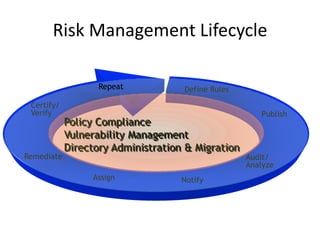
Remediate Audit/
Analyze
Assign Notify
Publish
Certify/
Verify
Define Rules
Policy Compliance
Vulnerability Management
Directory Administration & Migration
Repeat
Risk Management Lifecycle
Benefits of Lifecycle
• Increase audit coverage and frequency
• Look at ALL your servers and workstations,
ALL the time
• Provide policies to measure against
• Achieve constant state of audit
More Coverage + Complete Policies = Less Risk
Automating the Lifecycle
• What percentage of your machines do you
audit regularly today?
• For best security, how many should you audit?
• How often do you complete your audit cycle?
• Only an automated solution can:
– Audit 100% of machines
– Increase your audit frequency
– Decrease the time to remediate
– Reduce risks AND reduce costs at the same time
Sustainability
• Is this more work than you are doing today?
– YES!! And it will continue to grow…
– Start Now!
• With all the other things that are going on, how
can I not only create – but maintain a secure
environment.
– Create Policies
– Automate Assessment with software tools (VM)
– Remediate (VM)
– Evaluate (VM)
– Start Over! (VM – using scheduling)
Any pitfalls?
Technical:
• Depth of reporting (granularity, ad-hoc VS predefined)
• Closed loop problem identification and
Remediation
• Scalability
– Agents and their associated maintenance
– parallel processing
• Lack of centralized management (combination of security,
auditing and management tools bundled into product)
Other benefits
Business reasons:
• 30-70% reduction in business losses due to downtime
• 20-70% reduction in lost opportunity costs
• 20-50% reduction in mediation, recovery time and
associated costs
• 10-30% reduction in lost productivity of non-IT
personnel
• 1-2% legal exposure and costs
• 10-30% deployment and maintenance
Testimonials
“(VM) solutions reduced our business loss and
downtime when NIMDA hit.” “…put out the
1.1 million hits that we took. That was huge.”
– Large mid-west financial organization
“…vulnerability management solution, we
realized more than $1,000,000 in ROI.” –
Florida Hospital
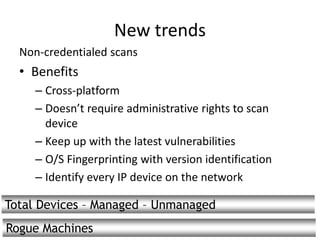
New trends
Non-credentialed scans
• Benefits
– Cross-platform
– Doesn’t require administrative rights to scan
device
– Keep up with the latest vulnerabilities
– O/S Fingerprinting with version identification
– Identify every IP device on the network
Total Devices – Managed – Unmanaged
Rogue Machines
Patch Management
What is a patch?
• A patch, or Hot Fix, is an updated file or set of
files (exe, dll, sys, etc) that fixes a software flaw
• Two types of patches:
– Security patches:
Patches that address known security vulnerabilities
– Non-security patches:
Patches that improve performance or fix functional
problems
• Service Packs
– Contains all previously released security and non-
security patches (rollups)
– Contains new patches also
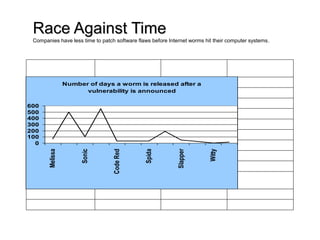
Race Against Time
Companies have less time to patch software flaws before Internet worms hit their computer systems.
Name of Worm Vulnerability Alert Number of Days Worm Released
Melissa Dec. 1, '99 65 March 27, '99
Sadmind Dec. 29, '99 496 May 8, '01
Sonic July 18, '00 104 Oct. 30 '00
Bugbear March 29, '01 550 Sept. 30, '02
Code Red June 18, '01 31 July 19 '01
Nimda Aug. 15 '01 34 Sept. 18 '01
Spida April 17, '02 34 May 21, '02
SQL Slammer July 24, '02 185 Jan. 25 '03
Slapper July 30, '02 46 Sept. 14, '02
Blaster/Welchia/Nachi July 16, '03 26 Aug. 11, '03
Witty March 18, '04 2 March 20, '04
Sasser April 13, '04 17 April 30, '04
Number of days a worm is released after a
vulnerability is announced
0
100
200
300
400
500
600
Melissa
Sonic
CodeRed
Spida
Slapper
Witty
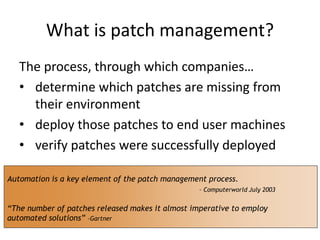
What is patch management?
The process, through which companies…
• determine which patches are missing from
their environment
• deploy those patches to end user machines
• verify patches were successfully deployed
Automation is a key element of the patch management process.
– Computerworld July 2003
“The number of patches released makes it almost imperative to employ
automated solutions” –Gartner
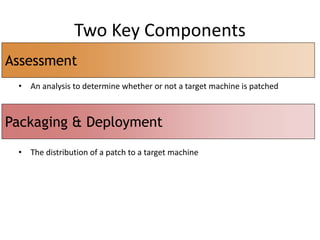
Two Key Components
• An analysis to determine whether or not a target machine is patched
• The distribution of a patch to a target machine
Assessment
Packaging & Deployment
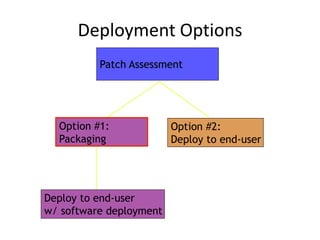
Deployment Options
Patch Assessment
Option #1:
Packaging
Option #2:
Deploy to end-user
Deploy to end-user
w/ software deployment
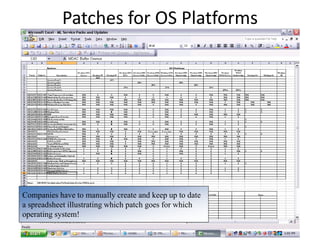
Patches for OS Platforms
Companies have to manually create and keep up to date
a spreadsheet illustrating which patch goes for which
operating system!
Check in with the experts
• The manual process of patching thousands of
workstations and servers in an environment is
“nearly impossible”. (Computerworld/July 14,
2003)
• “Gartner estimates that IT managers now
spend up to two hours every day managing
patches.” (Computerworld/July 14, 2003)
Patch Assessment-Considerations
• Audit the patch process
– Why is patch needed?
• Reboot required?
• Unsigned driver?
• Conduct an in-depth assessment
– CVE number
– Affected product
– Reason patch is missing
– Bulletin ID & name
Patch Assessment, how
A comprehensive meta document, called MSSECURE.XML,
provides the intelligence used to analyze whether or not a
patch is installed. It contains security bulletin name and title,
detailed product specific security hotfixes, including:
– Files in each hotfix package with their file versions and
checksums
– Registry keys that were applied by the hotfix installation
package
– Information about which patches supersede other patches
– Related Microsoft Knowledge Base article numbers
– Third party analysis of threats posed by a patch’s
vulnerability
– Links to additional information from BugTraq, cross
references to CVEs, and more
Patch Deployment
Patch packaging
Wizard-based package creation
Decentralized, scalable patch distribution method
Packaged using standard technology
Patch Deployment Packaged UI
Centralized patch depolyment
Ad-hoc patch distribution
Test deploy
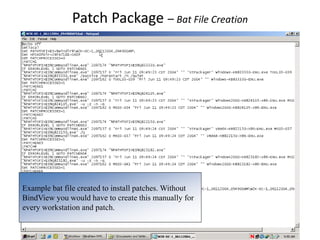
Patch Package – Bat File Creation
Example bat file created to install patches. Without
BindView you would have to create this manually for
every workstation and patch.
Solution considerations
Agentless
Scalability
Scheduling
Baselining
Executive reporting/view
Detailed patch analysis
Comprehensive pre-patch auditing
Post patch verification auditing
Flexible/comprehensive patch selection (critical patches)
Flexible patch deployment (critical servers)
Office CD central source
Rollback capabilities
Common Patch Management Tools in Enterprise
Environments
 Microsoft Baseline Security Advisor (MBSA
1.0, 1.2)
 Microsoft Software Update Service (SUS)
 Microsoft Systems Management Server (SMS
2.0, 2003)
 Active Directory Group Policies
Microsoft Baseline Security Advisor (MBSA 1.0,
1.2)
 Designed for small to medium businesses (less
than 500 machines or 1500 users
 No centralized management server or
reporting services
 No distributed agents for data collection
 Does not distribute patches
 When used with SMS, developers still have to
manually create patch packages
Microsoft Software Update Service (SUS)
 Corporate windowsupdate.com
 Does not evaluate “back office” applications
such as Exchange or IIS
 No reporting, only basic log analysis
 No distributed agents or distribution points
Microsoft Systems Management Server
 Does not specifically target security
 Software deployments (including patches)
must be created manually
 No easy way to report on only security patch
deployments
Active Directory Group Policies
 Not designed for patch deployment
 Cannot report on software deployments
 Targeted distribution points is cumbersome.
You must use multiple GPOs which is not
recommended
 Cannot monitor software pushes
Q&A

Vulnerability and Patch Management

  • 1.
  • 2.
    What is Vulnerability Management? Combinationof management and security tools into one product. Examples of Management tools: – Automated documentation for disaster recovery – Disk space analysis – Content scanning (MS Exchange) – Mailbox moves (MS Exchange) – Change impact analysis (MS SQL) The ability to audit and document your improved security. – Requisite in IT, banking/healthcare/government or any highly regulated industry – Staff augmentation (cost savings)
  • 3.
    Why Vulnerability Management Accordingto Gartner: Security continues to be one of the top three issues for CIOs. Windows, IIS and SQL Server are the three key areas prone to attack. 2004 was the first time that the security budget for the average enterprise constituted more than 5% of the overall IT budget – showing up on the CIO’s pie chart
  • 4.
    Why Vulnerability Management Alsoaccording to Gartner, some ways to quantify what you do are: • What percentage of known attacks is the organization vulnerable to? • When was that percentage calculated? • What percentage of company software, people and supplies have been reviewed for security issues? • What percentage of downtime is the result of security problems? • What percentage of nodes in the network are managed by IT?
  • 5.
    Why implement aVM solution? •Multiple threats across a complex IT infrastructure •Multiple IT Managers are accountable for specific pieces of the infrastructure, but not all •Native tools do not provide enterprise-level, consolidated assessment and audit •A breach in any one area can affect the entire infrastructure •Organizations must comply with some mandated standards and practices across the enterprise •Time and efficiencies gained
  • 6.
    Quick Quiz: 1. Howmany machines does it take to make a network completely vulnerable? 2. Name three ways a network may be vulnerable?
  • 7.
    Remediate Audit/ Analyze Assign Notify Publish Certify/ Verify DefineRules Policy Compliance Vulnerability Management Directory Administration & Migration Repeat Risk Management Lifecycle
  • 8.
    Benefits of Lifecycle •Increase audit coverage and frequency • Look at ALL your servers and workstations, ALL the time • Provide policies to measure against • Achieve constant state of audit More Coverage + Complete Policies = Less Risk
  • 9.
    Automating the Lifecycle •What percentage of your machines do you audit regularly today? • For best security, how many should you audit? • How often do you complete your audit cycle? • Only an automated solution can: – Audit 100% of machines – Increase your audit frequency – Decrease the time to remediate – Reduce risks AND reduce costs at the same time
  • 10.
    Sustainability • Is thismore work than you are doing today? – YES!! And it will continue to grow… – Start Now! • With all the other things that are going on, how can I not only create – but maintain a secure environment. – Create Policies – Automate Assessment with software tools (VM) – Remediate (VM) – Evaluate (VM) – Start Over! (VM – using scheduling)
  • 11.
    Any pitfalls? Technical: • Depthof reporting (granularity, ad-hoc VS predefined) • Closed loop problem identification and Remediation • Scalability – Agents and their associated maintenance – parallel processing • Lack of centralized management (combination of security, auditing and management tools bundled into product)
  • 12.
    Other benefits Business reasons: •30-70% reduction in business losses due to downtime • 20-70% reduction in lost opportunity costs • 20-50% reduction in mediation, recovery time and associated costs • 10-30% reduction in lost productivity of non-IT personnel • 1-2% legal exposure and costs • 10-30% deployment and maintenance
  • 13.
    Testimonials “(VM) solutions reducedour business loss and downtime when NIMDA hit.” “…put out the 1.1 million hits that we took. That was huge.” – Large mid-west financial organization “…vulnerability management solution, we realized more than $1,000,000 in ROI.” – Florida Hospital
  • 14.
    New trends Non-credentialed scans •Benefits – Cross-platform – Doesn’t require administrative rights to scan device – Keep up with the latest vulnerabilities – O/S Fingerprinting with version identification – Identify every IP device on the network Total Devices – Managed – Unmanaged Rogue Machines
  • 15.
  • 16.
    What is apatch? • A patch, or Hot Fix, is an updated file or set of files (exe, dll, sys, etc) that fixes a software flaw • Two types of patches: – Security patches: Patches that address known security vulnerabilities – Non-security patches: Patches that improve performance or fix functional problems • Service Packs – Contains all previously released security and non- security patches (rollups) – Contains new patches also
  • 17.
    Race Against Time Companieshave less time to patch software flaws before Internet worms hit their computer systems. Name of Worm Vulnerability Alert Number of Days Worm Released Melissa Dec. 1, '99 65 March 27, '99 Sadmind Dec. 29, '99 496 May 8, '01 Sonic July 18, '00 104 Oct. 30 '00 Bugbear March 29, '01 550 Sept. 30, '02 Code Red June 18, '01 31 July 19 '01 Nimda Aug. 15 '01 34 Sept. 18 '01 Spida April 17, '02 34 May 21, '02 SQL Slammer July 24, '02 185 Jan. 25 '03 Slapper July 30, '02 46 Sept. 14, '02 Blaster/Welchia/Nachi July 16, '03 26 Aug. 11, '03 Witty March 18, '04 2 March 20, '04 Sasser April 13, '04 17 April 30, '04 Number of days a worm is released after a vulnerability is announced 0 100 200 300 400 500 600 Melissa Sonic CodeRed Spida Slapper Witty
  • 18.
    What is patchmanagement? The process, through which companies… • determine which patches are missing from their environment • deploy those patches to end user machines • verify patches were successfully deployed Automation is a key element of the patch management process. – Computerworld July 2003 “The number of patches released makes it almost imperative to employ automated solutions” –Gartner
  • 19.
    Two Key Components •An analysis to determine whether or not a target machine is patched • The distribution of a patch to a target machine Assessment Packaging & Deployment
  • 20.
    Deployment Options Patch Assessment Option#1: Packaging Option #2: Deploy to end-user Deploy to end-user w/ software deployment
  • 21.
    Patches for OSPlatforms Companies have to manually create and keep up to date a spreadsheet illustrating which patch goes for which operating system!
  • 22.
    Check in withthe experts • The manual process of patching thousands of workstations and servers in an environment is “nearly impossible”. (Computerworld/July 14, 2003) • “Gartner estimates that IT managers now spend up to two hours every day managing patches.” (Computerworld/July 14, 2003)
  • 23.
    Patch Assessment-Considerations • Auditthe patch process – Why is patch needed? • Reboot required? • Unsigned driver? • Conduct an in-depth assessment – CVE number – Affected product – Reason patch is missing – Bulletin ID & name
  • 24.
    Patch Assessment, how Acomprehensive meta document, called MSSECURE.XML, provides the intelligence used to analyze whether or not a patch is installed. It contains security bulletin name and title, detailed product specific security hotfixes, including: – Files in each hotfix package with their file versions and checksums – Registry keys that were applied by the hotfix installation package – Information about which patches supersede other patches – Related Microsoft Knowledge Base article numbers – Third party analysis of threats posed by a patch’s vulnerability – Links to additional information from BugTraq, cross references to CVEs, and more
  • 25.
    Patch Deployment Patch packaging Wizard-basedpackage creation Decentralized, scalable patch distribution method Packaged using standard technology Patch Deployment Packaged UI Centralized patch depolyment Ad-hoc patch distribution Test deploy
  • 26.
    Patch Package –Bat File Creation Example bat file created to install patches. Without BindView you would have to create this manually for every workstation and patch.
  • 27.
    Solution considerations Agentless Scalability Scheduling Baselining Executive reporting/view Detailedpatch analysis Comprehensive pre-patch auditing Post patch verification auditing Flexible/comprehensive patch selection (critical patches) Flexible patch deployment (critical servers) Office CD central source Rollback capabilities
  • 28.
    Common Patch ManagementTools in Enterprise Environments  Microsoft Baseline Security Advisor (MBSA 1.0, 1.2)  Microsoft Software Update Service (SUS)  Microsoft Systems Management Server (SMS 2.0, 2003)  Active Directory Group Policies
  • 29.
    Microsoft Baseline SecurityAdvisor (MBSA 1.0, 1.2)  Designed for small to medium businesses (less than 500 machines or 1500 users  No centralized management server or reporting services  No distributed agents for data collection  Does not distribute patches  When used with SMS, developers still have to manually create patch packages
  • 30.
    Microsoft Software UpdateService (SUS)  Corporate windowsupdate.com  Does not evaluate “back office” applications such as Exchange or IIS  No reporting, only basic log analysis  No distributed agents or distribution points
  • 31.
    Microsoft Systems ManagementServer  Does not specifically target security  Software deployments (including patches) must be created manually  No easy way to report on only security patch deployments
  • 32.
    Active Directory GroupPolicies  Not designed for patch deployment  Cannot report on software deployments  Targeted distribution points is cumbersome. You must use multiple GPOs which is not recommended  Cannot monitor software pushes
  • 33.