Administration
(Professional Business)
Level 1 Award
Waterside
Tutor: Michelle Walsh
mwalsh@accross.ac.uk
01254 354413
Building Information -
Reminder
 Fire evacuation / Toilets / Smoking
 Code of Conduct / ICT Acceptable Use Policy
 Phone calls / appointments
 7 sessions (including enrolment session) – Always AIM for 100%
- Minimum attendance is 70% to achieve the qualification
12/04/2018 – 30/05/2018 - 7 sessions. Last session is a
Wednesday, instead of Thursday
 Absences are to be reported and you are required to catch up in
your own time, with resources provided on ItsLearning
 Brews – 25p per session – WASH OWN CUPS
 Questions?
Learning outcomes –
Session 5 LO 1: Take part in an icebreaker
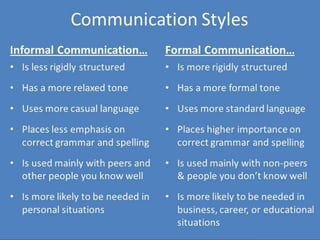
 LO 2: Give examples of when to use a formal or informal
communication style (CBD UNIT 2.1)
 LO 3: State why some businesses adopt a ‘house style’ for
certain documents (CBD UNIT 2.2)
 LO 4: Follow instructions to complete routine administrative
tasks – Admin Task 2/Admin Task 3/Admin Task 4 (WBA Unit
2.1) Produce routine business documents using the
appropriate communication style (CBD Unit 3.1) Check
documents for accuracy (CBD UNIT 3.2)
 LO 5: Use simple tools to organise your time (WBA Unit 4.1)
 LO 6: Use key equipment according to organisational
procedures (WBA Unit 2.2)
 LO 7: Be able to welcome visitors in a positive way (WV Unit
1.1-1.5)
ICE BREAKER
Why does following instructions
matter when you’re an administrator?
Give some examples for what may
happen if you didn’t follow
instructions
How does this link to the time
management task you completed last
week?
Home work
You needed to…..
 State how treating visitors politely and in a positive
way benefits the organisation (WV Unit 2.1 – Page 19)
Please write your answer in full sentences and include
detail.
Share some examples
You also needed to…
 Ensure your portfolio is up to date - completed first
unit, completed Admin Task 1 and at least 2 different
documents from Admin Task 2 during the week we
are not here
 Complete feedback on your assessed work so far
Group work – Know why it is
important to use the right
communication style in business
documents
 Give examples of when to use a formal or
informal communication style – 3 examples of
each. Examples must relate to business
documents. Consider the audience you are
directing the document at.
 State why some businesses adopt a ‘house style’
for certain documents
What is a 'House Style'?
A house style is a set of rules which state how all documents
and written communication from a business should be
formatted.
It will govern things such as
- the colours to be used
- the font style and size
- where the logo should appear
- whether text should be right, centre or fully
justified
- how the address and contact details should
be presented
House styles are needed:
 - To ensure consistency across all
documents
 - To support brand recognition (people
know the documents belong to a particular
organisation)
 -To reduce the amount of time staff spend
setting up and formatting documents
 - To reduce the risk of mistakes e.g.
address being mispelt, logo being omitted
Workbook
Complete Page 24 in your own workbook
To-do list & Progress
chart
 Complete a brief to-do list so you know what
tasks you have left to complete
 Mark off on the progress chart where you are
up to so that I am able to monitor this
ADMIN TASK 2
1. Follow instructions to complete routine administrative tasks - ADMIN
TASK 2 (handout) – this will take between 2 and 3 weeks
2. You need to create 3 separate documents from the Task sheet – These
need to be different types of documents but you can choose them (for
those able, try to choose the more difficult documents to challenge
yourself)
3. Proof read each document – Look for errors in layout, spellings, capital
letters, information is accurate, formatting is correct and professional
4. Save each file with an appropriate file name to the ‘documents’ folder on
the Computer (Ask if you are unsure)
5. Upload each document to ItsLearning (Ask if you are unsure)
6. If you have completed this for all 3 documents, ask me to check before
printing – Check ItsLearning for additional tasks 3 & 4
During the practical tasks you
will meet the following
criteria;
Working in business and Administration
 AC 2.1 Follow instructions to complete
routine administrative tasks
 AC 4.1 Use simple tools to organise their
time
Creating business documents
 AC 3.1 Produce routine business
documents using the appropriate
communication style
 AC 3.2 Check documents for accuracy
Reception observation
Individually, you will be observed whilst covering
our reception area here at Waterside (15 minutes
each for now)
 You are to familiarise yourself with reception
area and information available
 If the phone rings, you can answer it (A hand-out
is available to guide you)
 If someone comes to reception, you can find out
what their query is
Whilst on reception - What
are you being observed on?
Turn to page 18 in your workbook and look at your
Visitor’s Log.
 1.1 Welcome visitors and establish the purpose for their
visit
 1.2 Follow organisational procedures for receiving
visitors
 1.3 Ask and answer routine questions
 1.4 Make visitors feel welcome during any period of
waiting
 1.5 Use appropriate tone and language, including body
language, when dealing with visitors
Photographs will be used as evidence in your portfolio
– This evidence will take a few weeks to gather
Further Activities
 Admin Task 3 & 4 are on ItsLearning – Week
4
 Download a copy of these to your computer
and follow the instructions to complete these
tasks
ItsLearning
 If you haven’t already – Access ItsLearning to
have a look through some of the resources
available to you
 All resources from the session are there and
plenty more
 These resources will help you to further your
knowledge and improve your skills as an
administrator.
Did you…..
 LO 1: Take part in an icebreaker
 LO 2: Give examples of when to use a formal or informal
communication style (CBD UNIT 2.1)
 LO 3: State why some businesses adopt a ‘house style’ for certain
documents (CBD UNIT 2.2)
 LO 4: Follow instructions to complete routine administrative tasks –
Admin Task 2/Admin Task 3/Admin Task 4 (WBA Unit 2.1) Produce
routine business documents using the appropriate communication
style (CBD Unit 3.1) Check documents for accuracy (CBD UNIT 3.2)
 LO 5: Use simple tools to organise your time (WBA Unit 4.1)
 LO 6: Use key equipment according to organisational procedures
(WBA Unit 2.2)
 LO 7: Be able to welcome visitors in a positive way (WV Unit 1.1-1.5)
Home work
You need to…..
 List 5 different types of business documents and
suggest (in full sentences) when they might be used
 State (in full sentences) at least 2 reasons why
templates are used for some business documents
This can be typewritten and printed, typewritten and
emailed to me or it can be completed on ItsLearning – the
choice is yours!
 Access the resources on ItsLearning to help improve
your administration skills in different areas… IT, Word
documents, Emails, spreadsheets and formulas,
internet and apps and so on

Business Admin Session 5

  • 1.
    Administration (Professional Business) Level 1Award Waterside Tutor: Michelle Walsh mwalsh@accross.ac.uk 01254 354413
  • 2.
    Building Information - Reminder Fire evacuation / Toilets / Smoking  Code of Conduct / ICT Acceptable Use Policy  Phone calls / appointments  7 sessions (including enrolment session) – Always AIM for 100% - Minimum attendance is 70% to achieve the qualification 12/04/2018 – 30/05/2018 - 7 sessions. Last session is a Wednesday, instead of Thursday  Absences are to be reported and you are required to catch up in your own time, with resources provided on ItsLearning  Brews – 25p per session – WASH OWN CUPS  Questions?
  • 3.
    Learning outcomes – Session5 LO 1: Take part in an icebreaker  LO 2: Give examples of when to use a formal or informal communication style (CBD UNIT 2.1)  LO 3: State why some businesses adopt a ‘house style’ for certain documents (CBD UNIT 2.2)  LO 4: Follow instructions to complete routine administrative tasks – Admin Task 2/Admin Task 3/Admin Task 4 (WBA Unit 2.1) Produce routine business documents using the appropriate communication style (CBD Unit 3.1) Check documents for accuracy (CBD UNIT 3.2)  LO 5: Use simple tools to organise your time (WBA Unit 4.1)  LO 6: Use key equipment according to organisational procedures (WBA Unit 2.2)  LO 7: Be able to welcome visitors in a positive way (WV Unit 1.1-1.5)
  • 4.
  • 5.
    Why does followinginstructions matter when you’re an administrator? Give some examples for what may happen if you didn’t follow instructions How does this link to the time management task you completed last week?
  • 6.
    Home work You neededto…..  State how treating visitors politely and in a positive way benefits the organisation (WV Unit 2.1 – Page 19) Please write your answer in full sentences and include detail. Share some examples You also needed to…  Ensure your portfolio is up to date - completed first unit, completed Admin Task 1 and at least 2 different documents from Admin Task 2 during the week we are not here  Complete feedback on your assessed work so far
  • 7.
    Group work –Know why it is important to use the right communication style in business documents  Give examples of when to use a formal or informal communication style – 3 examples of each. Examples must relate to business documents. Consider the audience you are directing the document at.  State why some businesses adopt a ‘house style’ for certain documents
  • 9.
    What is a'House Style'? A house style is a set of rules which state how all documents and written communication from a business should be formatted. It will govern things such as - the colours to be used - the font style and size - where the logo should appear - whether text should be right, centre or fully justified - how the address and contact details should be presented
  • 10.
    House styles areneeded:  - To ensure consistency across all documents  - To support brand recognition (people know the documents belong to a particular organisation)  -To reduce the amount of time staff spend setting up and formatting documents  - To reduce the risk of mistakes e.g. address being mispelt, logo being omitted
  • 11.
    Workbook Complete Page 24in your own workbook
  • 13.
    To-do list &Progress chart  Complete a brief to-do list so you know what tasks you have left to complete  Mark off on the progress chart where you are up to so that I am able to monitor this
  • 14.
    ADMIN TASK 2 1.Follow instructions to complete routine administrative tasks - ADMIN TASK 2 (handout) – this will take between 2 and 3 weeks 2. You need to create 3 separate documents from the Task sheet – These need to be different types of documents but you can choose them (for those able, try to choose the more difficult documents to challenge yourself) 3. Proof read each document – Look for errors in layout, spellings, capital letters, information is accurate, formatting is correct and professional 4. Save each file with an appropriate file name to the ‘documents’ folder on the Computer (Ask if you are unsure) 5. Upload each document to ItsLearning (Ask if you are unsure) 6. If you have completed this for all 3 documents, ask me to check before printing – Check ItsLearning for additional tasks 3 & 4
  • 15.
    During the practicaltasks you will meet the following criteria; Working in business and Administration  AC 2.1 Follow instructions to complete routine administrative tasks  AC 4.1 Use simple tools to organise their time Creating business documents  AC 3.1 Produce routine business documents using the appropriate communication style  AC 3.2 Check documents for accuracy
  • 16.
    Reception observation Individually, youwill be observed whilst covering our reception area here at Waterside (15 minutes each for now)  You are to familiarise yourself with reception area and information available  If the phone rings, you can answer it (A hand-out is available to guide you)  If someone comes to reception, you can find out what their query is
  • 17.
    Whilst on reception- What are you being observed on? Turn to page 18 in your workbook and look at your Visitor’s Log.  1.1 Welcome visitors and establish the purpose for their visit  1.2 Follow organisational procedures for receiving visitors  1.3 Ask and answer routine questions  1.4 Make visitors feel welcome during any period of waiting  1.5 Use appropriate tone and language, including body language, when dealing with visitors Photographs will be used as evidence in your portfolio – This evidence will take a few weeks to gather
  • 18.
    Further Activities  AdminTask 3 & 4 are on ItsLearning – Week 4  Download a copy of these to your computer and follow the instructions to complete these tasks
  • 19.
    ItsLearning  If youhaven’t already – Access ItsLearning to have a look through some of the resources available to you  All resources from the session are there and plenty more  These resources will help you to further your knowledge and improve your skills as an administrator.
  • 20.
    Did you…..  LO1: Take part in an icebreaker  LO 2: Give examples of when to use a formal or informal communication style (CBD UNIT 2.1)  LO 3: State why some businesses adopt a ‘house style’ for certain documents (CBD UNIT 2.2)  LO 4: Follow instructions to complete routine administrative tasks – Admin Task 2/Admin Task 3/Admin Task 4 (WBA Unit 2.1) Produce routine business documents using the appropriate communication style (CBD Unit 3.1) Check documents for accuracy (CBD UNIT 3.2)  LO 5: Use simple tools to organise your time (WBA Unit 4.1)  LO 6: Use key equipment according to organisational procedures (WBA Unit 2.2)  LO 7: Be able to welcome visitors in a positive way (WV Unit 1.1-1.5)
  • 21.
    Home work You needto…..  List 5 different types of business documents and suggest (in full sentences) when they might be used  State (in full sentences) at least 2 reasons why templates are used for some business documents This can be typewritten and printed, typewritten and emailed to me or it can be completed on ItsLearning – the choice is yours!  Access the resources on ItsLearning to help improve your administration skills in different areas… IT, Word documents, Emails, spreadsheets and formulas, internet and apps and so on