Building Information Modeling
What Does it Mean for the Electrical
Engineer?
John Griffiths PE
Geoff Gunn PE
Anthony Fresquez
2
Presentation Overview
BIM Overview
BIM in Detail
BIM Project Management
Question and Answer
BIM Demonstration
3
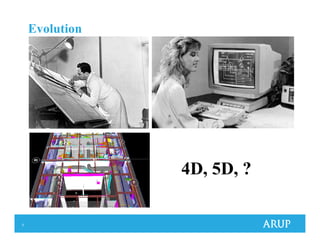
Evolution
4D, 5D, ?
6
What is BIM?
Building Information Modeling
“digital representation of physical and functional
characteristics of a facility”
National Institute of Building Sciences, Model Standard 22 (2007)
7
What is BIM?
Building Information Modeling
BIM means radically different things to different
people
Use often limited to 3D drafting
9
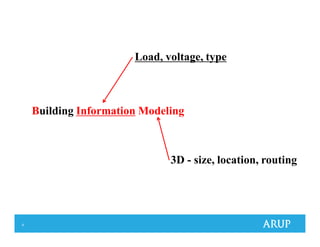
Building Information Modeling
Load, voltage, type
3D - size, location, routing
10
BIM to an Owner
Opportunity to take advantage of new technology
and skills to add value to their projects
- Build more for less
- Opportunity Reduce Risk
- Control Cost
- Manage Schedule
- Use BIM model throughout the life of the building
11
BIM to a Design Engineer
Allow the engineer to combine all the design process
and information a single model to streamline the
creation and production of designs
Better coordinated designs
Faster response to design changes
Increase accuracy (schedules)
Sustainability
12
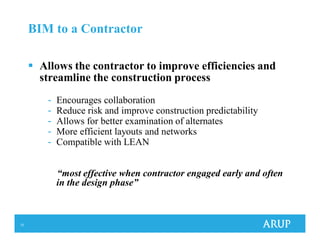
BIM to a Contractor
Allows the contractor to improve efficiencies and
streamline the construction process
- Encourages collaboration
- Reduce risk and improve construction predictability
- Allows for better examination of alternates
- More efficient layouts and networks
- Compatible with LEAN
“most effective when contractor engaged early and often
in the design phase”
13
Turning Expectations into Reality
Understand the Value Point for all stakeholders
Clearly define expectations and deliverables early in
process
Be realistic about capabilities and limitations of the
BIM delivery method
14
Turning Expectations into Reality
Clearly define expectations and deliverables early in
process
Understand the Value Point for all stakeholders
Be realistic about capabilities and limitations of the
BIM delivery method
well….doesn't Revit do that?
15
Define Expectations
“This project will utilize Building Information
Management (BIM) strategies and protocols, to assist
in the design and construction process”
Extract from a recent RFP
Big BIM or Little BIM?
16
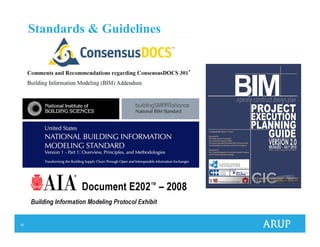
Standards & Guidelines
17
BIM – In Detail
Geoff Gunn PE
18
BIM – In Detail
Capabilities Overview
“How BIM’s supposed to work”
Case Study
“How BIM actually works”
19
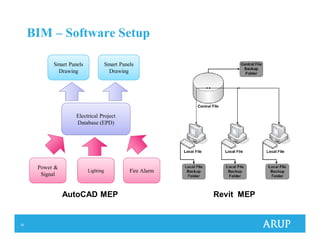
BIM – Software Setup
Electrical Project
Database (EPD)
Smart Panels
Drawing
Power &
Signal
Lighting Fire Alarm
Smart Panels
Drawing
ANTHONY
TO
CHANGE
AutoCAD MEP Revit MEP
20
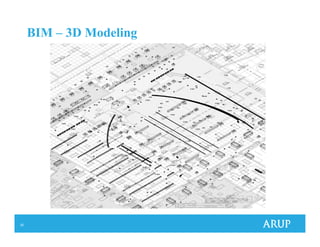
BIM – 3D Modeling
21
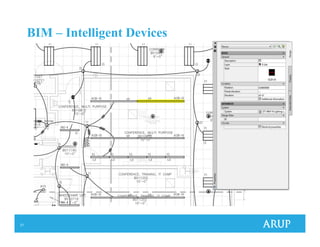
BIM – Intelligent Devices
22
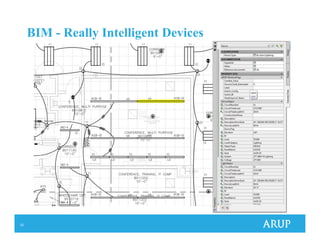
BIM - Really Intelligent Devices
23
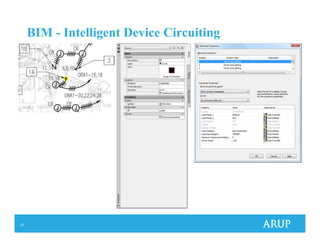
BIM - Intelligent Device Circuiting
24
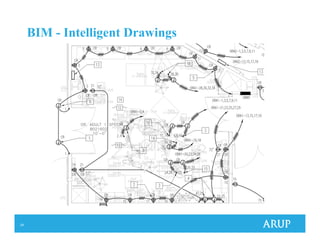
BIM - Intelligent Drawings
25
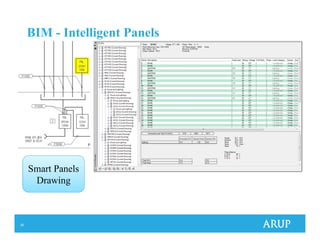
BIM - Intelligent Panels
Smart Panels
Drawing
26
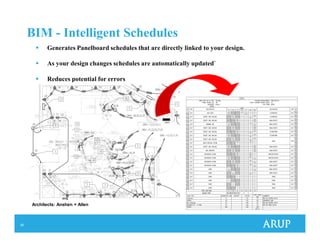
BIM - Intelligent Schedules
Generates Panelboard schedules that are directly linked to your design.
As your design changes schedules are automatically updated`
Reduces potential for errors
Architects: Anshen + Allen
27
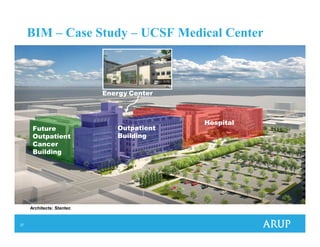
BIM – Case Study – UCSF Medical Center
Architects: Stantec
Hospital
Outpatient
Building
Future
Outpatient
Cancer
Building
Energy Center
28
BIM – Case Study – UCSF Medical Center
Energy Center
Statistics
3 Buildings
Hospital – 289 patient beds
Outpatient building
Energy Center
Total Building Area – 878,000 sf
Total Electrical Load – 16.5MW
29
BIM – Case Study – Project Timeline
2007 Project Start
SD phase completed
Design started in AutoCAD MEP 2008
2008
DD phase completed
2009
50% CD completed
Project “upgraded” to AutoCAD MEP 2010
2010
100% CD completed
2011
OSHPD permit received
30
BIM – Case Study – File Setup
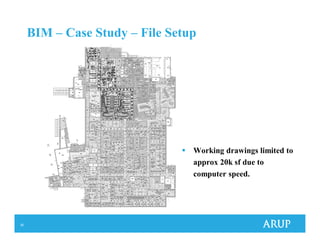
Working drawings limited to
approx 20k sf due to
computer speed.
31
BIM – Case Study – File Setup
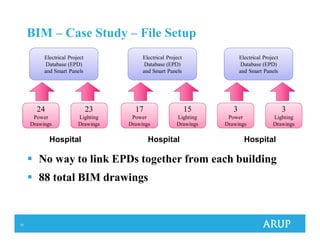
Electrical Project
Database (EPD)
and Smart Panels
24
Power
Drawings
23
Lighting
Drawings
Hospital
Electrical Project
Database (EPD)
and Smart Panels
17
Power
Drawings
15
Lighting
Drawings
Hospital
Electrical Project
Database (EPD)
and Smart Panels
3
Power
Drawings
3
Lighting
Drawings
Hospital
No way to link EPDs together from each building
88 total BIM drawings
32
BIM – Case Study – Complications
AutoCAD MEP 2008
Our version was heavily customized in order to realize
maximum BIM potential
Maximum size of EPD file due to 64-bit computers not being
supported
AutoCAD MEP 2010
Automatic Transfer Switches are not supported
Panelboard schedules did not meet OSHPD requirements out
of the box
No way to link EPD files from different projects
Some circuit loads were mis-recorded
33
BIM – Case Study – Lessons Learned
Proper project setup essential
All devices, demand factor styles, file structures, etc. should
be properly setup before any circuiting is started
Slow and Steady work flow
Adding extra BIM technicians and Engineers to meet a
deadline often results in crashes or corrupted files
Hardware and Software limitations
Limits due to hardware or software performance should be
reviewed in advance
34
BIM – Management
Anthony Fresquez
35
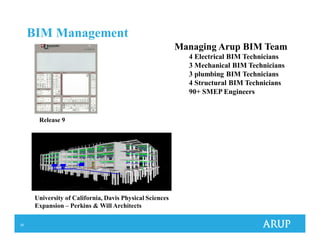
BIM Management
Managing Arup BIM Team
4 Electrical BIM Technicians
3 Mechanical BIM Technicians
3 plumbing BIM Technicians
4 Structural BIM Technicians
90+ SMEP Engineers
University of California, Davis Physical Sciences
Expansion – Perkins & Will Architects
Release 9
36
BIM Management
Work Culture
Communication
Challenges
Time Management
Software
Hardware
Next Steps
37
Work Culture
Transition from 2D CAD to 3D Modeling
Performing design within software
Increased roles and responsibility performing 3D coordination
Due to design skill specialization staff cannot switch easily
between disciplines
Hiring profile change seeking people with design experience
Recognizing some people may not make the transition
38
Communication
Communication is critical and occurs at a higher level within
design team.
- Entire team must understand engineering concepts
- Team members are not easily replaceable.
Model is very sensitive, because it is dynamic, which
necessitates more reviews and back checks.
Not just hard clashes, also soft checking
Demand Factors, Loads, Voltage
Challenges
39
BIM Management
Time management
Training
- Formal training is recommended. Train the trainer method not
beneficial.
Resourcing
- Plan ahead to avoid last minute allocation of resources as it’s
difficult to find contract resources with BIM skills.
Workflow
- Multiple users saving to EPD file caused software to crash with
AutoCAD MEP 2010. Issued resolved with AutoCAD MEP 2011
Trouble shooting
- Plan on it you’re going to spend plenty of time solving problems,
especially around deadlines.
40
BIM Management
Software
Constantly releasing new versions
- Autodesk has committed to releasing a new version of the every
year which can present a problem as projects can continue for 5+
years
- Difficulty upgrading to the new release as upgrading to new could
impact the display of AEC objects or new drawing format.
Licenses, various platforms, support
- Distributed server configuration
- Suite base products AutoCAD and Revit Structure, AutoCAD
MEP and Revit MEP plus we also use Navisworks.
- Autodesk Subscription online support
- Autodesk reseller ‘Ideate’ training, user groups and support.
41
BIM Management
Hardware
HP Z400 Workstation, Genuine Windows® 7 Professional 64-bit OS
10,000RPM 320gb Hard Drive
Intel® Xeon® 23350 3.06, 8MB/1066 QC CPU
16GB (4x4gb) DDR3-1333 MHz/PC3 10600-unbuffered- ECC RAM
NVIDIA Quadro FX3800 1GB Graphics Card
Dual Monitors is essential when working within the model
environment.
42
Next Steps
Revit MEP
- Recognized as industry standard for design firms
Capture I in BIM
- Information is key
- Superior scheduling functionally
- Single model allows better design processes
More capabilities
- Ideal workflow with architectural revit model
- More efficient 3D coordination and production tool
- Content development from manufacturers
Link to e-Specs
- Interfaces with Revit's parametric database, instantly updating your project
specifications to the requirements of the building model
43
Building and Maintaining Relationships
Beta-Testing program:
- Revit Structure
- AutoCAD MEP
- Revit MEP
- Navisworks
- Microstation Structural Triforma
Working with Software Designer to ensure software meets the
demands of the design industry
44
Summary
Great potential
Increased accuracy
Increased productivity
Major Challenges
Steep learning curve
High entry cost
- Training
- Software & Hardware
BIM is here to stay!
45
Questions and Comments
john.griffiths@arup.com
geoff.gunn@arup.com
anthony.fresquez@arup.com

Building information modeling

  • 1.
    Building Information Modeling WhatDoes it Mean for the Electrical Engineer? John Griffiths PE Geoff Gunn PE Anthony Fresquez
  • 2.
    2 Presentation Overview BIM Overview BIMin Detail BIM Project Management Question and Answer BIM Demonstration
  • 3.
  • 4.
    6 What is BIM? BuildingInformation Modeling “digital representation of physical and functional characteristics of a facility” National Institute of Building Sciences, Model Standard 22 (2007)
  • 5.
    7 What is BIM? BuildingInformation Modeling BIM means radically different things to different people Use often limited to 3D drafting
  • 6.
    9 Building Information Modeling Load,voltage, type 3D - size, location, routing
  • 7.
    10 BIM to anOwner Opportunity to take advantage of new technology and skills to add value to their projects - Build more for less - Opportunity Reduce Risk - Control Cost - Manage Schedule - Use BIM model throughout the life of the building
  • 8.
    11 BIM to aDesign Engineer Allow the engineer to combine all the design process and information a single model to streamline the creation and production of designs Better coordinated designs Faster response to design changes Increase accuracy (schedules) Sustainability
  • 9.
    12 BIM to aContractor Allows the contractor to improve efficiencies and streamline the construction process - Encourages collaboration - Reduce risk and improve construction predictability - Allows for better examination of alternates - More efficient layouts and networks - Compatible with LEAN “most effective when contractor engaged early and often in the design phase”
  • 10.
    13 Turning Expectations intoReality Understand the Value Point for all stakeholders Clearly define expectations and deliverables early in process Be realistic about capabilities and limitations of the BIM delivery method
  • 11.
    14 Turning Expectations intoReality Clearly define expectations and deliverables early in process Understand the Value Point for all stakeholders Be realistic about capabilities and limitations of the BIM delivery method well….doesn't Revit do that?
  • 12.
    15 Define Expectations “This projectwill utilize Building Information Management (BIM) strategies and protocols, to assist in the design and construction process” Extract from a recent RFP Big BIM or Little BIM?
  • 13.
  • 14.
    17 BIM – InDetail Geoff Gunn PE
  • 15.
    18 BIM – InDetail Capabilities Overview “How BIM’s supposed to work” Case Study “How BIM actually works”
  • 16.
    19 BIM – SoftwareSetup Electrical Project Database (EPD) Smart Panels Drawing Power & Signal Lighting Fire Alarm Smart Panels Drawing ANTHONY TO CHANGE AutoCAD MEP Revit MEP
  • 17.
    20 BIM – 3DModeling
  • 18.
  • 19.
    22 BIM - ReallyIntelligent Devices
  • 20.
    23 BIM - IntelligentDevice Circuiting
  • 21.
  • 22.
    25 BIM - IntelligentPanels Smart Panels Drawing
  • 23.
    26 BIM - IntelligentSchedules Generates Panelboard schedules that are directly linked to your design. As your design changes schedules are automatically updated` Reduces potential for errors Architects: Anshen + Allen
  • 24.
    27 BIM – CaseStudy – UCSF Medical Center Architects: Stantec Hospital Outpatient Building Future Outpatient Cancer Building Energy Center
  • 25.
    28 BIM – CaseStudy – UCSF Medical Center Energy Center Statistics 3 Buildings Hospital – 289 patient beds Outpatient building Energy Center Total Building Area – 878,000 sf Total Electrical Load – 16.5MW
  • 26.
    29 BIM – CaseStudy – Project Timeline 2007 Project Start SD phase completed Design started in AutoCAD MEP 2008 2008 DD phase completed 2009 50% CD completed Project “upgraded” to AutoCAD MEP 2010 2010 100% CD completed 2011 OSHPD permit received
  • 27.
    30 BIM – CaseStudy – File Setup Working drawings limited to approx 20k sf due to computer speed.
  • 28.
    31 BIM – CaseStudy – File Setup Electrical Project Database (EPD) and Smart Panels 24 Power Drawings 23 Lighting Drawings Hospital Electrical Project Database (EPD) and Smart Panels 17 Power Drawings 15 Lighting Drawings Hospital Electrical Project Database (EPD) and Smart Panels 3 Power Drawings 3 Lighting Drawings Hospital No way to link EPDs together from each building 88 total BIM drawings
  • 29.
    32 BIM – CaseStudy – Complications AutoCAD MEP 2008 Our version was heavily customized in order to realize maximum BIM potential Maximum size of EPD file due to 64-bit computers not being supported AutoCAD MEP 2010 Automatic Transfer Switches are not supported Panelboard schedules did not meet OSHPD requirements out of the box No way to link EPD files from different projects Some circuit loads were mis-recorded
  • 30.
    33 BIM – CaseStudy – Lessons Learned Proper project setup essential All devices, demand factor styles, file structures, etc. should be properly setup before any circuiting is started Slow and Steady work flow Adding extra BIM technicians and Engineers to meet a deadline often results in crashes or corrupted files Hardware and Software limitations Limits due to hardware or software performance should be reviewed in advance
  • 31.
  • 32.
    35 BIM Management Managing ArupBIM Team 4 Electrical BIM Technicians 3 Mechanical BIM Technicians 3 plumbing BIM Technicians 4 Structural BIM Technicians 90+ SMEP Engineers University of California, Davis Physical Sciences Expansion – Perkins & Will Architects Release 9
  • 33.
    36 BIM Management Work Culture Communication Challenges TimeManagement Software Hardware Next Steps
  • 34.
    37 Work Culture Transition from2D CAD to 3D Modeling Performing design within software Increased roles and responsibility performing 3D coordination Due to design skill specialization staff cannot switch easily between disciplines Hiring profile change seeking people with design experience Recognizing some people may not make the transition
  • 35.
    38 Communication Communication is criticaland occurs at a higher level within design team. - Entire team must understand engineering concepts - Team members are not easily replaceable. Model is very sensitive, because it is dynamic, which necessitates more reviews and back checks. Not just hard clashes, also soft checking Demand Factors, Loads, Voltage Challenges
  • 36.
    39 BIM Management Time management Training -Formal training is recommended. Train the trainer method not beneficial. Resourcing - Plan ahead to avoid last minute allocation of resources as it’s difficult to find contract resources with BIM skills. Workflow - Multiple users saving to EPD file caused software to crash with AutoCAD MEP 2010. Issued resolved with AutoCAD MEP 2011 Trouble shooting - Plan on it you’re going to spend plenty of time solving problems, especially around deadlines.
  • 37.
    40 BIM Management Software Constantly releasingnew versions - Autodesk has committed to releasing a new version of the every year which can present a problem as projects can continue for 5+ years - Difficulty upgrading to the new release as upgrading to new could impact the display of AEC objects or new drawing format. Licenses, various platforms, support - Distributed server configuration - Suite base products AutoCAD and Revit Structure, AutoCAD MEP and Revit MEP plus we also use Navisworks. - Autodesk Subscription online support - Autodesk reseller ‘Ideate’ training, user groups and support.
  • 38.
    41 BIM Management Hardware HP Z400Workstation, Genuine Windows® 7 Professional 64-bit OS 10,000RPM 320gb Hard Drive Intel® Xeon® 23350 3.06, 8MB/1066 QC CPU 16GB (4x4gb) DDR3-1333 MHz/PC3 10600-unbuffered- ECC RAM NVIDIA Quadro FX3800 1GB Graphics Card Dual Monitors is essential when working within the model environment.
  • 39.
    42 Next Steps Revit MEP -Recognized as industry standard for design firms Capture I in BIM - Information is key - Superior scheduling functionally - Single model allows better design processes More capabilities - Ideal workflow with architectural revit model - More efficient 3D coordination and production tool - Content development from manufacturers Link to e-Specs - Interfaces with Revit's parametric database, instantly updating your project specifications to the requirements of the building model
  • 40.
    43 Building and MaintainingRelationships Beta-Testing program: - Revit Structure - AutoCAD MEP - Revit MEP - Navisworks - Microstation Structural Triforma Working with Software Designer to ensure software meets the demands of the design industry
  • 41.
    44 Summary Great potential Increased accuracy Increasedproductivity Major Challenges Steep learning curve High entry cost - Training - Software & Hardware BIM is here to stay!
  • 42.