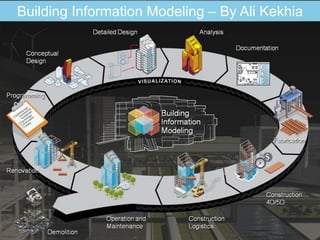
Building Information Modeling – By Ali Kekhia
THE STORY - EVOLUTION OF CAD
2D solutions
 Electronic drafting board
3D solutions
 Modeling for purely visualization purposes
BIM solutions
 Models with integrated architectural information
Construction Coordination (5D)
 Timing/scheduling and Cost estimation
WORKING CONCEPT - 2D CAD
Draft everything in 2D
No 3D model is created
Design changes maintained
manually on every drawing
Typically, each drawing is saved in
its own file
EVALUATION - 2D CAD
Benefits
 Compared to hand drafting
 Faster modifications
 Accuracy
 Smart drafting tools (fills, dimensions)
 Repetitive elements (blocks, xrefs)
 Compared to other CAD methods
 Easy to understand concept (electronic drafting)
 Relatively small files due to reduced data
 Quick (but less intelligent) solution for all building types
Drawbacks
• Changes on one drawing don’t influence other drawings
• Drawing coordination is essential
• No more content compared with hand drawing
• Collisions and other design problems are difficult to identify
WORKING CONCEPT – 3D CAD
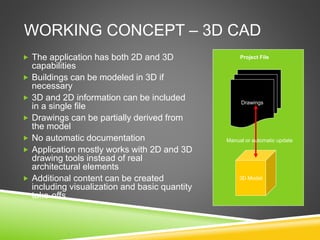
 The application has both 2D and 3D
capabilities
 Buildings can be modeled in 3D if
necessary
 3D and 2D information can be included
in a single file
 Drawings can be partially derived from
the model
 No automatic documentation
 Application mostly works with 2D and 3D
drawing tools instead of real
architectural elements
 Additional content can be created
including visualization and basic quantity
take-offs
Drawings
3D Model
Manual or automatic update
Project File
EVALUATION– 3D CAD
Benefits
 Compared to 2D CAD
 Easier checking of planning errors
 Managing changes is easier
 Visualization and calculation
 Compared to BIM
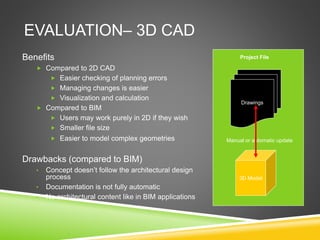
 Users may work purely in 2D if they wish
 Smaller file size
 Easier to model complex geometries
Drawbacks (compared to BIM)
• Concept doesn’t follow the architectural design
process
• Documentation is not fully automatic
• No architectural content like in BIM applications
Drawings
3D Model
Manual or automatic update
Project File
THE BIM CONCEPT
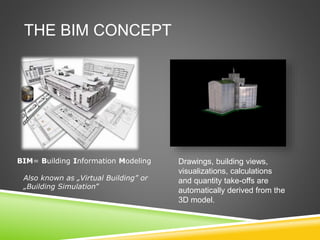
Drawings, building views,
visualizations, calculations
and quantity take-offs are
automatically derived from the
3D model.
BIM= Building Information Modeling
Also known as „Virtual Building” or
„Building Simulation”
EVALUATION– BIM
Benefits
 Compared to 2D and 3D CAD
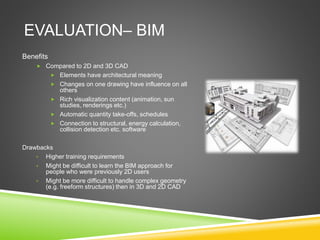
 Elements have architectural meaning
 Changes on one drawing have influence on all
others
 Rich visualization content (animation, sun
studies, renderings etc.)
 Automatic quantity take-offs, schedules
 Connection to structural, energy calculation,
collision detection etc. software
Drawbacks
• Higher training requirements
• Might be difficult to learn the BIM approach for
people who were previously 2D users
• Might be more difficult to handle complex geometry
(e.g. freeform structures) then in 3D and 2D CAD
BIM IS A PROCESS!
 Generic term used to describe advanced 3D CAD technology for
modeling and managing buildings and information related to them.
 BIM models are differentiated from traditional CAD systems in that the
software objects in a BIM model are intelligible to computer programs
as representations of real-world building components, unlike the
graphic objects in a two-dimensional CAD file”.
 The American Institute of Architects (AIA) defines BIM as “a model-
based technology linked with a database of project information”.
 BIM covers geometry, spatial relationships, geographic information,
quantities and properties of building components.
(http://en.wikipedia.org/wiki/Building_Information_Modeling)
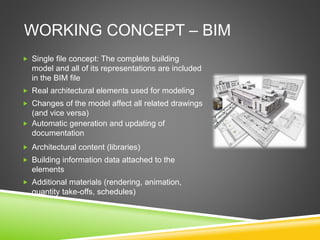
WORKING CONCEPT – BIM
 Single file concept: The complete building
model and all of its representations are included
in the BIM file
 Real architectural elements used for modeling
 Changes of the model affect all related drawings
(and vice versa)
 Automatic generation and updating of
documentation
 Architectural content (libraries)
 Building information data attached to the
elements
 Additional materials (rendering, animation,
quantity take-offs, schedules)
BIM USES
Project Definition, Planning and
 Pre-Design
Architectural Modelling (Design)
Structural Modelling and Analysis
MEP Modelling and Analysis
Construction Models
Facilities Management/As-built Models
ADVANTAGES
 Design visualization
 Reduction of Errors
 Collision Detection
 Quantity Take Off
 4D Constructability
 5D Cost Estimating
 Asset/Equipment Inventory
 Facility Operations
 Space assignment
 Maintenance/Repair
 Emergency response, etc.
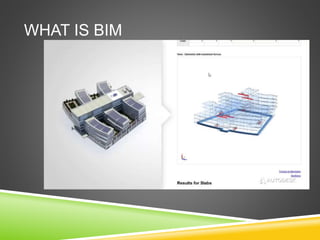
WHAT IS BIM
BIM EXAMPLE
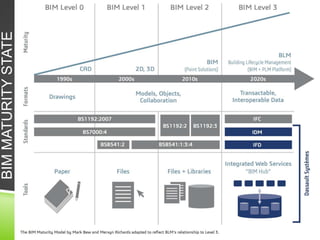
BIMMATURITYSTATE
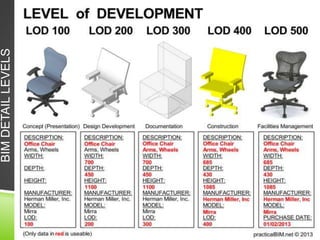
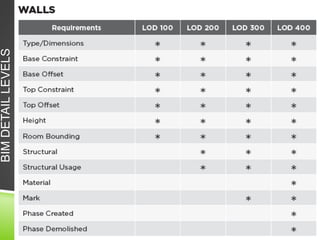
BIMDETAILLEVELS
BIMDETAILLEVELS
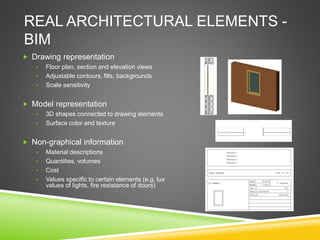
REAL ARCHITECTURAL ELEMENTS -
BIM
 Drawing representation
• Floor plan, section and elevation views
• Adjustable contours, fills, backgrounds
• Scale sensitivity
 Model representation
• 3D shapes connected to drawing elements
• Surface color and texture
 Non-graphical information
• Material descriptions
• Quantities, volumes
• Cost
• Values specific to certain elements (e.g. lux
values of lights, fire resistance of doors)
MODEL BASED DOCUMENTATION -
BIM
Coherence between model and drawing
All drawings derived from the model
Model itself coordinates drawings
Automatic scale change
The complete project lifecycle can be controlled
from a single file
Rich 3D visualization content helps you to win the
job
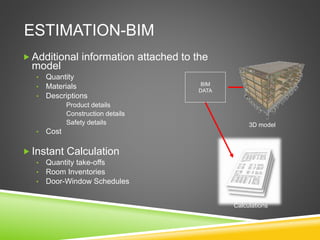
ESTIMATION-BIM
 Additional information attached to the
model
• Quantity
• Materials
• Descriptions
Product details
Construction details
Safety details
• Cost
 Instant Calculation
• Quantity take-offs
• Room Inventories
• Door-Window Schedules
BIM
DATA
3D model
Calculations
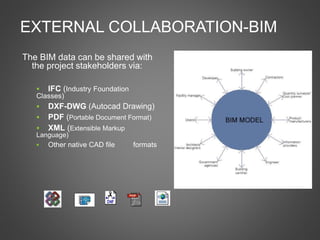
EXTERNAL COLLABORATION-BIM
The BIM data can be shared with
the project stakeholders via:
 IFC (Industry Foundation
Classes)
 DXF-DWG (Autocad Drawing)
 PDF (Portable Document Format)
 XML (Extensible Markup
Language)
 Other native CAD file formats
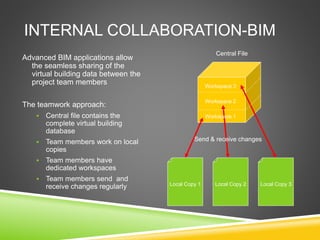
INTERNAL COLLABORATION-BIM
Advanced BIM applications allow
the seamless sharing of the
virtual building data between the
project team members
The teamwork approach:
 Central file contains the
complete virtual building
database
 Team members work on local
copies
 Team members have
dedicated workspaces
 Team members send and
receive changes regularly Local Copy 1 Local Copy 2 Local Copy 3
Central File
Workspace 3
Workspace 2
Workspace 1
Send & receive changes
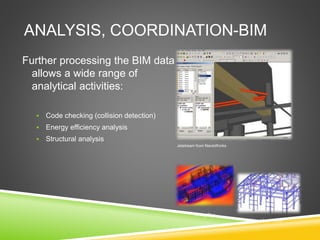
ANALYSIS, COORDINATION-BIM
Further processing the BIM data
allows a wide range of
analytical activities:
 Code checking (collision detection)
 Energy efficiency analysis
 Structural analysis
EnergyPlus
Jetstream from NavisWorks
Xsteel from Tekla
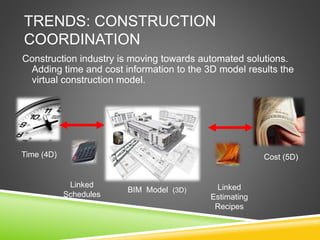
TRENDS: CONSTRUCTION
COORDINATION
Construction industry is moving towards automated solutions.
Adding time and cost information to the 3D model results the
virtual construction model.
Linked
Schedules
Linked
Estimating
Recipes
BIM Model (3D)
Cost (5D)Time (4D)
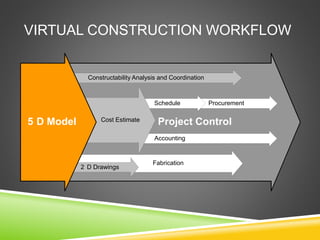
VIRTUAL CONSTRUCTION WORKFLOW
Project Control
Fabrication
2 D Drawings
Constructability Analysis and Coordination
ProcurementSchedule
Accounting
Cost Estimate5 D Model
CONCLUSIVE SUMMARY VIDEO
BIM@DEPA
BIM@DEPA
THANK YOU

Introduction to Building Information Modeling

  • 1.
  • 2.
    THE STORY -EVOLUTION OF CAD 2D solutions  Electronic drafting board 3D solutions  Modeling for purely visualization purposes BIM solutions  Models with integrated architectural information Construction Coordination (5D)  Timing/scheduling and Cost estimation
  • 3.
    WORKING CONCEPT -2D CAD Draft everything in 2D No 3D model is created Design changes maintained manually on every drawing Typically, each drawing is saved in its own file
  • 4.
    EVALUATION - 2DCAD Benefits  Compared to hand drafting  Faster modifications  Accuracy  Smart drafting tools (fills, dimensions)  Repetitive elements (blocks, xrefs)  Compared to other CAD methods  Easy to understand concept (electronic drafting)  Relatively small files due to reduced data  Quick (but less intelligent) solution for all building types Drawbacks • Changes on one drawing don’t influence other drawings • Drawing coordination is essential • No more content compared with hand drawing • Collisions and other design problems are difficult to identify
  • 5.
    WORKING CONCEPT –3D CAD  The application has both 2D and 3D capabilities  Buildings can be modeled in 3D if necessary  3D and 2D information can be included in a single file  Drawings can be partially derived from the model  No automatic documentation  Application mostly works with 2D and 3D drawing tools instead of real architectural elements  Additional content can be created including visualization and basic quantity take-offs Drawings 3D Model Manual or automatic update Project File
  • 6.
    EVALUATION– 3D CAD Benefits Compared to 2D CAD  Easier checking of planning errors  Managing changes is easier  Visualization and calculation  Compared to BIM  Users may work purely in 2D if they wish  Smaller file size  Easier to model complex geometries Drawbacks (compared to BIM) • Concept doesn’t follow the architectural design process • Documentation is not fully automatic • No architectural content like in BIM applications Drawings 3D Model Manual or automatic update Project File
  • 7.
    THE BIM CONCEPT Drawings,building views, visualizations, calculations and quantity take-offs are automatically derived from the 3D model. BIM= Building Information Modeling Also known as „Virtual Building” or „Building Simulation”
  • 8.
    EVALUATION– BIM Benefits  Comparedto 2D and 3D CAD  Elements have architectural meaning  Changes on one drawing have influence on all others  Rich visualization content (animation, sun studies, renderings etc.)  Automatic quantity take-offs, schedules  Connection to structural, energy calculation, collision detection etc. software Drawbacks • Higher training requirements • Might be difficult to learn the BIM approach for people who were previously 2D users • Might be more difficult to handle complex geometry (e.g. freeform structures) then in 3D and 2D CAD
  • 9.
    BIM IS APROCESS!  Generic term used to describe advanced 3D CAD technology for modeling and managing buildings and information related to them.  BIM models are differentiated from traditional CAD systems in that the software objects in a BIM model are intelligible to computer programs as representations of real-world building components, unlike the graphic objects in a two-dimensional CAD file”.  The American Institute of Architects (AIA) defines BIM as “a model- based technology linked with a database of project information”.  BIM covers geometry, spatial relationships, geographic information, quantities and properties of building components. (http://en.wikipedia.org/wiki/Building_Information_Modeling)
  • 10.
    WORKING CONCEPT –BIM  Single file concept: The complete building model and all of its representations are included in the BIM file  Real architectural elements used for modeling  Changes of the model affect all related drawings (and vice versa)  Automatic generation and updating of documentation  Architectural content (libraries)  Building information data attached to the elements  Additional materials (rendering, animation, quantity take-offs, schedules)
  • 11.
    BIM USES Project Definition,Planning and  Pre-Design Architectural Modelling (Design) Structural Modelling and Analysis MEP Modelling and Analysis Construction Models Facilities Management/As-built Models
  • 12.
    ADVANTAGES  Design visualization Reduction of Errors  Collision Detection  Quantity Take Off  4D Constructability  5D Cost Estimating  Asset/Equipment Inventory  Facility Operations  Space assignment  Maintenance/Repair  Emergency response, etc.
  • 13.
  • 14.
  • 15.
  • 16.
  • 17.
  • 18.
    REAL ARCHITECTURAL ELEMENTS- BIM  Drawing representation • Floor plan, section and elevation views • Adjustable contours, fills, backgrounds • Scale sensitivity  Model representation • 3D shapes connected to drawing elements • Surface color and texture  Non-graphical information • Material descriptions • Quantities, volumes • Cost • Values specific to certain elements (e.g. lux values of lights, fire resistance of doors)
  • 19.
    MODEL BASED DOCUMENTATION- BIM Coherence between model and drawing All drawings derived from the model Model itself coordinates drawings Automatic scale change The complete project lifecycle can be controlled from a single file Rich 3D visualization content helps you to win the job
  • 20.
    ESTIMATION-BIM  Additional informationattached to the model • Quantity • Materials • Descriptions Product details Construction details Safety details • Cost  Instant Calculation • Quantity take-offs • Room Inventories • Door-Window Schedules BIM DATA 3D model Calculations
  • 21.
    EXTERNAL COLLABORATION-BIM The BIMdata can be shared with the project stakeholders via:  IFC (Industry Foundation Classes)  DXF-DWG (Autocad Drawing)  PDF (Portable Document Format)  XML (Extensible Markup Language)  Other native CAD file formats
  • 22.
    INTERNAL COLLABORATION-BIM Advanced BIMapplications allow the seamless sharing of the virtual building data between the project team members The teamwork approach:  Central file contains the complete virtual building database  Team members work on local copies  Team members have dedicated workspaces  Team members send and receive changes regularly Local Copy 1 Local Copy 2 Local Copy 3 Central File Workspace 3 Workspace 2 Workspace 1 Send & receive changes
  • 23.
    ANALYSIS, COORDINATION-BIM Further processingthe BIM data allows a wide range of analytical activities:  Code checking (collision detection)  Energy efficiency analysis  Structural analysis EnergyPlus Jetstream from NavisWorks Xsteel from Tekla
  • 24.
    TRENDS: CONSTRUCTION COORDINATION Construction industryis moving towards automated solutions. Adding time and cost information to the 3D model results the virtual construction model. Linked Schedules Linked Estimating Recipes BIM Model (3D) Cost (5D)Time (4D)
  • 25.
    VIRTUAL CONSTRUCTION WORKFLOW ProjectControl Fabrication 2 D Drawings Constructability Analysis and Coordination ProcurementSchedule Accounting Cost Estimate5 D Model
  • 26.
  • 27.
  • 28.
  • 29.