Binomial, Geometric and Poisson
     Distributions in Excel
                      B. Heard
     (Not to be posted, used, etc. without my
  permission, students may download one copy
                 for personal use)
Binomial, Geometric and Poisson Distributions with Excel

 What I am about to show you, will amaze you.
 However…
   If your instructor has told you that you MUST use
    Minitab, I can’t change that requirement
   You could still use these “Magic Calculators” to
    check your work.
   I think it is important for you to be familiar with
    Excel, since that is what you have access to in the
    work environment (Microsoft Excel)
Binomial, Geometric and Poisson Distributions with Excel

 Before we start, follow these instructions carefully
   Go to http://highered.mcgraw-
    hill.com/sites/0070620164/student_view0/excel_tem
    plates.html

   A picture follows on the next page
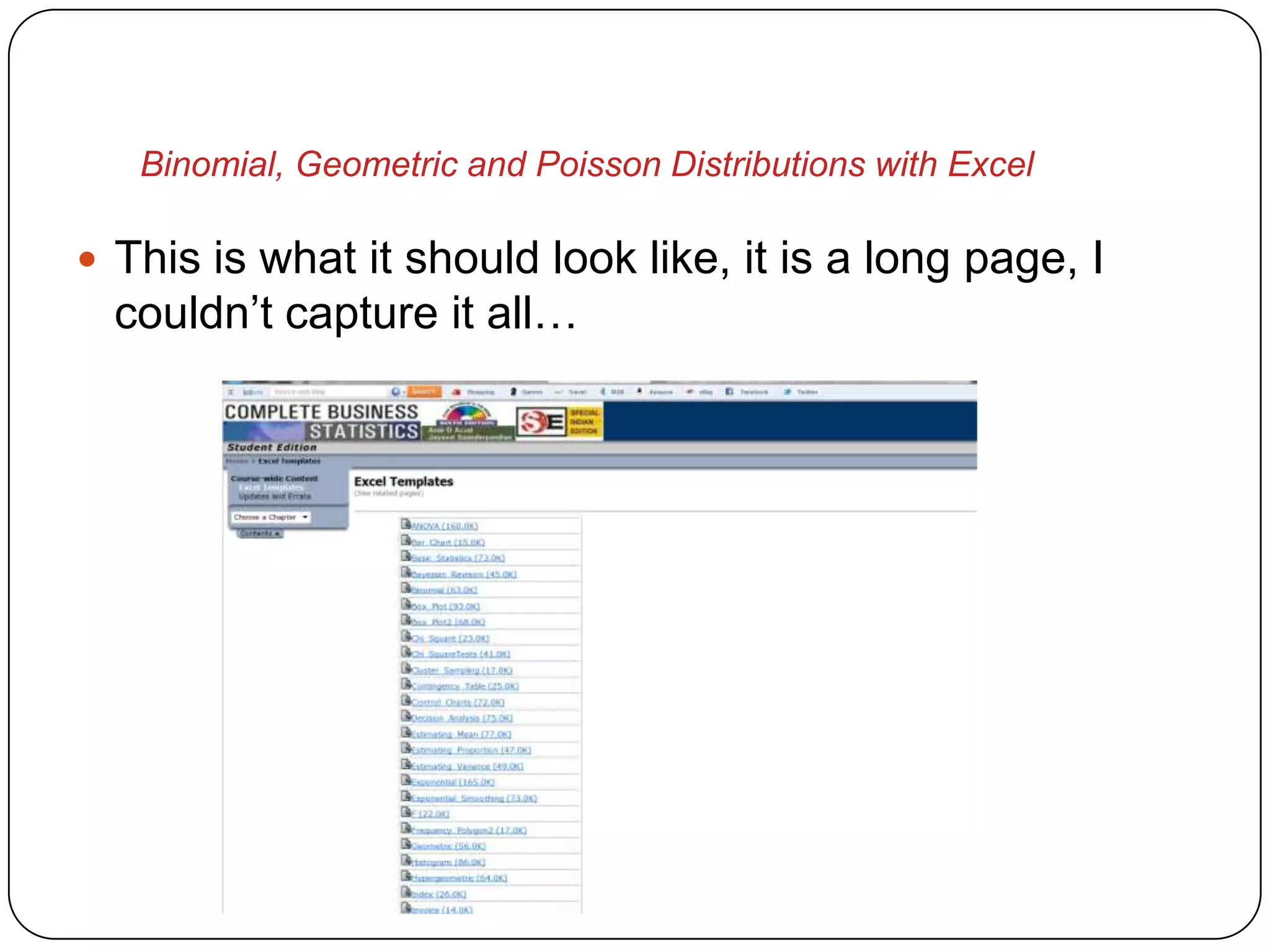
Binomial, Geometric and Poisson Distributions with Excel

 This is what it should look like, it is a long page, I
  couldn’t capture it all…
Binomial, Geometric and Poisson Distributions with Excel

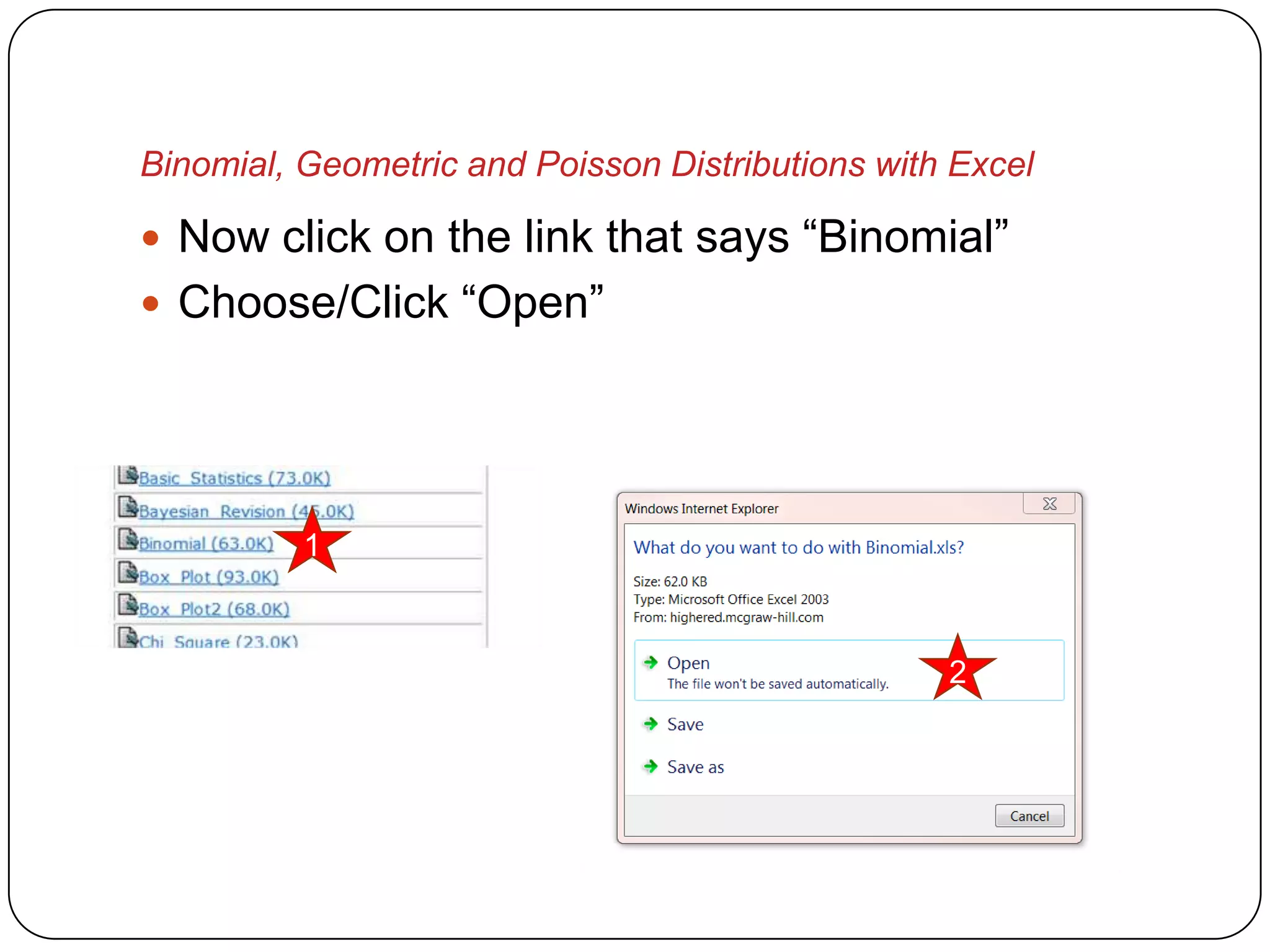
 Now click on the link that says “Binomial”
 Choose/Click “Open”


          1


                                                  2
Binomial, Geometric and Poisson Distributions with Excel

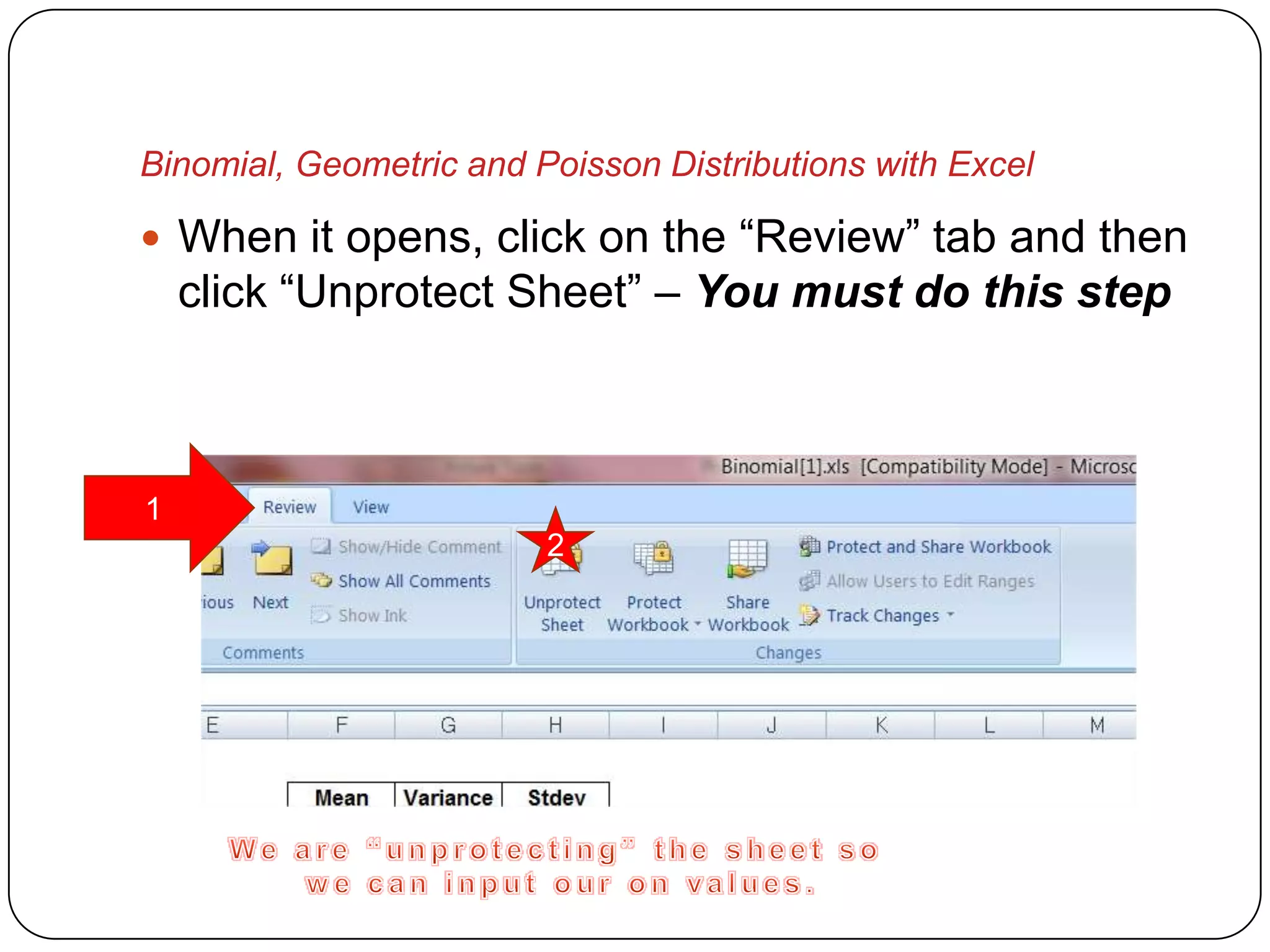
 When it opens, click on the “Review” tab and then
    click “Unprotect Sheet” – You must do this step


1
                         2
Binomial, Geometric and Poisson Distributions with Excel

 Now save your Excel Workbook file as something
  like “Binomial_Calculator”
 Let’s finish setting up our calculators
Binomial, Geometric and Poisson Distributions with Excel

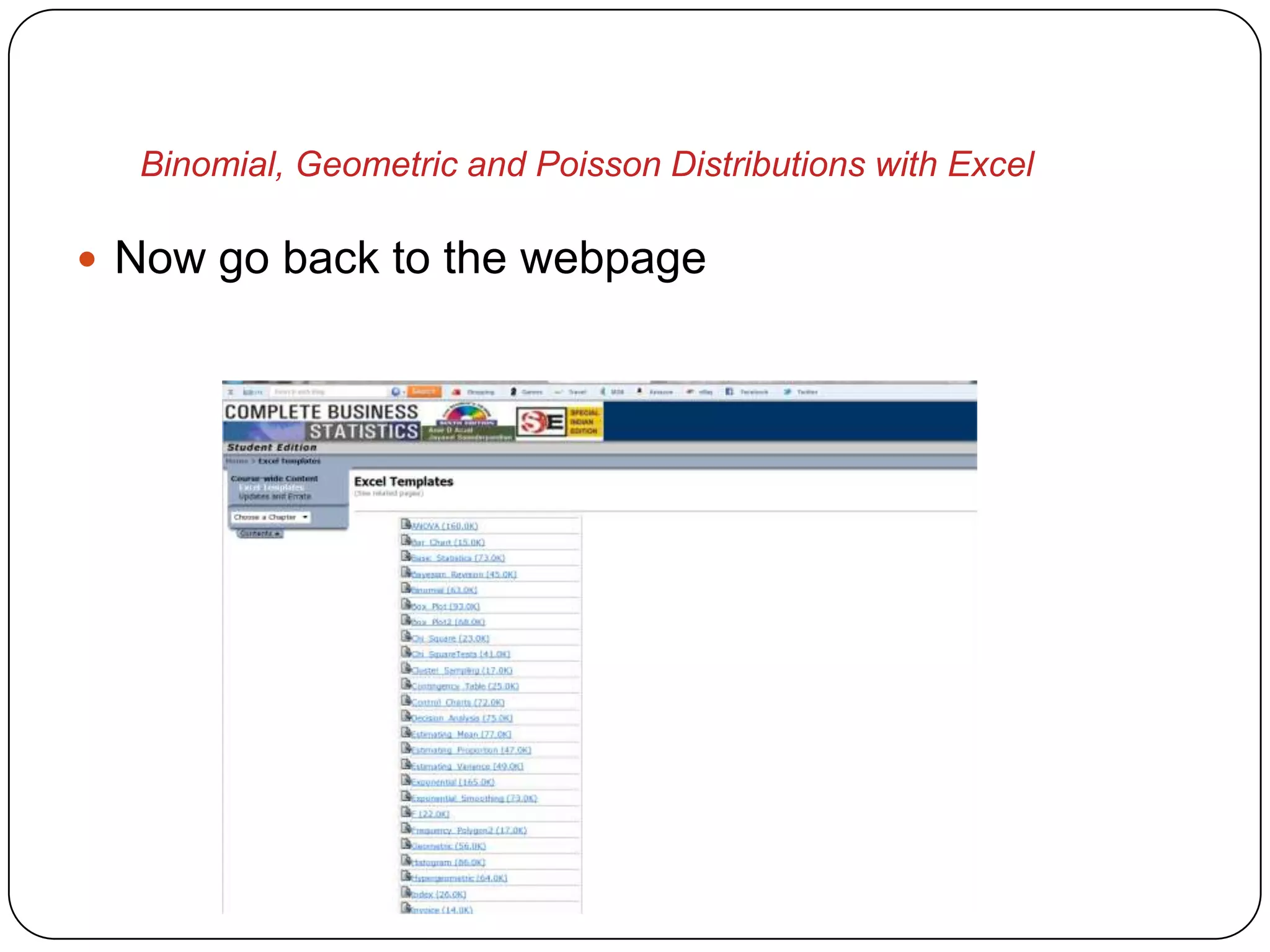
 Now go back to the webpage
Binomial, Geometric and Poisson Distributions with Excel

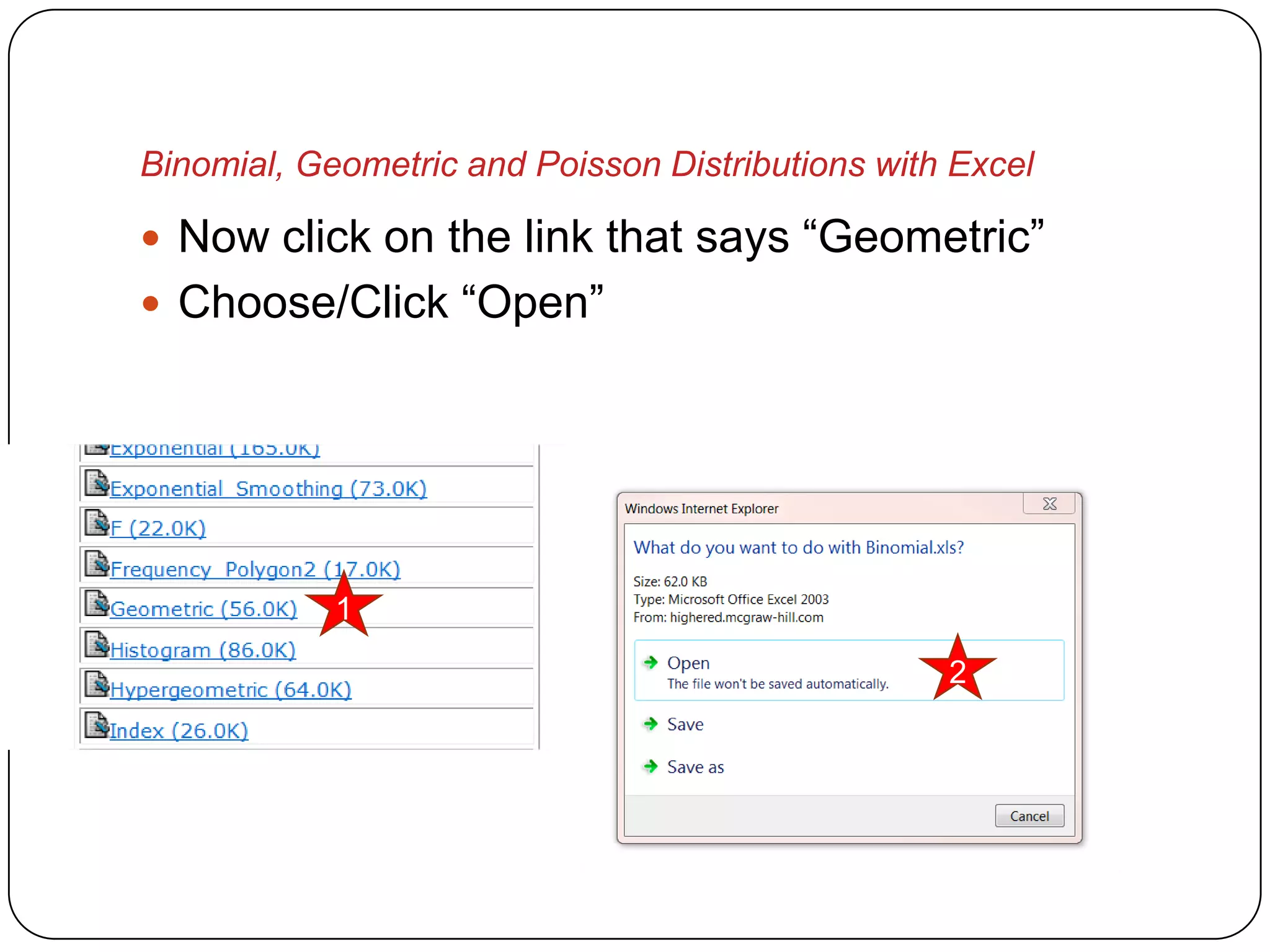
 Now click on the link that says “Geometric”
 Choose/Click “Open”


            1

                                                  2
Binomial, Geometric and Poisson Distributions with Excel

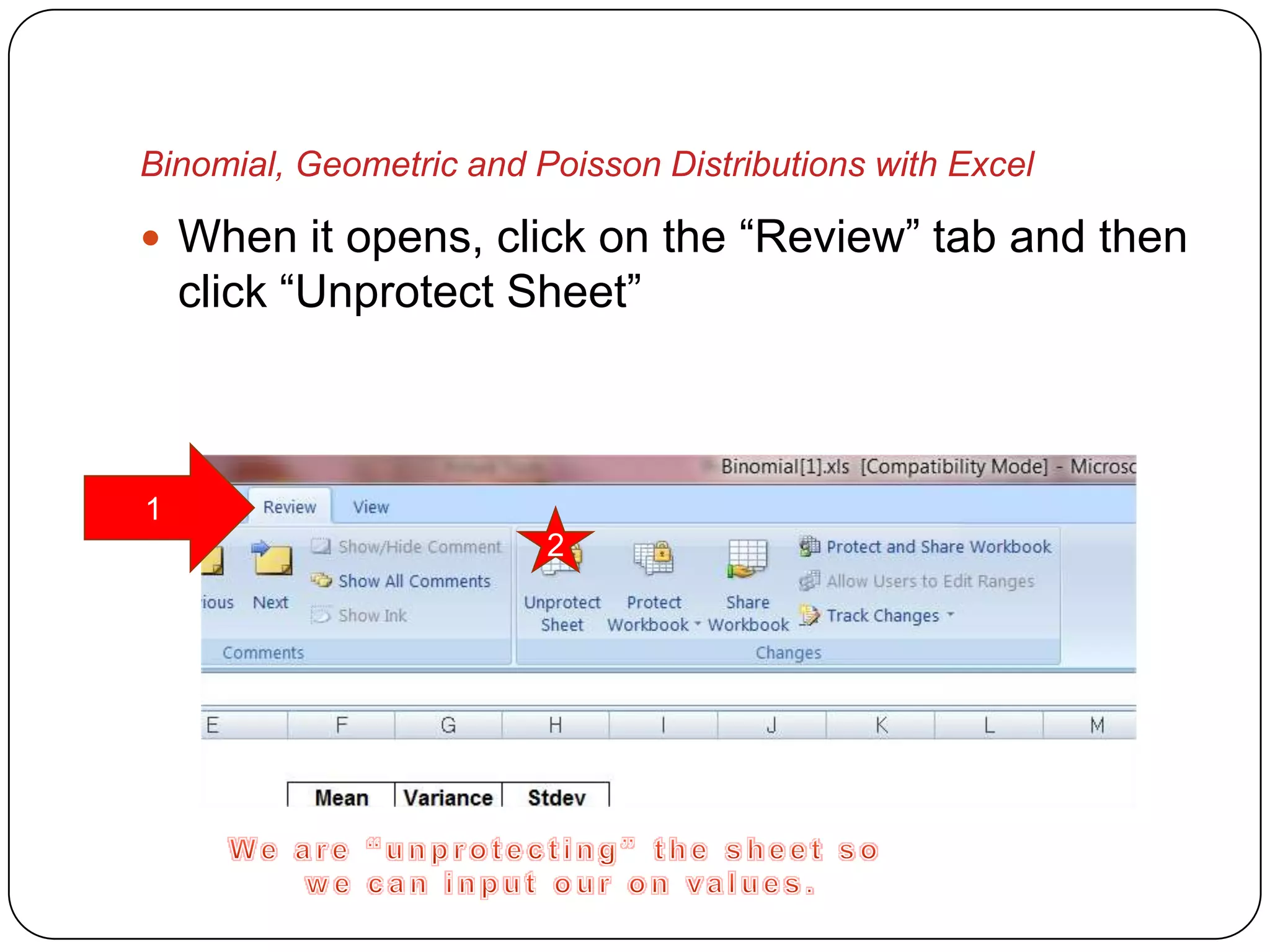
 When it opens, click on the “Review” tab and then
    click “Unprotect Sheet”


1
                         2
Binomial, Geometric and Poisson Distributions with Excel

 Now save your Excel Workbook file as something
  like “Geometric_Calculator”
 We need to add one more
Binomial, Geometric and Poisson Distributions with Excel

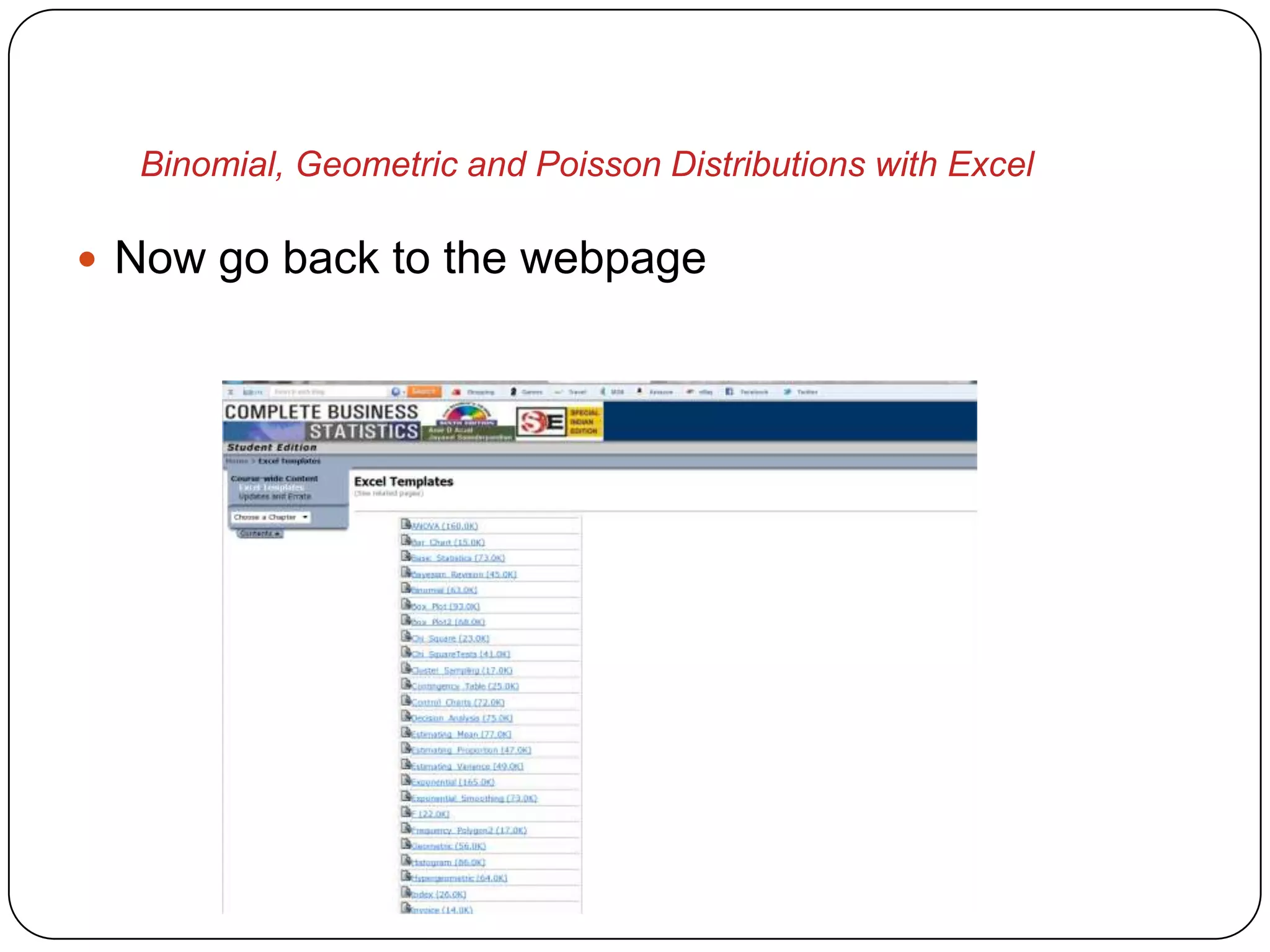
 Now go back to the webpage
Binomial, Geometric and Poisson Distributions with Excel

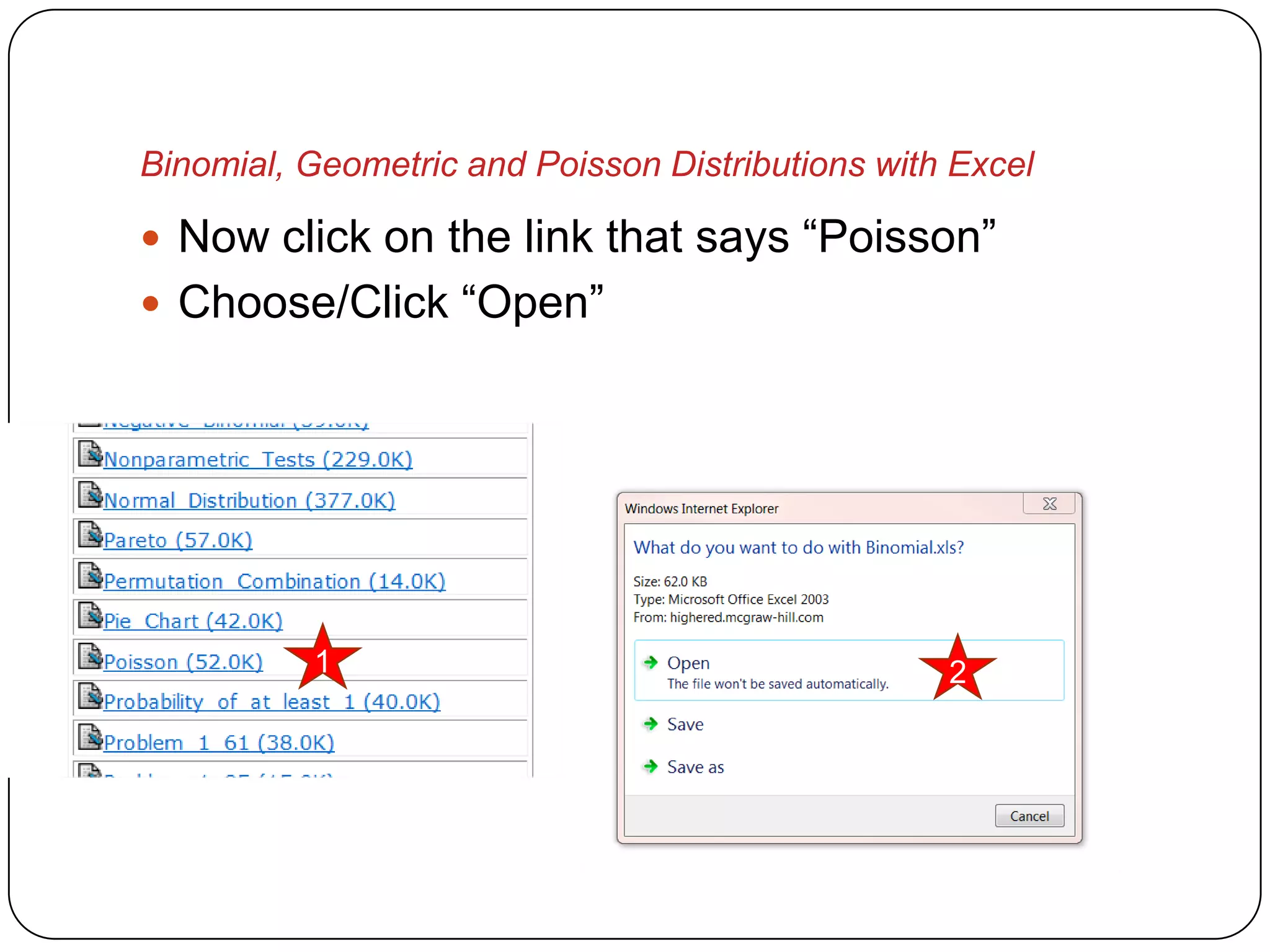
 Now click on the link that says “Poisson”
 Choose/Click “Open”


          1                                       2
Binomial, Geometric and Poisson Distributions with Excel

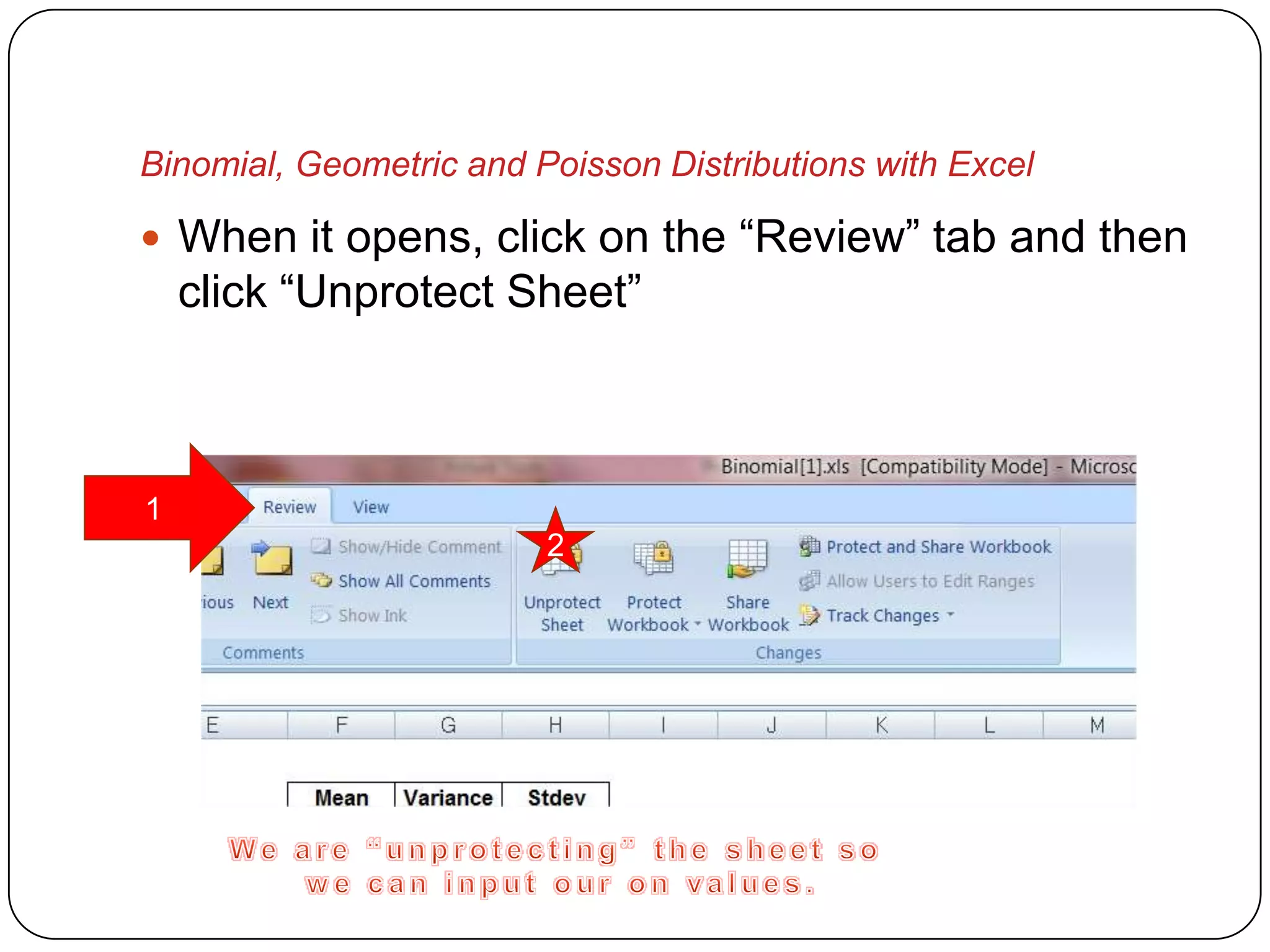
 When it opens, click on the “Review” tab and then
    click “Unprotect Sheet”


1
                         2
Binomial, Geometric and Poisson Distributions with Excel

 Now save your Excel Workbook file as something
  like “Poisson_Calculator”
 Let’s use our new calculators now
Binomial, Geometric and Poisson Distributions with Excel


        Binomial Distribution
             Example
Binomial, Geometric and Poisson Distributions with Excel

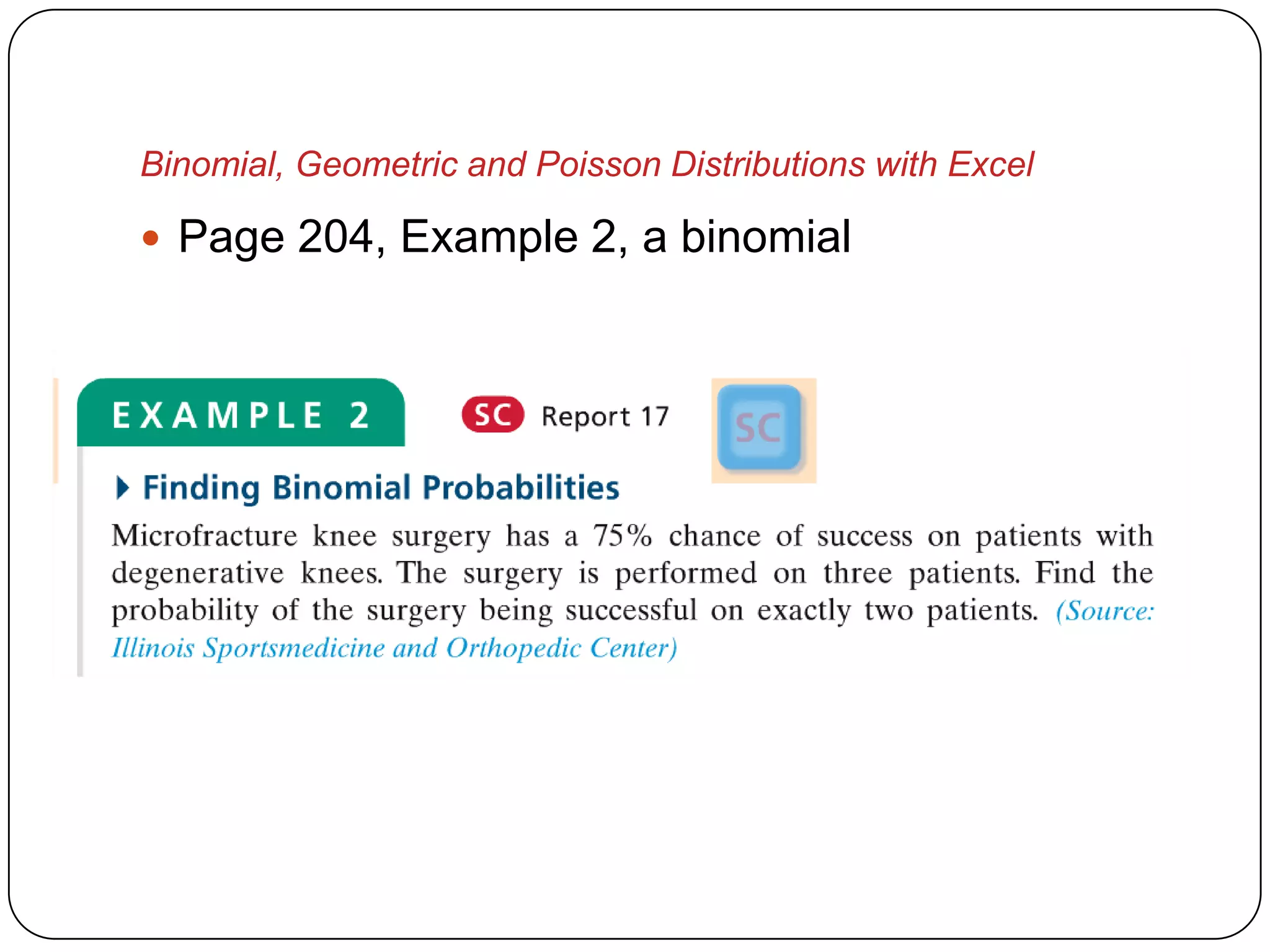
 Page 204, Example 2, a binomial
Binomial, Geometric and Poisson Distributions with Excel

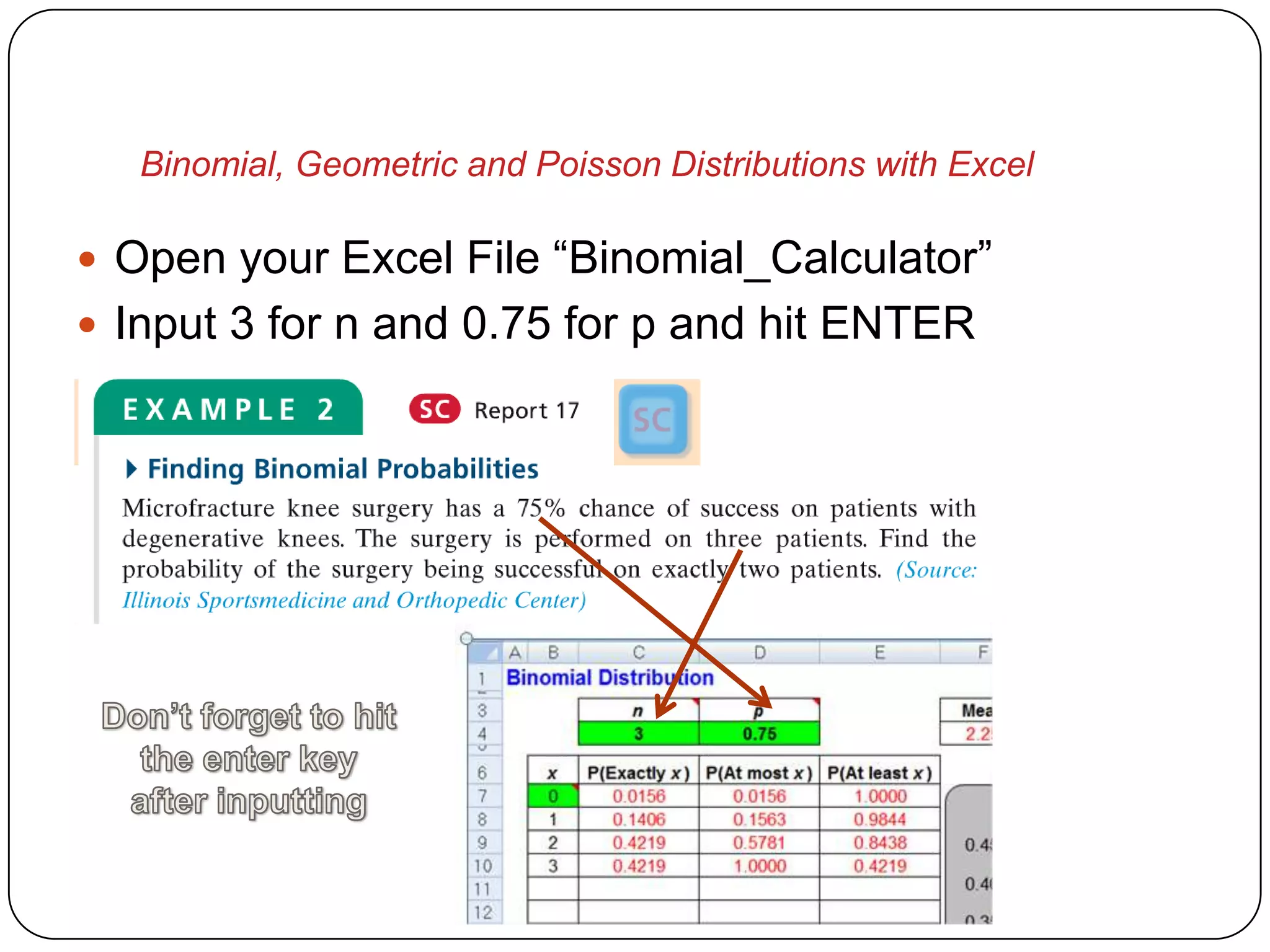
 Open your Excel File “Binomial_Calculator”
 Input 3 for n and 0.75 for p and hit ENTER
Binomial, Geometric and Poisson Distributions with Excel

 IMPORTANT
   DON’T FORGET TO HIT THE ENTER KEY OR
    CLICK ON ANOTHER CELL AFTER YOU INPUT
    YOUR VALUE
   DO NOT MESS WITH THE REST OF THE
    SHEET, ONLY INPUT INTO GREEN CELLS I
    NOTE, YOU WILL HAVE TO DOWNLOAD IT
    AGAIN IF YOU INADVERTENTLY CHANGE A
    CELL THAT IS USED FOR CALCULATIONS
Binomial, Geometric and Poisson Distributions with Excel

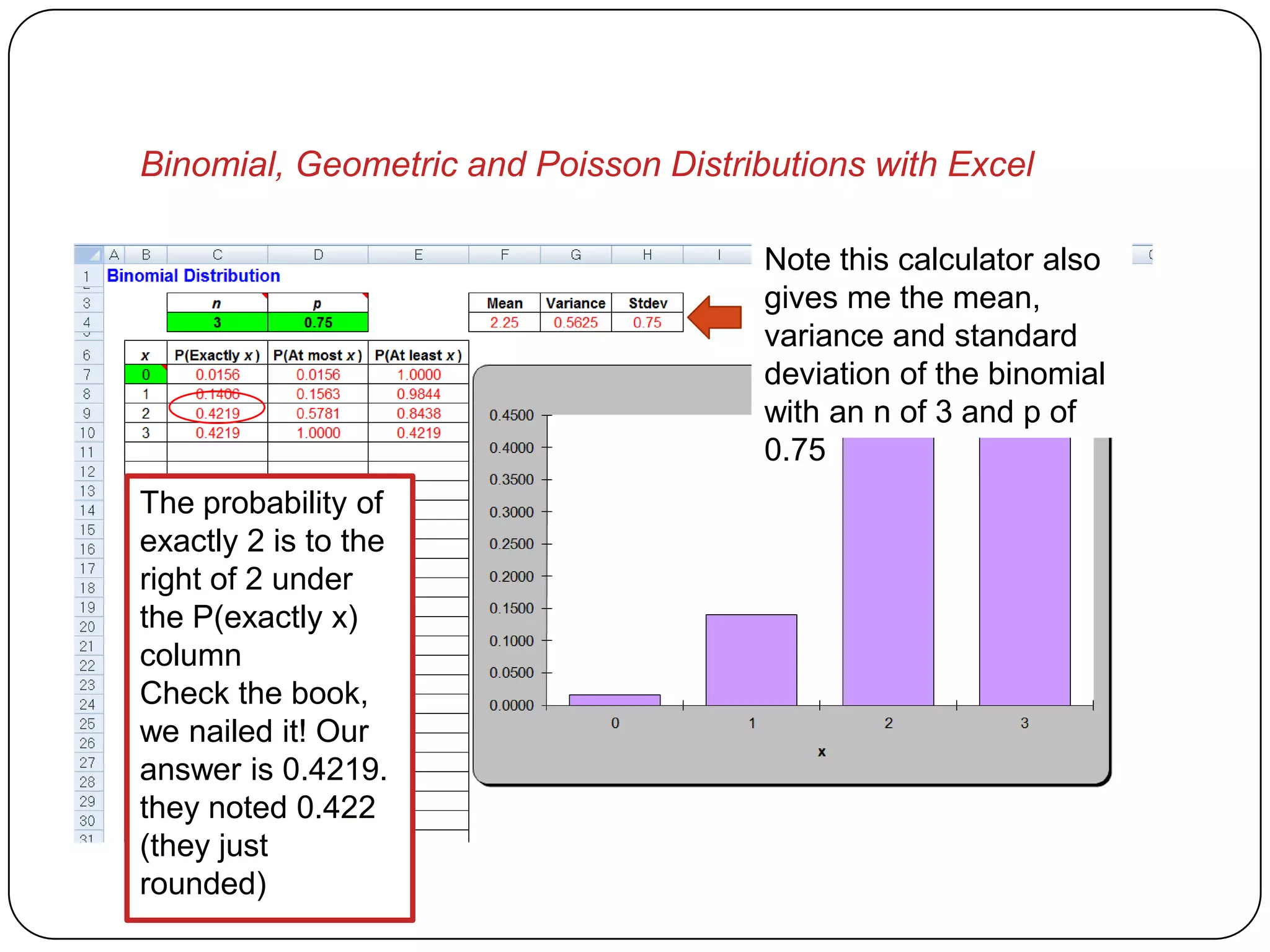
                                       Note this calculator also
                                       gives me the mean,
                                       variance and standard
                                       deviation of the binomial
                                       with an n of 3 and p of
                                       0.75
The probability of
exactly 2 is to the
right of 2 under
the P(exactly x)
column
Check the book,
we nailed it! Our
answer is 0.4219.
they noted 0.422
(they just
rounded)
Binomial, Geometric and Poisson Distributions with Excel


      Geometric Distribution
          Example
Binomial, Geometric and Poisson Distributions with Excel

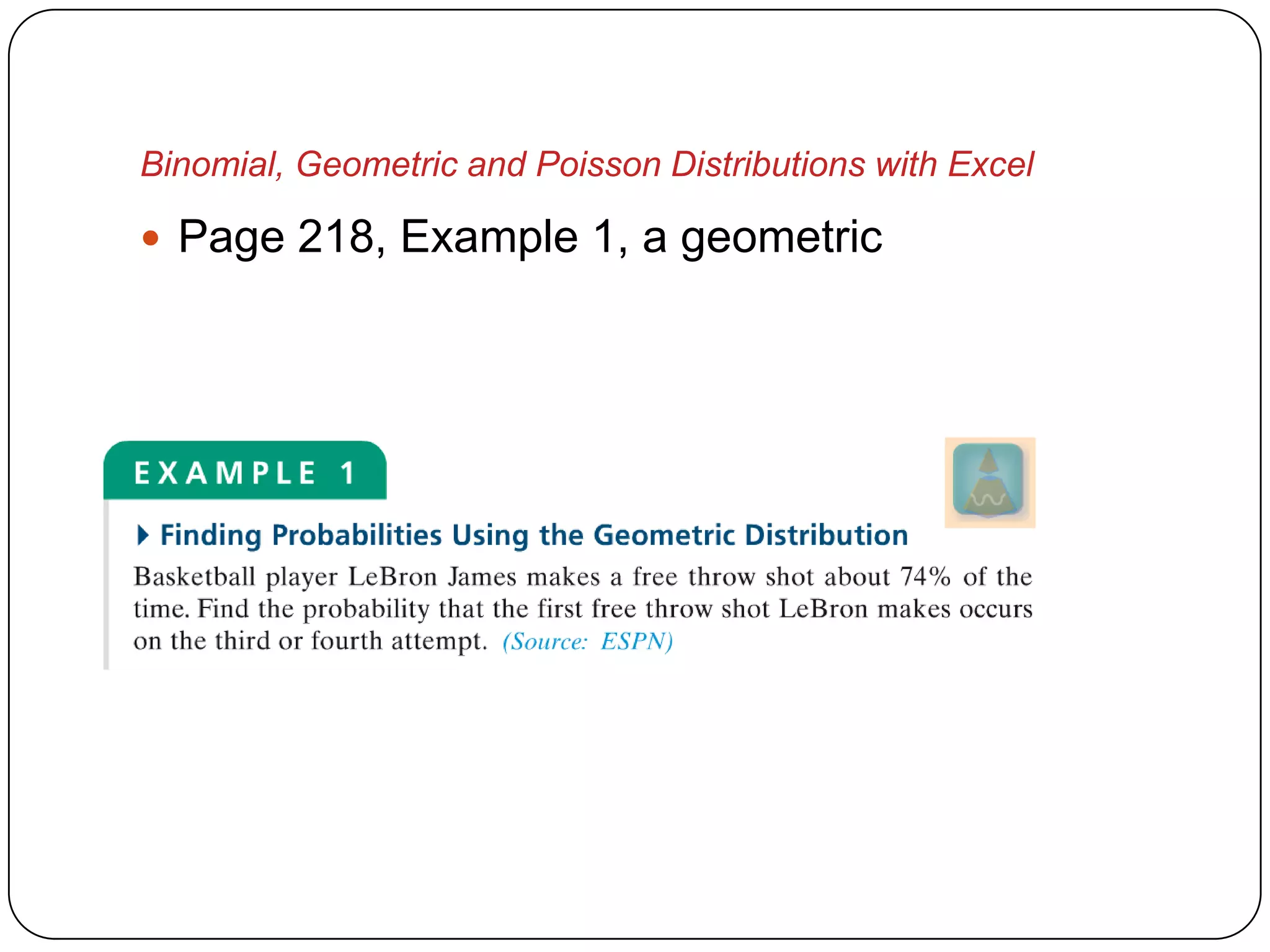
 Page 218, Example 1, a geometric
Binomial, Geometric and Poisson Distributions with Excel

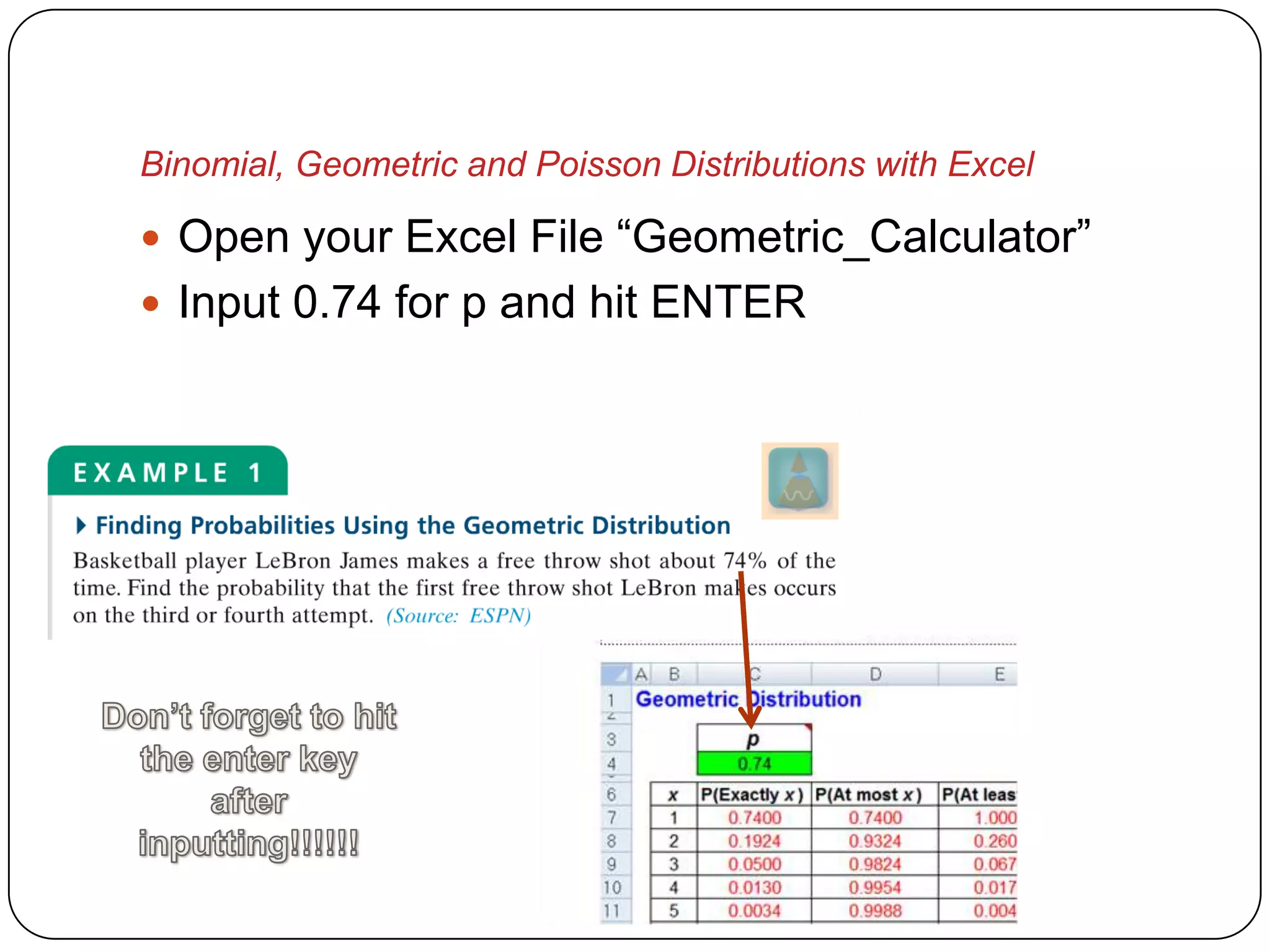
 Open your Excel File “Geometric_Calculator”
 Input 0.74 for p and hit ENTER
Binomial, Geometric and Poisson Distributions with Excel


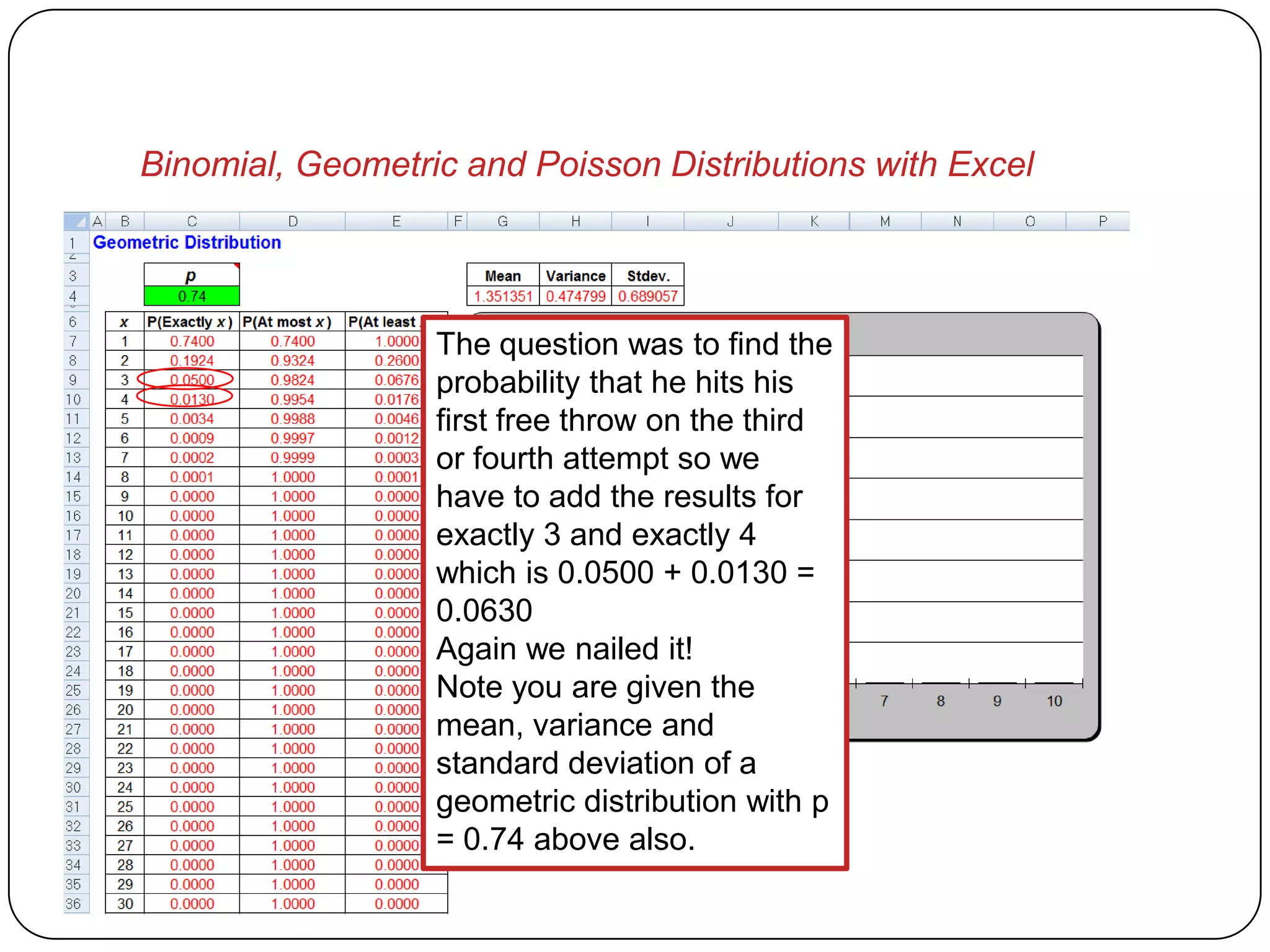
                  The question was to find the
                  probability that he hits his
                  first free throw on the third
                  or fourth attempt so we
                  have to add the results for
                  exactly 3 and exactly 4
                  which is 0.0500 + 0.0130 =
                  0.0630
                  Again we nailed it!
                  Note you are given the
                  mean, variance and
                  standard deviation of a
                  geometric distribution with p
                  = 0.74 above also.
Binomial, Geometric and Poisson Distributions with Excel


         Poisson Distribution
              Example
Binomial, Geometric and Poisson Distributions with Excel

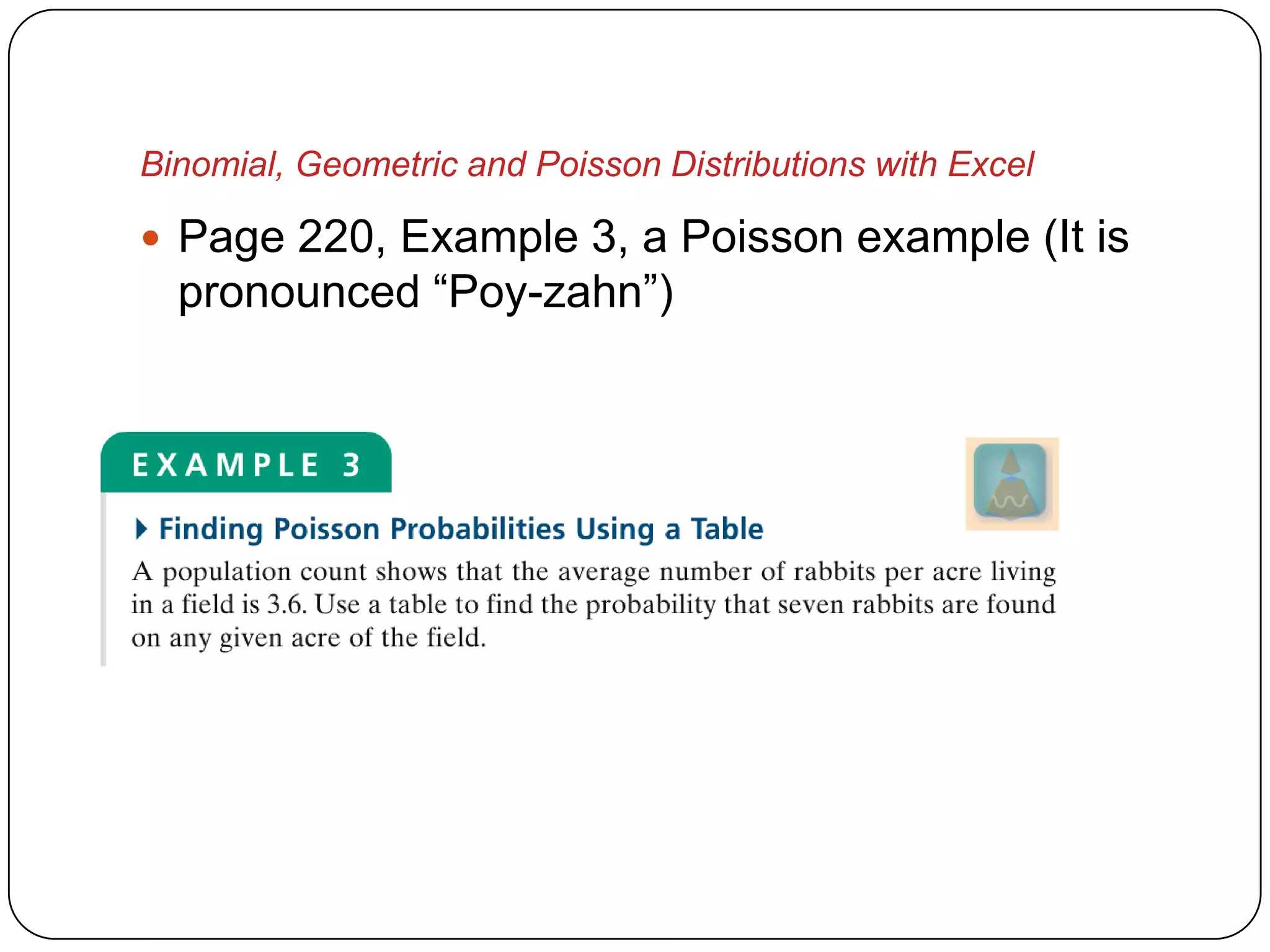
 Page 220, Example 3, a Poisson example (It is
  pronounced “Poy-zahn”)
Binomial, Geometric and Poisson Distributions with Excel

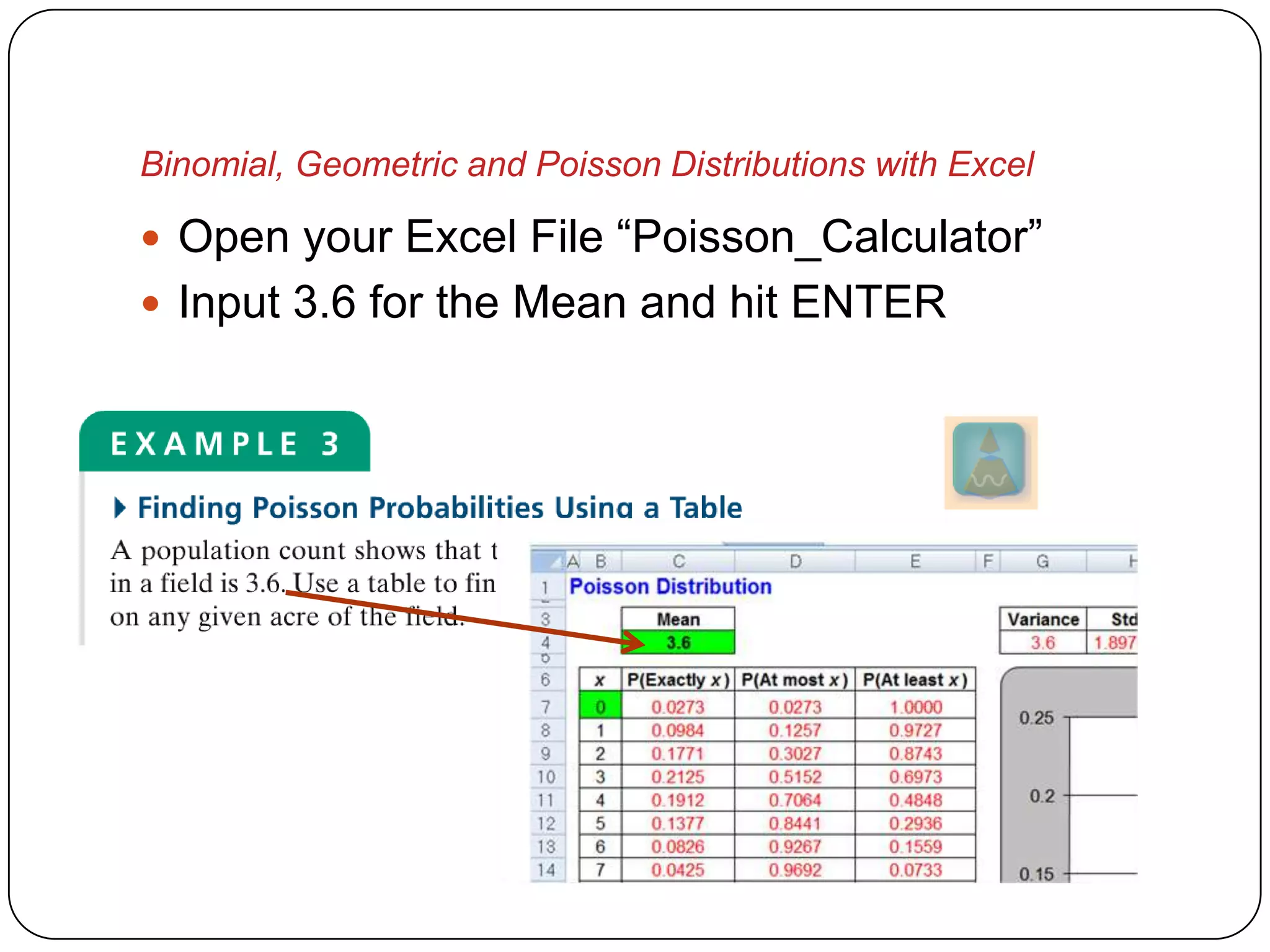
 Open your Excel File “Poisson_Calculator”
 Input 3.6 for the Mean and hit ENTER
Binomial, Geometric and Poisson Distributions with Excel


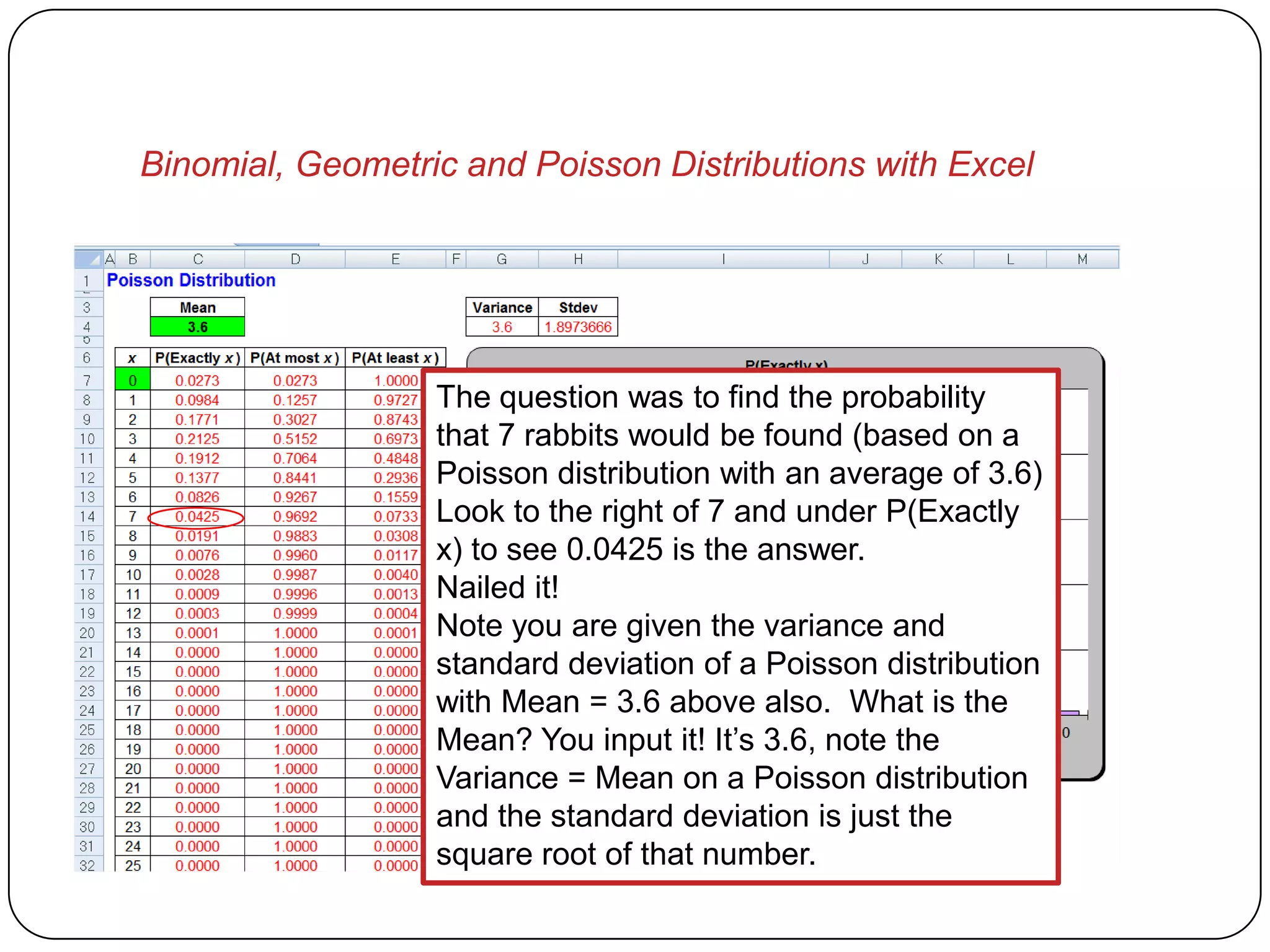
                  The question was to find the probability
                  that 7 rabbits would be found (based on a
                  Poisson distribution with an average of 3.6)
                  Look to the right of 7 and under P(Exactly
                  x) to see 0.0425 is the answer.
                  Nailed it!
                  Note you are given the variance and
                  standard deviation of a Poisson distribution
                  with Mean = 3.6 above also. What is the
                  Mean? You input it! It’s 3.6, note the
                  Variance = Mean on a Poisson distribution
                  and the standard deviation is just the
                  square root of that number.
Binomial, Geometric and Poisson Distributions with Excel

 The P(At most x) and P(At least x) are very
  valuable also. Let’s take a look at the last
  problem again where we were looking for rabbits
  (Poisson) in a field where an average of 3.6
  rabbits/acre were living.
Binomial, Geometric and Poisson Distributions with Excel


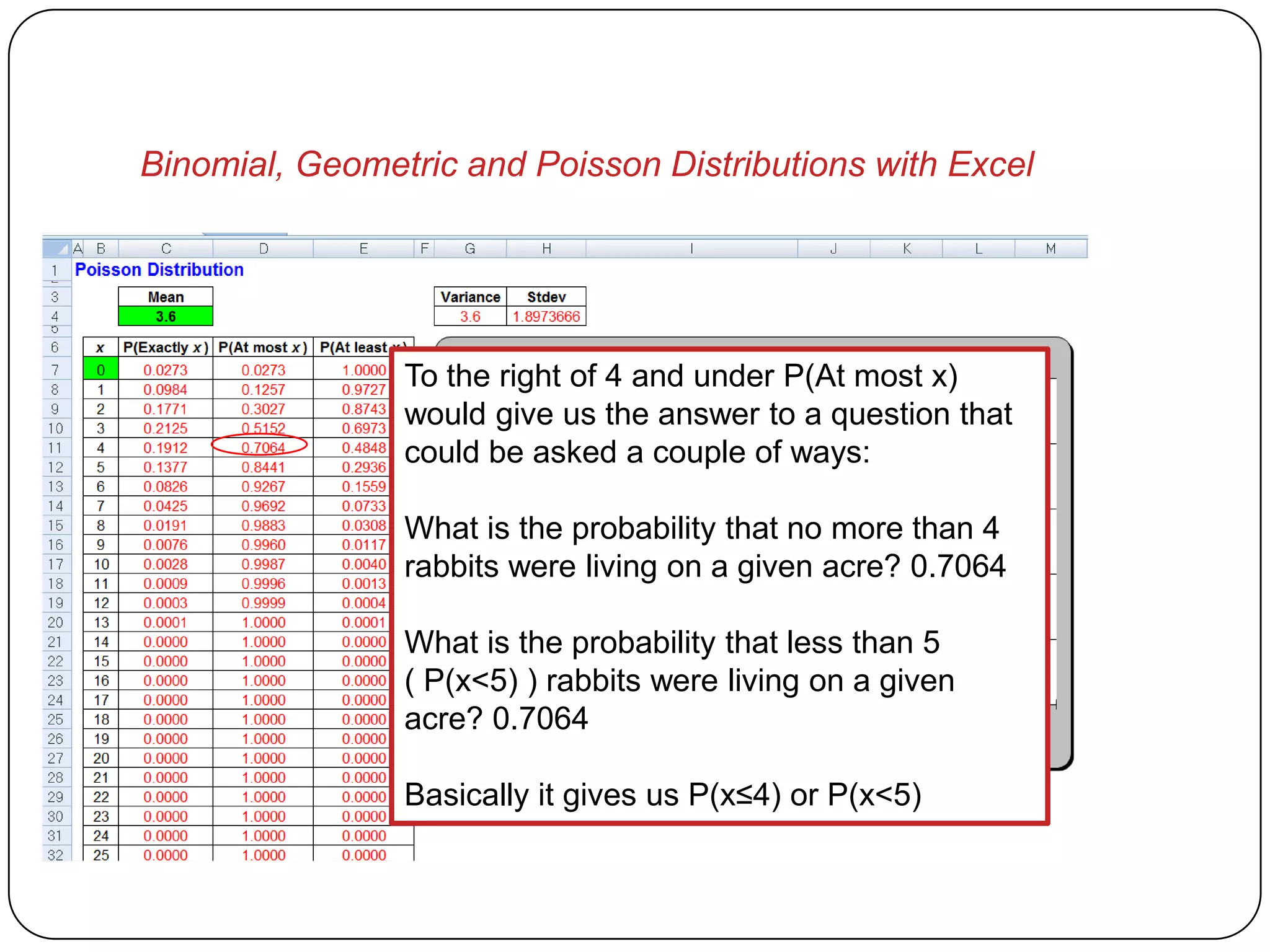
                To the right of 4 and under P(At most x)
                would give us the answer to a question that
                could be asked a couple of ways:

                What is the probability that no more than 4
                rabbits were living on a given acre? 0.7064

                What is the probability that less than 5
                ( P(x<5) ) rabbits were living on a given
                acre? 0.7064

                Basically it gives us P(x≤4) or P(x<5)
Binomial, Geometric and Poisson Distributions with Excel


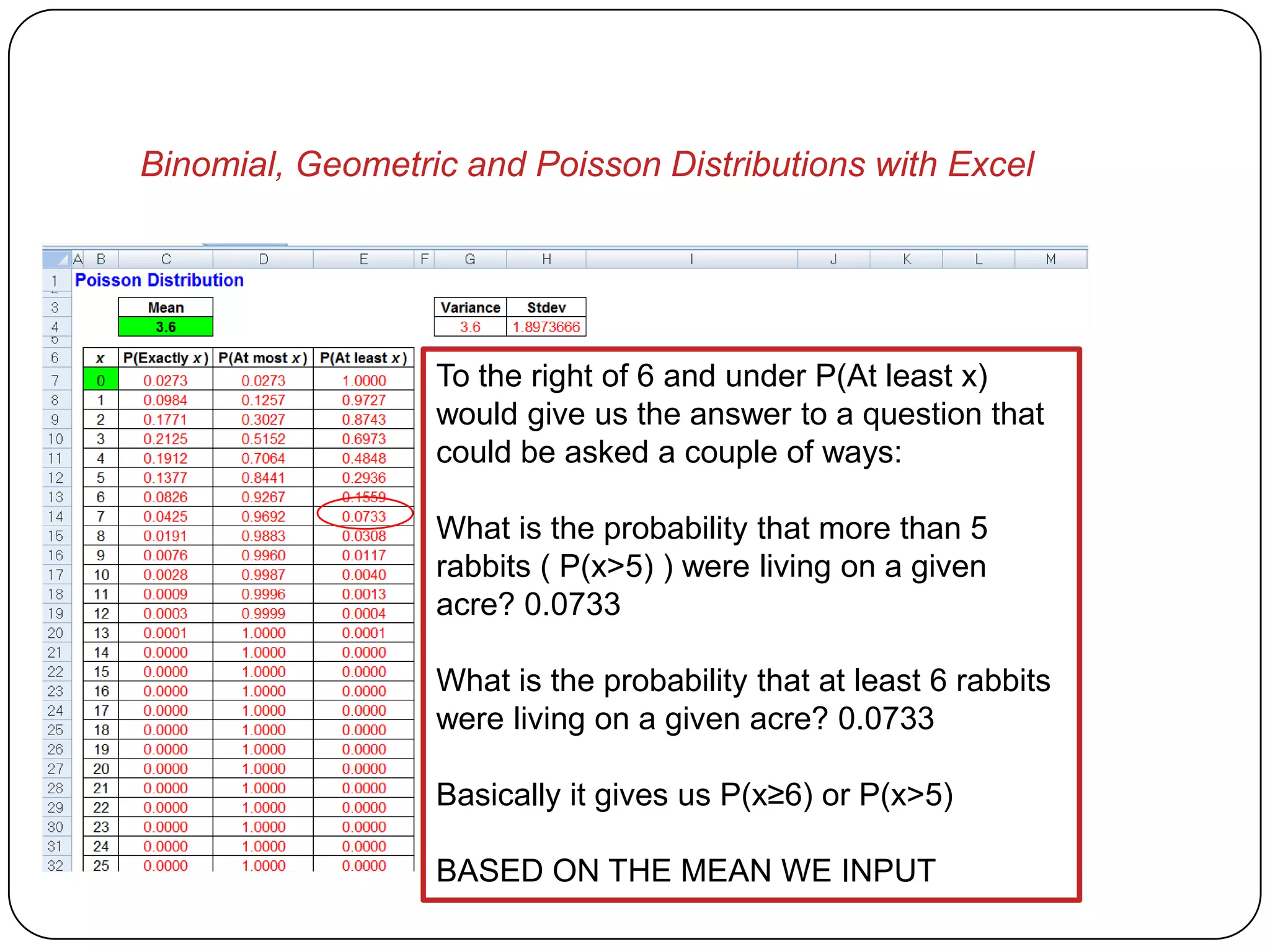
                  To the right of 6 and under P(At least x)
                  would give us the answer to a question that
                  could be asked a couple of ways:

                  What is the probability that more than 5
                  rabbits ( P(x>5) ) were living on a given
                  acre? 0.0733

                  What is the probability that at least 6 rabbits
                  were living on a given acre? 0.0733

                  Basically it gives us P(x≥6) or P(x>5)

                  BASED ON THE MEAN WE INPUT
Binomial, Geometric and Poisson Distributions with Excel

 Good luck, I hope this helps.
 If you enjoy reading the humor of an absent
  minded math professor, come be a fan at
  www.facebook.com/cranksmytractor or visit me at
  www.CranksMyTractor.com where I write about
  everyday things I come across…
 My best to you all…


          “Statistics do not lie, but people do.”

Binomial, Geometric and Poisson distributions in excel

  • 1.
    Binomial, Geometric andPoisson Distributions in Excel B. Heard (Not to be posted, used, etc. without my permission, students may download one copy for personal use)
  • 2.
    Binomial, Geometric andPoisson Distributions with Excel  What I am about to show you, will amaze you.  However…  If your instructor has told you that you MUST use Minitab, I can’t change that requirement  You could still use these “Magic Calculators” to check your work.  I think it is important for you to be familiar with Excel, since that is what you have access to in the work environment (Microsoft Excel)
  • 3.
    Binomial, Geometric andPoisson Distributions with Excel  Before we start, follow these instructions carefully  Go to http://highered.mcgraw- hill.com/sites/0070620164/student_view0/excel_tem plates.html  A picture follows on the next page
  • 4.
    Binomial, Geometric andPoisson Distributions with Excel  This is what it should look like, it is a long page, I couldn’t capture it all…
  • 5.
    Binomial, Geometric andPoisson Distributions with Excel  Now click on the link that says “Binomial”  Choose/Click “Open” 1 2
  • 6.
    Binomial, Geometric andPoisson Distributions with Excel  When it opens, click on the “Review” tab and then click “Unprotect Sheet” – You must do this step 1 2
  • 7.
    Binomial, Geometric andPoisson Distributions with Excel  Now save your Excel Workbook file as something like “Binomial_Calculator”  Let’s finish setting up our calculators
  • 8.
    Binomial, Geometric andPoisson Distributions with Excel  Now go back to the webpage
  • 9.
    Binomial, Geometric andPoisson Distributions with Excel  Now click on the link that says “Geometric”  Choose/Click “Open” 1 2
  • 10.
    Binomial, Geometric andPoisson Distributions with Excel  When it opens, click on the “Review” tab and then click “Unprotect Sheet” 1 2
  • 11.
    Binomial, Geometric andPoisson Distributions with Excel  Now save your Excel Workbook file as something like “Geometric_Calculator”  We need to add one more
  • 12.
    Binomial, Geometric andPoisson Distributions with Excel  Now go back to the webpage
  • 13.
    Binomial, Geometric andPoisson Distributions with Excel  Now click on the link that says “Poisson”  Choose/Click “Open” 1 2
  • 14.
    Binomial, Geometric andPoisson Distributions with Excel  When it opens, click on the “Review” tab and then click “Unprotect Sheet” 1 2
  • 15.
    Binomial, Geometric andPoisson Distributions with Excel  Now save your Excel Workbook file as something like “Poisson_Calculator”  Let’s use our new calculators now
  • 16.
    Binomial, Geometric andPoisson Distributions with Excel Binomial Distribution Example
  • 17.
    Binomial, Geometric andPoisson Distributions with Excel  Page 204, Example 2, a binomial
  • 18.
    Binomial, Geometric andPoisson Distributions with Excel  Open your Excel File “Binomial_Calculator”  Input 3 for n and 0.75 for p and hit ENTER
  • 19.
    Binomial, Geometric andPoisson Distributions with Excel  IMPORTANT  DON’T FORGET TO HIT THE ENTER KEY OR CLICK ON ANOTHER CELL AFTER YOU INPUT YOUR VALUE  DO NOT MESS WITH THE REST OF THE SHEET, ONLY INPUT INTO GREEN CELLS I NOTE, YOU WILL HAVE TO DOWNLOAD IT AGAIN IF YOU INADVERTENTLY CHANGE A CELL THAT IS USED FOR CALCULATIONS
  • 20.
    Binomial, Geometric andPoisson Distributions with Excel Note this calculator also gives me the mean, variance and standard deviation of the binomial with an n of 3 and p of 0.75 The probability of exactly 2 is to the right of 2 under the P(exactly x) column Check the book, we nailed it! Our answer is 0.4219. they noted 0.422 (they just rounded)
  • 21.
    Binomial, Geometric andPoisson Distributions with Excel Geometric Distribution Example
  • 22.
    Binomial, Geometric andPoisson Distributions with Excel  Page 218, Example 1, a geometric
  • 23.
    Binomial, Geometric andPoisson Distributions with Excel  Open your Excel File “Geometric_Calculator”  Input 0.74 for p and hit ENTER
  • 24.
    Binomial, Geometric andPoisson Distributions with Excel The question was to find the probability that he hits his first free throw on the third or fourth attempt so we have to add the results for exactly 3 and exactly 4 which is 0.0500 + 0.0130 = 0.0630 Again we nailed it! Note you are given the mean, variance and standard deviation of a geometric distribution with p = 0.74 above also.
  • 25.
    Binomial, Geometric andPoisson Distributions with Excel Poisson Distribution Example
  • 26.
    Binomial, Geometric andPoisson Distributions with Excel  Page 220, Example 3, a Poisson example (It is pronounced “Poy-zahn”)
  • 27.
    Binomial, Geometric andPoisson Distributions with Excel  Open your Excel File “Poisson_Calculator”  Input 3.6 for the Mean and hit ENTER
  • 28.
    Binomial, Geometric andPoisson Distributions with Excel The question was to find the probability that 7 rabbits would be found (based on a Poisson distribution with an average of 3.6) Look to the right of 7 and under P(Exactly x) to see 0.0425 is the answer. Nailed it! Note you are given the variance and standard deviation of a Poisson distribution with Mean = 3.6 above also. What is the Mean? You input it! It’s 3.6, note the Variance = Mean on a Poisson distribution and the standard deviation is just the square root of that number.
  • 29.
    Binomial, Geometric andPoisson Distributions with Excel  The P(At most x) and P(At least x) are very valuable also. Let’s take a look at the last problem again where we were looking for rabbits (Poisson) in a field where an average of 3.6 rabbits/acre were living.
  • 30.
    Binomial, Geometric andPoisson Distributions with Excel To the right of 4 and under P(At most x) would give us the answer to a question that could be asked a couple of ways: What is the probability that no more than 4 rabbits were living on a given acre? 0.7064 What is the probability that less than 5 ( P(x<5) ) rabbits were living on a given acre? 0.7064 Basically it gives us P(x≤4) or P(x<5)
  • 31.
    Binomial, Geometric andPoisson Distributions with Excel To the right of 6 and under P(At least x) would give us the answer to a question that could be asked a couple of ways: What is the probability that more than 5 rabbits ( P(x>5) ) were living on a given acre? 0.0733 What is the probability that at least 6 rabbits were living on a given acre? 0.0733 Basically it gives us P(x≥6) or P(x>5) BASED ON THE MEAN WE INPUT
  • 32.
    Binomial, Geometric andPoisson Distributions with Excel  Good luck, I hope this helps.  If you enjoy reading the humor of an absent minded math professor, come be a fan at www.facebook.com/cranksmytractor or visit me at www.CranksMyTractor.com where I write about everyday things I come across…  My best to you all… “Statistics do not lie, but people do.”