WEEK 7 HOMEWORK HELP
NUMBERS 9,10 & 12
B Heard
Not to be copied, posted,
shared without my
permission. Students can
download one copy for
their personal use.
WEEK 7 HOMEWORK HELP (MORE)
Find the critical value(s) for a left tailed z test with α = 0.11. Include a
graph…
Easy
In Minitab
Graph >> Probability Distribution Plot >> Click View Probability,
Click OK
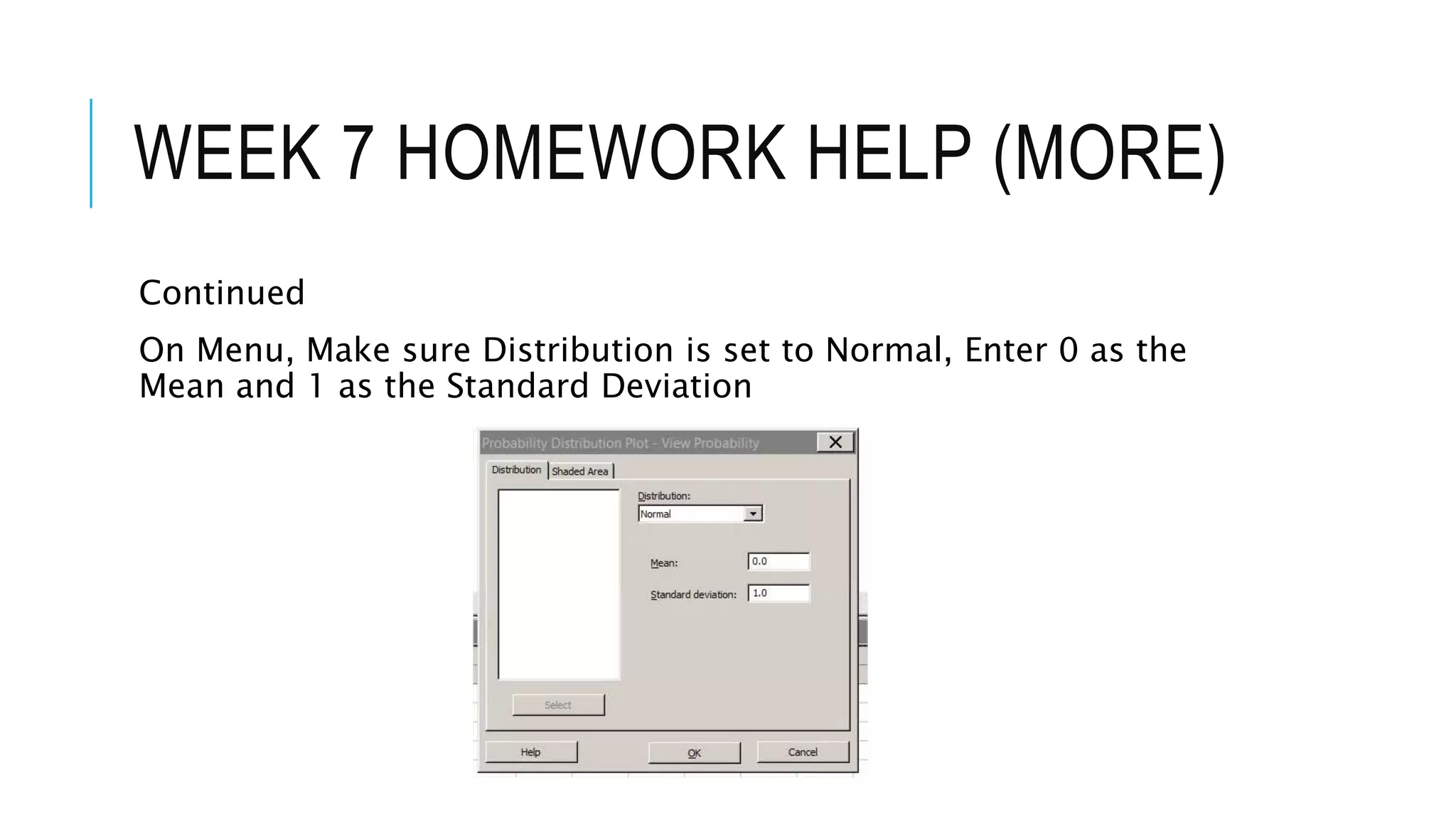
On Menu, Make sure Distribution is set to Normal, Enter 0 as the
Mean and 1 as the Standard Deviation
WEEK 7 HOMEWORK HELP (MORE)
Continued
On Menu, Make sure Distribution is set to Normal, Enter 0 as the
Mean and 1 as the Standard Deviation
WEEK 7 HOMEWORK HELP (MORE)
Continued
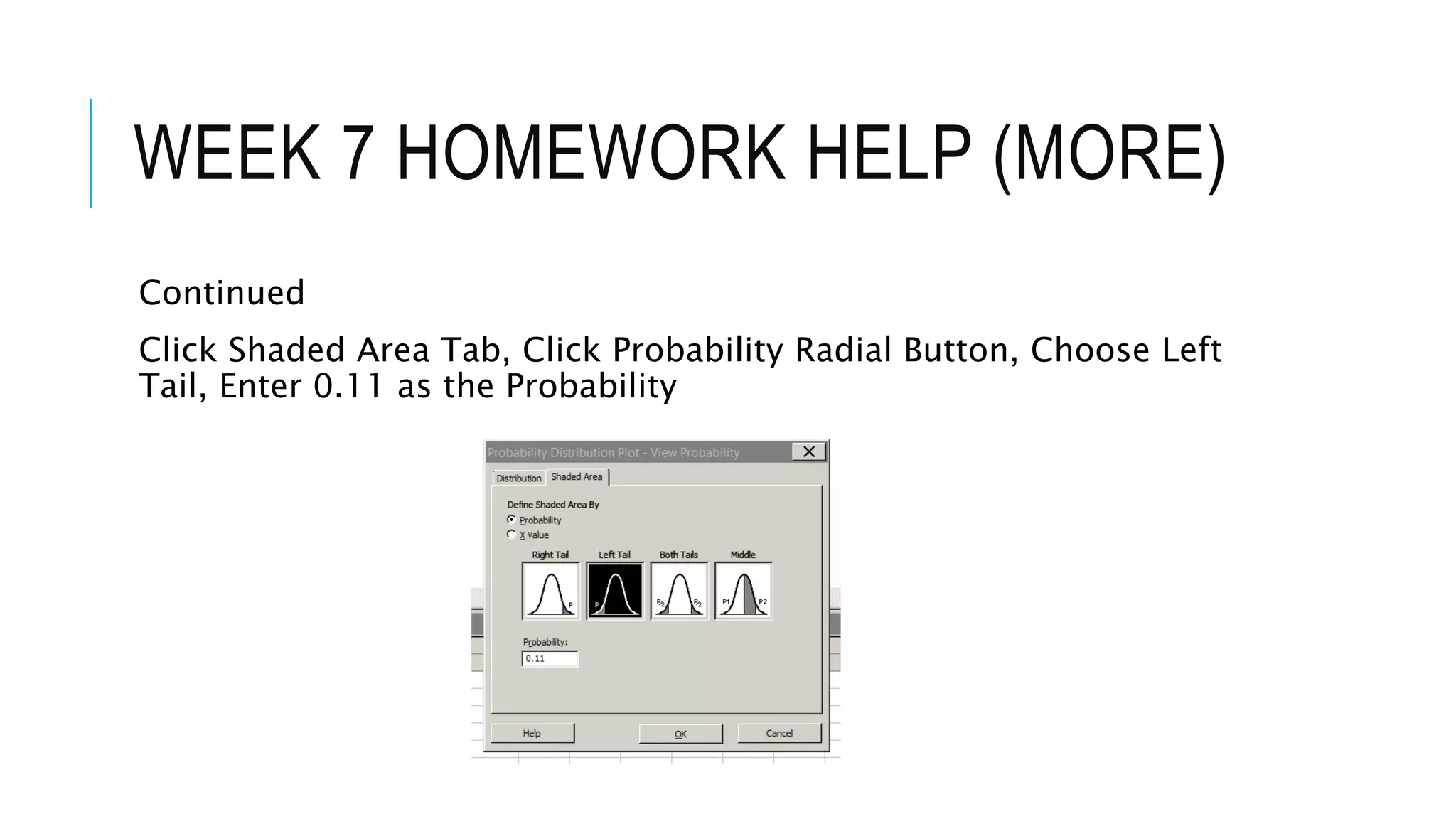
Click Shaded Area Tab, Click Probability Radial Button, Choose Left
Tail, Enter 0.11 as the Probability
WEEK 7 HOMEWORK HELP (MORE)
Continued
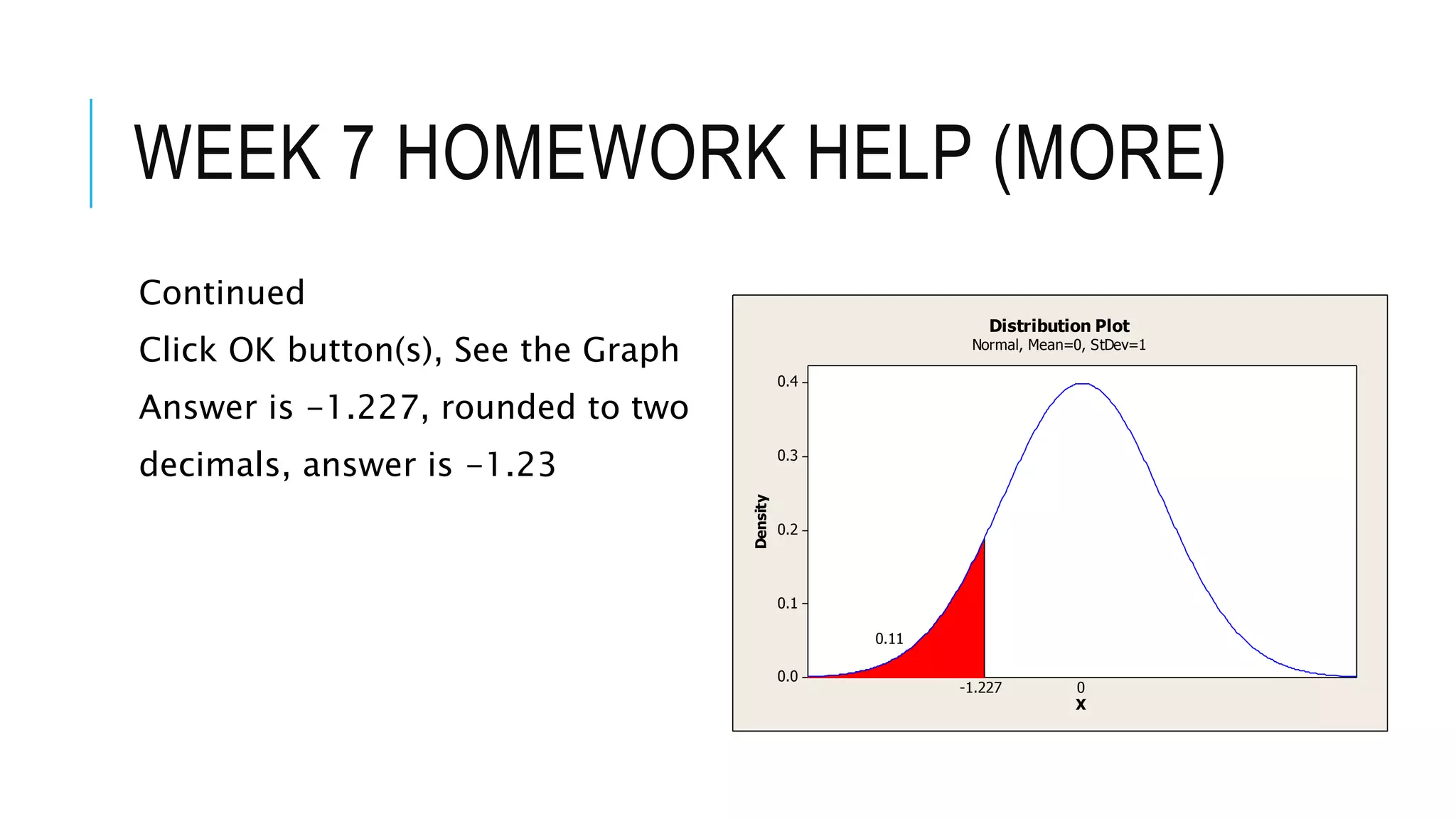
Click OK button(s), See the Graph
Answer is -1.227, rounded to two
decimals, answer is -1.23
0.4
0.3
0.2
0.1
0.0
X
Density
-1.227
0.11
0
Distribution Plot
Normal, Mean=0, StDev=1
WEEK 7 HOMEWORK HELP (MORE)
Test the claim about the population mean µ, at the given level of
significance using the given sample statistics.
Claim: µ = 60, α = 0.05. Sample Statistics: x-bar = 59.1, s = 4.11, n
=90
Easy
The claim would be H0 for this one (because it contains equality).
H0: µ = 60
Ha: µ ≠ 60
.
WEEK 7 HOMEWORK HELP (MORE)
Continued
Since Ha: µ ≠ 60 (or contains the not equal to sign), this is a two-
tailed test.
You can find the critical values in Minitab. Remember the that α =
0.05.
In Minitab,
Graph >> Probability Distribution Plot >> Click View Probability
Normal Distribution, Mean = 0, Standard Deviation = 1
Click Shaded Area Tab
.
WEEK 7 HOMEWORK HELP (MORE)
Continued
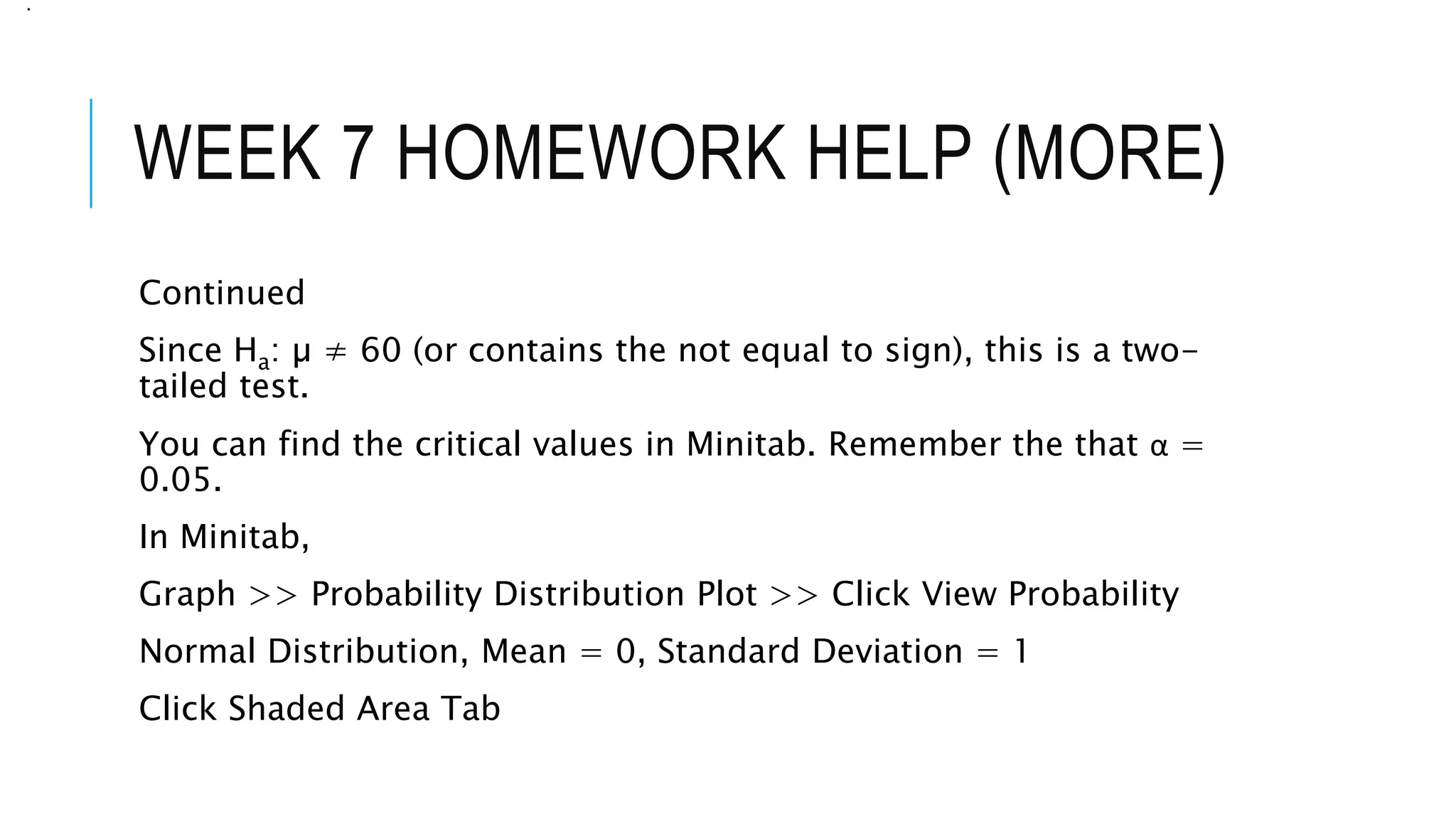
Click Probability button, Click Both Tails button, Enter 0.05 as your
probability
.
WEEK 7 HOMEWORK HELP (MORE)
Continued
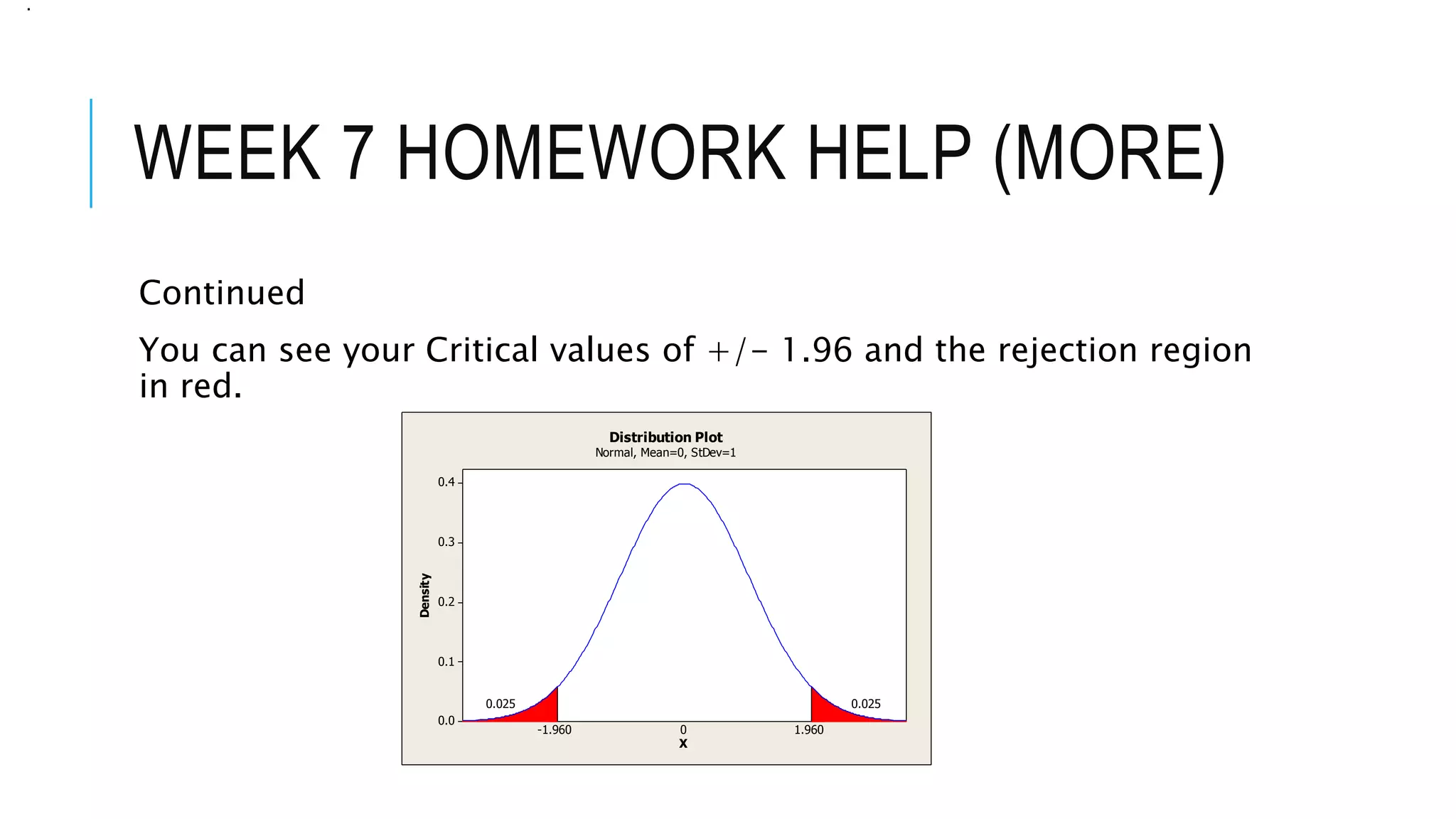
You can see your Critical values of +/- 1.96 and the rejection region
in red.
.
0.4
0.3
0.2
0.1
0.0
X
Density
-1.960
0.025
1.960
0.025
0
Distribution Plot
Normal, Mean=0, StDev=1
WEEK 7 HOMEWORK HELP (MORE)
Continued
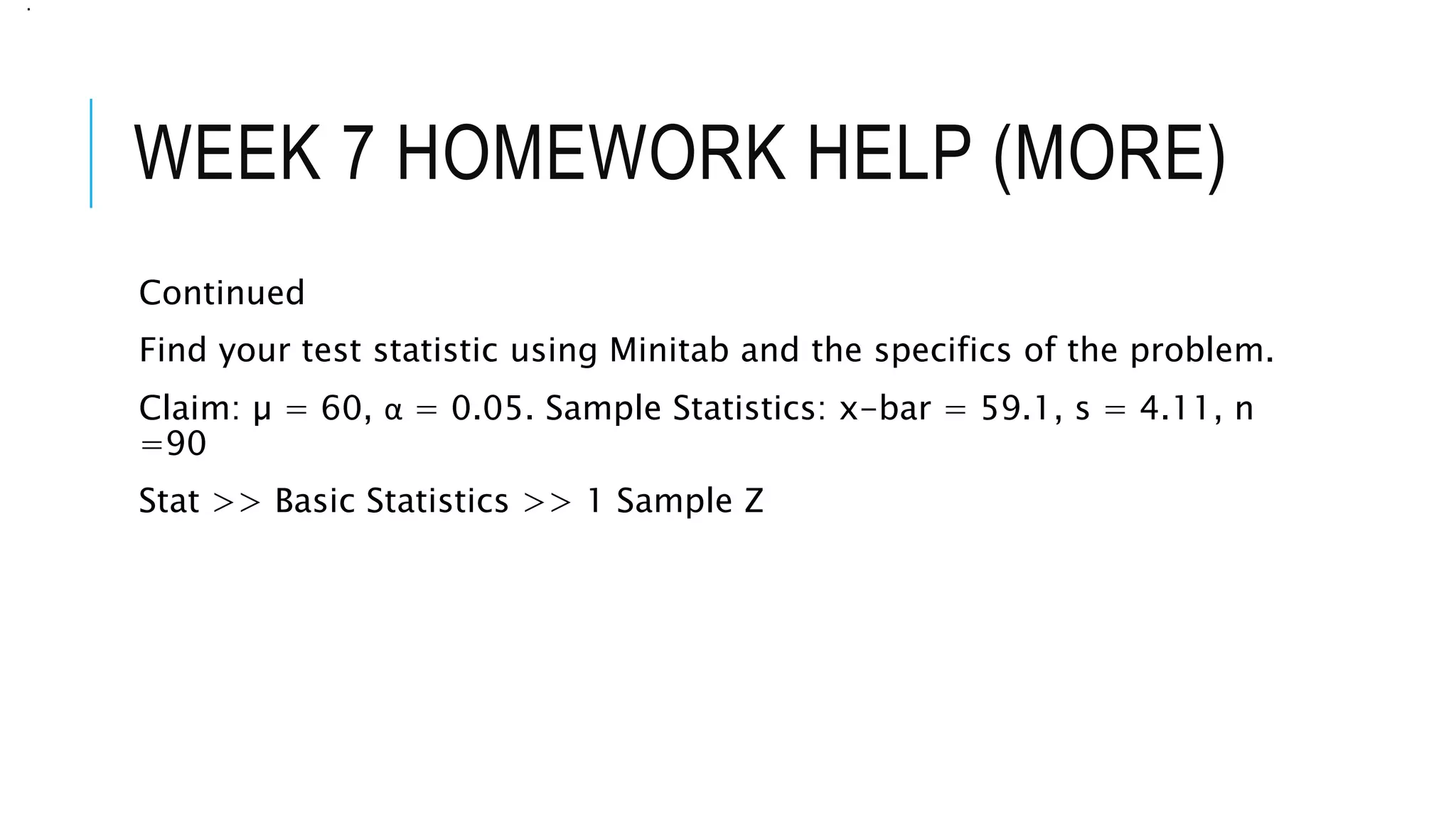
Find your test statistic using Minitab and the specifics of the problem.
Claim: µ = 60, α = 0.05. Sample Statistics: x-bar = 59.1, s = 4.11, n
=90
Stat >> Basic Statistics >> 1 Sample Z
.
WEEK 7 HOMEWORK HELP (MORE)
Continued
Click Summarized data button, the specifics including checking
Hypothesized Mean box and entering it…
Claim: µ = 60, α = 0.05. Sample Statistics: x-bar = 59.1, s = 4.11, n
=90
.
WEEK 7 HOMEWORK HELP (MORE)
Continued
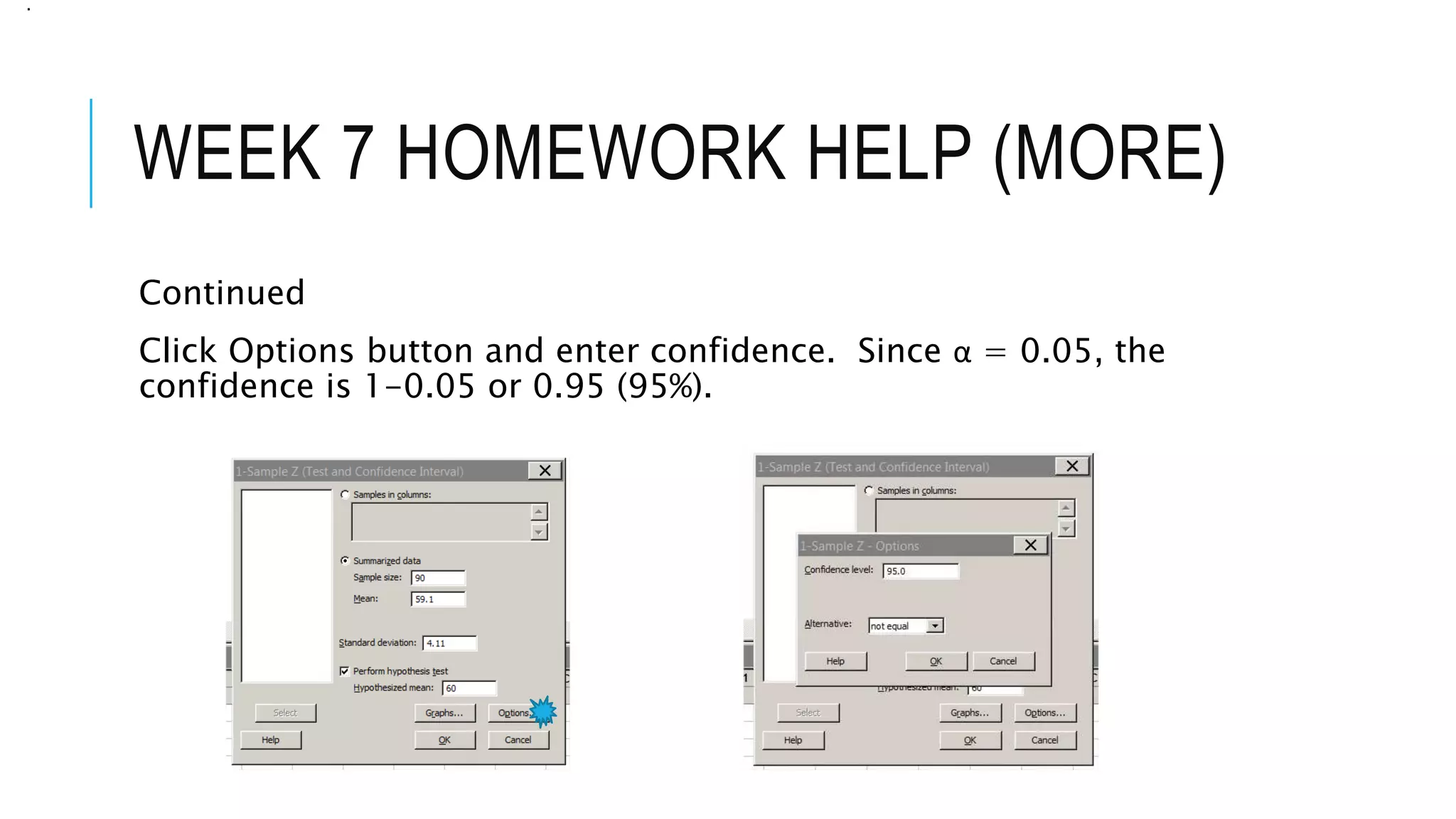
Click Options button and enter confidence. Since α = 0.05, the
confidence is 1-0.05 or 0.95 (95%).
.
WEEK 7 HOMEWORK HELP (MORE)
Continued
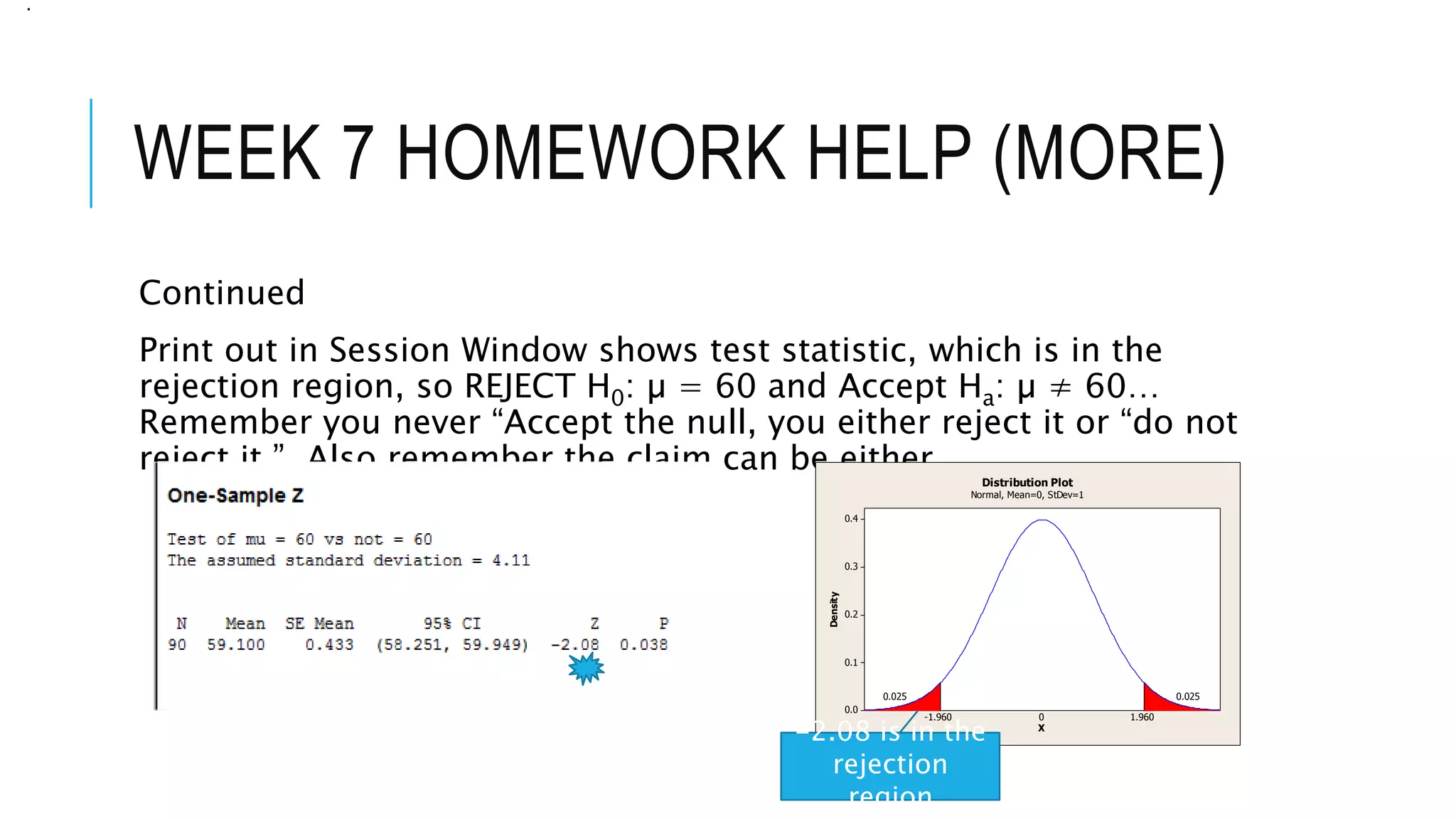
Print out in Session Window shows test statistic, which is in the
rejection region, so REJECT H0: µ = 60 and Accept Ha: µ ≠ 60…
Remember you never “Accept the null, you either reject it or “do not
reject it.” Also remember the claim can be either…
.
0.4
0.3
0.2
0.1
0.0
X
Density
-1.960
0.025
1.960
0.025
0
Distribution Plot
Normal, Mean=0, StDev=1
-2.08 is in the
rejection
region
WEEK 7 HOMEWORK HELP (MORE)
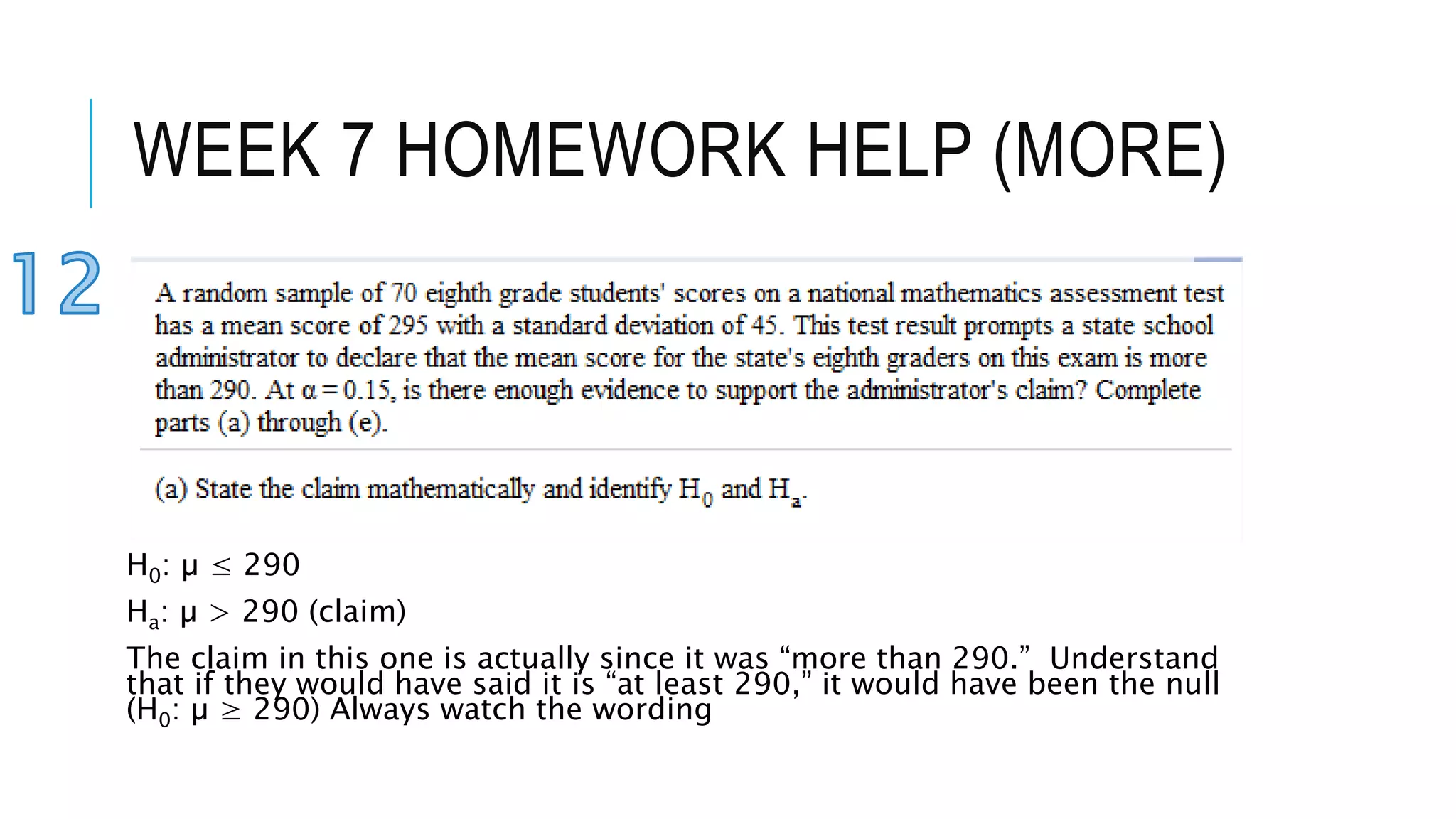
H0: µ ≤ 290
Ha: µ > 290 (claim)
The claim in this one is actually since it was “more than 290.” Understand
that if they would have said it is “at least 290,” it would have been the null
(H0: µ ≥ 290) Always watch the wording
WEEK 7 HOMEWORK HELP (MORE)
Continued
Same approach as in number 10 but this one is right tailed…
Why?
Always look at the Ha
Ha: µ > 290 (Pretend it is an arrow, > is “pointing right)
The only time you have two tails is when Ha contains an ≠ sign.
Ha has a >, it’s right tailed. Ha has a <, it’s left tailed.
.
WEEK 7 HOMEWORK HELP (MORE)
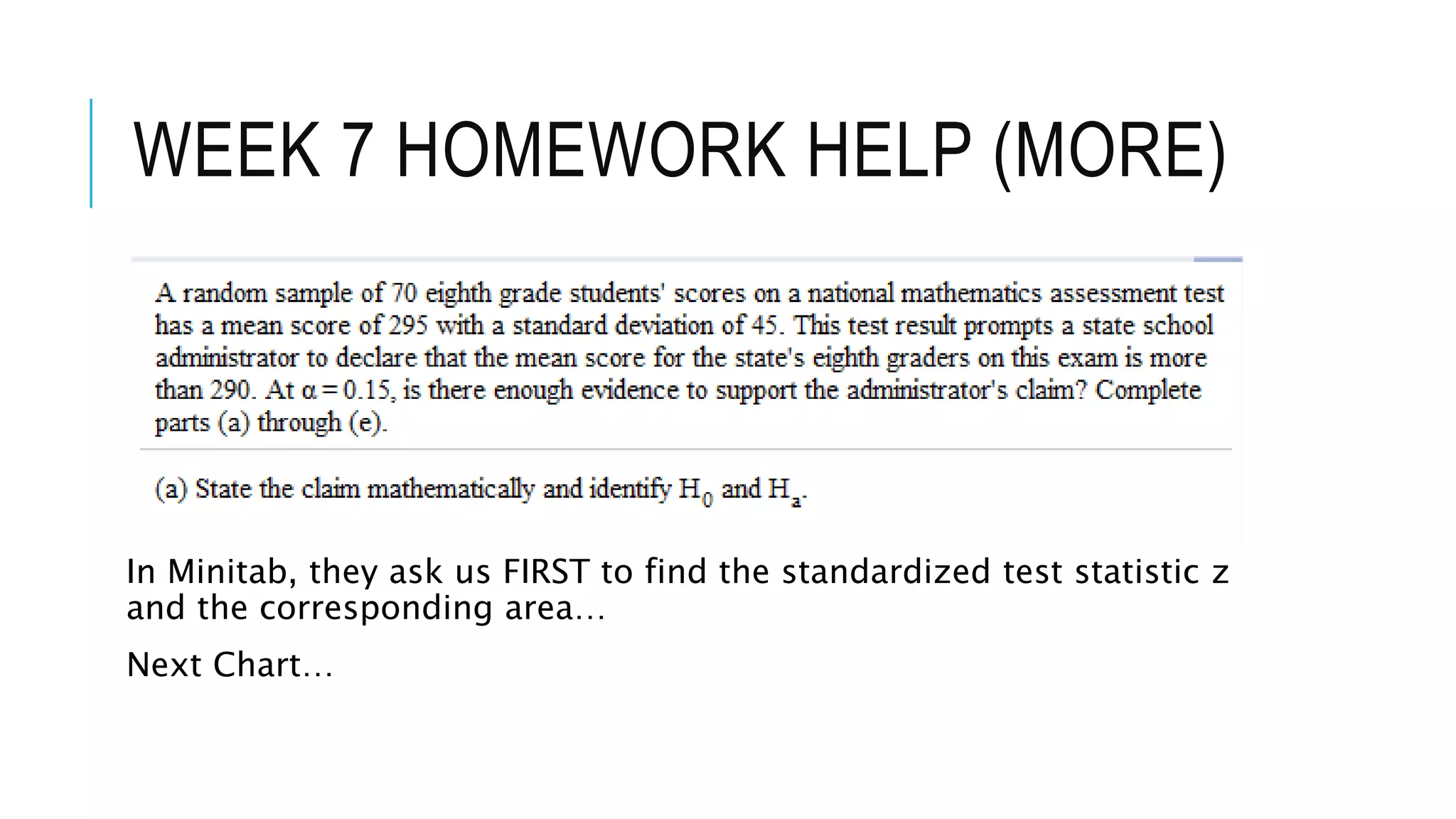
In Minitab, they ask us FIRST to find the standardized test statistic z
and the corresponding area…
Next Chart…
WEEK 7 HOMEWORK HELP (MORE)
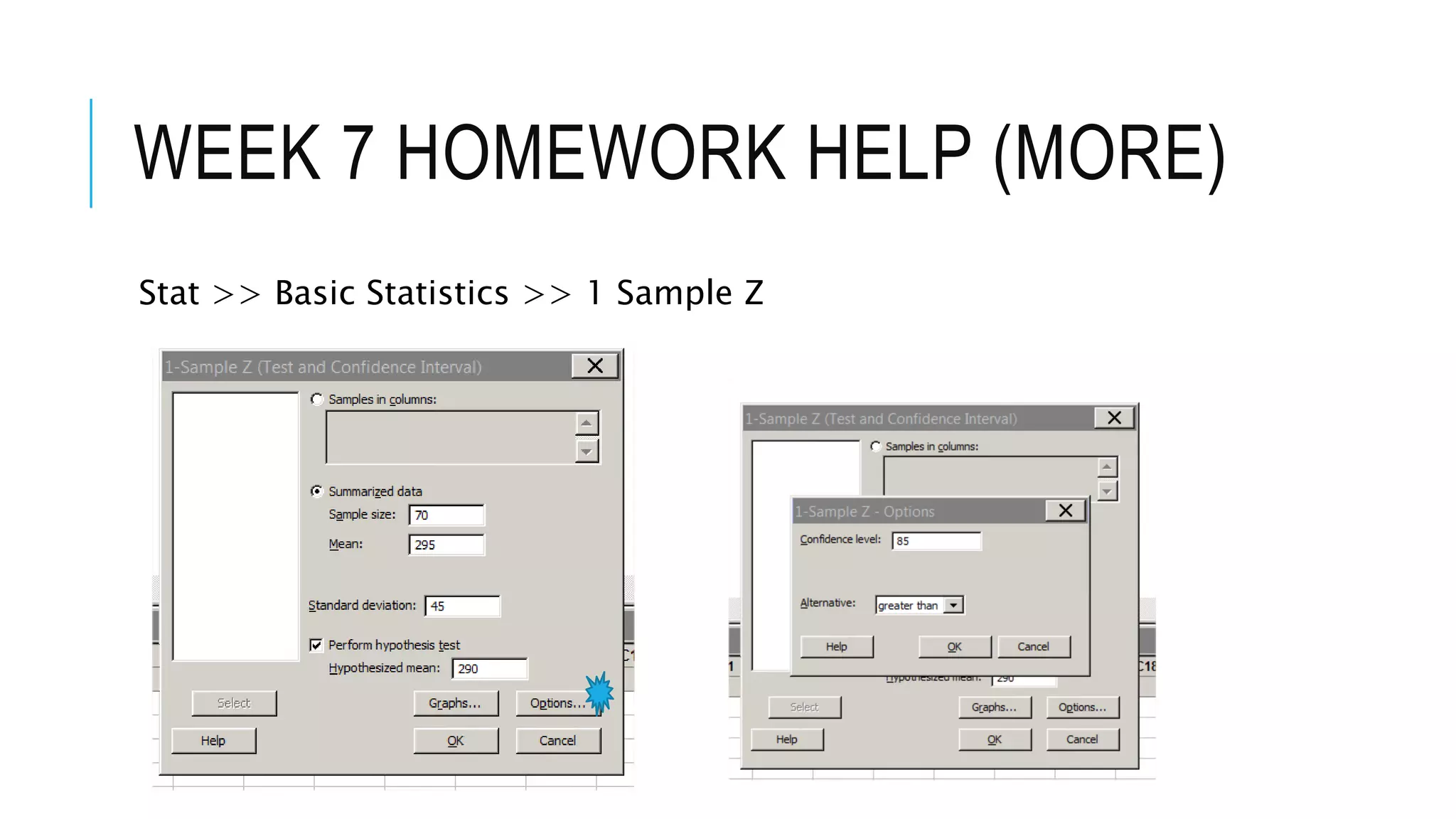
Stat >> Basic Statistics >> 1 Sample Z
WEEK 7 HOMEWORK HELP (MORE)
Continued
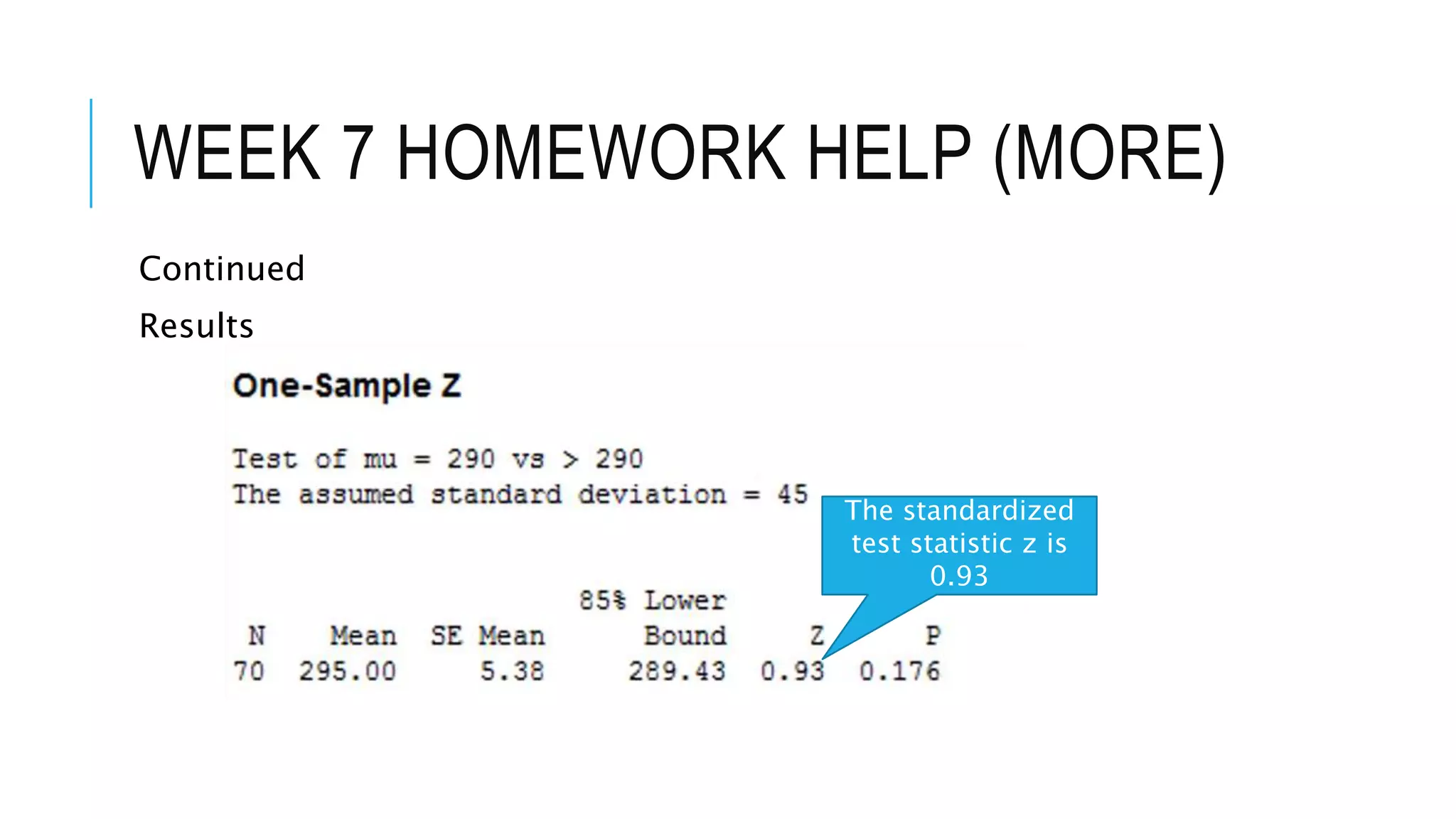
Results
The standardized
test statistic z is
0.93
WEEK 7 HOMEWORK HELP (MORE)
Continued
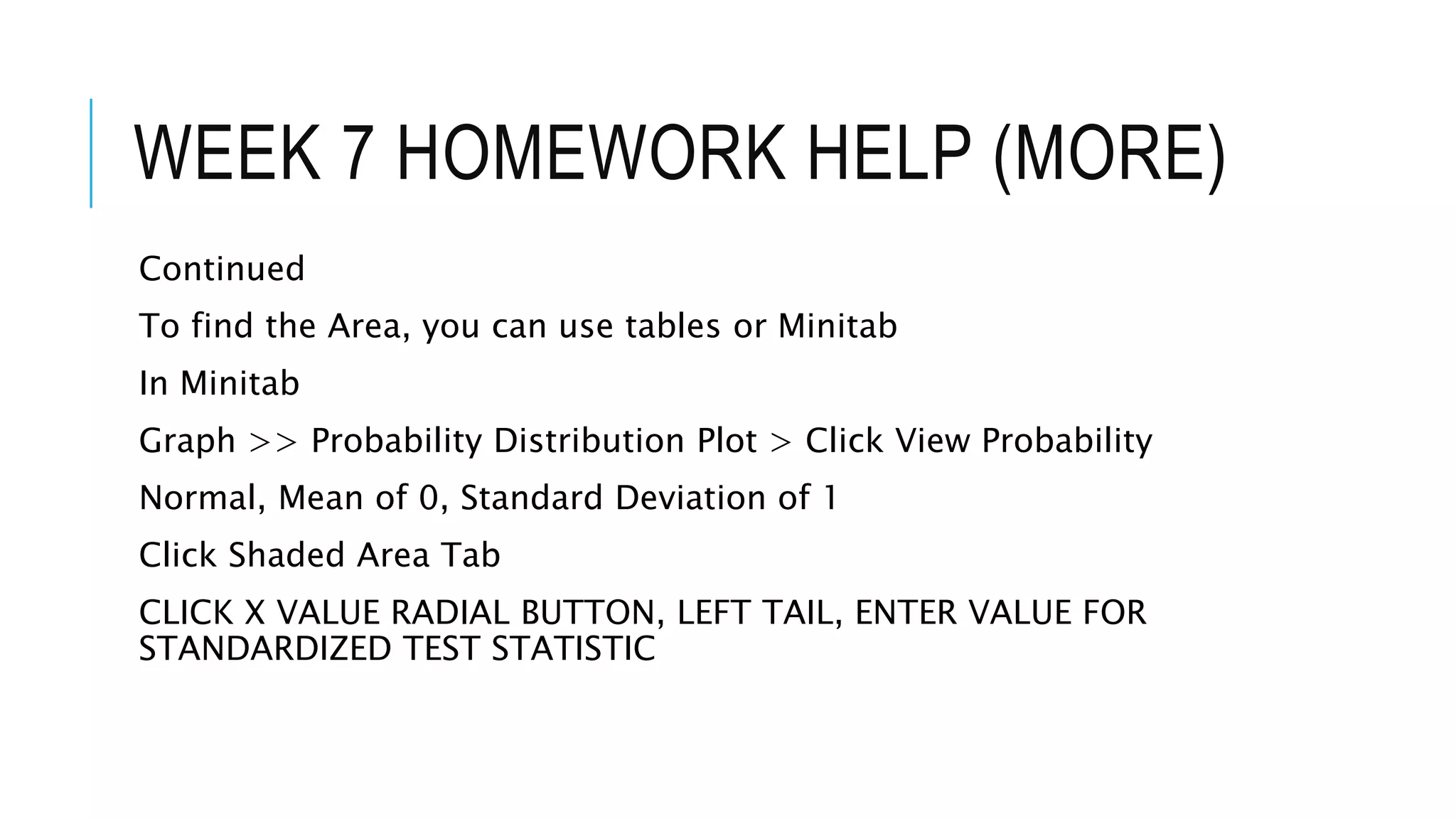
To find the Area, you can use tables or Minitab
In Minitab
Graph >> Probability Distribution Plot > Click View Probability
Normal, Mean of 0, Standard Deviation of 1
Click Shaded Area Tab
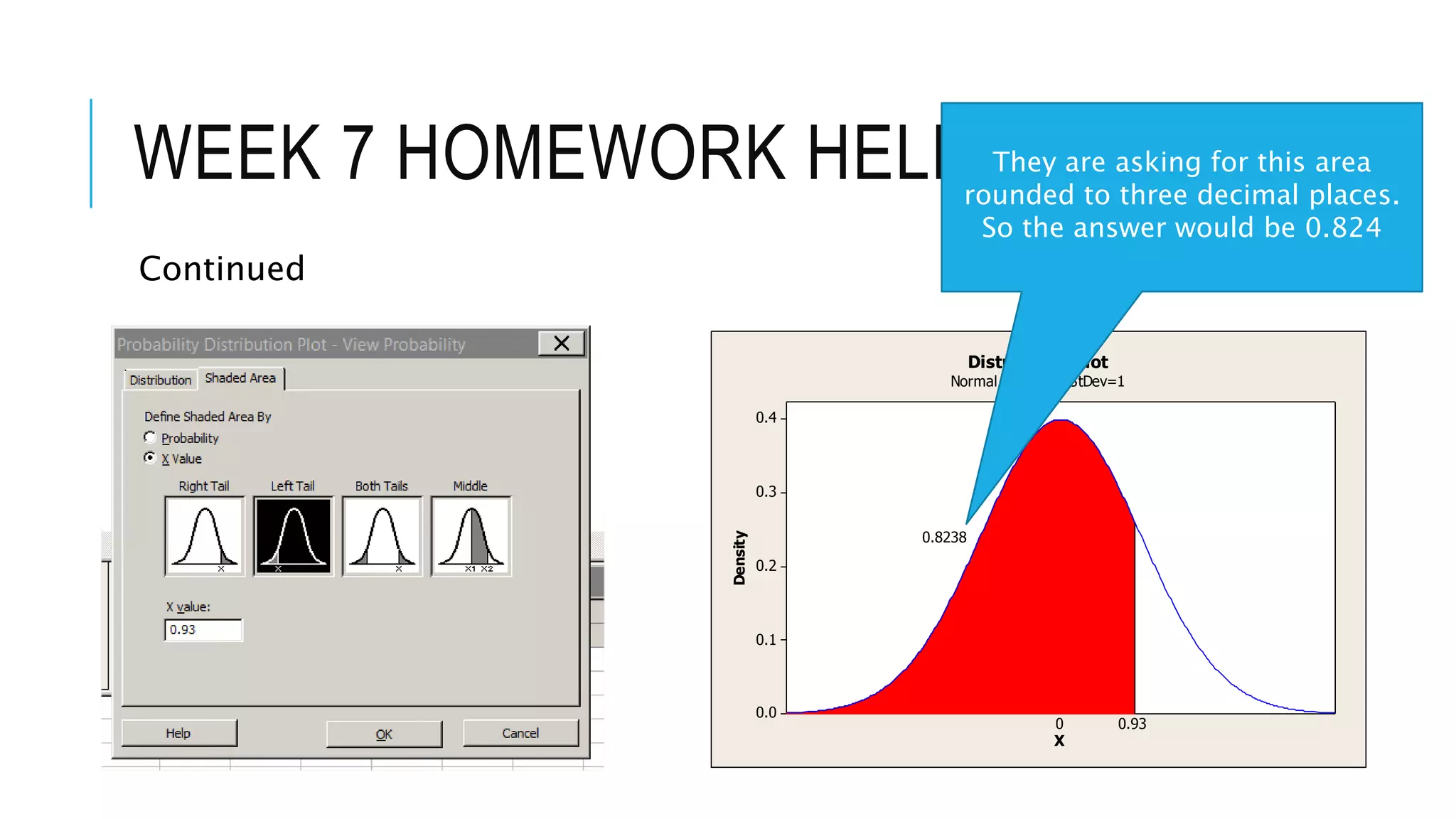
CLICK X VALUE RADIAL BUTTON, LEFT TAIL, ENTER VALUE FOR
STANDARDIZED TEST STATISTIC
WEEK 7 HOMEWORK HELP (MORE)
Continued
0.4
0.3
0.2
0.1
0.0
XDensity
0.93
0.8238
0
Distribution Plot
Normal, Mean=0, StDev=1
They are asking for this area
rounded to three decimal places.
So the answer would be 0.824
WEEK 7 HOMEWORK HELP (MORE)
Continued
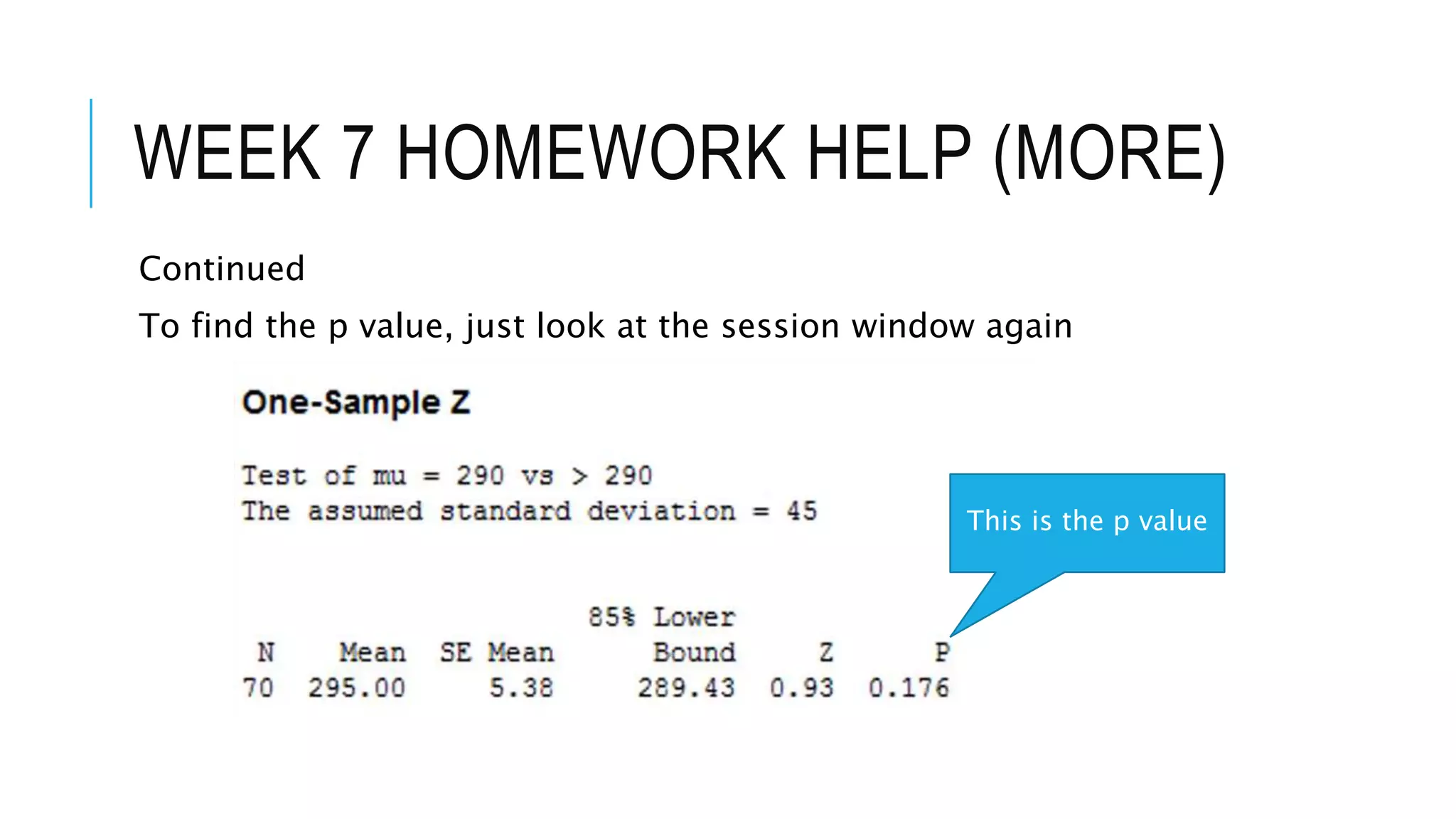
To find the p value, just look at the session window again
This is the p value
WEEK 7 HOMEWORK HELP (MORE)
Continued
This can get confusing. But Minitab sorts it out… If you chose the
correct values for the hypothesis when using Minitab, it gives you the
correct p value.
H0: µ ≤ 290
Ha: µ > 290
The example shows you subtracting the area from 1 or 1 – 0.824 =
0.176 (this is the same p value in your session window).
.
WEEK 7 HOMEWORK HELP (MORE)
Continued
Now compare your p value to your α.
p = 0.176 > α = 0.15
So “p is not less than alpha” - If p is not less than alpha, we do NOT
reject.
If “p is less than alpha” – If p is less than alpha, pLess or Please
Reject.
That’s the way I remember it…
.
WEEK 7 HOMEWORK HELP (MORE)
Continued
Our final conclusion is that we Fail to Reject and say there is not
enough evidence to accept our claim. Remember the claim for this
one was the alternative because of the wording.
H0: µ ≤ 290
Ha: µ > 290 (claim)
.

Week 7 Homework Numbers 9,10 and 12

  • 1.
    WEEK 7 HOMEWORKHELP NUMBERS 9,10 & 12 B Heard Not to be copied, posted, shared without my permission. Students can download one copy for their personal use.
  • 2.
    WEEK 7 HOMEWORKHELP (MORE) Find the critical value(s) for a left tailed z test with α = 0.11. Include a graph… Easy In Minitab Graph >> Probability Distribution Plot >> Click View Probability, Click OK On Menu, Make sure Distribution is set to Normal, Enter 0 as the Mean and 1 as the Standard Deviation
  • 3.
    WEEK 7 HOMEWORKHELP (MORE) Continued On Menu, Make sure Distribution is set to Normal, Enter 0 as the Mean and 1 as the Standard Deviation
  • 4.
    WEEK 7 HOMEWORKHELP (MORE) Continued Click Shaded Area Tab, Click Probability Radial Button, Choose Left Tail, Enter 0.11 as the Probability
  • 5.
    WEEK 7 HOMEWORKHELP (MORE) Continued Click OK button(s), See the Graph Answer is -1.227, rounded to two decimals, answer is -1.23 0.4 0.3 0.2 0.1 0.0 X Density -1.227 0.11 0 Distribution Plot Normal, Mean=0, StDev=1
  • 6.
    WEEK 7 HOMEWORKHELP (MORE) Test the claim about the population mean µ, at the given level of significance using the given sample statistics. Claim: µ = 60, α = 0.05. Sample Statistics: x-bar = 59.1, s = 4.11, n =90 Easy The claim would be H0 for this one (because it contains equality). H0: µ = 60 Ha: µ ≠ 60 .
  • 7.
    WEEK 7 HOMEWORKHELP (MORE) Continued Since Ha: µ ≠ 60 (or contains the not equal to sign), this is a two- tailed test. You can find the critical values in Minitab. Remember the that α = 0.05. In Minitab, Graph >> Probability Distribution Plot >> Click View Probability Normal Distribution, Mean = 0, Standard Deviation = 1 Click Shaded Area Tab .
  • 8.
    WEEK 7 HOMEWORKHELP (MORE) Continued Click Probability button, Click Both Tails button, Enter 0.05 as your probability .
  • 9.
    WEEK 7 HOMEWORKHELP (MORE) Continued You can see your Critical values of +/- 1.96 and the rejection region in red. . 0.4 0.3 0.2 0.1 0.0 X Density -1.960 0.025 1.960 0.025 0 Distribution Plot Normal, Mean=0, StDev=1
  • 10.
    WEEK 7 HOMEWORKHELP (MORE) Continued Find your test statistic using Minitab and the specifics of the problem. Claim: µ = 60, α = 0.05. Sample Statistics: x-bar = 59.1, s = 4.11, n =90 Stat >> Basic Statistics >> 1 Sample Z .
  • 11.
    WEEK 7 HOMEWORKHELP (MORE) Continued Click Summarized data button, the specifics including checking Hypothesized Mean box and entering it… Claim: µ = 60, α = 0.05. Sample Statistics: x-bar = 59.1, s = 4.11, n =90 .
  • 12.
    WEEK 7 HOMEWORKHELP (MORE) Continued Click Options button and enter confidence. Since α = 0.05, the confidence is 1-0.05 or 0.95 (95%). .
  • 13.
    WEEK 7 HOMEWORKHELP (MORE) Continued Print out in Session Window shows test statistic, which is in the rejection region, so REJECT H0: µ = 60 and Accept Ha: µ ≠ 60… Remember you never “Accept the null, you either reject it or “do not reject it.” Also remember the claim can be either… . 0.4 0.3 0.2 0.1 0.0 X Density -1.960 0.025 1.960 0.025 0 Distribution Plot Normal, Mean=0, StDev=1 -2.08 is in the rejection region
  • 14.
    WEEK 7 HOMEWORKHELP (MORE) H0: µ ≤ 290 Ha: µ > 290 (claim) The claim in this one is actually since it was “more than 290.” Understand that if they would have said it is “at least 290,” it would have been the null (H0: µ ≥ 290) Always watch the wording
  • 15.
    WEEK 7 HOMEWORKHELP (MORE) Continued Same approach as in number 10 but this one is right tailed… Why? Always look at the Ha Ha: µ > 290 (Pretend it is an arrow, > is “pointing right) The only time you have two tails is when Ha contains an ≠ sign. Ha has a >, it’s right tailed. Ha has a <, it’s left tailed. .
  • 16.
    WEEK 7 HOMEWORKHELP (MORE) In Minitab, they ask us FIRST to find the standardized test statistic z and the corresponding area… Next Chart…
  • 17.
    WEEK 7 HOMEWORKHELP (MORE) Stat >> Basic Statistics >> 1 Sample Z
  • 18.
    WEEK 7 HOMEWORKHELP (MORE) Continued Results The standardized test statistic z is 0.93
  • 19.
    WEEK 7 HOMEWORKHELP (MORE) Continued To find the Area, you can use tables or Minitab In Minitab Graph >> Probability Distribution Plot > Click View Probability Normal, Mean of 0, Standard Deviation of 1 Click Shaded Area Tab CLICK X VALUE RADIAL BUTTON, LEFT TAIL, ENTER VALUE FOR STANDARDIZED TEST STATISTIC
  • 20.
    WEEK 7 HOMEWORKHELP (MORE) Continued 0.4 0.3 0.2 0.1 0.0 XDensity 0.93 0.8238 0 Distribution Plot Normal, Mean=0, StDev=1 They are asking for this area rounded to three decimal places. So the answer would be 0.824
  • 21.
    WEEK 7 HOMEWORKHELP (MORE) Continued To find the p value, just look at the session window again This is the p value
  • 22.
    WEEK 7 HOMEWORKHELP (MORE) Continued This can get confusing. But Minitab sorts it out… If you chose the correct values for the hypothesis when using Minitab, it gives you the correct p value. H0: µ ≤ 290 Ha: µ > 290 The example shows you subtracting the area from 1 or 1 – 0.824 = 0.176 (this is the same p value in your session window). .
  • 23.
    WEEK 7 HOMEWORKHELP (MORE) Continued Now compare your p value to your α. p = 0.176 > α = 0.15 So “p is not less than alpha” - If p is not less than alpha, we do NOT reject. If “p is less than alpha” – If p is less than alpha, pLess or Please Reject. That’s the way I remember it… .
  • 24.
    WEEK 7 HOMEWORKHELP (MORE) Continued Our final conclusion is that we Fail to Reject and say there is not enough evidence to accept our claim. Remember the claim for this one was the alternative because of the wording. H0: µ ≤ 290 Ha: µ > 290 (claim) .