


BIM BASED PROJECT
CONTROLS
Institutionalizing BIM
Zuhair Haddad, CIO CCC
Chairman CCT
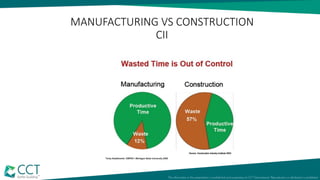
MANUFACTURING VS CONSTRUCTION
CII
DEFINITIONS: BIM
• BIM is often misunderstood and the focus has mainly been on the 3D
models and multi-discipline coordination of design information.
• The "I" in BIM is the real benefit but in the same time the biggest
challenge.
• CCC has used 3D/BIM based tools and linkages to build up its new
Integrated Project Control System. Below is the summary of
methodology that helped us achieve our objectives.
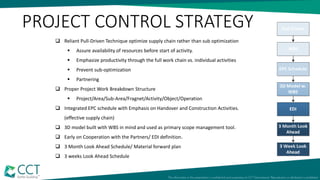
 Reliant Pull-Driven Technique optimize supply chain rather than sub optimization
 Assure availability of resources before start of activity.
 Emphasize productivity through the full work chain vs. individual activities
 Prevent sub-optimization
 Partnering
 Proper Project Work Breakdown Structure
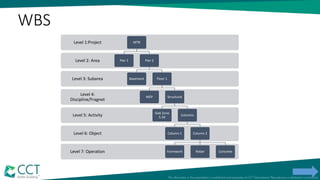
 Project/Area/Sub-Area/Fragnet/Activity/Object/Operation
 Integrated EPC schedule with Emphasis on Handover and Construction Activities.
(effective supply chain)
 3D model built with WBS in mind and used as primary scope management tool.
 Early on Cooperation with the Partners/ EDI definition.
 3 Month Look Ahead Schedule/ Material forward plan
 3 weeks Look Ahead Schedule
PROJECT CONTROL STRATEGY
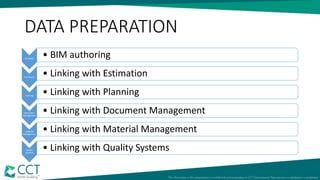
DATA PREPARATION
3D Model
• BIM authoring
Estimation
• Linking with Estimation
Planning
• Linking with Planning
Document
Management
• Linking with Document Management
Material
Management
• Linking with Material Management
Quality
Systems
• Linking with Quality Systems
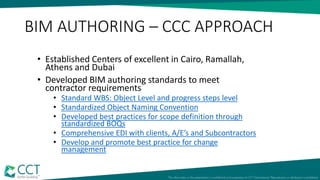
BIM AUTHORING – CCC APPROACH
• Established Centers of excellent in Cairo, Ramallah,
Athens and Dubai
• Developed BIM authoring standards to meet
contractor requirements
• Standard WBS: Object Level and progress steps level
• Standardized Object Naming Convention
• Developed best practices for scope definition through
standardized BOQs
• Comprehensive EDI with clients, A/E’s and Subcontractors
• Develop and promote best practice for change
management
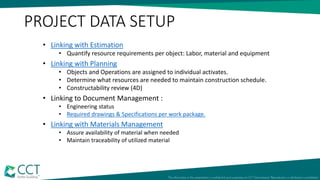
PROJECT DATA SETUP
• Linking with Estimation
• Quantify resource requirements per object: Labor, material and equipment
• Linking with Planning
• Objects and Operations are assigned to individual activates.
• Determine what resources are needed to maintain construction schedule.
• Constructability review (4D)
• Linking to Document Management :
• Engineering status
• Required drawings & Specifications per work package.
• Linking with Materials Management
• Assure availability of material when needed
• Maintain traceability of utilized material
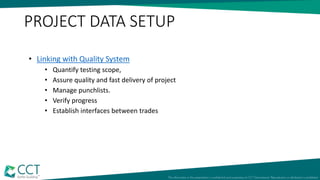
• Linking with Quality System
• Quantify testing scope,
• Assure quality and fast delivery of project
• Manage punchlists.
• Verify progress
• Establish interfaces between trades
PROJECT DATA SETUP
OUR FOCUS THIS YEAR
BIM Enablers
• BIM Based Project Control
• Front End loading Management
• Planning and Progress measurement
• Automated Payment Certificate
• Procurement/ Supply chain Management Back up
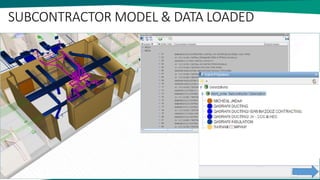
• Subcontractor Control
• Lean Construction Case Study
C3D Planner
Lean Construction Management
integrated in C3D
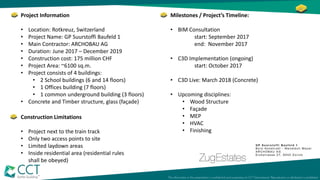
Project Information
• Location: Rotkreuz, Switzerland
• Project Name: GP Suurstoffi Baufeld 1
• Main Contractor: ARCHOBAU AG
• Duration: June 2017 – December 2019
• Construction cost: 175 million CHF
• Project Area: ~6100 sq.m.
• Project consists of 4 buildings:
• 2 School buildings (6 and 14 floors)
• 1 Offices building (7 floors)
• 1 common underground building (3 floors)
• Concrete and Timber structure, glass (façade)
Construction Limitations
• Project next to the train track
• Only two access points to site
• Limited laydown areas
• Inside residential area (residential rules
shall be obeyed)
Milestones / Project’s Timeline:
• BIM Consultation
start: September 2017
end: November 2017
• C3D Implementation (ongoing)
start: October 2017
• C3D Live: March 2018 (Concrete)
• Upcoming disciplines:
• Wood Structure
• Façade
• MEP
• HVAC
• Finishing
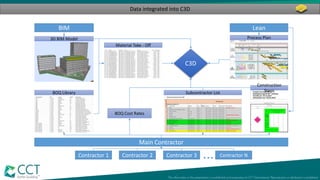
Data integrated into C3D
BIM
C3D
Lean
Main Contractor
Contractor 1 Contractor 2 Contractor 3 Contractor N...
3D BIM Model
BOQ Library
Material Take - Off
Process Plan
Construction
StepsSubcontractor List
BOQ Cost Rates
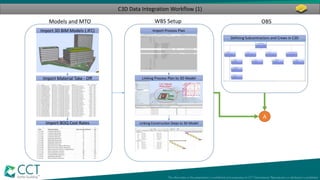
C3D Data Integration Workflow (1)
Models and MTO
Import 3D BIM Models (.IFC)
Import Material Take - Off
Import BOQ Cost Rates
A
WBS Setup
Import Process Plan
Linking Process Plan to 3D Model
Linking Construction Steps to 3D Model
Defining Subcontractors and Crews in C3D
OBS
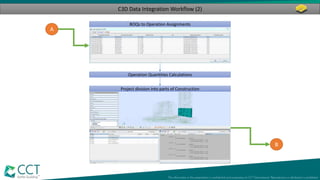
C3D Data Integration Workflow (2)
A
BOQs to Operation Assignments
Operation Quantities Calculations
Project division into parts of Construction
B
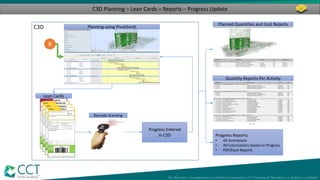
C3D Planning – Lean Cards – Reports – Progress Update
C3D Planning using PivotGantt
Lean Cards
Barcode Scanning
Progress Entered
in C3D Progress Reports:
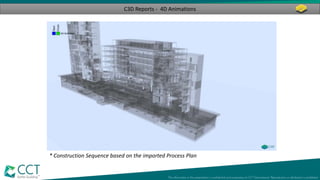
• 4D Animations
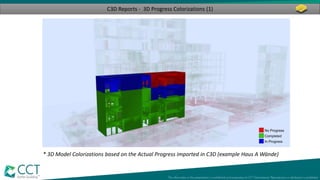
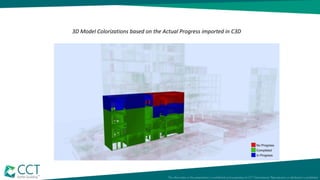
• 3D Colorizations based on Progress
• PDF/Excel Reports
B
Quantity Reports Per Activity
Planned Quantities and Cost Reports
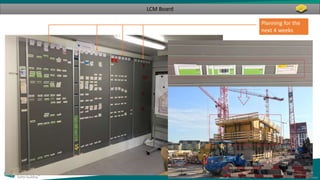
LCM Board
Planning for the
next 4 weeks
C3D Reports - 3D Progress Colorizations (1)
* 3D Model Colorizations based on the Actual Progress imported in C3D (example Haus A Wände)
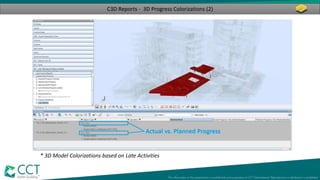
C3D Reports - 3D Progress Colorizations (2)
* 3D Model Colorizations based on Late Activities
C3D Reports - 4D Animations
* Construction Sequence based on the imported Process Plan
Questions…?
Thank you!
WBS
Level 7: Operation
Level 6: Object
Level 5: Activity
Level 4:
Discipline/Fragnet
Level 3: Subarea
Level 2: Area
Level 1:Project MTB
Pier 1 Pier 2
Basement Floor 1
MEP Structural
Slab Zone
5.34
Columns
Column 1 Column 2
Formwork Rebar Concrete
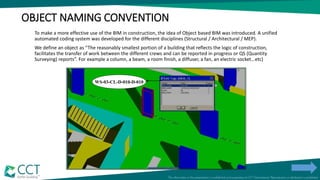
OBJECT NAMING CONVENTION
To make a more effective use of the BIM in construction, the idea of Object based BIM was introduced. A unified
automated coding system was developed for the different disciplines (Structural / Architectural / MEP).
We define an object as “The reasonably smallest portion of a building that reflects the logic of construction,
facilitates the transfer of work between the different crews and can be reported in progress or QS (Quantity
Surveying) reports”. For example a column, a beam, a room finish, a diffuser, a fan, an electric socket…etc)
WS-03-CL-D-010-D-010
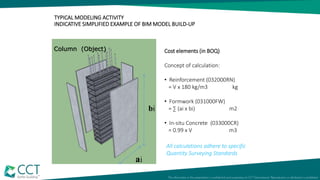
TYPICAL MODELING ACTIVITY
INDICATIVE SIMPLIFIED EXAMPLE OF BIM MODEL BUILD-UP
Column (Object) Cost elements (in BOQ)
Concept of calculation:
• Reinforcement (032000RN)
= V x 180 kg/m3 kg
• Formwork (031000FW)
= ∑ (ai x bi) m2
• In-situ Concrete (033000CR)
= 0.99 x V m3
bi
ai
All calculations adhere to specific
Quantity Surveying Standards
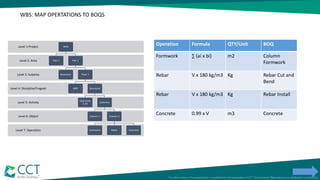
WBS: MAP OPERTATIONS TO BOQS
Level 7: Operation
Level 6: Object
Level 5: Activity
Level 4: Discipline/Fragnet
Level 3: Subarea
Level 2: Area
Level 1:Project MTB
Pier 1 Pier 2
Basement Floor 1
MEP Structural
Slab Zone
5.34
Columns
Column 1 Column 2
Formwork Rebar Concrete
Operation Formula QTY/Unit BOQ
Formwork ∑ (ai x bi) m2 Column
Formwork
Rebar V x 180 kg/m3 Kg Rebar Cut and
Bend
Rebar V x 180 kg/m3 Kg Rebar Install
Concrete 0.99 x V m3 Concrete
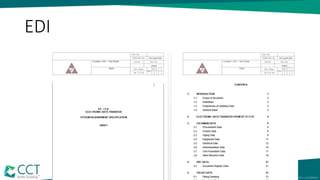
EDI
28
SUBCONTRACTOR MODEL & DATA LOADED
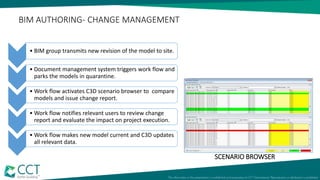
Data Bank Workflow
• BIM group transmits new revision of the model to site.
• Document management system triggers work flow and
parks the models in quarantine.
• Work flow activates C3D scenario browser to compare
models and issue change report.
• Work flow notifies relevant users to review change
report and evaluate the impact on project execution.
• Work flow makes new model current and C3D updates
all relevant data.
SCENARIO BROWSER
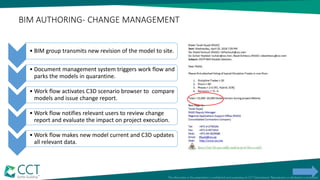
BIM AUTHORING- CHANGE MANAGEMENT
• BIM group transmits new revision of the model to site.
• Document management system triggers work flow and
parks the models in quarantine.
• Work flow activates C3D scenario browser to compare
models and issue change report.
• Work flow notifies relevant users to review change
report and evaluate the impact on project execution.
• Work flow makes new model current and C3D updates
all relevant data.
BIM AUTHORING- CHANGE MANAGEMENT
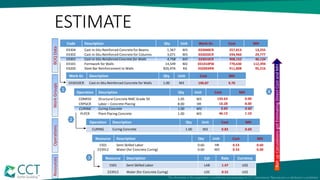
ESTIMATE
Code Description Qty Unit Work Gr. Cost MH
03304 Cast-in-Situ Reinforced Concrete for Beams 1,367 M3 033040CR 257,013 13,255
03302 Cast-in-Situ Reinforced Concrete for Columns 3,071 M3 033020CR 594,960 29,777
03301 Cast-in-Situ Reinforced Concrete for Walls 4,758 M3 033010CR 908,152 46,134
03101 Formwork for Walls 14,549 M2 031010FW 770,630 112,394
03200 Steel Bar Reinforcement to Walls 826,976 KG 032003RN 911,808 95,216
Work Gr. Description Qty Unit Cost MH
033010CR Cast-in-Situ Reinforced Concrete for Walls 1.00 M3 190.87 9.70
Operation Description Qty Unit Cost MH
CURING Curing Concrete 1.00 M3 0.83 0.60
Operation Description Qty Unit Cost MH
CONR50 Structural Concrete RMC Grade 50 1.05 M3 133.63 0.00
CRPGCR Labor – Concrete Placing 8.00 HR 10.28 8.00
CURING Curing Concrete 1.00 M3 0.83 0.60
PLPCR Plant Placing Concrete 1.00 M3 46.13 1.10
Resource Description Qty Unit Cost MH
1501 Semi Skilled Labor 0.60 HR 0.53 0.60
233912 Water (for Concrete Curing) 0.60 M3 0.33 0.00
Resource Description Cat Rate Currency
1501 Semi Skilled Labor LAB 1.47 US$
233912 Water (for Concrete Curing) LOC 0.55 US$
1
2
3
RollupCalculationsgotEstimatingDirectCostandMH
OperationsWorkGroupsBOQDataResources
4
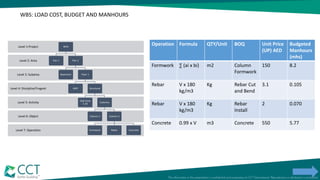
WBS: LOAD COST, BUDGET AND MANHOURS
Level 7: Operation
Level 6: Object
Level 5: Activity
Level 4: Discipline/Fragnet
Level 3: Subarea
Level 2: Area
Level 1:Project MTB
Pier 1 Pier 2
Basement Floor 1
MEP Structural
Slab Zone
5.34
Columns
Column 1 Column 2
Formwork Rebar Concrete
Operation Formula QTY/Unit BOQ Unit Price
(UP) AED
Budgeted
Manhours
(mhs)
Formwork ∑ (ai x bi) m2 Column
Formwork
150 8.2
Rebar V x 180
kg/m3
Kg Rebar Cut
and Bend
3.1 0.105
Rebar V x 180
kg/m3
Kg Rebar
Install
2 0.070
Concrete 0.99 x V m3 Concrete 550 5.77
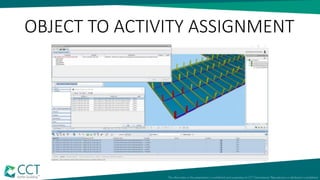
OBJECT TO ACTIVITY ASSIGNMENT
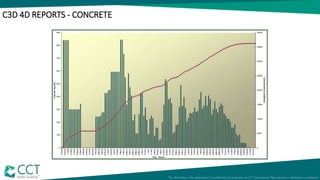
C3D 4D REPORTS - CONCRETE
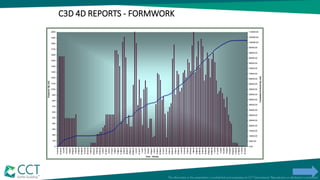
C3D 4D REPORTS - FORMWORK
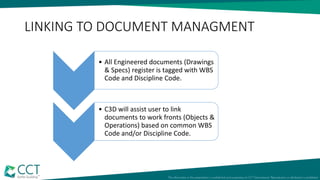
LINKING TO DOCUMENT MANAGMENT
• All Engineered documents (Drawings
& Specs) register is tagged with WBS
Code and Discipline Code.
• C3D will assist user to link
documents to work fronts (Objects &
Operations) based on common WBS
Code and/or Discipline Code.
Level 7: Operation
Level 6: Object
Level 5: Activity
Level 4: Discipline/Fragnet
Level 3: Subarea
Level 2: Area
Level 1:Project MTB
Pier 1 Pier 2
Basement Floor 1
MEP Structural
Slab Zone
5.34
Columns
Column 1 Column 2
Rebar Formwork Concrete
Cure and
Strip
Front End Loading
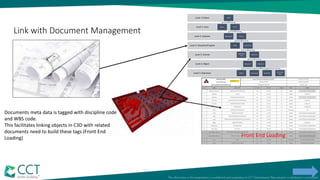
Link with Document Management
Documents meta data is tagged with discipline code
and WBS code.
This facilitates linking objects in C3D with related
documents need to build these tags (Front End
Loading)
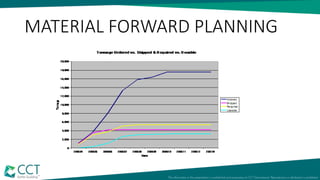
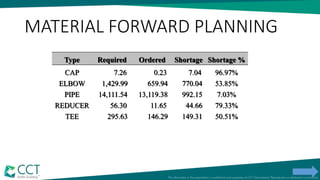
MATERIAL FORWARD PLANNING
Type Required Ordered Shortage Shortage %
CAP 7.26 0.23 7.04 96.97%
ELBOW 1,429.99 659.94 770.04 53.85%
PIPE 14,111.54 13,119.38 992.15 7.03%
REDUCER 56.30 11.65 44.66 79.33%
TEE 295.63 146.29 149.31 50.51%
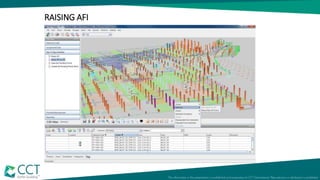
RAISING AFI
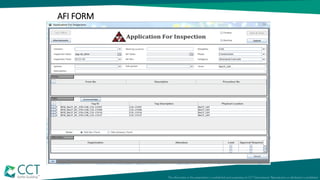
AFI FORM
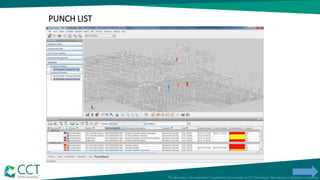
PUNCH LIST
Typical Rooms
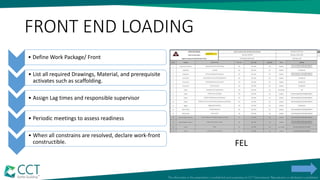
FRONT END LOADING
• Define Work Package/ Front
• List all required Drawings, Material, and prerequisite
activates such as scaffolding.
• Assign Lag times and responsible supervisor
• Periodic meetings to assess readiness
• When all constrains are resolved, declare work-front
constructible. FEL
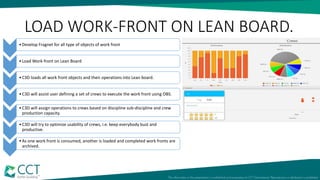
LOAD WORK-FRONT ON LEAN BOARD.
•Develop Fragnet for all type of objects of work front
•Load Work-front on Lean Board
•C3D loads all work front objects and their operations into Lean board.
•C3D will assist user defining a set of crews to execute the work front using OBS.
•C3D will assign operations to crews based on discipline sub-discipline and crew
production capacity.
•C3D will try to optimize usability of crews, i.e. keep everybody bust and
productive.
•As one work front is consumed, another is loaded and completed work fronts are
archived.
C3D LEAN BOARD
Defining Subcontractors and Crews in C3D
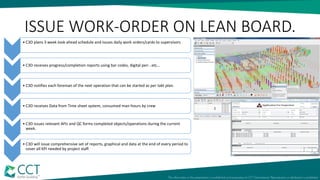
ISSUE WORK-ORDER ON LEAN BOARD.
• C3D plans 3 week look ahead schedule and issues daily work orders/cards to supervisors
• C3D receives progress/completion reports using bar codes, digital pen ..etc…
• C3D notifies each foreman of the next operation that can be started as per takt plan.
• C3D receives Data from Time sheet system, consumed man-hours by crew
• C3D issues relevant AFIs and QC forms completed objects/operations during the current
week.
• C3D will issue comprehensive set of reports, graphical and data at the end of every period to
cover all KPI needed by project staff.
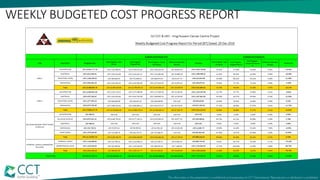
WEEKLY BUDGETED COST PROGRESS REPORT
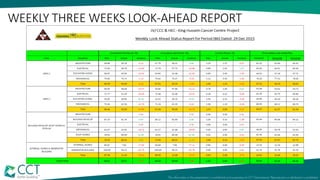
WEEKLY THREE WEEKS LOOK-AHEAD REPORT
3D Model Colorizations based on the Actual Progress imported in C3D
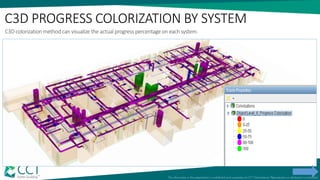
C3D PROGRESS COLORIZATION BY SYSTEM
C3D colorization method can visualize the actual progress percentage on each system.
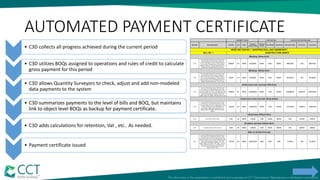
AUTOMATED PAYMENT CERTIFICATE
• C3D collects all progress achieved during the current period
• C3D utilizes BOQs assigned to operations and rules of credit to calculate
gross payment for this period
• C3D allows Quantity Surveyors to check, adjust and add non-modeled
data payments to the system
• C3D summarizes payments to the level of bills and BOQ, but maintains
link to object level BOQs as backup for payment certificate.
• C3D adds calculations for retention, Vat , etc.. As needed.
• Payment certificate issued
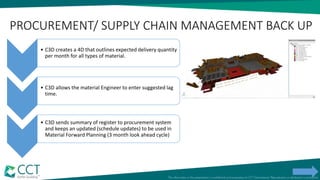
PROCUREMENT/ SUPPLY CHAIN MANAGEMENT BACK UP
• C3D creates a 4D that outlines expected delivery quantity
per month for all types of material.
• C3D allows the material Engineer to enter suggested lag
time.
• C3D sends summary of register to procurement system
and keeps an updated (schedule updates) to be used in
Material Forward Planning (3 month look ahead cycle)
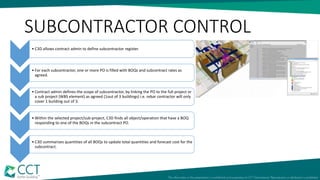
SUBCONTRACTOR CONTROL
• C3D allows contract admin to define subcontractor register.
• For each subcontractor, one or more PO is filled with BOQs and subcontract rates as
agreed.
• Contract admin defines the scope of subcontractor, by linking the PO to the full project or
a sub project (WBS element) as agreed (1out of 3 buildings) i.e. rebar contractor will only
cover 1 building out of 3.
• Within the selected project/sub-project, C3D finds all object/operation that have a BOQ
responding to one of the BOQs in the subcontract PO.
• C3D summarizes quantities of all BOQs to update total quantities and forecast cost for the
subcontract.
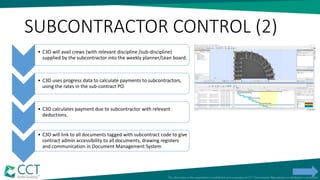
SUBCONTRACTOR CONTROL (2)
• C3D will avail crews (with relevant discipline /sub-discipline)
supplied by the subcontractor into the weekly planner/Lean board.
• C3D uses progress data to calculate payments to subcontractors,
using the rates in the sub-contract PO.
• C3D calculates payment due to subcontractor with relevant
deductions.
• C3D will link to all documents tagged with subcontract code to give
contract admin accessibility to all documents, drawing registers
and communication in Document Management System

BIM Based Project Controls

  • 2.
    BIM BASED PROJECT CONTROLS InstitutionalizingBIM Zuhair Haddad, CIO CCC Chairman CCT
  • 3.
  • 4.
    DEFINITIONS: BIM • BIMis often misunderstood and the focus has mainly been on the 3D models and multi-discipline coordination of design information. • The "I" in BIM is the real benefit but in the same time the biggest challenge. • CCC has used 3D/BIM based tools and linkages to build up its new Integrated Project Control System. Below is the summary of methodology that helped us achieve our objectives.
  • 5.
     Reliant Pull-DrivenTechnique optimize supply chain rather than sub optimization  Assure availability of resources before start of activity.  Emphasize productivity through the full work chain vs. individual activities  Prevent sub-optimization  Partnering  Proper Project Work Breakdown Structure  Project/Area/Sub-Area/Fragnet/Activity/Object/Operation  Integrated EPC schedule with Emphasis on Handover and Construction Activities. (effective supply chain)  3D model built with WBS in mind and used as primary scope management tool.  Early on Cooperation with the Partners/ EDI definition.  3 Month Look Ahead Schedule/ Material forward plan  3 weeks Look Ahead Schedule PROJECT CONTROL STRATEGY
  • 6.
    DATA PREPARATION 3D Model •BIM authoring Estimation • Linking with Estimation Planning • Linking with Planning Document Management • Linking with Document Management Material Management • Linking with Material Management Quality Systems • Linking with Quality Systems
  • 7.
    BIM AUTHORING –CCC APPROACH • Established Centers of excellent in Cairo, Ramallah, Athens and Dubai • Developed BIM authoring standards to meet contractor requirements • Standard WBS: Object Level and progress steps level • Standardized Object Naming Convention • Developed best practices for scope definition through standardized BOQs • Comprehensive EDI with clients, A/E’s and Subcontractors • Develop and promote best practice for change management
  • 8.
    PROJECT DATA SETUP •Linking with Estimation • Quantify resource requirements per object: Labor, material and equipment • Linking with Planning • Objects and Operations are assigned to individual activates. • Determine what resources are needed to maintain construction schedule. • Constructability review (4D) • Linking to Document Management : • Engineering status • Required drawings & Specifications per work package. • Linking with Materials Management • Assure availability of material when needed • Maintain traceability of utilized material
  • 9.
    • Linking withQuality System • Quantify testing scope, • Assure quality and fast delivery of project • Manage punchlists. • Verify progress • Establish interfaces between trades PROJECT DATA SETUP
  • 10.
    OUR FOCUS THISYEAR BIM Enablers • BIM Based Project Control • Front End loading Management • Planning and Progress measurement • Automated Payment Certificate • Procurement/ Supply chain Management Back up • Subcontractor Control • Lean Construction Case Study
  • 11.
    C3D Planner Lean ConstructionManagement integrated in C3D
  • 12.
    Project Information • Location:Rotkreuz, Switzerland • Project Name: GP Suurstoffi Baufeld 1 • Main Contractor: ARCHOBAU AG • Duration: June 2017 – December 2019 • Construction cost: 175 million CHF • Project Area: ~6100 sq.m. • Project consists of 4 buildings: • 2 School buildings (6 and 14 floors) • 1 Offices building (7 floors) • 1 common underground building (3 floors) • Concrete and Timber structure, glass (façade) Construction Limitations • Project next to the train track • Only two access points to site • Limited laydown areas • Inside residential area (residential rules shall be obeyed) Milestones / Project’s Timeline: • BIM Consultation start: September 2017 end: November 2017 • C3D Implementation (ongoing) start: October 2017 • C3D Live: March 2018 (Concrete) • Upcoming disciplines: • Wood Structure • Façade • MEP • HVAC • Finishing
  • 13.
    Data integrated intoC3D BIM C3D Lean Main Contractor Contractor 1 Contractor 2 Contractor 3 Contractor N... 3D BIM Model BOQ Library Material Take - Off Process Plan Construction StepsSubcontractor List BOQ Cost Rates
  • 14.
    C3D Data IntegrationWorkflow (1) Models and MTO Import 3D BIM Models (.IFC) Import Material Take - Off Import BOQ Cost Rates A WBS Setup Import Process Plan Linking Process Plan to 3D Model Linking Construction Steps to 3D Model Defining Subcontractors and Crews in C3D OBS
  • 15.
    C3D Data IntegrationWorkflow (2) A BOQs to Operation Assignments Operation Quantities Calculations Project division into parts of Construction B
  • 16.
    C3D Planning –Lean Cards – Reports – Progress Update C3D Planning using PivotGantt Lean Cards Barcode Scanning Progress Entered in C3D Progress Reports: • 4D Animations • 3D Colorizations based on Progress • PDF/Excel Reports B Quantity Reports Per Activity Planned Quantities and Cost Reports
  • 17.
    LCM Board Planning forthe next 4 weeks
  • 18.
    C3D Reports -3D Progress Colorizations (1) * 3D Model Colorizations based on the Actual Progress imported in C3D (example Haus A Wände)
  • 19.
    C3D Reports -3D Progress Colorizations (2) * 3D Model Colorizations based on Late Activities
  • 20.
    C3D Reports -4D Animations * Construction Sequence based on the imported Process Plan
  • 21.
  • 22.
  • 23.
    WBS Level 7: Operation Level6: Object Level 5: Activity Level 4: Discipline/Fragnet Level 3: Subarea Level 2: Area Level 1:Project MTB Pier 1 Pier 2 Basement Floor 1 MEP Structural Slab Zone 5.34 Columns Column 1 Column 2 Formwork Rebar Concrete
  • 24.
    OBJECT NAMING CONVENTION Tomake a more effective use of the BIM in construction, the idea of Object based BIM was introduced. A unified automated coding system was developed for the different disciplines (Structural / Architectural / MEP). We define an object as “The reasonably smallest portion of a building that reflects the logic of construction, facilitates the transfer of work between the different crews and can be reported in progress or QS (Quantity Surveying) reports”. For example a column, a beam, a room finish, a diffuser, a fan, an electric socket…etc) WS-03-CL-D-010-D-010
  • 25.
    TYPICAL MODELING ACTIVITY INDICATIVESIMPLIFIED EXAMPLE OF BIM MODEL BUILD-UP Column (Object) Cost elements (in BOQ) Concept of calculation: • Reinforcement (032000RN) = V x 180 kg/m3 kg • Formwork (031000FW) = ∑ (ai x bi) m2 • In-situ Concrete (033000CR) = 0.99 x V m3 bi ai All calculations adhere to specific Quantity Surveying Standards
  • 26.
    WBS: MAP OPERTATIONSTO BOQS Level 7: Operation Level 6: Object Level 5: Activity Level 4: Discipline/Fragnet Level 3: Subarea Level 2: Area Level 1:Project MTB Pier 1 Pier 2 Basement Floor 1 MEP Structural Slab Zone 5.34 Columns Column 1 Column 2 Formwork Rebar Concrete Operation Formula QTY/Unit BOQ Formwork ∑ (ai x bi) m2 Column Formwork Rebar V x 180 kg/m3 Kg Rebar Cut and Bend Rebar V x 180 kg/m3 Kg Rebar Install Concrete 0.99 x V m3 Concrete
  • 27.
  • 28.
  • 29.
    Data Bank Workflow •BIM group transmits new revision of the model to site. • Document management system triggers work flow and parks the models in quarantine. • Work flow activates C3D scenario browser to compare models and issue change report. • Work flow notifies relevant users to review change report and evaluate the impact on project execution. • Work flow makes new model current and C3D updates all relevant data. SCENARIO BROWSER BIM AUTHORING- CHANGE MANAGEMENT
  • 30.
    • BIM grouptransmits new revision of the model to site. • Document management system triggers work flow and parks the models in quarantine. • Work flow activates C3D scenario browser to compare models and issue change report. • Work flow notifies relevant users to review change report and evaluate the impact on project execution. • Work flow makes new model current and C3D updates all relevant data. BIM AUTHORING- CHANGE MANAGEMENT
  • 31.
    ESTIMATE Code Description QtyUnit Work Gr. Cost MH 03304 Cast-in-Situ Reinforced Concrete for Beams 1,367 M3 033040CR 257,013 13,255 03302 Cast-in-Situ Reinforced Concrete for Columns 3,071 M3 033020CR 594,960 29,777 03301 Cast-in-Situ Reinforced Concrete for Walls 4,758 M3 033010CR 908,152 46,134 03101 Formwork for Walls 14,549 M2 031010FW 770,630 112,394 03200 Steel Bar Reinforcement to Walls 826,976 KG 032003RN 911,808 95,216 Work Gr. Description Qty Unit Cost MH 033010CR Cast-in-Situ Reinforced Concrete for Walls 1.00 M3 190.87 9.70 Operation Description Qty Unit Cost MH CURING Curing Concrete 1.00 M3 0.83 0.60 Operation Description Qty Unit Cost MH CONR50 Structural Concrete RMC Grade 50 1.05 M3 133.63 0.00 CRPGCR Labor – Concrete Placing 8.00 HR 10.28 8.00 CURING Curing Concrete 1.00 M3 0.83 0.60 PLPCR Plant Placing Concrete 1.00 M3 46.13 1.10 Resource Description Qty Unit Cost MH 1501 Semi Skilled Labor 0.60 HR 0.53 0.60 233912 Water (for Concrete Curing) 0.60 M3 0.33 0.00 Resource Description Cat Rate Currency 1501 Semi Skilled Labor LAB 1.47 US$ 233912 Water (for Concrete Curing) LOC 0.55 US$ 1 2 3 RollupCalculationsgotEstimatingDirectCostandMH OperationsWorkGroupsBOQDataResources 4
  • 32.
    WBS: LOAD COST,BUDGET AND MANHOURS Level 7: Operation Level 6: Object Level 5: Activity Level 4: Discipline/Fragnet Level 3: Subarea Level 2: Area Level 1:Project MTB Pier 1 Pier 2 Basement Floor 1 MEP Structural Slab Zone 5.34 Columns Column 1 Column 2 Formwork Rebar Concrete Operation Formula QTY/Unit BOQ Unit Price (UP) AED Budgeted Manhours (mhs) Formwork ∑ (ai x bi) m2 Column Formwork 150 8.2 Rebar V x 180 kg/m3 Kg Rebar Cut and Bend 3.1 0.105 Rebar V x 180 kg/m3 Kg Rebar Install 2 0.070 Concrete 0.99 x V m3 Concrete 550 5.77
  • 33.
  • 34.
    C3D 4D REPORTS- CONCRETE
  • 35.
    C3D 4D REPORTS- FORMWORK
  • 36.
    LINKING TO DOCUMENTMANAGMENT • All Engineered documents (Drawings & Specs) register is tagged with WBS Code and Discipline Code. • C3D will assist user to link documents to work fronts (Objects & Operations) based on common WBS Code and/or Discipline Code.
  • 37.
    Level 7: Operation Level6: Object Level 5: Activity Level 4: Discipline/Fragnet Level 3: Subarea Level 2: Area Level 1:Project MTB Pier 1 Pier 2 Basement Floor 1 MEP Structural Slab Zone 5.34 Columns Column 1 Column 2 Rebar Formwork Concrete Cure and Strip Front End Loading Link with Document Management Documents meta data is tagged with discipline code and WBS code. This facilitates linking objects in C3D with related documents need to build these tags (Front End Loading)
  • 38.
  • 39.
    MATERIAL FORWARD PLANNING TypeRequired Ordered Shortage Shortage % CAP 7.26 0.23 7.04 96.97% ELBOW 1,429.99 659.94 770.04 53.85% PIPE 14,111.54 13,119.38 992.15 7.03% REDUCER 56.30 11.65 44.66 79.33% TEE 295.63 146.29 149.31 50.51%
  • 40.
  • 41.
  • 42.
  • 43.
    Typical Rooms FRONT ENDLOADING • Define Work Package/ Front • List all required Drawings, Material, and prerequisite activates such as scaffolding. • Assign Lag times and responsible supervisor • Periodic meetings to assess readiness • When all constrains are resolved, declare work-front constructible. FEL
  • 44.
    LOAD WORK-FRONT ONLEAN BOARD. •Develop Fragnet for all type of objects of work front •Load Work-front on Lean Board •C3D loads all work front objects and their operations into Lean board. •C3D will assist user defining a set of crews to execute the work front using OBS. •C3D will assign operations to crews based on discipline sub-discipline and crew production capacity. •C3D will try to optimize usability of crews, i.e. keep everybody bust and productive. •As one work front is consumed, another is loaded and completed work fronts are archived. C3D LEAN BOARD Defining Subcontractors and Crews in C3D
  • 45.
    ISSUE WORK-ORDER ONLEAN BOARD. • C3D plans 3 week look ahead schedule and issues daily work orders/cards to supervisors • C3D receives progress/completion reports using bar codes, digital pen ..etc… • C3D notifies each foreman of the next operation that can be started as per takt plan. • C3D receives Data from Time sheet system, consumed man-hours by crew • C3D issues relevant AFIs and QC forms completed objects/operations during the current week. • C3D will issue comprehensive set of reports, graphical and data at the end of every period to cover all KPI needed by project staff.
  • 46.
    WEEKLY BUDGETED COSTPROGRESS REPORT
  • 47.
    WEEKLY THREE WEEKSLOOK-AHEAD REPORT
  • 48.
    3D Model Colorizationsbased on the Actual Progress imported in C3D
  • 49.
    C3D PROGRESS COLORIZATIONBY SYSTEM C3D colorization method can visualize the actual progress percentage on each system.
  • 50.
    AUTOMATED PAYMENT CERTIFICATE •C3D collects all progress achieved during the current period • C3D utilizes BOQs assigned to operations and rules of credit to calculate gross payment for this period • C3D allows Quantity Surveyors to check, adjust and add non-modeled data payments to the system • C3D summarizes payments to the level of bills and BOQ, but maintains link to object level BOQs as backup for payment certificate. • C3D adds calculations for retention, Vat , etc.. As needed. • Payment certificate issued
  • 51.
    PROCUREMENT/ SUPPLY CHAINMANAGEMENT BACK UP • C3D creates a 4D that outlines expected delivery quantity per month for all types of material. • C3D allows the material Engineer to enter suggested lag time. • C3D sends summary of register to procurement system and keeps an updated (schedule updates) to be used in Material Forward Planning (3 month look ahead cycle)
  • 52.
    SUBCONTRACTOR CONTROL • C3Dallows contract admin to define subcontractor register. • For each subcontractor, one or more PO is filled with BOQs and subcontract rates as agreed. • Contract admin defines the scope of subcontractor, by linking the PO to the full project or a sub project (WBS element) as agreed (1out of 3 buildings) i.e. rebar contractor will only cover 1 building out of 3. • Within the selected project/sub-project, C3D finds all object/operation that have a BOQ responding to one of the BOQs in the subcontract PO. • C3D summarizes quantities of all BOQs to update total quantities and forecast cost for the subcontract.
  • 53.
    SUBCONTRACTOR CONTROL (2) •C3D will avail crews (with relevant discipline /sub-discipline) supplied by the subcontractor into the weekly planner/Lean board. • C3D uses progress data to calculate payments to subcontractors, using the rates in the sub-contract PO. • C3D calculates payment due to subcontractor with relevant deductions. • C3D will link to all documents tagged with subcontract code to give contract admin accessibility to all documents, drawing registers and communication in Document Management System