

Tips & Tricks
Computer
Maintenance
BY: Mohit patodiya
Basic Computer Maintenance
http://www.
• Clean and Cool
• Deleting Temporary Files
• Scandisk
• Backup Your Data
How to run scandisk?
 Click on Start-Programs-Accessories-
System Tools-Scandisk.
 Click on Start-Run. In the Run field type scandisk,
press OK or press the Enter key.
There are two ways:
http://ww
Basic Computer Maintenance
Defragment your Hard Drive
What is Defragmentation?
• When you create and delete files and
applications on your computer the hard drive will
become fragmented.
• Data is split into chunks and stored in different
areas of the hard disk.
• frees up disk space and speeds up your computer.
http://ww
Basic Computer Maintenance
How To Defrag Your
Harddrive?
http://ww
How to Defrag Your Harddrive
•Stop using your computer while you are
defragmenting the drive.
•Stop all programs running including
your screen saver.
•Run this program overnight
NOTE:
http://ww
How to Defrag Your Harddrive
Windows 9x, xp,window 7
• Click on the Start button, then move to the
Programs, select Accessories, then System Tools,
and then click on the Disk Defragmenter
• Select the drive you wish to defragment
(usually Drive c), click OK, and then click Yes.
Wait for the defragmentation tool to finish (this
may take a long time).
http://ww
Windows 2000/Xp/win 7
• Click Start, point to All Programs,
point to Accessories then System Tools,
and click Disk Defragmenter.
• Click the drive you want to defragment,
click the Defragment button and then wait for
the defragmentation tool to finish
(this may take a long time).
How to Defrag Your Harddrive
http://ww
Basic Computer Maintenance
Hard Disk Error Checking
Virus Checker
Uninstall Software
Clean Out Your Recycle Bin
Emptying the Recycle Bin
Emptying Your Deleted Email
Operating System Reinstall
http://ww
General Computer Tips
The Golden Rule: When all else fails, REBOOT.
• Ctrl+Alt+Del (all at the same time).
A Close Program or Task Manager dialog box
will appear.
• Select the task you want to end (or the ones
that say they are "not responding") and select
End Task.
• If this doesn’t work you can reboot the
machine, pressing Ctrl+Alt+Del twice in
succession.
http://ww
Unknown Emails
Unknown File Downloads
Incompatible Hardware and Software
Random Deletion of Files
General Computer Tips
1
2
3
4
http://ww
Windows Update
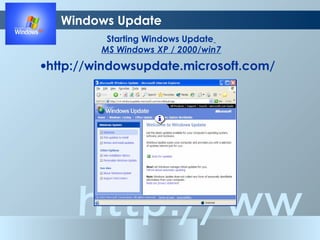
Starting Windows Update
MS Windows XP / 2000/win7
•http://windowsupdate.microsoft.com/
http://ww
Computer Viruses
What is a virus?
• a computer program designed to replicate and
spread on its own, preferably without a user’s
knowledge
How do viruses spread?
• Computer viruses spread whenever
infected diskettes or files are exchanged.
• Exchanging computer disks or viewing
email attachments.
http://ww
How can you protect yourself from viruses?
Computer Viruses
• Have an Antivirus program installed on your
computer
•Regularly scan the computer for viruses (at least
once a week).
•Keep your virus definition files ,up to date (at least
once a month, more times if possible).
http://ww
Computer Viruses
•Keep updated in regards to the latest security
patches for your operating systems and
applications
•Do not open email attachments that are from
people you don’t know
http://ww
THANK
YOU

Basic computer maintenance

  • 1.
  • 2.
    Basic Computer Maintenance http://www. •Clean and Cool • Deleting Temporary Files • Scandisk • Backup Your Data How to run scandisk?  Click on Start-Programs-Accessories- System Tools-Scandisk.  Click on Start-Run. In the Run field type scandisk, press OK or press the Enter key. There are two ways:
  • 3.
    http://ww Basic Computer Maintenance Defragmentyour Hard Drive What is Defragmentation? • When you create and delete files and applications on your computer the hard drive will become fragmented. • Data is split into chunks and stored in different areas of the hard disk. • frees up disk space and speeds up your computer.
  • 4.
  • 5.
    http://ww How to DefragYour Harddrive •Stop using your computer while you are defragmenting the drive. •Stop all programs running including your screen saver. •Run this program overnight NOTE:
  • 6.
    http://ww How to DefragYour Harddrive Windows 9x, xp,window 7 • Click on the Start button, then move to the Programs, select Accessories, then System Tools, and then click on the Disk Defragmenter • Select the drive you wish to defragment (usually Drive c), click OK, and then click Yes. Wait for the defragmentation tool to finish (this may take a long time).
  • 7.
    http://ww Windows 2000/Xp/win 7 •Click Start, point to All Programs, point to Accessories then System Tools, and click Disk Defragmenter. • Click the drive you want to defragment, click the Defragment button and then wait for the defragmentation tool to finish (this may take a long time). How to Defrag Your Harddrive
  • 8.
    http://ww Basic Computer Maintenance HardDisk Error Checking Virus Checker Uninstall Software Clean Out Your Recycle Bin Emptying the Recycle Bin Emptying Your Deleted Email Operating System Reinstall
  • 9.
    http://ww General Computer Tips TheGolden Rule: When all else fails, REBOOT. • Ctrl+Alt+Del (all at the same time). A Close Program or Task Manager dialog box will appear. • Select the task you want to end (or the ones that say they are "not responding") and select End Task. • If this doesn’t work you can reboot the machine, pressing Ctrl+Alt+Del twice in succession.
  • 10.
    http://ww Unknown Emails Unknown FileDownloads Incompatible Hardware and Software Random Deletion of Files General Computer Tips 1 2 3 4
  • 11.
    http://ww Windows Update Starting WindowsUpdate MS Windows XP / 2000/win7 •http://windowsupdate.microsoft.com/
  • 12.
    http://ww Computer Viruses What isa virus? • a computer program designed to replicate and spread on its own, preferably without a user’s knowledge How do viruses spread? • Computer viruses spread whenever infected diskettes or files are exchanged. • Exchanging computer disks or viewing email attachments.
  • 13.
    http://ww How can youprotect yourself from viruses? Computer Viruses • Have an Antivirus program installed on your computer •Regularly scan the computer for viruses (at least once a week). •Keep your virus definition files ,up to date (at least once a month, more times if possible).
  • 14.
    http://ww Computer Viruses •Keep updatedin regards to the latest security patches for your operating systems and applications •Do not open email attachments that are from people you don’t know
  • 15.