
• Ray Mkindo 
• It Guru Tz 
• Itgurutz.blogspot.com 
• +255718574710
Sometime you get bored by speed 
of your own computer when your 
real need it to be fast to finish 
what you were doing. This cause 
some disappointed of doing work 
using your Pc due to the 
slowness of your machine.
1. Data corruption or Hard Disk Fragmentation 
2. Missing Windows update or outdated drivers 
3. Left over programs, old cached and temporary files 
4. Not enough hard Drive space...with too many unused programs. 
5. Too many programs running at startup or in background
Disk Fragmentation rearranges fragmented data so your disks and 
drives can work more efficiently. Disk Fragmentation runs on a 
schedule, but you can also analyze and fragment your disks and drives 
manually. 
To do this...follow these steps: 
• Open Disk Defragmenter by clicking the Start button . In the search 
box, type Disk Defragmenter, and then, in the list of results....click 
Disk Defragmenter. 
Under Current status, select the disk you want to defragment . 
• To determine if the disk needs to be defragmented or not, click 
Analyze disk. If you're prompted for an administrator password or 
confirmation, type the password or provide confirmation.
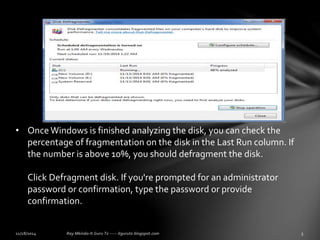
• Once Windows is finished analyzing the disk, you can check the 
percentage of fragmentation on the disk in the Last Run column. If 
the number is above 10%, you should defragment the disk. 
Click Defragment disk. If you're prompted for an administrator 
password or confirmation, type the password or provide 
confirmation.
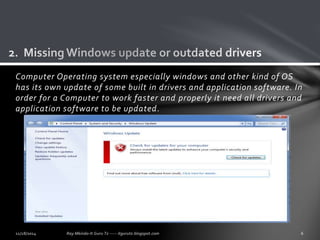
Computer Operating system especially windows and other kind of OS 
has its own update of some built in drivers and application software. In 
order for a Computer to work faster and properly it need all drivers and 
application software to be updated.
Open Windows Update by clicking the Start button .In the search box, type 
Update, and then, in the list of results, click Windows Update. 
In the left pane, click Check for updates. 
If there are any available updates, click the links to see more information 
about each update. 
Windows Update tells you if an update is important, recommended, or 
optional. Each type of update might include drivers. 
On the Select the updates you want to install page, look for updates for your 
hardware devices, select the check box for each driver that you want to 
install, and then click OK. 
There might not be any available driver updates. 
On the Windows Update page, click Install updates If you're prompted for an 
administrator password or confirmation, type the password or provide 
confirmation. 
Windows Update will tell you if the updates were successfully installed.
It happen sometime when we unistall some program in our computers, 
not all the file of thats program disappear when we unistall some of 
them remain and cause some unwanted interaction with other 
application software. 
How to Remove temporary files. 
• Hold windows key + R to open RUN 
• In RUN box type "%tmp% 
• Delete all file in a shown window 
• Skip all file which asking permission to not delete it.
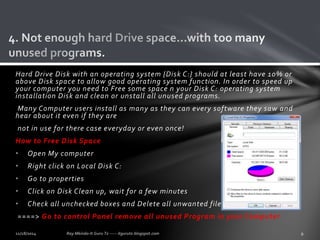
Hard Drive Disk with an operating system {Disk C:} should at least have 10% or 
above Disk space to allow good operating system function. In order to speed up 
your computer you need to Free some space n your Disk C: operating system 
installation Disk and clean or unstall all unused programs. 
Many Computer users install as many as they can every software they saw and 
hear about it even if they are 
not in use for there case everyday or even once! 
How to Free Disk Space 
• Open My computer 
• Right click on Local Disk C: 
• Go to properties 
• Click on Disk Clean up, wait for a few minutes 
• Check all unchecked boxes and Delete all unwanted files. 
====> Go to control Panel remove all unused Program in your Computer
Programs that automatically start with Windows can slow down your 
computers boot time, making you wait to get a useful desktop while icon 
after icon loads into your system tray. Fortunately it's possible to prevent 
these programs from automatically starting. 
How to Stop startup running Program in Background 
• Hold Windows key + R 
• Type CMD 
• In CMD type "msconfig" hit ENTER 
• System configuration will open 
• Go To Startup, disable all and click ok 
• Restart your PC 
NB: 
All this also can be done By third part Software like CCLEANER and other 
software.
For any Comment, advice or Question 
do not be uncomfortable... 
Just leave a Comment Below 
And I will Help. Or send a Mail through 
my Contact: 
Raymkindo02@gmail.com 
+255718574710

Speed up your computer

  • 1.
    • Ray Mkindo • It Guru Tz • Itgurutz.blogspot.com • +255718574710
  • 2.
    Sometime you getbored by speed of your own computer when your real need it to be fast to finish what you were doing. This cause some disappointed of doing work using your Pc due to the slowness of your machine.
  • 3.
    1. Data corruptionor Hard Disk Fragmentation 2. Missing Windows update or outdated drivers 3. Left over programs, old cached and temporary files 4. Not enough hard Drive space...with too many unused programs. 5. Too many programs running at startup or in background
  • 4.
    Disk Fragmentation rearrangesfragmented data so your disks and drives can work more efficiently. Disk Fragmentation runs on a schedule, but you can also analyze and fragment your disks and drives manually. To do this...follow these steps: • Open Disk Defragmenter by clicking the Start button . In the search box, type Disk Defragmenter, and then, in the list of results....click Disk Defragmenter. Under Current status, select the disk you want to defragment . • To determine if the disk needs to be defragmented or not, click Analyze disk. If you're prompted for an administrator password or confirmation, type the password or provide confirmation.
  • 5.
    • Once Windowsis finished analyzing the disk, you can check the percentage of fragmentation on the disk in the Last Run column. If the number is above 10%, you should defragment the disk. Click Defragment disk. If you're prompted for an administrator password or confirmation, type the password or provide confirmation.
  • 6.
    Computer Operating systemespecially windows and other kind of OS has its own update of some built in drivers and application software. In order for a Computer to work faster and properly it need all drivers and application software to be updated.
  • 7.
    Open Windows Updateby clicking the Start button .In the search box, type Update, and then, in the list of results, click Windows Update. In the left pane, click Check for updates. If there are any available updates, click the links to see more information about each update. Windows Update tells you if an update is important, recommended, or optional. Each type of update might include drivers. On the Select the updates you want to install page, look for updates for your hardware devices, select the check box for each driver that you want to install, and then click OK. There might not be any available driver updates. On the Windows Update page, click Install updates If you're prompted for an administrator password or confirmation, type the password or provide confirmation. Windows Update will tell you if the updates were successfully installed.
  • 8.
    It happen sometimewhen we unistall some program in our computers, not all the file of thats program disappear when we unistall some of them remain and cause some unwanted interaction with other application software. How to Remove temporary files. • Hold windows key + R to open RUN • In RUN box type "%tmp% • Delete all file in a shown window • Skip all file which asking permission to not delete it.
  • 9.
    Hard Drive Diskwith an operating system {Disk C:} should at least have 10% or above Disk space to allow good operating system function. In order to speed up your computer you need to Free some space n your Disk C: operating system installation Disk and clean or unstall all unused programs. Many Computer users install as many as they can every software they saw and hear about it even if they are not in use for there case everyday or even once! How to Free Disk Space • Open My computer • Right click on Local Disk C: • Go to properties • Click on Disk Clean up, wait for a few minutes • Check all unchecked boxes and Delete all unwanted files. ====> Go to control Panel remove all unused Program in your Computer
  • 10.
    Programs that automaticallystart with Windows can slow down your computers boot time, making you wait to get a useful desktop while icon after icon loads into your system tray. Fortunately it's possible to prevent these programs from automatically starting. How to Stop startup running Program in Background • Hold Windows key + R • Type CMD • In CMD type "msconfig" hit ENTER • System configuration will open • Go To Startup, disable all and click ok • Restart your PC NB: All this also can be done By third part Software like CCLEANER and other software.
  • 11.
    For any Comment,advice or Question do not be uncomfortable... Just leave a Comment Below And I will Help. Or send a Mail through my Contact: Raymkindo02@gmail.com +255718574710