OPTIMIZE YOUR PC And Protect Yourself in Windows XP www.novacharter.com
Table of Contents Introduction Fix Disk Errors Remove Temporary Files Rearrange your data Run Windows Update Install Antivirus and Antispyware Conclusion www.novacharter.com
Introduction Everyone wishes their computer ran faster, but is there a way to make it happen? The answer is yes, by following the steps in this presentation you will be able to increase the performance and keep it running that way. www.novacharter.com
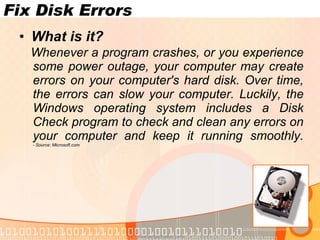
Fix Disk Errors What is it? Whenever a program crashes, or you experience some power outage, your computer may create errors on your computer's hard disk. Over time, the errors can slow your computer. Luckily, the Windows operating system includes a Disk Check program to check and clean any errors on your computer and keep it running smoothly. - Source: Microsoft.com www.novacharter.com
Fix Disk Errors Running The Disk Check Find  My Computer , either on your desktop or Start Menu, and open it. Find the Drive you want to check, usually C:, and right-click. In the menu, click  Properties . In the Properties Box, click on the  Tools  tab. Now under the Error Checking Section, press  Check Now . In the new box, check all the boxes and press  Start . You’ll see a message asking you to check your computer the next time you restart, click  Yes . When you restart, it will check  automatically. www.novacharter.com
Remove Temporary Files What are they? Your computer can pick up and store temporary files when you're looking at Web pages and even when you're working on files in programs, such as Microsoft Word. Over time, these files will slow your computer's performance.  - Source: Microsoft.com www.novacharter.com
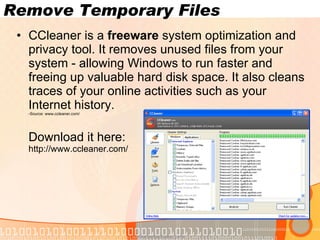
Remove Temporary Files CCleaner is a  freeware  system optimization and privacy tool. It removes unused files from your system - allowing Windows to run faster and freeing up valuable hard disk space. It also cleans traces of your online activities such as your Internet history. -Source: www.ccleaner.com/ Download it here:  http://www.ccleaner.com/ www.novacharter.com
Rearrange Your Data What does that mean? Your computer often breaks files side by side to increase the speed of access and retrieval. However, as files are updated, your computer saves these updates on the largest space available on the hard drive, often found far away from the other adjacent sectors of the file.  The result: a fragmented file. Fragmented files cause slower performance. This is because your computer must now search for all of the file's parts. In other words, your computer knows where all the pieces are, but putting them back together, and in the correct order when you need them, can slow your computer down. -Source: Microsoft.com www.novacharter.com
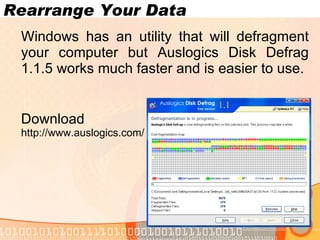
Rearrange Your Data Windows has an utility that will defragment your computer but Auslogics Disk Defrag 1.1.5 works much faster and is easier to use. Download it here: http://www.auslogics.com/ www.novacharter.com
Run Windows Update What is it? Windows Update downloads critical software  updates  for your operating system. This ensures that you are protected against hacks and other malicious encounters out there. www.novacharter.com
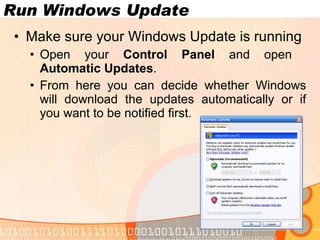
Run Windows Update Make sure your Windows Update is running Open your  Control Panel  and open  Automatic Updates . From here you can decide whether Windows will download the updates automatically or if you want to be notified first. www.novacharter.com
Install Antivirus and Antispyware What are these? Computer viruses and spyware (hidden software that gathers information about you without your knowledge or consent when you're using a computer) both reduce system performance. Computer viruses can not only reduce performance, but they can also destroy data. Any computer that accesses the Internet should have antivirus and antispyware programs installed. -Source: Microsoft.com www.novacharter.com
Install Antivirus and Antispyware Antivirus A great Free Program available online is AVG Free: http://free.grisoft.com/ Antispyware A great Free Program available online is Ad-Aware: http://www.lavasoftusa.com/products/ad_aware_free.php www.novacharter.com
Conclusion Although it may seem like a lot of work performing these tasks at least once a week will improve your performance. Make sure your Operating System, Antivirus, and Antispyware are up-to-date to make sure your computer stays healthy. www.novacharter.com For  More Detail/Options please visits. http://optimizurpc.co.cc http://optimize-ur-pc.blogspot.com

Optimize Your Pc

  • 1.
    OPTIMIZE YOUR PCAnd Protect Yourself in Windows XP www.novacharter.com
  • 2.
    Table of ContentsIntroduction Fix Disk Errors Remove Temporary Files Rearrange your data Run Windows Update Install Antivirus and Antispyware Conclusion www.novacharter.com
  • 3.
    Introduction Everyone wishestheir computer ran faster, but is there a way to make it happen? The answer is yes, by following the steps in this presentation you will be able to increase the performance and keep it running that way. www.novacharter.com
  • 4.
    Fix Disk ErrorsWhat is it? Whenever a program crashes, or you experience some power outage, your computer may create errors on your computer's hard disk. Over time, the errors can slow your computer. Luckily, the Windows operating system includes a Disk Check program to check and clean any errors on your computer and keep it running smoothly. - Source: Microsoft.com www.novacharter.com
  • 5.
    Fix Disk ErrorsRunning The Disk Check Find My Computer , either on your desktop or Start Menu, and open it. Find the Drive you want to check, usually C:, and right-click. In the menu, click Properties . In the Properties Box, click on the Tools tab. Now under the Error Checking Section, press Check Now . In the new box, check all the boxes and press Start . You’ll see a message asking you to check your computer the next time you restart, click Yes . When you restart, it will check automatically. www.novacharter.com
  • 6.
    Remove Temporary FilesWhat are they? Your computer can pick up and store temporary files when you're looking at Web pages and even when you're working on files in programs, such as Microsoft Word. Over time, these files will slow your computer's performance. - Source: Microsoft.com www.novacharter.com
  • 7.
    Remove Temporary FilesCCleaner is a freeware system optimization and privacy tool. It removes unused files from your system - allowing Windows to run faster and freeing up valuable hard disk space. It also cleans traces of your online activities such as your Internet history. -Source: www.ccleaner.com/ Download it here: http://www.ccleaner.com/ www.novacharter.com
  • 8.
    Rearrange Your DataWhat does that mean? Your computer often breaks files side by side to increase the speed of access and retrieval. However, as files are updated, your computer saves these updates on the largest space available on the hard drive, often found far away from the other adjacent sectors of the file. The result: a fragmented file. Fragmented files cause slower performance. This is because your computer must now search for all of the file's parts. In other words, your computer knows where all the pieces are, but putting them back together, and in the correct order when you need them, can slow your computer down. -Source: Microsoft.com www.novacharter.com
  • 9.
    Rearrange Your DataWindows has an utility that will defragment your computer but Auslogics Disk Defrag 1.1.5 works much faster and is easier to use. Download it here: http://www.auslogics.com/ www.novacharter.com
  • 10.
    Run Windows UpdateWhat is it? Windows Update downloads critical software updates for your operating system. This ensures that you are protected against hacks and other malicious encounters out there. www.novacharter.com
  • 11.
    Run Windows UpdateMake sure your Windows Update is running Open your Control Panel and open Automatic Updates . From here you can decide whether Windows will download the updates automatically or if you want to be notified first. www.novacharter.com
  • 12.
    Install Antivirus andAntispyware What are these? Computer viruses and spyware (hidden software that gathers information about you without your knowledge or consent when you're using a computer) both reduce system performance. Computer viruses can not only reduce performance, but they can also destroy data. Any computer that accesses the Internet should have antivirus and antispyware programs installed. -Source: Microsoft.com www.novacharter.com
  • 13.
    Install Antivirus andAntispyware Antivirus A great Free Program available online is AVG Free: http://free.grisoft.com/ Antispyware A great Free Program available online is Ad-Aware: http://www.lavasoftusa.com/products/ad_aware_free.php www.novacharter.com
  • 14.
    Conclusion Although itmay seem like a lot of work performing these tasks at least once a week will improve your performance. Make sure your Operating System, Antivirus, and Antispyware are up-to-date to make sure your computer stays healthy. www.novacharter.com For More Detail/Options please visits. http://optimizurpc.co.cc http://optimize-ur-pc.blogspot.com