
How to Secure and Maintain Your Computer Lab  August 6, 2008 Facilitator: Kami Griffiths Presenters: Claire Murray and John Neale   Sponsored by ReadyTalk   Remember to call: 866-740-1260 Code: 6339392
Using ReadyTalk Chat & raise hand  Mute = *6,  Unmute = *7 If you lose your internet connection, reconnect using the link emailed to you. If you lose your phone connection, r e-dial the phone number and re-join.
 
You are being recorded… Online seminars will be available on the TechSoup website. You will receive a link this afternoon.
How to Secure and Maintain Your Computer Lab  Facilitator: Kami Griffiths Presenters: Claire Murray and John Neale  Sponsored by:
Today’s Speakers Kami Griffiths Volunteer: Chris Peters Claire Murray John Neale
Uptime Security Accessibility Important aspects of managing public computers


Local Policy Settings: no Domain Policies must be set on each computer  “ User Rights” & “Security” will be primary concern  Permissions can be set based on logon group (admin, user, power user, etc.)
User Rights Policies are Extensive
Security Permissions also Extensive
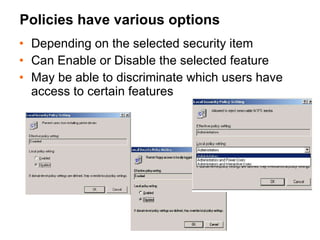
Policies have various options  Depending on the selected security item Can Enable or Disable the selected feature May be able to discriminate which users have access to certain features
Domain Policies Extensive number of items to select from All the selections as local policy plus more Can affect all users or selected users/group
Domain Policies Set policy  based on  Logon Script Set access  limits based on logon or group
Domain Policies: Many Options Too many to specify; should read carefully Can get yourself locked out if not careful Ask for advice from knowledgeable admin
Tracking Updates & Issues Excel spreadsheet for weekly update checks Access database for reporting problems/issues
Red Background & Extension Cords  Red Background means admin logon is being used Alerts staff that patron should not be on computer Set screen saver to require logon automatically for admin logons; not required on patron logons
Reception can see all display screens
Tabs on cover & base for locking
Zip Ties Keep Items on Desktop Zip Ties connect “easily  taken” speaker & USB  extension cords  to the keyboard or mouse cable.  Items can be moved easily from right to left of monitor to accommodate left-handed users.
USB & Speaker Extension Cords
 
 
The 10 Commandments for this Computer Lab (sample) There shall be no food in the lab. There shall be no drink in the lab There shall be no streaming video in the lab. There shall be no streaming games in the lab. There shall be no cell phone usage in the lab. There shall be no pornography downloaded are viewed in the lab. There shall be no changing of system settings. There shall be no sleeping in the lab. There shall be no children in the lab unless accompanied and supervised by an adult. There shall be payment of $.10 per page after the first 10 pages for printing.
Acceptable Use Policy (sample) Austin Free-Net welcomes you to this lab. We want this to be a safe and comfortable place for everyone to use the computers and to access the Internet. Young people and adults are all expected to share this lab responsibly.  Austin Free-Net facilitates access to information and maintains a "Freedom of Information" policy. As such, we are not responsible for the content available to our customers on the Internet. Nonetheless, our partners may decide on a different policy of their own. Parents/guardians are encouraged to learn about the Internet and advised to supervise their children's Internet sessions.  While Austin Free-Net has a "Freedom of Information" policy, we do not condone the use of our public access sites for illegal activities.  Please note that it is ILLEGAL:  to view any pornographic content when minors are present  to show any pornographic content to a minor  to view or produce child pornography  Austin Free-Net staff or volunteers may immediately end such Internet sessions, notify police, or refuse use of this or other AFN sites to anyone found engaged in such activities." To view AFN's "Freedom of Information Policy" and to learn more about these issues, please visit www.austinfree.net/freedom.html.  Thank you, Austin Free-Net
Q & A Raise your hand to ask a question, or type the  question in the chat box.
Important Resources MaintainIT Project CTCnet WebJunction Neighborhood Networks The Center for Accessible Technology Austin Free-Net  Murray Associates
Disk protection Internet filtering Working with volunteers Laptop checkout Wireless internet Reservation/Time Management Software  The MaintainIT Project www.maintainitproject.org
Get the Most Out of TechSoup At TechSoup, you’ll find a range of technology services to help your nonprofit: Read helpful articles  in our Learning Center Request donated software , hardware, and online services Join our community forums  to learn from your colleagues Browse upcoming events  and conferences
TechSoup Stock Vendor Partners Microsoft Symantec Adobe eTapestry Intuit Mailshell Business Objects Readytalk Alpha Software Atlas Business Solutions
Continue the discussion… Additional questions can be answered by posting in our Accessible Technology and Public Computing forum
Upcoming Online Seminars Maximize your Google Grant of In-Kind Advertising   August 14, 11am PDT  Creating Effective Online Surveys August 26, 11am PDT
Thank you ReadyTalk!
For More Information Contact: Kami Griffiths 415-633-9392 [email_address] www.techsoup.org

Secure and Maintain Your Computer Lab

  • 1.
    How to Secureand Maintain Your Computer Lab August 6, 2008 Facilitator: Kami Griffiths Presenters: Claire Murray and John Neale Sponsored by ReadyTalk Remember to call: 866-740-1260 Code: 6339392
  • 2.
    Using ReadyTalk Chat& raise hand Mute = *6, Unmute = *7 If you lose your internet connection, reconnect using the link emailed to you. If you lose your phone connection, r e-dial the phone number and re-join.
  • 3.
  • 4.
    You are beingrecorded… Online seminars will be available on the TechSoup website. You will receive a link this afternoon.
  • 5.
    How to Secureand Maintain Your Computer Lab Facilitator: Kami Griffiths Presenters: Claire Murray and John Neale Sponsored by:
  • 6.
    Today’s Speakers KamiGriffiths Volunteer: Chris Peters Claire Murray John Neale
  • 7.
    Uptime Security AccessibilityImportant aspects of managing public computers
  • 8.
  • 9.
  • 10.
  • 11.
  • 12.
    Local Policy Settings:no Domain Policies must be set on each computer “ User Rights” & “Security” will be primary concern Permissions can be set based on logon group (admin, user, power user, etc.)
  • 13.
    User Rights Policiesare Extensive
  • 14.
  • 15.
    Policies have variousoptions Depending on the selected security item Can Enable or Disable the selected feature May be able to discriminate which users have access to certain features
  • 16.
    Domain Policies Extensivenumber of items to select from All the selections as local policy plus more Can affect all users or selected users/group
  • 17.
    Domain Policies Setpolicy based on Logon Script Set access limits based on logon or group
  • 18.
    Domain Policies: ManyOptions Too many to specify; should read carefully Can get yourself locked out if not careful Ask for advice from knowledgeable admin
  • 19.
    Tracking Updates &Issues Excel spreadsheet for weekly update checks Access database for reporting problems/issues
  • 20.
    Red Background &Extension Cords Red Background means admin logon is being used Alerts staff that patron should not be on computer Set screen saver to require logon automatically for admin logons; not required on patron logons
  • 21.
    Reception can seeall display screens
  • 22.
    Tabs on cover& base for locking
  • 23.
    Zip Ties KeepItems on Desktop Zip Ties connect “easily taken” speaker & USB extension cords to the keyboard or mouse cable. Items can be moved easily from right to left of monitor to accommodate left-handed users.
  • 24.
    USB & SpeakerExtension Cords
  • 25.
  • 26.
  • 27.
    The 10 Commandmentsfor this Computer Lab (sample) There shall be no food in the lab. There shall be no drink in the lab There shall be no streaming video in the lab. There shall be no streaming games in the lab. There shall be no cell phone usage in the lab. There shall be no pornography downloaded are viewed in the lab. There shall be no changing of system settings. There shall be no sleeping in the lab. There shall be no children in the lab unless accompanied and supervised by an adult. There shall be payment of $.10 per page after the first 10 pages for printing.
  • 28.
    Acceptable Use Policy(sample) Austin Free-Net welcomes you to this lab. We want this to be a safe and comfortable place for everyone to use the computers and to access the Internet. Young people and adults are all expected to share this lab responsibly. Austin Free-Net facilitates access to information and maintains a "Freedom of Information" policy. As such, we are not responsible for the content available to our customers on the Internet. Nonetheless, our partners may decide on a different policy of their own. Parents/guardians are encouraged to learn about the Internet and advised to supervise their children's Internet sessions. While Austin Free-Net has a "Freedom of Information" policy, we do not condone the use of our public access sites for illegal activities. Please note that it is ILLEGAL: to view any pornographic content when minors are present to show any pornographic content to a minor to view or produce child pornography Austin Free-Net staff or volunteers may immediately end such Internet sessions, notify police, or refuse use of this or other AFN sites to anyone found engaged in such activities." To view AFN's "Freedom of Information Policy" and to learn more about these issues, please visit www.austinfree.net/freedom.html. Thank you, Austin Free-Net
  • 29.
    Q & ARaise your hand to ask a question, or type the question in the chat box.
  • 30.
    Important Resources MaintainITProject CTCnet WebJunction Neighborhood Networks The Center for Accessible Technology Austin Free-Net Murray Associates
  • 31.
    Disk protection Internetfiltering Working with volunteers Laptop checkout Wireless internet Reservation/Time Management Software The MaintainIT Project www.maintainitproject.org
  • 32.
    Get the MostOut of TechSoup At TechSoup, you’ll find a range of technology services to help your nonprofit: Read helpful articles in our Learning Center Request donated software , hardware, and online services Join our community forums to learn from your colleagues Browse upcoming events and conferences
  • 33.
    TechSoup Stock VendorPartners Microsoft Symantec Adobe eTapestry Intuit Mailshell Business Objects Readytalk Alpha Software Atlas Business Solutions
  • 34.
    Continue the discussion…Additional questions can be answered by posting in our Accessible Technology and Public Computing forum
  • 35.
    Upcoming Online SeminarsMaximize your Google Grant of In-Kind Advertising August 14, 11am PDT Creating Effective Online Surveys August 26, 11am PDT
  • 36.
  • 37.
    For More InformationContact: Kami Griffiths 415-633-9392 [email_address] www.techsoup.org

Editor's Notes

  • #2 Introduce myself What I do at TS, my role in MIT Previous work with CTC