Internal and External Hardware
  Components of a Computer
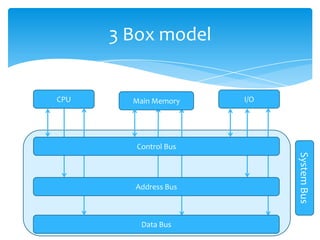
3 Box model


CPU     Main Memory    I/O


         Control Bus


                             System Bus
        Address Bus


          Data Bus
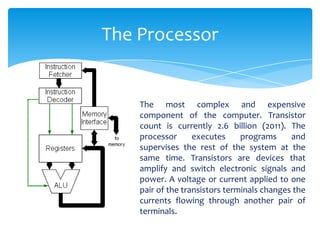
The Processor


    The most complex and expensive
    component of the computer. Transistor
    count is currently 2.6 billion (2011). The
    processor      executes     programs     and
    supervises the rest of the system at the
    same time. Transistors are devices that
    amplify and switch electronic signals and
    power. A voltage or current applied to one
    pair of the transistors terminals changes the
    currents flowing through another pair of
    terminals.
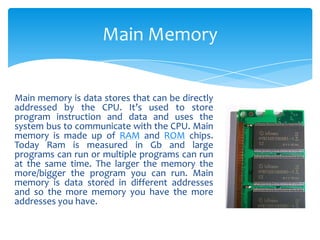
Main Memory


Main memory is data stores that can be directly
addressed by the CPU. It’s used to store
program instruction and data and uses the
system bus to communicate with the CPU. Main
memory is made up of RAM and ROM chips.
Today Ram is measured in Gb and large
programs can run or multiple programs can run
at the same time. The larger the memory the
more/bigger the program you can run. Main
memory is data stored in different addresses
and so the more memory you have the more
addresses you have.
RAM


Random access memory or RAM is used for any
memory that is readable and writable so the process
uses it to store data and load it back. However RAM is
volatile, meaning the contents of the RAM is
forgotten when the computer is turned off.
ROM


Read only memory or ROM remembers data when
the computer is turned off making it non-volatile.
ROM can provide random access like RAM but it can’t
be written to. This makes it useful to store fixed
programs on.
I/O Controllers and Ports


I/O controllers regulate the power between the devices
and the processor. Can handle different types of
devices now whereas before the processor wouldn’t
recognise new devices and whole new CPU would have
to be installed.
Generic ports are now used for all devices e.g. USB
because all computers have them and everyone can
plug in devices. This is the method of performing I/O
between the CPU and the device.
Connection between devices


In the 3 box model each components is connected by a
bus, known as the system bus. The different buses are
made up of wires that connect to each component of
the computer system and passes signals between them.
Signals either represent an address, data or control
information and so the system bus is made up of the
address bus, the data bus and the control bus.
Address Bus


Unidirectional and has 32 wires connecting to the
address memory which gives 110 locations. It carries
signals from the CPU to the main memory and I/O
devices. The CPU could request some data from the
main memory and it does this by sending the address of
the data to the main memory and then the main
memory returns the data along the data bus.
Control Bus


Bidirectional and has more than 16 wires (usually 32)
and is transports control signals between the 3
components of the box model. It’s used to carry
important information such as messages to say when a
device has finished a job or when a device has been
plugged in. It controls interrupt signals as well which
allow devices to signal that they have finished a
request. The CPU temporarily suspends its current
program, services the device and then resumes its
program. Ctrl + Alt + Del is the highest priority of
interrupt.
Data Bus


Bidirectional and has 32 wires used to transport data
and instruction between all the components in the 3
box model. The larger the data bus is the more data
that can be transported at one time. E.g.
  11111111 = 8 digit’s which means the data bus is 8 bit.
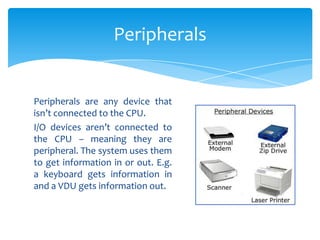
Peripherals


Peripherals are any device that
isn’t connected to the CPU.
I/O devices aren’t connected to
the CPU – meaning they are
peripheral. The system uses them
to get information in or out. E.g.
a keyboard gets information in
and a VDU gets information out.
Secondary Storage


Secondary storage is not directly connected to the
processor making it a peripheral device but it is
permanent storage. An example of secondary storage
is a magnetic hard disk. Any secondary storage is
connected to the processor and the main memory by
an I/O controller and data is transferred by using the
system bus.

Internal and external hardware components of a computer

  • 1.
    Internal and ExternalHardware Components of a Computer
  • 2.
    3 Box model CPU Main Memory I/O Control Bus System Bus Address Bus Data Bus
  • 3.
    The Processor The most complex and expensive component of the computer. Transistor count is currently 2.6 billion (2011). The processor executes programs and supervises the rest of the system at the same time. Transistors are devices that amplify and switch electronic signals and power. A voltage or current applied to one pair of the transistors terminals changes the currents flowing through another pair of terminals.
  • 4.
    Main Memory Main memoryis data stores that can be directly addressed by the CPU. It’s used to store program instruction and data and uses the system bus to communicate with the CPU. Main memory is made up of RAM and ROM chips. Today Ram is measured in Gb and large programs can run or multiple programs can run at the same time. The larger the memory the more/bigger the program you can run. Main memory is data stored in different addresses and so the more memory you have the more addresses you have.
  • 5.
    RAM Random access memoryor RAM is used for any memory that is readable and writable so the process uses it to store data and load it back. However RAM is volatile, meaning the contents of the RAM is forgotten when the computer is turned off.
  • 6.
    ROM Read only memoryor ROM remembers data when the computer is turned off making it non-volatile. ROM can provide random access like RAM but it can’t be written to. This makes it useful to store fixed programs on.
  • 7.
    I/O Controllers andPorts I/O controllers regulate the power between the devices and the processor. Can handle different types of devices now whereas before the processor wouldn’t recognise new devices and whole new CPU would have to be installed. Generic ports are now used for all devices e.g. USB because all computers have them and everyone can plug in devices. This is the method of performing I/O between the CPU and the device.
  • 8.
    Connection between devices Inthe 3 box model each components is connected by a bus, known as the system bus. The different buses are made up of wires that connect to each component of the computer system and passes signals between them. Signals either represent an address, data or control information and so the system bus is made up of the address bus, the data bus and the control bus.
  • 9.
    Address Bus Unidirectional andhas 32 wires connecting to the address memory which gives 110 locations. It carries signals from the CPU to the main memory and I/O devices. The CPU could request some data from the main memory and it does this by sending the address of the data to the main memory and then the main memory returns the data along the data bus.
  • 10.
    Control Bus Bidirectional andhas more than 16 wires (usually 32) and is transports control signals between the 3 components of the box model. It’s used to carry important information such as messages to say when a device has finished a job or when a device has been plugged in. It controls interrupt signals as well which allow devices to signal that they have finished a request. The CPU temporarily suspends its current program, services the device and then resumes its program. Ctrl + Alt + Del is the highest priority of interrupt.
  • 11.
    Data Bus Bidirectional andhas 32 wires used to transport data and instruction between all the components in the 3 box model. The larger the data bus is the more data that can be transported at one time. E.g. 11111111 = 8 digit’s which means the data bus is 8 bit.
  • 12.
    Peripherals Peripherals are anydevice that isn’t connected to the CPU. I/O devices aren’t connected to the CPU – meaning they are peripheral. The system uses them to get information in or out. E.g. a keyboard gets information in and a VDU gets information out.
  • 13.
    Secondary Storage Secondary storageis not directly connected to the processor making it a peripheral device but it is permanent storage. An example of secondary storage is a magnetic hard disk. Any secondary storage is connected to the processor and the main memory by an I/O controller and data is transferred by using the system bus.