Applying Pixel Values to
    Digital Images
    Guilford County SciVis
           V202.02
Digital Images Gather Data by Remote
Sensing
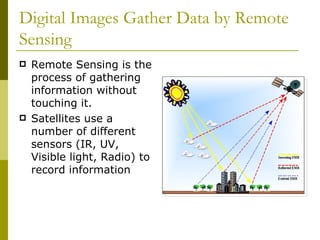
   Remote Sensing is the
    process of gathering
    information without
    touching it.
   Satellites use a
    number of different
    sensors (IR, UV,
    Visible light, Radio) to
    record information
Digital Images Gather Data by Remote
Sensing
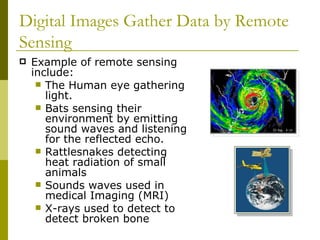
   Example of remote sensing
    include:
      The Human eye gathering
       light.
      Bats sensing their
       environment by emitting
       sound waves and listening
       for the reflected echo.
      Rattlesnakes detecting
       heat radiation of small
       animals
      Sounds waves used in
       medical Imaging (MRI)
      X-rays used to detect to
       detect broken bone
What are Digital Images?
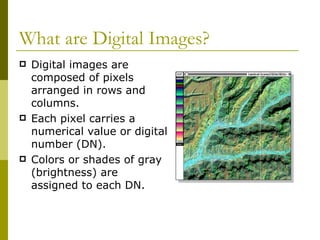
   Digital images are
    composed of pixels
    arranged in rows and
    columns.
   Each pixel carries a
    numerical value or digital
    number (DN).
   Colors or shades of gray
    (brightness) are
    assigned to each DN.
What are Digital Images?
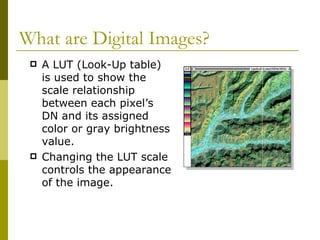
    A LUT (Look-Up table)
     is used to show the
     scale relationship
     between each pixel’s
     DN and its assigned
     color or gray brightness
     value.
    Changing the LUT scale
     controls the appearance
     of the image.
What are Digital Images?
   To digitize a photo, we superimpose a grid over
    the image and use the intersection of a row with
    a column to locate objects (similar to longitude
    and latitude).
   The brightness value at each X and Y location
    can be recorded by the satellite scanner
    (detector). The brightness value or DN is the Z-
    value associated with a picture element or pixel.
   By reducing the size or spacing of the grid, we
    can digitize at a finer and finer spatial resolution.
What are Digital Images?
   Digital data can be manipulated in a number of
    ways
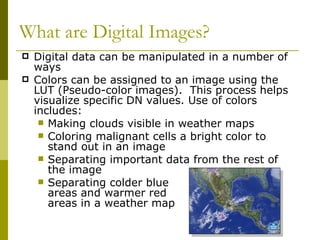
   Colors can be assigned to an image using the
    LUT (Pseudo-color images). This process helps
    visualize specific DN values. Use of colors
    includes:
      Making clouds visible in weather maps
      Coloring malignant cells a bright color to
       stand out in an image
      Separating important data from the rest of
       the image
      Separating colder blue
       areas and warmer red
       areas in a weather map
Multi-spectral Remote Sensing
   Recording energy in the red, green, blue, IR, UV,
    or other parts of the electromagnetic spectrum.
   Collected data can be qualitative or quantitative.
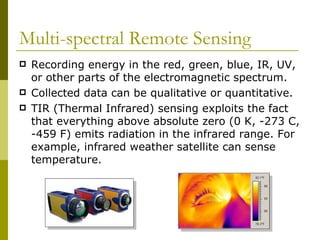
   TIR (Thermal Infrared) sensing exploits the fact
    that everything above absolute zero (0 K, -273 C,
    -459 F) emits radiation in the infrared range. For
    example, infrared weather satellite can sense
    temperature.
Multi-spectral Remote Sensing
   Multi-spectral remote
    sensing measures the
    amount of energy reflected
    in discrete bands that
    correspond to specific
    colors.
   Scientists can obtain
    information from these
    wavelengths (color).
   For example, scientists can
    pick out the range of color
    of marijuana plants grown
    in North Carolina.
Contrast and Brightness Levels
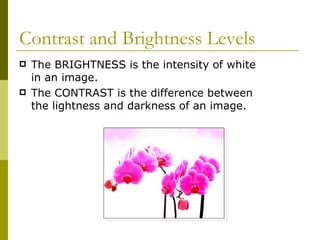
   The BRIGHTNESS is the intensity of white
    in an image.
   The CONTRAST is the difference between
    the lightness and darkness of an image.
Histograms in Area Renderings
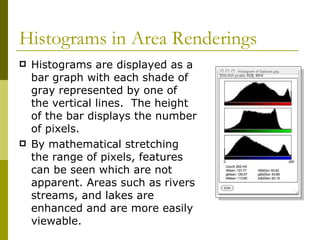
   Histograms are displayed as a
    bar graph with each shade of
    gray represented by one of
    the vertical lines. The height
    of the bar displays the number
    of pixels.
   By mathematical stretching
    the range of pixels, features
    can be seen which are not
    apparent. Areas such as rivers
    streams, and lakes are
    enhanced and are more easily
    viewable.
Measuring in Area Renderings
   The portion of the earth
    is dependent on the
    height of the satellite.
    Most weather satellites
    use the scale of 16
    square miles equals 1
    pixel. Programs like
    Scion Image allow you
    to set these scales.
   The curve of the earth
    may add variation to
    these renderings.
Density Slicing
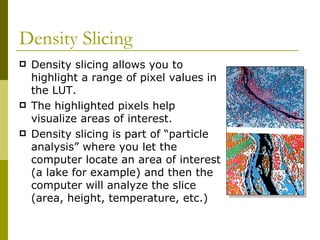
   Density slicing allows you to
    highlight a range of pixel values in
    the LUT.
   The highlighted pixels help
    visualize areas of interest.
   Density slicing is part of “particle
    analysis” where you let the
    computer locate an area of interest
    (a lake for example) and then the
    computer will analyze the slice
    (area, height, temperature, etc.)
Particle Analysis
   Particle analysis allows one
    to highlight specific pixel
    values and take
    measurements (i.e.
    calculating the area and
    perimeter of a massive cloud
    or the size of a tumor).
   Combining Set Scale,
    Density Slicing, and Particle
    Analysis is very useful to
    isolate and measure specific
    parts of a digital image.
Density Calibration
   Density calibrating an image will mathematically
    relate the values of one pixel to other pixels.
   If you know the elevation of a particular
    mountain, you can select those pixels and set the
    scale. The relative elevation of the other areas
    can then be estimated.
   Density calibration is based on making
    predictions from a line graph (linear regression).
Digital Elevation Models (DEM’s)
   DEM’s are images
    where DN (digital
    number) or grayscale
    values represent
    elevation.
   A digital image can be
    converted into a relief
    map.
   In Scion Image, we
    use Surface Plot to
    produce a relief map.
Elevation Calibration (Calibrated
DEM’s)
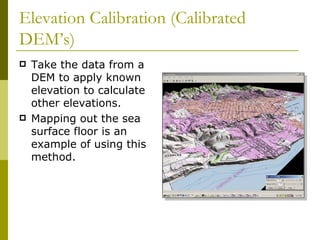
   Take the data from a
    DEM to apply known
    elevation to calculate
    other elevations.
   Mapping out the sea
    surface floor is an
    example of using this
    method.
Animation
   Multiple images of an area can be opened at the
    same time. (Images of a hurricane taken every
    hour).
   Images are put into a “stack” which works very
    much like a “flip book”. Useful for showing the
    movements of storm patterns.
The End

Applying pixel values to digital images

  • 1.
    Applying Pixel Valuesto Digital Images Guilford County SciVis V202.02
  • 2.
    Digital Images GatherData by Remote Sensing  Remote Sensing is the process of gathering information without touching it.  Satellites use a number of different sensors (IR, UV, Visible light, Radio) to record information
  • 3.
    Digital Images GatherData by Remote Sensing  Example of remote sensing include:  The Human eye gathering light.  Bats sensing their environment by emitting sound waves and listening for the reflected echo.  Rattlesnakes detecting heat radiation of small animals  Sounds waves used in medical Imaging (MRI)  X-rays used to detect to detect broken bone
  • 4.
    What are DigitalImages?  Digital images are composed of pixels arranged in rows and columns.  Each pixel carries a numerical value or digital number (DN).  Colors or shades of gray (brightness) are assigned to each DN.
  • 5.
    What are DigitalImages?  A LUT (Look-Up table) is used to show the scale relationship between each pixel’s DN and its assigned color or gray brightness value.  Changing the LUT scale controls the appearance of the image.
  • 6.
    What are DigitalImages?  To digitize a photo, we superimpose a grid over the image and use the intersection of a row with a column to locate objects (similar to longitude and latitude).  The brightness value at each X and Y location can be recorded by the satellite scanner (detector). The brightness value or DN is the Z- value associated with a picture element or pixel.  By reducing the size or spacing of the grid, we can digitize at a finer and finer spatial resolution.
  • 7.
    What are DigitalImages?  Digital data can be manipulated in a number of ways  Colors can be assigned to an image using the LUT (Pseudo-color images). This process helps visualize specific DN values. Use of colors includes:  Making clouds visible in weather maps  Coloring malignant cells a bright color to stand out in an image  Separating important data from the rest of the image  Separating colder blue areas and warmer red areas in a weather map
  • 8.
    Multi-spectral Remote Sensing  Recording energy in the red, green, blue, IR, UV, or other parts of the electromagnetic spectrum.  Collected data can be qualitative or quantitative.  TIR (Thermal Infrared) sensing exploits the fact that everything above absolute zero (0 K, -273 C, -459 F) emits radiation in the infrared range. For example, infrared weather satellite can sense temperature.
  • 9.
    Multi-spectral Remote Sensing  Multi-spectral remote sensing measures the amount of energy reflected in discrete bands that correspond to specific colors.  Scientists can obtain information from these wavelengths (color).  For example, scientists can pick out the range of color of marijuana plants grown in North Carolina.
  • 10.
    Contrast and BrightnessLevels  The BRIGHTNESS is the intensity of white in an image.  The CONTRAST is the difference between the lightness and darkness of an image.
  • 11.
    Histograms in AreaRenderings  Histograms are displayed as a bar graph with each shade of gray represented by one of the vertical lines. The height of the bar displays the number of pixels.  By mathematical stretching the range of pixels, features can be seen which are not apparent. Areas such as rivers streams, and lakes are enhanced and are more easily viewable.
  • 12.
    Measuring in AreaRenderings  The portion of the earth is dependent on the height of the satellite. Most weather satellites use the scale of 16 square miles equals 1 pixel. Programs like Scion Image allow you to set these scales.  The curve of the earth may add variation to these renderings.
  • 13.
    Density Slicing  Density slicing allows you to highlight a range of pixel values in the LUT.  The highlighted pixels help visualize areas of interest.  Density slicing is part of “particle analysis” where you let the computer locate an area of interest (a lake for example) and then the computer will analyze the slice (area, height, temperature, etc.)
  • 14.
    Particle Analysis  Particle analysis allows one to highlight specific pixel values and take measurements (i.e. calculating the area and perimeter of a massive cloud or the size of a tumor).  Combining Set Scale, Density Slicing, and Particle Analysis is very useful to isolate and measure specific parts of a digital image.
  • 15.
    Density Calibration  Density calibrating an image will mathematically relate the values of one pixel to other pixels.  If you know the elevation of a particular mountain, you can select those pixels and set the scale. The relative elevation of the other areas can then be estimated.  Density calibration is based on making predictions from a line graph (linear regression).
  • 16.
    Digital Elevation Models(DEM’s)  DEM’s are images where DN (digital number) or grayscale values represent elevation.  A digital image can be converted into a relief map.  In Scion Image, we use Surface Plot to produce a relief map.
  • 17.
    Elevation Calibration (Calibrated DEM’s)  Take the data from a DEM to apply known elevation to calculate other elevations.  Mapping out the sea surface floor is an example of using this method.
  • 18.
    Animation  Multiple images of an area can be opened at the same time. (Images of a hurricane taken every hour).  Images are put into a “stack” which works very much like a “flip book”. Useful for showing the movements of storm patterns.
  • 19.