 BY:
 VIVEK PATEL
 CWID: 10404232
 SUBJECT - CPE555
1
# Use of Raspberry Pi
# Sensor
#ADC convertor
#LED
# UBUNTU OS – RASPBIAN
# PYTHON GPIO
2
3
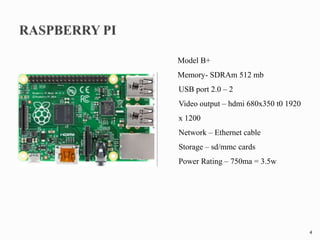
Model B+
Memory- SDRAm 512 mb
USB port 2.0 – 2
Video output – hdmi 680x350 t0 1920
x 1200
Network – Ethernet cable
Storage – sd/mmc cards
Power Rating – 750ma = 3.5w
4
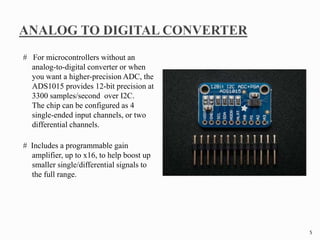
# For microcontrollers without an
analog-to-digital converter or when
you want a higher-precision ADC, the
ADS1015 provides 12-bit precision at
3300 samples/second over I2C.
The chip can be configured as 4
single-ended input channels, or two
differential channels.
# Includes a programmable gain
amplifier, up to x16, to help boost up
smaller single/differential signals to
the full range.
5
# We like this ADC because it can run from 2V to 5V power/logic, can measure a
large range of signals and its super easy to use.
# It is a great general purpose 12 bit converter.
# To get you started, we have example code for both the Raspberry Pi (in our
Adafruit Pi Python library) and Arduino (in our ADS1X15 Arduino library
repository) Simply connect GND to ground, VDD to your logic power supply, and
SCL/SDA to your microcontroller's I2C port and run the example code to start
reading data.
6
WIDE SUPPLY RANGE: 2.0V to 5.5V
LOW CURRENT CONSUMPTION: Continuous Mode: Only 150µA Single-Shot
Mode: Auto Shut-Down
PROGRAMMABLE DATA RATE: 128SPS to 3.3kSPS
INTERNAL LOW-DRIFT VOLTAGE REFERENCE
INTERNAL OSCILLATOR
INTERNAL PGA
I2C INTERFACE: Pin-Selectable Addresses
FOUR SINGLE-ENDED OR TWO DIFFERENTIAL INPUTS
PROGRAMMABLE COMPARATOR
This board/chip uses I2C 7-bit addresses between 0x48-0x4B, selectable with jumpers
7
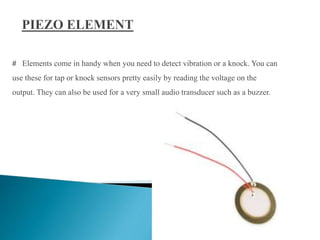
# Elements come in handy when you need to detect vibration or a knock. You can
use these for tap or knock sensors pretty easily by reading the voltage on the
output. They can also be used for a very small audio transducer such as a buzzer.
8
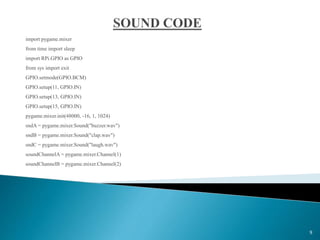
import pygame.mixer
from time import sleep
import RPi.GPIO as GPIO
from sys import exit
GPIO.setmode(GPIO.BCM)
GPIO.setup(11, GPIO.IN)
GPIO.setup(13, GPIO.IN)
GPIO.setup(15, GPIO.IN)
pygame.mixer.init(48000, -16, 1, 1024)
sndA = pygame.mixer.Sound("buzzer.wav")
sndB = pygame.mixer.Sound("clap.wav")
sndC = pygame.mixer.Sound("laugh.wav")
soundChannelA = pygame.mixer.Channel(1)
soundChannelB = pygame.mixer.Channel(2)
9
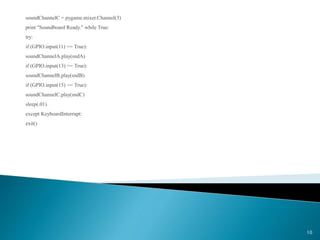
soundChannelC = pygame.mixer.Channel(3)
print "Soundboard Ready." while True:
try:
if (GPIO.input(11) == True):
soundChannelA.play(sndA)
if (GPIO.input(13) == True):
soundChannelB.play(sndB)
if (GPIO.input(15) == True):
soundChannelC.play(sndC)
sleep(.01)
except KeyboardInterrupt:
exit()
10
11
12

Any Surface Drum Kit

  • 1.
     BY:  VIVEKPATEL  CWID: 10404232  SUBJECT - CPE555 1
  • 2.
    # Use ofRaspberry Pi # Sensor #ADC convertor #LED # UBUNTU OS – RASPBIAN # PYTHON GPIO 2
  • 3.
  • 4.
    Model B+ Memory- SDRAm512 mb USB port 2.0 – 2 Video output – hdmi 680x350 t0 1920 x 1200 Network – Ethernet cable Storage – sd/mmc cards Power Rating – 750ma = 3.5w 4
  • 5.
    # For microcontrollerswithout an analog-to-digital converter or when you want a higher-precision ADC, the ADS1015 provides 12-bit precision at 3300 samples/second over I2C. The chip can be configured as 4 single-ended input channels, or two differential channels. # Includes a programmable gain amplifier, up to x16, to help boost up smaller single/differential signals to the full range. 5
  • 6.
    # We likethis ADC because it can run from 2V to 5V power/logic, can measure a large range of signals and its super easy to use. # It is a great general purpose 12 bit converter. # To get you started, we have example code for both the Raspberry Pi (in our Adafruit Pi Python library) and Arduino (in our ADS1X15 Arduino library repository) Simply connect GND to ground, VDD to your logic power supply, and SCL/SDA to your microcontroller's I2C port and run the example code to start reading data. 6
  • 7.
    WIDE SUPPLY RANGE:2.0V to 5.5V LOW CURRENT CONSUMPTION: Continuous Mode: Only 150µA Single-Shot Mode: Auto Shut-Down PROGRAMMABLE DATA RATE: 128SPS to 3.3kSPS INTERNAL LOW-DRIFT VOLTAGE REFERENCE INTERNAL OSCILLATOR INTERNAL PGA I2C INTERFACE: Pin-Selectable Addresses FOUR SINGLE-ENDED OR TWO DIFFERENTIAL INPUTS PROGRAMMABLE COMPARATOR This board/chip uses I2C 7-bit addresses between 0x48-0x4B, selectable with jumpers 7
  • 8.
    # Elements comein handy when you need to detect vibration or a knock. You can use these for tap or knock sensors pretty easily by reading the voltage on the output. They can also be used for a very small audio transducer such as a buzzer. 8
  • 9.
    import pygame.mixer from timeimport sleep import RPi.GPIO as GPIO from sys import exit GPIO.setmode(GPIO.BCM) GPIO.setup(11, GPIO.IN) GPIO.setup(13, GPIO.IN) GPIO.setup(15, GPIO.IN) pygame.mixer.init(48000, -16, 1, 1024) sndA = pygame.mixer.Sound("buzzer.wav") sndB = pygame.mixer.Sound("clap.wav") sndC = pygame.mixer.Sound("laugh.wav") soundChannelA = pygame.mixer.Channel(1) soundChannelB = pygame.mixer.Channel(2) 9
  • 10.
    soundChannelC = pygame.mixer.Channel(3) print"Soundboard Ready." while True: try: if (GPIO.input(11) == True): soundChannelA.play(sndA) if (GPIO.input(13) == True): soundChannelB.play(sndB) if (GPIO.input(15) == True): soundChannelC.play(sndC) sleep(.01) except KeyboardInterrupt: exit() 10
  • 11.
  • 12.