ARDUINO UNO
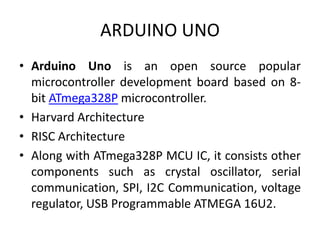
• Arduino Uno is an open source popular
microcontroller development board based on 8-
bit ATmega328P microcontroller.
• Harvard Architecture
• RISC Architecture
• Along with ATmega328P MCU IC, it consists other
components such as crystal oscillator, serial
communication, SPI, I2C Communication, voltage
regulator, USB Programmable ATMEGA 16U2.
Once arduino IDE is installed on the computer, connect the board with
computer using USB cable.
Now open the arduino IDE and choose the correct board by selecting
Tools>Boards>Arduino/Genuino Uno,
and choose the correct Port by selecting Tools>Port.
Arduino Uno is programmed using Arduino programming language
based on Wiring.
To get it started with Arduino Uno board and blink the built-in LED,
load the example code by selecting Files>Examples>Basics>Blink.
Once the example code (also shown below) is loaded into your IDE,
click on the ‘upload’ button given on the top bar.
Once the upload is finished, you should see the Arduino’s built-in LED
blinking.
RASPBERRY PI
• The Raspberry Pi is a low cost, credit-card sized computer that
plugs into a computer monitor or TV, and uses a standard keyboard
and mouse.
• It is a capable little device that enables people of all ages to explore
computing, and to learn how to program in languages like Scratch
and Python.
• It’s capable of doing everything you’d expect a desktop computer
to do, from browsing the internet and playing high-definition video,
to making spreadsheets, word-processing, and playing games.
• What’s more, the Raspberry Pi has the ability to interact with the
outside world, and has been used in a wide array of digital maker
projects, from music machines and parent detectors to weather
stations and tweeting birdhouses with infra-red cameras.
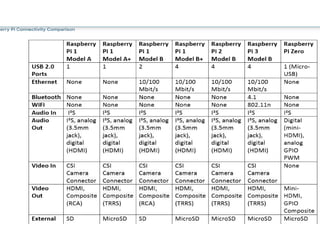
SPECIFICATIONS OF RASPBERRY PI 3 B+
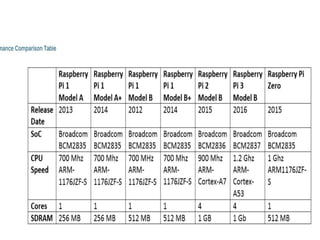
• The Raspberry Pi 3 Model B+ is the final revision in the Raspberry Pi 3 range.
• Broadcom BCM2837B0, Cortex-A53 (ARMv8) 64-bit SoC @ 1.4GHz
• 1GB LPDDR2 SDRAM INBUILT
• 2.4GHz and 5GHz IEEE 802.11.b/g/n/ac wireless LAN, Bluetooth 4.2, BLE
• Gigabit Ethernet over USB 2.0 (maximum throughput 300 Mbps)
• Extended 40-pin GPIO header
• Full-size HDMI
• 4 USB 2.0 ports
• CSI camera port for connecting a Raspberry Pi camera
• DSI display port for connecting a Raspberry Pi touchscreen display
• 4-pole stereo output and composite video port
• Micro SD port for loading your operating system and storing data
• 5V/2.5A DC power input
• Power-over-Ethernet (PoE) support (requires separate PoE HAT)
RASPBERRY PI 3B+ GPIO
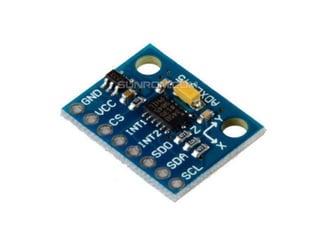
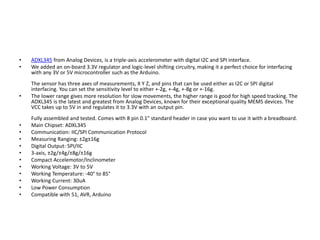
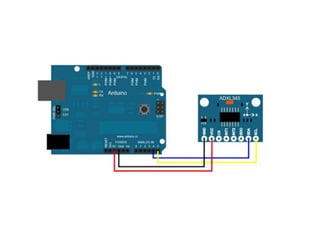
• ADXL345 from Analog Devices, is a triple-axis accelerometer with digital I2C and SPI interface.
• We added an on-board 3.3V regulator and logic-level shifting circuitry, making it a perfect choice for interfacing
with any 3V or 5V microcontroller such as the Arduino.
The sensor has three axes of measurements, X Y Z, and pins that can be used either as I2C or SPI digital
interfacing. You can set the sensitivity level to either +-2g, +-4g, +-8g or +-16g.
• The lower range gives more resolution for slow movements, the higher range is good for high speed tracking. The
ADXL345 is the latest and greatest from Analog Devices, known for their exceptional quality MEMS devices. The
VCC takes up to 5V in and regulates it to 3.3V with an output pin.
Fully assembled and tested. Comes with 8 pin 0.1" standard header in case you want to use it with a breadboard.
• Main Chipset: ADXL345
• Communication: IIC/SPI Communication Protocol
• Measuring Ranging: ±2g±16g
• Digital Output: SPI/IIC
• 3-axis, ±2g/±4g/±8g/±16g
• Compact Accelemotor/Inclinometer
• Working Voltage: 3V to 5V
• Working Temperature: -40° to 85°
• Working Current: 30uA
• Low Power Consumption
• Compatible with 51, AVR, Arduino
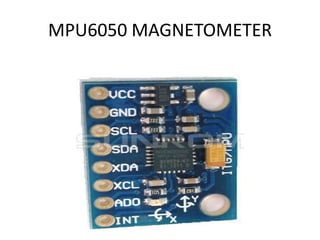
MPU6050 MAGNETOMETER
• The MPU-6050 is a serious little piece of motion processing tech! By combining a MEMS 3-axis gyroscope and a 3-axis accelerometer on the same

silicon die together with an onboard Digital Motion Processor™ (DMP™) capable of processing complex 9-axis Motion Fusion algorithms, the MPU-
6050 does away with the cross-axis alignment problems that can creep up on discrete parts.
• Features
• I2C Digital-output of 6 or 9-axis MotionFusion data in rotation matrix, quaternion, Euler Angle, or raw data format
• Input Voltage: 2.3 - 3.4V
• Selectable Solder Jumpers on CLK, FSYNC and AD0
• Tri-Axis angular rate sensor (gyro) with a sensitivity up to 131 LSBs/dps and a full-scale range of ±250, ±500, ±1000, and ±2000dps
• Tri-Axis accelerometer with a programmable full scale range of ±2g, ±4g, ±8g and ±16g
• Digital Motion Processing™ (DMP™) engine offloads complex MotionFusion, sensor timing synchronization and gesture detection
• Embedded algorithms for run-time bias and compass calibration. No user intervention required
• Digital-output temperature sensor
• Specifications
• Chip: MPU-6050

• Power supply: 3~5V Onboard regulator
• Communication mode: standard IIC communication protocol
• Chip built-in 16bit AD converter, 16bit data output
• Gyroscopes range: +/- 250 500 1000 2000 degree/sec
• Acceleration range: +/- 2g, +/- 4g, +/- 8g, +/- 16g
• Pin pitch: 2.54mm
• Great for DIY projects
• Applications
• Gestures and Movements Detection
• Motion-activated user interface
• Gaming Human Interface
• Navigation Boards
• Platform Stability
• Accurate angular-rate detection
• Use of Gyro in Smart Phone
• This sensor's function is to maintain and control the position, level or orientation based on the
principle of angular momentum. When 'Gyros' used along with accelerometer senses motion from
six axes i.e. right, left, up, down, forward and backward. It also detects the roll, pitch and yaw
motions. Yaw, Roll and Pitch are the angular moments seen from three axes i.e. X, Y and Z. Using
MEMS(Micro Electrical and Mechanical System) technology, (iPhone 4 uses this technology)
gyroscopic sensors helps in navigation purpose and detecting the gesture recognition systems used
in smartphones and tablets.
•
ARDUINO AND RASPBERRYPI.pptx

ARDUINO AND RASPBERRYPI.pptx

  • 2.
    ARDUINO UNO • ArduinoUno is an open source popular microcontroller development board based on 8- bit ATmega328P microcontroller. • Harvard Architecture • RISC Architecture • Along with ATmega328P MCU IC, it consists other components such as crystal oscillator, serial communication, SPI, I2C Communication, voltage regulator, USB Programmable ATMEGA 16U2.
  • 9.
    Once arduino IDEis installed on the computer, connect the board with computer using USB cable. Now open the arduino IDE and choose the correct board by selecting Tools>Boards>Arduino/Genuino Uno, and choose the correct Port by selecting Tools>Port. Arduino Uno is programmed using Arduino programming language based on Wiring. To get it started with Arduino Uno board and blink the built-in LED, load the example code by selecting Files>Examples>Basics>Blink. Once the example code (also shown below) is loaded into your IDE, click on the ‘upload’ button given on the top bar. Once the upload is finished, you should see the Arduino’s built-in LED blinking.
  • 10.
    RASPBERRY PI • TheRaspberry Pi is a low cost, credit-card sized computer that plugs into a computer monitor or TV, and uses a standard keyboard and mouse. • It is a capable little device that enables people of all ages to explore computing, and to learn how to program in languages like Scratch and Python. • It’s capable of doing everything you’d expect a desktop computer to do, from browsing the internet and playing high-definition video, to making spreadsheets, word-processing, and playing games. • What’s more, the Raspberry Pi has the ability to interact with the outside world, and has been used in a wide array of digital maker projects, from music machines and parent detectors to weather stations and tweeting birdhouses with infra-red cameras.
  • 11.
    SPECIFICATIONS OF RASPBERRYPI 3 B+ • The Raspberry Pi 3 Model B+ is the final revision in the Raspberry Pi 3 range. • Broadcom BCM2837B0, Cortex-A53 (ARMv8) 64-bit SoC @ 1.4GHz • 1GB LPDDR2 SDRAM INBUILT • 2.4GHz and 5GHz IEEE 802.11.b/g/n/ac wireless LAN, Bluetooth 4.2, BLE • Gigabit Ethernet over USB 2.0 (maximum throughput 300 Mbps) • Extended 40-pin GPIO header • Full-size HDMI • 4 USB 2.0 ports • CSI camera port for connecting a Raspberry Pi camera • DSI display port for connecting a Raspberry Pi touchscreen display • 4-pole stereo output and composite video port • Micro SD port for loading your operating system and storing data • 5V/2.5A DC power input • Power-over-Ethernet (PoE) support (requires separate PoE HAT)
  • 12.
  • 20.
    • ADXL345 fromAnalog Devices, is a triple-axis accelerometer with digital I2C and SPI interface. • We added an on-board 3.3V regulator and logic-level shifting circuitry, making it a perfect choice for interfacing with any 3V or 5V microcontroller such as the Arduino. The sensor has three axes of measurements, X Y Z, and pins that can be used either as I2C or SPI digital interfacing. You can set the sensitivity level to either +-2g, +-4g, +-8g or +-16g. • The lower range gives more resolution for slow movements, the higher range is good for high speed tracking. The ADXL345 is the latest and greatest from Analog Devices, known for their exceptional quality MEMS devices. The VCC takes up to 5V in and regulates it to 3.3V with an output pin. Fully assembled and tested. Comes with 8 pin 0.1" standard header in case you want to use it with a breadboard. • Main Chipset: ADXL345 • Communication: IIC/SPI Communication Protocol • Measuring Ranging: ±2g±16g • Digital Output: SPI/IIC • 3-axis, ±2g/±4g/±8g/±16g • Compact Accelemotor/Inclinometer • Working Voltage: 3V to 5V • Working Temperature: -40° to 85° • Working Current: 30uA • Low Power Consumption • Compatible with 51, AVR, Arduino
  • 27.
  • 28.
    • The MPU-6050is a serious little piece of motion processing tech! By combining a MEMS 3-axis gyroscope and a 3-axis accelerometer on the same silicon die together with an onboard Digital Motion Processor™ (DMP™) capable of processing complex 9-axis Motion Fusion algorithms, the MPU- 6050 does away with the cross-axis alignment problems that can creep up on discrete parts. • Features • I2C Digital-output of 6 or 9-axis MotionFusion data in rotation matrix, quaternion, Euler Angle, or raw data format • Input Voltage: 2.3 - 3.4V • Selectable Solder Jumpers on CLK, FSYNC and AD0 • Tri-Axis angular rate sensor (gyro) with a sensitivity up to 131 LSBs/dps and a full-scale range of ±250, ±500, ±1000, and ±2000dps • Tri-Axis accelerometer with a programmable full scale range of ±2g, ±4g, ±8g and ±16g • Digital Motion Processing™ (DMP™) engine offloads complex MotionFusion, sensor timing synchronization and gesture detection • Embedded algorithms for run-time bias and compass calibration. No user intervention required • Digital-output temperature sensor • Specifications • Chip: MPU-6050 • Power supply: 3~5V Onboard regulator • Communication mode: standard IIC communication protocol • Chip built-in 16bit AD converter, 16bit data output • Gyroscopes range: +/- 250 500 1000 2000 degree/sec • Acceleration range: +/- 2g, +/- 4g, +/- 8g, +/- 16g • Pin pitch: 2.54mm • Great for DIY projects

  • 29.
    • Applications • Gesturesand Movements Detection • Motion-activated user interface • Gaming Human Interface • Navigation Boards • Platform Stability • Accurate angular-rate detection • Use of Gyro in Smart Phone • This sensor's function is to maintain and control the position, level or orientation based on the principle of angular momentum. When 'Gyros' used along with accelerometer senses motion from six axes i.e. right, left, up, down, forward and backward. It also detects the roll, pitch and yaw motions. Yaw, Roll and Pitch are the angular moments seen from three axes i.e. X, Y and Z. Using MEMS(Micro Electrical and Mechanical System) technology, (iPhone 4 uses this technology) gyroscopic sensors helps in navigation purpose and detecting the gesture recognition systems used in smartphones and tablets. •