Parul Institute Of Engineering & Technology


Subject code:- 151001
Name of subject:- Microcontroller and Interfacing


Name of unit:- 8051 Timer Programming In Assembly And C


(Topic):-Programming 8051 Timers


Name of faculty:- Ms.Srushti Soni mam


Name of students:- 1) Vivek Patel (Roll.no- 146)
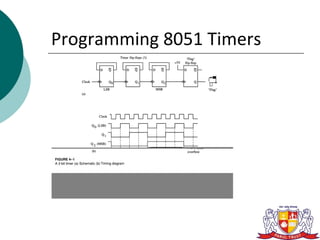
Programming 8051 Timers
  The 8051 has 2 timers/counters:
         timer/counter 0
         timer/counter 1

 They can be used as
1. The timer is used as a time delay generator.
     The clock source is the internal crystal
      frequency of the 8051.
Programming 8051 Timers
1.   An event counter.
      External input from input pin to count the
       number of events on registers.
      These clock pulses cold represent the
       number of people passing through an
       entrance, or the number of wheel
       rotations, or any other event that can be
       converted to pulses.
Programming 8051 Timers
 Timer:
   Set the initial value of registers
   Start the timer and then the 8051 counts up.
   Input from internal system clock (machine
    cycle)
Programming 8051 Timers
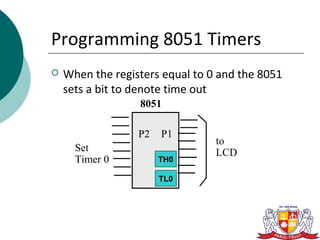
   When the registers equal to 0 and the 8051
    sets a bit to denote time out
                  8051

                  P2   P1
                                 to
      Set                        LCD
      Timer 0          TH0

                       TL0
Programming 8051 Timers
   Counter :
   Count the number of events
      Show the number of events on registers

      External input from T0 input pin (P3.4) for
       Counter 0
      External input from T1 input pin (P3.5) for
       Counter 1
Programming 8051 Timers
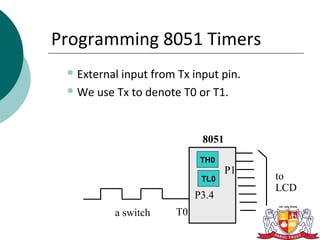
  Externalinput from Tx input pin.
  We use Tx to denote T0 or T1.


                            8051
                            TH0
                                   P1
                            TL0         to
                                        LCD
                           P3.4
          a switch    T0
Programming 8051 Timers
 Register    used in 8051

   TH0, TL0, TH1, TL1
   TMOD (Timer mode register)
   TCON (Timer control register)
Programming 8051 Timers
 TMOD      Register:
   Timer mode register: TMOD
     MOV TMOD,#21H
      An 8-bit register

      Set the usage mode for two timers

         Set lower 4 bits for Timer 0 (Set to 0000

          if not used)
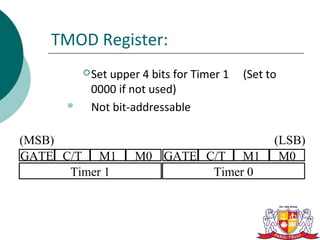
TMOD Register:
           Set
              upper 4 bits for Timer 1   (Set to
           0000 if not used)
          Not bit-addressable

(MSB)                                          (LSB)
GATE C/T M1        M0 GATE C/T M1               M0
      Timer 1               Timer 0
TMOD
  GATE=1
    External  control
    The hardware way of starting and
     stopping the timer by software and an
     external source.
    Timer/counter is enabled only while the
     INT pin is high and the TR control pin is
     set (TR).
TMOD
 Gate:
   Every timer has a mean of starting and stopping.
      GATE=0
         Internal control

         The start and stop of the timer are controlled
          by way of software.
         Set/clear the TR for start/stop timer.

                SETB TR0
                CLR TR0
TMOD
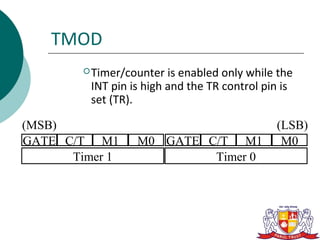
         Timer/counter  is enabled only while the
         INT pin is high and the TR control pin is
         set (TR).

(MSB)                                         (LSB)
GATE C/T M1       M0 GATE C/T M1               M0
      Timer 1              Timer 0
TMOD
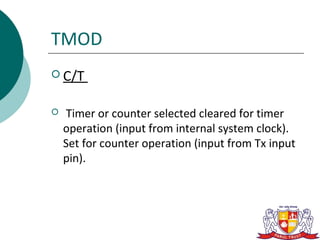
 C/T


   Timer or counter selected cleared for timer
    operation (input from internal system clock).
    Set for counter operation (input from Tx input
    pin).
TMOD
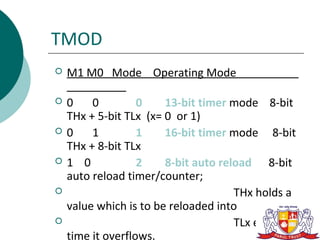
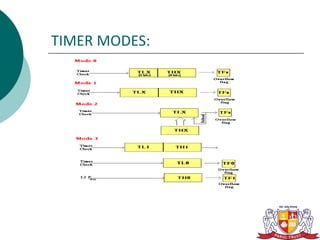
   M1 M0 Mode Operating Mode

   0    0         0    13-bit timer mode 8-bit
    THx + 5-bit TLx (x= 0 or 1)
   0    1         1    16-bit timer mode 8-bit
    THx + 8-bit TLx
   1 0            2    8-bit auto reload 8-bit
    auto reload timer/counter;
                                     THx holds a
    value which is to be reloaded into
                                     TLx each
    time it overflows.
TIMER MODES:
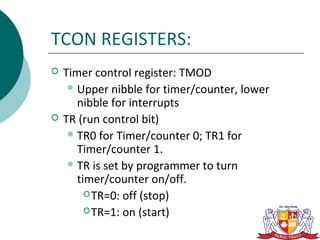
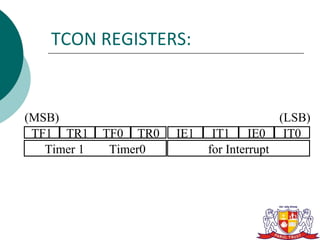
TCON REGISTERS:
   Timer control register: TMOD
      Upper nibble for timer/counter, lower
       nibble for interrupts
   TR (run control bit)
      TR0 for Timer/counter 0; TR1 for
       Timer/counter 1.
      TR is set by programmer to turn
       timer/counter on/off.
          TR=0: off (stop)

          TR=1: on (start)
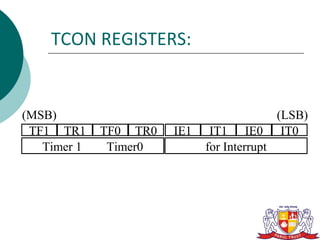
TCON REGISTERS:


(MSB)                                        (LSB)
 TF1 TR1     TF0 TR0   IE1    IT1 IE0         IT0
   Timer 1    Timer0         for Interrupt
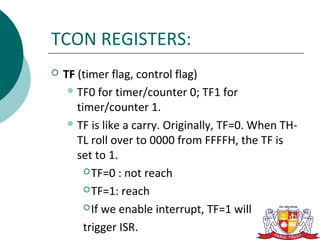
TCON REGISTERS:
   TF (timer flag, control flag)
      TF0 for timer/counter 0; TF1 for
       timer/counter 1.
      TF is like a carry. Originally, TF=0. When TH-
       TL roll over to 0000 from FFFFH, the TF is
       set to 1.
          TF=0 : not reach

          TF=1: reach

          If we enable interrupt, TF=1 will

         trigger ISR.
TCON REGISTERS:


(MSB)                                        (LSB)
 TF1 TR1     TF0 TR0   IE1    IT1 IE0         IT0
   Timer 1    Timer0         for Interrupt
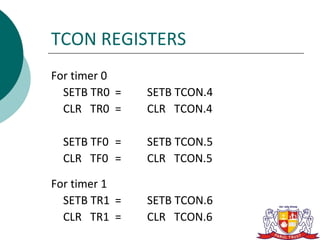
TCON REGISTERS
For timer 0
  SETB TR0 =   SETB TCON.4
  CLR TR0 =    CLR TCON.4

  SETB TF0 =   SETB TCON.5
  CLR TF0 =    CLR TCON.5

For timer 1
  SETB TR1 =   SETB TCON.6
  CLR TR1 =    CLR TCON.6
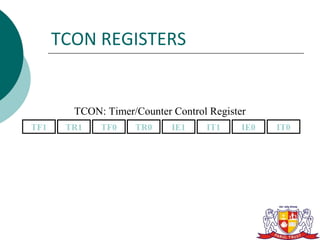
TCON REGISTERS


        TCON: Timer/Counter Control Register
TF1    TR1   TF0    TR0     IE1    IT1     IE0   IT0
Timer Mode 1:
   In following, we all use timer 0 as an example.
   16-bit timer (TH0 and TL0)
   TH0-TL0 is incremented continuously when
    TR0 is set to 1. And the 8051 stops to
    increment TH0-TL0 when TR0 is cleared.
   The timer works with the internal system
    clock. In other words, the timer counts up
    each machine cycle.
Timer Mode 1:
   When the timer (TH0-TL0) reaches its
    maximum of FFFFH, it rolls over to 0000,
    and TF0 is raised.
   Programmer should check TF0 and stop
    the timer 0.
Step of Timer Mode 1:
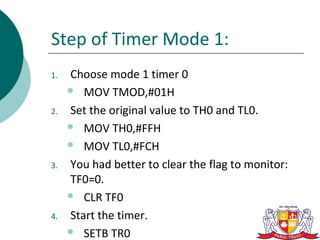
1.   Choose mode 1 timer 0
      MOV TMOD,#01H

2.   Set the original value to TH0 and TL0.
      MOV TH0,#FFH

      MOV TL0,#FCH

3.   You had better to clear the flag to monitor:
     TF0=0.
      CLR TF0

4.   Start the timer.
      SETB TR0
Step of Timer Mode 1:
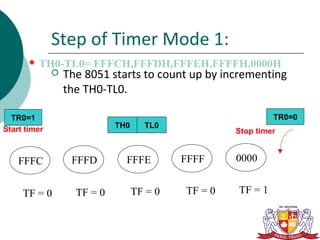
        TH0-TL0=      FFFCH,FFFDH,FFFEH,FFFFH,0000H
                 The 8051 starts to count up by incrementing
                  the TH0-TL0.

  TR0=1                                                       TR0=0
Start timer                  TH0     TL0
                                                     Stop timer


    FFFC           FFFD        FFFE         FFFF     0000


     TF = 0         TF = 0         TF = 0   TF = 0   TF = 1
Timer Mode 0
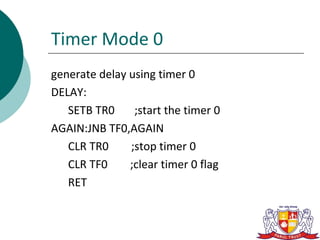
generate delay using timer 0
DELAY:
   SETB TR0     ;start the timer 0
AGAIN:JNB TF0,AGAIN
   CLR TR0     ;stop timer 0
   CLR TF0     ;clear timer 0 flag
   RET
Timer Mode 0


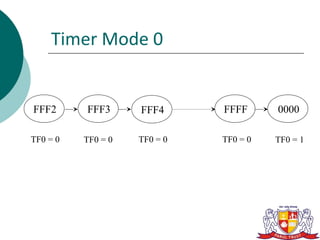
FFF2      FFF3      FFF4      FFFF      0000

TF0 = 0   TF0 = 0   TF0 = 0   TF0 = 0   TF0 = 1
Timer Mode 0

In the above program notice the following
  steps.
1. TMOD = 0000 0001 is loaded.
2. FFF2H is loaded into TH0 – TL0.
3. P1.5 is toggled for the high and low
  portions of the pulse.
4. The DELAY subroutine using the timer is
  called.
Timer Mode 0
5. In the DELAY subroutine, timer 0 is started by
   the “SETB TR0”
   instruction.
6. Timer 0 counts up with the passing of each
   clock, which is provided by the crystal
   oscillator.
As the timer counts up, it goes through the
   states of FFF3, FFF4, FFF5, FFF6, FFF7, FFF8,
   FFF9, FFFA, FFFB, FFFC, FFFFD, FFFE, FFFFH.
   One more clock rolls it to 0, raising the timer
   flag (TF0 = 1). At that point, the JNB instruction
   falls through.
Timer Mode 0
7. Timer 0 is stopped by the instruction
  “CLR TR0”. The DELAY subroutine ends,
  and the process is repeated.

Notice that to repeat the process, we must
  reload the TL and TH
registers, and start the timer again (in the
  main program).
Find Timer Values
   Assume that XTAL = 11.0592 MHz .
   And we know desired delay
   how to find the values for the TH,TL ?
       1. Divide the delay by 1.085 µs and get n.

       2. Perform 65536 –n

       3. Convert the result of Step 2 to hex (yyxx )

       4. Set TH = yy and TL = xx.
   Assuming XTAL = 11.0592 MHz,
   write a program to generate a square wave of
    50 Hz frequency on pin P2.3.

Solution:
1. The period of the square wave = 1 / 50 Hz = 20
   ms.
2. The high or low portion of the square wave =
   10 ms.
3. 10 ms / 1.085 µs = 9216

4. 65536 – 9216 = 56320 in decimal = DC00H in
   hex.
5. TL1 = 00H and TH1 = DCH.
Programming 8051 Timers

Programming 8051 Timers

  • 1.
    Parul Institute OfEngineering & Technology Subject code:- 151001 Name of subject:- Microcontroller and Interfacing Name of unit:- 8051 Timer Programming In Assembly And C (Topic):-Programming 8051 Timers Name of faculty:- Ms.Srushti Soni mam Name of students:- 1) Vivek Patel (Roll.no- 146)
  • 2.
    Programming 8051 Timers  The 8051 has 2 timers/counters:  timer/counter 0  timer/counter 1 They can be used as 1. The timer is used as a time delay generator.  The clock source is the internal crystal frequency of the 8051.
  • 3.
    Programming 8051 Timers 1. An event counter.  External input from input pin to count the number of events on registers.  These clock pulses cold represent the number of people passing through an entrance, or the number of wheel rotations, or any other event that can be converted to pulses.
  • 4.
  • 5.
    Programming 8051 Timers Timer:  Set the initial value of registers  Start the timer and then the 8051 counts up.  Input from internal system clock (machine cycle)
  • 6.
    Programming 8051 Timers  When the registers equal to 0 and the 8051 sets a bit to denote time out 8051 P2 P1 to Set LCD Timer 0 TH0 TL0
  • 7.
    Programming 8051 Timers  Counter :  Count the number of events  Show the number of events on registers  External input from T0 input pin (P3.4) for Counter 0  External input from T1 input pin (P3.5) for Counter 1
  • 8.
    Programming 8051 Timers  Externalinput from Tx input pin.  We use Tx to denote T0 or T1. 8051 TH0 P1 TL0 to LCD P3.4 a switch T0
  • 9.
    Programming 8051 Timers Register used in 8051  TH0, TL0, TH1, TL1  TMOD (Timer mode register)  TCON (Timer control register)
  • 10.
    Programming 8051 Timers TMOD Register:  Timer mode register: TMOD MOV TMOD,#21H  An 8-bit register  Set the usage mode for two timers  Set lower 4 bits for Timer 0 (Set to 0000 if not used)
  • 11.
    TMOD Register:  Set upper 4 bits for Timer 1 (Set to 0000 if not used)  Not bit-addressable (MSB) (LSB) GATE C/T M1 M0 GATE C/T M1 M0 Timer 1 Timer 0
  • 12.
    TMOD  GATE=1  External control  The hardware way of starting and stopping the timer by software and an external source.  Timer/counter is enabled only while the INT pin is high and the TR control pin is set (TR).
  • 13.
    TMOD  Gate:  Every timer has a mean of starting and stopping.  GATE=0  Internal control  The start and stop of the timer are controlled by way of software.  Set/clear the TR for start/stop timer. SETB TR0 CLR TR0
  • 14.
    TMOD  Timer/counter is enabled only while the INT pin is high and the TR control pin is set (TR). (MSB) (LSB) GATE C/T M1 M0 GATE C/T M1 M0 Timer 1 Timer 0
  • 15.
    TMOD  C/T  Timer or counter selected cleared for timer operation (input from internal system clock). Set for counter operation (input from Tx input pin).
  • 16.
    TMOD  M1 M0 Mode Operating Mode  0 0 0 13-bit timer mode 8-bit THx + 5-bit TLx (x= 0 or 1)  0 1 1 16-bit timer mode 8-bit THx + 8-bit TLx  1 0 2 8-bit auto reload 8-bit auto reload timer/counter;  THx holds a value which is to be reloaded into  TLx each time it overflows.
  • 17.
  • 18.
    TCON REGISTERS:  Timer control register: TMOD  Upper nibble for timer/counter, lower nibble for interrupts  TR (run control bit)  TR0 for Timer/counter 0; TR1 for Timer/counter 1.  TR is set by programmer to turn timer/counter on/off.  TR=0: off (stop)  TR=1: on (start)
  • 19.
    TCON REGISTERS: (MSB) (LSB) TF1 TR1 TF0 TR0 IE1 IT1 IE0 IT0 Timer 1 Timer0 for Interrupt
  • 20.
    TCON REGISTERS:  TF (timer flag, control flag)  TF0 for timer/counter 0; TF1 for timer/counter 1.  TF is like a carry. Originally, TF=0. When TH- TL roll over to 0000 from FFFFH, the TF is set to 1.  TF=0 : not reach  TF=1: reach  If we enable interrupt, TF=1 will trigger ISR.
  • 21.
    TCON REGISTERS: (MSB) (LSB) TF1 TR1 TF0 TR0 IE1 IT1 IE0 IT0 Timer 1 Timer0 for Interrupt
  • 22.
    TCON REGISTERS For timer0 SETB TR0 = SETB TCON.4 CLR TR0 = CLR TCON.4 SETB TF0 = SETB TCON.5 CLR TF0 = CLR TCON.5 For timer 1 SETB TR1 = SETB TCON.6 CLR TR1 = CLR TCON.6
  • 23.
    TCON REGISTERS TCON: Timer/Counter Control Register TF1 TR1 TF0 TR0 IE1 IT1 IE0 IT0
  • 24.
    Timer Mode 1:  In following, we all use timer 0 as an example.  16-bit timer (TH0 and TL0)  TH0-TL0 is incremented continuously when TR0 is set to 1. And the 8051 stops to increment TH0-TL0 when TR0 is cleared.  The timer works with the internal system clock. In other words, the timer counts up each machine cycle.
  • 25.
    Timer Mode 1:  When the timer (TH0-TL0) reaches its maximum of FFFFH, it rolls over to 0000, and TF0 is raised.  Programmer should check TF0 and stop the timer 0.
  • 26.
    Step of TimerMode 1: 1. Choose mode 1 timer 0  MOV TMOD,#01H 2. Set the original value to TH0 and TL0.  MOV TH0,#FFH  MOV TL0,#FCH 3. You had better to clear the flag to monitor: TF0=0.  CLR TF0 4. Start the timer.  SETB TR0
  • 27.
    Step of TimerMode 1:  TH0-TL0= FFFCH,FFFDH,FFFEH,FFFFH,0000H  The 8051 starts to count up by incrementing the TH0-TL0. TR0=1 TR0=0 Start timer TH0 TL0 Stop timer FFFC FFFD FFFE FFFF 0000 TF = 0 TF = 0 TF = 0 TF = 0 TF = 1
  • 28.
    Timer Mode 0 generatedelay using timer 0 DELAY: SETB TR0 ;start the timer 0 AGAIN:JNB TF0,AGAIN CLR TR0 ;stop timer 0 CLR TF0 ;clear timer 0 flag RET
  • 29.
    Timer Mode 0 FFF2 FFF3 FFF4 FFFF 0000 TF0 = 0 TF0 = 0 TF0 = 0 TF0 = 0 TF0 = 1
  • 30.
    Timer Mode 0 Inthe above program notice the following steps. 1. TMOD = 0000 0001 is loaded. 2. FFF2H is loaded into TH0 – TL0. 3. P1.5 is toggled for the high and low portions of the pulse. 4. The DELAY subroutine using the timer is called.
  • 31.
    Timer Mode 0 5.In the DELAY subroutine, timer 0 is started by the “SETB TR0” instruction. 6. Timer 0 counts up with the passing of each clock, which is provided by the crystal oscillator. As the timer counts up, it goes through the states of FFF3, FFF4, FFF5, FFF6, FFF7, FFF8, FFF9, FFFA, FFFB, FFFC, FFFFD, FFFE, FFFFH. One more clock rolls it to 0, raising the timer flag (TF0 = 1). At that point, the JNB instruction falls through.
  • 32.
    Timer Mode 0 7.Timer 0 is stopped by the instruction “CLR TR0”. The DELAY subroutine ends, and the process is repeated. Notice that to repeat the process, we must reload the TL and TH registers, and start the timer again (in the main program).
  • 33.
    Find Timer Values  Assume that XTAL = 11.0592 MHz .  And we know desired delay  how to find the values for the TH,TL ? 1. Divide the delay by 1.085 µs and get n. 2. Perform 65536 –n 3. Convert the result of Step 2 to hex (yyxx ) 4. Set TH = yy and TL = xx.
  • 34.
    Assuming XTAL = 11.0592 MHz,  write a program to generate a square wave of 50 Hz frequency on pin P2.3. Solution: 1. The period of the square wave = 1 / 50 Hz = 20 ms. 2. The high or low portion of the square wave = 10 ms. 3. 10 ms / 1.085 µs = 9216 4. 65536 – 9216 = 56320 in decimal = DC00H in hex. 5. TL1 = 00H and TH1 = DCH.