

Christine Iksic
Precision Laser & Instrument
High Accuracy Data Collection
with Esri Collector
• Part of Esri’s GIS Platform
• “…an online, collaborative web GIS that allows
you to use, create, and share maps, scenes, apps,
layers, and data.”
What is ArcGIS Online?
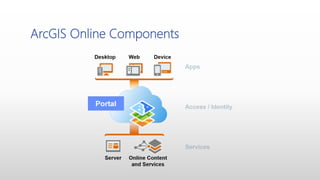
ArcGIS Online Components
• Give staff ‘anytime access’ to GIS data from any device
• Streamline data collection projects
• Share project data with many users – not just GIS data
• Simplify office > field > office workflows
Opportunities
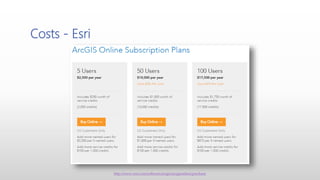
Costs - Esri
http://www.esri.com/software/arcgis/arcgisonline/purchase
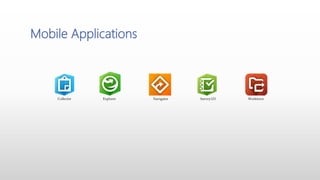
Mobile Applications
Collector Explorer Navigator Survey123 Workforce
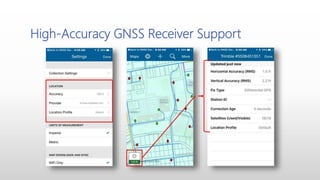
• Create a location provider so that you can connect directly to
professional-grade GPS receivers and stream highly accurate positions to
Collector.
• Create a correction profile to accurately transform positions received
from a differential correction source to the projection of your maps.
• Attach important positional metadata to the point features you collect
and update using GPS.
• Get more information about your GPS position on the map.
• Receive notifications and alerts when accuracy conditions are not met or
you lose connection to your provider. (*coming soon*)
• Windows 10 OS Support
Collector – What’s New
Versions and Requirements
August 23rd latest release – feature complete beta 3 update.
Android 4.1 (Jelly Bean) or later
ARMv7 or x86 processor
OpenGL ES 2.0 support
Precise location (GPS and network-based) support
July 19th – 10.4.0 released
iOS 8 or later
iPhone, iPad, iPod touch
August 17th – 10.4.0 released
Windows 10.0.586 or later (tablet and PC; excluding LTSB)
To use a GPS receiver with Collector, it must support the output of NMEA 0183 sentences.
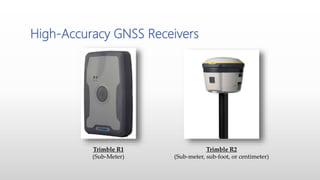
High-Accuracy GNSS Receivers
Trimble R1
(Sub-Meter)
Trimble R2
(Sub-meter, sub-foot, or centimeter)
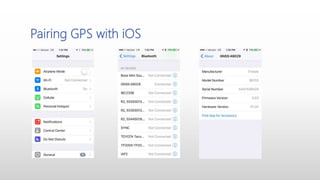
Pairing GPS with iOS
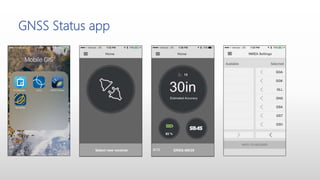
GNSS Status app
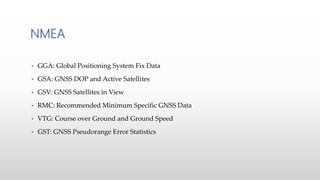
• GGA: Global Positioning System Fix Data
• GSA: GNSS DOP and Active Satellites
• GSV: GNSS Satellites in View
• RMC: Recommended Minimum Specific GNSS Data
• VTG: Course over Ground and Ground Speed
• GST: GNSS Pseudorange Error Statistics
NMEA
High-Accuracy GNSS Receiver Support
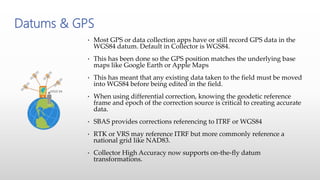
• Most GPS or data collection apps have or still record GPS data in the
WGS84 datum. Default in Collector is WGS84.
• This has been done so the GPS position matches the underlying base
maps like Google Earth or Apple Maps
• This has meant that any existing data taken to the field must be moved
into WGS84 before being edited in the field.
• When using differential correction, knowing the geodetic reference
frame and epoch of the correction source is critical to creating accurate
data.
• SBAS provides corrections referencing to ITRF or WGS84
• RTK or VRS may reference ITRF but more commonly reference a
national grid like NAD83.
• Collector High Accuracy now supports on-the-fly datum
transformations.
Datums & GPS
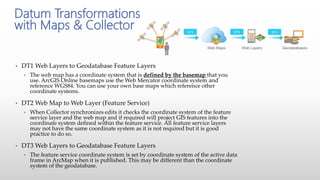
• DT1 Web Layers to Geodatabase Feature Layers
• The web map has a coordinate system that is defined by the basemap that you
use. ArcGIS Online basemaps use the Web Mercator coordinate system and
reference WGS84. You can use your own base maps which reference other
coordinate systems.
• DT2 Web Map to Web Layer (Feature Service)
• When Collector synchronizes edits it checks the coordinate system of the feature
service layer and the web map and if required will project GIS features into the
coordinate system defined within the feature service. All feature service layers
may not have the same coordinate system as it is not required but it is good
practice to do so.
• DT3 Web Layers to Geodatabase Feature Layers
• The feature service coordinate system is set by coordinate system of the active data
frame in ArcMap when it is published. This may be different than the coordinate
system of the geodatabase.
Datum Transformations
with Maps & Collector
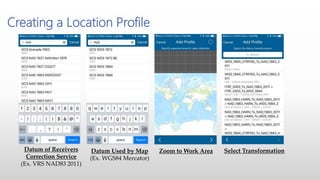
Creating a Location Profile
Datum of Receivers
Correction Service
(Ex. VRS NAD83 2011)
Datum Used by Map
(Ex. WGS84 Mercator)
Zoom to Work Area Select Transformation
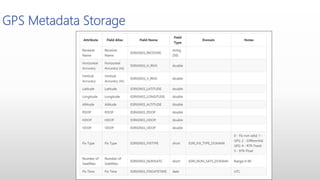
GPS Metadata Storage
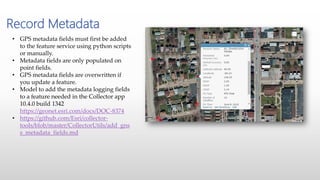
Record Metadata
• GPS metadata fields must first be added
to the feature service using python scripts
or manually.
• Metadata fields are only populated on
point fields.
• GPS metadata fields are overwritten if
you update a feature.
• Model to add the metadata logging fields
to a feature needed in the Collector app
10.4.0 build 1342
https://geonet.esri.com/docs/DOC-8374
• https://github.com/Esri/collector-
tools/blob/master/CollectorUtils/add_gns
s_metadata_fields.md
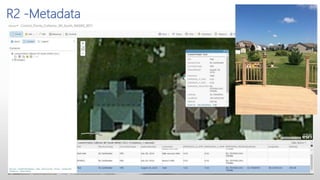
R2 -Metadata
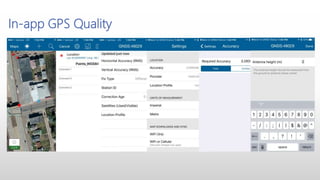
In-app GPS Quality
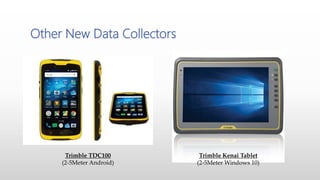
Other New Data Collectors
Trimble TDC100
(2-5Meter Android)
Trimble Kenai Tablet
(2-5Meter Windows 10)
Questions?
Thank You
Christine Iksic
cmi@laserinst.com
412-512-5665

High Accuracy Data Collection with Esri's Collector App

  • 1.
    Christine Iksic Precision Laser& Instrument High Accuracy Data Collection with Esri Collector
  • 2.
    • Part ofEsri’s GIS Platform • “…an online, collaborative web GIS that allows you to use, create, and share maps, scenes, apps, layers, and data.” What is ArcGIS Online?
  • 3.
  • 4.
    • Give staff‘anytime access’ to GIS data from any device • Streamline data collection projects • Share project data with many users – not just GIS data • Simplify office > field > office workflows Opportunities
  • 5.
  • 6.
    Mobile Applications Collector ExplorerNavigator Survey123 Workforce
  • 7.
    • Create alocation provider so that you can connect directly to professional-grade GPS receivers and stream highly accurate positions to Collector. • Create a correction profile to accurately transform positions received from a differential correction source to the projection of your maps. • Attach important positional metadata to the point features you collect and update using GPS. • Get more information about your GPS position on the map. • Receive notifications and alerts when accuracy conditions are not met or you lose connection to your provider. (*coming soon*) • Windows 10 OS Support Collector – What’s New
  • 8.
    Versions and Requirements August23rd latest release – feature complete beta 3 update. Android 4.1 (Jelly Bean) or later ARMv7 or x86 processor OpenGL ES 2.0 support Precise location (GPS and network-based) support July 19th – 10.4.0 released iOS 8 or later iPhone, iPad, iPod touch August 17th – 10.4.0 released Windows 10.0.586 or later (tablet and PC; excluding LTSB) To use a GPS receiver with Collector, it must support the output of NMEA 0183 sentences.
  • 9.
    High-Accuracy GNSS Receivers TrimbleR1 (Sub-Meter) Trimble R2 (Sub-meter, sub-foot, or centimeter)
  • 10.
  • 11.
  • 12.
    • GGA: GlobalPositioning System Fix Data • GSA: GNSS DOP and Active Satellites • GSV: GNSS Satellites in View • RMC: Recommended Minimum Specific GNSS Data • VTG: Course over Ground and Ground Speed • GST: GNSS Pseudorange Error Statistics NMEA
  • 13.
  • 14.
    • Most GPSor data collection apps have or still record GPS data in the WGS84 datum. Default in Collector is WGS84. • This has been done so the GPS position matches the underlying base maps like Google Earth or Apple Maps • This has meant that any existing data taken to the field must be moved into WGS84 before being edited in the field. • When using differential correction, knowing the geodetic reference frame and epoch of the correction source is critical to creating accurate data. • SBAS provides corrections referencing to ITRF or WGS84 • RTK or VRS may reference ITRF but more commonly reference a national grid like NAD83. • Collector High Accuracy now supports on-the-fly datum transformations. Datums & GPS
  • 15.
    • DT1 WebLayers to Geodatabase Feature Layers • The web map has a coordinate system that is defined by the basemap that you use. ArcGIS Online basemaps use the Web Mercator coordinate system and reference WGS84. You can use your own base maps which reference other coordinate systems. • DT2 Web Map to Web Layer (Feature Service) • When Collector synchronizes edits it checks the coordinate system of the feature service layer and the web map and if required will project GIS features into the coordinate system defined within the feature service. All feature service layers may not have the same coordinate system as it is not required but it is good practice to do so. • DT3 Web Layers to Geodatabase Feature Layers • The feature service coordinate system is set by coordinate system of the active data frame in ArcMap when it is published. This may be different than the coordinate system of the geodatabase. Datum Transformations with Maps & Collector
  • 16.
    Creating a LocationProfile Datum of Receivers Correction Service (Ex. VRS NAD83 2011) Datum Used by Map (Ex. WGS84 Mercator) Zoom to Work Area Select Transformation
  • 17.
  • 18.
    Record Metadata • GPSmetadata fields must first be added to the feature service using python scripts or manually. • Metadata fields are only populated on point fields. • GPS metadata fields are overwritten if you update a feature. • Model to add the metadata logging fields to a feature needed in the Collector app 10.4.0 build 1342 https://geonet.esri.com/docs/DOC-8374 • https://github.com/Esri/collector- tools/blob/master/CollectorUtils/add_gns s_metadata_fields.md
  • 19.
  • 20.
  • 21.
    Other New DataCollectors Trimble TDC100 (2-5Meter Android) Trimble Kenai Tablet (2-5Meter Windows 10)
  • 22.
  • 23.

Editor's Notes

  • #3 What is ArcGIS Online > From Esri’s own marketing material…(quote) ArcGIS Online is part of Esri’s GIS Platform “ArcGIS Platform” = combined suite of Esri software for desktop, server, web, and mobile Software as a Service – fully hosted & secure environment for storing and sharing Create and explore data, maps, and applications Subscription based platform – annual costs for user accounts and service
  • #4 Services – data can be published and stored in ArcGIS Online or be provided from an internal ArcGIS Server Portal – controls access, user management, and sharing of services & resources Where administrators will manage user accounts, control access to resources Where users will create maps, and other products What users connect to, to access data, maps, and applications Apps – this is where users interact with data Desktop – desktop applications (ArcGIS Desktop, Operations Dashboard, Microsoft (via Esri Maps for Office)) Web – Web applications, embedded maps Device – access to data from smartphones and tablets through applications included with an ArcGIS subscription
  • #5 Streamline data collection projects Data to field Field data to office Share project data with users in different offices Does not need to be ‘only’ GIS data – many supported item types Somewhat of a content management system
  • #7 Mobile Applications… Collector for ArcGIS – data collection and attribute editing, with disconnected ability Explorer for ArcGIS – View-only app, with ability to draw on map, share screenshot, etc. Navigator for ArcGIS – Directions, routes, and navigation Survey123 – Form-centric data gathering application, with advanced form creation capabilities Workforce for ArcGIS – Assign work, view work progress and worker locations
  • #10 Recent trend – use Bluetooth-compatible GNSS receivers with consumer devices (R1, R2) Some organizations are ‘moving away’ from all-in-one devices (Trimble Geo’s, etc.) and moving toward antenna / hardware combination Example from Ohio…(Used Geo or 3 R1’s, iPads, cases)
  • #12 GNSS Status app is free – used to configure the receiver. Select and pair receiver to use. Configure Real-time correction services. Enable NMEA output. FREE app
  • #13 The following are limitations with using Collector on supported Windows 10 devices with Trimble R1 and R2 receivers. For the Trimble R1 receiver, Collector can't access differential GPS fixes with RTX. However, Collector can get the location with autonomous GPS fixes, as well as SBAS corrected and local base station corrected locations via Ntrip. For the Trimble R2 receiver, Collector can't access location with RTX or local base station corrected locations via Ntrip. Collector can only access autonomous GPS fixes and SBAS corrected locations.
  • #14 In support of the Bluetooth receiver trend, Esri has updated Collector for ArcGIS to support high-accuracy receivers Integration in two primary places within the application Ability to choose receiver from within Collector app settings Real-time accuracy reporting and details from ‘map’ screen
  • #17 Add a Profile – This is example is for a map using WGS84 and connected a VRS correction stream using NAD83 2011 Select the coordinate system used by your receivers correction service. Select the coordinate system used by your map. Zoom to the area you will be working in. Select the correct datum transformation – ensure to read the fine print and select the transformation for the region you are working in.
  • #18 The new version of Collector also allows users to record GPS metadata Relies on fields being present in feature class(es) Important to verify ‘quality’ of the data You can manually or via script add the metadata fields to the geodatabase