Parul Institute Of Engineering & Technology


Subject code:- 151006
Name of subject:- Visual Basic And Application


Name of unit:- Using Intrinsic Dialogs


(Topic):- InputBox


Name of faculty:- 1) Ms.Nupur mam


Name of students:- 1) Vivek Patel (Roll.no- 146)
                     2) Sagar Pandya (Roll.no-140)
InputBox
 Defination:
   InputBox is used to accept input from the user.
   An inputBox is a pop up box,similar to a
    message box which has a textBox.
   It also has a “OK” and “CANCEL” buttons.
   Syntax:

   InputBox(prompt [, title ] [, default ] [, xpos ]
    [, ypos ] [, helpfile ] [, context ] )
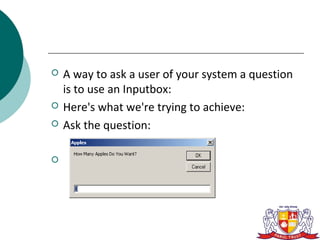
   A way to ask a user of your system a question
    is to use an Inputbox:
   Here's what we're trying to achieve:
   Ask the question:


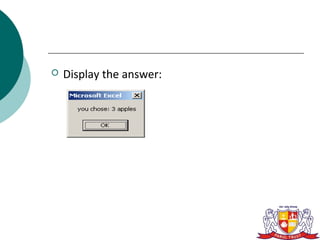
   Display the answer:
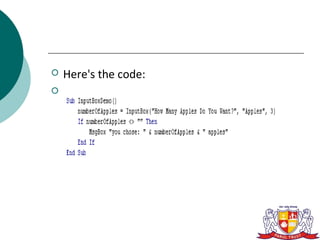
   Here's the code:

   InputBox takes several arguments:
      Prompt
      Title
      Default
      Xpos
      Ypos
      HelpFile
      Context
   In this example, we have entered:
      Prompt: "How Many Apples Do You Want?"
      Title: "Apples"
      Default: 3


   We then display the choice back to the user,
    but using this in a practical way, we'd trap the
    answer and use it for something else
We check whether the return from the box is
""
   If "" then they've pressed the Cancel
   button, and we should exit.
Getting User Input With a
VBA Input Box
   This could be useful if you wanted to fill up a
    page with text and print it to see if the margins
    etc. look OK.
   1. Open a new document in Word.
   2. Open the VBA Editor (Tools>Macro>Visual
    Basic Editor).
   3. Copy the following text from Sub
    InputBoxInsertText() to End Sub, inclusively.
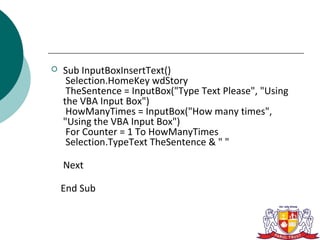
   Sub InputBoxInsertText()
     Selection.HomeKey wdStory
     TheSentence = InputBox("Type Text Please", "Using
    the VBA Input Box")
     HowManyTimes = InputBox("How many times",
    "Using the VBA Input Box")
     For Counter = 1 To HowManyTimes
     Selection.TypeText TheSentence & " "

    Next

    End Sub
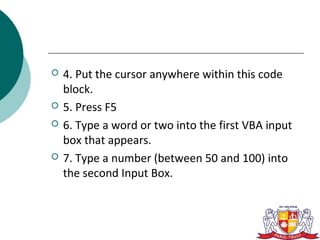
   4. Put the cursor anywhere within this code
    block.
   5. Press F5
   6. Type a word or two into the first VBA input
    box that appears.
   7. Type a number (between 50 and 100) into
    the second Input Box.
8. Go to the new document you opened and see
how the word or two that you typed into the
input box appears repeated the amount of times
corresponding to value you entered into the
second input box.
ARGUMENT
 prompt :
   Required.
   String expression displayed as the message in
    the dialog box. The maximum length
    ofprompt is approximately 1024 characters,
    depending on the width of the characters
    used.
   Ifprompt consists of more than one line, you
    can separate the lines using a carriage return
    character , a linefeed character , or carriage
    return–linefeed character combination
 title   :
   Optional. String expression displayed in the
    title bar of the dialog box. If you omit title, the
    application name is placed in the title bar.
 Default:
   Optional. String expression displayed in the
    text box as the default response if no other
    input is provided. If you omit default, the text
    box is displayed empty.
 Xpos:
   Optional.
   Numeric expression that specifies, in twips,
    the horizontal distance of the left edge of the
    dialog box from the left edge of the screen.
    If xpos is omitted, the dialog box is
    horizontally centered.
 Ypos:
   Optional.
   Numeric expression that specifies, in twips,
    the vertical distance of the upper edge of the
    dialog box from the top of the screen.
   If ypos is omitted, the dialog box is vertically
    positioned approximately one-third of the way
    down the screen.
 Helpfile:
   Optional.
   String expression that identifies the Help file to
    use to provide context-sensitive Help for the
    dialog box.
   If helpfile is provided, context must also be
    provided.
INPUT BOX- VBA

INPUT BOX- VBA

  • 1.
    Parul Institute OfEngineering & Technology Subject code:- 151006 Name of subject:- Visual Basic And Application Name of unit:- Using Intrinsic Dialogs (Topic):- InputBox Name of faculty:- 1) Ms.Nupur mam Name of students:- 1) Vivek Patel (Roll.no- 146) 2) Sagar Pandya (Roll.no-140)
  • 2.
    InputBox  Defination:  InputBox is used to accept input from the user.  An inputBox is a pop up box,similar to a message box which has a textBox.  It also has a “OK” and “CANCEL” buttons.
  • 3.
    Syntax:  InputBox(prompt [, title ] [, default ] [, xpos ] [, ypos ] [, helpfile ] [, context ] )
  • 4.
    A way to ask a user of your system a question is to use an Inputbox:  Here's what we're trying to achieve:  Ask the question: 
  • 5.
    Display the answer:
  • 6.
    Here's the code: 
  • 7.
    InputBox takes several arguments:  Prompt  Title  Default  Xpos  Ypos  HelpFile  Context
  • 8.
    In this example, we have entered:  Prompt: "How Many Apples Do You Want?"  Title: "Apples"  Default: 3  We then display the choice back to the user, but using this in a practical way, we'd trap the answer and use it for something else
  • 9.
    We check whetherthe return from the box is "" If "" then they've pressed the Cancel button, and we should exit.
  • 10.
    Getting User InputWith a VBA Input Box  This could be useful if you wanted to fill up a page with text and print it to see if the margins etc. look OK.  1. Open a new document in Word.  2. Open the VBA Editor (Tools>Macro>Visual Basic Editor).  3. Copy the following text from Sub InputBoxInsertText() to End Sub, inclusively.
  • 11.
    Sub InputBoxInsertText() Selection.HomeKey wdStory TheSentence = InputBox("Type Text Please", "Using the VBA Input Box") HowManyTimes = InputBox("How many times", "Using the VBA Input Box") For Counter = 1 To HowManyTimes Selection.TypeText TheSentence & " " Next End Sub
  • 12.
    4. Put the cursor anywhere within this code block.  5. Press F5  6. Type a word or two into the first VBA input box that appears.  7. Type a number (between 50 and 100) into the second Input Box.
  • 13.
    8. Go tothe new document you opened and see how the word or two that you typed into the input box appears repeated the amount of times corresponding to value you entered into the second input box.
  • 14.
    ARGUMENT  prompt :  Required.  String expression displayed as the message in the dialog box. The maximum length ofprompt is approximately 1024 characters, depending on the width of the characters used.  Ifprompt consists of more than one line, you can separate the lines using a carriage return character , a linefeed character , or carriage return–linefeed character combination
  • 15.
     title :  Optional. String expression displayed in the title bar of the dialog box. If you omit title, the application name is placed in the title bar.  Default:  Optional. String expression displayed in the text box as the default response if no other input is provided. If you omit default, the text box is displayed empty.
  • 16.
     Xpos:  Optional.  Numeric expression that specifies, in twips, the horizontal distance of the left edge of the dialog box from the left edge of the screen.  If xpos is omitted, the dialog box is horizontally centered.
  • 17.
     Ypos:  Optional.  Numeric expression that specifies, in twips, the vertical distance of the upper edge of the dialog box from the top of the screen.  If ypos is omitted, the dialog box is vertically positioned approximately one-third of the way down the screen.
  • 18.
     Helpfile:  Optional.  String expression that identifies the Help file to use to provide context-sensitive Help for the dialog box.  If helpfile is provided, context must also be provided.