Acknowledgement: Most of the information in this presentation is provided
          courtesy of Texas Instruments, and is intended for general educational purposes.


                          RF basics & getting started


www.anaren.com/AIR
air@anaren.com
Abstract

• This presentation serves as an overview of
  the parameters and considerations a
  designer would use to select a low-power
  wireless (LPRF) solution.
• It also highlights the devices and tools from
  the Anaren Integrated Radio (AIR) module
  product line and how they fit in a typical LPW
  design.
Outline
•   RF definitions
•   Radio modulation schemes
•   Radio frequency spectrum
•   Stack considerations
•   Network types
•   Development tools and EVMs
RF definitions
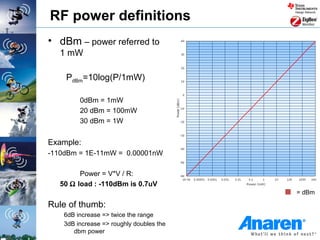
RF power definitions
• dBm – power referred to
   1 mW

    PdBm=10log(P/1mW)

         0dBm = 1mW
         20 dBm = 100mW
         30 dBm = 1W


Example:
-110dBm = 1E-11mW = 0.00001nW

         Power = V*V / R:
   50 Ω load : -110dBm is 0.7uV
                                          = dBm

Rule of thumb:
    6dB increase => twice the range
    3dB increase => roughly doubles the
       dbm power
dBm to Watt
•   About dBm and W
     – Voltage Ratio     aV = 20 log (P2/P1)      [aV] = dB

     – Power Ratio        aP = 10 log (P2/P1)     [aP] = dB

     – Voltage Level      V‘ = 20 log (V/1µV)     [V‘] = dBµV

     – Power Level        P‘ = 10 log (P/1mW)     [P‘] = dBm

•   Example: 25mW is the maximum allowed radiated (transmitted)
    power in the EU SRD band

     – P‘ = 10 log (25mW/1mW) = 10 * 1.39794 dBm ~ 14 dBm
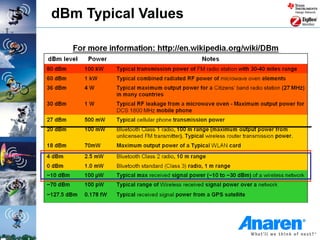
dBm Typical Values
Radio performance definitions
• Packet Error Rate (PER)
  The percentage (%) of packets not received successfully (This
  includes packets lost and packets received with a CRC error).
• Sensitivity
  Lowest input power with acceptable link quality (typically
  1% PER)
• Deviation/Separation
  Frequency offset between a logic ‘0’ and ‘1’ using FSK
  modulation scheme
• Blocking/selectivity
  How well a chip works in an environment with interference on
  the same channel/Frequency.
Radio modulation schemes
Wireless communication systems
Modulation methods
• Starting point: We have a low frequency signal and want to
  send it at a high frequency

• Modulation: The process of superimposing a low
  frequency signal onto a high frequency carrier signal

• Three modulation schemes available:
   1. Amplitude Modulation (AM): The amplitude of the carrier varies in
      accordance to the information signal
   2. Frequency Modulation (FM): The frequency of the carrier varies in
      accordance to the information signal
   3. Phase Modulation (PM): The phase of the carrier varies in
      accordance to the information signal
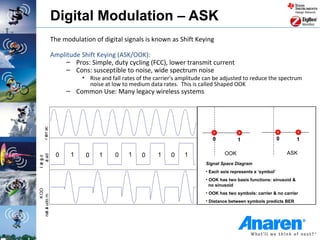
Digital Modulation – ASK
                 The modulation of digital signals is known as Shift Keying

                 Amplitude Shift Keying (ASK/OOK):
                      – Pros: Simple, duty cycling (FCC), lower transmit current
                      – Cons: susceptible to noise, wide spectrum noise
                            • Rise and fall rates of the carrier's amplitude can be adjusted to reduce the spectrum
                              noise at low to medium data rates. This is called Shaped OOK
                      – Common Use: Many legacy wireless systems
      r err ac
        i


                                                                               0           1                    0       1

                  0     1    0    1      0    1    0     1     0    1               OOK                             ASK
    a ad
l ai g d
   t i
     t


                                                                            Signal Space Diagram
                                                                            • Each axis represents a ‘symbol’
                                                                            • OOK has two basis functions: sinusoid &
                                                                              no sinusoid
         K OO


                                                                            • OOK has two symbols: carrier & no carrier
not a udo m


                                                                            • Distance between symbols predicts BER
 i l
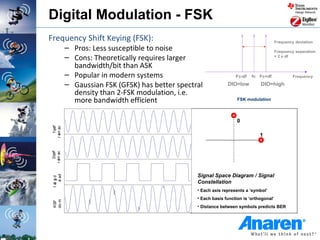
Digital Modulation - FSK
Frequency Shift Keying (FSK):                                                              Frequency deviation
            – Pros: Less susceptible to noise                                              Frequency separation
            – Cons: Theoretically requires larger                                          = 2 x df

              bandwidth/bit than ASK
            – Popular in modern systems                              Fc-df   fc Fc+df               Frequency

            – Gaussian FSK (GFSK) has better spectral            DIO=low         DIO=high
              density than 2-FSK modulation, i.e.
              more bandwidth efficient                                FSK modulation


                                                                      0
    1qe f
r err ac
       r


                                                                                 1
  i
    2qe f
r err ac
       r
  i


                                                   Signal Space Diagram / Signal
     a ad
 l ai g d


                                                   Constellation
    t i
      t


                                                   • Each axis represents a ‘symbol’
                                                   • Each basis function is ‘orthogonal’
 do m
 KSF


                                                   • Distance between symbols predicts BER
Digital modulation - PSK
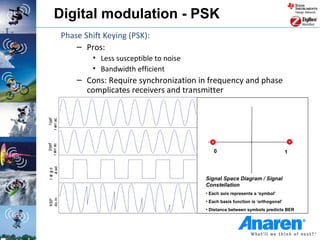
            Phase Shift Keying (PSK):
                – Pros:
                    • Less susceptible to noise
                    • Bandwidth efficient
                – Cons: Require synchronization in frequency and phase
                  complicates receivers and transmitter
    1qe f
r err ac
       r
  i
    2qe f
r err ac
       r


                                                     0                                    1
  i a ad
l ai g d
   t i
     t


                                                  Signal Space Diagram / Signal
                                                  Constellation
                                                  • Each axis represents a ‘symbol’
do m
KSP


                                                  • Each basis function is ‘orthogonal’
                                                  • Distance between symbols predicts BER
Digital modulation - MSK
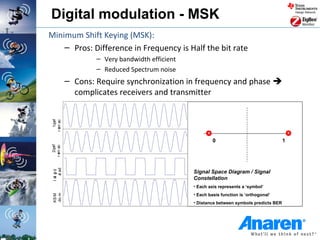
Minimum Shift Keying (MSK):
    – Pros: Difference in Frequency is Half the bit rate
                    – Very bandwidth efficient
                    – Reduced Spectrum noise
            – Cons: Require synchronization in frequency and phase 
              complicates receivers and transmitter
    1qe f
r err ac
       r
  i


                                                          0                                1
    2qe f
r err ac
       r
  i  a ad


                                                 Signal Space Diagram / Signal
 l ai g d
    t i
      t


                                                 Constellation
                                                 • Each axis represents a ‘symbol’
                                                 • Each basis function is ‘orthogonal’
 do m
 KS M


                                                 • Distance between symbols predicts BER
Digital modulation – QPSK/OQPSK
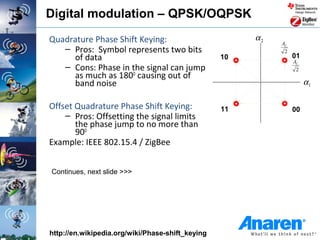
Quadrature Phase Shift Keying:                         α2
                                                            AC
   – Pros: Symbol represents two bits                        2
     of data                                      10             01
                                                                 AC
   – Cons: Phase in the signal can jump                           2
     as much as 180O causing out of
     band noise                                                       α1

Offset Quadrature Phase Shift Keying:             11             00
    – Pros: Offsetting the signal limits
       the phase jump to no more than
       90O
Example: IEEE 802.15.4 / ZigBee


Continues, next slide >>>


http://en.wikipedia.org/wiki/Phase-shift_keying
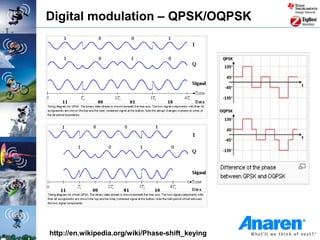
Digital modulation – QPSK/OQPSK


http://en.wikipedia.org/wiki/Phase-shift_keying
Preamble
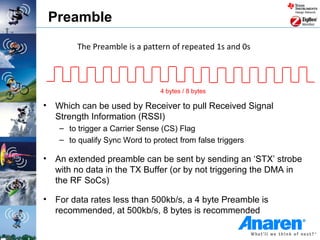
          The Preamble is a pattern of repeated 1s and 0s


                                  4 bytes / 8 bytes

•   Which can be used by Receiver to pull Received Signal
    Strength Information (RSSI)
     – to trigger a Carrier Sense (CS) Flag
     – to qualify Sync Word to protect from false triggers

•   An extended preamble can be sent by sending an ‘STX’ strobe
    with no data in the TX Buffer (or by not triggering the DMA in
    the RF SoCs)

•   For data rates less than 500kb/s, a 4 byte Preamble is
    recommended, at 500kb/s, 8 bytes is recommended
Clock and data recovery
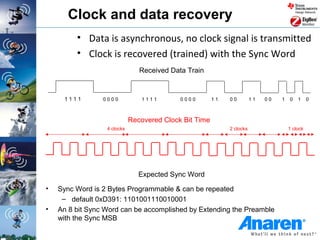
         • Data is asynchronous, no clock signal is transmitted
         • Clock is recovered (trained) with the Sync Word
                                Received Data Train


     1111        0000            1111       0000        11   00         11   00   1   0   1     0


                             Recovered Clock Bit Time
                  4 clocks                                   2 clocks                 1 clock


                                Expected Sync Word
•   Sync Word is 2 Bytes Programmable & can be repeated
     – default 0xD391: 1101001110010001
•   An 8 bit Sync Word can be accomplished by Extending the Preamble
    with the Sync MSB
Radio Frequency Spectrum
Electromagnetic spectrum
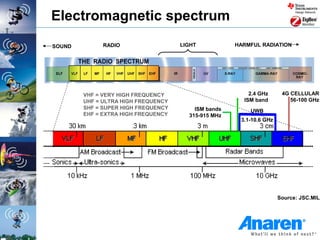
SOUND         RADIO                  LIGHT           HARMFUL RADIATION


        VHF = VERY HIGH FREQUENCY                        2.4 GHz      4G CELLULAR
        UHF = ULTRA HIGH FREQUENCY                     ISM band          56-100 GHz
        SHF = SUPER HIGH FREQUENCY       ISM bands       UWB
        EHF = EXTRA HIGH FREQUENCY     315-915 MHz
                                                      3.1-10.6 GHz


                                                                     Source: JSC.MIL
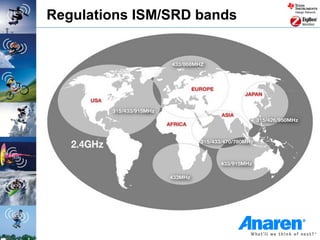
Regulations ISM/SRD bands
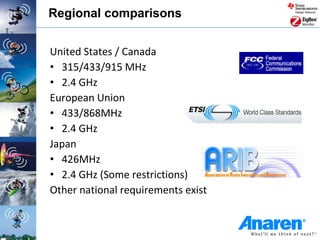
Regional comparisons


United States / Canada
• 315/433/915 MHz
• 2.4 GHz
European Union
• 433/868MHz
• 2.4 GHz
Japan
• 426MHz
• 2.4 GHz (Some restrictions)
Other national requirements exist
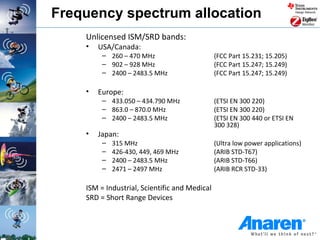
Frequency spectrum allocation
    Unlicensed ISM/SRD bands:
    •   USA/Canada:
         – 260 – 470 MHz                       (FCC Part 15.231; 15.205)
         – 902 – 928 MHz                       (FCC Part 15.247; 15.249)
         – 2400 – 2483.5 MHz                   (FCC Part 15.247; 15.249)

    •   Europe:
         – 433.050 – 434.790 MHz               (ETSI EN 300 220)
         – 863.0 – 870.0 MHz                   (ETSI EN 300 220)
         – 2400 – 2483.5 MHz                   (ETSI EN 300 440 or ETSI EN
                                               300 328)
    •   Japan:
         –   315 MHz                           (Ultra low power applications)
         –   426-430, 449, 469 MHz             (ARIB STD-T67)
         –   2400 – 2483.5 MHz                 (ARIB STD-T66)
         –   2471 – 2497 MHz                   (ARIB RCR STD-33)

    ISM = Industrial, Scientific and Medical
    SRD = Short Range Devices
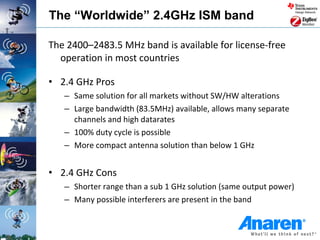
The “Worldwide” 2.4GHz ISM band

The 2400–2483.5 MHz band is available for license-free
  operation in most countries

• 2.4 GHz Pros
   – Same solution for all markets without SW/HW alterations
   – Large bandwidth (83.5MHz) available, allows many separate
     channels and high datarates
   – 100% duty cycle is possible
   – More compact antenna solution than below 1 GHz


• 2.4 GHz Cons
   – Shorter range than a sub 1 GHz solution (same output power)
   – Many possible interferers are present in the band
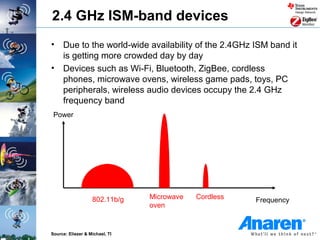
2.4 GHz ISM-band devices
• Due to the world-wide availability of the 2.4GHz ISM band it
  is getting more crowded day by day
• Devices such as Wi-Fi, Bluetooth, ZigBee, cordless
  phones, microwave ovens, wireless game pads, toys, PC
  peripherals, wireless audio devices occupy the 2.4 GHz
  frequency band
 Power


                   802.11b/g    Microwave   Cordless   Frequency
                                oven


Source: Eliezer & Michael, TI
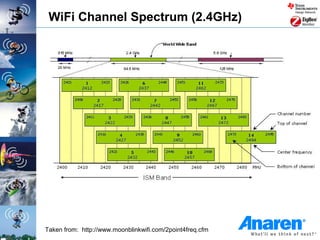
WiFi Channel Spectrum (2.4GHz)


Taken from: http://www.moonblinkwifi.com/2point4freq.cfm
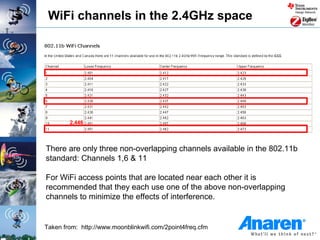
WiFi channels in the 2.4GHz space


        2.446


There are only three non-overlapping channels available in the 802.11b
standard: Channels 1,6 & 11

For WiFi access points that are located near each other it is
recommended that they each use one of the above non-overlapping
channels to minimize the effects of interference.


Taken from: http://www.moonblinkwifi.com/2point4freq.cfm
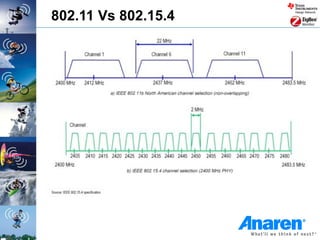
802.11 Vs 802.15.4
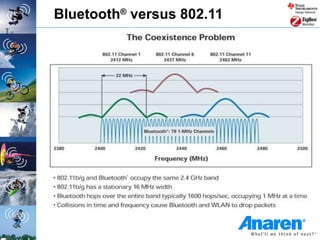
Bluetooth® versus 802.11
Sub-1GHz ISM bands

• The ISM bands under 1 GHz are not world-wide

• Limitations vary a lot from region to region and
  getting a full overview is not an easy task
   – Sub 1GHz Pros
       • Better range than 2.4 GHz with the same output power
         and current consumption (assuming a good antenna –
         not easy for a limited space)

   – Sub 1GHz Cons
       • Since different bands are used in different markets it is
         necessary with custom solutions for each market
       • More limitations to output power, data rate, bandwidth
         etc. than the 2.4 GHz
       • Duty cycle restrictions in some regions
       • Interferers are present in most bands
Sub-1GHz ISM bands in USA

 •   902-928 MHz is the main frequency band
      • The 260-470 MHz range is also available, but with more
        limitations on output power / duty cycling.
 •   The 902-928 MHz band is covered by FCC CFR 47, part 15
 •   Sharing bandwidth is done in the same way as for 2.4GHz:
      • Higher output power is allowed if you spread your transmitted
        power and don’t occupy one channel all the time FCC CFR 47
        part 15.247 covers wideband modulation
      • Frequency Hopping Spread Spectrum (FHSS) with ≥50
        channels are allowed up to 1 W, FHSS with 25-49 channels up
        to 0.25 W
      • Direct Sequence Spread Spectrum (DSSS) and other digital
        modulation formats with bandwidth above 500 kHz are allowed
        up to 1W
 •   FCC CFR 47 part 15.249
      • ”Single channel systems” can only transmit with ~0.75 mW
        output power
Available Wireless Standards
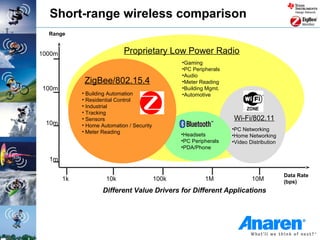
Short-range wireless comparison
  Range


1000m                        Proprietary Low Power Radio
                                                   •Gaming
                                                   •PC Peripherals
                                                   •Audio
              ZigBee/802.15.4                      •Meter Reading
100m                                               •Building Mgmt.
             • Building Automation                 •Automotive
             • Residential Control
             • Industrial
             • Tracking
             • Sensors                                               Wi-Fi/802.11
 10m         • Home Automation / Security
             • Meter Reading                                         •PC Networking
                                                   •Headsets         •Home Networking
                                                   •PC Peripherals   •Video Distribution
                                                   •PDA/Phone

  1m

                                                                                           Data Rate
        1k            10k                   100k            1M               10M           (bps)
                     Different Value Drivers for Different Applications
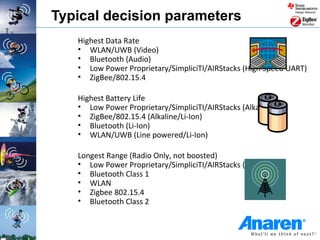
Typical decision parameters
   Highest Data Rate
   • WLAN/UWB (Video)
   • Bluetooth (Audio)
   • Low Power Proprietary/SimpliciTI/AIRStacks (High Speed UART)
   • ZigBee/802.15.4

   Highest Battery Life
   • Low Power Proprietary/SimpliciTI/AIRStacks (Alkaline)
   • ZigBee/802.15.4 (Alkaline/Li-Ion)
   • Bluetooth (Li-Ion)
   • WLAN/UWB (Line powered/Li-Ion)

   Longest Range (Radio Only, not boosted)
   • Low Power Proprietary/SimpliciTI/AIRStacks (433MHz)
   • Bluetooth Class 1
   • WLAN
   • Zigbee 802.15.4
   • Bluetooth Class 2
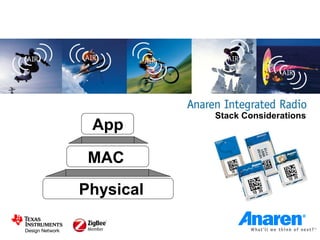
Stack Considerations
 App

 MAC
Physical
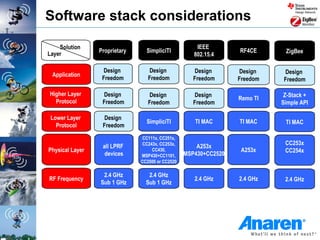
Software stack considerations

    Solution                                          IEEE
                 Proprietary     SimpliciTI                       RF4CE      ZigBee
Layer                                                802.15.4

                  Design          Design             Design       Design    Design
 Application
                  Freedom         Freedom            Freedom      Freedom   Freedom

Higher Layer      Design          Design             Design                  Z-Stack +
                                                                  Remo TI
  Protocol        Freedom         Freedom            Freedom                Simple API

 Lower Layer      Design
                                 SimpliciTI          TI MAC       TI MAC     TI MAC
   Protocol       Freedom
                                CC111x, CC251x,
                                CC243x, CC253x,                              CC253x
                  all LPRF                            A253x
Physical Layer                      CC430,                         A253x     CC254x
                   devices     MSP430+CC1101,     MSP430+CC2520
                               CC2500 or CC2520

                  2.4 GHz         2.4 GHz
RF Frequency                                         2.4 GHz      2.4 GHz    2.4 GHz
                 Sub 1 GHz       Sub 1 GHz
Network types
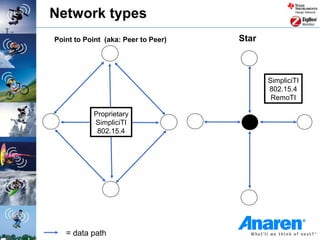
Network types
Point to Point (aka: Peer to Peer)   Star


                                            SimpliciTI
                                            802.15.4
                                             RemoTI

           Proprietary
           SimpliciTI
            802.15.4


   = data path
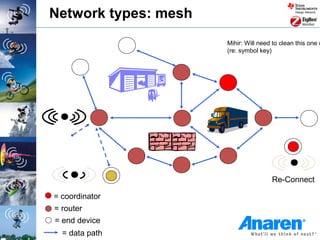
Network types: mesh
                      Mihir: Will need to clean this one u
                      (re: symbol key)


                                      Re-Connect

= coordinator
= router
= end device
  = data path
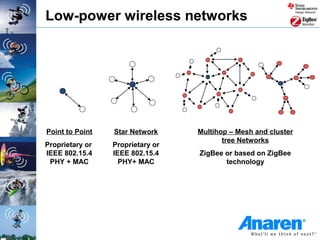
Low-power wireless networks


Point to Point   Star Network     Multihop – Mesh and cluster
                                         tree Networks
Proprietary or   Proprietary or
IEEE 802.15.4    IEEE 802.15.4    ZigBee or based on ZigBee
 PHY + MAC         PHY+ MAC              technology
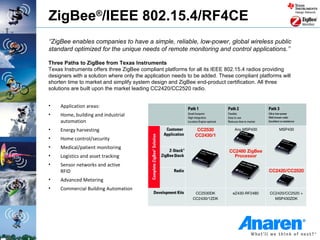
ZigBee®/IEEE 802.15.4/RF4CE
‘’ZigBee enables companies to have a simple, reliable, low-power, global wireless public
standard optimized for the unique needs of remote monitoring and control applications.’’

Three Paths to ZigBee from Texas Instruments
Texas Instruments offers three ZigBee compliant platforms for all its IEEE 802.15.4 radios providing
designers with a solution where only the application needs to be added. These compliant platforms will
shorten time to market and simplify system design and ZigBee end-product certification. All three
solutions are built upon the market leading CC2420/CC2520 radio.


•    Application areas:
•    Home, building and industrial
     automation
•    Energy harvesting
•    Home control/security
•    Medical/patient monitoring
•    Logistics and asset tracking
•    Sensor networks and active
     RFID
•    Advanced Metering
•    Commercial Building Automation
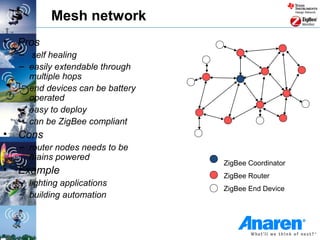
Mesh network
•   Pros
    – self healing
    – easily extendable through
      multiple hops
    – end devices can be battery
      operated
    – easy to deploy
    – can be ZigBee compliant
•   Cons
    – router nodes needs to be
      mains powered
                                   ZigBee Coordinator
•   Example                        ZigBee Router
    – lighting applications
                                   ZigBee End Device
    – building automation
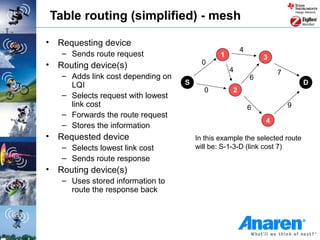
Table routing (simplified) - mesh

• Requesting device
                                                       4
   – Sends route request                       1               3
• Routing device(s)                      0
                                                   4               7
   – Adds link cost depending on                           6
     LQI                           S                                        D
                                         0         2
   – Selects request with lowest
     link cost                                             6           9
   – Forwards the route request
                                                               4
   – Stores the information
• Requested device                     In this example the selected route
   – Selects lowest link cost          will be: S-1-3-D (link cost 7)
   – Sends route response
• Routing device(s)
   – Uses stored information to
     route the response back
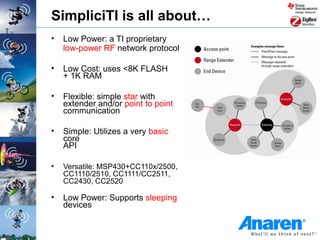
SimpliciTI is all about…
•   Low Power: a TI proprietary
    low-power RF network protocol

•   Low Cost: uses <8K FLASH
    + 1K RAM

•   Flexible: simple star with
    extender and/or point to point
    communication

•   Simple: Utilizes a very basic
    core
    API

•   Versatile: MSP430+CC110x/2500,
    CC1110/2510, CC1111/CC2511,
    CC2430, CC2520

•   Low Power: Supports sleeping
    devices
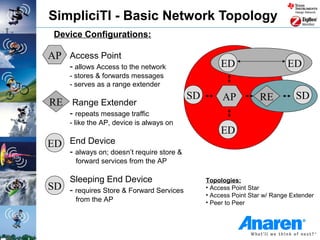
SimpliciTI - Basic Network Topology
 Device Configurations:

AP Access Point
      - allows Access to the network                   ED                     ED
      - stores & forwards messages
      - serves as a range extender
                                             SD        AP           RE          SD
RE Range Extender
      - repeats message traffic
      - like the AP, device is always on
                                                       ED
ED End Device
      - always on; doesn’t require store &
       forward services from the AP

   Sleeping End Device                            Topologies:
SD - requires Store & Forward Services            • Access Point Star
                                                  • Access Point Star w/ Range Extender
       from the AP                                • Peer to Peer
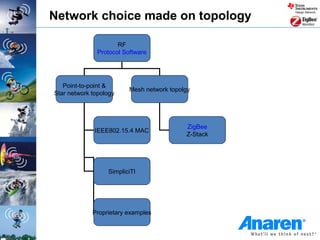
Network choice made on topology

                      RF
               Protocol Software


   Point-to-point &
                          Mesh network topolgy
Star network topology


                                            ZigBee
              IEEE802.15.4 MAC
                                            Z-Stack


                  SimpliciTI


             Proprietary examples                     Return to Master
                                                           Slide
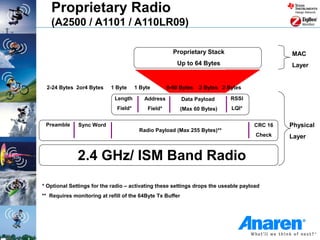
Proprietary Radio
   (A2500 / A1101 / A110LR09)

                                                       Proprietary Stack                     MAC
                                                         Up to 64 Bytes                      Layer


 2-24 Bytes 2or4 Bytes     1 Byte      1 Byte        0-60 Bytes   2 Bytes 2 Bytes

                             Length       Address          Data Payload      RSSI
                              Field*        Field*         (Max 60 Bytes)    LQI*


 Preamble     Sync Word                                                             CRC 16   Physical
                                        Radio Payload (Max 255 Bytes)**
                                                                                     Check   Layer


              2.4 GHz/ ISM Band Radio
* Optional Settings for the radio – activating these settings drops the useable payload
** Requires monitoring at refill of the 64Byte Tx Buffer
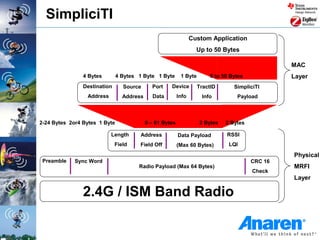
SimpliciTI
                                                                 Custom Application
                                                                   Up to 50 Bytes

                                                                                                  MAC
                4 Bytes        4 Bytes 1 Byte 1 Byte       1 Byte        0 to 50 Bytes            Layer
                Destination      Source      Port    Device         TractID       SimpliciTI
                 Address         Address      Data        Info       Info          Payload


2-24 Bytes 2or4 Bytes 1 Byte               0 – 61 Bytes             2 Bytes    2 Bytes

                           Length      Address            Data Payload         RSSI
                              Field    Field Off          (Max 60 Bytes)        LQI

                                                                                                  Physical
 Preamble    Sync Word                                                                   CRC 16
                                       Radio Payload (Max 64 Bytes)                               MRFI
                                                                                         Check
                                                                                                  Layer

                2.4G / ISM Band Radio
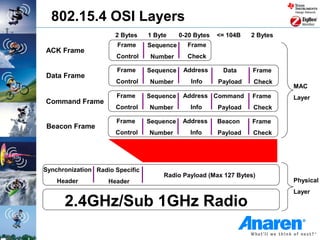
802.15.4 OSI Layers
                      2 Bytes    1 Byte     0-20 Bytes   <= 104B   2 Bytes
                       Frame     Sequence     Frame
ACK Frame
                      Control     Number      Check

                      Frame      Sequence    Address      Data     Frame
Data Frame
                      Control    Number        Info      Payload   Check
                                                                             MAC
                      Frame      Sequence    Address Command       Frame     Layer
Command Frame
                      Control    Number        Info      Payload   Check

                      Frame      Sequence    Address     Beacon    Frame
Beacon Frame
                      Control    Number        Info      Payload   Check


Synchronization Radio Specific
                                      Radio Payload (Max 127 Bytes)
    Header          Header                                                   Physical
                                                                             Layer

      2.4GHz/Sub 1GHz Radio
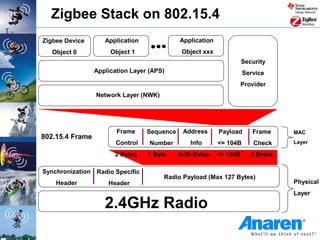
Zigbee Stack on 802.15.4
Zigbee Device       Application              Application
   Object 0           Object 1                Object xxx
                                                                     Security
                 Application Layer (APS)                             Service
                                                                     Provider
                 Network Layer (NWK)


                        Frame     Sequence    Address      Payload      Frame     MAC
802.15.4 Frame
                        Control    Number       Info       <= 104B       Check    Layer

                       2 Bytes    1 Byte     0-20 Bytes    <= 104B      2 Bytes

Synchronization Radio Specific
                                       Radio Payload (Max 127 Bytes)
    Header           Header                                                       Physical
                                                                                  Layer

                    2.4GHz Radio
Some available Low-power RF tools
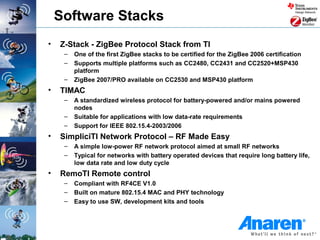
Software Stacks
•   Z-Stack - ZigBee Protocol Stack from TI
     –   One of the first ZigBee stacks to be certified for the ZigBee 2006 certification
     –   Supports multiple platforms such as CC2480, CC2431 and CC2520+MSP430
         platform
     –   ZigBee 2007/PRO available on CC2530 and MSP430 platform
•   TIMAC
     –   A standardized wireless protocol for battery-powered and/or mains powered
         nodes
     –   Suitable for applications with low data-rate requirements
     –   Support for IEEE 802.15.4-2003/2006
•   SimpliciTI Network Protocol – RF Made Easy
     –   A simple low-power RF network protocol aimed at small RF networks
     –   Typical for networks with battery operated devices that require long battery life,
         low data rate and low duty cycle
•   RemoTI Remote control
     –   Compliant with RF4CE V1.0
     –   Built on mature 802.15.4 MAC and PHY technology
     –   Easy to use SW, development kits and tools
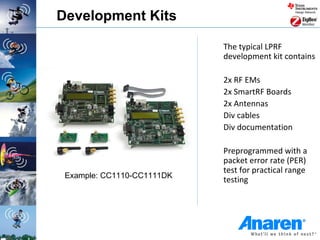
Development Kits

                            The typical LPRF
                            development kit contains

                            2x RF EMs
                            2x SmartRF Boards
                            2x Antennas
                            Div cables
                            Div documentation

                            Preprogrammed with a
                            packet error rate (PER)
                            test for practical range
 Example: CC1110-CC1111DK
                            testing
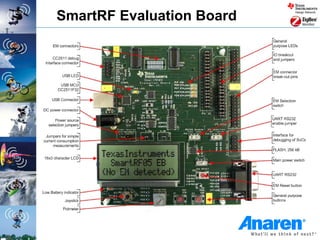
SmartRF Evaluation Board
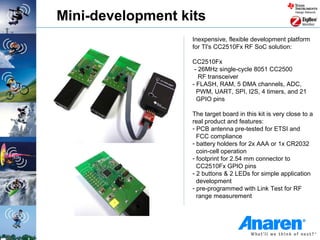
Mini-development kits
                   Inexpensive, flexible development platform
                   for TI's CC2510Fx RF SoC solution:

                   CC2510Fx
                    - 26MHz single-cycle 8051 CC2500
                      RF transceiver
                   - FLASH, RAM, 5 DMA channels, ADC,
                     PWM, UART, SPI, I2S, 4 timers, and 21
                     GPIO pins

                   The target board in this kit is very close to a
                   real product and features:
                   - PCB antenna pre-tested for ETSI and
                     FCC compliance
                   - battery holders for 2x AAA or 1x CR2032
                     coin-cell operation
                   - footprint for 2.54 mm connector to
                     CC2510Fx GPIO pins
                   - 2 buttons & 2 LEDs for simple application
                     development
                   - pre-programmed with Link Test for RF
                     range measurement
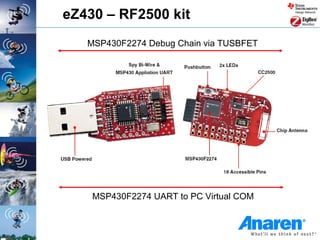
eZ430 – RF2500 kit
   MSP430F2274 Debug Chain via TUSBFET


    MSP430F2274 UART to PC Virtual COM
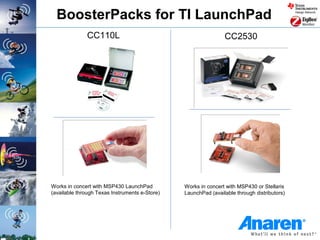
BoosterPacks for TI LaunchPad
              CC110L                                            CC2530


Works in concert with MSP430 LaunchPad          Works in concert with MSP430 or Stellaris
(available through Texas Instruments e-Store)   LaunchPad (available through distributors)
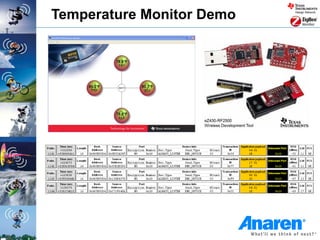
Temperature Monitor Demo
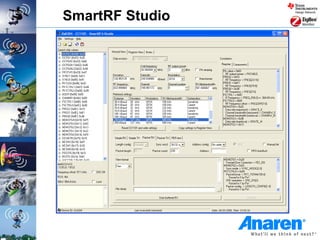
SmartRF Studio
• SmartRF Studio is a PC application to be used together
  with TI’s development kits for ALL CCxxxx RF-ICs.

• Converts user input to associated chip register values
   – RF frequency
   – Data rate
   – Output power

• Allows remote control/configuration of the RF device
  when connected to the PC via a SmartRF Evaluation
  Board

• Supports quick and simple performance testing
   – Simple RX/TX
   – Packet RX/TX
   – Packet Error Rate (PER)
SmartRF Studio
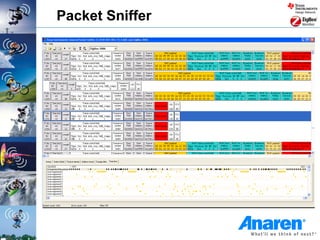
Packet Sniffer
• Captures and parses packets going over the air
• Useful debugging tool for any protocol/SW designer
• PC Tool available for FREE

• Supported protocols
   –   SimpliciTI
   –   RemoTI (RF4CE)
   –   ZigBee
   –   Generic protocol


• Hardware required for packet sniffing
   – CC2430DB
   – SmartRF04EB + CC1110/CC2510/CC2430
   – SmartRF05EB + CC2520/CC2530
Packet Sniffer
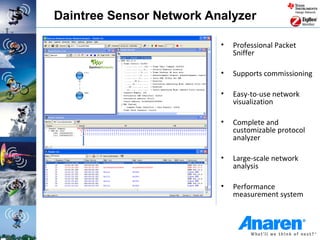
Daintree Sensor Network Analyzer

                          •   Professional Packet
                              Sniffer

                          •   Supports commissioning

                          •   Easy-to-use network
                              visualization

                          •   Complete and
                              customizable protocol
                              analyzer

                          •   Large-scale network
                              analysis

                          •   Performance
                              measurement system
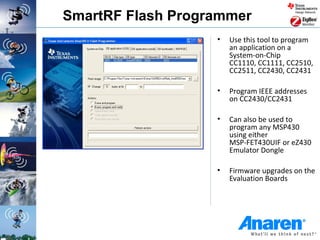
SmartRF Flash Programmer
                   •   Use this tool to program
                       an application on a
                       System-on-Chip
                       CC1110, CC1111, CC2510,
                       CC2511, CC2430, CC2431

                   •   Program IEEE addresses
                       on CC2430/CC2431

                   •   Can also be used to
                       program any MSP430
                       using either
                       MSP-FET430UIF or eZ430
                       Emulator Dongle

                   •   Firmware upgrades on the
                       Evaluation Boards
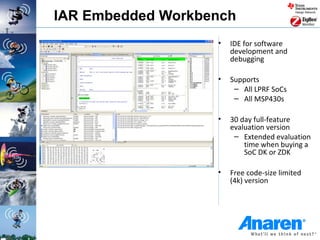
IAR Embedded Workbench
                   •   IDE for software
                       development and
                       debugging

                   •   Supports
                        – All LPRF SoCs
                        – All MSP430s

                   •   30 day full-feature
                       evaluation version
                        – Extended evaluation
                           time when buying a
                           SoC DK or ZDK

                   •   Free code-size limited
                       (4k) version
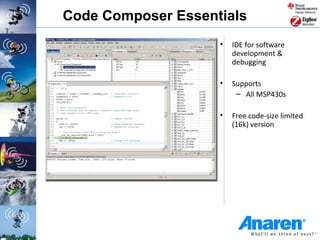
Code Composer Essentials
                    •   IDE for software
                        development &
                        debugging

                    •   Supports
                         – All MSP430s

                    •   Free code-size limited
                        (16k) version
Getting started with AIR / Questions?
         Email us at AIR@anaren.com

RF Basics & Getting Started Guide by Anaren

  • 1.
    Acknowledgement: Most ofthe information in this presentation is provided courtesy of Texas Instruments, and is intended for general educational purposes. RF basics & getting started www.anaren.com/AIR air@anaren.com
  • 2.
    Abstract • This presentationserves as an overview of the parameters and considerations a designer would use to select a low-power wireless (LPRF) solution. • It also highlights the devices and tools from the Anaren Integrated Radio (AIR) module product line and how they fit in a typical LPW design.
  • 3.
    Outline • RF definitions • Radio modulation schemes • Radio frequency spectrum • Stack considerations • Network types • Development tools and EVMs
  • 4.
  • 5.
    RF power definitions •dBm – power referred to 1 mW PdBm=10log(P/1mW) 0dBm = 1mW 20 dBm = 100mW 30 dBm = 1W Example: -110dBm = 1E-11mW = 0.00001nW Power = V*V / R: 50 Ω load : -110dBm is 0.7uV = dBm Rule of thumb: 6dB increase => twice the range 3dB increase => roughly doubles the dbm power
  • 6.
    dBm to Watt • About dBm and W – Voltage Ratio aV = 20 log (P2/P1) [aV] = dB – Power Ratio aP = 10 log (P2/P1) [aP] = dB – Voltage Level V‘ = 20 log (V/1µV) [V‘] = dBµV – Power Level P‘ = 10 log (P/1mW) [P‘] = dBm • Example: 25mW is the maximum allowed radiated (transmitted) power in the EU SRD band – P‘ = 10 log (25mW/1mW) = 10 * 1.39794 dBm ~ 14 dBm
  • 7.
  • 8.
    Radio performance definitions •Packet Error Rate (PER) The percentage (%) of packets not received successfully (This includes packets lost and packets received with a CRC error). • Sensitivity Lowest input power with acceptable link quality (typically 1% PER) • Deviation/Separation Frequency offset between a logic ‘0’ and ‘1’ using FSK modulation scheme • Blocking/selectivity How well a chip works in an environment with interference on the same channel/Frequency.
  • 9.
  • 10.
  • 11.
    Modulation methods • Startingpoint: We have a low frequency signal and want to send it at a high frequency • Modulation: The process of superimposing a low frequency signal onto a high frequency carrier signal • Three modulation schemes available: 1. Amplitude Modulation (AM): The amplitude of the carrier varies in accordance to the information signal 2. Frequency Modulation (FM): The frequency of the carrier varies in accordance to the information signal 3. Phase Modulation (PM): The phase of the carrier varies in accordance to the information signal
  • 12.
    Digital Modulation –ASK The modulation of digital signals is known as Shift Keying Amplitude Shift Keying (ASK/OOK): – Pros: Simple, duty cycling (FCC), lower transmit current – Cons: susceptible to noise, wide spectrum noise • Rise and fall rates of the carrier's amplitude can be adjusted to reduce the spectrum noise at low to medium data rates. This is called Shaped OOK – Common Use: Many legacy wireless systems r err ac i 0 1 0 1 0 1 0 1 0 1 0 1 0 1 OOK ASK a ad l ai g d t i t Signal Space Diagram • Each axis represents a ‘symbol’ • OOK has two basis functions: sinusoid & no sinusoid K OO • OOK has two symbols: carrier & no carrier not a udo m • Distance between symbols predicts BER i l
  • 13.
    Digital Modulation -FSK Frequency Shift Keying (FSK): Frequency deviation – Pros: Less susceptible to noise Frequency separation – Cons: Theoretically requires larger = 2 x df bandwidth/bit than ASK – Popular in modern systems Fc-df fc Fc+df Frequency – Gaussian FSK (GFSK) has better spectral DIO=low DIO=high density than 2-FSK modulation, i.e. more bandwidth efficient FSK modulation 0 1qe f r err ac r 1 i 2qe f r err ac r i Signal Space Diagram / Signal a ad l ai g d Constellation t i t • Each axis represents a ‘symbol’ • Each basis function is ‘orthogonal’ do m KSF • Distance between symbols predicts BER
  • 14.
    Digital modulation -PSK Phase Shift Keying (PSK): – Pros: • Less susceptible to noise • Bandwidth efficient – Cons: Require synchronization in frequency and phase complicates receivers and transmitter 1qe f r err ac r i 2qe f r err ac r 0 1 i a ad l ai g d t i t Signal Space Diagram / Signal Constellation • Each axis represents a ‘symbol’ do m KSP • Each basis function is ‘orthogonal’ • Distance between symbols predicts BER
  • 15.
    Digital modulation -MSK Minimum Shift Keying (MSK): – Pros: Difference in Frequency is Half the bit rate – Very bandwidth efficient – Reduced Spectrum noise – Cons: Require synchronization in frequency and phase  complicates receivers and transmitter 1qe f r err ac r i 0 1 2qe f r err ac r i a ad Signal Space Diagram / Signal l ai g d t i t Constellation • Each axis represents a ‘symbol’ • Each basis function is ‘orthogonal’ do m KS M • Distance between symbols predicts BER
  • 16.
    Digital modulation –QPSK/OQPSK Quadrature Phase Shift Keying: α2 AC – Pros: Symbol represents two bits 2 of data 10 01 AC – Cons: Phase in the signal can jump 2 as much as 180O causing out of band noise α1 Offset Quadrature Phase Shift Keying: 11 00 – Pros: Offsetting the signal limits the phase jump to no more than 90O Example: IEEE 802.15.4 / ZigBee Continues, next slide >>> http://en.wikipedia.org/wiki/Phase-shift_keying
  • 17.
    Digital modulation –QPSK/OQPSK http://en.wikipedia.org/wiki/Phase-shift_keying
  • 18.
    Preamble The Preamble is a pattern of repeated 1s and 0s 4 bytes / 8 bytes • Which can be used by Receiver to pull Received Signal Strength Information (RSSI) – to trigger a Carrier Sense (CS) Flag – to qualify Sync Word to protect from false triggers • An extended preamble can be sent by sending an ‘STX’ strobe with no data in the TX Buffer (or by not triggering the DMA in the RF SoCs) • For data rates less than 500kb/s, a 4 byte Preamble is recommended, at 500kb/s, 8 bytes is recommended
  • 19.
    Clock and datarecovery • Data is asynchronous, no clock signal is transmitted • Clock is recovered (trained) with the Sync Word Received Data Train 1111 0000 1111 0000 11 00 11 00 1 0 1 0 Recovered Clock Bit Time 4 clocks 2 clocks 1 clock Expected Sync Word • Sync Word is 2 Bytes Programmable & can be repeated – default 0xD391: 1101001110010001 • An 8 bit Sync Word can be accomplished by Extending the Preamble with the Sync MSB
  • 20.
  • 21.
    Electromagnetic spectrum SOUND RADIO LIGHT HARMFUL RADIATION VHF = VERY HIGH FREQUENCY 2.4 GHz 4G CELLULAR UHF = ULTRA HIGH FREQUENCY ISM band 56-100 GHz SHF = SUPER HIGH FREQUENCY ISM bands UWB EHF = EXTRA HIGH FREQUENCY 315-915 MHz 3.1-10.6 GHz Source: JSC.MIL
  • 22.
  • 23.
    Regional comparisons United States/ Canada • 315/433/915 MHz • 2.4 GHz European Union • 433/868MHz • 2.4 GHz Japan • 426MHz • 2.4 GHz (Some restrictions) Other national requirements exist
  • 24.
    Frequency spectrum allocation Unlicensed ISM/SRD bands: • USA/Canada: – 260 – 470 MHz (FCC Part 15.231; 15.205) – 902 – 928 MHz (FCC Part 15.247; 15.249) – 2400 – 2483.5 MHz (FCC Part 15.247; 15.249) • Europe: – 433.050 – 434.790 MHz (ETSI EN 300 220) – 863.0 – 870.0 MHz (ETSI EN 300 220) – 2400 – 2483.5 MHz (ETSI EN 300 440 or ETSI EN 300 328) • Japan: – 315 MHz (Ultra low power applications) – 426-430, 449, 469 MHz (ARIB STD-T67) – 2400 – 2483.5 MHz (ARIB STD-T66) – 2471 – 2497 MHz (ARIB RCR STD-33) ISM = Industrial, Scientific and Medical SRD = Short Range Devices
  • 25.
    The “Worldwide” 2.4GHzISM band The 2400–2483.5 MHz band is available for license-free operation in most countries • 2.4 GHz Pros – Same solution for all markets without SW/HW alterations – Large bandwidth (83.5MHz) available, allows many separate channels and high datarates – 100% duty cycle is possible – More compact antenna solution than below 1 GHz • 2.4 GHz Cons – Shorter range than a sub 1 GHz solution (same output power) – Many possible interferers are present in the band
  • 26.
    2.4 GHz ISM-banddevices • Due to the world-wide availability of the 2.4GHz ISM band it is getting more crowded day by day • Devices such as Wi-Fi, Bluetooth, ZigBee, cordless phones, microwave ovens, wireless game pads, toys, PC peripherals, wireless audio devices occupy the 2.4 GHz frequency band Power 802.11b/g Microwave Cordless Frequency oven Source: Eliezer & Michael, TI
  • 27.
    WiFi Channel Spectrum(2.4GHz) Taken from: http://www.moonblinkwifi.com/2point4freq.cfm
  • 28.
    WiFi channels inthe 2.4GHz space 2.446 There are only three non-overlapping channels available in the 802.11b standard: Channels 1,6 & 11 For WiFi access points that are located near each other it is recommended that they each use one of the above non-overlapping channels to minimize the effects of interference. Taken from: http://www.moonblinkwifi.com/2point4freq.cfm
  • 29.
  • 30.
  • 31.
    Sub-1GHz ISM bands •The ISM bands under 1 GHz are not world-wide • Limitations vary a lot from region to region and getting a full overview is not an easy task – Sub 1GHz Pros • Better range than 2.4 GHz with the same output power and current consumption (assuming a good antenna – not easy for a limited space) – Sub 1GHz Cons • Since different bands are used in different markets it is necessary with custom solutions for each market • More limitations to output power, data rate, bandwidth etc. than the 2.4 GHz • Duty cycle restrictions in some regions • Interferers are present in most bands
  • 32.
    Sub-1GHz ISM bandsin USA • 902-928 MHz is the main frequency band • The 260-470 MHz range is also available, but with more limitations on output power / duty cycling. • The 902-928 MHz band is covered by FCC CFR 47, part 15 • Sharing bandwidth is done in the same way as for 2.4GHz: • Higher output power is allowed if you spread your transmitted power and don’t occupy one channel all the time FCC CFR 47 part 15.247 covers wideband modulation • Frequency Hopping Spread Spectrum (FHSS) with ≥50 channels are allowed up to 1 W, FHSS with 25-49 channels up to 0.25 W • Direct Sequence Spread Spectrum (DSSS) and other digital modulation formats with bandwidth above 500 kHz are allowed up to 1W • FCC CFR 47 part 15.249 • ”Single channel systems” can only transmit with ~0.75 mW output power
  • 33.
  • 34.
    Short-range wireless comparison Range 1000m Proprietary Low Power Radio •Gaming •PC Peripherals •Audio ZigBee/802.15.4 •Meter Reading 100m •Building Mgmt. • Building Automation •Automotive • Residential Control • Industrial • Tracking • Sensors Wi-Fi/802.11 10m • Home Automation / Security • Meter Reading •PC Networking •Headsets •Home Networking •PC Peripherals •Video Distribution •PDA/Phone 1m Data Rate 1k 10k 100k 1M 10M (bps) Different Value Drivers for Different Applications
  • 35.
    Typical decision parameters Highest Data Rate • WLAN/UWB (Video) • Bluetooth (Audio) • Low Power Proprietary/SimpliciTI/AIRStacks (High Speed UART) • ZigBee/802.15.4 Highest Battery Life • Low Power Proprietary/SimpliciTI/AIRStacks (Alkaline) • ZigBee/802.15.4 (Alkaline/Li-Ion) • Bluetooth (Li-Ion) • WLAN/UWB (Line powered/Li-Ion) Longest Range (Radio Only, not boosted) • Low Power Proprietary/SimpliciTI/AIRStacks (433MHz) • Bluetooth Class 1 • WLAN • Zigbee 802.15.4 • Bluetooth Class 2
  • 36.
  • 37.
    Software stack considerations Solution IEEE Proprietary SimpliciTI RF4CE ZigBee Layer 802.15.4 Design Design Design Design Design Application Freedom Freedom Freedom Freedom Freedom Higher Layer Design Design Design Z-Stack + Remo TI Protocol Freedom Freedom Freedom Simple API Lower Layer Design SimpliciTI TI MAC TI MAC TI MAC Protocol Freedom CC111x, CC251x, CC243x, CC253x, CC253x all LPRF A253x Physical Layer CC430, A253x CC254x devices MSP430+CC1101, MSP430+CC2520 CC2500 or CC2520 2.4 GHz 2.4 GHz RF Frequency 2.4 GHz 2.4 GHz 2.4 GHz Sub 1 GHz Sub 1 GHz
  • 38.
  • 39.
    Network types Point toPoint (aka: Peer to Peer) Star SimpliciTI 802.15.4 RemoTI Proprietary SimpliciTI 802.15.4 = data path
  • 40.
    Network types: mesh Mihir: Will need to clean this one u (re: symbol key) Re-Connect = coordinator = router = end device = data path
  • 41.
    Low-power wireless networks Pointto Point Star Network Multihop – Mesh and cluster tree Networks Proprietary or Proprietary or IEEE 802.15.4 IEEE 802.15.4 ZigBee or based on ZigBee PHY + MAC PHY+ MAC technology
  • 42.
    ZigBee®/IEEE 802.15.4/RF4CE ‘’ZigBee enablescompanies to have a simple, reliable, low-power, global wireless public standard optimized for the unique needs of remote monitoring and control applications.’’ Three Paths to ZigBee from Texas Instruments Texas Instruments offers three ZigBee compliant platforms for all its IEEE 802.15.4 radios providing designers with a solution where only the application needs to be added. These compliant platforms will shorten time to market and simplify system design and ZigBee end-product certification. All three solutions are built upon the market leading CC2420/CC2520 radio. • Application areas: • Home, building and industrial automation • Energy harvesting • Home control/security • Medical/patient monitoring • Logistics and asset tracking • Sensor networks and active RFID • Advanced Metering • Commercial Building Automation
  • 43.
    Mesh network • Pros – self healing – easily extendable through multiple hops – end devices can be battery operated – easy to deploy – can be ZigBee compliant • Cons – router nodes needs to be mains powered ZigBee Coordinator • Example ZigBee Router – lighting applications ZigBee End Device – building automation
  • 44.
    Table routing (simplified)- mesh • Requesting device 4 – Sends route request 1 3 • Routing device(s) 0 4 7 – Adds link cost depending on 6 LQI S D 0 2 – Selects request with lowest link cost 6 9 – Forwards the route request 4 – Stores the information • Requested device In this example the selected route – Selects lowest link cost will be: S-1-3-D (link cost 7) – Sends route response • Routing device(s) – Uses stored information to route the response back
  • 45.
    SimpliciTI is allabout… • Low Power: a TI proprietary low-power RF network protocol • Low Cost: uses <8K FLASH + 1K RAM • Flexible: simple star with extender and/or point to point communication • Simple: Utilizes a very basic core API • Versatile: MSP430+CC110x/2500, CC1110/2510, CC1111/CC2511, CC2430, CC2520 • Low Power: Supports sleeping devices
  • 46.
    SimpliciTI - BasicNetwork Topology Device Configurations: AP Access Point - allows Access to the network ED ED - stores & forwards messages - serves as a range extender SD AP RE SD RE Range Extender - repeats message traffic - like the AP, device is always on ED ED End Device - always on; doesn’t require store & forward services from the AP Sleeping End Device Topologies: SD - requires Store & Forward Services • Access Point Star • Access Point Star w/ Range Extender from the AP • Peer to Peer
  • 47.
    Network choice madeon topology RF Protocol Software Point-to-point & Mesh network topolgy Star network topology ZigBee IEEE802.15.4 MAC Z-Stack SimpliciTI Proprietary examples Return to Master Slide
  • 48.
    Proprietary Radio (A2500 / A1101 / A110LR09) Proprietary Stack MAC Up to 64 Bytes Layer 2-24 Bytes 2or4 Bytes 1 Byte 1 Byte 0-60 Bytes 2 Bytes 2 Bytes Length Address Data Payload RSSI Field* Field* (Max 60 Bytes) LQI* Preamble Sync Word CRC 16 Physical Radio Payload (Max 255 Bytes)** Check Layer 2.4 GHz/ ISM Band Radio * Optional Settings for the radio – activating these settings drops the useable payload ** Requires monitoring at refill of the 64Byte Tx Buffer
  • 49.
    SimpliciTI Custom Application Up to 50 Bytes MAC 4 Bytes 4 Bytes 1 Byte 1 Byte 1 Byte 0 to 50 Bytes Layer Destination Source Port Device TractID SimpliciTI Address Address Data Info Info Payload 2-24 Bytes 2or4 Bytes 1 Byte 0 – 61 Bytes 2 Bytes 2 Bytes Length Address Data Payload RSSI Field Field Off (Max 60 Bytes) LQI Physical Preamble Sync Word CRC 16 Radio Payload (Max 64 Bytes) MRFI Check Layer 2.4G / ISM Band Radio
  • 50.
    802.15.4 OSI Layers 2 Bytes 1 Byte 0-20 Bytes <= 104B 2 Bytes Frame Sequence Frame ACK Frame Control Number Check Frame Sequence Address Data Frame Data Frame Control Number Info Payload Check MAC Frame Sequence Address Command Frame Layer Command Frame Control Number Info Payload Check Frame Sequence Address Beacon Frame Beacon Frame Control Number Info Payload Check Synchronization Radio Specific Radio Payload (Max 127 Bytes) Header Header Physical Layer 2.4GHz/Sub 1GHz Radio
  • 51.
    Zigbee Stack on802.15.4 Zigbee Device Application Application Object 0 Object 1 Object xxx Security Application Layer (APS) Service Provider Network Layer (NWK) Frame Sequence Address Payload Frame MAC 802.15.4 Frame Control Number Info <= 104B Check Layer 2 Bytes 1 Byte 0-20 Bytes <= 104B 2 Bytes Synchronization Radio Specific Radio Payload (Max 127 Bytes) Header Header Physical Layer 2.4GHz Radio
  • 52.
  • 53.
    Software Stacks • Z-Stack - ZigBee Protocol Stack from TI – One of the first ZigBee stacks to be certified for the ZigBee 2006 certification – Supports multiple platforms such as CC2480, CC2431 and CC2520+MSP430 platform – ZigBee 2007/PRO available on CC2530 and MSP430 platform • TIMAC – A standardized wireless protocol for battery-powered and/or mains powered nodes – Suitable for applications with low data-rate requirements – Support for IEEE 802.15.4-2003/2006 • SimpliciTI Network Protocol – RF Made Easy – A simple low-power RF network protocol aimed at small RF networks – Typical for networks with battery operated devices that require long battery life, low data rate and low duty cycle • RemoTI Remote control – Compliant with RF4CE V1.0 – Built on mature 802.15.4 MAC and PHY technology – Easy to use SW, development kits and tools
  • 54.
    Development Kits The typical LPRF development kit contains 2x RF EMs 2x SmartRF Boards 2x Antennas Div cables Div documentation Preprogrammed with a packet error rate (PER) test for practical range Example: CC1110-CC1111DK testing
  • 55.
  • 56.
    Mini-development kits Inexpensive, flexible development platform for TI's CC2510Fx RF SoC solution: CC2510Fx - 26MHz single-cycle 8051 CC2500 RF transceiver - FLASH, RAM, 5 DMA channels, ADC, PWM, UART, SPI, I2S, 4 timers, and 21 GPIO pins The target board in this kit is very close to a real product and features: - PCB antenna pre-tested for ETSI and FCC compliance - battery holders for 2x AAA or 1x CR2032 coin-cell operation - footprint for 2.54 mm connector to CC2510Fx GPIO pins - 2 buttons & 2 LEDs for simple application development - pre-programmed with Link Test for RF range measurement
  • 57.
    eZ430 – RF2500kit MSP430F2274 Debug Chain via TUSBFET MSP430F2274 UART to PC Virtual COM
  • 58.
    BoosterPacks for TILaunchPad CC110L CC2530 Works in concert with MSP430 LaunchPad Works in concert with MSP430 or Stellaris (available through Texas Instruments e-Store) LaunchPad (available through distributors)
  • 59.
  • 60.
    SmartRF Studio • SmartRFStudio is a PC application to be used together with TI’s development kits for ALL CCxxxx RF-ICs. • Converts user input to associated chip register values – RF frequency – Data rate – Output power • Allows remote control/configuration of the RF device when connected to the PC via a SmartRF Evaluation Board • Supports quick and simple performance testing – Simple RX/TX – Packet RX/TX – Packet Error Rate (PER)
  • 61.
  • 62.
    Packet Sniffer • Capturesand parses packets going over the air • Useful debugging tool for any protocol/SW designer • PC Tool available for FREE • Supported protocols – SimpliciTI – RemoTI (RF4CE) – ZigBee – Generic protocol • Hardware required for packet sniffing – CC2430DB – SmartRF04EB + CC1110/CC2510/CC2430 – SmartRF05EB + CC2520/CC2530
  • 63.
  • 64.
    Daintree Sensor NetworkAnalyzer • Professional Packet Sniffer • Supports commissioning • Easy-to-use network visualization • Complete and customizable protocol analyzer • Large-scale network analysis • Performance measurement system
  • 65.
    SmartRF Flash Programmer • Use this tool to program an application on a System-on-Chip CC1110, CC1111, CC2510, CC2511, CC2430, CC2431 • Program IEEE addresses on CC2430/CC2431 • Can also be used to program any MSP430 using either MSP-FET430UIF or eZ430 Emulator Dongle • Firmware upgrades on the Evaluation Boards
  • 66.
    IAR Embedded Workbench • IDE for software development and debugging • Supports – All LPRF SoCs – All MSP430s • 30 day full-feature evaluation version – Extended evaluation time when buying a SoC DK or ZDK • Free code-size limited (4k) version
  • 67.
    Code Composer Essentials • IDE for software development & debugging • Supports – All MSP430s • Free code-size limited (16k) version
  • 68.
    Getting started withAIR / Questions? Email us at AIR@anaren.com