
By Khaled Al-Sham’aa
Import data from the Web (1)
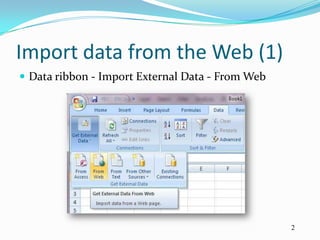
 Data ribbon - Import External Data - From Web


                                                  2
Import data from the Web (2)
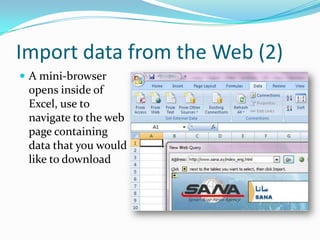
 A mini-browser
 opens inside of
 Excel, use to
 navigate to the web
 page containing
 data that you would
 like to download
Import data from the Web (3)
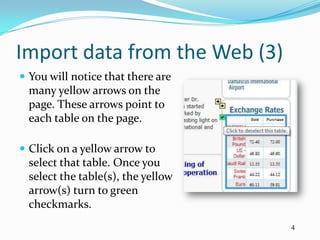
 You will notice that there are
  many yellow arrows on the
  page. These arrows point to
  each table on the page.

 Click on a yellow arrow to
  select that table. Once you
  select the table(s), the yellow
  arrow(s) turn to green
  checkmarks.
                                    4
Import data from the Web (4)
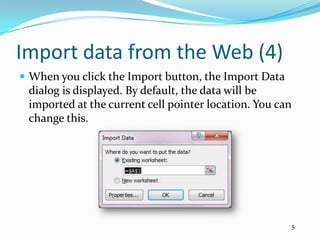
 When you click the Import button, the Import Data
 dialog is displayed. By default, the data will be
 imported at the current cell pointer location. You can
 change this.


                                                      5
Import data from the Web (5)
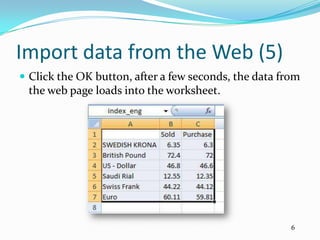
 Click the OK button, after a few seconds, the data from
 the web page loads into the worksheet.


                                                       6
Import data from the Web (6)
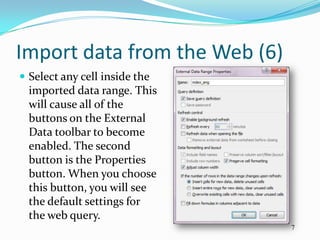
 Select any cell inside the
  imported data range. This
  will cause all of the
  buttons on the External
  Data toolbar to become
  enabled. The second
  button is the Properties
  button. When you choose
  this button, you will see
  the default settings for
  the web query.
                               7
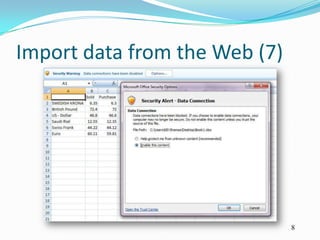
Import data from the Web (7)


                               8
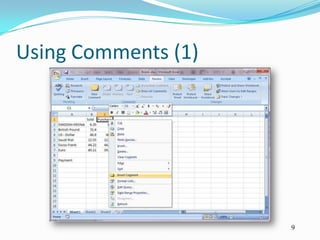
Using Comments (1)


                     9
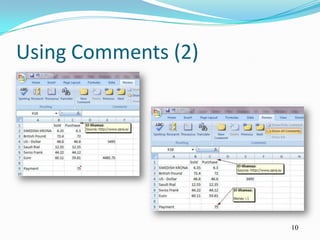
Using Comments (2)


                     10
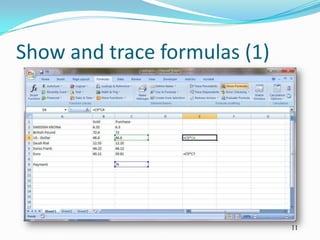
Show and trace formulas (1)


                              11
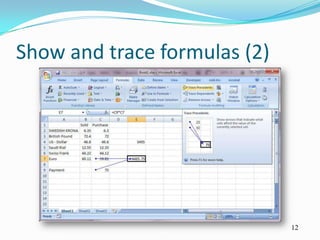
Show and trace formulas (2)


                              12
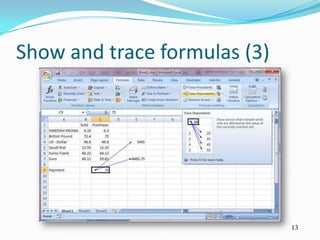
Show and trace formulas (3)


                              13
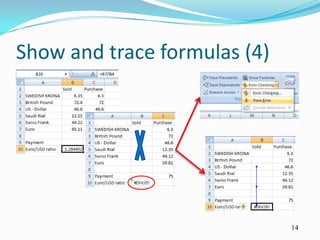
Show and trace formulas (4)


                              14
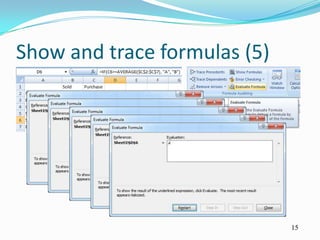
Show and trace formulas (5)


                              15
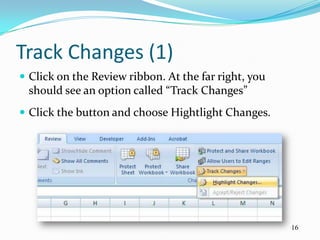
Track Changes (1)
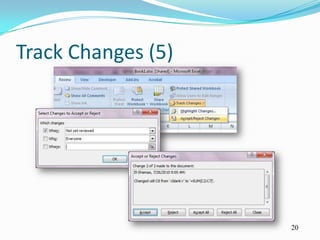
 Click on the Review ribbon. At the far right, you
 should see an option called “Track Changes”
 Click the button and choose Hightlight Changes.


                                                      16
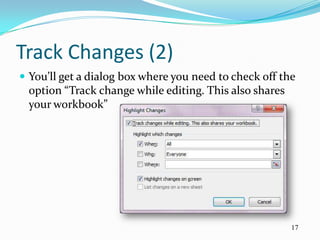
Track Changes (2)
 You’ll get a dialog box where you need to check off the
 option “Track change while editing. This also shares
 your workbook”


                                                        17
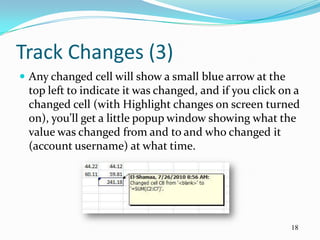
Track Changes (3)
 Any changed cell will show a small blue arrow at the
 top left to indicate it was changed, and if you click on a
 changed cell (with Highlight changes on screen turned
 on), you’ll get a little popup window showing what the
 value was changed from and to and who changed it
 (account username) at what time.


                                                         18
Track Changes (4)
 So you can now hide the changes on the screen by not
  checking the box, then send out your file to everyone
  who has to make changes to it, and when you get it
  back, just go to Track Changes and Highlight Changes
  and recheck the box!
 After this, you’ll need to either approve or reject the
  changes. So even though someone has made a change,
  it does not necessarily have to be permanent. Simply
  click on Track Changes and choose “Accept/Reject
  Changes”.
                                                            19
Track Changes (5)


                    20
Protect Excel Files (1)
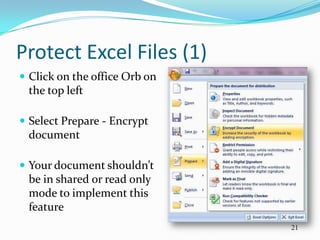
 Click on the office Orb on
 the top left

 Select Prepare - Encrypt
 document

 Your document shouldn’t
 be in shared or read only
 mode to implement this
 feature
                               21
Protect Excel Files (2)
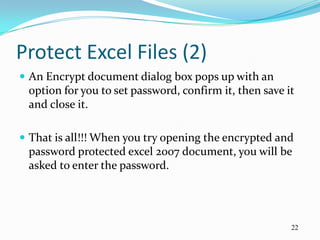
 An Encrypt document dialog box pops up with an
 option for you to set password, confirm it, then save it
 and close it.

 That is all!!! When you try opening the encrypted and
 password protected excel 2007 document, you will be
 asked to enter the password.


                                                        22
Digital Signatures (1)
 In Microsoft Office Excel 2003 and in later versions of
 Excel, you can digitally sign a workbook. This ensures
 that you were the last person to make changes to that
 workbook. Note that you have to stop track changes
 (Share mode)

 You can view and edit signed Excel workbooks,
 although you cannot modify and save a signed
 workbook without invalidating the signature.

                                                        23
Digital Signatures (2)
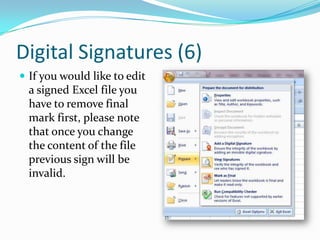
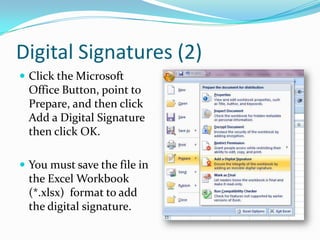
 Click the Microsoft
 Office Button, point to
 Prepare, and then click
 Add a Digital Signature
 then click OK.

 You must save the file in
 the Excel Workbook
 (*.xlsx) format to add
 the digital signature.
Digital Signatures (3)
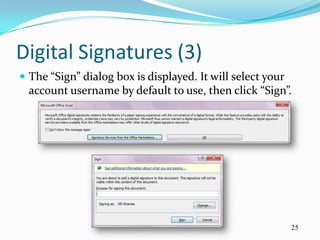
 The “Sign” dialog box is displayed. It will select your
  account username by default to use, then click “Sign”.


                                                            25
Digital Signatures (4)
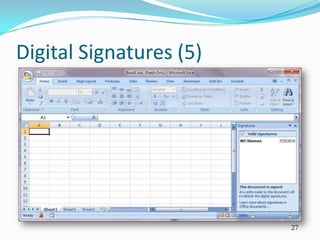
 After you complete the necessary steps, your Excel
 workbook is now signed.

 When you close and then reopen the signed
 workbook, the Excel title bar will display the words
 [Read-Only] (in brackets) after the workbook name.
 Additionally, the digital ID icon appears in the status
 bar, and the Signatures task pane appears to indicate
 that a digital signature has been added to the
 workbook.
                                                           26
Digital Signatures (5)


                         27
Digital Signatures (6)
 If you would like to edit
  a signed Excel file you
  have to remove final
  mark first, please note
  that once you change
  the content of the file
  previous sign will be
  invalid.
Thank You


            29
                 29

Advanced Excel, Day 5

  • 1.
  • 2.
    Import data fromthe Web (1)  Data ribbon - Import External Data - From Web 2
  • 3.
    Import data fromthe Web (2)  A mini-browser opens inside of Excel, use to navigate to the web page containing data that you would like to download
  • 4.
    Import data fromthe Web (3)  You will notice that there are many yellow arrows on the page. These arrows point to each table on the page.  Click on a yellow arrow to select that table. Once you select the table(s), the yellow arrow(s) turn to green checkmarks. 4
  • 5.
    Import data fromthe Web (4)  When you click the Import button, the Import Data dialog is displayed. By default, the data will be imported at the current cell pointer location. You can change this. 5
  • 6.
    Import data fromthe Web (5)  Click the OK button, after a few seconds, the data from the web page loads into the worksheet. 6
  • 7.
    Import data fromthe Web (6)  Select any cell inside the imported data range. This will cause all of the buttons on the External Data toolbar to become enabled. The second button is the Properties button. When you choose this button, you will see the default settings for the web query. 7
  • 8.
    Import data fromthe Web (7) 8
  • 9.
  • 10.
  • 11.
    Show and traceformulas (1) 11
  • 12.
    Show and traceformulas (2) 12
  • 13.
    Show and traceformulas (3) 13
  • 14.
    Show and traceformulas (4) 14
  • 15.
    Show and traceformulas (5) 15
  • 16.
    Track Changes (1) Click on the Review ribbon. At the far right, you should see an option called “Track Changes”  Click the button and choose Hightlight Changes. 16
  • 17.
    Track Changes (2) You’ll get a dialog box where you need to check off the option “Track change while editing. This also shares your workbook” 17
  • 18.
    Track Changes (3) Any changed cell will show a small blue arrow at the top left to indicate it was changed, and if you click on a changed cell (with Highlight changes on screen turned on), you’ll get a little popup window showing what the value was changed from and to and who changed it (account username) at what time. 18
  • 19.
    Track Changes (4) So you can now hide the changes on the screen by not checking the box, then send out your file to everyone who has to make changes to it, and when you get it back, just go to Track Changes and Highlight Changes and recheck the box!  After this, you’ll need to either approve or reject the changes. So even though someone has made a change, it does not necessarily have to be permanent. Simply click on Track Changes and choose “Accept/Reject Changes”. 19
  • 20.
  • 21.
    Protect Excel Files(1)  Click on the office Orb on the top left  Select Prepare - Encrypt document  Your document shouldn’t be in shared or read only mode to implement this feature 21
  • 22.
    Protect Excel Files(2)  An Encrypt document dialog box pops up with an option for you to set password, confirm it, then save it and close it.  That is all!!! When you try opening the encrypted and password protected excel 2007 document, you will be asked to enter the password. 22
  • 23.
    Digital Signatures (1) In Microsoft Office Excel 2003 and in later versions of Excel, you can digitally sign a workbook. This ensures that you were the last person to make changes to that workbook. Note that you have to stop track changes (Share mode)  You can view and edit signed Excel workbooks, although you cannot modify and save a signed workbook without invalidating the signature. 23
  • 24.
    Digital Signatures (2) Click the Microsoft Office Button, point to Prepare, and then click Add a Digital Signature then click OK.  You must save the file in the Excel Workbook (*.xlsx) format to add the digital signature.
  • 25.
    Digital Signatures (3) The “Sign” dialog box is displayed. It will select your account username by default to use, then click “Sign”. 25
  • 26.
    Digital Signatures (4) After you complete the necessary steps, your Excel workbook is now signed.  When you close and then reopen the signed workbook, the Excel title bar will display the words [Read-Only] (in brackets) after the workbook name. Additionally, the digital ID icon appears in the status bar, and the Signatures task pane appears to indicate that a digital signature has been added to the workbook. 26
  • 27.
  • 28.
    Digital Signatures (6) If you would like to edit a signed Excel file you have to remove final mark first, please note that once you change the content of the file previous sign will be invalid.
  • 29.

Editor's Notes

  • #13 Ctrl + [Ctrl + Shift + [
  • #14 Ctrl + ]Ctrl + Shift + ]
  • #18 You have several options here for When , Who, and Where. For When, All means every change will be highlighted. You also have the option of highlighting changes from the last time you saved the document, since a specific date, or changes that have not yet been reviewed.If you select Who, you can choose to track changes made by anyone or changes made by everyone except you. The Where filter allows you to track changes only for a specific portion of the spreadsheet. Just click the button at the right and select the range of cells you want to keep track of.Finally, you can un-check the Highlight changes on screen option if you do not want others to know you are tracking changes. By default, once you start tracking and this option is selected, any changed cell will show a small arrow at the top left to indicate it was changed.
  • #22 Another microsoft excel dialog box pops up with the message "This document is both encrypted and password protected. The office Open XML Formats available in the 2007 release provide stronger encryption.Do you want to increase the security of this document by converting to an Office open XML format ?"If you want more stronger security, click Yes else click No in the above dialog box