Intro      Network path       Bootloader    Device model   Xen   Conclusion


        Securing your cloud with Xen’s advanced security
                            features

                                  George Dunlap


                          Brussels – February 2-3, 2013
Intro             Network path     Bootloader              Device model                Xen       Conclusion


Intro


              Xen is an enterprise-grade Type I hypervisor
              Built for the Cloud before it was called the Cloud
              A number of advanced security features
                      Driver domains, stub domains, FLASK, &c
              Most of them aren’t or can’t be turned on by default
              Although simple to use, sometimes seem complicated


  Brussels – February 2-3, 2013      Securing your cloud with Xen’s advanced security features       2 / 28
Intro             Network path    Bootloader              Device model                Xen       Conclusion


Goal


              Tools to think about security in Xen
              Know some key security features of Xen
              Equipped with the knowledge to get them working


  Brussels – February 2-3, 2013     Securing your cloud with Xen’s advanced security features       3 / 28
Intro             Network path     Bootloader              Device model                Xen       Conclusion


Outline


              Overview of the Xen architecture
              Brief introduction to principles of security analysis
              Consider some attack surfaces and Xen features we can use to
              mitigate them
                      Driver domains
                      pvgrub
                      stub domains
                      PV vs HVM
                      FLASK example policy


  Brussels – February 2-3, 2013      Securing your cloud with Xen’s advanced security features       4 / 28
Intro             Network path              Bootloader              Device model                Xen       Conclusion


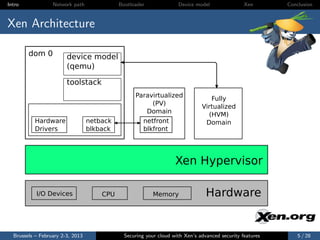
Xen Architecture

        dom 0           device model
                        (qemu)

                        toolstack
                                                  Paravirtualized                Fully
                                                       (PV)
                                                                              Virtualized
                                                     Domain                     (HVM)
           Hardware               netback           netfront                   Domain
           Drivers                blkback           blkfront


                                                                   Xen Hypervisor

           I/O Devices                CPU                 Memory                Hardware


  Brussels – February 2-3, 2013               Securing your cloud with Xen’s advanced security features       5 / 28
Intro             Network path       Bootloader              Device model                Xen       Conclusion


Security Overview


              Threat Model
                      Attacker can access network
                      Attacker controls one guest OS
              Security considerations
                      How much code is accessible?
                      What is the interface like? (e.g., pointers vs scalars)
                      Defense-in-depth


  Brussels – February 2-3, 2013        Securing your cloud with Xen’s advanced security features       6 / 28
Intro             Network path     Bootloader              Device model                Xen       Conclusion


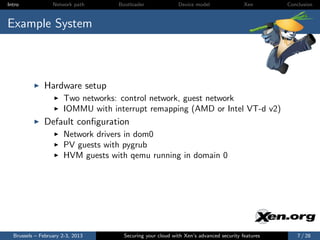
Example System


              Hardware setup
                      Two networks: control network, guest network
                      IOMMU with interrupt remapping (AMD or Intel VT-d v2)
              Default configuration
                      Network drivers in dom0
                      PV guests with pygrub
                      HVM guests with qemu running in domain 0


  Brussels – February 2-3, 2013      Securing your cloud with Xen’s advanced security features       7 / 28
Intro             Network path              Bootloader              Device model                Xen       Conclusion


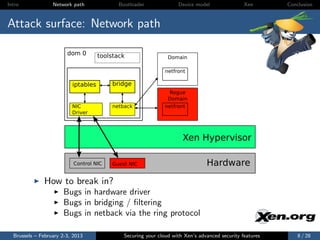
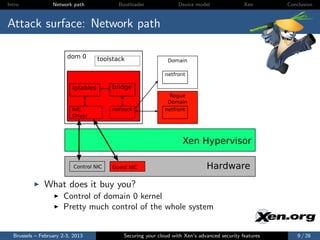
Attack surface: Network path

                        dom 0        toolstack                  Domain

                                                               netfront

                          iptables       bridge
                                                                Rogue
                                                                Domain
                          NIC            netback               netfront
                          Driver


                                                                      Xen Hypervisor

                           Control NIC   Guest NIC                              Hardware

              How to break in?
                      Bugs in hardware driver
                      Bugs in bridging / filtering
                      Bugs in netback via the ring protocol

  Brussels – February 2-3, 2013               Securing your cloud with Xen’s advanced security features       8 / 28
Intro             Network path              Bootloader              Device model                Xen       Conclusion


Attack surface: Network path

                        dom 0        toolstack                  Domain

                                                               netfront

                          iptables       bridge
                                                                Rogue
                                                                Domain
                          NIC            netback               netfront
                          Driver


                                                                      Xen Hypervisor

                           Control NIC   Guest NIC                              Hardware

              What does it buy you?
                      Control of domain 0 kernel
                      Pretty much control of the whole system


  Brussels – February 2-3, 2013               Securing your cloud with Xen’s advanced security features       9 / 28
Intro             Network path             Bootloader              Device model                Xen       Conclusion


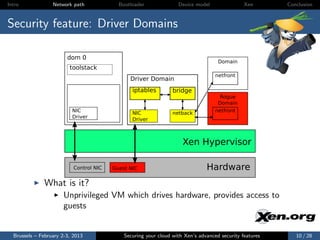
Security feature: Driver Domains

                        dom 0
                                                                                    Domain
                         toolstack
                                                                                   netfront
                                               Driver Domain
                                                iptables         bridge
                                                                                    Rogue
                                                                                    Domain
                          NIC                                                      netfront
                                                NIC              netback
                          Driver                Driver


                                                                     Xen Hypervisor

                           Control NIC   Guest NIC                             Hardware
              What is it?
                      Unprivileged VM which drives hardware, provides access to
                      guests


  Brussels – February 2-3, 2013              Securing your cloud with Xen’s advanced security features      10 / 28
Intro             Network path             Bootloader              Device model                Xen       Conclusion


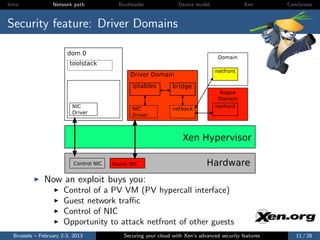
Security feature: Driver Domains

                        dom 0
                                                                                    Domain
                         toolstack
                                                                                   netfront
                                               Driver Domain
                                                iptables         bridge
                                                                                    Rogue
                                                                                    Domain
                          NIC                                                      netfront
                                                NIC              netback
                          Driver                Driver


                                                                     Xen Hypervisor

                           Control NIC   Guest NIC                             Hardware
              Now an exploit buys you:
                      Control of a PV VM (PV hypercall interface)
                      Guest network traffic
                      Control of NIC
                      Opportunity to attack netfront of other guests
  Brussels – February 2-3, 2013              Securing your cloud with Xen’s advanced security features      11 / 28
Intro             Network path      Bootloader              Device model                Xen       Conclusion


HowTo: Driver Domains

              Create a VM with appropriate drivers
                      Any distro supporting dom0 should do
              Install the xen-related hotplug scripts
                      Just installing the xen tools in the VM is usually good enough
              Give the VM access to the physical NIC with PCI pass-through
              Configure the network topology in the driver domain
                      Just like you would for dom0
              Configure the guest vif to use the new domain ID
                      Add backend=domnet to vif declaration

        vif = [ ’type=pv, bridge=xenbr0, backend=domnet’ ]

              http://wiki.xen.org/wiki/Driver Domain


  Brussels – February 2-3, 2013       Securing your cloud with Xen’s advanced security features      12 / 28
Intro             Network path            Bootloader              Device model                Xen       Conclusion


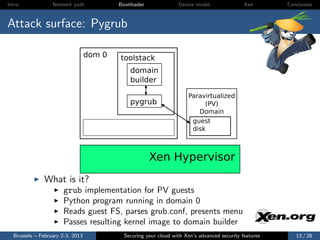
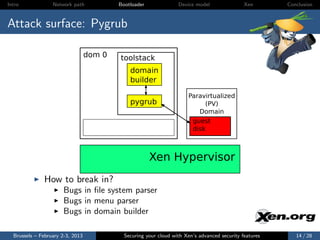
Attack surface: Pygrub

                                  dom 0   toolstack
                                              domain
                                              builder

                                                                      Paravirtualized
                                              pygrub                       (PV)
                                                                         Domain
                                                                       guest
                                                                       disk


                                                       Xen Hypervisor
              What is it?
                      grub implementation for PV guests
                      Python program running in domain 0
                      Reads guest FS, parses grub.conf, presents menu
                      Passes resulting kernel image to domain builder
  Brussels – February 2-3, 2013             Securing your cloud with Xen’s advanced security features      13 / 28
Intro             Network path            Bootloader              Device model                Xen       Conclusion


Attack surface: Pygrub

                                  dom 0   toolstack
                                              domain
                                              builder

                                                                      Paravirtualized
                                              pygrub                       (PV)
                                                                         Domain
                                                                       guest
                                                                       disk


                                                       Xen Hypervisor
              How to break in?
                      Bugs in file system parser
                      Bugs in menu parser
                      Bugs in domain builder

  Brussels – February 2-3, 2013             Securing your cloud with Xen’s advanced security features      14 / 28
Intro             Network path             Bootloader              Device model                Xen       Conclusion


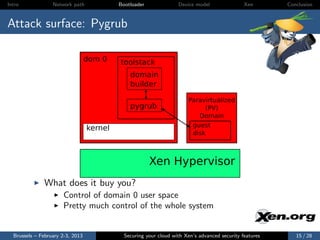
Attack surface: Pygrub

                                  dom 0    toolstack
                                               domain
                                               builder

                                                                       Paravirtualized
                                               pygrub                       (PV)
                                                                          Domain
                                  kernel                                guest
                                                                        disk


                                                        Xen Hypervisor
              What does it buy you?
                      Control of domain 0 user space
                      Pretty much control of the whole system


  Brussels – February 2-3, 2013              Securing your cloud with Xen’s advanced security features      15 / 28
Intro             Network path             Bootloader              Device model                Xen       Conclusion


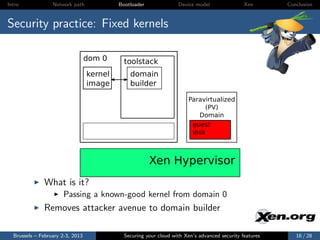
Security practice: Fixed kernels

                                  dom 0      toolstack
                                  kernel       domain
                                  image        builder

                                                                       Paravirtualized
                                                                            (PV)
                                                                          Domain
                                                                        guest
                                                                        disk


                                                        Xen Hypervisor
              What is it?
                      Passing a known-good kernel from domain 0
              Removes attacker avenue to domain builder

  Brussels – February 2-3, 2013              Securing your cloud with Xen’s advanced security features      16 / 28
Intro             Network path             Bootloader              Device model                Xen       Conclusion


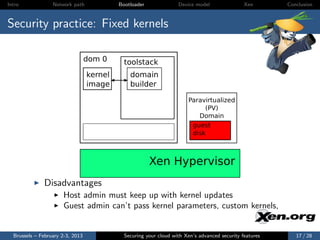
Security practice: Fixed kernels

                                  dom 0      toolstack
                                  kernel       domain
                                  image        builder

                                                                       Paravirtualized
                                                                            (PV)
                                                                          Domain
                                                                        guest
                                                                        disk


                                                        Xen Hypervisor
              Disadvantages
                      Host admin must keep up with kernel updates
                      Guest admin can’t pass kernel parameters, custom kernels,


  Brussels – February 2-3, 2013              Securing your cloud with Xen’s advanced security features      17 / 28
Intro             Network path            Bootloader              Device model                Xen       Conclusion


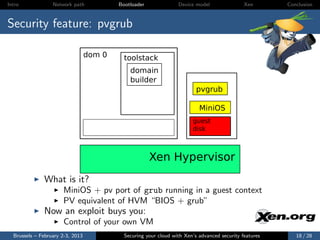
Security feature: pvgrub

                                  dom 0     toolstack
                                              domain
                                              builder
                                                                          pvgrub

                                                                           MiniOS
                                                                        guest
                                                                        disk


                                                       Xen Hypervisor
              What is it?
                      MiniOS + pv port of grub running in a guest context
                      PV equivalent of HVM “BIOS + grub”
              Now an exploit buys you:
                      Control of your own VM
  Brussels – February 2-3, 2013             Securing your cloud with Xen’s advanced security features      18 / 28
Intro             Network path     Bootloader              Device model                Xen       Conclusion


HowTo: pvgrub


              Make sure that you have the pvgrub image
                      pvgrub-$ARCH.gz
                      Normally lives in /usr/lib/xen/boot
                      Included in Fedora Xen packages
                      Debian-based: need to build yourself
              Use appropriate pvgrub as bootloader in guest config

        kernel="/usr/lib/xen/boot/pvgrub-x86_32.gz"

              http://wiki.xen.org/wiki/Pvgrub


  Brussels – February 2-3, 2013      Securing your cloud with Xen’s advanced security features      19 / 28
Intro             Network path      Bootloader              Device model                Xen       Conclusion


Attack surface: Device model (qemu)


              How to break in?
                      Bugs in NIC emulator parsing packets
                      Bugs in emulation of virtual devices
              What does it buy you?
                      Domain 0 privileged userspace
                      Pretty much control of the whole system


  Brussels – February 2-3, 2013       Securing your cloud with Xen’s advanced security features      20 / 28
Intro             Network path      Bootloader              Device model                Xen       Conclusion


Security feature: qemu stub domains


              What is it?
                      Stub domain: a small “service” domain running just one
                      application
                      qemu stub domain: run each qemu in its own domain
              Now an exploit buys you:
                      Control of the stubom VM
                      ...which we assume you control


  Brussels – February 2-3, 2013       Securing your cloud with Xen’s advanced security features      21 / 28
Intro             Network path     Bootloader              Device model                Xen       Conclusion


HowTo: qemu stub domains


              Make sure that you have the pvgrub image:
                      ioemu-$ARCH.gz
                      Normally lives in /usr/lib/xen/boot
                      Included in Fedora Xen packages
                      Debian-based: need to build yourself
              Specify stub domains in your guest config

        device_model_stubdomain_override = 1

              http://wiki.xen.org/wiki/Device Model Stub Domains


  Brussels – February 2-3, 2013      Securing your cloud with Xen’s advanced security features      22 / 28
Intro             Network path        Bootloader              Device model                Xen       Conclusion


Attack Surface: Xen


              PV guests
                      PV Hypercalls
              HVM guests
                      HVM hypercalls (Subset of PV hypercalls)
                      Instruction emulation (MMIO, shadow pagetables)
                      Emulated platform devices: APIC, HPET, PIT
                      Nested virtualization
              Security practice: Use PV VMs


  Brussels – February 2-3, 2013         Securing your cloud with Xen’s advanced security features      23 / 28
Intro             Network path       Bootloader              Device model                Xen       Conclusion


Security feature: FLASK example policy

              What is FLASK?
                      Xen Security Module (XSM): Xen equivalent of LSM
                      FLASK: Framework for XSM developed by NSA
                      Xen Equivalent of SELinux
                      Uses same concepts, tools as SELinux
                      Allows a policy to restrict hypercalls
              What can FLASK do?
                      Basic: Restricts hypercalls to those needed by a particular
                      guest
                      Advanced: Allows more fine-grained granting of privileges
              FLASK example policy
                      This contains example roles for dom0, domU, stub domains,
                      driver domains, &c


  Brussels – February 2-3, 2013        Securing your cloud with Xen’s advanced security features      24 / 28
Intro             Network path    Bootloader              Device model                Xen       Conclusion


HowTo: Use the example FLASK policy


              Build Xen with XSM enabled
              Build the example policy
              Add the appropriate label to guest config files
                      seclabel=[foo]
                      stubdom label=[foo]
              WARNING: In 4.2, the example policy not extensively tested.
              Use with care!
              http://wiki.xen.org/wiki/Xen Security Modules : XSM-
              FLASK


  Brussels – February 2-3, 2013     Securing your cloud with Xen’s advanced security features      25 / 28
Intro             Network path     Bootloader                Device model                Xen       Conclusion


Outline


              Overview of the Xen architecture
              Brief introduction to principles of security analysis
              Consider some attack surfaces and Xen features we can use to
              mitigate them
                      Driver domains
                      pvgrub
                      stub domains
                      PV vs HVM
              Experimental: Example policy for FLASK


  Brussels – February 2-3, 2013        Securing your cloud with Xen’s advanced security features      26 / 28
Intro             Network path    Bootloader              Device model                Xen       Conclusion


Goal


              Tools to think about security in Xen
              Know some key security features of Xen
              Equipped with the knowledge to get them working


  Brussels – February 2-3, 2013     Securing your cloud with Xen’s advanced security features      27 / 28
Intro             Network path    Bootloader              Device model                Xen       Conclusion


Questions


                                         Questions?

        More info at http://wiki.xen.org/wiki/Securing Xen
        Check out our blog: http://blog.xen.org/


  Brussels – February 2-3, 2013     Securing your cloud with Xen’s advanced security features      28 / 28

Securing your cloud with Xen's advanced security features

  • 1.
    Intro Network path Bootloader Device model Xen Conclusion Securing your cloud with Xen’s advanced security features George Dunlap Brussels – February 2-3, 2013
  • 2.
    Intro Network path Bootloader Device model Xen Conclusion Intro Xen is an enterprise-grade Type I hypervisor Built for the Cloud before it was called the Cloud A number of advanced security features Driver domains, stub domains, FLASK, &c Most of them aren’t or can’t be turned on by default Although simple to use, sometimes seem complicated Brussels – February 2-3, 2013 Securing your cloud with Xen’s advanced security features 2 / 28
  • 3.
    Intro Network path Bootloader Device model Xen Conclusion Goal Tools to think about security in Xen Know some key security features of Xen Equipped with the knowledge to get them working Brussels – February 2-3, 2013 Securing your cloud with Xen’s advanced security features 3 / 28
  • 4.
    Intro Network path Bootloader Device model Xen Conclusion Outline Overview of the Xen architecture Brief introduction to principles of security analysis Consider some attack surfaces and Xen features we can use to mitigate them Driver domains pvgrub stub domains PV vs HVM FLASK example policy Brussels – February 2-3, 2013 Securing your cloud with Xen’s advanced security features 4 / 28
  • 5.
    Intro Network path Bootloader Device model Xen Conclusion Xen Architecture dom 0 device model (qemu) toolstack Paravirtualized Fully (PV) Virtualized Domain (HVM) Hardware netback netfront Domain Drivers blkback blkfront Xen Hypervisor I/O Devices CPU Memory Hardware Brussels – February 2-3, 2013 Securing your cloud with Xen’s advanced security features 5 / 28
  • 6.
    Intro Network path Bootloader Device model Xen Conclusion Security Overview Threat Model Attacker can access network Attacker controls one guest OS Security considerations How much code is accessible? What is the interface like? (e.g., pointers vs scalars) Defense-in-depth Brussels – February 2-3, 2013 Securing your cloud with Xen’s advanced security features 6 / 28
  • 7.
    Intro Network path Bootloader Device model Xen Conclusion Example System Hardware setup Two networks: control network, guest network IOMMU with interrupt remapping (AMD or Intel VT-d v2) Default configuration Network drivers in dom0 PV guests with pygrub HVM guests with qemu running in domain 0 Brussels – February 2-3, 2013 Securing your cloud with Xen’s advanced security features 7 / 28
  • 8.
    Intro Network path Bootloader Device model Xen Conclusion Attack surface: Network path dom 0 toolstack Domain netfront iptables bridge Rogue Domain NIC netback netfront Driver Xen Hypervisor Control NIC Guest NIC Hardware How to break in? Bugs in hardware driver Bugs in bridging / filtering Bugs in netback via the ring protocol Brussels – February 2-3, 2013 Securing your cloud with Xen’s advanced security features 8 / 28
  • 9.
    Intro Network path Bootloader Device model Xen Conclusion Attack surface: Network path dom 0 toolstack Domain netfront iptables bridge Rogue Domain NIC netback netfront Driver Xen Hypervisor Control NIC Guest NIC Hardware What does it buy you? Control of domain 0 kernel Pretty much control of the whole system Brussels – February 2-3, 2013 Securing your cloud with Xen’s advanced security features 9 / 28
  • 10.
    Intro Network path Bootloader Device model Xen Conclusion Security feature: Driver Domains dom 0 Domain toolstack netfront Driver Domain iptables bridge Rogue Domain NIC netfront NIC netback Driver Driver Xen Hypervisor Control NIC Guest NIC Hardware What is it? Unprivileged VM which drives hardware, provides access to guests Brussels – February 2-3, 2013 Securing your cloud with Xen’s advanced security features 10 / 28
  • 11.
    Intro Network path Bootloader Device model Xen Conclusion Security feature: Driver Domains dom 0 Domain toolstack netfront Driver Domain iptables bridge Rogue Domain NIC netfront NIC netback Driver Driver Xen Hypervisor Control NIC Guest NIC Hardware Now an exploit buys you: Control of a PV VM (PV hypercall interface) Guest network traffic Control of NIC Opportunity to attack netfront of other guests Brussels – February 2-3, 2013 Securing your cloud with Xen’s advanced security features 11 / 28
  • 12.
    Intro Network path Bootloader Device model Xen Conclusion HowTo: Driver Domains Create a VM with appropriate drivers Any distro supporting dom0 should do Install the xen-related hotplug scripts Just installing the xen tools in the VM is usually good enough Give the VM access to the physical NIC with PCI pass-through Configure the network topology in the driver domain Just like you would for dom0 Configure the guest vif to use the new domain ID Add backend=domnet to vif declaration vif = [ ’type=pv, bridge=xenbr0, backend=domnet’ ] http://wiki.xen.org/wiki/Driver Domain Brussels – February 2-3, 2013 Securing your cloud with Xen’s advanced security features 12 / 28
  • 13.
    Intro Network path Bootloader Device model Xen Conclusion Attack surface: Pygrub dom 0 toolstack domain builder Paravirtualized pygrub (PV) Domain guest disk Xen Hypervisor What is it? grub implementation for PV guests Python program running in domain 0 Reads guest FS, parses grub.conf, presents menu Passes resulting kernel image to domain builder Brussels – February 2-3, 2013 Securing your cloud with Xen’s advanced security features 13 / 28
  • 14.
    Intro Network path Bootloader Device model Xen Conclusion Attack surface: Pygrub dom 0 toolstack domain builder Paravirtualized pygrub (PV) Domain guest disk Xen Hypervisor How to break in? Bugs in file system parser Bugs in menu parser Bugs in domain builder Brussels – February 2-3, 2013 Securing your cloud with Xen’s advanced security features 14 / 28
  • 15.
    Intro Network path Bootloader Device model Xen Conclusion Attack surface: Pygrub dom 0 toolstack domain builder Paravirtualized pygrub (PV) Domain kernel guest disk Xen Hypervisor What does it buy you? Control of domain 0 user space Pretty much control of the whole system Brussels – February 2-3, 2013 Securing your cloud with Xen’s advanced security features 15 / 28
  • 16.
    Intro Network path Bootloader Device model Xen Conclusion Security practice: Fixed kernels dom 0 toolstack kernel domain image builder Paravirtualized (PV) Domain guest disk Xen Hypervisor What is it? Passing a known-good kernel from domain 0 Removes attacker avenue to domain builder Brussels – February 2-3, 2013 Securing your cloud with Xen’s advanced security features 16 / 28
  • 17.
    Intro Network path Bootloader Device model Xen Conclusion Security practice: Fixed kernels dom 0 toolstack kernel domain image builder Paravirtualized (PV) Domain guest disk Xen Hypervisor Disadvantages Host admin must keep up with kernel updates Guest admin can’t pass kernel parameters, custom kernels, Brussels – February 2-3, 2013 Securing your cloud with Xen’s advanced security features 17 / 28
  • 18.
    Intro Network path Bootloader Device model Xen Conclusion Security feature: pvgrub dom 0 toolstack domain builder pvgrub MiniOS guest disk Xen Hypervisor What is it? MiniOS + pv port of grub running in a guest context PV equivalent of HVM “BIOS + grub” Now an exploit buys you: Control of your own VM Brussels – February 2-3, 2013 Securing your cloud with Xen’s advanced security features 18 / 28
  • 19.
    Intro Network path Bootloader Device model Xen Conclusion HowTo: pvgrub Make sure that you have the pvgrub image pvgrub-$ARCH.gz Normally lives in /usr/lib/xen/boot Included in Fedora Xen packages Debian-based: need to build yourself Use appropriate pvgrub as bootloader in guest config kernel="/usr/lib/xen/boot/pvgrub-x86_32.gz" http://wiki.xen.org/wiki/Pvgrub Brussels – February 2-3, 2013 Securing your cloud with Xen’s advanced security features 19 / 28
  • 20.
    Intro Network path Bootloader Device model Xen Conclusion Attack surface: Device model (qemu) How to break in? Bugs in NIC emulator parsing packets Bugs in emulation of virtual devices What does it buy you? Domain 0 privileged userspace Pretty much control of the whole system Brussels – February 2-3, 2013 Securing your cloud with Xen’s advanced security features 20 / 28
  • 21.
    Intro Network path Bootloader Device model Xen Conclusion Security feature: qemu stub domains What is it? Stub domain: a small “service” domain running just one application qemu stub domain: run each qemu in its own domain Now an exploit buys you: Control of the stubom VM ...which we assume you control Brussels – February 2-3, 2013 Securing your cloud with Xen’s advanced security features 21 / 28
  • 22.
    Intro Network path Bootloader Device model Xen Conclusion HowTo: qemu stub domains Make sure that you have the pvgrub image: ioemu-$ARCH.gz Normally lives in /usr/lib/xen/boot Included in Fedora Xen packages Debian-based: need to build yourself Specify stub domains in your guest config device_model_stubdomain_override = 1 http://wiki.xen.org/wiki/Device Model Stub Domains Brussels – February 2-3, 2013 Securing your cloud with Xen’s advanced security features 22 / 28
  • 23.
    Intro Network path Bootloader Device model Xen Conclusion Attack Surface: Xen PV guests PV Hypercalls HVM guests HVM hypercalls (Subset of PV hypercalls) Instruction emulation (MMIO, shadow pagetables) Emulated platform devices: APIC, HPET, PIT Nested virtualization Security practice: Use PV VMs Brussels – February 2-3, 2013 Securing your cloud with Xen’s advanced security features 23 / 28
  • 24.
    Intro Network path Bootloader Device model Xen Conclusion Security feature: FLASK example policy What is FLASK? Xen Security Module (XSM): Xen equivalent of LSM FLASK: Framework for XSM developed by NSA Xen Equivalent of SELinux Uses same concepts, tools as SELinux Allows a policy to restrict hypercalls What can FLASK do? Basic: Restricts hypercalls to those needed by a particular guest Advanced: Allows more fine-grained granting of privileges FLASK example policy This contains example roles for dom0, domU, stub domains, driver domains, &c Brussels – February 2-3, 2013 Securing your cloud with Xen’s advanced security features 24 / 28
  • 25.
    Intro Network path Bootloader Device model Xen Conclusion HowTo: Use the example FLASK policy Build Xen with XSM enabled Build the example policy Add the appropriate label to guest config files seclabel=[foo] stubdom label=[foo] WARNING: In 4.2, the example policy not extensively tested. Use with care! http://wiki.xen.org/wiki/Xen Security Modules : XSM- FLASK Brussels – February 2-3, 2013 Securing your cloud with Xen’s advanced security features 25 / 28
  • 26.
    Intro Network path Bootloader Device model Xen Conclusion Outline Overview of the Xen architecture Brief introduction to principles of security analysis Consider some attack surfaces and Xen features we can use to mitigate them Driver domains pvgrub stub domains PV vs HVM Experimental: Example policy for FLASK Brussels – February 2-3, 2013 Securing your cloud with Xen’s advanced security features 26 / 28
  • 27.
    Intro Network path Bootloader Device model Xen Conclusion Goal Tools to think about security in Xen Know some key security features of Xen Equipped with the knowledge to get them working Brussels – February 2-3, 2013 Securing your cloud with Xen’s advanced security features 27 / 28
  • 28.
    Intro Network path Bootloader Device model Xen Conclusion Questions Questions? More info at http://wiki.xen.org/wiki/Securing Xen Check out our blog: http://blog.xen.org/ Brussels – February 2-3, 2013 Securing your cloud with Xen’s advanced security features 28 / 28