The Open Source Xen Hypervisor Introduction to the Open Source Xen Hypervisor Todd Deshane and Patrick Wilbur  (Clarkson University) Stephen Spector (Citrix) June 22, 2008
Overview of the Day and Schedule Unit 1 : Virtualization and Xen Overview Morning Break Unit 2 : Installing, Configuring, and Basic Usage Lunch Unit 3 : Devices and Advanced Configuration Afternoon Break Unit 4 : Security, Admin Tools, and Performance
Unit 1: Virtualization and Xen Overview Unit 1
Unit 1: Virtualization and Xen Overview Why Virtualize? Potential Pitfalls Types of Virtualization Xen Background Hardware-Assisted Virtualization Overview Xen Architecture Xen LiveCD Demonstration
Why Virtualize? Consolidation of servers Support heterogeneous and legacy OSes Rapid deployment and provisioning Advantages Testing/debugging before going into production Recovery and backup Load balancing
Potential Pitfalls Hardware/software licensing complexities Added complexity per server More to lose with a single server failure Lack of IT staff with virtualization skills Security challenges Loss of deterministic hardware performance Mitigated with configuration
Types of Virtualization No Virtualization Operating system running on native hardware  Emulation Fully-emulate a hardware architecture Can be different than actual hardware architecture Unmodified guest OSes Examples: QEMU, Bochs Full Simulate the base hardware architecture Binary re-writing Hardware-assisted virtualization Unmodified guest OSes Examples: VMware, VirtualBox, QEMU + kqemu, MS Virtual PC, Parallels, Xen/KVM (hardware-assisted)
Types of Virtualization Para Abstracted base architecture Modified guest OSes Examples: Xen, UML, Lguest Operating System Level Shared kernel (and architecture), separate user spaces Homogeneous guest OSes Examples: OpenVZ, Linux-VServer, Solaris Containers, FreeBSD Jails
Xen Background Paravirtualization (PV) High performance (claim to fame) Full Virtualization With hardware support  Hardware Virtual Machine (HVM) Advantages Open source Standalone hypervisor Citrix Xen Server Virtual Iron Solaris xVM Oracle VM
Hardware-Assisted Virtualization IBM mainframe to commodity x86 Co-evolution of hardware and software x86 AMD/Intel AMD-V, Nested Page Tables (NPT) VT-x, VT-d, Extended Page Tables (EPT) Processor AMD-V, VT-x Memory Input/Output Memory Management Unit (IOMMU) NPT, EPT I/O Smart devices Virtualization-aware NICs, graphics cards, etc.
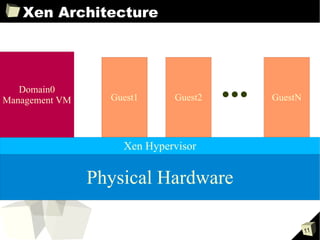
Xen Architecture Physical Hardware Xen Hypervisor Domain0 Management VM Guest1 Guest2 GuestN
Xen Hypervisor Role Thin, privileged abstraction layer Provides generic classes of devices CPU, memory, disk, network, etc. Scheduling
Domain0 Role Creates and manages guest VMs Interacts with the Xen hypervisor Xend (Xen daemon) xm commands Xenstore xenconsoled Abstraction for guest ttys Supplies device and I/O services Runs backend drivers Provides guest storage
Xenstore Overview Database of configuration information Used by Domain0 to access guest state Guest domain drivers can write to xenstore Reference: http://wiki.xensource.com/xenwiki/XenStoreReference
Xen LiveCD Demo xm list xm create xm shutdown xm reboot xm destroy xm pause xm unpause xm console
Unit 1: Virtualization and Xen Overview  Questions?
Morning Break Break Time
Unit 2: Installing, Configuring, Basic Use Unit 2
Unit 2: Installing, Configuring, Basic Use Hands-on Installation Demos Guest Installation Distro-specific Guest Installation Tools Interacting with Guests
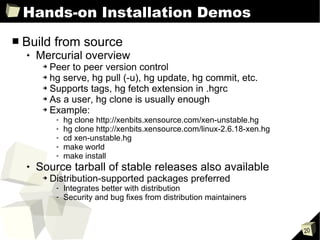
Hands-on Installation Demos Build from source Mercurial overview Peer to peer version control hg serve, hg pull (-u), hg update, hg commit, etc.  Supports tags, hg fetch extension in .hgrc As a user, hg clone is usually enough Example: hg clone http://xenbits.xensource.com/xen-unstable.hg  hg clone http://xenbits.xensource.com/linux-2.6.18-xen.hg  cd xen-unstable.hg make world  make install Source tarball of stable releases also available Distribution-supported packages preferred Integrates better with distribution Security and bug fixes from distribution maintainers
Open Source Distributions CentOS/Fedora Note: No Domain0 kernel in Fedora 9
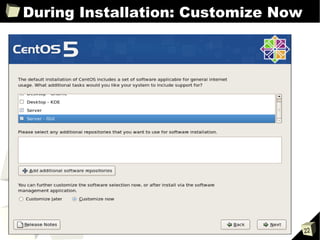
During Installation: Customize Now
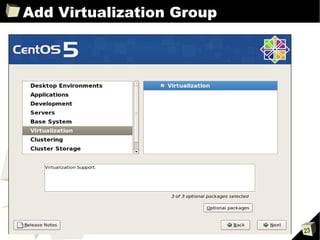
Add Virtualization Group
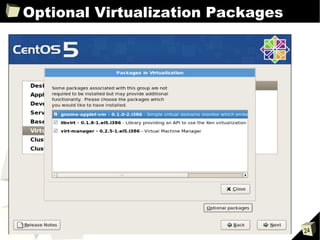
Optional Virtualization Packages
Open Source Distributions OpenSUSE
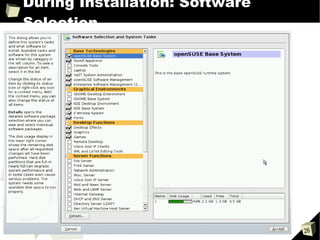
During Installation: Software Selection
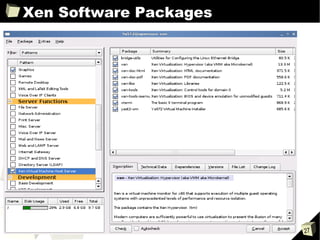
Xen Software Packages
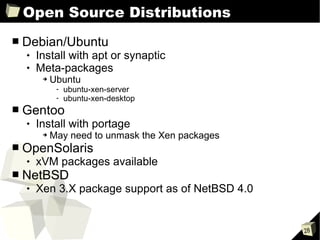
Open Source Distributions Debian/Ubuntu Install with apt or synaptic Meta-packages Ubuntu ubuntu-xen-server ubuntu-xen-desktop Gentoo Install with portage May need to unmask the Xen packages OpenSolaris xVM packages available NetBSD Xen 3.X package support as of NetBSD 4.0
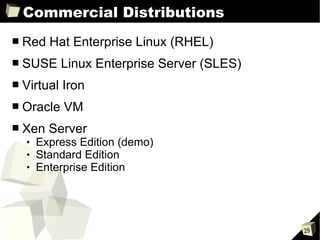
Commercial Distributions Red Hat Enterprise Linux (RHEL) SUSE Linux Enterprise Server (SLES) Virtual Iron Oracle VM Xen Server Express Edition (demo) Standard Edition Enterprise Edition
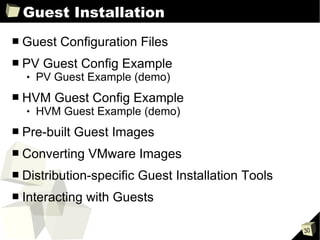
Guest Installation Guest Configuration Files PV Guest Config Example PV Guest Example (demo) HVM Guest Config Example HVM Guest Example (demo) Pre-built Guest Images Converting VMware Images Distribution-specific Guest Installation Tools Interacting with Guests
Guest Configuration Files Disk I/O and memory configuration parameters disk Array of 3-tuples Device to export Device as seen by guest Access permission (r, w) SCSI (sd) and IDE (hd) examples: disk = ['phy:sda,  sda , w', 'phy:/dev/cdrom, cdrom:hdc, r'] disk = ['tap:aio:hdb1,  hdb1 , w', 'phy:/dev/LV/disk1,  sda1 , w'] Xen Virtual Block Device (xvd) examples:  disk = ['phy:sda,  xvda , w', 'phy:/dev/cdrom, cdrom:hdc, r'] disk = ['tap:aio:hdb1,  xvdb1 , w', 'phy:/dev/LV/disk1,  xvda1 , w'] memory Integer in megabytes (MB) Example: memory = 512
Guest Configuration Files Network configuration parameters vif Array of virtual interface specifications Zero or more name=value entries for each interface Single interface examples vif=[' '] vif=['mac=00:16:3e:51:c2:b1'] vif=['mac=00:16:3e:36:a1:e9, bridge=eth0'] Multiple interface examples vif=[' ', ' '] vif= ['mac=00:16:3e:36:a1:e9, bridge=eth1', 'bridge=eth0'] dhcp, gateway, hostname, netmask
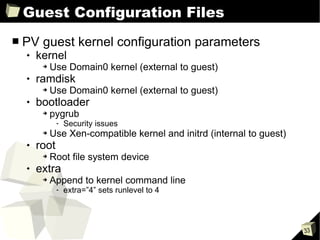
Guest Configuration Files PV guest kernel configuration parameters kernel  Use Domain0 kernel (external to guest) ramdisk Use Domain0 kernel (external to guest) bootloader pygrub Security issues Use Xen-compatible kernel and initrd (internal to guest) root Root file system device extra Append to kernel command line extra=”4” sets runlevel to 4
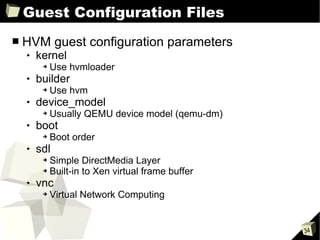
Guest Configuration Files HVM guest configuration parameters kernel Use hvmloader builder Use hvm device_model Usually QEMU device model (qemu-dm) boot Boot order  sdl Simple DirectMedia Layer Built-in to Xen virtual frame buffer vnc Virtual Network Computing
Guest Configuration Files Deprecated parameters cdrom Replaced by disk=['....cdrom:hdX...'] file:/ in disk=['file:/...'] Replaced with disk=['tap:aio:/...'] nics Better to simply use the vif array
PV Guest Config Example kernel="/boot/vmlinuz-2.6.24-16-xen" ramdisk="/boot/initrd.img-2.6.24-16-xen" disk=['tap:aio:/xen/para.partition,xvda1,w'] memory=512 vif=[' '] root="/dev/xvda1"
PV Guest Example Demo
HVM Guest Config Example HVM guest example kernel="/usr/lib64/xen/boot/hvmloader" builder="hvm" device_model = "/usr/lib64/xen/bin/qemu-dm" disk=['phy:/xen/images/hvm.disk,hda,w',   'phy:/dev/cdrom,hdc:cdrom,r'] sdl=1 boot="dc" memory=512 vif=['type=ioemu,bridge=eth0']
HVM Guest Example Demo
Pre-built Guest Images rpath.com jailtime.org virtualappliances.net jumpbox.com
Converting VMware Images qemu-img convert  (demo)
Distribution-specific Tools CentOS/Fedora Virtual Machine Manager (virt-manager) and rpmstrap OpenSUSE Yast Virtual Machine Management Debian/Ubuntu debootstrap and xen-tools Gentoo quickpkg and domi
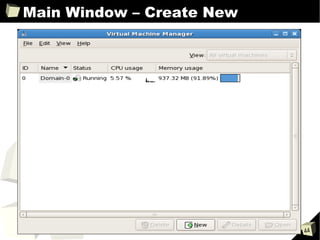
Distribution-specific Tools Virtual Machine Manager example
Main Window – Create New
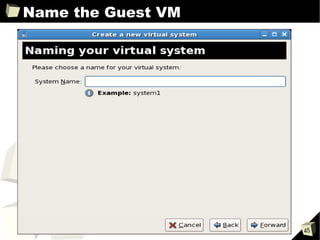
Name the Guest VM
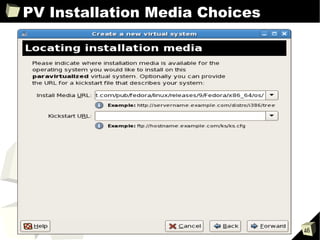
PV Installation Media Choices
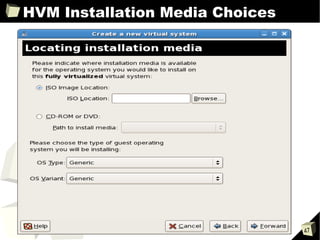
HVM Installation Media Choices
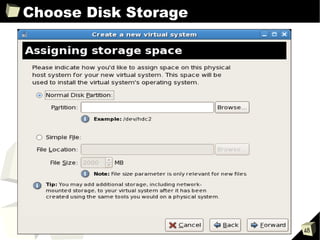
Choose Disk Storage
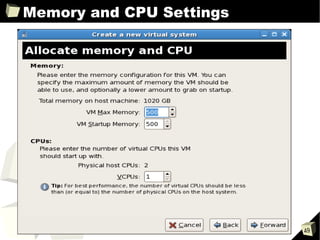
Memory and CPU Settings
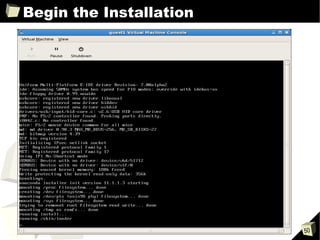
Begin the Installation
Distribution-specific Tools Yast Virtual Machine Management example
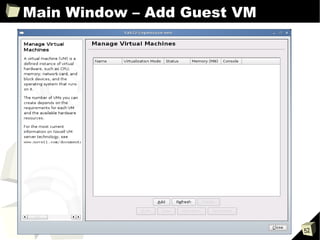
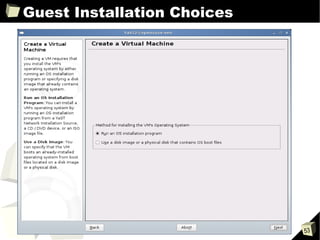
Main Window – Add Guest VM
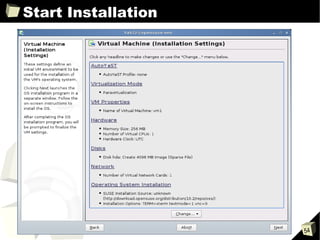
Guest Installation Choices
Start Installation
Interacting with Guests SSH VNC FreeNX Xen console  Xen virtual frame buffer (sdl) Remote Desktop (demo)
Unit 2: Installing, Configuring, Basic Use Questions?
Lunch Food Time
Unit 3: Devices and Advanced Config Unit 3
Unit 3: Devices and Advanced Config Quick LVM Refresher Network Storage Guest Image Files from Scratch Guest Save, Restore, and Live Migration Xen Device Models Network Configurations
Quick LVM Refresher Logical Volume Manager (LVM) Provides abstraction above block devices Allows the system administrator to: Span logical volumes across physical volumes Grow and shrink logical volumes Use various RAID levels Use copy-on-write Why LVM? Flexible Resize partitions (guest images) Density of logical volumes (guests) Feature-rich Copy-on-write snapshots Backup and recovery
Quick LVM Refresher Key terms physical volume  (PV) volume group  (VG) logical volume  (LV)
Quick LVM Refresher LVM commands pvcreate  – initializes a physical volume for LVM use # pvcreate /dev/sda3 /dev/sda4 /dev/hda1 vgcreate  – creates a new volume group # vgcreate xen_vg /dev/sda3 /dev/sda4 /dev/hda1 lvcreate  – creates a new logical volume # lvcreate -L 4G -n guest_partition xen_vg lvextend  – grows a logical volume # lvextend -L 5G /dev/xen_vg/guest_partition lvreduce  – shrinks a logical volume # lvreduce -L 3G /dev/xen_vg/guest_partition
Quick LVM Refresher LVM caveats When extending a logical volume Resize the underlying file system  after  the lvextend When reducing a logical volume Resize the underlying file system  before  the lvreduce Underlying file system support Resize larger or smaller Resize online (while the file system is mounted) File system-specific commands ext2/3 resize2fs e2fsck tune2fs
Network Storage ATA over Ethernet (AoE) Exports block devices over the network Lightweight Ethernet layer protocol No built-in security Internet Small Computer System Interface (iSCSI) Exports block devices over the network Scales with network bandwidth Network layer protocol Client and user-level security Network File System (NFS) Exports file system over the network Well-known and widely used Network layer protocol Known performance issues as root file system
Network Storage Network Block Device (NBD) Exports block device over the network Scales with network bandwidth Network layer protocol Not recommended as root file system Cluster file systems Advantages of block devices and file servers More difficult to setup and configure Examples: Global Network Block Device (GNBD) Distributed Replicated Block Device (DRBD)
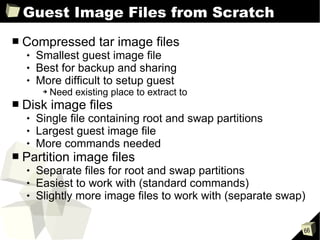
Guest Image Files from Scratch Compressed tar image files Smallest guest image file Best for backup and sharing More difficult to setup guest Need existing place to extract to Disk image files Single file containing root and swap partitions Largest guest image file More commands needed Partition image files Separate files for root and swap partitions Easiest to work with (standard commands) Slightly more image files to work with (separate swap)
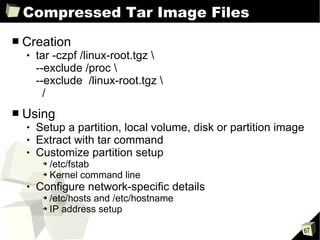
Compressed Tar Image Files Creation tar -czpf /linux-root.tgz \  --exclude /proc \  --exclude  /linux-root.tgz \  / Using Setup a partition, local volume, disk or partition image Extract with tar command Customize partition setup /etc/fstab Kernel command line Configure network-specific details /etc/hosts and /etc/hostname IP address setup
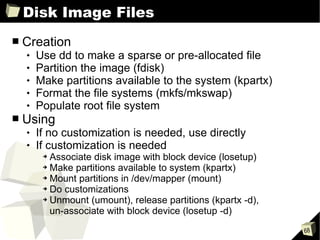
Disk Image Files Creation Use dd to make a sparse or pre-allocated file Partition the image (fdisk) Make partitions available to the system (kpartx) Format the file systems (mkfs/mkswap) Populate root file system Using If no customization is needed, use directly If customization is needed Associate disk image with block device (losetup) Make partitions available to system (kpartx) Mount partitions in /dev/mapper (mount) Do customizations Unmount (umount), release partitions (kpartx -d),  un-associate with block device (losetup -d)
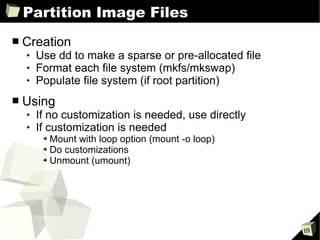
Partition Image Files Creation  Use dd to make a sparse or pre-allocated file Format each file system (mkfs/mkswap) Populate file system (if root partition) Using If no customization is needed, use directly If customization is needed Mount with loop option (mount -o loop) Do customizations Unmount (umount)
Guest Save, Restore, and Live Migration Guest save and restore Similar to hibernate and resume of physical PC Built-in Xen functionality and xm commands Guest relocation and migration Cold static relocation Warm static (regular) migration Live migration
Guest Save and Restore Save and restore commands xm save Pauses and suspends (hibernates) a guest Saves guest state to a file on disk xm restore Restores a guest's state from disk Resumes execution of guest
Guest Relocation Cold static relocation Image and config files need to be manually copied from source to target Domain0 Benefits Hardware maintenance with less downtime Backup of guest images Shared storage not required Limitations More manual process Guests should be shut down during copy
Guest Migration Warm static (regular) migration xm migrate Pauses a guest Transfers guest state across network to a new Domain0 Resumes guest on destination host Network connections to and from guest are  interrupted  and  probably will timeout Live migration xm migrate --live Copies a guest's state to a new Domain0 Repeatedly copies dirtied memory until transfer is complete Re-routes network connections Network connections to and from guest remain  active  and  uninterrupted
Guest Migration Benefits Load balancing Hardware maintenance with little or no downtime Relocation for various reasons Limitations Shared storage required Guests on same layer 2 network Sufficient resources needed on target machine CPU architectures need to match Some constraints on hypervisor version
Xen Device Models Split driver model QEMU device model No virtualization device support PCI passthrough demo
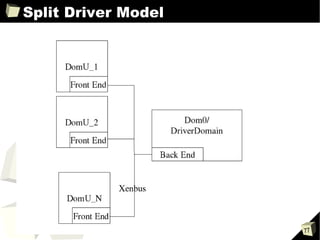
Split Driver Model Generic backends  Loaded in DriverDomain (often Domain0) Generic frontends (virtual devices) Loaded in guest domain Connects to corresponding backend driver Guests use standard Xen virtual device drivers Real device-specific drivers are in DriverDomain Devices are multiplexed to the guests
Split Driver Model
QEMU Device Model Provides emulation of devices Provides exclusive access illusion to the guests Used primarily for HVM guests device_model set to qemu-dm binary in guest config
No Virtualization Device Support Guests granted full access to specific PCI devices The actual device driver runs in the guest Benefits Highest performance for a device Useful when virtualization doesn't support a device System stability with buggy driver Limitations Not (yet) well-tested DriverDomain as backend can be tricky HVM guest support still limited Security considerations Without an IOMMU, guests can (direct memory access) DMA into main memory
PCI Passthrough Demo
Network Configurations Network Bridge Configuration Network Route Configuration Network NAT Configuration Host-only Networking Handling Multiple Interfaces Virtual Private Network (VPN)  Xen's vnet configuration
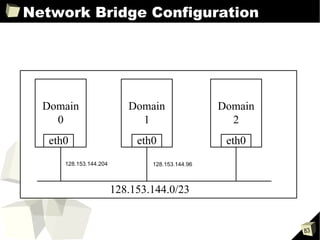
Network Bridge Configuration A bridge relays traffic based on MAC address Behavior of guests in bridge mode Appear transparently on the DriverDomain's network Access the network directly (through software bridge) Obtain IP address on the local Ethernet Configuration details Set network-bridge and vif-bridge in xend config Bridge is default guest configuration Can set bridge option manually Secure with ebtables MAC layer filtering (similar to iptables) Troubleshoot with brctl (bridge-utils package) brctl show
Network Bridge Configuration
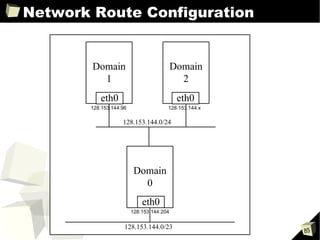
Network Route Configuration A router relays traffic based on IP address Behavior of guests in route mode Get routed to the Ethernet through the DriverDomain Access the network via DriverDomain Obtain IP address from DriverDomain Manually or with DHCP relay Configuration details Set network-route and vif-route in xend config Set IP, netmask, and gateway in guest config Secure with iptables ip_forwarding in DriverDomain Troubleshoot at IP layer Network traces and iptables configuration
Network Route Configuration
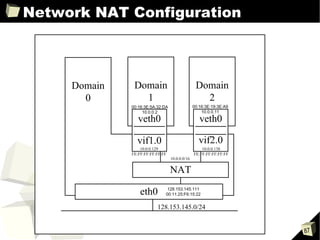
Network NAT Configuration A NAT gateway translates between a single globally routable IP to many internal IP addresses Behavior of guests in NAT mode Get NATed through the DriverDomain Access outgoing traffic transparently through NAT Are not visible from the outside (behind NAT router)  Obtain internal IP from software NAT router Configuration details Set network-nat and vif-nat in xend config Set IP, netmask, and gateway in guest config Secured with iptables Uses MASQUERADE chain Troubleshoot with internal and external traces
Network NAT Configuration
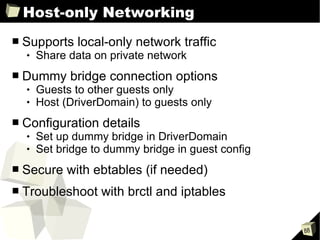
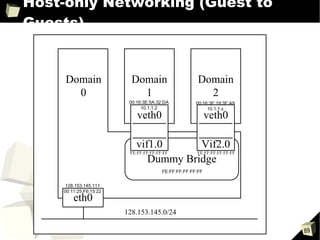
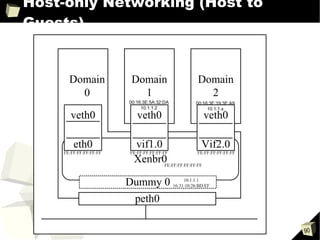
Host-only Networking Supports local-only network traffic Share data on private network  Dummy bridge connection options Guests to other guests only Host (DriverDomain) to guests only Configuration details Set up dummy bridge in DriverDomain Set bridge to dummy bridge in guest config Secure with ebtables (if needed) Troubleshoot with brctl and iptables
Host-only Networking (Guest to Guests)
Host-only Networking (Host to Guests)
Handling Multiple Interfaces Configure the purpose of NICs in xend config Specify bridge device in guest config Create custom scripts that call network-* scripts Set virtual device number (vifnum) Set network device (netdev) Set bridge device (bridge) Add custom network script in xend config Add vif entries and specify bridge in guest config
Virtual Private Network (VPN) Provides confidential communication on public network Illusion of VPN client on VPN server's local network Xen's vnet configuration  VPN implementation based on bridged network Installation methods Kernel module Userspace daemon in DriverDomain Not well-tested (yet)
Unit 3: Devices and Advanced Config Questions?
Afternoon Break Break Time
Unit 4: Security, Admin Tools, and Perf Unit 4
Unit 4: Security, Admin Tools, and Perf Security Basics Advanced Security: sHype and XSM Management APIs and Utilities Resources and Performance Future Directions
Security Basics Standard system security practices apply Secure Domain0 and Xen Secure guest domains normally
Security Basics Secure Xen Hypervisor Secure Hypervisor (sHype) Xen Security Modules (XSM) Secure Domain0 Minimize software packages Minimize running services and open ports Use firewall and intrusion detection systems Secure guests Similar to Domain0 – software, services, and ports IOMMU for direct PCI device pass-through Prevent insecure memory access through driver DMA
Advanced Security: sHype and XSM Secure Hypervisor (sHype) IBM Research project Role-Based Access Control (RBAC) Rights-based on privilege group Mandatory Access Control (MAC) Labeled objects Privilege groups given access to specific object labels Virtual Trusted Platform Module (vTPM) Enables remote attestation by digitally signing cryptographic hashes of software components “Attestation” means to affirm that some software or hardware is genuine or correct Xen Security Modules (XSM) National Security Agency (NSA) security framework Based on SELinux
Advanced Security: sHype Demo
Management APIs and Utilities APIs libvirt Xen Application Programming Interface (API) Xen Common Information Model (CIM) Management utilities virt-manager virsh XenMan (ConVirt) Enomalism Citrix XenServer Virtual Iron  IBM Director (IBM Virtualization Manager extension)
Management APIs and Utilities Demo
Resources and Performance Gauging performance xm top (demo) xentop Memory management xm mem-set xm mem-max Virtual CPU management xm vcpu-list xm vcpu-set xm vcpu-pin
Resources and Performance Xen scheduler Credit scheduler Weight and cap I/O schedulers Noop scheduler Deadline scheduler Anticipatory scheduler (as) Complete fair queuing scheduler (cfq)
Resources and Performance Macro benchmarks Disk I/O iozone, iometer, bonnie++ Network netperf, iperf, ttcp CPU SPECint, kernbench Web and database servers SPECweb, Hammerhead, Apache bench (ab) Database benchmarks Micro benchmarks and profiling xenoprof, xenperf, xentrace, xenmon virtbench Performance isolation suite (from Clarkson)
Future Directions Smart devices Virtualization-aware NICs, video cards Next generation hardware support AMD NPT, Intel EPT, etc. IOMMUs Trusted Platform Module (TPM) support Xen Domain0 inclusion in mainline Linux PV drivers for HVM guests PVGPL Citrix Novell Various others Microsoft enlightenments support
Further Information Useful resources Xen Community XenWiki Xen Mailing Lists Xen Bugzilla Xen Summit Xen source code Academic papers and conferences The Definitive Guide to the Xen Hypervisor  (book) Running Xen: A Hands-On Guide to the Art of Virtualization  (book)
Unit 4: Security, Admin Tools, and Perf Questions?
Acknowledgments “Running Xen” book co-authors Jeanna Matthews Eli M. Dow Wenjin Hu Jeremy Bongio Brendan Johnson Padmashree Apparao (Intel Research) Mark Williamson (University of Cambridge)
References http://runningxen.com http://runningxen.com/mailman/listinfo/readers_runningxen.com http://www.usenix.org/publications/login/2007-02/pdfs/hand.pdf http://wiki.xensource.com/xenwiki/XenStoreReference http://portal.acm.org/citation.cfm?id=1281700.1281706&coll=&dl=ACM  http://www.usenix.org/publications/login/2007-02/pdfs/griffin.pdf  http://passat.crhc.uiuc.edu/dasCMP/papers/dasCMP07/paper01.pdf http://ieeexplore.ieee.org/iel5/4299339/4299340/04299347.pdf?isnumber=4299340&prod=CNF&arnumber=4299347&arSt=2&ared=2&arAuthor=Apparao%2C+Padma%3B+Makineni%2C+Srihari%3B+Newell%2C+Don http://workspace.globus.org/vtdc06/VTDC_files/programdraft.htm http://xen.org/files/xensummit_fall07/28_PadmaApparao.pdf http://opensolaris.org/os/project/libmicro/ http://www.computerworld.com/action/article.do?command=viewArticleBasic&taxonomyName=Storage&articleId=9081798&taxonomyId=19 http://weblog.infoworld.com/daily/archives/2008/04/top_3_gotchas_o.html http://news.zdnet.com/2100-3513_22-6191965.html http://www.cl.cam.ac.uk/research/srg/netos/xen/readmes/hg-cheatsheet.txt http://www.cuddletech.com/blog/pivot/entry.php?id=469
The Open Source Xen Hypervisor Thank you for coming. Questions/Comments?

S4 xen hypervisor_20080622

  • 1.
    The Open SourceXen Hypervisor Introduction to the Open Source Xen Hypervisor Todd Deshane and Patrick Wilbur (Clarkson University) Stephen Spector (Citrix) June 22, 2008
  • 2.
    Overview of theDay and Schedule Unit 1 : Virtualization and Xen Overview Morning Break Unit 2 : Installing, Configuring, and Basic Usage Lunch Unit 3 : Devices and Advanced Configuration Afternoon Break Unit 4 : Security, Admin Tools, and Performance
  • 3.
    Unit 1: Virtualizationand Xen Overview Unit 1
  • 4.
    Unit 1: Virtualizationand Xen Overview Why Virtualize? Potential Pitfalls Types of Virtualization Xen Background Hardware-Assisted Virtualization Overview Xen Architecture Xen LiveCD Demonstration
  • 5.
    Why Virtualize? Consolidationof servers Support heterogeneous and legacy OSes Rapid deployment and provisioning Advantages Testing/debugging before going into production Recovery and backup Load balancing
  • 6.
    Potential Pitfalls Hardware/softwarelicensing complexities Added complexity per server More to lose with a single server failure Lack of IT staff with virtualization skills Security challenges Loss of deterministic hardware performance Mitigated with configuration
  • 7.
    Types of VirtualizationNo Virtualization Operating system running on native hardware Emulation Fully-emulate a hardware architecture Can be different than actual hardware architecture Unmodified guest OSes Examples: QEMU, Bochs Full Simulate the base hardware architecture Binary re-writing Hardware-assisted virtualization Unmodified guest OSes Examples: VMware, VirtualBox, QEMU + kqemu, MS Virtual PC, Parallels, Xen/KVM (hardware-assisted)
  • 8.
    Types of VirtualizationPara Abstracted base architecture Modified guest OSes Examples: Xen, UML, Lguest Operating System Level Shared kernel (and architecture), separate user spaces Homogeneous guest OSes Examples: OpenVZ, Linux-VServer, Solaris Containers, FreeBSD Jails
  • 9.
    Xen Background Paravirtualization(PV) High performance (claim to fame) Full Virtualization With hardware support Hardware Virtual Machine (HVM) Advantages Open source Standalone hypervisor Citrix Xen Server Virtual Iron Solaris xVM Oracle VM
  • 10.
    Hardware-Assisted Virtualization IBMmainframe to commodity x86 Co-evolution of hardware and software x86 AMD/Intel AMD-V, Nested Page Tables (NPT) VT-x, VT-d, Extended Page Tables (EPT) Processor AMD-V, VT-x Memory Input/Output Memory Management Unit (IOMMU) NPT, EPT I/O Smart devices Virtualization-aware NICs, graphics cards, etc.
  • 11.
    Xen Architecture PhysicalHardware Xen Hypervisor Domain0 Management VM Guest1 Guest2 GuestN
  • 12.
    Xen Hypervisor RoleThin, privileged abstraction layer Provides generic classes of devices CPU, memory, disk, network, etc. Scheduling
  • 13.
    Domain0 Role Createsand manages guest VMs Interacts with the Xen hypervisor Xend (Xen daemon) xm commands Xenstore xenconsoled Abstraction for guest ttys Supplies device and I/O services Runs backend drivers Provides guest storage
  • 14.
    Xenstore Overview Databaseof configuration information Used by Domain0 to access guest state Guest domain drivers can write to xenstore Reference: http://wiki.xensource.com/xenwiki/XenStoreReference
  • 15.
    Xen LiveCD Demoxm list xm create xm shutdown xm reboot xm destroy xm pause xm unpause xm console
  • 16.
    Unit 1: Virtualizationand Xen Overview Questions?
  • 17.
  • 18.
    Unit 2: Installing,Configuring, Basic Use Unit 2
  • 19.
    Unit 2: Installing,Configuring, Basic Use Hands-on Installation Demos Guest Installation Distro-specific Guest Installation Tools Interacting with Guests
  • 20.
    Hands-on Installation DemosBuild from source Mercurial overview Peer to peer version control hg serve, hg pull (-u), hg update, hg commit, etc. Supports tags, hg fetch extension in .hgrc As a user, hg clone is usually enough Example: hg clone http://xenbits.xensource.com/xen-unstable.hg hg clone http://xenbits.xensource.com/linux-2.6.18-xen.hg cd xen-unstable.hg make world make install Source tarball of stable releases also available Distribution-supported packages preferred Integrates better with distribution Security and bug fixes from distribution maintainers
  • 21.
    Open Source DistributionsCentOS/Fedora Note: No Domain0 kernel in Fedora 9
  • 22.
  • 23.
  • 24.
  • 25.
  • 26.
  • 27.
  • 28.
    Open Source DistributionsDebian/Ubuntu Install with apt or synaptic Meta-packages Ubuntu ubuntu-xen-server ubuntu-xen-desktop Gentoo Install with portage May need to unmask the Xen packages OpenSolaris xVM packages available NetBSD Xen 3.X package support as of NetBSD 4.0
  • 29.
    Commercial Distributions RedHat Enterprise Linux (RHEL) SUSE Linux Enterprise Server (SLES) Virtual Iron Oracle VM Xen Server Express Edition (demo) Standard Edition Enterprise Edition
  • 30.
    Guest Installation GuestConfiguration Files PV Guest Config Example PV Guest Example (demo) HVM Guest Config Example HVM Guest Example (demo) Pre-built Guest Images Converting VMware Images Distribution-specific Guest Installation Tools Interacting with Guests
  • 31.
    Guest Configuration FilesDisk I/O and memory configuration parameters disk Array of 3-tuples Device to export Device as seen by guest Access permission (r, w) SCSI (sd) and IDE (hd) examples: disk = ['phy:sda, sda , w', 'phy:/dev/cdrom, cdrom:hdc, r'] disk = ['tap:aio:hdb1, hdb1 , w', 'phy:/dev/LV/disk1, sda1 , w'] Xen Virtual Block Device (xvd) examples: disk = ['phy:sda, xvda , w', 'phy:/dev/cdrom, cdrom:hdc, r'] disk = ['tap:aio:hdb1, xvdb1 , w', 'phy:/dev/LV/disk1, xvda1 , w'] memory Integer in megabytes (MB) Example: memory = 512
  • 32.
    Guest Configuration FilesNetwork configuration parameters vif Array of virtual interface specifications Zero or more name=value entries for each interface Single interface examples vif=[' '] vif=['mac=00:16:3e:51:c2:b1'] vif=['mac=00:16:3e:36:a1:e9, bridge=eth0'] Multiple interface examples vif=[' ', ' '] vif= ['mac=00:16:3e:36:a1:e9, bridge=eth1', 'bridge=eth0'] dhcp, gateway, hostname, netmask
  • 33.
    Guest Configuration FilesPV guest kernel configuration parameters kernel Use Domain0 kernel (external to guest) ramdisk Use Domain0 kernel (external to guest) bootloader pygrub Security issues Use Xen-compatible kernel and initrd (internal to guest) root Root file system device extra Append to kernel command line extra=”4” sets runlevel to 4
  • 34.
    Guest Configuration FilesHVM guest configuration parameters kernel Use hvmloader builder Use hvm device_model Usually QEMU device model (qemu-dm) boot Boot order sdl Simple DirectMedia Layer Built-in to Xen virtual frame buffer vnc Virtual Network Computing
  • 35.
    Guest Configuration FilesDeprecated parameters cdrom Replaced by disk=['....cdrom:hdX...'] file:/ in disk=['file:/...'] Replaced with disk=['tap:aio:/...'] nics Better to simply use the vif array
  • 36.
    PV Guest ConfigExample kernel="/boot/vmlinuz-2.6.24-16-xen" ramdisk="/boot/initrd.img-2.6.24-16-xen" disk=['tap:aio:/xen/para.partition,xvda1,w'] memory=512 vif=[' '] root="/dev/xvda1"
  • 37.
  • 38.
    HVM Guest ConfigExample HVM guest example kernel="/usr/lib64/xen/boot/hvmloader" builder="hvm" device_model = "/usr/lib64/xen/bin/qemu-dm" disk=['phy:/xen/images/hvm.disk,hda,w', 'phy:/dev/cdrom,hdc:cdrom,r'] sdl=1 boot="dc" memory=512 vif=['type=ioemu,bridge=eth0']
  • 39.
  • 40.
    Pre-built Guest Imagesrpath.com jailtime.org virtualappliances.net jumpbox.com
  • 41.
    Converting VMware Imagesqemu-img convert (demo)
  • 42.
    Distribution-specific Tools CentOS/FedoraVirtual Machine Manager (virt-manager) and rpmstrap OpenSUSE Yast Virtual Machine Management Debian/Ubuntu debootstrap and xen-tools Gentoo quickpkg and domi
  • 43.
    Distribution-specific Tools VirtualMachine Manager example
  • 44.
    Main Window –Create New
  • 45.
  • 46.
  • 47.
  • 48.
  • 49.
  • 50.
  • 51.
    Distribution-specific Tools YastVirtual Machine Management example
  • 52.
    Main Window –Add Guest VM
  • 53.
  • 54.
  • 55.
    Interacting with GuestsSSH VNC FreeNX Xen console Xen virtual frame buffer (sdl) Remote Desktop (demo)
  • 56.
    Unit 2: Installing,Configuring, Basic Use Questions?
  • 57.
  • 58.
    Unit 3: Devicesand Advanced Config Unit 3
  • 59.
    Unit 3: Devicesand Advanced Config Quick LVM Refresher Network Storage Guest Image Files from Scratch Guest Save, Restore, and Live Migration Xen Device Models Network Configurations
  • 60.
    Quick LVM RefresherLogical Volume Manager (LVM) Provides abstraction above block devices Allows the system administrator to: Span logical volumes across physical volumes Grow and shrink logical volumes Use various RAID levels Use copy-on-write Why LVM? Flexible Resize partitions (guest images) Density of logical volumes (guests) Feature-rich Copy-on-write snapshots Backup and recovery
  • 61.
    Quick LVM RefresherKey terms physical volume (PV) volume group (VG) logical volume (LV)
  • 62.
    Quick LVM RefresherLVM commands pvcreate – initializes a physical volume for LVM use # pvcreate /dev/sda3 /dev/sda4 /dev/hda1 vgcreate – creates a new volume group # vgcreate xen_vg /dev/sda3 /dev/sda4 /dev/hda1 lvcreate – creates a new logical volume # lvcreate -L 4G -n guest_partition xen_vg lvextend – grows a logical volume # lvextend -L 5G /dev/xen_vg/guest_partition lvreduce – shrinks a logical volume # lvreduce -L 3G /dev/xen_vg/guest_partition
  • 63.
    Quick LVM RefresherLVM caveats When extending a logical volume Resize the underlying file system after the lvextend When reducing a logical volume Resize the underlying file system before the lvreduce Underlying file system support Resize larger or smaller Resize online (while the file system is mounted) File system-specific commands ext2/3 resize2fs e2fsck tune2fs
  • 64.
    Network Storage ATAover Ethernet (AoE) Exports block devices over the network Lightweight Ethernet layer protocol No built-in security Internet Small Computer System Interface (iSCSI) Exports block devices over the network Scales with network bandwidth Network layer protocol Client and user-level security Network File System (NFS) Exports file system over the network Well-known and widely used Network layer protocol Known performance issues as root file system
  • 65.
    Network Storage NetworkBlock Device (NBD) Exports block device over the network Scales with network bandwidth Network layer protocol Not recommended as root file system Cluster file systems Advantages of block devices and file servers More difficult to setup and configure Examples: Global Network Block Device (GNBD) Distributed Replicated Block Device (DRBD)
  • 66.
    Guest Image Filesfrom Scratch Compressed tar image files Smallest guest image file Best for backup and sharing More difficult to setup guest Need existing place to extract to Disk image files Single file containing root and swap partitions Largest guest image file More commands needed Partition image files Separate files for root and swap partitions Easiest to work with (standard commands) Slightly more image files to work with (separate swap)
  • 67.
    Compressed Tar ImageFiles Creation tar -czpf /linux-root.tgz \ --exclude /proc \ --exclude /linux-root.tgz \ / Using Setup a partition, local volume, disk or partition image Extract with tar command Customize partition setup /etc/fstab Kernel command line Configure network-specific details /etc/hosts and /etc/hostname IP address setup
  • 68.
    Disk Image FilesCreation Use dd to make a sparse or pre-allocated file Partition the image (fdisk) Make partitions available to the system (kpartx) Format the file systems (mkfs/mkswap) Populate root file system Using If no customization is needed, use directly If customization is needed Associate disk image with block device (losetup) Make partitions available to system (kpartx) Mount partitions in /dev/mapper (mount) Do customizations Unmount (umount), release partitions (kpartx -d), un-associate with block device (losetup -d)
  • 69.
    Partition Image FilesCreation Use dd to make a sparse or pre-allocated file Format each file system (mkfs/mkswap) Populate file system (if root partition) Using If no customization is needed, use directly If customization is needed Mount with loop option (mount -o loop) Do customizations Unmount (umount)
  • 70.
    Guest Save, Restore,and Live Migration Guest save and restore Similar to hibernate and resume of physical PC Built-in Xen functionality and xm commands Guest relocation and migration Cold static relocation Warm static (regular) migration Live migration
  • 71.
    Guest Save andRestore Save and restore commands xm save Pauses and suspends (hibernates) a guest Saves guest state to a file on disk xm restore Restores a guest's state from disk Resumes execution of guest
  • 72.
    Guest Relocation Coldstatic relocation Image and config files need to be manually copied from source to target Domain0 Benefits Hardware maintenance with less downtime Backup of guest images Shared storage not required Limitations More manual process Guests should be shut down during copy
  • 73.
    Guest Migration Warmstatic (regular) migration xm migrate Pauses a guest Transfers guest state across network to a new Domain0 Resumes guest on destination host Network connections to and from guest are interrupted and probably will timeout Live migration xm migrate --live Copies a guest's state to a new Domain0 Repeatedly copies dirtied memory until transfer is complete Re-routes network connections Network connections to and from guest remain active and uninterrupted
  • 74.
    Guest Migration BenefitsLoad balancing Hardware maintenance with little or no downtime Relocation for various reasons Limitations Shared storage required Guests on same layer 2 network Sufficient resources needed on target machine CPU architectures need to match Some constraints on hypervisor version
  • 75.
    Xen Device ModelsSplit driver model QEMU device model No virtualization device support PCI passthrough demo
  • 76.
    Split Driver ModelGeneric backends Loaded in DriverDomain (often Domain0) Generic frontends (virtual devices) Loaded in guest domain Connects to corresponding backend driver Guests use standard Xen virtual device drivers Real device-specific drivers are in DriverDomain Devices are multiplexed to the guests
  • 77.
  • 78.
    QEMU Device ModelProvides emulation of devices Provides exclusive access illusion to the guests Used primarily for HVM guests device_model set to qemu-dm binary in guest config
  • 79.
    No Virtualization DeviceSupport Guests granted full access to specific PCI devices The actual device driver runs in the guest Benefits Highest performance for a device Useful when virtualization doesn't support a device System stability with buggy driver Limitations Not (yet) well-tested DriverDomain as backend can be tricky HVM guest support still limited Security considerations Without an IOMMU, guests can (direct memory access) DMA into main memory
  • 80.
  • 81.
    Network Configurations NetworkBridge Configuration Network Route Configuration Network NAT Configuration Host-only Networking Handling Multiple Interfaces Virtual Private Network (VPN) Xen's vnet configuration
  • 82.
    Network Bridge ConfigurationA bridge relays traffic based on MAC address Behavior of guests in bridge mode Appear transparently on the DriverDomain's network Access the network directly (through software bridge) Obtain IP address on the local Ethernet Configuration details Set network-bridge and vif-bridge in xend config Bridge is default guest configuration Can set bridge option manually Secure with ebtables MAC layer filtering (similar to iptables) Troubleshoot with brctl (bridge-utils package) brctl show
  • 83.
  • 84.
    Network Route ConfigurationA router relays traffic based on IP address Behavior of guests in route mode Get routed to the Ethernet through the DriverDomain Access the network via DriverDomain Obtain IP address from DriverDomain Manually or with DHCP relay Configuration details Set network-route and vif-route in xend config Set IP, netmask, and gateway in guest config Secure with iptables ip_forwarding in DriverDomain Troubleshoot at IP layer Network traces and iptables configuration
  • 85.
  • 86.
    Network NAT ConfigurationA NAT gateway translates between a single globally routable IP to many internal IP addresses Behavior of guests in NAT mode Get NATed through the DriverDomain Access outgoing traffic transparently through NAT Are not visible from the outside (behind NAT router) Obtain internal IP from software NAT router Configuration details Set network-nat and vif-nat in xend config Set IP, netmask, and gateway in guest config Secured with iptables Uses MASQUERADE chain Troubleshoot with internal and external traces
  • 87.
  • 88.
    Host-only Networking Supportslocal-only network traffic Share data on private network Dummy bridge connection options Guests to other guests only Host (DriverDomain) to guests only Configuration details Set up dummy bridge in DriverDomain Set bridge to dummy bridge in guest config Secure with ebtables (if needed) Troubleshoot with brctl and iptables
  • 89.
  • 90.
  • 91.
    Handling Multiple InterfacesConfigure the purpose of NICs in xend config Specify bridge device in guest config Create custom scripts that call network-* scripts Set virtual device number (vifnum) Set network device (netdev) Set bridge device (bridge) Add custom network script in xend config Add vif entries and specify bridge in guest config
  • 92.
    Virtual Private Network(VPN) Provides confidential communication on public network Illusion of VPN client on VPN server's local network Xen's vnet configuration VPN implementation based on bridged network Installation methods Kernel module Userspace daemon in DriverDomain Not well-tested (yet)
  • 93.
    Unit 3: Devicesand Advanced Config Questions?
  • 94.
  • 95.
    Unit 4: Security,Admin Tools, and Perf Unit 4
  • 96.
    Unit 4: Security,Admin Tools, and Perf Security Basics Advanced Security: sHype and XSM Management APIs and Utilities Resources and Performance Future Directions
  • 97.
    Security Basics Standardsystem security practices apply Secure Domain0 and Xen Secure guest domains normally
  • 98.
    Security Basics SecureXen Hypervisor Secure Hypervisor (sHype) Xen Security Modules (XSM) Secure Domain0 Minimize software packages Minimize running services and open ports Use firewall and intrusion detection systems Secure guests Similar to Domain0 – software, services, and ports IOMMU for direct PCI device pass-through Prevent insecure memory access through driver DMA
  • 99.
    Advanced Security: sHypeand XSM Secure Hypervisor (sHype) IBM Research project Role-Based Access Control (RBAC) Rights-based on privilege group Mandatory Access Control (MAC) Labeled objects Privilege groups given access to specific object labels Virtual Trusted Platform Module (vTPM) Enables remote attestation by digitally signing cryptographic hashes of software components “Attestation” means to affirm that some software or hardware is genuine or correct Xen Security Modules (XSM) National Security Agency (NSA) security framework Based on SELinux
  • 100.
  • 101.
    Management APIs andUtilities APIs libvirt Xen Application Programming Interface (API) Xen Common Information Model (CIM) Management utilities virt-manager virsh XenMan (ConVirt) Enomalism Citrix XenServer Virtual Iron IBM Director (IBM Virtualization Manager extension)
  • 102.
    Management APIs andUtilities Demo
  • 103.
    Resources and PerformanceGauging performance xm top (demo) xentop Memory management xm mem-set xm mem-max Virtual CPU management xm vcpu-list xm vcpu-set xm vcpu-pin
  • 104.
    Resources and PerformanceXen scheduler Credit scheduler Weight and cap I/O schedulers Noop scheduler Deadline scheduler Anticipatory scheduler (as) Complete fair queuing scheduler (cfq)
  • 105.
    Resources and PerformanceMacro benchmarks Disk I/O iozone, iometer, bonnie++ Network netperf, iperf, ttcp CPU SPECint, kernbench Web and database servers SPECweb, Hammerhead, Apache bench (ab) Database benchmarks Micro benchmarks and profiling xenoprof, xenperf, xentrace, xenmon virtbench Performance isolation suite (from Clarkson)
  • 106.
    Future Directions Smartdevices Virtualization-aware NICs, video cards Next generation hardware support AMD NPT, Intel EPT, etc. IOMMUs Trusted Platform Module (TPM) support Xen Domain0 inclusion in mainline Linux PV drivers for HVM guests PVGPL Citrix Novell Various others Microsoft enlightenments support
  • 107.
    Further Information Usefulresources Xen Community XenWiki Xen Mailing Lists Xen Bugzilla Xen Summit Xen source code Academic papers and conferences The Definitive Guide to the Xen Hypervisor (book) Running Xen: A Hands-On Guide to the Art of Virtualization (book)
  • 108.
    Unit 4: Security,Admin Tools, and Perf Questions?
  • 109.
    Acknowledgments “Running Xen”book co-authors Jeanna Matthews Eli M. Dow Wenjin Hu Jeremy Bongio Brendan Johnson Padmashree Apparao (Intel Research) Mark Williamson (University of Cambridge)
  • 110.
    References http://runningxen.com http://runningxen.com/mailman/listinfo/readers_runningxen.comhttp://www.usenix.org/publications/login/2007-02/pdfs/hand.pdf http://wiki.xensource.com/xenwiki/XenStoreReference http://portal.acm.org/citation.cfm?id=1281700.1281706&coll=&dl=ACM http://www.usenix.org/publications/login/2007-02/pdfs/griffin.pdf http://passat.crhc.uiuc.edu/dasCMP/papers/dasCMP07/paper01.pdf http://ieeexplore.ieee.org/iel5/4299339/4299340/04299347.pdf?isnumber=4299340&prod=CNF&arnumber=4299347&arSt=2&ared=2&arAuthor=Apparao%2C+Padma%3B+Makineni%2C+Srihari%3B+Newell%2C+Don http://workspace.globus.org/vtdc06/VTDC_files/programdraft.htm http://xen.org/files/xensummit_fall07/28_PadmaApparao.pdf http://opensolaris.org/os/project/libmicro/ http://www.computerworld.com/action/article.do?command=viewArticleBasic&taxonomyName=Storage&articleId=9081798&taxonomyId=19 http://weblog.infoworld.com/daily/archives/2008/04/top_3_gotchas_o.html http://news.zdnet.com/2100-3513_22-6191965.html http://www.cl.cam.ac.uk/research/srg/netos/xen/readmes/hg-cheatsheet.txt http://www.cuddletech.com/blog/pivot/entry.php?id=469
  • 111.
    The Open SourceXen Hypervisor Thank you for coming. Questions/Comments?