XenServer
Advanced
Christian Ferber
Systems Engineer Datacenter & Cloud
Server Virtualization
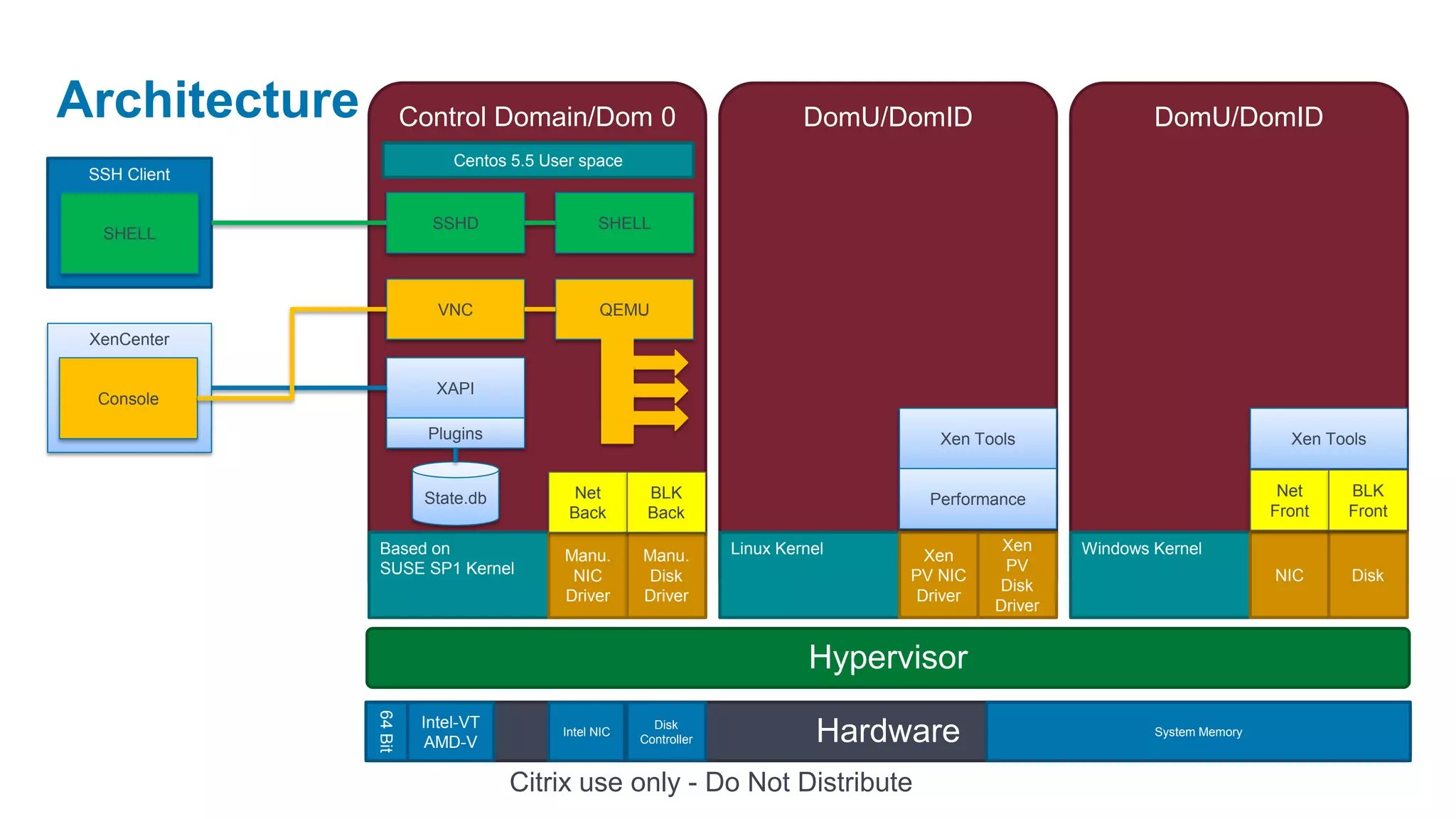
Architecture
Architecture            Control Domain/Dom 0                                DomU/DomID                        DomU/DomID
                             Centos 5.5 User space
 SSH Client

                          SSHD                  SHELL
  SHELL


                           VNC                  QEMU
 XenCenter

                           XAPI
  Console

                          Plugins                                                     Xen Tools                                 Xen Tools


                         State.db           Net        BLK                                                                     Net    BLK
                                                                                     Performance
                                           Back        Back                                                                   Front   Front

                Based on                                           Linux Kernel               Xen     Windows Kernel
                                          Manu.       Manu.                          Xen
                SUSE SP1 Kernel                                                               PV
                                           NIC        Disk                         PV NIC                                     NIC      Disk
                                                                                             Disk
                                          Driver      Driver                        Driver
                                                                                             Driver


                                                                             Hypervisor
               64 Bit


                         Intel-VT
                          AMD-V
                                          Intel NIC
                                                        Disk
                                                      Controller              Hardware                        System Memory


                                    Citrix use only - Do Not Distribute
Command Line Interface
(CLI)
xe Command

• Runs CLI binary
 • Local in Dom0
 • Remote on Linux and Windows
 • Syntax: xe help or xe help command or xe help –all

• Network Communication
 • SSL, TCP 443

• Objects such as a VM or Server Addressed by
 • Name e.g. WindowsAppServer
 • unique UUID e.g. 79372186-1db3-4928-ac1f-5ae7feb5fd19
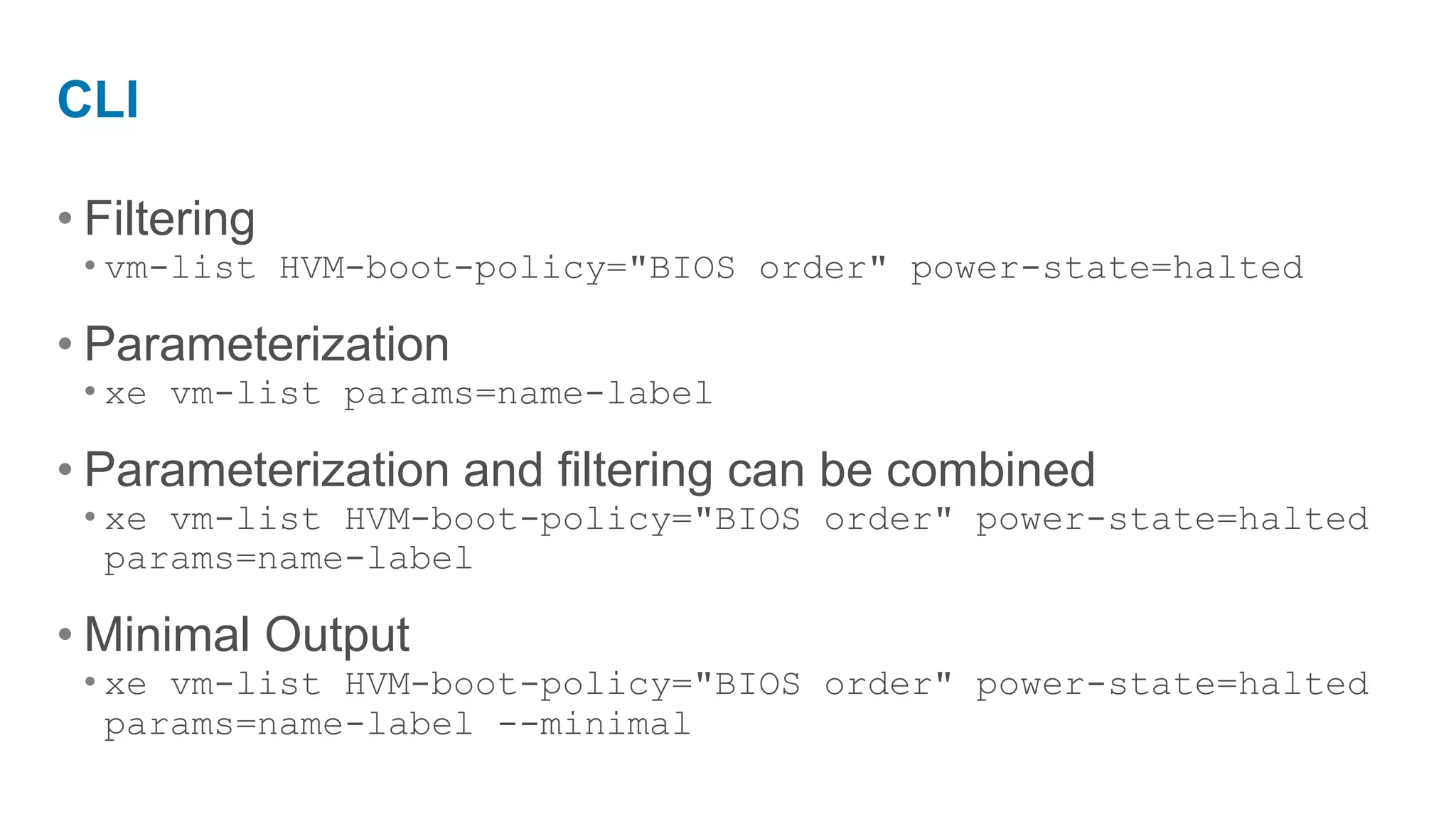
CLI

• Filtering
 • vm-list HVM-boot-policy="BIOS order" power-state=halted

• Parameterization
 • xe vm-list params=name-label

• Parameterization and filtering can be combined
 • xe vm-list HVM-boot-policy="BIOS order" power-state=halted
   params=name-label

• Minimal Output
 • xe vm-list HVM-boot-policy="BIOS order" power-state=halted
   params=name-label --minimal
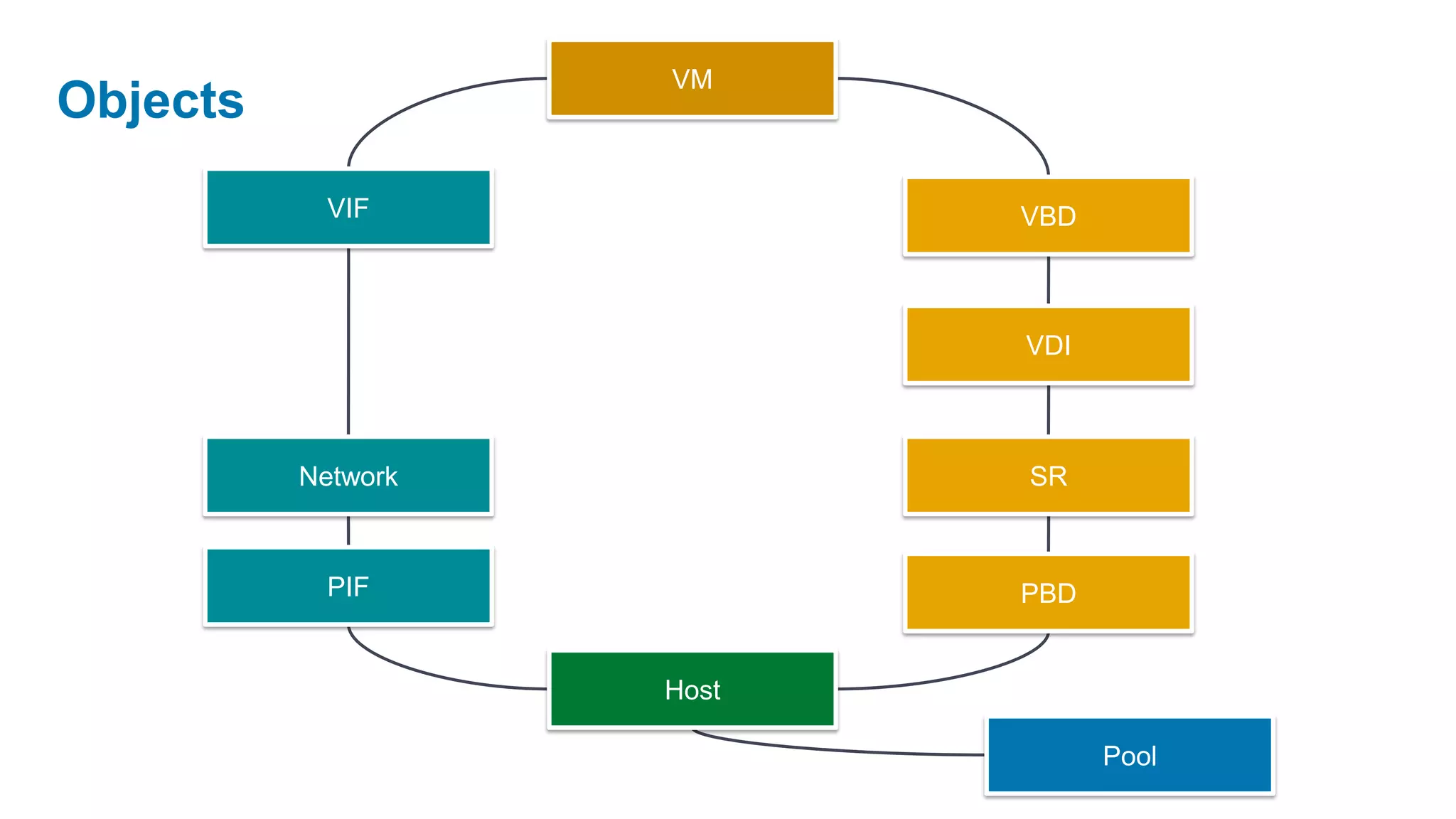
VM
Objects
            VIF            VBD


                           VDI


          Network          SR


            PIF            PBD


                    Host

                                 Pool
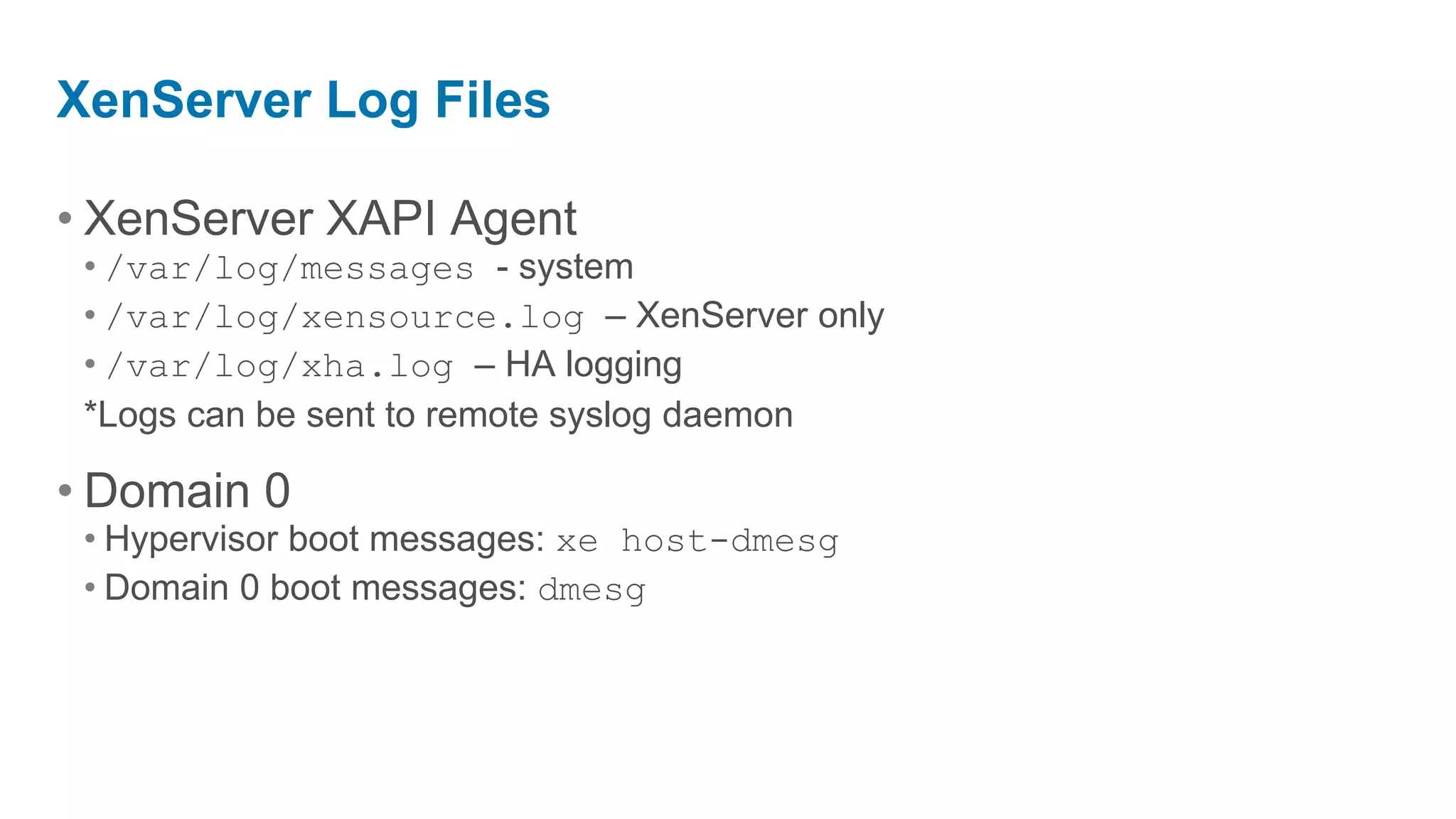
XenServer Log Files

• XenServer XAPI Agent
 • /var/log/messages - system
 • /var/log/xensource.log – XenServer only
 • /var/log/xha.log – HA logging
 *Logs can be sent to remote syslog daemon

• Domain 0
 • Hypervisor boot messages: xe host-dmesg
 • Domain 0 boot messages: dmesg
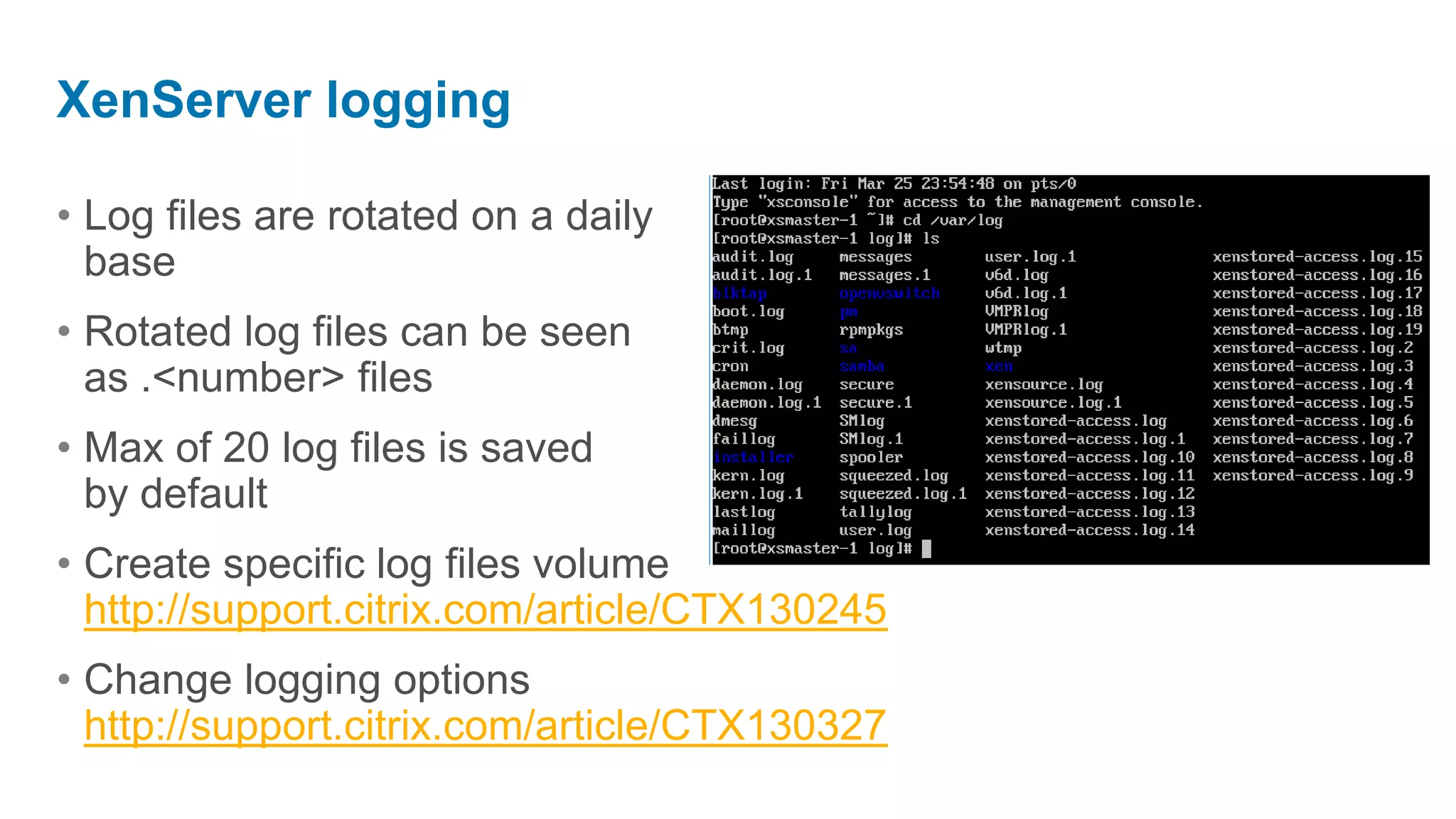
XenServer logging

• Log files are rotated on a daily
  base
• Rotated log files can be seen
  as .<number> files
• Max of 20 log files is saved
  by default
• Create specific log files volume
  http://support.citrix.com/article/CTX130245
• Change logging options
  http://support.citrix.com/article/CTX130327
XenServer
Networking
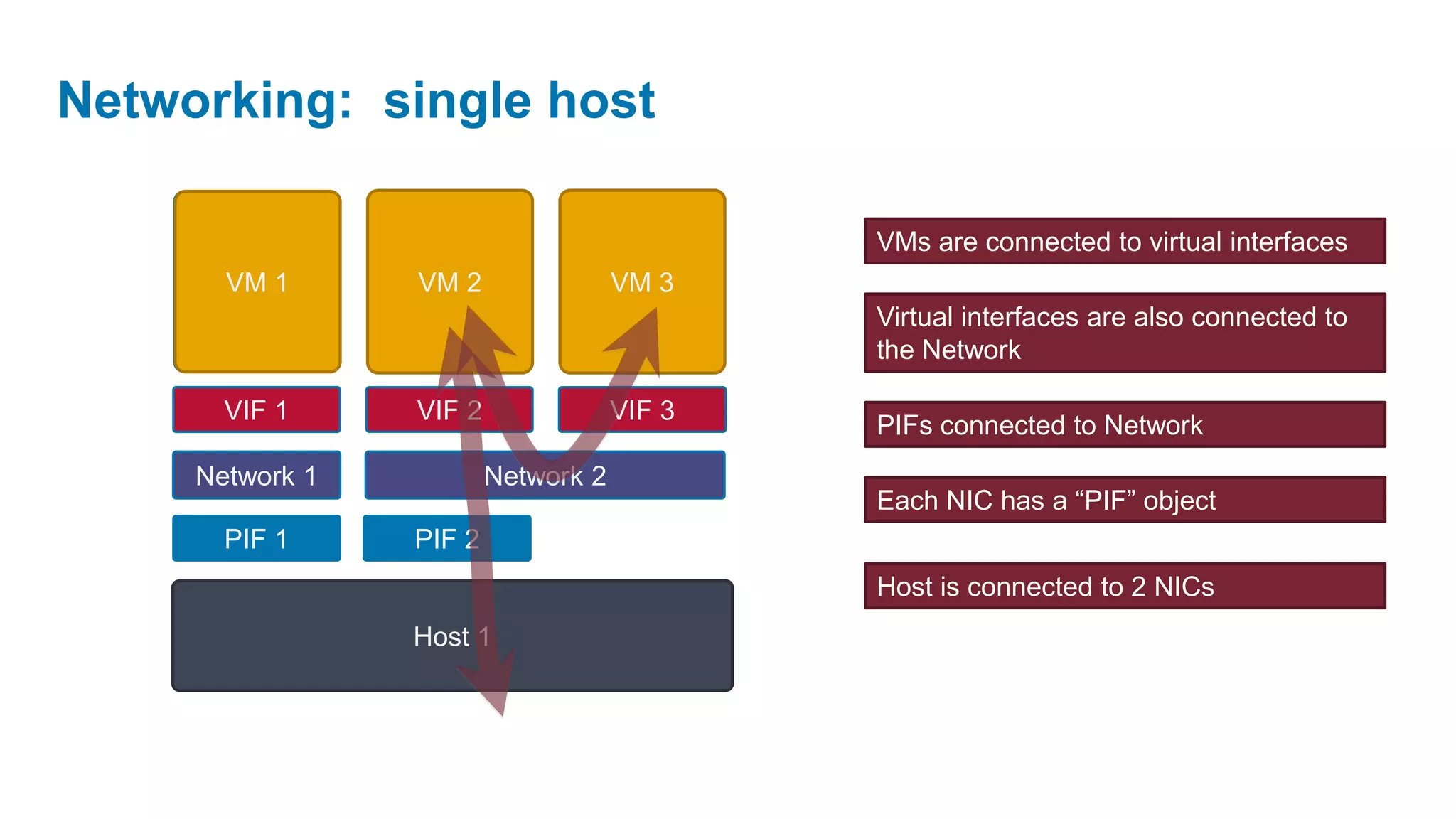
Networking: single host

                                             VMs are connected to virtual interfaces
       VM 1      VM 2                VM 3
                                             Virtual interfaces are also connected to
                                             the Network

       VIF 1     VIF 2               VIF 3
                                             PIFs connected to Network
     Network 1           Network 2
                                             Each NIC has a “PIF” object
       PIF 1     PIF 2
                                             Host is connected to 2 NICs
                 Host 1
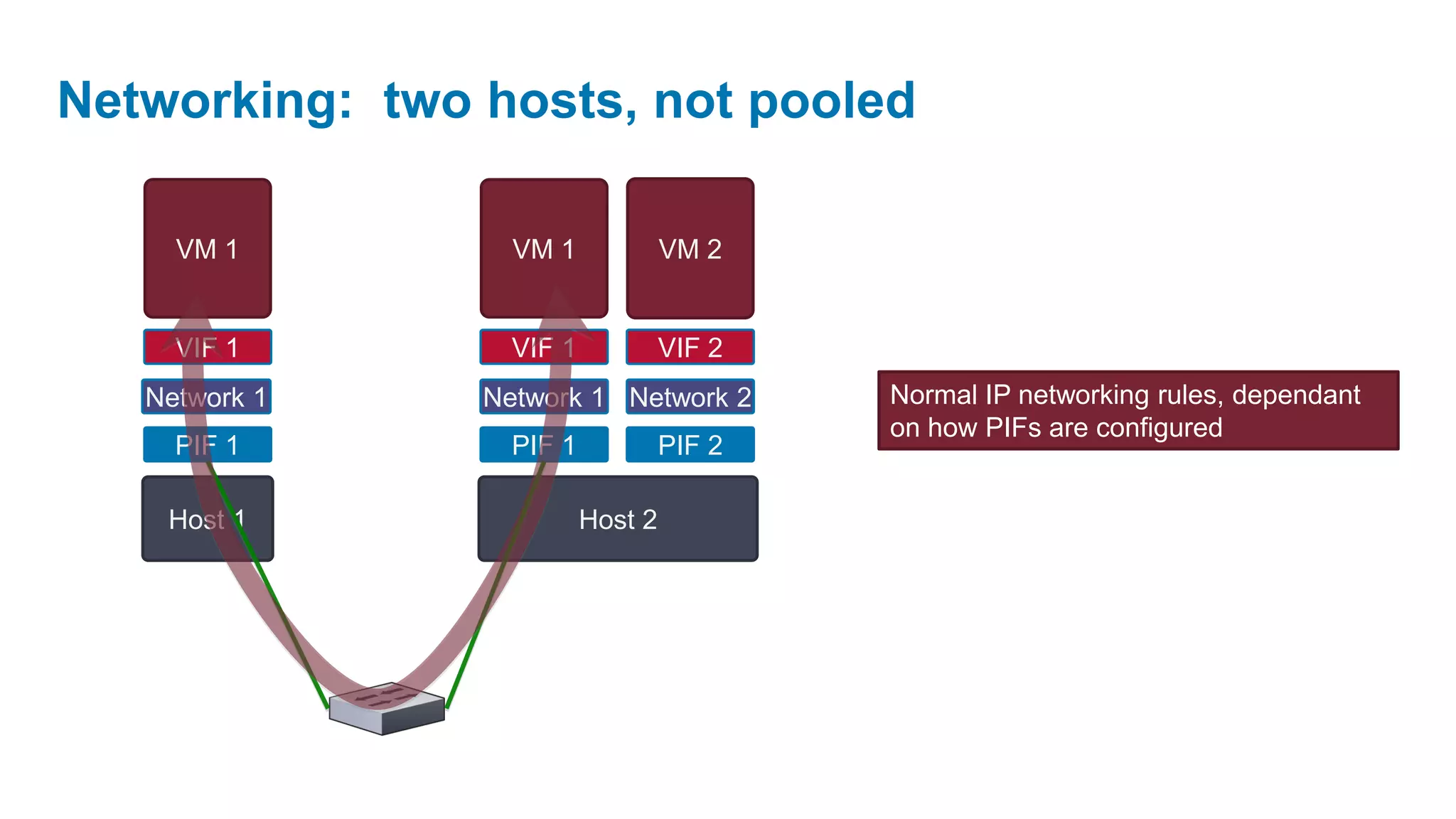
Networking: two hosts, not pooled

     VM 1         VM 1             VM 2


     VIF 1        VIF 1            VIF 2
   Network 1    Network 1 Network 2        Normal IP networking rules, dependant
                                           on how PIFs are configured
     PIF 1        PIF 1            PIF 2

    Host 1                Host 2
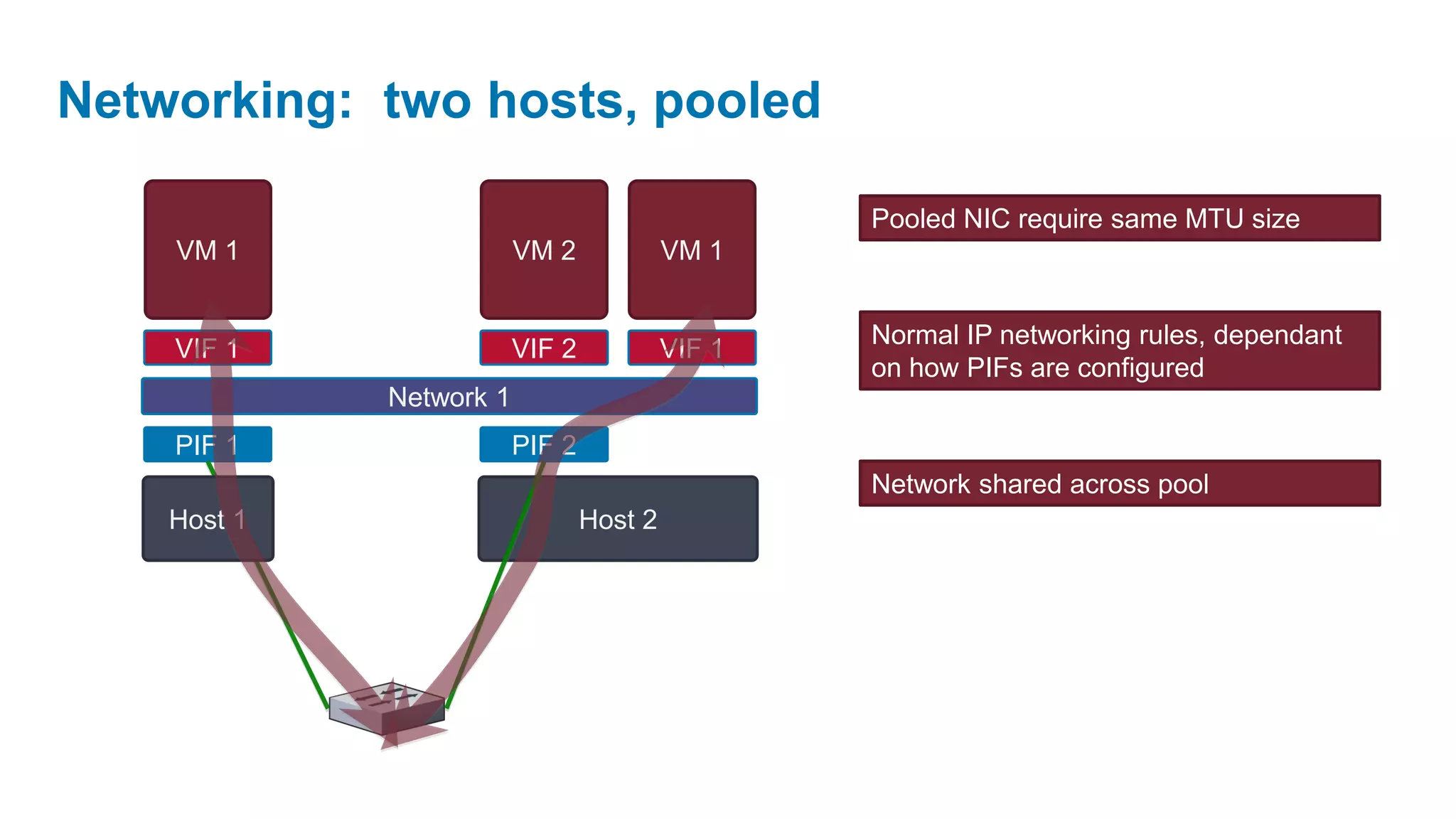
Networking: two hosts, pooled

                                                  Pooled NIC require same MTU size
    VM 1                 VM 2             VM 1


                                                  Normal IP networking rules, dependant
    VIF 1                VIF 2            VIF 1
                                                  on how PIFs are configured
             Network 1
    PIF 1                PIF 2
                                                  Network shared across pool
    Host 1                       Host 2
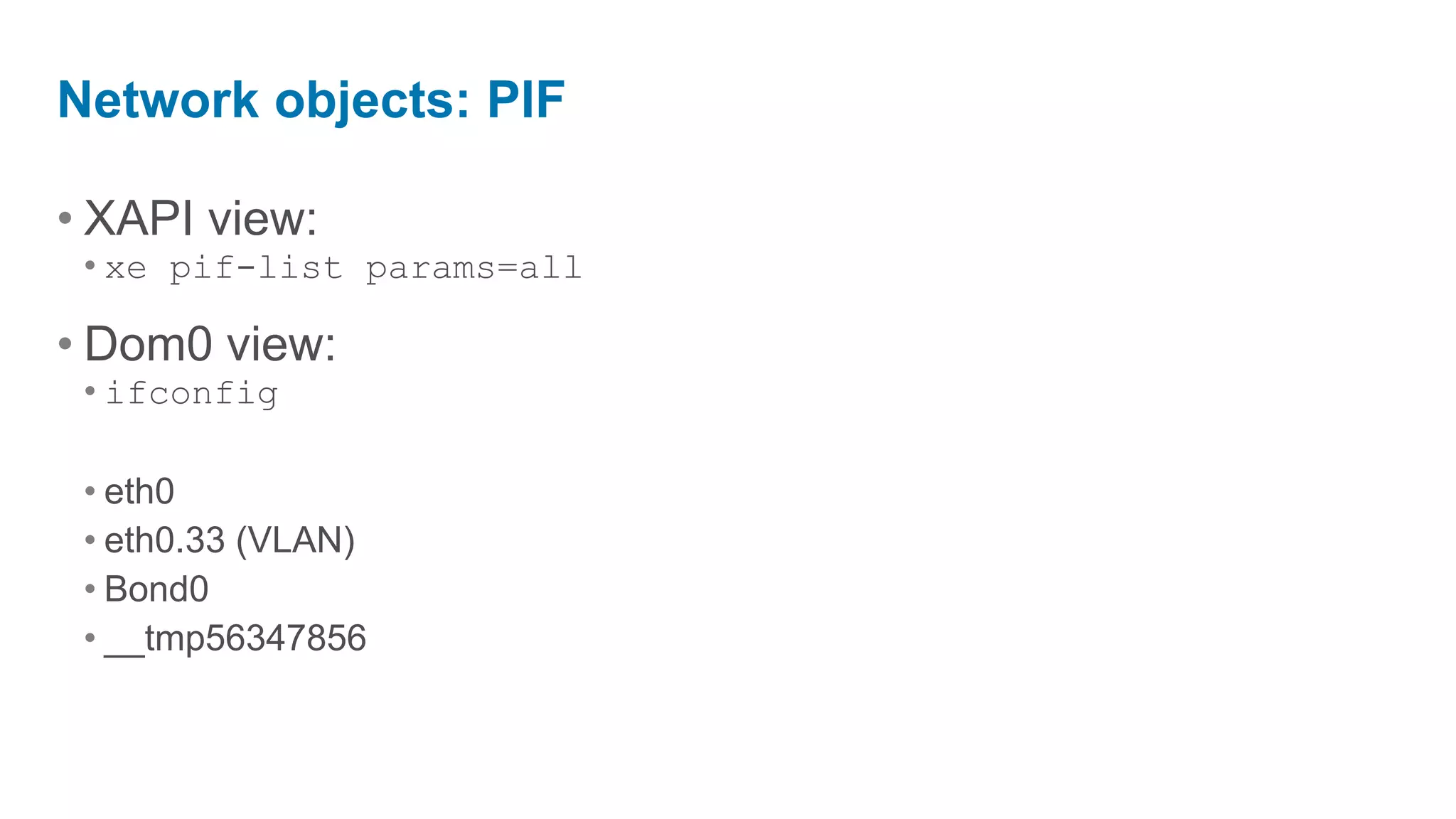
Network objects: PIF

• XAPI view:
 • xe pif-list params=all

• Dom0 view:
 • ifconfig

 • eth0
 • eth0.33 (VLAN)
 • Bond0
 • __tmp56347856
Bonding

• SLB (Source Load Balancing)
• Load-balancing of VM and MGMT traffic
• Fail-over support for storage traffic
• Dynamic rebalancing (10 sec)
• Note: etherchannel or 802.3ad (LACP) not required
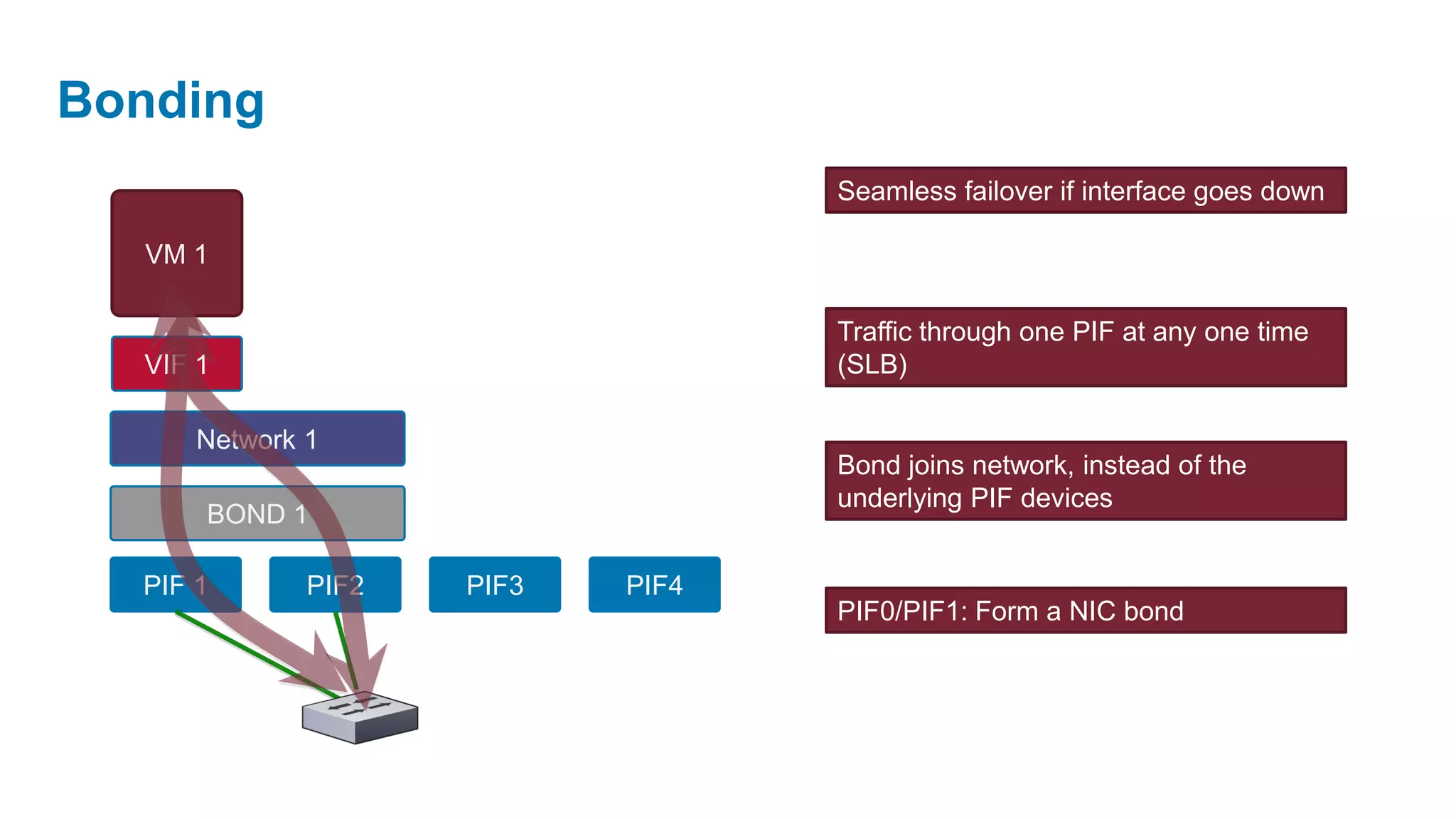
Bonding
                                   Seamless failover if interface goes down

  VM 1

                                   Traffic through one PIF at any one time
  VIF 1                            (SLB)

      Network 1
                                   Bond joins network, instead of the
                                   underlying PIF devices
      BOND 1

  PIF 1       PIF2   PIF3   PIF4
                                   PIF0/PIF1: Form a NIC bond
XenServer
Storage
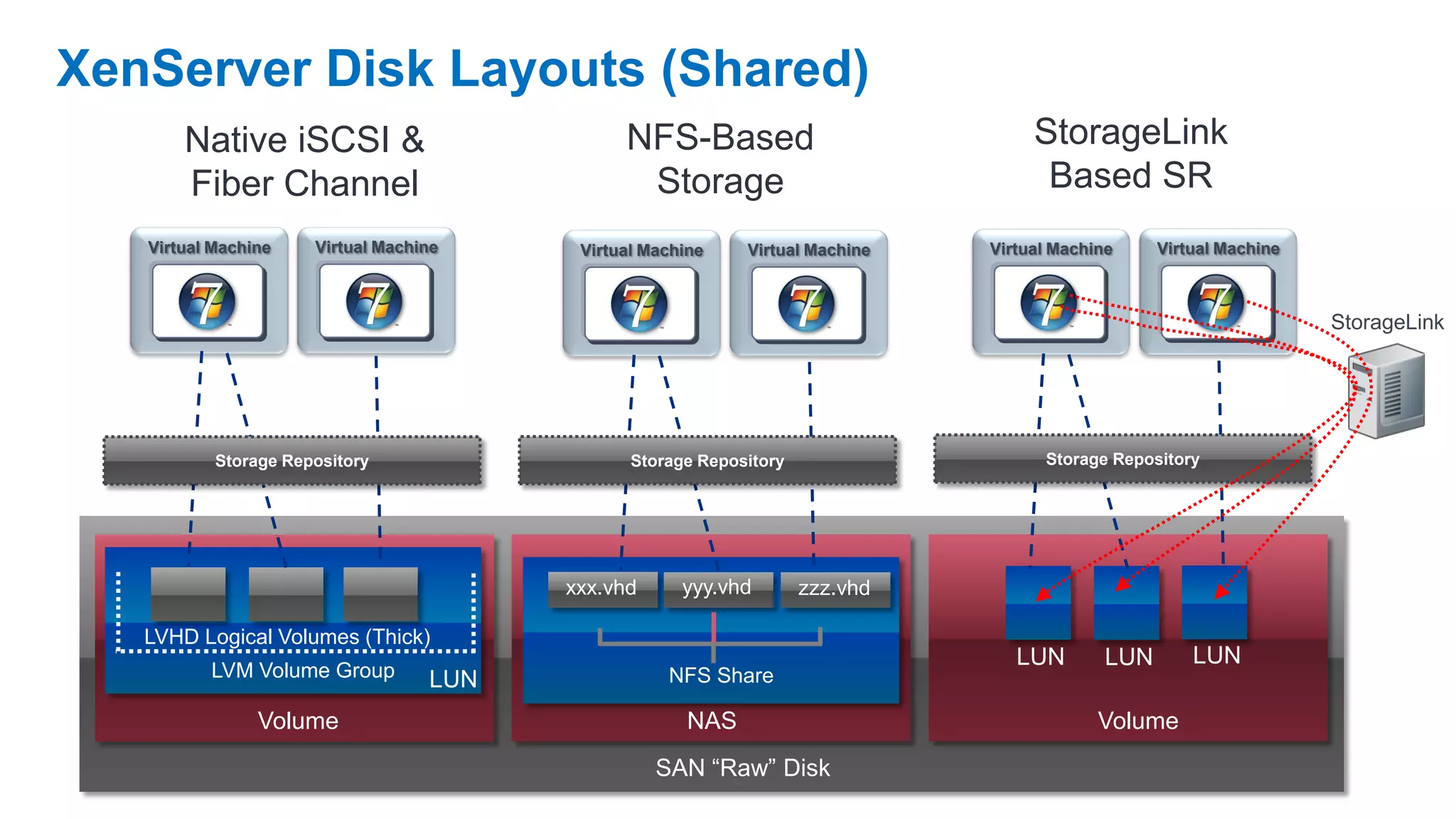
XenServer Disk Layouts (Shared)
       Native iSCSI &                          NFS-Based                            StorageLink
       Fiber Channel                            Storage                              Based SR
   Virtual Machine    Virtual Machine     Virtual Machine    Virtual Machine   Virtual Machine     Virtual Machine


                                                                                                                     StorageLink


           Storage Repository                   Storage Repository                   Storage Repository


                                         xxx.vhd      yyy.vhd        zzz.vhd

   LVHD Logical Volumes (Thick)
                                                                                  LUN        LUN       LUN
          LVM Volume Group         LUN              NFS Share

                Volume                                 NAS                                  Volume
                                                   SAN “Raw” Disk
LVM

• Host storage virtualized using LVM
• Volume Group named “VG_XenStorage_<UUID>”
• Common commands
 • vgs - List of volume groups
 • lvs, lvdisplay - List of logical volumes
 • pvs, pvdisplay - List of physical volumes
 • man lvm - Other commands

• Mount guest disk in dom0
 • mount /dev/VG_XenStorage_<uuid>/<VM_uuid>.<disk>
   /path/to/mount/point
Common Issues

• Is the disk detected?
 • fdisk –l to show disks and partitions

• Is the module loaded?
 • lsmod – lists loaded modules
 • insmod/modprobe – inserts modules
 • rmmod – removes loaded modules

• Confirm device info?
 • lspci
Performance Analysis
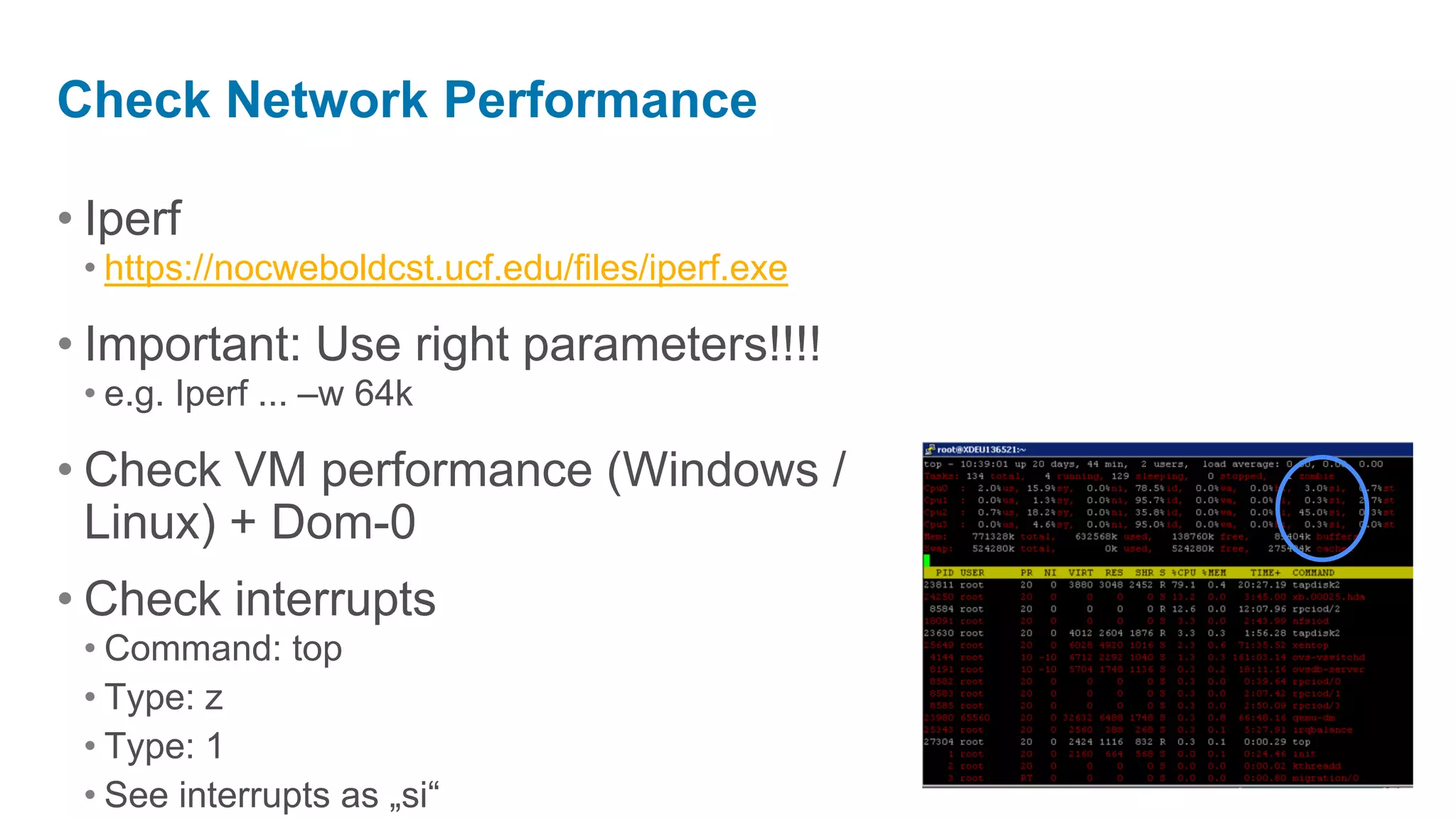
Check Network Performance

• Iperf
 • https://nocweboldcst.ucf.edu/files/iperf.exe

• Important: Use right parameters!!!!
 • e.g. Iperf ... –w 64k

• Check VM performance (Windows /
  Linux) + Dom-0
• Check interrupts
 • Command: top
 • Type: z
 • Type: 1
 • See interrupts as „si“
VM Networking Performance Improvement

• Task Offload is enabled by default
• Keep defaults, change when experiencing
  performance issues
• May require modification in specific situations
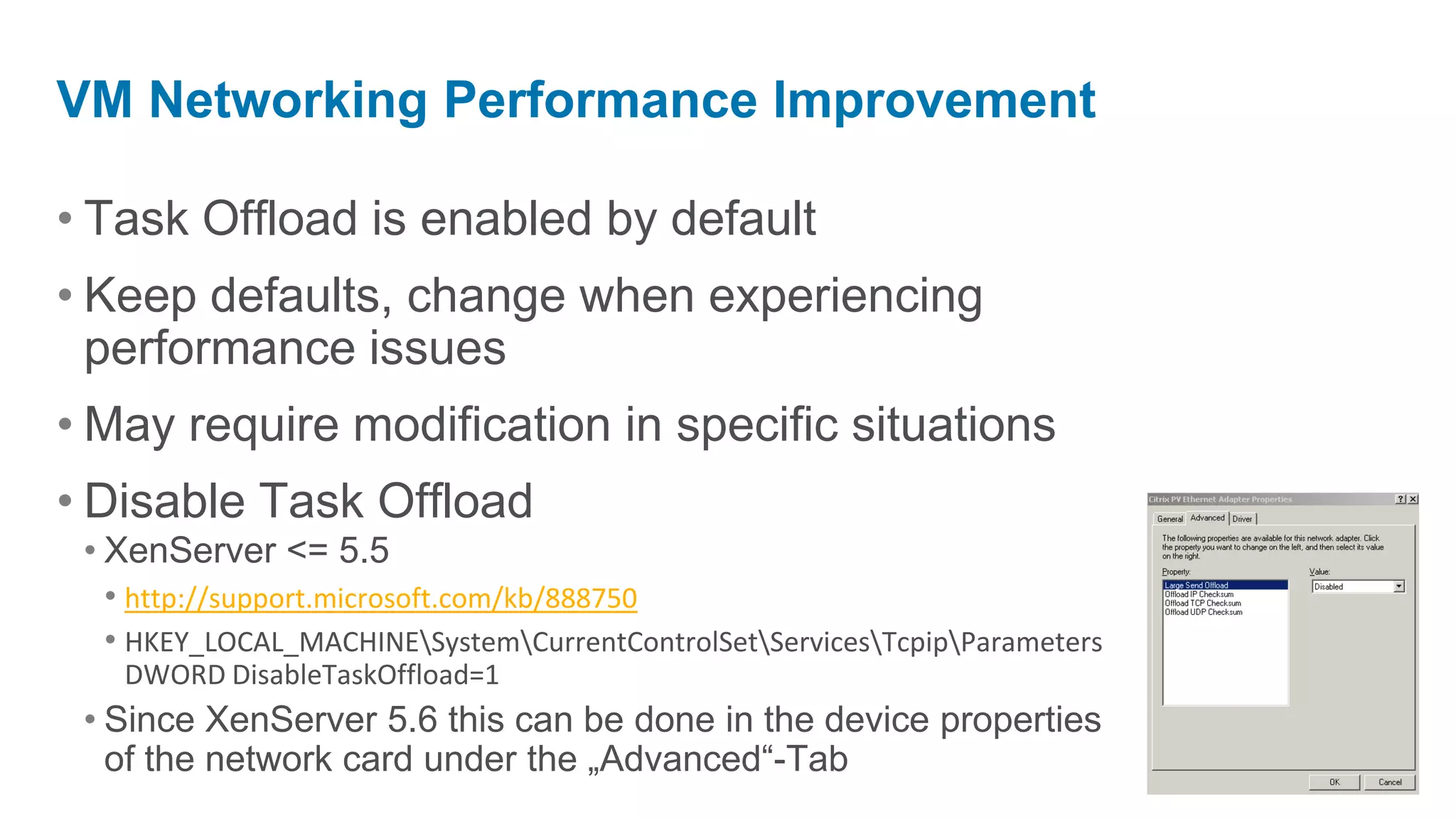
• Disable Task Offload
 • XenServer <= 5.5
   • http://support.microsoft.com/kb/888750
   • HKEY_LOCAL_MACHINESystemCurrentControlSetServicesTcpipParameters
   DWORD DisableTaskOffload=1
 • Since XenServer 5.6 this can be done in the device properties
   of the network card under the „Advanced“-Tab
Server Networking Performance improvement

• Task Offload could be set on server level as well
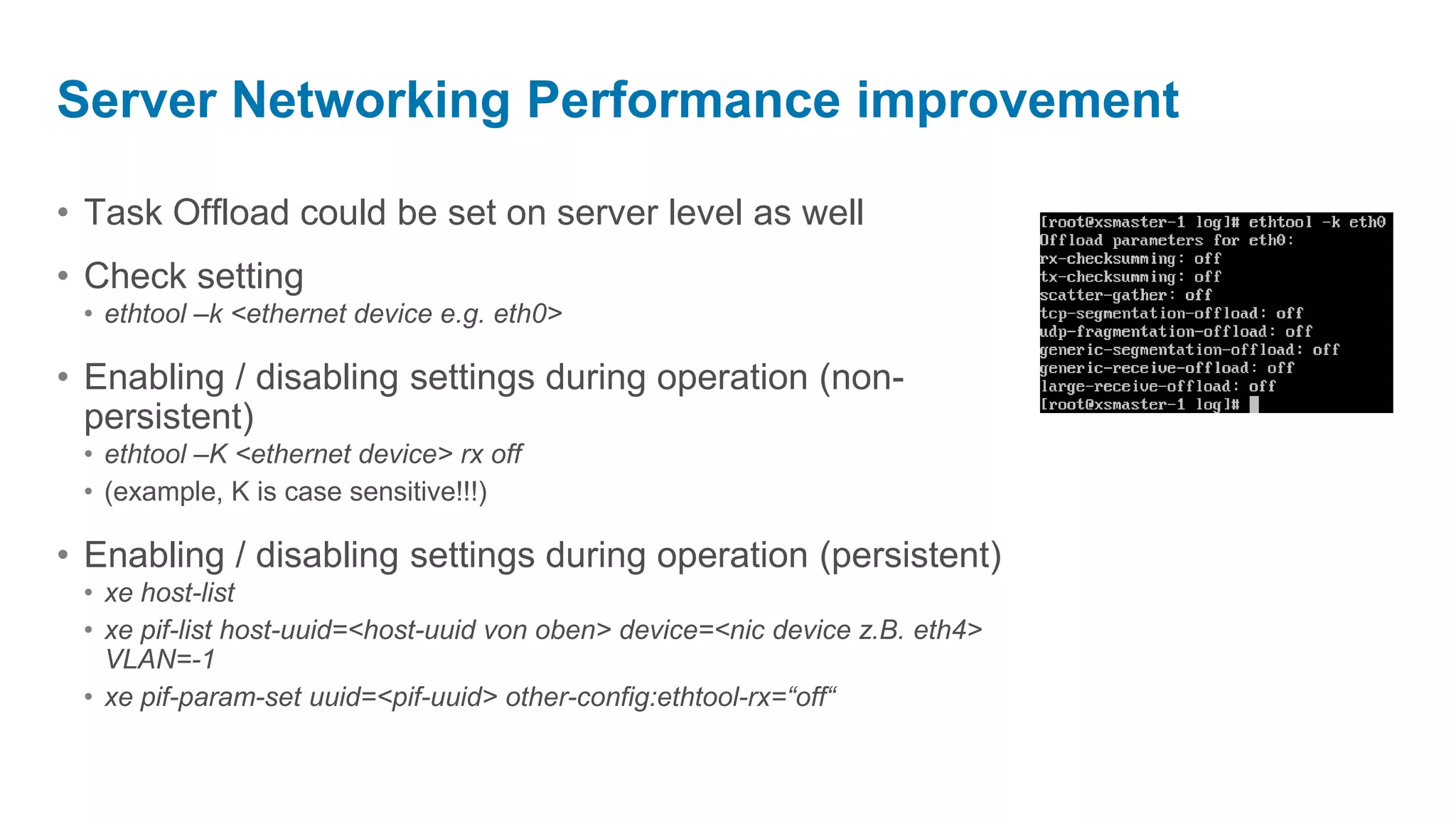
• Check setting
 • ethtool –k <ethernet device e.g. eth0>

• Enabling / disabling settings during operation (non-
  persistent)
 • ethtool –K <ethernet device> rx off
 • (example, K is case sensitive!!!)

• Enabling / disabling settings during operation (persistent)
 • xe host-list
 • xe pif-list host-uuid=<host-uuid von oben> device=<nic device z.B. eth4>
   VLAN=-1
 • xe pif-param-set uuid=<pif-uuid> other-config:ethtool-rx=“off“
Performance optimation NFS/iSCSI

• Check large-receive-offload and enable it (ethtool –k), gain
  80%
• Disable IOMMU in BIOS, gain up to 10%
• Enable JumboFrames (DVS)
Enabling IRQ Rebalancing on XS 5.6 SP2 and older

• http://blog.benpiper.com/2011/08/improving-network-
  throughput-in-xenserver-using-irqbalance/
• yum install irqbalance --enablerepo base
• Service irqbalance start
• Check interrupts
 • Cat /proc/interrupts

• Default in XenServer 6.0
Check storage performance

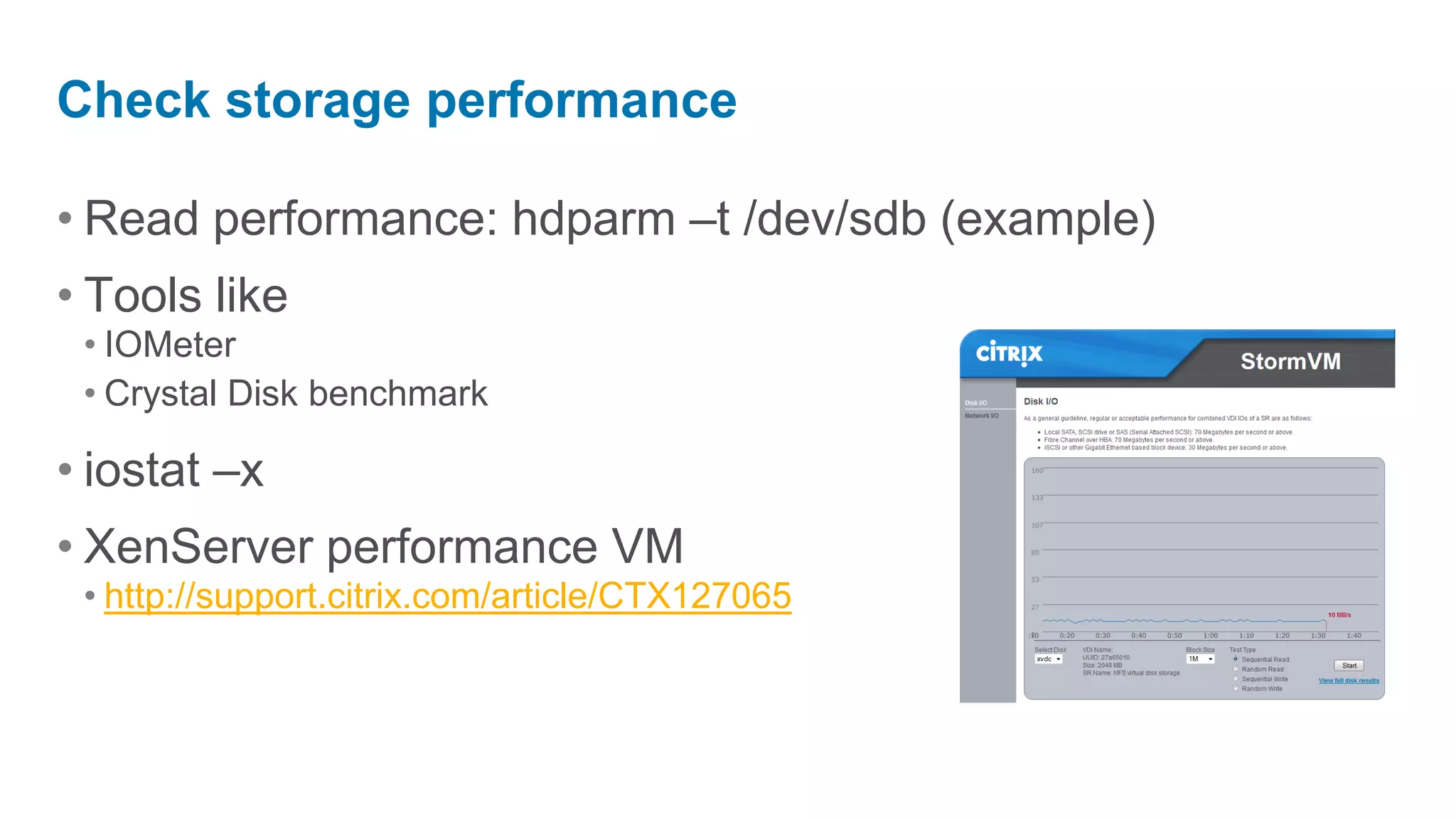
• Read performance: hdparm –t /dev/sdb (example)
• Tools like
 • IOMeter
 • Crystal Disk benchmark

• iostat –x
• XenServer performance VM
 • http://support.citrix.com/article/CTX127065
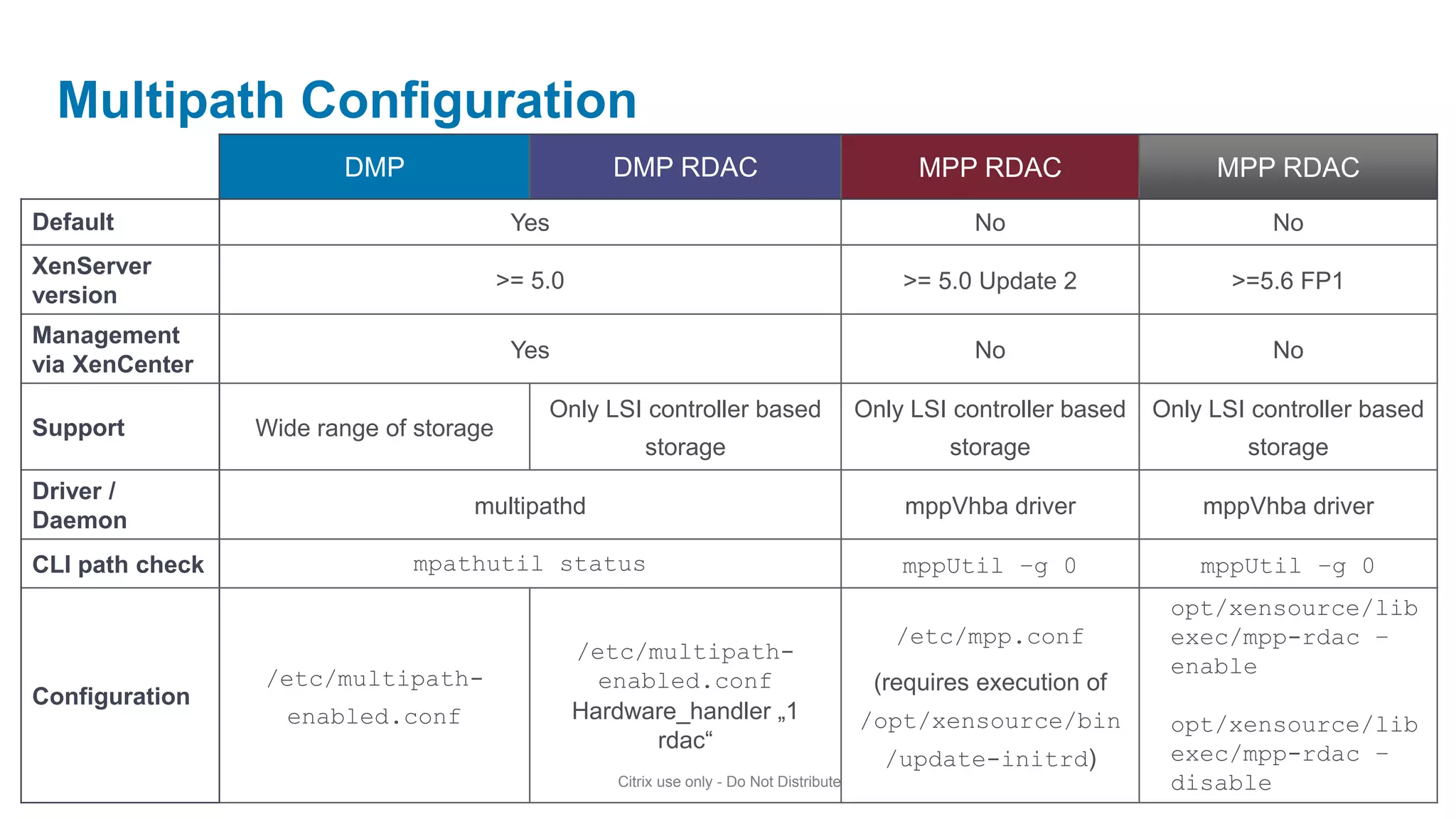
Multipath Configuration
                        DMP                          DMP RDAC                                   MPP RDAC                    MPP RDAC
Default                                   Yes                                                         No                          No
XenServer
                                         >= 5.0                                                >= 5.0 Update 2                >=5.6 FP1
version
Management
                                          Yes                                                         No                          No
via XenCenter
                                             Only LSI controller based                     Only LSI controller based   Only LSI controller based
Support          Wide range of storage
                                                         storage                                   storage                     storage
Driver /
                                    multipathd                                                 mppVhba driver              mppVhba driver
Daemon
CLI path check                mpathutil status                                                 mppUtil –g 0                mppUtil –g 0
                                                                                                                        opt/xensource/lib
                                                                                              /etc/mpp.conf             exec/mpp-rdac –
                                                  /etc/multipath-
                                                                                                                        enable
                 /etc/multipath-                    enabled.conf                            (requires execution of
Configuration
                   enabled.conf                   Hardware_handler „1                      /opt/xensource/bin           opt/xensource/lib
                                                        rdac“
                                                                                             /update-initrd)            exec/mpp-rdac –
                                                     Citrix use only - Do Not Distribute                                disable
12 christian ferber xen_server_advanced

12 christian ferber xen_server_advanced

  • 1.
    XenServer Advanced Christian Ferber Systems EngineerDatacenter & Cloud Server Virtualization
  • 2.
  • 3.
    Architecture Control Domain/Dom 0 DomU/DomID DomU/DomID Centos 5.5 User space SSH Client SSHD SHELL SHELL VNC QEMU XenCenter XAPI Console Plugins Xen Tools Xen Tools State.db Net BLK Net BLK Performance Back Back Front Front Based on Linux Kernel Xen Windows Kernel Manu. Manu. Xen SUSE SP1 Kernel PV NIC Disk PV NIC NIC Disk Disk Driver Driver Driver Driver Hypervisor 64 Bit Intel-VT AMD-V Intel NIC Disk Controller Hardware System Memory Citrix use only - Do Not Distribute
  • 4.
  • 5.
    xe Command • RunsCLI binary • Local in Dom0 • Remote on Linux and Windows • Syntax: xe help or xe help command or xe help –all • Network Communication • SSL, TCP 443 • Objects such as a VM or Server Addressed by • Name e.g. WindowsAppServer • unique UUID e.g. 79372186-1db3-4928-ac1f-5ae7feb5fd19
  • 6.
    CLI • Filtering •vm-list HVM-boot-policy="BIOS order" power-state=halted • Parameterization • xe vm-list params=name-label • Parameterization and filtering can be combined • xe vm-list HVM-boot-policy="BIOS order" power-state=halted params=name-label • Minimal Output • xe vm-list HVM-boot-policy="BIOS order" power-state=halted params=name-label --minimal
  • 7.
    VM Objects VIF VBD VDI Network SR PIF PBD Host Pool
  • 8.
    XenServer Log Files •XenServer XAPI Agent • /var/log/messages - system • /var/log/xensource.log – XenServer only • /var/log/xha.log – HA logging *Logs can be sent to remote syslog daemon • Domain 0 • Hypervisor boot messages: xe host-dmesg • Domain 0 boot messages: dmesg
  • 9.
    XenServer logging • Logfiles are rotated on a daily base • Rotated log files can be seen as .<number> files • Max of 20 log files is saved by default • Create specific log files volume http://support.citrix.com/article/CTX130245 • Change logging options http://support.citrix.com/article/CTX130327
  • 10.
  • 11.
    Networking: single host VMs are connected to virtual interfaces VM 1 VM 2 VM 3 Virtual interfaces are also connected to the Network VIF 1 VIF 2 VIF 3 PIFs connected to Network Network 1 Network 2 Each NIC has a “PIF” object PIF 1 PIF 2 Host is connected to 2 NICs Host 1
  • 12.
    Networking: two hosts,not pooled VM 1 VM 1 VM 2 VIF 1 VIF 1 VIF 2 Network 1 Network 1 Network 2 Normal IP networking rules, dependant on how PIFs are configured PIF 1 PIF 1 PIF 2 Host 1 Host 2
  • 13.
    Networking: two hosts,pooled Pooled NIC require same MTU size VM 1 VM 2 VM 1 Normal IP networking rules, dependant VIF 1 VIF 2 VIF 1 on how PIFs are configured Network 1 PIF 1 PIF 2 Network shared across pool Host 1 Host 2
  • 14.
    Network objects: PIF •XAPI view: • xe pif-list params=all • Dom0 view: • ifconfig • eth0 • eth0.33 (VLAN) • Bond0 • __tmp56347856
  • 15.
    Bonding • SLB (SourceLoad Balancing) • Load-balancing of VM and MGMT traffic • Fail-over support for storage traffic • Dynamic rebalancing (10 sec) • Note: etherchannel or 802.3ad (LACP) not required
  • 16.
    Bonding Seamless failover if interface goes down VM 1 Traffic through one PIF at any one time VIF 1 (SLB) Network 1 Bond joins network, instead of the underlying PIF devices BOND 1 PIF 1 PIF2 PIF3 PIF4 PIF0/PIF1: Form a NIC bond
  • 17.
  • 18.
    XenServer Disk Layouts(Shared) Native iSCSI & NFS-Based StorageLink Fiber Channel Storage Based SR Virtual Machine Virtual Machine Virtual Machine Virtual Machine Virtual Machine Virtual Machine StorageLink Storage Repository Storage Repository Storage Repository xxx.vhd yyy.vhd zzz.vhd LVHD Logical Volumes (Thick) LUN LUN LUN LVM Volume Group LUN NFS Share Volume NAS Volume SAN “Raw” Disk
  • 19.
    LVM • Host storagevirtualized using LVM • Volume Group named “VG_XenStorage_<UUID>” • Common commands • vgs - List of volume groups • lvs, lvdisplay - List of logical volumes • pvs, pvdisplay - List of physical volumes • man lvm - Other commands • Mount guest disk in dom0 • mount /dev/VG_XenStorage_<uuid>/<VM_uuid>.<disk> /path/to/mount/point
  • 20.
    Common Issues • Isthe disk detected? • fdisk –l to show disks and partitions • Is the module loaded? • lsmod – lists loaded modules • insmod/modprobe – inserts modules • rmmod – removes loaded modules • Confirm device info? • lspci
  • 21.
  • 22.
    Check Network Performance •Iperf • https://nocweboldcst.ucf.edu/files/iperf.exe • Important: Use right parameters!!!! • e.g. Iperf ... –w 64k • Check VM performance (Windows / Linux) + Dom-0 • Check interrupts • Command: top • Type: z • Type: 1 • See interrupts as „si“
  • 23.
    VM Networking PerformanceImprovement • Task Offload is enabled by default • Keep defaults, change when experiencing performance issues • May require modification in specific situations • Disable Task Offload • XenServer <= 5.5 • http://support.microsoft.com/kb/888750 • HKEY_LOCAL_MACHINESystemCurrentControlSetServicesTcpipParameters DWORD DisableTaskOffload=1 • Since XenServer 5.6 this can be done in the device properties of the network card under the „Advanced“-Tab
  • 24.
    Server Networking Performanceimprovement • Task Offload could be set on server level as well • Check setting • ethtool –k <ethernet device e.g. eth0> • Enabling / disabling settings during operation (non- persistent) • ethtool –K <ethernet device> rx off • (example, K is case sensitive!!!) • Enabling / disabling settings during operation (persistent) • xe host-list • xe pif-list host-uuid=<host-uuid von oben> device=<nic device z.B. eth4> VLAN=-1 • xe pif-param-set uuid=<pif-uuid> other-config:ethtool-rx=“off“
  • 25.
    Performance optimation NFS/iSCSI •Check large-receive-offload and enable it (ethtool –k), gain 80% • Disable IOMMU in BIOS, gain up to 10% • Enable JumboFrames (DVS)
  • 26.
    Enabling IRQ Rebalancingon XS 5.6 SP2 and older • http://blog.benpiper.com/2011/08/improving-network- throughput-in-xenserver-using-irqbalance/ • yum install irqbalance --enablerepo base • Service irqbalance start • Check interrupts • Cat /proc/interrupts • Default in XenServer 6.0
  • 27.
    Check storage performance •Read performance: hdparm –t /dev/sdb (example) • Tools like • IOMeter • Crystal Disk benchmark • iostat –x • XenServer performance VM • http://support.citrix.com/article/CTX127065
  • 28.
    Multipath Configuration DMP DMP RDAC MPP RDAC MPP RDAC Default Yes No No XenServer >= 5.0 >= 5.0 Update 2 >=5.6 FP1 version Management Yes No No via XenCenter Only LSI controller based Only LSI controller based Only LSI controller based Support Wide range of storage storage storage storage Driver / multipathd mppVhba driver mppVhba driver Daemon CLI path check mpathutil status mppUtil –g 0 mppUtil –g 0 opt/xensource/lib /etc/mpp.conf exec/mpp-rdac – /etc/multipath- enable /etc/multipath- enabled.conf (requires execution of Configuration enabled.conf Hardware_handler „1 /opt/xensource/bin opt/xensource/lib rdac“ /update-initrd) exec/mpp-rdac – Citrix use only - Do Not Distribute disable