XenServer, Hyper-V, and ESXi - Architecture, API, and Coding

Agenda:

0. Quick hypervisor/market comparison
1. Architecture/Installation Comparison – XenServer, Hyper-V, and ESXi
2. API Comparison – XenServer, Hyper-V, and ESXi
3. Review code and demo programs I wrote - XenServer, Hyper-V, and ESXi


                         Humair Ahmed
                         hue@humairahmed.com


                         All code available on GitHub and Personal Website:

                         https://github.com/HumairAhmed
                         http://www.humairahmed.com/#Downloads


                        02/29/12                                          1
XenServer, Hyper-V and ESXi - Architecture, API, and Coding


           0. Quick hypervisor/market comparison


                    02/29/12                                  2
XenServer, Hyper-V and ESXi - Architecture, API, and Coding


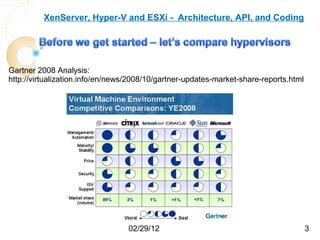
Gartner 2008 Analysis:
http://virtualization.info/en/news/2008/10/gartner-updates-market-share-reports.html


                                  02/29/12                                             3
XenServer, Hyper-V and ESXi - Architecture, API, and Coding


 1. Architecture/Installation Comparison – XenServer, Hyper-V, and ESXi


                        02/29/12                                          4
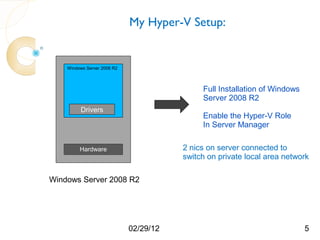
My Hyper-V Setup:


    Windows Server 2008 R2


                                             Full Installation of Windows
                                             Server 2008 R2
         Drivers
                                             Enable the Hyper-V Role
                                             In Server Manager


         Hardware                       2 nics on server connected to
                                        switch on private local area network

Windows Server 2008 R2


                             02/29/12                                       5
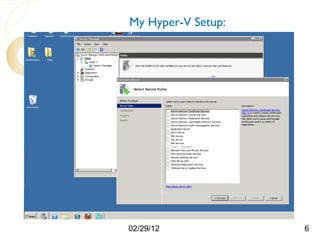
My Hyper-V Setup:


02/29/12            6
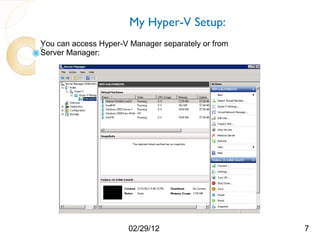
My Hyper-V Setup:
You can access Hyper-V Manager separately or from
Server Manager:


                      02/29/12                      7
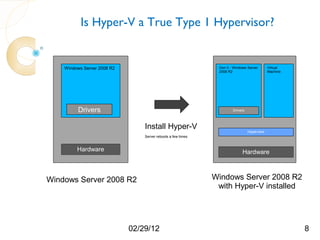
Is Hyper-V a True Type 1 Hypervisor?


    Windows Server 2008 R2                                     Don 0 - Windows Server        Virtual
                                                               2008 R2                       Machine


         Drivers                                                      Drivers


                                 Install Hyper-V                                Hypervisor
                                 Server reboots a few times


         Hardware                                                           Hardware


Windows Server 2008 R2                                        Windows Server 2008 R2
                                                               with Hyper-V installed


                             02/29/12                                                                  8
Is Hyper-V a True Type 1 Hypervisor?


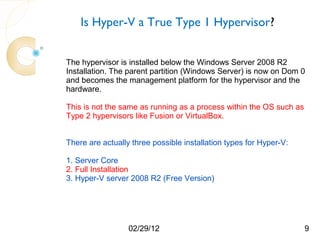
The hypervisor is installed below the Windows Server 2008 R2
Installation. The parent partition (Windows Server) is now on Dom 0
and becomes the management platform for the hypervisor and the
hardware.
This is not the same as running as a process within the OS such as
Type 2 hypervisors like Fusion or VirtualBox.

There are actually three possible installation types for Hyper-V:

1. Server Core
2. Full Installation
3. Hyper-V server 2008 R2 (Free Version)


                  02/29/12                                           9
My XenServer Setup:


Dom 0 - Linux                  Virtual
                               Machine


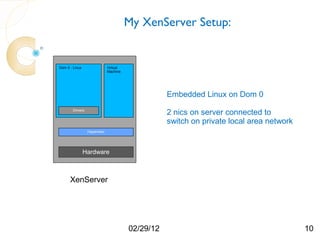
                                                    Embedded Linux on Dom 0
        Drivers
                                                    2 nics on server connected to
                                                    switch on private local area network
                  Hypervisor


                Hardware


      XenServer


                                         02/29/12                                          10
My XenServer Setup:

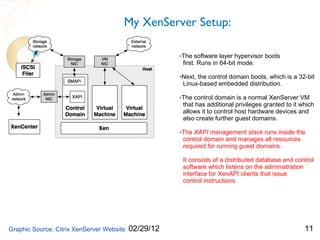
                                                      -The software layer hypervisor boots
                                                       first. Runs in 64-bit mode.

                                                      -Next, the control domain boots, which is a 32-bit
                                                       Linux-based embedded distribution.

                                                      -The control domain is a normal XenServer VM
                                                       that has additional privileges granted to it which
                                                       allows it to control host hardware devices and
                                                       also create further guest domains.

                                                      -The XAPI management stack runs inside the
                                                       control domain and manages all resources
                                                       required for running guest domains.

                                                       It consists of a distributed database and control
                                                       software which listens on the administration
                                                       interface for XenAPI clients that issue
                                                       control instructions.


Graphic Source: Citrix XenServer Website   02/29/12                                                  11
My XenServer Setup:
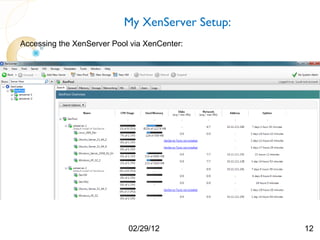
Accessing the XenServer Pool via XenCenter:


                            02/29/12             12
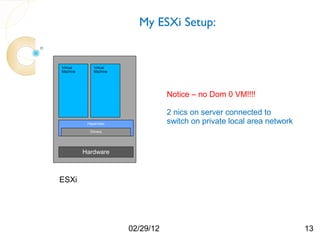
My ESXi Setup:


Virtual       Virtual
Machine       Machine


                                   Notice – no Dom 0 VM!!!!

                                   2 nics on server connected to
           Hypervisor              switch on private local area network
            Drivers


          Hardware


ESXi


                        02/29/12                                          13
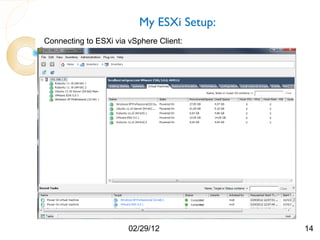
My ESXi Setup:
Connecting to ESXi via vSphere Client:


                       02/29/12            14
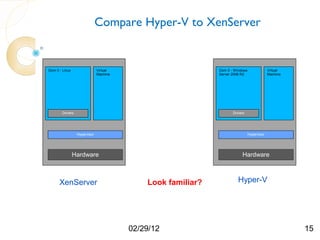
Compare Hyper-V to XenServer


Dom 0 - Linux                  Virtual                        Dom 0 - Windows                Virtual
                               Machine                        Server 2008 R2                 Machine


        Drivers                                                      Drivers


                  Hypervisor                                                    Hypervisor


                Hardware                                                  Hardware


      XenServer                              Look familiar?             Hyper-V


                                         02/29/12                                                      15
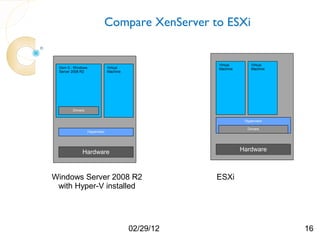
Compare XenServer to ESXi


                                                     Virtual       Virtual
 Dom 0 - Windows                Virtual              Machine       Machine
 Server 2008 R2                 Machine


        Drivers


                                                                Hypervisor

                                                                 Drivers
                   Hypervisor


             Hardware                                          Hardware


Windows Server 2008 R2                               ESXi
 with Hyper-V installed


                                          02/29/12                           16
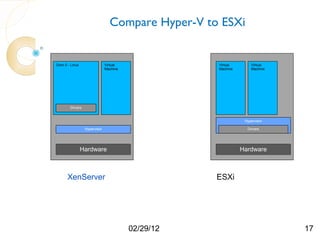
Compare Hyper-V to ESXi


Dom 0 - Linux                  Virtual              Virtual       Virtual
                               Machine              Machine       Machine


        Drivers


                                                               Hypervisor

                  Hypervisor                                    Drivers


                Hardware                                      Hardware


      XenServer                                     ESXi


                                         02/29/12                           17
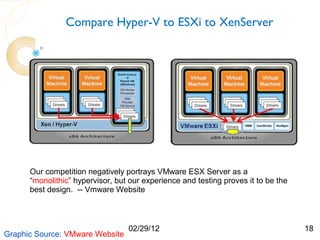
Compare Hyper-V to ESXi to XenServer


      Our competition negatively portrays VMware ESX Server as a
      “monolithic” hypervisor, but our experience and testing proves it to be the
      best design. -- Vmware Website


                                  02/29/12                                          18
Graphic Source: VMware Website
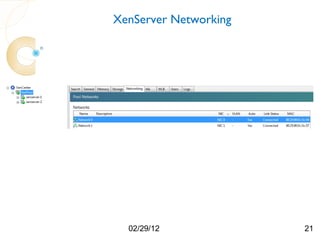
XenServer Networking


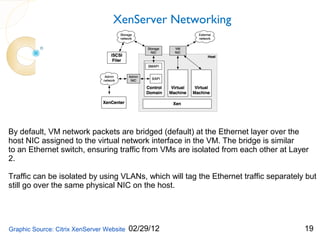
By default, VM network packets are bridged (default) at the Ethernet layer over the
host NIC assigned to the virtual network interface in the VM. The bridge is similar
to an Ethernet switch, ensuring traffic from VMs are isolated from each other at Layer
2.

Traffic can be isolated by using VLANs, which will tag the Ethernet traffic separately but
still go over the same physical NIC on the host.


Graphic Source: Citrix XenServer Website   02/29/12                                   19
XenServer Networking


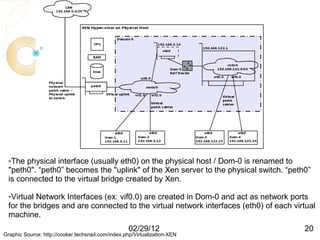
  -The physical interface (usually eth0) on the physical host / Dom-0 is renamed to
  "peth0". “peth0” becomes the "uplink" of the Xen server to the physical switch. “peth0”
  is connected to the virtual bridge created by Xen.

  -Virtual Network Interfaces (ex: vif0.0) are created in Dom-0 and act as network ports
  for the bridges and are connected to the virtual network interfaces (eth0) of each virtual
  machine.
                                                    02/29/12                            20
Graphic Source: http://cooker.techsnail.com/index.php/Virtualization-XEN
XenServer Networking


  02/29/12             21
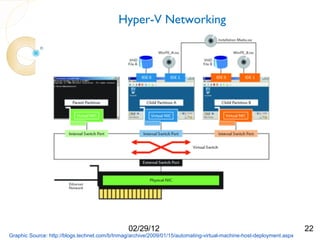
Hyper-V Networking


                                                02/29/12                                                              22
Graphic Source: http://blogs.technet.com/b/tnmag/archive/2009/01/15/automating-virtual-machine-host-deployment.aspx
Hyper-V Networking


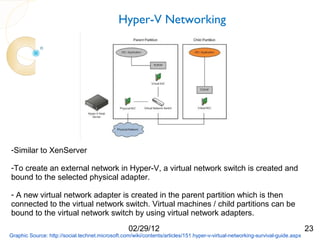
-Similar to XenServer

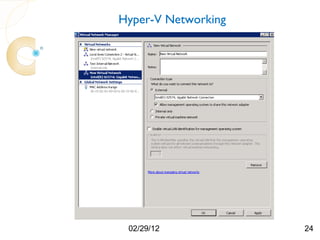
-To create an external network in Hyper-V, a virtual network switch is created and
bound to the selected physical adapter.

- A new virtual network adapter is created in the parent partition which is then
connected to the virtual network switch. Virtual machines / child partitions can be
bound to the virtual network switch by using virtual network adapters.
                                                   02/29/12                                                                     23
Graphic Source: http://social.technet.microsoft.com/wiki/contents/articles/151.hyper-v-virtual-networking-survival-guide.aspx
Hyper-V Networking


 02/29/12            24
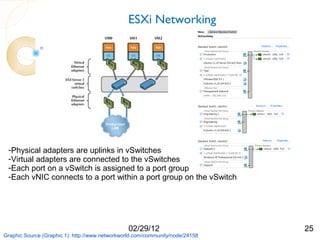
ESXi Networking


 -Physical adapters are uplinks in vSwitches
 -Virtual adapters are connected to the vSwitches
 -Each port on a vSwitch is assigned to a port group
 -Each vNIC connects to a port within a port group on the vSwitch


                                                02/29/12                       25
Graphic Source (Graphic 1): http://www.networkworld.com/community/node/24158
XenServer, Hyper-V and ESXi - Architecture, API, and Coding


2. API Comparison – XenServer, Hyper-V, and ESXi


                     02/29/12                                 26
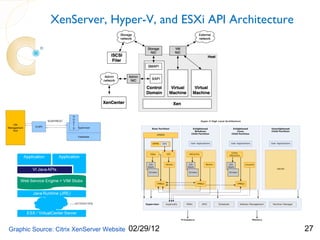
XenServer, Hyper-V, and ESXi API Architecture


Graphic Source: Citrix XenServer Website   02/29/12           27
XenServer API

-The XAPI stack is written in Objective Caml (or Ocaml - a high-level,
 statically type-safe language).

Supposedly, this is to help prevent low-level memory corruption issues
such as buffer overflows or integer overflows which could be used in
malicious attacks over the administration network.


-The XAPI stack listens on port 80 (plain-text) and port 443
 (SSL encrypted) for XenAPI requests.

-XenCenter uses the SSL port which ensure that traffic from the host is
 Encrypted. XenAPI clients may or may not use SSL.


                       02/29/12                                           28
XenServer API
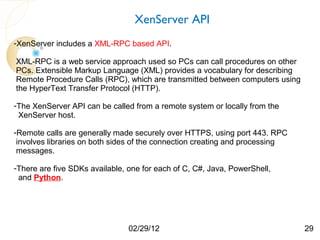
-XenServer includes a XML-RPC based API.

XML-RPC is a web service approach used so PCs can call procedures on other
PCs. Extensible Markup Language (XML) provides a vocabulary for describing
Remote Procedure Calls (RPC), which are transmitted between computers using
the HyperText Transfer Protocol (HTTP).

-The XenServer API can be called from a remote system or locally from the
 XenServer host.

-Remote calls are generally made securely over HTTPS, using port 443. RPC
 involves libraries on both sides of the connection creating and processing
 messages.

-There are five SDKs available, one for each of C, C#, Java, PowerShell,
 and Python.


                                02/29/12                                      29
XenServer API
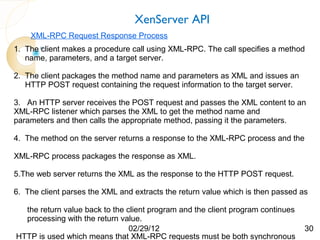
    XML-RPC Request Response Process
1. The client makes a procedure call using XML-RPC. The call specifies a method
   name, parameters, and a target server.

2. The client packages the method name and parameters as XML and issues an
   HTTP POST request containing the request information to the target server.

3. An HTTP server receives the POST request and passes the XML content to an
XML-RPC listener which parses the XML to get the method name and
parameters and then calls the appropriate method, passing it the parameters.

4. The method on the server returns a response to the XML-RPC process and the

XML-RPC process packages the response as XML.

5.The web server returns the XML as the response to the HTTP POST request.

6. The client parses the XML and extracts the return value which is then passed as

  the return value back to the client program and the client program continues
  processing with the return value.
                                02/29/12                                         30
HTTP is used which means that XML-RPC requests must be both synchronous
Hyper-V API


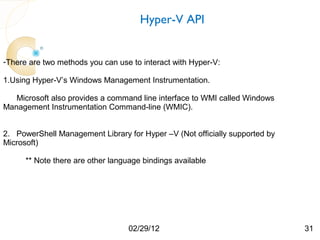
-There are two methods you can use to interact with Hyper-V:

1.Using Hyper-V’s Windows Management Instrumentation.

   Microsoft also provides a command line interface to WMI called Windows
Management Instrumentation Command-line (WMIC).


2. PowerShell Management Library for Hyper –V (Not officially supported by
Microsoft)

      ** Note there are other language bindings available


                                   02/29/12                                  31
Hyper-V API
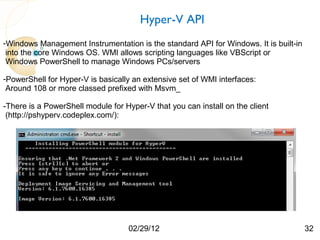
-Windows Management Instrumentation is the standard API for Windows. It is built-in
 into the core Windows OS. WMI allows scripting languages like VBScript or
 Windows PowerShell to manage Windows PCs/servers

-PowerShell for Hyper-V is basically an extensive set of WMI interfaces:
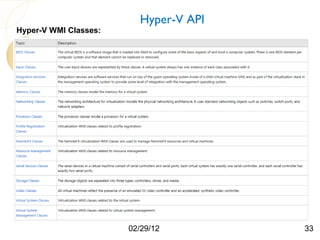
 Around 108 or more classed prefixed with Msvm_

-There is a PowerShell module for Hyper-V that you can install on the client
 (http://pshyperv.codeplex.com/):


                                   02/29/12                                           32
Hyper-V API
Hyper-V WMI Classes:


                       02/29/12        33
set-executionpolicy unrestricted


                               Hyper-V API

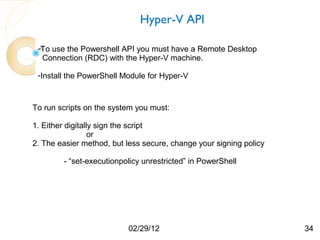
 -To use the Powershell API you must have a Remote Desktop
  Connection (RDC) with the Hyper-V machine.

 -Install the PowerShell Module for Hyper-V


To run scripts on the system you must:

1. Either digitally sign the script
                  or
2. The easier method, but less secure, change your signing policy

        - “set-executionpolicy unrestricted” in PowerShell


                          02/29/12                                  34
vSphere API

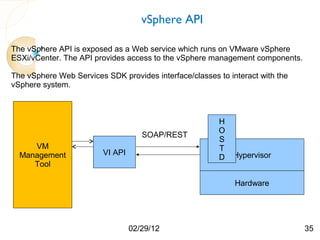
The vSphere API is exposed as a Web service which runs on VMware vSphere
ESXi/vCenter. The API provides access to the vSphere management components.

The vSphere Web Services SDK provides interface/classes to interact with the
vSphere system.


                                                         H
                                                         O
                                     SOAP/REST
                                                         S
     VM                                                  T
  Management             VI API                              Hypervisor
                                                         D
     Tool

                                                             Hardware


                                  02/29/12                                     35
vSphere API
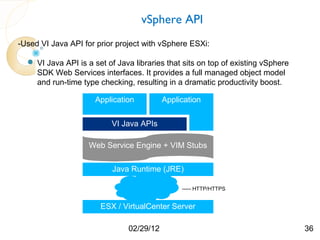
-Used VI Java API for prior project with vSphere ESXi:

   VI Java API is a set of Java libraries that sits on top of existing vSphere
    SDK Web Services interfaces. It provides a full managed object model
    and run-time type checking, resulting in a dramatic productivity boost.

                     Application          Application


                          VI Java APIs

                    Web Service Engine + VIM Stubs

                           Java Runtime (JRE)

                                               ----- HTTP/HTTPS


                       ESX / VirtualCenter Server

                               02/29/12                                           36
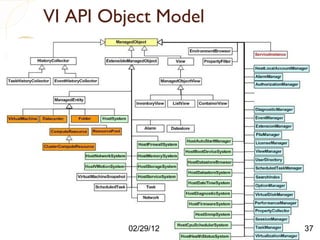
VI API Object Model

 Add problem statement


           02/29/12       37
XenServer, Hyper-V and ESXi - Architecture, API, and Coding


3. Review code and demo programs I wrote - XenServer, Hyper-V, and ESXi


                             02/29/12                                     38
Citrix XenServer Source Code
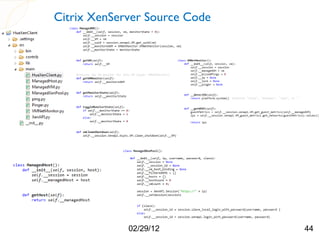
   • Used Tkinter library to develop GUI for easily managing XenServers
   • Also used the Pmw megawidgets library (which itself uses Tkinter as a base)

     You will very quickly find there is little to no well written documentation on
   the
     Tkinter Python library. The Pmw megawidgets library has even less
     documentation.


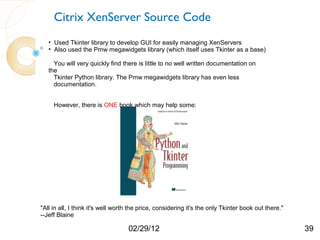
     However, there is ONE book which may help some:


"All in all, I think it's well worth the price, considering it's the only Tkinter book out there."
--Jeff Blaine

                                   02/29/12                                                          39
Citrix XenServer Source Code


 • Used Python Binding to XML-RPC based API for managing, monitoring, and

  performing operations on virtual machines.

  You will very quickly find there that documentation for the Python binding is
  extremely lacking. If my life depended on it, I would not have used Python.

  The Java binding has a nice JavaDoc which is extremely helpful and was
  even helpful developing in Python, although some classes were either not
  implemented or named very differently .


 • JavaDoc, XenServer Management API Guide, XenServer Software
   Development Kit Guide, and experimenting are you best bet!


                       02/29/12                                                   40
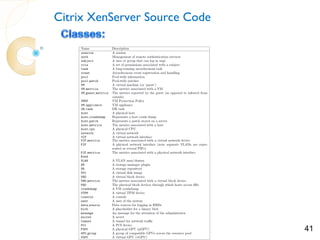
Citrix XenServer Source Code


             02/29/12          41
Citrix XenServer Source Code


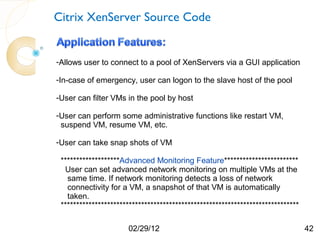
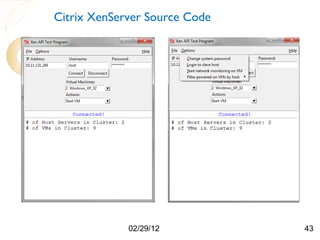
-Allows user to connect to a pool of XenServers via a GUI application

-In-case of emergency, user can logon to the slave host of the pool

-User can filter VMs in the pool by host

-User can perform some administrative functions like restart VM,
 suspend VM, resume VM, etc.

-User can take snap shots of VM

 *******************Advanced Monitoring Feature************************
  User can set advanced network monitoring on multiple VMs at the
   same time. If network monitoring detects a loss of network
   connectivity for a VM, a snapshot of that VM is automatically
   taken.
 *****************************************************************************

                      02/29/12                                                   42
Citrix XenServer Source Code


             02/29/12          43
Citrix XenServer Source Code


             02/29/12          44
Citrix XenServer Source Code
  *******************Advanced Monitoring Feature************************
    User can set advanced network monitoring on multiple VMs at the
     same time. If network monitoring detects a loss of network
     connectivity for a VM, a snapshot of that VM is automatically
     taken.
   *****************************************************************************


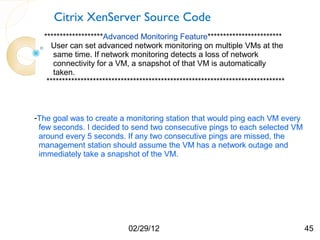
-The goal was to create a monitoring station that would ping each VM every
 few seconds. I decided to send two consecutive pings to each selected VM
 around every 5 seconds. If any two consecutive pings are missed, the
 management station should assume the VM has a network outage and
 immediately take a snapshot of the VM.


                             02/29/12                                              45
Citrix XenServer Source Code
    *******************Advanced Monitoring Feature************************
      User can set advanced network monitoring on multiple VMs at the
       same time. If network monitoring detects a loss of network
       connectivity for a VM, a snapshot of that VM is automatically
       taken.
     *****************************************************************************


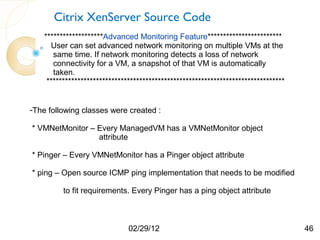
-The following classes were created :

* VMNetMonitor – Every ManagedVM has a VMNetMonitor object
                 attribute

* Pinger – Every VMNetMonitor has a Pinger object attribute

* ping – Open source ICMP ping implementation that needs to be modified

          to fit requirements. Every Pinger has a ping object attribute


                               02/29/12                                              46
Citrix XenServer Source Code
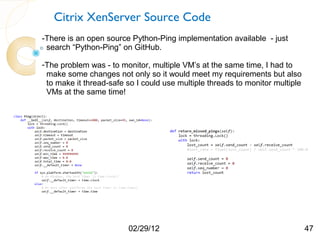
-There is an open source Python-Ping implementation available - just
 search “Python-Ping” on GitHub.

-The problem was - to monitor, multiple VM’s at the same time, I had to
 make some changes not only so it would meet my requirements but also
 to make it thread-safe so I could use multiple threads to monitor multiple
 VMs at the same time!


                         02/29/12                                             47
Citrix XenServer Source Code

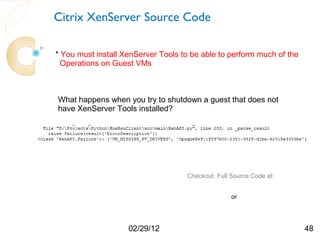
* You must install XenServer Tools to be able to perform much of the
  Operations on Guest VMs


What happens when you try to shutdown a guest that does not
have XenServer Tools installed?


                                    Checkout Full Source Code at:

                                    http://humairahmed.com/#Downloads
                                                     or
                                    https://github.com/HumairAhmed


                    02/29/12                                            48
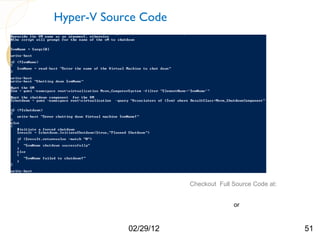
Hyper-V Source Code


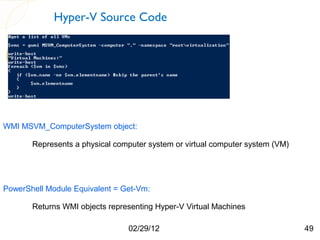
WMI MSVM_ComputerSystem object:

       Represents a physical computer system or virtual computer system (VM)


PowerShell Module Equivalent = Get-Vm:

       Returns WMI objects representing Hyper-V Virtual Machines

                                02/29/12                                       49
Hyper-V Source Code


            02/29/12   50
Hyper-V Source Code


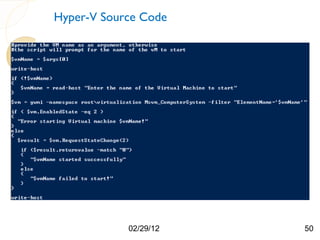
                       Checkout Full Source Code at:

                       http://humairahmed.com/#Downloads
                                        or
                       https://github.com/HumairAhmed

            02/29/12                                       51
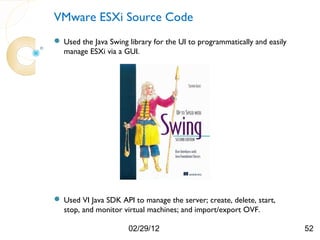
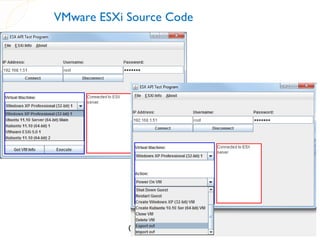
VMware ESXi Source Code
 Used the Java Swing library for the UI to programmatically and easily
  manage ESXi via a GUI.


 Used VI Java SDK API to manage the server; create, delete, start,
  stop, and monitor virtual machines; and import/export OVF.

                      02/29/12                                            52
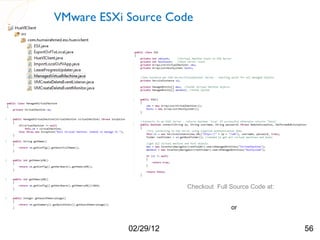
VMware ESXi Source Code

• There is a managed object type called ManagedObject in the VI
  Java API and it captures all common properties and behaviors
  of all managed objects.
• Two classes used extensively for this project are both
  subclasses of the very important ManagedEntity class which is
  the immediate super-class for all other types in the inventory
  tree:
   – HostSystem (Used for the Server level)
   – VirtualMachine (Used for the VM level)


                          02/29/12                                 53
VMware ESXi Source Code


• Additional important classes:
     – ServiceInstance – first managed object seen in a typical application flow. Used to connect
       and authenticate with the ESXi server
     – ServerConnection – represents a connection to the server under a specific login user.
     – InventoryNavigator – class used for helping to find managed entities inside the inventory


     InventoryNavigator Example:
mes = new InventoryNavigator(rootFolder).searchManagedEntities("VirtualMachine");

mesHost = new InventoryNavigator(rootFolder).searchManagedEntities("HostSystem");


                                      02/29/12                                                      54
VMware ESXi Source Code


            02/29/12      55
VMware ESXi Source Code


                       Checkout Full Source Code at:

                       http://humairahmed.com/#Downloads
                                        or
                       https://github.com/HumairAhmed

            02/29/12                                       56
Questions


        02/29/12   57

XenServer, Hyper-V, and ESXi - Architecture, API, and Coding

  • 1.
    XenServer, Hyper-V, andESXi - Architecture, API, and Coding Agenda: 0. Quick hypervisor/market comparison 1. Architecture/Installation Comparison – XenServer, Hyper-V, and ESXi 2. API Comparison – XenServer, Hyper-V, and ESXi 3. Review code and demo programs I wrote - XenServer, Hyper-V, and ESXi Humair Ahmed hue@humairahmed.com All code available on GitHub and Personal Website: https://github.com/HumairAhmed http://www.humairahmed.com/#Downloads 02/29/12 1
  • 2.
    XenServer, Hyper-V andESXi - Architecture, API, and Coding 0. Quick hypervisor/market comparison 02/29/12 2
  • 3.
    XenServer, Hyper-V andESXi - Architecture, API, and Coding Gartner 2008 Analysis: http://virtualization.info/en/news/2008/10/gartner-updates-market-share-reports.html 02/29/12 3
  • 4.
    XenServer, Hyper-V andESXi - Architecture, API, and Coding 1. Architecture/Installation Comparison – XenServer, Hyper-V, and ESXi 02/29/12 4
  • 5.
    My Hyper-V Setup: Windows Server 2008 R2 Full Installation of Windows Server 2008 R2 Drivers Enable the Hyper-V Role In Server Manager Hardware 2 nics on server connected to switch on private local area network Windows Server 2008 R2 02/29/12 5
  • 6.
  • 7.
    My Hyper-V Setup: Youcan access Hyper-V Manager separately or from Server Manager: 02/29/12 7
  • 8.
    Is Hyper-V aTrue Type 1 Hypervisor? Windows Server 2008 R2 Don 0 - Windows Server Virtual 2008 R2 Machine Drivers Drivers Install Hyper-V Hypervisor Server reboots a few times Hardware Hardware Windows Server 2008 R2 Windows Server 2008 R2 with Hyper-V installed 02/29/12 8
  • 9.
    Is Hyper-V aTrue Type 1 Hypervisor? The hypervisor is installed below the Windows Server 2008 R2 Installation. The parent partition (Windows Server) is now on Dom 0 and becomes the management platform for the hypervisor and the hardware. This is not the same as running as a process within the OS such as Type 2 hypervisors like Fusion or VirtualBox. There are actually three possible installation types for Hyper-V: 1. Server Core 2. Full Installation 3. Hyper-V server 2008 R2 (Free Version) 02/29/12 9
  • 10.
    My XenServer Setup: Dom0 - Linux Virtual Machine Embedded Linux on Dom 0 Drivers 2 nics on server connected to switch on private local area network Hypervisor Hardware XenServer 02/29/12 10
  • 11.
    My XenServer Setup: -The software layer hypervisor boots first. Runs in 64-bit mode. -Next, the control domain boots, which is a 32-bit Linux-based embedded distribution. -The control domain is a normal XenServer VM that has additional privileges granted to it which allows it to control host hardware devices and also create further guest domains. -The XAPI management stack runs inside the control domain and manages all resources required for running guest domains. It consists of a distributed database and control software which listens on the administration interface for XenAPI clients that issue control instructions. Graphic Source: Citrix XenServer Website 02/29/12 11
  • 12.
    My XenServer Setup: Accessingthe XenServer Pool via XenCenter: 02/29/12 12
  • 13.
    My ESXi Setup: Virtual Virtual Machine Machine Notice – no Dom 0 VM!!!! 2 nics on server connected to Hypervisor switch on private local area network Drivers Hardware ESXi 02/29/12 13
  • 14.
    My ESXi Setup: Connectingto ESXi via vSphere Client: 02/29/12 14
  • 15.
    Compare Hyper-V toXenServer Dom 0 - Linux Virtual Dom 0 - Windows Virtual Machine Server 2008 R2 Machine Drivers Drivers Hypervisor Hypervisor Hardware Hardware XenServer Look familiar? Hyper-V 02/29/12 15
  • 16.
    Compare XenServer toESXi Virtual Virtual Dom 0 - Windows Virtual Machine Machine Server 2008 R2 Machine Drivers Hypervisor Drivers Hypervisor Hardware Hardware Windows Server 2008 R2 ESXi with Hyper-V installed 02/29/12 16
  • 17.
    Compare Hyper-V toESXi Dom 0 - Linux Virtual Virtual Virtual Machine Machine Machine Drivers Hypervisor Hypervisor Drivers Hardware Hardware XenServer ESXi 02/29/12 17
  • 18.
    Compare Hyper-V toESXi to XenServer Our competition negatively portrays VMware ESX Server as a “monolithic” hypervisor, but our experience and testing proves it to be the best design. -- Vmware Website 02/29/12 18 Graphic Source: VMware Website
  • 19.
    XenServer Networking By default,VM network packets are bridged (default) at the Ethernet layer over the host NIC assigned to the virtual network interface in the VM. The bridge is similar to an Ethernet switch, ensuring traffic from VMs are isolated from each other at Layer 2. Traffic can be isolated by using VLANs, which will tag the Ethernet traffic separately but still go over the same physical NIC on the host. Graphic Source: Citrix XenServer Website 02/29/12 19
  • 20.
    XenServer Networking -The physical interface (usually eth0) on the physical host / Dom-0 is renamed to "peth0". “peth0” becomes the "uplink" of the Xen server to the physical switch. “peth0” is connected to the virtual bridge created by Xen. -Virtual Network Interfaces (ex: vif0.0) are created in Dom-0 and act as network ports for the bridges and are connected to the virtual network interfaces (eth0) of each virtual machine. 02/29/12 20 Graphic Source: http://cooker.techsnail.com/index.php/Virtualization-XEN
  • 21.
  • 22.
    Hyper-V Networking 02/29/12 22 Graphic Source: http://blogs.technet.com/b/tnmag/archive/2009/01/15/automating-virtual-machine-host-deployment.aspx
  • 23.
    Hyper-V Networking -Similar toXenServer -To create an external network in Hyper-V, a virtual network switch is created and bound to the selected physical adapter. - A new virtual network adapter is created in the parent partition which is then connected to the virtual network switch. Virtual machines / child partitions can be bound to the virtual network switch by using virtual network adapters. 02/29/12 23 Graphic Source: http://social.technet.microsoft.com/wiki/contents/articles/151.hyper-v-virtual-networking-survival-guide.aspx
  • 24.
  • 25.
    ESXi Networking -Physicaladapters are uplinks in vSwitches -Virtual adapters are connected to the vSwitches -Each port on a vSwitch is assigned to a port group -Each vNIC connects to a port within a port group on the vSwitch 02/29/12 25 Graphic Source (Graphic 1): http://www.networkworld.com/community/node/24158
  • 26.
    XenServer, Hyper-V andESXi - Architecture, API, and Coding 2. API Comparison – XenServer, Hyper-V, and ESXi 02/29/12 26
  • 27.
    XenServer, Hyper-V, andESXi API Architecture Graphic Source: Citrix XenServer Website 02/29/12 27
  • 28.
    XenServer API -The XAPIstack is written in Objective Caml (or Ocaml - a high-level, statically type-safe language). Supposedly, this is to help prevent low-level memory corruption issues such as buffer overflows or integer overflows which could be used in malicious attacks over the administration network. -The XAPI stack listens on port 80 (plain-text) and port 443 (SSL encrypted) for XenAPI requests. -XenCenter uses the SSL port which ensure that traffic from the host is Encrypted. XenAPI clients may or may not use SSL. 02/29/12 28
  • 29.
    XenServer API -XenServer includesa XML-RPC based API. XML-RPC is a web service approach used so PCs can call procedures on other PCs. Extensible Markup Language (XML) provides a vocabulary for describing Remote Procedure Calls (RPC), which are transmitted between computers using the HyperText Transfer Protocol (HTTP). -The XenServer API can be called from a remote system or locally from the XenServer host. -Remote calls are generally made securely over HTTPS, using port 443. RPC involves libraries on both sides of the connection creating and processing messages. -There are five SDKs available, one for each of C, C#, Java, PowerShell, and Python. 02/29/12 29
  • 30.
    XenServer API XML-RPC Request Response Process 1. The client makes a procedure call using XML-RPC. The call specifies a method name, parameters, and a target server. 2. The client packages the method name and parameters as XML and issues an HTTP POST request containing the request information to the target server. 3. An HTTP server receives the POST request and passes the XML content to an XML-RPC listener which parses the XML to get the method name and parameters and then calls the appropriate method, passing it the parameters. 4. The method on the server returns a response to the XML-RPC process and the XML-RPC process packages the response as XML. 5.The web server returns the XML as the response to the HTTP POST request. 6. The client parses the XML and extracts the return value which is then passed as the return value back to the client program and the client program continues processing with the return value. 02/29/12 30 HTTP is used which means that XML-RPC requests must be both synchronous
  • 31.
    Hyper-V API -There aretwo methods you can use to interact with Hyper-V: 1.Using Hyper-V’s Windows Management Instrumentation. Microsoft also provides a command line interface to WMI called Windows Management Instrumentation Command-line (WMIC). 2. PowerShell Management Library for Hyper –V (Not officially supported by Microsoft) ** Note there are other language bindings available 02/29/12 31
  • 32.
    Hyper-V API -Windows ManagementInstrumentation is the standard API for Windows. It is built-in into the core Windows OS. WMI allows scripting languages like VBScript or Windows PowerShell to manage Windows PCs/servers -PowerShell for Hyper-V is basically an extensive set of WMI interfaces: Around 108 or more classed prefixed with Msvm_ -There is a PowerShell module for Hyper-V that you can install on the client (http://pshyperv.codeplex.com/): 02/29/12 32
  • 33.
    Hyper-V API Hyper-V WMIClasses: 02/29/12 33
  • 34.
    set-executionpolicy unrestricted Hyper-V API -To use the Powershell API you must have a Remote Desktop Connection (RDC) with the Hyper-V machine. -Install the PowerShell Module for Hyper-V To run scripts on the system you must: 1. Either digitally sign the script or 2. The easier method, but less secure, change your signing policy - “set-executionpolicy unrestricted” in PowerShell 02/29/12 34
  • 35.
    vSphere API The vSphereAPI is exposed as a Web service which runs on VMware vSphere ESXi/vCenter. The API provides access to the vSphere management components. The vSphere Web Services SDK provides interface/classes to interact with the vSphere system. H O SOAP/REST S VM T Management VI API Hypervisor D Tool Hardware 02/29/12 35
  • 36.
    vSphere API -Used VIJava API for prior project with vSphere ESXi:  VI Java API is a set of Java libraries that sits on top of existing vSphere SDK Web Services interfaces. It provides a full managed object model and run-time type checking, resulting in a dramatic productivity boost. Application Application VI Java APIs Web Service Engine + VIM Stubs Java Runtime (JRE) ----- HTTP/HTTPS ESX / VirtualCenter Server 02/29/12 36
  • 37.
    VI API ObjectModel Add problem statement 02/29/12 37
  • 38.
    XenServer, Hyper-V andESXi - Architecture, API, and Coding 3. Review code and demo programs I wrote - XenServer, Hyper-V, and ESXi 02/29/12 38
  • 39.
    Citrix XenServer SourceCode • Used Tkinter library to develop GUI for easily managing XenServers • Also used the Pmw megawidgets library (which itself uses Tkinter as a base) You will very quickly find there is little to no well written documentation on the Tkinter Python library. The Pmw megawidgets library has even less documentation. However, there is ONE book which may help some: "All in all, I think it's well worth the price, considering it's the only Tkinter book out there." --Jeff Blaine 02/29/12 39
  • 40.
    Citrix XenServer SourceCode • Used Python Binding to XML-RPC based API for managing, monitoring, and performing operations on virtual machines. You will very quickly find there that documentation for the Python binding is extremely lacking. If my life depended on it, I would not have used Python. The Java binding has a nice JavaDoc which is extremely helpful and was even helpful developing in Python, although some classes were either not implemented or named very differently . • JavaDoc, XenServer Management API Guide, XenServer Software Development Kit Guide, and experimenting are you best bet! 02/29/12 40
  • 41.
    Citrix XenServer SourceCode 02/29/12 41
  • 42.
    Citrix XenServer SourceCode -Allows user to connect to a pool of XenServers via a GUI application -In-case of emergency, user can logon to the slave host of the pool -User can filter VMs in the pool by host -User can perform some administrative functions like restart VM, suspend VM, resume VM, etc. -User can take snap shots of VM *******************Advanced Monitoring Feature************************ User can set advanced network monitoring on multiple VMs at the same time. If network monitoring detects a loss of network connectivity for a VM, a snapshot of that VM is automatically taken. ***************************************************************************** 02/29/12 42
  • 43.
    Citrix XenServer SourceCode 02/29/12 43
  • 44.
    Citrix XenServer SourceCode 02/29/12 44
  • 45.
    Citrix XenServer SourceCode *******************Advanced Monitoring Feature************************ User can set advanced network monitoring on multiple VMs at the same time. If network monitoring detects a loss of network connectivity for a VM, a snapshot of that VM is automatically taken. ***************************************************************************** -The goal was to create a monitoring station that would ping each VM every few seconds. I decided to send two consecutive pings to each selected VM around every 5 seconds. If any two consecutive pings are missed, the management station should assume the VM has a network outage and immediately take a snapshot of the VM. 02/29/12 45
  • 46.
    Citrix XenServer SourceCode *******************Advanced Monitoring Feature************************ User can set advanced network monitoring on multiple VMs at the same time. If network monitoring detects a loss of network connectivity for a VM, a snapshot of that VM is automatically taken. ***************************************************************************** -The following classes were created : * VMNetMonitor – Every ManagedVM has a VMNetMonitor object attribute * Pinger – Every VMNetMonitor has a Pinger object attribute * ping – Open source ICMP ping implementation that needs to be modified to fit requirements. Every Pinger has a ping object attribute 02/29/12 46
  • 47.
    Citrix XenServer SourceCode -There is an open source Python-Ping implementation available - just search “Python-Ping” on GitHub. -The problem was - to monitor, multiple VM’s at the same time, I had to make some changes not only so it would meet my requirements but also to make it thread-safe so I could use multiple threads to monitor multiple VMs at the same time! 02/29/12 47
  • 48.
    Citrix XenServer SourceCode * You must install XenServer Tools to be able to perform much of the Operations on Guest VMs What happens when you try to shutdown a guest that does not have XenServer Tools installed? Checkout Full Source Code at: http://humairahmed.com/#Downloads or https://github.com/HumairAhmed 02/29/12 48
  • 49.
    Hyper-V Source Code WMIMSVM_ComputerSystem object: Represents a physical computer system or virtual computer system (VM) PowerShell Module Equivalent = Get-Vm: Returns WMI objects representing Hyper-V Virtual Machines 02/29/12 49
  • 50.
  • 51.
    Hyper-V Source Code Checkout Full Source Code at: http://humairahmed.com/#Downloads or https://github.com/HumairAhmed 02/29/12 51
  • 52.
    VMware ESXi SourceCode  Used the Java Swing library for the UI to programmatically and easily manage ESXi via a GUI.  Used VI Java SDK API to manage the server; create, delete, start, stop, and monitor virtual machines; and import/export OVF. 02/29/12 52
  • 53.
    VMware ESXi SourceCode • There is a managed object type called ManagedObject in the VI Java API and it captures all common properties and behaviors of all managed objects. • Two classes used extensively for this project are both subclasses of the very important ManagedEntity class which is the immediate super-class for all other types in the inventory tree: – HostSystem (Used for the Server level) – VirtualMachine (Used for the VM level) 02/29/12 53
  • 54.
    VMware ESXi SourceCode • Additional important classes: – ServiceInstance – first managed object seen in a typical application flow. Used to connect and authenticate with the ESXi server – ServerConnection – represents a connection to the server under a specific login user. – InventoryNavigator – class used for helping to find managed entities inside the inventory InventoryNavigator Example: mes = new InventoryNavigator(rootFolder).searchManagedEntities("VirtualMachine"); mesHost = new InventoryNavigator(rootFolder).searchManagedEntities("HostSystem"); 02/29/12 54
  • 55.
    VMware ESXi SourceCode 02/29/12 55
  • 56.
    VMware ESXi SourceCode Checkout Full Source Code at: http://humairahmed.com/#Downloads or https://github.com/HumairAhmed 02/29/12 56
  • 57.
    Questions 02/29/12 57