Securing Your Xen
Virtualization Environment
Russell Pavlicek
Xen Project Evangelist
Citrix Systems
Who is the Old, Fat Geek Up Front?
•
•

Employed by Citrix, focused entirely on Xen project

•

History with open source begins in 1995

•

Former columnist for Infoworld, Processor magazines

•

Former panelist on The Linux Show, repeat
guest on The Linux Link Tech Show

•

2

Xen project Evangelist

Over 150 pieces published, one book on
open source, plus blogs
Presentation Goals
•
•

Introduce you to the Xen Project Security Tools

•

Discuss some key Xen security features

•

3

Introduce the subject of security in the Cloud

Get you started in the right direction toward securing
your Xen installation
Presentation Outline
•

A few thoughts on the problem of securing the Cloud

•

Overview of the Xen architecture

•

Brief introduction to the principles of security analysis

•

Examine some of the attack surfaces and the Xen
features we can use to mitigate them:
‒
‒

PVgrub

‒

Stub Domains

‒

Paravirtualization (PV) versus
Hardware Virtualization (HVM)

‒

4

Driver Domains

FLASK example policy
Introduction: Xen Project, The Cloud,
and Security
Introduction: Xen Project and Security
•

Xen project produces an enterprise-grade Type 1
hypervisor

•

Built for the cloud before it was called cloud

•

A number of advanced security features
‒
‒

Most of them are not (or cannot) be turned on by default

‒

6

Driver domains, stub domains, FLASK, and more
Although they can be simple to use, sometimes they appear
complicated
The Cloud Security Conundrum
•

Cloud Security: The 800lb Gorilla in the room
‒

Nothing generates more fear in specific, and FUD in general

‒

Probably the single greatest barrier to Cloud adoption
‒

Immediately behind it is the inability to get out of the 20th century IT mindset
‒
‒

‒

Cloud is about embracing change at a rapid pace

The good news: the “Gorilla” is actually a “Red Herring”
‒

7

Must get past the “Change is Bad” concept of 1980

We don't need to fear it – we just need to solve it
Cloud Security: New Visibility to an
Old Problem
•

Security has always been an IT issue

•

Putting a truly secure system in the open does not
reduce its security, it just increases the frequency of
attack

•

Unfortunately, system security behind the firewall has
not always been comprehensive

•

Having solutions in an external cloud forces us to
solve the security issues we should have already
solved
News Flash: Security Through Obscurity is Dead

8
Use Security by Design, Not by
Wishful Thinking
•

Security by wishful thinking no longer works
‒

‒

Addressing security in one area while ignoring others is NOT
good enough

‒

•

Merely hoping that your firewall holds off the marauding
hordes is NOT good enough

Saying, “We never had a problem before” is NOT good
enough

Comprehensive security starts with design
‒
‒

It needs to be implemented at multiple levels

‒

9

It needs to be planned carefully and thought through
It needs components which are themselves securable
Xen Project: Security by Design
•

Xen Project was designed for clouds before the term
“cloud” was ever coined in the industry
‒

‒

•

10

Designers foresaw the day of “infrastructure for wide-area
distributed computing” which we now call “the cloud”
http://www.cl.cam.ac.uk/research//srg/netos/xeno/publications.
html

Xen is designed to thwart attacks from many attack
vectors, using different defensive techniques
Basic Architecture of the Xen Hypervisor
Hypervisor Architectures
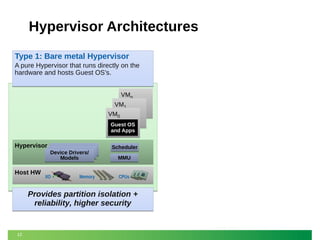
Type 1: Bare metal Hypervisor
A pure Hypervisor that runs directly on the
hardware and hosts Guest OS’s.
VMn
VM1
VM0
Guest OS
and Apps

Hypervisor

Host HW

Device Drivers/
Models

I/O

Memory

Scheduler
MMU
CPUs

Provides partition isolation +
reliability, higher security

12
Hypervisor Architectures
Type 1: Bare metal Hypervisor

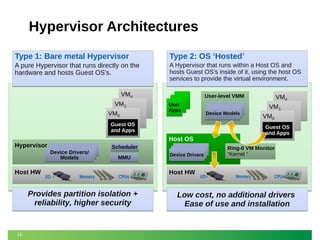
Type 2: OS ‘Hosted’

A pure Hypervisor that runs directly on the
hardware and hosts Guest OS’s.

A Hypervisor that runs within a Host OS and
hosts Guest OS’s inside of it, using the host OS
services to provide the virtual environment.

VMn
VM1
VM0

User-level VMM
User
Apps

Device Models

Guest OS
and Apps

Hypervisor

Host HW

I/O

Memory

Scheduler
MMU
CPUs

Provides partition isolation +
reliability, higher security

13

Device Drivers

Host HW

VM0
Guest OS
and Apps

Host OS
Device Drivers/
Models

VMn
VM1

I/O

Ring-0 VM Monitor
“Kernel “

Memory

CPUs

Low cost, no additional drivers
Ease of use and installation
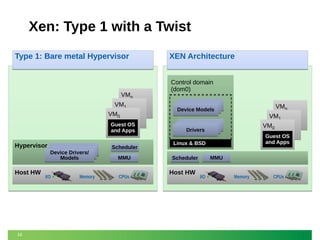
Xen: Type 1 with a Twist
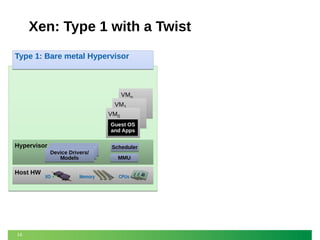
Type 1: Bare metal Hypervisor

VMn
VM1
VM0
Guest OS
and Apps

Hypervisor

Host HW

14

Device Drivers/
Models

I/O

Memory

Scheduler
MMU
CPUs
Xen: Type 1 with a Twist
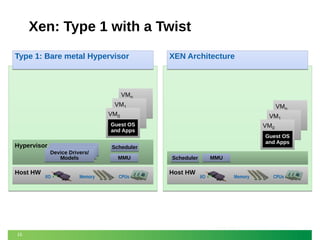
Type 1: Bare metal Hypervisor

XEN Architecture

VMn
VM1

VMn
VM1

VM0
Guest OS
and Apps

Hypervisor

Host HW

15

Device Drivers/
Models

I/O

Memory

VM0
Guest OS
and Apps

Scheduler
MMU
CPUs

MMU

Scheduler

Host HW

I/O

Memory

CPUs
Xen: Type 1 with a Twist
Type 1: Bare metal Hypervisor

VMn
VM1
VM0
Guest OS
and Apps

Hypervisor

Host HW

16

Device Drivers/
Models

I/O

Memory

Scheduler
MMU
CPUs

XEN Architecture
Control domain
(dom0)
VMn
VM1

Device Models

VM0

Drivers

Guest OS
and Apps

Linux & BSD
MMU

Scheduler

Host HW

I/O

Memory

CPUs
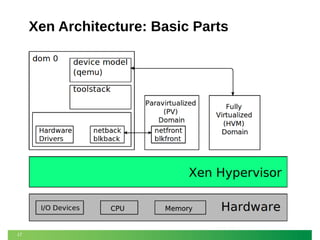
Xen Architecture: Basic Parts

17
Security Thinking: An Approach
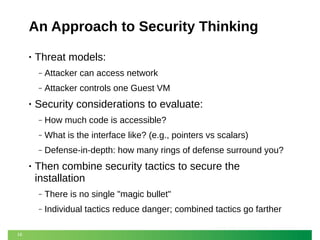
An Approach to Security Thinking
•

Threat models:
‒
‒

•

Attacker can access network
Attacker controls one Guest VM

Security considerations to evaluate:
‒
‒

What is the interface like? (e.g., pointers vs scalars)

‒

•

How much code is accessible?
Defense-in-depth: how many rings of defense surround you?

Then combine security tactics to secure the
installation
‒
‒

19

There is no single "magic bullet"
Individual tactics reduce danger; combined tactics go farther
Example System For This Discussion
•

Hardware setup
‒
‒

•

Two networks: one Control network, one Guest network
IOMMU with interrupt remapping (AMD or Intel VT-d v2) to
allow for full hardware virtualization (HVM)

Default configuration
‒

‒

Paravirtualized (PV) guests using PyGrub (grub-like boot utility
within context of Guest Domain)

‒

20

Network drivers in the Control Domain (aka "Domain 0" or just
"Dom0")

Hardware Virtualized (HVM) guests using Qemu (as the
device model) running in the Control Domain
Attacking the Network Interface
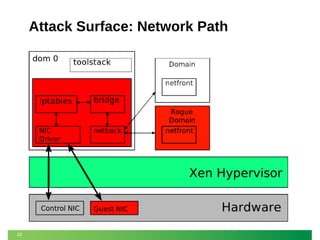
Attack Surface: Network Path

22
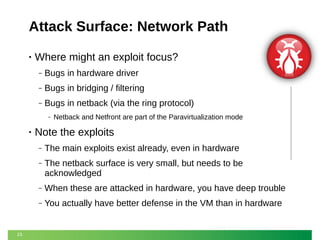
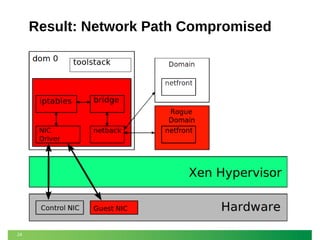
Attack Surface: Network Path
•

Where might an exploit focus?
‒

Bugs in hardware driver

‒

Bugs in bridging / filtering

‒

Bugs in netback (via the ring protocol)
‒

•

Netback and Netfront are part of the Paravirtualization mode

Note the exploits
‒
‒

The netback surface is very small, but needs to be
acknowledged

‒

When these are attacked in hardware, you have deep trouble

‒

23

The main exploits exist already, even in hardware

You actually have better defense in the VM than in hardware
Result: Network Path Compromised

24
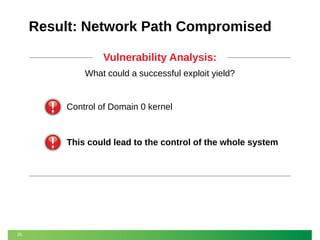
Result: Network Path Compromised
Vulnerability Analysis:
What could a successful exploit yield?

Control of Domain 0 kernel

This could lead to the control of the whole system

25
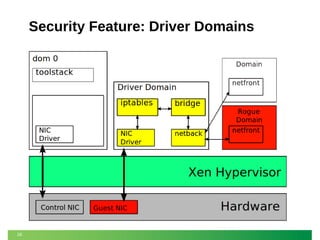
Security Feature: Driver Domains

26
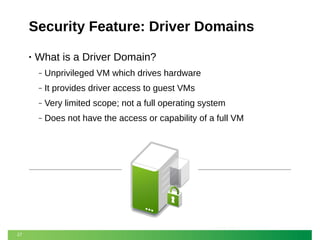
Security Feature: Driver Domains
•

What is a Driver Domain?
‒
‒

It provides driver access to guest VMs

‒

Very limited scope; not a full operating system

‒

27

Unprivileged VM which drives hardware

Does not have the access or capability of a full VM
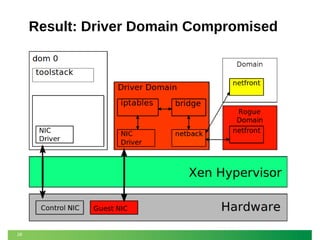
Result: Driver Domain Compromised

28
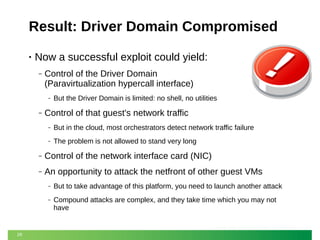
Result: Driver Domain Compromised
•

Now a successful exploit could yield:
‒

Control of the Driver Domain
(Paravirtualization hypercall interface)
‒

‒

But the Driver Domain is limited: no shell, no utilities

Control of that guest's network traffic
‒

But in the cloud, most orchestrators detect network traffic failure

‒

The problem is not allowed to stand very long

‒

Control of the network interface card (NIC)

‒

An opportunity to attack the netfront of other guest VMs
‒
‒

29

But to take advantage of this platform, you need to launch another attack
Compound attacks are complex, and they take time which you may not
have
Basic How To: Driver Domains
•

Create a VM with appropriate drivers
‒

•

Use any distribution suitable as a Control Domain

Install the Xen-related hotplug scripts
‒

Just installing the Xen tools in the VM is usually good enough

•

Give the VM access to the physical NIC with PCI
passthrough

•

Configure the network topology in the Driver Domain
‒

30

Just like you would for the Control Domain
Basic How To: Driver Domains
•

Configure the guest Virtual Network Interface (vif) to
use the new domain ID
‒

Add “backend=domnet” to vif declaration

vif = [ 'type=pv, bridge=xenbr0, backend=domnet' ]

Detailed Info
http://wiki.xenproject.org/wiki/Driver_Domain

31
Attacking the PyGrub Boot Loader
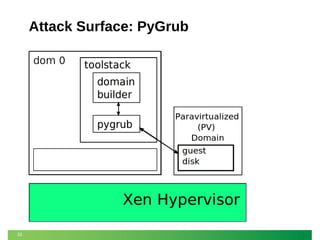
Attack Surface: PyGrub

33
Attack Surface: PyGrub
•

What is PyGrub?
‒
‒

•

“grub” implementation for Paravirtualized guests
A Python program running in Control Domain

What does it do?
‒
‒

It parses grub.conf

‒

It displays a boot menu to the user

‒

34

It reads the guest VM's filesystem

It passes the selected kernel image to domain builder
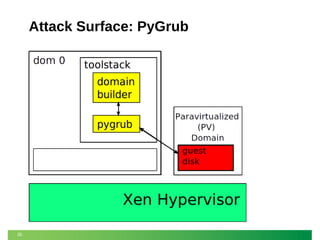
Attack Surface: PyGrub

35
Attack Surface: PyGrub
•

Where might an exploit focus?
‒
‒

Bugs in menu parser

‒

•

Bugs in file system parser

Bugs in domain builder

Again, note the exploits
‒
‒

36

Forms of these exist in hardware as well
But hardware doesn't have as many options to combat the
situation
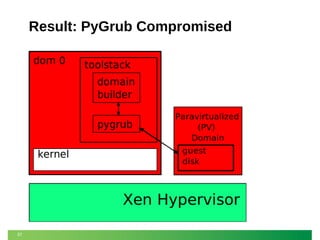
Result: PyGrub Compromised

37
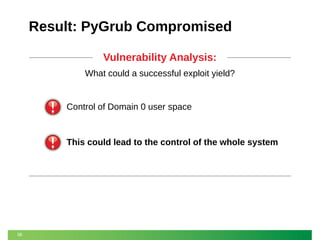
Result: PyGrub Compromised
Vulnerability Analysis:
What could a successful exploit yield?

Control of Domain 0 user space

This could lead to the control of the whole system

38
Security Feature: Fixed Kernels

39
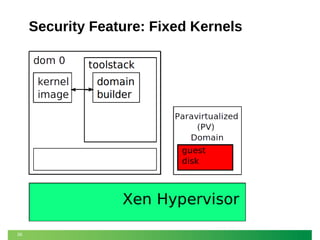
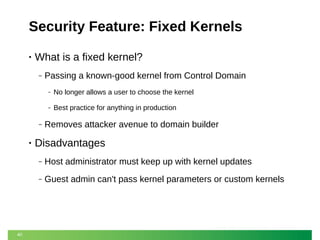
Security Feature: Fixed Kernels
•

What is a fixed kernel?
‒

Passing a known-good kernel from Control Domain
‒
‒

‒

•

No longer allows a user to choose the kernel
Best practice for anything in production

Removes attacker avenue to domain builder

Disadvantages
‒
‒

40

Host administrator must keep up with kernel updates
Guest admin can't pass kernel parameters or custom kernels
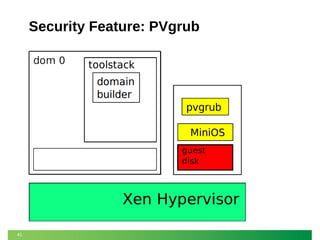
Security Feature: PVgrub

41
Security Feature: PVgrub
•

What is PVgrub?
‒

‒

42

MiniOS plus the Paravirtualized port of “grub” running in a
guest context
Paravirtualized equivalent of Hardware Virtualized combination
of BIOS plus grub
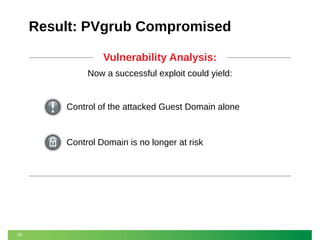
Result: PVgrub Compromised
Vulnerability Analysis:
Now a successful exploit could yield:

Control of the attacked Guest Domain alone

Control Domain is no longer at risk

43
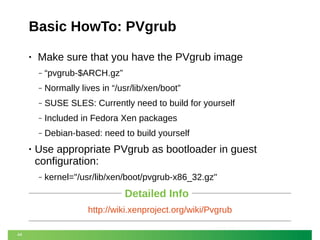
Basic HowTo: PVgrub
•

Make sure that you have the PVgrub image
‒
‒

Normally lives in “/usr/lib/xen/boot”

‒

SUSE SLES: Currently need to build for yourself

‒

Included in Fedora Xen packages

‒

•

“pvgrub-$ARCH.gz”

Debian-based: need to build yourself

Use appropriate PVgrub as bootloader in guest
configuration:
‒

kernel="/usr/lib/xen/boot/pvgrub-x86_32.gz"

Detailed Info
http://wiki.xenproject.org/wiki/Pvgrub
44
Attacking the Qemu Device Model
Attack Surface: Device Model (Qemu)

46
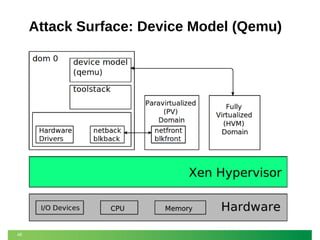
Attack Surface: Device Model (Qemu)
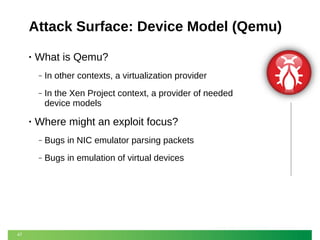
•

What is Qemu?
‒
‒

•

In other contexts, a virtualization provider
In the Xen Project context, a provider of needed
device models

Where might an exploit focus?
‒
‒

47

Bugs in NIC emulator parsing packets
Bugs in emulation of virtual devices
Result: Device Model Compromised
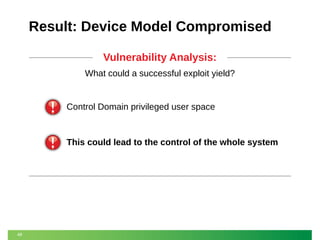
Vulnerability Analysis:
What could a successful exploit yield?

Control Domain privileged user space

This could lead to the control of the whole system

48
Security Feature: Qemu Stub Domains
•

What is a stub domain?
‒

‒

49

Stub domain: a small “service'' domain running just one
application
Qemu stub domain: run each Qemu in its own domain
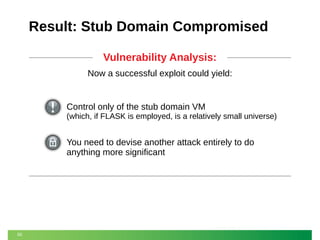
Result: Stub Domain Compromised
Vulnerability Analysis:
Now a successful exploit could yield:

Control only of the stub domain VM
(which, if FLASK is employed, is a relatively small universe)

You need to devise another attack entirely to do
anything more significant

50
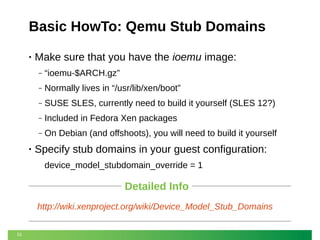
Basic HowTo: Qemu Stub Domains
•

Make sure that you have the ioemu image:
‒
‒

Normally lives in “/usr/lib/xen/boot”

‒

SUSE SLES, currently need to build it yourself (SLES 12?)

‒

Included in Fedora Xen packages

‒

•

“ioemu-$ARCH.gz”

On Debian (and offshoots), you will need to build it yourself

Specify stub domains in your guest configuration:
device_model_stubdomain_override = 1

Detailed Info
http://wiki.xenproject.org/wiki/Device_Model_Stub_Domains
51
Attacking the Hypervisor Itself
Attack Surface: Xen Hypervisor Itself
•

Where might an exploit focus?
‒

On Paravirtualized (PV) Guests:
‒

‒

PV Hypercalls

On full Hardware Virtualized (HVM) Guests:
‒
‒

Emulated platform devices: APIC, HPET, PIT

‒

53

Instruction emulation (MMIO, shadow pagetables)

‒

•

HVM hypercalls (Subset of PV hypercalls)

Nested virtualization

Security practice: Use PV VMs whenever possible
Using the Xen Security Module
Security Feature: FLASK Policy
•

What is FLASK?
‒
‒

FLASK: FLux Advanced Security Kernel

‒

Framework for XSM developed by NSA

‒

Xen equivalent of SELinux

‒

Uses same concepts and tools as SELinux

‒

55

Xen Security Module (XSM): Xen equivalent of LSM

Allows a policy to restrict hypercalls
Security Feature: FLASK Policy
•

What can FLASK do?
‒

‒

•

Basic: Restricts hypercalls to those needed by a particular
guest
Advanced: Allows more fine-grained granting of privileges

FLASK example policy
‒

This contains example roles for the Control Domain (dom0),
User/Guest Domain(domU), stub domains, driver domains, etc.

‒

Make sure you TEST the example policy in your environment
BEFORE putting it into production!

NOTE: As an example policy, it is not as rigorously tested as
other parts of Xen during release; make sure it is suitable for you

56
Basic HowTo: FLASK Example Policy
•

Build Xen with XSM enabled

•

Build the example policy

•

Add the appropriate label to guest config files:
‒

“seclabel=[foo]”

‒

“stubdom_label=[foo]”

Detailed Info
http://wiki.xenproject.org/wiki/Xen_Security_Modules_:_XSM-FLASK

57
ARM-Specific Security Features
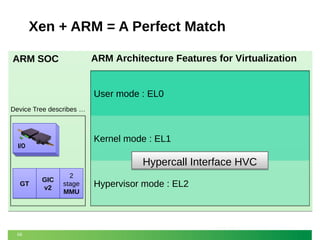
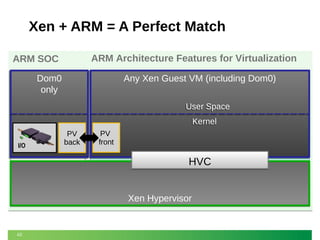
Xen + ARM = A Perfect Match
ARM Architecture Features for Virtualization

ARM SOC

User mode : EL0
Device Tree describes …

Kernel mode : EL1

I/O

Hypercall Interface HVC
GT

59

GIC
v2

2
stage
MMU

Hypervisor mode : EL2
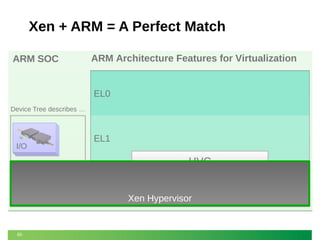
Xen + ARM = A Perfect Match
ARM Architecture Features for Virtualization

ARM SOC

EL0
Device Tree describes …

EL1

I/O

HVC
GT

60

GIC
v2

2
stage
MMU

EL2
Xen Hypervisor
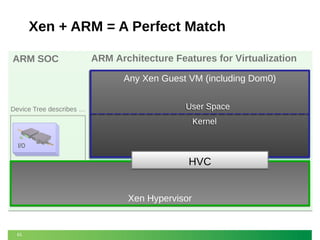
Xen + ARM = A Perfect Match
ARM Architecture Features for Virtualization

ARM SOC

Any Xen Guest VM (including Dom0)
EL0
User Space
User Space

Device Tree describes …

Kernel
Kernel

EL1

I/O

HVC
GT

61

GIC
v2

2
stage
MMU

EL2
Xen Hypervisor
Xen + ARM = A Perfect Match
ARM Architecture Features for Virtualization

ARM SOC
Dom0
Dom0
only

Any Xen Guest VM (including Dom0)
EL0
User Space
User Space

Device Tree describes …

Kernel
Kernel
PV
back

I/O

PV

EL1
front

HVC
GT

62

GIC
v2

2
stage
MMU

EL2
Xen Hypervisor
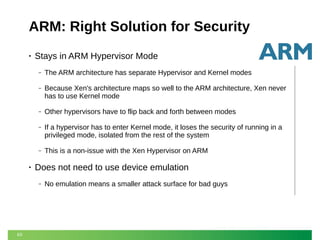
ARM: Right Solution for Security
•

Stays in ARM Hypervisor Mode
‒
‒

Because Xen's architecture maps so well to the ARM architecture, Xen never
has to use Kernel mode

‒

Other hypervisors have to flip back and forth between modes

‒

If a hypervisor has to enter Kernel mode, it loses the security of running in a
privileged mode, isolated from the rest of the system

‒

•

The ARM architecture has separate Hypervisor and Kernel modes

This is a non-issue with the Xen Hypervisor on ARM

Does not need to use device emulation
‒

63

No emulation means a smaller attack surface for bad guys
For More Information...
Detailed Info
http://wiki.xenproject.org/wiki/Securing_Xen
Thanks to George Dunlap for supplying much of the
information presented here, and Stefano Stabellini for
ARM information
Check out our blog: http://blog.xenproject.org/
Contact me at russell.pavlicek@xenproject.org

Thank You!
64
Securing your Cloud with Xen - SUSECon 2013

Securing your Cloud with Xen - SUSECon 2013

  • 1.
    Securing Your Xen VirtualizationEnvironment Russell Pavlicek Xen Project Evangelist Citrix Systems
  • 2.
    Who is theOld, Fat Geek Up Front? • • Employed by Citrix, focused entirely on Xen project • History with open source begins in 1995 • Former columnist for Infoworld, Processor magazines • Former panelist on The Linux Show, repeat guest on The Linux Link Tech Show • 2 Xen project Evangelist Over 150 pieces published, one book on open source, plus blogs
  • 3.
    Presentation Goals • • Introduce youto the Xen Project Security Tools • Discuss some key Xen security features • 3 Introduce the subject of security in the Cloud Get you started in the right direction toward securing your Xen installation
  • 4.
    Presentation Outline • A fewthoughts on the problem of securing the Cloud • Overview of the Xen architecture • Brief introduction to the principles of security analysis • Examine some of the attack surfaces and the Xen features we can use to mitigate them: ‒ ‒ PVgrub ‒ Stub Domains ‒ Paravirtualization (PV) versus Hardware Virtualization (HVM) ‒ 4 Driver Domains FLASK example policy
  • 5.
    Introduction: Xen Project,The Cloud, and Security
  • 6.
    Introduction: Xen Projectand Security • Xen project produces an enterprise-grade Type 1 hypervisor • Built for the cloud before it was called cloud • A number of advanced security features ‒ ‒ Most of them are not (or cannot) be turned on by default ‒ 6 Driver domains, stub domains, FLASK, and more Although they can be simple to use, sometimes they appear complicated
  • 7.
    The Cloud SecurityConundrum • Cloud Security: The 800lb Gorilla in the room ‒ Nothing generates more fear in specific, and FUD in general ‒ Probably the single greatest barrier to Cloud adoption ‒ Immediately behind it is the inability to get out of the 20th century IT mindset ‒ ‒ ‒ Cloud is about embracing change at a rapid pace The good news: the “Gorilla” is actually a “Red Herring” ‒ 7 Must get past the “Change is Bad” concept of 1980 We don't need to fear it – we just need to solve it
  • 8.
    Cloud Security: NewVisibility to an Old Problem • Security has always been an IT issue • Putting a truly secure system in the open does not reduce its security, it just increases the frequency of attack • Unfortunately, system security behind the firewall has not always been comprehensive • Having solutions in an external cloud forces us to solve the security issues we should have already solved News Flash: Security Through Obscurity is Dead 8
  • 9.
    Use Security byDesign, Not by Wishful Thinking • Security by wishful thinking no longer works ‒ ‒ Addressing security in one area while ignoring others is NOT good enough ‒ • Merely hoping that your firewall holds off the marauding hordes is NOT good enough Saying, “We never had a problem before” is NOT good enough Comprehensive security starts with design ‒ ‒ It needs to be implemented at multiple levels ‒ 9 It needs to be planned carefully and thought through It needs components which are themselves securable
  • 10.
    Xen Project: Securityby Design • Xen Project was designed for clouds before the term “cloud” was ever coined in the industry ‒ ‒ • 10 Designers foresaw the day of “infrastructure for wide-area distributed computing” which we now call “the cloud” http://www.cl.cam.ac.uk/research//srg/netos/xeno/publications. html Xen is designed to thwart attacks from many attack vectors, using different defensive techniques
  • 11.
    Basic Architecture ofthe Xen Hypervisor
  • 12.
    Hypervisor Architectures Type 1:Bare metal Hypervisor A pure Hypervisor that runs directly on the hardware and hosts Guest OS’s. VMn VM1 VM0 Guest OS and Apps Hypervisor Host HW Device Drivers/ Models I/O Memory Scheduler MMU CPUs Provides partition isolation + reliability, higher security 12
  • 13.
    Hypervisor Architectures Type 1:Bare metal Hypervisor Type 2: OS ‘Hosted’ A pure Hypervisor that runs directly on the hardware and hosts Guest OS’s. A Hypervisor that runs within a Host OS and hosts Guest OS’s inside of it, using the host OS services to provide the virtual environment. VMn VM1 VM0 User-level VMM User Apps Device Models Guest OS and Apps Hypervisor Host HW I/O Memory Scheduler MMU CPUs Provides partition isolation + reliability, higher security 13 Device Drivers Host HW VM0 Guest OS and Apps Host OS Device Drivers/ Models VMn VM1 I/O Ring-0 VM Monitor “Kernel “ Memory CPUs Low cost, no additional drivers Ease of use and installation
  • 14.
    Xen: Type 1with a Twist Type 1: Bare metal Hypervisor VMn VM1 VM0 Guest OS and Apps Hypervisor Host HW 14 Device Drivers/ Models I/O Memory Scheduler MMU CPUs
  • 15.
    Xen: Type 1with a Twist Type 1: Bare metal Hypervisor XEN Architecture VMn VM1 VMn VM1 VM0 Guest OS and Apps Hypervisor Host HW 15 Device Drivers/ Models I/O Memory VM0 Guest OS and Apps Scheduler MMU CPUs MMU Scheduler Host HW I/O Memory CPUs
  • 16.
    Xen: Type 1with a Twist Type 1: Bare metal Hypervisor VMn VM1 VM0 Guest OS and Apps Hypervisor Host HW 16 Device Drivers/ Models I/O Memory Scheduler MMU CPUs XEN Architecture Control domain (dom0) VMn VM1 Device Models VM0 Drivers Guest OS and Apps Linux & BSD MMU Scheduler Host HW I/O Memory CPUs
  • 17.
  • 18.
  • 19.
    An Approach toSecurity Thinking • Threat models: ‒ ‒ • Attacker can access network Attacker controls one Guest VM Security considerations to evaluate: ‒ ‒ What is the interface like? (e.g., pointers vs scalars) ‒ • How much code is accessible? Defense-in-depth: how many rings of defense surround you? Then combine security tactics to secure the installation ‒ ‒ 19 There is no single "magic bullet" Individual tactics reduce danger; combined tactics go farther
  • 20.
    Example System ForThis Discussion • Hardware setup ‒ ‒ • Two networks: one Control network, one Guest network IOMMU with interrupt remapping (AMD or Intel VT-d v2) to allow for full hardware virtualization (HVM) Default configuration ‒ ‒ Paravirtualized (PV) guests using PyGrub (grub-like boot utility within context of Guest Domain) ‒ 20 Network drivers in the Control Domain (aka "Domain 0" or just "Dom0") Hardware Virtualized (HVM) guests using Qemu (as the device model) running in the Control Domain
  • 21.
  • 22.
  • 23.
    Attack Surface: NetworkPath • Where might an exploit focus? ‒ Bugs in hardware driver ‒ Bugs in bridging / filtering ‒ Bugs in netback (via the ring protocol) ‒ • Netback and Netfront are part of the Paravirtualization mode Note the exploits ‒ ‒ The netback surface is very small, but needs to be acknowledged ‒ When these are attacked in hardware, you have deep trouble ‒ 23 The main exploits exist already, even in hardware You actually have better defense in the VM than in hardware
  • 24.
    Result: Network PathCompromised 24
  • 25.
    Result: Network PathCompromised Vulnerability Analysis: What could a successful exploit yield? Control of Domain 0 kernel This could lead to the control of the whole system 25
  • 26.
  • 27.
    Security Feature: DriverDomains • What is a Driver Domain? ‒ ‒ It provides driver access to guest VMs ‒ Very limited scope; not a full operating system ‒ 27 Unprivileged VM which drives hardware Does not have the access or capability of a full VM
  • 28.
    Result: Driver DomainCompromised 28
  • 29.
    Result: Driver DomainCompromised • Now a successful exploit could yield: ‒ Control of the Driver Domain (Paravirtualization hypercall interface) ‒ ‒ But the Driver Domain is limited: no shell, no utilities Control of that guest's network traffic ‒ But in the cloud, most orchestrators detect network traffic failure ‒ The problem is not allowed to stand very long ‒ Control of the network interface card (NIC) ‒ An opportunity to attack the netfront of other guest VMs ‒ ‒ 29 But to take advantage of this platform, you need to launch another attack Compound attacks are complex, and they take time which you may not have
  • 30.
    Basic How To:Driver Domains • Create a VM with appropriate drivers ‒ • Use any distribution suitable as a Control Domain Install the Xen-related hotplug scripts ‒ Just installing the Xen tools in the VM is usually good enough • Give the VM access to the physical NIC with PCI passthrough • Configure the network topology in the Driver Domain ‒ 30 Just like you would for the Control Domain
  • 31.
    Basic How To:Driver Domains • Configure the guest Virtual Network Interface (vif) to use the new domain ID ‒ Add “backend=domnet” to vif declaration vif = [ 'type=pv, bridge=xenbr0, backend=domnet' ] Detailed Info http://wiki.xenproject.org/wiki/Driver_Domain 31
  • 32.
  • 33.
  • 34.
    Attack Surface: PyGrub • Whatis PyGrub? ‒ ‒ • “grub” implementation for Paravirtualized guests A Python program running in Control Domain What does it do? ‒ ‒ It parses grub.conf ‒ It displays a boot menu to the user ‒ 34 It reads the guest VM's filesystem It passes the selected kernel image to domain builder
  • 35.
  • 36.
    Attack Surface: PyGrub • Wheremight an exploit focus? ‒ ‒ Bugs in menu parser ‒ • Bugs in file system parser Bugs in domain builder Again, note the exploits ‒ ‒ 36 Forms of these exist in hardware as well But hardware doesn't have as many options to combat the situation
  • 37.
  • 38.
    Result: PyGrub Compromised VulnerabilityAnalysis: What could a successful exploit yield? Control of Domain 0 user space This could lead to the control of the whole system 38
  • 39.
  • 40.
    Security Feature: FixedKernels • What is a fixed kernel? ‒ Passing a known-good kernel from Control Domain ‒ ‒ ‒ • No longer allows a user to choose the kernel Best practice for anything in production Removes attacker avenue to domain builder Disadvantages ‒ ‒ 40 Host administrator must keep up with kernel updates Guest admin can't pass kernel parameters or custom kernels
  • 41.
  • 42.
    Security Feature: PVgrub • Whatis PVgrub? ‒ ‒ 42 MiniOS plus the Paravirtualized port of “grub” running in a guest context Paravirtualized equivalent of Hardware Virtualized combination of BIOS plus grub
  • 43.
    Result: PVgrub Compromised VulnerabilityAnalysis: Now a successful exploit could yield: Control of the attacked Guest Domain alone Control Domain is no longer at risk 43
  • 44.
    Basic HowTo: PVgrub • Makesure that you have the PVgrub image ‒ ‒ Normally lives in “/usr/lib/xen/boot” ‒ SUSE SLES: Currently need to build for yourself ‒ Included in Fedora Xen packages ‒ • “pvgrub-$ARCH.gz” Debian-based: need to build yourself Use appropriate PVgrub as bootloader in guest configuration: ‒ kernel="/usr/lib/xen/boot/pvgrub-x86_32.gz" Detailed Info http://wiki.xenproject.org/wiki/Pvgrub 44
  • 45.
    Attacking the QemuDevice Model
  • 46.
    Attack Surface: DeviceModel (Qemu) 46
  • 47.
    Attack Surface: DeviceModel (Qemu) • What is Qemu? ‒ ‒ • In other contexts, a virtualization provider In the Xen Project context, a provider of needed device models Where might an exploit focus? ‒ ‒ 47 Bugs in NIC emulator parsing packets Bugs in emulation of virtual devices
  • 48.
    Result: Device ModelCompromised Vulnerability Analysis: What could a successful exploit yield? Control Domain privileged user space This could lead to the control of the whole system 48
  • 49.
    Security Feature: QemuStub Domains • What is a stub domain? ‒ ‒ 49 Stub domain: a small “service'' domain running just one application Qemu stub domain: run each Qemu in its own domain
  • 50.
    Result: Stub DomainCompromised Vulnerability Analysis: Now a successful exploit could yield: Control only of the stub domain VM (which, if FLASK is employed, is a relatively small universe) You need to devise another attack entirely to do anything more significant 50
  • 51.
    Basic HowTo: QemuStub Domains • Make sure that you have the ioemu image: ‒ ‒ Normally lives in “/usr/lib/xen/boot” ‒ SUSE SLES, currently need to build it yourself (SLES 12?) ‒ Included in Fedora Xen packages ‒ • “ioemu-$ARCH.gz” On Debian (and offshoots), you will need to build it yourself Specify stub domains in your guest configuration: device_model_stubdomain_override = 1 Detailed Info http://wiki.xenproject.org/wiki/Device_Model_Stub_Domains 51
  • 52.
  • 53.
    Attack Surface: XenHypervisor Itself • Where might an exploit focus? ‒ On Paravirtualized (PV) Guests: ‒ ‒ PV Hypercalls On full Hardware Virtualized (HVM) Guests: ‒ ‒ Emulated platform devices: APIC, HPET, PIT ‒ 53 Instruction emulation (MMIO, shadow pagetables) ‒ • HVM hypercalls (Subset of PV hypercalls) Nested virtualization Security practice: Use PV VMs whenever possible
  • 54.
    Using the XenSecurity Module
  • 55.
    Security Feature: FLASKPolicy • What is FLASK? ‒ ‒ FLASK: FLux Advanced Security Kernel ‒ Framework for XSM developed by NSA ‒ Xen equivalent of SELinux ‒ Uses same concepts and tools as SELinux ‒ 55 Xen Security Module (XSM): Xen equivalent of LSM Allows a policy to restrict hypercalls
  • 56.
    Security Feature: FLASKPolicy • What can FLASK do? ‒ ‒ • Basic: Restricts hypercalls to those needed by a particular guest Advanced: Allows more fine-grained granting of privileges FLASK example policy ‒ This contains example roles for the Control Domain (dom0), User/Guest Domain(domU), stub domains, driver domains, etc. ‒ Make sure you TEST the example policy in your environment BEFORE putting it into production! NOTE: As an example policy, it is not as rigorously tested as other parts of Xen during release; make sure it is suitable for you 56
  • 57.
    Basic HowTo: FLASKExample Policy • Build Xen with XSM enabled • Build the example policy • Add the appropriate label to guest config files: ‒ “seclabel=[foo]” ‒ “stubdom_label=[foo]” Detailed Info http://wiki.xenproject.org/wiki/Xen_Security_Modules_:_XSM-FLASK 57
  • 58.
  • 59.
    Xen + ARM= A Perfect Match ARM Architecture Features for Virtualization ARM SOC User mode : EL0 Device Tree describes … Kernel mode : EL1 I/O Hypercall Interface HVC GT 59 GIC v2 2 stage MMU Hypervisor mode : EL2
  • 60.
    Xen + ARM= A Perfect Match ARM Architecture Features for Virtualization ARM SOC EL0 Device Tree describes … EL1 I/O HVC GT 60 GIC v2 2 stage MMU EL2 Xen Hypervisor
  • 61.
    Xen + ARM= A Perfect Match ARM Architecture Features for Virtualization ARM SOC Any Xen Guest VM (including Dom0) Any Xen Guest VM (including Dom0) EL0 User Space User Space Device Tree describes … Kernel Kernel EL1 I/O HVC GT 61 GIC v2 2 stage MMU EL2 Xen Hypervisor
  • 62.
    Xen + ARM= A Perfect Match ARM Architecture Features for Virtualization ARM SOC Dom0 Dom0 only Any Xen Guest VM (including Dom0) Any Xen Guest VM (including Dom0) EL0 User Space User Space Device Tree describes … Kernel Kernel PV back I/O PV EL1 front HVC GT 62 GIC v2 2 stage MMU EL2 Xen Hypervisor
  • 63.
    ARM: Right Solutionfor Security • Stays in ARM Hypervisor Mode ‒ ‒ Because Xen's architecture maps so well to the ARM architecture, Xen never has to use Kernel mode ‒ Other hypervisors have to flip back and forth between modes ‒ If a hypervisor has to enter Kernel mode, it loses the security of running in a privileged mode, isolated from the rest of the system ‒ • The ARM architecture has separate Hypervisor and Kernel modes This is a non-issue with the Xen Hypervisor on ARM Does not need to use device emulation ‒ 63 No emulation means a smaller attack surface for bad guys
  • 64.
    For More Information... DetailedInfo http://wiki.xenproject.org/wiki/Securing_Xen Thanks to George Dunlap for supplying much of the information presented here, and Stefano Stabellini for ARM information Check out our blog: http://blog.xenproject.org/ Contact me at russell.pavlicek@xenproject.org Thank You! 64