PAGE 1
Company Proprietary and Confidential
For more secure authentication
Sk. Saddam Ahmed
M.TECH in Computer Science & Engineering
Class Roll No : 02
Session : 2014-15
Semester : 2
BY
PAGE 2
Company Proprietary and Confidential
INDEX
• Authentication Slide 3
• Common Authentication Techniques Slide 4
• Drawbacks of Common Authentication Techniques Slide 5
• 3D Password Scheme with Example Slide 6-7
• 3D Password Scheme Selection and Inputs Slide 8
• Formal View of 3D Password Scheme Slide 9
• Snapshot of the concept of 3d-Virtual Environment Slide 10
• 3D Virtual Environment Design Guidelines Slide 11
• 3D Password Advantages and Disadvantages Slide 12
• Attacks on 3D Password Slide 13
• 3D Password Application Areas Slide 14
Slide NoPresentation Topics
PAGE 3
Company Proprietary and Confidential
Authentication
• Authentication is a process of validating who are you to whom you claimed
to be.
• Human authentication techniques are as follows:
1. Knowledge Base (What you know)
2. Token Based(what you have)
3. Biometrics(what you are)
Human
Authentication
Techniques
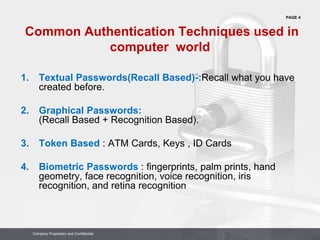
Knowledge Base
( What you know )
Token Based
( What you have )
Biometrics
( What you are)
Textual Password
Graphical Password
ATM Card
Keys
ID Cards
Fingerprints,Palmprint
Hand Geometry
Face,iris,voice,retina
Human Authentication
Techniques
PAGE 4
Company Proprietary and Confidential
Common Authentication Techniques used in
computer world
1. Textual Passwords(Recall Based)-:Recall what you have
created before.
2. Graphical Passwords:
(Recall Based + Recognition Based).
3. Token Based : ATM Cards, Keys , ID Cards
4. Biometric Passwords : fingerprints, palm prints, hand
geometry, face recognition, voice recognition, iris
recognition, and retina recognition
PAGE 5
Company Proprietary and Confidential
Drawbacks of Common Authentication Techniques
Textual Password:
• Textual Passwords should be easy to remember at the same time hard to guess.
• Full password space for 8 characters consisting of both numbers and characters is at most
2 X 10¹⁴.
• From an research 25% of the passwords out of 15,000 users can guessed correctly by
using brute force dictionary.
Graphical Password :
• Graphical passwords can be easily recorded but some schemes take a long time to perform.
Token Password: Most unsecured one, if stolen can breech through any security levels.
Biometric Password:
• One main drawback of applying biometric is its intrusiveness upon a user’s personal
characteristic .
• Retina biometrical recognition schemes require the user to willingly subject their eyes to a low-
intensity infrared light so specified environment is required.
• In addition, most biometric systems require a special scanning device to authenticate users,
which is not applicable for remote and Internet users.
PAGE 6
Company Proprietary and Confidential
3D PASSWORD SCHEME
The 3D Password scheme is a new authentication scheme that combine
RECOGNITION
+ RECALL
+ TOKENS
+ BIOMETRIC
In one authentication system
 The 3D password presents a virtual environment containing various virtual
objects.
 The user walks through the environment and interacts with the objects .
 The 3d Password is simply the combination and sequence of user interactions
that occur in the 3D environment.
PAGE 7
Company Proprietary and Confidential
Example of 3D-Password
PAGE 8
Company Proprietary and Confidential
3D Password selection and Inputs
Virtual objects can be any object we encounter in real life:
• A computer with which the user can type;
• A fingerprint reader that requires the user’s fingerprint;
• A biometrical recognition device;
• A paper or a white board that a user can write, sign, or Draw on;
• An automated teller machine (ATM) that requests a token;
• A light that can be switched on/off;
• A television or radio where channels can be selected;
• A staple that can be punched;
• A car that can be driven;
• A book that can be moved from one place to another;
• Any graphical password scheme;
• Any real-life object;
• Any upcoming authentication scheme
PAGE 9
Company Proprietary and Confidential
For Example :
Let us assume the user enters a virtual office then performs the following action:
 (10,24,91) Action=Open office door
 (10,24,91) Action=Close office door
 (4,34,18) Action=Typing,”C”
 (4,34,18) Action=Typing,”O”
 (4,34,18)Action=Typing,”N”
 (10,24,80)Action=Pick up the pen
 (1,18,80)Action=Draw point=(330,130)
3D Password selection and Inputs
( Formal View )
 Let us consider a 3-D virtual environment space of size G x G x G.
 The 3-D environment space is represented by the coordinates (x, y, z) Є [1, . . . ,
G] x [1, . . . , G] x [1, . . . , G].
 The objects are distributed in the 3-D virtual environment with unique (x, y, z)
coordinates.
 We assume that the user can navigate into the 3-D virtual environment and interact
with the objects using any input device such as a mouse, keyboard, fingerprint
scanner, iris scanner, stylus, card reader, and microphone.
PAGE 10
Company Proprietary and Confidential
(a) Snapshot of a proof-of-concept 3-D virtual environment, where the
user is typing a textual password on a virtual computer as a part of the
user’s 3-D password. (b) Snapshot of a proof-of-concept virtual art
gallery, which contains 36 pictures and six computers
(a) (b)
Snapshot of the concept of 3d-Virtual
Environment
PAGE 11
Company Proprietary and Confidential
3-D Virtual Environment Design
Guidelines
State diagram of a possible
3-D password application
Design Guidelines
1. Real-life similarity.
2. Object uniqueness and distinction.
3. Three-dimensional virtual
environment.
4. Number of objects (items) and their
types .
5. System importance.
PAGE 12
Company Proprietary and Confidential
3D Passwords Advantages & Disadvantages
 Flexibility:3D Passwords allows Multifactor authentication biometric ,
textual passwords can be embedded in 3D password technology.
 Strength: This scenario provides almost unlimited passwords possibility.
 Ease to Memorize: can be remembered in the form of short story.
 Respect of Privacy: Organizers can select authentication schemes that
respect users privacy.
 Difficult for blind people to use this technology.
 Requires sophisticated computers technology expensive.
 A lot of program coding is required.
Advantages
Disadvantages
PAGE 13
Company Proprietary and Confidential
Attacks and Countermeasures
• Brute Force Attack.
• Well Studied Attack
• Shoulder Surfing Attacks
• Timing Attack
PAGE 14
Company Proprietary and Confidential
3D Password Application Areas
• Critical Servers
• Nuclear and military Stations
• Airplanes and Jet Fighters
• ATMs, Desktop and Laptop Logins, Web
Authentication
PAGE 15
Company Proprietary and Confidential
Thank
You

3D Password

  • 1.
    PAGE 1 Company Proprietaryand Confidential Company Proprietary and Confidential For more secure authentication Sk. Saddam Ahmed M.TECH in Computer Science & Engineering Class Roll No : 02 Session : 2014-15 Semester : 2 BY
  • 2.
    PAGE 2 Company Proprietaryand Confidential Company Proprietary and Confidential INDEX • Authentication Slide 3 • Common Authentication Techniques Slide 4 • Drawbacks of Common Authentication Techniques Slide 5 • 3D Password Scheme with Example Slide 6-7 • 3D Password Scheme Selection and Inputs Slide 8 • Formal View of 3D Password Scheme Slide 9 • Snapshot of the concept of 3d-Virtual Environment Slide 10 • 3D Virtual Environment Design Guidelines Slide 11 • 3D Password Advantages and Disadvantages Slide 12 • Attacks on 3D Password Slide 13 • 3D Password Application Areas Slide 14 Slide NoPresentation Topics
  • 3.
    PAGE 3 Company Proprietaryand Confidential Company Proprietary and Confidential Authentication • Authentication is a process of validating who are you to whom you claimed to be. • Human authentication techniques are as follows: 1. Knowledge Base (What you know) 2. Token Based(what you have) 3. Biometrics(what you are) Human Authentication Techniques Knowledge Base ( What you know ) Token Based ( What you have ) Biometrics ( What you are) Textual Password Graphical Password ATM Card Keys ID Cards Fingerprints,Palmprint Hand Geometry Face,iris,voice,retina Human Authentication Techniques
  • 4.
    PAGE 4 Company Proprietaryand Confidential Company Proprietary and Confidential Common Authentication Techniques used in computer world 1. Textual Passwords(Recall Based)-:Recall what you have created before. 2. Graphical Passwords: (Recall Based + Recognition Based). 3. Token Based : ATM Cards, Keys , ID Cards 4. Biometric Passwords : fingerprints, palm prints, hand geometry, face recognition, voice recognition, iris recognition, and retina recognition
  • 5.
    PAGE 5 Company Proprietaryand Confidential Company Proprietary and Confidential Drawbacks of Common Authentication Techniques Textual Password: • Textual Passwords should be easy to remember at the same time hard to guess. • Full password space for 8 characters consisting of both numbers and characters is at most 2 X 10¹⁴. • From an research 25% of the passwords out of 15,000 users can guessed correctly by using brute force dictionary. Graphical Password : • Graphical passwords can be easily recorded but some schemes take a long time to perform. Token Password: Most unsecured one, if stolen can breech through any security levels. Biometric Password: • One main drawback of applying biometric is its intrusiveness upon a user’s personal characteristic . • Retina biometrical recognition schemes require the user to willingly subject their eyes to a low- intensity infrared light so specified environment is required. • In addition, most biometric systems require a special scanning device to authenticate users, which is not applicable for remote and Internet users.
  • 6.
    PAGE 6 Company Proprietaryand Confidential Company Proprietary and Confidential 3D PASSWORD SCHEME The 3D Password scheme is a new authentication scheme that combine RECOGNITION + RECALL + TOKENS + BIOMETRIC In one authentication system  The 3D password presents a virtual environment containing various virtual objects.  The user walks through the environment and interacts with the objects .  The 3d Password is simply the combination and sequence of user interactions that occur in the 3D environment.
  • 7.
    PAGE 7 Company Proprietaryand Confidential Company Proprietary and Confidential Example of 3D-Password
  • 8.
    PAGE 8 Company Proprietaryand Confidential Company Proprietary and Confidential 3D Password selection and Inputs Virtual objects can be any object we encounter in real life: • A computer with which the user can type; • A fingerprint reader that requires the user’s fingerprint; • A biometrical recognition device; • A paper or a white board that a user can write, sign, or Draw on; • An automated teller machine (ATM) that requests a token; • A light that can be switched on/off; • A television or radio where channels can be selected; • A staple that can be punched; • A car that can be driven; • A book that can be moved from one place to another; • Any graphical password scheme; • Any real-life object; • Any upcoming authentication scheme
  • 9.
    PAGE 9 Company Proprietaryand Confidential Company Proprietary and Confidential For Example : Let us assume the user enters a virtual office then performs the following action:  (10,24,91) Action=Open office door  (10,24,91) Action=Close office door  (4,34,18) Action=Typing,”C”  (4,34,18) Action=Typing,”O”  (4,34,18)Action=Typing,”N”  (10,24,80)Action=Pick up the pen  (1,18,80)Action=Draw point=(330,130) 3D Password selection and Inputs ( Formal View )  Let us consider a 3-D virtual environment space of size G x G x G.  The 3-D environment space is represented by the coordinates (x, y, z) Є [1, . . . , G] x [1, . . . , G] x [1, . . . , G].  The objects are distributed in the 3-D virtual environment with unique (x, y, z) coordinates.  We assume that the user can navigate into the 3-D virtual environment and interact with the objects using any input device such as a mouse, keyboard, fingerprint scanner, iris scanner, stylus, card reader, and microphone.
  • 10.
    PAGE 10 Company Proprietaryand Confidential Company Proprietary and Confidential (a) Snapshot of a proof-of-concept 3-D virtual environment, where the user is typing a textual password on a virtual computer as a part of the user’s 3-D password. (b) Snapshot of a proof-of-concept virtual art gallery, which contains 36 pictures and six computers (a) (b) Snapshot of the concept of 3d-Virtual Environment
  • 11.
    PAGE 11 Company Proprietaryand Confidential Company Proprietary and Confidential 3-D Virtual Environment Design Guidelines State diagram of a possible 3-D password application Design Guidelines 1. Real-life similarity. 2. Object uniqueness and distinction. 3. Three-dimensional virtual environment. 4. Number of objects (items) and their types . 5. System importance.
  • 12.
    PAGE 12 Company Proprietaryand Confidential Company Proprietary and Confidential 3D Passwords Advantages & Disadvantages  Flexibility:3D Passwords allows Multifactor authentication biometric , textual passwords can be embedded in 3D password technology.  Strength: This scenario provides almost unlimited passwords possibility.  Ease to Memorize: can be remembered in the form of short story.  Respect of Privacy: Organizers can select authentication schemes that respect users privacy.  Difficult for blind people to use this technology.  Requires sophisticated computers technology expensive.  A lot of program coding is required. Advantages Disadvantages
  • 13.
    PAGE 13 Company Proprietaryand Confidential Company Proprietary and Confidential Attacks and Countermeasures • Brute Force Attack. • Well Studied Attack • Shoulder Surfing Attacks • Timing Attack
  • 14.
    PAGE 14 Company Proprietaryand Confidential Company Proprietary and Confidential 3D Password Application Areas • Critical Servers • Nuclear and military Stations • Airplanes and Jet Fighters • ATMs, Desktop and Laptop Logins, Web Authentication
  • 15.
    PAGE 15 Company Proprietaryand Confidential Company Proprietary and Confidential Thank You