3 - D password
Presentedby:
G.MAHESH BABU
158p1a0543
For m o r e secure a u t h e n t i c a t i o n . .
Under Guidance of
Mr. RamaChandra reddy
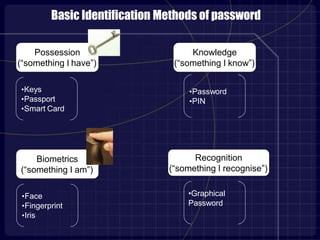
•Password
•PIN
•Keys
•Passport
•Smart Card
•Face
•Fingerprint
•Iris
Possession
(“something I have”)
Biometrics
(“something I am”)
Knowledge
(“something I know”)
Basic Identification Methods of password
•Graphical
Password
Recognition
(“something I recognise”)
PASSWORD
• It is basically a encryption algorithm
• Usually 8-15 characters or slightly more than that
• Can be meaningful words from dictionary, pet names,
name of friends etc
• Easy to break and vulnerable to Brute force attack
PASSPHRASE
•Enhanced version of password
•Combination of words or simply a collection of passwords
in proper sequence
•Length is about 30 – 50 characters or more than that also
•Creates ambiguity to remember if there is no proper
sequence
GRAPHICAL PASSWORDS
•Based on the idea that users can recall and recognize
pictures better than words.
• Require a long time to be performed
•Have a password space that is less than or equal to the
textual password space
• Vulnerable to shoulder surfing attacks
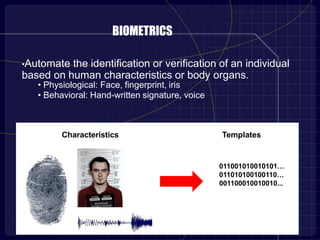
BIOMETRICS
•Automate the identification or verification of an individual
based on human characteristics or body organs.
• Physiological: Face, fingerprint, iris
• Behavioral: Hand-written signature, voice
Characteristics Templates
011001010010101…
011010100100110…
001100010010010...
3-DPASSWORD
•Customizable and very interesting way of authentication
•Multi factor authentication scheme.
•Contains a 3-D virtual environment where the user navigates & interacts
with various objects.
•Sequence of actions and interactions toward the objects constructs
user’s 3-D password.
•Combination of textual passwords, graphical passwords & various
types of biometrics into a 3-D virtual environment.
•Design of 3-D virtual environment and type of objects selected
determine 3-D password key space
3-D ENVIRONMENT VIRTUAL OBJECTS CAN BE AS FOLLOWS:
• a computer with which the user can type;
• a fingerprint reader that requires the user’s fingerprint;
• a biometrical recognition device;
• a paper or a white board that a user can write, sign, or draw on;
• an automated teller machine (ATM) that requests a token;
• a light that can be switched on/off;
• a television or radio where channels can be selected;
• a staple that can be punched;
• a car that can be driven;
• a book that can be moved from one place to another;
• any graphical password scheme;
• any real-life object;
• any upcoming authentication scheme.
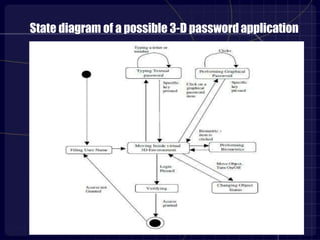
State diagram of a possible 3-D passwordapplication
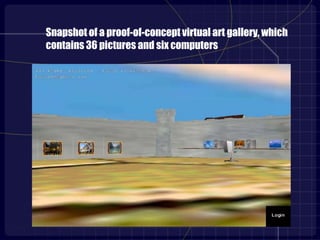
Snapshot of a proof-of-concept virtual art gallery, which
contains 36 pictures and six computers
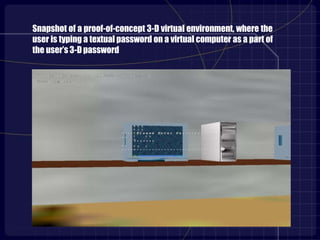
Snapshot of a proof-of-concept 3-D virtual environment, where the
user is typing a textual password on a virtual computer as a part of
the user’s 3-D password
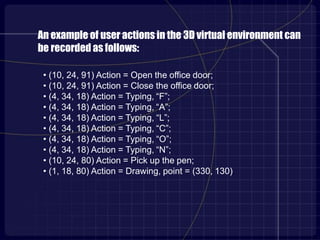
• (10, 24, 91) Action = Open the office door;
• (10, 24, 91) Action = Close the office door;
• (4, 34, 18) Action = Typing, “F”;
• (4, 34, 18) Action = Typing, “A”;
• (4, 34, 18) Action = Typing, “L”;
• (4, 34, 18) Action = Typing, “C”;
• (4, 34, 18) Action = Typing, “O”;
• (4, 34, 18) Action = Typing, “N”;
• (10, 24, 80) Action = Pick up the pen;
• (1, 18, 80) Action = Drawing, point = (330, 130).
An example of user actions in the 3D virtual environment can
be recorded as follows:
3D VIRTUAL ENVIRONMENT DESIGN GUIDELINES
• Real life similarity
• Object uniqueness and distinction
• Three Dimensional Virtual Environment Size
• Number of objects and their types
• System Importance
3-D PASSWORD APPLICATIONS
In Critical Systems:
• Critical servers
• Nuclear and military facilities
• Airplanes and jet fighters
In small virtual environments:
• ATM
• Personal Digital Assistance
• Desktop Computers & laptop logins
• Web Authentication
ADVANTAGES OF 3-D PASSWORD
• Several authentication schemes
• Easy to memorize
• Designed according to protected system
• Highly flexible
• Extremely strong
• Provides secrets
• 3D environment can be changed
• Password can change easily.
• Difficult to crack
• Freedom to select
• Difficult to share
• 3D graphical password has no limit
DISADVANTAGES
•Difficult for blind people to use this technology.
• Requires sophisticated computer technology.
• Expensive.
• A lot of program coding is required.
ATTACKS AND COUNTER MEASURES
• Brute Force Attack
a) Time required to login
b) Cost of attacks
• Well Studied Attack
• Shoulder Surfing Attack
• Timing attack
CONCLUSION
•3D password is a multi factor authentication scheme that combines the
various authentication schemes into a single 3D virtual environment.
•Design of the 3D virtual environment is the selection of objects inside
the environment and the object's type reflect the resulted password
space
•Password space is very large compared to any existing authentication
schemes
•It is the task of the system administrator to design the environment and
to select the appropriate object that reflects the protected system
requirements
•Designing a simple and easy to use 3D virtual environment is a factor
that leads to a higher user acceptability of a 3D password system.
Questions??
Thank u

3dpswd 130320115940-phpapp01-converted

  • 1.
    3 - Dpassword Presentedby: G.MAHESH BABU 158p1a0543 For m o r e secure a u t h e n t i c a t i o n . . Under Guidance of Mr. RamaChandra reddy
  • 2.
    •Password •PIN •Keys •Passport •Smart Card •Face •Fingerprint •Iris Possession (“something Ihave”) Biometrics (“something I am”) Knowledge (“something I know”) Basic Identification Methods of password •Graphical Password Recognition (“something I recognise”)
  • 3.
    PASSWORD • It isbasically a encryption algorithm • Usually 8-15 characters or slightly more than that • Can be meaningful words from dictionary, pet names, name of friends etc • Easy to break and vulnerable to Brute force attack
  • 4.
    PASSPHRASE •Enhanced version ofpassword •Combination of words or simply a collection of passwords in proper sequence •Length is about 30 – 50 characters or more than that also •Creates ambiguity to remember if there is no proper sequence
  • 5.
    GRAPHICAL PASSWORDS •Based onthe idea that users can recall and recognize pictures better than words. • Require a long time to be performed •Have a password space that is less than or equal to the textual password space • Vulnerable to shoulder surfing attacks
  • 6.
    BIOMETRICS •Automate the identificationor verification of an individual based on human characteristics or body organs. • Physiological: Face, fingerprint, iris • Behavioral: Hand-written signature, voice Characteristics Templates 011001010010101… 011010100100110… 001100010010010...
  • 7.
    3-DPASSWORD •Customizable and veryinteresting way of authentication •Multi factor authentication scheme. •Contains a 3-D virtual environment where the user navigates & interacts with various objects. •Sequence of actions and interactions toward the objects constructs user’s 3-D password. •Combination of textual passwords, graphical passwords & various types of biometrics into a 3-D virtual environment. •Design of 3-D virtual environment and type of objects selected determine 3-D password key space
  • 8.
    3-D ENVIRONMENT VIRTUALOBJECTS CAN BE AS FOLLOWS: • a computer with which the user can type; • a fingerprint reader that requires the user’s fingerprint; • a biometrical recognition device; • a paper or a white board that a user can write, sign, or draw on; • an automated teller machine (ATM) that requests a token; • a light that can be switched on/off; • a television or radio where channels can be selected; • a staple that can be punched; • a car that can be driven; • a book that can be moved from one place to another; • any graphical password scheme; • any real-life object; • any upcoming authentication scheme.
  • 9.
    State diagram ofa possible 3-D passwordapplication
  • 10.
    Snapshot of aproof-of-concept virtual art gallery, which contains 36 pictures and six computers
  • 11.
    Snapshot of aproof-of-concept 3-D virtual environment, where the user is typing a textual password on a virtual computer as a part of the user’s 3-D password
  • 12.
    • (10, 24,91) Action = Open the office door; • (10, 24, 91) Action = Close the office door; • (4, 34, 18) Action = Typing, “F”; • (4, 34, 18) Action = Typing, “A”; • (4, 34, 18) Action = Typing, “L”; • (4, 34, 18) Action = Typing, “C”; • (4, 34, 18) Action = Typing, “O”; • (4, 34, 18) Action = Typing, “N”; • (10, 24, 80) Action = Pick up the pen; • (1, 18, 80) Action = Drawing, point = (330, 130). An example of user actions in the 3D virtual environment can be recorded as follows:
  • 13.
    3D VIRTUAL ENVIRONMENTDESIGN GUIDELINES • Real life similarity • Object uniqueness and distinction • Three Dimensional Virtual Environment Size • Number of objects and their types • System Importance
  • 14.
    3-D PASSWORD APPLICATIONS InCritical Systems: • Critical servers • Nuclear and military facilities • Airplanes and jet fighters In small virtual environments: • ATM • Personal Digital Assistance • Desktop Computers & laptop logins • Web Authentication
  • 15.
    ADVANTAGES OF 3-DPASSWORD • Several authentication schemes • Easy to memorize • Designed according to protected system • Highly flexible • Extremely strong • Provides secrets • 3D environment can be changed • Password can change easily. • Difficult to crack • Freedom to select • Difficult to share • 3D graphical password has no limit
  • 16.
    DISADVANTAGES •Difficult for blindpeople to use this technology. • Requires sophisticated computer technology. • Expensive. • A lot of program coding is required.
  • 17.
    ATTACKS AND COUNTERMEASURES • Brute Force Attack a) Time required to login b) Cost of attacks • Well Studied Attack • Shoulder Surfing Attack • Timing attack
  • 18.
    CONCLUSION •3D password isa multi factor authentication scheme that combines the various authentication schemes into a single 3D virtual environment. •Design of the 3D virtual environment is the selection of objects inside the environment and the object's type reflect the resulted password space •Password space is very large compared to any existing authentication schemes •It is the task of the system administrator to design the environment and to select the appropriate object that reflects the protected system requirements •Designing a simple and easy to use 3D virtual environment is a factor that leads to a higher user acceptability of a 3D password system.
  • 19.
  • 20.