QUALITY TOOLS &
TECHNIQUES
By: -
Hakeem–Ur–Rehman
Certified Six Sigma Black Belt (SQII – Singapore)
IRCA (UK) Lead Auditor ISO 9001
MS–Total Quality Management (P.U.)
MSc (Information & Operations Management) (P.U.)
IQTM–PU
1
TQ T
SEVEN MANAGEMENT & PLANNING
TOOLS
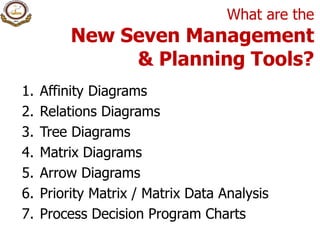
What are the
New Seven Management
& Planning Tools?
1. Affinity Diagrams
2. Relations Diagrams
3. Tree Diagrams
4. Matrix Diagrams
5. Arrow Diagrams
6. Priority Matrix / Matrix Data Analysis
7. Process Decision Program Charts
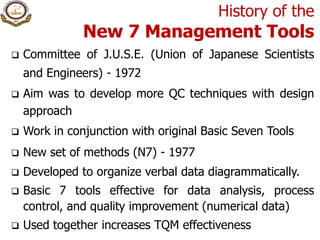
History of the
New 7 Management Tools
 Committee of J.U.S.E. (Union of Japanese Scientists
and Engineers) - 1972
 Aim was to develop more QC techniques with design
approach
 Work in conjunction with original Basic Seven Tools
 New set of methods (N7) - 1977
 Developed to organize verbal data diagrammatically.
 Basic 7 tools effective for data analysis, process
control, and quality improvement (numerical data)
 Used together increases TQM effectiveness
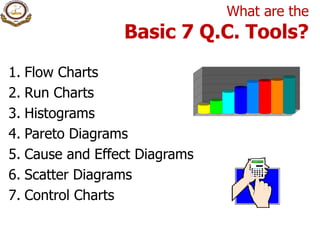
What are the
Basic 7 Q.C. Tools?
1. Flow Charts
2. Run Charts
3. Histograms
4. Pareto Diagrams
5. Cause and Effect Diagrams
6. Scatter Diagrams
7. Control Charts
Relation Between New Seven Management
Tools and Basic Seven Q.C. Tools
FACTS
Data
Numerical Data Verbal Data
Organize
The Seven New Tools
Information
The Basic Seven Tools
 Generate Ideas
 Formulate plans
Analytical approach
Define problem after
collecting numerical data
Define problem before
collecting numerical data
Source: Nayatani, Y., The Seven New QC Tools (Tokyo, Japan, 3A Corporation, 1984)
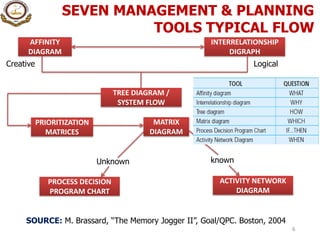
SEVEN MANAGEMENT & PLANNING
TOOLS TYPICAL FLOW
6
AFFINITY
DIAGRAM
INTERRELATIONSHIP
DIGRAPH
Creative Logical
TREE DIAGRAM /
SYSTEM FLOW
PRIORITIZATION
MATRICES
MATRIX
DIAGRAM
Unknown known
PROCESS DECISION
PROGRAM CHART
ACTIVITY NETWORK
DIAGRAM
SOURCE: M. Brassard, “The Memory Jogger II”, Goal/QPC. Boston, 2004
AFFINITY DIAGRAM
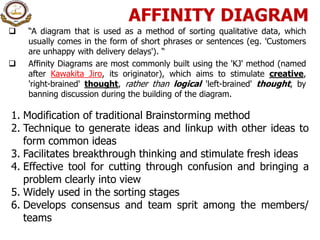
 “A diagram that is used as a method of sorting qualitative data, which
usually comes in the form of short phrases or sentences (eg. 'Customers
are unhappy with delivery delays'). “
 Affinity Diagrams are most commonly built using the 'KJ' method (named
after Kawakita Jiro, its originator), which aims to stimulate creative,
'right-brained' thought, rather than logical 'left-brained' thought, by
banning discussion during the building of the diagram.
1. Modification of traditional Brainstorming method
2. Technique to generate ideas and linkup with other ideas to
form common ideas
3. Facilitates breakthrough thinking and stimulate fresh ideas
4. Effective tool for cutting through confusion and bringing a
problem clearly into view
5. Widely used in the sorting stages
6. Develops consensus and team sprit among the members/
teams
HOW TO MAKE
AFFINITY DIAGRAM?
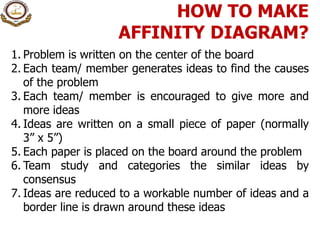
1. Problem is written on the center of the board
2. Each team/ member generates ideas to find the causes
of the problem
3. Each team/ member is encouraged to give more and
more ideas
4. Ideas are written on a small piece of paper (normally
3” x 5”)
5. Each paper is placed on the board around the problem
6. Team study and categories the similar ideas by
consensus
7. Ideas are reduced to a workable number of ideas and a
border line is drawn around these ideas
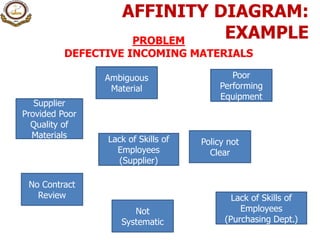
AFFINITY DIAGRAM:
EXAMPLE
Ambiguous
Material
PROBLEM
DEFECTIVE INCOMING MATERIALS
No Contract
Review
Lack of Skills of
Employees
(Supplier)
Supplier
Provided Poor
Quality of
Materials
Poor
Performing
Equipment
Lack of Skills of
Employees
(Purchasing Dept.)
Policy not
Clear
Not
Systematic
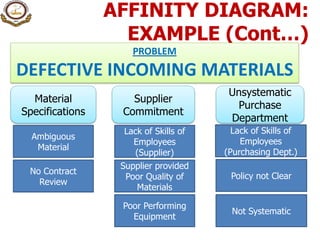
AFFINITY DIAGRAM:
EXAMPLE (Cont…)
Ambiguous
Material
PROBLEM
DEFECTIVE INCOMING MATERIALS
No Contract
Review
Supplier provided
Poor Quality of
Materials
Poor Performing
Equipment
Policy not Clear
Not Systematic
Lack of Skills of
Employees
(Supplier)
Lack of Skills of
Employees
(Purchasing Dept.)
Material
Specifications
Supplier
Commitment
Unsystematic
Purchase
Department
RELATION / RELATIONSHIP
DIAGRAM
The Relation Diagrams are used for finding appropriate
solution strategies by clarifying the causes of the
problem using why, why technique.
Also known as Interrelationship Diagraph
1. Technique for clarifying the complex issues by
considering the numerous possible causes
2. Useful tools for finding appropriate strategies by
relating different causes of a problem
3. Enables to identify the root causes of the problem
HOW TO MAKE
RELATION DIAGRAM?
Activity normally carried out after Affinity Diagram
1. Place the problem in the center
2. Write primary causes of the problem round it
3. Determine the secondary, tertiary, 4th & 5th level
causes by repeating why, why about 5-times
4. Review the whole diagram and systematically explore
the relationships among these causes
5. Many causes at 4th & 5th stage may have the common
reasons
6. Combine such reasons to reach the root cause of the
problem
COMPLETING A
RELATION DIAGRAM?
Why doesn’t
X happen?
Primary Cause
Primary Cause
Primary Cause
Primary Cause
Tertiary
Cause
Secondary
Cause
Secondary
Cause
Secondary
Cause
Secondary
Cause
Tertiary
Cause
4th level
Cause
Tertiary
Cause
Tertiary
Cause
4th level
Cause
5th level
Cause
6th level
Cause
Tertiary
Cause
Secondary
Cause
EXAMPLE: RELATION
DIAGRAM
Defective
incoming
Material
Ambiguous
Specifications
Poor quality
materials used
by supplier
Poor quality of
equipment
Unskilled
employees of
suppliers
Lack of
Commitment of
Supplier
No contract
review of
specifications
Policy not
Clear
Unsystematic
purchase
department
Lack of Skills of
employees
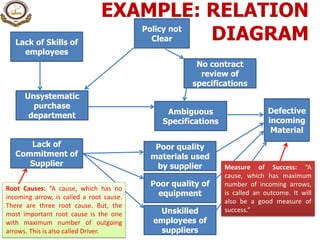
Root Causes: “A cause, which has no
incoming arrow, is called a root cause.
There are three root cause. But, the
most important root cause is the one
with maximum number of outgoing
arrows. This is also called Driver.
Measure of Success: “A
cause, which has maximum
number of incoming arrows,
is called an outcome. It will
also be a good measure of
success.”
TREE DIAGRAM
 Also known as Systematic Diagram
 Tree Diagrams are drawn to develop a succession of
strategies/ means for achieving an objective (target, goal or
result) systematically and logically.
 Constructing this diagram yields specific guidelines for
solving a problem.
 Tree Diagrams are also classified as strategy-development or
component development diagrams.
HOW TO MAKE TREE
DIAGRAM?
Write the objective on the left side
 Think different strategies to achieve these
objectives in the form of primary branches
 Again think different means to accomplish these
strategies in the form of secondary branches
 In this way keep on stratifying till you find easy
solutions of a bigger problem
EXAMPLE: TREE DIAGRAM
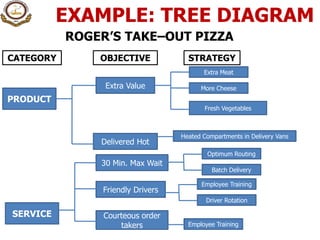
ROGER’S TAKE–OUT PIZZA
CATEGORY OBJECTIVE STRATEGY
PRODUCT
SERVICE
Extra Value
Delivered Hot
Extra Meat
More Cheese
Fresh Vegetables
30 Min. Max Wait
Courteous order
takers
Friendly Drivers
Heated Compartments in Delivery Vans
Optimum Routing
Batch Delivery
Employee Training
Driver Rotation
Employee Training
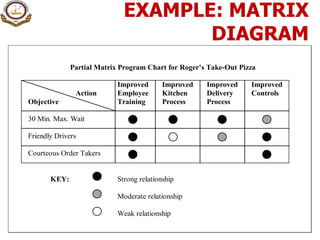
MATRIX DIAGRAM
Matrix Diagrams enable the data based on ideas to be
employed effectively for examining the relationships.
They clarify the relationship among the different elements
based on verbal data (attribute data) like the scatter diagrams
show the correlation between different parameters based on
numerical data (variable data)
1. Two dimensional array of columns and rows whose
intersections are examined to determine the relationship
2. Used to systematically analyze the correlation between two
sets of attribute data
3. Sets of data are compared in rows and columns
4. Where rows and columns meet relationship code like strong
weak or no relation can be inserted
5. Explores relationship among the attributes of rows and
columns
EXAMPLE: MATRIX
DIAGRAM
Partial Matrix Program Chart for Roger’s Take-Out Pizza
Improved Improved Improved Improved
Action Employee Kitchen Delivery Controls
Objective Training Process Process
30 Min. Max. Wait
Friendly Drivers
Courteous Order Takers
KEY: Strong relationship
Moderate relationship
Weak relationship
ARROW DIAGRAM
 Imagine that you have used a Tree Diagram or a Matrix Diagram to
decide on the best possible strategies for solving a problem.
 The next question that arises is when and in what order to perform the
numerous operations required to implement these strategies.
 Arrow diagrams are useful for planning this kind of action. They show the
sequence and relationships among different activities effectively. They
also indicate how altering one operation will effect the other and which
activities are critical to the time schedule and which have some slack or
spare time.
Also known as Activity Network diagram
1. Used in PERT (Program Evaluation and Review Technique) and CPM
(Critical Path Method)
2. Who is going to do what and when?
3. What can be done in parallel & what can be done only in series?
4. Planning Aid for construction projects & large manufacturing units
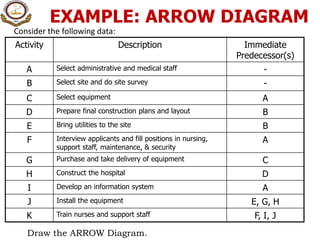
EXAMPLE: ARROW DIAGRAM
Consider the following data:
Activity Description Immediate
Predecessor(s)
A Select administrative and medical staff -
B Select site and do site survey -
C Select equipment A
D Prepare final construction plans and layout B
E Bring utilities to the site B
F Interview applicants and fill positions in nursing,
support staff, maintenance, & security
A
G Purchase and take delivery of equipment C
H Construct the hospital D
I Develop an information system A
J Install the equipment E, G, H
K Train nurses and support staff F, I, J
Draw the ARROW Diagram.
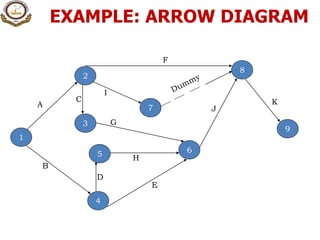
EXAMPLE: ARROW DIAGRAM
1
2
4
3
5 6
7
8
9
A
B
C
D
H
E
I
G
F
K
J
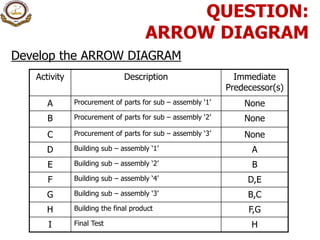
Activity Description Immediate
Predecessor(s)
A Procurement of parts for sub – assembly ‘1’ None
B Procurement of parts for sub – assembly ‘2’ None
C Procurement of parts for sub – assembly ‘3’ None
D Building sub – assembly ‘1’ A
E Building sub – assembly ‘2’ B
F Building sub – assembly ‘4’ D,E
G Building sub – assembly ‘3’ B,C
H Building the final product F,G
I Final Test H
Develop the ARROW DIAGRAM
QUESTION:
ARROW DIAGRAM
CRITICAL PATH METHOD: EXAMPLE
1 8
2
6
4
3
7
a, 6
f, 15
b, 8
c, 5
e, 9
d, 13
g, 17 h, 9
i, 6
j, 12
5
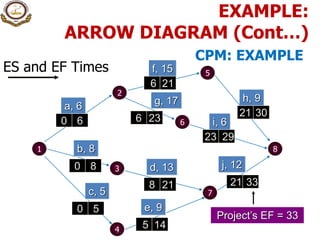
EXAMPLE:
ARROW DIAGRAM (Cont…)
ES and EF Times
1 8
2
6
4
3
7
a, 6
f, 15
b, 8
c, 5
e, 9
d, 13
g, 17 h, 9
i, 6
j, 12
5
0 6
0 8
0 5
5 14
8 21 21 33
6 23 21 30
23 29
6 21
Project’s EF = 33
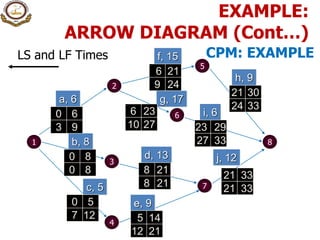
EXAMPLE:
ARROW DIAGRAM (Cont…)
CPM: EXAMPLE
LS and LF Times
1 8
2
6
4
3
7
a, 6
f, 15
b, 8
c, 5
e, 9
d, 13
g, 17
h, 9
i, 6
j, 12
5
0 6
0 8
0 5
5 14
8 21
21 33
6 23
21 30
23 29
6 21
3 9
0 8
7 12
12 21
21 33
27 33
8 21
10 27
24 33
9 24
EXAMPLE:
ARROW DIAGRAM (Cont…)
CPM: EXAMPLE
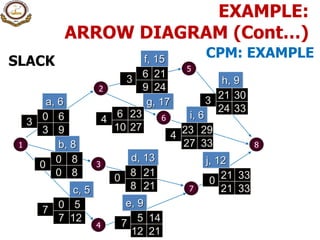
SLACK
1 8
2
6
4
3
7
a, 6
f, 15
b, 8
c, 5
e, 9
d, 13
g, 17
h, 9
i, 6
j, 12
5
0 6
0 8
0 5
5 14
8 21 21 33
6 23
21 30
23 29
6 21
3 9
0 8
7 12
12 21
21 33
27 33
8 21
10 27
24 33
9 24
3 4
3
3
4
0
0
7
7
0
EXAMPLE:
ARROW DIAGRAM (Cont…)
CPM: EXAMPLE
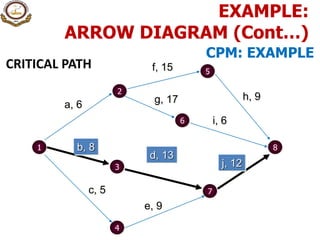
CRITICAL PATH
1 8
2
6
4
3
7
a, 6
f, 15
b, 8
c, 5
e, 9
d, 13
g, 17 h, 9
i, 6
j, 12
5
EXAMPLE:
ARROW DIAGRAM (Cont…)
CPM: EXAMPLE
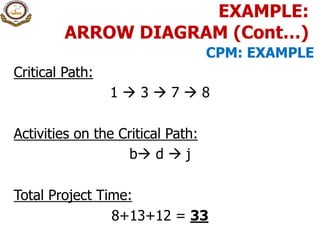
Critical Path:
1  3  7  8
Activities on the Critical Path:
b d  j
Total Project Time:
8+13+12 = 33
EXAMPLE:
ARROW DIAGRAM (Cont…)
CPM: EXAMPLE
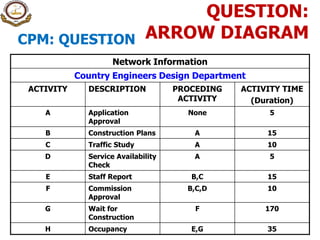
Network Information
Country Engineers Design Department
ACTIVITY DESCRIPTION PROCEDING
ACTIVITY
ACTIVITY TIME
(Duration)
A Application
Approval
None 5
B Construction Plans A 15
C Traffic Study A 10
D Service Availability
Check
A 5
E Staff Report B,C 15
F Commission
Approval
B,C,D 10
G Wait for
Construction
F 170
H Occupancy E,G 35
QUESTION:
ARROW DIAGRAMCPM: QUESTION
PRIORITY MATRIX
 It is just a kind of matrix in which same attributes/ strategies/ tasks are
written both horizontally and vertically. Then instead of finding
relationship among two different attributes, the importance of horizontally
placed attributes is compared with the vertically placed attribute.
 In this way the importance of each task when compared to all other tasks
become visible.
 This type of matrix is drawn when there are many tasks but there are not
enough resources. So instead of just thinking which tasks are more
important, the Priority Matrix is drawn.
Priority matrix is used when
1. There are more tasks than available resources
2. Numerous possibilities/ multiple choices exists
3. Selection criteria is complicated
4. Prioritizing between several viable options
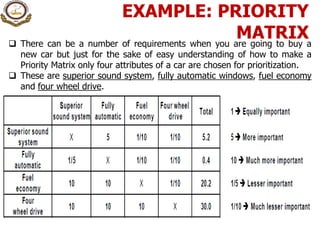
EXAMPLE: PRIORITY
MATRIX There can be a number of requirements when you are going to buy a
new car but just for the sake of easy understanding of how to make a
Priority Matrix only four attributes of a car are chosen for prioritization.
 These are superior sound system, fully automatic windows, fuel economy
and four wheel drive.
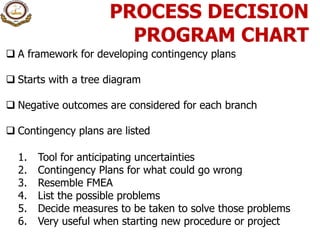
PROCESS DECISION
PROGRAM CHART
 A framework for developing contingency plans
 Starts with a tree diagram
 Negative outcomes are considered for each branch
 Contingency plans are listed
1. Tool for anticipating uncertainties
2. Contingency Plans for what could go wrong
3. Resemble FMEA
4. List the possible problems
5. Decide measures to be taken to solve those problems
6. Very useful when starting new procedure or project
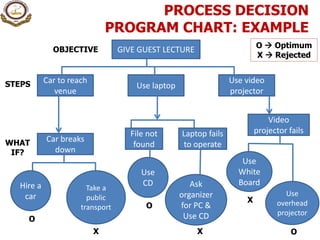
PROCESS DECISION
PROGRAM CHART: EXAMPLE
GIVE GUEST LECTUREOBJECTIVE
Car to reach
venue
STEPS Use laptop
Use video
projector
Car breaks
down
WHAT
IF?
Hire a
car
Take a
public
transport
O
X
File not
found
Laptop fails
to operate
Use
CD
O
Ask
organizer
for PC &
Use CD
X
Video
projector fails
Use
White
Board
Use
overhead
projector
X
O
O  Optimum
X  Rejected
QUESTIONS

12. seven management & planning tools

  • 1.
    QUALITY TOOLS & TECHNIQUES By:- Hakeem–Ur–Rehman Certified Six Sigma Black Belt (SQII – Singapore) IRCA (UK) Lead Auditor ISO 9001 MS–Total Quality Management (P.U.) MSc (Information & Operations Management) (P.U.) IQTM–PU 1 TQ T SEVEN MANAGEMENT & PLANNING TOOLS
  • 2.
    What are the NewSeven Management & Planning Tools? 1. Affinity Diagrams 2. Relations Diagrams 3. Tree Diagrams 4. Matrix Diagrams 5. Arrow Diagrams 6. Priority Matrix / Matrix Data Analysis 7. Process Decision Program Charts
  • 3.
    History of the New7 Management Tools  Committee of J.U.S.E. (Union of Japanese Scientists and Engineers) - 1972  Aim was to develop more QC techniques with design approach  Work in conjunction with original Basic Seven Tools  New set of methods (N7) - 1977  Developed to organize verbal data diagrammatically.  Basic 7 tools effective for data analysis, process control, and quality improvement (numerical data)  Used together increases TQM effectiveness
  • 4.
    What are the Basic7 Q.C. Tools? 1. Flow Charts 2. Run Charts 3. Histograms 4. Pareto Diagrams 5. Cause and Effect Diagrams 6. Scatter Diagrams 7. Control Charts
  • 5.
    Relation Between NewSeven Management Tools and Basic Seven Q.C. Tools FACTS Data Numerical Data Verbal Data Organize The Seven New Tools Information The Basic Seven Tools  Generate Ideas  Formulate plans Analytical approach Define problem after collecting numerical data Define problem before collecting numerical data Source: Nayatani, Y., The Seven New QC Tools (Tokyo, Japan, 3A Corporation, 1984)
  • 6.
    SEVEN MANAGEMENT &PLANNING TOOLS TYPICAL FLOW 6 AFFINITY DIAGRAM INTERRELATIONSHIP DIGRAPH Creative Logical TREE DIAGRAM / SYSTEM FLOW PRIORITIZATION MATRICES MATRIX DIAGRAM Unknown known PROCESS DECISION PROGRAM CHART ACTIVITY NETWORK DIAGRAM SOURCE: M. Brassard, “The Memory Jogger II”, Goal/QPC. Boston, 2004
  • 7.
    AFFINITY DIAGRAM  “Adiagram that is used as a method of sorting qualitative data, which usually comes in the form of short phrases or sentences (eg. 'Customers are unhappy with delivery delays'). “  Affinity Diagrams are most commonly built using the 'KJ' method (named after Kawakita Jiro, its originator), which aims to stimulate creative, 'right-brained' thought, rather than logical 'left-brained' thought, by banning discussion during the building of the diagram. 1. Modification of traditional Brainstorming method 2. Technique to generate ideas and linkup with other ideas to form common ideas 3. Facilitates breakthrough thinking and stimulate fresh ideas 4. Effective tool for cutting through confusion and bringing a problem clearly into view 5. Widely used in the sorting stages 6. Develops consensus and team sprit among the members/ teams
  • 8.
    HOW TO MAKE AFFINITYDIAGRAM? 1. Problem is written on the center of the board 2. Each team/ member generates ideas to find the causes of the problem 3. Each team/ member is encouraged to give more and more ideas 4. Ideas are written on a small piece of paper (normally 3” x 5”) 5. Each paper is placed on the board around the problem 6. Team study and categories the similar ideas by consensus 7. Ideas are reduced to a workable number of ideas and a border line is drawn around these ideas
  • 9.
    AFFINITY DIAGRAM: EXAMPLE Ambiguous Material PROBLEM DEFECTIVE INCOMINGMATERIALS No Contract Review Lack of Skills of Employees (Supplier) Supplier Provided Poor Quality of Materials Poor Performing Equipment Lack of Skills of Employees (Purchasing Dept.) Policy not Clear Not Systematic
  • 10.
    AFFINITY DIAGRAM: EXAMPLE (Cont…) Ambiguous Material PROBLEM DEFECTIVEINCOMING MATERIALS No Contract Review Supplier provided Poor Quality of Materials Poor Performing Equipment Policy not Clear Not Systematic Lack of Skills of Employees (Supplier) Lack of Skills of Employees (Purchasing Dept.) Material Specifications Supplier Commitment Unsystematic Purchase Department
  • 11.
    RELATION / RELATIONSHIP DIAGRAM TheRelation Diagrams are used for finding appropriate solution strategies by clarifying the causes of the problem using why, why technique. Also known as Interrelationship Diagraph 1. Technique for clarifying the complex issues by considering the numerous possible causes 2. Useful tools for finding appropriate strategies by relating different causes of a problem 3. Enables to identify the root causes of the problem
  • 12.
    HOW TO MAKE RELATIONDIAGRAM? Activity normally carried out after Affinity Diagram 1. Place the problem in the center 2. Write primary causes of the problem round it 3. Determine the secondary, tertiary, 4th & 5th level causes by repeating why, why about 5-times 4. Review the whole diagram and systematically explore the relationships among these causes 5. Many causes at 4th & 5th stage may have the common reasons 6. Combine such reasons to reach the root cause of the problem
  • 13.
    COMPLETING A RELATION DIAGRAM? Whydoesn’t X happen? Primary Cause Primary Cause Primary Cause Primary Cause Tertiary Cause Secondary Cause Secondary Cause Secondary Cause Secondary Cause Tertiary Cause 4th level Cause Tertiary Cause Tertiary Cause 4th level Cause 5th level Cause 6th level Cause Tertiary Cause Secondary Cause
  • 14.
    EXAMPLE: RELATION DIAGRAM Defective incoming Material Ambiguous Specifications Poor quality materialsused by supplier Poor quality of equipment Unskilled employees of suppliers Lack of Commitment of Supplier No contract review of specifications Policy not Clear Unsystematic purchase department Lack of Skills of employees Root Causes: “A cause, which has no incoming arrow, is called a root cause. There are three root cause. But, the most important root cause is the one with maximum number of outgoing arrows. This is also called Driver. Measure of Success: “A cause, which has maximum number of incoming arrows, is called an outcome. It will also be a good measure of success.”
  • 15.
    TREE DIAGRAM  Alsoknown as Systematic Diagram  Tree Diagrams are drawn to develop a succession of strategies/ means for achieving an objective (target, goal or result) systematically and logically.  Constructing this diagram yields specific guidelines for solving a problem.  Tree Diagrams are also classified as strategy-development or component development diagrams.
  • 16.
    HOW TO MAKETREE DIAGRAM? Write the objective on the left side  Think different strategies to achieve these objectives in the form of primary branches  Again think different means to accomplish these strategies in the form of secondary branches  In this way keep on stratifying till you find easy solutions of a bigger problem
  • 17.
    EXAMPLE: TREE DIAGRAM ROGER’STAKE–OUT PIZZA CATEGORY OBJECTIVE STRATEGY PRODUCT SERVICE Extra Value Delivered Hot Extra Meat More Cheese Fresh Vegetables 30 Min. Max Wait Courteous order takers Friendly Drivers Heated Compartments in Delivery Vans Optimum Routing Batch Delivery Employee Training Driver Rotation Employee Training
  • 18.
    MATRIX DIAGRAM Matrix Diagramsenable the data based on ideas to be employed effectively for examining the relationships. They clarify the relationship among the different elements based on verbal data (attribute data) like the scatter diagrams show the correlation between different parameters based on numerical data (variable data) 1. Two dimensional array of columns and rows whose intersections are examined to determine the relationship 2. Used to systematically analyze the correlation between two sets of attribute data 3. Sets of data are compared in rows and columns 4. Where rows and columns meet relationship code like strong weak or no relation can be inserted 5. Explores relationship among the attributes of rows and columns
  • 19.
    EXAMPLE: MATRIX DIAGRAM Partial MatrixProgram Chart for Roger’s Take-Out Pizza Improved Improved Improved Improved Action Employee Kitchen Delivery Controls Objective Training Process Process 30 Min. Max. Wait Friendly Drivers Courteous Order Takers KEY: Strong relationship Moderate relationship Weak relationship
  • 20.
    ARROW DIAGRAM  Imaginethat you have used a Tree Diagram or a Matrix Diagram to decide on the best possible strategies for solving a problem.  The next question that arises is when and in what order to perform the numerous operations required to implement these strategies.  Arrow diagrams are useful for planning this kind of action. They show the sequence and relationships among different activities effectively. They also indicate how altering one operation will effect the other and which activities are critical to the time schedule and which have some slack or spare time. Also known as Activity Network diagram 1. Used in PERT (Program Evaluation and Review Technique) and CPM (Critical Path Method) 2. Who is going to do what and when? 3. What can be done in parallel & what can be done only in series? 4. Planning Aid for construction projects & large manufacturing units
  • 21.
    EXAMPLE: ARROW DIAGRAM Considerthe following data: Activity Description Immediate Predecessor(s) A Select administrative and medical staff - B Select site and do site survey - C Select equipment A D Prepare final construction plans and layout B E Bring utilities to the site B F Interview applicants and fill positions in nursing, support staff, maintenance, & security A G Purchase and take delivery of equipment C H Construct the hospital D I Develop an information system A J Install the equipment E, G, H K Train nurses and support staff F, I, J Draw the ARROW Diagram.
  • 22.
    EXAMPLE: ARROW DIAGRAM 1 2 4 3 56 7 8 9 A B C D H E I G F K J
  • 23.
    Activity Description Immediate Predecessor(s) AProcurement of parts for sub – assembly ‘1’ None B Procurement of parts for sub – assembly ‘2’ None C Procurement of parts for sub – assembly ‘3’ None D Building sub – assembly ‘1’ A E Building sub – assembly ‘2’ B F Building sub – assembly ‘4’ D,E G Building sub – assembly ‘3’ B,C H Building the final product F,G I Final Test H Develop the ARROW DIAGRAM QUESTION: ARROW DIAGRAM
  • 24.
    CRITICAL PATH METHOD:EXAMPLE 1 8 2 6 4 3 7 a, 6 f, 15 b, 8 c, 5 e, 9 d, 13 g, 17 h, 9 i, 6 j, 12 5 EXAMPLE: ARROW DIAGRAM (Cont…)
  • 25.
    ES and EFTimes 1 8 2 6 4 3 7 a, 6 f, 15 b, 8 c, 5 e, 9 d, 13 g, 17 h, 9 i, 6 j, 12 5 0 6 0 8 0 5 5 14 8 21 21 33 6 23 21 30 23 29 6 21 Project’s EF = 33 EXAMPLE: ARROW DIAGRAM (Cont…) CPM: EXAMPLE
  • 26.
    LS and LFTimes 1 8 2 6 4 3 7 a, 6 f, 15 b, 8 c, 5 e, 9 d, 13 g, 17 h, 9 i, 6 j, 12 5 0 6 0 8 0 5 5 14 8 21 21 33 6 23 21 30 23 29 6 21 3 9 0 8 7 12 12 21 21 33 27 33 8 21 10 27 24 33 9 24 EXAMPLE: ARROW DIAGRAM (Cont…) CPM: EXAMPLE
  • 27.
    SLACK 1 8 2 6 4 3 7 a, 6 f,15 b, 8 c, 5 e, 9 d, 13 g, 17 h, 9 i, 6 j, 12 5 0 6 0 8 0 5 5 14 8 21 21 33 6 23 21 30 23 29 6 21 3 9 0 8 7 12 12 21 21 33 27 33 8 21 10 27 24 33 9 24 3 4 3 3 4 0 0 7 7 0 EXAMPLE: ARROW DIAGRAM (Cont…) CPM: EXAMPLE
  • 28.
    CRITICAL PATH 1 8 2 6 4 3 7 a,6 f, 15 b, 8 c, 5 e, 9 d, 13 g, 17 h, 9 i, 6 j, 12 5 EXAMPLE: ARROW DIAGRAM (Cont…) CPM: EXAMPLE
  • 29.
    Critical Path: 1 3  7  8 Activities on the Critical Path: b d  j Total Project Time: 8+13+12 = 33 EXAMPLE: ARROW DIAGRAM (Cont…) CPM: EXAMPLE
  • 30.
    Network Information Country EngineersDesign Department ACTIVITY DESCRIPTION PROCEDING ACTIVITY ACTIVITY TIME (Duration) A Application Approval None 5 B Construction Plans A 15 C Traffic Study A 10 D Service Availability Check A 5 E Staff Report B,C 15 F Commission Approval B,C,D 10 G Wait for Construction F 170 H Occupancy E,G 35 QUESTION: ARROW DIAGRAMCPM: QUESTION
  • 31.
    PRIORITY MATRIX  Itis just a kind of matrix in which same attributes/ strategies/ tasks are written both horizontally and vertically. Then instead of finding relationship among two different attributes, the importance of horizontally placed attributes is compared with the vertically placed attribute.  In this way the importance of each task when compared to all other tasks become visible.  This type of matrix is drawn when there are many tasks but there are not enough resources. So instead of just thinking which tasks are more important, the Priority Matrix is drawn. Priority matrix is used when 1. There are more tasks than available resources 2. Numerous possibilities/ multiple choices exists 3. Selection criteria is complicated 4. Prioritizing between several viable options
  • 32.
    EXAMPLE: PRIORITY MATRIX Therecan be a number of requirements when you are going to buy a new car but just for the sake of easy understanding of how to make a Priority Matrix only four attributes of a car are chosen for prioritization.  These are superior sound system, fully automatic windows, fuel economy and four wheel drive.
  • 33.
    PROCESS DECISION PROGRAM CHART A framework for developing contingency plans  Starts with a tree diagram  Negative outcomes are considered for each branch  Contingency plans are listed 1. Tool for anticipating uncertainties 2. Contingency Plans for what could go wrong 3. Resemble FMEA 4. List the possible problems 5. Decide measures to be taken to solve those problems 6. Very useful when starting new procedure or project
  • 34.
    PROCESS DECISION PROGRAM CHART:EXAMPLE GIVE GUEST LECTUREOBJECTIVE Car to reach venue STEPS Use laptop Use video projector Car breaks down WHAT IF? Hire a car Take a public transport O X File not found Laptop fails to operate Use CD O Ask organizer for PC & Use CD X Video projector fails Use White Board Use overhead projector X O O  Optimum X  Rejected
  • 35.