MethodsMethods
Subroutines in Computer ProgrammingSubroutines in Computer Programming
Svetlin NakovSvetlin Nakov
Telerik CorporationTelerik Corporation
www.telerik.comwww.telerik.com
Table of ContentsTable of Contents
1.1. Using MethodsUsing Methods
 What is a Method? Why to Use Methods?What is a Method? Why to Use Methods?
 Declaring and Creating MethodsDeclaring and Creating Methods
 Calling MethodsCalling Methods
1.1. Methods with ParametersMethods with Parameters
 Passing ParametersPassing Parameters
 Returning ValuesReturning Values
1.1. Best PracticesBest Practices
2
What is a Method?What is a Method?
 AA methodmethod is a kind of building block that solvesis a kind of building block that solves
a small problema small problem
A piece of code that has a name and can beA piece of code that has a name and can be
called from the other codecalled from the other code
Can take parameters and return a valueCan take parameters and return a value
 Methods allow programmers to construct largeMethods allow programmers to construct large
programs from simple piecesprograms from simple pieces
 Methods are also known asMethods are also known as functionsfunctions,,
proceduresprocedures, and, and subroutinessubroutines
3
Why to Use Methods?Why to Use Methods?
 More manageable programmingMore manageable programming
Split large problems into small piecesSplit large problems into small pieces
Better organization of the programBetter organization of the program
Improve code readabilityImprove code readability
Improve code understandabilityImprove code understandability
 Avoiding repeating codeAvoiding repeating code
 Improve code maintainabilityImprove code maintainability
 Code reusabilityCode reusability
Using existing methods several timesUsing existing methods several times
4
Declaring andDeclaring and
Creating MethodsCreating Methods
Declaring and Creating MethodsDeclaring and Creating Methods
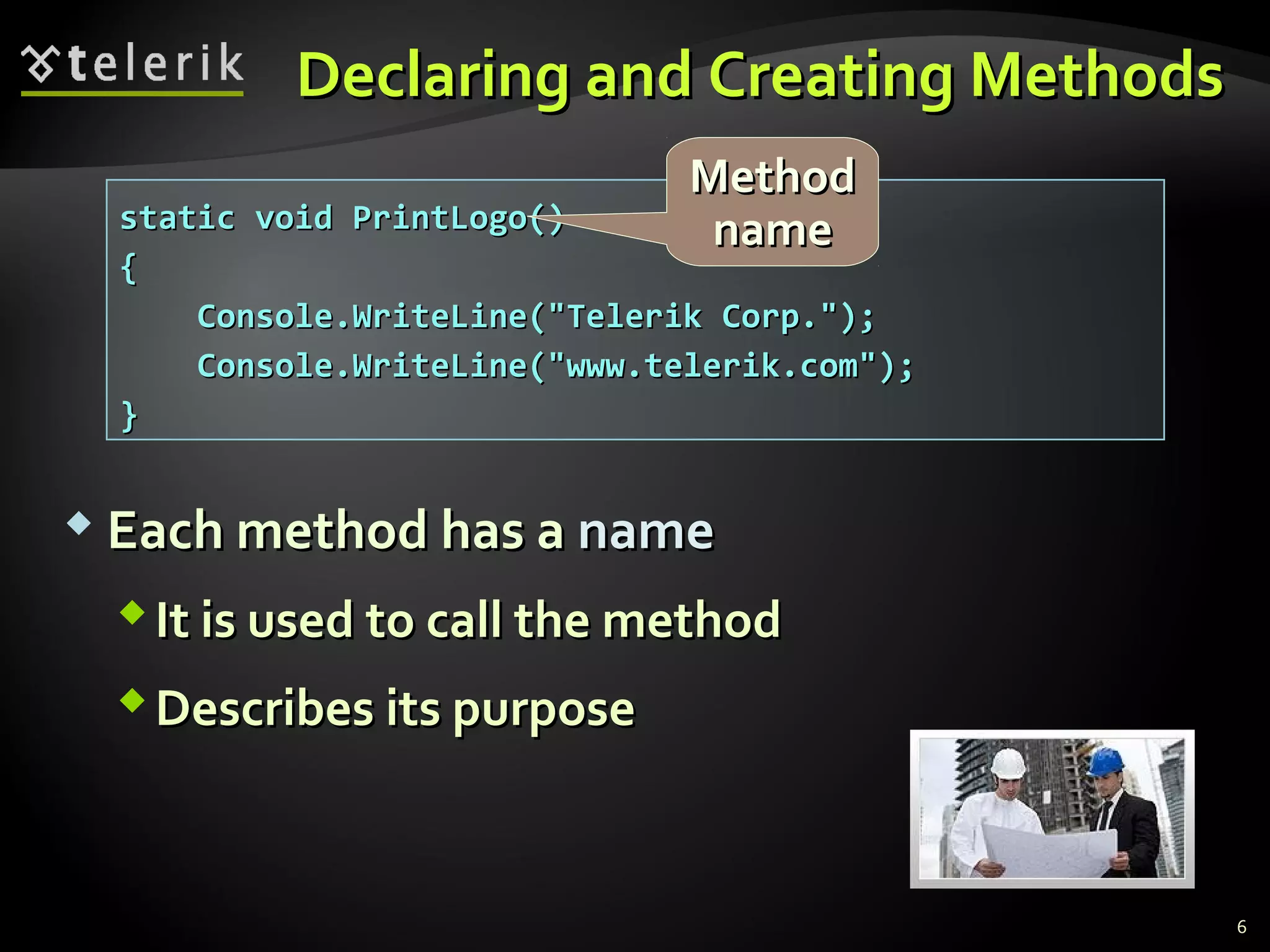
 Each method has aEach method has a namename
It is used to call the methodIt is used to call the method
Describes its purposeDescribes its purpose
static void PrintLogo()static void PrintLogo()
{{
Console.WriteLine("Telerik Corp.");Console.WriteLine("Telerik Corp.");
Console.WriteLine("www.telerik.com");Console.WriteLine("www.telerik.com");
}}
MethodMethod
namename
6
Declaring and Creating Methods (2)Declaring and Creating Methods (2)
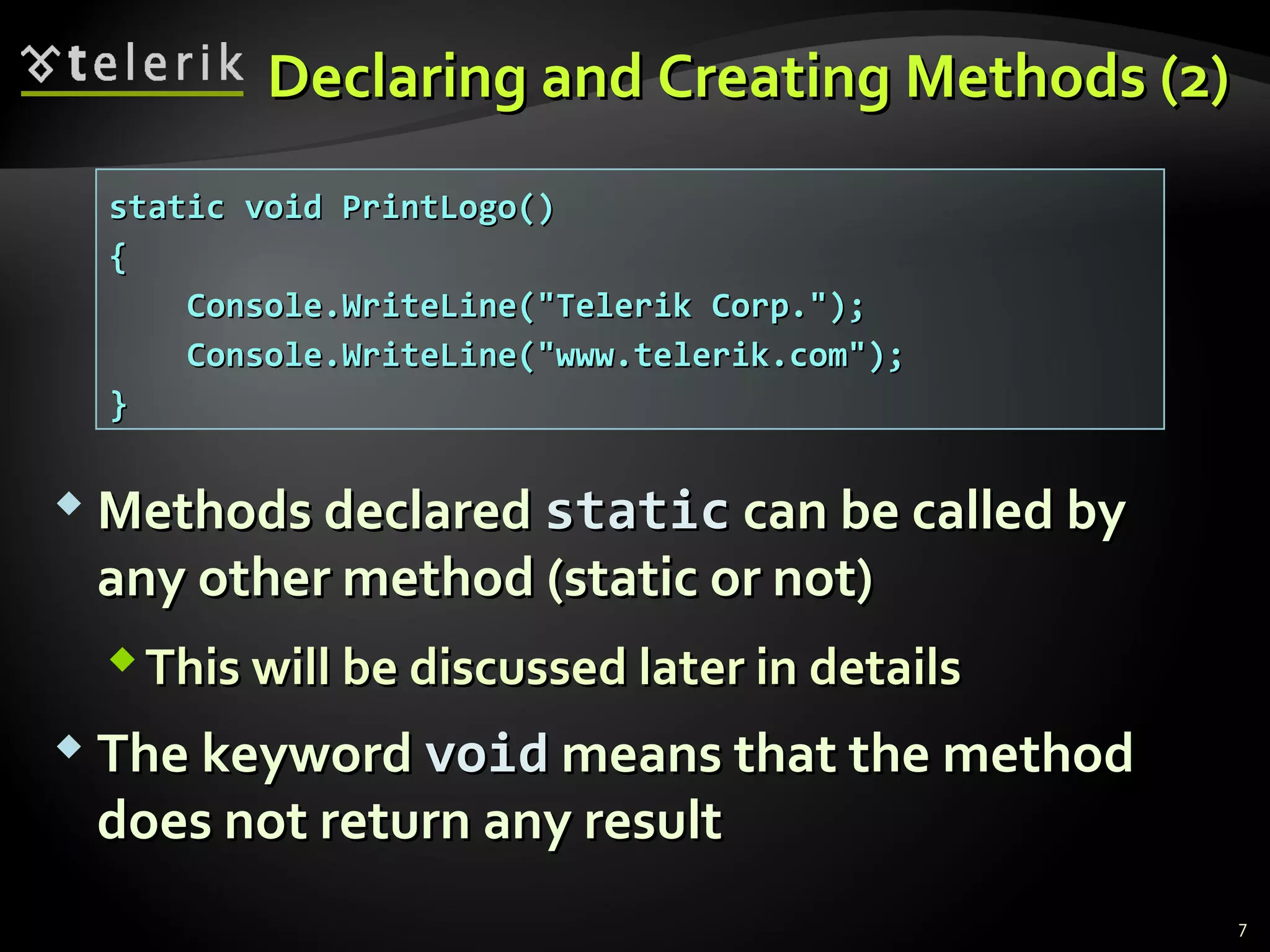
 Methods declaredMethods declared staticstatic can be called bycan be called by
any other method (static or not)any other method (static or not)
This will be discussed later in detailsThis will be discussed later in details
 The keywordThe keyword voidvoid means that the methodmeans that the method
does not return any resultdoes not return any result
static void PrintLogo()static void PrintLogo()
{{
Console.WriteLine("Telerik Corp.");Console.WriteLine("Telerik Corp.");
Console.WriteLine("www.telerik.com");Console.WriteLine("www.telerik.com");
}}
7
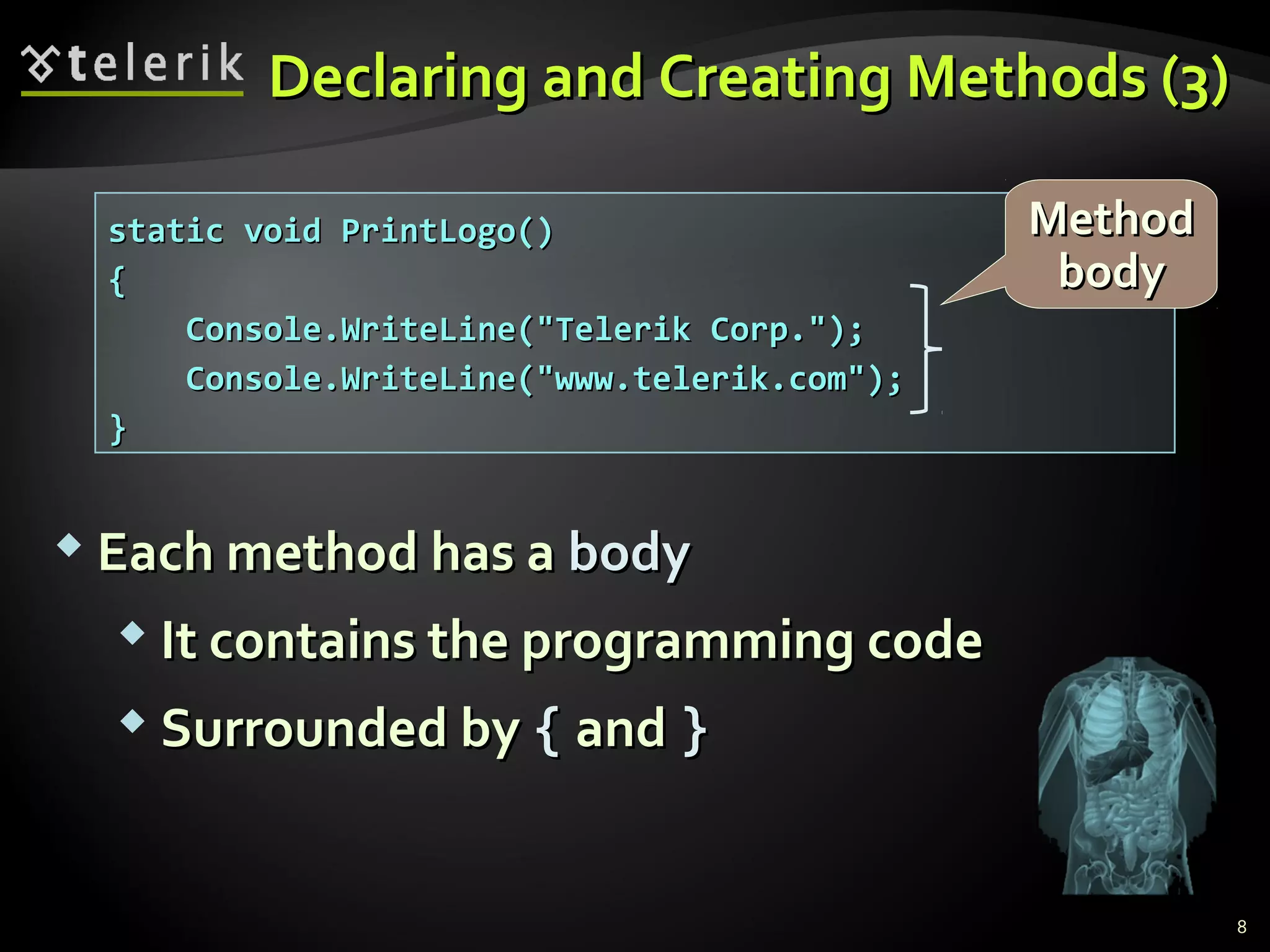
static void PrintLogo()static void PrintLogo()
{{
Console.WriteLine("Telerik Corp.");Console.WriteLine("Telerik Corp.");
Console.WriteLine("www.telerik.com");Console.WriteLine("www.telerik.com");
}}
Declaring and Creating Methods (3)Declaring and Creating Methods (3)
 Each method has aEach method has a bodybody
 It contains the programming codeIt contains the programming code
 Surrounded bySurrounded by {{ andand }}
MethodMethod
bodybody
8
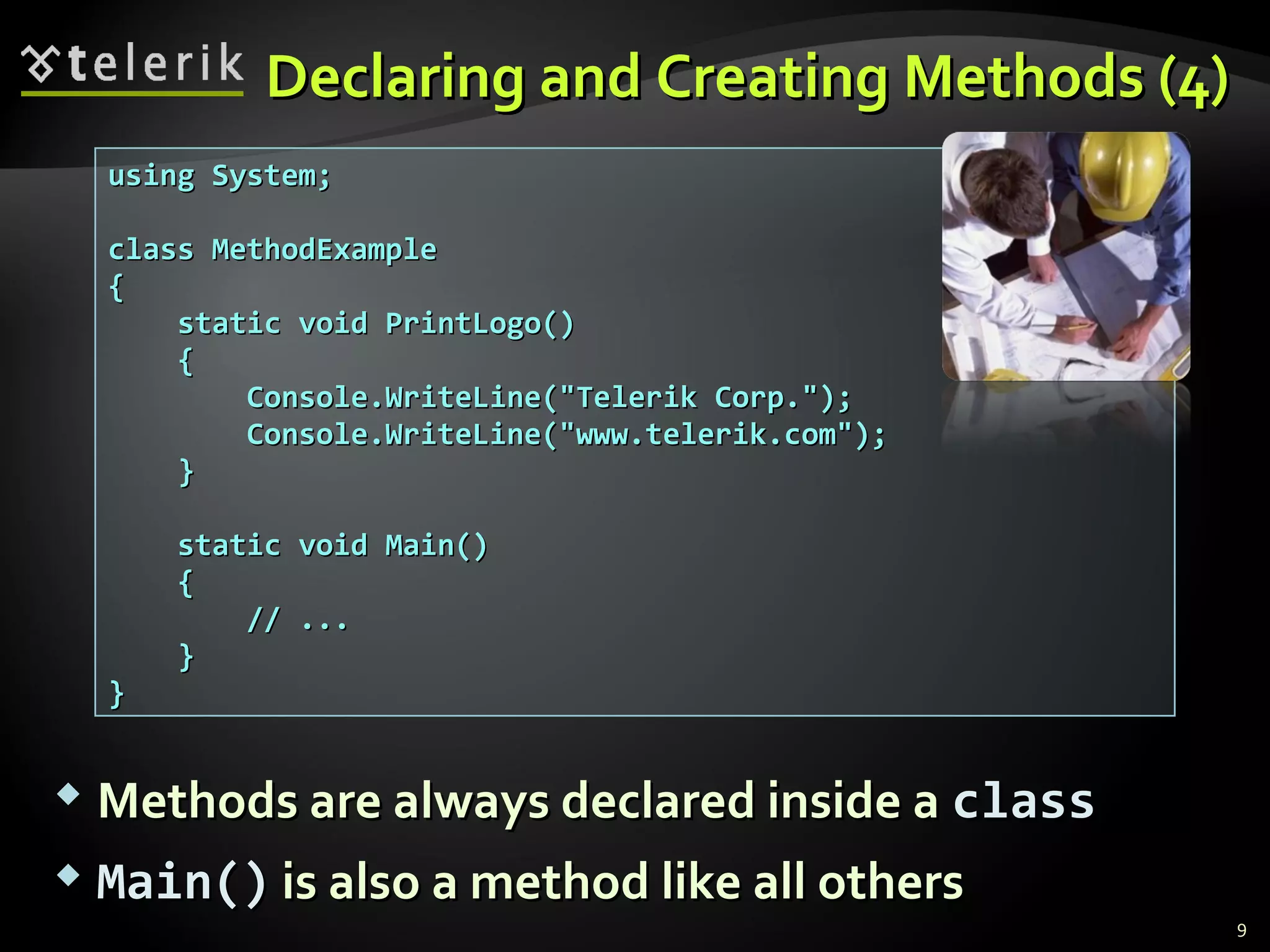
using System;using System;
class MethodExampleclass MethodExample
{{
static void PrintLogo()static void PrintLogo()
{{
Console.WriteLine("Telerik Corp.");Console.WriteLine("Telerik Corp.");
Console.WriteLine("www.telerik.com");Console.WriteLine("www.telerik.com");
}}
static void Main()static void Main()
{{
// ...// ...
}}
}}
Declaring and Creating Methods (4)Declaring and Creating Methods (4)
 Methods are always declared inside aMethods are always declared inside a classclass
 Main()Main() is also a method like all othersis also a method like all others
9
Calling MethodsCalling Methods
 To call a method, simply use:To call a method, simply use:
1.1. The method’s nameThe method’s name
2.2. Parentheses (don’t forget them!)Parentheses (don’t forget them!)
3.3. A semicolon (A semicolon (;;))
 This will execute the code in the method’sThis will execute the code in the method’s
body and will result in printing the following:body and will result in printing the following:
PrintLogo();PrintLogo();
Telerik Corp.Telerik Corp.
www.telerik.comwww.telerik.com
11
Calling Methods (2)Calling Methods (2)
 A method can be called from:A method can be called from:
TheThe Main()Main() methodmethod
Any other methodAny other method
Itself (process known asItself (process known as recursionrecursion))
static void Main()static void Main()
{{
// ...// ...
PrintLogo();PrintLogo();
// ...// ...
}}
12
Declaring andDeclaring and
Calling MethodsCalling Methods
Live DemoLive Demo
Methods with ParametersMethods with Parameters
Passing Parameters and Returning ValuesPassing Parameters and Returning Values
Method ParametersMethod Parameters
 To pass information to a method, you can useTo pass information to a method, you can use
parametersparameters (also known as(also known as argumentsarguments))
You can pass zero or several input valuesYou can pass zero or several input values
You can pass values of different typesYou can pass values of different types
Each parameter has name and typeEach parameter has name and type
Parameters are assigned to particular valuesParameters are assigned to particular values
when the method is calledwhen the method is called
 Parameters can change the method behaviorParameters can change the method behavior
depending on the passed valuesdepending on the passed values
15
Defining and UsingDefining and Using
Method ParametersMethod Parameters
 Method’s behavior depends on its parametersMethod’s behavior depends on its parameters
 Parameters can be of any typeParameters can be of any type
 intint,, doubledouble,, stringstring, etc., etc.
 arrays (arrays (intint[][],, double[]double[], etc.), etc.)
static void PrintSign(int number)static void PrintSign(int number)
{{
if (number > 0)if (number > 0)
Console.WriteLine("Positive");Console.WriteLine("Positive");
else if (number < 0)else if (number < 0)
Console.WriteLine("Negative");Console.WriteLine("Negative");
elseelse
Console.WriteLine("Zero");Console.WriteLine("Zero");
}}
16
Defining and UsingDefining and Using
Method Parameters (2)Method Parameters (2)
 Methods can have as many parameters asMethods can have as many parameters as
needed:needed:
 The following syntax is not valid:The following syntax is not valid:
static void PrintMax(float number1, float number2)static void PrintMax(float number1, float number2)
{{
float max = number1;float max = number1;
if (number2 > number1)if (number2 > number1)
max = number2;max = number2;
Console.WriteLine("Maximal number: {0}", max);Console.WriteLine("Maximal number: {0}", max);
}}
static void PrintMax(float number1, number2)static void PrintMax(float number1, number2)
17
Calling MethodsCalling Methods
with Parameterswith Parameters
 To call a method and pass values to itsTo call a method and pass values to its
parameters:parameters:
Use the method’s name, followed by a list ofUse the method’s name, followed by a list of
expressions for each parameterexpressions for each parameter
 Examples:Examples:
PrintSign(-5);PrintSign(-5);
PrintSign(balance);PrintSign(balance);
PrintSign(2+3);PrintSign(2+3);
PrintMax(100, 200);PrintMax(100, 200);
PrintMax(oldQuantity * 1.5, quantity * 2);PrintMax(oldQuantity * 1.5, quantity * 2);
18
Calling MethodsCalling Methods
with Parameters (2)with Parameters (2)
 Expressions must be of the same type asExpressions must be of the same type as
method’s parameters (or compatible)method’s parameters (or compatible)
If the method requires aIf the method requires a floatfloat expression, youexpression, you
can passcan pass intint insteadinstead
 Use the same order like in method declarationUse the same order like in method declaration
 For methods with no parameters do not forgetFor methods with no parameters do not forget
the parenthesesthe parentheses
19
ExamplesExamples
Using MethodsUsing Methods
With ParametersWith Parameters
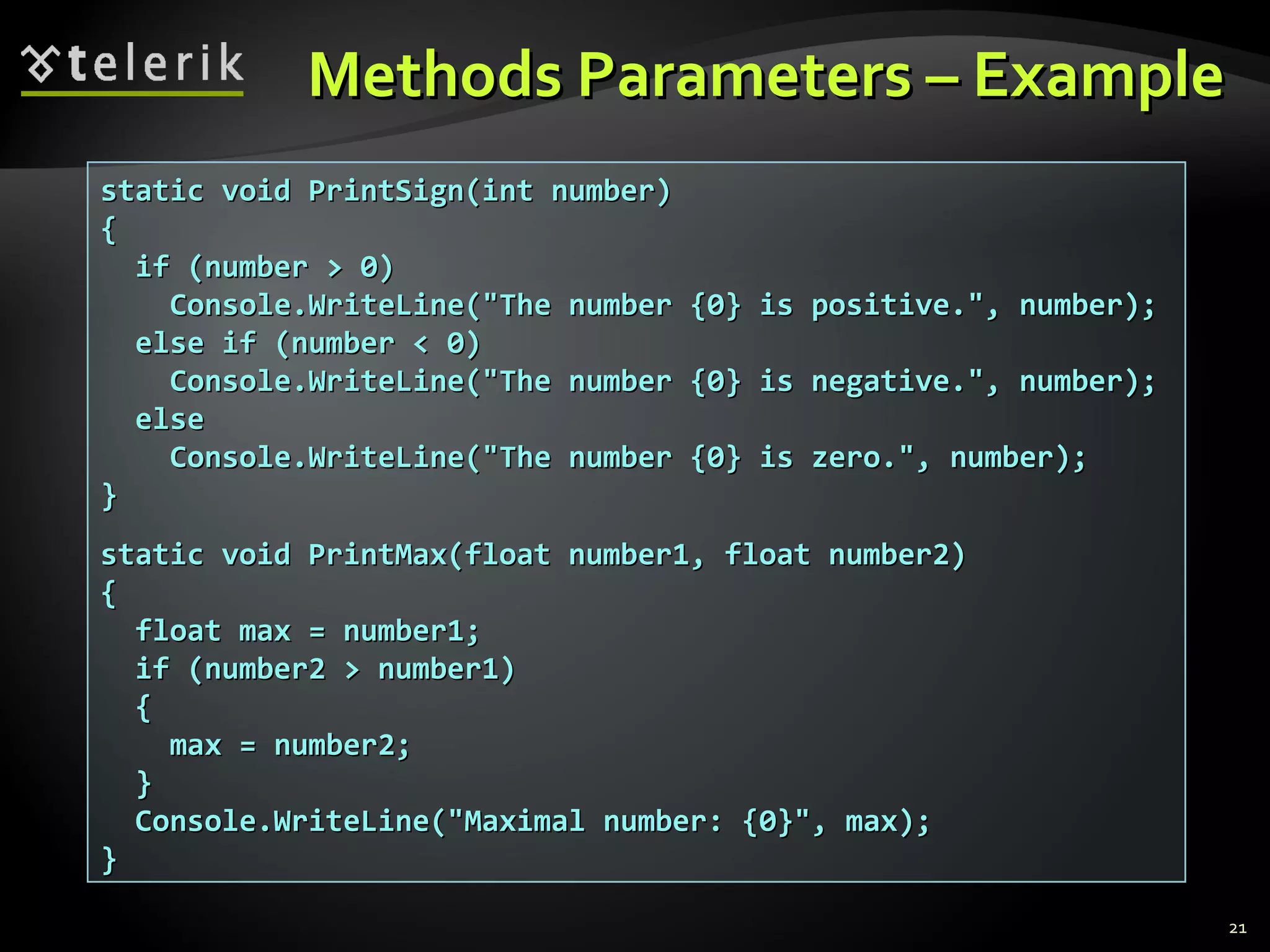
Methods Parameters – ExampleMethods Parameters – Example
static void PrintSign(int number)static void PrintSign(int number)
{{
if (number > 0)if (number > 0)
Console.WriteLine("The number {0} is positive.", number);Console.WriteLine("The number {0} is positive.", number);
else if (number < 0)else if (number < 0)
Console.WriteLine("The number {0} is negative.", number);Console.WriteLine("The number {0} is negative.", number);
elseelse
Console.WriteLine("The number {0} is zero.", number);Console.WriteLine("The number {0} is zero.", number);
}}
static void PrintMax(float number1, float number2)static void PrintMax(float number1, float number2)
{{
float max = number1;float max = number1;
if (number2 > number1)if (number2 > number1)
{{
max = number2;max = number2;
}}
Console.WriteLine("Maximal number: {0}", max);Console.WriteLine("Maximal number: {0}", max);
}}
21
Live DemoLive Demo
Method ParametersMethod Parameters
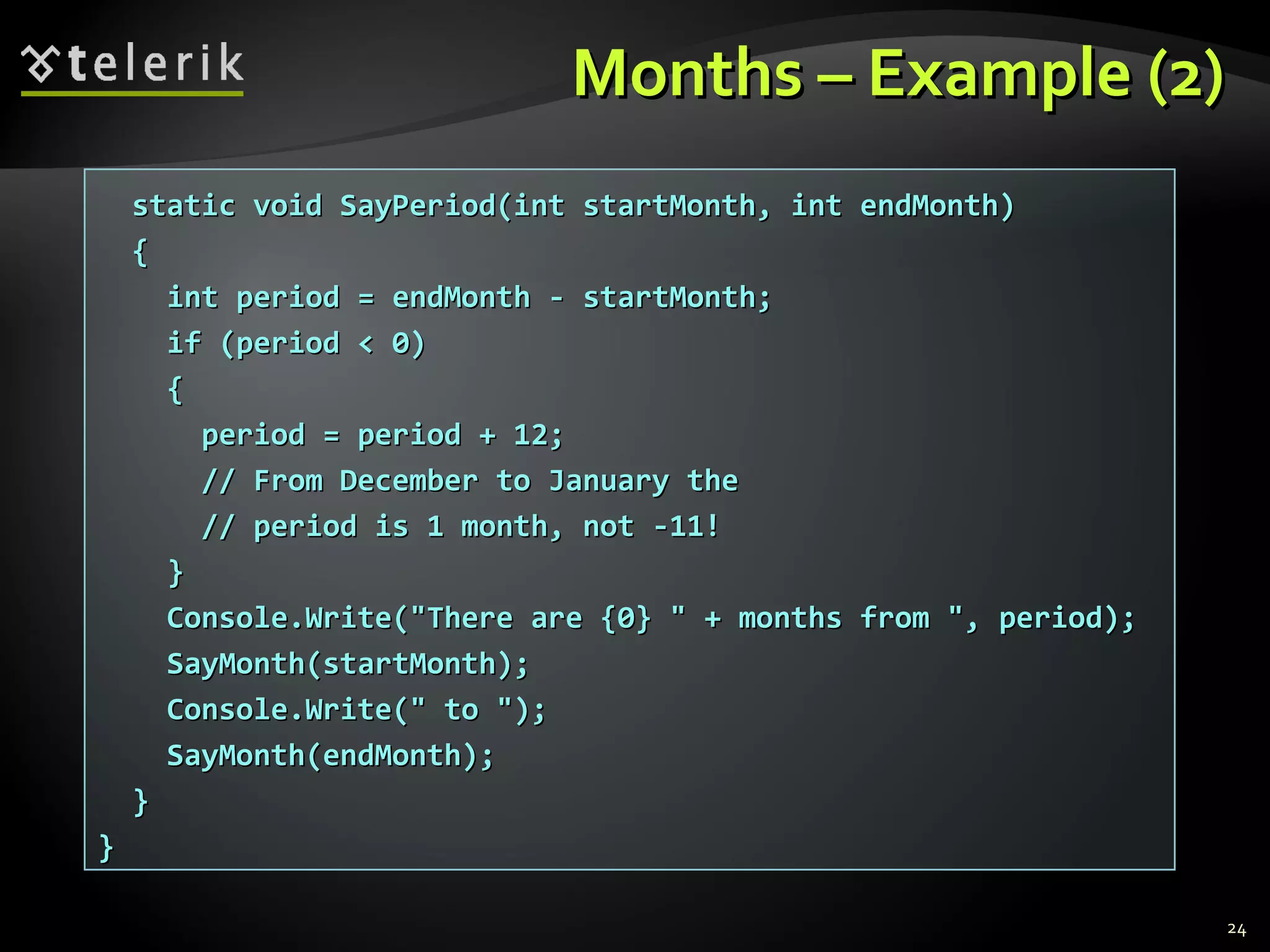
Months – ExampleMonths – Example
 Display the period between two months in aDisplay the period between two months in a
user-friendly wayuser-friendly way
using System;using System;
class MonthsExampleclass MonthsExample
{{
static void SayMonth(int month)static void SayMonth(int month)
{{
string[] monthNames = new string[] {string[] monthNames = new string[] {
"January", "February", "March","January", "February", "March",
"April", "May", "June", "July","April", "May", "June", "July",
"August", "September", "October","August", "September", "October",
"November", "December"};"November", "December"};
Console.Write(monthNames[month-1]);Console.Write(monthNames[month-1]);
}}
(the example continues)(the example continues)
23
Months – Example (2)Months – Example (2)
static void SayPeriod(int startMonth, int endMonth)static void SayPeriod(int startMonth, int endMonth)
{{
int period = endMonth - startMonth;int period = endMonth - startMonth;
if (period < 0)if (period < 0)
{{
period = period + 12;period = period + 12;
// From December to January the// From December to January the
// period is 1 month, not -11!// period is 1 month, not -11!
}}
Console.Write("There are {0} " + months from ", period);Console.Write("There are {0} " + months from ", period);
SayMonth(startMonth);SayMonth(startMonth);
Console.Write(" to ");Console.Write(" to ");
SayMonth(endMonth);SayMonth(endMonth);
}}
}}
24
Live DemoLive Demo
MonthsMonths
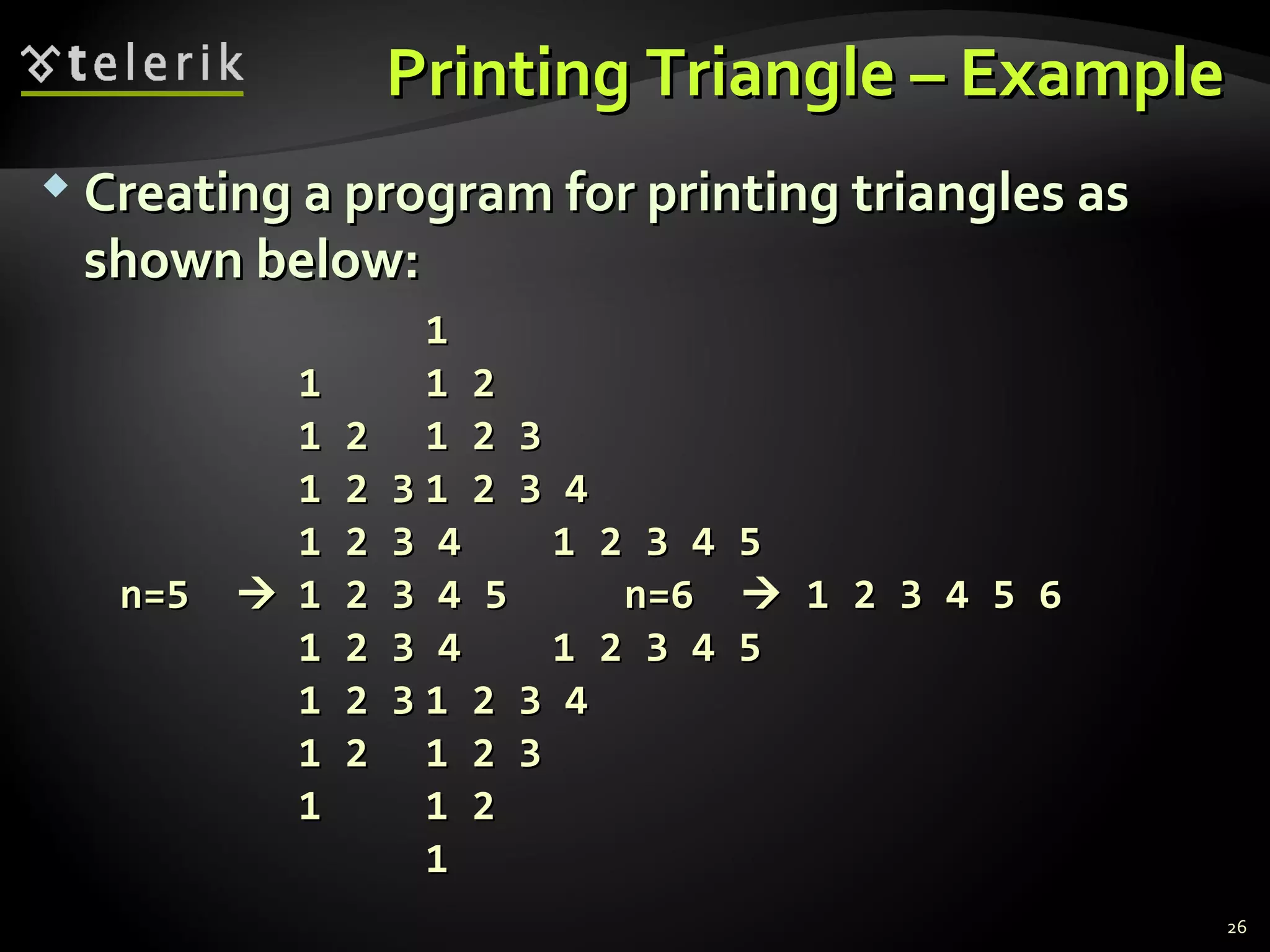
Printing Triangle – ExamplePrinting Triangle – Example
 Creating a program for printing triangles asCreating a program for printing triangles as
shown below:shown below:
11
11 1 21 2
1 21 2 1 2 31 2 3
1 2 31 2 3 1 2 3 41 2 3 4
1 2 3 41 2 3 4 1 2 3 4 51 2 3 4 5
n=5n=5  1 2 3 4 51 2 3 4 5 n=6n=6  1 2 3 4 5 61 2 3 4 5 6
1 2 3 41 2 3 4 1 2 3 4 51 2 3 4 5
1 2 31 2 3 1 2 3 41 2 3 4
1 21 2 1 2 31 2 3
11 1 21 2
11
26
Printing Triangle – ExamplePrinting Triangle – Example
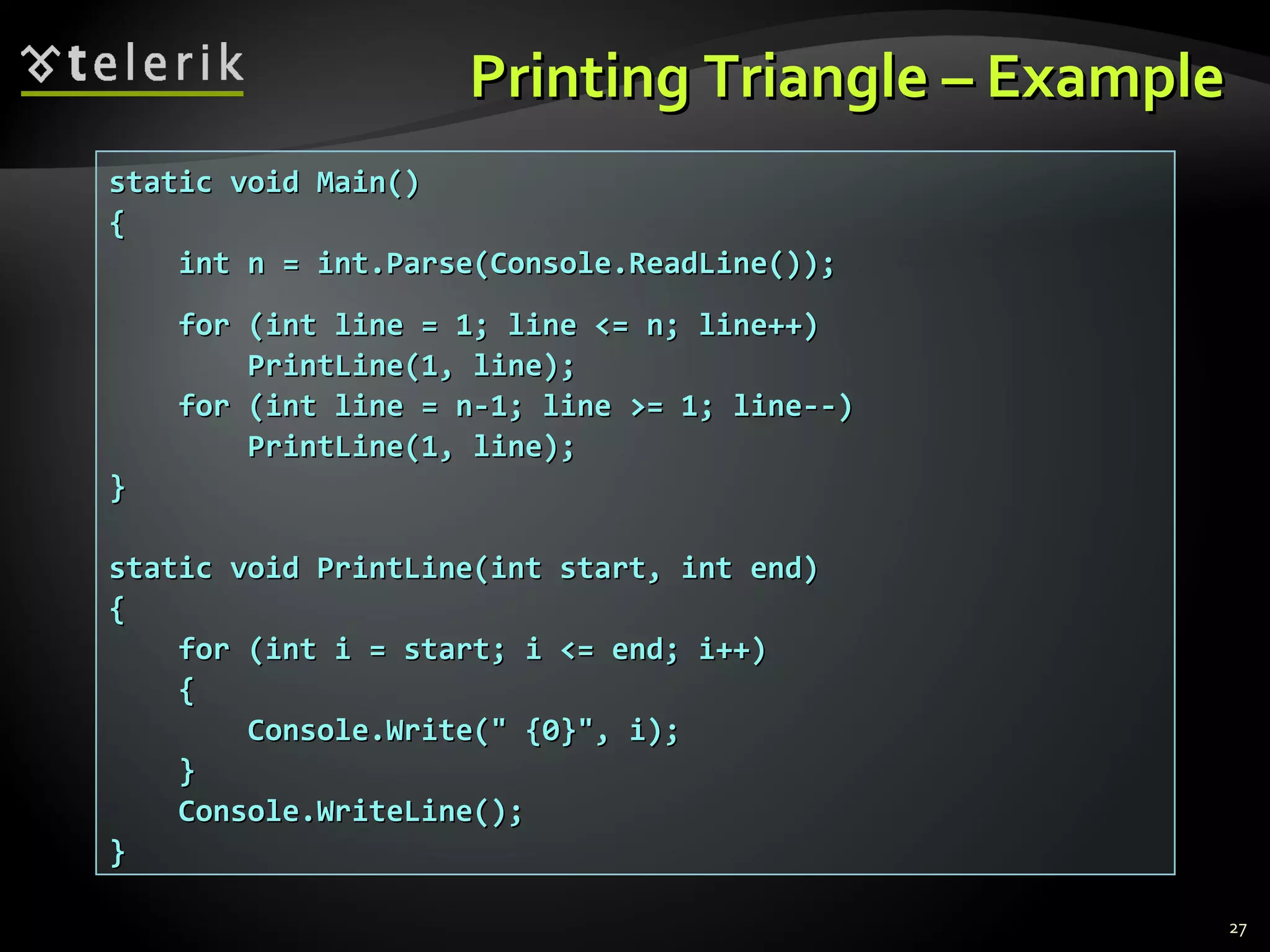
static void Main()static void Main()
{{
int n = int.Parse(Console.ReadLine());int n = int.Parse(Console.ReadLine());
for (int line = 1; line <= n; line++)for (int line = 1; line <= n; line++)
PrintLine(1, line);PrintLine(1, line);
for (int line = n-1; line >= 1; line--)for (int line = n-1; line >= 1; line--)
PrintLine(1, line);PrintLine(1, line);
}}
static void PrintLine(int start, int end)static void PrintLine(int start, int end)
{{
for (int i = start; i <= end; i++)for (int i = start; i <= end; i++)
{{
Console.Write(" {0}", i);Console.Write(" {0}", i);
}}
Console.WriteLine();Console.WriteLine();
}}
27
PrintingTrianglePrintingTriangle
Live DemoLive Demo
Optional ParametersOptional Parameters
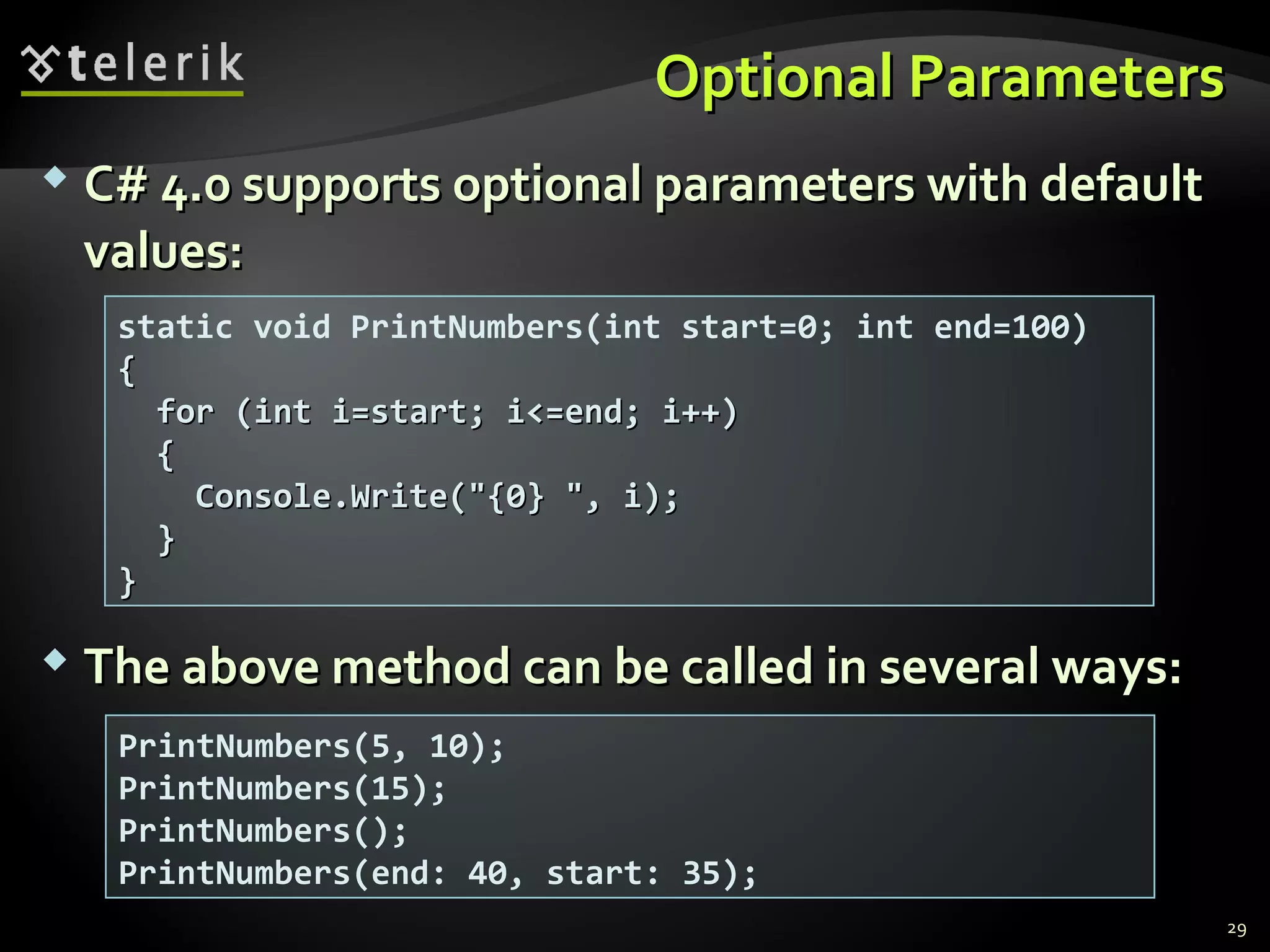
 C# 4.0 supports optional parameters with defaultC# 4.0 supports optional parameters with default
values:values:
 The above method can be called in several ways:The above method can be called in several ways:
static void PrintNumbers(int start=0; int end=100)
{{
for (int i=start; i<=end; i++)for (int i=start; i<=end; i++)
{{
Console.Write("{0} ", i);Console.Write("{0} ", i);
}}
}}
PrintNumbers(5, 10);
PrintNumbers(15);
PrintNumbers();
PrintNumbers(end: 40, start: 35);
29
Optional ParametersOptional Parameters
Live DemoLive Demo
ReturningValuesReturningValues
From MethodsFrom Methods
Returning Values From MethodsReturning Values From Methods
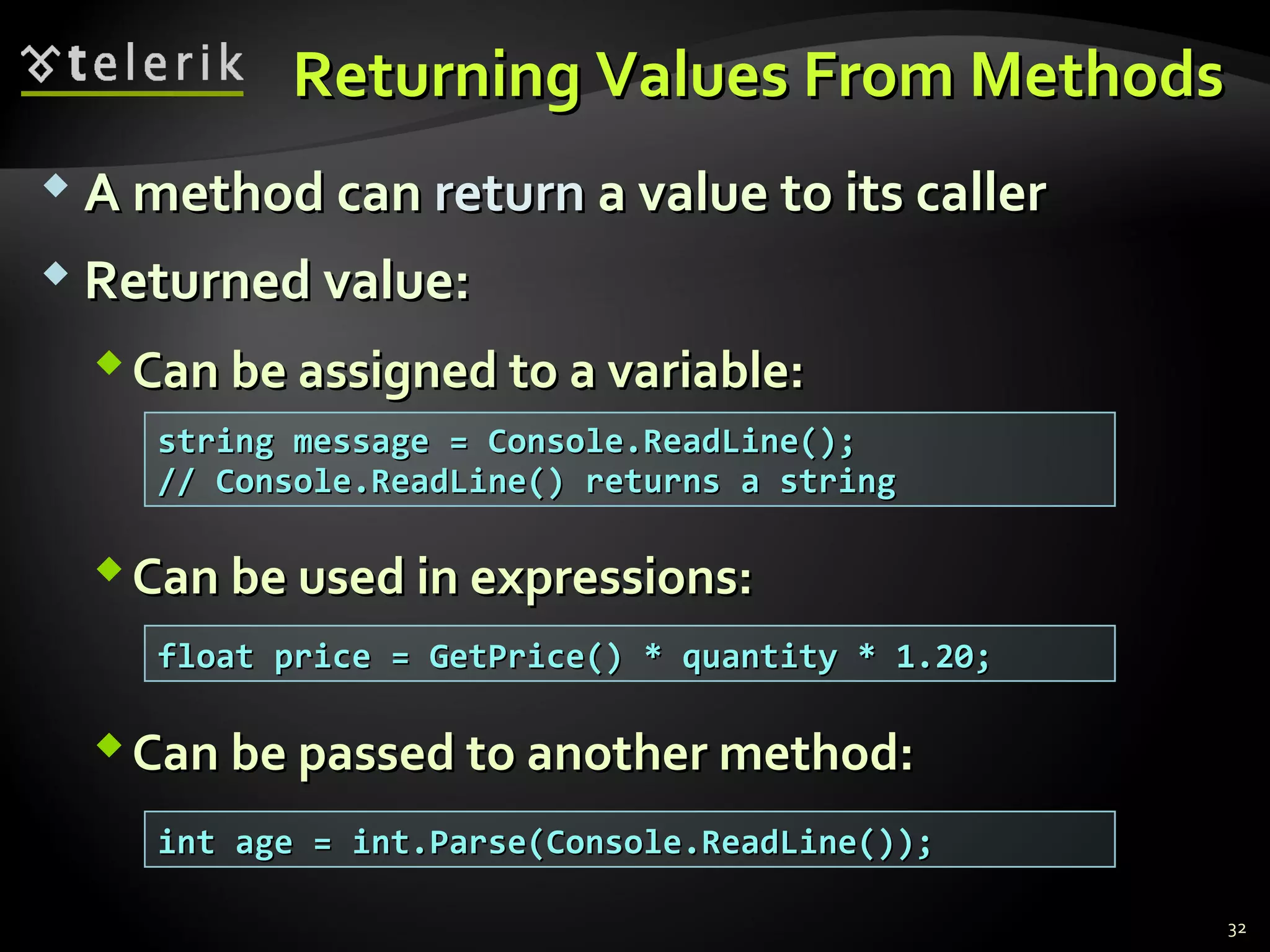
 A method canA method can returnreturn a value to its callera value to its caller
 Returned value:Returned value:
Can be assigned to a variable:Can be assigned to a variable:
Can be used in expressions:Can be used in expressions:
Can be passed to another method:Can be passed to another method:
string message = Console.ReadLine();string message = Console.ReadLine();
// Console.ReadLine() returns a string// Console.ReadLine() returns a string
float price = GetPrice() * quantity * 1.20;float price = GetPrice() * quantity * 1.20;
int age = int.Parse(Console.ReadLine());int age = int.Parse(Console.ReadLine());
32
Defining MethodsDefining Methods
That Return a ValueThat Return a Value
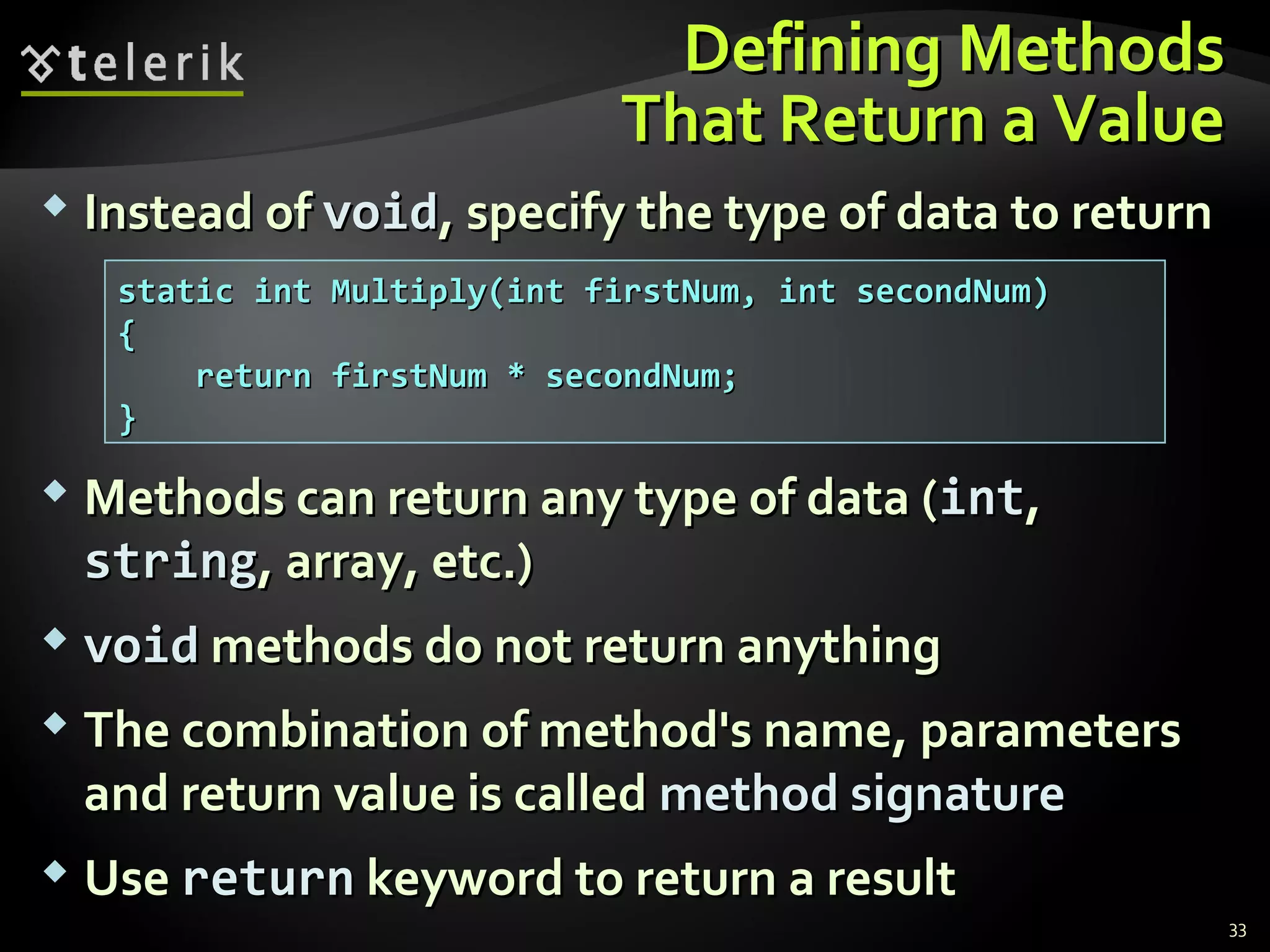
 Instead ofInstead of voidvoid, specify the type of data to return, specify the type of data to return
 Methods can return any type of data (Methods can return any type of data (intint,,
stringstring, array, etc.), array, etc.)
 voidvoid methods do not return anythingmethods do not return anything
 The combination of method's name, parametersThe combination of method's name, parameters
and return value is calledand return value is called method signaturemethod signature
 UseUse returnreturn keyword to return a resultkeyword to return a result
static int Multiply(int firstNum, int secondNum)static int Multiply(int firstNum, int secondNum)
{{
return firstNum * secondNum;return firstNum * secondNum;
}}
33
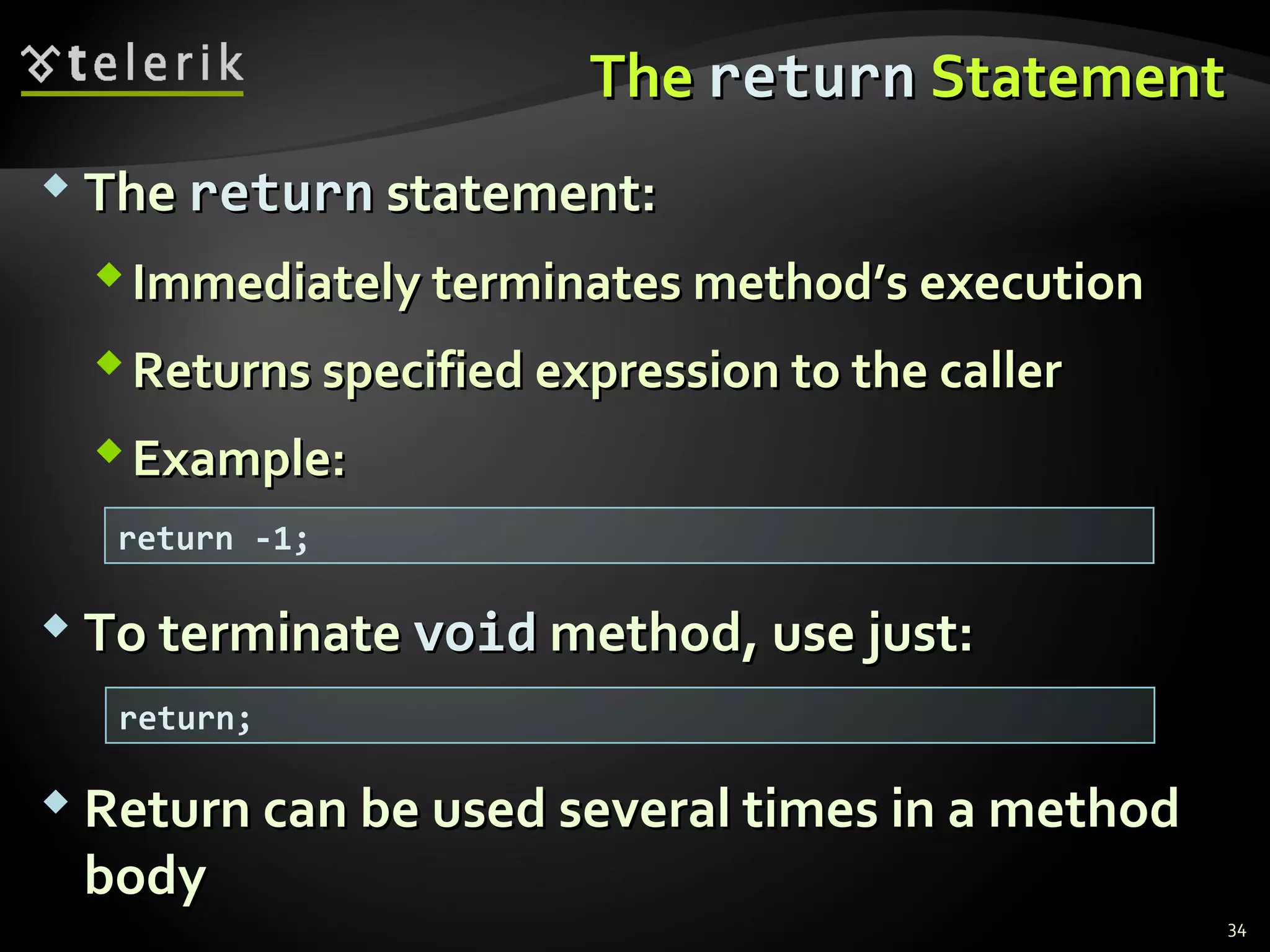
TheThe returnreturn StatementStatement
 TheThe returnreturn statement:statement:
Immediately terminates method’s executionImmediately terminates method’s execution
Returns specified expression to the callerReturns specified expression to the caller
Example:Example:
 To terminateTo terminate voidvoid method, use just:method, use just:
 Return can be used several times in a methodReturn can be used several times in a method
bodybody
return -1;
return;
34
ExamplesExamples
ReturningValuesReturningValues
From MethodsFrom Methods
ExamplesExamples
ReturningValuesReturningValues
From MethodsFrom Methods
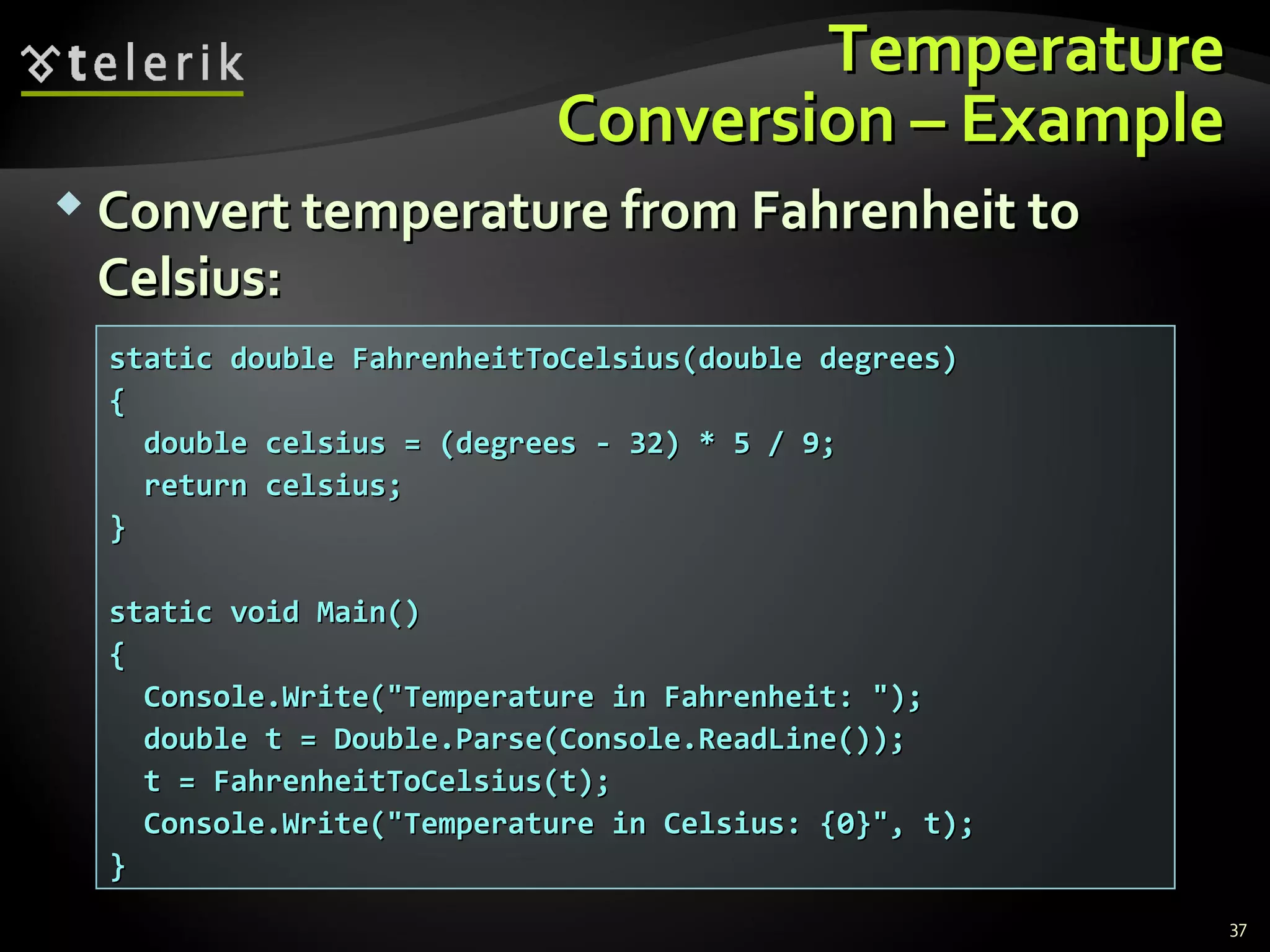
TemperatureTemperature
Conversion – ExampleConversion – Example
 Convert temperature from Fahrenheit toConvert temperature from Fahrenheit to
Celsius:Celsius:
static double FahrenheitToCelsius(double degrees)static double FahrenheitToCelsius(double degrees)
{{
double celsius = (degrees - 32) * 5 / 9;double celsius = (degrees - 32) * 5 / 9;
return celsius;return celsius;
}}
static void Main()static void Main()
{{
Console.Write("Temperature in Fahrenheit: ");Console.Write("Temperature in Fahrenheit: ");
double t = Double.Parse(Console.ReadLine());double t = Double.Parse(Console.ReadLine());
t = FahrenheitToCelsius(t);t = FahrenheitToCelsius(t);
Console.Write("Temperature in Celsius: {0}", t);Console.Write("Temperature in Celsius: {0}", t);
}}
37
Live DemoLive Demo
Temperature ConversionTemperature Conversion
Positive Numbers – ExamplePositive Numbers – Example
 Check if all numbers in a sequence are positive:Check if all numbers in a sequence are positive:
static bool ArePositive(int[] sequence)static bool ArePositive(int[] sequence)
{{
foreach (int number in sequence)foreach (int number in sequence)
{{
if (number <= 0)if (number <= 0)
{{
return false;return false;
}}
}}
return true;return true;
}}
39
Live DemoLive Demo
Positive NumbersPositive Numbers
Data Validation – ExampleData Validation – Example
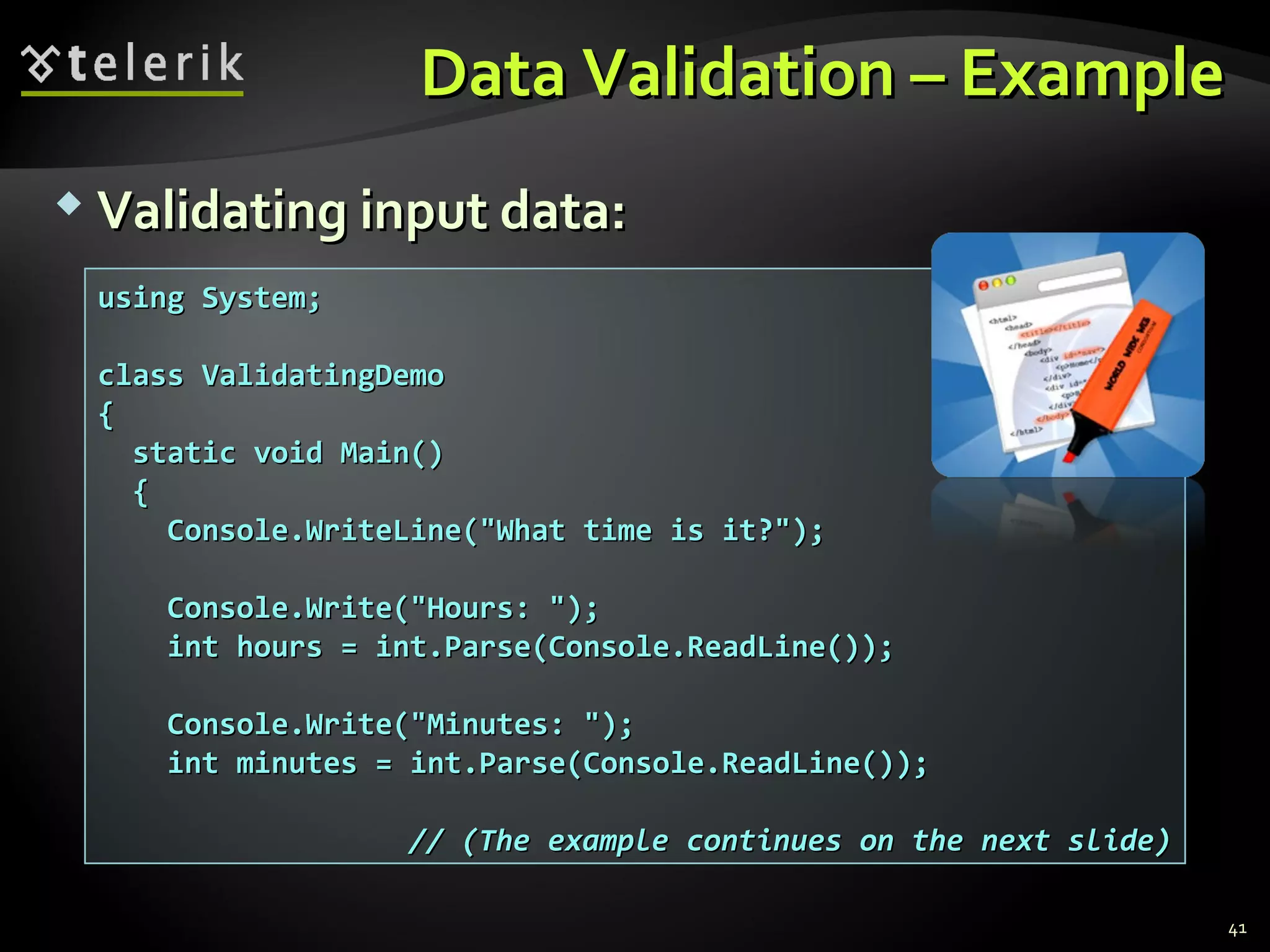
 Validating input data:Validating input data:
using System;using System;
class ValidatingDemoclass ValidatingDemo
{{
static void Main()static void Main()
{{
Console.WriteLine("What time is it?");Console.WriteLine("What time is it?");
Console.Write("Hours: ");Console.Write("Hours: ");
int hours = int.Parse(Console.ReadLine());int hours = int.Parse(Console.ReadLine());
Console.Write("Minutes: ");Console.Write("Minutes: ");
int minutes = int.Parse(Console.ReadLine());int minutes = int.Parse(Console.ReadLine());
// (The example continues on the next slide)// (The example continues on the next slide)
41
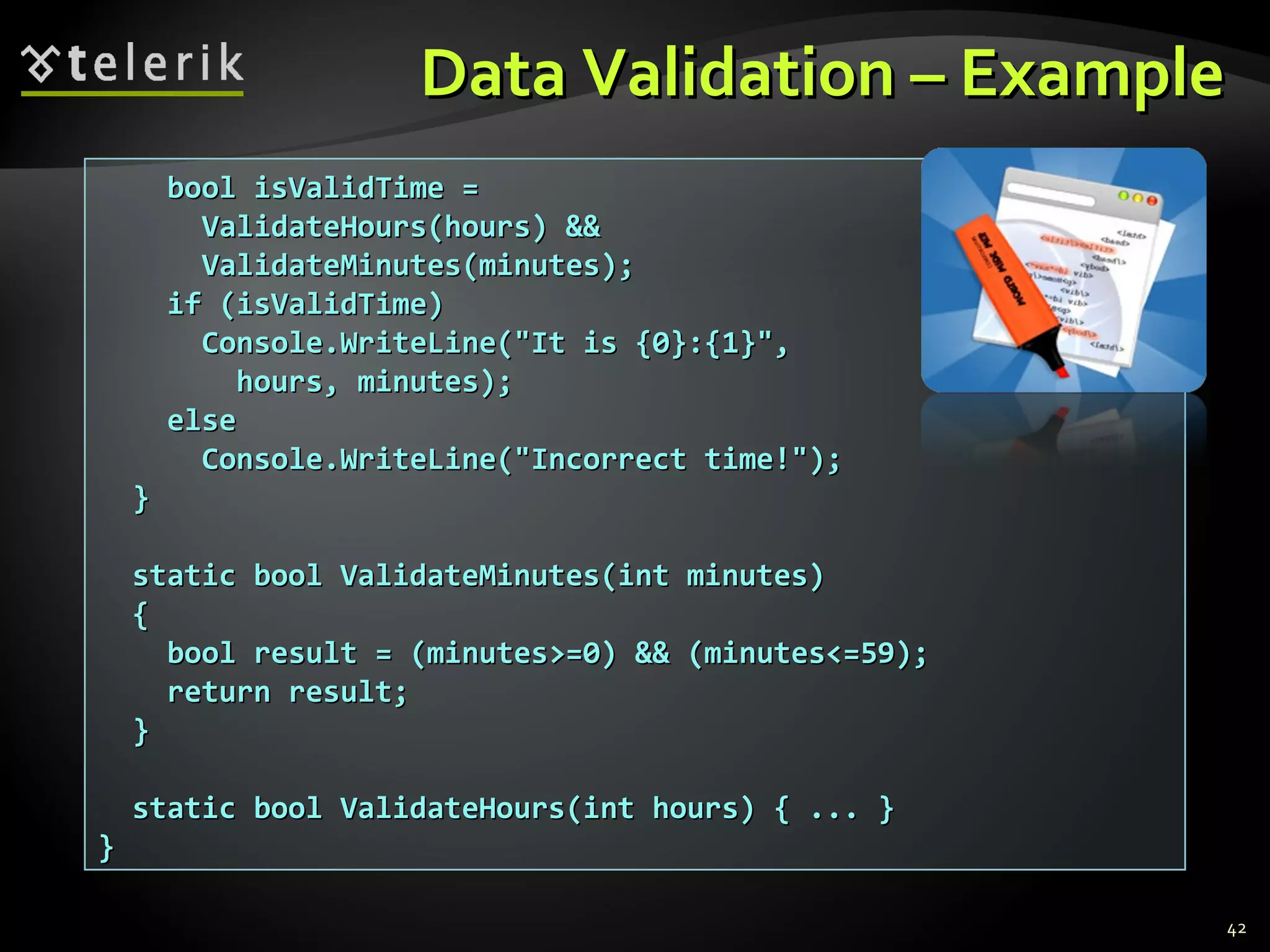
Data Validation – ExampleData Validation – Example
bool isValidTime =bool isValidTime =
ValidateHours(hours) &&ValidateHours(hours) &&
ValidateMinutes(minutes);ValidateMinutes(minutes);
if (isValidTime)if (isValidTime)
Console.WriteLine("It is {0}:{1}",Console.WriteLine("It is {0}:{1}",
hours, minutes);hours, minutes);
elseelse
Console.WriteLine("Incorrect time!");Console.WriteLine("Incorrect time!");
}}
static bool ValidateMinutes(int minutes)static bool ValidateMinutes(int minutes)
{{
bool result = (minutes>=0) && (minutes<=59);bool result = (minutes>=0) && (minutes<=59);
return result;return result;
}}
static bool ValidateHours(int hours) { ... }static bool ValidateHours(int hours) { ... }
}}
42
Live DemoLive Demo
DataValidationDataValidation
Methods – Best PracticesMethods – Best Practices
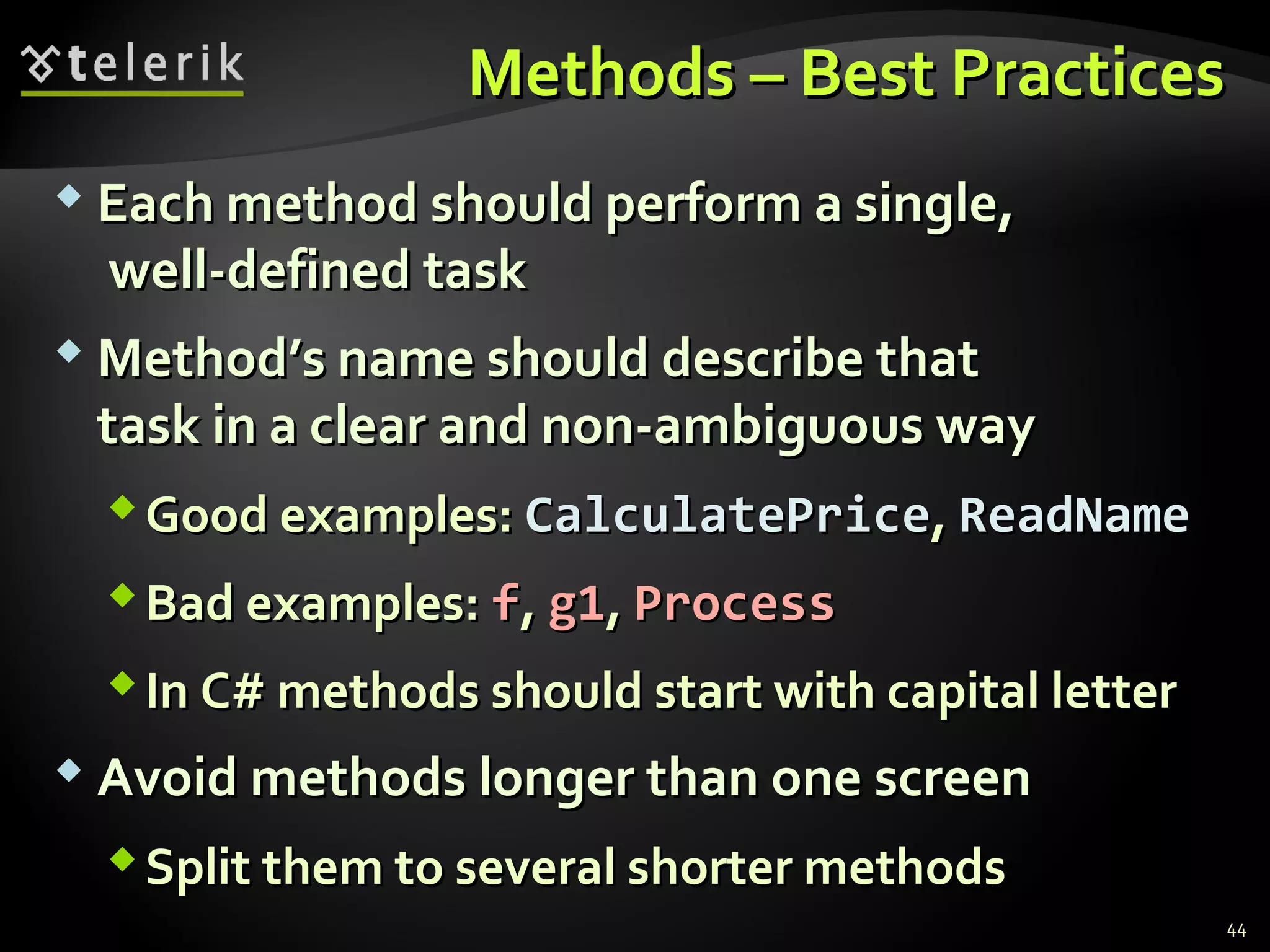
 Each method should perform a single,Each method should perform a single,
well-defined taskwell-defined task
 Method’s name should describe thatMethod’s name should describe that
task in a clear and non-ambiguous waytask in a clear and non-ambiguous way
Good examples:Good examples: CalculatePriceCalculatePrice,, ReadNameReadName
Bad examples:Bad examples: ff,, g1g1,, ProcessProcess
In C# methods should start with capital letterIn C# methods should start with capital letter
 Avoid methods longer than one screenAvoid methods longer than one screen
Split them to several shorter methodsSplit them to several shorter methods
44
SummarySummary
 Break large programs into simple methodsBreak large programs into simple methods
that solve small sub-problemsthat solve small sub-problems
 Methods consist of declaration and bodyMethods consist of declaration and body
 Methods are invoked by their nameMethods are invoked by their name
 Methods can accept parametersMethods can accept parameters
 Parameters take actual values when calling aParameters take actual values when calling a
methodmethod
 Methods can return a value or nothingMethods can return a value or nothing
45
Questions?Questions?
MethodsMethods
http://academy.telerik.com
ExercisesExercises
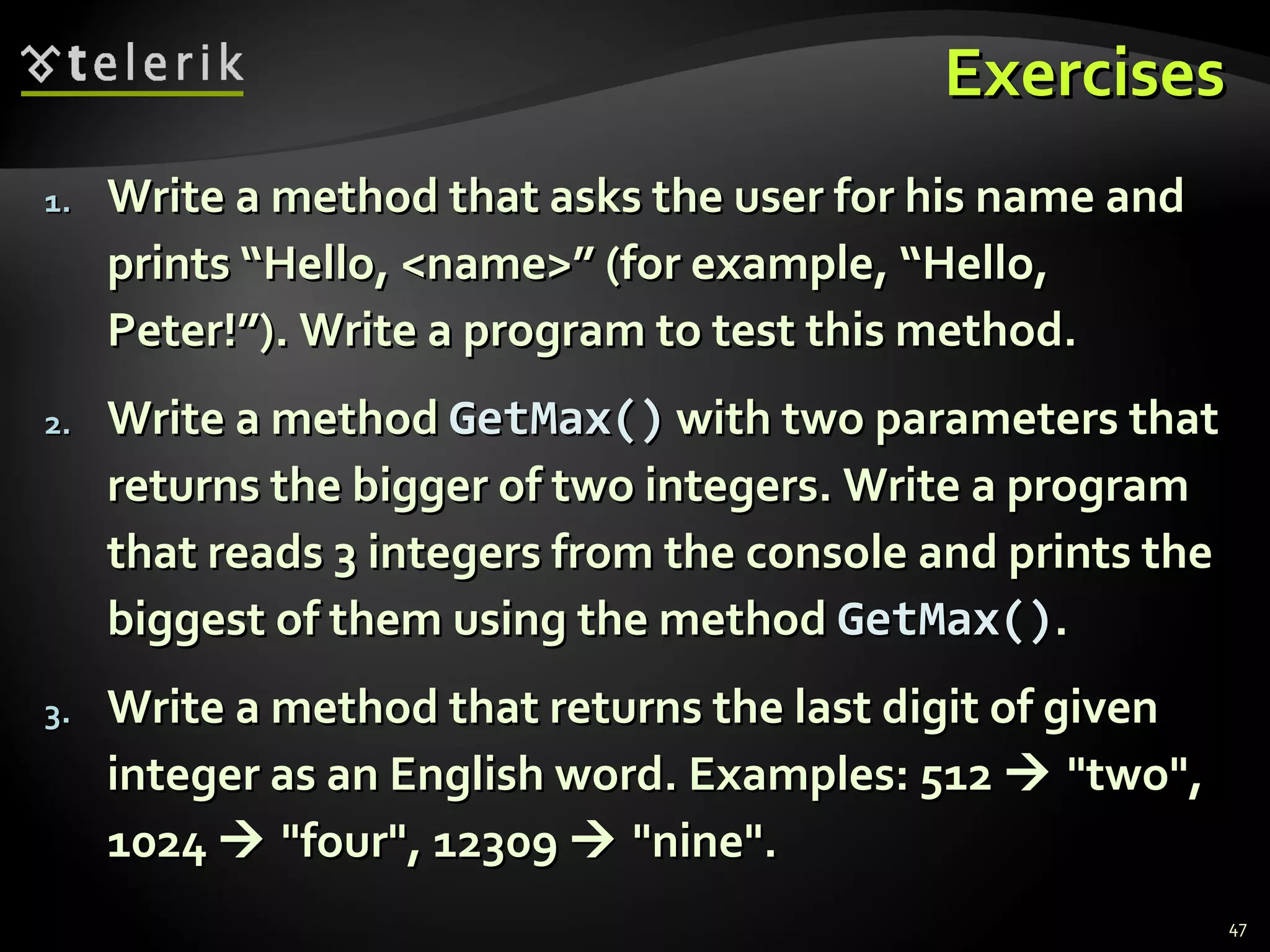
1.1. Write a method that asks the user for his name andWrite a method that asks the user for his name and
prints “Hello, <name>” (for example, “Hello,prints “Hello, <name>” (for example, “Hello,
Peter!”). Write a program to test this method.Peter!”). Write a program to test this method.
2.2. Write a methodWrite a method GetMax()GetMax() with two parameters thatwith two parameters that
returns the bigger of two integers. Write a programreturns the bigger of two integers. Write a program
that reads 3 integers from the console and prints thethat reads 3 integers from the console and prints the
biggest of them using the methodbiggest of them using the method GetMax()GetMax()..
3.3. Write a method that returns the last digit of givenWrite a method that returns the last digit of given
integer as an English word. Examples: 512integer as an English word. Examples: 512  "two","two",
10241024  "four", 12309"four", 12309  "nine"."nine".
47
Exercises (2)Exercises (2)
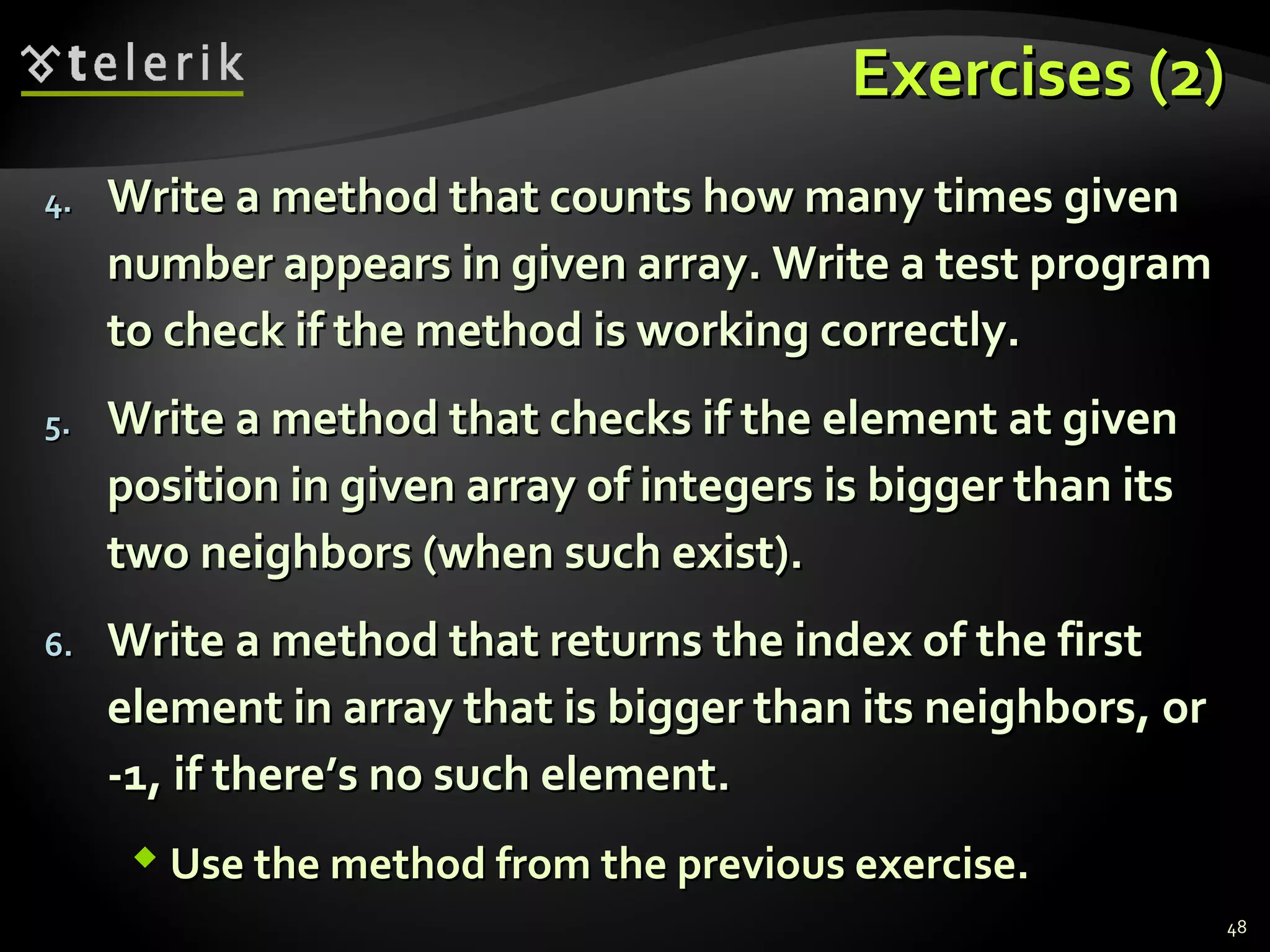
4.4. Write a method that counts how many times givenWrite a method that counts how many times given
number appears in given array. Write a test programnumber appears in given array. Write a test program
to check if the method is working correctly.to check if the method is working correctly.
5.5. Write a method that checks if the element at givenWrite a method that checks if the element at given
position in given array of integers is bigger than itsposition in given array of integers is bigger than its
two neighbors (when such exist).two neighbors (when such exist).
6.6. Write a method that returns the index of the firstWrite a method that returns the index of the first
element in array that is bigger than its neighbors, orelement in array that is bigger than its neighbors, or
-1, if there’s no such element.-1, if there’s no such element.
 Use the method from the previous exercise.Use the method from the previous exercise.
48
Exercises (3)Exercises (3)
7.7. Write a method that reverses the digits of givenWrite a method that reverses the digits of given
decimal number. Example: 256decimal number. Example: 256  652652
8.8. Write a method that adds two positive integerWrite a method that adds two positive integer
numbers represented as arrays of digits (each arraynumbers represented as arrays of digits (each array
elementelement arr[iarr[i]] contains a digit; the last digit iscontains a digit; the last digit is
kept inkept in arr[0]arr[0]). Each of the numbers that will be). Each of the numbers that will be
added could have up to 10 000 digits.added could have up to 10 000 digits.
9.9. Write a method that return the maximal element inWrite a method that return the maximal element in
a portion of array of integers starting at given index.a portion of array of integers starting at given index.
Using it write another method that sorts an array inUsing it write another method that sorts an array in
ascending / descending order.ascending / descending order.
49
Exercises (4)Exercises (4)
10.10. Write a program to calculateWrite a program to calculate n!n! for eachfor each nn in thein the
rangerange [1..100][1..100]. Hint: Implement first a method. Hint: Implement first a method
that multiplies a number represented as array ofthat multiplies a number represented as array of
digits by given integer number.digits by given integer number.
11.11. Write a method that adds two polynomials.Write a method that adds two polynomials.
Represent them as arrays of their coefficients as inRepresent them as arrays of their coefficients as in
the example below:the example below:
xx22
+ 5 = 1+ 5 = 1xx22
+ 0+ 0xx + 5+ 5 
10.10. Extend the program to support also subtraction andExtend the program to support also subtraction and
multiplication of polynomials.multiplication of polynomials.
55 00 11
50
Exercises (5)Exercises (5)
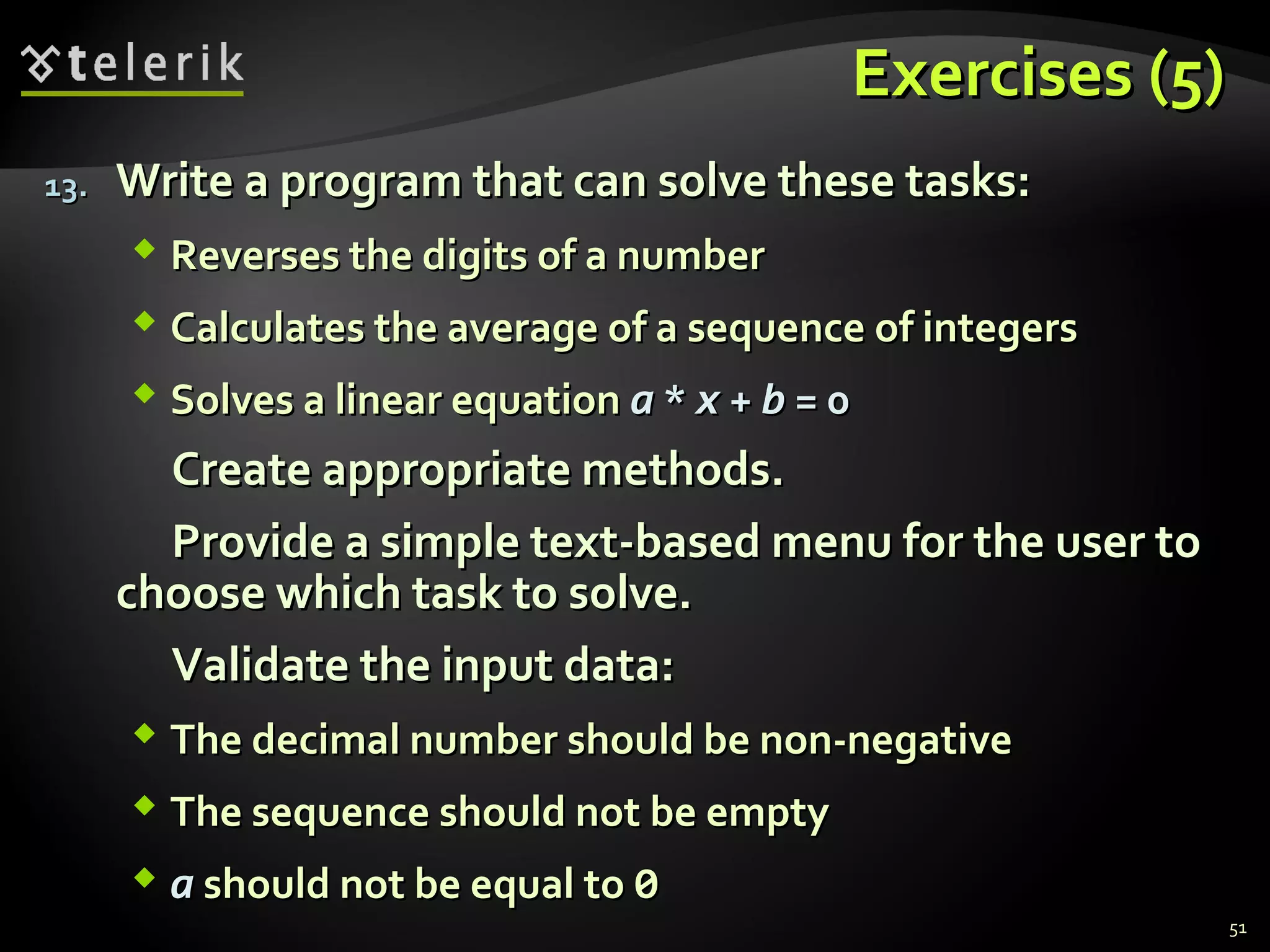
13.13. Write a program that can solve these tasks:Write a program that can solve these tasks:
 Reverses the digits of a numberReverses the digits of a number
 Calculates the average of a sequence of integersCalculates the average of a sequence of integers
 Solves a linear equationSolves a linear equation aa ** xx ++ bb = 0= 0
Create appropriate methods.Create appropriate methods.
Provide a simple text-based menu for the user toProvide a simple text-based menu for the user to
choose which task to solve.choose which task to solve.
Validate the input data:Validate the input data:
 The decimal number should be non-negativeThe decimal number should be non-negative
 The sequence should not be emptyThe sequence should not be empty
 aa should not be equal toshould not be equal to 00
51

09 Methods

  • 1.
    MethodsMethods Subroutines in ComputerProgrammingSubroutines in Computer Programming Svetlin NakovSvetlin Nakov Telerik CorporationTelerik Corporation www.telerik.comwww.telerik.com
  • 2.
    Table of ContentsTableof Contents 1.1. Using MethodsUsing Methods  What is a Method? Why to Use Methods?What is a Method? Why to Use Methods?  Declaring and Creating MethodsDeclaring and Creating Methods  Calling MethodsCalling Methods 1.1. Methods with ParametersMethods with Parameters  Passing ParametersPassing Parameters  Returning ValuesReturning Values 1.1. Best PracticesBest Practices 2
  • 3.
    What is aMethod?What is a Method?  AA methodmethod is a kind of building block that solvesis a kind of building block that solves a small problema small problem A piece of code that has a name and can beA piece of code that has a name and can be called from the other codecalled from the other code Can take parameters and return a valueCan take parameters and return a value  Methods allow programmers to construct largeMethods allow programmers to construct large programs from simple piecesprograms from simple pieces  Methods are also known asMethods are also known as functionsfunctions,, proceduresprocedures, and, and subroutinessubroutines 3
  • 4.
    Why to UseMethods?Why to Use Methods?  More manageable programmingMore manageable programming Split large problems into small piecesSplit large problems into small pieces Better organization of the programBetter organization of the program Improve code readabilityImprove code readability Improve code understandabilityImprove code understandability  Avoiding repeating codeAvoiding repeating code  Improve code maintainabilityImprove code maintainability  Code reusabilityCode reusability Using existing methods several timesUsing existing methods several times 4
  • 5.
    Declaring andDeclaring and CreatingMethodsCreating Methods
  • 6.
    Declaring and CreatingMethodsDeclaring and Creating Methods  Each method has aEach method has a namename It is used to call the methodIt is used to call the method Describes its purposeDescribes its purpose static void PrintLogo()static void PrintLogo() {{ Console.WriteLine("Telerik Corp.");Console.WriteLine("Telerik Corp."); Console.WriteLine("www.telerik.com");Console.WriteLine("www.telerik.com"); }} MethodMethod namename 6
  • 7.
    Declaring and CreatingMethods (2)Declaring and Creating Methods (2)  Methods declaredMethods declared staticstatic can be called bycan be called by any other method (static or not)any other method (static or not) This will be discussed later in detailsThis will be discussed later in details  The keywordThe keyword voidvoid means that the methodmeans that the method does not return any resultdoes not return any result static void PrintLogo()static void PrintLogo() {{ Console.WriteLine("Telerik Corp.");Console.WriteLine("Telerik Corp."); Console.WriteLine("www.telerik.com");Console.WriteLine("www.telerik.com"); }} 7
  • 8.
    static void PrintLogo()staticvoid PrintLogo() {{ Console.WriteLine("Telerik Corp.");Console.WriteLine("Telerik Corp."); Console.WriteLine("www.telerik.com");Console.WriteLine("www.telerik.com"); }} Declaring and Creating Methods (3)Declaring and Creating Methods (3)  Each method has aEach method has a bodybody  It contains the programming codeIt contains the programming code  Surrounded bySurrounded by {{ andand }} MethodMethod bodybody 8
  • 9.
    using System;using System; classMethodExampleclass MethodExample {{ static void PrintLogo()static void PrintLogo() {{ Console.WriteLine("Telerik Corp.");Console.WriteLine("Telerik Corp."); Console.WriteLine("www.telerik.com");Console.WriteLine("www.telerik.com"); }} static void Main()static void Main() {{ // ...// ... }} }} Declaring and Creating Methods (4)Declaring and Creating Methods (4)  Methods are always declared inside aMethods are always declared inside a classclass  Main()Main() is also a method like all othersis also a method like all others 9
  • 10.
  • 11.
    Calling MethodsCalling Methods To call a method, simply use:To call a method, simply use: 1.1. The method’s nameThe method’s name 2.2. Parentheses (don’t forget them!)Parentheses (don’t forget them!) 3.3. A semicolon (A semicolon (;;))  This will execute the code in the method’sThis will execute the code in the method’s body and will result in printing the following:body and will result in printing the following: PrintLogo();PrintLogo(); Telerik Corp.Telerik Corp. www.telerik.comwww.telerik.com 11
  • 12.
    Calling Methods (2)CallingMethods (2)  A method can be called from:A method can be called from: TheThe Main()Main() methodmethod Any other methodAny other method Itself (process known asItself (process known as recursionrecursion)) static void Main()static void Main() {{ // ...// ... PrintLogo();PrintLogo(); // ...// ... }} 12
  • 13.
    Declaring andDeclaring and CallingMethodsCalling Methods Live DemoLive Demo
  • 14.
    Methods with ParametersMethodswith Parameters Passing Parameters and Returning ValuesPassing Parameters and Returning Values
  • 15.
    Method ParametersMethod Parameters To pass information to a method, you can useTo pass information to a method, you can use parametersparameters (also known as(also known as argumentsarguments)) You can pass zero or several input valuesYou can pass zero or several input values You can pass values of different typesYou can pass values of different types Each parameter has name and typeEach parameter has name and type Parameters are assigned to particular valuesParameters are assigned to particular values when the method is calledwhen the method is called  Parameters can change the method behaviorParameters can change the method behavior depending on the passed valuesdepending on the passed values 15
  • 16.
    Defining and UsingDefiningand Using Method ParametersMethod Parameters  Method’s behavior depends on its parametersMethod’s behavior depends on its parameters  Parameters can be of any typeParameters can be of any type  intint,, doubledouble,, stringstring, etc., etc.  arrays (arrays (intint[][],, double[]double[], etc.), etc.) static void PrintSign(int number)static void PrintSign(int number) {{ if (number > 0)if (number > 0) Console.WriteLine("Positive");Console.WriteLine("Positive"); else if (number < 0)else if (number < 0) Console.WriteLine("Negative");Console.WriteLine("Negative"); elseelse Console.WriteLine("Zero");Console.WriteLine("Zero"); }} 16
  • 17.
    Defining and UsingDefiningand Using Method Parameters (2)Method Parameters (2)  Methods can have as many parameters asMethods can have as many parameters as needed:needed:  The following syntax is not valid:The following syntax is not valid: static void PrintMax(float number1, float number2)static void PrintMax(float number1, float number2) {{ float max = number1;float max = number1; if (number2 > number1)if (number2 > number1) max = number2;max = number2; Console.WriteLine("Maximal number: {0}", max);Console.WriteLine("Maximal number: {0}", max); }} static void PrintMax(float number1, number2)static void PrintMax(float number1, number2) 17
  • 18.
    Calling MethodsCalling Methods withParameterswith Parameters  To call a method and pass values to itsTo call a method and pass values to its parameters:parameters: Use the method’s name, followed by a list ofUse the method’s name, followed by a list of expressions for each parameterexpressions for each parameter  Examples:Examples: PrintSign(-5);PrintSign(-5); PrintSign(balance);PrintSign(balance); PrintSign(2+3);PrintSign(2+3); PrintMax(100, 200);PrintMax(100, 200); PrintMax(oldQuantity * 1.5, quantity * 2);PrintMax(oldQuantity * 1.5, quantity * 2); 18
  • 19.
    Calling MethodsCalling Methods withParameters (2)with Parameters (2)  Expressions must be of the same type asExpressions must be of the same type as method’s parameters (or compatible)method’s parameters (or compatible) If the method requires aIf the method requires a floatfloat expression, youexpression, you can passcan pass intint insteadinstead  Use the same order like in method declarationUse the same order like in method declaration  For methods with no parameters do not forgetFor methods with no parameters do not forget the parenthesesthe parentheses 19
  • 20.
  • 21.
    Methods Parameters –ExampleMethods Parameters – Example static void PrintSign(int number)static void PrintSign(int number) {{ if (number > 0)if (number > 0) Console.WriteLine("The number {0} is positive.", number);Console.WriteLine("The number {0} is positive.", number); else if (number < 0)else if (number < 0) Console.WriteLine("The number {0} is negative.", number);Console.WriteLine("The number {0} is negative.", number); elseelse Console.WriteLine("The number {0} is zero.", number);Console.WriteLine("The number {0} is zero.", number); }} static void PrintMax(float number1, float number2)static void PrintMax(float number1, float number2) {{ float max = number1;float max = number1; if (number2 > number1)if (number2 > number1) {{ max = number2;max = number2; }} Console.WriteLine("Maximal number: {0}", max);Console.WriteLine("Maximal number: {0}", max); }} 21
  • 22.
    Live DemoLive Demo MethodParametersMethod Parameters
  • 23.
    Months – ExampleMonths– Example  Display the period between two months in aDisplay the period between two months in a user-friendly wayuser-friendly way using System;using System; class MonthsExampleclass MonthsExample {{ static void SayMonth(int month)static void SayMonth(int month) {{ string[] monthNames = new string[] {string[] monthNames = new string[] { "January", "February", "March","January", "February", "March", "April", "May", "June", "July","April", "May", "June", "July", "August", "September", "October","August", "September", "October", "November", "December"};"November", "December"}; Console.Write(monthNames[month-1]);Console.Write(monthNames[month-1]); }} (the example continues)(the example continues) 23
  • 24.
    Months – Example(2)Months – Example (2) static void SayPeriod(int startMonth, int endMonth)static void SayPeriod(int startMonth, int endMonth) {{ int period = endMonth - startMonth;int period = endMonth - startMonth; if (period < 0)if (period < 0) {{ period = period + 12;period = period + 12; // From December to January the// From December to January the // period is 1 month, not -11!// period is 1 month, not -11! }} Console.Write("There are {0} " + months from ", period);Console.Write("There are {0} " + months from ", period); SayMonth(startMonth);SayMonth(startMonth); Console.Write(" to ");Console.Write(" to "); SayMonth(endMonth);SayMonth(endMonth); }} }} 24
  • 25.
  • 26.
    Printing Triangle –ExamplePrinting Triangle – Example  Creating a program for printing triangles asCreating a program for printing triangles as shown below:shown below: 11 11 1 21 2 1 21 2 1 2 31 2 3 1 2 31 2 3 1 2 3 41 2 3 4 1 2 3 41 2 3 4 1 2 3 4 51 2 3 4 5 n=5n=5  1 2 3 4 51 2 3 4 5 n=6n=6  1 2 3 4 5 61 2 3 4 5 6 1 2 3 41 2 3 4 1 2 3 4 51 2 3 4 5 1 2 31 2 3 1 2 3 41 2 3 4 1 21 2 1 2 31 2 3 11 1 21 2 11 26
  • 27.
    Printing Triangle –ExamplePrinting Triangle – Example static void Main()static void Main() {{ int n = int.Parse(Console.ReadLine());int n = int.Parse(Console.ReadLine()); for (int line = 1; line <= n; line++)for (int line = 1; line <= n; line++) PrintLine(1, line);PrintLine(1, line); for (int line = n-1; line >= 1; line--)for (int line = n-1; line >= 1; line--) PrintLine(1, line);PrintLine(1, line); }} static void PrintLine(int start, int end)static void PrintLine(int start, int end) {{ for (int i = start; i <= end; i++)for (int i = start; i <= end; i++) {{ Console.Write(" {0}", i);Console.Write(" {0}", i); }} Console.WriteLine();Console.WriteLine(); }} 27
  • 28.
  • 29.
    Optional ParametersOptional Parameters C# 4.0 supports optional parameters with defaultC# 4.0 supports optional parameters with default values:values:  The above method can be called in several ways:The above method can be called in several ways: static void PrintNumbers(int start=0; int end=100) {{ for (int i=start; i<=end; i++)for (int i=start; i<=end; i++) {{ Console.Write("{0} ", i);Console.Write("{0} ", i); }} }} PrintNumbers(5, 10); PrintNumbers(15); PrintNumbers(); PrintNumbers(end: 40, start: 35); 29
  • 30.
  • 31.
  • 32.
    Returning Values FromMethodsReturning Values From Methods  A method canA method can returnreturn a value to its callera value to its caller  Returned value:Returned value: Can be assigned to a variable:Can be assigned to a variable: Can be used in expressions:Can be used in expressions: Can be passed to another method:Can be passed to another method: string message = Console.ReadLine();string message = Console.ReadLine(); // Console.ReadLine() returns a string// Console.ReadLine() returns a string float price = GetPrice() * quantity * 1.20;float price = GetPrice() * quantity * 1.20; int age = int.Parse(Console.ReadLine());int age = int.Parse(Console.ReadLine()); 32
  • 33.
    Defining MethodsDefining Methods ThatReturn a ValueThat Return a Value  Instead ofInstead of voidvoid, specify the type of data to return, specify the type of data to return  Methods can return any type of data (Methods can return any type of data (intint,, stringstring, array, etc.), array, etc.)  voidvoid methods do not return anythingmethods do not return anything  The combination of method's name, parametersThe combination of method's name, parameters and return value is calledand return value is called method signaturemethod signature  UseUse returnreturn keyword to return a resultkeyword to return a result static int Multiply(int firstNum, int secondNum)static int Multiply(int firstNum, int secondNum) {{ return firstNum * secondNum;return firstNum * secondNum; }} 33
  • 34.
    TheThe returnreturn StatementStatement TheThe returnreturn statement:statement: Immediately terminates method’s executionImmediately terminates method’s execution Returns specified expression to the callerReturns specified expression to the caller Example:Example:  To terminateTo terminate voidvoid method, use just:method, use just:  Return can be used several times in a methodReturn can be used several times in a method bodybody return -1; return; 34
  • 35.
  • 36.
  • 37.
    TemperatureTemperature Conversion – ExampleConversion– Example  Convert temperature from Fahrenheit toConvert temperature from Fahrenheit to Celsius:Celsius: static double FahrenheitToCelsius(double degrees)static double FahrenheitToCelsius(double degrees) {{ double celsius = (degrees - 32) * 5 / 9;double celsius = (degrees - 32) * 5 / 9; return celsius;return celsius; }} static void Main()static void Main() {{ Console.Write("Temperature in Fahrenheit: ");Console.Write("Temperature in Fahrenheit: "); double t = Double.Parse(Console.ReadLine());double t = Double.Parse(Console.ReadLine()); t = FahrenheitToCelsius(t);t = FahrenheitToCelsius(t); Console.Write("Temperature in Celsius: {0}", t);Console.Write("Temperature in Celsius: {0}", t); }} 37
  • 38.
    Live DemoLive Demo TemperatureConversionTemperature Conversion
  • 39.
    Positive Numbers –ExamplePositive Numbers – Example  Check if all numbers in a sequence are positive:Check if all numbers in a sequence are positive: static bool ArePositive(int[] sequence)static bool ArePositive(int[] sequence) {{ foreach (int number in sequence)foreach (int number in sequence) {{ if (number <= 0)if (number <= 0) {{ return false;return false; }} }} return true;return true; }} 39
  • 40.
    Live DemoLive Demo PositiveNumbersPositive Numbers
  • 41.
    Data Validation –ExampleData Validation – Example  Validating input data:Validating input data: using System;using System; class ValidatingDemoclass ValidatingDemo {{ static void Main()static void Main() {{ Console.WriteLine("What time is it?");Console.WriteLine("What time is it?"); Console.Write("Hours: ");Console.Write("Hours: "); int hours = int.Parse(Console.ReadLine());int hours = int.Parse(Console.ReadLine()); Console.Write("Minutes: ");Console.Write("Minutes: "); int minutes = int.Parse(Console.ReadLine());int minutes = int.Parse(Console.ReadLine()); // (The example continues on the next slide)// (The example continues on the next slide) 41
  • 42.
    Data Validation –ExampleData Validation – Example bool isValidTime =bool isValidTime = ValidateHours(hours) &&ValidateHours(hours) && ValidateMinutes(minutes);ValidateMinutes(minutes); if (isValidTime)if (isValidTime) Console.WriteLine("It is {0}:{1}",Console.WriteLine("It is {0}:{1}", hours, minutes);hours, minutes); elseelse Console.WriteLine("Incorrect time!");Console.WriteLine("Incorrect time!"); }} static bool ValidateMinutes(int minutes)static bool ValidateMinutes(int minutes) {{ bool result = (minutes>=0) && (minutes<=59);bool result = (minutes>=0) && (minutes<=59); return result;return result; }} static bool ValidateHours(int hours) { ... }static bool ValidateHours(int hours) { ... } }} 42
  • 43.
  • 44.
    Methods – BestPracticesMethods – Best Practices  Each method should perform a single,Each method should perform a single, well-defined taskwell-defined task  Method’s name should describe thatMethod’s name should describe that task in a clear and non-ambiguous waytask in a clear and non-ambiguous way Good examples:Good examples: CalculatePriceCalculatePrice,, ReadNameReadName Bad examples:Bad examples: ff,, g1g1,, ProcessProcess In C# methods should start with capital letterIn C# methods should start with capital letter  Avoid methods longer than one screenAvoid methods longer than one screen Split them to several shorter methodsSplit them to several shorter methods 44
  • 45.
    SummarySummary  Break largeprograms into simple methodsBreak large programs into simple methods that solve small sub-problemsthat solve small sub-problems  Methods consist of declaration and bodyMethods consist of declaration and body  Methods are invoked by their nameMethods are invoked by their name  Methods can accept parametersMethods can accept parameters  Parameters take actual values when calling aParameters take actual values when calling a methodmethod  Methods can return a value or nothingMethods can return a value or nothing 45
  • 46.
  • 47.
    ExercisesExercises 1.1. Write amethod that asks the user for his name andWrite a method that asks the user for his name and prints “Hello, <name>” (for example, “Hello,prints “Hello, <name>” (for example, “Hello, Peter!”). Write a program to test this method.Peter!”). Write a program to test this method. 2.2. Write a methodWrite a method GetMax()GetMax() with two parameters thatwith two parameters that returns the bigger of two integers. Write a programreturns the bigger of two integers. Write a program that reads 3 integers from the console and prints thethat reads 3 integers from the console and prints the biggest of them using the methodbiggest of them using the method GetMax()GetMax().. 3.3. Write a method that returns the last digit of givenWrite a method that returns the last digit of given integer as an English word. Examples: 512integer as an English word. Examples: 512  "two","two", 10241024  "four", 12309"four", 12309  "nine"."nine". 47
  • 48.
    Exercises (2)Exercises (2) 4.4.Write a method that counts how many times givenWrite a method that counts how many times given number appears in given array. Write a test programnumber appears in given array. Write a test program to check if the method is working correctly.to check if the method is working correctly. 5.5. Write a method that checks if the element at givenWrite a method that checks if the element at given position in given array of integers is bigger than itsposition in given array of integers is bigger than its two neighbors (when such exist).two neighbors (when such exist). 6.6. Write a method that returns the index of the firstWrite a method that returns the index of the first element in array that is bigger than its neighbors, orelement in array that is bigger than its neighbors, or -1, if there’s no such element.-1, if there’s no such element.  Use the method from the previous exercise.Use the method from the previous exercise. 48
  • 49.
    Exercises (3)Exercises (3) 7.7.Write a method that reverses the digits of givenWrite a method that reverses the digits of given decimal number. Example: 256decimal number. Example: 256  652652 8.8. Write a method that adds two positive integerWrite a method that adds two positive integer numbers represented as arrays of digits (each arraynumbers represented as arrays of digits (each array elementelement arr[iarr[i]] contains a digit; the last digit iscontains a digit; the last digit is kept inkept in arr[0]arr[0]). Each of the numbers that will be). Each of the numbers that will be added could have up to 10 000 digits.added could have up to 10 000 digits. 9.9. Write a method that return the maximal element inWrite a method that return the maximal element in a portion of array of integers starting at given index.a portion of array of integers starting at given index. Using it write another method that sorts an array inUsing it write another method that sorts an array in ascending / descending order.ascending / descending order. 49
  • 50.
    Exercises (4)Exercises (4) 10.10.Write a program to calculateWrite a program to calculate n!n! for eachfor each nn in thein the rangerange [1..100][1..100]. Hint: Implement first a method. Hint: Implement first a method that multiplies a number represented as array ofthat multiplies a number represented as array of digits by given integer number.digits by given integer number. 11.11. Write a method that adds two polynomials.Write a method that adds two polynomials. Represent them as arrays of their coefficients as inRepresent them as arrays of their coefficients as in the example below:the example below: xx22 + 5 = 1+ 5 = 1xx22 + 0+ 0xx + 5+ 5  10.10. Extend the program to support also subtraction andExtend the program to support also subtraction and multiplication of polynomials.multiplication of polynomials. 55 00 11 50
  • 51.
    Exercises (5)Exercises (5) 13.13.Write a program that can solve these tasks:Write a program that can solve these tasks:  Reverses the digits of a numberReverses the digits of a number  Calculates the average of a sequence of integersCalculates the average of a sequence of integers  Solves a linear equationSolves a linear equation aa ** xx ++ bb = 0= 0 Create appropriate methods.Create appropriate methods. Provide a simple text-based menu for the user toProvide a simple text-based menu for the user to choose which task to solve.choose which task to solve. Validate the input data:Validate the input data:  The decimal number should be non-negativeThe decimal number should be non-negative  The sequence should not be emptyThe sequence should not be empty  aa should not be equal toshould not be equal to 00 51