Console Input / OutputConsole Input / Output
Reading and Writing to the ConsoleReading and Writing to the Console
Svetlin NakovSvetlin Nakov
Telerik CorporationTelerik Corporation
www.telerik.comwww.telerik.com
Table of ContentsTable of Contents
 Printing to the ConsolePrinting to the Console
 Printing Strings and NumbersPrinting Strings and Numbers
 Reading from the ConsoleReading from the Console
 Reading CharactersReading Characters
 Reading StringsReading Strings
 Parsing Strings to Numeral TypesParsing Strings to Numeral Types
 Reading Numeral TypesReading Numeral Types
 Various ExamplesVarious Examples
2
Printing to the ConsolePrinting to the Console
Printing Strings, Numeral Types and ExpressionsPrinting Strings, Numeral Types and Expressions
3
Printing to the ConsolePrinting to the Console
 Console is used to display information in a textConsole is used to display information in a text
windowwindow
 Can display different values:Can display different values:
StringsStrings
Numeral typesNumeral types
All primitiveAll primitive datadata typestypes
 To print to the console use the classTo print to the console use the class ConsoleConsole
((System.ConsoleSystem.Console))
4
The Console ClassThe Console Class
 Provides methods for console input and outputProvides methods for console input and output
InputInput
 Read(…)Read(…) – reads a single character– reads a single character
 ReadKey(…)ReadKey(…) – reads a combination of keys– reads a combination of keys
 ReadLine(…)ReadLine(…) – reads a single line of characters– reads a single line of characters
OutputOutput
 Write(…)Write(…) – prints the specified– prints the specified
argument on the consoleargument on the console
 WriteLine(…WriteLine(…)) – prints specified data to the– prints specified data to the
console and moves to the next lineconsole and moves to the next line
5
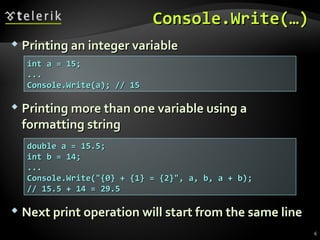
Console.Write(…)Console.Write(…)
 Printing more than one variable using aPrinting more than one variable using a
formatting stringformatting string
int a = 15;int a = 15;
......
Console.Write(a); // 15Console.Write(a); // 15
 Printing an integer variablePrinting an integer variable
double a = 15.5;double a = 15.5;
int b = 14;int b = 14;
......
Console.Write("{0} + {1} = {2}", a, b, a + b);Console.Write("{0} + {1} = {2}", a, b, a + b);
// 15.5 + 14 = 29.5// 15.5 + 14 = 29.5
 Next print operation will start from the same lineNext print operation will start from the same line
6
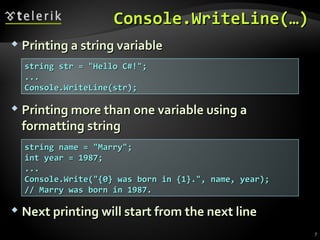
Console.WriteLine(…)Console.WriteLine(…)
 Printing more than one variable using aPrinting more than one variable using a
formatting stringformatting string
string str = "Hello C#!";string str = "Hello C#!";
......
Console.WriteLine(str);Console.WriteLine(str);
 Printing a string variablePrinting a string variable
string name = "Marry";string name = "Marry";
int year = 1987;int year = 1987;
......
Console.Write("{0} was born in {1}.", name, year);Console.Write("{0} was born in {1}.", name, year);
// Marry was born in 1987.// Marry was born in 1987.
 Next printing will start from the next lineNext printing will start from the next line
7
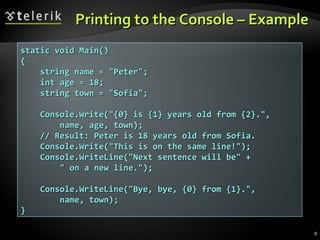
Printing to the Console – ExamplePrinting to the Console – Example
static void Main()static void Main()
{{
string name = "Peter";string name = "Peter";
int age = 18;int age = 18;
string town = "Sofia";string town = "Sofia";
Console.Write("{0} is {1} years old from {2}.",Console.Write("{0} is {1} years old from {2}.",
name, age, town);name, age, town);
// Result: Peter is 18 years old from Sofia.// Result: Peter is 18 years old from Sofia.
Console.Write("This is on the same line!");Console.Write("This is on the same line!");
Console.WriteLine("Next sentence will be" +Console.WriteLine("Next sentence will be" +
" on a new line.");" on a new line.");
Console.WriteLine("Bye, bye, {0} from {1}.",Console.WriteLine("Bye, bye, {0} from {1}.",
name, town);name, town);
}}
8
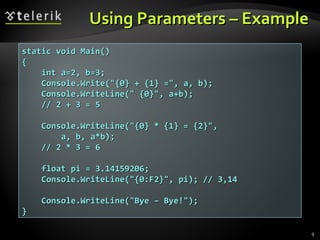
Using Parameters – ExampleUsing Parameters – Example
9
static void Main()static void Main()
{{
int a=2, b=3;int a=2, b=3;
Console.Write("{0} + {1} =", a, b);Console.Write("{0} + {1} =", a, b);
Console.WriteLine(" {0}", a+b);Console.WriteLine(" {0}", a+b);
// 2 + 3 = 5// 2 + 3 = 5
Console.WriteLine("{0} * {1} = {2}",Console.WriteLine("{0} * {1} = {2}",
a, b, a*b);a, b, a*b);
// 2 * 3 = 6// 2 * 3 = 6
float pi = 3.14159206;float pi = 3.14159206;
Console.WriteLine("{0:F2}", pi); // 3,14Console.WriteLine("{0:F2}", pi); // 3,14
Console.WriteLine("Bye – Bye!");Console.WriteLine("Bye – Bye!");
}}
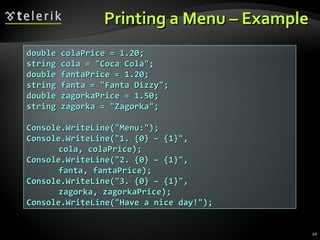
Printing a Menu – ExamplePrinting a Menu – Example
double colaPrice = 1.20;double colaPrice = 1.20;
string cola = "Coca Cola";string cola = "Coca Cola";
double fantaPrice = 1.20;double fantaPrice = 1.20;
string fanta = "Fanta Dizzy";string fanta = "Fanta Dizzy";
double zagorkaPrice = 1.50;double zagorkaPrice = 1.50;
string zagorka = "Zagorka";string zagorka = "Zagorka";
Console.WriteLine("Menu:");Console.WriteLine("Menu:");
Console.WriteLine("1. {0} – {1}",Console.WriteLine("1. {0} – {1}",
cola, colaPrice);cola, colaPrice);
Console.WriteLine("2. {0} – {1}",Console.WriteLine("2. {0} – {1}",
fanta, fantaPrice);fanta, fantaPrice);
Console.WriteLine("3. {0} – {1}",Console.WriteLine("3. {0} – {1}",
zagorka, zagorkaPrice);zagorka, zagorkaPrice);
Console.WriteLine("Have a nice day!");Console.WriteLine("Have a nice day!");
10
Printing toPrinting to
the Consolethe Console
Live DemoLive Demo
Reading from the ConsoleReading from the Console
Reading Strings and Numeral TypesReading Strings and Numeral Types
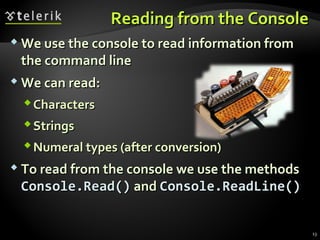
Reading from the ConsoleReading from the Console
 We use the console to read information fromWe use the console to read information from
the command linethe command line
 We can read:We can read:
CharactersCharacters
StringsStrings
Numeral types (after conversion)Numeral types (after conversion)
 To read from the console we use the methodsTo read from the console we use the methods
Console.Read()Console.Read() andand Console.ReadLine()Console.ReadLine()
13
Console.Read()Console.Read()
 Gets a single character from the console (afterGets a single character from the console (after
[Enter] is pressed)[Enter] is pressed)
 Returns a result of typeReturns a result of type intint
 ReturnsReturns -1-1 if there aren’t more symbolsif there aren’t more symbols
 To get the actually read character weTo get the actually read character we
need to cast it toneed to cast it to charchar
int i = Console.Read();int i = Console.Read();
char ch = (char) i; // Cast the int to charchar ch = (char) i; // Cast the int to char
// Gets the code of the entered symbol// Gets the code of the entered symbol
Console.WriteLine("The code of '{0}' is {1}.", ch, i);Console.WriteLine("The code of '{0}' is {1}.", ch, i);
14
Reading CharactersReading Characters
fromfrom the Consolethe Console
Live DemoLive Demo
Console.ReadKey()Console.ReadKey()
 Waits until a combination of keys is pressedWaits until a combination of keys is pressed
 Reads a single character from console or aReads a single character from console or a
combination of keyscombination of keys
 Returns a result of typeReturns a result of type ConsoleKeyInfoConsoleKeyInfo
 KeyCharKeyChar – holds the entered character– holds the entered character
 ModifiersModifiers – holds the state of [Ctrl], [Alt], …– holds the state of [Ctrl], [Alt], …
ConsoleKeyInfo key = Console.ReadKey();ConsoleKeyInfo key = Console.ReadKey();
Console.WriteLine();Console.WriteLine();
Console.WriteLine("Character entered: " + key.KeyChar);Console.WriteLine("Character entered: " + key.KeyChar);
Console.WriteLine("Special keys: " + key.Modifiers);Console.WriteLine("Special keys: " + key.Modifiers);
16
Reading KeysReading Keys
from the Consolefrom the Console
Live DemoLive Demo
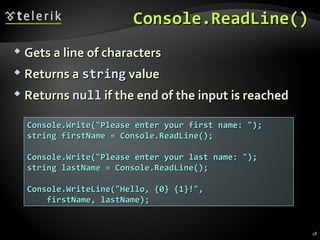
Console.ReadLine()Console.ReadLine()
 Gets a line of charactersGets a line of characters
 Returns aReturns a stringstring valuevalue
 ReturnsReturns nullnull if the end of the input is reachedif the end of the input is reached
Console.Write("Please enter your first name: ");Console.Write("Please enter your first name: ");
string firstName = Console.ReadLine();string firstName = Console.ReadLine();
Console.Write("Please enter your last name: ");Console.Write("Please enter your last name: ");
string lastName = Console.ReadLine();string lastName = Console.ReadLine();
Console.WriteLine("Hello, {0} {1}!",Console.WriteLine("Hello, {0} {1}!",
firstName, lastName);firstName, lastName);
18
Reading StringsReading Strings
from the Consolefrom the Console
Live DemoLive Demo
Reading Numeral TypesReading Numeral Types
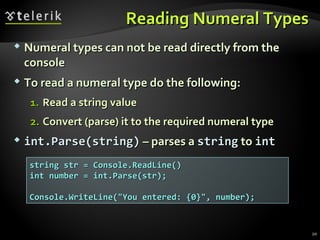
 Numeral types can not be read directly from theNumeral types can not be read directly from the
consoleconsole
 To read a numeral type do the following:To read a numeral type do the following:
1.1. RRead a string valueead a string value
2.2. Convert (parse) it to the required numeral typeConvert (parse) it to the required numeral type
 int.Parse(string)int.Parse(string) – parses a– parses a stringstring toto intint
string str = Console.ReadLine()string str = Console.ReadLine()
int number = int.Parse(str);int number = int.Parse(str);
Console.WriteLine("You entered: {0}", number);Console.WriteLine("You entered: {0}", number);
20
Converting Strings to NumbersConverting Strings to Numbers
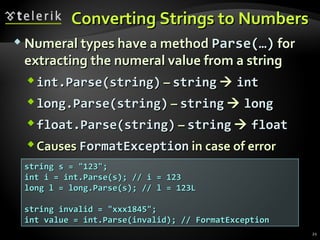
 Numeral types have a methodNumeral types have a method Parse(…)Parse(…) forfor
extracting the numeral value from a stringextracting the numeral value from a string
int.Parse(string)int.Parse(string) –– stringstring  intint
longlong.Parse(string).Parse(string) –– stringstring  longlong
floatfloat.Parse(string).Parse(string) –– stringstring  floatfloat
CausesCauses FormatExceptionFormatException in case ofin case of errorerror
string s = "123";string s = "123";
int i = int.Parse(s); // i = 123int i = int.Parse(s); // i = 123
long l = long.Parse(s); // l = 123Llong l = long.Parse(s); // l = 123L
string invalid = "xxx1845";string invalid = "xxx1845";
int value = int.Parse(invalid); // FormatExceptionint value = int.Parse(invalid); // FormatException
21
Reading Numbers from theReading Numbers from the
Console – ExampleConsole – Example
22
static void Main()static void Main()
{{
int a = int.Parse(Console.ReadLine());int a = int.Parse(Console.ReadLine());
int b = int.Parse(Console.ReadLine());int b = int.Parse(Console.ReadLine());
Console.WriteLine("{0} + {1} = {2}",Console.WriteLine("{0} + {1} = {2}",
a, b, a+b);a, b, a+b);
Console.WriteLine("{0} * {1} = {2}",Console.WriteLine("{0} * {1} = {2}",
a, b, a*b);a, b, a*b);
float f = float.Parse(Console.ReadLine());float f = float.Parse(Console.ReadLine());
Console.WriteLine("{0} * {1} / {2} = {3}",Console.WriteLine("{0} * {1} / {2} = {3}",
a, b, f, a*b/f);a, b, f, a*b/f);
}}
Converting Strings toConverting Strings to
Numbers (2)Numbers (2)
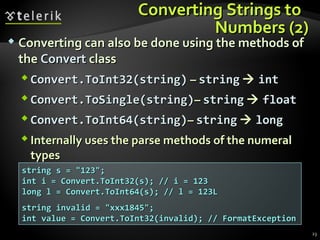
 Converting can also be done using the methods ofConverting can also be done using the methods of
thethe ConvertConvert classclass
 Convert.ToInt32(string)Convert.ToInt32(string) –– stringstring  intint
 Convert.ToSingle(string)Convert.ToSingle(string)–– stringstring  floatfloat
 Convert.ToInt64(string)Convert.ToInt64(string)–– stringstring  longlong
 Internally uses the parse methods of the numeralInternally uses the parse methods of the numeral
typestypes
string s = "123";string s = "123";
int i = Convert.ToInt32(s); // i = 123int i = Convert.ToInt32(s); // i = 123
long l = Convert.ToInt64(s); // l = 123Llong l = Convert.ToInt64(s); // l = 123L
string invalid = "xxx1845";string invalid = "xxx1845";
int value = Convert.ToInt32(invalid); // FormatExceptionint value = Convert.ToInt32(invalid); // FormatException
23
Reading NumbersReading Numbers
from the Consolefrom the Console
Live DemoLive Demo
Error Handling when ParsingError Handling when Parsing
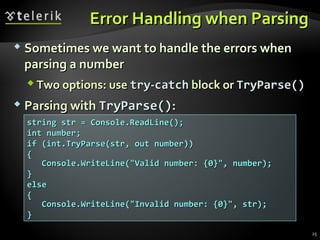
 Sometimes we want to handle the errors whenSometimes we want to handle the errors when
parsing a numberparsing a number
 Two options: useTwo options: use trytry--catchcatch block orblock or TryParse()TryParse()
 Parsing withParsing with TryParse()TryParse()::
string str = Console.ReadLine();string str = Console.ReadLine();
int number;int number;
if (int.TryParse(str, out number))if (int.TryParse(str, out number))
{{
Console.WriteLine("Valid number: {0}", number);Console.WriteLine("Valid number: {0}", number);
}}
elseelse
{{
Console.WriteLine("Invalid number: {0}", str);Console.WriteLine("Invalid number: {0}", str);
}}
25
Parsing withParsing with TryParseTryParse()()
Live DemoLive Demo
Reading and PrintingReading and Printing
to the Consoleto the Console
Various ExamplesVarious Examples
Printing a Letter – ExamplePrinting a Letter – Example
28
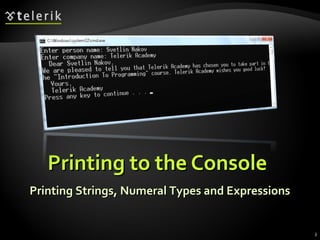
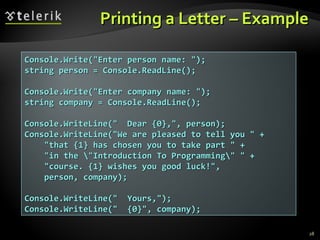
Console.Write("Enter person name: ");Console.Write("Enter person name: ");
string person = Console.ReadLine();string person = Console.ReadLine();
Console.Write("Enter company name: ");Console.Write("Enter company name: ");
string company = Console.ReadLine();string company = Console.ReadLine();
Console.WriteLine(" Dear {0},", person);Console.WriteLine(" Dear {0},", person);
Console.WriteLine("We are pleased to tell you " +Console.WriteLine("We are pleased to tell you " +
"that {1} has chosen you to take part " +"that {1} has chosen you to take part " +
"in the "Introduction To Programming" " +"in the "Introduction To Programming" " +
"course. {1} wishes you good luck!","course. {1} wishes you good luck!",
person, company);person, company);
Console.WriteLine(" Yours,");Console.WriteLine(" Yours,");
Console.WriteLine(" {0}", company);Console.WriteLine(" {0}", company);
Printing a LetterPrinting a Letter
Live DemoLive Demo
Calculating Area – ExampleCalculating Area – Example
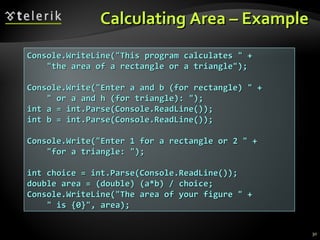
Console.WriteLine("This program calculates " +Console.WriteLine("This program calculates " +
"the area of a rectangle or a triangle");"the area of a rectangle or a triangle");
Console.Write("Enter a and b (for rectangle) " +Console.Write("Enter a and b (for rectangle) " +
" or a and h (for triangle): ");" or a and h (for triangle): ");
int a = int.Parse(Console.ReadLine());int a = int.Parse(Console.ReadLine());
int b = int.Parse(Console.ReadLine());int b = int.Parse(Console.ReadLine());
Console.Write("Enter 1 for a rectangle or 2 " +Console.Write("Enter 1 for a rectangle or 2 " +
"for a triangle: ");"for a triangle: ");
int choice = int.Parse(Console.ReadLine());int choice = int.Parse(Console.ReadLine());
double area = (double) (a*b) / choice;double area = (double) (a*b) / choice;
Console.WriteLine("The area of your figure " +Console.WriteLine("The area of your figure " +
" is {0}", area);" is {0}", area);
30
Calculating AreaCalculating Area
Live DemoLive Demo
SummarySummary
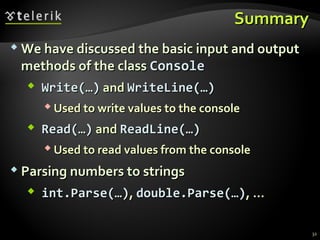
 We have discussed the basic input and outputWe have discussed the basic input and output
methods of the classmethods of the class ConsoleConsole
 Write(…)Write(…) andand WriteLine(WriteLine(……))
 Used to write values to the consoleUsed to write values to the console
 Read(…)Read(…) andand ReadLine(ReadLine(……))
 Used to read values from the consoleUsed to read values from the console
 Parsing numbers to stringsParsing numbers to strings
 int.Parse(…)int.Parse(…),, double.Parse(…)double.Parse(…), …, …
32
Questions?Questions?
Console Input / OutputConsole Input / Output
http://academy.telerik.com
ExercisesExercises
1.1. Write a program that readsWrite a program that reads 33 integer numbers frominteger numbers from
the console and prints their sum.the console and prints their sum.
2.2. Write a program that reads the radiusWrite a program that reads the radius rr of a circleof a circle
and prints its perimeter and area.and prints its perimeter and area.
3.3. A company has name, address, phone number, faxA company has name, address, phone number, fax
number, web site and manager. The manager hasnumber, web site and manager. The manager has
first name, last name, age and a phone number.first name, last name, age and a phone number.
Write a program that reads the information about aWrite a program that reads the information about a
company and its manager and prints them on thecompany and its manager and prints them on the
console.console.
34
Exercises (2)Exercises (2)
4.4. Write a program that reads two positive integerWrite a program that reads two positive integer
numbers and prints how many numbersnumbers and prints how many numbers pp existexist
between them such that the reminder of the divisionbetween them such that the reminder of the division
byby 55 isis 00 (inclusive). Example:(inclusive). Example: p(17,25)p(17,25) == 22..
5.5. Write a program that gets two numbers from theWrite a program that gets two numbers from the
console and prints the greater of them. Don’t useconsole and prints the greater of them. Don’t use ifif
statements.statements.
6.6. Write a program that reads the coefficientsWrite a program that reads the coefficients aa,, bb andand cc
of a quadratic equationof a quadratic equation aaxx22
+b+bxx+c=0+c=0 and solves itand solves it
(prints its real roots).(prints its real roots).
35
Exercises (3)Exercises (3)
7.7. Write a program that gets a numberWrite a program that gets a number nn and after thatand after that
gets moregets more nn numbers and calculates and prints theirnumbers and calculates and prints their
sum.sum.
8.8. Write a program that reads an integer numberWrite a program that reads an integer number nn
from the console and prints all the numbers in thefrom the console and prints all the numbers in the
interval [interval [11....nn], each on a single line.], each on a single line.
9.9. Write a program to print the first 100 members ofWrite a program to print the first 100 members of
the sequence of Fibonaccithe sequence of Fibonacci: 0, 1, 1, 2, 3, 5, 8, 13, 21,: 0, 1, 1, 2, 3, 5, 8, 13, 21,
34, 55, 89, 144, 233, 377, …34, 55, 89, 144, 233, 377, …
10.10. Write a program to calculate the sum (with accuracyWrite a program to calculate the sum (with accuracy
of 0.001): 1 + 1/2 - 1/3 + 1/4 - 1/5 + ...of 0.001): 1 + 1/2 - 1/3 + 1/4 - 1/5 + ...
36

04 Console input output-

  • 1.
    Console Input /OutputConsole Input / Output Reading and Writing to the ConsoleReading and Writing to the Console Svetlin NakovSvetlin Nakov Telerik CorporationTelerik Corporation www.telerik.comwww.telerik.com
  • 2.
    Table of ContentsTableof Contents  Printing to the ConsolePrinting to the Console  Printing Strings and NumbersPrinting Strings and Numbers  Reading from the ConsoleReading from the Console  Reading CharactersReading Characters  Reading StringsReading Strings  Parsing Strings to Numeral TypesParsing Strings to Numeral Types  Reading Numeral TypesReading Numeral Types  Various ExamplesVarious Examples 2
  • 3.
    Printing to theConsolePrinting to the Console Printing Strings, Numeral Types and ExpressionsPrinting Strings, Numeral Types and Expressions 3
  • 4.
    Printing to theConsolePrinting to the Console  Console is used to display information in a textConsole is used to display information in a text windowwindow  Can display different values:Can display different values: StringsStrings Numeral typesNumeral types All primitiveAll primitive datadata typestypes  To print to the console use the classTo print to the console use the class ConsoleConsole ((System.ConsoleSystem.Console)) 4
  • 5.
    The Console ClassTheConsole Class  Provides methods for console input and outputProvides methods for console input and output InputInput  Read(…)Read(…) – reads a single character– reads a single character  ReadKey(…)ReadKey(…) – reads a combination of keys– reads a combination of keys  ReadLine(…)ReadLine(…) – reads a single line of characters– reads a single line of characters OutputOutput  Write(…)Write(…) – prints the specified– prints the specified argument on the consoleargument on the console  WriteLine(…WriteLine(…)) – prints specified data to the– prints specified data to the console and moves to the next lineconsole and moves to the next line 5
  • 6.
    Console.Write(…)Console.Write(…)  Printing morethan one variable using aPrinting more than one variable using a formatting stringformatting string int a = 15;int a = 15; ...... Console.Write(a); // 15Console.Write(a); // 15  Printing an integer variablePrinting an integer variable double a = 15.5;double a = 15.5; int b = 14;int b = 14; ...... Console.Write("{0} + {1} = {2}", a, b, a + b);Console.Write("{0} + {1} = {2}", a, b, a + b); // 15.5 + 14 = 29.5// 15.5 + 14 = 29.5  Next print operation will start from the same lineNext print operation will start from the same line 6
  • 7.
    Console.WriteLine(…)Console.WriteLine(…)  Printing morethan one variable using aPrinting more than one variable using a formatting stringformatting string string str = "Hello C#!";string str = "Hello C#!"; ...... Console.WriteLine(str);Console.WriteLine(str);  Printing a string variablePrinting a string variable string name = "Marry";string name = "Marry"; int year = 1987;int year = 1987; ...... Console.Write("{0} was born in {1}.", name, year);Console.Write("{0} was born in {1}.", name, year); // Marry was born in 1987.// Marry was born in 1987.  Next printing will start from the next lineNext printing will start from the next line 7
  • 8.
    Printing to theConsole – ExamplePrinting to the Console – Example static void Main()static void Main() {{ string name = "Peter";string name = "Peter"; int age = 18;int age = 18; string town = "Sofia";string town = "Sofia"; Console.Write("{0} is {1} years old from {2}.",Console.Write("{0} is {1} years old from {2}.", name, age, town);name, age, town); // Result: Peter is 18 years old from Sofia.// Result: Peter is 18 years old from Sofia. Console.Write("This is on the same line!");Console.Write("This is on the same line!"); Console.WriteLine("Next sentence will be" +Console.WriteLine("Next sentence will be" + " on a new line.");" on a new line."); Console.WriteLine("Bye, bye, {0} from {1}.",Console.WriteLine("Bye, bye, {0} from {1}.", name, town);name, town); }} 8
  • 9.
    Using Parameters –ExampleUsing Parameters – Example 9 static void Main()static void Main() {{ int a=2, b=3;int a=2, b=3; Console.Write("{0} + {1} =", a, b);Console.Write("{0} + {1} =", a, b); Console.WriteLine(" {0}", a+b);Console.WriteLine(" {0}", a+b); // 2 + 3 = 5// 2 + 3 = 5 Console.WriteLine("{0} * {1} = {2}",Console.WriteLine("{0} * {1} = {2}", a, b, a*b);a, b, a*b); // 2 * 3 = 6// 2 * 3 = 6 float pi = 3.14159206;float pi = 3.14159206; Console.WriteLine("{0:F2}", pi); // 3,14Console.WriteLine("{0:F2}", pi); // 3,14 Console.WriteLine("Bye – Bye!");Console.WriteLine("Bye – Bye!"); }}
  • 10.
    Printing a Menu– ExamplePrinting a Menu – Example double colaPrice = 1.20;double colaPrice = 1.20; string cola = "Coca Cola";string cola = "Coca Cola"; double fantaPrice = 1.20;double fantaPrice = 1.20; string fanta = "Fanta Dizzy";string fanta = "Fanta Dizzy"; double zagorkaPrice = 1.50;double zagorkaPrice = 1.50; string zagorka = "Zagorka";string zagorka = "Zagorka"; Console.WriteLine("Menu:");Console.WriteLine("Menu:"); Console.WriteLine("1. {0} – {1}",Console.WriteLine("1. {0} – {1}", cola, colaPrice);cola, colaPrice); Console.WriteLine("2. {0} – {1}",Console.WriteLine("2. {0} – {1}", fanta, fantaPrice);fanta, fantaPrice); Console.WriteLine("3. {0} – {1}",Console.WriteLine("3. {0} – {1}", zagorka, zagorkaPrice);zagorka, zagorkaPrice); Console.WriteLine("Have a nice day!");Console.WriteLine("Have a nice day!"); 10
  • 11.
    Printing toPrinting to theConsolethe Console Live DemoLive Demo
  • 12.
    Reading from theConsoleReading from the Console Reading Strings and Numeral TypesReading Strings and Numeral Types
  • 13.
    Reading from theConsoleReading from the Console  We use the console to read information fromWe use the console to read information from the command linethe command line  We can read:We can read: CharactersCharacters StringsStrings Numeral types (after conversion)Numeral types (after conversion)  To read from the console we use the methodsTo read from the console we use the methods Console.Read()Console.Read() andand Console.ReadLine()Console.ReadLine() 13
  • 14.
    Console.Read()Console.Read()  Gets asingle character from the console (afterGets a single character from the console (after [Enter] is pressed)[Enter] is pressed)  Returns a result of typeReturns a result of type intint  ReturnsReturns -1-1 if there aren’t more symbolsif there aren’t more symbols  To get the actually read character weTo get the actually read character we need to cast it toneed to cast it to charchar int i = Console.Read();int i = Console.Read(); char ch = (char) i; // Cast the int to charchar ch = (char) i; // Cast the int to char // Gets the code of the entered symbol// Gets the code of the entered symbol Console.WriteLine("The code of '{0}' is {1}.", ch, i);Console.WriteLine("The code of '{0}' is {1}.", ch, i); 14
  • 15.
    Reading CharactersReading Characters fromfromthe Consolethe Console Live DemoLive Demo
  • 16.
    Console.ReadKey()Console.ReadKey()  Waits untila combination of keys is pressedWaits until a combination of keys is pressed  Reads a single character from console or aReads a single character from console or a combination of keyscombination of keys  Returns a result of typeReturns a result of type ConsoleKeyInfoConsoleKeyInfo  KeyCharKeyChar – holds the entered character– holds the entered character  ModifiersModifiers – holds the state of [Ctrl], [Alt], …– holds the state of [Ctrl], [Alt], … ConsoleKeyInfo key = Console.ReadKey();ConsoleKeyInfo key = Console.ReadKey(); Console.WriteLine();Console.WriteLine(); Console.WriteLine("Character entered: " + key.KeyChar);Console.WriteLine("Character entered: " + key.KeyChar); Console.WriteLine("Special keys: " + key.Modifiers);Console.WriteLine("Special keys: " + key.Modifiers); 16
  • 17.
    Reading KeysReading Keys fromthe Consolefrom the Console Live DemoLive Demo
  • 18.
    Console.ReadLine()Console.ReadLine()  Gets aline of charactersGets a line of characters  Returns aReturns a stringstring valuevalue  ReturnsReturns nullnull if the end of the input is reachedif the end of the input is reached Console.Write("Please enter your first name: ");Console.Write("Please enter your first name: "); string firstName = Console.ReadLine();string firstName = Console.ReadLine(); Console.Write("Please enter your last name: ");Console.Write("Please enter your last name: "); string lastName = Console.ReadLine();string lastName = Console.ReadLine(); Console.WriteLine("Hello, {0} {1}!",Console.WriteLine("Hello, {0} {1}!", firstName, lastName);firstName, lastName); 18
  • 19.
    Reading StringsReading Strings fromthe Consolefrom the Console Live DemoLive Demo
  • 20.
    Reading Numeral TypesReadingNumeral Types  Numeral types can not be read directly from theNumeral types can not be read directly from the consoleconsole  To read a numeral type do the following:To read a numeral type do the following: 1.1. RRead a string valueead a string value 2.2. Convert (parse) it to the required numeral typeConvert (parse) it to the required numeral type  int.Parse(string)int.Parse(string) – parses a– parses a stringstring toto intint string str = Console.ReadLine()string str = Console.ReadLine() int number = int.Parse(str);int number = int.Parse(str); Console.WriteLine("You entered: {0}", number);Console.WriteLine("You entered: {0}", number); 20
  • 21.
    Converting Strings toNumbersConverting Strings to Numbers  Numeral types have a methodNumeral types have a method Parse(…)Parse(…) forfor extracting the numeral value from a stringextracting the numeral value from a string int.Parse(string)int.Parse(string) –– stringstring  intint longlong.Parse(string).Parse(string) –– stringstring  longlong floatfloat.Parse(string).Parse(string) –– stringstring  floatfloat CausesCauses FormatExceptionFormatException in case ofin case of errorerror string s = "123";string s = "123"; int i = int.Parse(s); // i = 123int i = int.Parse(s); // i = 123 long l = long.Parse(s); // l = 123Llong l = long.Parse(s); // l = 123L string invalid = "xxx1845";string invalid = "xxx1845"; int value = int.Parse(invalid); // FormatExceptionint value = int.Parse(invalid); // FormatException 21
  • 22.
    Reading Numbers fromtheReading Numbers from the Console – ExampleConsole – Example 22 static void Main()static void Main() {{ int a = int.Parse(Console.ReadLine());int a = int.Parse(Console.ReadLine()); int b = int.Parse(Console.ReadLine());int b = int.Parse(Console.ReadLine()); Console.WriteLine("{0} + {1} = {2}",Console.WriteLine("{0} + {1} = {2}", a, b, a+b);a, b, a+b); Console.WriteLine("{0} * {1} = {2}",Console.WriteLine("{0} * {1} = {2}", a, b, a*b);a, b, a*b); float f = float.Parse(Console.ReadLine());float f = float.Parse(Console.ReadLine()); Console.WriteLine("{0} * {1} / {2} = {3}",Console.WriteLine("{0} * {1} / {2} = {3}", a, b, f, a*b/f);a, b, f, a*b/f); }}
  • 23.
    Converting Strings toConvertingStrings to Numbers (2)Numbers (2)  Converting can also be done using the methods ofConverting can also be done using the methods of thethe ConvertConvert classclass  Convert.ToInt32(string)Convert.ToInt32(string) –– stringstring  intint  Convert.ToSingle(string)Convert.ToSingle(string)–– stringstring  floatfloat  Convert.ToInt64(string)Convert.ToInt64(string)–– stringstring  longlong  Internally uses the parse methods of the numeralInternally uses the parse methods of the numeral typestypes string s = "123";string s = "123"; int i = Convert.ToInt32(s); // i = 123int i = Convert.ToInt32(s); // i = 123 long l = Convert.ToInt64(s); // l = 123Llong l = Convert.ToInt64(s); // l = 123L string invalid = "xxx1845";string invalid = "xxx1845"; int value = Convert.ToInt32(invalid); // FormatExceptionint value = Convert.ToInt32(invalid); // FormatException 23
  • 24.
    Reading NumbersReading Numbers fromthe Consolefrom the Console Live DemoLive Demo
  • 25.
    Error Handling whenParsingError Handling when Parsing  Sometimes we want to handle the errors whenSometimes we want to handle the errors when parsing a numberparsing a number  Two options: useTwo options: use trytry--catchcatch block orblock or TryParse()TryParse()  Parsing withParsing with TryParse()TryParse():: string str = Console.ReadLine();string str = Console.ReadLine(); int number;int number; if (int.TryParse(str, out number))if (int.TryParse(str, out number)) {{ Console.WriteLine("Valid number: {0}", number);Console.WriteLine("Valid number: {0}", number); }} elseelse {{ Console.WriteLine("Invalid number: {0}", str);Console.WriteLine("Invalid number: {0}", str); }} 25
  • 26.
    Parsing withParsing withTryParseTryParse()() Live DemoLive Demo
  • 27.
    Reading and PrintingReadingand Printing to the Consoleto the Console Various ExamplesVarious Examples
  • 28.
    Printing a Letter– ExamplePrinting a Letter – Example 28 Console.Write("Enter person name: ");Console.Write("Enter person name: "); string person = Console.ReadLine();string person = Console.ReadLine(); Console.Write("Enter company name: ");Console.Write("Enter company name: "); string company = Console.ReadLine();string company = Console.ReadLine(); Console.WriteLine(" Dear {0},", person);Console.WriteLine(" Dear {0},", person); Console.WriteLine("We are pleased to tell you " +Console.WriteLine("We are pleased to tell you " + "that {1} has chosen you to take part " +"that {1} has chosen you to take part " + "in the "Introduction To Programming" " +"in the "Introduction To Programming" " + "course. {1} wishes you good luck!","course. {1} wishes you good luck!", person, company);person, company); Console.WriteLine(" Yours,");Console.WriteLine(" Yours,"); Console.WriteLine(" {0}", company);Console.WriteLine(" {0}", company);
  • 29.
    Printing a LetterPrintinga Letter Live DemoLive Demo
  • 30.
    Calculating Area –ExampleCalculating Area – Example Console.WriteLine("This program calculates " +Console.WriteLine("This program calculates " + "the area of a rectangle or a triangle");"the area of a rectangle or a triangle"); Console.Write("Enter a and b (for rectangle) " +Console.Write("Enter a and b (for rectangle) " + " or a and h (for triangle): ");" or a and h (for triangle): "); int a = int.Parse(Console.ReadLine());int a = int.Parse(Console.ReadLine()); int b = int.Parse(Console.ReadLine());int b = int.Parse(Console.ReadLine()); Console.Write("Enter 1 for a rectangle or 2 " +Console.Write("Enter 1 for a rectangle or 2 " + "for a triangle: ");"for a triangle: "); int choice = int.Parse(Console.ReadLine());int choice = int.Parse(Console.ReadLine()); double area = (double) (a*b) / choice;double area = (double) (a*b) / choice; Console.WriteLine("The area of your figure " +Console.WriteLine("The area of your figure " + " is {0}", area);" is {0}", area); 30
  • 31.
  • 32.
    SummarySummary  We havediscussed the basic input and outputWe have discussed the basic input and output methods of the classmethods of the class ConsoleConsole  Write(…)Write(…) andand WriteLine(WriteLine(……))  Used to write values to the consoleUsed to write values to the console  Read(…)Read(…) andand ReadLine(ReadLine(……))  Used to read values from the consoleUsed to read values from the console  Parsing numbers to stringsParsing numbers to strings  int.Parse(…)int.Parse(…),, double.Parse(…)double.Parse(…), …, … 32
  • 33.
    Questions?Questions? Console Input /OutputConsole Input / Output http://academy.telerik.com
  • 34.
    ExercisesExercises 1.1. Write aprogram that readsWrite a program that reads 33 integer numbers frominteger numbers from the console and prints their sum.the console and prints their sum. 2.2. Write a program that reads the radiusWrite a program that reads the radius rr of a circleof a circle and prints its perimeter and area.and prints its perimeter and area. 3.3. A company has name, address, phone number, faxA company has name, address, phone number, fax number, web site and manager. The manager hasnumber, web site and manager. The manager has first name, last name, age and a phone number.first name, last name, age and a phone number. Write a program that reads the information about aWrite a program that reads the information about a company and its manager and prints them on thecompany and its manager and prints them on the console.console. 34
  • 35.
    Exercises (2)Exercises (2) 4.4.Write a program that reads two positive integerWrite a program that reads two positive integer numbers and prints how many numbersnumbers and prints how many numbers pp existexist between them such that the reminder of the divisionbetween them such that the reminder of the division byby 55 isis 00 (inclusive). Example:(inclusive). Example: p(17,25)p(17,25) == 22.. 5.5. Write a program that gets two numbers from theWrite a program that gets two numbers from the console and prints the greater of them. Don’t useconsole and prints the greater of them. Don’t use ifif statements.statements. 6.6. Write a program that reads the coefficientsWrite a program that reads the coefficients aa,, bb andand cc of a quadratic equationof a quadratic equation aaxx22 +b+bxx+c=0+c=0 and solves itand solves it (prints its real roots).(prints its real roots). 35
  • 36.
    Exercises (3)Exercises (3) 7.7.Write a program that gets a numberWrite a program that gets a number nn and after thatand after that gets moregets more nn numbers and calculates and prints theirnumbers and calculates and prints their sum.sum. 8.8. Write a program that reads an integer numberWrite a program that reads an integer number nn from the console and prints all the numbers in thefrom the console and prints all the numbers in the interval [interval [11....nn], each on a single line.], each on a single line. 9.9. Write a program to print the first 100 members ofWrite a program to print the first 100 members of the sequence of Fibonaccithe sequence of Fibonacci: 0, 1, 1, 2, 3, 5, 8, 13, 21,: 0, 1, 1, 2, 3, 5, 8, 13, 21, 34, 55, 89, 144, 233, 377, …34, 55, 89, 144, 233, 377, … 10.10. Write a program to calculate the sum (with accuracyWrite a program to calculate the sum (with accuracy of 0.001): 1 + 1/2 - 1/3 + 1/4 - 1/5 + ...of 0.001): 1 + 1/2 - 1/3 + 1/4 - 1/5 + ... 36