

Methods
Writing and using methods,
overloads, ref, out
SoftUni Team
Technical Trainers
Software University
http://softuni.bg
Table of Contents
1. Using Methods
 What is a Method? Why Use Methods?
 Declaring and Creating Methods
 Calling Methods
2. Methods with Parameters
 Passing Parameters
 Returning Values
3. Best Practices
2
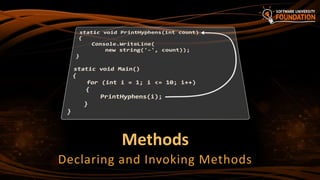
Methods
Declaring and Invoking Methods
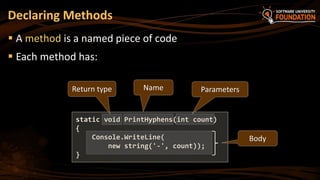
 A method is a named piece of code
 Each method has:
Declaring Methods
static void PrintHyphens(int count)
{
Console.WriteLine(
new string('-', count));
}
NameReturn type Parameters
Body
5
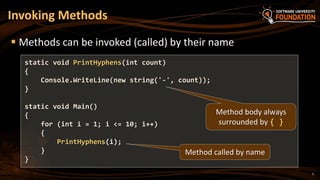
 Methods can be invoked (called) by their name
Invoking Methods
static void PrintHyphens(int count)
{
Console.WriteLine(new string('-', count));
}
static void Main()
{
for (int i = 1; i <= 10; i++)
{
PrintHyphens(i);
}
}
Method body always
surrounded by { }
Method called by name
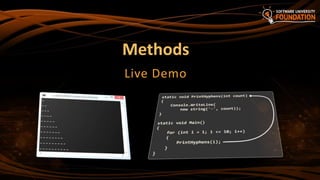
Methods
Live Demo
7
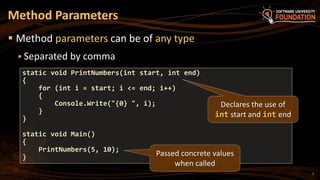
 Method parameters can be of any type
 Separated by comma
Method Parameters
static void PrintNumbers(int start, int end)
{
for (int i = start; i <= end; i++)
{
Console.Write("{0} ", i);
}
}
static void Main()
{
PrintNumbers(5, 10);
}
Declares the use of
int start and int end
Passed concrete values
when called
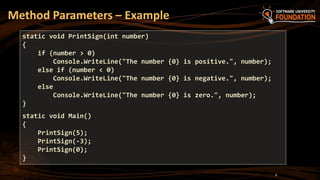
Method Parameters – Example
8
static void PrintSign(int number)
{
if (number > 0)
Console.WriteLine("The number {0} is positive.", number);
else if (number < 0)
Console.WriteLine("The number {0} is negative.", number);
else
Console.WriteLine("The number {0} is zero.", number);
}
static void Main()
{
PrintSign(5);
PrintSign(-3);
PrintSign(0);
}
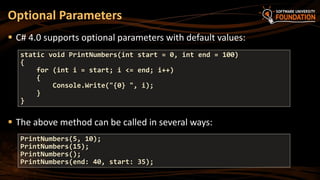
 C# 4.0 supports optional parameters with default values:
 The above method can be called in several ways:
Optional Parameters
static void PrintNumbers(int start = 0, int end = 100)
{
for (int i = start; i <= end; i++)
{
Console.Write("{0} ", i);
}
}
PrintNumbers(5, 10);
PrintNumbers(15);
PrintNumbers();
PrintNumbers(end: 40, start: 35);
Method Parameters
Live Demo
Exercises in Class
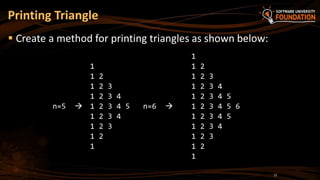
Printing Triangle
 Create a method for printing triangles as shown below:
12
1
1 1 2
1 2 1 2 3
1 2 3 1 2 3 4
1 2 3 4 1 2 3 4 5
n=5  1 2 3 4 5 n=6  1 2 3 4 5 6
1 2 3 4 1 2 3 4 5
1 2 3 1 2 3 4
1 2 1 2 3
1 1 2
1
Returning Values From
Methods
15
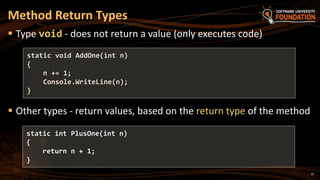
 Type void - does not return a value (only executes code)
 Other types - return values, based on the return type of the method
Method Return Types
static void AddOne(int n)
{
n += 1;
Console.WriteLine(n);
}
static int PlusOne(int n)
{
return n + 1;
}
16
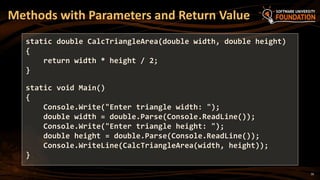
Methods with Parameters and Return Value
static double CalcTriangleArea(double width, double height)
{
return width * height / 2;
}
static void Main()
{
Console.Write("Enter triangle width: ");
double width = double.Parse(Console.ReadLine());
Console.Write("Enter triangle height: ");
double height = double.Parse(Console.ReadLine());
Console.WriteLine(CalcTriangleArea(width, height));
}
17
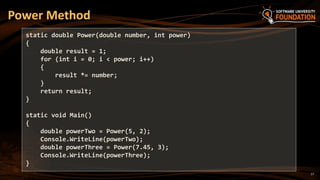
Power Method
static double Power(double number, int power)
{
double result = 1;
for (int i = 0; i < power; i++)
{
result *= number;
}
return result;
}
static void Main()
{
double powerTwo = Power(5, 2);
Console.WriteLine(powerTwo);
double powerThree = Power(7.45, 3);
Console.WriteLine(powerThree);
}
18
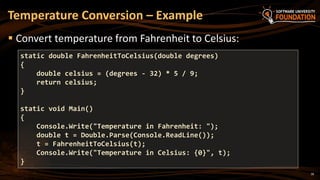
 Convert temperature from Fahrenheit to Celsius:
Temperature Conversion – Example
static double FahrenheitToCelsius(double degrees)
{
double celsius = (degrees - 32) * 5 / 9;
return celsius;
}
static void Main()
{
Console.Write("Temperature in Fahrenheit: ");
double t = Double.Parse(Console.ReadLine());
t = FahrenheitToCelsius(t);
Console.Write("Temperature in Celsius: {0}", t);
}
Returning Values From
Methods
Live Demo
Overloading Methods
Multiple Methods
with the Same Name
21
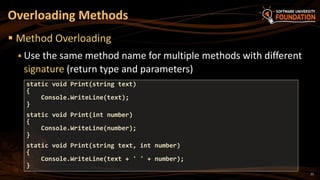
 Method Overloading
 Use the same method name for multiple methods with different
signature (return type and parameters)
Overloading Methods
static void Print(string text)
{
Console.WriteLine(text);
}
static void Print(int number)
{
Console.WriteLine(number);
}
static void Print(string text, int number)
{
Console.WriteLine(text + ' ' + number);
}
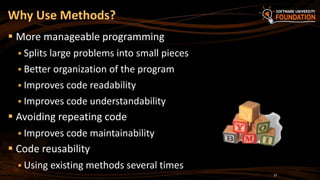
Why Use Methods?
 More manageable programming
 Splits large problems into small pieces
 Better organization of the program
 Improves code readability
 Improves code understandability
 Avoiding repeating code
 Improves code maintainability
 Code reusability
 Using existing methods several times
22
23
 Each method should perform a single, well-defined task
 Method's name should describe that task in a clear and non-
ambiguous way
 Good examples: CalculatePrice, ReadName
 Bad examples: f, g1, Process
 In C# methods should start with a capital letter (PascalCase)
 Avoid methods longer than one screen
 Split them to several shorter methods
Methods – Best Practices
24
 Break large programs into simple
methods that solve small sub-problems
 Methods consist of declaration and body
 Methods are invoked by their name
 Methods can accept parameters
 Parameters take actual values when calling a method
 Methods can return a value or nothing (void)
Summary
?
Fundamentals Level @ SoftUni
http://softuni.bg/courses/advanced-csharp
License
 This course (slides, examples, demos, videos, homework, etc.)
is licensed under the "Creative Commons Attribution-
NonCommercial-ShareAlike 4.0 International" license
 Attribution: this work may contain portions from
 "C# Fundamentals – Part 1" course by Telerik Academy under CC-BY-NC-SA license
 "C# Fundamentals – Part 2" course by Telerik Academy under CC-BY-NC-SA license
26
Free Trainings @ Software University
 Software University Foundation – softuni.org
 Software University – High-Quality Education,
Profession and Job for Software Developers
 softuni.bg
 Software University @ Facebook
 facebook.com/SoftwareUniversity
 Software University @ YouTube
 youtube.com/SoftwareUniversity
 Software University Forums – forum.softuni.bg

09. Methods

  • 1.
    Methods Writing and usingmethods, overloads, ref, out SoftUni Team Technical Trainers Software University http://softuni.bg
  • 2.
    Table of Contents 1.Using Methods  What is a Method? Why Use Methods?  Declaring and Creating Methods  Calling Methods 2. Methods with Parameters  Passing Parameters  Returning Values 3. Best Practices 2
  • 3.
  • 4.
     A methodis a named piece of code  Each method has: Declaring Methods static void PrintHyphens(int count) { Console.WriteLine( new string('-', count)); } NameReturn type Parameters Body
  • 5.
    5  Methods canbe invoked (called) by their name Invoking Methods static void PrintHyphens(int count) { Console.WriteLine(new string('-', count)); } static void Main() { for (int i = 1; i <= 10; i++) { PrintHyphens(i); } } Method body always surrounded by { } Method called by name
  • 6.
  • 7.
    7  Method parameterscan be of any type  Separated by comma Method Parameters static void PrintNumbers(int start, int end) { for (int i = start; i <= end; i++) { Console.Write("{0} ", i); } } static void Main() { PrintNumbers(5, 10); } Declares the use of int start and int end Passed concrete values when called
  • 8.
    Method Parameters –Example 8 static void PrintSign(int number) { if (number > 0) Console.WriteLine("The number {0} is positive.", number); else if (number < 0) Console.WriteLine("The number {0} is negative.", number); else Console.WriteLine("The number {0} is zero.", number); } static void Main() { PrintSign(5); PrintSign(-3); PrintSign(0); }
  • 9.
     C# 4.0supports optional parameters with default values:  The above method can be called in several ways: Optional Parameters static void PrintNumbers(int start = 0, int end = 100) { for (int i = start; i <= end; i++) { Console.Write("{0} ", i); } } PrintNumbers(5, 10); PrintNumbers(15); PrintNumbers(); PrintNumbers(end: 40, start: 35);
  • 10.
  • 11.
  • 12.
    Printing Triangle  Createa method for printing triangles as shown below: 12 1 1 1 2 1 2 1 2 3 1 2 3 1 2 3 4 1 2 3 4 1 2 3 4 5 n=5  1 2 3 4 5 n=6  1 2 3 4 5 6 1 2 3 4 1 2 3 4 5 1 2 3 1 2 3 4 1 2 1 2 3 1 1 2 1
  • 14.
  • 15.
    15  Type void- does not return a value (only executes code)  Other types - return values, based on the return type of the method Method Return Types static void AddOne(int n) { n += 1; Console.WriteLine(n); } static int PlusOne(int n) { return n + 1; }
  • 16.
    16 Methods with Parametersand Return Value static double CalcTriangleArea(double width, double height) { return width * height / 2; } static void Main() { Console.Write("Enter triangle width: "); double width = double.Parse(Console.ReadLine()); Console.Write("Enter triangle height: "); double height = double.Parse(Console.ReadLine()); Console.WriteLine(CalcTriangleArea(width, height)); }
  • 17.
    17 Power Method static doublePower(double number, int power) { double result = 1; for (int i = 0; i < power; i++) { result *= number; } return result; } static void Main() { double powerTwo = Power(5, 2); Console.WriteLine(powerTwo); double powerThree = Power(7.45, 3); Console.WriteLine(powerThree); }
  • 18.
    18  Convert temperaturefrom Fahrenheit to Celsius: Temperature Conversion – Example static double FahrenheitToCelsius(double degrees) { double celsius = (degrees - 32) * 5 / 9; return celsius; } static void Main() { Console.Write("Temperature in Fahrenheit: "); double t = Double.Parse(Console.ReadLine()); t = FahrenheitToCelsius(t); Console.Write("Temperature in Celsius: {0}", t); }
  • 19.
  • 20.
  • 21.
    21  Method Overloading Use the same method name for multiple methods with different signature (return type and parameters) Overloading Methods static void Print(string text) { Console.WriteLine(text); } static void Print(int number) { Console.WriteLine(number); } static void Print(string text, int number) { Console.WriteLine(text + ' ' + number); }
  • 22.
    Why Use Methods? More manageable programming  Splits large problems into small pieces  Better organization of the program  Improves code readability  Improves code understandability  Avoiding repeating code  Improves code maintainability  Code reusability  Using existing methods several times 22
  • 23.
    23  Each methodshould perform a single, well-defined task  Method's name should describe that task in a clear and non- ambiguous way  Good examples: CalculatePrice, ReadName  Bad examples: f, g1, Process  In C# methods should start with a capital letter (PascalCase)  Avoid methods longer than one screen  Split them to several shorter methods Methods – Best Practices
  • 24.
    24  Break largeprograms into simple methods that solve small sub-problems  Methods consist of declaration and body  Methods are invoked by their name  Methods can accept parameters  Parameters take actual values when calling a method  Methods can return a value or nothing (void) Summary
  • 25.
    ? Fundamentals Level @SoftUni http://softuni.bg/courses/advanced-csharp
  • 26.
    License  This course(slides, examples, demos, videos, homework, etc.) is licensed under the "Creative Commons Attribution- NonCommercial-ShareAlike 4.0 International" license  Attribution: this work may contain portions from  "C# Fundamentals – Part 1" course by Telerik Academy under CC-BY-NC-SA license  "C# Fundamentals – Part 2" course by Telerik Academy under CC-BY-NC-SA license 26
  • 27.
    Free Trainings @Software University  Software University Foundation – softuni.org  Software University – High-Quality Education, Profession and Job for Software Developers  softuni.bg  Software University @ Facebook  facebook.com/SoftwareUniversity  Software University @ YouTube  youtube.com/SoftwareUniversity  Software University Forums – forum.softuni.bg

Editor's Notes

  • #11 (c) 2007 National Academy for Software Development - http://academy.devbg.org. All rights reserved. Unauthorized copying or re-distribution is strictly prohibited.*
  • #15 (c) 2007 National Academy for Software Development - http://academy.devbg.org. All rights reserved. Unauthorized copying or re-distribution is strictly prohibited.*
  • #20 (c) 2007 National Academy for Software Development - http://academy.devbg.org. All rights reserved. Unauthorized copying or re-distribution is strictly prohibited.*
  • #23 (c) 2007 National Academy for Software Development - http://academy.devbg.org. All rights reserved. Unauthorized copying or re-distribution is strictly prohibited.*
  • #25 (c) 2007 National Academy for Software Development - http://academy.devbg.org. All rights reserved. Unauthorized copying or re-distribution is strictly prohibited.*