Brief Introduction to the C Programming Language Fred Kuhns [email_address] Applied Research Laboratory, Department of Computer Science and Engineering, Washington University in St. Louis
Introduction The C programming language was designed by Dennis Ritchie at Bell Laboratories in the early 1970s Influenced by  ALGOL 60 (1960),  CPL (Cambridge, 1963),  BCPL (Martin Richard, 1967),  B (Ken Thompson, 1970) Traditionally used for systems programming, though this may be changing in favor of C++ Traditional C: The C Programming Language , by Brian Kernighan and Dennis Ritchie, 2 nd  Edition, Prentice Hall Referred to as  K&R
Standard C Standardized in 1989 by ANSI (American National Standards Institute) known as ANSI C International standard (ISO) in 1990  which was adopted by ANSI and is known as  C89 As part of the normal evolution process the standard was updated in 1995 ( C95 ) and 1999 ( C99 ) C++ and C C++ extends C to include support for Object Oriented Programming and other features that facilitate large software development projects C is not strictly a subset of C++, but it is possible to write “ Clean C ” that conforms to both the C++ and C standards.
Elements of a C Program A C development environment includes  System libraries  and  headers : a set of standard libraries and their header files. For example see  /usr/include  and  glibc . Application Source : application source and header files Compiler :  converts source to object code for a specific platform Linker :  resolves external references and produces the executable module User program structure there must be one main function where execution begins when the program is run. This function is called main int main (void) { ... }, int main (int argc, char *argv[]) { ... } UNIX Systems have a 3 rd  way to define main(), though it is not POSIX.1 compliant int main (int argc, char *argv[], char *envp[]) additional local and external functions and variables
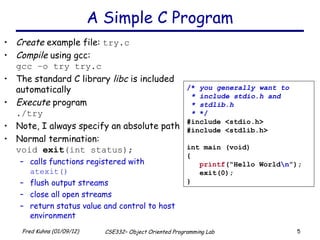
A Simple C Program Create  example file:  try.c Compile  using gcc: gcc –o try try.c The standard C library  libc  is included automatically Execute  program ./try Note, I always specify an absolute path Normal termination: void  exit (int status); calls functions registered with  atexit() flush output streams close all open streams return status value and control to host environment /*  you generally want to * include stdio.h and * stdlib.h *  */ #include <stdio.h> #include <stdlib.h> int main (void) { printf (“Hello World \n ”); exit(0); }
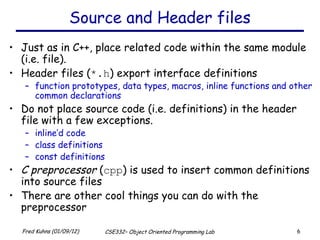
Source and Header files Just as in C++, place related code within the same module (i.e. file).  Header files ( *.h ) export interface definitions function prototypes, data types, macros, inline functions and other common declarations Do not place source code (i.e. definitions) in the header file with a few exceptions. inline’d code class definitions const definitions C preprocessor  ( cpp ) is used to insert common definitions into source files There are other cool things you can do with the preprocessor
Another Example C Program example.c /*  this is a C-style comment  * You generally want to palce * all file includes at start of file *  */ #include <stdio.h> #include <stdlib.h> int main (int argc, char **argv) { // this is a C++-style comment // printf prototype in stdio.h printf(“Hello, Prog name = %s\n”, argv[0]); exit(0); } /*  comments  */ #ifndef _STDIO_H #define _STDIO_H ... definitions and protoypes #endif /usr/include/stdio.h /*  prevents including file * contents multiple * times  */ #ifndef _STDLIB_H #define _STDLIB_H ... definitions and protoypes #endif /usr/include/stdlib.h #include  directs the preprocessor to “include” the contents of the file at this point in the source file. #define   directs preprocessor to define macros.
Passing Command Line Arguments When you execute a program you can include arguments on the command line. The run time environment will create an argument vector. argv  is the argument vector argc  is the number of arguments  Argument vector is an array of pointers to strings. a  string  is an array of characters terminated by a binary 0 (NULL or ‘\0’). argv[0]  is always the program name, so  argc  is at least 1. ./try –g 2 fred argc  = 4, argv  =  <address0> ‘ t’‘r’‘y’‘\0’ argv : [0]  <addres1> [1]  <addres2> [2]   <addres3> [3]   <addres4> [4]  NULL ‘ -’‘g’‘\0’ ‘ 2’‘\0’ ‘ f’‘r’‘e’‘d’‘\0’
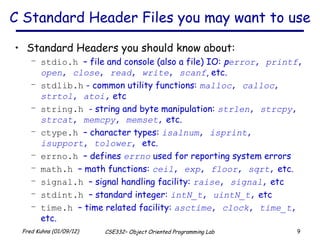
C Standard Header Files you may want to use Standard Headers you should know about:  stdio.h   – file and console (also a file) IO:  p error ,  printf ,  open ,  close ,  read ,  write ,  scanf , etc. stdlib.h  - common utility functions:  malloc ,  calloc ,  strtol ,  atoi,   etc string.h   - string and byte manipulation:  strlen ,  strcpy ,  strcat ,  memcpy ,  memset ,  etc. ctype.h   – character types:  isalnum ,  isprint ,  isupport ,  tolower ,  etc. errno.h   – defines  errno  used for reporting system errors math.h   – math functions:  ceil ,  exp ,  floor ,  sqrt ,  etc. signal.h   – signal handling facility:  raise ,  signal ,  etc stdint.h   – standard integer:  intN_t ,  uintN_t ,  etc time.h   – time related facility:  asctime ,  clock ,  time_t ,  etc.
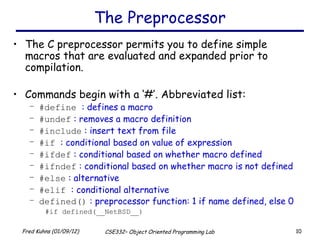
The Preprocessor The C preprocessor permits you to define simple macros that are evaluated and expanded prior to compilation. Commands begin with a ‘#’. Abbreviated list: #define   : defines a macro #undef  : removes a macro definition #include  : insert text from file #if  : conditional based on value of expression #ifdef  : conditional based on whether macro defined #ifndef  : conditional based on whether macro is not defined #else  : alternative #elif   : conditional alternative defined()  : preprocessor function: 1 if name defined, else 0 #if defined(__NetBSD__)
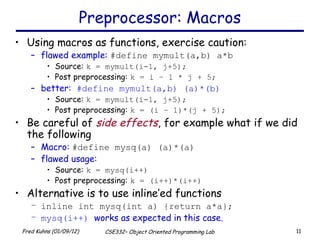
Preprocessor: Macros Using macros as functions, exercise caution: flawed example:  #define mymult(a,b) a*b Source:  k = mymult(i-1, j+5); Post preprocessing:  k = i – 1 * j + 5; better:  #define mymult(a,b) (a)*(b) Source:  k = mymult(i-1, j+5); Post preprocessing:  k = (i – 1)*(j + 5); Be careful of  side effects , for example what if we did the following Macro:  #define mysq(a) (a)*(a) flawed usage: Source:  k = mysq(i++) Post preprocessing:  k = (i++)*(i++) Alternative is to use inline’ed functions inline int mysq(int a) {return a*a}; mysq(i++)  works as expected in this case.
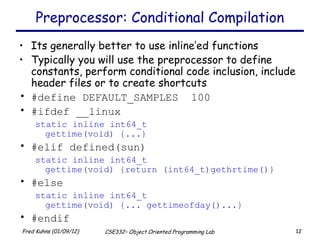
Preprocessor: Conditional Compilation Its generally better to use inline’ed functions Typically you will use the preprocessor to define constants, perform conditional code inclusion, include header files or to create shortcuts #define DEFAULT_SAMPLES  100 #ifdef __linux static inline int64_t  gettime(void) {...} #elif defined(sun) static inline int64_t  gettime(void) {return (int64_t)gethrtime()} #else static inline int64_t  gettime(void) {... gettimeofday()...} #endif
Another Simple C Program int main (int  argc , char ** argv )  { int i; printf(“There are %d arguments\n”,  argc ); for (i = 0; i <  argc ; i++) printf(“Arg %d = %s\n”, i,  argv [i]); return 0; } Notice that the syntax is similar to Java What’s new in the above simple program?  of course you will have to learn the new interfaces and utility functions defined by the C standard and UNIX Pointers will give you the most trouble
A variable declared as an array represents a contiguous region of memory in which the array elements are stored. int x[5]; // an array of 5 4-byte ints. All arrays begin with an index of 0 An array identifier is equivalent to a pointer that references the first element of the array int x[5], *ptr; ptr = &x[0]  is equivalent to  ptr = x; Pointer arithmetic and arrays:  int x[5]; x[2]  is the same as * (x + 2) , the compiler will assume you mean 2 objects beyond element x. Arrays and Pointers 0 1 2 3 4 1 0 2 3 little endian byte ordering memory layout for array x
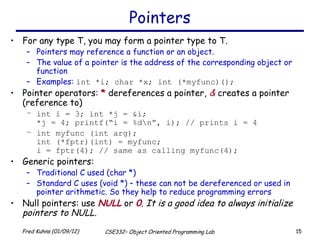
Pointers For any type T, you may form a pointer type to T.  Pointers may reference a function or an object. The value of a pointer is the address of the corresponding object or function Examples:  int *i; char *x; int (*myfunc)(); Pointer operators:  *  dereferences a pointer,  &  creates a pointer (reference to) int i = 3; int *j = &i; *j = 4; printf(“i = %d\n”, i); // prints i = 4 int myfunc (int arg); int (*fptr)(int) = myfunc;  i = fptr(4); // same as calling myfunc(4); Generic pointers: Traditional C used (char *) Standard C uses (void *) – these can not be dereferenced or used in pointer arithmetic. So they help to reduce programming errors Null pointers: use  NULL  or  0 .  It is a good idea to always initialize pointers to NULL.
Pointers in C (and C++) Address 0x3dc 0x3d8 Program Memory 0x3cc 0x3c8 0x3c4 0x3c0 Note: The compiler converts z[1] or *(z+1) to Value at address  ( Address of z   +  sizeof(int)) ; In C you would write the byte address as: (char *)z + sizeof(int); or letting the compiler do the work for you (int *)z + 1; Step 1 : int main (int argc, argv) { int  x  = 4; int * y  = & x ; int * z [4] = { NULL ,  NULL ,  NULL ,  NULL }; int  a [4] = {1, 2, 3, 4}; ... 0x3bc 0x3b8 0x3b4 0x3b0 0x3d4 0x3d0 z[3] z[2] z[1] z[0] a[3] a[2] a[1] a[0] x y 4 0x3dc 0 0 0 0 4 3 2 1 NA NA
Pointers Continued 4 0x3dc Address 0x3dc 0x3d8 Program Memory 0x3bc 0x3b8 0x3b4 0x3b0 0x3cc 0x3c8 0x3c4 0x3c0 Step 1: int main (int argc, argv) { int  x = 4; int *y = &x; int *z[4] = {NULL, NULL, NULL, NULL}; int  a[4] = {1, 2, 3, 4}; Step 2 : Assign addresses to array Z z [0] =  a;   // same as & a [0] ; z [1] =  a + 1;   // same as &a[1] ; z [2] = a + 2; // same as &a[2]; z [3] = a + 3; // same as &a[3]; 0x3bc 0x3b8 0x3b4 0x3b0 4 3 2 1 NA 0x3d4 0x3d0 z[3] z[2] z[1] z[0] a[3] a[2] a[1] a[0] NA x y
Pointers Continued 4 0x3dc Address 0x3dc 0x3d8 Program Memory 0x3bc 0x3b8 0x3b4 0x3b0 0x3cc 0x3c8 0x3c4 0x3c0 Step 1: int main (int argc, argv) { int x = 4; int *y = &x; int *z[4] = {NULL, NULL, NULL, NULL}; int a[4] = {1, 2, 3, 4}; Step 2: z [0] = a; z [1] = a + 1; z [2] = a + 2; z [3] = a + 3; Step 3 : No change in z’s values z[0] = (int *)((char *)a); z[1] = (int *)((char *)a  + sizeof(int)); z[2] = (int *)((char *)a + 2 * sizeof(int)); z[3] = (int *)((char *)a + 3 * sizeof(int)); 0x3bc 0x3b8 0x3b4 0x3b0 4 3 2 1 NA 0x3d4 0x3d0 z[3] z[2] z[1] z[0] a[3] a[2] a[1] a[0] NA x y
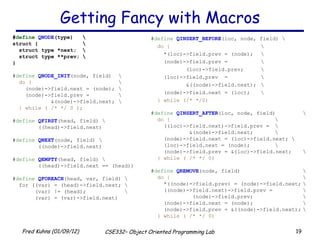
Getting Fancy with Macros # define  QNODE (type) \ struct { \ struct type *next; \ struct type **prev; \ } # define   QNODE_INIT (node, field) \ do {   \ (node)->field.next = (node); \ (node)->field.prev =  \ &(node)->field.next; \ } while ( /* */ 0 ); # define   QFIRST (head, field) \ ((head)->field.next) # define   QNEXT (node, field) \ ((node)->field.next) # define   QEMPTY (head, field) \  ((head)->field.next == (head)) # define   QFOREACH (head, var, field) \ for ((var) = (head)->field.next; \ (var) != (head); \ (var) = (var)->field.next) # define   QINSERT_BEFORE (loc, node, field) \ do { \ *(loc)->field.prev = (node); \ (node)->field.prev = \ (loc)->field.prev; \ (loc)->field.prev  =  \ &((node)->field.next); \ (node)->field.next = (loc); \ } while (/* */0) # define   QINSERT_AFTER (loc, node, field) \ do { \ ((loc)->field.next)->field.prev =  \ &(node)->field.next; \ (node)->field.next = (loc)->field.next; \ (loc)->field.next = (node);  \ (node)->field.prev = &(loc)->field.next; \ } while ( /* */ 0) # define   QREMOVE (node, field) \ do { \ *((node)->field.prev) = (node)->field.next; \ ((node)->field.next)->field.prev = \ (node)->field.prev; \ (node)->field.next = (node); \ (node)->field.prev = &((node)->field.next); \ } while ( /* */ 0)
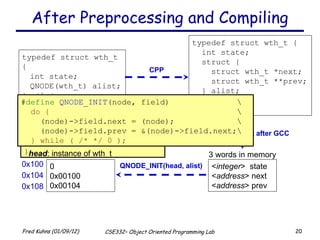
After Preprocessing and Compiling typedef struct wth_t { int state; QNODE(wth_t) alist; } wth_t; # define  QNODE (type) \ struct { \ struct type *next; \ struct type **prev; \ } typedef struct wth_t { int state; struct { struct wth_t *next; struct wth_t **prev; } alist; } wth_t; < integer >  state < address > next < address > prev 3 words in memory # define   QNODE_INIT (node, field) \ do {   \ (node)->field.next = (node);  \ (node)->field.prev = &(node)->field.next;\ } while ( /* */ 0 ); 0 0x00100 0x00104 0x100 head : instance of wth_t 0x104 0x108 memory layout after GCC CPP QNODE_INIT(head, alist)
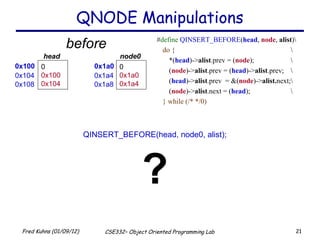
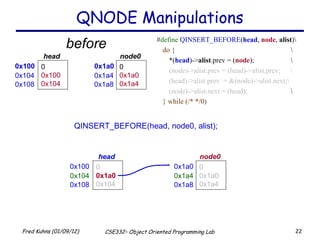
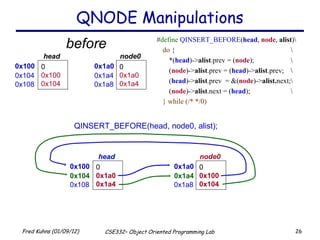
QNODE Manipulations # define   QINSERT_BEFORE ( head ,  node ,  alist )\ do { \ *( head )-> alist .prev = ( node );  \ ( node )-> alist .prev = ( head )-> alist .prev;  \ ( head )-> alist .prev  = &( node )-> alist. next;\ ( node )-> alist .next = ( head ); \ } while (/* */0) QINSERT_BEFORE(head, node0, alist); ? before 0x100 0 0x100 0x104 head  0x104 0x108 0x1a0 0 0x1a0 0x1a4 node0  0x1a4 0x1a8
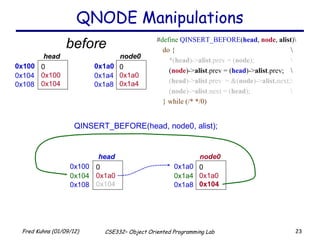
QNODE Manipulations # define   QINSERT_BEFORE ( head ,  node ,  alist )\ do { \ *( head )-> alist .prev = ( node );  \ (node)->alist.prev = (head)->alist.prev;  \ (head)->alist.prev  = &(node)->alist.next;\ (node)->alist.next = (head); \ } while (/* */0) QINSERT_BEFORE(head, node0, alist); before 0x100 0 0x100 0x104 head  0x104 0x108 0x1a0 0 0x1a0 0x1a4 node0  0x1a4 0x1a8 0x100 0 0x1a0 0x104 head   0x104 0x108 0x1a0 0 0x1a0 0x1a4 node0   0x1a4 0x1a8
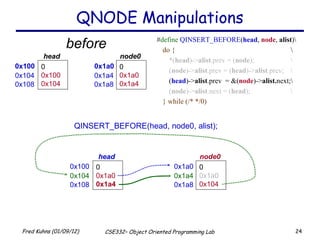
QNODE Manipulations # define   QINSERT_BEFORE ( head ,  node ,  alist )\ do { \ *( head )-> alist .prev = ( node );  \ ( node )-> alist .prev = ( head )-> alist .prev;  \ ( head )-> alist .prev  = &( node )-> alist. next;\ ( node )-> alist .next = ( head ); \ } while (/* */0) QINSERT_BEFORE(head, node0, alist); before 0x100 0 0x100 0x104 head  0x104 0x108 0x1a0 0 0x1a0 0x1a4 node0  0x1a4 0x1a8 0x100 0 0x1a0 0x104 head   0x104 0x108 0x1a0 0 0x1a0 0x104 node0   0x1a4 0x1a8
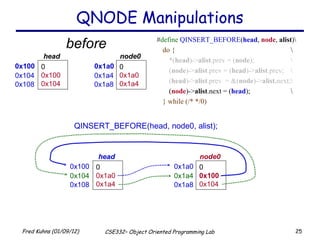
QNODE Manipulations # define   QINSERT_BEFORE ( head ,  node ,  alist )\ do { \ *( head )-> alist .prev = ( node );  \ ( node )-> alist .prev = ( head )-> alist .prev;  \ ( head )-> alist .prev  = &( node )-> alist. next;\ ( node )-> alist .next = ( head ); \ } while (/* */0) QINSERT_BEFORE(head, node0, alist); before 0x100 0 0x100 0x104 head  0x104 0x108 0x1a0 0 0x1a0 0x1a4 node0  0x1a4 0x1a8 0x100 0 0x1a0 0x1a4 head   0x104 0x108 0x1a0 0 0x1a0 0x104 node0   0x1a4 0x1a8
QNODE Manipulations # define   QINSERT_BEFORE ( head ,  node ,  alist )\ do { \ *( head )-> alist .prev = ( node );  \ ( node )-> alist .prev = ( head )-> alist .prev;  \ ( head )-> alist .prev  = &( node )-> alist. next;\ ( node )-> alist .next = ( head ); \ } while (/* */0) QINSERT_BEFORE(head, node0, alist); before 0x100 0 0x100 0x104 head  0x104 0x108 0x1a0 0 0x1a0 0x1a4 node0  0x1a4 0x1a8 0x100 0 0x1a0 0x1a4 head   0x104 0x108 0x1a0 0 0x100 0x104 node0   0x1a4 0x1a8
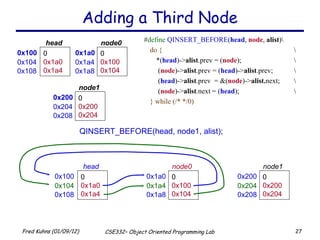
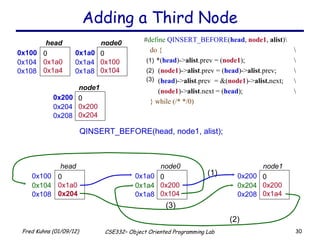
Adding a Third Node QINSERT_BEFORE(head, node1, alist); # define   QINSERT_BEFORE ( head ,  node ,  alist )\ do { \ *( head )-> alist .prev = ( node );  \   ( node )-> alist .prev = ( head )-> alist .prev;  \   ( head )-> alist .prev  = &( node )-> alist. next; \   ( node )-> alist .next = ( head ); \ } while (/* */0) 0x100 0 0x1a0 0x1a4 head  0x104 0x108 0x1a0 0 0x100 0x104 node0  0x1a4 0x1a8 0x200 0 0x200 0x204 node1 0x204 0x208 0x200 0 0x200 0x204 node1 0x204 0x208 0x100 0 0x1a0 0x1a4 head   0x104 0x108 0x1a0 0 0x100 0x104 node0   0x1a4 0x1a8
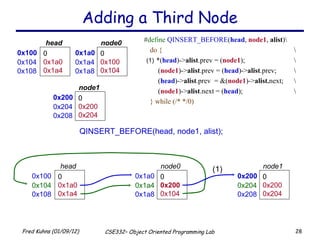
Adding a Third Node QINSERT_BEFORE(head, node1, alist); # define   QINSERT_BEFORE ( head ,  node1 ,  alist )\ do { \ *( head )-> alist .prev = ( node1 );  \   ( node1 )-> alist .prev = ( head )-> alist .prev;  \   ( head )-> alist .prev  = &( node1 )-> alist. next; \   ( node1 )-> alist .next = ( head ); \ } while (/* */0) (1) (1) 0x100 0 0x1a0 0x1a4 head  0x104 0x108 0x1a0 0 0x100 0x104 node0  0x1a4 0x1a8 0x100 0 0x1a0 0x1a4 head  0x104 0x108 0x1a0 0 0x200 0x104 node0  0x1a4 0x1a8 0x200 0 0x200 0x204 node1 0x204 0x208 0x200 0 0x200 0x204 node1 0x204 0x208
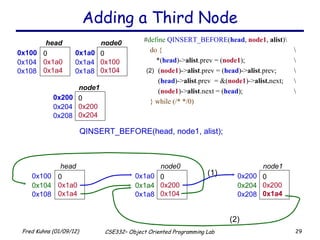
Adding a Third Node QINSERT_BEFORE(head, node1, alist); # define   QINSERT_BEFORE ( head ,  node1 ,  alist )\ do { \ *( head )-> alist .prev = ( node1 );  \   ( node1 )-> alist .prev = ( head )-> alist .prev;  \   ( head )-> alist .prev  = &( node1 )-> alist. next; \   ( node1 )-> alist .next = ( head ); \ } while (/* */0) (1) (2) (2) 0x100 0 0x1a0 0x1a4 head  0x104 0x108 0x1a0 0 0x100 0x104 node0  0x1a4 0x1a8 0x100 0 0x1a0 0x1a4 head  0x104 0x108 0x1a0 0 0x200 0x104 node0  0x1a4 0x1a8 0x200 0 0x200 0x204 node1 0x204 0x208 0x200 0 0x200 0x1a4 node1 0x204 0x208
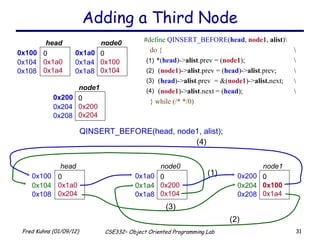
Adding a Third Node QINSERT_BEFORE(head, node1, alist); # define   QINSERT_BEFORE ( head ,  node1 ,  alist )\ do { \ *( head )-> alist .prev = ( node1 );  \   ( node1 )-> alist .prev = ( head )-> alist .prev;  \   ( head )-> alist .prev  = &( node1 )-> alist. next; \   ( node1 )-> alist .next = ( head ); \ } while (/* */0) (3) (3) 0x100 0 0x1a0 0x1a4 head  0x104 0x108 0x1a0 0 0x100 0x104 node0  0x1a4 0x1a8 0x100 0 0x1a0 0x204 head  0x104 0x108 0x1a0 0 0x200 0x104 node0  0x1a4 0x1a8 0x200 0 0x200 0x204 node1 0x204 0x208 0x200 0 0x200 0x1a4 node1 0x204 0x208 (1) (1) (2) (2)
Adding a Third Node QINSERT_BEFORE(head, node1, alist); # define   QINSERT_BEFORE ( head ,  node1 ,  alist )\ do { \ *( head )-> alist .prev = ( node1 );  \   ( node1 )-> alist .prev = ( head )-> alist .prev;  \   ( head )-> alist .prev  = &( node1 )-> alist. next; \   ( node1 )-> alist .next = ( head ); \ } while (/* */0) (1) (1) (2) (2) (3) (3) (4) (4) 0x100 0 0x1a0 0x1a4 head  0x104 0x108 0x1a0 0 0x100 0x104 node0  0x1a4 0x1a8 0x100 0 0x1a0 0x204 head  0x104 0x108 0x1a0 0 0x200 0x104 node0  0x1a4 0x1a8 0x200 0 0x200 0x204 node1 0x204 0x208 0x200 0 0x100 0x1a4 node1 0x204 0x208
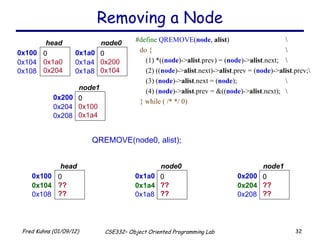
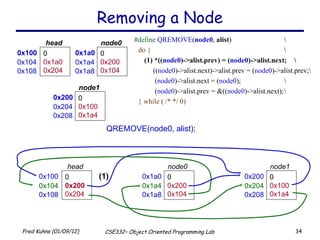
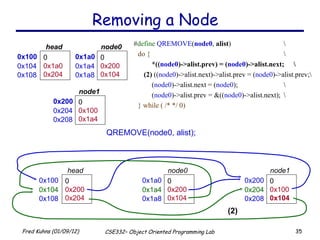
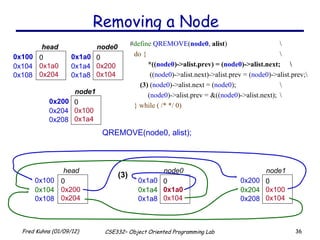
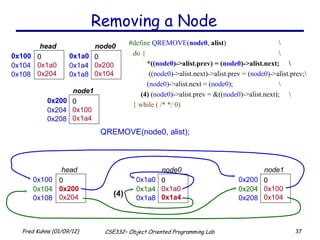
Removing a Node QREMOVE(node0, alist); # define   QREMOVE ( node ,  alist ) \ do { \ (1) *(( node )-> alist .prev) = ( node )-> alist .next; \ (2) (( node )-> alist .next)-> alist .prev = ( node )-> alist .prev;\ (3) ( node )-> alist .next = ( node ); \ (4) ( node )-> alist .prev = &(( node )-> alist .next); \ } while ( /* */ 0) 0x100 0 0x1a0 0x204 head  0x104 0x108 0x1a0 0 0x200 0x104 node0  0x1a4 0x1a8 0x200 0 0x100 0x1a4 node1 0x204 0x208 0x100 0 ?? ?? head  0x104 0x108 0x1a0 0 ?? ?? node0  0x1a4 0x1a8 0x200 0 ?? ?? node1 0x204 0x208
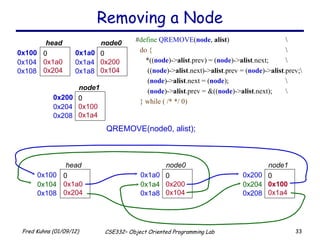
Removing a Node QREMOVE(node0, alist); # define   QREMOVE ( node ,  alist ) \ do { \ *(( node )-> alist .prev) = ( node )-> alist .next; \   (( node )-> alist .next)-> alist .prev = ( node )-> alist .prev;\   ( node )-> alist .next = ( node ); \   ( node )-> alist .prev = &(( node )-> alist .next); \ } while ( /* */ 0) 0x100 0 0x1a0 0x204 head  0x104 0x108 0x1a0 0 0x200 0x104 node0  0x1a4 0x1a8 0x200 0 0x100 0x1a4 node1 0x204 0x208 0x100 0 0x1a0 0x204 head  0x104 0x108 0x1a0 0 0x200 0x104 node0  0x1a4 0x1a8 0x200 0 0x100 0x1a4 node1 0x204 0x208
Removing a Node QREMOVE(node0, alist); # define   QREMOVE ( node0 ,  alist ) \ do { \ (1) *(( node0 )->alist.prev) = ( node0 )->alist.next; \   (( node0 )->alist.next)->alist.prev = ( node0 )->alist.prev;\   ( node0 )->alist.next = ( node0 ); \   ( node0 )->alist.prev = &(( node0 )->alist.next); \ } while ( /* */ 0) (1) 0x100 0 0x200 0x204 head  0x104 0x108 0x1a0 0 0x200 0x104 node0  0x1a4 0x1a8 0x200 0 0x100 0x1a4 node1 0x204 0x208 0x100 0 0x1a0 0x204 head  0x104 0x108 0x1a0 0 0x200 0x104 node0  0x1a4 0x1a8 0x200 0 0x100 0x1a4 node1 0x204 0x208
Removing a Node QREMOVE(node0, alist); # define   QREMOVE ( node0 ,  alist ) \ do { \ *(( node0 )->alist.prev) = ( node0 )->alist.next; \ (2)  (( node0 )->alist.next)->alist.prev = ( node0 )->alist.prev;\ ( node0 )->alist.next = ( node0 ); \ ( node0 )->alist.prev = &(( node0 )->alist.next); \ } while ( /* */ 0) (2) 0x100 0 0x200 0x204 head  0x104 0x108 0x1a0 0 0x200 0x104 node0  0x1a4 0x1a8 0x200 0 0x100 0x104 node1 0x204 0x208 0x100 0 0x1a0 0x204 head  0x104 0x108 0x1a0 0 0x200 0x104 node0  0x1a4 0x1a8 0x200 0 0x100 0x1a4 node1 0x204 0x208
Removing a Node QREMOVE(node0, alist); # define   QREMOVE ( node0 ,  alist ) \ do { \ *(( node0 )->alist.prev) = ( node0 )->alist.next; \   (( node0 )->alist.next)->alist.prev = ( node0 )->alist.prev;\ (3)  ( node0 )->alist.next = ( node0 ); \ ( node0 )->alist.prev = &(( node0 )->alist.next); \ } while ( /* */ 0) (3) 0x100 0 0x200 0x204 head  0x104 0x108 0x1a0 0 0x1a0 0x104 node0  0x1a4 0x1a8 0x200 0 0x100 0x104 node1 0x204 0x208 0x100 0 0x1a0 0x204 head  0x104 0x108 0x1a0 0 0x200 0x104 node0  0x1a4 0x1a8 0x200 0 0x100 0x1a4 node1 0x204 0x208
Removing a Node QREMOVE(node0, alist); # define   QREMOVE ( node0 ,  alist ) \ do { \ *(( node0 )->alist.prev) = ( node0 )->alist.next; \   (( node0 )->alist.next)->alist.prev = ( node0 )->alist.prev;\ ( node0 )->alist.next = ( node0 ); \   (4)  ( node0 )->alist.prev = &(( node0 )->alist.next); \ } while ( /* */ 0) (4) 0x100 0 0x200 0x204 head  0x104 0x108 0x1a0 0 0x1a0 0x1a4 node0  0x1a4 0x1a8 0x200 0 0x100 0x104 node1 0x204 0x208 0x100 0 0x1a0 0x204 head  0x104 0x108 0x1a0 0 0x200 0x104 node0  0x1a4 0x1a8 0x200 0 0x100 0x1a4 node1 0x204 0x208
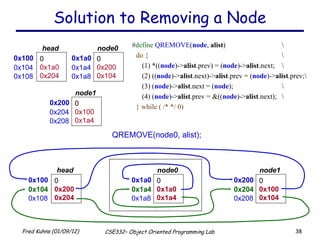
Solution to Removing a Node QREMOVE(node0, alist); # define   QREMOVE ( node ,  alist ) \ do { \ (1) *(( node )-> alist .prev) = ( node )-> alist .next; \ (2) (( node )-> alist .next)-> alist .prev = ( node )-> alist .prev;\ (3) ( node )-> alist .next = ( node ); \ (4) ( node )-> alist .prev = &(( node )-> alist .next); \ } while ( /* */ 0) 0x100 0 0x1a0 0x204 head  0x104 0x108 0x1a0 0 0x200 0x104 node0  0x1a4 0x1a8 0x200 0 0x100 0x1a4 node1 0x204 0x208 0x100 0 0x200 0x204 head  0x104 0x108 0x1a0 0 0x1a0 0x1a4 node0  0x1a4 0x1a8 0x200 0 0x100 0x104 node1 0x204 0x208
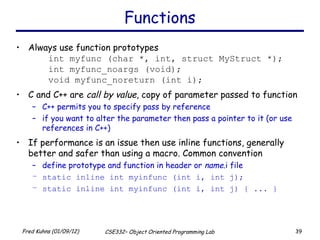
Functions Always use function prototypes int myfunc (char *, int, struct MyStruct *); int myfunc_noargs (void); void myfunc_noreturn (int i); C and C++ are  call by value , copy of parameter passed to function C++ permits you to specify pass by reference if you want to alter the parameter then pass a pointer to it (or use references in C++) If performance is an issue then use inline functions, generally better and safer than using a macro. Common convention define prototype and function in header or  name .i file static inline int myinfunc (int i, int j); static inline int myinfunc (int i, int j) { ... }
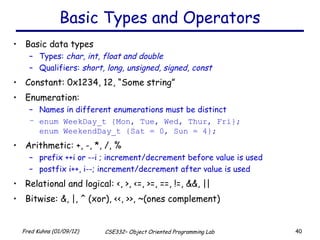
Basic Types and Operators Basic data types Types:  char, int, float and double Qualifiers:  short, long, unsigned, signed, const Constant: 0x1234, 12, “Some string” Enumeration:  Names in different enumerations must be distinct enum WeekDay_t {Mon, Tue, Wed, Thur, Fri}; enum WeekendDay_t {Sat = 0, Sun = 4}; Arithmetic: +, -, *, /, % prefix ++i or --i ; increment/decrement before value is used postfix i++, i--; increment/decrement after value is used Relational and logical: <, >, <=, >=, ==, !=, &&, || Bitwise: &, |, ^ (xor), <<, >>, ~(ones complement)
Operator Precedence  (from “C a Reference Manual”, 5 th  Edition) 15 16 Precedence right-to-left unary address of & right-to-left unary indirection ( dereference ) * right-to-left unary negation, plus - + right-to-left unary logical not ! right-to-left unary bitwise not ~ right-to-left prefix increment, decrement ++  -- left-to-right postfix compound literal ( type ){ init } left-to-right postfix increment, decrement ++ -- left-to-right postfix direct selection . left-to-right postfix function call f (...) left-to-right postfix subscripting a [k] size indirect selection simple tokens Operator n/a primary names, literals right-to-left unary sizeof left to right postfix -> Associates Class Tokens 1 2 3 4 5 6 7 8 9 10 11 12 13 14 Precedence right-to-left unary casts ( type ) left-to-right binary multiplicative * / %  left-to-right binary additive + - sequential eval. assignment conditional logical or logical and bitwise or bitwise xor bitwise and equality/ineq. relational left, right shift Operator left-to-right binary , right-to-left binary = += -= *= /= %= &= ^= |= <<= >>= right-to-left ternary ?: left-to-right binary || left-to-right binary && left-to-right binary | left-to-right binary ^ left-to-right binary & left-to-right binary == != left-to-right binary < <= > >= left-to-right binary << >> Associates Class Tokens
Structs and Unions structures struct MyPoint {int x, int y}; typedef struct MyPoint MyPoint_t; MyPoint_t point, *ptr; point.x = 0;point.y = 10; ptr = &point; ptr->x = 12; ptr->y = 40; unions union MyUnion {int x; MyPoint_t pt; struct {int 3; char c[4]} S;}; union MyUnion x; Can only use one of the elements. Memory will be allocated for the largest element
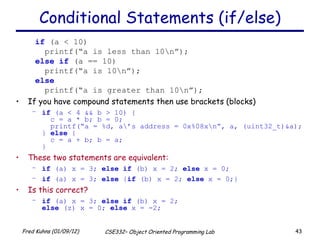
Conditional Statements (if/else) if  (a < 10) printf(“a is less than 10\n”); else   if  (a == 10) printf(“a is 10\n”); else printf(“a is greater than 10\n”); If you have compound statements then use brackets (blocks) if  (a < 4 && b > 10) {   c = a * b; b = 0;   printf(“a = %d, a\’s address = 0x%08x\n”, a, (uint32_t)&a); }  else  {   c = a + b; b = a; } These two statements are equivalent:   if  (a) x = 3;  else   if  (b) x = 2;  else  x = 0; if  (a) x = 3;  else  { if  (b) x = 2;  else  x = 0;} Is this correct? if  (a) x = 3;  else   if  (b) x = 2; else  (z) x = 0;  else  x = -2;
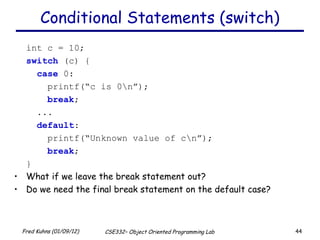
Conditional Statements (switch) int c = 10; switch  (c) {   case  0:   printf(“c is 0\n”);   break ;   ...   default :   printf(“Unknown value of c\n”);   break ; } What if we leave the break statement out? Do we need the final break statement on the default case?
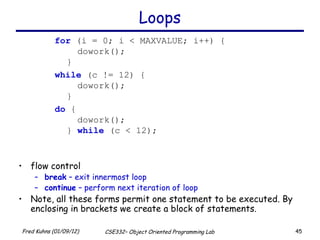
Loops for  (i = 0; i < MAXVALUE; i++) {   dowork(); } while  (c != 12) {   dowork(); } do  {   dowork(); }  while  (c < 12); flow control break  – exit innermost loop continue  – perform next iteration of loop Note, all these forms permit one statement to be executed. By enclosing in brackets we create a block of statements.
Building your program For all labs and programming assignments: you must supply a make file you must supply a README file that describes the assignment and results. This must be a text file, no MS word. of course the source code and any other libraries or utility code you used you may submit plots, they must be postscript or pdf
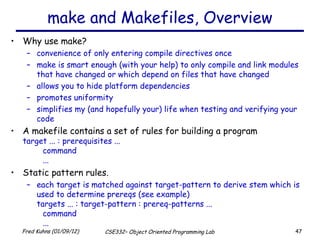
make and Makefiles, Overview Why use make? convenience of only entering compile directives once make is smart enough (with your help) to only compile and link modules that have changed or which depend on files that have changed allows you to hide platform dependencies promotes uniformity simplifies my (and hopefully your) life when testing and verifying your code A makefile contains a set of rules for building a program target ... : prerequisites ... command ... Static pattern rules. each target is matched against target-pattern to derive stem which is used to determine prereqs (see example) targets ... : target-pattern : prereq-patterns ... command ...
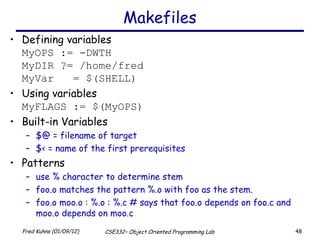
Makefiles Defining variables MyOPS := -DWTH MyDIR ?= /home/fred MyVar  = $(SHELL) Using variables MyFLAGS := $(MyOPS) Built-in Variables $@ = filename of target $< = name of the first prerequisites Patterns use % character to determine stem foo.o matches the pattern %.o with foo as the stem. foo.o moo.o : %.o : %.c # says that foo.o depends on foo.c and moo.o depends on moo.c
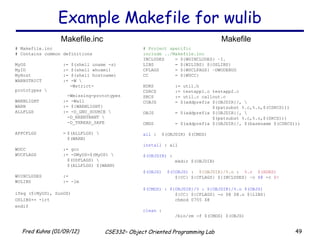
Example Makefile for wulib # Project specific  include ../Makefile.inc INCLUDES = ${WUINCLUDES} –I. LIBS = ${WILIBS} ${OSLIBS} CFLAGS = ${WUCLFAGS} –DWUDEBUG CC = ${WUCC} HDRS := util.h CSRCS := testapp1.c testapp2.c SRCS := util.c callout.c COBJS = $(addprefix ${OBJDIR}/, \ $(patsubst %.c,%.o,$(CSRCS))) OBJS = $(addprefix ${OBJDIR}/, \ $(patsubst %.c,%.o,$(SRCS))) CMDS = $(addprefix ${OBJDIR}/, $(basename $(CSRCS))) all  :  $(OBJDIR) $(CMDS) install  : all $(OBJDIR)  : mkdir $(OBJDIR) $(OBJS)  $(COBJS)  :  ${OBJDIR}/%.o  :  %.c  $(HDRS) ${CC} ${CFLAGS} ${INCLUDES} –o  $@  -c  $< $(CMDS) : ${OBJDIR}/% : ${OBJDIR}/%.o $(OBJS) ${CC} ${CFLAGS} -o $@ $@.o ${LIBS} chmod 0755 $@ clean  : /bin/rm -f $(CMDS) $(OBJS) # Makefile.inc # Contains common definitions MyOS := $(shell uname -s) MyID := $(shell whoami) MyHost := $(shell hostname) WARNSTRICT := -W \   -Wstrict-prototypes \ -Wmissing-prototypes WARNLIGHT := -Wall WARN := ${WARNLIGHT} ALLFLGS := -D_GNU_SOURCE \ -D_REENTRANT \ -D_THREAD_SAFE APPCFLGS = $(ALLFLGS) \ $(WARN) WUCC := gcc WUCFLAGS := -DMyOS=$(MyOS) \ $(OSFLAGS) \ $(ALLFLGS) $(WARN) WUINCLUDES := WULIBS := -lm ifeq (${MyOS), SunOS) OSLIBS+= -lrt endif Makefile.inc Makefile
Project Documentation README file structure Section A :  Introduction describe the project, paraphrase the requirements and state your understanding of the assignments value. Section B :  Design and Implementation List all files turned in with a brief description for each. Explain your design and provide simple psuedo-code for your project. Provide a simple flow chart of you code and note any constraints, invariants, assumptions or sources for reused code or ideas. Section C :  Results For each project you will be given a list of questions to answer, this is where you do it. If you are not satisfied with your results explain why here. Section D :  Conclusions What did you learn, or not learn during this assignment. What would you do differently or what did you do well.
Attacking a Project Requirements and scope : Identify specific requirements and or goals. Also note any design and/or implementation environment requirements. knowing when you are done, or not done estimating effort or areas which require more research programming language, platform and other development environment issues Approach : How do you plan to solve the problem identified in the first step. Develop a prototype design and document. Next figure out how you will verify that you did satisfy the requirements/goals. Designing the tests will help you to better understand the problem domain and your proposed solution Iterative development : It is good practice to build your project in small pieces.  Testing and learning as you go. Final Touches : Put it all together and run the tests identified in the approach phase. Verify you met requirements. Polish you code and documentation. Turn it in :

C

  • 1.
    Brief Introduction tothe C Programming Language Fred Kuhns [email_address] Applied Research Laboratory, Department of Computer Science and Engineering, Washington University in St. Louis
  • 2.
    Introduction The Cprogramming language was designed by Dennis Ritchie at Bell Laboratories in the early 1970s Influenced by ALGOL 60 (1960), CPL (Cambridge, 1963), BCPL (Martin Richard, 1967), B (Ken Thompson, 1970) Traditionally used for systems programming, though this may be changing in favor of C++ Traditional C: The C Programming Language , by Brian Kernighan and Dennis Ritchie, 2 nd Edition, Prentice Hall Referred to as K&R
  • 3.
    Standard C Standardizedin 1989 by ANSI (American National Standards Institute) known as ANSI C International standard (ISO) in 1990 which was adopted by ANSI and is known as C89 As part of the normal evolution process the standard was updated in 1995 ( C95 ) and 1999 ( C99 ) C++ and C C++ extends C to include support for Object Oriented Programming and other features that facilitate large software development projects C is not strictly a subset of C++, but it is possible to write “ Clean C ” that conforms to both the C++ and C standards.
  • 4.
    Elements of aC Program A C development environment includes System libraries and headers : a set of standard libraries and their header files. For example see /usr/include and glibc . Application Source : application source and header files Compiler : converts source to object code for a specific platform Linker : resolves external references and produces the executable module User program structure there must be one main function where execution begins when the program is run. This function is called main int main (void) { ... }, int main (int argc, char *argv[]) { ... } UNIX Systems have a 3 rd way to define main(), though it is not POSIX.1 compliant int main (int argc, char *argv[], char *envp[]) additional local and external functions and variables
  • 5.
    A Simple CProgram Create example file: try.c Compile using gcc: gcc –o try try.c The standard C library libc is included automatically Execute program ./try Note, I always specify an absolute path Normal termination: void exit (int status); calls functions registered with atexit() flush output streams close all open streams return status value and control to host environment /* you generally want to * include stdio.h and * stdlib.h * */ #include <stdio.h> #include <stdlib.h> int main (void) { printf (“Hello World \n ”); exit(0); }
  • 6.
    Source and Headerfiles Just as in C++, place related code within the same module (i.e. file). Header files ( *.h ) export interface definitions function prototypes, data types, macros, inline functions and other common declarations Do not place source code (i.e. definitions) in the header file with a few exceptions. inline’d code class definitions const definitions C preprocessor ( cpp ) is used to insert common definitions into source files There are other cool things you can do with the preprocessor
  • 7.
    Another Example CProgram example.c /* this is a C-style comment * You generally want to palce * all file includes at start of file * */ #include <stdio.h> #include <stdlib.h> int main (int argc, char **argv) { // this is a C++-style comment // printf prototype in stdio.h printf(“Hello, Prog name = %s\n”, argv[0]); exit(0); } /* comments */ #ifndef _STDIO_H #define _STDIO_H ... definitions and protoypes #endif /usr/include/stdio.h /* prevents including file * contents multiple * times */ #ifndef _STDLIB_H #define _STDLIB_H ... definitions and protoypes #endif /usr/include/stdlib.h #include directs the preprocessor to “include” the contents of the file at this point in the source file. #define directs preprocessor to define macros.
  • 8.
    Passing Command LineArguments When you execute a program you can include arguments on the command line. The run time environment will create an argument vector. argv is the argument vector argc is the number of arguments Argument vector is an array of pointers to strings. a string is an array of characters terminated by a binary 0 (NULL or ‘\0’). argv[0] is always the program name, so argc is at least 1. ./try –g 2 fred argc = 4, argv = <address0> ‘ t’‘r’‘y’‘\0’ argv : [0] <addres1> [1] <addres2> [2] <addres3> [3] <addres4> [4] NULL ‘ -’‘g’‘\0’ ‘ 2’‘\0’ ‘ f’‘r’‘e’‘d’‘\0’
  • 9.
    C Standard HeaderFiles you may want to use Standard Headers you should know about: stdio.h – file and console (also a file) IO: p error , printf , open , close , read , write , scanf , etc. stdlib.h - common utility functions: malloc , calloc , strtol , atoi, etc string.h - string and byte manipulation: strlen , strcpy , strcat , memcpy , memset , etc. ctype.h – character types: isalnum , isprint , isupport , tolower , etc. errno.h – defines errno used for reporting system errors math.h – math functions: ceil , exp , floor , sqrt , etc. signal.h – signal handling facility: raise , signal , etc stdint.h – standard integer: intN_t , uintN_t , etc time.h – time related facility: asctime , clock , time_t , etc.
  • 10.
    The Preprocessor TheC preprocessor permits you to define simple macros that are evaluated and expanded prior to compilation. Commands begin with a ‘#’. Abbreviated list: #define : defines a macro #undef : removes a macro definition #include : insert text from file #if : conditional based on value of expression #ifdef : conditional based on whether macro defined #ifndef : conditional based on whether macro is not defined #else : alternative #elif : conditional alternative defined() : preprocessor function: 1 if name defined, else 0 #if defined(__NetBSD__)
  • 11.
    Preprocessor: Macros Usingmacros as functions, exercise caution: flawed example: #define mymult(a,b) a*b Source: k = mymult(i-1, j+5); Post preprocessing: k = i – 1 * j + 5; better: #define mymult(a,b) (a)*(b) Source: k = mymult(i-1, j+5); Post preprocessing: k = (i – 1)*(j + 5); Be careful of side effects , for example what if we did the following Macro: #define mysq(a) (a)*(a) flawed usage: Source: k = mysq(i++) Post preprocessing: k = (i++)*(i++) Alternative is to use inline’ed functions inline int mysq(int a) {return a*a}; mysq(i++) works as expected in this case.
  • 12.
    Preprocessor: Conditional CompilationIts generally better to use inline’ed functions Typically you will use the preprocessor to define constants, perform conditional code inclusion, include header files or to create shortcuts #define DEFAULT_SAMPLES 100 #ifdef __linux static inline int64_t gettime(void) {...} #elif defined(sun) static inline int64_t gettime(void) {return (int64_t)gethrtime()} #else static inline int64_t gettime(void) {... gettimeofday()...} #endif
  • 13.
    Another Simple CProgram int main (int argc , char ** argv ) { int i; printf(“There are %d arguments\n”, argc ); for (i = 0; i < argc ; i++) printf(“Arg %d = %s\n”, i, argv [i]); return 0; } Notice that the syntax is similar to Java What’s new in the above simple program? of course you will have to learn the new interfaces and utility functions defined by the C standard and UNIX Pointers will give you the most trouble
  • 14.
    A variable declaredas an array represents a contiguous region of memory in which the array elements are stored. int x[5]; // an array of 5 4-byte ints. All arrays begin with an index of 0 An array identifier is equivalent to a pointer that references the first element of the array int x[5], *ptr; ptr = &x[0] is equivalent to ptr = x; Pointer arithmetic and arrays: int x[5]; x[2] is the same as * (x + 2) , the compiler will assume you mean 2 objects beyond element x. Arrays and Pointers 0 1 2 3 4 1 0 2 3 little endian byte ordering memory layout for array x
  • 15.
    Pointers For anytype T, you may form a pointer type to T. Pointers may reference a function or an object. The value of a pointer is the address of the corresponding object or function Examples: int *i; char *x; int (*myfunc)(); Pointer operators: * dereferences a pointer, & creates a pointer (reference to) int i = 3; int *j = &i; *j = 4; printf(“i = %d\n”, i); // prints i = 4 int myfunc (int arg); int (*fptr)(int) = myfunc; i = fptr(4); // same as calling myfunc(4); Generic pointers: Traditional C used (char *) Standard C uses (void *) – these can not be dereferenced or used in pointer arithmetic. So they help to reduce programming errors Null pointers: use NULL or 0 . It is a good idea to always initialize pointers to NULL.
  • 16.
    Pointers in C(and C++) Address 0x3dc 0x3d8 Program Memory 0x3cc 0x3c8 0x3c4 0x3c0 Note: The compiler converts z[1] or *(z+1) to Value at address ( Address of z + sizeof(int)) ; In C you would write the byte address as: (char *)z + sizeof(int); or letting the compiler do the work for you (int *)z + 1; Step 1 : int main (int argc, argv) { int x = 4; int * y = & x ; int * z [4] = { NULL , NULL , NULL , NULL }; int a [4] = {1, 2, 3, 4}; ... 0x3bc 0x3b8 0x3b4 0x3b0 0x3d4 0x3d0 z[3] z[2] z[1] z[0] a[3] a[2] a[1] a[0] x y 4 0x3dc 0 0 0 0 4 3 2 1 NA NA
  • 17.
    Pointers Continued 40x3dc Address 0x3dc 0x3d8 Program Memory 0x3bc 0x3b8 0x3b4 0x3b0 0x3cc 0x3c8 0x3c4 0x3c0 Step 1: int main (int argc, argv) { int x = 4; int *y = &x; int *z[4] = {NULL, NULL, NULL, NULL}; int a[4] = {1, 2, 3, 4}; Step 2 : Assign addresses to array Z z [0] = a; // same as & a [0] ; z [1] = a + 1; // same as &a[1] ; z [2] = a + 2; // same as &a[2]; z [3] = a + 3; // same as &a[3]; 0x3bc 0x3b8 0x3b4 0x3b0 4 3 2 1 NA 0x3d4 0x3d0 z[3] z[2] z[1] z[0] a[3] a[2] a[1] a[0] NA x y
  • 18.
    Pointers Continued 40x3dc Address 0x3dc 0x3d8 Program Memory 0x3bc 0x3b8 0x3b4 0x3b0 0x3cc 0x3c8 0x3c4 0x3c0 Step 1: int main (int argc, argv) { int x = 4; int *y = &x; int *z[4] = {NULL, NULL, NULL, NULL}; int a[4] = {1, 2, 3, 4}; Step 2: z [0] = a; z [1] = a + 1; z [2] = a + 2; z [3] = a + 3; Step 3 : No change in z’s values z[0] = (int *)((char *)a); z[1] = (int *)((char *)a + sizeof(int)); z[2] = (int *)((char *)a + 2 * sizeof(int)); z[3] = (int *)((char *)a + 3 * sizeof(int)); 0x3bc 0x3b8 0x3b4 0x3b0 4 3 2 1 NA 0x3d4 0x3d0 z[3] z[2] z[1] z[0] a[3] a[2] a[1] a[0] NA x y
  • 19.
    Getting Fancy withMacros # define QNODE (type) \ struct { \ struct type *next; \ struct type **prev; \ } # define QNODE_INIT (node, field) \ do { \ (node)->field.next = (node); \ (node)->field.prev = \ &(node)->field.next; \ } while ( /* */ 0 ); # define QFIRST (head, field) \ ((head)->field.next) # define QNEXT (node, field) \ ((node)->field.next) # define QEMPTY (head, field) \ ((head)->field.next == (head)) # define QFOREACH (head, var, field) \ for ((var) = (head)->field.next; \ (var) != (head); \ (var) = (var)->field.next) # define QINSERT_BEFORE (loc, node, field) \ do { \ *(loc)->field.prev = (node); \ (node)->field.prev = \ (loc)->field.prev; \ (loc)->field.prev = \ &((node)->field.next); \ (node)->field.next = (loc); \ } while (/* */0) # define QINSERT_AFTER (loc, node, field) \ do { \ ((loc)->field.next)->field.prev = \ &(node)->field.next; \ (node)->field.next = (loc)->field.next; \ (loc)->field.next = (node); \ (node)->field.prev = &(loc)->field.next; \ } while ( /* */ 0) # define QREMOVE (node, field) \ do { \ *((node)->field.prev) = (node)->field.next; \ ((node)->field.next)->field.prev = \ (node)->field.prev; \ (node)->field.next = (node); \ (node)->field.prev = &((node)->field.next); \ } while ( /* */ 0)
  • 20.
    After Preprocessing andCompiling typedef struct wth_t { int state; QNODE(wth_t) alist; } wth_t; # define QNODE (type) \ struct { \ struct type *next; \ struct type **prev; \ } typedef struct wth_t { int state; struct { struct wth_t *next; struct wth_t **prev; } alist; } wth_t; < integer > state < address > next < address > prev 3 words in memory # define QNODE_INIT (node, field) \ do { \ (node)->field.next = (node); \ (node)->field.prev = &(node)->field.next;\ } while ( /* */ 0 ); 0 0x00100 0x00104 0x100 head : instance of wth_t 0x104 0x108 memory layout after GCC CPP QNODE_INIT(head, alist)
  • 21.
    QNODE Manipulations #define QINSERT_BEFORE ( head , node , alist )\ do { \ *( head )-> alist .prev = ( node ); \ ( node )-> alist .prev = ( head )-> alist .prev; \ ( head )-> alist .prev = &( node )-> alist. next;\ ( node )-> alist .next = ( head ); \ } while (/* */0) QINSERT_BEFORE(head, node0, alist); ? before 0x100 0 0x100 0x104 head 0x104 0x108 0x1a0 0 0x1a0 0x1a4 node0 0x1a4 0x1a8
  • 22.
    QNODE Manipulations #define QINSERT_BEFORE ( head , node , alist )\ do { \ *( head )-> alist .prev = ( node ); \ (node)->alist.prev = (head)->alist.prev; \ (head)->alist.prev = &(node)->alist.next;\ (node)->alist.next = (head); \ } while (/* */0) QINSERT_BEFORE(head, node0, alist); before 0x100 0 0x100 0x104 head 0x104 0x108 0x1a0 0 0x1a0 0x1a4 node0 0x1a4 0x1a8 0x100 0 0x1a0 0x104 head 0x104 0x108 0x1a0 0 0x1a0 0x1a4 node0 0x1a4 0x1a8
  • 23.
    QNODE Manipulations #define QINSERT_BEFORE ( head , node , alist )\ do { \ *( head )-> alist .prev = ( node ); \ ( node )-> alist .prev = ( head )-> alist .prev; \ ( head )-> alist .prev = &( node )-> alist. next;\ ( node )-> alist .next = ( head ); \ } while (/* */0) QINSERT_BEFORE(head, node0, alist); before 0x100 0 0x100 0x104 head 0x104 0x108 0x1a0 0 0x1a0 0x1a4 node0 0x1a4 0x1a8 0x100 0 0x1a0 0x104 head 0x104 0x108 0x1a0 0 0x1a0 0x104 node0 0x1a4 0x1a8
  • 24.
    QNODE Manipulations #define QINSERT_BEFORE ( head , node , alist )\ do { \ *( head )-> alist .prev = ( node ); \ ( node )-> alist .prev = ( head )-> alist .prev; \ ( head )-> alist .prev = &( node )-> alist. next;\ ( node )-> alist .next = ( head ); \ } while (/* */0) QINSERT_BEFORE(head, node0, alist); before 0x100 0 0x100 0x104 head 0x104 0x108 0x1a0 0 0x1a0 0x1a4 node0 0x1a4 0x1a8 0x100 0 0x1a0 0x1a4 head 0x104 0x108 0x1a0 0 0x1a0 0x104 node0 0x1a4 0x1a8
  • 25.
    QNODE Manipulations #define QINSERT_BEFORE ( head , node , alist )\ do { \ *( head )-> alist .prev = ( node ); \ ( node )-> alist .prev = ( head )-> alist .prev; \ ( head )-> alist .prev = &( node )-> alist. next;\ ( node )-> alist .next = ( head ); \ } while (/* */0) QINSERT_BEFORE(head, node0, alist); before 0x100 0 0x100 0x104 head 0x104 0x108 0x1a0 0 0x1a0 0x1a4 node0 0x1a4 0x1a8 0x100 0 0x1a0 0x1a4 head 0x104 0x108 0x1a0 0 0x100 0x104 node0 0x1a4 0x1a8
  • 26.
    QNODE Manipulations #define QINSERT_BEFORE ( head , node , alist )\ do { \ *( head )-> alist .prev = ( node ); \ ( node )-> alist .prev = ( head )-> alist .prev; \ ( head )-> alist .prev = &( node )-> alist. next;\ ( node )-> alist .next = ( head ); \ } while (/* */0) QINSERT_BEFORE(head, node0, alist); before 0x100 0 0x100 0x104 head 0x104 0x108 0x1a0 0 0x1a0 0x1a4 node0 0x1a4 0x1a8 0x100 0 0x1a0 0x1a4 head 0x104 0x108 0x1a0 0 0x100 0x104 node0 0x1a4 0x1a8
  • 27.
    Adding a ThirdNode QINSERT_BEFORE(head, node1, alist); # define QINSERT_BEFORE ( head , node , alist )\ do { \ *( head )-> alist .prev = ( node ); \ ( node )-> alist .prev = ( head )-> alist .prev; \ ( head )-> alist .prev = &( node )-> alist. next; \ ( node )-> alist .next = ( head ); \ } while (/* */0) 0x100 0 0x1a0 0x1a4 head 0x104 0x108 0x1a0 0 0x100 0x104 node0 0x1a4 0x1a8 0x200 0 0x200 0x204 node1 0x204 0x208 0x200 0 0x200 0x204 node1 0x204 0x208 0x100 0 0x1a0 0x1a4 head 0x104 0x108 0x1a0 0 0x100 0x104 node0 0x1a4 0x1a8
  • 28.
    Adding a ThirdNode QINSERT_BEFORE(head, node1, alist); # define QINSERT_BEFORE ( head , node1 , alist )\ do { \ *( head )-> alist .prev = ( node1 ); \ ( node1 )-> alist .prev = ( head )-> alist .prev; \ ( head )-> alist .prev = &( node1 )-> alist. next; \ ( node1 )-> alist .next = ( head ); \ } while (/* */0) (1) (1) 0x100 0 0x1a0 0x1a4 head 0x104 0x108 0x1a0 0 0x100 0x104 node0 0x1a4 0x1a8 0x100 0 0x1a0 0x1a4 head 0x104 0x108 0x1a0 0 0x200 0x104 node0 0x1a4 0x1a8 0x200 0 0x200 0x204 node1 0x204 0x208 0x200 0 0x200 0x204 node1 0x204 0x208
  • 29.
    Adding a ThirdNode QINSERT_BEFORE(head, node1, alist); # define QINSERT_BEFORE ( head , node1 , alist )\ do { \ *( head )-> alist .prev = ( node1 ); \ ( node1 )-> alist .prev = ( head )-> alist .prev; \ ( head )-> alist .prev = &( node1 )-> alist. next; \ ( node1 )-> alist .next = ( head ); \ } while (/* */0) (1) (2) (2) 0x100 0 0x1a0 0x1a4 head 0x104 0x108 0x1a0 0 0x100 0x104 node0 0x1a4 0x1a8 0x100 0 0x1a0 0x1a4 head 0x104 0x108 0x1a0 0 0x200 0x104 node0 0x1a4 0x1a8 0x200 0 0x200 0x204 node1 0x204 0x208 0x200 0 0x200 0x1a4 node1 0x204 0x208
  • 30.
    Adding a ThirdNode QINSERT_BEFORE(head, node1, alist); # define QINSERT_BEFORE ( head , node1 , alist )\ do { \ *( head )-> alist .prev = ( node1 ); \ ( node1 )-> alist .prev = ( head )-> alist .prev; \ ( head )-> alist .prev = &( node1 )-> alist. next; \ ( node1 )-> alist .next = ( head ); \ } while (/* */0) (3) (3) 0x100 0 0x1a0 0x1a4 head 0x104 0x108 0x1a0 0 0x100 0x104 node0 0x1a4 0x1a8 0x100 0 0x1a0 0x204 head 0x104 0x108 0x1a0 0 0x200 0x104 node0 0x1a4 0x1a8 0x200 0 0x200 0x204 node1 0x204 0x208 0x200 0 0x200 0x1a4 node1 0x204 0x208 (1) (1) (2) (2)
  • 31.
    Adding a ThirdNode QINSERT_BEFORE(head, node1, alist); # define QINSERT_BEFORE ( head , node1 , alist )\ do { \ *( head )-> alist .prev = ( node1 ); \ ( node1 )-> alist .prev = ( head )-> alist .prev; \ ( head )-> alist .prev = &( node1 )-> alist. next; \ ( node1 )-> alist .next = ( head ); \ } while (/* */0) (1) (1) (2) (2) (3) (3) (4) (4) 0x100 0 0x1a0 0x1a4 head 0x104 0x108 0x1a0 0 0x100 0x104 node0 0x1a4 0x1a8 0x100 0 0x1a0 0x204 head 0x104 0x108 0x1a0 0 0x200 0x104 node0 0x1a4 0x1a8 0x200 0 0x200 0x204 node1 0x204 0x208 0x200 0 0x100 0x1a4 node1 0x204 0x208
  • 32.
    Removing a NodeQREMOVE(node0, alist); # define QREMOVE ( node , alist ) \ do { \ (1) *(( node )-> alist .prev) = ( node )-> alist .next; \ (2) (( node )-> alist .next)-> alist .prev = ( node )-> alist .prev;\ (3) ( node )-> alist .next = ( node ); \ (4) ( node )-> alist .prev = &(( node )-> alist .next); \ } while ( /* */ 0) 0x100 0 0x1a0 0x204 head 0x104 0x108 0x1a0 0 0x200 0x104 node0 0x1a4 0x1a8 0x200 0 0x100 0x1a4 node1 0x204 0x208 0x100 0 ?? ?? head 0x104 0x108 0x1a0 0 ?? ?? node0 0x1a4 0x1a8 0x200 0 ?? ?? node1 0x204 0x208
  • 33.
    Removing a NodeQREMOVE(node0, alist); # define QREMOVE ( node , alist ) \ do { \ *(( node )-> alist .prev) = ( node )-> alist .next; \ (( node )-> alist .next)-> alist .prev = ( node )-> alist .prev;\ ( node )-> alist .next = ( node ); \ ( node )-> alist .prev = &(( node )-> alist .next); \ } while ( /* */ 0) 0x100 0 0x1a0 0x204 head 0x104 0x108 0x1a0 0 0x200 0x104 node0 0x1a4 0x1a8 0x200 0 0x100 0x1a4 node1 0x204 0x208 0x100 0 0x1a0 0x204 head 0x104 0x108 0x1a0 0 0x200 0x104 node0 0x1a4 0x1a8 0x200 0 0x100 0x1a4 node1 0x204 0x208
  • 34.
    Removing a NodeQREMOVE(node0, alist); # define QREMOVE ( node0 , alist ) \ do { \ (1) *(( node0 )->alist.prev) = ( node0 )->alist.next; \ (( node0 )->alist.next)->alist.prev = ( node0 )->alist.prev;\ ( node0 )->alist.next = ( node0 ); \ ( node0 )->alist.prev = &(( node0 )->alist.next); \ } while ( /* */ 0) (1) 0x100 0 0x200 0x204 head 0x104 0x108 0x1a0 0 0x200 0x104 node0 0x1a4 0x1a8 0x200 0 0x100 0x1a4 node1 0x204 0x208 0x100 0 0x1a0 0x204 head 0x104 0x108 0x1a0 0 0x200 0x104 node0 0x1a4 0x1a8 0x200 0 0x100 0x1a4 node1 0x204 0x208
  • 35.
    Removing a NodeQREMOVE(node0, alist); # define QREMOVE ( node0 , alist ) \ do { \ *(( node0 )->alist.prev) = ( node0 )->alist.next; \ (2) (( node0 )->alist.next)->alist.prev = ( node0 )->alist.prev;\ ( node0 )->alist.next = ( node0 ); \ ( node0 )->alist.prev = &(( node0 )->alist.next); \ } while ( /* */ 0) (2) 0x100 0 0x200 0x204 head 0x104 0x108 0x1a0 0 0x200 0x104 node0 0x1a4 0x1a8 0x200 0 0x100 0x104 node1 0x204 0x208 0x100 0 0x1a0 0x204 head 0x104 0x108 0x1a0 0 0x200 0x104 node0 0x1a4 0x1a8 0x200 0 0x100 0x1a4 node1 0x204 0x208
  • 36.
    Removing a NodeQREMOVE(node0, alist); # define QREMOVE ( node0 , alist ) \ do { \ *(( node0 )->alist.prev) = ( node0 )->alist.next; \ (( node0 )->alist.next)->alist.prev = ( node0 )->alist.prev;\ (3) ( node0 )->alist.next = ( node0 ); \ ( node0 )->alist.prev = &(( node0 )->alist.next); \ } while ( /* */ 0) (3) 0x100 0 0x200 0x204 head 0x104 0x108 0x1a0 0 0x1a0 0x104 node0 0x1a4 0x1a8 0x200 0 0x100 0x104 node1 0x204 0x208 0x100 0 0x1a0 0x204 head 0x104 0x108 0x1a0 0 0x200 0x104 node0 0x1a4 0x1a8 0x200 0 0x100 0x1a4 node1 0x204 0x208
  • 37.
    Removing a NodeQREMOVE(node0, alist); # define QREMOVE ( node0 , alist ) \ do { \ *(( node0 )->alist.prev) = ( node0 )->alist.next; \ (( node0 )->alist.next)->alist.prev = ( node0 )->alist.prev;\ ( node0 )->alist.next = ( node0 ); \ (4) ( node0 )->alist.prev = &(( node0 )->alist.next); \ } while ( /* */ 0) (4) 0x100 0 0x200 0x204 head 0x104 0x108 0x1a0 0 0x1a0 0x1a4 node0 0x1a4 0x1a8 0x200 0 0x100 0x104 node1 0x204 0x208 0x100 0 0x1a0 0x204 head 0x104 0x108 0x1a0 0 0x200 0x104 node0 0x1a4 0x1a8 0x200 0 0x100 0x1a4 node1 0x204 0x208
  • 38.
    Solution to Removinga Node QREMOVE(node0, alist); # define QREMOVE ( node , alist ) \ do { \ (1) *(( node )-> alist .prev) = ( node )-> alist .next; \ (2) (( node )-> alist .next)-> alist .prev = ( node )-> alist .prev;\ (3) ( node )-> alist .next = ( node ); \ (4) ( node )-> alist .prev = &(( node )-> alist .next); \ } while ( /* */ 0) 0x100 0 0x1a0 0x204 head 0x104 0x108 0x1a0 0 0x200 0x104 node0 0x1a4 0x1a8 0x200 0 0x100 0x1a4 node1 0x204 0x208 0x100 0 0x200 0x204 head 0x104 0x108 0x1a0 0 0x1a0 0x1a4 node0 0x1a4 0x1a8 0x200 0 0x100 0x104 node1 0x204 0x208
  • 39.
    Functions Always usefunction prototypes int myfunc (char *, int, struct MyStruct *); int myfunc_noargs (void); void myfunc_noreturn (int i); C and C++ are call by value , copy of parameter passed to function C++ permits you to specify pass by reference if you want to alter the parameter then pass a pointer to it (or use references in C++) If performance is an issue then use inline functions, generally better and safer than using a macro. Common convention define prototype and function in header or name .i file static inline int myinfunc (int i, int j); static inline int myinfunc (int i, int j) { ... }
  • 40.
    Basic Types andOperators Basic data types Types: char, int, float and double Qualifiers: short, long, unsigned, signed, const Constant: 0x1234, 12, “Some string” Enumeration: Names in different enumerations must be distinct enum WeekDay_t {Mon, Tue, Wed, Thur, Fri}; enum WeekendDay_t {Sat = 0, Sun = 4}; Arithmetic: +, -, *, /, % prefix ++i or --i ; increment/decrement before value is used postfix i++, i--; increment/decrement after value is used Relational and logical: <, >, <=, >=, ==, !=, &&, || Bitwise: &, |, ^ (xor), <<, >>, ~(ones complement)
  • 41.
    Operator Precedence (from “C a Reference Manual”, 5 th Edition) 15 16 Precedence right-to-left unary address of & right-to-left unary indirection ( dereference ) * right-to-left unary negation, plus - + right-to-left unary logical not ! right-to-left unary bitwise not ~ right-to-left prefix increment, decrement ++ -- left-to-right postfix compound literal ( type ){ init } left-to-right postfix increment, decrement ++ -- left-to-right postfix direct selection . left-to-right postfix function call f (...) left-to-right postfix subscripting a [k] size indirect selection simple tokens Operator n/a primary names, literals right-to-left unary sizeof left to right postfix -> Associates Class Tokens 1 2 3 4 5 6 7 8 9 10 11 12 13 14 Precedence right-to-left unary casts ( type ) left-to-right binary multiplicative * / % left-to-right binary additive + - sequential eval. assignment conditional logical or logical and bitwise or bitwise xor bitwise and equality/ineq. relational left, right shift Operator left-to-right binary , right-to-left binary = += -= *= /= %= &= ^= |= <<= >>= right-to-left ternary ?: left-to-right binary || left-to-right binary && left-to-right binary | left-to-right binary ^ left-to-right binary & left-to-right binary == != left-to-right binary < <= > >= left-to-right binary << >> Associates Class Tokens
  • 42.
    Structs and Unionsstructures struct MyPoint {int x, int y}; typedef struct MyPoint MyPoint_t; MyPoint_t point, *ptr; point.x = 0;point.y = 10; ptr = &point; ptr->x = 12; ptr->y = 40; unions union MyUnion {int x; MyPoint_t pt; struct {int 3; char c[4]} S;}; union MyUnion x; Can only use one of the elements. Memory will be allocated for the largest element
  • 43.
    Conditional Statements (if/else)if (a < 10) printf(“a is less than 10\n”); else if (a == 10) printf(“a is 10\n”); else printf(“a is greater than 10\n”); If you have compound statements then use brackets (blocks) if (a < 4 && b > 10) { c = a * b; b = 0; printf(“a = %d, a\’s address = 0x%08x\n”, a, (uint32_t)&a); } else { c = a + b; b = a; } These two statements are equivalent: if (a) x = 3; else if (b) x = 2; else x = 0; if (a) x = 3; else { if (b) x = 2; else x = 0;} Is this correct? if (a) x = 3; else if (b) x = 2; else (z) x = 0; else x = -2;
  • 44.
    Conditional Statements (switch)int c = 10; switch (c) { case 0: printf(“c is 0\n”); break ; ... default : printf(“Unknown value of c\n”); break ; } What if we leave the break statement out? Do we need the final break statement on the default case?
  • 45.
    Loops for (i = 0; i < MAXVALUE; i++) { dowork(); } while (c != 12) { dowork(); } do { dowork(); } while (c < 12); flow control break – exit innermost loop continue – perform next iteration of loop Note, all these forms permit one statement to be executed. By enclosing in brackets we create a block of statements.
  • 46.
    Building your programFor all labs and programming assignments: you must supply a make file you must supply a README file that describes the assignment and results. This must be a text file, no MS word. of course the source code and any other libraries or utility code you used you may submit plots, they must be postscript or pdf
  • 47.
    make and Makefiles,Overview Why use make? convenience of only entering compile directives once make is smart enough (with your help) to only compile and link modules that have changed or which depend on files that have changed allows you to hide platform dependencies promotes uniformity simplifies my (and hopefully your) life when testing and verifying your code A makefile contains a set of rules for building a program target ... : prerequisites ... command ... Static pattern rules. each target is matched against target-pattern to derive stem which is used to determine prereqs (see example) targets ... : target-pattern : prereq-patterns ... command ...
  • 48.
    Makefiles Defining variablesMyOPS := -DWTH MyDIR ?= /home/fred MyVar = $(SHELL) Using variables MyFLAGS := $(MyOPS) Built-in Variables $@ = filename of target $< = name of the first prerequisites Patterns use % character to determine stem foo.o matches the pattern %.o with foo as the stem. foo.o moo.o : %.o : %.c # says that foo.o depends on foo.c and moo.o depends on moo.c
  • 49.
    Example Makefile forwulib # Project specific include ../Makefile.inc INCLUDES = ${WUINCLUDES} –I. LIBS = ${WILIBS} ${OSLIBS} CFLAGS = ${WUCLFAGS} –DWUDEBUG CC = ${WUCC} HDRS := util.h CSRCS := testapp1.c testapp2.c SRCS := util.c callout.c COBJS = $(addprefix ${OBJDIR}/, \ $(patsubst %.c,%.o,$(CSRCS))) OBJS = $(addprefix ${OBJDIR}/, \ $(patsubst %.c,%.o,$(SRCS))) CMDS = $(addprefix ${OBJDIR}/, $(basename $(CSRCS))) all : $(OBJDIR) $(CMDS) install : all $(OBJDIR) : mkdir $(OBJDIR) $(OBJS) $(COBJS) : ${OBJDIR}/%.o : %.c $(HDRS) ${CC} ${CFLAGS} ${INCLUDES} –o $@ -c $< $(CMDS) : ${OBJDIR}/% : ${OBJDIR}/%.o $(OBJS) ${CC} ${CFLAGS} -o $@ $@.o ${LIBS} chmod 0755 $@ clean : /bin/rm -f $(CMDS) $(OBJS) # Makefile.inc # Contains common definitions MyOS := $(shell uname -s) MyID := $(shell whoami) MyHost := $(shell hostname) WARNSTRICT := -W \ -Wstrict-prototypes \ -Wmissing-prototypes WARNLIGHT := -Wall WARN := ${WARNLIGHT} ALLFLGS := -D_GNU_SOURCE \ -D_REENTRANT \ -D_THREAD_SAFE APPCFLGS = $(ALLFLGS) \ $(WARN) WUCC := gcc WUCFLAGS := -DMyOS=$(MyOS) \ $(OSFLAGS) \ $(ALLFLGS) $(WARN) WUINCLUDES := WULIBS := -lm ifeq (${MyOS), SunOS) OSLIBS+= -lrt endif Makefile.inc Makefile
  • 50.
    Project Documentation READMEfile structure Section A : Introduction describe the project, paraphrase the requirements and state your understanding of the assignments value. Section B : Design and Implementation List all files turned in with a brief description for each. Explain your design and provide simple psuedo-code for your project. Provide a simple flow chart of you code and note any constraints, invariants, assumptions or sources for reused code or ideas. Section C : Results For each project you will be given a list of questions to answer, this is where you do it. If you are not satisfied with your results explain why here. Section D : Conclusions What did you learn, or not learn during this assignment. What would you do differently or what did you do well.
  • 51.
    Attacking a ProjectRequirements and scope : Identify specific requirements and or goals. Also note any design and/or implementation environment requirements. knowing when you are done, or not done estimating effort or areas which require more research programming language, platform and other development environment issues Approach : How do you plan to solve the problem identified in the first step. Develop a prototype design and document. Next figure out how you will verify that you did satisfy the requirements/goals. Designing the tests will help you to better understand the problem domain and your proposed solution Iterative development : It is good practice to build your project in small pieces. Testing and learning as you go. Final Touches : Put it all together and run the tests identified in the approach phase. Verify you met requirements. Polish you code and documentation. Turn it in :