C/C++ Tutorial
Outline
   “Hello World" Program       Pointers
   Data Types & Variables      Functions
   printf()                    Command-Line Argument
   Arithmetic & Logical        Data Structure
    Operations                  Memory Allocation
   Conditionals                Programming Tips
   Loops                       C vs. C++
   Arrays & Strings            Books recommended
Hello World Program

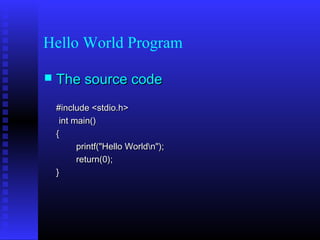
   The source code
    #include <stdio.h>
     int main()
    {
          printf("Hello Worldn");
          return(0);
    }
Hello World Program
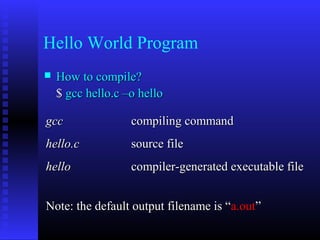
   How to compile?
    $ gcc hello.c –o hello

gcc                compiling command
hello.c            source file
hello              compiler-generated executable file


Note: the default output filename is “a.out”
Hello World Program
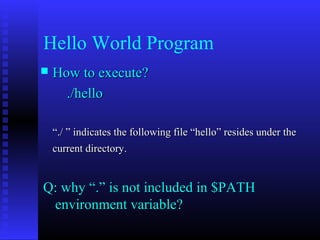
   How to execute?
      ./hello

    “./ ” indicates the following file “hello” resides under the
    current directory.


Q: why “.” is not included in $PATH
 environment variable?
Hello World Program
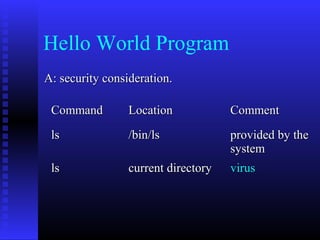
A: security consideration.

 Command         Location            Comment
 ls              /bin/ls             provided by the
                                     system
 ls              current directory   virus
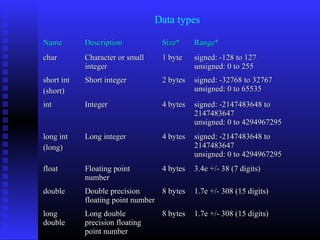
Data types

Name        Description           Size*     Range*
char        Character or small    1 byte    signed: -128 to 127
            integer                         unsigned: 0 to 255
short int   Short integer         2 bytes   signed: -32768 to 32767
(short)                                     unsigned: 0 to 65535
int         Integer               4 bytes   signed: -2147483648 to
                                            2147483647
                                            unsigned: 0 to 4294967295
long int    Long integer          4 bytes   signed: -2147483648 to
(long)                                      2147483647
                                            unsigned: 0 to 4294967295
float       Floating point        4 bytes   3.4e +/- 38 (7 digits)
            number
double      Double precision      8 bytes   1.7e +/- 308 (15 digits)
            floating point number
long        Long double           8 bytes   1.7e +/- 308 (15 digits)
double      precision floating
            point number
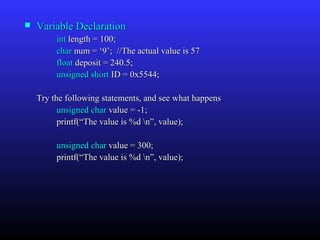
   Variable Declaration
         int length = 100;
         char num = ‘9’; //The actual value is 57
         float deposit = 240.5;
         unsigned short ID = 0x5544;

    Try the following statements, and see what happens
          unsigned char value = -1;
          printf(“The value is %d n”, value);

         unsigned char value = 300;
         printf(“The value is %d n”, value);
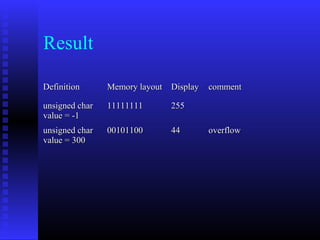
Result

Definition      Memory layout Display   comment

unsigned char   11111111      255
value = -1
unsigned char   00101100      44        overflow
value = 300
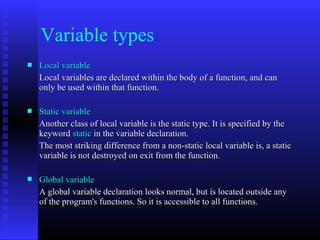
Variable types
   Local variable
    Local variables are declared within the body of a function, and can
    only be used within that function.

   Static variable
    Another class of local variable is the static type. It is specified by the
    keyword static in the variable declaration.
    The most striking difference from a non-static local variable is, a static
    variable is not destroyed on exit from the function.

   Global variable
    A global variable declaration looks normal, but is located outside any
    of the program's functions. So it is accessible to all functions.
   An example

    int global = 10;            //global variable

    int func (int x)
    {
         static int stat_var;   //static local variable
         int temp;              //(normal) local variable
         int name[50];          //(normal) local variable
         ……
    }
Variable Definition vs Declaration
Definition    Tell the compiler about the variable: its type
              and name, as well as allocated a memory cell for
              the variable


Declaration   Describe information ``about'' the variable,
              doesn’t allocate memory cell for the variable
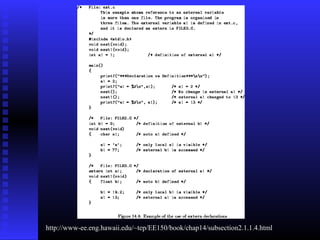
http://www-ee.eng.hawaii.edu/~tep/EE150/book/chap14/subsection2.1.1.4.html
printf()
The printf() function can be instructed to print
  integers, floats and string properly.
 The general syntax is

      printf( “format”, variables);

   An example
       int stud_id = 5200;
       char * name = “Mike”;
       printf(“%s ‘s ID is %d n”, name, stud_id);
   Format Identifiers
    %d         decimal integers
    %x         hex integer
    %c         character
    %f         float and double number
    %s         string
    %p         pointer

   How to specify display space for a variable?
    printf(“The student id is %5d n”, stud_id);
    The value of stud_id will occupy 5 characters space in the
    print-out.
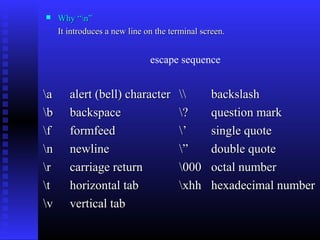
    Why “n”
     It introduces a new line on the terminal screen.


                               escape sequence


a      alert (bell) character                 backslash
b      backspace                      ?        question mark
f      formfeed                       ’        single quote
n      newline                        ”        double quote
r      carriage return                000      octal number
t      horizontal tab                 xhh      hexadecimal number
v      vertical tab
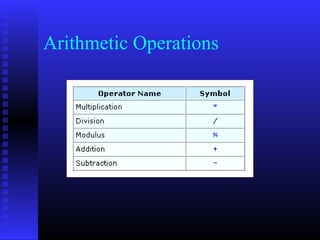
Arithmetic Operations
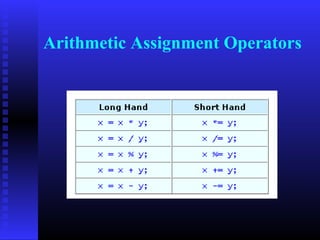
Arithmetic Assignment Operators
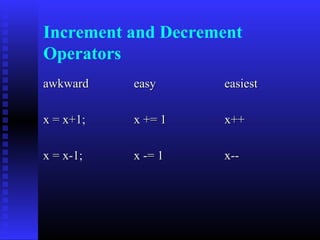
Increment and Decrement
Operators
awkward    easy     easiest

x = x+1;   x += 1   x++

x = x-1;   x -= 1   x--
Example
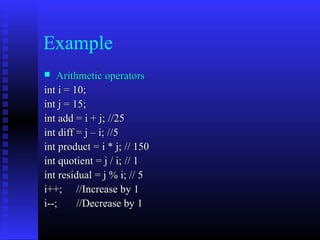
   Arithmetic operators
int i = 10;
int j = 15;
int add = i + j; //25
int diff = j – i; //5
int product = i * j; // 150
int quotient = j / i; // 1
int residual = j % i; // 5
i++; //Increase by 1
i--;     //Decrease by 1
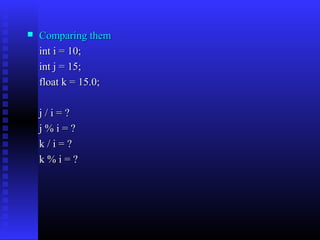
   Comparing them
    int i = 10;
    int j = 15;
    float k = 15.0;

    j/i=?
    j%i=?
    k/i=?
    k%i=?
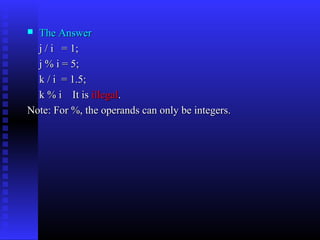
 The Answer
  j / i = 1;
  j % i = 5;
  k / i = 1.5;
  k % i It is illegal.
Note: For %, the operands can only be integers.
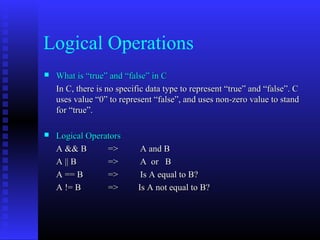
Logical Operations
   What is “true” and “false” in C
    In C, there is no specific data type to represent “true” and “false”. C
    uses value “0” to represent “false”, and uses non-zero value to stand
    for “true”.

   Logical Operators
    A && B       =>         A and B
    A || B       =>         A or B
    A == B       =>         Is A equal to B?
    A != B       =>        Is A not equal to B?
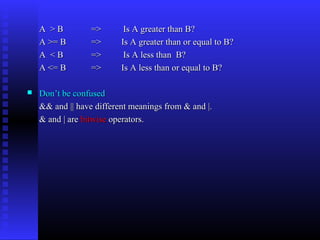
A >B          =>       Is A greater than B?
    A >= B        =>      Is A greater than or equal to B?
    A <B          =>       Is A less than B?
    A <= B        =>      Is A less than or equal to B?

   Don’t be confused
    && and || have different meanings from & and |.
    & and | are bitwise operators.
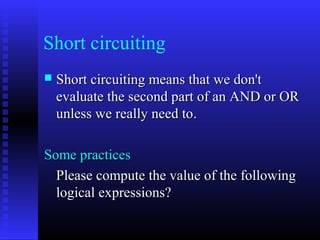
Short circuiting
   Short circuiting means that we don't
    evaluate the second part of an AND or OR
    unless we really need to.

Some practices
  Please compute the value of the following
  logical expressions?
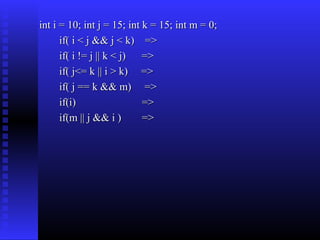
int i = 10; int j = 15; int k = 15; int m = 0;
      if( i < j && j < k) =>
      if( i != j || k < j) =>
      if( j<= k || i > k) =>
      if( j == k && m) =>
      if(i)                 =>
      if(m || j && i )      =>
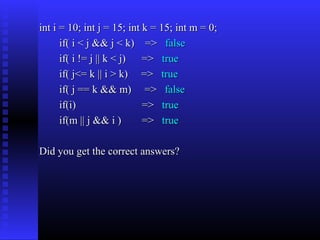
int i = 10; int j = 15; int k = 15; int m = 0;
      if( i < j && j < k) => false
      if( i != j || k < j) => true
      if( j<= k || i > k) => true
      if( j == k && m) => false
      if(i)                 => true
      if(m || j && i )      => true

Did you get the correct answers?
Conditionals
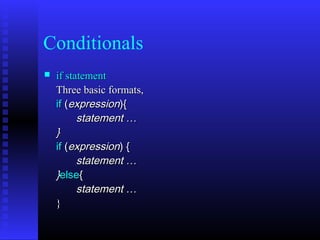
   if statement
    Three basic formats,
    if (expression){
          statement …
    }
    if (expression) {
          statement …
    }else{
          statement …
    }
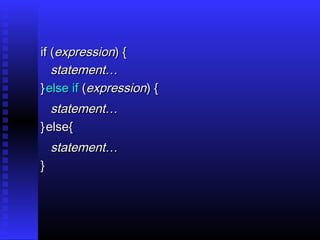
if (expression) {
   statement…
} else if (expression) {
   statement…
} else{
    statement…
}
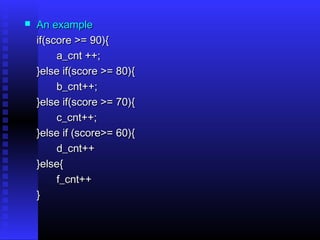
   An example
    if(score >= 90){
         a_cnt ++;
    }else if(score >= 80){
         b_cnt++;
    }else if(score >= 70){
         c_cnt++;
    }else if (score>= 60){
         d_cnt++
    }else{
         f_cnt++
    }
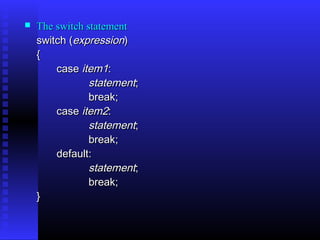
   The switch statement
    switch (expression) 
    {
        case item1:
                statement;
                break;
        case item2:
                statement;
                break;
        default:
                statement;
                break;
    }
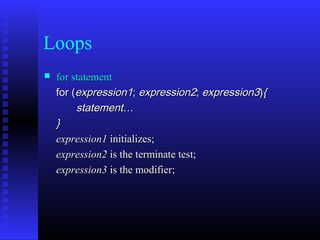
Loops
   for statement
    for (expression1; expression2; expression3){
         statement…
    }
    expression1 initializes;
    expression2 is the terminate test;
    expression3 is the modifier;
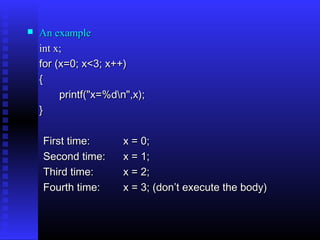
   An example
    int x;
    for (x=0; x<3; x++)
    {
         printf("x=%dn",x);
    }

    First time:       x = 0;
    Second time:      x = 1;
    Third time:       x = 2;
    Fourth time:      x = 3; (don’t execute the body)
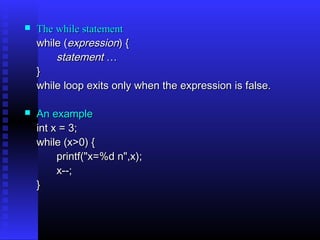
   The while statement
    while (expression) {
        statement …
    }
    while loop exits only when the expression is false.

   An example
    int x = 3;
    while (x>0) {
         printf("x=%d n",x);
         x--;
    }
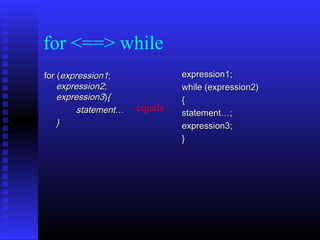
for <==> while
for (expression1;              expression1;
    expression2;               while (expression2)
    expression3){              {
         statement…   equals   statement…;
    }                          expression3;
                               }
Arrays & Strings
   Arrays
    int ids[50];
    char name[100];
    int table_of_num[30][40];
   Accessing an array
    ids[0] = 40;
    i = ids[1] + j;
    table_of_num[3][4] = 100;
    Note: In C Array subscripts start at 0 and end one less than
    the array size. [0 .. n-1]
   Strings
    Strings are defined as arrays of characters.
    The only difference from a character array is, a symbol “0”
    is used to indicate the end of a string.

    For example, suppose we have a character array, char
    name[8], and we store into it a string “Dave”.
    Note: the length of this string 4, but it occupies 5 bytes.


     D      a     v     e      0
Functions
Functions are easy to use; they allow complicated programs to be broken
   into small blocks, each of which is easier to write, read, and maintain.
   This is called modulation.

   How does a function look like?
    returntype function_name(parameters…)    
    { 
         local variables declaration;  
         function code;
         return result;  
    }
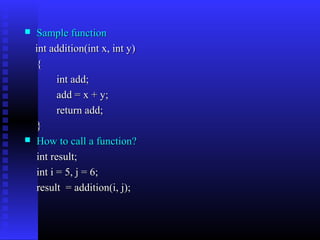
   Sample function
    int addition(int x, int y)
    {
          int add;
          add = x + y;
          return add;
    }
   How to call a function?
    int result;
    int i = 5, j = 6;
    result = addition(i, j);
Pointers
Pointer is the most beautiful (ugliest) part of C, but also
  brings most trouble to C programmers. Over 90% bugs in
  the C programs come from pointers.
“The International Obfuscated C Code Contest ”
                    (http://www.ioccc.org/)

 What is a pointer?
A pointer is a variable which contains the address in memory
  of another variable.

In C we have a specific type for pointers.
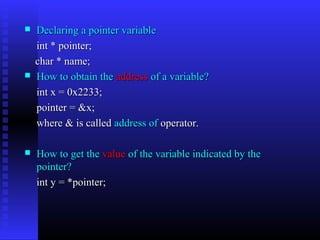
   Declaring a pointer variable
    int * pointer;
    char * name;
   How to obtain the address of a variable?
    int x = 0x2233;
    pointer = &x;
    where & is called address of operator.

   How to get the value of the variable indicated by the
    pointer?
    int y = *pointer;
What happens in the memory?
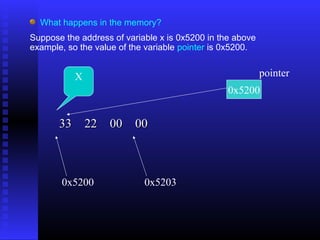
Suppose the address of variable x is 0x5200 in the above
example, so the value of the variable pointer is 0x5200.


           X                                               pointer
                                                 0x5200


       33 22 00 00


       0x5200               0x5203
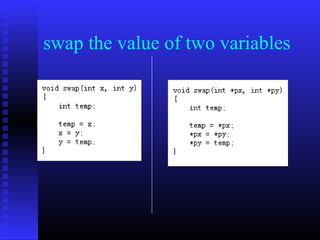
swap the value of two variables
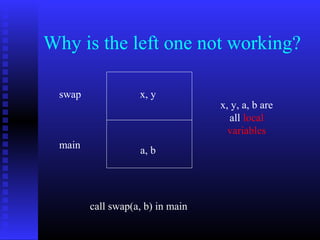
Why is the left one not working?

 swap              x, y
                                  x, y, a, b are
                                    all local
                                    variables
 main              a, b


        call swap(a, b) in main
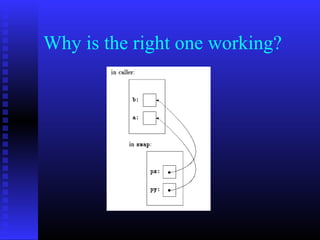
Why is the right one working?
   Pointers and Arrays
    Pointers and arrays are very closely linked in C.
    Array elements arranged in consecutive memory locations

   Accessing array elements using pointers
    int ids[50];
    int * p = &ids[0];
    p[i] <=> ids[i]

   Pointers and Strings
    A string can be represented by a char * pointer.
Char name[50];
name[0] = ‘D’;
name[1] = ‘a’;
name[2] = ‘v’;
name[3] = ‘e’;
name[4] = ‘0’;
char * p = &name[0];
printf(“The name is %s n”, p);
Note: The p represents the string “Dave”, but not the array
   name[50].
Command-Line Argument

In C you can pass arguments to main() function.
 main() prototype

   int main(int argc, char * argv[]);
   argc indicates the number of arguments
   argv is an array of input string pointers.

   How to pass your own arguments?
    ./hello 10
   What value is argc and argv?
    Let’s add two printf statement to get the value of argc and
    argv.
    #include <stdio.h>
     int main(int argc, char * argv[]);)
    {
          int i=0;
          printf("Hello Worldn");
          printf(“The argc is %d n”, argc);
          for(i=0; i < argc; i++){
            printf(“The %dth element in argv is %sn”, i, argv[i]);
          }
          return(0);
    }
   The output
    The argc is 2
    The 0th element in argv is ./hello
    The 1th element in argv is 10

    The trick is the system always passes the name of the
    executable file as the first argument to the main() function.

   How to use your argument?
    Be careful. Your arguments to main() are always in string format.
    Taking the above program for example, the argv[1] is string “10”,
    not a number. You must convert it into a number before you can
    use it.
Data Structure
A data structure is a collection of one or more variables, possibly of
   different types.

   An example of student record
    struct stud_record{
          char name[50];
          int id;
          int age;
          int major;
          ……
    };
   A data structure is also a data type
    struct stud_record my_record;
    struct stud_record * pointer;
    pointer = & my_record;

   Accessing a field inside a data structure
    my_record.id = 10;          “.”
        or
    pointer->id = 10;           “->”
Memory Allocation
   Stack memory allocation
    Non-static local variable is an example of stack memory
    allocation.
    Such memory allocations are placed in a system memory
    area called the stack.

   Static memory allocation
    Static local variable and global variable require static
    memory allocation. Static memory allocation happens
    before the program starts, and persists through the entire
    life time of the program.
   Dynamic memory allocation
    It allows the program determine how much memory it
    needs at run time, and allocate exactly the right amount of
    storage.

    The region of memory where dynamic allocation and
    deallocation of memory can take place is called the heap.

    Note: the program has the responsibility to free the
    dynamic memory it allocated.
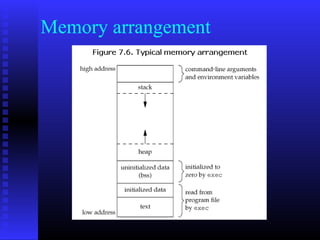
Memory arrangement
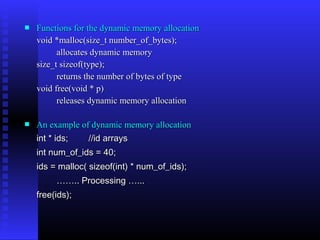
   Functions for the dynamic memory allocation
    void *malloc(size_t number_of_bytes);
          allocates dynamic memory
    size_t sizeof(type);
          returns the number of bytes of type
    void free(void * p)
          releases dynamic memory allocation

   An example of dynamic memory allocation
    int * ids;   //id arrays
    int num_of_ids = 40;
    ids = malloc( sizeof(int) * num_of_ids);
         …….. Processing …...
    free(ids);
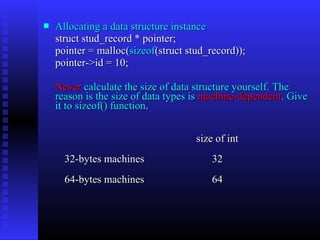
   Allocating a data structure instance
    struct stud_record * pointer;
    pointer = malloc(sizeof(struct stud_record));
    pointer->id = 10;

    Never calculate the size of data structure yourself. The
    reason is the size of data types is machine-dependent. Give
    it to sizeof() function.


                                     size of int
      32-bytes machines                  32
      64-bytes machines                  64
Programming Tips
   Replacing numbers in your code with macros
    - don’t use magic numbers directly
    #define MAX_NAME_LEN           50;
    char name[MAX_NAME_LEN];

   Avoiding global variables
    - modulation is more important
   Giving variables and functions a nice name
    - a meaning name
   Don’t repeat your code
    - make a subroutine/function
   Don’t let the function body to exceed one screen
    - hard to debug
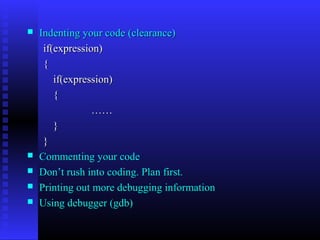
   Indenting your code (clearance)
     if(expression)
     {
        if(expression)
        {
                 ……
        }
     }
   Commenting your code
   Don’t rush into coding. Plan first.
   Printing out more debugging information
   Using debugger (gdb)
C vs. C++
 C++ is a superset of C
 C++ has all the characteristics of C
 Using g++ to compile your source code
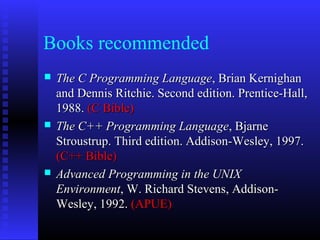
Books recommended
   The C Programming Language, Brian Kernighan
    and Dennis Ritchie. Second edition. Prentice-Hall,
    1988. (C Bible)
   The C++ Programming Language, Bjarne
    Stroustrup. Third edition. Addison-Wesley, 1997.
    (C++ Bible)
   Advanced Programming in the UNIX
    Environment, W. Richard Stevens, Addison-
    Wesley, 1992. (APUE)
Thanks

C tutorial

  • 1.
  • 2.
    Outline  “Hello World" Program  Pointers  Data Types & Variables  Functions  printf()  Command-Line Argument  Arithmetic & Logical  Data Structure Operations  Memory Allocation  Conditionals  Programming Tips  Loops  C vs. C++  Arrays & Strings  Books recommended
  • 3.
    Hello World Program  The source code #include <stdio.h> int main() { printf("Hello Worldn"); return(0); }
  • 4.
    Hello World Program  How to compile? $ gcc hello.c –o hello gcc compiling command hello.c source file hello compiler-generated executable file Note: the default output filename is “a.out”
  • 5.
    Hello World Program  How to execute? ./hello “./ ” indicates the following file “hello” resides under the current directory. Q: why “.” is not included in $PATH environment variable?
  • 6.
    Hello World Program A:security consideration. Command Location Comment ls /bin/ls provided by the system ls current directory virus
  • 7.
    Data types Name Description Size* Range* char Character or small 1 byte signed: -128 to 127 integer unsigned: 0 to 255 short int Short integer 2 bytes signed: -32768 to 32767 (short) unsigned: 0 to 65535 int Integer 4 bytes signed: -2147483648 to 2147483647 unsigned: 0 to 4294967295 long int Long integer 4 bytes signed: -2147483648 to (long) 2147483647 unsigned: 0 to 4294967295 float Floating point 4 bytes 3.4e +/- 38 (7 digits) number double Double precision 8 bytes 1.7e +/- 308 (15 digits) floating point number long Long double 8 bytes 1.7e +/- 308 (15 digits) double precision floating point number
  • 8.
    Variable Declaration int length = 100; char num = ‘9’; //The actual value is 57 float deposit = 240.5; unsigned short ID = 0x5544; Try the following statements, and see what happens unsigned char value = -1; printf(“The value is %d n”, value); unsigned char value = 300; printf(“The value is %d n”, value);
  • 9.
    Result Definition Memory layout Display comment unsigned char 11111111 255 value = -1 unsigned char 00101100 44 overflow value = 300
  • 10.
    Variable types  Local variable Local variables are declared within the body of a function, and can only be used within that function.  Static variable Another class of local variable is the static type. It is specified by the keyword static in the variable declaration. The most striking difference from a non-static local variable is, a static variable is not destroyed on exit from the function.  Global variable A global variable declaration looks normal, but is located outside any of the program's functions. So it is accessible to all functions.
  • 11.
    An example int global = 10; //global variable int func (int x) { static int stat_var; //static local variable int temp; //(normal) local variable int name[50]; //(normal) local variable …… }
  • 12.
    Variable Definition vsDeclaration Definition Tell the compiler about the variable: its type and name, as well as allocated a memory cell for the variable Declaration Describe information ``about'' the variable, doesn’t allocate memory cell for the variable
  • 13.
  • 14.
    printf() The printf() functioncan be instructed to print integers, floats and string properly.  The general syntax is printf( “format”, variables);  An example int stud_id = 5200; char * name = “Mike”; printf(“%s ‘s ID is %d n”, name, stud_id);
  • 15.
    Format Identifiers %d decimal integers %x hex integer %c character %f float and double number %s string %p pointer  How to specify display space for a variable? printf(“The student id is %5d n”, stud_id); The value of stud_id will occupy 5 characters space in the print-out.
  • 16.
    Why “n” It introduces a new line on the terminal screen. escape sequence a alert (bell) character backslash b backspace ? question mark f formfeed ’ single quote n newline ” double quote r carriage return 000 octal number t horizontal tab xhh hexadecimal number v vertical tab
  • 17.
  • 18.
  • 19.
    Increment and Decrement Operators awkward easy easiest x = x+1; x += 1 x++ x = x-1; x -= 1 x--
  • 20.
    Example  Arithmetic operators int i = 10; int j = 15; int add = i + j; //25 int diff = j – i; //5 int product = i * j; // 150 int quotient = j / i; // 1 int residual = j % i; // 5 i++; //Increase by 1 i--; //Decrease by 1
  • 21.
    Comparing them int i = 10; int j = 15; float k = 15.0; j/i=? j%i=? k/i=? k%i=?
  • 22.
     The Answer j / i = 1; j % i = 5; k / i = 1.5; k % i It is illegal. Note: For %, the operands can only be integers.
  • 23.
    Logical Operations  What is “true” and “false” in C In C, there is no specific data type to represent “true” and “false”. C uses value “0” to represent “false”, and uses non-zero value to stand for “true”.  Logical Operators A && B => A and B A || B => A or B A == B => Is A equal to B? A != B => Is A not equal to B?
  • 24.
    A >B => Is A greater than B? A >= B => Is A greater than or equal to B? A <B => Is A less than B? A <= B => Is A less than or equal to B?  Don’t be confused && and || have different meanings from & and |. & and | are bitwise operators.
  • 25.
    Short circuiting  Short circuiting means that we don't evaluate the second part of an AND or OR unless we really need to. Some practices Please compute the value of the following logical expressions?
  • 26.
    int i =10; int j = 15; int k = 15; int m = 0; if( i < j && j < k) => if( i != j || k < j) => if( j<= k || i > k) => if( j == k && m) => if(i) => if(m || j && i ) =>
  • 27.
    int i =10; int j = 15; int k = 15; int m = 0; if( i < j && j < k) => false if( i != j || k < j) => true if( j<= k || i > k) => true if( j == k && m) => false if(i) => true if(m || j && i ) => true Did you get the correct answers?
  • 28.
    Conditionals  if statement Three basic formats, if (expression){ statement … } if (expression) { statement … }else{ statement … }
  • 29.
    if (expression) { statement… } else if (expression) { statement… } else{ statement… }
  • 30.
    An example if(score >= 90){ a_cnt ++; }else if(score >= 80){ b_cnt++; }else if(score >= 70){ c_cnt++; }else if (score>= 60){ d_cnt++ }else{ f_cnt++ }
  • 31.
    The switch statement switch (expression)  { case item1: statement; break; case item2: statement; break; default: statement; break; }
  • 32.
    Loops  for statement for (expression1; expression2; expression3){ statement… } expression1 initializes; expression2 is the terminate test; expression3 is the modifier;
  • 33.
    An example int x; for (x=0; x<3; x++) { printf("x=%dn",x); } First time: x = 0; Second time: x = 1; Third time: x = 2; Fourth time: x = 3; (don’t execute the body)
  • 34.
    The while statement while (expression) { statement … } while loop exits only when the expression is false.  An example int x = 3; while (x>0) { printf("x=%d n",x); x--; }
  • 35.
    for <==> while for(expression1; expression1; expression2; while (expression2) expression3){ { statement… equals statement…; } expression3; }
  • 36.
    Arrays & Strings  Arrays int ids[50]; char name[100]; int table_of_num[30][40];  Accessing an array ids[0] = 40; i = ids[1] + j; table_of_num[3][4] = 100; Note: In C Array subscripts start at 0 and end one less than the array size. [0 .. n-1]
  • 37.
    Strings Strings are defined as arrays of characters. The only difference from a character array is, a symbol “0” is used to indicate the end of a string. For example, suppose we have a character array, char name[8], and we store into it a string “Dave”. Note: the length of this string 4, but it occupies 5 bytes. D a v e 0
  • 38.
    Functions Functions are easyto use; they allow complicated programs to be broken into small blocks, each of which is easier to write, read, and maintain. This is called modulation.  How does a function look like? returntype function_name(parameters…)     {  local variables declaration;   function code; return result;   }
  • 39.
    Sample function int addition(int x, int y) { int add; add = x + y; return add; }  How to call a function? int result; int i = 5, j = 6; result = addition(i, j);
  • 40.
    Pointers Pointer is themost beautiful (ugliest) part of C, but also brings most trouble to C programmers. Over 90% bugs in the C programs come from pointers. “The International Obfuscated C Code Contest ” (http://www.ioccc.org/)  What is a pointer? A pointer is a variable which contains the address in memory of another variable. In C we have a specific type for pointers.
  • 41.
    Declaring a pointer variable int * pointer; char * name;  How to obtain the address of a variable? int x = 0x2233; pointer = &x; where & is called address of operator.  How to get the value of the variable indicated by the pointer? int y = *pointer;
  • 42.
    What happens inthe memory? Suppose the address of variable x is 0x5200 in the above example, so the value of the variable pointer is 0x5200. X pointer 0x5200 33 22 00 00 0x5200 0x5203
  • 43.
    swap the valueof two variables
  • 44.
    Why is theleft one not working? swap x, y x, y, a, b are all local variables main a, b call swap(a, b) in main
  • 45.
    Why is theright one working?
  • 46.
    Pointers and Arrays Pointers and arrays are very closely linked in C. Array elements arranged in consecutive memory locations  Accessing array elements using pointers int ids[50]; int * p = &ids[0]; p[i] <=> ids[i]  Pointers and Strings A string can be represented by a char * pointer.
  • 47.
    Char name[50]; name[0] =‘D’; name[1] = ‘a’; name[2] = ‘v’; name[3] = ‘e’; name[4] = ‘0’; char * p = &name[0]; printf(“The name is %s n”, p); Note: The p represents the string “Dave”, but not the array name[50].
  • 48.
    Command-Line Argument In Cyou can pass arguments to main() function.  main() prototype int main(int argc, char * argv[]); argc indicates the number of arguments argv is an array of input string pointers.  How to pass your own arguments? ./hello 10
  • 49.
    What value is argc and argv? Let’s add two printf statement to get the value of argc and argv. #include <stdio.h> int main(int argc, char * argv[]);) { int i=0; printf("Hello Worldn"); printf(“The argc is %d n”, argc); for(i=0; i < argc; i++){ printf(“The %dth element in argv is %sn”, i, argv[i]); } return(0); }
  • 50.
    The output The argc is 2 The 0th element in argv is ./hello The 1th element in argv is 10 The trick is the system always passes the name of the executable file as the first argument to the main() function.  How to use your argument? Be careful. Your arguments to main() are always in string format. Taking the above program for example, the argv[1] is string “10”, not a number. You must convert it into a number before you can use it.
  • 51.
    Data Structure A datastructure is a collection of one or more variables, possibly of different types.  An example of student record struct stud_record{ char name[50]; int id; int age; int major; …… };
  • 52.
    A data structure is also a data type struct stud_record my_record; struct stud_record * pointer; pointer = & my_record;  Accessing a field inside a data structure my_record.id = 10; “.” or pointer->id = 10; “->”
  • 53.
    Memory Allocation  Stack memory allocation Non-static local variable is an example of stack memory allocation. Such memory allocations are placed in a system memory area called the stack.  Static memory allocation Static local variable and global variable require static memory allocation. Static memory allocation happens before the program starts, and persists through the entire life time of the program.
  • 54.
    Dynamic memory allocation It allows the program determine how much memory it needs at run time, and allocate exactly the right amount of storage. The region of memory where dynamic allocation and deallocation of memory can take place is called the heap. Note: the program has the responsibility to free the dynamic memory it allocated.
  • 55.
  • 56.
    Functions for the dynamic memory allocation void *malloc(size_t number_of_bytes); allocates dynamic memory size_t sizeof(type); returns the number of bytes of type void free(void * p) releases dynamic memory allocation  An example of dynamic memory allocation int * ids; //id arrays int num_of_ids = 40; ids = malloc( sizeof(int) * num_of_ids); …….. Processing …... free(ids);
  • 57.
    Allocating a data structure instance struct stud_record * pointer; pointer = malloc(sizeof(struct stud_record)); pointer->id = 10; Never calculate the size of data structure yourself. The reason is the size of data types is machine-dependent. Give it to sizeof() function. size of int 32-bytes machines 32 64-bytes machines 64
  • 58.
    Programming Tips  Replacing numbers in your code with macros - don’t use magic numbers directly #define MAX_NAME_LEN 50; char name[MAX_NAME_LEN];  Avoiding global variables - modulation is more important  Giving variables and functions a nice name - a meaning name  Don’t repeat your code - make a subroutine/function  Don’t let the function body to exceed one screen - hard to debug
  • 59.
    Indenting your code (clearance) if(expression) { if(expression) { …… } }  Commenting your code  Don’t rush into coding. Plan first.  Printing out more debugging information  Using debugger (gdb)
  • 60.
    C vs. C++ C++ is a superset of C  C++ has all the characteristics of C  Using g++ to compile your source code
  • 61.
    Books recommended  The C Programming Language, Brian Kernighan and Dennis Ritchie. Second edition. Prentice-Hall, 1988. (C Bible)  The C++ Programming Language, Bjarne Stroustrup. Third edition. Addison-Wesley, 1997. (C++ Bible)  Advanced Programming in the UNIX Environment, W. Richard Stevens, Addison- Wesley, 1992. (APUE)
  • 62.