Digital Image Fundamentals: 1
Digital Image FundamentalsDigital Image Fundamentals
Digital Image Fundamentals: 2
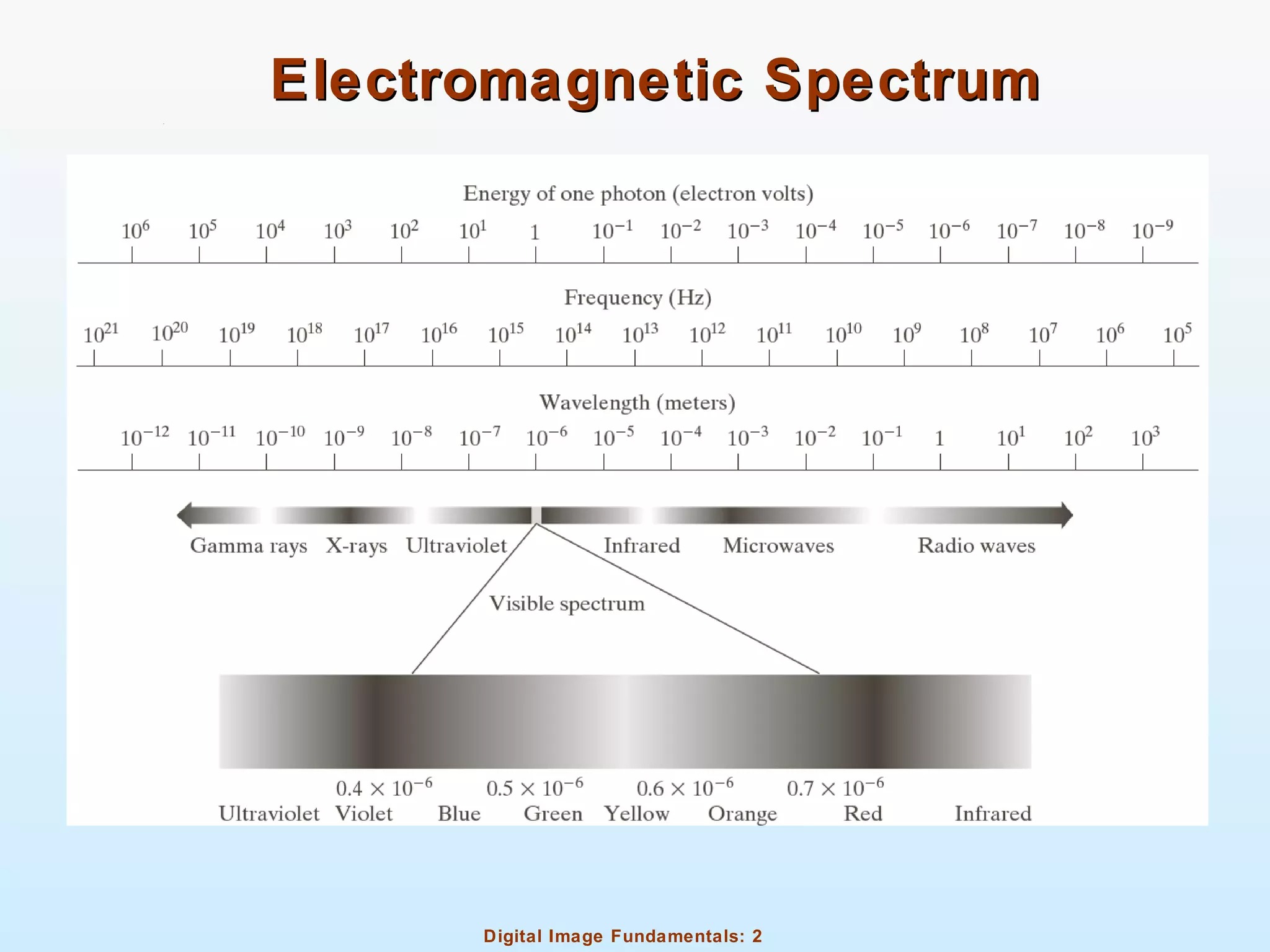
Electromagnetic SpectrumElectromagnetic Spectrum
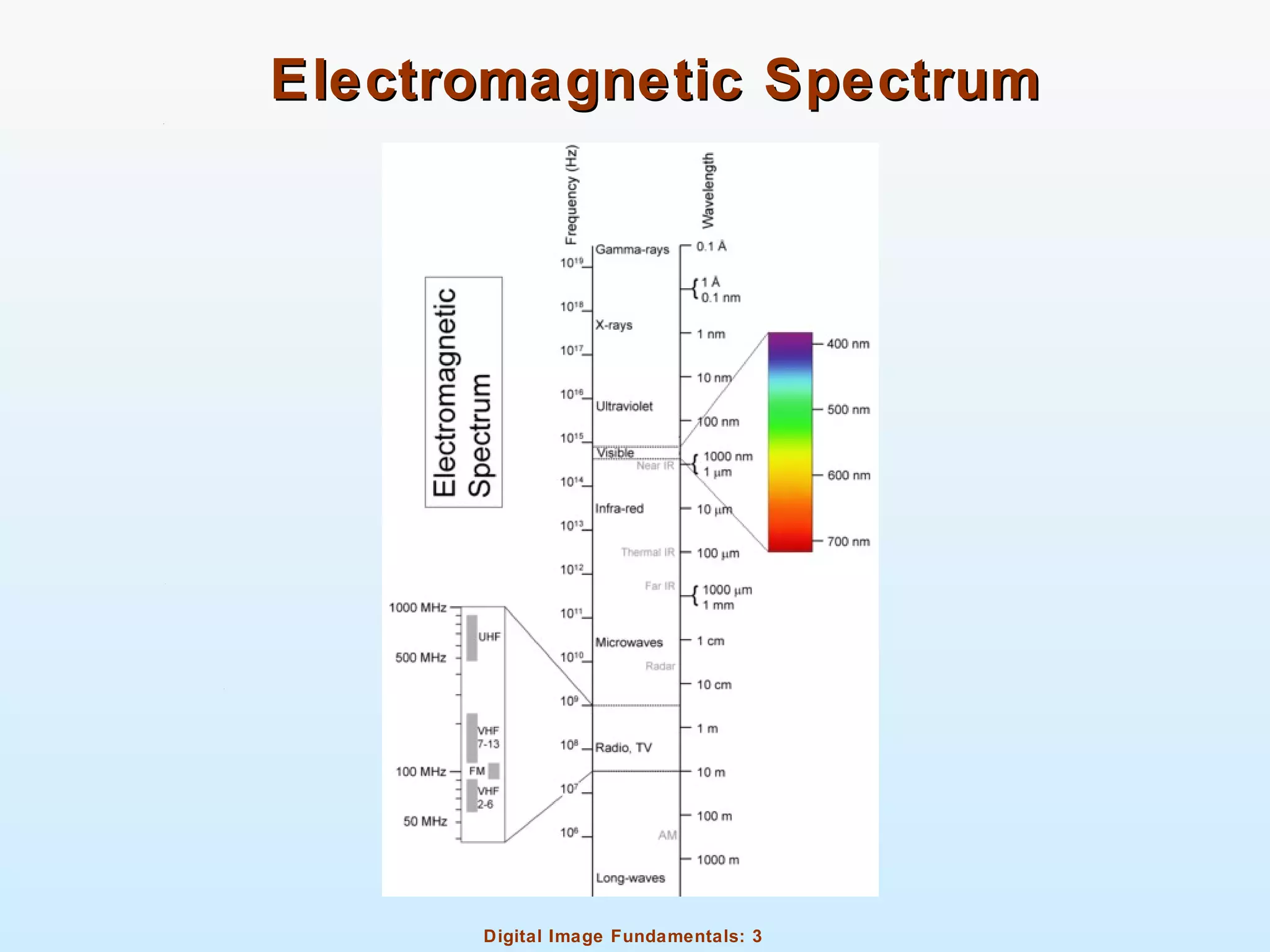
Digital Image Fundamentals: 3
Electromagnetic SpectrumElectromagnetic Spectrum
Digital Image Fundamentals: 4
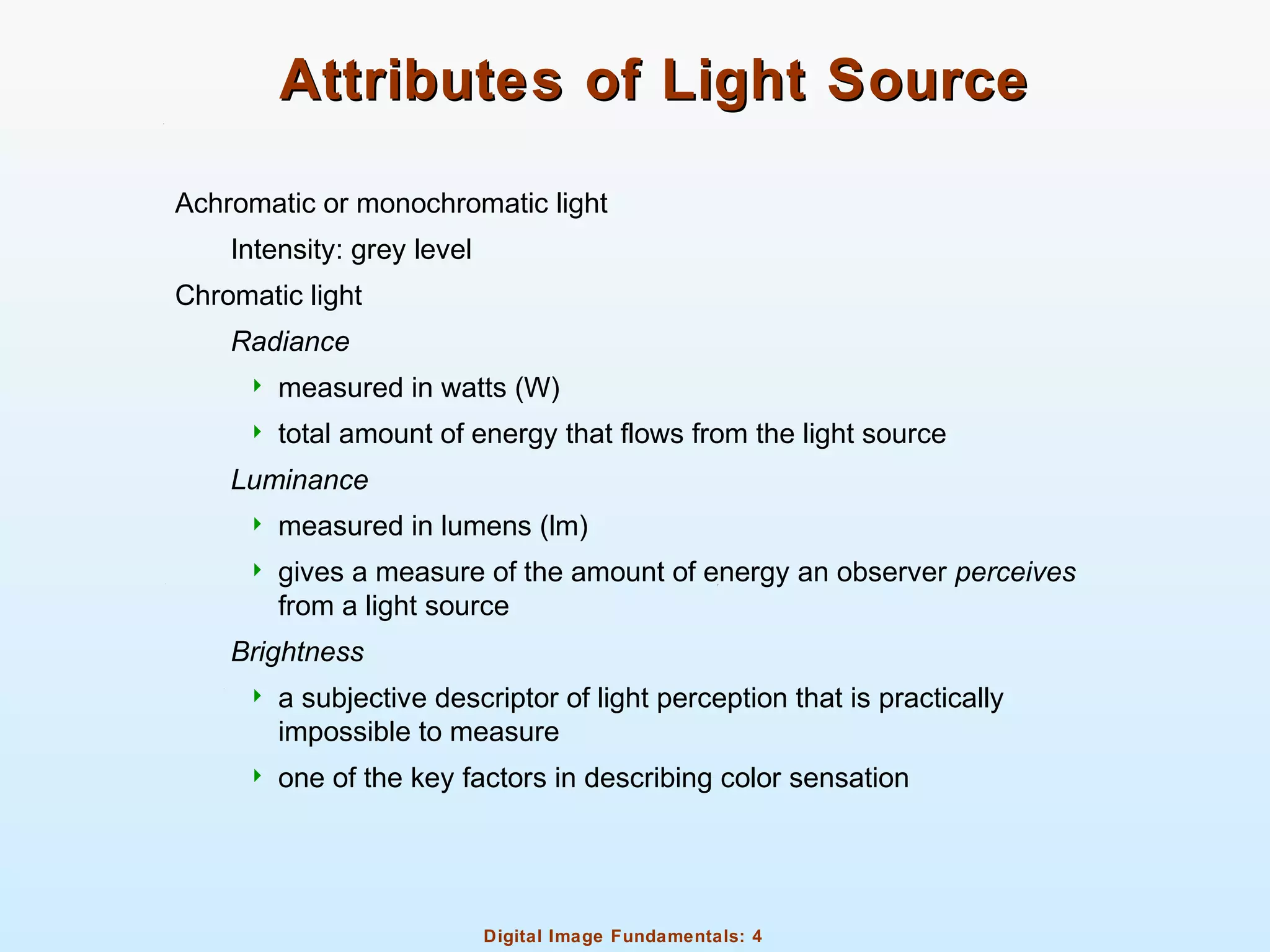
Attributes of Light SourceAttributes of Light Source
Achromatic or monochromatic light
Intensity: grey level
Chromatic light
Radiance
 measured in watts (W)
 total amount of energy that flows from the light source
Luminance
 measured in lumens (lm)
 gives a measure of the amount of energy an observer perceives
from a light source
Brightness
 a subjective descriptor of light perception that is practically
impossible to measure
 one of the key factors in describing color sensation
Digital Image Fundamentals: 5
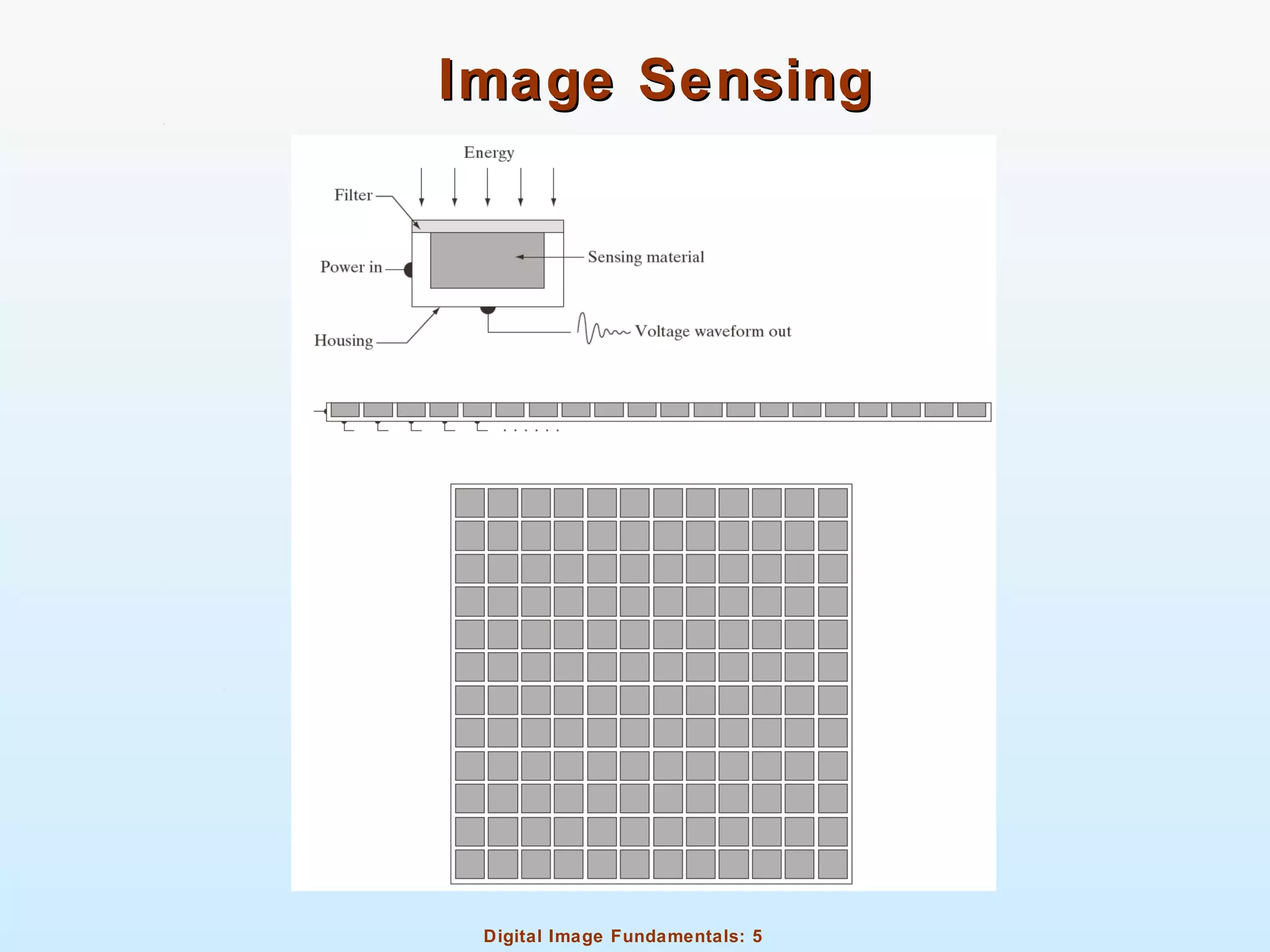
Image SensingImage Sensing
Digital Image Fundamentals: 6
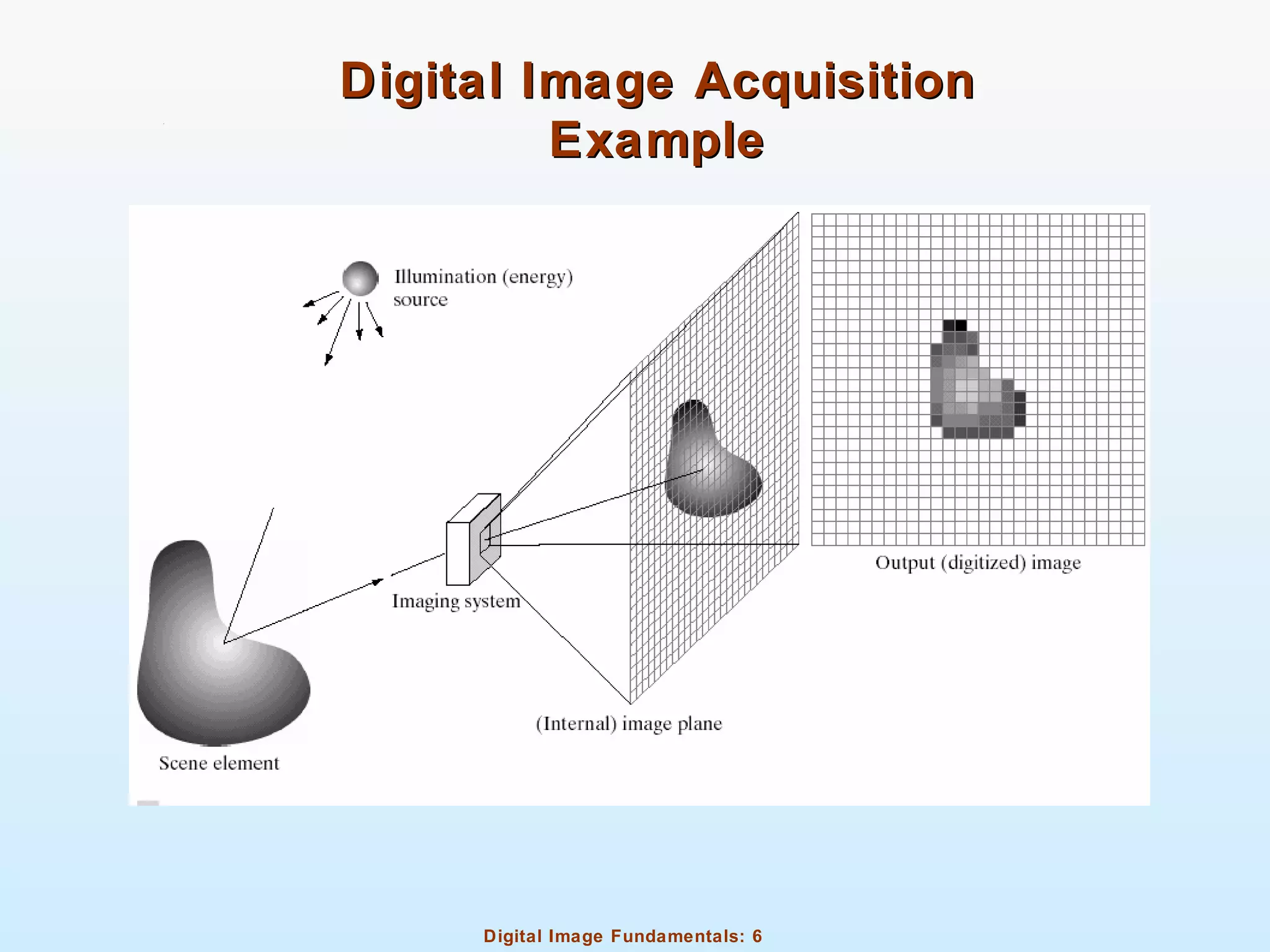
Digital Image AcquisitionDigital Image Acquisition
ExampleExample
Digital Image Fundamentals: 7
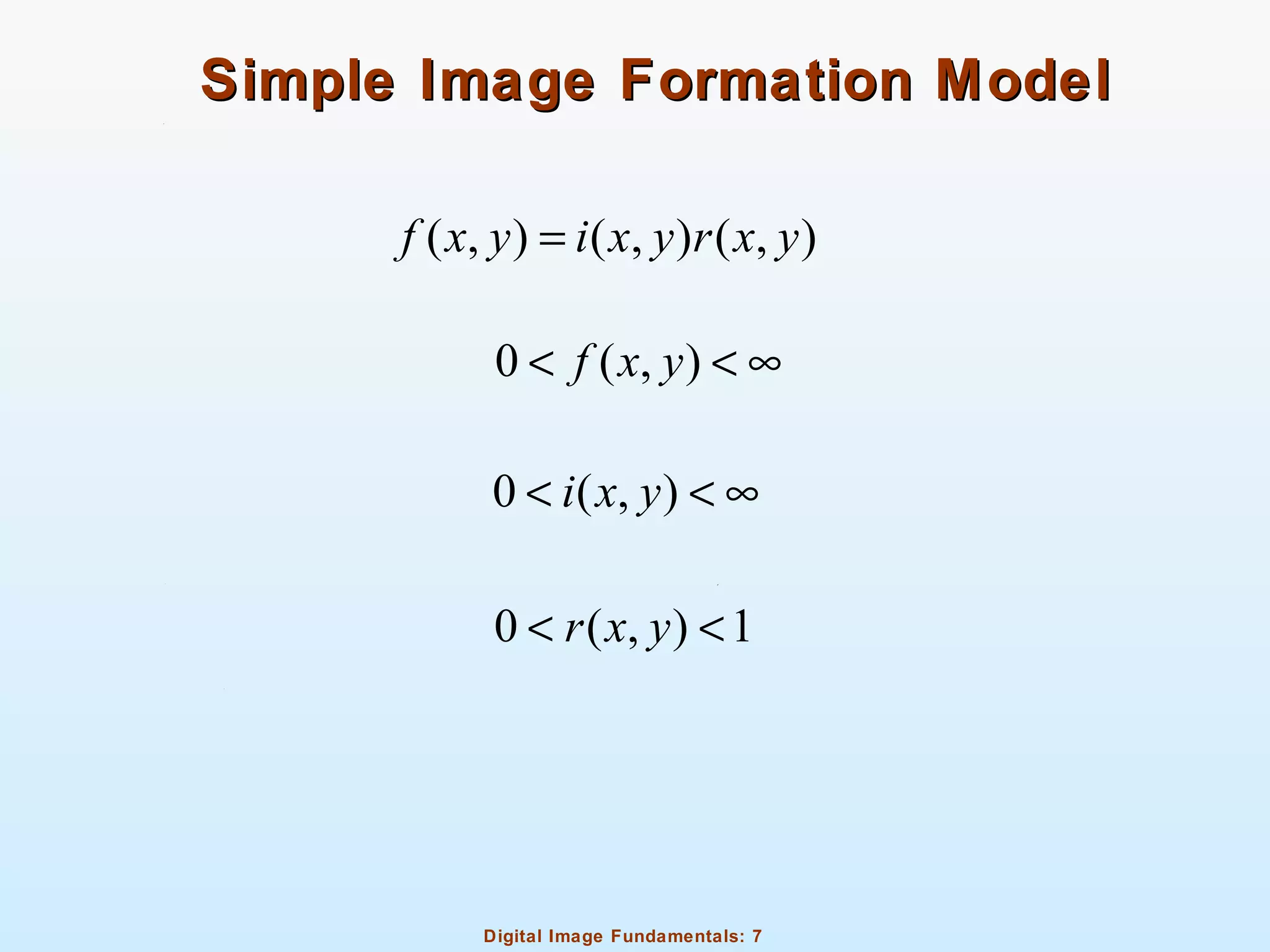
Simple Image Formation ModelSimple Image Formation Model
( , ) ( , ) ( , )f x y i x y r x y=
0 ( , )f x y< < ∞
0 ( , )i x y< < ∞
0 ( , ) 1r x y< <
Digital Image Fundamentals: 8
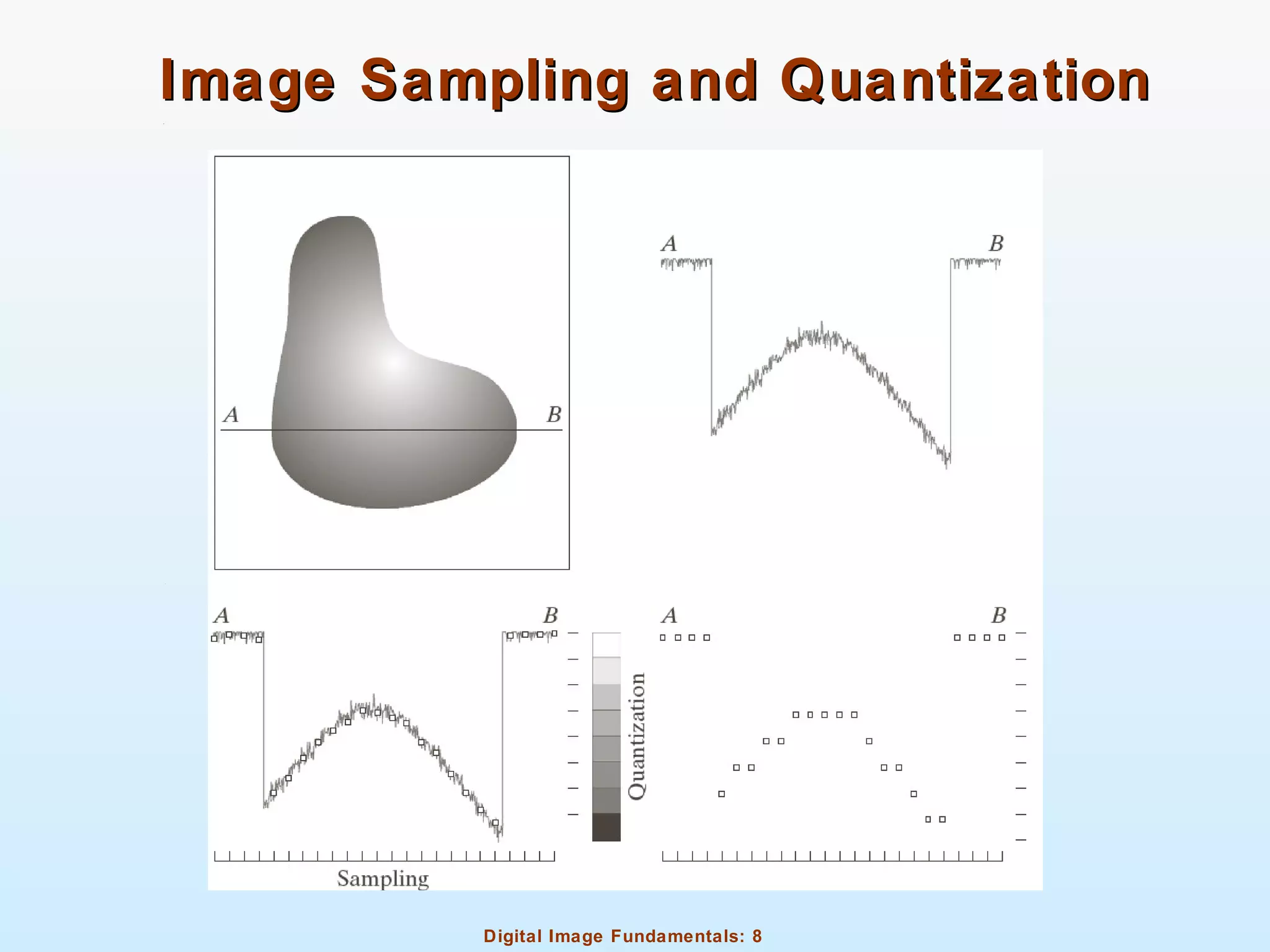
Image Sampling and QuantizationImage Sampling and Quantization
Digital Image Fundamentals: 9
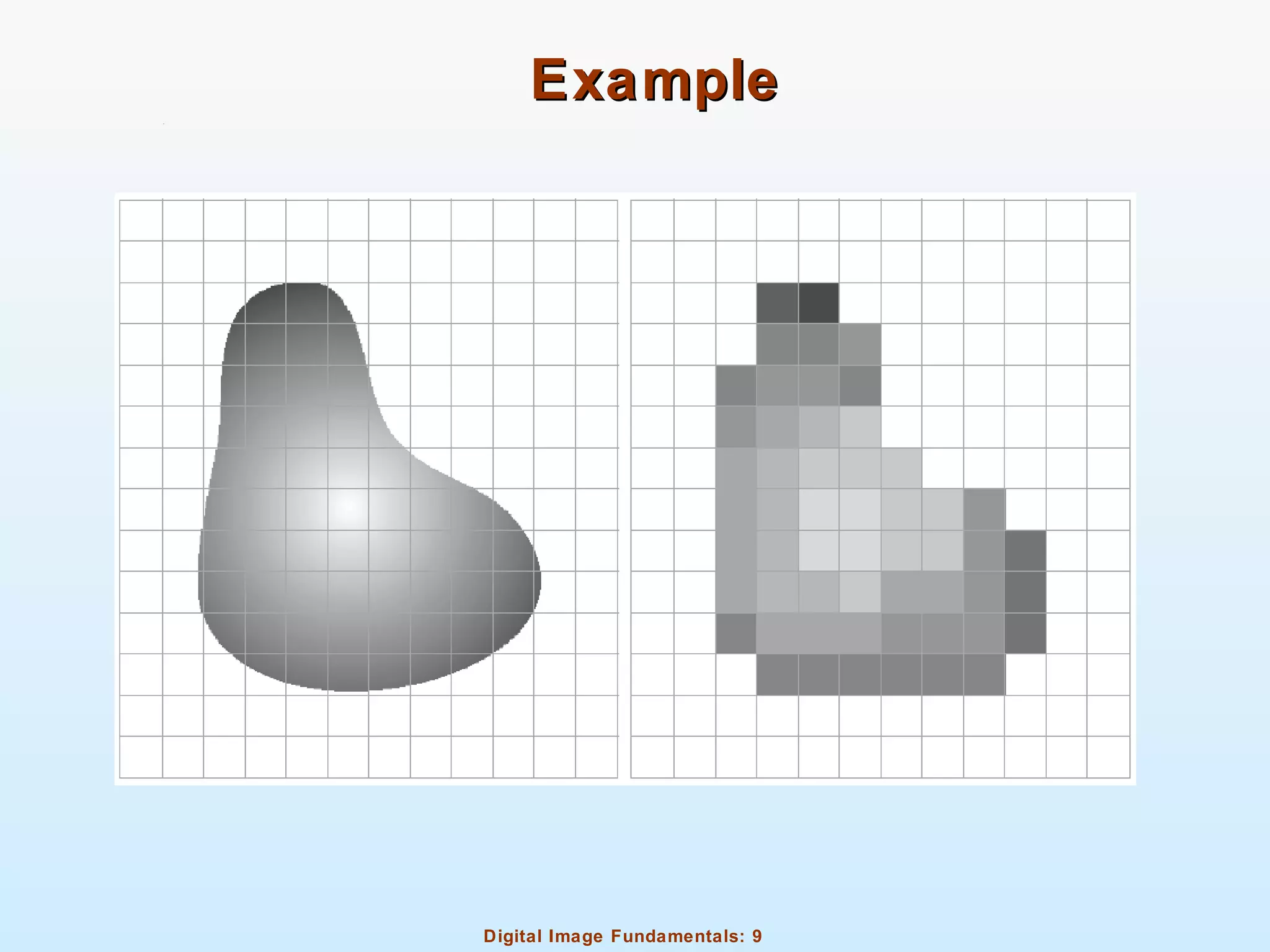
ExampleExample
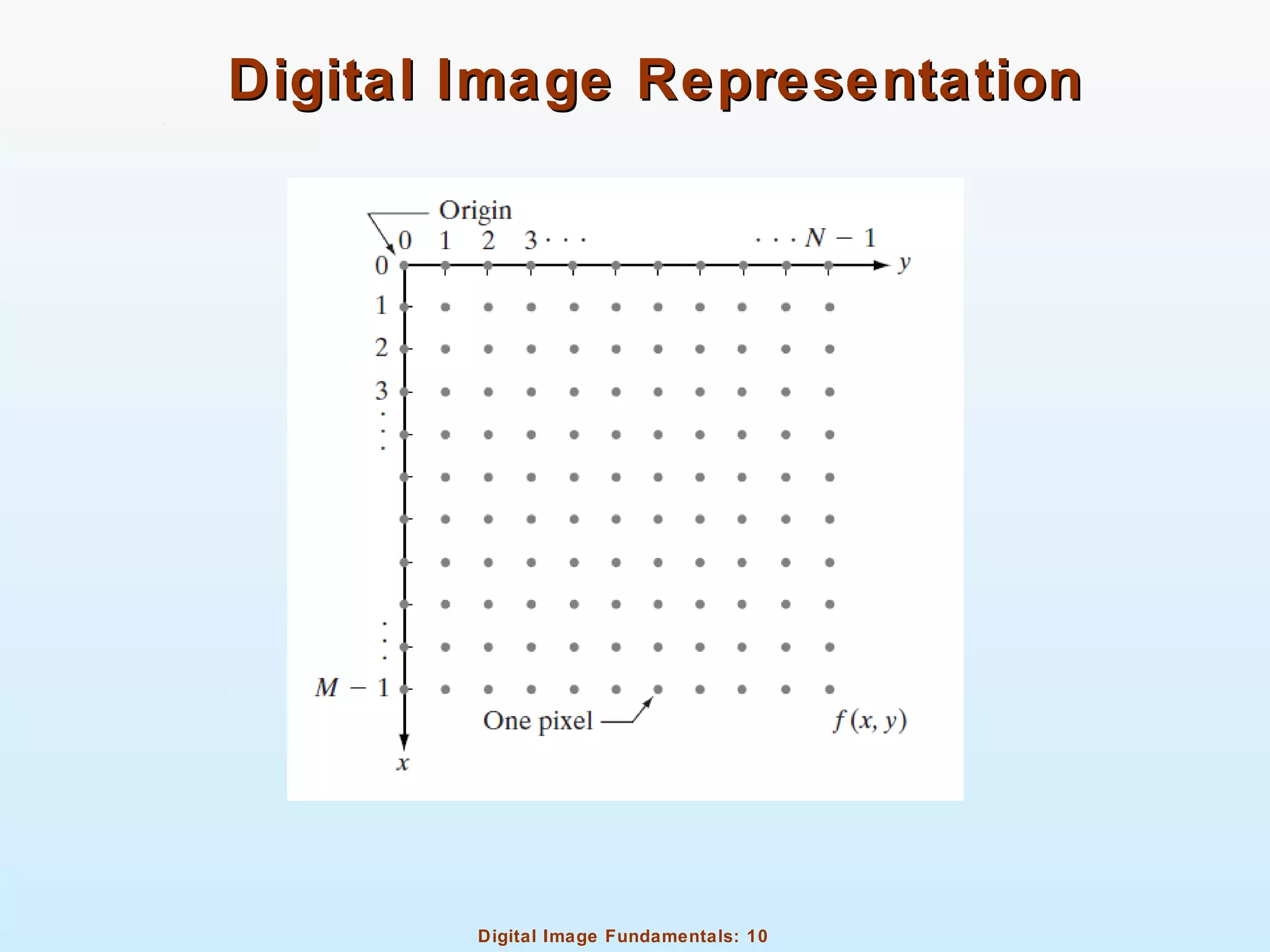
Digital Image Fundamentals: 10
Digital Image RepresentationDigital Image Representation
Digital Image Fundamentals: 11
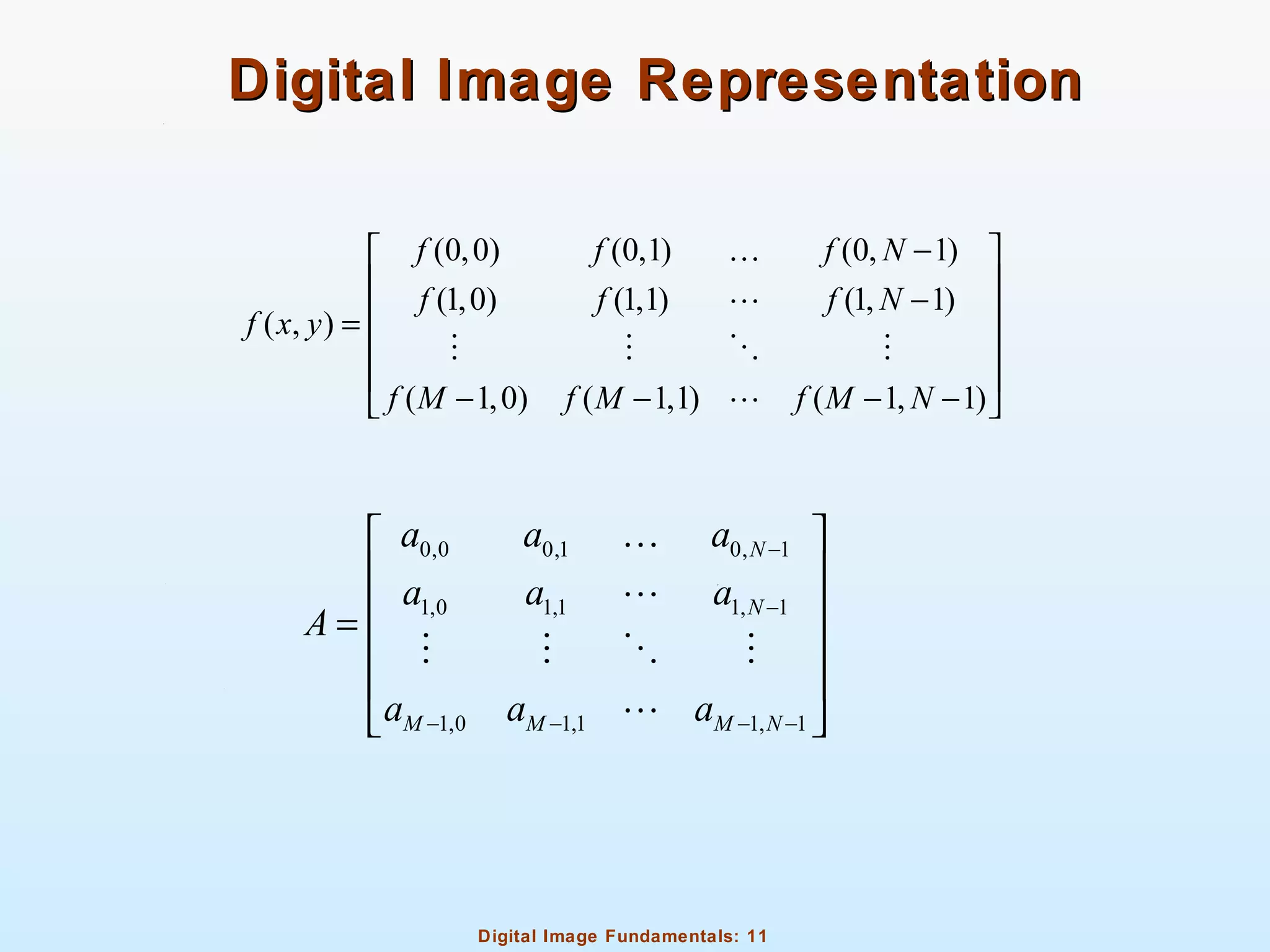
Digital Image RepresentationDigital Image Representation
(0,0) (0,1) (0, 1)
(1,0) (1,1) (1, 1)
( , )
( 1,0) ( 1,1) ( 1, 1)
f f f N
f f f N
f x y
f M f M f M N
− 
 − =
 
 
− − − − 
K
L
M M O M
L
0,0 0,1 0, 1
1,0 1,1 1, 1
1,0 1,1 1, 1
N
N
M M M N
a a a
a a a
A
a a a
−
−
− − − −
 
 
 =
 
 
 
K
L
M M O M
L
Digital Image Fundamentals: 12
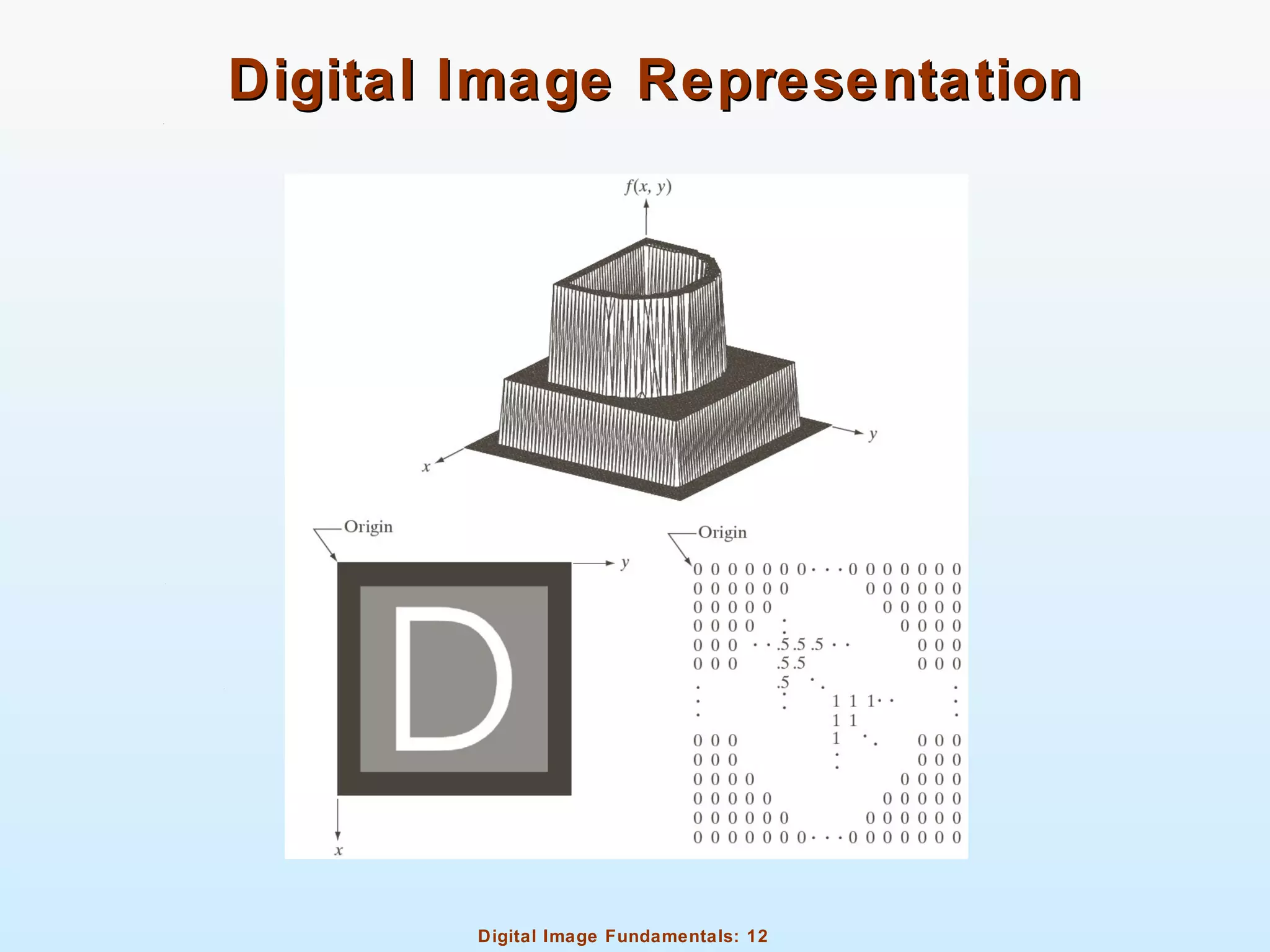
Digital Image RepresentationDigital Image Representation
Digital Image Fundamentals: 13
Digital Image RepresentationDigital Image Representation
M – number of rows
N – number of columns
L – number of gray levels (dynamic range)
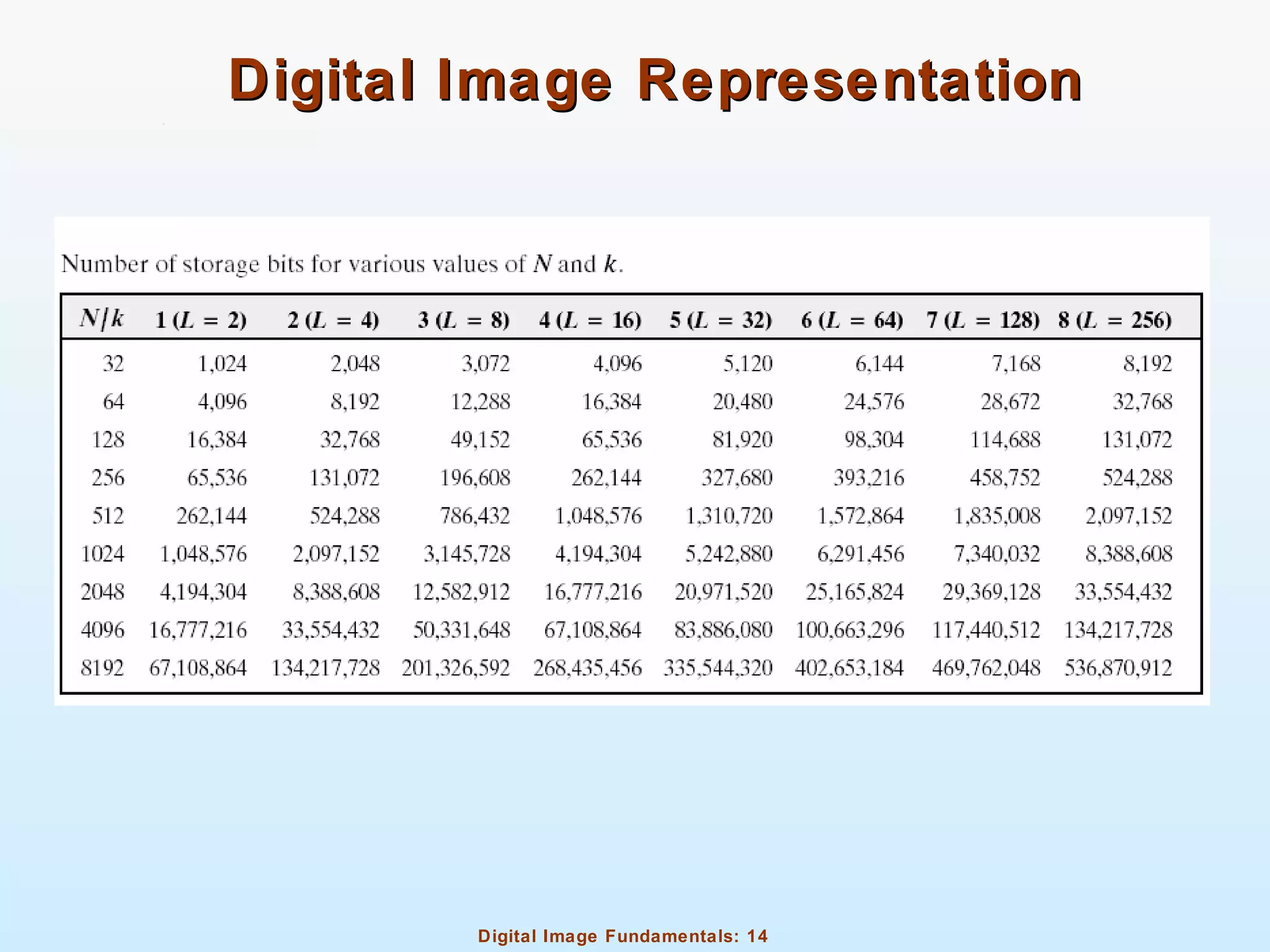
b – number of bits required to store a digital image
when M=N
2k
L = [0, 1]L −
b M N k= × ×
2
b N k= ×
Digital Image Fundamentals: 14
Digital Image RepresentationDigital Image Representation
Digital Image Fundamentals: 15
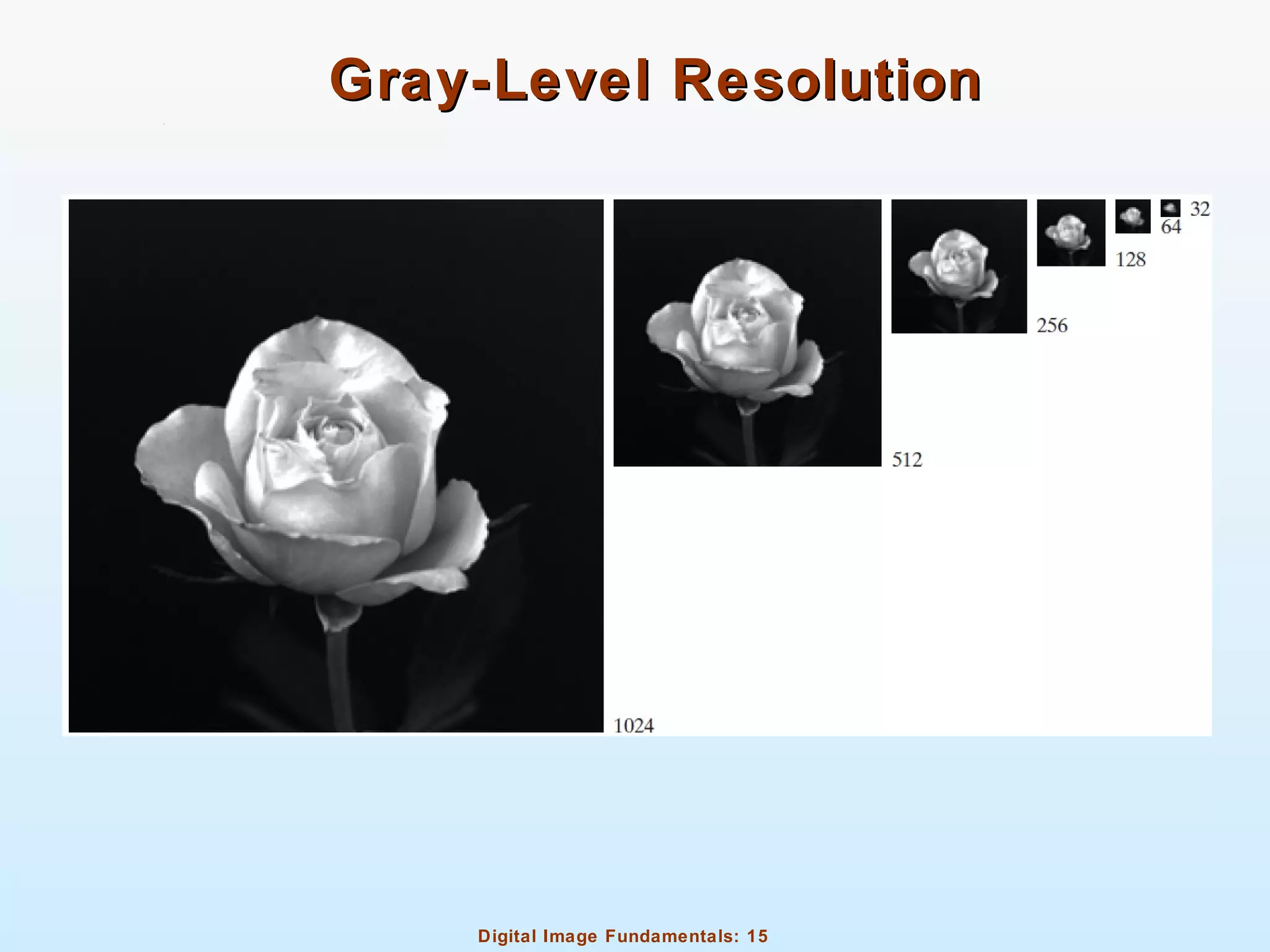
Gray-Level ResolutionGray-Level Resolution
Digital Image Fundamentals: 16
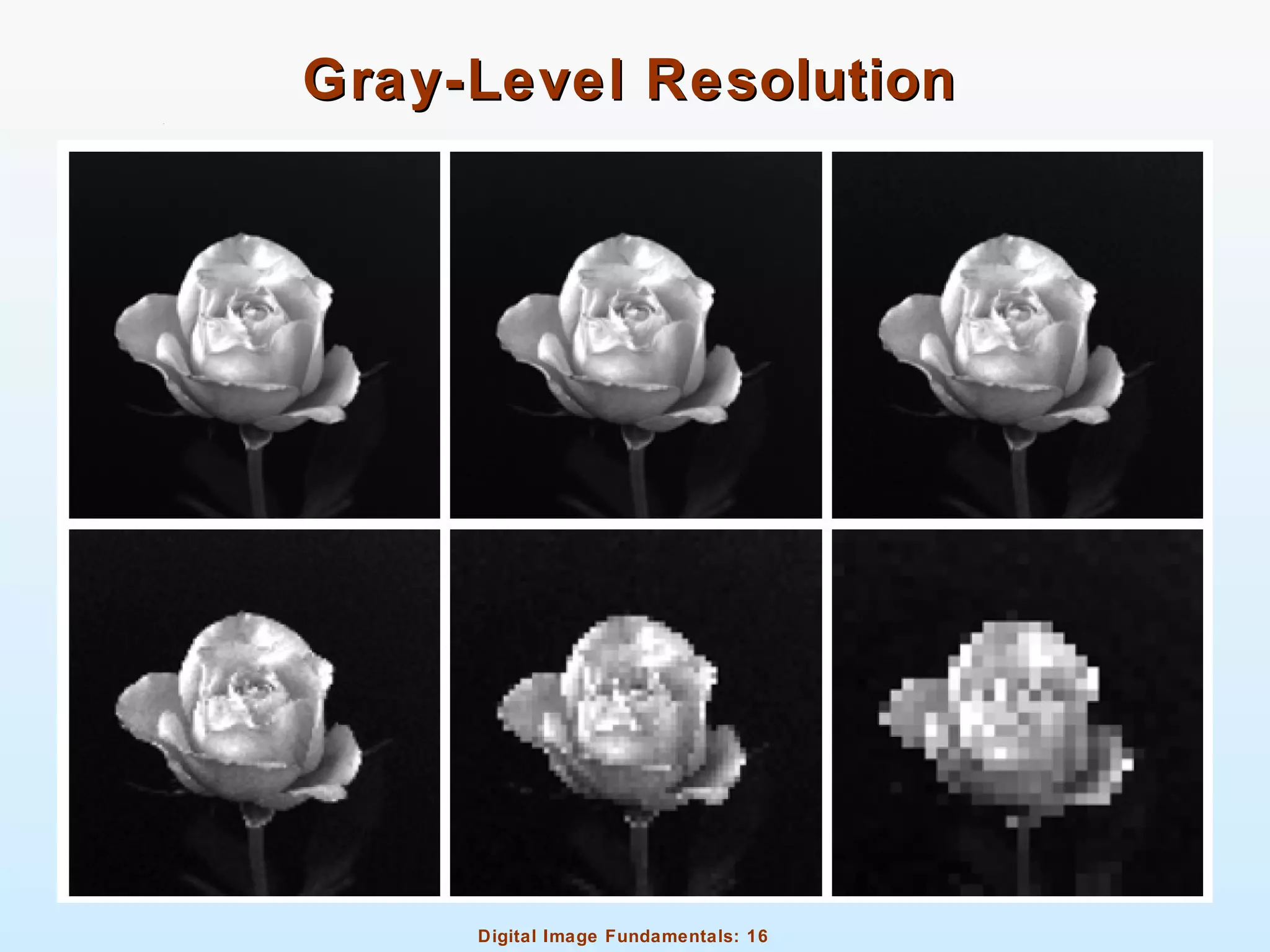
Gray-Level ResolutionGray-Level Resolution
Digital Image Fundamentals: 17
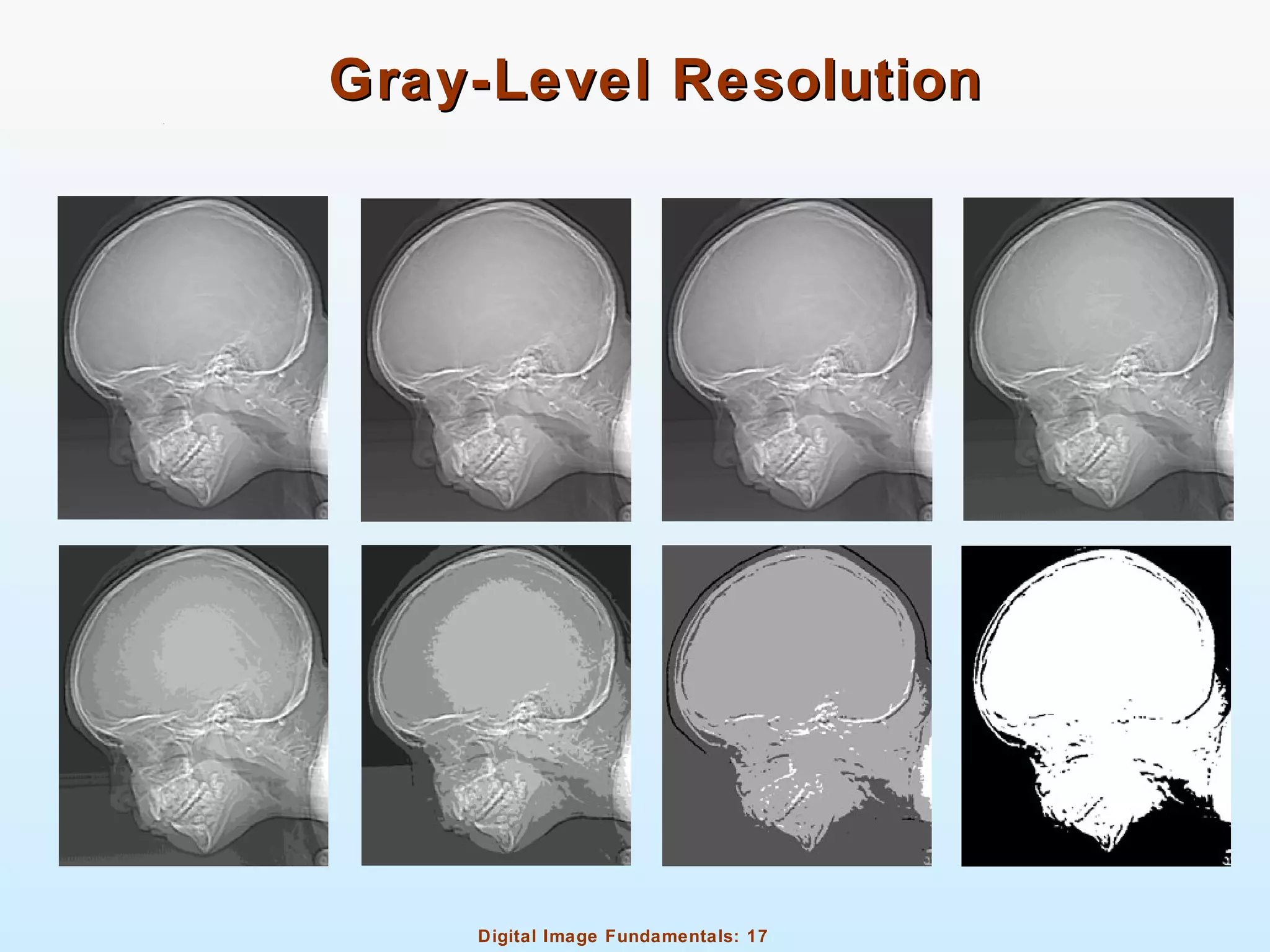
Gray-Level ResolutionGray-Level Resolution
Digital Image Fundamentals: 18
Digital ZoomingDigital Zooming
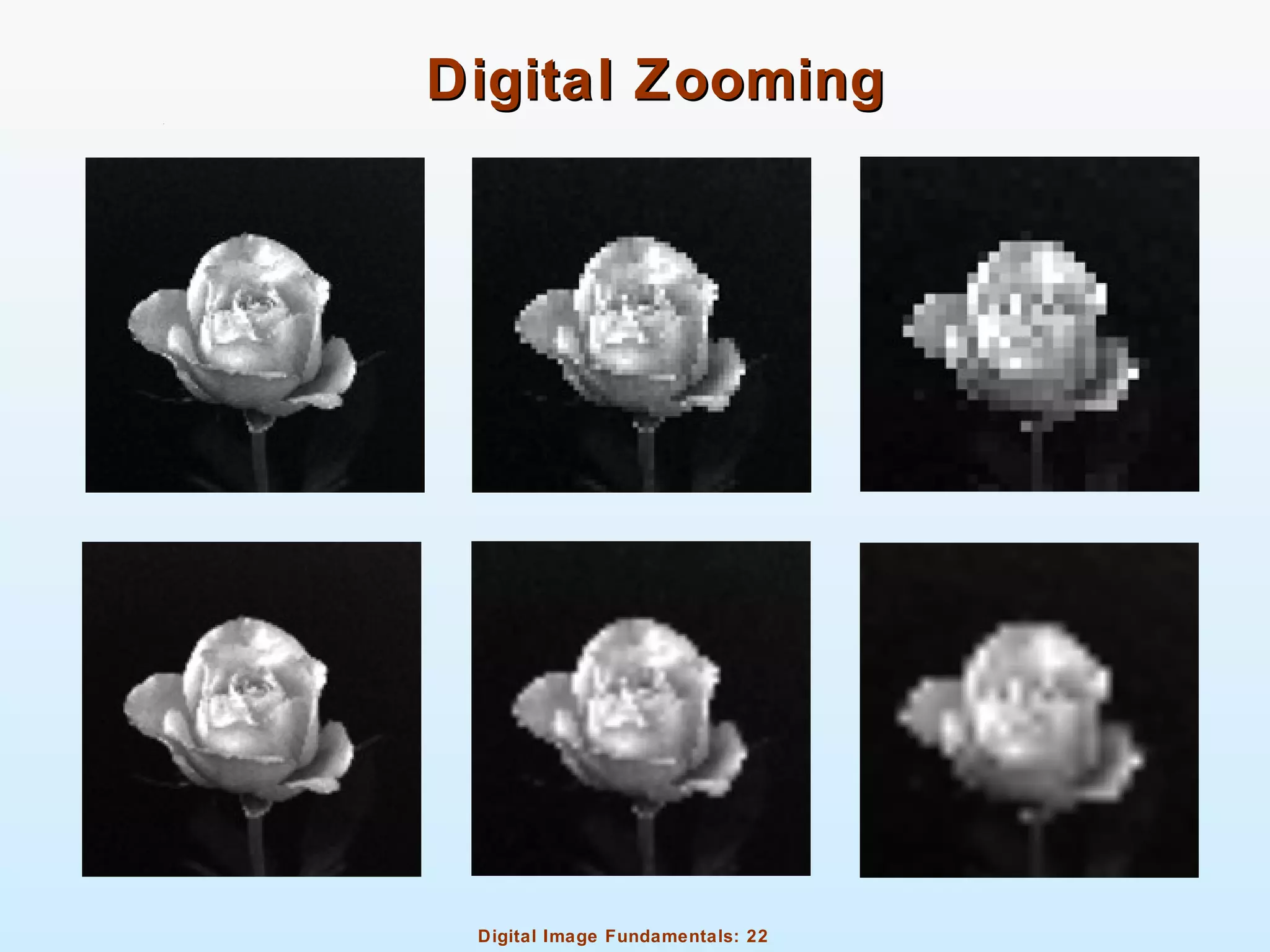
Zooming requires two steps
Creation of new pixel locations
Assignment of grey levels to those new locations
Digital Image Fundamentals: 19
Digital ZoomingDigital Zooming
Nearest neighbor interpolation
Look for closest pixel in original image
Pixel replication
Fast but causes undesirable checkerboard effect
Digital Image Fundamentals: 20
Digital ZoomingDigital Zooming
Bilinear interpolation
Determines pixel value based on four nearest neighbors
Do linear interpolation in x direction
Do linear interpolation in y direction based on results of
interpolation from x direction
Does not suffer from checkerboard effect but can result in a blurred
appearance
Digital Image Fundamentals: 21
Digital ZoomingDigital Zooming
Bicubic Interpolation
Determines pixel value based on sixteen nearest neighbors
Do cubic spline interpolation in x direction
Do cubic spline interpolation in y direction based on results of
interpolation from x direction
Does not suffer from checkerboard effect like nearest neighbor
interpolation and preserves fine details better than bilinear
interpolation
Digital Image Fundamentals: 22
Digital ZoomingDigital Zooming
Digital Image Fundamentals: 23
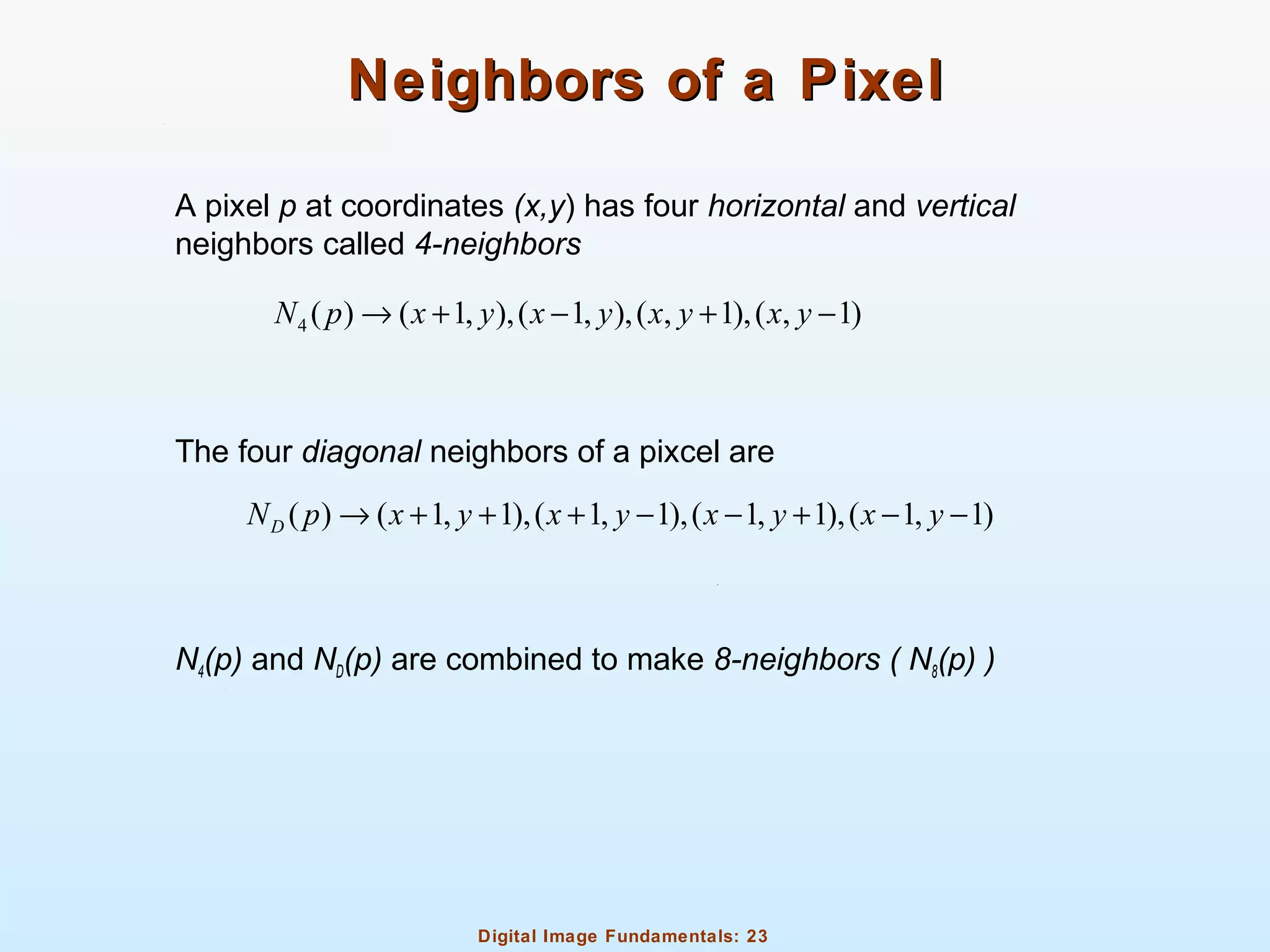
Neighbors of a PixelNeighbors of a Pixel
A pixel p at coordinates (x,y) has four horizontal and vertical
neighbors called 4-neighbors
The four diagonal neighbors of a pixcel are
N4(p) and ND(p) are combined to make 8-neighbors ( N8(p) )
4 ( ) ( 1, ),( 1, ),( , 1),( , 1)N p x y x y x y x y→ + − + −
( ) ( 1, 1),( 1, 1),( 1, 1),( 1, 1)DN p x y x y x y x y→ + + + − − + − −
Digital Image Fundamentals: 24
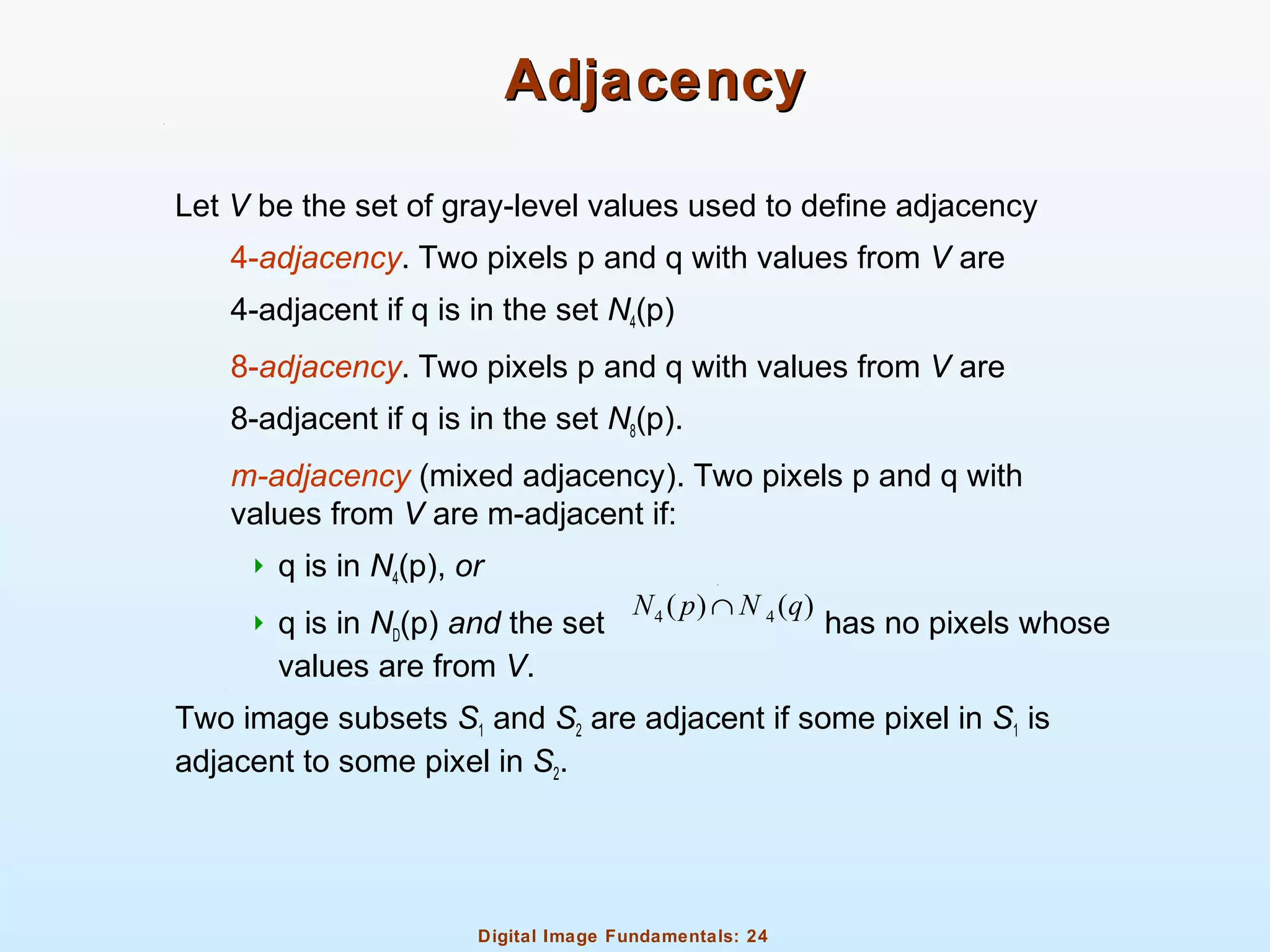
AdjacencyAdjacency
Let V be the set of gray-level values used to define adjacency
4-adjacency. Two pixels p and q with values from V are
4-adjacent if q is in the set N4(p)
8-adjacency. Two pixels p and q with values from V are
8-adjacent if q is in the set N8(p).
m-adjacency (mixed adjacency). Two pixels p and q with
values from V are m-adjacent if:
 q is in N4(p), or
 q is in ND(p) and the set has no pixels whose
values are from V.
Two image subsets S1 and S2 are adjacent if some pixel in S1 is
adjacent to some pixel in S2.
4 4( ) ( )N p N q∩
Digital Image Fundamentals: 25
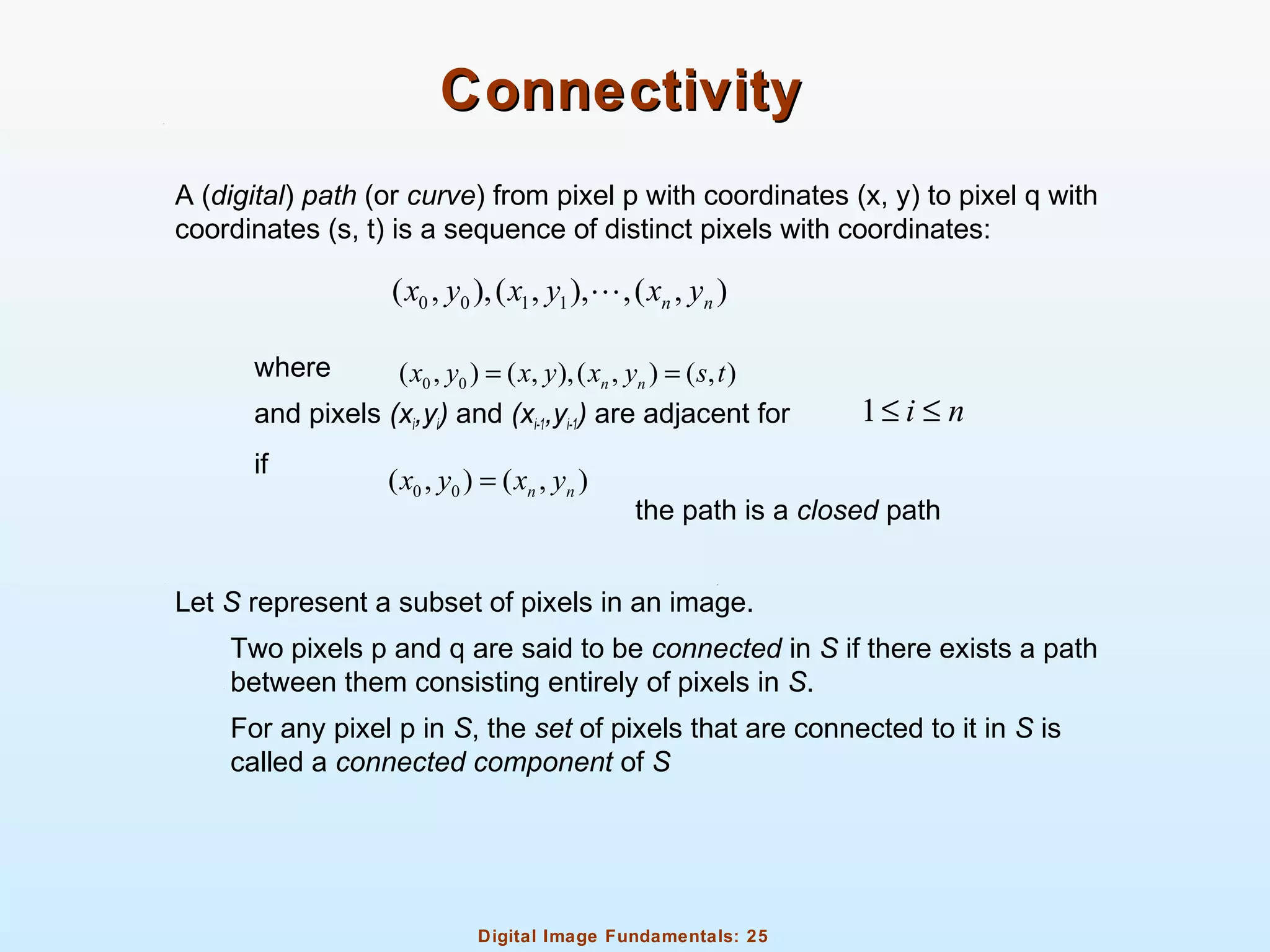
ConnectivityConnectivity
A (digital) path (or curve) from pixel p with coordinates (x, y) to pixel q with
coordinates (s, t) is a sequence of distinct pixels with coordinates:
where
and pixels (xi,yi) and (xi-1,yi-1) are adjacent for
if
the path is a closed path
Let S represent a subset of pixels in an image.
Two pixels p and q are said to be connected in S if there exists a path
between them consisting entirely of pixels in S.
For any pixel p in S, the set of pixels that are connected to it in S is
called a connected component of S
0 0 1 1( , ),( , ), ,( , )n nx y x y x yL
0 0( , ) ( , ),( , ) ( , )n nx y x y x y s t= =
1 i n≤ ≤
0 0( , ) ( , )n nx y x y=
Digital Image Fundamentals: 26
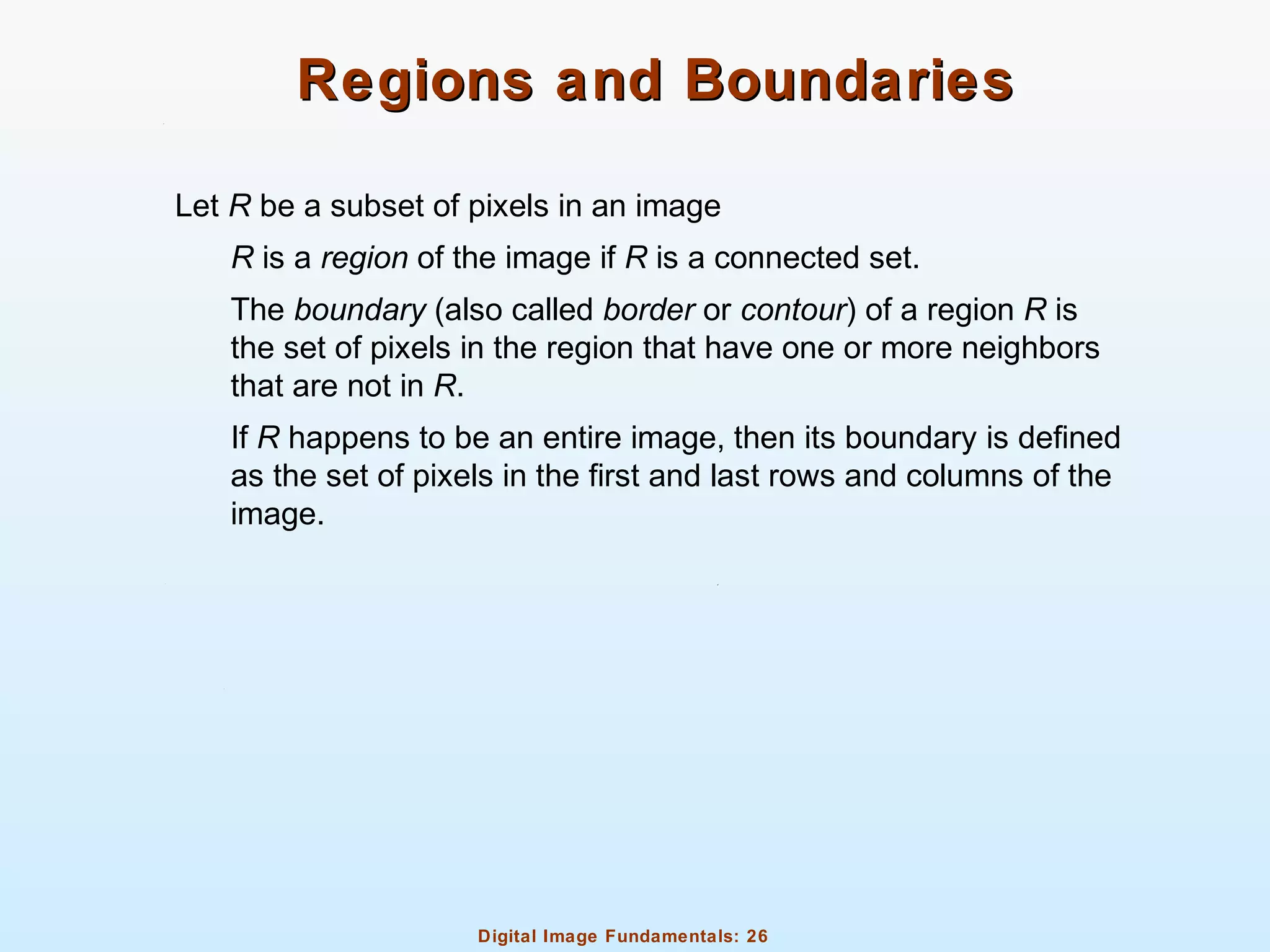
Regions and BoundariesRegions and Boundaries
Let R be a subset of pixels in an image
R is a region of the image if R is a connected set.
The boundary (also called border or contour) of a region R is
the set of pixels in the region that have one or more neighbors
that are not in R.
If R happens to be an entire image, then its boundary is defined
as the set of pixels in the first and last rows and columns of the
image.
Digital Image Fundamentals: 27
Distance MeasuresDistance Measures
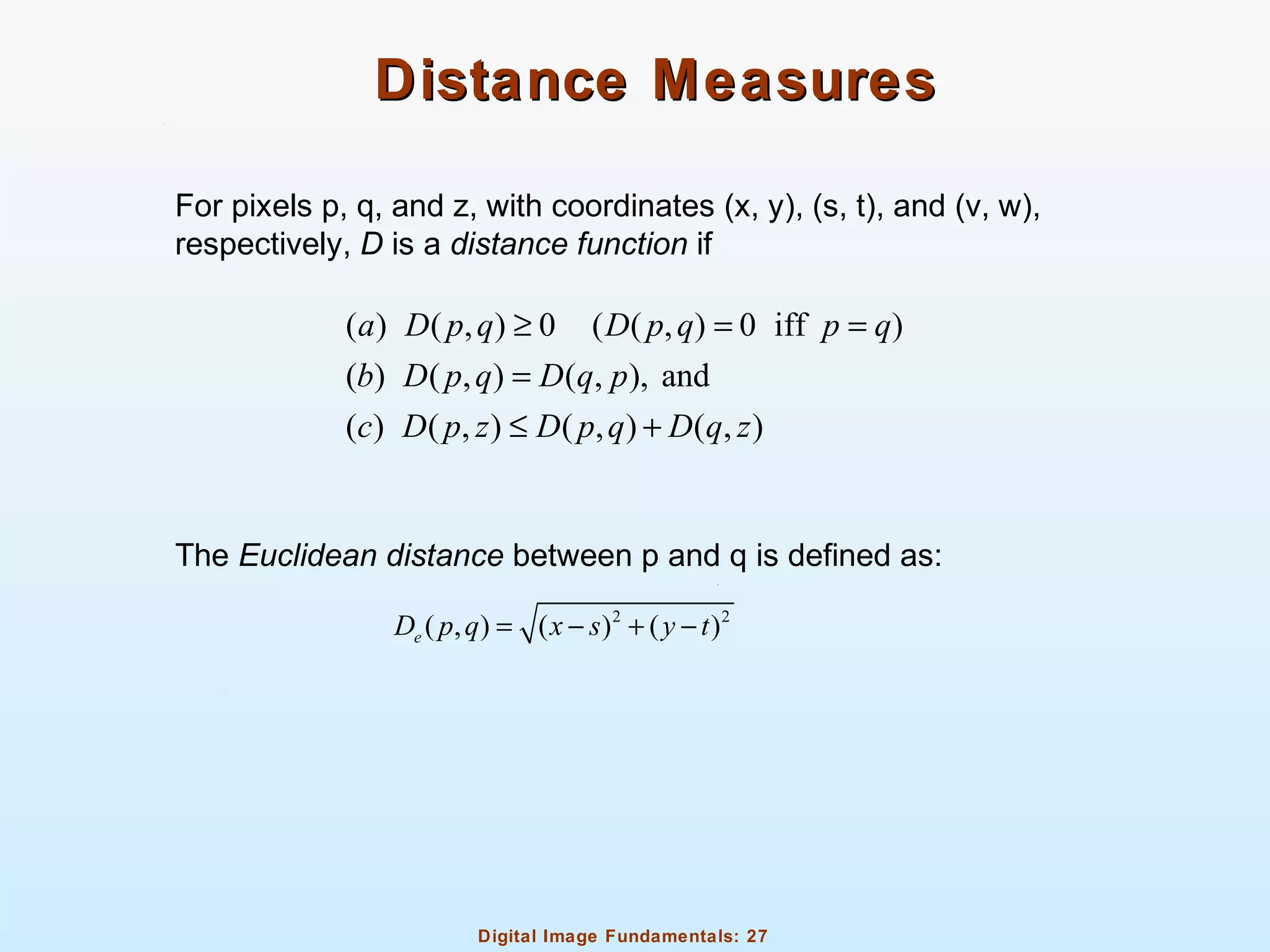
For pixels p, q, and z, with coordinates (x, y), (s, t), and (v, w),
respectively, D is a distance function if
The Euclidean distance between p and q is defined as:
( ) ( , ) 0 ( ( , ) 0 iff )
( ) ( , ) ( , ), and
( ) ( , ) ( , ) ( , )
a D p q D p q p q
b D p q D q p
c D p z D p q D q z
≥ = =
=
≤ +
2 2
( , ) ( ) ( )eD p q x s y t= − + −
Digital Image Fundamentals: 28
Distance MeasuresDistance Measures
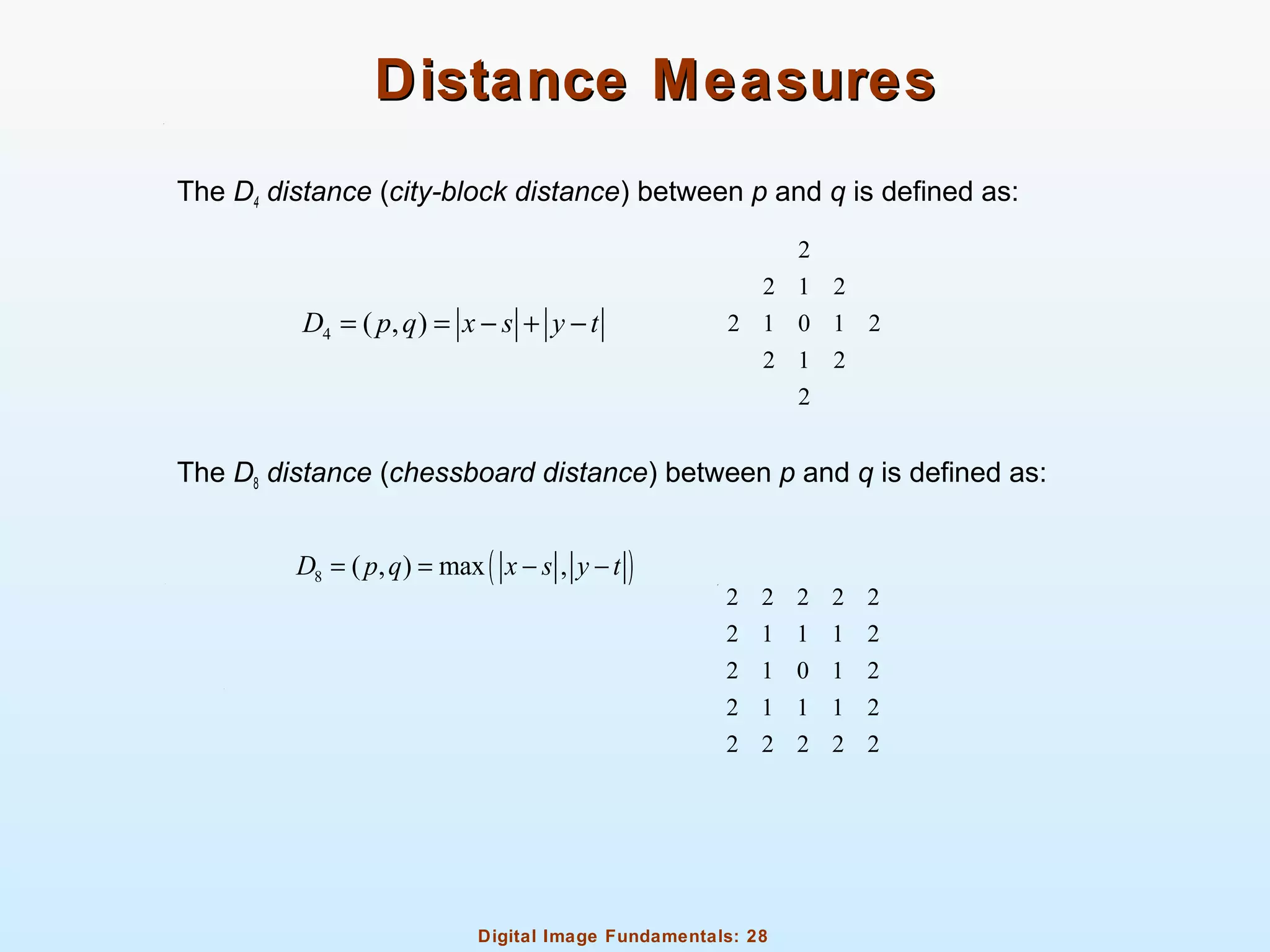
The D4 distance (city-block distance) between p and q is defined as:
The D8 distance (chessboard distance) between p and q is defined as:
4 ( , )D p q x s y t= = − + −
2
2 1 2
2 1 0 1 2
2 1 2
2
( )8 ( , ) max ,D p q x s y t= = − −
2 2 2 2 2
2 1 1 1 2
2 1 0 1 2
2 1 1 1 2
2 2 2 2 2

03 digital image fundamentals DIP

  • 1.
    Digital Image Fundamentals:1 Digital Image FundamentalsDigital Image Fundamentals
  • 2.
    Digital Image Fundamentals:2 Electromagnetic SpectrumElectromagnetic Spectrum
  • 3.
    Digital Image Fundamentals:3 Electromagnetic SpectrumElectromagnetic Spectrum
  • 4.
    Digital Image Fundamentals:4 Attributes of Light SourceAttributes of Light Source Achromatic or monochromatic light Intensity: grey level Chromatic light Radiance  measured in watts (W)  total amount of energy that flows from the light source Luminance  measured in lumens (lm)  gives a measure of the amount of energy an observer perceives from a light source Brightness  a subjective descriptor of light perception that is practically impossible to measure  one of the key factors in describing color sensation
  • 5.
    Digital Image Fundamentals:5 Image SensingImage Sensing
  • 6.
    Digital Image Fundamentals:6 Digital Image AcquisitionDigital Image Acquisition ExampleExample
  • 7.
    Digital Image Fundamentals:7 Simple Image Formation ModelSimple Image Formation Model ( , ) ( , ) ( , )f x y i x y r x y= 0 ( , )f x y< < ∞ 0 ( , )i x y< < ∞ 0 ( , ) 1r x y< <
  • 8.
    Digital Image Fundamentals:8 Image Sampling and QuantizationImage Sampling and Quantization
  • 9.
  • 10.
    Digital Image Fundamentals:10 Digital Image RepresentationDigital Image Representation
  • 11.
    Digital Image Fundamentals:11 Digital Image RepresentationDigital Image Representation (0,0) (0,1) (0, 1) (1,0) (1,1) (1, 1) ( , ) ( 1,0) ( 1,1) ( 1, 1) f f f N f f f N f x y f M f M f M N −   − =     − − − −  K L M M O M L 0,0 0,1 0, 1 1,0 1,1 1, 1 1,0 1,1 1, 1 N N M M M N a a a a a a A a a a − − − − − −      =       K L M M O M L
  • 12.
    Digital Image Fundamentals:12 Digital Image RepresentationDigital Image Representation
  • 13.
    Digital Image Fundamentals:13 Digital Image RepresentationDigital Image Representation M – number of rows N – number of columns L – number of gray levels (dynamic range) b – number of bits required to store a digital image when M=N 2k L = [0, 1]L − b M N k= × × 2 b N k= ×
  • 14.
    Digital Image Fundamentals:14 Digital Image RepresentationDigital Image Representation
  • 15.
    Digital Image Fundamentals:15 Gray-Level ResolutionGray-Level Resolution
  • 16.
    Digital Image Fundamentals:16 Gray-Level ResolutionGray-Level Resolution
  • 17.
    Digital Image Fundamentals:17 Gray-Level ResolutionGray-Level Resolution
  • 18.
    Digital Image Fundamentals:18 Digital ZoomingDigital Zooming Zooming requires two steps Creation of new pixel locations Assignment of grey levels to those new locations
  • 19.
    Digital Image Fundamentals:19 Digital ZoomingDigital Zooming Nearest neighbor interpolation Look for closest pixel in original image Pixel replication Fast but causes undesirable checkerboard effect
  • 20.
    Digital Image Fundamentals:20 Digital ZoomingDigital Zooming Bilinear interpolation Determines pixel value based on four nearest neighbors Do linear interpolation in x direction Do linear interpolation in y direction based on results of interpolation from x direction Does not suffer from checkerboard effect but can result in a blurred appearance
  • 21.
    Digital Image Fundamentals:21 Digital ZoomingDigital Zooming Bicubic Interpolation Determines pixel value based on sixteen nearest neighbors Do cubic spline interpolation in x direction Do cubic spline interpolation in y direction based on results of interpolation from x direction Does not suffer from checkerboard effect like nearest neighbor interpolation and preserves fine details better than bilinear interpolation
  • 22.
    Digital Image Fundamentals:22 Digital ZoomingDigital Zooming
  • 23.
    Digital Image Fundamentals:23 Neighbors of a PixelNeighbors of a Pixel A pixel p at coordinates (x,y) has four horizontal and vertical neighbors called 4-neighbors The four diagonal neighbors of a pixcel are N4(p) and ND(p) are combined to make 8-neighbors ( N8(p) ) 4 ( ) ( 1, ),( 1, ),( , 1),( , 1)N p x y x y x y x y→ + − + − ( ) ( 1, 1),( 1, 1),( 1, 1),( 1, 1)DN p x y x y x y x y→ + + + − − + − −
  • 24.
    Digital Image Fundamentals:24 AdjacencyAdjacency Let V be the set of gray-level values used to define adjacency 4-adjacency. Two pixels p and q with values from V are 4-adjacent if q is in the set N4(p) 8-adjacency. Two pixels p and q with values from V are 8-adjacent if q is in the set N8(p). m-adjacency (mixed adjacency). Two pixels p and q with values from V are m-adjacent if:  q is in N4(p), or  q is in ND(p) and the set has no pixels whose values are from V. Two image subsets S1 and S2 are adjacent if some pixel in S1 is adjacent to some pixel in S2. 4 4( ) ( )N p N q∩
  • 25.
    Digital Image Fundamentals:25 ConnectivityConnectivity A (digital) path (or curve) from pixel p with coordinates (x, y) to pixel q with coordinates (s, t) is a sequence of distinct pixels with coordinates: where and pixels (xi,yi) and (xi-1,yi-1) are adjacent for if the path is a closed path Let S represent a subset of pixels in an image. Two pixels p and q are said to be connected in S if there exists a path between them consisting entirely of pixels in S. For any pixel p in S, the set of pixels that are connected to it in S is called a connected component of S 0 0 1 1( , ),( , ), ,( , )n nx y x y x yL 0 0( , ) ( , ),( , ) ( , )n nx y x y x y s t= = 1 i n≤ ≤ 0 0( , ) ( , )n nx y x y=
  • 26.
    Digital Image Fundamentals:26 Regions and BoundariesRegions and Boundaries Let R be a subset of pixels in an image R is a region of the image if R is a connected set. The boundary (also called border or contour) of a region R is the set of pixels in the region that have one or more neighbors that are not in R. If R happens to be an entire image, then its boundary is defined as the set of pixels in the first and last rows and columns of the image.
  • 27.
    Digital Image Fundamentals:27 Distance MeasuresDistance Measures For pixels p, q, and z, with coordinates (x, y), (s, t), and (v, w), respectively, D is a distance function if The Euclidean distance between p and q is defined as: ( ) ( , ) 0 ( ( , ) 0 iff ) ( ) ( , ) ( , ), and ( ) ( , ) ( , ) ( , ) a D p q D p q p q b D p q D q p c D p z D p q D q z ≥ = = = ≤ + 2 2 ( , ) ( ) ( )eD p q x s y t= − + −
  • 28.
    Digital Image Fundamentals:28 Distance MeasuresDistance Measures The D4 distance (city-block distance) between p and q is defined as: The D8 distance (chessboard distance) between p and q is defined as: 4 ( , )D p q x s y t= = − + − 2 2 1 2 2 1 0 1 2 2 1 2 2 ( )8 ( , ) max ,D p q x s y t= = − − 2 2 2 2 2 2 1 1 1 2 2 1 0 1 2 2 1 1 1 2 2 2 2 2 2